Compare commits
31 Commits
| Author | SHA1 | Date | |
|---|---|---|---|
 Aryan Aryan
|
80a7854540 | ||
|
Aryan
|
5ac3d644d2 | ||
|
Aryan
|
b8317da20f | ||
|
Aryan
|
a5fe2bd4fd | ||
|
Aryan
|
153cf0c393 | ||
|
Aryan
|
495fddb8ae | ||
|
Aryan
|
367fdef96d | ||
|
Aryan
|
82fa9df1c7 | ||
|
Aryan
|
fb229b54bb | ||
|
Aryan
|
0a44380a36 | ||
|
Aryan
|
2ed59c178d | ||
|
Aryan
|
1f3e02f4da | ||
|
Aryan
|
38a603939e | ||
|
Aryan
|
169bb0df9c | ||
|
Aryan
|
f731664773 | ||
|
Aryan
|
3dde07a647 | ||
|
Aryan
|
701cf86654 | ||
|
Aryan
|
ca715a9771 | ||
|
Aryan
|
aa8e328328 | ||
|
Aryan
|
ff5f2ee505 | ||
|
Aryan
|
46619ea717 | ||
|
Aryan
|
c76e1cc17e | ||
|
Aryan
|
315e357a18 | ||
|
Aryan
|
1f33ca276d | ||
|
Aryan
|
41b0c473d2 | ||
|
Aryan
|
0e232ac8c0 | ||
|
Aryan
|
2557238b4d | ||
|
Aryan
|
d71fe55895 | ||
|
Aryan
|
7ab424a15a | ||
|
Aryan
|
dd69b41834 | ||
|
Aryan
|
406b1062f8 |
@@ -23,7 +23,7 @@ jobs:
|
||||
runs-on:
|
||||
group: aws-g6-4xlarge-plus
|
||||
container:
|
||||
image: diffusers/diffusers-pytorch-cuda
|
||||
image: diffusers/diffusers-pytorch-compile-cuda
|
||||
options: --shm-size "16gb" --ipc host --gpus 0
|
||||
steps:
|
||||
- name: Checkout diffusers
|
||||
|
||||
@@ -38,16 +38,9 @@ jobs:
|
||||
token: ${{ secrets.GITHUB_TOKEN }}
|
||||
|
||||
- name: Build Changed Docker Images
|
||||
env:
|
||||
CHANGED_FILES: ${{ steps.file_changes.outputs.all }}
|
||||
run: |
|
||||
echo "$CHANGED_FILES"
|
||||
for FILE in $CHANGED_FILES; do
|
||||
# skip anything that isn't still on disk
|
||||
if [[ ! -f "$FILE" ]]; then
|
||||
echo "Skipping removed file $FILE"
|
||||
continue
|
||||
fi
|
||||
CHANGED_FILES="${{ steps.file_changes.outputs.all }}"
|
||||
for FILE in $CHANGED_FILES; do
|
||||
if [[ "$FILE" == docker/*Dockerfile ]]; then
|
||||
DOCKER_PATH="${FILE%/Dockerfile}"
|
||||
DOCKER_TAG=$(basename "$DOCKER_PATH")
|
||||
@@ -72,7 +65,7 @@ jobs:
|
||||
image-name:
|
||||
- diffusers-pytorch-cpu
|
||||
- diffusers-pytorch-cuda
|
||||
- diffusers-pytorch-cuda
|
||||
- diffusers-pytorch-compile-cuda
|
||||
- diffusers-pytorch-xformers-cuda
|
||||
- diffusers-pytorch-minimum-cuda
|
||||
- diffusers-flax-cpu
|
||||
|
||||
+100
-115
@@ -13,9 +13,8 @@ env:
|
||||
PYTEST_TIMEOUT: 600
|
||||
RUN_SLOW: yes
|
||||
RUN_NIGHTLY: yes
|
||||
PIPELINE_USAGE_CUTOFF: 0
|
||||
PIPELINE_USAGE_CUTOFF: 5000
|
||||
SLACK_API_TOKEN: ${{ secrets.SLACK_CIFEEDBACK_BOT_TOKEN }}
|
||||
CONSOLIDATED_REPORT_PATH: consolidated_test_report.md
|
||||
|
||||
jobs:
|
||||
setup_torch_cuda_pipeline_matrix:
|
||||
@@ -100,6 +99,11 @@ jobs:
|
||||
with:
|
||||
name: pipeline_${{ matrix.module }}_test_reports
|
||||
path: reports
|
||||
- name: Generate Report and Notify Channel
|
||||
if: always()
|
||||
run: |
|
||||
pip install slack_sdk tabulate
|
||||
python utils/log_reports.py >> $GITHUB_STEP_SUMMARY
|
||||
|
||||
run_nightly_tests_for_other_torch_modules:
|
||||
name: Nightly Torch CUDA Tests
|
||||
@@ -138,6 +142,7 @@ jobs:
|
||||
HF_TOKEN: ${{ secrets.DIFFUSERS_HF_HUB_READ_TOKEN }}
|
||||
# https://pytorch.org/docs/stable/notes/randomness.html#avoiding-nondeterministic-algorithms
|
||||
CUBLAS_WORKSPACE_CONFIG: :16:8
|
||||
RUN_COMPILE: yes
|
||||
run: |
|
||||
python -m pytest -n 1 --max-worker-restart=0 --dist=loadfile \
|
||||
-s -v -k "not Flax and not Onnx" \
|
||||
@@ -170,6 +175,12 @@ jobs:
|
||||
name: torch_${{ matrix.module }}_cuda_test_reports
|
||||
path: reports
|
||||
|
||||
- name: Generate Report and Notify Channel
|
||||
if: always()
|
||||
run: |
|
||||
pip install slack_sdk tabulate
|
||||
python utils/log_reports.py >> $GITHUB_STEP_SUMMARY
|
||||
|
||||
run_torch_compile_tests:
|
||||
name: PyTorch Compile CUDA tests
|
||||
|
||||
@@ -177,7 +188,7 @@ jobs:
|
||||
group: aws-g4dn-2xlarge
|
||||
|
||||
container:
|
||||
image: diffusers/diffusers-pytorch-cuda
|
||||
image: diffusers/diffusers-pytorch-compile-cuda
|
||||
options: --gpus 0 --shm-size "16gb" --ipc host
|
||||
|
||||
steps:
|
||||
@@ -213,6 +224,12 @@ jobs:
|
||||
name: torch_compile_test_reports
|
||||
path: reports
|
||||
|
||||
- name: Generate Report and Notify Channel
|
||||
if: always()
|
||||
run: |
|
||||
pip install slack_sdk tabulate
|
||||
python utils/log_reports.py >> $GITHUB_STEP_SUMMARY
|
||||
|
||||
run_big_gpu_torch_tests:
|
||||
name: Torch tests on big GPU
|
||||
strategy:
|
||||
@@ -263,7 +280,12 @@ jobs:
|
||||
with:
|
||||
name: torch_cuda_big_gpu_test_reports
|
||||
path: reports
|
||||
|
||||
- name: Generate Report and Notify Channel
|
||||
if: always()
|
||||
run: |
|
||||
pip install slack_sdk tabulate
|
||||
python utils/log_reports.py >> $GITHUB_STEP_SUMMARY
|
||||
|
||||
torch_minimum_version_cuda_tests:
|
||||
name: Torch Minimum Version CUDA Tests
|
||||
runs-on:
|
||||
@@ -320,6 +342,63 @@ jobs:
|
||||
with:
|
||||
name: torch_minimum_version_cuda_test_reports
|
||||
path: reports
|
||||
|
||||
run_flax_tpu_tests:
|
||||
name: Nightly Flax TPU Tests
|
||||
runs-on:
|
||||
group: gcp-ct5lp-hightpu-8t
|
||||
if: github.event_name == 'schedule'
|
||||
|
||||
container:
|
||||
image: diffusers/diffusers-flax-tpu
|
||||
options: --shm-size "16gb" --ipc host --privileged ${{ vars.V5_LITEPOD_8_ENV}} -v /mnt/hf_cache:/mnt/hf_cache
|
||||
defaults:
|
||||
run:
|
||||
shell: bash
|
||||
steps:
|
||||
- name: Checkout diffusers
|
||||
uses: actions/checkout@v3
|
||||
with:
|
||||
fetch-depth: 2
|
||||
|
||||
- name: Install dependencies
|
||||
run: |
|
||||
python -m venv /opt/venv && export PATH="/opt/venv/bin:$PATH"
|
||||
python -m uv pip install -e [quality,test]
|
||||
pip uninstall accelerate -y && python -m uv pip install -U accelerate@git+https://github.com/huggingface/accelerate.git
|
||||
python -m uv pip install pytest-reportlog
|
||||
|
||||
- name: Environment
|
||||
run: python utils/print_env.py
|
||||
|
||||
- name: Run nightly Flax TPU tests
|
||||
env:
|
||||
HF_TOKEN: ${{ secrets.DIFFUSERS_HF_HUB_READ_TOKEN }}
|
||||
run: |
|
||||
python -m pytest -n 0 \
|
||||
-s -v -k "Flax" \
|
||||
--make-reports=tests_flax_tpu \
|
||||
--report-log=tests_flax_tpu.log \
|
||||
tests/
|
||||
|
||||
- name: Failure short reports
|
||||
if: ${{ failure() }}
|
||||
run: |
|
||||
cat reports/tests_flax_tpu_stats.txt
|
||||
cat reports/tests_flax_tpu_failures_short.txt
|
||||
|
||||
- name: Test suite reports artifacts
|
||||
if: ${{ always() }}
|
||||
uses: actions/upload-artifact@v4
|
||||
with:
|
||||
name: flax_tpu_test_reports
|
||||
path: reports
|
||||
|
||||
- name: Generate Report and Notify Channel
|
||||
if: always()
|
||||
run: |
|
||||
pip install slack_sdk tabulate
|
||||
python utils/log_reports.py >> $GITHUB_STEP_SUMMARY
|
||||
|
||||
run_nightly_onnx_tests:
|
||||
name: Nightly ONNXRuntime CUDA tests on Ubuntu
|
||||
@@ -370,12 +449,18 @@ jobs:
|
||||
name: tests_onnx_cuda_reports
|
||||
path: reports
|
||||
|
||||
- name: Generate Report and Notify Channel
|
||||
if: always()
|
||||
run: |
|
||||
pip install slack_sdk tabulate
|
||||
python utils/log_reports.py >> $GITHUB_STEP_SUMMARY
|
||||
|
||||
run_nightly_quantization_tests:
|
||||
name: Torch quantization nightly tests
|
||||
strategy:
|
||||
fail-fast: false
|
||||
max-parallel: 2
|
||||
matrix:
|
||||
matrix:
|
||||
config:
|
||||
- backend: "bitsandbytes"
|
||||
test_location: "bnb"
|
||||
@@ -435,7 +520,12 @@ jobs:
|
||||
with:
|
||||
name: torch_cuda_${{ matrix.config.backend }}_reports
|
||||
path: reports
|
||||
|
||||
- name: Generate Report and Notify Channel
|
||||
if: always()
|
||||
run: |
|
||||
pip install slack_sdk tabulate
|
||||
python utils/log_reports.py >> $GITHUB_STEP_SUMMARY
|
||||
|
||||
run_nightly_pipeline_level_quantization_tests:
|
||||
name: Torch quantization nightly tests
|
||||
strategy:
|
||||
@@ -484,117 +574,12 @@ jobs:
|
||||
with:
|
||||
name: torch_cuda_pipeline_level_quant_reports
|
||||
path: reports
|
||||
|
||||
run_flax_tpu_tests:
|
||||
name: Nightly Flax TPU Tests
|
||||
runs-on:
|
||||
group: gcp-ct5lp-hightpu-8t
|
||||
if: github.event_name == 'schedule'
|
||||
|
||||
container:
|
||||
image: diffusers/diffusers-flax-tpu
|
||||
options: --shm-size "16gb" --ipc host --privileged ${{ vars.V5_LITEPOD_8_ENV}} -v /mnt/hf_cache:/mnt/hf_cache
|
||||
defaults:
|
||||
run:
|
||||
shell: bash
|
||||
steps:
|
||||
- name: Checkout diffusers
|
||||
uses: actions/checkout@v3
|
||||
with:
|
||||
fetch-depth: 2
|
||||
|
||||
- name: Install dependencies
|
||||
run: |
|
||||
python -m venv /opt/venv && export PATH="/opt/venv/bin:$PATH"
|
||||
python -m uv pip install -e [quality,test]
|
||||
pip uninstall accelerate -y && python -m uv pip install -U accelerate@git+https://github.com/huggingface/accelerate.git
|
||||
python -m uv pip install pytest-reportlog
|
||||
|
||||
- name: Environment
|
||||
run: python utils/print_env.py
|
||||
|
||||
- name: Run nightly Flax TPU tests
|
||||
env:
|
||||
HF_TOKEN: ${{ secrets.DIFFUSERS_HF_HUB_READ_TOKEN }}
|
||||
run: |
|
||||
python -m pytest -n 0 \
|
||||
-s -v -k "Flax" \
|
||||
--make-reports=tests_flax_tpu \
|
||||
--report-log=tests_flax_tpu.log \
|
||||
tests/
|
||||
|
||||
- name: Failure short reports
|
||||
if: ${{ failure() }}
|
||||
run: |
|
||||
cat reports/tests_flax_tpu_stats.txt
|
||||
cat reports/tests_flax_tpu_failures_short.txt
|
||||
|
||||
- name: Test suite reports artifacts
|
||||
if: ${{ always() }}
|
||||
uses: actions/upload-artifact@v4
|
||||
with:
|
||||
name: flax_tpu_test_reports
|
||||
path: reports
|
||||
|
||||
generate_consolidated_report:
|
||||
name: Generate Consolidated Test Report
|
||||
needs: [
|
||||
run_nightly_tests_for_torch_pipelines,
|
||||
run_nightly_tests_for_other_torch_modules,
|
||||
run_torch_compile_tests,
|
||||
run_big_gpu_torch_tests,
|
||||
run_nightly_quantization_tests,
|
||||
run_nightly_pipeline_level_quantization_tests,
|
||||
run_nightly_onnx_tests,
|
||||
torch_minimum_version_cuda_tests,
|
||||
run_flax_tpu_tests
|
||||
]
|
||||
if: always()
|
||||
runs-on:
|
||||
group: aws-general-8-plus
|
||||
container:
|
||||
image: diffusers/diffusers-pytorch-cpu
|
||||
steps:
|
||||
- name: Checkout diffusers
|
||||
uses: actions/checkout@v3
|
||||
with:
|
||||
fetch-depth: 2
|
||||
|
||||
- name: Create reports directory
|
||||
run: mkdir -p combined_reports
|
||||
|
||||
- name: Download all test reports
|
||||
uses: actions/download-artifact@v4
|
||||
with:
|
||||
path: artifacts
|
||||
|
||||
- name: Prepare reports
|
||||
- name: Generate Report and Notify Channel
|
||||
if: always()
|
||||
run: |
|
||||
# Move all report files to a single directory for processing
|
||||
find artifacts -name "*.txt" -exec cp {} combined_reports/ \;
|
||||
|
||||
- name: Install dependencies
|
||||
run: |
|
||||
pip install -e .[test]
|
||||
pip install slack_sdk tabulate
|
||||
|
||||
- name: Generate consolidated report
|
||||
run: |
|
||||
python utils/consolidated_test_report.py \
|
||||
--reports_dir combined_reports \
|
||||
--output_file $CONSOLIDATED_REPORT_PATH \
|
||||
--slack_channel_name diffusers-ci-nightly
|
||||
|
||||
- name: Show consolidated report
|
||||
run: |
|
||||
cat $CONSOLIDATED_REPORT_PATH >> $GITHUB_STEP_SUMMARY
|
||||
|
||||
- name: Upload consolidated report
|
||||
uses: actions/upload-artifact@v4
|
||||
with:
|
||||
name: consolidated_test_report
|
||||
path: ${{ env.CONSOLIDATED_REPORT_PATH }}
|
||||
|
||||
python utils/log_reports.py >> $GITHUB_STEP_SUMMARY
|
||||
|
||||
# M1 runner currently not well supported
|
||||
# TODO: (Dhruv) add these back when we setup better testing for Apple Silicon
|
||||
# run_nightly_tests_apple_m1:
|
||||
|
||||
@@ -14,4 +14,4 @@ jobs:
|
||||
with:
|
||||
python_quality_dependencies: "[quality]"
|
||||
secrets:
|
||||
bot_token: ${{ secrets.HF_STYLE_BOT_ACTION }}
|
||||
bot_token: ${{ secrets.GITHUB_TOKEN }}
|
||||
@@ -291,8 +291,8 @@ jobs:
|
||||
- name: Failure short reports
|
||||
if: ${{ failure() }}
|
||||
run: |
|
||||
cat reports/tests_peft_main_failures_short.txt
|
||||
cat reports/tests_models_lora_peft_main_failures_short.txt
|
||||
cat reports/tests_lora_failures_short.txt
|
||||
cat reports/tests_models_lora_failures_short.txt
|
||||
|
||||
- name: Test suite reports artifacts
|
||||
if: ${{ always() }}
|
||||
|
||||
@@ -262,7 +262,7 @@ jobs:
|
||||
group: aws-g4dn-2xlarge
|
||||
|
||||
container:
|
||||
image: diffusers/diffusers-pytorch-cuda
|
||||
image: diffusers/diffusers-pytorch-compile-cuda
|
||||
options: --gpus 0 --shm-size "16gb" --ipc host
|
||||
|
||||
steps:
|
||||
|
||||
@@ -316,7 +316,7 @@ jobs:
|
||||
group: aws-g4dn-2xlarge
|
||||
|
||||
container:
|
||||
image: diffusers/diffusers-pytorch-cuda
|
||||
image: diffusers/diffusers-pytorch-compile-cuda
|
||||
options: --gpus 0 --shm-size "16gb" --ipc host
|
||||
|
||||
steps:
|
||||
|
||||
@@ -0,0 +1,50 @@
|
||||
FROM nvidia/cuda:12.1.0-runtime-ubuntu20.04
|
||||
LABEL maintainer="Hugging Face"
|
||||
LABEL repository="diffusers"
|
||||
|
||||
ENV DEBIAN_FRONTEND=noninteractive
|
||||
|
||||
RUN apt-get -y update \
|
||||
&& apt-get install -y software-properties-common \
|
||||
&& add-apt-repository ppa:deadsnakes/ppa
|
||||
|
||||
RUN apt install -y bash \
|
||||
build-essential \
|
||||
git \
|
||||
git-lfs \
|
||||
curl \
|
||||
ca-certificates \
|
||||
libsndfile1-dev \
|
||||
libgl1 \
|
||||
python3.10 \
|
||||
python3.10-dev \
|
||||
python3-pip \
|
||||
python3.10-venv && \
|
||||
rm -rf /var/lib/apt/lists
|
||||
|
||||
# make sure to use venv
|
||||
RUN python3.10 -m venv /opt/venv
|
||||
ENV PATH="/opt/venv/bin:$PATH"
|
||||
|
||||
# pre-install the heavy dependencies (these can later be overridden by the deps from setup.py)
|
||||
RUN python3.10 -m pip install --no-cache-dir --upgrade pip uv==0.1.11 && \
|
||||
python3.10 -m uv pip install --no-cache-dir \
|
||||
torch \
|
||||
torchvision \
|
||||
torchaudio \
|
||||
invisible_watermark && \
|
||||
python3.10 -m pip install --no-cache-dir \
|
||||
accelerate \
|
||||
datasets \
|
||||
hf-doc-builder \
|
||||
huggingface-hub \
|
||||
hf_transfer \
|
||||
Jinja2 \
|
||||
librosa \
|
||||
numpy==1.26.4 \
|
||||
scipy \
|
||||
tensorboard \
|
||||
transformers \
|
||||
hf_transfer
|
||||
|
||||
CMD ["/bin/bash"]
|
||||
@@ -92,6 +92,8 @@
|
||||
title: API Reference
|
||||
title: Hybrid Inference
|
||||
- sections:
|
||||
- local: using-diffusers/cogvideox
|
||||
title: CogVideoX
|
||||
- local: using-diffusers/consisid
|
||||
title: ConsisID
|
||||
- local: using-diffusers/sdxl
|
||||
@@ -176,12 +178,10 @@
|
||||
- sections:
|
||||
- local: optimization/fp16
|
||||
title: Accelerate inference
|
||||
- local: optimization/cache
|
||||
title: Caching
|
||||
- local: optimization/memory
|
||||
title: Reduce memory usage
|
||||
- local: optimization/pruna
|
||||
title: Pruna
|
||||
- local: optimization/torch2.0
|
||||
title: PyTorch 2.0
|
||||
- local: optimization/xformers
|
||||
title: xFormers
|
||||
- local: optimization/tome
|
||||
@@ -208,7 +208,7 @@
|
||||
- local: optimization/mps
|
||||
title: Metal Performance Shaders (MPS)
|
||||
- local: optimization/habana
|
||||
title: Intel Gaudi
|
||||
title: Habana Gaudi
|
||||
- local: optimization/neuron
|
||||
title: AWS Neuron
|
||||
title: Optimized hardware
|
||||
@@ -285,8 +285,6 @@
|
||||
title: AllegroTransformer3DModel
|
||||
- local: api/models/aura_flow_transformer2d
|
||||
title: AuraFlowTransformer2DModel
|
||||
- local: api/models/chroma_transformer
|
||||
title: ChromaTransformer2DModel
|
||||
- local: api/models/cogvideox_transformer3d
|
||||
title: CogVideoXTransformer3DModel
|
||||
- local: api/models/cogview3plus_transformer2d
|
||||
@@ -409,8 +407,6 @@
|
||||
title: AutoPipeline
|
||||
- local: api/pipelines/blip_diffusion
|
||||
title: BLIP-Diffusion
|
||||
- local: api/pipelines/chroma
|
||||
title: Chroma
|
||||
- local: api/pipelines/cogvideox
|
||||
title: CogVideoX
|
||||
- local: api/pipelines/cogview3
|
||||
|
||||
@@ -11,20 +11,95 @@ specific language governing permissions and limitations under the License. -->
|
||||
|
||||
# Caching methods
|
||||
|
||||
Cache methods speedup diffusion transformers by storing and reusing intermediate outputs of specific layers, such as attention and feedforward layers, instead of recalculating them at each inference step.
|
||||
## Faster Cache
|
||||
|
||||
## CacheMixin
|
||||
[FasterCache](https://huggingface.co/papers/2410.19355) from Zhengyao Lv, Chenyang Si, Junhao Song, Zhenyu Yang, Yu Qiao, Ziwei Liu, Kwan-Yee K. Wong.
|
||||
|
||||
FasterCache is a method that speeds up inference in diffusion transformers by:
|
||||
- Reusing attention states between successive inference steps, due to high similarity between them
|
||||
- Skipping unconditional branch prediction used in classifier-free guidance by revealing redundancies between unconditional and conditional branch outputs for the same timestep, and therefore approximating the unconditional branch output using the conditional branch output
|
||||
|
||||
```python
|
||||
import torch
|
||||
from diffusers import CogVideoXPipeline, FasterCacheConfig
|
||||
|
||||
pipe = CogVideoXPipeline.from_pretrained("THUDM/CogVideoX-5b", torch_dtype=torch.bfloat16)
|
||||
pipe.to("cuda")
|
||||
|
||||
config = FasterCacheConfig(
|
||||
spatial_attention_block_skip_range=2,
|
||||
spatial_attention_timestep_skip_range=(-1, 681),
|
||||
current_timestep_callback=lambda: pipe.current_timestep,
|
||||
attention_weight_callback=lambda _: 0.3,
|
||||
unconditional_batch_skip_range=5,
|
||||
unconditional_batch_timestep_skip_range=(-1, 781),
|
||||
tensor_format="BFCHW",
|
||||
)
|
||||
pipe.transformer.enable_cache(config)
|
||||
```
|
||||
|
||||
## First Block Cache
|
||||
|
||||
[First Block Cache](https://github.com/chengzeyi/ParaAttention/blob/7a266123671b55e7e5a2fe9af3121f07a36afc78/README.md#first-block-cache-our-dynamic-caching) is a method that builds upon the ideas of [TeaCache](https://huggingface.co/papers/2411.19108) to speed up inference in diffusion transformers. The generation quality is superior with greatly reduced inference time. This method always computes the output of the first transformer block and computes the differences between past and current outputs of the first transformer block. If the difference is smaller than a predefined threshold, the computation of remaining transformer blocks is skipped, and otherwise the computation is performed as usual.
|
||||
|
||||
```python
|
||||
import torch
|
||||
from diffusers import CogVideoXPipeline, FirstBlockCacheConfig
|
||||
|
||||
pipe = CogVideoXPipeline.from_pretrained("THUDM/CogVideoX-5b", torch_dtype=torch.bfloat16)
|
||||
pipe.to("cuda")
|
||||
|
||||
# Increasing the threshold may lead to faster inference speeds, but may also lead to poorer quality of generated videos.
|
||||
# Smaller values between 0.02-0.20 are recommended based on the model being used. The default value is 0.05.
|
||||
config = FirstBlockCacheConfig(threshold=0.07)
|
||||
pipe.transformer.enable_cache(config)
|
||||
```
|
||||
|
||||
## Pyramid Attention Broadcast
|
||||
|
||||
[Pyramid Attention Broadcast](https://huggingface.co/papers/2408.12588) from Xuanlei Zhao, Xiaolong Jin, Kai Wang, Yang You.
|
||||
|
||||
Pyramid Attention Broadcast (PAB) is a method that speeds up inference in diffusion models by systematically skipping attention computations between successive inference steps and reusing cached attention states. The attention states are not very different between successive inference steps. The most prominent difference is in the spatial attention blocks, not as much in the temporal attention blocks, and finally the least in the cross attention blocks. Therefore, many cross attention computation blocks can be skipped, followed by the temporal and spatial attention blocks. By combining other techniques like sequence parallelism and classifier-free guidance parallelism, PAB achieves near real-time video generation.
|
||||
|
||||
Enable PAB with [`~PyramidAttentionBroadcastConfig`] on any pipeline. For some benchmarks, refer to [this](https://github.com/huggingface/diffusers/pull/9562) pull request.
|
||||
|
||||
```python
|
||||
import torch
|
||||
from diffusers import CogVideoXPipeline, PyramidAttentionBroadcastConfig
|
||||
|
||||
pipe = CogVideoXPipeline.from_pretrained("THUDM/CogVideoX-5b", torch_dtype=torch.bfloat16)
|
||||
pipe.to("cuda")
|
||||
|
||||
# Increasing the value of `spatial_attention_timestep_skip_range[0]` or decreasing the value of
|
||||
# `spatial_attention_timestep_skip_range[1]` will decrease the interval in which pyramid attention
|
||||
# broadcast is active, leader to slower inference speeds. However, large intervals can lead to
|
||||
# poorer quality of generated videos.
|
||||
config = PyramidAttentionBroadcastConfig(
|
||||
spatial_attention_block_skip_range=2,
|
||||
spatial_attention_timestep_skip_range=(100, 800),
|
||||
current_timestep_callback=lambda: pipe.current_timestep,
|
||||
)
|
||||
pipe.transformer.enable_cache(config)
|
||||
```
|
||||
|
||||
### CacheMixin
|
||||
|
||||
[[autodoc]] CacheMixin
|
||||
|
||||
## PyramidAttentionBroadcastConfig
|
||||
|
||||
[[autodoc]] PyramidAttentionBroadcastConfig
|
||||
|
||||
[[autodoc]] apply_pyramid_attention_broadcast
|
||||
|
||||
## FasterCacheConfig
|
||||
### FasterCacheConfig
|
||||
|
||||
[[autodoc]] FasterCacheConfig
|
||||
|
||||
[[autodoc]] apply_faster_cache
|
||||
|
||||
### FirstBlockCacheConfig
|
||||
|
||||
[[autodoc]] FirstBlockCacheConfig
|
||||
|
||||
[[autodoc]] apply_first_block_cache
|
||||
|
||||
### PyramidAttentionBroadcastConfig
|
||||
|
||||
[[autodoc]] PyramidAttentionBroadcastConfig
|
||||
|
||||
[[autodoc]] apply_pyramid_attention_broadcast
|
||||
|
||||
@@ -98,8 +98,4 @@ To learn more about how to load LoRA weights, see the [LoRA](../../using-diffuse
|
||||
|
||||
## LoraBaseMixin
|
||||
|
||||
[[autodoc]] loaders.lora_base.LoraBaseMixin
|
||||
|
||||
## WanLoraLoaderMixin
|
||||
|
||||
[[autodoc]] loaders.lora_pipeline.WanLoraLoaderMixin
|
||||
[[autodoc]] loaders.lora_base.LoraBaseMixin
|
||||
@@ -1,19 +0,0 @@
|
||||
<!--Copyright 2025 The HuggingFace Team. All rights reserved.
|
||||
|
||||
Licensed under the Apache License, Version 2.0 (the "License"); you may not use this file except in compliance with
|
||||
the License. You may obtain a copy of the License at
|
||||
|
||||
http://www.apache.org/licenses/LICENSE-2.0
|
||||
|
||||
Unless required by applicable law or agreed to in writing, software distributed under the License is distributed on
|
||||
an "AS IS" BASIS, WITHOUT WARRANTIES OR CONDITIONS OF ANY KIND, either express or implied. See the License for the
|
||||
specific language governing permissions and limitations under the License.
|
||||
-->
|
||||
|
||||
# ChromaTransformer2DModel
|
||||
|
||||
A modified flux Transformer model from [Chroma](https://huggingface.co/lodestones/Chroma)
|
||||
|
||||
## ChromaTransformer2DModel
|
||||
|
||||
[[autodoc]] ChromaTransformer2DModel
|
||||
@@ -1,71 +0,0 @@
|
||||
<!--Copyright 2025 The HuggingFace Team. All rights reserved.
|
||||
|
||||
Licensed under the Apache License, Version 2.0 (the "License"); you may not use this file except in compliance with
|
||||
the License. You may obtain a copy of the License at
|
||||
|
||||
http://www.apache.org/licenses/LICENSE-2.0
|
||||
|
||||
Unless required by applicable law or agreed to in writing, software distributed under the License is distributed on
|
||||
an "AS IS" BASIS, WITHOUT WARRANTIES OR CONDITIONS OF ANY KIND, either express or implied. See the License for the
|
||||
specific language governing permissions and limitations under the License.
|
||||
-->
|
||||
|
||||
# Chroma
|
||||
|
||||
<div class="flex flex-wrap space-x-1">
|
||||
<img alt="LoRA" src="https://img.shields.io/badge/LoRA-d8b4fe?style=flat"/>
|
||||
<img alt="MPS" src="https://img.shields.io/badge/MPS-000000?style=flat&logo=apple&logoColor=white%22">
|
||||
</div>
|
||||
|
||||
Chroma is a text to image generation model based on Flux.
|
||||
|
||||
Original model checkpoints for Chroma can be found [here](https://huggingface.co/lodestones/Chroma).
|
||||
|
||||
<Tip>
|
||||
|
||||
Chroma can use all the same optimizations as Flux.
|
||||
|
||||
</Tip>
|
||||
|
||||
## Inference (Single File)
|
||||
|
||||
The `ChromaTransformer2DModel` supports loading checkpoints in the original format. This is also useful when trying to load finetunes or quantized versions of the models that have been published by the community.
|
||||
|
||||
The following example demonstrates how to run Chroma from a single file.
|
||||
|
||||
Then run the following example
|
||||
|
||||
```python
|
||||
import torch
|
||||
from diffusers import ChromaTransformer2DModel, ChromaPipeline
|
||||
from transformers import T5EncoderModel
|
||||
|
||||
bfl_repo = "black-forest-labs/FLUX.1-dev"
|
||||
dtype = torch.bfloat16
|
||||
|
||||
transformer = ChromaTransformer2DModel.from_single_file("https://huggingface.co/lodestones/Chroma/blob/main/chroma-unlocked-v35.safetensors", torch_dtype=dtype)
|
||||
|
||||
text_encoder = T5EncoderModel.from_pretrained(bfl_repo, subfolder="text_encoder_2", torch_dtype=dtype)
|
||||
tokenizer = T5Tokenizer.from_pretrained(bfl_repo, subfolder="tokenizer_2", torch_dtype=dtype)
|
||||
|
||||
pipe = ChromaPipeline.from_pretrained(bfl_repo, transformer=transformer, text_encoder=text_encoder, tokenizer=tokenizer, torch_dtype=dtype)
|
||||
|
||||
pipe.enable_model_cpu_offload()
|
||||
|
||||
prompt = "A cat holding a sign that says hello world"
|
||||
image = pipe(
|
||||
prompt,
|
||||
guidance_scale=4.0,
|
||||
output_type="pil",
|
||||
num_inference_steps=26,
|
||||
generator=torch.Generator("cpu").manual_seed(0)
|
||||
).images[0]
|
||||
|
||||
image.save("image.png")
|
||||
```
|
||||
|
||||
## ChromaPipeline
|
||||
|
||||
[[autodoc]] ChromaPipeline
|
||||
- all
|
||||
- __call__
|
||||
@@ -13,181 +13,150 @@
|
||||
# limitations under the License.
|
||||
-->
|
||||
|
||||
<div style="float: right;">
|
||||
<div class="flex flex-wrap space-x-1">
|
||||
<a href="https://huggingface.co/docs/diffusers/main/en/tutorials/using_peft_for_inference" target="_blank" rel="noopener">
|
||||
<img alt="LoRA" src="https://img.shields.io/badge/LoRA-d8b4fe?style=flat"/>
|
||||
</a>
|
||||
</div>
|
||||
</div>
|
||||
|
||||
# CogVideoX
|
||||
|
||||
[CogVideoX](https://huggingface.co/papers/2408.06072) is a large diffusion transformer model - available in 2B and 5B parameters - designed to generate longer and more consistent videos from text. This model uses a 3D causal variational autoencoder to more efficiently process video data by reducing sequence length (and associated training compute) and preventing flickering in generated videos. An "expert" transformer with adaptive LayerNorm improves alignment between text and video, and 3D full attention helps accurately capture motion and time in generated videos.
|
||||
<div class="flex flex-wrap space-x-1">
|
||||
<img alt="LoRA" src="https://img.shields.io/badge/LoRA-d8b4fe?style=flat"/>
|
||||
</div>
|
||||
|
||||
You can find all the original CogVideoX checkpoints under the [CogVideoX](https://huggingface.co/collections/THUDM/cogvideo-66c08e62f1685a3ade464cce) collection.
|
||||
[CogVideoX: Text-to-Video Diffusion Models with An Expert Transformer](https://huggingface.co/papers/2408.06072) from Tsinghua University & ZhipuAI, by Zhuoyi Yang, Jiayan Teng, Wendi Zheng, Ming Ding, Shiyu Huang, Jiazheng Xu, Yuanming Yang, Wenyi Hong, Xiaohan Zhang, Guanyu Feng, Da Yin, Xiaotao Gu, Yuxuan Zhang, Weihan Wang, Yean Cheng, Ting Liu, Bin Xu, Yuxiao Dong, Jie Tang.
|
||||
|
||||
> [!TIP]
|
||||
> Click on the CogVideoX models in the right sidebar for more examples of other video generation tasks.
|
||||
The abstract from the paper is:
|
||||
|
||||
The example below demonstrates how to generate a video optimized for memory or inference speed.
|
||||
*We introduce CogVideoX, a large-scale diffusion transformer model designed for generating videos based on text prompts. To efficently model video data, we propose to levearge a 3D Variational Autoencoder (VAE) to compresses videos along both spatial and temporal dimensions. To improve the text-video alignment, we propose an expert transformer with the expert adaptive LayerNorm to facilitate the deep fusion between the two modalities. By employing a progressive training technique, CogVideoX is adept at producing coherent, long-duration videos characterized by significant motion. In addition, we develop an effectively text-video data processing pipeline that includes various data preprocessing strategies and a video captioning method. It significantly helps enhance the performance of CogVideoX, improving both generation quality and semantic alignment. Results show that CogVideoX demonstrates state-of-the-art performance across both multiple machine metrics and human evaluations. The model weight of CogVideoX-2B is publicly available at https://github.com/THUDM/CogVideo.*
|
||||
|
||||
<hfoptions id="usage">
|
||||
<hfoption id="memory">
|
||||
<Tip>
|
||||
|
||||
Refer to the [Reduce memory usage](../../optimization/memory) guide for more details about the various memory saving techniques.
|
||||
Make sure to check out the Schedulers [guide](../../using-diffusers/schedulers) to learn how to explore the tradeoff between scheduler speed and quality, and see the [reuse components across pipelines](../../using-diffusers/loading#reuse-a-pipeline) section to learn how to efficiently load the same components into multiple pipelines.
|
||||
|
||||
The quantized CogVideoX 5B model below requires ~16GB of VRAM.
|
||||
</Tip>
|
||||
|
||||
```py
|
||||
This pipeline was contributed by [zRzRzRzRzRzRzR](https://github.com/zRzRzRzRzRzRzR). The original codebase can be found [here](https://huggingface.co/THUDM). The original weights can be found under [hf.co/THUDM](https://huggingface.co/THUDM).
|
||||
|
||||
There are three official CogVideoX checkpoints for text-to-video and video-to-video.
|
||||
|
||||
| checkpoints | recommended inference dtype |
|
||||
|:---:|:---:|
|
||||
| [`THUDM/CogVideoX-2b`](https://huggingface.co/THUDM/CogVideoX-2b) | torch.float16 |
|
||||
| [`THUDM/CogVideoX-5b`](https://huggingface.co/THUDM/CogVideoX-5b) | torch.bfloat16 |
|
||||
| [`THUDM/CogVideoX1.5-5b`](https://huggingface.co/THUDM/CogVideoX1.5-5b) | torch.bfloat16 |
|
||||
|
||||
There are two official CogVideoX checkpoints available for image-to-video.
|
||||
|
||||
| checkpoints | recommended inference dtype |
|
||||
|:---:|:---:|
|
||||
| [`THUDM/CogVideoX-5b-I2V`](https://huggingface.co/THUDM/CogVideoX-5b-I2V) | torch.bfloat16 |
|
||||
| [`THUDM/CogVideoX-1.5-5b-I2V`](https://huggingface.co/THUDM/CogVideoX-1.5-5b-I2V) | torch.bfloat16 |
|
||||
|
||||
For the CogVideoX 1.5 series:
|
||||
- Text-to-video (T2V) works best at a resolution of 1360x768 because it was trained with that specific resolution.
|
||||
- Image-to-video (I2V) works for multiple resolutions. The width can vary from 768 to 1360, but the height must be 768. The height/width must be divisible by 16.
|
||||
- Both T2V and I2V models support generation with 81 and 161 frames and work best at this value. Exporting videos at 16 FPS is recommended.
|
||||
|
||||
There are two official CogVideoX checkpoints that support pose controllable generation (by the [Alibaba-PAI](https://huggingface.co/alibaba-pai) team).
|
||||
|
||||
| checkpoints | recommended inference dtype |
|
||||
|:---:|:---:|
|
||||
| [`alibaba-pai/CogVideoX-Fun-V1.1-2b-Pose`](https://huggingface.co/alibaba-pai/CogVideoX-Fun-V1.1-2b-Pose) | torch.bfloat16 |
|
||||
| [`alibaba-pai/CogVideoX-Fun-V1.1-5b-Pose`](https://huggingface.co/alibaba-pai/CogVideoX-Fun-V1.1-5b-Pose) | torch.bfloat16 |
|
||||
|
||||
## Inference
|
||||
|
||||
Use [`torch.compile`](https://huggingface.co/docs/diffusers/main/en/tutorials/fast_diffusion#torchcompile) to reduce the inference latency.
|
||||
|
||||
First, load the pipeline:
|
||||
|
||||
```python
|
||||
import torch
|
||||
from diffusers import CogVideoXPipeline, AutoModel
|
||||
from diffusers.quantizers import PipelineQuantizationConfig
|
||||
from diffusers.hooks import apply_group_offloading
|
||||
from diffusers.utils import export_to_video
|
||||
|
||||
# quantize weights to int8 with torchao
|
||||
pipeline_quant_config = PipelineQuantizationConfig(
|
||||
quant_backend="torchao",
|
||||
quant_kwargs={"quant_type": "int8wo"},
|
||||
components_to_quantize=["transformer"]
|
||||
)
|
||||
|
||||
# fp8 layerwise weight-casting
|
||||
transformer = AutoModel.from_pretrained(
|
||||
"THUDM/CogVideoX-5b",
|
||||
subfolder="transformer",
|
||||
torch_dtype=torch.bfloat16
|
||||
)
|
||||
transformer.enable_layerwise_casting(
|
||||
storage_dtype=torch.float8_e4m3fn, compute_dtype=torch.bfloat16
|
||||
)
|
||||
|
||||
pipeline = CogVideoXPipeline.from_pretrained(
|
||||
"THUDM/CogVideoX-5b",
|
||||
transformer=transformer,
|
||||
quantization_config=pipeline_quant_config,
|
||||
torch_dtype=torch.bfloat16
|
||||
)
|
||||
pipeline.to("cuda")
|
||||
|
||||
# model-offloading
|
||||
pipeline.enable_model_cpu_offload()
|
||||
|
||||
prompt = """
|
||||
A detailed wooden toy ship with intricately carved masts and sails is seen gliding smoothly over a plush, blue carpet that mimics the waves of the sea.
|
||||
The ship's hull is painted a rich brown, with tiny windows. The carpet, soft and textured, provides a perfect backdrop, resembling an oceanic expanse.
|
||||
Surrounding the ship are various other toys and children's items, hinting at a playful environment. The scene captures the innocence and imagination of childhood,
|
||||
with the toy ship's journey symbolizing endless adventures in a whimsical, indoor setting.
|
||||
"""
|
||||
|
||||
video = pipeline(
|
||||
prompt=prompt,
|
||||
guidance_scale=6,
|
||||
num_inference_steps=50
|
||||
).frames[0]
|
||||
export_to_video(video, "output.mp4", fps=8)
|
||||
from diffusers import CogVideoXPipeline, CogVideoXImageToVideoPipeline
|
||||
from diffusers.utils import export_to_video,load_image
|
||||
pipe = CogVideoXPipeline.from_pretrained("THUDM/CogVideoX-5b").to("cuda") # or "THUDM/CogVideoX-2b"
|
||||
```
|
||||
|
||||
</hfoption>
|
||||
<hfoption id="inference speed">
|
||||
If you are using the image-to-video pipeline, load it as follows:
|
||||
|
||||
[Compilation](../../optimization/fp16#torchcompile) is slow the first time but subsequent calls to the pipeline are faster.
|
||||
```python
|
||||
pipe = CogVideoXImageToVideoPipeline.from_pretrained("THUDM/CogVideoX-5b-I2V").to("cuda")
|
||||
```
|
||||
|
||||
The average inference time with torch.compile on a 80GB A100 is 76.27 seconds compared to 96.89 seconds for an uncompiled model.
|
||||
Then change the memory layout of the pipelines `transformer` component to `torch.channels_last`:
|
||||
|
||||
```python
|
||||
pipe.transformer.to(memory_format=torch.channels_last)
|
||||
```
|
||||
|
||||
Compile the components and run inference:
|
||||
|
||||
```python
|
||||
pipe.transformer = torch.compile(pipeline.transformer, mode="max-autotune", fullgraph=True)
|
||||
|
||||
# CogVideoX works well with long and well-described prompts
|
||||
prompt = "A panda, dressed in a small, red jacket and a tiny hat, sits on a wooden stool in a serene bamboo forest. The panda's fluffy paws strum a miniature acoustic guitar, producing soft, melodic tunes. Nearby, a few other pandas gather, watching curiously and some clapping in rhythm. Sunlight filters through the tall bamboo, casting a gentle glow on the scene. The panda's face is expressive, showing concentration and joy as it plays. The background includes a small, flowing stream and vibrant green foliage, enhancing the peaceful and magical atmosphere of this unique musical performance."
|
||||
video = pipe(prompt=prompt, guidance_scale=6, num_inference_steps=50).frames[0]
|
||||
```
|
||||
|
||||
The [T2V benchmark](https://gist.github.com/a-r-r-o-w/5183d75e452a368fd17448fcc810bd3f) results on an 80GB A100 machine are:
|
||||
|
||||
```
|
||||
Without torch.compile(): Average inference time: 96.89 seconds.
|
||||
With torch.compile(): Average inference time: 76.27 seconds.
|
||||
```
|
||||
|
||||
### Memory optimization
|
||||
|
||||
CogVideoX-2b requires about 19 GB of GPU memory to decode 49 frames (6 seconds of video at 8 FPS) with output resolution 720x480 (W x H), which makes it not possible to run on consumer GPUs or free-tier T4 Colab. The following memory optimizations could be used to reduce the memory footprint. For replication, you can refer to [this](https://gist.github.com/a-r-r-o-w/3959a03f15be5c9bd1fe545b09dfcc93) script.
|
||||
|
||||
- `pipe.enable_model_cpu_offload()`:
|
||||
- Without enabling cpu offloading, memory usage is `33 GB`
|
||||
- With enabling cpu offloading, memory usage is `19 GB`
|
||||
- `pipe.enable_sequential_cpu_offload()`:
|
||||
- Similar to `enable_model_cpu_offload` but can significantly reduce memory usage at the cost of slow inference
|
||||
- When enabled, memory usage is under `4 GB`
|
||||
- `pipe.vae.enable_tiling()`:
|
||||
- With enabling cpu offloading and tiling, memory usage is `11 GB`
|
||||
- `pipe.vae.enable_slicing()`
|
||||
|
||||
## Quantization
|
||||
|
||||
Quantization helps reduce the memory requirements of very large models by storing model weights in a lower precision data type. However, quantization may have varying impact on video quality depending on the video model.
|
||||
|
||||
Refer to the [Quantization](../../quantization/overview) overview to learn more about supported quantization backends and selecting a quantization backend that supports your use case. The example below demonstrates how to load a quantized [`CogVideoXPipeline`] for inference with bitsandbytes.
|
||||
|
||||
```py
|
||||
import torch
|
||||
from diffusers import CogVideoXPipeline
|
||||
from diffusers import BitsAndBytesConfig as DiffusersBitsAndBytesConfig, CogVideoXTransformer3DModel, CogVideoXPipeline
|
||||
from diffusers.utils import export_to_video
|
||||
from transformers import BitsAndBytesConfig as BitsAndBytesConfig, T5EncoderModel
|
||||
|
||||
quant_config = BitsAndBytesConfig(load_in_8bit=True)
|
||||
text_encoder_8bit = T5EncoderModel.from_pretrained(
|
||||
"THUDM/CogVideoX-2b",
|
||||
subfolder="text_encoder",
|
||||
quantization_config=quant_config,
|
||||
torch_dtype=torch.float16,
|
||||
)
|
||||
|
||||
quant_config = DiffusersBitsAndBytesConfig(load_in_8bit=True)
|
||||
transformer_8bit = CogVideoXTransformer3DModel.from_pretrained(
|
||||
"THUDM/CogVideoX-2b",
|
||||
subfolder="transformer",
|
||||
quantization_config=quant_config,
|
||||
torch_dtype=torch.float16,
|
||||
)
|
||||
|
||||
pipeline = CogVideoXPipeline.from_pretrained(
|
||||
"THUDM/CogVideoX-2b",
|
||||
torch_dtype=torch.float16
|
||||
).to("cuda")
|
||||
|
||||
# torch.compile
|
||||
pipeline.transformer.to(memory_format=torch.channels_last)
|
||||
pipeline.transformer = torch.compile(
|
||||
pipeline.transformer, mode="max-autotune", fullgraph=True
|
||||
text_encoder=text_encoder_8bit,
|
||||
transformer=transformer_8bit,
|
||||
torch_dtype=torch.float16,
|
||||
device_map="balanced",
|
||||
)
|
||||
|
||||
prompt = """
|
||||
A detailed wooden toy ship with intricately carved masts and sails is seen gliding smoothly over a plush, blue carpet that mimics the waves of the sea.
|
||||
The ship's hull is painted a rich brown, with tiny windows. The carpet, soft and textured, provides a perfect backdrop, resembling an oceanic expanse.
|
||||
Surrounding the ship are various other toys and children's items, hinting at a playful environment. The scene captures the innocence and imagination of childhood,
|
||||
with the toy ship's journey symbolizing endless adventures in a whimsical, indoor setting.
|
||||
"""
|
||||
|
||||
video = pipeline(
|
||||
prompt=prompt,
|
||||
guidance_scale=6,
|
||||
num_inference_steps=50
|
||||
).frames[0]
|
||||
export_to_video(video, "output.mp4", fps=8)
|
||||
prompt = "A detailed wooden toy ship with intricately carved masts and sails is seen gliding smoothly over a plush, blue carpet that mimics the waves of the sea. The ship's hull is painted a rich brown, with tiny windows. The carpet, soft and textured, provides a perfect backdrop, resembling an oceanic expanse. Surrounding the ship are various other toys and children's items, hinting at a playful environment. The scene captures the innocence and imagination of childhood, with the toy ship's journey symbolizing endless adventures in a whimsical, indoor setting."
|
||||
video = pipeline(prompt=prompt, guidance_scale=6, num_inference_steps=50).frames[0]
|
||||
export_to_video(video, "ship.mp4", fps=8)
|
||||
```
|
||||
|
||||
</hfoption>
|
||||
</hfoptions>
|
||||
|
||||
## Notes
|
||||
|
||||
- CogVideoX supports LoRAs with [`~loaders.CogVideoXLoraLoaderMixin.load_lora_weights`].
|
||||
|
||||
<details>
|
||||
<summary>Show example code</summary>
|
||||
|
||||
```py
|
||||
import torch
|
||||
from diffusers import CogVideoXPipeline
|
||||
from diffusers.hooks import apply_group_offloading
|
||||
from diffusers.utils import export_to_video
|
||||
|
||||
pipeline = CogVideoXPipeline.from_pretrained(
|
||||
"THUDM/CogVideoX-5b",
|
||||
torch_dtype=torch.bfloat16
|
||||
)
|
||||
pipeline.to("cuda")
|
||||
|
||||
# load LoRA weights
|
||||
pipeline.load_lora_weights("finetrainers/CogVideoX-1.5-crush-smol-v0", adapter_name="crush-lora")
|
||||
pipeline.set_adapters("crush-lora", 0.9)
|
||||
|
||||
# model-offloading
|
||||
pipeline.enable_model_cpu_offload()
|
||||
|
||||
prompt = """
|
||||
PIKA_CRUSH A large metal cylinder is seen pressing down on a pile of Oreo cookies, flattening them as if they were under a hydraulic press.
|
||||
"""
|
||||
negative_prompt = "inconsistent motion, blurry motion, worse quality, degenerate outputs, deformed outputs"
|
||||
|
||||
video = pipeline(
|
||||
prompt=prompt,
|
||||
negative_prompt=negative_prompt,
|
||||
num_frames=81,
|
||||
height=480,
|
||||
width=768,
|
||||
num_inference_steps=50
|
||||
).frames[0]
|
||||
export_to_video(video, "output.mp4", fps=16)
|
||||
```
|
||||
|
||||
</details>
|
||||
|
||||
- The text-to-video (T2V) checkpoints work best with a resolution of 1360x768 because that was the resolution it was pretrained on.
|
||||
|
||||
- The image-to-video (I2V) checkpoints work with multiple resolutions. The width can vary from 768 to 1360, but the height must be 758. Both height and width must be divisible by 16.
|
||||
|
||||
- Both T2V and I2V checkpoints work best with 81 and 161 frames. It is recommended to export the generated video at 16fps.
|
||||
|
||||
- Refer to the table below to view memory usage when various memory-saving techniques are enabled.
|
||||
|
||||
| method | memory usage (enabled) | memory usage (disabled) |
|
||||
|---|---|---|
|
||||
| enable_model_cpu_offload | 19GB | 33GB |
|
||||
| enable_sequential_cpu_offload | <4GB | ~33GB (very slow inference speed) |
|
||||
| enable_tiling | 11GB (with enable_model_cpu_offload) | --- |
|
||||
|
||||
## CogVideoXPipeline
|
||||
|
||||
[[autodoc]] CogVideoXPipeline
|
||||
|
||||
@@ -36,22 +36,6 @@ Make sure to check out the Schedulers [guide](../../using-diffusers/schedulers)
|
||||
- all
|
||||
- __call__
|
||||
|
||||
## Cosmos2TextToImagePipeline
|
||||
|
||||
[[autodoc]] Cosmos2TextToImagePipeline
|
||||
- all
|
||||
- __call__
|
||||
|
||||
## Cosmos2VideoToWorldPipeline
|
||||
|
||||
[[autodoc]] Cosmos2VideoToWorldPipeline
|
||||
- all
|
||||
- __call__
|
||||
|
||||
## CosmosPipelineOutput
|
||||
|
||||
[[autodoc]] pipelines.cosmos.pipeline_output.CosmosPipelineOutput
|
||||
|
||||
## CosmosImagePipelineOutput
|
||||
|
||||
[[autodoc]] pipelines.cosmos.pipeline_output.CosmosImagePipelineOutput
|
||||
|
||||
@@ -347,7 +347,7 @@ pipe.to("cuda")
|
||||
image = pipe(image=image, prompt="<prompt>", strength=0.3).images
|
||||
```
|
||||
|
||||
You can also use [`torch.compile`](../../optimization/fp16#torchcompile). Note that we have not exhaustively tested `torch.compile`
|
||||
You can also use [`torch.compile`](../../optimization/torch2.0). Note that we have not exhaustively tested `torch.compile`
|
||||
with IF and it might not give expected results.
|
||||
|
||||
```py
|
||||
|
||||
@@ -12,171 +12,78 @@
|
||||
# See the License for the specific language governing permissions and
|
||||
# limitations under the License. -->
|
||||
|
||||
<div style="float: right;">
|
||||
<div class="flex flex-wrap space-x-1">
|
||||
<a href="https://huggingface.co/docs/diffusers/main/en/tutorials/using_peft_for_inference" target="_blank" rel="noopener">
|
||||
<img alt="LoRA" src="https://img.shields.io/badge/LoRA-d8b4fe?style=flat"/>
|
||||
</a>
|
||||
</div>
|
||||
</div>
|
||||
|
||||
# HunyuanVideo
|
||||
|
||||
[HunyuanVideo](https://huggingface.co/papers/2412.03603) is a 13B parameter diffusion transformer model designed to be competitive with closed-source video foundation models and enable wider community access. This model uses a "dual-stream to single-stream" architecture to separately process the video and text tokens first, before concatenating and feeding them to the transformer to fuse the multimodal information. A pretrained multimodal large language model (MLLM) is used as the encoder because it has better image-text alignment, better image detail description and reasoning, and it can be used as a zero-shot learner if system instructions are added to user prompts. Finally, HunyuanVideo uses a 3D causal variational autoencoder to more efficiently process video data at the original resolution and frame rate.
|
||||
<div class="flex flex-wrap space-x-1">
|
||||
<img alt="LoRA" src="https://img.shields.io/badge/LoRA-d8b4fe?style=flat"/>
|
||||
</div>
|
||||
|
||||
You can find all the original HunyuanVideo checkpoints under the [Tencent](https://huggingface.co/tencent) organization.
|
||||
[HunyuanVideo](https://www.arxiv.org/abs/2412.03603) by Tencent.
|
||||
|
||||
> [!TIP]
|
||||
> Click on the HunyuanVideo models in the right sidebar for more examples of video generation tasks.
|
||||
>
|
||||
> The examples below use a checkpoint from [hunyuanvideo-community](https://huggingface.co/hunyuanvideo-community) because the weights are stored in a layout compatible with Diffusers.
|
||||
*Recent advancements in video generation have significantly impacted daily life for both individuals and industries. However, the leading video generation models remain closed-source, resulting in a notable performance gap between industry capabilities and those available to the public. In this report, we introduce HunyuanVideo, an innovative open-source video foundation model that demonstrates performance in video generation comparable to, or even surpassing, that of leading closed-source models. HunyuanVideo encompasses a comprehensive framework that integrates several key elements, including data curation, advanced architectural design, progressive model scaling and training, and an efficient infrastructure tailored for large-scale model training and inference. As a result, we successfully trained a video generative model with over 13 billion parameters, making it the largest among all open-source models. We conducted extensive experiments and implemented a series of targeted designs to ensure high visual quality, motion dynamics, text-video alignment, and advanced filming techniques. According to evaluations by professionals, HunyuanVideo outperforms previous state-of-the-art models, including Runway Gen-3, Luma 1.6, and three top-performing Chinese video generative models. By releasing the code for the foundation model and its applications, we aim to bridge the gap between closed-source and open-source communities. This initiative will empower individuals within the community to experiment with their ideas, fostering a more dynamic and vibrant video generation ecosystem. The code is publicly available at [this https URL](https://github.com/tencent/HunyuanVideo).*
|
||||
|
||||
The example below demonstrates how to generate a video optimized for memory or inference speed.
|
||||
<Tip>
|
||||
|
||||
<hfoptions id="usage">
|
||||
<hfoption id="memory">
|
||||
Make sure to check out the Schedulers [guide](../../using-diffusers/schedulers) to learn how to explore the tradeoff between scheduler speed and quality, and see the [reuse components across pipelines](../../using-diffusers/loading#reuse-a-pipeline) section to learn how to efficiently load the same components into multiple pipelines.
|
||||
|
||||
Refer to the [Reduce memory usage](../../optimization/memory) guide for more details about the various memory saving techniques.
|
||||
</Tip>
|
||||
|
||||
The quantized HunyuanVideo model below requires ~14GB of VRAM.
|
||||
Recommendations for inference:
|
||||
- Both text encoders should be in `torch.float16`.
|
||||
- Transformer should be in `torch.bfloat16`.
|
||||
- VAE should be in `torch.float16`.
|
||||
- `num_frames` should be of the form `4 * k + 1`, for example `49` or `129`.
|
||||
- For smaller resolution videos, try lower values of `shift` (between `2.0` to `5.0`) in the [Scheduler](https://huggingface.co/docs/diffusers/main/en/api/schedulers/flow_match_euler_discrete#diffusers.FlowMatchEulerDiscreteScheduler.shift). For larger resolution images, try higher values (between `7.0` and `12.0`). The default value is `7.0` for HunyuanVideo.
|
||||
- For more information about supported resolutions and other details, please refer to the original repository [here](https://github.com/Tencent/HunyuanVideo/).
|
||||
|
||||
## Available models
|
||||
|
||||
The following models are available for the [`HunyuanVideoPipeline`](text-to-video) pipeline:
|
||||
|
||||
| Model name | Description |
|
||||
|:---|:---|
|
||||
| [`hunyuanvideo-community/HunyuanVideo`](https://huggingface.co/hunyuanvideo-community/HunyuanVideo) | Official HunyuanVideo (guidance-distilled). Performs best at multiple resolutions and frames. Performs best with `guidance_scale=6.0`, `true_cfg_scale=1.0` and without a negative prompt. |
|
||||
| [`https://huggingface.co/Skywork/SkyReels-V1-Hunyuan-T2V`](https://huggingface.co/Skywork/SkyReels-V1-Hunyuan-T2V) | Skywork's custom finetune of HunyuanVideo (de-distilled). Performs best with `97x544x960` resolution, `guidance_scale=1.0`, `true_cfg_scale=6.0` and a negative prompt. |
|
||||
|
||||
The following models are available for the image-to-video pipeline:
|
||||
|
||||
| Model name | Description |
|
||||
|:---|:---|
|
||||
| [`Skywork/SkyReels-V1-Hunyuan-I2V`](https://huggingface.co/Skywork/SkyReels-V1-Hunyuan-I2V) | Skywork's custom finetune of HunyuanVideo (de-distilled). Performs best with `97x544x960` resolution. Performs best at `97x544x960` resolution, `guidance_scale=1.0`, `true_cfg_scale=6.0` and a negative prompt. |
|
||||
| [`hunyuanvideo-community/HunyuanVideo-I2V-33ch`](https://huggingface.co/hunyuanvideo-community/HunyuanVideo-I2V) | Tecent's official HunyuanVideo 33-channel I2V model. Performs best at resolutions of 480, 720, 960, 1280. A higher `shift` value when initializing the scheduler is recommended (good values are between 7 and 20). |
|
||||
| [`hunyuanvideo-community/HunyuanVideo-I2V`](https://huggingface.co/hunyuanvideo-community/HunyuanVideo-I2V) | Tecent's official HunyuanVideo 16-channel I2V model. Performs best at resolutions of 480, 720, 960, 1280. A higher `shift` value when initializing the scheduler is recommended (good values are between 7 and 20) |
|
||||
|
||||
## Quantization
|
||||
|
||||
Quantization helps reduce the memory requirements of very large models by storing model weights in a lower precision data type. However, quantization may have varying impact on video quality depending on the video model.
|
||||
|
||||
Refer to the [Quantization](../../quantization/overview) overview to learn more about supported quantization backends and selecting a quantization backend that supports your use case. The example below demonstrates how to load a quantized [`HunyuanVideoPipeline`] for inference with bitsandbytes.
|
||||
|
||||
```py
|
||||
import torch
|
||||
from diffusers import AutoModel, HunyuanVideoPipeline
|
||||
from diffusers.quantizers import PipelineQuantizationConfig
|
||||
from diffusers import BitsAndBytesConfig as DiffusersBitsAndBytesConfig, HunyuanVideoTransformer3DModel, HunyuanVideoPipeline
|
||||
from diffusers.utils import export_to_video
|
||||
|
||||
# quantize weights to int4 with bitsandbytes
|
||||
pipeline_quant_config = PipelineQuantizationConfig(
|
||||
quant_backend="bitsandbytes_4bit",
|
||||
quant_kwargs={
|
||||
"load_in_4bit": True,
|
||||
"bnb_4bit_quant_type": "nf4",
|
||||
"bnb_4bit_compute_dtype": torch.bfloat16
|
||||
},
|
||||
components_to_quantize=["transformer"]
|
||||
quant_config = DiffusersBitsAndBytesConfig(load_in_8bit=True)
|
||||
transformer_8bit = HunyuanVideoTransformer3DModel.from_pretrained(
|
||||
"hunyuanvideo-community/HunyuanVideo",
|
||||
subfolder="transformer",
|
||||
quantization_config=quant_config,
|
||||
torch_dtype=torch.bfloat16,
|
||||
)
|
||||
|
||||
pipeline = HunyuanVideoPipeline.from_pretrained(
|
||||
"hunyuanvideo-community/HunyuanVideo",
|
||||
quantization_config=pipeline_quant_config,
|
||||
torch_dtype=torch.bfloat16,
|
||||
transformer=transformer_8bit,
|
||||
torch_dtype=torch.float16,
|
||||
device_map="balanced",
|
||||
)
|
||||
|
||||
# model-offloading and tiling
|
||||
pipeline.enable_model_cpu_offload()
|
||||
pipeline.vae.enable_tiling()
|
||||
|
||||
prompt = "A fluffy teddy bear sits on a bed of soft pillows surrounded by children's toys."
|
||||
prompt = "A cat walks on the grass, realistic style."
|
||||
video = pipeline(prompt=prompt, num_frames=61, num_inference_steps=30).frames[0]
|
||||
export_to_video(video, "output.mp4", fps=15)
|
||||
export_to_video(video, "cat.mp4", fps=15)
|
||||
```
|
||||
|
||||
</hfoption>
|
||||
<hfoption id="inference speed">
|
||||
|
||||
[Compilation](../../optimization/fp16#torchcompile) is slow the first time but subsequent calls to the pipeline are faster.
|
||||
|
||||
```py
|
||||
import torch
|
||||
from diffusers import AutoModel, HunyuanVideoPipeline
|
||||
from diffusers.quantizers import PipelineQuantizationConfig
|
||||
from diffusers.utils import export_to_video
|
||||
|
||||
# quantize weights to int4 with bitsandbytes
|
||||
pipeline_quant_config = PipelineQuantizationConfig(
|
||||
quant_backend="bitsandbytes_4bit",
|
||||
quant_kwargs={
|
||||
"load_in_4bit": True,
|
||||
"bnb_4bit_quant_type": "nf4",
|
||||
"bnb_4bit_compute_dtype": torch.bfloat16
|
||||
},
|
||||
components_to_quantize=["transformer"]
|
||||
)
|
||||
|
||||
pipeline = HunyuanVideoPipeline.from_pretrained(
|
||||
"hunyuanvideo-community/HunyuanVideo",
|
||||
quantization_config=pipeline_quant_config,
|
||||
torch_dtype=torch.bfloat16,
|
||||
)
|
||||
|
||||
# model-offloading and tiling
|
||||
pipeline.enable_model_cpu_offload()
|
||||
pipeline.vae.enable_tiling()
|
||||
|
||||
# torch.compile
|
||||
pipeline.transformer.to(memory_format=torch.channels_last)
|
||||
pipeline.transformer = torch.compile(
|
||||
pipeline.transformer, mode="max-autotune", fullgraph=True
|
||||
)
|
||||
|
||||
prompt = "A fluffy teddy bear sits on a bed of soft pillows surrounded by children's toys."
|
||||
video = pipeline(prompt=prompt, num_frames=61, num_inference_steps=30).frames[0]
|
||||
export_to_video(video, "output.mp4", fps=15)
|
||||
```
|
||||
|
||||
</hfoption>
|
||||
</hfoptions>
|
||||
|
||||
## Notes
|
||||
|
||||
- HunyuanVideo supports LoRAs with [`~loaders.HunyuanVideoLoraLoaderMixin.load_lora_weights`].
|
||||
|
||||
<details>
|
||||
<summary>Show example code</summary>
|
||||
|
||||
```py
|
||||
import torch
|
||||
from diffusers import AutoModel, HunyuanVideoPipeline
|
||||
from diffusers.quantizers import PipelineQuantizationConfig
|
||||
from diffusers.utils import export_to_video
|
||||
|
||||
# quantize weights to int4 with bitsandbytes
|
||||
pipeline_quant_config = PipelineQuantizationConfig(
|
||||
quant_backend="bitsandbytes_4bit",
|
||||
quant_kwargs={
|
||||
"load_in_4bit": True,
|
||||
"bnb_4bit_quant_type": "nf4",
|
||||
"bnb_4bit_compute_dtype": torch.bfloat16
|
||||
},
|
||||
components_to_quantize=["transformer"]
|
||||
)
|
||||
|
||||
pipeline = HunyuanVideoPipeline.from_pretrained(
|
||||
"hunyuanvideo-community/HunyuanVideo",
|
||||
quantization_config=pipeline_quant_config,
|
||||
torch_dtype=torch.bfloat16,
|
||||
)
|
||||
|
||||
# load LoRA weights
|
||||
pipeline.load_lora_weights("https://huggingface.co/lucataco/hunyuan-steamboat-willie-10", adapter_name="steamboat-willie")
|
||||
pipeline.set_adapters("steamboat-willie", 0.9)
|
||||
|
||||
# model-offloading and tiling
|
||||
pipeline.enable_model_cpu_offload()
|
||||
pipeline.vae.enable_tiling()
|
||||
|
||||
# use "In the style of SWR" to trigger the LoRA
|
||||
prompt = """
|
||||
In the style of SWR. A black and white animated scene featuring a fluffy teddy bear sits on a bed of soft pillows surrounded by children's toys.
|
||||
"""
|
||||
video = pipeline(prompt=prompt, num_frames=61, num_inference_steps=30).frames[0]
|
||||
export_to_video(video, "output.mp4", fps=15)
|
||||
```
|
||||
|
||||
</details>
|
||||
|
||||
- Refer to the table below for recommended inference values.
|
||||
|
||||
| parameter | recommended value |
|
||||
|---|---|
|
||||
| text encoder dtype | `torch.float16` |
|
||||
| transformer dtype | `torch.bfloat16` |
|
||||
| vae dtype | `torch.float16` |
|
||||
| `num_frames (k)` | 4 * `k` + 1 |
|
||||
|
||||
- Try lower `shift` values (`2.0` to `5.0`) for lower resolution videos and higher `shift` values (`7.0` to `12.0`) for higher resolution images.
|
||||
|
||||
## HunyuanVideoPipeline
|
||||
|
||||
[[autodoc]] HunyuanVideoPipeline
|
||||
|
||||
@@ -12,108 +12,322 @@
|
||||
# See the License for the specific language governing permissions and
|
||||
# limitations under the License. -->
|
||||
|
||||
<div style="float: right;">
|
||||
<div class="flex flex-wrap space-x-1">
|
||||
<a href="https://huggingface.co/docs/diffusers/main/en/tutorials/using_peft_for_inference" target="_blank" rel="noopener">
|
||||
<img alt="LoRA" src="https://img.shields.io/badge/LoRA-d8b4fe?style=flat"/>
|
||||
</a>
|
||||
<img alt="MPS" src="https://img.shields.io/badge/MPS-000000?style=flat&logo=apple&logoColor=white%22">
|
||||
</div>
|
||||
# LTX Video
|
||||
|
||||
<div class="flex flex-wrap space-x-1">
|
||||
<img alt="LoRA" src="https://img.shields.io/badge/LoRA-d8b4fe?style=flat"/>
|
||||
<img alt="MPS" src="https://img.shields.io/badge/MPS-000000?style=flat&logo=apple&logoColor=white%22">
|
||||
</div>
|
||||
|
||||
# LTX-Video
|
||||
[LTX Video](https://huggingface.co/Lightricks/LTX-Video) is the first DiT-based video generation model capable of generating high-quality videos in real-time. It produces 24 FPS videos at a 768x512 resolution faster than they can be watched. Trained on a large-scale dataset of diverse videos, the model generates high-resolution videos with realistic and varied content. We provide a model for both text-to-video as well as image + text-to-video usecases.
|
||||
|
||||
[LTX-Video](https://huggingface.co/Lightricks/LTX-Video) is a diffusion transformer designed for fast and real-time generation of high-resolution videos from text and images. The main feature of LTX-Video is the Video-VAE. The Video-VAE has a higher pixel to latent compression ratio (1:192) which enables more efficient video data processing and faster generation speed. To support and prevent finer details from being lost during generation, the Video-VAE decoder performs the latent to pixel conversion *and* the last denoising step.
|
||||
<Tip>
|
||||
|
||||
You can find all the original LTX-Video checkpoints under the [Lightricks](https://huggingface.co/Lightricks) organization.
|
||||
Make sure to check out the Schedulers [guide](../../using-diffusers/schedulers) to learn how to explore the tradeoff between scheduler speed and quality, and see the [reuse components across pipelines](../../using-diffusers/loading#reuse-a-pipeline) section to learn how to efficiently load the same components into multiple pipelines.
|
||||
|
||||
> [!TIP]
|
||||
> Click on the LTX-Video models in the right sidebar for more examples of other video generation tasks.
|
||||
</Tip>
|
||||
|
||||
The example below demonstrates how to generate a video optimized for memory or inference speed.
|
||||
Available models:
|
||||
|
||||
<hfoptions id="usage">
|
||||
<hfoption id="memory">
|
||||
| Model name | Recommended dtype |
|
||||
|:-------------:|:-----------------:|
|
||||
| [`LTX Video 2B 0.9.0`](https://huggingface.co/Lightricks/LTX-Video/blob/main/ltx-video-2b-v0.9.safetensors) | `torch.bfloat16` |
|
||||
| [`LTX Video 2B 0.9.1`](https://huggingface.co/Lightricks/LTX-Video/blob/main/ltx-video-2b-v0.9.1.safetensors) | `torch.bfloat16` |
|
||||
| [`LTX Video 2B 0.9.5`](https://huggingface.co/Lightricks/LTX-Video/blob/main/ltx-video-2b-v0.9.5.safetensors) | `torch.bfloat16` |
|
||||
| [`LTX Video 13B 0.9.7`](https://huggingface.co/Lightricks/LTX-Video/blob/main/ltxv-13b-0.9.7-dev.safetensors) | `torch.bfloat16` |
|
||||
| [`LTX Video 13B 0.9.7 (distilled)`](https://huggingface.co/Lightricks/LTX-Video/blob/main/ltxv-13b-0.9.7-distilled.safetensors) | `torch.bfloat16` |
|
||||
| [`LTX Video Spatial Upscaler 0.9.7`](https://huggingface.co/Lightricks/LTX-Video/blob/main/ltxv-spatial-upscaler-0.9.7.safetensors) | `torch.bfloat16` |
|
||||
|
||||
Refer to the [Reduce memory usage](../../optimization/memory) guide for more details about the various memory saving techniques.
|
||||
Note: The recommended dtype is for the transformer component. The VAE and text encoders can be either `torch.float32`, `torch.bfloat16` or `torch.float16` but the recommended dtype is `torch.bfloat16` as used in the original repository.
|
||||
|
||||
The LTX-Video model below requires ~10GB of VRAM.
|
||||
## Recommended settings for generation
|
||||
|
||||
```py
|
||||
For the best results, it is recommended to follow the guidelines mentioned in the official LTX Video [repository](https://github.com/Lightricks/LTX-Video).
|
||||
|
||||
- Some variants of LTX Video are guidance-distilled. For guidance-distilled models, `guidance_scale` must be set to `1.0`. For any other models, `guidance_scale` should be set higher (e.g., `5.0`) for good generation quality.
|
||||
- For variants with a timestep-aware VAE (LTXV 0.9.1 and above), it is recommended to set `decode_timestep` to `0.05` and `image_cond_noise_scale` to `0.025`.
|
||||
- For variants that support interpolation between multiple conditioning images and videos (LTXV 0.9.5 and above), it is recommended to use similar looking images/videos for the best results. High divergence between the conditionings may lead to abrupt transitions in the generated video.
|
||||
|
||||
<!-- TODO(aryan): remove this warning when modular diffusers is ready -->
|
||||
|
||||
<Tip warning={true}>
|
||||
|
||||
The examples below show some recommended generation settings, but note that all features supported in the original [LTX Video repository](https://github.com/Lightricks/LTX-Video) are not supported in `diffusers` yet (for example, Spatio-temporal Guidance and CRF compression for image inputs). This will gradually be supported in the future. For the best possible generation quality, we recommend using the code from the original repository.
|
||||
|
||||
</Tip>
|
||||
|
||||
## Using LTX Video 13B 0.9.7
|
||||
|
||||
LTX Video 0.9.7 comes with a spatial latent upscaler and a 13B parameter transformer. The inference involves generating a low resolution video first, which is very fast, followed by upscaling and refining the generated video.
|
||||
|
||||
<!-- TODO(aryan): modify when official checkpoints are available -->
|
||||
|
||||
```python
|
||||
import torch
|
||||
from diffusers import LTXPipeline, AutoModel
|
||||
from diffusers.hooks import apply_group_offloading
|
||||
from diffusers.utils import export_to_video
|
||||
from diffusers import LTXConditionPipeline, LTXLatentUpsamplePipeline
|
||||
from diffusers.pipelines.ltx.pipeline_ltx_condition import LTXVideoCondition
|
||||
from diffusers.utils import export_to_video, load_video
|
||||
|
||||
# fp8 layerwise weight-casting
|
||||
transformer = AutoModel.from_pretrained(
|
||||
"Lightricks/LTX-Video",
|
||||
subfolder="transformer",
|
||||
torch_dtype=torch.bfloat16
|
||||
)
|
||||
transformer.enable_layerwise_casting(
|
||||
storage_dtype=torch.float8_e4m3fn, compute_dtype=torch.bfloat16
|
||||
)
|
||||
pipe = LTXConditionPipeline.from_pretrained("Lightricks/LTX-Video-0.9.7-dev", torch_dtype=torch.bfloat16)
|
||||
pipe_upsample = LTXLatentUpsamplePipeline.from_pretrained("Lightricks/ltxv-spatial-upscaler-0.9.7", vae=pipe.vae, torch_dtype=torch.bfloat16)
|
||||
pipe.to("cuda")
|
||||
pipe_upsample.to("cuda")
|
||||
pipe.vae.enable_tiling()
|
||||
|
||||
pipeline = LTXPipeline.from_pretrained("Lightricks/LTX-Video", transformer=transformer, torch_dtype=torch.bfloat16)
|
||||
def round_to_nearest_resolution_acceptable_by_vae(height, width):
|
||||
height = height - (height % pipe.vae_temporal_compression_ratio)
|
||||
width = width - (width % pipe.vae_temporal_compression_ratio)
|
||||
return height, width
|
||||
|
||||
# group-offloading
|
||||
onload_device = torch.device("cuda")
|
||||
offload_device = torch.device("cpu")
|
||||
pipeline.transformer.enable_group_offload(onload_device=onload_device, offload_device=offload_device, offload_type="leaf_level", use_stream=True)
|
||||
apply_group_offloading(pipeline.text_encoder, onload_device=onload_device, offload_type="block_level", num_blocks_per_group=2)
|
||||
apply_group_offloading(pipeline.vae, onload_device=onload_device, offload_type="leaf_level")
|
||||
video = load_video(
|
||||
"https://huggingface.co/datasets/huggingface/documentation-images/resolve/main/diffusers/cosmos/cosmos-video2world-input-vid.mp4"
|
||||
)[:21] # Use only the first 21 frames as conditioning
|
||||
condition1 = LTXVideoCondition(video=video, frame_index=0)
|
||||
|
||||
prompt = """
|
||||
A woman with long brown hair and light skin smiles at another woman with long blonde hair.
|
||||
The woman with brown hair wears a black jacket and has a small, barely noticeable mole on her right cheek.
|
||||
The camera angle is a close-up, focused on the woman with brown hair's face. The lighting is warm and
|
||||
natural, likely from the setting sun, casting a soft glow on the scene. The scene appears to be real-life footage
|
||||
"""
|
||||
prompt = "The video depicts a winding mountain road covered in snow, with a single vehicle traveling along it. The road is flanked by steep, rocky cliffs and sparse vegetation. The landscape is characterized by rugged terrain and a river visible in the distance. The scene captures the solitude and beauty of a winter drive through a mountainous region."
|
||||
negative_prompt = "worst quality, inconsistent motion, blurry, jittery, distorted"
|
||||
expected_height, expected_width = 768, 1152
|
||||
downscale_factor = 2 / 3
|
||||
num_frames = 161
|
||||
|
||||
video = pipeline(
|
||||
# Part 1. Generate video at smaller resolution
|
||||
# Text-only conditioning is also supported without the need to pass `conditions`
|
||||
downscaled_height, downscaled_width = int(expected_height * downscale_factor), int(expected_width * downscale_factor)
|
||||
downscaled_height, downscaled_width = round_to_nearest_resolution_acceptable_by_vae(downscaled_height, downscaled_width)
|
||||
latents = pipe(
|
||||
conditions=[condition1],
|
||||
prompt=prompt,
|
||||
negative_prompt=negative_prompt,
|
||||
width=768,
|
||||
height=512,
|
||||
num_frames=161,
|
||||
decode_timestep=0.03,
|
||||
width=downscaled_width,
|
||||
height=downscaled_height,
|
||||
num_frames=num_frames,
|
||||
num_inference_steps=30,
|
||||
decode_timestep=0.05,
|
||||
decode_noise_scale=0.025,
|
||||
num_inference_steps=50,
|
||||
image_cond_noise_scale=0.0,
|
||||
guidance_scale=5.0,
|
||||
guidance_rescale=0.7,
|
||||
generator=torch.Generator().manual_seed(0),
|
||||
output_type="latent",
|
||||
).frames
|
||||
|
||||
# Part 2. Upscale generated video using latent upsampler with fewer inference steps
|
||||
# The available latent upsampler upscales the height/width by 2x
|
||||
upscaled_height, upscaled_width = downscaled_height * 2, downscaled_width * 2
|
||||
upscaled_latents = pipe_upsample(
|
||||
latents=latents,
|
||||
output_type="latent"
|
||||
).frames
|
||||
|
||||
# Part 3. Denoise the upscaled video with few steps to improve texture (optional, but recommended)
|
||||
video = pipe(
|
||||
conditions=[condition1],
|
||||
prompt=prompt,
|
||||
negative_prompt=negative_prompt,
|
||||
width=upscaled_width,
|
||||
height=upscaled_height,
|
||||
num_frames=num_frames,
|
||||
denoise_strength=0.4, # Effectively, 4 inference steps out of 10
|
||||
num_inference_steps=10,
|
||||
latents=upscaled_latents,
|
||||
decode_timestep=0.05,
|
||||
decode_noise_scale=0.025,
|
||||
image_cond_noise_scale=0.0,
|
||||
guidance_scale=5.0,
|
||||
guidance_rescale=0.7,
|
||||
generator=torch.Generator().manual_seed(0),
|
||||
output_type="pil",
|
||||
).frames[0]
|
||||
|
||||
# Part 4. Downscale the video to the expected resolution
|
||||
video = [frame.resize((expected_width, expected_height)) for frame in video]
|
||||
|
||||
export_to_video(video, "output.mp4", fps=24)
|
||||
```
|
||||
|
||||
</hfoption>
|
||||
<hfoption id="inference speed">
|
||||
## Using LTX Video 0.9.7 (distilled)
|
||||
|
||||
[Compilation](../../optimization/fp16#torchcompile) is slow the first time but subsequent calls to the pipeline are faster.
|
||||
The same example as above can be used with the exception of the `guidance_scale` parameter. The model is both guidance and timestep distilled in order to speedup generation. It requires `guidance_scale` to be set to `1.0`. Additionally, to benefit from the timestep distillation, `num_inference_steps` can be set between `4` and `10` for good generation quality.
|
||||
|
||||
Additionally, custom timesteps can also be used for conditioning the generation. The authors recommend using the following timesteps for best results:
|
||||
- Base model inference to prepare for upscaling: `[1000, 993, 987, 981, 975, 909, 725, 0.03]`
|
||||
- Upscaling: `[1000, 909, 725, 421, 0]`
|
||||
|
||||
<details>
|
||||
<summary> Full example </summary>
|
||||
|
||||
```python
|
||||
import torch
|
||||
from diffusers import LTXConditionPipeline, LTXLatentUpsamplePipeline
|
||||
from diffusers.pipelines.ltx.pipeline_ltx_condition import LTXVideoCondition
|
||||
from diffusers.utils import export_to_video, load_video
|
||||
|
||||
pipe = LTXConditionPipeline.from_pretrained("Lightricks/LTX-Video-0.9.7-distilled", torch_dtype=torch.bfloat16)
|
||||
pipe_upsample = LTXLatentUpsamplePipeline.from_pretrained("Lightricks/ltxv-spatial-upscaler-0.9.7", vae=pipe.vae, torch_dtype=torch.bfloat16)
|
||||
pipe.to("cuda")
|
||||
pipe_upsample.to("cuda")
|
||||
pipe.vae.enable_tiling()
|
||||
|
||||
def round_to_nearest_resolution_acceptable_by_vae(height, width):
|
||||
height = height - (height % pipe.vae_temporal_compression_ratio)
|
||||
width = width - (width % pipe.vae_temporal_compression_ratio)
|
||||
return height, width
|
||||
|
||||
prompt = "artistic anatomical 3d render, utlra quality, human half full male body with transparent skin revealing structure instead of organs, muscular, intricate creative patterns, monochromatic with backlighting, lightning mesh, scientific concept art, blending biology with botany, surreal and ethereal quality, unreal engine 5, ray tracing, ultra realistic, 16K UHD, rich details. camera zooms out in a rotating fashion"
|
||||
negative_prompt = "worst quality, inconsistent motion, blurry, jittery, distorted"
|
||||
expected_height, expected_width = 768, 1152
|
||||
downscale_factor = 2 / 3
|
||||
num_frames = 161
|
||||
|
||||
# Part 1. Generate video at smaller resolution
|
||||
downscaled_height, downscaled_width = int(expected_height * downscale_factor), int(expected_width * downscale_factor)
|
||||
downscaled_height, downscaled_width = round_to_nearest_resolution_acceptable_by_vae(downscaled_height, downscaled_width)
|
||||
latents = pipe(
|
||||
prompt=prompt,
|
||||
negative_prompt=negative_prompt,
|
||||
width=downscaled_width,
|
||||
height=downscaled_height,
|
||||
num_frames=num_frames,
|
||||
timesteps=[1000, 993, 987, 981, 975, 909, 725, 0.03],
|
||||
decode_timestep=0.05,
|
||||
decode_noise_scale=0.025,
|
||||
image_cond_noise_scale=0.0,
|
||||
guidance_scale=1.0,
|
||||
guidance_rescale=0.7,
|
||||
generator=torch.Generator().manual_seed(0),
|
||||
output_type="latent",
|
||||
).frames
|
||||
|
||||
# Part 2. Upscale generated video using latent upsampler with fewer inference steps
|
||||
# The available latent upsampler upscales the height/width by 2x
|
||||
upscaled_height, upscaled_width = downscaled_height * 2, downscaled_width * 2
|
||||
upscaled_latents = pipe_upsample(
|
||||
latents=latents,
|
||||
adain_factor=1.0,
|
||||
output_type="latent"
|
||||
).frames
|
||||
|
||||
# Part 3. Denoise the upscaled video with few steps to improve texture (optional, but recommended)
|
||||
video = pipe(
|
||||
prompt=prompt,
|
||||
negative_prompt=negative_prompt,
|
||||
width=upscaled_width,
|
||||
height=upscaled_height,
|
||||
num_frames=num_frames,
|
||||
denoise_strength=0.999, # Effectively, 4 inference steps out of 5
|
||||
timesteps=[1000, 909, 725, 421, 0],
|
||||
latents=upscaled_latents,
|
||||
decode_timestep=0.05,
|
||||
decode_noise_scale=0.025,
|
||||
image_cond_noise_scale=0.0,
|
||||
guidance_scale=1.0,
|
||||
guidance_rescale=0.7,
|
||||
generator=torch.Generator().manual_seed(0),
|
||||
output_type="pil",
|
||||
).frames[0]
|
||||
|
||||
# Part 4. Downscale the video to the expected resolution
|
||||
video = [frame.resize((expected_width, expected_height)) for frame in video]
|
||||
|
||||
export_to_video(video, "output.mp4", fps=24)
|
||||
```
|
||||
|
||||
</details>
|
||||
|
||||
## Loading Single Files
|
||||
|
||||
Loading the original LTX Video checkpoints is also possible with [`~ModelMixin.from_single_file`]. We recommend using `from_single_file` for the Lightricks series of models, as they plan to release multiple models in the future in the single file format.
|
||||
|
||||
```python
|
||||
import torch
|
||||
from diffusers import AutoencoderKLLTXVideo, LTXImageToVideoPipeline, LTXVideoTransformer3DModel
|
||||
|
||||
# `single_file_url` could also be https://huggingface.co/Lightricks/LTX-Video/ltx-video-2b-v0.9.1.safetensors
|
||||
single_file_url = "https://huggingface.co/Lightricks/LTX-Video/ltx-video-2b-v0.9.safetensors"
|
||||
transformer = LTXVideoTransformer3DModel.from_single_file(
|
||||
single_file_url, torch_dtype=torch.bfloat16
|
||||
)
|
||||
vae = AutoencoderKLLTXVideo.from_single_file(single_file_url, torch_dtype=torch.bfloat16)
|
||||
pipe = LTXImageToVideoPipeline.from_pretrained(
|
||||
"Lightricks/LTX-Video", transformer=transformer, vae=vae, torch_dtype=torch.bfloat16
|
||||
)
|
||||
|
||||
# ... inference code ...
|
||||
```
|
||||
|
||||
Alternatively, the pipeline can be used to load the weights with [`~FromSingleFileMixin.from_single_file`].
|
||||
|
||||
```python
|
||||
import torch
|
||||
from diffusers import LTXImageToVideoPipeline
|
||||
from transformers import T5EncoderModel, T5Tokenizer
|
||||
|
||||
single_file_url = "https://huggingface.co/Lightricks/LTX-Video/ltx-video-2b-v0.9.safetensors"
|
||||
text_encoder = T5EncoderModel.from_pretrained(
|
||||
"Lightricks/LTX-Video", subfolder="text_encoder", torch_dtype=torch.bfloat16
|
||||
)
|
||||
tokenizer = T5Tokenizer.from_pretrained(
|
||||
"Lightricks/LTX-Video", subfolder="tokenizer", torch_dtype=torch.bfloat16
|
||||
)
|
||||
pipe = LTXImageToVideoPipeline.from_single_file(
|
||||
single_file_url, text_encoder=text_encoder, tokenizer=tokenizer, torch_dtype=torch.bfloat16
|
||||
)
|
||||
```
|
||||
|
||||
Loading [LTX GGUF checkpoints](https://huggingface.co/city96/LTX-Video-gguf) are also supported:
|
||||
|
||||
```py
|
||||
import torch
|
||||
from diffusers.utils import export_to_video
|
||||
from diffusers import LTXPipeline, LTXVideoTransformer3DModel, GGUFQuantizationConfig
|
||||
|
||||
ckpt_path = (
|
||||
"https://huggingface.co/city96/LTX-Video-gguf/blob/main/ltx-video-2b-v0.9-Q3_K_S.gguf"
|
||||
)
|
||||
transformer = LTXVideoTransformer3DModel.from_single_file(
|
||||
ckpt_path,
|
||||
quantization_config=GGUFQuantizationConfig(compute_dtype=torch.bfloat16),
|
||||
torch_dtype=torch.bfloat16,
|
||||
)
|
||||
pipe = LTXPipeline.from_pretrained(
|
||||
"Lightricks/LTX-Video",
|
||||
transformer=transformer,
|
||||
torch_dtype=torch.bfloat16,
|
||||
)
|
||||
pipe.enable_model_cpu_offload()
|
||||
|
||||
prompt = "A woman with long brown hair and light skin smiles at another woman with long blonde hair. The woman with brown hair wears a black jacket and has a small, barely noticeable mole on her right cheek. The camera angle is a close-up, focused on the woman with brown hair's face. The lighting is warm and natural, likely from the setting sun, casting a soft glow on the scene. The scene appears to be real-life footage"
|
||||
negative_prompt = "worst quality, inconsistent motion, blurry, jittery, distorted"
|
||||
|
||||
video = pipe(
|
||||
prompt=prompt,
|
||||
negative_prompt=negative_prompt,
|
||||
width=704,
|
||||
height=480,
|
||||
num_frames=161,
|
||||
num_inference_steps=50,
|
||||
).frames[0]
|
||||
export_to_video(video, "output_gguf_ltx.mp4", fps=24)
|
||||
```
|
||||
|
||||
Make sure to read the [documentation on GGUF](../../quantization/gguf) to learn more about our GGUF support.
|
||||
|
||||
<!-- TODO(aryan): Update this when official weights are supported -->
|
||||
|
||||
Loading and running inference with [LTX Video 0.9.1](https://huggingface.co/Lightricks/LTX-Video/blob/main/ltx-video-2b-v0.9.1.safetensors) weights.
|
||||
|
||||
```python
|
||||
import torch
|
||||
from diffusers import LTXPipeline
|
||||
from diffusers.utils import export_to_video
|
||||
|
||||
pipeline = LTXPipeline.from_pretrained(
|
||||
"Lightricks/LTX-Video", torch_dtype=torch.bfloat16
|
||||
)
|
||||
pipe = LTXPipeline.from_pretrained("a-r-r-o-w/LTX-Video-0.9.1-diffusers", torch_dtype=torch.bfloat16)
|
||||
pipe.to("cuda")
|
||||
|
||||
# torch.compile
|
||||
pipeline.transformer.to(memory_format=torch.channels_last)
|
||||
pipeline.transformer = torch.compile(
|
||||
pipeline.transformer, mode="max-autotune", fullgraph=True
|
||||
)
|
||||
|
||||
prompt = """
|
||||
A woman with long brown hair and light skin smiles at another woman with long blonde hair.
|
||||
The woman with brown hair wears a black jacket and has a small, barely noticeable mole on her right cheek.
|
||||
The camera angle is a close-up, focused on the woman with brown hair's face. The lighting is warm and
|
||||
natural, likely from the setting sun, casting a soft glow on the scene. The scene appears to be real-life footage
|
||||
"""
|
||||
prompt = "A woman with long brown hair and light skin smiles at another woman with long blonde hair. The woman with brown hair wears a black jacket and has a small, barely noticeable mole on her right cheek. The camera angle is a close-up, focused on the woman with brown hair's face. The lighting is warm and natural, likely from the setting sun, casting a soft glow on the scene. The scene appears to be real-life footage"
|
||||
negative_prompt = "worst quality, inconsistent motion, blurry, jittery, distorted"
|
||||
|
||||
video = pipeline(
|
||||
video = pipe(
|
||||
prompt=prompt,
|
||||
negative_prompt=negative_prompt,
|
||||
width=768,
|
||||
@@ -126,264 +340,48 @@ video = pipeline(
|
||||
export_to_video(video, "output.mp4", fps=24)
|
||||
```
|
||||
|
||||
</hfoption>
|
||||
</hfoptions>
|
||||
Refer to [this section](https://huggingface.co/docs/diffusers/main/en/api/pipelines/cogvideox#memory-optimization) to learn more about optimizing memory consumption.
|
||||
|
||||
## Notes
|
||||
## Quantization
|
||||
|
||||
- Refer to the following recommended settings for generation from the [LTX-Video](https://github.com/Lightricks/LTX-Video) repository.
|
||||
Quantization helps reduce the memory requirements of very large models by storing model weights in a lower precision data type. However, quantization may have varying impact on video quality depending on the video model.
|
||||
|
||||
- The recommended dtype for the transformer, VAE, and text encoder is `torch.bfloat16`. The VAE and text encoder can also be `torch.float32` or `torch.float16`.
|
||||
- For guidance-distilled variants of LTX-Video, set `guidance_scale` to `1.0`. The `guidance_scale` for any other model should be set higher, like `5.0`, for good generation quality.
|
||||
- For timestep-aware VAE variants (LTX-Video 0.9.1 and above), set `decode_timestep` to `0.05` and `image_cond_noise_scale` to `0.025`.
|
||||
- For variants that support interpolation between multiple conditioning images and videos (LTX-Video 0.9.5 and above), use similar images and videos for the best results. Divergence from the conditioning inputs may lead to abrupt transitionts in the generated video.
|
||||
Refer to the [Quantization](../../quantization/overview) overview to learn more about supported quantization backends and selecting a quantization backend that supports your use case. The example below demonstrates how to load a quantized [`LTXPipeline`] for inference with bitsandbytes.
|
||||
|
||||
- LTX-Video 0.9.7 includes a spatial latent upscaler and a 13B parameter transformer. During inference, a low resolution video is quickly generated first and then upscaled and refined.
|
||||
```py
|
||||
import torch
|
||||
from diffusers import BitsAndBytesConfig as DiffusersBitsAndBytesConfig, LTXVideoTransformer3DModel, LTXPipeline
|
||||
from diffusers.utils import export_to_video
|
||||
from transformers import BitsAndBytesConfig as BitsAndBytesConfig, T5EncoderModel
|
||||
|
||||
<details>
|
||||
<summary>Show example code</summary>
|
||||
quant_config = BitsAndBytesConfig(load_in_8bit=True)
|
||||
text_encoder_8bit = T5EncoderModel.from_pretrained(
|
||||
"Lightricks/LTX-Video",
|
||||
subfolder="text_encoder",
|
||||
quantization_config=quant_config,
|
||||
torch_dtype=torch.float16,
|
||||
)
|
||||
|
||||
```py
|
||||
import torch
|
||||
from diffusers import LTXConditionPipeline, LTXLatentUpsamplePipeline
|
||||
from diffusers.pipelines.ltx.pipeline_ltx_condition import LTXVideoCondition
|
||||
from diffusers.utils import export_to_video, load_video
|
||||
quant_config = DiffusersBitsAndBytesConfig(load_in_8bit=True)
|
||||
transformer_8bit = LTXVideoTransformer3DModel.from_pretrained(
|
||||
"Lightricks/LTX-Video",
|
||||
subfolder="transformer",
|
||||
quantization_config=quant_config,
|
||||
torch_dtype=torch.float16,
|
||||
)
|
||||
|
||||
pipeline = LTXConditionPipeline.from_pretrained("Lightricks/LTX-Video-0.9.7-dev", torch_dtype=torch.bfloat16)
|
||||
pipeline_upsample = LTXLatentUpsamplePipeline.from_pretrained("Lightricks/ltxv-spatial-upscaler-0.9.7", vae=pipeline.vae, torch_dtype=torch.bfloat16)
|
||||
pipeline.to("cuda")
|
||||
pipe_upsample.to("cuda")
|
||||
pipeline.vae.enable_tiling()
|
||||
pipeline = LTXPipeline.from_pretrained(
|
||||
"Lightricks/LTX-Video",
|
||||
text_encoder=text_encoder_8bit,
|
||||
transformer=transformer_8bit,
|
||||
torch_dtype=torch.float16,
|
||||
device_map="balanced",
|
||||
)
|
||||
|
||||
def round_to_nearest_resolution_acceptable_by_vae(height, width):
|
||||
height = height - (height % pipeline.vae_temporal_compression_ratio)
|
||||
width = width - (width % pipeline.vae_temporal_compression_ratio)
|
||||
return height, width
|
||||
|
||||
video = load_video(
|
||||
"https://huggingface.co/datasets/huggingface/documentation-images/resolve/main/diffusers/cosmos/cosmos-video2world-input-vid.mp4"
|
||||
)[:21] # only use the first 21 frames as conditioning
|
||||
condition1 = LTXVideoCondition(video=video, frame_index=0)
|
||||
|
||||
prompt = """
|
||||
The video depicts a winding mountain road covered in snow, with a single vehicle
|
||||
traveling along it. The road is flanked by steep, rocky cliffs and sparse vegetation.
|
||||
The landscape is characterized by rugged terrain and a river visible in the distance.
|
||||
The scene captures the solitude and beauty of a winter drive through a mountainous region.
|
||||
"""
|
||||
negative_prompt = "worst quality, inconsistent motion, blurry, jittery, distorted"
|
||||
expected_height, expected_width = 768, 1152
|
||||
downscale_factor = 2 / 3
|
||||
num_frames = 161
|
||||
|
||||
# 1. Generate video at smaller resolution
|
||||
# Text-only conditioning is also supported without the need to pass `conditions`
|
||||
downscaled_height, downscaled_width = int(expected_height * downscale_factor), int(expected_width * downscale_factor)
|
||||
downscaled_height, downscaled_width = round_to_nearest_resolution_acceptable_by_vae(downscaled_height, downscaled_width)
|
||||
latents = pipeline(
|
||||
conditions=[condition1],
|
||||
prompt=prompt,
|
||||
negative_prompt=negative_prompt,
|
||||
width=downscaled_width,
|
||||
height=downscaled_height,
|
||||
num_frames=num_frames,
|
||||
num_inference_steps=30,
|
||||
decode_timestep=0.05,
|
||||
decode_noise_scale=0.025,
|
||||
image_cond_noise_scale=0.0,
|
||||
guidance_scale=5.0,
|
||||
guidance_rescale=0.7,
|
||||
generator=torch.Generator().manual_seed(0),
|
||||
output_type="latent",
|
||||
).frames
|
||||
|
||||
# 2. Upscale generated video using latent upsampler with fewer inference steps
|
||||
# The available latent upsampler upscales the height/width by 2x
|
||||
upscaled_height, upscaled_width = downscaled_height * 2, downscaled_width * 2
|
||||
upscaled_latents = pipe_upsample(
|
||||
latents=latents,
|
||||
output_type="latent"
|
||||
).frames
|
||||
|
||||
# 3. Denoise the upscaled video with few steps to improve texture (optional, but recommended)
|
||||
video = pipeline(
|
||||
conditions=[condition1],
|
||||
prompt=prompt,
|
||||
negative_prompt=negative_prompt,
|
||||
width=upscaled_width,
|
||||
height=upscaled_height,
|
||||
num_frames=num_frames,
|
||||
denoise_strength=0.4, # Effectively, 4 inference steps out of 10
|
||||
num_inference_steps=10,
|
||||
latents=upscaled_latents,
|
||||
decode_timestep=0.05,
|
||||
decode_noise_scale=0.025,
|
||||
image_cond_noise_scale=0.0,
|
||||
guidance_scale=5.0,
|
||||
guidance_rescale=0.7,
|
||||
generator=torch.Generator().manual_seed(0),
|
||||
output_type="pil",
|
||||
).frames[0]
|
||||
|
||||
# 4. Downscale the video to the expected resolution
|
||||
video = [frame.resize((expected_width, expected_height)) for frame in video]
|
||||
|
||||
export_to_video(video, "output.mp4", fps=24)
|
||||
```
|
||||
|
||||
</details>
|
||||
|
||||
- LTX-Video 0.9.7 distilled model is guidance and timestep-distilled to speedup generation. It requires `guidance_scale` to be set to `1.0` and `num_inference_steps` should be set between `4` and `10` for good generation quality. You should also use the following custom timesteps for the best results.
|
||||
|
||||
- Base model inference to prepare for upscaling: `[1000, 993, 987, 981, 975, 909, 725, 0.03]`.
|
||||
- Upscaling: `[1000, 909, 725, 421, 0]`.
|
||||
|
||||
<details>
|
||||
<summary>Show example code</summary>
|
||||
|
||||
```py
|
||||
import torch
|
||||
from diffusers import LTXConditionPipeline, LTXLatentUpsamplePipeline
|
||||
from diffusers.pipelines.ltx.pipeline_ltx_condition import LTXVideoCondition
|
||||
from diffusers.utils import export_to_video, load_video
|
||||
|
||||
pipeline = LTXConditionPipeline.from_pretrained("Lightricks/LTX-Video-0.9.7-distilled", torch_dtype=torch.bfloat16)
|
||||
pipe_upsample = LTXLatentUpsamplePipeline.from_pretrained("Lightricks/ltxv-spatial-upscaler-0.9.7", vae=pipeline.vae, torch_dtype=torch.bfloat16)
|
||||
pipeline.to("cuda")
|
||||
pipe_upsample.to("cuda")
|
||||
pipeline.vae.enable_tiling()
|
||||
|
||||
def round_to_nearest_resolution_acceptable_by_vae(height, width):
|
||||
height = height - (height % pipeline.vae_temporal_compression_ratio)
|
||||
width = width - (width % pipeline.vae_temporal_compression_ratio)
|
||||
return height, width
|
||||
|
||||
prompt = """
|
||||
artistic anatomical 3d render, utlra quality, human half full male body with transparent
|
||||
skin revealing structure instead of organs, muscular, intricate creative patterns,
|
||||
monochromatic with backlighting, lightning mesh, scientific concept art, blending biology
|
||||
with botany, surreal and ethereal quality, unreal engine 5, ray tracing, ultra realistic,
|
||||
16K UHD, rich details. camera zooms out in a rotating fashion
|
||||
"""
|
||||
negative_prompt = "worst quality, inconsistent motion, blurry, jittery, distorted"
|
||||
expected_height, expected_width = 768, 1152
|
||||
downscale_factor = 2 / 3
|
||||
num_frames = 161
|
||||
|
||||
# 1. Generate video at smaller resolution
|
||||
downscaled_height, downscaled_width = int(expected_height * downscale_factor), int(expected_width * downscale_factor)
|
||||
downscaled_height, downscaled_width = round_to_nearest_resolution_acceptable_by_vae(downscaled_height, downscaled_width)
|
||||
latents = pipeline(
|
||||
prompt=prompt,
|
||||
negative_prompt=negative_prompt,
|
||||
width=downscaled_width,
|
||||
height=downscaled_height,
|
||||
num_frames=num_frames,
|
||||
timesteps=[1000, 993, 987, 981, 975, 909, 725, 0.03],
|
||||
decode_timestep=0.05,
|
||||
decode_noise_scale=0.025,
|
||||
image_cond_noise_scale=0.0,
|
||||
guidance_scale=1.0,
|
||||
guidance_rescale=0.7,
|
||||
generator=torch.Generator().manual_seed(0),
|
||||
output_type="latent",
|
||||
).frames
|
||||
|
||||
# 2. Upscale generated video using latent upsampler with fewer inference steps
|
||||
# The available latent upsampler upscales the height/width by 2x
|
||||
upscaled_height, upscaled_width = downscaled_height * 2, downscaled_width * 2
|
||||
upscaled_latents = pipe_upsample(
|
||||
latents=latents,
|
||||
adain_factor=1.0,
|
||||
output_type="latent"
|
||||
).frames
|
||||
|
||||
# 3. Denoise the upscaled video with few steps to improve texture (optional, but recommended)
|
||||
video = pipeline(
|
||||
prompt=prompt,
|
||||
negative_prompt=negative_prompt,
|
||||
width=upscaled_width,
|
||||
height=upscaled_height,
|
||||
num_frames=num_frames,
|
||||
denoise_strength=0.999, # Effectively, 4 inference steps out of 5
|
||||
timesteps=[1000, 909, 725, 421, 0],
|
||||
latents=upscaled_latents,
|
||||
decode_timestep=0.05,
|
||||
decode_noise_scale=0.025,
|
||||
image_cond_noise_scale=0.0,
|
||||
guidance_scale=1.0,
|
||||
guidance_rescale=0.7,
|
||||
generator=torch.Generator().manual_seed(0),
|
||||
output_type="pil",
|
||||
).frames[0]
|
||||
|
||||
# 4. Downscale the video to the expected resolution
|
||||
video = [frame.resize((expected_width, expected_height)) for frame in video]
|
||||
|
||||
export_to_video(video, "output.mp4", fps=24)
|
||||
```
|
||||
|
||||
</details>
|
||||
|
||||
- LTX-Video supports LoRAs with [`~loaders.LTXVideoLoraLoaderMixin.load_lora_weights`].
|
||||
|
||||
<details>
|
||||
<summary>Show example code</summary>
|
||||
|
||||
```py
|
||||
import torch
|
||||
from diffusers import LTXConditionPipeline
|
||||
from diffusers.utils import export_to_video, load_image
|
||||
|
||||
pipeline = LTXConditionPipeline.from_pretrained(
|
||||
"Lightricks/LTX-Video-0.9.5", torch_dtype=torch.bfloat16
|
||||
)
|
||||
|
||||
pipeline.load_lora_weights("Lightricks/LTX-Video-Cakeify-LoRA", adapter_name="cakeify")
|
||||
pipeline.set_adapters("cakeify")
|
||||
|
||||
# use "CAKEIFY" to trigger the LoRA
|
||||
prompt = "CAKEIFY a person using a knife to cut a cake shaped like a Pikachu plushie"
|
||||
image = load_image("https://huggingface.co/Lightricks/LTX-Video-Cakeify-LoRA/resolve/main/assets/images/pikachu.png")
|
||||
|
||||
video = pipeline(
|
||||
prompt=prompt,
|
||||
image=image,
|
||||
width=576,
|
||||
height=576,
|
||||
num_frames=161,
|
||||
decode_timestep=0.03,
|
||||
decode_noise_scale=0.025,
|
||||
num_inference_steps=50,
|
||||
).frames[0]
|
||||
export_to_video(video, "output.mp4", fps=26)
|
||||
```
|
||||
|
||||
</details>
|
||||
|
||||
- LTX-Video supports loading from single files, such as [GGUF checkpoints](../../quantization/gguf), with [`loaders.FromOriginalModelMixin.from_single_file`] or [`loaders.FromSingleFileMixin.from_single_file`].
|
||||
|
||||
<details>
|
||||
<summary>Show example code</summary>
|
||||
|
||||
```py
|
||||
import torch
|
||||
from diffusers.utils import export_to_video
|
||||
from diffusers import LTXPipeline, AutoModel, GGUFQuantizationConfig
|
||||
|
||||
transformer = AutoModel.from_single_file(
|
||||
"https://huggingface.co/city96/LTX-Video-gguf/blob/main/ltx-video-2b-v0.9-Q3_K_S.gguf"
|
||||
quantization_config=GGUFQuantizationConfig(compute_dtype=torch.bfloat16),
|
||||
torch_dtype=torch.bfloat16
|
||||
)
|
||||
pipeline = LTXPipeline.from_pretrained(
|
||||
"Lightricks/LTX-Video",
|
||||
transformer=transformer,
|
||||
torch_dtype=torch.bfloat16
|
||||
)
|
||||
```
|
||||
|
||||
</details>
|
||||
prompt = "A detailed wooden toy ship with intricately carved masts and sails is seen gliding smoothly over a plush, blue carpet that mimics the waves of the sea. The ship's hull is painted a rich brown, with tiny windows. The carpet, soft and textured, provides a perfect backdrop, resembling an oceanic expanse. Surrounding the ship are various other toys and children's items, hinting at a playful environment. The scene captures the innocence and imagination of childhood, with the toy ship's journey symbolizing endless adventures in a whimsical, indoor setting."
|
||||
video = pipeline(prompt=prompt, num_frames=161, num_inference_steps=50).frames[0]
|
||||
export_to_video(video, "ship.mp4", fps=24)
|
||||
```
|
||||
|
||||
## LTXPipeline
|
||||
|
||||
|
||||
@@ -88,46 +88,12 @@ image.save("sana.png")
|
||||
|
||||
Users can tweak the `max_timesteps` value for experimenting with the visual quality of the generated outputs. The default `max_timesteps` value was obtained with an inference-time search process. For more details about it, check out the paper.
|
||||
|
||||
## Image to Image
|
||||
|
||||
The [`SanaSprintImg2ImgPipeline`] is a pipeline for image-to-image generation. It takes an input image and a prompt, and generates a new image based on the input image and the prompt.
|
||||
|
||||
```py
|
||||
import torch
|
||||
from diffusers import SanaSprintImg2ImgPipeline
|
||||
from diffusers.utils.loading_utils import load_image
|
||||
|
||||
image = load_image(
|
||||
"https://huggingface.co/datasets/huggingface/documentation-images/resolve/main/diffusers/penguin.png"
|
||||
)
|
||||
|
||||
pipe = SanaSprintImg2ImgPipeline.from_pretrained(
|
||||
"Efficient-Large-Model/Sana_Sprint_1.6B_1024px_diffusers",
|
||||
torch_dtype=torch.bfloat16)
|
||||
pipe.to("cuda")
|
||||
|
||||
image = pipe(
|
||||
prompt="a cute pink bear",
|
||||
image=image,
|
||||
strength=0.5,
|
||||
height=832,
|
||||
width=480
|
||||
).images[0]
|
||||
image.save("output.png")
|
||||
```
|
||||
|
||||
## SanaSprintPipeline
|
||||
|
||||
[[autodoc]] SanaSprintPipeline
|
||||
- all
|
||||
- __call__
|
||||
|
||||
## SanaSprintImg2ImgPipeline
|
||||
|
||||
[[autodoc]] SanaSprintImg2ImgPipeline
|
||||
- all
|
||||
- __call__
|
||||
|
||||
|
||||
## SanaPipelineOutput
|
||||
|
||||
|
||||
+398
-235
@@ -12,170 +12,128 @@
|
||||
# See the License for the specific language governing permissions and
|
||||
# limitations under the License. -->
|
||||
|
||||
<div style="float: right;">
|
||||
<div class="flex flex-wrap space-x-1">
|
||||
<a href="https://huggingface.co/docs/diffusers/main/en/tutorials/using_peft_for_inference" target="_blank" rel="noopener">
|
||||
<img alt="LoRA" src="https://img.shields.io/badge/LoRA-d8b4fe?style=flat"/>
|
||||
</a>
|
||||
</div>
|
||||
# Wan
|
||||
|
||||
<div class="flex flex-wrap space-x-1">
|
||||
<img alt="LoRA" src="https://img.shields.io/badge/LoRA-d8b4fe?style=flat"/>
|
||||
</div>
|
||||
|
||||
# Wan2.1
|
||||
[Wan 2.1](https://github.com/Wan-Video/Wan2.1) by the Alibaba Wan Team.
|
||||
|
||||
[Wan-2.1](https://huggingface.co/papers/2503.20314) by the Wan Team.
|
||||
<!-- TODO(aryan): update abstract once paper is out -->
|
||||
|
||||
*This report presents Wan, a comprehensive and open suite of video foundation models designed to push the boundaries of video generation. Built upon the mainstream diffusion transformer paradigm, Wan achieves significant advancements in generative capabilities through a series of innovations, including our novel VAE, scalable pre-training strategies, large-scale data curation, and automated evaluation metrics. These contributions collectively enhance the model's performance and versatility. Specifically, Wan is characterized by four key features: Leading Performance: The 14B model of Wan, trained on a vast dataset comprising billions of images and videos, demonstrates the scaling laws of video generation with respect to both data and model size. It consistently outperforms the existing open-source models as well as state-of-the-art commercial solutions across multiple internal and external benchmarks, demonstrating a clear and significant performance superiority. Comprehensiveness: Wan offers two capable models, i.e., 1.3B and 14B parameters, for efficiency and effectiveness respectively. It also covers multiple downstream applications, including image-to-video, instruction-guided video editing, and personal video generation, encompassing up to eight tasks. Consumer-Grade Efficiency: The 1.3B model demonstrates exceptional resource efficiency, requiring only 8.19 GB VRAM, making it compatible with a wide range of consumer-grade GPUs. Openness: We open-source the entire series of Wan, including source code and all models, with the goal of fostering the growth of the video generation community. This openness seeks to significantly expand the creative possibilities of video production in the industry and provide academia with high-quality video foundation models. All the code and models are available at [this https URL](https://github.com/Wan-Video/Wan2.1).*
|
||||
## Generating Videos with Wan 2.1
|
||||
|
||||
You can find all the original Wan2.1 checkpoints under the [Wan-AI](https://huggingface.co/Wan-AI) organization.
|
||||
We will first need to install some additional dependencies.
|
||||
|
||||
The following Wan models are supported in Diffusers:
|
||||
- [Wan 2.1 T2V 1.3B](https://huggingface.co/Wan-AI/Wan2.1-T2V-1.3B-Diffusers)
|
||||
- [Wan 2.1 T2V 14B](https://huggingface.co/Wan-AI/Wan2.1-T2V-14B-Diffusers)
|
||||
- [Wan 2.1 I2V 14B - 480P](https://huggingface.co/Wan-AI/Wan2.1-I2V-14B-480P-Diffusers)
|
||||
- [Wan 2.1 I2V 14B - 720P](https://huggingface.co/Wan-AI/Wan2.1-I2V-14B-720P-Diffusers)
|
||||
- [Wan 2.1 FLF2V 14B - 720P](https://huggingface.co/Wan-AI/Wan2.1-FLF2V-14B-720P-diffusers)
|
||||
- [Wan 2.1 VACE 1.3B](https://huggingface.co/Wan-AI/Wan2.1-VACE-1.3B-diffusers)
|
||||
- [Wan 2.1 VACE 14B](https://huggingface.co/Wan-AI/Wan2.1-VACE-14B-diffusers)
|
||||
|
||||
> [!TIP]
|
||||
> Click on the Wan2.1 models in the right sidebar for more examples of video generation.
|
||||
|
||||
### Text-to-Video Generation
|
||||
|
||||
The example below demonstrates how to generate a video from text optimized for memory or inference speed.
|
||||
|
||||
<hfoptions id="T2V usage">
|
||||
<hfoption id="T2V memory">
|
||||
|
||||
Refer to the [Reduce memory usage](../../optimization/memory) guide for more details about the various memory saving techniques.
|
||||
|
||||
The Wan2.1 text-to-video model below requires ~13GB of VRAM.
|
||||
|
||||
```py
|
||||
# pip install ftfy
|
||||
import torch
|
||||
import numpy as np
|
||||
from diffusers import AutoModel, WanPipeline
|
||||
from diffusers.quantizers import PipelineQuantizationConfig
|
||||
from diffusers.hooks.group_offloading import apply_group_offloading
|
||||
from diffusers.utils import export_to_video, load_image
|
||||
from transformers import UMT5EncoderModel
|
||||
|
||||
text_encoder = UMT5EncoderModel.from_pretrained("Wan-AI/Wan2.1-T2V-14B-Diffusers", subfolder="text_encoder", torch_dtype=torch.bfloat16)
|
||||
vae = AutoModel.from_pretrained("Wan-AI/Wan2.1-T2V-14B-Diffusers", subfolder="vae", torch_dtype=torch.float32)
|
||||
transformer = AutoModel.from_pretrained("Wan-AI/Wan2.1-T2V-14B-Diffusers", subfolder="transformer", torch_dtype=torch.bfloat16)
|
||||
|
||||
# group-offloading
|
||||
onload_device = torch.device("cuda")
|
||||
offload_device = torch.device("cpu")
|
||||
apply_group_offloading(text_encoder,
|
||||
onload_device=onload_device,
|
||||
offload_device=offload_device,
|
||||
offload_type="block_level",
|
||||
num_blocks_per_group=4
|
||||
)
|
||||
transformer.enable_group_offload(
|
||||
onload_device=onload_device,
|
||||
offload_device=offload_device,
|
||||
offload_type="leaf_level",
|
||||
use_stream=True
|
||||
)
|
||||
|
||||
pipeline = WanPipeline.from_pretrained(
|
||||
"Wan-AI/Wan2.1-T2V-14B-Diffusers",
|
||||
vae=vae,
|
||||
transformer=transformer,
|
||||
text_encoder=text_encoder,
|
||||
torch_dtype=torch.bfloat16
|
||||
)
|
||||
pipeline.to("cuda")
|
||||
|
||||
prompt = """
|
||||
The camera rushes from far to near in a low-angle shot,
|
||||
revealing a white ferret on a log. It plays, leaps into the water, and emerges, as the camera zooms in
|
||||
for a close-up. Water splashes berry bushes nearby, while moss, snow, and leaves blanket the ground.
|
||||
Birch trees and a light blue sky frame the scene, with ferns in the foreground. Side lighting casts dynamic
|
||||
shadows and warm highlights. Medium composition, front view, low angle, with depth of field.
|
||||
"""
|
||||
negative_prompt = """
|
||||
Bright tones, overexposed, static, blurred details, subtitles, style, works, paintings, images, static, overall gray, worst quality,
|
||||
low quality, JPEG compression residue, ugly, incomplete, extra fingers, poorly drawn hands, poorly drawn faces, deformed, disfigured,
|
||||
misshapen limbs, fused fingers, still picture, messy background, three legs, many people in the background, walking backwards
|
||||
"""
|
||||
|
||||
output = pipeline(
|
||||
prompt=prompt,
|
||||
negative_prompt=negative_prompt,
|
||||
num_frames=81,
|
||||
guidance_scale=5.0,
|
||||
).frames[0]
|
||||
export_to_video(output, "output.mp4", fps=16)
|
||||
```shell
|
||||
pip install -u ftfy imageio-ffmpeg imageio
|
||||
```
|
||||
|
||||
</hfoption>
|
||||
<hfoption id="T2V inference speed">
|
||||
### Text to Video Generation
|
||||
|
||||
[Compilation](../../optimization/fp16#torchcompile) is slow the first time but subsequent calls to the pipeline are faster.
|
||||
The following example requires 11GB VRAM to run and uses the smaller `Wan-AI/Wan2.1-T2V-1.3B-Diffusers` model. You can switch it out
|
||||
for the larger `Wan2.1-I2V-14B-720P-Diffusers` or `Wan-AI/Wan2.1-I2V-14B-480P-Diffusers` if you have at least 35GB VRAM available.
|
||||
|
||||
```py
|
||||
# pip install ftfy
|
||||
import torch
|
||||
import numpy as np
|
||||
from diffusers import AutoModel, WanPipeline
|
||||
from diffusers.hooks.group_offloading import apply_group_offloading
|
||||
from diffusers.utils import export_to_video, load_image
|
||||
from transformers import UMT5EncoderModel
|
||||
```python
|
||||
from diffusers import WanPipeline
|
||||
from diffusers.utils import export_to_video
|
||||
|
||||
text_encoder = UMT5EncoderModel.from_pretrained("Wan-AI/Wan2.1-T2V-14B-Diffusers", subfolder="text_encoder", torch_dtype=torch.bfloat16)
|
||||
vae = AutoModel.from_pretrained("Wan-AI/Wan2.1-T2V-14B-Diffusers", subfolder="vae", torch_dtype=torch.float32)
|
||||
transformer = AutoModel.from_pretrained("Wan-AI/Wan2.1-T2V-14B-Diffusers", subfolder="transformer", torch_dtype=torch.bfloat16)
|
||||
# Available models: Wan-AI/Wan2.1-I2V-14B-720P-Diffusers or Wan-AI/Wan2.1-I2V-14B-480P-Diffusers
|
||||
model_id = "Wan-AI/Wan2.1-T2V-1.3B-Diffusers"
|
||||
|
||||
pipeline = WanPipeline.from_pretrained(
|
||||
"Wan-AI/Wan2.1-T2V-14B-Diffusers",
|
||||
vae=vae,
|
||||
transformer=transformer,
|
||||
text_encoder=text_encoder,
|
||||
torch_dtype=torch.bfloat16
|
||||
)
|
||||
pipeline.to("cuda")
|
||||
pipe = WanPipeline.from_pretrained(model_id, torch_dtype=torch.bfloat16)
|
||||
pipe.enable_model_cpu_offload()
|
||||
|
||||
# torch.compile
|
||||
pipeline.transformer.to(memory_format=torch.channels_last)
|
||||
pipeline.transformer = torch.compile(
|
||||
pipeline.transformer, mode="max-autotune", fullgraph=True
|
||||
)
|
||||
prompt = "A cat and a dog baking a cake together in a kitchen. The cat is carefully measuring flour, while the dog is stirring the batter with a wooden spoon. The kitchen is cozy, with sunlight streaming through the window."
|
||||
negative_prompt = "Bright tones, overexposed, static, blurred details, subtitles, style, works, paintings, images, static, overall gray, worst quality, low quality, JPEG compression residue, ugly, incomplete, extra fingers, poorly drawn hands, poorly drawn faces, deformed, disfigured, misshapen limbs, fused fingers, still picture, messy background, three legs, many people in the background, walking backwards"
|
||||
num_frames = 33
|
||||
|
||||
prompt = """
|
||||
The camera rushes from far to near in a low-angle shot,
|
||||
revealing a white ferret on a log. It plays, leaps into the water, and emerges, as the camera zooms in
|
||||
for a close-up. Water splashes berry bushes nearby, while moss, snow, and leaves blanket the ground.
|
||||
Birch trees and a light blue sky frame the scene, with ferns in the foreground. Side lighting casts dynamic
|
||||
shadows and warm highlights. Medium composition, front view, low angle, with depth of field.
|
||||
"""
|
||||
negative_prompt = """
|
||||
Bright tones, overexposed, static, blurred details, subtitles, style, works, paintings, images, static, overall gray, worst quality,
|
||||
low quality, JPEG compression residue, ugly, incomplete, extra fingers, poorly drawn hands, poorly drawn faces, deformed, disfigured,
|
||||
misshapen limbs, fused fingers, still picture, messy background, three legs, many people in the background, walking backwards
|
||||
"""
|
||||
|
||||
output = pipeline(
|
||||
prompt=prompt,
|
||||
negative_prompt=negative_prompt,
|
||||
num_frames=81,
|
||||
guidance_scale=5.0,
|
||||
).frames[0]
|
||||
export_to_video(output, "output.mp4", fps=16)
|
||||
frames = pipe(prompt=prompt, negative_prompt=negative_prompt, num_frames=num_frames).frames[0]
|
||||
export_to_video(frames, "wan-t2v.mp4", fps=16)
|
||||
```
|
||||
|
||||
</hfoption>
|
||||
</hfoptions>
|
||||
<Tip>
|
||||
You can improve the quality of the generated video by running the decoding step in full precision.
|
||||
</Tip>
|
||||
|
||||
### First-Last-Frame-to-Video Generation
|
||||
```python
|
||||
from diffusers import WanPipeline, AutoencoderKLWan
|
||||
from diffusers.utils import export_to_video
|
||||
|
||||
The example below demonstrates how to use the image-to-video pipeline to generate a video using a text description, a starting frame, and an ending frame.
|
||||
model_id = "Wan-AI/Wan2.1-T2V-1.3B-Diffusers"
|
||||
|
||||
<hfoptions id="FLF2V usage">
|
||||
<hfoption id="usage">
|
||||
vae = AutoencoderKLWan.from_pretrained(model_id, subfolder="vae", torch_dtype=torch.float32)
|
||||
pipe = WanPipeline.from_pretrained(model_id, vae=vae, torch_dtype=torch.bfloat16)
|
||||
|
||||
# replace this with pipe.to("cuda") if you have sufficient VRAM
|
||||
pipe.enable_model_cpu_offload()
|
||||
|
||||
prompt = "A cat and a dog baking a cake together in a kitchen. The cat is carefully measuring flour, while the dog is stirring the batter with a wooden spoon. The kitchen is cozy, with sunlight streaming through the window."
|
||||
negative_prompt = "Bright tones, overexposed, static, blurred details, subtitles, style, works, paintings, images, static, overall gray, worst quality, low quality, JPEG compression residue, ugly, incomplete, extra fingers, poorly drawn hands, poorly drawn faces, deformed, disfigured, misshapen limbs, fused fingers, still picture, messy background, three legs, many people in the background, walking backwards"
|
||||
num_frames = 33
|
||||
|
||||
frames = pipe(prompt=prompt, num_frames=num_frames).frames[0]
|
||||
export_to_video(frames, "wan-t2v.mp4", fps=16)
|
||||
```
|
||||
|
||||
### Image to Video Generation
|
||||
|
||||
The Image to Video pipeline requires loading the `AutoencoderKLWan` and the `CLIPVisionModel` components in full precision. The following example will need at least
|
||||
35GB of VRAM to run.
|
||||
|
||||
```python
|
||||
import torch
|
||||
import numpy as np
|
||||
from diffusers import AutoencoderKLWan, WanImageToVideoPipeline
|
||||
from diffusers.utils import export_to_video, load_image
|
||||
from transformers import CLIPVisionModel
|
||||
|
||||
# Available models: Wan-AI/Wan2.1-I2V-14B-480P-Diffusers, Wan-AI/Wan2.1-I2V-14B-720P-Diffusers
|
||||
model_id = "Wan-AI/Wan2.1-I2V-14B-480P-Diffusers"
|
||||
image_encoder = CLIPVisionModel.from_pretrained(
|
||||
model_id, subfolder="image_encoder", torch_dtype=torch.float32
|
||||
)
|
||||
vae = AutoencoderKLWan.from_pretrained(model_id, subfolder="vae", torch_dtype=torch.float32)
|
||||
pipe = WanImageToVideoPipeline.from_pretrained(
|
||||
model_id, vae=vae, image_encoder=image_encoder, torch_dtype=torch.bfloat16
|
||||
)
|
||||
|
||||
# replace this with pipe.to("cuda") if you have sufficient VRAM
|
||||
pipe.enable_model_cpu_offload()
|
||||
|
||||
image = load_image(
|
||||
"https://huggingface.co/datasets/huggingface/documentation-images/resolve/main/diffusers/astronaut.jpg"
|
||||
)
|
||||
|
||||
max_area = 480 * 832
|
||||
aspect_ratio = image.height / image.width
|
||||
mod_value = pipe.vae_scale_factor_spatial * pipe.transformer.config.patch_size[1]
|
||||
height = round(np.sqrt(max_area * aspect_ratio)) // mod_value * mod_value
|
||||
width = round(np.sqrt(max_area / aspect_ratio)) // mod_value * mod_value
|
||||
image = image.resize((width, height))
|
||||
|
||||
prompt = (
|
||||
"An astronaut hatching from an egg, on the surface of the moon, the darkness and depth of space realised in "
|
||||
"the background. High quality, ultrarealistic detail and breath-taking movie-like camera shot."
|
||||
)
|
||||
negative_prompt = "Bright tones, overexposed, static, blurred details, subtitles, style, works, paintings, images, static, overall gray, worst quality, low quality, JPEG compression residue, ugly, incomplete, extra fingers, poorly drawn hands, poorly drawn faces, deformed, disfigured, misshapen limbs, fused fingers, still picture, messy background, three legs, many people in the background, walking backwards"
|
||||
|
||||
num_frames = 33
|
||||
|
||||
output = pipe(
|
||||
image=image,
|
||||
prompt=prompt,
|
||||
negative_prompt=negative_prompt,
|
||||
height=height,
|
||||
width=width,
|
||||
num_frames=num_frames,
|
||||
guidance_scale=5.0,
|
||||
).frames[0]
|
||||
export_to_video(output, "wan-i2v.mp4", fps=16)
|
||||
```
|
||||
|
||||
### First and Last Frame Interpolation
|
||||
|
||||
```python
|
||||
import numpy as np
|
||||
@@ -208,13 +166,13 @@ def aspect_ratio_resize(image, pipe, max_area=720 * 1280):
|
||||
def center_crop_resize(image, height, width):
|
||||
# Calculate resize ratio to match first frame dimensions
|
||||
resize_ratio = max(width / image.width, height / image.height)
|
||||
|
||||
|
||||
# Resize the image
|
||||
width = round(image.width * resize_ratio)
|
||||
height = round(image.height * resize_ratio)
|
||||
size = [width, height]
|
||||
image = TF.center_crop(image, size)
|
||||
|
||||
|
||||
return image, height, width
|
||||
|
||||
first_frame, height, width = aspect_ratio_resize(first_frame, pipe)
|
||||
@@ -229,103 +187,320 @@ output = pipe(
|
||||
export_to_video(output, "output.mp4", fps=16)
|
||||
```
|
||||
|
||||
</hfoption>
|
||||
</hfoptions>
|
||||
### Video to Video Generation
|
||||
|
||||
### Any-to-Video Controllable Generation
|
||||
```python
|
||||
import torch
|
||||
from diffusers.utils import load_video, export_to_video
|
||||
from diffusers import AutoencoderKLWan, WanVideoToVideoPipeline, UniPCMultistepScheduler
|
||||
|
||||
Wan VACE supports various generation techniques which achieve controllable video generation. Some of the capabilities include:
|
||||
- Control to Video (Depth, Pose, Sketch, Flow, Grayscale, Scribble, Layout, Boundary Box, etc.). Recommended library for preprocessing videos to obtain control videos: [huggingface/controlnet_aux]()
|
||||
- Image/Video to Video (first frame, last frame, starting clip, ending clip, random clips)
|
||||
- Inpainting and Outpainting
|
||||
- Subject to Video (faces, object, characters, etc.)
|
||||
- Composition to Video (reference anything, animate anything, swap anything, expand anything, move anything, etc.)
|
||||
# Available models: Wan-AI/Wan2.1-T2V-14B-Diffusers, Wan-AI/Wan2.1-T2V-1.3B-Diffusers
|
||||
model_id = "Wan-AI/Wan2.1-T2V-1.3B-Diffusers"
|
||||
vae = AutoencoderKLWan.from_pretrained(
|
||||
model_id, subfolder="vae", torch_dtype=torch.float32
|
||||
)
|
||||
pipe = WanVideoToVideoPipeline.from_pretrained(
|
||||
model_id, vae=vae, torch_dtype=torch.bfloat16
|
||||
)
|
||||
flow_shift = 3.0 # 5.0 for 720P, 3.0 for 480P
|
||||
pipe.scheduler = UniPCMultistepScheduler.from_config(
|
||||
pipe.scheduler.config, flow_shift=flow_shift
|
||||
)
|
||||
# change to pipe.to("cuda") if you have sufficient VRAM
|
||||
pipe.enable_model_cpu_offload()
|
||||
|
||||
The code snippets available in [this](https://github.com/huggingface/diffusers/pull/11582) pull request demonstrate some examples of how videos can be generated with controllability signals.
|
||||
prompt = "A robot standing on a mountain top. The sun is setting in the background"
|
||||
negative_prompt = "Bright tones, overexposed, static, blurred details, subtitles, style, works, paintings, images, static, overall gray, worst quality, low quality, JPEG compression residue, ugly, incomplete, extra fingers, poorly drawn hands, poorly drawn faces, deformed, disfigured, misshapen limbs, fused fingers, still picture, messy background, three legs, many people in the background, walking backwards"
|
||||
video = load_video(
|
||||
"https://huggingface.co/datasets/huggingface/documentation-images/resolve/main/diffusers/hiker.mp4"
|
||||
)
|
||||
output = pipe(
|
||||
video=video,
|
||||
prompt=prompt,
|
||||
negative_prompt=negative_prompt,
|
||||
height=480,
|
||||
width=512,
|
||||
guidance_scale=7.0,
|
||||
strength=0.7,
|
||||
).frames[0]
|
||||
|
||||
The general rule of thumb to keep in mind when preparing inputs for the VACE pipeline is that the input images, or frames of a video that you want to use for conditioning, should have a corresponding mask that is black in color. The black mask signifies that the model will not generate new content for that area, and only use those parts for conditioning the generation process. For parts/frames that should be generated by the model, the mask should be white in color.
|
||||
export_to_video(output, "wan-v2v.mp4", fps=16)
|
||||
```
|
||||
|
||||
## Notes
|
||||
## Memory Optimizations for Wan 2.1
|
||||
|
||||
- Wan2.1 supports LoRAs with [`~loaders.WanLoraLoaderMixin.load_lora_weights`].
|
||||
Base inference with the large 14B Wan 2.1 models can take up to 35GB of VRAM when generating videos at 720p resolution. We'll outline a few memory optimizations we can apply to reduce the VRAM required to run the model.
|
||||
|
||||
<details>
|
||||
<summary>Show example code</summary>
|
||||
We'll use `Wan-AI/Wan2.1-I2V-14B-720P-Diffusers` model in these examples to demonstrate the memory savings, but the techniques are applicable to all model checkpoints.
|
||||
|
||||
```py
|
||||
# pip install ftfy
|
||||
import torch
|
||||
from diffusers import AutoModel, WanPipeline
|
||||
from diffusers.schedulers.scheduling_unipc_multistep import UniPCMultistepScheduler
|
||||
from diffusers.utils import export_to_video
|
||||
### Group Offloading the Transformer and UMT5 Text Encoder
|
||||
|
||||
vae = AutoModel.from_pretrained(
|
||||
"Wan-AI/Wan2.1-T2V-1.3B-Diffusers", subfolder="vae", torch_dtype=torch.float32
|
||||
)
|
||||
pipeline = WanPipeline.from_pretrained(
|
||||
"Wan-AI/Wan2.1-T2V-1.3B-Diffusers", vae=vae, torch_dtype=torch.bfloat16
|
||||
)
|
||||
pipeline.scheduler = UniPCMultistepScheduler.from_config(
|
||||
pipeline.scheduler.config, flow_shift=5.0
|
||||
)
|
||||
pipeline.to("cuda")
|
||||
Find more information about group offloading [here](../optimization/memory.md)
|
||||
|
||||
pipeline.load_lora_weights("benjamin-paine/steamboat-willie-1.3b", adapter_name="steamboat-willie")
|
||||
pipeline.set_adapters("steamboat-willie")
|
||||
#### Block Level Group Offloading
|
||||
|
||||
pipeline.enable_model_cpu_offload()
|
||||
We can reduce our VRAM requirements by applying group offloading to the larger model components of the pipeline; the `WanTransformer3DModel` and `UMT5EncoderModel`. Group offloading will break up the individual modules of a model and offload/onload them onto your GPU as needed during inference. In this example, we'll apply `block_level` offloading, which will group the modules in a model into blocks of size `num_blocks_per_group` and offload/onload them to GPU. Moving to between CPU and GPU does add latency to the inference process. You can trade off between latency and memory savings by increasing or decreasing the `num_blocks_per_group`.
|
||||
|
||||
# use "steamboat willie style" to trigger the LoRA
|
||||
prompt = """
|
||||
steamboat willie style, golden era animation, The camera rushes from far to near in a low-angle shot,
|
||||
revealing a white ferret on a log. It plays, leaps into the water, and emerges, as the camera zooms in
|
||||
for a close-up. Water splashes berry bushes nearby, while moss, snow, and leaves blanket the ground.
|
||||
Birch trees and a light blue sky frame the scene, with ferns in the foreground. Side lighting casts dynamic
|
||||
shadows and warm highlights. Medium composition, front view, low angle, with depth of field.
|
||||
"""
|
||||
The following example will now only require 14GB of VRAM to run, but will take approximately 30 minutes to generate a video.
|
||||
|
||||
output = pipeline(
|
||||
prompt=prompt,
|
||||
num_frames=81,
|
||||
guidance_scale=5.0,
|
||||
).frames[0]
|
||||
export_to_video(output, "output.mp4", fps=16)
|
||||
```
|
||||
```python
|
||||
import torch
|
||||
import numpy as np
|
||||
from diffusers import AutoencoderKLWan, WanTransformer3DModel, WanImageToVideoPipeline
|
||||
from diffusers.hooks.group_offloading import apply_group_offloading
|
||||
from diffusers.utils import export_to_video, load_image
|
||||
from transformers import UMT5EncoderModel, CLIPVisionModel
|
||||
|
||||
</details>
|
||||
# Available models: Wan-AI/Wan2.1-I2V-14B-480P-Diffusers, Wan-AI/Wan2.1-I2V-14B-720P-Diffusers
|
||||
model_id = "Wan-AI/Wan2.1-I2V-14B-720P-Diffusers"
|
||||
image_encoder = CLIPVisionModel.from_pretrained(
|
||||
model_id, subfolder="image_encoder", torch_dtype=torch.float32
|
||||
)
|
||||
|
||||
- [`WanTransformer3DModel`] and [`AutoencoderKLWan`] supports loading from single files with [`~loaders.FromSingleFileMixin.from_single_file`].
|
||||
text_encoder = UMT5EncoderModel.from_pretrained(model_id, subfolder="text_encoder", torch_dtype=torch.bfloat16)
|
||||
vae = AutoencoderKLWan.from_pretrained(model_id, subfolder="vae", torch_dtype=torch.float32)
|
||||
transformer = WanTransformer3DModel.from_pretrained(model_id, subfolder="transformer", torch_dtype=torch.bfloat16)
|
||||
|
||||
<details>
|
||||
<summary>Show example code</summary>
|
||||
onload_device = torch.device("cuda")
|
||||
offload_device = torch.device("cpu")
|
||||
|
||||
```py
|
||||
# pip install ftfy
|
||||
import torch
|
||||
from diffusers import WanPipeline, AutoModel
|
||||
apply_group_offloading(text_encoder,
|
||||
onload_device=onload_device,
|
||||
offload_device=offload_device,
|
||||
offload_type="block_level",
|
||||
num_blocks_per_group=4
|
||||
)
|
||||
|
||||
vae = AutoModel.from_single_file(
|
||||
"https://huggingface.co/Comfy-Org/Wan_2.1_ComfyUI_repackaged/blob/main/split_files/vae/wan_2.1_vae.safetensors"
|
||||
)
|
||||
transformer = AutoModel.from_single_file(
|
||||
"https://huggingface.co/Comfy-Org/Wan_2.1_ComfyUI_repackaged/blob/main/split_files/diffusion_models/wan2.1_t2v_1.3B_bf16.safetensors",
|
||||
torch_dtype=torch.bfloat16
|
||||
)
|
||||
pipeline = WanPipeline.from_pretrained(
|
||||
"Wan-AI/Wan2.1-T2V-1.3B-Diffusers",
|
||||
vae=vae,
|
||||
transformer=transformer,
|
||||
torch_dtype=torch.bfloat16
|
||||
)
|
||||
```
|
||||
transformer.enable_group_offload(
|
||||
onload_device=onload_device,
|
||||
offload_device=offload_device,
|
||||
offload_type="block_level",
|
||||
num_blocks_per_group=4,
|
||||
)
|
||||
pipe = WanImageToVideoPipeline.from_pretrained(
|
||||
model_id,
|
||||
vae=vae,
|
||||
transformer=transformer,
|
||||
text_encoder=text_encoder,
|
||||
image_encoder=image_encoder,
|
||||
torch_dtype=torch.bfloat16
|
||||
)
|
||||
# Since we've offloaded the larger models already, we can move the rest of the model components to GPU
|
||||
pipe.to("cuda")
|
||||
|
||||
</details>
|
||||
image = load_image(
|
||||
"https://huggingface.co/datasets/huggingface/documentation-images/resolve/main/diffusers/astronaut.jpg"
|
||||
)
|
||||
|
||||
- Set the [`AutoencoderKLWan`] dtype to `torch.float32` for better decoding quality.
|
||||
max_area = 720 * 832
|
||||
aspect_ratio = image.height / image.width
|
||||
mod_value = pipe.vae_scale_factor_spatial * pipe.transformer.config.patch_size[1]
|
||||
height = round(np.sqrt(max_area * aspect_ratio)) // mod_value * mod_value
|
||||
width = round(np.sqrt(max_area / aspect_ratio)) // mod_value * mod_value
|
||||
image = image.resize((width, height))
|
||||
|
||||
- The number of frames per second (fps) or `k` should be calculated by `4 * k + 1`.
|
||||
prompt = (
|
||||
"An astronaut hatching from an egg, on the surface of the moon, the darkness and depth of space realised in "
|
||||
"the background. High quality, ultrarealistic detail and breath-taking movie-like camera shot."
|
||||
)
|
||||
negative_prompt = "Bright tones, overexposed, static, blurred details, subtitles, style, works, paintings, images, static, overall gray, worst quality, low quality, JPEG compression residue, ugly, incomplete, extra fingers, poorly drawn hands, poorly drawn faces, deformed, disfigured, misshapen limbs, fused fingers, still picture, messy background, three legs, many people in the background, walking backwards"
|
||||
|
||||
- Try lower `shift` values (`2.0` to `5.0`) for lower resolution videos and higher `shift` values (`7.0` to `12.0`) for higher resolution images.
|
||||
num_frames = 33
|
||||
|
||||
output = pipe(
|
||||
image=image,
|
||||
prompt=prompt,
|
||||
negative_prompt=negative_prompt,
|
||||
height=height,
|
||||
width=width,
|
||||
num_frames=num_frames,
|
||||
guidance_scale=5.0,
|
||||
).frames[0]
|
||||
|
||||
export_to_video(output, "wan-i2v.mp4", fps=16)
|
||||
```
|
||||
|
||||
#### Block Level Group Offloading with CUDA Streams
|
||||
|
||||
We can speed up group offloading inference, by enabling the use of [CUDA streams](https://pytorch.org/docs/stable/generated/torch.cuda.Stream.html). However, using CUDA streams requires moving the model parameters into pinned memory. This allocation is handled by Pytorch under the hood, and can result in a significant spike in CPU RAM usage. Please consider this option if your CPU RAM is atleast 2X the size of the model you are group offloading.
|
||||
|
||||
In the following example we will use CUDA streams when group offloading the `WanTransformer3DModel`. When testing on an A100, this example will require 14GB of VRAM, 52GB of CPU RAM, but will generate a video in approximately 9 minutes.
|
||||
|
||||
```python
|
||||
import torch
|
||||
import numpy as np
|
||||
from diffusers import AutoencoderKLWan, WanTransformer3DModel, WanImageToVideoPipeline
|
||||
from diffusers.hooks.group_offloading import apply_group_offloading
|
||||
from diffusers.utils import export_to_video, load_image
|
||||
from transformers import UMT5EncoderModel, CLIPVisionModel
|
||||
|
||||
# Available models: Wan-AI/Wan2.1-I2V-14B-480P-Diffusers, Wan-AI/Wan2.1-I2V-14B-720P-Diffusers
|
||||
model_id = "Wan-AI/Wan2.1-I2V-14B-720P-Diffusers"
|
||||
image_encoder = CLIPVisionModel.from_pretrained(
|
||||
model_id, subfolder="image_encoder", torch_dtype=torch.float32
|
||||
)
|
||||
|
||||
text_encoder = UMT5EncoderModel.from_pretrained(model_id, subfolder="text_encoder", torch_dtype=torch.bfloat16)
|
||||
vae = AutoencoderKLWan.from_pretrained(model_id, subfolder="vae", torch_dtype=torch.float32)
|
||||
transformer = WanTransformer3DModel.from_pretrained(model_id, subfolder="transformer", torch_dtype=torch.bfloat16)
|
||||
|
||||
onload_device = torch.device("cuda")
|
||||
offload_device = torch.device("cpu")
|
||||
|
||||
apply_group_offloading(text_encoder,
|
||||
onload_device=onload_device,
|
||||
offload_device=offload_device,
|
||||
offload_type="block_level",
|
||||
num_blocks_per_group=4
|
||||
)
|
||||
|
||||
transformer.enable_group_offload(
|
||||
onload_device=onload_device,
|
||||
offload_device=offload_device,
|
||||
offload_type="leaf_level",
|
||||
use_stream=True
|
||||
)
|
||||
pipe = WanImageToVideoPipeline.from_pretrained(
|
||||
model_id,
|
||||
vae=vae,
|
||||
transformer=transformer,
|
||||
text_encoder=text_encoder,
|
||||
image_encoder=image_encoder,
|
||||
torch_dtype=torch.bfloat16
|
||||
)
|
||||
# Since we've offloaded the larger models already, we can move the rest of the model components to GPU
|
||||
pipe.to("cuda")
|
||||
|
||||
image = load_image(
|
||||
"https://huggingface.co/datasets/huggingface/documentation-images/resolve/main/diffusers/astronaut.jpg"
|
||||
)
|
||||
|
||||
max_area = 720 * 832
|
||||
aspect_ratio = image.height / image.width
|
||||
mod_value = pipe.vae_scale_factor_spatial * pipe.transformer.config.patch_size[1]
|
||||
height = round(np.sqrt(max_area * aspect_ratio)) // mod_value * mod_value
|
||||
width = round(np.sqrt(max_area / aspect_ratio)) // mod_value * mod_value
|
||||
image = image.resize((width, height))
|
||||
|
||||
prompt = (
|
||||
"An astronaut hatching from an egg, on the surface of the moon, the darkness and depth of space realised in "
|
||||
"the background. High quality, ultrarealistic detail and breath-taking movie-like camera shot."
|
||||
)
|
||||
negative_prompt = "Bright tones, overexposed, static, blurred details, subtitles, style, works, paintings, images, static, overall gray, worst quality, low quality, JPEG compression residue, ugly, incomplete, extra fingers, poorly drawn hands, poorly drawn faces, deformed, disfigured, misshapen limbs, fused fingers, still picture, messy background, three legs, many people in the background, walking backwards"
|
||||
|
||||
num_frames = 33
|
||||
|
||||
output = pipe(
|
||||
image=image,
|
||||
prompt=prompt,
|
||||
negative_prompt=negative_prompt,
|
||||
height=height,
|
||||
width=width,
|
||||
num_frames=num_frames,
|
||||
guidance_scale=5.0,
|
||||
).frames[0]
|
||||
|
||||
export_to_video(output, "wan-i2v.mp4", fps=16)
|
||||
```
|
||||
|
||||
### Applying Layerwise Casting to the Transformer
|
||||
|
||||
Find more information about layerwise casting [here](../optimization/memory.md)
|
||||
|
||||
In this example, we will model offloading with layerwise casting. Layerwise casting will downcast each layer's weights to `torch.float8_e4m3fn`, temporarily upcast to `torch.bfloat16` during the forward pass of the layer, then revert to `torch.float8_e4m3fn` afterward. This approach reduces memory requirements by approximately 50% while introducing a minor quality reduction in the generated video due to the precision trade-off.
|
||||
|
||||
This example will require 20GB of VRAM.
|
||||
|
||||
```python
|
||||
import torch
|
||||
import numpy as np
|
||||
from diffusers import AutoencoderKLWan, WanTransformer3DModel, WanImageToVideoPipeline
|
||||
from diffusers.hooks.group_offloading import apply_group_offloading
|
||||
from diffusers.utils import export_to_video, load_image
|
||||
from transformers import UMT5EncoderModel, CLIPVisionModel
|
||||
|
||||
model_id = "Wan-AI/Wan2.1-I2V-14B-720P-Diffusers"
|
||||
image_encoder = CLIPVisionModel.from_pretrained(
|
||||
model_id, subfolder="image_encoder", torch_dtype=torch.float32
|
||||
)
|
||||
text_encoder = UMT5EncoderModel.from_pretrained(model_id, subfolder="text_encoder", torch_dtype=torch.bfloat16)
|
||||
vae = AutoencoderKLWan.from_pretrained(model_id, subfolder="vae", torch_dtype=torch.float32)
|
||||
|
||||
transformer = WanTransformer3DModel.from_pretrained(model_id, subfolder="transformer", torch_dtype=torch.bfloat16)
|
||||
transformer.enable_layerwise_casting(storage_dtype=torch.float8_e4m3fn, compute_dtype=torch.bfloat16)
|
||||
|
||||
pipe = WanImageToVideoPipeline.from_pretrained(
|
||||
model_id,
|
||||
vae=vae,
|
||||
transformer=transformer,
|
||||
text_encoder=text_encoder,
|
||||
image_encoder=image_encoder,
|
||||
torch_dtype=torch.bfloat16
|
||||
)
|
||||
pipe.enable_model_cpu_offload()
|
||||
image = load_image("https://huggingface.co/datasets/huggingface/documentation-images/resolve/main/diffusers/astronaut.jpg")
|
||||
|
||||
max_area = 720 * 832
|
||||
aspect_ratio = image.height / image.width
|
||||
mod_value = pipe.vae_scale_factor_spatial * pipe.transformer.config.patch_size[1]
|
||||
height = round(np.sqrt(max_area * aspect_ratio)) // mod_value * mod_value
|
||||
width = round(np.sqrt(max_area / aspect_ratio)) // mod_value * mod_value
|
||||
image = image.resize((width, height))
|
||||
prompt = (
|
||||
"An astronaut hatching from an egg, on the surface of the moon, the darkness and depth of space realised in "
|
||||
"the background. High quality, ultrarealistic detail and breath-taking movie-like camera shot."
|
||||
)
|
||||
negative_prompt = "Bright tones, overexposed, static, blurred details, subtitles, style, works, paintings, images, static, overall gray, worst quality, low quality, JPEG compression residue, ugly, incomplete, extra fingers, poorly drawn hands, poorly drawn faces, deformed, disfigured, misshapen limbs, fused fingers, still picture, messy background, three legs, many people in the background, walking backwards"
|
||||
num_frames = 33
|
||||
|
||||
output = pipe(
|
||||
image=image,
|
||||
prompt=prompt,
|
||||
negative_prompt=negative_prompt,
|
||||
height=height,
|
||||
width=width,
|
||||
num_frames=num_frames,
|
||||
num_inference_steps=50,
|
||||
guidance_scale=5.0,
|
||||
).frames[0]
|
||||
export_to_video(output, "wan-i2v.mp4", fps=16)
|
||||
```
|
||||
|
||||
## Using a Custom Scheduler
|
||||
|
||||
Wan can be used with many different schedulers, each with their own benefits regarding speed and generation quality. By default, Wan uses the `UniPCMultistepScheduler(prediction_type="flow_prediction", use_flow_sigmas=True, flow_shift=3.0)` scheduler. You can use a different scheduler as follows:
|
||||
|
||||
```python
|
||||
from diffusers import FlowMatchEulerDiscreteScheduler, UniPCMultistepScheduler, WanPipeline
|
||||
|
||||
scheduler_a = FlowMatchEulerDiscreteScheduler(shift=5.0)
|
||||
scheduler_b = UniPCMultistepScheduler(prediction_type="flow_prediction", use_flow_sigmas=True, flow_shift=4.0)
|
||||
|
||||
pipe = WanPipeline.from_pretrained("Wan-AI/Wan2.1-T2V-1.3B-Diffusers", scheduler=<CUSTOM_SCHEDULER_HERE>)
|
||||
|
||||
# or,
|
||||
pipe.scheduler = <CUSTOM_SCHEDULER_HERE>
|
||||
```
|
||||
|
||||
## Using Single File Loading with Wan 2.1
|
||||
|
||||
The `WanTransformer3DModel` and `AutoencoderKLWan` models support loading checkpoints in their original format via the `from_single_file` loading
|
||||
method.
|
||||
|
||||
```python
|
||||
import torch
|
||||
from diffusers import WanPipeline, WanTransformer3DModel
|
||||
|
||||
ckpt_path = "https://huggingface.co/Comfy-Org/Wan_2.1_ComfyUI_repackaged/blob/main/split_files/diffusion_models/wan2.1_t2v_1.3B_bf16.safetensors"
|
||||
transformer = WanTransformer3DModel.from_single_file(ckpt_path, torch_dtype=torch.bfloat16)
|
||||
|
||||
pipe = WanPipeline.from_pretrained("Wan-AI/Wan2.1-T2V-1.3B-Diffusers", transformer=transformer)
|
||||
```
|
||||
|
||||
## Recommendations for Inference
|
||||
- Keep `AutencoderKLWan` in `torch.float32` for better decoding quality.
|
||||
- `num_frames` should satisfy the following constraint: `(num_frames - 1) % 4 == 0`
|
||||
- For smaller resolution videos, try lower values of `shift` (between `2.0` to `5.0`) in the [Scheduler](https://huggingface.co/docs/diffusers/main/en/api/schedulers/flow_match_euler_discrete#diffusers.FlowMatchEulerDiscreteScheduler.shift). For larger resolution videos, try higher values (between `7.0` and `12.0`). The default value is `3.0` for Wan.
|
||||
|
||||
## WanPipeline
|
||||
|
||||
@@ -339,18 +514,6 @@ The general rule of thumb to keep in mind when preparing inputs for the VACE pip
|
||||
- all
|
||||
- __call__
|
||||
|
||||
## WanVACEPipeline
|
||||
|
||||
[[autodoc]] WanVACEPipeline
|
||||
- all
|
||||
- __call__
|
||||
|
||||
## WanVideoToVideoPipeline
|
||||
|
||||
[[autodoc]] WanVideoToVideoPipeline
|
||||
- all
|
||||
- __call__
|
||||
|
||||
## WanPipelineOutput
|
||||
|
||||
[[autodoc]] pipelines.wan.pipeline_output.WanPipelineOutput
|
||||
[[autodoc]] pipelines.wan.pipeline_output.WanPipelineOutput
|
||||
|
||||
@@ -1,69 +0,0 @@
|
||||
<!-- Copyright 2024 The HuggingFace Team. All rights reserved.
|
||||
|
||||
Licensed under the Apache License, Version 2.0 (the "License"); you may not use this file except in compliance with
|
||||
the License. You may obtain a copy of the License at
|
||||
|
||||
http://www.apache.org/licenses/LICENSE-2.0
|
||||
|
||||
Unless required by applicable law or agreed to in writing, software distributed under the License is distributed on
|
||||
an "AS IS" BASIS, WITHOUT WARRANTIES OR CONDITIONS OF ANY KIND, either express or implied. See the License for the
|
||||
specific language governing permissions and limitations under the License. -->
|
||||
|
||||
# Caching
|
||||
|
||||
Caching accelerates inference by storing and reusing intermediate outputs of different layers, such as attention and feedforward layers, instead of performing the entire computation at each inference step. It significantly improves generation speed at the expense of more memory and doesn't require additional training.
|
||||
|
||||
This guide shows you how to use the caching methods supported in Diffusers.
|
||||
|
||||
## Pyramid Attention Broadcast
|
||||
|
||||
[Pyramid Attention Broadcast (PAB)](https://huggingface.co/papers/2408.12588) is based on the observation that attention outputs aren't that different between successive timesteps of the generation process. The attention differences are smallest in the cross attention layers and are generally cached over a longer timestep range. This is followed by temporal attention and spatial attention layers.
|
||||
|
||||
> [!TIP]
|
||||
> Not all video models have three types of attention (cross, temporal, and spatial)!
|
||||
|
||||
PAB can be combined with other techniques like sequence parallelism and classifier-free guidance parallelism (data parallelism) for near real-time video generation.
|
||||
|
||||
Set up and pass a [`PyramidAttentionBroadcastConfig`] to a pipeline's transformer to enable it. The `spatial_attention_block_skip_range` controls how often to skip attention calculations in the spatial attention blocks and the `spatial_attention_timestep_skip_range` is the range of timesteps to skip. Take care to choose an appropriate range because a smaller interval can lead to slower inference speeds and a larger interval can result in lower generation quality.
|
||||
|
||||
```python
|
||||
import torch
|
||||
from diffusers import CogVideoXPipeline, PyramidAttentionBroadcastConfig
|
||||
|
||||
pipeline = CogVideoXPipeline.from_pretrained("THUDM/CogVideoX-5b", torch_dtype=torch.bfloat16)
|
||||
pipeline.to("cuda")
|
||||
|
||||
config = PyramidAttentionBroadcastConfig(
|
||||
spatial_attention_block_skip_range=2,
|
||||
spatial_attention_timestep_skip_range=(100, 800),
|
||||
current_timestep_callback=lambda: pipe.current_timestep,
|
||||
)
|
||||
pipeline.transformer.enable_cache(config)
|
||||
```
|
||||
|
||||
## FasterCache
|
||||
|
||||
[FasterCache](https://huggingface.co/papers/2410.19355) caches and reuses attention features similar to [PAB](#pyramid-attention-broadcast) since output differences are small for each successive timestep.
|
||||
|
||||
This method may also choose to skip the unconditional branch prediction, when using classifier-free guidance for sampling (common in most base models), and estimate it from the conditional branch prediction if there is significant redundancy in the predicted latent outputs between successive timesteps.
|
||||
|
||||
Set up and pass a [`FasterCacheConfig`] to a pipeline's transformer to enable it.
|
||||
|
||||
```python
|
||||
import torch
|
||||
from diffusers import CogVideoXPipeline, FasterCacheConfig
|
||||
|
||||
pipe line= CogVideoXPipeline.from_pretrained("THUDM/CogVideoX-5b", torch_dtype=torch.bfloat16)
|
||||
pipeline.to("cuda")
|
||||
|
||||
config = FasterCacheConfig(
|
||||
spatial_attention_block_skip_range=2,
|
||||
spatial_attention_timestep_skip_range=(-1, 681),
|
||||
current_timestep_callback=lambda: pipe.current_timestep,
|
||||
attention_weight_callback=lambda _: 0.3,
|
||||
unconditional_batch_skip_range=5,
|
||||
unconditional_batch_timestep_skip_range=(-1, 781),
|
||||
tensor_format="BFCHW",
|
||||
)
|
||||
pipeline.transformer.enable_cache(config)
|
||||
```
|
||||
@@ -150,24 +150,6 @@ pipeline(prompt, num_inference_steps=30).images[0]
|
||||
|
||||
Compilation is slow the first time, but once compiled, it is significantly faster. Try to only use the compiled pipeline on the same type of inference operations. Calling the compiled pipeline on a different image size retriggers compilation which is slow and inefficient.
|
||||
|
||||
### Regional compilation
|
||||
|
||||
[Regional compilation](https://docs.pytorch.org/tutorials/recipes/regional_compilation.html) reduces the cold start compilation time by only compiling a specific repeated region (or block) of the model instead of the entire model. The compiler reuses the cached and compiled code for the other blocks.
|
||||
|
||||
[Accelerate](https://huggingface.co/docs/accelerate/index) provides the [compile_regions](https://github.com/huggingface/accelerate/blob/273799c85d849a1954a4f2e65767216eb37fa089/src/accelerate/utils/other.py#L78) method for automatically compiling the repeated blocks of a `nn.Module` sequentially. The rest of the model is compiled separately.
|
||||
|
||||
```py
|
||||
# pip install -U accelerate
|
||||
import torch
|
||||
from diffusers import StableDiffusionXLPipeline
|
||||
from accelerate.utils import compile regions
|
||||
|
||||
pipeline = StableDiffusionXLPipeline.from_pretrained(
|
||||
"stabilityai/stable-diffusion-xl-base-1.0", torch_dtype=torch.float16
|
||||
).to("cuda")
|
||||
pipeline.unet = compile_regions(pipeline.unet, mode="reduce-overhead", fullgraph=True)
|
||||
```
|
||||
|
||||
### Graph breaks
|
||||
|
||||
It is important to specify `fullgraph=True` in torch.compile to ensure there are no graph breaks in the underlying model. This allows you to take advantage of torch.compile without any performance degradation. For the UNet and VAE, this changes how you access the return variables.
|
||||
@@ -188,12 +170,6 @@ The `step()` function is [called](https://github.com/huggingface/diffusers/blob/
|
||||
|
||||
In general, the `sigmas` should [stay on the CPU](https://github.com/huggingface/diffusers/blob/35a969d297cba69110d175ee79c59312b9f49e1e/src/diffusers/schedulers/scheduling_euler_discrete.py#L240) to avoid the communication sync and latency.
|
||||
|
||||
### Benchmarks
|
||||
|
||||
Refer to the [diffusers/benchmarks](https://huggingface.co/datasets/diffusers/benchmarks) dataset to see inference latency and memory usage data for compiled pipelines.
|
||||
|
||||
The [diffusers-torchao](https://github.com/sayakpaul/diffusers-torchao#benchmarking-results) repository also contains benchmarking results for compiled versions of Flux and CogVideoX.
|
||||
|
||||
## Dynamic quantization
|
||||
|
||||
[Dynamic quantization](https://pytorch.org/tutorials/recipes/recipes/dynamic_quantization.html) improves inference speed by reducing precision to enable faster math operations. This particular type of quantization determines how to scale the activations based on the data at runtime rather than using a fixed scaling factor. As a result, the scaling factor is more accurately aligned with the data.
|
||||
|
||||
@@ -10,22 +10,67 @@ an "AS IS" BASIS, WITHOUT WARRANTIES OR CONDITIONS OF ANY KIND, either express o
|
||||
specific language governing permissions and limitations under the License.
|
||||
-->
|
||||
|
||||
# Intel Gaudi
|
||||
# Habana Gaudi
|
||||
|
||||
The Intel Gaudi AI accelerator family includes [Intel Gaudi 1](https://habana.ai/products/gaudi/), [Intel Gaudi 2](https://habana.ai/products/gaudi2/), and [Intel Gaudi 3](https://habana.ai/products/gaudi3/). Each server is equipped with 8 devices, known as Habana Processing Units (HPUs), providing 128GB of memory on Gaudi 3, 96GB on Gaudi 2, and 32GB on the first-gen Gaudi. For more details on the underlying hardware architecture, check out the [Gaudi Architecture](https://docs.habana.ai/en/latest/Gaudi_Overview/Gaudi_Architecture.html) overview.
|
||||
🤗 Diffusers is compatible with Habana Gaudi through 🤗 [Optimum](https://huggingface.co/docs/optimum/habana/usage_guides/stable_diffusion). Follow the [installation](https://docs.habana.ai/en/latest/Installation_Guide/index.html) guide to install the SynapseAI and Gaudi drivers, and then install Optimum Habana:
|
||||
|
||||
Diffusers pipelines can take advantage of HPU acceleration, even if a pipeline hasn't been added to [Optimum for Intel Gaudi](https://huggingface.co/docs/optimum/main/en/habana/index) yet, with the [GPU Migration Toolkit](https://docs.habana.ai/en/latest/PyTorch/PyTorch_Model_Porting/GPU_Migration_Toolkit/GPU_Migration_Toolkit.html).
|
||||
|
||||
Call `.to("hpu")` on your pipeline to move it to a HPU device as shown below for Flux:
|
||||
```py
|
||||
import torch
|
||||
from diffusers import DiffusionPipeline
|
||||
|
||||
pipeline = DiffusionPipeline.from_pretrained("black-forest-labs/FLUX.1-schnell", torch_dtype=torch.bfloat16)
|
||||
pipeline.to("hpu")
|
||||
|
||||
image = pipeline("An image of a squirrel in Picasso style").images[0]
|
||||
```bash
|
||||
python -m pip install --upgrade-strategy eager optimum[habana]
|
||||
```
|
||||
|
||||
> [!TIP]
|
||||
> For Gaudi-optimized diffusion pipeline implementations, we recommend using [Optimum for Intel Gaudi](https://huggingface.co/docs/optimum/main/en/habana/index).
|
||||
To generate images with Stable Diffusion 1 and 2 on Gaudi, you need to instantiate two instances:
|
||||
|
||||
- [`~optimum.habana.diffusers.GaudiStableDiffusionPipeline`], a pipeline for text-to-image generation.
|
||||
- [`~optimum.habana.diffusers.GaudiDDIMScheduler`], a Gaudi-optimized scheduler.
|
||||
|
||||
When you initialize the pipeline, you have to specify `use_habana=True` to deploy it on HPUs and to get the fastest possible generation, you should enable **HPU graphs** with `use_hpu_graphs=True`.
|
||||
|
||||
Finally, specify a [`~optimum.habana.GaudiConfig`] which can be downloaded from the [Habana](https://huggingface.co/Habana) organization on the Hub.
|
||||
|
||||
```python
|
||||
from optimum.habana import GaudiConfig
|
||||
from optimum.habana.diffusers import GaudiDDIMScheduler, GaudiStableDiffusionPipeline
|
||||
|
||||
model_name = "stabilityai/stable-diffusion-2-base"
|
||||
scheduler = GaudiDDIMScheduler.from_pretrained(model_name, subfolder="scheduler")
|
||||
pipeline = GaudiStableDiffusionPipeline.from_pretrained(
|
||||
model_name,
|
||||
scheduler=scheduler,
|
||||
use_habana=True,
|
||||
use_hpu_graphs=True,
|
||||
gaudi_config="Habana/stable-diffusion-2",
|
||||
)
|
||||
```
|
||||
|
||||
Now you can call the pipeline to generate images by batches from one or several prompts:
|
||||
|
||||
```python
|
||||
outputs = pipeline(
|
||||
prompt=[
|
||||
"High quality photo of an astronaut riding a horse in space",
|
||||
"Face of a yellow cat, high resolution, sitting on a park bench",
|
||||
],
|
||||
num_images_per_prompt=10,
|
||||
batch_size=4,
|
||||
)
|
||||
```
|
||||
|
||||
For more information, check out 🤗 Optimum Habana's [documentation](https://huggingface.co/docs/optimum/habana/usage_guides/stable_diffusion) and the [example](https://github.com/huggingface/optimum-habana/tree/main/examples/stable-diffusion) provided in the official GitHub repository.
|
||||
|
||||
## Benchmark
|
||||
|
||||
We benchmarked Habana's first-generation Gaudi and Gaudi2 with the [Habana/stable-diffusion](https://huggingface.co/Habana/stable-diffusion) and [Habana/stable-diffusion-2](https://huggingface.co/Habana/stable-diffusion-2) Gaudi configurations (mixed precision bf16/fp32) to demonstrate their performance.
|
||||
|
||||
For [Stable Diffusion v1.5](https://huggingface.co/stable-diffusion-v1-5/stable-diffusion-v1-5) on 512x512 images:
|
||||
|
||||
| | Latency (batch size = 1) | Throughput |
|
||||
| ---------------------- |:------------------------:|:---------------------------:|
|
||||
| first-generation Gaudi | 3.80s | 0.308 images/s (batch size = 8) |
|
||||
| Gaudi2 | 1.33s | 1.081 images/s (batch size = 8) |
|
||||
|
||||
For [Stable Diffusion v2.1](https://huggingface.co/stabilityai/stable-diffusion-2-1) on 768x768 images:
|
||||
|
||||
| | Latency (batch size = 1) | Throughput |
|
||||
| ---------------------- |:------------------------:|:-------------------------------:|
|
||||
| first-generation Gaudi | 10.2s | 0.108 images/s (batch size = 4) |
|
||||
| Gaudi2 | 3.17s | 0.379 images/s (batch size = 8) |
|
||||
|
||||
@@ -1,187 +0,0 @@
|
||||
# Pruna
|
||||
|
||||
[Pruna](https://github.com/PrunaAI/pruna) is a model optimization framework that offers various optimization methods - quantization, pruning, caching, compilation - for accelerating inference and reducing memory usage. A general overview of the optimization methods are shown below.
|
||||
|
||||
|
||||
| Technique | Description | Speed | Memory | Quality |
|
||||
|--------------|-----------------------------------------------------------------------------------------------|:-----:|:------:|:-------:|
|
||||
| `batcher` | Groups multiple inputs together to be processed simultaneously, improving computational efficiency and reducing processing time. | ✅ | ❌ | ➖ |
|
||||
| `cacher` | Stores intermediate results of computations to speed up subsequent operations. | ✅ | ➖ | ➖ |
|
||||
| `compiler` | Optimises the model with instructions for specific hardware. | ✅ | ➖ | ➖ |
|
||||
| `distiller` | Trains a smaller, simpler model to mimic a larger, more complex model. | ✅ | ✅ | ❌ |
|
||||
| `quantizer` | Reduces the precision of weights and activations, lowering memory requirements. | ✅ | ✅ | ❌ |
|
||||
| `pruner` | Removes less important or redundant connections and neurons, resulting in a sparser, more efficient network. | ✅ | ✅ | ❌ |
|
||||
| `recoverer` | Restores the performance of a model after compression. | ➖ | ➖ | ✅ |
|
||||
| `factorizer` | Factorization batches several small matrix multiplications into one large fused operation. | ✅ | ➖ | ➖ |
|
||||
| `enhancer` | Enhances the model output by applying post-processing algorithms such as denoising or upscaling. | ❌ | - | ✅ |
|
||||
|
||||
✅ (improves), ➖ (approx. the same), ❌ (worsens)
|
||||
|
||||
Explore the full range of optimization methods in the [Pruna documentation](https://docs.pruna.ai/en/stable/docs_pruna/user_manual/configure.html#configure-algorithms).
|
||||
|
||||
## Installation
|
||||
|
||||
Install Pruna with the following command.
|
||||
|
||||
```bash
|
||||
pip install pruna
|
||||
```
|
||||
|
||||
|
||||
## Optimize Diffusers models
|
||||
|
||||
A broad range of optimization algorithms are supported for Diffusers models as shown below.
|
||||
|
||||
<div class="flex justify-center">
|
||||
<img src="https://huggingface.co/datasets/PrunaAI/documentation-images/resolve/main/diffusers/diffusers_combinations.png" alt="Overview of the supported optimization algorithms for diffusers models">
|
||||
</div>
|
||||
|
||||
The example below optimizes [black-forest-labs/FLUX.1-dev](https://huggingface.co/black-forest-labs/FLUX.1-dev)
|
||||
with a combination of factorizer, compiler, and cacher algorithms. This combination accelerates inference by up to 4.2x and cuts peak GPU memory usage from 34.7GB to 28.0GB, all while maintaining virtually the same output quality.
|
||||
|
||||
> [!TIP]
|
||||
> Refer to the [Pruna optimization](https://docs.pruna.ai/en/stable/docs_pruna/user_manual/configure.html) docs to learn more about the optimization techniques used in this example.
|
||||
|
||||
<div class="flex justify-center">
|
||||
<img src="https://huggingface.co/datasets/PrunaAI/documentation-images/resolve/main/diffusers/flux_combination.png" alt="Optimization techniques used for FLUX.1-dev showing the combination of factorizer, compiler, and cacher algorithms">
|
||||
</div>
|
||||
|
||||
Start by defining a `SmashConfig` with the optimization algorithms to use. To optimize the model, wrap the pipeline and the `SmashConfig` with `smash` and then use the pipeline as normal for inference.
|
||||
|
||||
```python
|
||||
import torch
|
||||
from diffusers import FluxPipeline
|
||||
|
||||
from pruna import PrunaModel, SmashConfig, smash
|
||||
|
||||
# load the model
|
||||
# Try segmind/Segmind-Vega or black-forest-labs/FLUX.1-schnell with a small GPU memory
|
||||
pipe = FluxPipeline.from_pretrained(
|
||||
"black-forest-labs/FLUX.1-dev",
|
||||
torch_dtype=torch.bfloat16
|
||||
).to("cuda")
|
||||
|
||||
# define the configuration
|
||||
smash_config = SmashConfig()
|
||||
smash_config["factorizer"] = "qkv_diffusers"
|
||||
smash_config["compiler"] = "torch_compile"
|
||||
smash_config["torch_compile_target"] = "module_list"
|
||||
smash_config["cacher"] = "fora"
|
||||
smash_config["fora_interval"] = 2
|
||||
|
||||
# for the best results in terms of speed you can add these configs
|
||||
# however they will increase your warmup time from 1.5 min to 10 min
|
||||
# smash_config["torch_compile_mode"] = "max-autotune-no-cudagraphs"
|
||||
# smash_config["quantizer"] = "torchao"
|
||||
# smash_config["torchao_quant_type"] = "fp8dq"
|
||||
# smash_config["torchao_excluded_modules"] = "norm+embedding"
|
||||
|
||||
# optimize the model
|
||||
smashed_pipe = smash(pipe, smash_config)
|
||||
|
||||
# run the model
|
||||
smashed_pipe("a knitted purple prune").images[0]
|
||||
```
|
||||
|
||||
<div class="flex justify-center">
|
||||
<img src="https://huggingface.co/datasets/PrunaAI/documentation-images/resolve/main/diffusers/flux_smashed_comparison.png">
|
||||
</div>
|
||||
|
||||
After optimization, we can share and load the optimized model using the Hugging Face Hub.
|
||||
|
||||
```python
|
||||
# save the model
|
||||
smashed_pipe.save_to_hub("<username>/FLUX.1-dev-smashed")
|
||||
|
||||
# load the model
|
||||
smashed_pipe = PrunaModel.from_hub("<username>/FLUX.1-dev-smashed")
|
||||
```
|
||||
|
||||
## Evaluate and benchmark Diffusers models
|
||||
|
||||
Pruna provides the [EvaluationAgent](https://docs.pruna.ai/en/stable/docs_pruna/user_manual/evaluate.html) to evaluate the quality of your optimized models.
|
||||
|
||||
We can metrics we care about, such as total time and throughput, and the dataset to evaluate on. We can define a model and pass it to the `EvaluationAgent`.
|
||||
|
||||
<hfoptions id="eval">
|
||||
<hfoption id="optimized model">
|
||||
|
||||
We can load and evaluate an optimized model by using the `EvaluationAgent` and pass it to the `Task`.
|
||||
|
||||
```python
|
||||
import torch
|
||||
from diffusers import FluxPipeline
|
||||
|
||||
from pruna import PrunaModel
|
||||
from pruna.data.pruna_datamodule import PrunaDataModule
|
||||
from pruna.evaluation.evaluation_agent import EvaluationAgent
|
||||
from pruna.evaluation.metrics import (
|
||||
ThroughputMetric,
|
||||
TorchMetricWrapper,
|
||||
TotalTimeMetric,
|
||||
)
|
||||
from pruna.evaluation.task import Task
|
||||
|
||||
# define the device
|
||||
device = "cuda" if torch.cuda.is_available() else "mps" if torch.backends.mps.is_available() else "cpu"
|
||||
|
||||
# load the model
|
||||
# Try PrunaAI/Segmind-Vega-smashed or PrunaAI/FLUX.1-dev-smashed with a small GPU memory
|
||||
smashed_pipe = PrunaModel.from_hub("PrunaAI/FLUX.1-dev-smashed")
|
||||
|
||||
# Define the metrics
|
||||
metrics = [
|
||||
TotalTimeMetric(n_iterations=20, n_warmup_iterations=5),
|
||||
ThroughputMetric(n_iterations=20, n_warmup_iterations=5),
|
||||
TorchMetricWrapper("clip"),
|
||||
]
|
||||
|
||||
# Define the datamodule
|
||||
datamodule = PrunaDataModule.from_string("LAION256")
|
||||
datamodule.limit_datasets(10)
|
||||
|
||||
# Define the task and evaluation agent
|
||||
task = Task(metrics, datamodule=datamodule, device=device)
|
||||
eval_agent = EvaluationAgent(task)
|
||||
|
||||
# Evaluate smashed model and offload it to CPU
|
||||
smashed_pipe.move_to_device(device)
|
||||
smashed_pipe_results = eval_agent.evaluate(smashed_pipe)
|
||||
smashed_pipe.move_to_device("cpu")
|
||||
```
|
||||
|
||||
</hfoption>
|
||||
<hfoption id="standalone model">
|
||||
|
||||
Instead of comparing the optimized model to the base model, you can also evaluate the standalone `diffusers` model. This is useful if you want to evaluate the performance of the model without the optimization. We can do so by using the `PrunaModel` wrapper and run the `EvaluationAgent` on it.
|
||||
|
||||
```python
|
||||
import torch
|
||||
from diffusers import FluxPipeline
|
||||
|
||||
from pruna import PrunaModel
|
||||
|
||||
# load the model
|
||||
# Try PrunaAI/Segmind-Vega-smashed or PrunaAI/FLUX.1-dev-smashed with a small GPU memory
|
||||
pipe = FluxPipeline.from_pretrained(
|
||||
"black-forest-labs/FLUX.1-dev",
|
||||
torch_dtype=torch.bfloat16
|
||||
).to("cpu")
|
||||
wrapped_pipe = PrunaModel(model=pipe)
|
||||
```
|
||||
|
||||
</hfoption>
|
||||
</hfoptions>
|
||||
|
||||
Now that you have seen how to optimize and evaluate your models, you can start using Pruna to optimize your own models. Luckily, we have many examples to help you get started.
|
||||
|
||||
> [!TIP]
|
||||
> For more details about benchmarking Flux, check out the [Announcing FLUX-Juiced: The Fastest Image Generation Endpoint (2.6 times faster)!](https://huggingface.co/blog/PrunaAI/flux-fastest-image-generation-endpoint) blog post and the [InferBench](https://huggingface.co/spaces/PrunaAI/InferBench) Space.
|
||||
|
||||
## Reference
|
||||
|
||||
- [Pruna](https://github.com/pruna-ai/pruna)
|
||||
- [Pruna optimization](https://docs.pruna.ai/en/stable/docs_pruna/user_manual/configure.html#configure-algorithms)
|
||||
- [Pruna evaluation](https://docs.pruna.ai/en/stable/docs_pruna/user_manual/evaluate.html)
|
||||
- [Pruna tutorials](https://docs.pruna.ai/en/stable/docs_pruna/tutorials/index.html)
|
||||
|
||||
@@ -93,4 +93,4 @@ To reproduce this benchmark, feel free to use this [script](https://gist.github.
|
||||
| | | 2 | OOM | 13 | 10.78 |
|
||||
| | | 1 | OOM | 6.66 | 5.54 |
|
||||
|
||||
As seen in the tables above, the speed-up from `tomesd` becomes more pronounced for larger image resolutions. It is also interesting to note that with `tomesd`, it is possible to run the pipeline on a higher resolution like 1024x1024. You may be able to speed-up inference even more with [`torch.compile`](fp16#torchcompile).
|
||||
As seen in the tables above, the speed-up from `tomesd` becomes more pronounced for larger image resolutions. It is also interesting to note that with `tomesd`, it is possible to run the pipeline on a higher resolution like 1024x1024. You may be able to speed-up inference even more with [`torch.compile`](torch2.0).
|
||||
|
||||
@@ -0,0 +1,438 @@
|
||||
<!--Copyright 2024 The HuggingFace Team. All rights reserved.
|
||||
|
||||
Licensed under the Apache License, Version 2.0 (the "License"); you may not use this file except in compliance with
|
||||
the License. You may obtain a copy of the License at
|
||||
|
||||
http://www.apache.org/licenses/LICENSE-2.0
|
||||
|
||||
Unless required by applicable law or agreed to in writing, software distributed under the License is distributed on
|
||||
an "AS IS" BASIS, WITHOUT WARRANTIES OR CONDITIONS OF ANY KIND, either express or implied. See the License for the
|
||||
specific language governing permissions and limitations under the License.
|
||||
-->
|
||||
|
||||
# PyTorch 2.0
|
||||
|
||||
🤗 Diffusers supports the latest optimizations from [PyTorch 2.0](https://pytorch.org/get-started/pytorch-2.0/) which include:
|
||||
|
||||
1. A memory-efficient attention implementation, scaled dot product attention, without requiring any extra dependencies such as xFormers.
|
||||
2. [`torch.compile`](https://pytorch.org/tutorials/intermediate/torch_compile_tutorial.html), a just-in-time (JIT) compiler to provide an extra performance boost when individual models are compiled.
|
||||
|
||||
Both of these optimizations require PyTorch 2.0 or later and 🤗 Diffusers > 0.13.0.
|
||||
|
||||
```bash
|
||||
pip install --upgrade torch diffusers
|
||||
```
|
||||
|
||||
## Scaled dot product attention
|
||||
|
||||
[`torch.nn.functional.scaled_dot_product_attention`](https://pytorch.org/docs/master/generated/torch.nn.functional.scaled_dot_product_attention) (SDPA) is an optimized and memory-efficient attention (similar to xFormers) that automatically enables several other optimizations depending on the model inputs and GPU type. SDPA is enabled by default if you're using PyTorch 2.0 and the latest version of 🤗 Diffusers, so you don't need to add anything to your code.
|
||||
|
||||
However, if you want to explicitly enable it, you can set a [`DiffusionPipeline`] to use [`~models.attention_processor.AttnProcessor2_0`]:
|
||||
|
||||
```diff
|
||||
import torch
|
||||
from diffusers import DiffusionPipeline
|
||||
+ from diffusers.models.attention_processor import AttnProcessor2_0
|
||||
|
||||
pipe = DiffusionPipeline.from_pretrained("stable-diffusion-v1-5/stable-diffusion-v1-5", torch_dtype=torch.float16, use_safetensors=True).to("cuda")
|
||||
+ pipe.unet.set_attn_processor(AttnProcessor2_0())
|
||||
|
||||
prompt = "a photo of an astronaut riding a horse on mars"
|
||||
image = pipe(prompt).images[0]
|
||||
```
|
||||
|
||||
SDPA should be as fast and memory efficient as `xFormers`; check the [benchmark](#benchmark) for more details.
|
||||
|
||||
In some cases - such as making the pipeline more deterministic or converting it to other formats - it may be helpful to use the vanilla attention processor, [`~models.attention_processor.AttnProcessor`]. To revert to [`~models.attention_processor.AttnProcessor`], call the [`~UNet2DConditionModel.set_default_attn_processor`] function on the pipeline:
|
||||
|
||||
```diff
|
||||
import torch
|
||||
from diffusers import DiffusionPipeline
|
||||
|
||||
pipe = DiffusionPipeline.from_pretrained("stable-diffusion-v1-5/stable-diffusion-v1-5", torch_dtype=torch.float16, use_safetensors=True).to("cuda")
|
||||
+ pipe.unet.set_default_attn_processor()
|
||||
|
||||
prompt = "a photo of an astronaut riding a horse on mars"
|
||||
image = pipe(prompt).images[0]
|
||||
```
|
||||
|
||||
## torch.compile
|
||||
|
||||
The `torch.compile` function can often provide an additional speed-up to your PyTorch code. In 🤗 Diffusers, it is usually best to wrap the UNet with `torch.compile` because it does most of the heavy lifting in the pipeline.
|
||||
|
||||
```python
|
||||
from diffusers import DiffusionPipeline
|
||||
import torch
|
||||
|
||||
pipe = DiffusionPipeline.from_pretrained("stable-diffusion-v1-5/stable-diffusion-v1-5", torch_dtype=torch.float16, use_safetensors=True).to("cuda")
|
||||
pipe.unet = torch.compile(pipe.unet, mode="reduce-overhead", fullgraph=True)
|
||||
images = pipe(prompt, num_inference_steps=steps, num_images_per_prompt=batch_size).images[0]
|
||||
```
|
||||
|
||||
Depending on GPU type, `torch.compile` can provide an *additional speed-up* of **5-300x** on top of SDPA! If you're using more recent GPU architectures such as Ampere (A100, 3090), Ada (4090), and Hopper (H100), `torch.compile` is able to squeeze even more performance out of these GPUs.
|
||||
|
||||
Compilation requires some time to complete, so it is best suited for situations where you prepare your pipeline once and then perform the same type of inference operations multiple times. For example, calling the compiled pipeline on a different image size triggers compilation again which can be expensive.
|
||||
|
||||
For more information and different options about `torch.compile`, refer to the [`torch_compile`](https://pytorch.org/tutorials/intermediate/torch_compile_tutorial.html) tutorial.
|
||||
|
||||
> [!TIP]
|
||||
> Learn more about other ways PyTorch 2.0 can help optimize your model in the [Accelerate inference of text-to-image diffusion models](../tutorials/fast_diffusion) tutorial.
|
||||
|
||||
### Regional compilation
|
||||
|
||||
Compiling the whole model usually has a big problem space for optimization. Models are often composed of multiple repeated blocks. [Regional compilation](https://pytorch.org/tutorials/recipes/regional_compilation.html) compiles the repeated block first (a transformer encoder block, for example), so that the Torch compiler would re-use its cached/optimized generated code for the other blocks, reducing (often massively) the cold start compilation time observed on the first inference call.
|
||||
|
||||
Enabling regional compilation might require simple yet intrusive changes to the
|
||||
modeling code. However, 🤗 Accelerate provides a utility [`compile_regions()`](https://huggingface.co/docs/accelerate/main/en/usage_guides/compilation#how-to-use-regional-compilation) which automatically compiles
|
||||
the repeated blocks of the provided `nn.Module` sequentially, and the rest of the model separately. This helps with reducing cold start time while keeping most (if not all) of the speedup you would get from full compilation.
|
||||
|
||||
```py
|
||||
# Make sure you're on the latest `accelerate`: `pip install -U accelerate`.
|
||||
from accelerate.utils import compile_regions
|
||||
|
||||
pipe.unet = compile_regions(pipe.unet, mode="reduce-overhead", fullgraph=True)
|
||||
```
|
||||
|
||||
As you may have noticed `compile_regions()` takes the same arguments as `torch.compile()`, allowing flexibility.
|
||||
|
||||
## Benchmark
|
||||
|
||||
We conducted a comprehensive benchmark with PyTorch 2.0's efficient attention implementation and `torch.compile` across different GPUs and batch sizes for five of our most used pipelines. The code is benchmarked on 🤗 Diffusers v0.17.0.dev0 to optimize `torch.compile` usage (see [here](https://github.com/huggingface/diffusers/pull/3313) for more details).
|
||||
|
||||
Expand the dropdown below to find the code used to benchmark each pipeline:
|
||||
|
||||
<details>
|
||||
|
||||
### Stable Diffusion text-to-image
|
||||
|
||||
```python
|
||||
from diffusers import DiffusionPipeline
|
||||
import torch
|
||||
|
||||
path = "stable-diffusion-v1-5/stable-diffusion-v1-5"
|
||||
|
||||
run_compile = True # Set True / False
|
||||
|
||||
pipe = DiffusionPipeline.from_pretrained(path, torch_dtype=torch.float16, use_safetensors=True)
|
||||
pipe = pipe.to("cuda")
|
||||
pipe.unet.to(memory_format=torch.channels_last)
|
||||
|
||||
if run_compile:
|
||||
print("Run torch compile")
|
||||
pipe.unet = torch.compile(pipe.unet, mode="reduce-overhead", fullgraph=True)
|
||||
|
||||
prompt = "ghibli style, a fantasy landscape with castles"
|
||||
|
||||
for _ in range(3):
|
||||
images = pipe(prompt=prompt).images
|
||||
```
|
||||
|
||||
### Stable Diffusion image-to-image
|
||||
|
||||
```python
|
||||
from diffusers import StableDiffusionImg2ImgPipeline
|
||||
from diffusers.utils import load_image
|
||||
import torch
|
||||
|
||||
url = "https://raw.githubusercontent.com/CompVis/stable-diffusion/main/assets/stable-samples/img2img/sketch-mountains-input.jpg"
|
||||
|
||||
init_image = load_image(url)
|
||||
init_image = init_image.resize((512, 512))
|
||||
|
||||
path = "stable-diffusion-v1-5/stable-diffusion-v1-5"
|
||||
|
||||
run_compile = True # Set True / False
|
||||
|
||||
pipe = StableDiffusionImg2ImgPipeline.from_pretrained(path, torch_dtype=torch.float16, use_safetensors=True)
|
||||
pipe = pipe.to("cuda")
|
||||
pipe.unet.to(memory_format=torch.channels_last)
|
||||
|
||||
if run_compile:
|
||||
print("Run torch compile")
|
||||
pipe.unet = torch.compile(pipe.unet, mode="reduce-overhead", fullgraph=True)
|
||||
|
||||
prompt = "ghibli style, a fantasy landscape with castles"
|
||||
|
||||
for _ in range(3):
|
||||
image = pipe(prompt=prompt, image=init_image).images[0]
|
||||
```
|
||||
|
||||
### Stable Diffusion inpainting
|
||||
|
||||
```python
|
||||
from diffusers import StableDiffusionInpaintPipeline
|
||||
from diffusers.utils import load_image
|
||||
import torch
|
||||
|
||||
img_url = "https://raw.githubusercontent.com/CompVis/latent-diffusion/main/data/inpainting_examples/overture-creations-5sI6fQgYIuo.png"
|
||||
mask_url = "https://raw.githubusercontent.com/CompVis/latent-diffusion/main/data/inpainting_examples/overture-creations-5sI6fQgYIuo_mask.png"
|
||||
|
||||
init_image = load_image(img_url).resize((512, 512))
|
||||
mask_image = load_image(mask_url).resize((512, 512))
|
||||
|
||||
path = "runwayml/stable-diffusion-inpainting"
|
||||
|
||||
run_compile = True # Set True / False
|
||||
|
||||
pipe = StableDiffusionInpaintPipeline.from_pretrained(path, torch_dtype=torch.float16, use_safetensors=True)
|
||||
pipe = pipe.to("cuda")
|
||||
pipe.unet.to(memory_format=torch.channels_last)
|
||||
|
||||
if run_compile:
|
||||
print("Run torch compile")
|
||||
pipe.unet = torch.compile(pipe.unet, mode="reduce-overhead", fullgraph=True)
|
||||
|
||||
prompt = "ghibli style, a fantasy landscape with castles"
|
||||
|
||||
for _ in range(3):
|
||||
image = pipe(prompt=prompt, image=init_image, mask_image=mask_image).images[0]
|
||||
```
|
||||
|
||||
### ControlNet
|
||||
|
||||
```python
|
||||
from diffusers import StableDiffusionControlNetPipeline, ControlNetModel
|
||||
from diffusers.utils import load_image
|
||||
import torch
|
||||
|
||||
url = "https://raw.githubusercontent.com/CompVis/stable-diffusion/main/assets/stable-samples/img2img/sketch-mountains-input.jpg"
|
||||
|
||||
init_image = load_image(url)
|
||||
init_image = init_image.resize((512, 512))
|
||||
|
||||
path = "stable-diffusion-v1-5/stable-diffusion-v1-5"
|
||||
|
||||
run_compile = True # Set True / False
|
||||
controlnet = ControlNetModel.from_pretrained("lllyasviel/sd-controlnet-canny", torch_dtype=torch.float16, use_safetensors=True)
|
||||
pipe = StableDiffusionControlNetPipeline.from_pretrained(
|
||||
path, controlnet=controlnet, torch_dtype=torch.float16, use_safetensors=True
|
||||
)
|
||||
|
||||
pipe = pipe.to("cuda")
|
||||
pipe.unet.to(memory_format=torch.channels_last)
|
||||
pipe.controlnet.to(memory_format=torch.channels_last)
|
||||
|
||||
if run_compile:
|
||||
print("Run torch compile")
|
||||
pipe.unet = torch.compile(pipe.unet, mode="reduce-overhead", fullgraph=True)
|
||||
pipe.controlnet = torch.compile(pipe.controlnet, mode="reduce-overhead", fullgraph=True)
|
||||
|
||||
prompt = "ghibli style, a fantasy landscape with castles"
|
||||
|
||||
for _ in range(3):
|
||||
image = pipe(prompt=prompt, image=init_image).images[0]
|
||||
```
|
||||
|
||||
### DeepFloyd IF text-to-image + upscaling
|
||||
|
||||
```python
|
||||
from diffusers import DiffusionPipeline
|
||||
import torch
|
||||
|
||||
run_compile = True # Set True / False
|
||||
|
||||
pipe_1 = DiffusionPipeline.from_pretrained("DeepFloyd/IF-I-M-v1.0", variant="fp16", text_encoder=None, torch_dtype=torch.float16, use_safetensors=True)
|
||||
pipe_1.to("cuda")
|
||||
pipe_2 = DiffusionPipeline.from_pretrained("DeepFloyd/IF-II-M-v1.0", variant="fp16", text_encoder=None, torch_dtype=torch.float16, use_safetensors=True)
|
||||
pipe_2.to("cuda")
|
||||
pipe_3 = DiffusionPipeline.from_pretrained("stabilityai/stable-diffusion-x4-upscaler", torch_dtype=torch.float16, use_safetensors=True)
|
||||
pipe_3.to("cuda")
|
||||
|
||||
|
||||
pipe_1.unet.to(memory_format=torch.channels_last)
|
||||
pipe_2.unet.to(memory_format=torch.channels_last)
|
||||
pipe_3.unet.to(memory_format=torch.channels_last)
|
||||
|
||||
if run_compile:
|
||||
pipe_1.unet = torch.compile(pipe_1.unet, mode="reduce-overhead", fullgraph=True)
|
||||
pipe_2.unet = torch.compile(pipe_2.unet, mode="reduce-overhead", fullgraph=True)
|
||||
pipe_3.unet = torch.compile(pipe_3.unet, mode="reduce-overhead", fullgraph=True)
|
||||
|
||||
prompt = "the blue hulk"
|
||||
|
||||
prompt_embeds = torch.randn((1, 2, 4096), dtype=torch.float16)
|
||||
neg_prompt_embeds = torch.randn((1, 2, 4096), dtype=torch.float16)
|
||||
|
||||
for _ in range(3):
|
||||
image_1 = pipe_1(prompt_embeds=prompt_embeds, negative_prompt_embeds=neg_prompt_embeds, output_type="pt").images
|
||||
image_2 = pipe_2(image=image_1, prompt_embeds=prompt_embeds, negative_prompt_embeds=neg_prompt_embeds, output_type="pt").images
|
||||
image_3 = pipe_3(prompt=prompt, image=image_1, noise_level=100).images
|
||||
```
|
||||
</details>
|
||||
|
||||
The graph below highlights the relative speed-ups for the [`StableDiffusionPipeline`] across five GPU families with PyTorch 2.0 and `torch.compile` enabled. The benchmarks for the following graphs are measured in *number of iterations/second*.
|
||||
|
||||
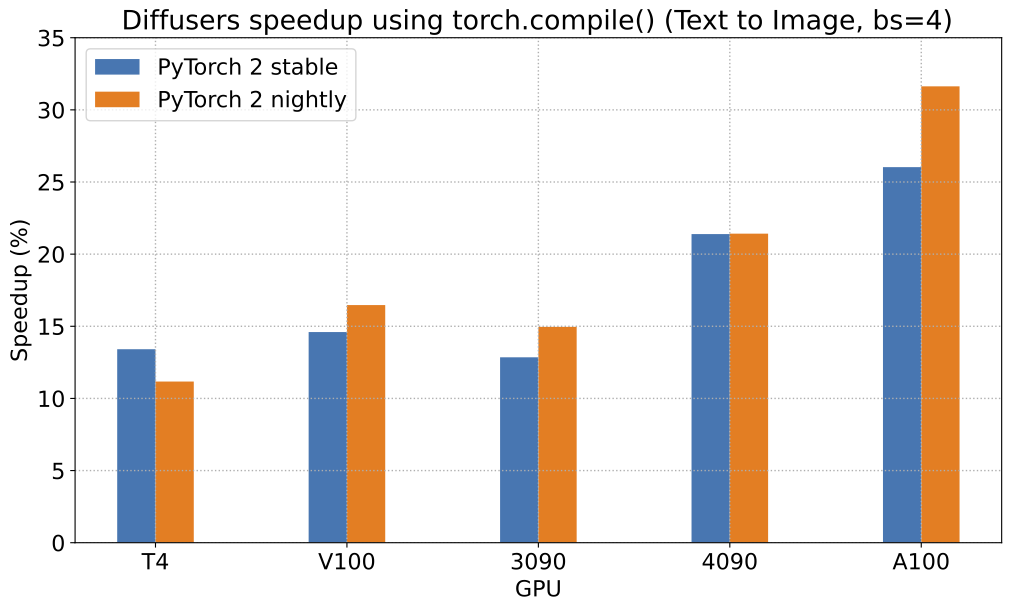
|
||||
|
||||
To give you an even better idea of how this speed-up holds for the other pipelines, consider the following
|
||||
graph for an A100 with PyTorch 2.0 and `torch.compile`:
|
||||
|
||||
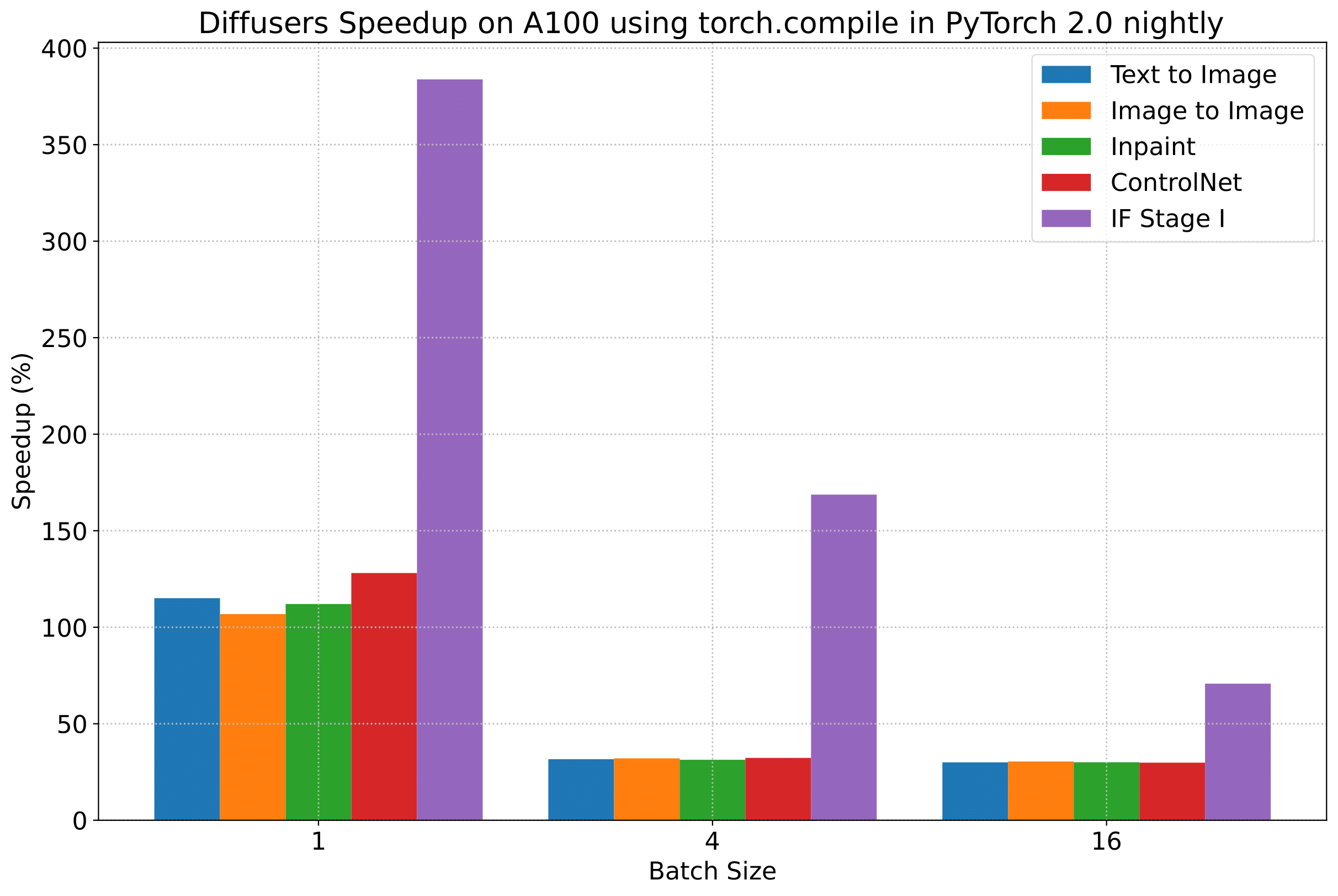
|
||||
|
||||
In the following tables, we report our findings in terms of the *number of iterations/second*.
|
||||
|
||||
### A100 (batch size: 1)
|
||||
|
||||
| **Pipeline** | **torch 2.0 - <br>no compile** | **torch nightly - <br>no compile** | **torch 2.0 - <br>compile** | **torch nightly - <br>compile** |
|
||||
|:---:|:---:|:---:|:---:|:---:|
|
||||
| SD - txt2img | 21.66 | 23.13 | 44.03 | 49.74 |
|
||||
| SD - img2img | 21.81 | 22.40 | 43.92 | 46.32 |
|
||||
| SD - inpaint | 22.24 | 23.23 | 43.76 | 49.25 |
|
||||
| SD - controlnet | 15.02 | 15.82 | 32.13 | 36.08 |
|
||||
| IF | 20.21 / <br>13.84 / <br>24.00 | 20.12 / <br>13.70 / <br>24.03 | ❌ | 97.34 / <br>27.23 / <br>111.66 |
|
||||
| SDXL - txt2img | 8.64 | 9.9 | - | - |
|
||||
|
||||
### A100 (batch size: 4)
|
||||
|
||||
| **Pipeline** | **torch 2.0 - <br>no compile** | **torch nightly - <br>no compile** | **torch 2.0 - <br>compile** | **torch nightly - <br>compile** |
|
||||
|:---:|:---:|:---:|:---:|:---:|
|
||||
| SD - txt2img | 11.6 | 13.12 | 14.62 | 17.27 |
|
||||
| SD - img2img | 11.47 | 13.06 | 14.66 | 17.25 |
|
||||
| SD - inpaint | 11.67 | 13.31 | 14.88 | 17.48 |
|
||||
| SD - controlnet | 8.28 | 9.38 | 10.51 | 12.41 |
|
||||
| IF | 25.02 | 18.04 | ❌ | 48.47 |
|
||||
| SDXL - txt2img | 2.44 | 2.74 | - | - |
|
||||
|
||||
### A100 (batch size: 16)
|
||||
|
||||
| **Pipeline** | **torch 2.0 - <br>no compile** | **torch nightly - <br>no compile** | **torch 2.0 - <br>compile** | **torch nightly - <br>compile** |
|
||||
|:---:|:---:|:---:|:---:|:---:|
|
||||
| SD - txt2img | 3.04 | 3.6 | 3.83 | 4.68 |
|
||||
| SD - img2img | 2.98 | 3.58 | 3.83 | 4.67 |
|
||||
| SD - inpaint | 3.04 | 3.66 | 3.9 | 4.76 |
|
||||
| SD - controlnet | 2.15 | 2.58 | 2.74 | 3.35 |
|
||||
| IF | 8.78 | 9.82 | ❌ | 16.77 |
|
||||
| SDXL - txt2img | 0.64 | 0.72 | - | - |
|
||||
|
||||
### V100 (batch size: 1)
|
||||
|
||||
| **Pipeline** | **torch 2.0 - <br>no compile** | **torch nightly - <br>no compile** | **torch 2.0 - <br>compile** | **torch nightly - <br>compile** |
|
||||
|:---:|:---:|:---:|:---:|:---:|
|
||||
| SD - txt2img | 18.99 | 19.14 | 20.95 | 22.17 |
|
||||
| SD - img2img | 18.56 | 19.18 | 20.95 | 22.11 |
|
||||
| SD - inpaint | 19.14 | 19.06 | 21.08 | 22.20 |
|
||||
| SD - controlnet | 13.48 | 13.93 | 15.18 | 15.88 |
|
||||
| IF | 20.01 / <br>9.08 / <br>23.34 | 19.79 / <br>8.98 / <br>24.10 | ❌ | 55.75 / <br>11.57 / <br>57.67 |
|
||||
|
||||
### V100 (batch size: 4)
|
||||
|
||||
| **Pipeline** | **torch 2.0 - <br>no compile** | **torch nightly - <br>no compile** | **torch 2.0 - <br>compile** | **torch nightly - <br>compile** |
|
||||
|:---:|:---:|:---:|:---:|:---:|
|
||||
| SD - txt2img | 5.96 | 5.89 | 6.83 | 6.86 |
|
||||
| SD - img2img | 5.90 | 5.91 | 6.81 | 6.82 |
|
||||
| SD - inpaint | 5.99 | 6.03 | 6.93 | 6.95 |
|
||||
| SD - controlnet | 4.26 | 4.29 | 4.92 | 4.93 |
|
||||
| IF | 15.41 | 14.76 | ❌ | 22.95 |
|
||||
|
||||
### V100 (batch size: 16)
|
||||
|
||||
| **Pipeline** | **torch 2.0 - <br>no compile** | **torch nightly - <br>no compile** | **torch 2.0 - <br>compile** | **torch nightly - <br>compile** |
|
||||
|:---:|:---:|:---:|:---:|:---:|
|
||||
| SD - txt2img | 1.66 | 1.66 | 1.92 | 1.90 |
|
||||
| SD - img2img | 1.65 | 1.65 | 1.91 | 1.89 |
|
||||
| SD - inpaint | 1.69 | 1.69 | 1.95 | 1.93 |
|
||||
| SD - controlnet | 1.19 | 1.19 | OOM after warmup | 1.36 |
|
||||
| IF | 5.43 | 5.29 | ❌ | 7.06 |
|
||||
|
||||
### T4 (batch size: 1)
|
||||
|
||||
| **Pipeline** | **torch 2.0 - <br>no compile** | **torch nightly - <br>no compile** | **torch 2.0 - <br>compile** | **torch nightly - <br>compile** |
|
||||
|:---:|:---:|:---:|:---:|:---:|
|
||||
| SD - txt2img | 6.9 | 6.95 | 7.3 | 7.56 |
|
||||
| SD - img2img | 6.84 | 6.99 | 7.04 | 7.55 |
|
||||
| SD - inpaint | 6.91 | 6.7 | 7.01 | 7.37 |
|
||||
| SD - controlnet | 4.89 | 4.86 | 5.35 | 5.48 |
|
||||
| IF | 17.42 / <br>2.47 / <br>18.52 | 16.96 / <br>2.45 / <br>18.69 | ❌ | 24.63 / <br>2.47 / <br>23.39 |
|
||||
| SDXL - txt2img | 1.15 | 1.16 | - | - |
|
||||
|
||||
### T4 (batch size: 4)
|
||||
|
||||
| **Pipeline** | **torch 2.0 - <br>no compile** | **torch nightly - <br>no compile** | **torch 2.0 - <br>compile** | **torch nightly - <br>compile** |
|
||||
|:---:|:---:|:---:|:---:|:---:|
|
||||
| SD - txt2img | 1.79 | 1.79 | 2.03 | 1.99 |
|
||||
| SD - img2img | 1.77 | 1.77 | 2.05 | 2.04 |
|
||||
| SD - inpaint | 1.81 | 1.82 | 2.09 | 2.09 |
|
||||
| SD - controlnet | 1.34 | 1.27 | 1.47 | 1.46 |
|
||||
| IF | 5.79 | 5.61 | ❌ | 7.39 |
|
||||
| SDXL - txt2img | 0.288 | 0.289 | - | - |
|
||||
|
||||
### T4 (batch size: 16)
|
||||
|
||||
| **Pipeline** | **torch 2.0 - <br>no compile** | **torch nightly - <br>no compile** | **torch 2.0 - <br>compile** | **torch nightly - <br>compile** |
|
||||
|:---:|:---:|:---:|:---:|:---:|
|
||||
| SD - txt2img | 2.34s | 2.30s | OOM after 2nd iteration | 1.99s |
|
||||
| SD - img2img | 2.35s | 2.31s | OOM after warmup | 2.00s |
|
||||
| SD - inpaint | 2.30s | 2.26s | OOM after 2nd iteration | 1.95s |
|
||||
| SD - controlnet | OOM after 2nd iteration | OOM after 2nd iteration | OOM after warmup | OOM after warmup |
|
||||
| IF * | 1.44 | 1.44 | ❌ | 1.94 |
|
||||
| SDXL - txt2img | OOM | OOM | - | - |
|
||||
|
||||
### RTX 3090 (batch size: 1)
|
||||
|
||||
| **Pipeline** | **torch 2.0 - <br>no compile** | **torch nightly - <br>no compile** | **torch 2.0 - <br>compile** | **torch nightly - <br>compile** |
|
||||
|:---:|:---:|:---:|:---:|:---:|
|
||||
| SD - txt2img | 22.56 | 22.84 | 23.84 | 25.69 |
|
||||
| SD - img2img | 22.25 | 22.61 | 24.1 | 25.83 |
|
||||
| SD - inpaint | 22.22 | 22.54 | 24.26 | 26.02 |
|
||||
| SD - controlnet | 16.03 | 16.33 | 17.38 | 18.56 |
|
||||
| IF | 27.08 / <br>9.07 / <br>31.23 | 26.75 / <br>8.92 / <br>31.47 | ❌ | 68.08 / <br>11.16 / <br>65.29 |
|
||||
|
||||
### RTX 3090 (batch size: 4)
|
||||
|
||||
| **Pipeline** | **torch 2.0 - <br>no compile** | **torch nightly - <br>no compile** | **torch 2.0 - <br>compile** | **torch nightly - <br>compile** |
|
||||
|:---:|:---:|:---:|:---:|:---:|
|
||||
| SD - txt2img | 6.46 | 6.35 | 7.29 | 7.3 |
|
||||
| SD - img2img | 6.33 | 6.27 | 7.31 | 7.26 |
|
||||
| SD - inpaint | 6.47 | 6.4 | 7.44 | 7.39 |
|
||||
| SD - controlnet | 4.59 | 4.54 | 5.27 | 5.26 |
|
||||
| IF | 16.81 | 16.62 | ❌ | 21.57 |
|
||||
|
||||
### RTX 3090 (batch size: 16)
|
||||
|
||||
| **Pipeline** | **torch 2.0 - <br>no compile** | **torch nightly - <br>no compile** | **torch 2.0 - <br>compile** | **torch nightly - <br>compile** |
|
||||
|:---:|:---:|:---:|:---:|:---:|
|
||||
| SD - txt2img | 1.7 | 1.69 | 1.93 | 1.91 |
|
||||
| SD - img2img | 1.68 | 1.67 | 1.93 | 1.9 |
|
||||
| SD - inpaint | 1.72 | 1.71 | 1.97 | 1.94 |
|
||||
| SD - controlnet | 1.23 | 1.22 | 1.4 | 1.38 |
|
||||
| IF | 5.01 | 5.00 | ❌ | 6.33 |
|
||||
|
||||
### RTX 4090 (batch size: 1)
|
||||
|
||||
| **Pipeline** | **torch 2.0 - <br>no compile** | **torch nightly - <br>no compile** | **torch 2.0 - <br>compile** | **torch nightly - <br>compile** |
|
||||
|:---:|:---:|:---:|:---:|:---:|
|
||||
| SD - txt2img | 40.5 | 41.89 | 44.65 | 49.81 |
|
||||
| SD - img2img | 40.39 | 41.95 | 44.46 | 49.8 |
|
||||
| SD - inpaint | 40.51 | 41.88 | 44.58 | 49.72 |
|
||||
| SD - controlnet | 29.27 | 30.29 | 32.26 | 36.03 |
|
||||
| IF | 69.71 / <br>18.78 / <br>85.49 | 69.13 / <br>18.80 / <br>85.56 | ❌ | 124.60 / <br>26.37 / <br>138.79 |
|
||||
| SDXL - txt2img | 6.8 | 8.18 | - | - |
|
||||
|
||||
### RTX 4090 (batch size: 4)
|
||||
|
||||
| **Pipeline** | **torch 2.0 - <br>no compile** | **torch nightly - <br>no compile** | **torch 2.0 - <br>compile** | **torch nightly - <br>compile** |
|
||||
|:---:|:---:|:---:|:---:|:---:|
|
||||
| SD - txt2img | 12.62 | 12.84 | 15.32 | 15.59 |
|
||||
| SD - img2img | 12.61 | 12,.79 | 15.35 | 15.66 |
|
||||
| SD - inpaint | 12.65 | 12.81 | 15.3 | 15.58 |
|
||||
| SD - controlnet | 9.1 | 9.25 | 11.03 | 11.22 |
|
||||
| IF | 31.88 | 31.14 | ❌ | 43.92 |
|
||||
| SDXL - txt2img | 2.19 | 2.35 | - | - |
|
||||
|
||||
### RTX 4090 (batch size: 16)
|
||||
|
||||
| **Pipeline** | **torch 2.0 - <br>no compile** | **torch nightly - <br>no compile** | **torch 2.0 - <br>compile** | **torch nightly - <br>compile** |
|
||||
|:---:|:---:|:---:|:---:|:---:|
|
||||
| SD - txt2img | 3.17 | 3.2 | 3.84 | 3.85 |
|
||||
| SD - img2img | 3.16 | 3.2 | 3.84 | 3.85 |
|
||||
| SD - inpaint | 3.17 | 3.2 | 3.85 | 3.85 |
|
||||
| SD - controlnet | 2.23 | 2.3 | 2.7 | 2.75 |
|
||||
| IF | 9.26 | 9.2 | ❌ | 13.31 |
|
||||
| SDXL - txt2img | 0.52 | 0.53 | - | - |
|
||||
|
||||
## Notes
|
||||
|
||||
* Follow this [PR](https://github.com/huggingface/diffusers/pull/3313) for more details on the environment used for conducting the benchmarks.
|
||||
* For the DeepFloyd IF pipeline where batch sizes > 1, we only used a batch size of > 1 in the first IF pipeline for text-to-image generation and NOT for upscaling. That means the two upscaling pipelines received a batch size of 1.
|
||||
|
||||
*Thanks to [Horace He](https://github.com/Chillee) from the PyTorch team for their support in improving our support of `torch.compile()` in Diffusers.*
|
||||
@@ -416,45 +416,6 @@ text_encoder_2_4bit.dequantize()
|
||||
transformer_4bit.dequantize()
|
||||
```
|
||||
|
||||
## torch.compile
|
||||
|
||||
Speed up inference with `torch.compile`. Make sure you have the latest `bitsandbytes` installed and we also recommend installing [PyTorch nightly](https://pytorch.org/get-started/locally/).
|
||||
|
||||
<hfoptions id="bnb">
|
||||
<hfoption id="8-bit">
|
||||
```py
|
||||
torch._dynamo.config.capture_dynamic_output_shape_ops = True
|
||||
|
||||
quant_config = DiffusersBitsAndBytesConfig(load_in_8bit=True)
|
||||
transformer_4bit = AutoModel.from_pretrained(
|
||||
"black-forest-labs/FLUX.1-dev",
|
||||
subfolder="transformer",
|
||||
quantization_config=quant_config,
|
||||
torch_dtype=torch.float16,
|
||||
)
|
||||
transformer_4bit.compile(fullgraph=True)
|
||||
```
|
||||
|
||||
</hfoption>
|
||||
<hfoption id="4-bit">
|
||||
|
||||
```py
|
||||
quant_config = DiffusersBitsAndBytesConfig(load_in_4bit=True)
|
||||
transformer_4bit = AutoModel.from_pretrained(
|
||||
"black-forest-labs/FLUX.1-dev",
|
||||
subfolder="transformer",
|
||||
quantization_config=quant_config,
|
||||
torch_dtype=torch.float16,
|
||||
)
|
||||
transformer_4bit.compile(fullgraph=True)
|
||||
```
|
||||
</hfoption>
|
||||
</hfoptions>
|
||||
|
||||
On an RTX 4090 with compilation, 4-bit Flux generation completed in 25.809 seconds versus 32.570 seconds without.
|
||||
|
||||
Check out the [benchmarking script](https://gist.github.com/sayakpaul/0db9d8eeeb3d2a0e5ed7cf0d9ca19b7d) for more details.
|
||||
|
||||
## Resources
|
||||
|
||||
* [End-to-end notebook showing Flux.1 Dev inference in a free-tier Colab](https://gist.github.com/sayakpaul/c76bd845b48759e11687ac550b99d8b4)
|
||||
|
||||
@@ -13,30 +13,80 @@ specific language governing permissions and limitations under the License.
|
||||
|
||||
# Quantization
|
||||
|
||||
Quantization focuses on representing data with fewer bits while also trying to preserve the precision of the original data. This often means converting a data type to represent the same information with fewer bits. For example, if your model weights are stored as 32-bit floating points and they're quantized to 16-bit floating points, this halves the model size which makes it easier to store and reduces memory usage. Lower precision can also speedup inference because it takes less time to perform calculations with fewer bits.
|
||||
Quantization techniques focus on representing data with less information while also trying to not lose too much accuracy. This often means converting a data type to represent the same information with fewer bits. For example, if your model weights are stored as 32-bit floating points and they're quantized to 16-bit floating points, this halves the model size which makes it easier to store and reduces memory-usage. Lower precision can also speedup inference because it takes less time to perform calculations with fewer bits.
|
||||
|
||||
Diffusers supports multiple quantization backends to make large diffusion models like [Flux](../api/pipelines/flux) more accessible. This guide shows how to use the [`~quantizers.PipelineQuantizationConfig`] class to quantize a pipeline during its initialization from a pretrained or non-quantized checkpoint.
|
||||
<Tip>
|
||||
|
||||
Interested in adding a new quantization method to Diffusers? Refer to the [Contribute new quantization method guide](https://huggingface.co/docs/transformers/main/en/quantization/contribute) to learn more about adding a new quantization method.
|
||||
|
||||
</Tip>
|
||||
|
||||
<Tip>
|
||||
|
||||
If you are new to the quantization field, we recommend you to check out these beginner-friendly courses about quantization in collaboration with DeepLearning.AI:
|
||||
|
||||
* [Quantization Fundamentals with Hugging Face](https://www.deeplearning.ai/short-courses/quantization-fundamentals-with-hugging-face/)
|
||||
* [Quantization in Depth](https://www.deeplearning.ai/short-courses/quantization-in-depth/)
|
||||
|
||||
</Tip>
|
||||
|
||||
## When to use what?
|
||||
|
||||
Diffusers currently supports the following quantization methods.
|
||||
- [BitsandBytes](./bitsandbytes)
|
||||
- [TorchAO](./torchao)
|
||||
- [GGUF](./gguf)
|
||||
- [Quanto](./quanto.md)
|
||||
|
||||
[This resource](https://huggingface.co/docs/transformers/main/en/quantization/overview#when-to-use-what) provides a good overview of the pros and cons of different quantization techniques.
|
||||
|
||||
## Pipeline-level quantization
|
||||
|
||||
There are two ways you can use [`~quantizers.PipelineQuantizationConfig`] depending on the level of control you want over the quantization specifications of each model in the pipeline.
|
||||
Diffusers allows users to directly initialize pipelines from checkpoints that may contain quantized models ([example](https://huggingface.co/hf-internal-testing/flux.1-dev-nf4-pkg)). However, users may want to apply
|
||||
quantization on-the-fly when initializing a pipeline from a pre-trained and non-quantized checkpoint. You can
|
||||
do this with [`~quantizers.PipelineQuantizationConfig`].
|
||||
|
||||
- for more basic and simple use cases, you only need to define the `quant_backend`, `quant_kwargs`, and `components_to_quantize`
|
||||
- for more granular quantization control, provide a `quant_mapping` that provides the quantization specifications for the individual model components
|
||||
|
||||
### Simple quantization
|
||||
|
||||
Initialize [`~quantizers.PipelineQuantizationConfig`] with the following parameters.
|
||||
|
||||
- `quant_backend` specifies which quantization backend to use. Currently supported backends include: `bitsandbytes_4bit`, `bitsandbytes_8bit`, `gguf`, `quanto`, and `torchao`.
|
||||
- `quant_kwargs` contains the specific quantization arguments to use.
|
||||
- `components_to_quantize` specifies which components of the pipeline to quantize. Typically, you should quantize the most compute intensive components like the transformer. The text encoder is another component to consider quantizing if a pipeline has more than one such as [`FluxPipeline`]. The example below quantizes the T5 text encoder in [`FluxPipeline`] while keeping the CLIP model intact.
|
||||
Start by defining a `PipelineQuantizationConfig`:
|
||||
|
||||
```py
|
||||
import torch
|
||||
from diffusers import DiffusionPipeline
|
||||
from diffusers.quantizers.quantization_config import QuantoConfig
|
||||
from diffusers.quantizers import PipelineQuantizationConfig
|
||||
from transformers import BitsAndBytesConfig
|
||||
|
||||
pipeline_quant_config = PipelineQuantizationConfig(
|
||||
quant_mapping={
|
||||
"transformer": QuantoConfig(weights_dtype="int8"),
|
||||
"text_encoder_2": BitsAndBytesConfig(
|
||||
load_in_4bit=True, compute_dtype=torch.bfloat16
|
||||
),
|
||||
}
|
||||
)
|
||||
```
|
||||
|
||||
Then pass it to [`~DiffusionPipeline.from_pretrained`] and run inference:
|
||||
|
||||
```py
|
||||
pipe = DiffusionPipeline.from_pretrained(
|
||||
"black-forest-labs/FLUX.1-dev",
|
||||
quantization_config=pipeline_quant_config,
|
||||
torch_dtype=torch.bfloat16,
|
||||
).to("cuda")
|
||||
|
||||
image = pipe("photo of a cute dog").images[0]
|
||||
```
|
||||
|
||||
This method allows for more granular control over the quantization specifications of individual
|
||||
model-level components of a pipeline. It also allows for different quantization backends for
|
||||
different components. In the above example, you used a combination of Quanto and BitsandBytes. However,
|
||||
one caveat of this method is that users need to know which components come from `transformers` to be able
|
||||
to import the right quantization config class.
|
||||
|
||||
The other method is simpler in terms of experience but is
|
||||
less-flexible. Start by defining a `PipelineQuantizationConfig` but in a different way:
|
||||
|
||||
```py
|
||||
pipeline_quant_config = PipelineQuantizationConfig(
|
||||
quant_backend="bitsandbytes_4bit",
|
||||
quant_kwargs={"load_in_4bit": True, "bnb_4bit_quant_type": "nf4", "bnb_4bit_compute_dtype": torch.bfloat16},
|
||||
@@ -44,89 +94,35 @@ pipeline_quant_config = PipelineQuantizationConfig(
|
||||
)
|
||||
```
|
||||
|
||||
Pass the `pipeline_quant_config` to [`~DiffusionPipeline.from_pretrained`] to quantize the pipeline.
|
||||
This `pipeline_quant_config` can now be passed to [`~DiffusionPipeline.from_pretrained`] similar to the above example.
|
||||
|
||||
In this case, `quant_kwargs` will be used to initialize the quantization specifications
|
||||
of the respective quantization configuration class of `quant_backend`. `components_to_quantize`
|
||||
is used to denote the components that will be quantized. For most pipelines, you would want to
|
||||
keep `transformer` in the list as that is often the most compute and memory intensive.
|
||||
|
||||
The config below will work for most diffusion pipelines that have a `transformer` component present.
|
||||
In most case, you will want to quantize the `transformer` component as that is often the most compute-
|
||||
intensive part of a diffusion pipeline.
|
||||
|
||||
```py
|
||||
pipe = DiffusionPipeline.from_pretrained(
|
||||
"black-forest-labs/FLUX.1-dev",
|
||||
quantization_config=pipeline_quant_config,
|
||||
torch_dtype=torch.bfloat16,
|
||||
).to("cuda")
|
||||
|
||||
image = pipe("photo of a cute dog").images[0]
|
||||
```
|
||||
|
||||
### quant_mapping
|
||||
|
||||
The `quant_mapping` argument provides more flexible options for how to quantize each individual component in a pipeline, like combining different quantization backends.
|
||||
|
||||
Initialize [`~quantizers.PipelineQuantizationConfig`] and pass a `quant_mapping` to it. The `quant_mapping` allows you to specify the quantization options for each component in the pipeline such as the transformer and text encoder.
|
||||
|
||||
The example below uses two quantization backends, [`~quantizers.QuantoConfig`] and [`transformers.BitsAndBytesConfig`], for the transformer and text encoder.
|
||||
|
||||
```py
|
||||
import torch
|
||||
from diffusers import DiffusionPipeline
|
||||
from diffusers import BitsAndBytesConfig as DiffusersBitsAndBytesConfig
|
||||
from diffusers.quantizers.quantization_config import QuantoConfig
|
||||
from diffusers.quantizers import PipelineQuantizationConfig
|
||||
from transformers import BitsAndBytesConfig as TransformersBitsAndBytesConfig
|
||||
|
||||
pipeline_quant_config = PipelineQuantizationConfig(
|
||||
quant_mapping={
|
||||
"transformer": QuantoConfig(weights_dtype="int8"),
|
||||
"text_encoder_2": TransformersBitsAndBytesConfig(
|
||||
load_in_4bit=True, compute_dtype=torch.bfloat16
|
||||
),
|
||||
}
|
||||
quant_backend="bitsandbytes_4bit",
|
||||
quant_kwargs={"load_in_4bit": True, "bnb_4bit_quant_type": "nf4", "bnb_4bit_compute_dtype": torch.bfloat16},
|
||||
components_to_quantize=["transformer"],
|
||||
)
|
||||
```
|
||||
|
||||
There is a separate bitsandbytes backend in [Transformers](https://huggingface.co/docs/transformers/main_classes/quantization#transformers.BitsAndBytesConfig). You need to import and use [`transformers.BitsAndBytesConfig`] for components that come from Transformers. For example, `text_encoder_2` in [`FluxPipeline`] is a [`~transformers.T5EncoderModel`] from Transformers so you need to use [`transformers.BitsAndBytesConfig`] instead of [`diffusers.BitsAndBytesConfig`].
|
||||
Below is a list of the supported quantization backends available in both `diffusers` and `transformers`:
|
||||
|
||||
> [!TIP]
|
||||
> Use the [simple quantization](#simple-quantization) method above if you don't want to manage these distinct imports or aren't sure where each pipeline component comes from.
|
||||
* `bitsandbytes_4bit`
|
||||
* `bitsandbytes_8bit`
|
||||
* `gguf`
|
||||
* `quanto`
|
||||
* `torchao`
|
||||
|
||||
```py
|
||||
import torch
|
||||
from diffusers import DiffusionPipeline
|
||||
from diffusers import BitsAndBytesConfig as DiffusersBitsAndBytesConfig
|
||||
from diffusers.quantizers import PipelineQuantizationConfig
|
||||
from transformers import BitsAndBytesConfig as TransformersBitsAndBytesConfig
|
||||
|
||||
pipeline_quant_config = PipelineQuantizationConfig(
|
||||
quant_mapping={
|
||||
"transformer": DiffusersBitsAndBytesConfig(load_in_4bit=True, bnb_4bit_compute_dtype=torch.bfloat16),
|
||||
"text_encoder_2": TransformersBitsAndBytesConfig(
|
||||
load_in_4bit=True, compute_dtype=torch.bfloat16
|
||||
),
|
||||
}
|
||||
)
|
||||
```
|
||||
|
||||
Pass the `pipeline_quant_config` to [`~DiffusionPipeline.from_pretrained`] to quantize the pipeline.
|
||||
|
||||
```py
|
||||
pipe = DiffusionPipeline.from_pretrained(
|
||||
"black-forest-labs/FLUX.1-dev",
|
||||
quantization_config=pipeline_quant_config,
|
||||
torch_dtype=torch.bfloat16,
|
||||
).to("cuda")
|
||||
|
||||
image = pipe("photo of a cute dog").images[0]
|
||||
```
|
||||
|
||||
## Resources
|
||||
|
||||
Check out the resources below to learn more about quantization.
|
||||
|
||||
- If you are new to quantization, we recommend checking out the following beginner-friendly courses in collaboration with DeepLearning.AI.
|
||||
|
||||
- [Quantization Fundamentals with Hugging Face](https://www.deeplearning.ai/short-courses/quantization-fundamentals-with-hugging-face/)
|
||||
- [Quantization in Depth](https://www.deeplearning.ai/short-courses/quantization-in-depth/)
|
||||
|
||||
- Refer to the [Contribute new quantization method guide](https://huggingface.co/docs/transformers/main/en/quantization/contribute) if you're interested in adding a new quantization method.
|
||||
|
||||
- The Transformers quantization [Overview](https://huggingface.co/docs/transformers/quantization/overview#when-to-use-what) provides an overview of the pros and cons of different quantization backends.
|
||||
|
||||
- Read the [Exploring Quantization Backends in Diffusers](https://huggingface.co/blog/diffusers-quantization) blog post for a brief introduction to each quantization backend, how to choose a backend, and combining quantization with other memory optimizations.
|
||||
Diffusion pipelines can have multiple text encoders. [`FluxPipeline`] has two, for example. It's
|
||||
recommended to quantize the text encoders that are memory-intensive. Some examples include T5,
|
||||
Llama, Gemma, etc. In the above example, you quantized the T5 model of [`FluxPipeline`] through
|
||||
`text_encoder_2` while keeping the CLIP model intact (accessible through `text_encoder`).
|
||||
@@ -56,7 +56,7 @@ image = pipe(
|
||||
image.save("output.png")
|
||||
```
|
||||
|
||||
TorchAO is fully compatible with [torch.compile](../optimization/fp16#torchcompile), setting it apart from other quantization methods. This makes it easy to speed up inference with just one line of code.
|
||||
TorchAO is fully compatible with [torch.compile](./optimization/torch2.0#torchcompile), setting it apart from other quantization methods. This makes it easy to speed up inference with just one line of code.
|
||||
|
||||
```python
|
||||
# In the above code, add the following after initializing the transformer
|
||||
@@ -65,9 +65,6 @@ transformer = torch.compile(transformer, mode="max-autotune", fullgraph=True)
|
||||
|
||||
For speed and memory benchmarks on Flux and CogVideoX, please refer to the table [here](https://github.com/huggingface/diffusers/pull/10009#issue-2688781450). You can also find some torchao [benchmarks](https://github.com/pytorch/ao/tree/main/torchao/quantization#benchmarks) numbers for various hardware.
|
||||
|
||||
> [!TIP]
|
||||
> The FP8 post-training quantization schemes in torchao are effective for GPUs with compute capability of at least 8.9 (RTX-4090, Hopper, etc.). FP8 often provides the best speed, memory, and quality trade-off when generating images and videos. We recommend combining FP8 and torch.compile if your GPU is compatible.
|
||||
|
||||
torchao also supports an automatic quantization API through [autoquant](https://github.com/pytorch/ao/blob/main/torchao/quantization/README.md#autoquantization). Autoquantization determines the best quantization strategy applicable to a model by comparing the performance of each technique on chosen input types and shapes. Currently, this can be used directly on the underlying modeling components. Diffusers will also expose an autoquant configuration option in the future.
|
||||
|
||||
The `TorchAoConfig` class accepts three parameters:
|
||||
@@ -94,7 +91,7 @@ The quantization methods supported are as follows:
|
||||
|
||||
Some quantization methods are aliases (for example, `int8wo` is the commonly used shorthand for `int8_weight_only`). This allows using the quantization methods described in the torchao docs as-is, while also making it convenient to remember their shorthand notations.
|
||||
|
||||
Refer to the [official torchao documentation](https://docs.pytorch.org/ao/stable/index.html) for a better understanding of the available quantization methods and the exhaustive list of configuration options available.
|
||||
Refer to the official torchao documentation for a better understanding of the available quantization methods and the exhaustive list of configuration options available.
|
||||
|
||||
## Serializing and Deserializing quantized models
|
||||
|
||||
@@ -158,5 +155,5 @@ transformer.load_state_dict(state_dict, strict=True, assign=True)
|
||||
|
||||
## Resources
|
||||
|
||||
- [TorchAO Quantization API](https://docs.pytorch.org/ao/stable/index.html)
|
||||
- [TorchAO Quantization API](https://github.com/pytorch/ao/blob/main/torchao/quantization/README.md)
|
||||
- [Diffusers-TorchAO examples](https://github.com/sayakpaul/diffusers-torchao)
|
||||
|
||||
@@ -256,6 +256,6 @@ make_image_grid(images, 2, 2)
|
||||
|
||||
In this tutorial, you learned how to optimize a [`DiffusionPipeline`] for computational and memory efficiency as well as improving the quality of generated outputs. If you're interested in making your pipeline even faster, take a look at the following resources:
|
||||
|
||||
- Learn how [PyTorch 2.0](./optimization/fp16) and [`torch.compile`](https://pytorch.org/docs/stable/generated/torch.compile.html) can yield 5 - 300% faster inference speed. On an A100 GPU, inference can be up to 50% faster!
|
||||
- Learn how [PyTorch 2.0](./optimization/torch2.0) and [`torch.compile`](https://pytorch.org/docs/stable/generated/torch.compile.html) can yield 5 - 300% faster inference speed. On an A100 GPU, inference can be up to 50% faster!
|
||||
- If you can't use PyTorch 2, we recommend you install [xFormers](./optimization/xformers). Its memory-efficient attention mechanism works great with PyTorch 1.13.1 for faster speed and reduced memory consumption.
|
||||
- Other optimization techniques, such as model offloading, are covered in [this guide](./optimization/fp16).
|
||||
|
||||
@@ -59,5 +59,5 @@ pip install -r requirements_sdxl.txt
|
||||
|
||||
To speedup training and reduce memory-usage, we recommend:
|
||||
|
||||
- using PyTorch 2.0 or higher to automatically use [scaled dot product attention](../optimization/fp16#scaled-dot-product-attention) during training (you don't need to make any changes to the training code)
|
||||
- using PyTorch 2.0 or higher to automatically use [scaled dot product attention](../optimization/torch2.0#scaled-dot-product-attention) during training (you don't need to make any changes to the training code)
|
||||
- installing [xFormers](../optimization/xformers) to enable memory-efficient attention
|
||||
@@ -103,7 +103,7 @@ pipeline("A cute cnmt eating a slice of pizza, stunning color scheme, masterpiec
|
||||
|
||||
## torch.compile
|
||||
|
||||
[torch.compile](../optimization/fp16#torchcompile) speeds up inference by compiling the PyTorch model to use optimized kernels. Before compiling, the LoRA weights need to be fused into the base model and unloaded first.
|
||||
[torch.compile](../optimization/torch2.0#torchcompile) speeds up inference by compiling the PyTorch model to use optimized kernels. Before compiling, the LoRA weights need to be fused into the base model and unloaded first.
|
||||
|
||||
```py
|
||||
import torch
|
||||
|
||||
@@ -0,0 +1,120 @@
|
||||
<!--Copyright 2024 The HuggingFace Team. All rights reserved.
|
||||
|
||||
Licensed under the Apache License, Version 2.0 (the "License"); you may not use this file except in compliance with
|
||||
the License. You may obtain a copy of the License at
|
||||
|
||||
http://www.apache.org/licenses/LICENSE-2.0
|
||||
|
||||
Unless required by applicable law or agreed to in writing, software distributed under the License is distributed on
|
||||
an "AS IS" BASIS, WITHOUT WARRANTIES OR CONDITIONS OF ANY KIND, either express or implied. See the License for the
|
||||
specific language governing permissions and limitations under the License.
|
||||
-->
|
||||
# CogVideoX
|
||||
|
||||
CogVideoX is a text-to-video generation model focused on creating more coherent videos aligned with a prompt. It achieves this using several methods.
|
||||
|
||||
- a 3D variational autoencoder that compresses videos spatially and temporally, improving compression rate and video accuracy.
|
||||
|
||||
- an expert transformer block to help align text and video, and a 3D full attention module for capturing and creating spatially and temporally accurate videos.
|
||||
|
||||
|
||||
|
||||
## Load model checkpoints
|
||||
Model weights may be stored in separate subfolders on the Hub or locally, in which case, you should use the [`~DiffusionPipeline.from_pretrained`] method.
|
||||
|
||||
|
||||
```py
|
||||
from diffusers import CogVideoXPipeline, CogVideoXImageToVideoPipeline
|
||||
pipe = CogVideoXPipeline.from_pretrained(
|
||||
"THUDM/CogVideoX-2b",
|
||||
torch_dtype=torch.float16
|
||||
)
|
||||
|
||||
pipe = CogVideoXImageToVideoPipeline.from_pretrained(
|
||||
"THUDM/CogVideoX-5b-I2V",
|
||||
torch_dtype=torch.bfloat16
|
||||
)
|
||||
|
||||
```
|
||||
|
||||
## Text-to-Video
|
||||
For text-to-video, pass a text prompt. By default, CogVideoX generates a 720x480 video for the best results.
|
||||
|
||||
```py
|
||||
import torch
|
||||
from diffusers import CogVideoXPipeline
|
||||
from diffusers.utils import export_to_video
|
||||
|
||||
prompt = "An elderly gentleman, with a serene expression, sits at the water's edge, a steaming cup of tea by his side. He is engrossed in his artwork, brush in hand, as he renders an oil painting on a canvas that's propped up against a small, weathered table. The sea breeze whispers through his silver hair, gently billowing his loose-fitting white shirt, while the salty air adds an intangible element to his masterpiece in progress. The scene is one of tranquility and inspiration, with the artist's canvas capturing the vibrant hues of the setting sun reflecting off the tranquil sea."
|
||||
|
||||
pipe = CogVideoXPipeline.from_pretrained(
|
||||
"THUDM/CogVideoX-5b",
|
||||
torch_dtype=torch.bfloat16
|
||||
)
|
||||
|
||||
pipe.enable_model_cpu_offload()
|
||||
pipe.vae.enable_tiling()
|
||||
|
||||
video = pipe(
|
||||
prompt=prompt,
|
||||
num_videos_per_prompt=1,
|
||||
num_inference_steps=50,
|
||||
num_frames=49,
|
||||
guidance_scale=6,
|
||||
generator=torch.Generator(device="cuda").manual_seed(42),
|
||||
).frames[0]
|
||||
|
||||
export_to_video(video, "output.mp4", fps=8)
|
||||
|
||||
```
|
||||
|
||||
|
||||
<div class="flex justify-center">
|
||||
<img src="https://huggingface.co/datasets/huggingface/documentation-images/resolve/main/diffusers/cogvideox/cogvideox_out.gif" alt="generated image of an astronaut in a jungle"/>
|
||||
</div>
|
||||
|
||||
|
||||
## Image-to-Video
|
||||
|
||||
|
||||
You'll use the [THUDM/CogVideoX-5b-I2V](https://huggingface.co/THUDM/CogVideoX-5b-I2V) checkpoint for this guide.
|
||||
|
||||
```py
|
||||
import torch
|
||||
from diffusers import CogVideoXImageToVideoPipeline
|
||||
from diffusers.utils import export_to_video, load_image
|
||||
|
||||
prompt = "A vast, shimmering ocean flows gracefully under a twilight sky, its waves undulating in a mesmerizing dance of blues and greens. The surface glints with the last rays of the setting sun, casting golden highlights that ripple across the water. Seagulls soar above, their cries blending with the gentle roar of the waves. The horizon stretches infinitely, where the ocean meets the sky in a seamless blend of hues. Close-ups reveal the intricate patterns of the waves, capturing the fluidity and dynamic beauty of the sea in motion."
|
||||
image = load_image(image="cogvideox_rocket.png")
|
||||
pipe = CogVideoXImageToVideoPipeline.from_pretrained(
|
||||
"THUDM/CogVideoX-5b-I2V",
|
||||
torch_dtype=torch.bfloat16
|
||||
)
|
||||
|
||||
pipe.vae.enable_tiling()
|
||||
pipe.vae.enable_slicing()
|
||||
|
||||
video = pipe(
|
||||
prompt=prompt,
|
||||
image=image,
|
||||
num_videos_per_prompt=1,
|
||||
num_inference_steps=50,
|
||||
num_frames=49,
|
||||
guidance_scale=6,
|
||||
generator=torch.Generator(device="cuda").manual_seed(42),
|
||||
).frames[0]
|
||||
|
||||
export_to_video(video, "output.mp4", fps=8)
|
||||
```
|
||||
|
||||
<div class="flex gap-4">
|
||||
<div>
|
||||
<img class="rounded-xl" src="https://huggingface.co/datasets/huggingface/documentation-images/resolve/main/diffusers/cogvideox/cogvideox_rocket.png"/>
|
||||
<figcaption class="mt-2 text-center text-sm text-gray-500">initial image</figcaption>
|
||||
</div>
|
||||
<div>
|
||||
<img class="rounded-xl" src="https://huggingface.co/datasets/huggingface/documentation-images/resolve/main/diffusers/cogvideox/cogvideox_outrocket.gif"/>
|
||||
<figcaption class="mt-2 text-center text-sm text-gray-500">generated video</figcaption>
|
||||
</div>
|
||||
</div>
|
||||
|
||||
@@ -303,7 +303,7 @@ There are many types of conditioning inputs you can use, and 🤗 Diffusers supp
|
||||
|
||||
Diffusion models are large, and the iterative nature of denoising an image is computationally expensive and intensive. But this doesn't mean you need access to powerful - or even many - GPUs to use them. There are many optimization techniques for running diffusion models on consumer and free-tier resources. For example, you can load model weights in half-precision to save GPU memory and increase speed or offload the entire model to the GPU to save even more memory.
|
||||
|
||||
PyTorch 2.0 also supports a more memory-efficient attention mechanism called [*scaled dot product attention*](../optimization/fp16#scaled-dot-product-attention) that is automatically enabled if you're using PyTorch 2.0. You can combine this with [`torch.compile`](https://pytorch.org/tutorials/intermediate/torch_compile_tutorial.html) to speed your code up even more:
|
||||
PyTorch 2.0 also supports a more memory-efficient attention mechanism called [*scaled dot product attention*](../optimization/torch2.0#scaled-dot-product-attention) that is automatically enabled if you're using PyTorch 2.0. You can combine this with [`torch.compile`](https://pytorch.org/tutorials/intermediate/torch_compile_tutorial.html) to speed your code up even more:
|
||||
|
||||
```py
|
||||
from diffusers import AutoPipelineForText2Image
|
||||
@@ -313,4 +313,4 @@ pipeline = AutoPipelineForText2Image.from_pretrained("stable-diffusion-v1-5/stab
|
||||
pipeline.unet = torch.compile(pipeline.unet, mode="reduce-overhead", fullgraph=True)
|
||||
```
|
||||
|
||||
For more tips on how to optimize your code to save memory and speed up inference, read the [Accelerate inference](../optimization/fp16) and [Reduce memory usage](../optimization/memory) guides.
|
||||
For more tips on how to optimize your code to save memory and speed up inference, read the [Memory and speed](../optimization/fp16) and [Torch 2.0](../optimization/torch2.0) guides.
|
||||
|
||||
@@ -35,7 +35,7 @@ pipeline.enable_xformers_memory_efficient_attention()
|
||||
|
||||
<Tip>
|
||||
|
||||
You'll notice throughout the guide, we use [`~DiffusionPipeline.enable_model_cpu_offload`] and [`~DiffusionPipeline.enable_xformers_memory_efficient_attention`], to save memory and increase inference speed. If you're using PyTorch 2.0, then you don't need to call [`~DiffusionPipeline.enable_xformers_memory_efficient_attention`] on your pipeline because it'll already be using PyTorch 2.0's native [scaled-dot product attention](../optimization/fp16#scaled-dot-product-attention).
|
||||
You'll notice throughout the guide, we use [`~DiffusionPipeline.enable_model_cpu_offload`] and [`~DiffusionPipeline.enable_xformers_memory_efficient_attention`], to save memory and increase inference speed. If you're using PyTorch 2.0, then you don't need to call [`~DiffusionPipeline.enable_xformers_memory_efficient_attention`] on your pipeline because it'll already be using PyTorch 2.0's native [scaled-dot product attention](../optimization/torch2.0#scaled-dot-product-attention).
|
||||
|
||||
</Tip>
|
||||
|
||||
@@ -589,17 +589,17 @@ make_image_grid([init_image, depth_image, image_control_net, image_elden_ring],
|
||||
|
||||
## Optimize
|
||||
|
||||
Running diffusion models is computationally expensive and intensive, but with a few optimization tricks, it is entirely possible to run them on consumer and free-tier GPUs. For example, you can use a more memory-efficient form of attention such as PyTorch 2.0's [scaled-dot product attention](../optimization/fp16#scaled-dot-product-attention) or [xFormers](../optimization/xformers) (you can use one or the other, but there's no need to use both). You can also offload the model to the GPU while the other pipeline components wait on the CPU.
|
||||
Running diffusion models is computationally expensive and intensive, but with a few optimization tricks, it is entirely possible to run them on consumer and free-tier GPUs. For example, you can use a more memory-efficient form of attention such as PyTorch 2.0's [scaled-dot product attention](../optimization/torch2.0#scaled-dot-product-attention) or [xFormers](../optimization/xformers) (you can use one or the other, but there's no need to use both). You can also offload the model to the GPU while the other pipeline components wait on the CPU.
|
||||
|
||||
```diff
|
||||
+ pipeline.enable_model_cpu_offload()
|
||||
+ pipeline.enable_xformers_memory_efficient_attention()
|
||||
```
|
||||
|
||||
With [`torch.compile`](../optimization/fp16#torchcompile), you can boost your inference speed even more by wrapping your UNet with it:
|
||||
With [`torch.compile`](../optimization/torch2.0#torchcompile), you can boost your inference speed even more by wrapping your UNet with it:
|
||||
|
||||
```py
|
||||
pipeline.unet = torch.compile(pipeline.unet, mode="reduce-overhead", fullgraph=True)
|
||||
```
|
||||
|
||||
To learn more, take a look at the [Reduce memory usage](../optimization/memory) and [Accelerate inference](../optimization/fp16) guides.
|
||||
To learn more, take a look at the [Reduce memory usage](../optimization/memory) and [Torch 2.0](../optimization/torch2.0) guides.
|
||||
|
||||
@@ -35,7 +35,7 @@ pipeline.enable_xformers_memory_efficient_attention()
|
||||
|
||||
<Tip>
|
||||
|
||||
You'll notice throughout the guide, we use [`~DiffusionPipeline.enable_model_cpu_offload`] and [`~DiffusionPipeline.enable_xformers_memory_efficient_attention`], to save memory and increase inference speed. If you're using PyTorch 2.0, it's not necessary to call [`~DiffusionPipeline.enable_xformers_memory_efficient_attention`] on your pipeline because it'll already be using PyTorch 2.0's native [scaled-dot product attention](../optimization/fp16#scaled-dot-product-attention).
|
||||
You'll notice throughout the guide, we use [`~DiffusionPipeline.enable_model_cpu_offload`] and [`~DiffusionPipeline.enable_xformers_memory_efficient_attention`], to save memory and increase inference speed. If you're using PyTorch 2.0, it's not necessary to call [`~DiffusionPipeline.enable_xformers_memory_efficient_attention`] on your pipeline because it'll already be using PyTorch 2.0's native [scaled-dot product attention](../optimization/torch2.0#scaled-dot-product-attention).
|
||||
|
||||
</Tip>
|
||||
|
||||
@@ -788,7 +788,7 @@ make_image_grid([init_image, mask_image, image, image_elden_ring], rows=2, cols=
|
||||
|
||||
## Optimize
|
||||
|
||||
It can be difficult and slow to run diffusion models if you're resource constrained, but it doesn't have to be with a few optimization tricks. One of the biggest (and easiest) optimizations you can enable is switching to memory-efficient attention. If you're using PyTorch 2.0, [scaled-dot product attention](../optimization/fp16#scaled-dot-product-attention) is automatically enabled and you don't need to do anything else. For non-PyTorch 2.0 users, you can install and use [xFormers](../optimization/xformers)'s implementation of memory-efficient attention. Both options reduce memory usage and accelerate inference.
|
||||
It can be difficult and slow to run diffusion models if you're resource constrained, but it doesn't have to be with a few optimization tricks. One of the biggest (and easiest) optimizations you can enable is switching to memory-efficient attention. If you're using PyTorch 2.0, [scaled-dot product attention](../optimization/torch2.0#scaled-dot-product-attention) is automatically enabled and you don't need to do anything else. For non-PyTorch 2.0 users, you can install and use [xFormers](../optimization/xformers)'s implementation of memory-efficient attention. Both options reduce memory usage and accelerate inference.
|
||||
|
||||
You can also offload the model to the CPU to save even more memory:
|
||||
|
||||
@@ -797,10 +797,10 @@ You can also offload the model to the CPU to save even more memory:
|
||||
+ pipeline.enable_model_cpu_offload()
|
||||
```
|
||||
|
||||
To speed-up your inference code even more, use [`torch_compile`](../optimization/fp16#torchcompile). You should wrap `torch.compile` around the most intensive component in the pipeline which is typically the UNet:
|
||||
To speed-up your inference code even more, use [`torch_compile`](../optimization/torch2.0#torchcompile). You should wrap `torch.compile` around the most intensive component in the pipeline which is typically the UNet:
|
||||
|
||||
```py
|
||||
pipeline.unet = torch.compile(pipeline.unet, mode="reduce-overhead", fullgraph=True)
|
||||
```
|
||||
|
||||
Learn more in the [Reduce memory usage](../optimization/memory) and [Accelerate inference](../optimization/fp16) guides.
|
||||
Learn more in the [Reduce memory usage](../optimization/memory) and [Torch 2.0](../optimization/torch2.0) guides.
|
||||
|
||||
@@ -288,7 +288,7 @@ Speeding them up can be achieved by using a more efficient attention processor:
|
||||
depth = pipe(image, num_inference_steps=1)
|
||||
```
|
||||
|
||||
Finally, as suggested in [Optimizations](../optimization/fp16#torchcompile), enabling `torch.compile` can further enhance performance depending on
|
||||
Finally, as suggested in [Optimizations](../optimization/torch2.0#torch.compile), enabling `torch.compile` can further enhance performance depending on
|
||||
the target hardware.
|
||||
However, compilation incurs a significant overhead during the first pipeline invocation, making it beneficial only when
|
||||
the same pipeline instance is called repeatedly, such as within a loop.
|
||||
|
||||
@@ -63,7 +63,7 @@ export_to_video(frames, "generated.mp4", fps=7)
|
||||
|
||||
## torch.compile
|
||||
|
||||
You can gain a 20-25% speedup at the expense of slightly increased memory by [compiling](../optimization/fp16#torchcompile) the UNet.
|
||||
You can gain a 20-25% speedup at the expense of slightly increased memory by [compiling](../optimization/torch2.0#torchcompile) the UNet.
|
||||
|
||||
```diff
|
||||
- pipe.enable_model_cpu_offload()
|
||||
|
||||
@@ -1,4 +1,4 @@
|
||||
<!--Copyright 2024 The HuggingFace Team. All rights reserved.
|
||||
<!--Copyright 2024 The HuggingFace Team. All rights reserved.
|
||||
|
||||
Licensed under the Apache License, Version 2.0 (the "License"); you may not use this file except in compliance with
|
||||
the License. You may obtain a copy of the License at
|
||||
@@ -12,436 +12,551 @@ specific language governing permissions and limitations under the License.
|
||||
|
||||
# Video generation
|
||||
|
||||
Video generation models extend image generation (can be considered a 1-frame video) to also process data related to space and time. Making sure all this data - text, space, time - remain consistent and aligned from frame-to-frame is a big challenge in generating long and high-resolution videos.
|
||||
Video generation models include a temporal dimension to bring images, or frames, together to create a video. These models are trained on large-scale datasets of high-quality text-video pairs to learn how to combine the modalities to ensure the generated video is coherent and realistic.
|
||||
|
||||
Modern video models tackle this challenge with the diffusion transformer (DiT) architecture. This reduces computational costs and allows more efficient scaling to larger and higher-quality image and video data.
|
||||
[Explore](https://huggingface.co/models?other=video-generation) some of the more popular open-source video generation models available from Diffusers below.
|
||||
|
||||
Check out what some of these video models are capable of below.
|
||||
<hfoptions id="popular-models">
|
||||
<hfoption id="CogVideoX">
|
||||
|
||||
<hfoptions id="popular models">
|
||||
<hfoption id="Wan2.1">
|
||||
[CogVideoX](https://huggingface.co/collections/THUDM/cogvideo-66c08e62f1685a3ade464cce) uses a 3D causal Variational Autoencoder (VAE) to compress videos along the spatial and temporal dimensions, and it includes a stack of expert transformer blocks with a 3D full attention mechanism to better capture visual, semantic, and motion information in the data.
|
||||
|
||||
The CogVideoX family also includes models capable of generating videos from images and videos in addition to text. The image-to-video models are indicated by **I2V** in the checkpoint name, and they should be used with the [`CogVideoXImageToVideoPipeline`]. The regular checkpoints support video-to-video through the [`CogVideoXVideoToVideoPipeline`].
|
||||
|
||||
The example below demonstrates how to generate a video from an image and text prompt with [THUDM/CogVideoX-5b-I2V](https://huggingface.co/THUDM/CogVideoX-5b-I2V).
|
||||
|
||||
```py
|
||||
# pip install ftfy
|
||||
import torch
|
||||
import numpy as np
|
||||
from diffusers import AutoModel, WanPipeline
|
||||
from diffusers.hooks.group_offloading import apply_group_offloading
|
||||
from diffusers import CogVideoXImageToVideoPipeline
|
||||
from diffusers.utils import export_to_video, load_image
|
||||
from transformers import UMT5EncoderModel
|
||||
|
||||
text_encoder = UMT5EncoderModel.from_pretrained("Wan-AI/Wan2.1-T2V-14B-Diffusers", subfolder="text_encoder", torch_dtype=torch.bfloat16)
|
||||
vae = AutoModel.from_pretrained("Wan-AI/Wan2.1-T2V-14B-Diffusers", subfolder="vae", torch_dtype=torch.float32)
|
||||
transformer = AutoModel.from_pretrained("Wan-AI/Wan2.1-T2V-14B-Diffusers", subfolder="transformer", torch_dtype=torch.bfloat16)
|
||||
|
||||
# group-offloading
|
||||
onload_device = torch.device("cuda")
|
||||
offload_device = torch.device("cpu")
|
||||
apply_group_offloading(text_encoder,
|
||||
onload_device=onload_device,
|
||||
offload_device=offload_device,
|
||||
offload_type="block_level",
|
||||
num_blocks_per_group=4
|
||||
)
|
||||
transformer.enable_group_offload(
|
||||
onload_device=onload_device,
|
||||
offload_device=offload_device,
|
||||
offload_type="leaf_level",
|
||||
use_stream=True
|
||||
)
|
||||
|
||||
pipeline = WanPipeline.from_pretrained(
|
||||
"Wan-AI/Wan2.1-T2V-14B-Diffusers",
|
||||
vae=vae,
|
||||
transformer=transformer,
|
||||
text_encoder=text_encoder,
|
||||
prompt = "A vast, shimmering ocean flows gracefully under a twilight sky, its waves undulating in a mesmerizing dance of blues and greens. The surface glints with the last rays of the setting sun, casting golden highlights that ripple across the water. Seagulls soar above, their cries blending with the gentle roar of the waves. The horizon stretches infinitely, where the ocean meets the sky in a seamless blend of hues. Close-ups reveal the intricate patterns of the waves, capturing the fluidity and dynamic beauty of the sea in motion."
|
||||
image = load_image(image="https://huggingface.co/datasets/huggingface/documentation-images/resolve/main/diffusers/cogvideox/cogvideox_rocket.png")
|
||||
pipe = CogVideoXImageToVideoPipeline.from_pretrained(
|
||||
"THUDM/CogVideoX-5b-I2V",
|
||||
torch_dtype=torch.bfloat16
|
||||
)
|
||||
pipeline.to("cuda")
|
||||
|
||||
prompt = """
|
||||
The camera rushes from far to near in a low-angle shot,
|
||||
revealing a white ferret on a log. It plays, leaps into the water, and emerges, as the camera zooms in
|
||||
for a close-up. Water splashes berry bushes nearby, while moss, snow, and leaves blanket the ground.
|
||||
Birch trees and a light blue sky frame the scene, with ferns in the foreground. Side lighting casts dynamic
|
||||
shadows and warm highlights. Medium composition, front view, low angle, with depth of field.
|
||||
"""
|
||||
negative_prompt = """
|
||||
Bright tones, overexposed, static, blurred details, subtitles, style, works, paintings, images, static, overall gray, worst quality,
|
||||
low quality, JPEG compression residue, ugly, incomplete, extra fingers, poorly drawn hands, poorly drawn faces, deformed, disfigured,
|
||||
misshapen limbs, fused fingers, still picture, messy background, three legs, many people in the background, walking backwards
|
||||
"""
|
||||
# reduce memory requirements
|
||||
pipe.vae.enable_tiling()
|
||||
pipe.vae.enable_slicing()
|
||||
|
||||
output = pipeline(
|
||||
video = pipe(
|
||||
prompt=prompt,
|
||||
negative_prompt=negative_prompt,
|
||||
num_frames=81,
|
||||
guidance_scale=5.0,
|
||||
image=image,
|
||||
num_videos_per_prompt=1,
|
||||
num_inference_steps=50,
|
||||
num_frames=49,
|
||||
guidance_scale=6,
|
||||
generator=torch.Generator(device="cuda").manual_seed(42),
|
||||
).frames[0]
|
||||
export_to_video(output, "output.mp4", fps=16)
|
||||
export_to_video(video, "output.mp4", fps=8)
|
||||
```
|
||||
|
||||
<div class="flex gap-4">
|
||||
<div>
|
||||
<img class="rounded-xl" src="https://huggingface.co/datasets/huggingface/documentation-images/resolve/main/diffusers/cogvideox/cogvideox_rocket.png"/>
|
||||
<figcaption class="mt-2 text-center text-sm text-gray-500">initial image</figcaption>
|
||||
</div>
|
||||
<div>
|
||||
<img class="rounded-xl" src="https://huggingface.co/datasets/huggingface/documentation-images/resolve/main/diffusers/cogvideox/cogvideox_outrocket.gif"/>
|
||||
<figcaption class="mt-2 text-center text-sm text-gray-500">generated video</figcaption>
|
||||
</div>
|
||||
</div>
|
||||
|
||||
</hfoption>
|
||||
<hfoption id="HunyuanVideo">
|
||||
|
||||
> [!TIP]
|
||||
> HunyuanVideo is a 13B parameter model and requires a lot of memory. Refer to the HunyuanVideo [Quantization](../api/pipelines/hunyuan_video#quantization) guide to learn how to quantize the model. CogVideoX and LTX-Video are more lightweight options that can still generate high-quality videos.
|
||||
|
||||
[HunyuanVideo](https://huggingface.co/tencent/HunyuanVideo) features a dual-stream to single-stream diffusion transformer (DiT) for learning video and text tokens separately, and then subsequently concatenating the video and text tokens to combine their information. A single multimodal large language model (MLLM) serves as the text encoder, and videos are also spatio-temporally compressed with a 3D causal VAE.
|
||||
|
||||
```py
|
||||
import torch
|
||||
from diffusers importAutoModel, HunyuanVideoPipeline
|
||||
from diffusers.quantizers import PipelineQuantizationConfig
|
||||
from diffusers import HunyuanVideoPipeline, HunyuanVideoTransformer3DModel
|
||||
from diffusers.utils import export_to_video
|
||||
|
||||
# quantize weights to int4 with bitsandbytes
|
||||
pipeline_quant_config = PipelineQuantizationConfig(
|
||||
quant_backend="bitsandbytes_4bit",
|
||||
quant_kwargs={
|
||||
"load_in_4bit": True,
|
||||
"bnb_4bit_quant_type": "nf4",
|
||||
"bnb_4bit_compute_dtype": torch.bfloat16
|
||||
},
|
||||
components_to_quantize=["transformer"]
|
||||
transformer = HunyuanVideoTransformer3DModel.from_pretrained(
|
||||
"hunyuanvideo-community/HunyuanVideo", subfolder="transformer", torch_dtype=torch.bfloat16
|
||||
)
|
||||
pipe = HunyuanVideoPipeline.from_pretrained(
|
||||
"hunyuanvideo-community/HunyuanVideo", transformer=transformer, torch_dtype=torch.float16
|
||||
)
|
||||
|
||||
pipeline = HunyuanVideoPipeline.from_pretrained(
|
||||
"hunyuanvideo-community/HunyuanVideo",
|
||||
quantization_config=pipeline_quant_config,
|
||||
torch_dtype=torch.bfloat16,
|
||||
)
|
||||
# reduce memory requirements
|
||||
pipe.vae.enable_tiling()
|
||||
pipe.to("cuda")
|
||||
|
||||
# model-offloading and tiling
|
||||
pipeline.enable_model_cpu_offload()
|
||||
pipeline.vae.enable_tiling()
|
||||
|
||||
prompt = "A fluffy teddy bear sits on a bed of soft pillows surrounded by children's toys."
|
||||
video = pipeline(prompt=prompt, num_frames=61, num_inference_steps=30).frames[0]
|
||||
video = pipe(
|
||||
prompt="A cat walks on the grass, realistic",
|
||||
height=320,
|
||||
width=512,
|
||||
num_frames=61,
|
||||
num_inference_steps=30,
|
||||
).frames[0]
|
||||
export_to_video(video, "output.mp4", fps=15)
|
||||
```
|
||||
|
||||
<div class="flex justify-center">
|
||||
<img src="https://huggingface.co/datasets/huggingface/documentation-images/resolve/main/diffusers/hunyuan-video-output.gif"/>
|
||||
</div>
|
||||
|
||||
</hfoption>
|
||||
<hfoption id="LTX-Video">
|
||||
|
||||
```py
|
||||
import torch
|
||||
from diffusers import LTXPipeline, AutoModel
|
||||
from diffusers.hooks import apply_group_offloading
|
||||
from diffusers.utils import export_to_video
|
||||
|
||||
# fp8 layerwise weight-casting
|
||||
transformer = AutoModel.from_pretrained(
|
||||
"Lightricks/LTX-Video",
|
||||
subfolder="transformer",
|
||||
torch_dtype=torch.bfloat16
|
||||
)
|
||||
transformer.enable_layerwise_casting(
|
||||
storage_dtype=torch.float8_e4m3fn, compute_dtype=torch.bfloat16
|
||||
)
|
||||
|
||||
pipeline = LTXPipeline.from_pretrained("Lightricks/LTX-Video", transformer=transformer, torch_dtype=torch.bfloat16)
|
||||
|
||||
# group-offloading
|
||||
onload_device = torch.device("cuda")
|
||||
offload_device = torch.device("cpu")
|
||||
pipeline.transformer.enable_group_offload(onload_device=onload_device, offload_device=offload_device, offload_type="leaf_level", use_stream=True)
|
||||
apply_group_offloading(pipeline.text_encoder, onload_device=onload_device, offload_type="block_level", num_blocks_per_group=2)
|
||||
apply_group_offloading(pipeline.vae, onload_device=onload_device, offload_type="leaf_level")
|
||||
|
||||
prompt = """
|
||||
A woman with long brown hair and light skin smiles at another woman with long blonde hair. The woman with brown hair wears a black jacket and has a small, barely noticeable mole on her right cheek. The camera angle is a close-up, focused on the woman with brown hair's face. The lighting is warm and natural, likely from the setting sun, casting a soft glow on the scene. The scene appears to be real-life footage
|
||||
"""
|
||||
negative_prompt = "worst quality, inconsistent motion, blurry, jittery, distorted"
|
||||
|
||||
video = pipeline(
|
||||
prompt=prompt,
|
||||
negative_prompt=negative_prompt,
|
||||
width=768,
|
||||
height=512,
|
||||
num_frames=161,
|
||||
decode_timestep=0.03,
|
||||
decode_noise_scale=0.025,
|
||||
num_inference_steps=50,
|
||||
).frames[0]
|
||||
export_to_video(video, "output.mp4", fps=24)
|
||||
```
|
||||
|
||||
</hfoption>
|
||||
</hfoptions>
|
||||
|
||||
This guide will cover video generation basics such as which parameters to configure and how to reduce their memory usage.
|
||||
|
||||
> [!TIP]
|
||||
> If you're interested in learning more about how to use a specific model, please refer to their pipeline API model card.
|
||||
|
||||
## Pipeline parameters
|
||||
|
||||
There are several parameters to configure in the pipeline that'll affect video generation quality or speed. Experimenting with different parameter values is important for discovering the appropriate quality and speed tradeoff.
|
||||
|
||||
### num_frames
|
||||
|
||||
A frame is a still image that is played in a sequence of other frames to create motion or a video. Control the number of frames generated per second with `num_frames`. Increasing `num_frames` increases perceived motion smoothness and visual coherence, making it especially important for videos with dynamic content. A higher `num_frames` value also increases video duration.
|
||||
|
||||
Some video models require more specific `num_frames` values for inference. For example, [`HunyuanVideoPipeline`] recommends calculating the `num_frames` with `(4 * num_frames) +1`. Always check a pipelines API model card to see if there is a recommended value.
|
||||
[LTX-Video (LTXV)](https://huggingface.co/Lightricks/LTX-Video) is a diffusion transformer (DiT) with a focus on speed. It generates 768x512 resolution videos at 24 frames per second (fps), enabling near real-time generation of high-quality videos. LTXV is relatively lightweight compared to other modern video generation models, making it possible to run on consumer GPUs.
|
||||
|
||||
```py
|
||||
import torch
|
||||
from diffusers import LTXPipeline
|
||||
from diffusers.utils import export_to_video
|
||||
|
||||
pipeline = LTXPipeline.from_pretrained(
|
||||
"Lightricks/LTX-Video", torch_dtype=torch.bfloat16
|
||||
).to("cuda")
|
||||
pipe = LTXPipeline.from_pretrained("Lightricks/LTX-Video", torch_dtype=torch.bfloat16).to("cuda")
|
||||
|
||||
prompt = """
|
||||
A woman with long brown hair and light skin smiles at another woman with long blonde hair. The woman
|
||||
with brown hair wears a black jacket and has a small, barely noticeable mole on her right cheek. The
|
||||
camera angle is a close-up, focused on the woman with brown hair's face. The lighting is warm and
|
||||
natural, likely from the setting sun, casting a soft glow on the scene. The scene appears to be
|
||||
real-life footage
|
||||
"""
|
||||
|
||||
video = pipeline(
|
||||
prompt = "A man walks towards a window, looks out, and then turns around. He has short, dark hair, dark skin, and is wearing a brown coat over a red and gray scarf. He walks from left to right towards a window, his gaze fixed on something outside. The camera follows him from behind at a medium distance. The room is brightly lit, with white walls and a large window covered by a white curtain. As he approaches the window, he turns his head slightly to the left, then back to the right. He then turns his entire body to the right, facing the window. The camera remains stationary as he stands in front of the window. The scene is captured in real-life footage."
|
||||
video = pipe(
|
||||
prompt=prompt,
|
||||
negative_prompt=negative_prompt,
|
||||
width=768,
|
||||
height=512,
|
||||
width=704,
|
||||
height=480,
|
||||
num_frames=161,
|
||||
decode_timestep=0.03,
|
||||
decode_noise_scale=0.025,
|
||||
num_inference_steps=50,
|
||||
).frames[0]
|
||||
export_to_video(video, "output.mp4", fps=24)
|
||||
```
|
||||
|
||||
### guidance_scale
|
||||
<div class="flex justify-center">
|
||||
<img src="https://huggingface.co/Lightricks/LTX-Video/resolve/main/media/ltx-video_example_00014.gif"/>
|
||||
</div>
|
||||
|
||||
Guidance scale or "cfg" controls how closely the generated frames adhere to the input conditioning (text, image or both). Increasing `guidance_scale` generates frames that resemble the input conditions more closely and includes finer details, but risk introducing artifacts and reducing output diversity. Lower `guidance_scale` values encourages looser prompt adherence and increased output variety, but details may not be as great. If it's too low, it may ignore your prompt entirely and generate random noise.
|
||||
|
||||
```py
|
||||
import torch
|
||||
from diffusers import CogVideoXPipeline, CogVideoXTransformer3DModel
|
||||
from diffusers.utils import export_to_video
|
||||
|
||||
pipeline = CogVideoXPipeline.from_pretrained(
|
||||
"THUDM/CogVideoX-2b",
|
||||
torch_dtype=torch.float16
|
||||
).to("cuda")
|
||||
|
||||
prompt = """
|
||||
A detailed wooden toy ship with intricately carved masts and sails is seen gliding smoothly over
|
||||
a plush, blue carpet that mimics the waves of the sea. The ship's hull is painted a rich brown,
|
||||
with tiny windows. The carpet, soft and textured, provides a perfect backdrop, resembling an
|
||||
oceanic expanse. Surrounding the ship are various other toys and children's items, hinting at
|
||||
a playful environment. The scene captures the innocence and imagination of childhood,
|
||||
with the toy ship's journey symbolizing endless adventures in a whimsical, indoor setting.
|
||||
"""
|
||||
|
||||
video = pipeline(
|
||||
prompt=prompt,
|
||||
guidance_scale=6,
|
||||
num_inference_steps=50
|
||||
).frames[0]
|
||||
export_to_video(video, "output.mp4", fps=8)
|
||||
```
|
||||
|
||||
### negative_prompt
|
||||
|
||||
A negative prompt is useful for excluding things you don't want to see in the generated video. It is commonly used to refine the quality and alignment of the generated video by pushing the model away from undesirable elements like "blurry, distorted, ugly". This can create cleaner and more focused videos.
|
||||
|
||||
```py
|
||||
# pip install ftfy
|
||||
import torch
|
||||
from diffusers import WanPipeline
|
||||
from diffusers.schedulers.scheduling_unipc_multistep import UniPCMultistepScheduler
|
||||
from diffusers.utils import export_to_video
|
||||
|
||||
vae = AutoencoderKLWan.from_pretrained(
|
||||
"Wan-AI/Wan2.1-T2V-14B-Diffusers", subfolder="vae", torch_dtype=torch.float32
|
||||
)
|
||||
pipeline = WanPipeline.from_pretrained(
|
||||
"Wan-AI/Wan2.1-T2V-14B-Diffusers", vae=vae, torch_dtype=torch.bfloat16
|
||||
)
|
||||
pipeline.scheduler = UniPCMultistepScheduler.from_config(
|
||||
pipeline.scheduler.config, flow_shift=5.0
|
||||
)
|
||||
pipeline.to("cuda")
|
||||
|
||||
pipeline.load_lora_weights("benjamin-paine/steamboat-willie-14b", adapter_name="steamboat-willie")
|
||||
pipeline.set_adapters("steamboat-willie")
|
||||
|
||||
pipeline.enable_model_cpu_offload()
|
||||
|
||||
# use "steamboat willie style" to trigger the LoRA
|
||||
prompt = """
|
||||
steamboat willie style, golden era animation, The camera rushes from far to near in a low-angle shot,
|
||||
revealing a white ferret on a log. It plays, leaps into the water, and emerges, as the camera zooms in
|
||||
for a close-up. Water splashes berry bushes nearby, while moss, snow, and leaves blanket the ground.
|
||||
Birch trees and a light blue sky frame the scene, with ferns in the foreground. Side lighting casts
|
||||
dynamic shadows and warm highlights. Medium composition, front view, low angle, with depth of field.
|
||||
"""
|
||||
|
||||
output = pipeline(
|
||||
prompt=prompt,
|
||||
num_frames=81,
|
||||
guidance_scale=5.0,
|
||||
).frames[0]
|
||||
export_to_video(output, "output.mp4", fps=16)
|
||||
```
|
||||
|
||||
## Reduce memory usage
|
||||
|
||||
Recent video models like [`HunyuanVideoPipeline`] and [`WanPipeline`], which have 10B+ parameters, require a lot of memory and it often exceeds the memory availabe on consumer hardware. Diffusers offers several techniques for reducing the memory requirements of these large models.
|
||||
</hfoption>
|
||||
<hfoption id="Mochi-1">
|
||||
|
||||
> [!TIP]
|
||||
> Refer to the [Reduce memory usage](../optimization/memory) guide for more details about other memory saving techniques.
|
||||
> Mochi-1 is a 10B parameter model and requires a lot of memory. Refer to the Mochi [Quantization](../api/pipelines/mochi#quantization) guide to learn how to quantize the model. CogVideoX and LTX-Video are more lightweight options that can still generate high-quality videos.
|
||||
|
||||
One of these techniques is [group-offloading](../optimization/memory#group-offloading), which offloads groups of internal model layers (such as `torch.nn.Sequential`) to the CPU when it isn't being used. These layers are only loaded when they're needed for computation to avoid storing **all** the model components on the GPU. For a 14B parameter model like [`WanPipeline`], group-offloading can lower the required memory to ~13GB of VRAM.
|
||||
[Mochi-1](https://huggingface.co/genmo/mochi-1-preview) introduces the Asymmetric Diffusion Transformer (AsymmDiT) and Asymmetric Variational Autoencoder (AsymmVAE) to reduces memory requirements. AsymmVAE causally compresses videos 128x to improve memory efficiency, and AsymmDiT jointly attends to the compressed video tokens and user text tokens. This model is noted for generating videos with high-quality motion dynamics and strong prompt adherence.
|
||||
|
||||
```py
|
||||
# pip install ftfy
|
||||
import torch
|
||||
import numpy as np
|
||||
from diffusers import AutoModel, WanPipeline
|
||||
from diffusers.hooks.group_offloading import apply_group_offloading
|
||||
from diffusers.utils import export_to_video, load_image
|
||||
from transformers import UMT5EncoderModel
|
||||
|
||||
text_encoder = UMT5EncoderModel.from_pretrained("Wan-AI/Wan2.1-T2V-14B-Diffusers", subfolder="text_encoder", torch_dtype=torch.bfloat16)
|
||||
vae = AutoModel.from_pretrained("Wan-AI/Wan2.1-T2V-14B-Diffusers", subfolder="vae", torch_dtype=torch.float32)
|
||||
transformer = AutoModel.from_pretrained("Wan-AI/Wan2.1-T2V-14B-Diffusers", subfolder="transformer", torch_dtype=torch.bfloat16)
|
||||
|
||||
# group-offloading
|
||||
onload_device = torch.device("cuda")
|
||||
offload_device = torch.device("cpu")
|
||||
apply_group_offloading(text_encoder,
|
||||
onload_device=onload_device,
|
||||
offload_device=offload_device,
|
||||
offload_type="block_level",
|
||||
num_blocks_per_group=4
|
||||
)
|
||||
transformer.enable_group_offload(
|
||||
onload_device=onload_device,
|
||||
offload_device=offload_device,
|
||||
offload_type="leaf_level",
|
||||
use_stream=True
|
||||
)
|
||||
|
||||
pipeline = WanPipeline.from_pretrained(
|
||||
"Wan-AI/Wan2.1-T2V-14B-Diffusers",
|
||||
vae=vae,
|
||||
transformer=transformer,
|
||||
text_encoder=text_encoder,
|
||||
torch_dtype=torch.bfloat16
|
||||
)
|
||||
pipeline.to("cuda")
|
||||
|
||||
prompt = """
|
||||
The camera rushes from far to near in a low-angle shot,
|
||||
revealing a white ferret on a log. It plays, leaps into the water, and emerges, as the camera zooms in
|
||||
for a close-up. Water splashes berry bushes nearby, while moss, snow, and leaves blanket the ground.
|
||||
Birch trees and a light blue sky frame the scene, with ferns in the foreground. Side lighting casts dynamic
|
||||
shadows and warm highlights. Medium composition, front view, low angle, with depth of field.
|
||||
"""
|
||||
negative_prompt = """
|
||||
Bright tones, overexposed, static, blurred details, subtitles, style, works, paintings, images, static, overall gray, worst quality,
|
||||
low quality, JPEG compression residue, ugly, incomplete, extra fingers, poorly drawn hands, poorly drawn faces, deformed, disfigured,
|
||||
misshapen limbs, fused fingers, still picture, messy background, three legs, many people in the background, walking backwards
|
||||
"""
|
||||
|
||||
output = pipeline(
|
||||
prompt=prompt,
|
||||
negative_prompt=negative_prompt,
|
||||
num_frames=81,
|
||||
guidance_scale=5.0,
|
||||
).frames[0]
|
||||
export_to_video(output, "output.mp4", fps=16)
|
||||
```
|
||||
|
||||
Another option for reducing memory is to consider quantizing a model, which stores the model weights in a lower precision data type. However, quantization may impact video quality depending on the specific video model. Refer to the quantization [Overivew](../quantization/overview) to learn more about the different supported quantization backends.
|
||||
|
||||
The example below uses [bitsandbytes](../quantization/bitsandbytes) to quantize a model.
|
||||
|
||||
```py
|
||||
# pip install ftfy
|
||||
|
||||
import torch
|
||||
from diffusers import WanPipeline
|
||||
from diffusers import AutoModel, WanPipeline
|
||||
from diffusers.quantizers import PipelineQuantizationConfig
|
||||
from diffusers.schedulers.scheduling_unipc_multistep import UniPCMultistepScheduler
|
||||
from transformers import UMT5EncoderModel
|
||||
from diffusers import MochiPipeline
|
||||
from diffusers.utils import export_to_video
|
||||
|
||||
# quantize transformer and text encoder weights with bitsandbytes
|
||||
pipeline_quant_config = PipelineQuantizationConfig(
|
||||
quant_backend="bitsandbytes_4bit",
|
||||
quant_kwargs={"load_in_4bit": True},
|
||||
components_to_quantize=["transformer", "text_encoder"]
|
||||
pipe = MochiPipeline.from_pretrained("genmo/mochi-1-preview", variant="bf16", torch_dtype=torch.bfloat16)
|
||||
|
||||
# reduce memory requirements
|
||||
pipe.enable_model_cpu_offload()
|
||||
pipe.enable_vae_tiling()
|
||||
|
||||
prompt = "Close-up of a chameleon's eye, with its scaly skin changing color. Ultra high resolution 4k."
|
||||
video = pipe(prompt, num_frames=84).frames[0]
|
||||
export_to_video(video, "output.mp4", fps=30)
|
||||
```
|
||||
|
||||
<div class="flex justify-center">
|
||||
<img src="https://huggingface.co/datasets/huggingface/documentation-images/resolve/main/diffusers/mochi-video-output.gif"/>
|
||||
</div>
|
||||
|
||||
</hfoption>
|
||||
<hfoption id="StableVideoDiffusion">
|
||||
|
||||
[StableVideoDiffusion (SVD)](https://huggingface.co/stabilityai/stable-video-diffusion-img2vid-xt) is based on the Stable Diffusion 2.1 model and it is trained on images, then low-resolution videos, and finally a smaller dataset of high-resolution videos. This model generates a short 2-4 second video from an initial image.
|
||||
|
||||
```py
|
||||
import torch
|
||||
from diffusers import StableVideoDiffusionPipeline
|
||||
from diffusers.utils import load_image, export_to_video
|
||||
|
||||
pipeline = StableVideoDiffusionPipeline.from_pretrained(
|
||||
"stabilityai/stable-video-diffusion-img2vid-xt", torch_dtype=torch.float16, variant="fp16"
|
||||
)
|
||||
|
||||
vae = AutoModel.from_pretrained(
|
||||
"Wan-AI/Wan2.1-T2V-14B-Diffusers", subfolder="vae", torch_dtype=torch.float32
|
||||
)
|
||||
pipeline = WanPipeline.from_pretrained(
|
||||
"Wan-AI/Wan2.1-T2V-14B-Diffusers", vae=vae, quantization_config=pipeline_quant_config, torch_dtype=torch.bfloat16
|
||||
)
|
||||
pipeline.scheduler = UniPCMultistepScheduler.from_config(
|
||||
pipeline.scheduler.config, flow_shift=5.0
|
||||
)
|
||||
pipeline.to("cuda")
|
||||
|
||||
pipeline.load_lora_weights("benjamin-paine/steamboat-willie-14b", adapter_name="steamboat-willie")
|
||||
pipeline.set_adapters("steamboat-willie")
|
||||
|
||||
# reduce memory requirements
|
||||
pipeline.enable_model_cpu_offload()
|
||||
|
||||
# use "steamboat willie style" to trigger the LoRA
|
||||
prompt = """
|
||||
steamboat willie style, golden era animation, The camera rushes from far to near in a low-angle shot,
|
||||
revealing a white ferret on a log. It plays, leaps into the water, and emerges, as the camera zooms in
|
||||
for a close-up. Water splashes berry bushes nearby, while moss, snow, and leaves blanket the ground.
|
||||
Birch trees and a light blue sky frame the scene, with ferns in the foreground. Side lighting casts
|
||||
dynamic shadows and warm highlights. Medium composition, front view, low angle, with depth of field.
|
||||
"""
|
||||
image = load_image("https://huggingface.co/datasets/huggingface/documentation-images/resolve/main/diffusers/svd/rocket.png")
|
||||
image = image.resize((1024, 576))
|
||||
|
||||
output = pipeline(
|
||||
prompt=prompt,
|
||||
num_frames=81,
|
||||
guidance_scale=5.0,
|
||||
).frames[0]
|
||||
export_to_video(output, "output.mp4", fps=16)
|
||||
generator = torch.manual_seed(42)
|
||||
frames = pipeline(image, decode_chunk_size=8, generator=generator).frames[0]
|
||||
export_to_video(frames, "generated.mp4", fps=7)
|
||||
```
|
||||
|
||||
## Inference speed
|
||||
<div class="flex gap-4">
|
||||
<div>
|
||||
<img class="rounded-xl" src="https://huggingface.co/datasets/huggingface/documentation-images/resolve/main/diffusers/svd/rocket.png"/>
|
||||
<figcaption class="mt-2 text-center text-sm text-gray-500">initial image</figcaption>
|
||||
</div>
|
||||
<div>
|
||||
<img class="rounded-xl" src="https://huggingface.co/datasets/huggingface/documentation-images/resolve/main/diffusers/svd/output_rocket.gif"/>
|
||||
<figcaption class="mt-2 text-center text-sm text-gray-500">generated video</figcaption>
|
||||
</div>
|
||||
</div>
|
||||
|
||||
[torch.compile](https://pytorch.org/tutorials/intermediate/torch_compile_tutorial_.html) can speedup inference by using optimized kernels. Compilation takes longer the first time, but once compiled, it is much faster. It is best to compile the pipeline once, and then use the pipeline multiple times without changing anything. A change, such as in the image size, triggers recompilation.
|
||||
</hfoption>
|
||||
<hfoption id="AnimateDiff">
|
||||
|
||||
The example below compiles the transformer in the pipeline and uses the `"max-autotune"` mode to maximize performance.
|
||||
[AnimateDiff](https://huggingface.co/guoyww/animatediff) is an adapter model that inserts a motion module into a pretrained diffusion model to animate an image. The adapter is trained on video clips to learn motion which is used to condition the generation process to create a video. It is faster and easier to only train the adapter and it can be loaded into most diffusion models, effectively turning them into “video models”.
|
||||
|
||||
Load a `MotionAdapter` and pass it to the [`AnimateDiffPipeline`].
|
||||
|
||||
```py
|
||||
import torch
|
||||
from diffusers import CogVideoXPipeline, CogVideoXTransformer3DModel
|
||||
from diffusers.utils import export_to_video
|
||||
from diffusers import AnimateDiffPipeline, DDIMScheduler, MotionAdapter
|
||||
from diffusers.utils import export_to_gif
|
||||
|
||||
pipeline = CogVideoXPipeline.from_pretrained(
|
||||
"THUDM/CogVideoX-2b",
|
||||
torch_dtype=torch.float16
|
||||
adapter = MotionAdapter.from_pretrained("guoyww/animatediff-motion-adapter-v1-5-2", torch_dtype=torch.float16)
|
||||
pipeline = AnimateDiffPipeline.from_pretrained("emilianJR/epiCRealism", motion_adapter=adapter, torch_dtype=torch.float16)
|
||||
scheduler = DDIMScheduler.from_pretrained(
|
||||
"emilianJR/epiCRealism",
|
||||
subfolder="scheduler",
|
||||
clip_sample=False,
|
||||
timestep_spacing="linspace",
|
||||
beta_schedule="linear",
|
||||
steps_offset=1,
|
||||
)
|
||||
pipeline.scheduler = scheduler
|
||||
|
||||
# reduce memory requirements
|
||||
pipeline.enable_vae_slicing()
|
||||
pipeline.enable_model_cpu_offload()
|
||||
|
||||
output = pipeline(
|
||||
prompt="A space rocket with trails of smoke behind it launching into space from the desert, 4k, high resolution",
|
||||
negative_prompt="bad quality, worse quality, low resolution",
|
||||
num_frames=16,
|
||||
guidance_scale=7.5,
|
||||
num_inference_steps=50,
|
||||
generator=torch.Generator("cpu").manual_seed(49),
|
||||
)
|
||||
frames = output.frames[0]
|
||||
export_to_gif(frames, "animation.gif")
|
||||
```
|
||||
|
||||
<div class="flex justify-center">
|
||||
<img src="https://huggingface.co/datasets/huggingface/documentation-images/resolve/main/diffusers/animatediff.gif"/>
|
||||
</div>
|
||||
|
||||
</hfoption>
|
||||
</hfoptions>
|
||||
|
||||
## Configure model parameters
|
||||
|
||||
There are a few important parameters you can configure in the pipeline that'll affect the video generation process and quality. Let's take a closer look at what these parameters do and how changing them affects the output.
|
||||
|
||||
### Number of frames
|
||||
|
||||
The `num_frames` parameter determines how many video frames are generated per second. A frame is an image that is played in a sequence of other frames to create motion or a video. This affects video length because the pipeline generates a certain number of frames per second (check a pipeline's API reference for the default value). To increase the video duration, you'll need to increase the `num_frames` parameter.
|
||||
|
||||
```py
|
||||
import torch
|
||||
from diffusers import StableVideoDiffusionPipeline
|
||||
from diffusers.utils import load_image, export_to_video
|
||||
|
||||
pipeline = StableVideoDiffusionPipeline.from_pretrained(
|
||||
"stabilityai/stable-video-diffusion-img2vid", torch_dtype=torch.float16, variant="fp16"
|
||||
)
|
||||
pipeline.enable_model_cpu_offload()
|
||||
|
||||
image = load_image("https://huggingface.co/datasets/huggingface/documentation-images/resolve/main/diffusers/svd/rocket.png")
|
||||
image = image.resize((1024, 576))
|
||||
|
||||
generator = torch.manual_seed(42)
|
||||
frames = pipeline(image, decode_chunk_size=8, generator=generator, num_frames=25).frames[0]
|
||||
export_to_video(frames, "generated.mp4", fps=7)
|
||||
```
|
||||
|
||||
<div class="flex gap-4">
|
||||
<div>
|
||||
<img class="rounded-xl" src="https://huggingface.co/datasets/huggingface/documentation-images/resolve/main/diffusers/num_frames_14.gif"/>
|
||||
<figcaption class="mt-2 text-center text-sm text-gray-500">num_frames=14</figcaption>
|
||||
</div>
|
||||
<div>
|
||||
<img class="rounded-xl" src="https://huggingface.co/datasets/huggingface/documentation-images/resolve/main/diffusers/num_frames_25.gif"/>
|
||||
<figcaption class="mt-2 text-center text-sm text-gray-500">num_frames=25</figcaption>
|
||||
</div>
|
||||
</div>
|
||||
|
||||
### Guidance scale
|
||||
|
||||
The `guidance_scale` parameter controls how closely aligned the generated video and text prompt or initial image is. A higher `guidance_scale` value means your generated video is more aligned with the text prompt or initial image, while a lower `guidance_scale` value means your generated video is less aligned which could give the model more "creativity" to interpret the conditioning input.
|
||||
|
||||
<Tip>
|
||||
|
||||
SVD uses the `min_guidance_scale` and `max_guidance_scale` parameters for applying guidance to the first and last frames respectively.
|
||||
|
||||
</Tip>
|
||||
|
||||
```py
|
||||
import torch
|
||||
from diffusers import I2VGenXLPipeline
|
||||
from diffusers.utils import export_to_gif, load_image
|
||||
|
||||
pipeline = I2VGenXLPipeline.from_pretrained("ali-vilab/i2vgen-xl", torch_dtype=torch.float16, variant="fp16")
|
||||
pipeline.enable_model_cpu_offload()
|
||||
|
||||
image_url = "https://huggingface.co/datasets/diffusers/docs-images/resolve/main/i2vgen_xl_images/img_0009.png"
|
||||
image = load_image(image_url).convert("RGB")
|
||||
|
||||
prompt = "Papers were floating in the air on a table in the library"
|
||||
negative_prompt = "Distorted, discontinuous, Ugly, blurry, low resolution, motionless, static, disfigured, disconnected limbs, Ugly faces, incomplete arms"
|
||||
generator = torch.manual_seed(0)
|
||||
|
||||
frames = pipeline(
|
||||
prompt=prompt,
|
||||
image=image,
|
||||
num_inference_steps=50,
|
||||
negative_prompt=negative_prompt,
|
||||
guidance_scale=1.0,
|
||||
generator=generator
|
||||
).frames[0]
|
||||
export_to_gif(frames, "i2v.gif")
|
||||
```
|
||||
|
||||
<div class="flex gap-4">
|
||||
<div>
|
||||
<img class="rounded-xl" src="https://huggingface.co/datasets/huggingface/documentation-images/resolve/main/diffusers/i2vgen-xl-example.gif"/>
|
||||
<figcaption class="mt-2 text-center text-sm text-gray-500">guidance_scale=9.0</figcaption>
|
||||
</div>
|
||||
<div>
|
||||
<img class="rounded-xl" src="https://huggingface.co/datasets/huggingface/documentation-images/resolve/main/diffusers/guidance_scale_1.0.gif"/>
|
||||
<figcaption class="mt-2 text-center text-sm text-gray-500">guidance_scale=1.0</figcaption>
|
||||
</div>
|
||||
</div>
|
||||
|
||||
### Negative prompt
|
||||
|
||||
A negative prompt deters the model from generating things you don’t want it to. This parameter is commonly used to improve overall generation quality by removing poor or bad features such as “low resolution” or “bad details”.
|
||||
|
||||
```py
|
||||
import torch
|
||||
from diffusers import AnimateDiffPipeline, DDIMScheduler, MotionAdapter
|
||||
from diffusers.utils import export_to_gif
|
||||
|
||||
adapter = MotionAdapter.from_pretrained("guoyww/animatediff-motion-adapter-v1-5-2", torch_dtype=torch.float16)
|
||||
|
||||
pipeline = AnimateDiffPipeline.from_pretrained("emilianJR/epiCRealism", motion_adapter=adapter, torch_dtype=torch.float16)
|
||||
scheduler = DDIMScheduler.from_pretrained(
|
||||
"emilianJR/epiCRealism",
|
||||
subfolder="scheduler",
|
||||
clip_sample=False,
|
||||
timestep_spacing="linspace",
|
||||
beta_schedule="linear",
|
||||
steps_offset=1,
|
||||
)
|
||||
pipeline.scheduler = scheduler
|
||||
pipeline.enable_vae_slicing()
|
||||
pipeline.enable_model_cpu_offload()
|
||||
|
||||
output = pipeline(
|
||||
prompt="360 camera shot of a sushi roll in a restaurant",
|
||||
negative_prompt="Distorted, discontinuous, ugly, blurry, low resolution, motionless, static",
|
||||
num_frames=16,
|
||||
guidance_scale=7.5,
|
||||
num_inference_steps=50,
|
||||
generator=torch.Generator("cpu").manual_seed(0),
|
||||
)
|
||||
frames = output.frames[0]
|
||||
export_to_gif(frames, "animation.gif")
|
||||
```
|
||||
|
||||
<div class="flex gap-4">
|
||||
<div>
|
||||
<img class="rounded-xl" src="https://huggingface.co/datasets/huggingface/documentation-images/resolve/main/diffusers/animatediff_no_neg.gif"/>
|
||||
<figcaption class="mt-2 text-center text-sm text-gray-500">no negative prompt</figcaption>
|
||||
</div>
|
||||
<div>
|
||||
<img class="rounded-xl" src="https://huggingface.co/datasets/huggingface/documentation-images/resolve/main/diffusers/animatediff_neg.gif"/>
|
||||
<figcaption class="mt-2 text-center text-sm text-gray-500">negative prompt applied</figcaption>
|
||||
</div>
|
||||
</div>
|
||||
|
||||
### Model-specific parameters
|
||||
|
||||
There are some pipeline parameters that are unique to each model such as adjusting the motion in a video or adding noise to the initial image.
|
||||
|
||||
<hfoptions id="special-parameters">
|
||||
<hfoption id="Stable Video Diffusion">
|
||||
|
||||
Stable Video Diffusion provides additional micro-conditioning for the frame rate with the `fps` parameter and for motion with the `motion_bucket_id` parameter. Together, these parameters allow for adjusting the amount of motion in the generated video.
|
||||
|
||||
There is also a `noise_aug_strength` parameter that increases the amount of noise added to the initial image. Varying this parameter affects how similar the generated video and initial image are. A higher `noise_aug_strength` also increases the amount of motion. To learn more, read the [Micro-conditioning](../using-diffusers/svd#micro-conditioning) guide.
|
||||
|
||||
</hfoption>
|
||||
<hfoption id="Text2Video-Zero">
|
||||
|
||||
Text2Video-Zero computes the amount of motion to apply to each frame from randomly sampled latents. You can use the `motion_field_strength_x` and `motion_field_strength_y` parameters to control the amount of motion to apply to the x and y-axes of the video. The parameters `t0` and `t1` are the timesteps to apply motion to the latents.
|
||||
|
||||
</hfoption>
|
||||
</hfoptions>
|
||||
|
||||
## Control video generation
|
||||
|
||||
Video generation can be controlled similar to how text-to-image, image-to-image, and inpainting can be controlled with a [`ControlNetModel`]. The only difference is you need to use the [`~pipelines.text_to_video_synthesis.pipeline_text_to_video_zero.CrossFrameAttnProcessor`] so each frame attends to the first frame.
|
||||
|
||||
### Text2Video-Zero
|
||||
|
||||
Text2Video-Zero video generation can be conditioned on pose and edge images for even greater control over a subject's motion in the generated video or to preserve the identity of a subject/object in the video. You can also use Text2Video-Zero with [InstructPix2Pix](../api/pipelines/pix2pix) for editing videos with text.
|
||||
|
||||
<hfoptions id="t2v-zero">
|
||||
<hfoption id="pose control">
|
||||
|
||||
Start by downloading a video and extracting the pose images from it.
|
||||
|
||||
```py
|
||||
from huggingface_hub import hf_hub_download
|
||||
from PIL import Image
|
||||
import imageio
|
||||
|
||||
filename = "__assets__/poses_skeleton_gifs/dance1_corr.mp4"
|
||||
repo_id = "PAIR/Text2Video-Zero"
|
||||
video_path = hf_hub_download(repo_type="space", repo_id=repo_id, filename=filename)
|
||||
|
||||
reader = imageio.get_reader(video_path, "ffmpeg")
|
||||
frame_count = 8
|
||||
pose_images = [Image.fromarray(reader.get_data(i)) for i in range(frame_count)]
|
||||
```
|
||||
|
||||
Load a [`ControlNetModel`] for pose estimation and a checkpoint into the [`StableDiffusionControlNetPipeline`]. Then you'll use the [`~pipelines.text_to_video_synthesis.pipeline_text_to_video_zero.CrossFrameAttnProcessor`] for the UNet and ControlNet.
|
||||
|
||||
```py
|
||||
import torch
|
||||
from diffusers import StableDiffusionControlNetPipeline, ControlNetModel
|
||||
from diffusers.pipelines.text_to_video_synthesis.pipeline_text_to_video_zero import CrossFrameAttnProcessor
|
||||
|
||||
model_id = "stable-diffusion-v1-5/stable-diffusion-v1-5"
|
||||
controlnet = ControlNetModel.from_pretrained("lllyasviel/sd-controlnet-openpose", torch_dtype=torch.float16)
|
||||
pipeline = StableDiffusionControlNetPipeline.from_pretrained(
|
||||
model_id, controlnet=controlnet, torch_dtype=torch.float16
|
||||
).to("cuda")
|
||||
|
||||
# torch.compile
|
||||
pipeline.transformer.to(memory_format=torch.channels_last)
|
||||
pipeline.transformer = torch.compile(
|
||||
pipeline.transformer, mode="max-autotune", fullgraph=True
|
||||
)
|
||||
pipeline.unet.set_attn_processor(CrossFrameAttnProcessor(batch_size=2))
|
||||
pipeline.controlnet.set_attn_processor(CrossFrameAttnProcessor(batch_size=2))
|
||||
```
|
||||
|
||||
prompt = """
|
||||
A detailed wooden toy ship with intricately carved masts and sails is seen gliding smoothly over a plush, blue carpet that mimics the waves of the sea.
|
||||
The ship's hull is painted a rich brown, with tiny windows. The carpet, soft and textured, provides a perfect backdrop, resembling an oceanic expanse.
|
||||
Surrounding the ship are various other toys and children's items, hinting at a playful environment. The scene captures the innocence and imagination of childhood,
|
||||
with the toy ship's journey symbolizing endless adventures in a whimsical, indoor setting.
|
||||
"""
|
||||
Fix the latents for all the frames, and then pass your prompt and extracted pose images to the model to generate a video.
|
||||
|
||||
video = pipeline(
|
||||
prompt=prompt,
|
||||
guidance_scale=6,
|
||||
num_inference_steps=50
|
||||
).frames[0]
|
||||
export_to_video(video, "output.mp4", fps=8)
|
||||
```
|
||||
```py
|
||||
latents = torch.randn((1, 4, 64, 64), device="cuda", dtype=torch.float16).repeat(len(pose_images), 1, 1, 1)
|
||||
|
||||
prompt = "Darth Vader dancing in a desert"
|
||||
result = pipeline(prompt=[prompt] * len(pose_images), image=pose_images, latents=latents).images
|
||||
imageio.mimsave("video.mp4", result, fps=4)
|
||||
```
|
||||
|
||||
</hfoption>
|
||||
<hfoption id="edge control">
|
||||
|
||||
Download a video and extract the edges from it.
|
||||
|
||||
```py
|
||||
from huggingface_hub import hf_hub_download
|
||||
from PIL import Image
|
||||
import imageio
|
||||
|
||||
filename = "__assets__/poses_skeleton_gifs/dance1_corr.mp4"
|
||||
repo_id = "PAIR/Text2Video-Zero"
|
||||
video_path = hf_hub_download(repo_type="space", repo_id=repo_id, filename=filename)
|
||||
|
||||
reader = imageio.get_reader(video_path, "ffmpeg")
|
||||
frame_count = 8
|
||||
pose_images = [Image.fromarray(reader.get_data(i)) for i in range(frame_count)]
|
||||
```
|
||||
|
||||
Load a [`ControlNetModel`] for canny edge and a checkpoint into the [`StableDiffusionControlNetPipeline`]. Then you'll use the [`~pipelines.text_to_video_synthesis.pipeline_text_to_video_zero.CrossFrameAttnProcessor`] for the UNet and ControlNet.
|
||||
|
||||
```py
|
||||
import torch
|
||||
from diffusers import StableDiffusionControlNetPipeline, ControlNetModel
|
||||
from diffusers.pipelines.text_to_video_synthesis.pipeline_text_to_video_zero import CrossFrameAttnProcessor
|
||||
|
||||
model_id = "stable-diffusion-v1-5/stable-diffusion-v1-5"
|
||||
controlnet = ControlNetModel.from_pretrained("lllyasviel/sd-controlnet-canny", torch_dtype=torch.float16)
|
||||
pipeline = StableDiffusionControlNetPipeline.from_pretrained(
|
||||
model_id, controlnet=controlnet, torch_dtype=torch.float16
|
||||
).to("cuda")
|
||||
|
||||
pipeline.unet.set_attn_processor(CrossFrameAttnProcessor(batch_size=2))
|
||||
pipeline.controlnet.set_attn_processor(CrossFrameAttnProcessor(batch_size=2))
|
||||
```
|
||||
|
||||
Fix the latents for all the frames, and then pass your prompt and extracted edge images to the model to generate a video.
|
||||
|
||||
```py
|
||||
latents = torch.randn((1, 4, 64, 64), device="cuda", dtype=torch.float16).repeat(len(pose_images), 1, 1, 1)
|
||||
|
||||
prompt = "Darth Vader dancing in a desert"
|
||||
result = pipeline(prompt=[prompt] * len(pose_images), image=pose_images, latents=latents).images
|
||||
imageio.mimsave("video.mp4", result, fps=4)
|
||||
```
|
||||
|
||||
</hfoption>
|
||||
<hfoption id="InstructPix2Pix">
|
||||
|
||||
InstructPix2Pix allows you to use text to describe the changes you want to make to the video. Start by downloading and reading a video.
|
||||
|
||||
```py
|
||||
from huggingface_hub import hf_hub_download
|
||||
from PIL import Image
|
||||
import imageio
|
||||
|
||||
filename = "__assets__/pix2pix video/camel.mp4"
|
||||
repo_id = "PAIR/Text2Video-Zero"
|
||||
video_path = hf_hub_download(repo_type="space", repo_id=repo_id, filename=filename)
|
||||
|
||||
reader = imageio.get_reader(video_path, "ffmpeg")
|
||||
frame_count = 8
|
||||
video = [Image.fromarray(reader.get_data(i)) for i in range(frame_count)]
|
||||
```
|
||||
|
||||
Load the [`StableDiffusionInstructPix2PixPipeline`] and set the [`~pipelines.text_to_video_synthesis.pipeline_text_to_video_zero.CrossFrameAttnProcessor`] for the UNet.
|
||||
|
||||
```py
|
||||
import torch
|
||||
from diffusers import StableDiffusionInstructPix2PixPipeline
|
||||
from diffusers.pipelines.text_to_video_synthesis.pipeline_text_to_video_zero import CrossFrameAttnProcessor
|
||||
|
||||
pipeline = StableDiffusionInstructPix2PixPipeline.from_pretrained("timbrooks/instruct-pix2pix", torch_dtype=torch.float16).to("cuda")
|
||||
pipeline.unet.set_attn_processor(CrossFrameAttnProcessor(batch_size=3))
|
||||
```
|
||||
|
||||
Pass a prompt describing the change you want to apply to the video.
|
||||
|
||||
```py
|
||||
prompt = "make it Van Gogh Starry Night style"
|
||||
result = pipeline(prompt=[prompt] * len(video), image=video).images
|
||||
imageio.mimsave("edited_video.mp4", result, fps=4)
|
||||
```
|
||||
|
||||
</hfoption>
|
||||
</hfoptions>
|
||||
|
||||
## Optimize
|
||||
|
||||
Video generation requires a lot of memory because you're generating many video frames at once. You can reduce your memory requirements at the expense of some inference speed. Try:
|
||||
|
||||
1. offloading pipeline components that are no longer needed to the CPU
|
||||
2. feed-forward chunking runs the feed-forward layer in a loop instead of all at once
|
||||
3. break up the number of frames the VAE has to decode into chunks instead of decoding them all at once
|
||||
|
||||
```diff
|
||||
- pipeline.enable_model_cpu_offload()
|
||||
- frames = pipeline(image, decode_chunk_size=8, generator=generator).frames[0]
|
||||
+ pipeline.enable_model_cpu_offload()
|
||||
+ pipeline.unet.enable_forward_chunking()
|
||||
+ frames = pipeline(image, decode_chunk_size=2, generator=generator, num_frames=25).frames[0]
|
||||
```
|
||||
|
||||
If memory is not an issue and you want to optimize for speed, try wrapping the UNet with [`torch.compile`](../optimization/torch2.0#torchcompile).
|
||||
|
||||
```diff
|
||||
- pipeline.enable_model_cpu_offload()
|
||||
+ pipeline.to("cuda")
|
||||
+ pipeline.unet = torch.compile(pipeline.unet, mode="reduce-overhead", fullgraph=True)
|
||||
```
|
||||
|
||||
## Quantization
|
||||
|
||||
Quantization helps reduce the memory requirements of very large models by storing model weights in a lower precision data type. However, quantization may have varying impact on video quality depending on the video model.
|
||||
|
||||
Refer to the [Quantization](../../quantization/overview) to learn more about supported quantization backends (bitsandbytes, torchao, gguf) and selecting a quantization backend that supports your use case.
|
||||
|
||||
@@ -175,7 +175,7 @@
|
||||
- local: optimization/mps
|
||||
title: Metal Performance Shaders (MPS)
|
||||
- local: optimization/habana
|
||||
title: Intel Gaudi
|
||||
title: Habana Gaudi
|
||||
title: 최적화된 하드웨어
|
||||
title: 추론 가속화와 메모리 줄이기
|
||||
- sections:
|
||||
|
||||
@@ -10,7 +10,7 @@ an "AS IS" BASIS, WITHOUT WARRANTIES OR CONDITIONS OF ANY KIND, either express o
|
||||
specific language governing permissions and limitations under the License.
|
||||
-->
|
||||
|
||||
# Intel Gaudi에서 Stable Diffusion을 사용하는 방법
|
||||
# Habana Gaudi에서 Stable Diffusion을 사용하는 방법
|
||||
|
||||
🤗 Diffusers는 🤗 [Optimum Habana](https://huggingface.co/docs/optimum/habana/usage_guides/stable_diffusion)를 통해서 Habana Gaudi와 호환됩니다.
|
||||
|
||||
|
||||
@@ -128,7 +128,6 @@ You can also load a dataset straight from by specifying it's name in `dataset_na
|
||||
Look [here](https://huggingface.co/blog/sdxl_lora_advanced_script#custom-captioning) for more info on creating/loading your own caption dataset.
|
||||
|
||||
- **optimizer**: for this example, we'll use [prodigy](https://huggingface.co/blog/sdxl_lora_advanced_script#adaptive-optimizers) - an adaptive optimizer
|
||||
- To use Prodigy, please make sure to install the prodigyopt library: `pip install prodigyopt`
|
||||
- **pivotal tuning**
|
||||
- **min SNR gamma**
|
||||
|
||||
|
||||
@@ -76,24 +76,6 @@ This command will prompt you for a token. Copy-paste yours from your [settings/t
|
||||
> `pip install wandb`
|
||||
> Alternatively, you can use other tools / train without reporting by modifying the flag `--report_to="wandb"`.
|
||||
|
||||
### LoRA Rank and Alpha
|
||||
Two key LoRA hyperparameters are LoRA rank and LoRA alpha.
|
||||
- `--rank`: Defines the dimension of the trainable LoRA matrices. A higher rank means more expressiveness and capacity to learn (and more parameters).
|
||||
- `--lora_alpha`: A scaling factor for the LoRA's output. The LoRA update is scaled by lora_alpha / lora_rank.
|
||||
- lora_alpha vs. rank:
|
||||
This ratio dictates the LoRA's effective strength:
|
||||
lora_alpha == rank: Scaling factor is 1. The LoRA is applied with its learned strength. (e.g., alpha=16, rank=16)
|
||||
lora_alpha < rank: Scaling factor < 1. Reduces the LoRA's impact. Useful for subtle changes or to prevent overpowering the base model. (e.g., alpha=8, rank=16)
|
||||
lora_alpha > rank: Scaling factor > 1. Amplifies the LoRA's impact. Allows a lower rank LoRA to have a stronger effect. (e.g., alpha=32, rank=16)
|
||||
|
||||
> [!TIP]
|
||||
> A common starting point is to set `lora_alpha` equal to `rank`.
|
||||
> Some also set `lora_alpha` to be twice the `rank` (e.g., lora_alpha=32 for lora_rank=16)
|
||||
> to give the LoRA updates more influence without increasing parameter count.
|
||||
> If you find your LoRA is "overcooking" or learning too aggressively, consider setting `lora_alpha` to half of `rank`
|
||||
> (e.g., lora_alpha=8 for rank=16). Experimentation is often key to finding the optimal balance for your use case.
|
||||
|
||||
|
||||
### Target Modules
|
||||
When LoRA was first adapted from language models to diffusion models, it was applied to the cross-attention layers in the Unet that relate the image representations with the prompts that describe them.
|
||||
More recently, SOTA text-to-image diffusion models replaced the Unet with a diffusion Transformer(DiT). With this change, we may also want to explore
|
||||
@@ -161,8 +143,7 @@ Now we'll simply specify the name of the dataset and caption column (in this cas
|
||||
You can also load a dataset straight from by specifying it's name in `dataset_name`.
|
||||
Look [here](https://huggingface.co/blog/sdxl_lora_advanced_script#custom-captioning) for more info on creating/loading your own caption dataset.
|
||||
|
||||
- **optimizer**: for this example, we'll use [prodigy](https://huggingface.co/blog/sdxl_lora_advanced_script#adaptive-optimizers) - an adaptive optimizer
|
||||
- To use Prodigy, please make sure to install the prodigyopt library: `pip install prodigyopt`
|
||||
- **optimizer**: for this example, we'll use [prodigy](https://huggingface.co/blog/sdxl_lora_advanced_script#adaptive-optimizers) - an adaptive optimizer
|
||||
- **pivotal tuning**
|
||||
|
||||
### Example #1: Pivotal tuning
|
||||
|
||||
@@ -13,7 +13,6 @@
|
||||
# See the License for the specific language governing permissions and
|
||||
# limitations under the License.
|
||||
|
||||
import json
|
||||
import logging
|
||||
import os
|
||||
import sys
|
||||
@@ -21,8 +20,6 @@ import tempfile
|
||||
|
||||
import safetensors
|
||||
|
||||
from diffusers.loaders.lora_base import LORA_ADAPTER_METADATA_KEY
|
||||
|
||||
|
||||
sys.path.append("..")
|
||||
from test_examples_utils import ExamplesTestsAccelerate, run_command # noqa: E402
|
||||
@@ -284,45 +281,3 @@ class DreamBoothLoRAFluxAdvanced(ExamplesTestsAccelerate):
|
||||
run_command(self._launch_args + resume_run_args)
|
||||
|
||||
self.assertEqual({x for x in os.listdir(tmpdir) if "checkpoint" in x}, {"checkpoint-6", "checkpoint-8"})
|
||||
|
||||
def test_dreambooth_lora_with_metadata(self):
|
||||
# Use a `lora_alpha` that is different from `rank`.
|
||||
lora_alpha = 8
|
||||
rank = 4
|
||||
with tempfile.TemporaryDirectory() as tmpdir:
|
||||
test_args = f"""
|
||||
{self.script_path}
|
||||
--pretrained_model_name_or_path {self.pretrained_model_name_or_path}
|
||||
--instance_data_dir {self.instance_data_dir}
|
||||
--instance_prompt {self.instance_prompt}
|
||||
--resolution 64
|
||||
--train_batch_size 1
|
||||
--gradient_accumulation_steps 1
|
||||
--max_train_steps 2
|
||||
--lora_alpha={lora_alpha}
|
||||
--rank={rank}
|
||||
--learning_rate 5.0e-04
|
||||
--scale_lr
|
||||
--lr_scheduler constant
|
||||
--lr_warmup_steps 0
|
||||
--output_dir {tmpdir}
|
||||
""".split()
|
||||
|
||||
run_command(self._launch_args + test_args)
|
||||
# save_pretrained smoke test
|
||||
state_dict_file = os.path.join(tmpdir, "pytorch_lora_weights.safetensors")
|
||||
self.assertTrue(os.path.isfile(state_dict_file))
|
||||
|
||||
# Check if the metadata was properly serialized.
|
||||
with safetensors.torch.safe_open(state_dict_file, framework="pt", device="cpu") as f:
|
||||
metadata = f.metadata() or {}
|
||||
|
||||
metadata.pop("format", None)
|
||||
raw = metadata.get(LORA_ADAPTER_METADATA_KEY)
|
||||
if raw:
|
||||
raw = json.loads(raw)
|
||||
|
||||
loaded_lora_alpha = raw["transformer.lora_alpha"]
|
||||
self.assertTrue(loaded_lora_alpha == lora_alpha)
|
||||
loaded_lora_rank = raw["transformer.r"]
|
||||
self.assertTrue(loaded_lora_rank == rank)
|
||||
|
||||
@@ -55,7 +55,6 @@ from diffusers import (
|
||||
)
|
||||
from diffusers.optimization import get_scheduler
|
||||
from diffusers.training_utils import (
|
||||
_collate_lora_metadata,
|
||||
_set_state_dict_into_text_encoder,
|
||||
cast_training_params,
|
||||
compute_density_for_timestep_sampling,
|
||||
@@ -432,13 +431,6 @@ def parse_args(input_args=None):
|
||||
help=("The dimension of the LoRA update matrices."),
|
||||
)
|
||||
|
||||
parser.add_argument(
|
||||
"--lora_alpha",
|
||||
type=int,
|
||||
default=4,
|
||||
help="LoRA alpha to be used for additional scaling.",
|
||||
)
|
||||
|
||||
parser.add_argument("--lora_dropout", type=float, default=0.0, help="Dropout probability for LoRA layers")
|
||||
|
||||
parser.add_argument(
|
||||
@@ -1564,7 +1556,7 @@ def main(args):
|
||||
# now we will add new LoRA weights to the attention layers
|
||||
transformer_lora_config = LoraConfig(
|
||||
r=args.rank,
|
||||
lora_alpha=args.lora_alpha,
|
||||
lora_alpha=args.rank,
|
||||
lora_dropout=args.lora_dropout,
|
||||
init_lora_weights="gaussian",
|
||||
target_modules=target_modules,
|
||||
@@ -1573,7 +1565,7 @@ def main(args):
|
||||
if args.train_text_encoder:
|
||||
text_lora_config = LoraConfig(
|
||||
r=args.rank,
|
||||
lora_alpha=args.lora_alpha,
|
||||
lora_alpha=args.rank,
|
||||
lora_dropout=args.lora_dropout,
|
||||
init_lora_weights="gaussian",
|
||||
target_modules=["q_proj", "k_proj", "v_proj", "out_proj"],
|
||||
@@ -1590,15 +1582,13 @@ def main(args):
|
||||
if accelerator.is_main_process:
|
||||
transformer_lora_layers_to_save = None
|
||||
text_encoder_one_lora_layers_to_save = None
|
||||
modules_to_save = {}
|
||||
|
||||
for model in models:
|
||||
if isinstance(model, type(unwrap_model(transformer))):
|
||||
transformer_lora_layers_to_save = get_peft_model_state_dict(model)
|
||||
modules_to_save["transformer"] = model
|
||||
elif isinstance(model, type(unwrap_model(text_encoder_one))):
|
||||
if args.train_text_encoder: # when --train_text_encoder_ti we don't save the layers
|
||||
text_encoder_one_lora_layers_to_save = get_peft_model_state_dict(model)
|
||||
modules_to_save["text_encoder"] = model
|
||||
elif isinstance(model, type(unwrap_model(text_encoder_two))):
|
||||
pass # when --train_text_encoder_ti and --enable_t5_ti we don't save the layers
|
||||
else:
|
||||
@@ -1611,7 +1601,6 @@ def main(args):
|
||||
output_dir,
|
||||
transformer_lora_layers=transformer_lora_layers_to_save,
|
||||
text_encoder_lora_layers=text_encoder_one_lora_layers_to_save,
|
||||
**_collate_lora_metadata(modules_to_save),
|
||||
)
|
||||
if args.train_text_encoder_ti:
|
||||
embedding_handler.save_embeddings(f"{args.output_dir}/{Path(args.output_dir).name}_emb.safetensors")
|
||||
@@ -2370,19 +2359,16 @@ def main(args):
|
||||
# Save the lora layers
|
||||
accelerator.wait_for_everyone()
|
||||
if accelerator.is_main_process:
|
||||
modules_to_save = {}
|
||||
transformer = unwrap_model(transformer)
|
||||
if args.upcast_before_saving:
|
||||
transformer.to(torch.float32)
|
||||
else:
|
||||
transformer = transformer.to(weight_dtype)
|
||||
transformer_lora_layers = get_peft_model_state_dict(transformer)
|
||||
modules_to_save["transformer"] = transformer
|
||||
|
||||
if args.train_text_encoder:
|
||||
text_encoder_one = unwrap_model(text_encoder_one)
|
||||
text_encoder_lora_layers = get_peft_model_state_dict(text_encoder_one.to(torch.float32))
|
||||
modules_to_save["text_encoder"] = text_encoder_one
|
||||
else:
|
||||
text_encoder_lora_layers = None
|
||||
|
||||
@@ -2391,7 +2377,6 @@ def main(args):
|
||||
save_directory=args.output_dir,
|
||||
transformer_lora_layers=transformer_lora_layers,
|
||||
text_encoder_lora_layers=text_encoder_lora_layers,
|
||||
**_collate_lora_metadata(modules_to_save),
|
||||
)
|
||||
|
||||
if args.train_text_encoder_ti:
|
||||
|
||||
@@ -555,7 +555,7 @@ class VideoDataset(Dataset):
|
||||
|
||||
if any(not path.is_file() for path in instance_videos):
|
||||
raise ValueError(
|
||||
"Expected '--video_column' to be a path to a file in `--instance_data_root` containing line-separated paths to video data but found at least one path that is not a valid file."
|
||||
"Expected '--video_column' to be a path to a file in `--instance_data_root` containing line-separated paths to video data but found atleast one path that is not a valid file."
|
||||
)
|
||||
|
||||
return instance_prompts, instance_videos
|
||||
|
||||
@@ -539,7 +539,7 @@ class VideoDataset(Dataset):
|
||||
|
||||
if any(not path.is_file() for path in instance_videos):
|
||||
raise ValueError(
|
||||
"Expected '--video_column' to be a path to a file in `--instance_data_root` containing line-separated paths to video data but found at least one path that is not a valid file."
|
||||
"Expected '--video_column' to be a path to a file in `--instance_data_root` containing line-separated paths to video data but found atleast one path that is not a valid file."
|
||||
)
|
||||
|
||||
return instance_prompts, instance_videos
|
||||
|
||||
@@ -282,7 +282,10 @@ class IPAdapterFaceIDStableDiffusionPipeline(
|
||||
revision = kwargs.pop("revision", None)
|
||||
subfolder = kwargs.pop("subfolder", None)
|
||||
|
||||
user_agent = {"file_type": "attn_procs_weights", "framework": "pytorch"}
|
||||
user_agent = {
|
||||
"file_type": "attn_procs_weights",
|
||||
"framework": "pytorch",
|
||||
}
|
||||
model_file = _get_model_file(
|
||||
pretrained_model_name_or_path_or_dict,
|
||||
weights_name=weight_name,
|
||||
|
||||
@@ -1,205 +0,0 @@
|
||||
# Copyright Philip Brown, ppbrown@github
|
||||
#
|
||||
# Licensed under the Apache License, Version 2.0 (the "License");
|
||||
# you may not use this file except in compliance with the License.
|
||||
# You may obtain a copy of the License at
|
||||
#
|
||||
# http://www.apache.org/licenses/LICENSE-2.0
|
||||
#
|
||||
# Unless required by applicable law or agreed to in writing, software
|
||||
# distributed under the License is distributed on an "AS IS" BASIS,
|
||||
# WITHOUT WARRANTIES OR CONDITIONS OF ANY KIND, either express or implied.
|
||||
# See the License for the specific language governing permissions and
|
||||
# limitations under the License.
|
||||
|
||||
###########################################################################
|
||||
# This pipeline attempts to use a model that has SDXL vae, T5 text encoder,
|
||||
# and SDXL unet.
|
||||
# At the present time, there are no pretrained models that give pleasing
|
||||
# output. So as yet, (2025/06/10) this pipeline is somewhat of a tech
|
||||
# demo proving that the pieces can at least be put together.
|
||||
# Hopefully, it will encourage someone with the hardware available to
|
||||
# throw enough resources into training one up.
|
||||
|
||||
|
||||
from typing import Optional
|
||||
|
||||
import torch.nn as nn
|
||||
from transformers import (
|
||||
CLIPImageProcessor,
|
||||
CLIPTokenizer,
|
||||
CLIPVisionModelWithProjection,
|
||||
T5EncoderModel,
|
||||
)
|
||||
|
||||
from diffusers import DiffusionPipeline, StableDiffusionXLPipeline
|
||||
from diffusers.image_processor import VaeImageProcessor
|
||||
from diffusers.models import AutoencoderKL, UNet2DConditionModel
|
||||
from diffusers.schedulers import KarrasDiffusionSchedulers
|
||||
|
||||
|
||||
# Note: At this time, the intent is to use the T5 encoder mentioned
|
||||
# below, with zero changes.
|
||||
# Therefore, the model deliberately does not store the T5 encoder model bytes,
|
||||
# (Since they are not unique!)
|
||||
# but instead takes advantage of huggingface hub cache loading
|
||||
|
||||
T5_NAME = "mcmonkey/google_t5-v1_1-xxl_encoderonly"
|
||||
|
||||
# Caller is expected to load this, or equivalent, as model name for now
|
||||
# eg: pipe = StableDiffusionXL_T5Pipeline(SDXL_NAME)
|
||||
SDXL_NAME = "stabilityai/stable-diffusion-xl-base-1.0"
|
||||
|
||||
|
||||
class LinearWithDtype(nn.Linear):
|
||||
@property
|
||||
def dtype(self):
|
||||
return self.weight.dtype
|
||||
|
||||
|
||||
class StableDiffusionXL_T5Pipeline(StableDiffusionXLPipeline):
|
||||
_expected_modules = [
|
||||
"vae",
|
||||
"unet",
|
||||
"scheduler",
|
||||
"tokenizer",
|
||||
"image_encoder",
|
||||
"feature_extractor",
|
||||
"t5_encoder",
|
||||
"t5_projection",
|
||||
"t5_pooled_projection",
|
||||
]
|
||||
|
||||
_optional_components = [
|
||||
"image_encoder",
|
||||
"feature_extractor",
|
||||
"t5_encoder",
|
||||
"t5_projection",
|
||||
"t5_pooled_projection",
|
||||
]
|
||||
|
||||
def __init__(
|
||||
self,
|
||||
vae: AutoencoderKL,
|
||||
unet: UNet2DConditionModel,
|
||||
scheduler: KarrasDiffusionSchedulers,
|
||||
tokenizer: CLIPTokenizer,
|
||||
t5_encoder=None,
|
||||
t5_projection=None,
|
||||
t5_pooled_projection=None,
|
||||
image_encoder: CLIPVisionModelWithProjection = None,
|
||||
feature_extractor: CLIPImageProcessor = None,
|
||||
force_zeros_for_empty_prompt: bool = True,
|
||||
add_watermarker: Optional[bool] = None,
|
||||
):
|
||||
DiffusionPipeline.__init__(self)
|
||||
|
||||
if t5_encoder is None:
|
||||
self.t5_encoder = T5EncoderModel.from_pretrained(T5_NAME, torch_dtype=unet.dtype)
|
||||
else:
|
||||
self.t5_encoder = t5_encoder
|
||||
|
||||
# ----- build T5 4096 => 2048 dim projection -----
|
||||
if t5_projection is None:
|
||||
self.t5_projection = LinearWithDtype(4096, 2048) # trainable
|
||||
else:
|
||||
self.t5_projection = t5_projection
|
||||
self.t5_projection.to(dtype=unet.dtype)
|
||||
# ----- build T5 4096 => 1280 dim projection -----
|
||||
if t5_pooled_projection is None:
|
||||
self.t5_pooled_projection = LinearWithDtype(4096, 1280) # trainable
|
||||
else:
|
||||
self.t5_pooled_projection = t5_pooled_projection
|
||||
self.t5_pooled_projection.to(dtype=unet.dtype)
|
||||
|
||||
print("dtype of Linear is ", self.t5_projection.dtype)
|
||||
|
||||
self.register_modules(
|
||||
vae=vae,
|
||||
unet=unet,
|
||||
scheduler=scheduler,
|
||||
tokenizer=tokenizer,
|
||||
t5_encoder=self.t5_encoder,
|
||||
t5_projection=self.t5_projection,
|
||||
t5_pooled_projection=self.t5_pooled_projection,
|
||||
image_encoder=image_encoder,
|
||||
feature_extractor=feature_extractor,
|
||||
)
|
||||
self.register_to_config(force_zeros_for_empty_prompt=force_zeros_for_empty_prompt)
|
||||
self.vae_scale_factor = 2 ** (len(self.vae.config.block_out_channels) - 1) if getattr(self, "vae", None) else 8
|
||||
self.image_processor = VaeImageProcessor(vae_scale_factor=self.vae_scale_factor)
|
||||
|
||||
self.default_sample_size = (
|
||||
self.unet.config.sample_size
|
||||
if hasattr(self, "unet") and self.unet is not None and hasattr(self.unet.config, "sample_size")
|
||||
else 128
|
||||
)
|
||||
|
||||
self.watermark = None
|
||||
|
||||
# Parts of original SDXL class complain if these attributes are not
|
||||
# at least PRESENT
|
||||
self.text_encoder = self.text_encoder_2 = None
|
||||
|
||||
# ------------------------------------------------------------------
|
||||
# Encode a text prompt (T5-XXL + 4096→2048 projection)
|
||||
# Returns exactly four tensors in the order SDXL’s __call__ expects.
|
||||
# ------------------------------------------------------------------
|
||||
def encode_prompt(
|
||||
self,
|
||||
prompt,
|
||||
num_images_per_prompt: int = 1,
|
||||
do_classifier_free_guidance: bool = True,
|
||||
negative_prompt: str | None = None,
|
||||
**_,
|
||||
):
|
||||
"""
|
||||
Returns
|
||||
-------
|
||||
prompt_embeds : Tensor [B, T, 2048]
|
||||
negative_prompt_embeds : Tensor [B, T, 2048] | None
|
||||
pooled_prompt_embeds : Tensor [B, 1280]
|
||||
negative_pooled_prompt_embeds: Tensor [B, 1280] | None
|
||||
where B = batch * num_images_per_prompt
|
||||
"""
|
||||
|
||||
# --- helper to tokenize on the pipeline’s device ----------------
|
||||
def _tok(text: str):
|
||||
tok_out = self.tokenizer(
|
||||
text,
|
||||
return_tensors="pt",
|
||||
padding="max_length",
|
||||
max_length=self.tokenizer.model_max_length,
|
||||
truncation=True,
|
||||
).to(self.device)
|
||||
return tok_out.input_ids, tok_out.attention_mask
|
||||
|
||||
# ---------- positive stream -------------------------------------
|
||||
ids, mask = _tok(prompt)
|
||||
h_pos = self.t5_encoder(ids, attention_mask=mask).last_hidden_state # [b, T, 4096]
|
||||
tok_pos = self.t5_projection(h_pos) # [b, T, 2048]
|
||||
pool_pos = self.t5_pooled_projection(h_pos.mean(dim=1)) # [b, 1280]
|
||||
|
||||
# expand for multiple images per prompt
|
||||
tok_pos = tok_pos.repeat_interleave(num_images_per_prompt, 0)
|
||||
pool_pos = pool_pos.repeat_interleave(num_images_per_prompt, 0)
|
||||
|
||||
# ---------- negative / CFG stream --------------------------------
|
||||
if do_classifier_free_guidance:
|
||||
neg_text = "" if negative_prompt is None else negative_prompt
|
||||
ids_n, mask_n = _tok(neg_text)
|
||||
h_neg = self.t5_encoder(ids_n, attention_mask=mask_n).last_hidden_state
|
||||
tok_neg = self.t5_projection(h_neg)
|
||||
pool_neg = self.t5_pooled_projection(h_neg.mean(dim=1))
|
||||
|
||||
tok_neg = tok_neg.repeat_interleave(num_images_per_prompt, 0)
|
||||
pool_neg = pool_neg.repeat_interleave(num_images_per_prompt, 0)
|
||||
else:
|
||||
tok_neg = pool_neg = None
|
||||
|
||||
# ----------------- final ordered return --------------------------
|
||||
# 1) positive token embeddings
|
||||
# 2) negative token embeddings (or None)
|
||||
# 3) positive pooled embeddings
|
||||
# 4) negative pooled embeddings (or None)
|
||||
return tok_pos, tok_neg, pool_pos, pool_neg
|
||||
@@ -178,11 +178,11 @@ def log_validation(
|
||||
else:
|
||||
logger.warning(f"image logging not implemented for {tracker.name}")
|
||||
|
||||
del pipeline
|
||||
gc.collect()
|
||||
torch.cuda.empty_cache()
|
||||
del pipeline
|
||||
gc.collect()
|
||||
torch.cuda.empty_cache()
|
||||
|
||||
return image_logs
|
||||
return image_logs
|
||||
|
||||
|
||||
def import_model_class_from_model_name_or_path(pretrained_model_name_or_path: str, revision: str):
|
||||
|
||||
@@ -192,9 +192,9 @@ def log_validation(
|
||||
else:
|
||||
logger.warning(f"image logging not implemented for {tracker.name}")
|
||||
|
||||
del pipeline
|
||||
free_memory()
|
||||
return image_logs
|
||||
del pipeline
|
||||
free_memory()
|
||||
return image_logs
|
||||
|
||||
|
||||
def save_model_card(repo_id: str, image_logs=None, base_model=str, repo_folder=None):
|
||||
|
||||
@@ -199,13 +199,13 @@ def log_validation(controlnet, args, accelerator, weight_dtype, step, is_final_v
|
||||
else:
|
||||
logger.warning(f"image logging not implemented for {tracker.name}")
|
||||
|
||||
del pipeline
|
||||
free_memory()
|
||||
del pipeline
|
||||
free_memory()
|
||||
|
||||
if not is_final_validation:
|
||||
controlnet.to(accelerator.device)
|
||||
if not is_final_validation:
|
||||
controlnet.to(accelerator.device)
|
||||
|
||||
return image_logs
|
||||
return image_logs
|
||||
|
||||
|
||||
# Copied from dreambooth sd3 example
|
||||
|
||||
@@ -201,11 +201,11 @@ def log_validation(vae, unet, controlnet, args, accelerator, weight_dtype, step,
|
||||
else:
|
||||
logger.warning(f"image logging not implemented for {tracker.name}")
|
||||
|
||||
del pipeline
|
||||
gc.collect()
|
||||
torch.cuda.empty_cache()
|
||||
del pipeline
|
||||
gc.collect()
|
||||
torch.cuda.empty_cache()
|
||||
|
||||
return image_logs
|
||||
return image_logs
|
||||
|
||||
|
||||
def import_model_class_from_model_name_or_path(
|
||||
|
||||
@@ -134,7 +134,7 @@ Note also that we use PEFT library as backend for LoRA training, make sure to ha
|
||||
Prodigy is an adaptive optimizer that dynamically adjusts the learning rate learned parameters based on past gradients, allowing for more efficient convergence.
|
||||
By using prodigy we can "eliminate" the need for manual learning rate tuning. read more [here](https://huggingface.co/blog/sdxl_lora_advanced_script#adaptive-optimizers).
|
||||
|
||||
to use prodigy, first make sure to install the prodigyopt library: `pip install prodigyopt`, and then specify -
|
||||
to use prodigy, specify
|
||||
```bash
|
||||
--optimizer="prodigy"
|
||||
```
|
||||
@@ -170,23 +170,6 @@ accelerate launch train_dreambooth_lora_flux.py \
|
||||
--push_to_hub
|
||||
```
|
||||
|
||||
### LoRA Rank and Alpha
|
||||
Two key LoRA hyperparameters are LoRA rank and LoRA alpha.
|
||||
- `--rank`: Defines the dimension of the trainable LoRA matrices. A higher rank means more expressiveness and capacity to learn (and more parameters).
|
||||
- `--lora_alpha`: A scaling factor for the LoRA's output. The LoRA update is scaled by lora_alpha / lora_rank.
|
||||
- lora_alpha vs. rank:
|
||||
This ratio dictates the LoRA's effective strength:
|
||||
lora_alpha == rank: Scaling factor is 1. The LoRA is applied with its learned strength. (e.g., alpha=16, rank=16)
|
||||
lora_alpha < rank: Scaling factor < 1. Reduces the LoRA's impact. Useful for subtle changes or to prevent overpowering the base model. (e.g., alpha=8, rank=16)
|
||||
lora_alpha > rank: Scaling factor > 1. Amplifies the LoRA's impact. Allows a lower rank LoRA to have a stronger effect. (e.g., alpha=32, rank=16)
|
||||
|
||||
> [!TIP]
|
||||
> A common starting point is to set `lora_alpha` equal to `rank`.
|
||||
> Some also set `lora_alpha` to be twice the `rank` (e.g., lora_alpha=32 for lora_rank=16)
|
||||
> to give the LoRA updates more influence without increasing parameter count.
|
||||
> If you find your LoRA is "overcooking" or learning too aggressively, consider setting `lora_alpha` to half of `rank`
|
||||
> (e.g., lora_alpha=8 for rank=16). Experimentation is often key to finding the optimal balance for your use case.
|
||||
|
||||
### Target Modules
|
||||
When LoRA was first adapted from language models to diffusion models, it was applied to the cross-attention layers in the Unet that relate the image representations with the prompts that describe them.
|
||||
More recently, SOTA text-to-image diffusion models replaced the Unet with a diffusion Transformer(DiT). With this change, we may also want to explore
|
||||
|
||||
@@ -13,7 +13,6 @@
|
||||
# See the License for the specific language governing permissions and
|
||||
# limitations under the License.
|
||||
|
||||
import json
|
||||
import logging
|
||||
import os
|
||||
import sys
|
||||
@@ -21,8 +20,6 @@ import tempfile
|
||||
|
||||
import safetensors
|
||||
|
||||
from diffusers.loaders.lora_base import LORA_ADAPTER_METADATA_KEY
|
||||
|
||||
|
||||
sys.path.append("..")
|
||||
from test_examples_utils import ExamplesTestsAccelerate, run_command # noqa: E402
|
||||
@@ -237,45 +234,3 @@ class DreamBoothLoRAFlux(ExamplesTestsAccelerate):
|
||||
run_command(self._launch_args + resume_run_args)
|
||||
|
||||
self.assertEqual({x for x in os.listdir(tmpdir) if "checkpoint" in x}, {"checkpoint-6", "checkpoint-8"})
|
||||
|
||||
def test_dreambooth_lora_with_metadata(self):
|
||||
# Use a `lora_alpha` that is different from `rank`.
|
||||
lora_alpha = 8
|
||||
rank = 4
|
||||
with tempfile.TemporaryDirectory() as tmpdir:
|
||||
test_args = f"""
|
||||
{self.script_path}
|
||||
--pretrained_model_name_or_path {self.pretrained_model_name_or_path}
|
||||
--instance_data_dir {self.instance_data_dir}
|
||||
--instance_prompt {self.instance_prompt}
|
||||
--resolution 64
|
||||
--train_batch_size 1
|
||||
--gradient_accumulation_steps 1
|
||||
--max_train_steps 2
|
||||
--lora_alpha={lora_alpha}
|
||||
--rank={rank}
|
||||
--learning_rate 5.0e-04
|
||||
--scale_lr
|
||||
--lr_scheduler constant
|
||||
--lr_warmup_steps 0
|
||||
--output_dir {tmpdir}
|
||||
""".split()
|
||||
|
||||
run_command(self._launch_args + test_args)
|
||||
# save_pretrained smoke test
|
||||
state_dict_file = os.path.join(tmpdir, "pytorch_lora_weights.safetensors")
|
||||
self.assertTrue(os.path.isfile(state_dict_file))
|
||||
|
||||
# Check if the metadata was properly serialized.
|
||||
with safetensors.torch.safe_open(state_dict_file, framework="pt", device="cpu") as f:
|
||||
metadata = f.metadata() or {}
|
||||
|
||||
metadata.pop("format", None)
|
||||
raw = metadata.get(LORA_ADAPTER_METADATA_KEY)
|
||||
if raw:
|
||||
raw = json.loads(raw)
|
||||
|
||||
loaded_lora_alpha = raw["transformer.lora_alpha"]
|
||||
self.assertTrue(loaded_lora_alpha == lora_alpha)
|
||||
loaded_lora_rank = raw["transformer.r"]
|
||||
self.assertTrue(loaded_lora_rank == rank)
|
||||
|
||||
@@ -27,6 +27,7 @@ from pathlib import Path
|
||||
|
||||
import numpy as np
|
||||
import torch
|
||||
import torch.utils.checkpoint
|
||||
import transformers
|
||||
from accelerate import Accelerator
|
||||
from accelerate.logging import get_logger
|
||||
@@ -52,7 +53,6 @@ from diffusers import (
|
||||
)
|
||||
from diffusers.optimization import get_scheduler
|
||||
from diffusers.training_utils import (
|
||||
_collate_lora_metadata,
|
||||
_set_state_dict_into_text_encoder,
|
||||
cast_training_params,
|
||||
compute_density_for_timestep_sampling,
|
||||
@@ -358,12 +358,7 @@ def parse_args(input_args=None):
|
||||
default=4,
|
||||
help=("The dimension of the LoRA update matrices."),
|
||||
)
|
||||
parser.add_argument(
|
||||
"--lora_alpha",
|
||||
type=int,
|
||||
default=4,
|
||||
help="LoRA alpha to be used for additional scaling.",
|
||||
)
|
||||
|
||||
parser.add_argument("--lora_dropout", type=float, default=0.0, help="Dropout probability for LoRA layers")
|
||||
|
||||
parser.add_argument(
|
||||
@@ -1243,7 +1238,7 @@ def main(args):
|
||||
# now we will add new LoRA weights the transformer layers
|
||||
transformer_lora_config = LoraConfig(
|
||||
r=args.rank,
|
||||
lora_alpha=args.lora_alpha,
|
||||
lora_alpha=args.rank,
|
||||
lora_dropout=args.lora_dropout,
|
||||
init_lora_weights="gaussian",
|
||||
target_modules=target_modules,
|
||||
@@ -1252,7 +1247,7 @@ def main(args):
|
||||
if args.train_text_encoder:
|
||||
text_lora_config = LoraConfig(
|
||||
r=args.rank,
|
||||
lora_alpha=args.lora_alpha,
|
||||
lora_alpha=args.rank,
|
||||
lora_dropout=args.lora_dropout,
|
||||
init_lora_weights="gaussian",
|
||||
target_modules=["q_proj", "k_proj", "v_proj", "out_proj"],
|
||||
@@ -1269,14 +1264,12 @@ def main(args):
|
||||
if accelerator.is_main_process:
|
||||
transformer_lora_layers_to_save = None
|
||||
text_encoder_one_lora_layers_to_save = None
|
||||
modules_to_save = {}
|
||||
|
||||
for model in models:
|
||||
if isinstance(model, type(unwrap_model(transformer))):
|
||||
transformer_lora_layers_to_save = get_peft_model_state_dict(model)
|
||||
modules_to_save["transformer"] = model
|
||||
elif isinstance(model, type(unwrap_model(text_encoder_one))):
|
||||
text_encoder_one_lora_layers_to_save = get_peft_model_state_dict(model)
|
||||
modules_to_save["text_encoder"] = model
|
||||
else:
|
||||
raise ValueError(f"unexpected save model: {model.__class__}")
|
||||
|
||||
@@ -1287,7 +1280,6 @@ def main(args):
|
||||
output_dir,
|
||||
transformer_lora_layers=transformer_lora_layers_to_save,
|
||||
text_encoder_lora_layers=text_encoder_one_lora_layers_to_save,
|
||||
**_collate_lora_metadata(modules_to_save),
|
||||
)
|
||||
|
||||
def load_model_hook(models, input_dir):
|
||||
@@ -1897,19 +1889,16 @@ def main(args):
|
||||
# Save the lora layers
|
||||
accelerator.wait_for_everyone()
|
||||
if accelerator.is_main_process:
|
||||
modules_to_save = {}
|
||||
transformer = unwrap_model(transformer)
|
||||
if args.upcast_before_saving:
|
||||
transformer.to(torch.float32)
|
||||
else:
|
||||
transformer = transformer.to(weight_dtype)
|
||||
transformer_lora_layers = get_peft_model_state_dict(transformer)
|
||||
modules_to_save["transformer"] = transformer
|
||||
|
||||
if args.train_text_encoder:
|
||||
text_encoder_one = unwrap_model(text_encoder_one)
|
||||
text_encoder_lora_layers = get_peft_model_state_dict(text_encoder_one.to(torch.float32))
|
||||
modules_to_save["text_encoder"] = text_encoder_one
|
||||
else:
|
||||
text_encoder_lora_layers = None
|
||||
|
||||
@@ -1917,7 +1906,6 @@ def main(args):
|
||||
save_directory=args.output_dir,
|
||||
transformer_lora_layers=transformer_lora_layers,
|
||||
text_encoder_lora_layers=text_encoder_lora_layers,
|
||||
**_collate_lora_metadata(modules_to_save),
|
||||
)
|
||||
|
||||
# Final inference
|
||||
|
||||
@@ -29,7 +29,7 @@ from pathlib import Path
|
||||
import numpy as np
|
||||
import torch
|
||||
import transformers
|
||||
from accelerate import Accelerator, DistributedType
|
||||
from accelerate import Accelerator
|
||||
from accelerate.logging import get_logger
|
||||
from accelerate.utils import DistributedDataParallelKwargs, ProjectConfiguration, set_seed
|
||||
from huggingface_hub import create_repo, upload_folder
|
||||
@@ -1181,15 +1181,13 @@ def main(args):
|
||||
transformer_lora_layers_to_save = None
|
||||
|
||||
for model in models:
|
||||
if isinstance(unwrap_model(model), type(unwrap_model(transformer))):
|
||||
model = unwrap_model(model)
|
||||
if isinstance(model, type(unwrap_model(transformer))):
|
||||
transformer_lora_layers_to_save = get_peft_model_state_dict(model)
|
||||
else:
|
||||
raise ValueError(f"unexpected save model: {model.__class__}")
|
||||
|
||||
# make sure to pop weight so that corresponding model is not saved again
|
||||
if weights:
|
||||
weights.pop()
|
||||
weights.pop()
|
||||
|
||||
HiDreamImagePipeline.save_lora_weights(
|
||||
output_dir,
|
||||
@@ -1199,20 +1197,13 @@ def main(args):
|
||||
def load_model_hook(models, input_dir):
|
||||
transformer_ = None
|
||||
|
||||
if not accelerator.distributed_type == DistributedType.DEEPSPEED:
|
||||
while len(models) > 0:
|
||||
model = models.pop()
|
||||
while len(models) > 0:
|
||||
model = models.pop()
|
||||
|
||||
if isinstance(unwrap_model(model), type(unwrap_model(transformer))):
|
||||
model = unwrap_model(model)
|
||||
transformer_ = model
|
||||
else:
|
||||
raise ValueError(f"unexpected save model: {model.__class__}")
|
||||
else:
|
||||
transformer_ = HiDreamImageTransformer2DModel.from_pretrained(
|
||||
args.pretrained_model_name_or_path, subfolder="transformer"
|
||||
)
|
||||
transformer_.add_adapter(transformer_lora_config)
|
||||
if isinstance(model, type(unwrap_model(transformer))):
|
||||
transformer_ = model
|
||||
else:
|
||||
raise ValueError(f"unexpected save model: {model.__class__}")
|
||||
|
||||
lora_state_dict = HiDreamImagePipeline.lora_state_dict(input_dir)
|
||||
|
||||
@@ -1664,7 +1655,7 @@ def main(args):
|
||||
progress_bar.update(1)
|
||||
global_step += 1
|
||||
|
||||
if accelerator.is_main_process or accelerator.distributed_type == DistributedType.DEEPSPEED:
|
||||
if accelerator.is_main_process:
|
||||
if global_step % args.checkpointing_steps == 0:
|
||||
# _before_ saving state, check if this save would set us over the `checkpoints_total_limit`
|
||||
if args.checkpoints_total_limit is not None:
|
||||
|
||||
@@ -915,7 +915,7 @@ def main(args):
|
||||
args.lr_scheduler,
|
||||
optimizer=optimizer,
|
||||
num_warmup_steps=args.lr_warmup_steps * accelerator.num_processes,
|
||||
num_training_steps=num_training_steps_for_scheduler,
|
||||
num_training_steps=args.max_train_steps * accelerator.num_processes,
|
||||
num_cycles=args.lr_num_cycles,
|
||||
power=args.lr_power,
|
||||
)
|
||||
|
||||
@@ -1060,7 +1060,7 @@ def main(args):
|
||||
args.lr_scheduler,
|
||||
optimizer=optimizer,
|
||||
num_warmup_steps=args.lr_warmup_steps * accelerator.num_processes,
|
||||
num_training_steps=num_training_steps_for_scheduler,
|
||||
num_training_steps=args.max_train_steps * accelerator.num_processes,
|
||||
num_cycles=args.lr_num_cycles,
|
||||
power=args.lr_power,
|
||||
)
|
||||
|
||||
@@ -73,7 +73,7 @@ accelerate launch train_multi_subject_dreambooth_inpaint.py \
|
||||
|
||||
## 3. Results
|
||||
|
||||
A [](https://wandb.ai/gzguevara/uncategorized/reports/Multi-Subject-Dreambooth-for-Inpainting--Vmlldzo2MzY5NDQ4?accessToken=y0nya2d7baguhbryxaikbfr1203amvn1jsmyl07vk122mrs7tnph037u1nqgse8t) is provided showing the training progress by every 50 steps. Note, the reported weights & biases run was performed on a A100 GPU with the following stetting:
|
||||
A [](https://wandb.ai/gzguevara/uncategorized/reports/Multi-Subject-Dreambooth-for-Inpainting--Vmlldzo2MzY5NDQ4?accessToken=y0nya2d7baguhbryxaikbfr1203amvn1jsmyl07vk122mrs7tnph037u1nqgse8t) is provided showing the training progress by every 50 steps. Note, the reported weights & baises run was performed on a A100 GPU with the following stetting:
|
||||
|
||||
```bash
|
||||
accelerate launch train_multi_subject_dreambooth_inpaint.py \
|
||||
|
||||
@@ -793,22 +793,17 @@ def main():
|
||||
)
|
||||
|
||||
# Scheduler and math around the number of training steps.
|
||||
# Check the PR https://github.com/huggingface/diffusers/pull/8312 for detailed explanation.
|
||||
num_warmup_steps_for_scheduler = args.lr_warmup_steps * accelerator.num_processes
|
||||
overrode_max_train_steps = False
|
||||
num_update_steps_per_epoch = math.ceil(len(train_dataloader) / args.gradient_accumulation_steps)
|
||||
if args.max_train_steps is None:
|
||||
len_train_dataloader_after_sharding = math.ceil(len(train_dataloader) / accelerator.num_processes)
|
||||
num_update_steps_per_epoch = math.ceil(len_train_dataloader_after_sharding / args.gradient_accumulation_steps)
|
||||
num_training_steps_for_scheduler = (
|
||||
args.num_train_epochs * num_update_steps_per_epoch * accelerator.num_processes
|
||||
)
|
||||
else:
|
||||
num_training_steps_for_scheduler = args.max_train_steps * accelerator.num_processes
|
||||
args.max_train_steps = args.num_train_epochs * num_update_steps_per_epoch
|
||||
overrode_max_train_steps = True
|
||||
|
||||
lr_scheduler = get_scheduler(
|
||||
args.lr_scheduler,
|
||||
optimizer=optimizer,
|
||||
num_warmup_steps=num_warmup_steps_for_scheduler,
|
||||
num_training_steps=num_training_steps_for_scheduler,
|
||||
num_warmup_steps=args.lr_warmup_steps * accelerator.num_processes,
|
||||
num_training_steps=args.max_train_steps * accelerator.num_processes,
|
||||
num_cycles=args.lr_num_cycles,
|
||||
)
|
||||
|
||||
@@ -834,14 +829,8 @@ def main():
|
||||
|
||||
# We need to recalculate our total training steps as the size of the training dataloader may have changed.
|
||||
num_update_steps_per_epoch = math.ceil(len(train_dataloader) / args.gradient_accumulation_steps)
|
||||
if args.max_train_steps is None:
|
||||
if overrode_max_train_steps:
|
||||
args.max_train_steps = args.num_train_epochs * num_update_steps_per_epoch
|
||||
if num_training_steps_for_scheduler != args.max_train_steps * accelerator.num_processes:
|
||||
logger.warning(
|
||||
f"The length of the 'train_dataloader' after 'accelerator.prepare' ({len(train_dataloader)}) does not match "
|
||||
f"the expected length ({len_train_dataloader_after_sharding}) when the learning rate scheduler was created. "
|
||||
f"This inconsistency may result in the learning rate scheduler not functioning properly."
|
||||
)
|
||||
# Afterwards we recalculate our number of training epochs
|
||||
args.num_train_epochs = math.ceil(args.max_train_steps / num_update_steps_per_epoch)
|
||||
|
||||
|
||||
@@ -7,17 +7,7 @@ from accelerate import init_empty_weights
|
||||
from huggingface_hub import snapshot_download
|
||||
from transformers import T5EncoderModel, T5TokenizerFast
|
||||
|
||||
from diffusers import (
|
||||
AutoencoderKLCosmos,
|
||||
AutoencoderKLWan,
|
||||
Cosmos2TextToImagePipeline,
|
||||
Cosmos2VideoToWorldPipeline,
|
||||
CosmosTextToWorldPipeline,
|
||||
CosmosTransformer3DModel,
|
||||
CosmosVideoToWorldPipeline,
|
||||
EDMEulerScheduler,
|
||||
FlowMatchEulerDiscreteScheduler,
|
||||
)
|
||||
from diffusers import AutoencoderKLCosmos, CosmosTextToWorldPipeline, CosmosTransformer3DModel, EDMEulerScheduler
|
||||
|
||||
|
||||
def remove_keys_(key: str, state_dict: Dict[str, Any]):
|
||||
@@ -39,7 +29,7 @@ def rename_transformer_blocks_(key: str, state_dict: Dict[str, Any]):
|
||||
state_dict[new_key] = state_dict.pop(key)
|
||||
|
||||
|
||||
TRANSFORMER_KEYS_RENAME_DICT_COSMOS_1_0 = {
|
||||
TRANSFORMER_KEYS_RENAME_DICT = {
|
||||
"t_embedder.1": "time_embed.t_embedder",
|
||||
"affline_norm": "time_embed.norm",
|
||||
".blocks.0.block.attn": ".attn1",
|
||||
@@ -66,7 +56,7 @@ TRANSFORMER_KEYS_RENAME_DICT_COSMOS_1_0 = {
|
||||
"final_layer.linear": "proj_out",
|
||||
}
|
||||
|
||||
TRANSFORMER_SPECIAL_KEYS_REMAP_COSMOS_1_0 = {
|
||||
TRANSFORMER_SPECIAL_KEYS_REMAP = {
|
||||
"blocks.block": rename_transformer_blocks_,
|
||||
"logvar.0.freqs": remove_keys_,
|
||||
"logvar.0.phases": remove_keys_,
|
||||
@@ -74,45 +64,6 @@ TRANSFORMER_SPECIAL_KEYS_REMAP_COSMOS_1_0 = {
|
||||
"pos_embedder.seq": remove_keys_,
|
||||
}
|
||||
|
||||
TRANSFORMER_KEYS_RENAME_DICT_COSMOS_2_0 = {
|
||||
"t_embedder.1": "time_embed.t_embedder",
|
||||
"t_embedding_norm": "time_embed.norm",
|
||||
"blocks": "transformer_blocks",
|
||||
"adaln_modulation_self_attn.1": "norm1.linear_1",
|
||||
"adaln_modulation_self_attn.2": "norm1.linear_2",
|
||||
"adaln_modulation_cross_attn.1": "norm2.linear_1",
|
||||
"adaln_modulation_cross_attn.2": "norm2.linear_2",
|
||||
"adaln_modulation_mlp.1": "norm3.linear_1",
|
||||
"adaln_modulation_mlp.2": "norm3.linear_2",
|
||||
"self_attn": "attn1",
|
||||
"cross_attn": "attn2",
|
||||
"q_proj": "to_q",
|
||||
"k_proj": "to_k",
|
||||
"v_proj": "to_v",
|
||||
"output_proj": "to_out.0",
|
||||
"q_norm": "norm_q",
|
||||
"k_norm": "norm_k",
|
||||
"mlp.layer1": "ff.net.0.proj",
|
||||
"mlp.layer2": "ff.net.2",
|
||||
"x_embedder.proj.1": "patch_embed.proj",
|
||||
# "extra_pos_embedder": "learnable_pos_embed",
|
||||
"final_layer.adaln_modulation.1": "norm_out.linear_1",
|
||||
"final_layer.adaln_modulation.2": "norm_out.linear_2",
|
||||
"final_layer.linear": "proj_out",
|
||||
}
|
||||
|
||||
TRANSFORMER_SPECIAL_KEYS_REMAP_COSMOS_2_0 = {
|
||||
"accum_video_sample_counter": remove_keys_,
|
||||
"accum_image_sample_counter": remove_keys_,
|
||||
"accum_iteration": remove_keys_,
|
||||
"accum_train_in_hours": remove_keys_,
|
||||
"pos_embedder.seq": remove_keys_,
|
||||
"pos_embedder.dim_spatial_range": remove_keys_,
|
||||
"pos_embedder.dim_temporal_range": remove_keys_,
|
||||
"_extra_state": remove_keys_,
|
||||
}
|
||||
|
||||
|
||||
TRANSFORMER_CONFIGS = {
|
||||
"Cosmos-1.0-Diffusion-7B-Text2World": {
|
||||
"in_channels": 16,
|
||||
@@ -174,66 +125,6 @@ TRANSFORMER_CONFIGS = {
|
||||
"concat_padding_mask": True,
|
||||
"extra_pos_embed_type": "learnable",
|
||||
},
|
||||
"Cosmos-2.0-Diffusion-2B-Text2Image": {
|
||||
"in_channels": 16,
|
||||
"out_channels": 16,
|
||||
"num_attention_heads": 16,
|
||||
"attention_head_dim": 128,
|
||||
"num_layers": 28,
|
||||
"mlp_ratio": 4.0,
|
||||
"text_embed_dim": 1024,
|
||||
"adaln_lora_dim": 256,
|
||||
"max_size": (128, 240, 240),
|
||||
"patch_size": (1, 2, 2),
|
||||
"rope_scale": (1.0, 4.0, 4.0),
|
||||
"concat_padding_mask": True,
|
||||
"extra_pos_embed_type": None,
|
||||
},
|
||||
"Cosmos-2.0-Diffusion-14B-Text2Image": {
|
||||
"in_channels": 16,
|
||||
"out_channels": 16,
|
||||
"num_attention_heads": 40,
|
||||
"attention_head_dim": 128,
|
||||
"num_layers": 36,
|
||||
"mlp_ratio": 4.0,
|
||||
"text_embed_dim": 1024,
|
||||
"adaln_lora_dim": 256,
|
||||
"max_size": (128, 240, 240),
|
||||
"patch_size": (1, 2, 2),
|
||||
"rope_scale": (1.0, 4.0, 4.0),
|
||||
"concat_padding_mask": True,
|
||||
"extra_pos_embed_type": None,
|
||||
},
|
||||
"Cosmos-2.0-Diffusion-2B-Video2World": {
|
||||
"in_channels": 16 + 1,
|
||||
"out_channels": 16,
|
||||
"num_attention_heads": 16,
|
||||
"attention_head_dim": 128,
|
||||
"num_layers": 28,
|
||||
"mlp_ratio": 4.0,
|
||||
"text_embed_dim": 1024,
|
||||
"adaln_lora_dim": 256,
|
||||
"max_size": (128, 240, 240),
|
||||
"patch_size": (1, 2, 2),
|
||||
"rope_scale": (1.0, 3.0, 3.0),
|
||||
"concat_padding_mask": True,
|
||||
"extra_pos_embed_type": None,
|
||||
},
|
||||
"Cosmos-2.0-Diffusion-14B-Video2World": {
|
||||
"in_channels": 16 + 1,
|
||||
"out_channels": 16,
|
||||
"num_attention_heads": 40,
|
||||
"attention_head_dim": 128,
|
||||
"num_layers": 36,
|
||||
"mlp_ratio": 4.0,
|
||||
"text_embed_dim": 1024,
|
||||
"adaln_lora_dim": 256,
|
||||
"max_size": (128, 240, 240),
|
||||
"patch_size": (1, 2, 2),
|
||||
"rope_scale": (20 / 24, 2.0, 2.0),
|
||||
"concat_padding_mask": True,
|
||||
"extra_pos_embed_type": None,
|
||||
},
|
||||
}
|
||||
|
||||
VAE_KEYS_RENAME_DICT = {
|
||||
@@ -325,18 +216,9 @@ def get_state_dict(saved_dict: Dict[str, Any]) -> Dict[str, Any]:
|
||||
return state_dict
|
||||
|
||||
|
||||
def convert_transformer(transformer_type: str, ckpt_path: str, weights_only: bool = True):
|
||||
def convert_transformer(transformer_type: str, ckpt_path: str):
|
||||
PREFIX_KEY = "net."
|
||||
original_state_dict = get_state_dict(torch.load(ckpt_path, map_location="cpu", weights_only=weights_only))
|
||||
|
||||
if "Cosmos-1.0" in transformer_type:
|
||||
TRANSFORMER_KEYS_RENAME_DICT = TRANSFORMER_KEYS_RENAME_DICT_COSMOS_1_0
|
||||
TRANSFORMER_SPECIAL_KEYS_REMAP = TRANSFORMER_SPECIAL_KEYS_REMAP_COSMOS_1_0
|
||||
elif "Cosmos-2.0" in transformer_type:
|
||||
TRANSFORMER_KEYS_RENAME_DICT = TRANSFORMER_KEYS_RENAME_DICT_COSMOS_2_0
|
||||
TRANSFORMER_SPECIAL_KEYS_REMAP = TRANSFORMER_SPECIAL_KEYS_REMAP_COSMOS_2_0
|
||||
else:
|
||||
assert False
|
||||
original_state_dict = get_state_dict(torch.load(ckpt_path, map_location="cpu", weights_only=True))
|
||||
|
||||
with init_empty_weights():
|
||||
config = TRANSFORMER_CONFIGS[transformer_type]
|
||||
@@ -399,61 +281,13 @@ def convert_vae(vae_type: str):
|
||||
return vae
|
||||
|
||||
|
||||
def save_pipeline_cosmos_1_0(args, transformer, vae):
|
||||
text_encoder = T5EncoderModel.from_pretrained(args.text_encoder_path, torch_dtype=torch.bfloat16)
|
||||
tokenizer = T5TokenizerFast.from_pretrained(args.tokenizer_path)
|
||||
# The original code initializes EDM config with sigma_min=0.0002, but does not make use of it anywhere directly.
|
||||
# So, the sigma_min values that is used is the default value of 0.002.
|
||||
scheduler = EDMEulerScheduler(
|
||||
sigma_min=0.002,
|
||||
sigma_max=80,
|
||||
sigma_data=0.5,
|
||||
sigma_schedule="karras",
|
||||
num_train_timesteps=1000,
|
||||
prediction_type="epsilon",
|
||||
rho=7.0,
|
||||
final_sigmas_type="sigma_min",
|
||||
)
|
||||
|
||||
pipe_cls = CosmosTextToWorldPipeline if "Text2World" in args.transformer_type else CosmosVideoToWorldPipeline
|
||||
pipe = pipe_cls(
|
||||
text_encoder=text_encoder,
|
||||
tokenizer=tokenizer,
|
||||
transformer=transformer,
|
||||
vae=vae,
|
||||
scheduler=scheduler,
|
||||
safety_checker=lambda *args, **kwargs: None,
|
||||
)
|
||||
pipe.save_pretrained(args.output_path, safe_serialization=True, max_shard_size="5GB")
|
||||
|
||||
|
||||
def save_pipeline_cosmos_2_0(args, transformer, vae):
|
||||
text_encoder = T5EncoderModel.from_pretrained(args.text_encoder_path, torch_dtype=torch.bfloat16)
|
||||
tokenizer = T5TokenizerFast.from_pretrained(args.tokenizer_path)
|
||||
|
||||
scheduler = FlowMatchEulerDiscreteScheduler(use_karras_sigmas=True)
|
||||
|
||||
pipe_cls = Cosmos2TextToImagePipeline if "Text2Image" in args.transformer_type else Cosmos2VideoToWorldPipeline
|
||||
pipe = pipe_cls(
|
||||
text_encoder=text_encoder,
|
||||
tokenizer=tokenizer,
|
||||
transformer=transformer,
|
||||
vae=vae,
|
||||
scheduler=scheduler,
|
||||
safety_checker=lambda *args, **kwargs: None,
|
||||
)
|
||||
pipe.save_pretrained(args.output_path, safe_serialization=True, max_shard_size="5GB")
|
||||
|
||||
|
||||
def get_args():
|
||||
parser = argparse.ArgumentParser()
|
||||
parser.add_argument("--transformer_type", type=str, default=None, choices=list(TRANSFORMER_CONFIGS.keys()))
|
||||
parser.add_argument(
|
||||
"--transformer_ckpt_path", type=str, default=None, help="Path to original transformer checkpoint"
|
||||
)
|
||||
parser.add_argument(
|
||||
"--vae_type", type=str, default=None, choices=["none", *list(VAE_CONFIGS.keys())], help="Type of VAE"
|
||||
)
|
||||
parser.add_argument("--vae_type", type=str, default=None, choices=list(VAE_CONFIGS.keys()), help="Type of VAE")
|
||||
parser.add_argument("--text_encoder_path", type=str, default="google-t5/t5-11b")
|
||||
parser.add_argument("--tokenizer_path", type=str, default="google-t5/t5-11b")
|
||||
parser.add_argument("--save_pipeline", action="store_true")
|
||||
@@ -482,26 +316,37 @@ if __name__ == "__main__":
|
||||
assert args.tokenizer_path is not None
|
||||
|
||||
if args.transformer_ckpt_path is not None:
|
||||
weights_only = "Cosmos-1.0" in args.transformer_type
|
||||
transformer = convert_transformer(args.transformer_type, args.transformer_ckpt_path, weights_only)
|
||||
transformer = convert_transformer(args.transformer_type, args.transformer_ckpt_path)
|
||||
transformer = transformer.to(dtype=dtype)
|
||||
if not args.save_pipeline:
|
||||
transformer.save_pretrained(args.output_path, safe_serialization=True, max_shard_size="5GB")
|
||||
|
||||
if args.vae_type is not None:
|
||||
if "Cosmos-1.0" in args.transformer_type:
|
||||
vae = convert_vae(args.vae_type)
|
||||
else:
|
||||
vae = AutoencoderKLWan.from_pretrained(
|
||||
"Wan-AI/Wan2.1-T2V-1.3B-Diffusers", subfolder="vae", torch_dtype=torch.float32
|
||||
)
|
||||
vae = convert_vae(args.vae_type)
|
||||
if not args.save_pipeline:
|
||||
vae.save_pretrained(args.output_path, safe_serialization=True, max_shard_size="5GB")
|
||||
|
||||
if args.save_pipeline:
|
||||
if "Cosmos-1.0" in args.transformer_type:
|
||||
save_pipeline_cosmos_1_0(args, transformer, vae)
|
||||
elif "Cosmos-2.0" in args.transformer_type:
|
||||
save_pipeline_cosmos_2_0(args, transformer, vae)
|
||||
else:
|
||||
assert False
|
||||
text_encoder = T5EncoderModel.from_pretrained(args.text_encoder_path, torch_dtype=dtype)
|
||||
tokenizer = T5TokenizerFast.from_pretrained(args.tokenizer_path)
|
||||
# The original code initializes EDM config with sigma_min=0.0002, but does not make use of it anywhere directly.
|
||||
# So, the sigma_min values that is used is the default value of 0.002.
|
||||
scheduler = EDMEulerScheduler(
|
||||
sigma_min=0.002,
|
||||
sigma_max=80,
|
||||
sigma_data=0.5,
|
||||
sigma_schedule="karras",
|
||||
num_train_timesteps=1000,
|
||||
prediction_type="epsilon",
|
||||
rho=7.0,
|
||||
final_sigmas_type="sigma_min",
|
||||
)
|
||||
|
||||
pipe = CosmosTextToWorldPipeline(
|
||||
text_encoder=text_encoder,
|
||||
tokenizer=tokenizer,
|
||||
transformer=transformer,
|
||||
vae=vae,
|
||||
scheduler=scheduler,
|
||||
)
|
||||
pipe.save_pretrained(args.output_path, safe_serialization=True, max_shard_size="5GB")
|
||||
|
||||
@@ -1,4 +1,4 @@
|
||||
# Run this script to convert the Stable Audio model weights to a diffusers pipeline.
|
||||
# Run this script to convert the Stable Cascade model weights to a diffusers pipeline.
|
||||
import argparse
|
||||
import json
|
||||
import os
|
||||
|
||||
@@ -1,6 +1,6 @@
|
||||
import argparse
|
||||
import pathlib
|
||||
from typing import Any, Dict, Tuple
|
||||
from typing import Any, Dict
|
||||
|
||||
import torch
|
||||
from accelerate import init_empty_weights
|
||||
@@ -14,8 +14,6 @@ from diffusers import (
|
||||
WanImageToVideoPipeline,
|
||||
WanPipeline,
|
||||
WanTransformer3DModel,
|
||||
WanVACEPipeline,
|
||||
WanVACETransformer3DModel,
|
||||
)
|
||||
|
||||
|
||||
@@ -61,52 +59,7 @@ TRANSFORMER_KEYS_RENAME_DICT = {
|
||||
"attn2.norm_k_img": "attn2.norm_added_k",
|
||||
}
|
||||
|
||||
VACE_TRANSFORMER_KEYS_RENAME_DICT = {
|
||||
"time_embedding.0": "condition_embedder.time_embedder.linear_1",
|
||||
"time_embedding.2": "condition_embedder.time_embedder.linear_2",
|
||||
"text_embedding.0": "condition_embedder.text_embedder.linear_1",
|
||||
"text_embedding.2": "condition_embedder.text_embedder.linear_2",
|
||||
"time_projection.1": "condition_embedder.time_proj",
|
||||
"head.modulation": "scale_shift_table",
|
||||
"head.head": "proj_out",
|
||||
"modulation": "scale_shift_table",
|
||||
"ffn.0": "ffn.net.0.proj",
|
||||
"ffn.2": "ffn.net.2",
|
||||
# Hack to swap the layer names
|
||||
# The original model calls the norms in following order: norm1, norm3, norm2
|
||||
# We convert it to: norm1, norm2, norm3
|
||||
"norm2": "norm__placeholder",
|
||||
"norm3": "norm2",
|
||||
"norm__placeholder": "norm3",
|
||||
# # For the I2V model
|
||||
# "img_emb.proj.0": "condition_embedder.image_embedder.norm1",
|
||||
# "img_emb.proj.1": "condition_embedder.image_embedder.ff.net.0.proj",
|
||||
# "img_emb.proj.3": "condition_embedder.image_embedder.ff.net.2",
|
||||
# "img_emb.proj.4": "condition_embedder.image_embedder.norm2",
|
||||
# # for the FLF2V model
|
||||
# "img_emb.emb_pos": "condition_embedder.image_embedder.pos_embed",
|
||||
# Add attention component mappings
|
||||
"self_attn.q": "attn1.to_q",
|
||||
"self_attn.k": "attn1.to_k",
|
||||
"self_attn.v": "attn1.to_v",
|
||||
"self_attn.o": "attn1.to_out.0",
|
||||
"self_attn.norm_q": "attn1.norm_q",
|
||||
"self_attn.norm_k": "attn1.norm_k",
|
||||
"cross_attn.q": "attn2.to_q",
|
||||
"cross_attn.k": "attn2.to_k",
|
||||
"cross_attn.v": "attn2.to_v",
|
||||
"cross_attn.o": "attn2.to_out.0",
|
||||
"cross_attn.norm_q": "attn2.norm_q",
|
||||
"cross_attn.norm_k": "attn2.norm_k",
|
||||
"attn2.to_k_img": "attn2.add_k_proj",
|
||||
"attn2.to_v_img": "attn2.add_v_proj",
|
||||
"attn2.norm_k_img": "attn2.norm_added_k",
|
||||
"before_proj": "proj_in",
|
||||
"after_proj": "proj_out",
|
||||
}
|
||||
|
||||
TRANSFORMER_SPECIAL_KEYS_REMAP = {}
|
||||
VACE_TRANSFORMER_SPECIAL_KEYS_REMAP = {}
|
||||
|
||||
|
||||
def update_state_dict_(state_dict: Dict[str, Any], old_key: str, new_key: str) -> Dict[str, Any]:
|
||||
@@ -121,7 +74,7 @@ def load_sharded_safetensors(dir: pathlib.Path):
|
||||
return state_dict
|
||||
|
||||
|
||||
def get_transformer_config(model_type: str) -> Tuple[Dict[str, Any], ...]:
|
||||
def get_transformer_config(model_type: str) -> Dict[str, Any]:
|
||||
if model_type == "Wan-T2V-1.3B":
|
||||
config = {
|
||||
"model_id": "StevenZhang/Wan2.1-T2V-1.3B-Diff",
|
||||
@@ -141,8 +94,6 @@ def get_transformer_config(model_type: str) -> Tuple[Dict[str, Any], ...]:
|
||||
"text_dim": 4096,
|
||||
},
|
||||
}
|
||||
RENAME_DICT = TRANSFORMER_KEYS_RENAME_DICT
|
||||
SPECIAL_KEYS_REMAP = TRANSFORMER_SPECIAL_KEYS_REMAP
|
||||
elif model_type == "Wan-T2V-14B":
|
||||
config = {
|
||||
"model_id": "StevenZhang/Wan2.1-T2V-14B-Diff",
|
||||
@@ -162,8 +113,6 @@ def get_transformer_config(model_type: str) -> Tuple[Dict[str, Any], ...]:
|
||||
"text_dim": 4096,
|
||||
},
|
||||
}
|
||||
RENAME_DICT = TRANSFORMER_KEYS_RENAME_DICT
|
||||
SPECIAL_KEYS_REMAP = TRANSFORMER_SPECIAL_KEYS_REMAP
|
||||
elif model_type == "Wan-I2V-14B-480p":
|
||||
config = {
|
||||
"model_id": "StevenZhang/Wan2.1-I2V-14B-480P-Diff",
|
||||
@@ -184,8 +133,6 @@ def get_transformer_config(model_type: str) -> Tuple[Dict[str, Any], ...]:
|
||||
"text_dim": 4096,
|
||||
},
|
||||
}
|
||||
RENAME_DICT = TRANSFORMER_KEYS_RENAME_DICT
|
||||
SPECIAL_KEYS_REMAP = TRANSFORMER_SPECIAL_KEYS_REMAP
|
||||
elif model_type == "Wan-I2V-14B-720p":
|
||||
config = {
|
||||
"model_id": "StevenZhang/Wan2.1-I2V-14B-720P-Diff",
|
||||
@@ -206,8 +153,6 @@ def get_transformer_config(model_type: str) -> Tuple[Dict[str, Any], ...]:
|
||||
"text_dim": 4096,
|
||||
},
|
||||
}
|
||||
RENAME_DICT = TRANSFORMER_KEYS_RENAME_DICT
|
||||
SPECIAL_KEYS_REMAP = TRANSFORMER_SPECIAL_KEYS_REMAP
|
||||
elif model_type == "Wan-FLF2V-14B-720P":
|
||||
config = {
|
||||
"model_id": "ypyp/Wan2.1-FLF2V-14B-720P", # This is just a placeholder
|
||||
@@ -230,60 +175,11 @@ def get_transformer_config(model_type: str) -> Tuple[Dict[str, Any], ...]:
|
||||
"pos_embed_seq_len": 257 * 2,
|
||||
},
|
||||
}
|
||||
RENAME_DICT = TRANSFORMER_KEYS_RENAME_DICT
|
||||
SPECIAL_KEYS_REMAP = TRANSFORMER_SPECIAL_KEYS_REMAP
|
||||
elif model_type == "Wan-VACE-1.3B":
|
||||
config = {
|
||||
"model_id": "Wan-AI/Wan2.1-VACE-1.3B",
|
||||
"diffusers_config": {
|
||||
"added_kv_proj_dim": None,
|
||||
"attention_head_dim": 128,
|
||||
"cross_attn_norm": True,
|
||||
"eps": 1e-06,
|
||||
"ffn_dim": 8960,
|
||||
"freq_dim": 256,
|
||||
"in_channels": 16,
|
||||
"num_attention_heads": 12,
|
||||
"num_layers": 30,
|
||||
"out_channels": 16,
|
||||
"patch_size": [1, 2, 2],
|
||||
"qk_norm": "rms_norm_across_heads",
|
||||
"text_dim": 4096,
|
||||
"vace_layers": [0, 2, 4, 6, 8, 10, 12, 14, 16, 18, 20, 22, 24, 26, 28],
|
||||
"vace_in_channels": 96,
|
||||
},
|
||||
}
|
||||
RENAME_DICT = VACE_TRANSFORMER_KEYS_RENAME_DICT
|
||||
SPECIAL_KEYS_REMAP = VACE_TRANSFORMER_SPECIAL_KEYS_REMAP
|
||||
elif model_type == "Wan-VACE-14B":
|
||||
config = {
|
||||
"model_id": "Wan-AI/Wan2.1-VACE-14B",
|
||||
"diffusers_config": {
|
||||
"added_kv_proj_dim": None,
|
||||
"attention_head_dim": 128,
|
||||
"cross_attn_norm": True,
|
||||
"eps": 1e-06,
|
||||
"ffn_dim": 13824,
|
||||
"freq_dim": 256,
|
||||
"in_channels": 16,
|
||||
"num_attention_heads": 40,
|
||||
"num_layers": 40,
|
||||
"out_channels": 16,
|
||||
"patch_size": [1, 2, 2],
|
||||
"qk_norm": "rms_norm_across_heads",
|
||||
"text_dim": 4096,
|
||||
"vace_layers": [0, 5, 10, 15, 20, 25, 30, 35],
|
||||
"vace_in_channels": 96,
|
||||
},
|
||||
}
|
||||
RENAME_DICT = VACE_TRANSFORMER_KEYS_RENAME_DICT
|
||||
SPECIAL_KEYS_REMAP = VACE_TRANSFORMER_SPECIAL_KEYS_REMAP
|
||||
return config, RENAME_DICT, SPECIAL_KEYS_REMAP
|
||||
return config
|
||||
|
||||
|
||||
def convert_transformer(model_type: str):
|
||||
config, RENAME_DICT, SPECIAL_KEYS_REMAP = get_transformer_config(model_type)
|
||||
|
||||
config = get_transformer_config(model_type)
|
||||
diffusers_config = config["diffusers_config"]
|
||||
model_id = config["model_id"]
|
||||
model_dir = pathlib.Path(snapshot_download(model_id, repo_type="model"))
|
||||
@@ -291,19 +187,16 @@ def convert_transformer(model_type: str):
|
||||
original_state_dict = load_sharded_safetensors(model_dir)
|
||||
|
||||
with init_empty_weights():
|
||||
if "VACE" not in model_type:
|
||||
transformer = WanTransformer3DModel.from_config(diffusers_config)
|
||||
else:
|
||||
transformer = WanVACETransformer3DModel.from_config(diffusers_config)
|
||||
transformer = WanTransformer3DModel.from_config(diffusers_config)
|
||||
|
||||
for key in list(original_state_dict.keys()):
|
||||
new_key = key[:]
|
||||
for replace_key, rename_key in RENAME_DICT.items():
|
||||
for replace_key, rename_key in TRANSFORMER_KEYS_RENAME_DICT.items():
|
||||
new_key = new_key.replace(replace_key, rename_key)
|
||||
update_state_dict_(original_state_dict, key, new_key)
|
||||
|
||||
for key in list(original_state_dict.keys()):
|
||||
for special_key, handler_fn_inplace in SPECIAL_KEYS_REMAP.items():
|
||||
for special_key, handler_fn_inplace in TRANSFORMER_SPECIAL_KEYS_REMAP.items():
|
||||
if special_key not in key:
|
||||
continue
|
||||
handler_fn_inplace(key, original_state_dict)
|
||||
@@ -519,7 +412,7 @@ def get_args():
|
||||
parser = argparse.ArgumentParser()
|
||||
parser.add_argument("--model_type", type=str, default=None)
|
||||
parser.add_argument("--output_path", type=str, required=True)
|
||||
parser.add_argument("--dtype", default="fp32", choices=["fp32", "fp16", "bf16", "none"])
|
||||
parser.add_argument("--dtype", default="fp32")
|
||||
return parser.parse_args()
|
||||
|
||||
|
||||
@@ -533,20 +426,18 @@ DTYPE_MAPPING = {
|
||||
if __name__ == "__main__":
|
||||
args = get_args()
|
||||
|
||||
transformer = convert_transformer(args.model_type)
|
||||
transformer = None
|
||||
dtype = DTYPE_MAPPING[args.dtype]
|
||||
|
||||
transformer = convert_transformer(args.model_type).to(dtype=dtype)
|
||||
vae = convert_vae()
|
||||
text_encoder = UMT5EncoderModel.from_pretrained("google/umt5-xxl", torch_dtype=torch.bfloat16)
|
||||
text_encoder = UMT5EncoderModel.from_pretrained("google/umt5-xxl")
|
||||
tokenizer = AutoTokenizer.from_pretrained("google/umt5-xxl")
|
||||
flow_shift = 16.0 if "FLF2V" in args.model_type else 3.0
|
||||
scheduler = UniPCMultistepScheduler(
|
||||
prediction_type="flow_prediction", use_flow_sigmas=True, num_train_timesteps=1000, flow_shift=flow_shift
|
||||
)
|
||||
|
||||
# If user has specified "none", we keep the original dtypes of the state dict without any conversion
|
||||
if args.dtype != "none":
|
||||
dtype = DTYPE_MAPPING[args.dtype]
|
||||
transformer.to(dtype)
|
||||
|
||||
if "I2V" in args.model_type or "FLF2V" in args.model_type:
|
||||
image_encoder = CLIPVisionModelWithProjection.from_pretrained(
|
||||
"laion/CLIP-ViT-H-14-laion2B-s32B-b79K", torch_dtype=torch.bfloat16
|
||||
@@ -561,14 +452,6 @@ if __name__ == "__main__":
|
||||
image_encoder=image_encoder,
|
||||
image_processor=image_processor,
|
||||
)
|
||||
elif "VACE" in args.model_type:
|
||||
pipe = WanVACEPipeline(
|
||||
transformer=transformer,
|
||||
text_encoder=text_encoder,
|
||||
tokenizer=tokenizer,
|
||||
vae=vae,
|
||||
scheduler=scheduler,
|
||||
)
|
||||
else:
|
||||
pipe = WanPipeline(
|
||||
transformer=transformer,
|
||||
|
||||
@@ -133,9 +133,11 @@ else:
|
||||
_import_structure["hooks"].extend(
|
||||
[
|
||||
"FasterCacheConfig",
|
||||
"FirstBlockCacheConfig",
|
||||
"HookRegistry",
|
||||
"PyramidAttentionBroadcastConfig",
|
||||
"apply_faster_cache",
|
||||
"apply_first_block_cache",
|
||||
"apply_pyramid_attention_broadcast",
|
||||
]
|
||||
)
|
||||
@@ -159,7 +161,6 @@ else:
|
||||
"AutoencoderTiny",
|
||||
"AutoModel",
|
||||
"CacheMixin",
|
||||
"ChromaTransformer2DModel",
|
||||
"CogVideoXTransformer3DModel",
|
||||
"CogView3PlusTransformer2DModel",
|
||||
"CogView4Transformer2DModel",
|
||||
@@ -216,7 +217,6 @@ else:
|
||||
"UVit2DModel",
|
||||
"VQModel",
|
||||
"WanTransformer3DModel",
|
||||
"WanVACETransformer3DModel",
|
||||
]
|
||||
)
|
||||
_import_structure["optimization"] = [
|
||||
@@ -353,7 +353,6 @@ else:
|
||||
"AuraFlowPipeline",
|
||||
"BlipDiffusionControlNetPipeline",
|
||||
"BlipDiffusionPipeline",
|
||||
"ChromaPipeline",
|
||||
"CLIPImageProjection",
|
||||
"CogVideoXFunControlPipeline",
|
||||
"CogVideoXImageToVideoPipeline",
|
||||
@@ -363,8 +362,6 @@ else:
|
||||
"CogView4ControlPipeline",
|
||||
"CogView4Pipeline",
|
||||
"ConsisIDPipeline",
|
||||
"Cosmos2TextToImagePipeline",
|
||||
"Cosmos2VideoToWorldPipeline",
|
||||
"CosmosTextToWorldPipeline",
|
||||
"CosmosVideoToWorldPipeline",
|
||||
"CycleDiffusionPipeline",
|
||||
@@ -446,7 +443,6 @@ else:
|
||||
"SanaControlNetPipeline",
|
||||
"SanaPAGPipeline",
|
||||
"SanaPipeline",
|
||||
"SanaSprintImg2ImgPipeline",
|
||||
"SanaSprintPipeline",
|
||||
"SemanticStableDiffusionPipeline",
|
||||
"ShapEImg2ImgPipeline",
|
||||
@@ -532,7 +528,6 @@ else:
|
||||
"VQDiffusionPipeline",
|
||||
"WanImageToVideoPipeline",
|
||||
"WanPipeline",
|
||||
"WanVACEPipeline",
|
||||
"WanVideoToVideoPipeline",
|
||||
"WuerstchenCombinedPipeline",
|
||||
"WuerstchenDecoderPipeline",
|
||||
@@ -698,7 +693,6 @@ else:
|
||||
|
||||
if TYPE_CHECKING or DIFFUSERS_SLOW_IMPORT:
|
||||
from .configuration_utils import ConfigMixin
|
||||
from .quantizers import PipelineQuantizationConfig
|
||||
|
||||
try:
|
||||
if not is_bitsandbytes_available():
|
||||
@@ -748,9 +742,11 @@ if TYPE_CHECKING or DIFFUSERS_SLOW_IMPORT:
|
||||
else:
|
||||
from .hooks import (
|
||||
FasterCacheConfig,
|
||||
FirstBlockCacheConfig,
|
||||
HookRegistry,
|
||||
PyramidAttentionBroadcastConfig,
|
||||
apply_faster_cache,
|
||||
apply_first_block_cache,
|
||||
apply_pyramid_attention_broadcast,
|
||||
)
|
||||
from .models import (
|
||||
@@ -772,7 +768,6 @@ if TYPE_CHECKING or DIFFUSERS_SLOW_IMPORT:
|
||||
AutoencoderTiny,
|
||||
AutoModel,
|
||||
CacheMixin,
|
||||
ChromaTransformer2DModel,
|
||||
CogVideoXTransformer3DModel,
|
||||
CogView3PlusTransformer2DModel,
|
||||
CogView4Transformer2DModel,
|
||||
@@ -828,7 +823,6 @@ if TYPE_CHECKING or DIFFUSERS_SLOW_IMPORT:
|
||||
UVit2DModel,
|
||||
VQModel,
|
||||
WanTransformer3DModel,
|
||||
WanVACETransformer3DModel,
|
||||
)
|
||||
from .optimization import (
|
||||
get_constant_schedule,
|
||||
@@ -945,7 +939,6 @@ if TYPE_CHECKING or DIFFUSERS_SLOW_IMPORT:
|
||||
AudioLDM2UNet2DConditionModel,
|
||||
AudioLDMPipeline,
|
||||
AuraFlowPipeline,
|
||||
ChromaPipeline,
|
||||
CLIPImageProjection,
|
||||
CogVideoXFunControlPipeline,
|
||||
CogVideoXImageToVideoPipeline,
|
||||
@@ -955,8 +948,6 @@ if TYPE_CHECKING or DIFFUSERS_SLOW_IMPORT:
|
||||
CogView4ControlPipeline,
|
||||
CogView4Pipeline,
|
||||
ConsisIDPipeline,
|
||||
Cosmos2TextToImagePipeline,
|
||||
Cosmos2VideoToWorldPipeline,
|
||||
CosmosTextToWorldPipeline,
|
||||
CosmosVideoToWorldPipeline,
|
||||
CycleDiffusionPipeline,
|
||||
@@ -1038,7 +1029,6 @@ if TYPE_CHECKING or DIFFUSERS_SLOW_IMPORT:
|
||||
SanaControlNetPipeline,
|
||||
SanaPAGPipeline,
|
||||
SanaPipeline,
|
||||
SanaSprintImg2ImgPipeline,
|
||||
SanaSprintPipeline,
|
||||
SemanticStableDiffusionPipeline,
|
||||
ShapEImg2ImgPipeline,
|
||||
@@ -1123,7 +1113,6 @@ if TYPE_CHECKING or DIFFUSERS_SLOW_IMPORT:
|
||||
VQDiffusionPipeline,
|
||||
WanImageToVideoPipeline,
|
||||
WanPipeline,
|
||||
WanVACEPipeline,
|
||||
WanVideoToVideoPipeline,
|
||||
WuerstchenCombinedPipeline,
|
||||
WuerstchenDecoderPipeline,
|
||||
|
||||
@@ -1,8 +1,23 @@
|
||||
# Copyright 2024 The HuggingFace Team. All rights reserved.
|
||||
#
|
||||
# Licensed under the Apache License, Version 2.0 (the "License");
|
||||
# you may not use this file except in compliance with the License.
|
||||
# You may obtain a copy of the License at
|
||||
#
|
||||
# http://www.apache.org/licenses/LICENSE-2.0
|
||||
#
|
||||
# Unless required by applicable law or agreed to in writing, software
|
||||
# distributed under the License is distributed on an "AS IS" BASIS,
|
||||
# WITHOUT WARRANTIES OR CONDITIONS OF ANY KIND, either express or implied.
|
||||
# See the License for the specific language governing permissions and
|
||||
# limitations under the License.
|
||||
|
||||
from ..utils import is_torch_available
|
||||
|
||||
|
||||
if is_torch_available():
|
||||
from .faster_cache import FasterCacheConfig, apply_faster_cache
|
||||
from .first_block_cache import FirstBlockCacheConfig, apply_first_block_cache
|
||||
from .group_offloading import apply_group_offloading
|
||||
from .hooks import HookRegistry, ModelHook
|
||||
from .layerwise_casting import apply_layerwise_casting, apply_layerwise_casting_hook
|
||||
|
||||
@@ -0,0 +1,30 @@
|
||||
# Copyright 2024 The HuggingFace Team. All rights reserved.
|
||||
#
|
||||
# Licensed under the Apache License, Version 2.0 (the "License");
|
||||
# you may not use this file except in compliance with the License.
|
||||
# You may obtain a copy of the License at
|
||||
#
|
||||
# http://www.apache.org/licenses/LICENSE-2.0
|
||||
#
|
||||
# Unless required by applicable law or agreed to in writing, software
|
||||
# distributed under the License is distributed on an "AS IS" BASIS,
|
||||
# WITHOUT WARRANTIES OR CONDITIONS OF ANY KIND, either express or implied.
|
||||
# See the License for the specific language governing permissions and
|
||||
# limitations under the License.
|
||||
|
||||
from ..models.attention_processor import Attention, MochiAttention
|
||||
|
||||
|
||||
_ATTENTION_CLASSES = (Attention, MochiAttention)
|
||||
|
||||
_SPATIAL_TRANSFORMER_BLOCK_IDENTIFIERS = ("blocks", "transformer_blocks", "single_transformer_blocks", "layers")
|
||||
_TEMPORAL_TRANSFORMER_BLOCK_IDENTIFIERS = ("temporal_transformer_blocks",)
|
||||
_CROSS_TRANSFORMER_BLOCK_IDENTIFIERS = ("blocks", "transformer_blocks", "layers")
|
||||
|
||||
_ALL_TRANSFORMER_BLOCK_IDENTIFIERS = tuple(
|
||||
{
|
||||
*_SPATIAL_TRANSFORMER_BLOCK_IDENTIFIERS,
|
||||
*_TEMPORAL_TRANSFORMER_BLOCK_IDENTIFIERS,
|
||||
*_CROSS_TRANSFORMER_BLOCK_IDENTIFIERS,
|
||||
}
|
||||
)
|
||||
@@ -146,7 +146,7 @@ class FasterCacheConfig:
|
||||
alpha_low_frequency: float = 1.1
|
||||
alpha_high_frequency: float = 1.1
|
||||
|
||||
# n as described in CFG-Cache explanation in the paper - dependent on the model
|
||||
# n as described in CFG-Cache explanation in the paper - dependant on the model
|
||||
unconditional_batch_skip_range: int = 5
|
||||
unconditional_batch_timestep_skip_range: Tuple[int, int] = (-1, 641)
|
||||
|
||||
|
||||
@@ -0,0 +1,221 @@
|
||||
# Copyright 2024 The HuggingFace Team. All rights reserved.
|
||||
#
|
||||
# Licensed under the Apache License, Version 2.0 (the "License");
|
||||
# you may not use this file except in compliance with the License.
|
||||
# You may obtain a copy of the License at
|
||||
#
|
||||
# http://www.apache.org/licenses/LICENSE-2.0
|
||||
#
|
||||
# Unless required by applicable law or agreed to in writing, software
|
||||
# distributed under the License is distributed on an "AS IS" BASIS,
|
||||
# WITHOUT WARRANTIES OR CONDITIONS OF ANY KIND, either express or implied.
|
||||
# See the License for the specific language governing permissions and
|
||||
# limitations under the License.
|
||||
|
||||
from dataclasses import dataclass
|
||||
|
||||
import torch
|
||||
|
||||
from ..utils import get_logger
|
||||
from ..utils.torch_utils import unwrap_module
|
||||
from ._common import _ALL_TRANSFORMER_BLOCK_IDENTIFIERS
|
||||
from .hooks import BaseState, HookRegistry, ModelHook, StateManager
|
||||
|
||||
|
||||
logger = get_logger(__name__) # pylint: disable=invalid-name
|
||||
|
||||
_FBC_LEADER_BLOCK_HOOK = "fbc_leader_block_hook"
|
||||
_FBC_BLOCK_HOOK = "fbc_block_hook"
|
||||
|
||||
|
||||
@dataclass
|
||||
class FirstBlockCacheConfig:
|
||||
r"""
|
||||
Configuration for [First Block
|
||||
Cache](https://github.com/chengzeyi/ParaAttention/blob/7a266123671b55e7e5a2fe9af3121f07a36afc78/README.md#first-block-cache-our-dynamic-caching).
|
||||
|
||||
Args:
|
||||
threshold (`float`, defaults to `0.05`):
|
||||
The threshold to determine whether or not a forward pass through all layers of the model is required. A
|
||||
higher threshold usually results in a forward pass through a lower number of layers and faster inference,
|
||||
but might lead to poorer generation quality. A lower threshold may not result in significant generation
|
||||
speedup. The threshold is compared against the absmean difference of the residuals between the current and
|
||||
cached outputs from the first transformer block. If the difference is below the threshold, the forward pass
|
||||
is skipped.
|
||||
"""
|
||||
|
||||
threshold: float = 0.05
|
||||
|
||||
|
||||
class FBCSharedBlockState(BaseState):
|
||||
def __init__(self) -> None:
|
||||
super().__init__()
|
||||
|
||||
self.head_block_output_hidden_states: torch.Tensor = None
|
||||
self.head_block_output_encoder_hidden_states: torch.Tensor = None
|
||||
self.head_block_residual_hidden_states: torch.Tensor = None
|
||||
self.tail_block_residual_hidden_states: torch.Tensor = None
|
||||
self.tail_block_residual_encoder_hidden_states: torch.Tensor = None
|
||||
self.should_compute: bool = True
|
||||
|
||||
def reset(self):
|
||||
self.head_block_output_hidden_states = None
|
||||
self.head_block_output_encoder_hidden_states = None
|
||||
self.head_block_residual_hidden_states = None
|
||||
self.tail_block_residual_hidden_states = None
|
||||
self.tail_block_residual_encoder_hidden_states = None
|
||||
self.should_compute = True
|
||||
|
||||
|
||||
class FBCHeadBlockHook(ModelHook):
|
||||
_is_stateful = True
|
||||
|
||||
def __init__(self, state_manager: StateManager, threshold: float):
|
||||
self.state_manager = state_manager
|
||||
self.threshold = threshold
|
||||
self._metadata = None
|
||||
|
||||
def initialize_hook(self, module):
|
||||
unwrapped_module = unwrap_module(module)
|
||||
if not hasattr(unwrapped_module, "_diffusers_transformer_block_metadata"):
|
||||
raise ValueError(
|
||||
f"Module {unwrapped_module} does not have any registered metadata. "
|
||||
"Make sure to register the metadata using `diffusers.models.metadata.register_transformer_block`."
|
||||
)
|
||||
self._metadata = unwrapped_module._diffusers_transformer_block_metadata
|
||||
return module
|
||||
|
||||
def new_forward(self, module: torch.nn.Module, *args, **kwargs):
|
||||
original_hidden_states = self._metadata._get_parameter_from_args_kwargs("hidden_states", args, kwargs)
|
||||
|
||||
output = self.fn_ref.original_forward(*args, **kwargs)
|
||||
hidden_states_residual = output.hidden_states - original_hidden_states
|
||||
|
||||
shared_state: FBCSharedBlockState = self.state_manager.get_state()
|
||||
hidden_states = encoder_hidden_states = None
|
||||
should_compute = self._should_compute_remaining_blocks(hidden_states_residual)
|
||||
shared_state.should_compute = should_compute
|
||||
|
||||
if not should_compute:
|
||||
# Apply caching
|
||||
return_output = output.__class__()
|
||||
hidden_states = shared_state.tail_block_residual_hidden_states + output.hidden_states
|
||||
return_output = return_output._replace(hidden_states=hidden_states)
|
||||
if hasattr(output, "encoder_hidden_states"):
|
||||
encoder_hidden_states = (
|
||||
shared_state.tail_block_residual_encoder_hidden_states + output.encoder_hidden_states
|
||||
)
|
||||
return_output = return_output._replace(encoder_hidden_states=encoder_hidden_states)
|
||||
else:
|
||||
return_output = output
|
||||
shared_state.head_block_output_hidden_states = output.hidden_states
|
||||
if hasattr(output, "encoder_hidden_states"):
|
||||
shared_state.head_block_output_encoder_hidden_states = output.encoder_hidden_states
|
||||
shared_state.head_block_residual_hidden_states = hidden_states_residual
|
||||
|
||||
return return_output
|
||||
|
||||
def reset_state(self, module):
|
||||
self.state_manager.reset()
|
||||
return module
|
||||
|
||||
@torch.compiler.disable
|
||||
def _should_compute_remaining_blocks(self, hidden_states_residual: torch.Tensor) -> bool:
|
||||
shared_state = self.state_manager.get_state()
|
||||
if shared_state.head_block_residual_hidden_states is None:
|
||||
return True
|
||||
prev_hidden_states_residual = shared_state.head_block_residual_hidden_states
|
||||
absmean = (hidden_states_residual - prev_hidden_states_residual).abs().mean()
|
||||
prev_hidden_states_absmean = prev_hidden_states_residual.abs().mean()
|
||||
diff = (absmean / prev_hidden_states_absmean).item()
|
||||
return diff > self.threshold
|
||||
|
||||
|
||||
class FBCBlockHook(ModelHook):
|
||||
def __init__(self, state_manager: StateManager, is_tail: bool = False):
|
||||
super().__init__()
|
||||
self.state_manager = state_manager
|
||||
self.is_tail = is_tail
|
||||
self._metadata = None
|
||||
self._output_cls = None
|
||||
|
||||
def initialize_hook(self, module):
|
||||
unwrapped_module = unwrap_module(module)
|
||||
if not hasattr(unwrapped_module, "_diffusers_transformer_block_metadata"):
|
||||
raise ValueError(
|
||||
f"Module {unwrapped_module} does not have any registered metadata. "
|
||||
"Make sure to register the metadata using `diffusers.models.metadata.register_transformer_block`."
|
||||
)
|
||||
self._metadata = unwrapped_module._diffusers_transformer_block_metadata
|
||||
return module
|
||||
|
||||
def new_forward(self, module: torch.nn.Module, *args, **kwargs):
|
||||
original_hidden_states = self._metadata._get_parameter_from_args_kwargs("hidden_states", args, kwargs)
|
||||
|
||||
original_encoder_hidden_states = None
|
||||
try:
|
||||
original_encoder_hidden_states = self._metadata._get_parameter_from_args_kwargs(
|
||||
"encoder_hidden_states", args, kwargs
|
||||
)
|
||||
except ValueError:
|
||||
# This is expected for models that don't have use encoder_hidden_states in their forward definition
|
||||
pass
|
||||
|
||||
shared_state = self.state_manager.get_state()
|
||||
|
||||
if shared_state.should_compute:
|
||||
output = self.fn_ref.original_forward(*args, **kwargs)
|
||||
if self._output_cls is None:
|
||||
self._output_cls = output.__class__
|
||||
if self.is_tail:
|
||||
hidden_states_residual = output.hidden_states - shared_state.head_block_output_hidden_states
|
||||
if hasattr(output, "encoder_hidden_states"):
|
||||
encoder_hidden_states_residual = (
|
||||
output.encoder_hidden_states - shared_state.head_block_output_encoder_hidden_states
|
||||
)
|
||||
shared_state.tail_block_residual_hidden_states = hidden_states_residual
|
||||
shared_state.tail_block_residual_encoder_hidden_states = encoder_hidden_states_residual
|
||||
return output
|
||||
|
||||
assert self._output_cls is not None
|
||||
return_output = self._output_cls()
|
||||
return_output = return_output._replace(hidden_states=original_hidden_states)
|
||||
if hasattr(return_output, "encoder_hidden_states"):
|
||||
return_output = return_output._replace(encoder_hidden_states=original_encoder_hidden_states)
|
||||
return return_output
|
||||
|
||||
|
||||
def apply_first_block_cache(module: torch.nn.Module, config: FirstBlockCacheConfig) -> None:
|
||||
state_manager = StateManager(FBCSharedBlockState, (), {})
|
||||
remaining_blocks = []
|
||||
|
||||
for name, submodule in module.named_children():
|
||||
if name not in _ALL_TRANSFORMER_BLOCK_IDENTIFIERS or not isinstance(submodule, torch.nn.ModuleList):
|
||||
continue
|
||||
for index, block in enumerate(submodule):
|
||||
remaining_blocks.append((f"{name}.{index}", block))
|
||||
|
||||
head_block_name, head_block = remaining_blocks.pop(0)
|
||||
tail_block_name, tail_block = remaining_blocks.pop(-1)
|
||||
|
||||
logger.debug(f"Applying FBCHeadBlockHook to '{head_block_name}'")
|
||||
_apply_fbc_head_block_hook(head_block, state_manager, config.threshold)
|
||||
|
||||
for name, block in remaining_blocks:
|
||||
logger.debug(f"Applying FBCBlockHook to '{name}'")
|
||||
_apply_fbc_block_hook(block, state_manager)
|
||||
|
||||
logger.debug(f"Applying FBCBlockHook to tail block '{tail_block_name}'")
|
||||
_apply_fbc_block_hook(tail_block, state_manager, is_tail=True)
|
||||
|
||||
|
||||
def _apply_fbc_head_block_hook(block: torch.nn.Module, state_manager: StateManager, threshold: float) -> None:
|
||||
registry = HookRegistry.check_if_exists_or_initialize(block)
|
||||
hook = FBCHeadBlockHook(state_manager, threshold)
|
||||
registry.register_hook(hook, _FBC_LEADER_BLOCK_HOOK)
|
||||
|
||||
|
||||
def _apply_fbc_block_hook(block: torch.nn.Module, state_manager: StateManager, is_tail: bool = False) -> None:
|
||||
registry = HookRegistry.check_if_exists_or_initialize(block)
|
||||
hook = FBCBlockHook(state_manager, is_tail)
|
||||
registry.register_hook(hook, _FBC_BLOCK_HOOK)
|
||||
@@ -113,7 +113,6 @@ class ModuleGroup:
|
||||
finally:
|
||||
pinned_dict = None
|
||||
|
||||
@torch.compiler.disable()
|
||||
def onload_(self):
|
||||
r"""Onloads the group of modules to the onload_device."""
|
||||
torch_accelerator_module = (
|
||||
@@ -166,7 +165,6 @@ class ModuleGroup:
|
||||
if self.record_stream:
|
||||
buffer.data.record_stream(current_stream)
|
||||
|
||||
@torch.compiler.disable()
|
||||
def offload_(self):
|
||||
r"""Offloads the group of modules to the offload_device."""
|
||||
|
||||
|
||||
@@ -18,11 +18,44 @@ from typing import Any, Dict, Optional, Tuple
|
||||
import torch
|
||||
|
||||
from ..utils.logging import get_logger
|
||||
from ..utils.torch_utils import unwrap_module
|
||||
|
||||
|
||||
logger = get_logger(__name__) # pylint: disable=invalid-name
|
||||
|
||||
|
||||
class BaseState:
|
||||
def reset(self, *args, **kwargs) -> None:
|
||||
raise NotImplementedError(
|
||||
"BaseState::reset is not implemented. Please implement this method in the derived class."
|
||||
)
|
||||
|
||||
|
||||
class StateManager:
|
||||
def __init__(self, state_cls: BaseState, init_args=None, init_kwargs=None):
|
||||
self._state_cls = state_cls
|
||||
self._init_args = init_args if init_args is not None else ()
|
||||
self._init_kwargs = init_kwargs if init_kwargs is not None else {}
|
||||
self._state_cache = {}
|
||||
self._current_context = None
|
||||
|
||||
def get_state(self):
|
||||
if self._current_context is None:
|
||||
raise ValueError("No context is set. Please set a context before retrieving the state.")
|
||||
if self._current_context not in self._state_cache.keys():
|
||||
self._state_cache[self._current_context] = self._state_cls(*self._init_args, **self._init_kwargs)
|
||||
return self._state_cache[self._current_context]
|
||||
|
||||
def set_context(self, name: str) -> None:
|
||||
self._current_context = name
|
||||
|
||||
def reset(self, *args, **kwargs) -> None:
|
||||
for name, state in list(self._state_cache.items()):
|
||||
state.reset(*args, **kwargs)
|
||||
self._state_cache.pop(name)
|
||||
self._current_context = None
|
||||
|
||||
|
||||
class ModelHook:
|
||||
r"""
|
||||
A hook that contains callbacks to be executed just before and after the forward method of a model.
|
||||
@@ -45,7 +78,7 @@ class ModelHook:
|
||||
|
||||
def deinitalize_hook(self, module: torch.nn.Module) -> torch.nn.Module:
|
||||
r"""
|
||||
Hook that is executed when a model is deinitialized.
|
||||
Hook that is executed when a model is deinitalized.
|
||||
|
||||
Args:
|
||||
module (`torch.nn.Module`):
|
||||
@@ -99,6 +132,14 @@ class ModelHook:
|
||||
raise NotImplementedError("This hook is stateful and needs to implement the `reset_state` method.")
|
||||
return module
|
||||
|
||||
def _set_context(self, module: torch.nn.Module, name: str) -> None:
|
||||
# Iterate over all attributes of the hook to see if any of them have the type `StateManager`. If so, call `set_context` on them.
|
||||
for attr_name in dir(self):
|
||||
attr = getattr(self, attr_name)
|
||||
if isinstance(attr, StateManager):
|
||||
attr.set_context(name)
|
||||
return module
|
||||
|
||||
|
||||
class HookFunctionReference:
|
||||
def __init__(self) -> None:
|
||||
@@ -211,9 +252,10 @@ class HookRegistry:
|
||||
hook.reset_state(self._module_ref)
|
||||
|
||||
if recurse:
|
||||
for module_name, module in self._module_ref.named_modules():
|
||||
for module_name, module in unwrap_module(self._module_ref).named_modules():
|
||||
if module_name == "":
|
||||
continue
|
||||
module = unwrap_module(module)
|
||||
if hasattr(module, "_diffusers_hook"):
|
||||
module._diffusers_hook.reset_stateful_hooks(recurse=False)
|
||||
|
||||
@@ -223,6 +265,19 @@ class HookRegistry:
|
||||
module._diffusers_hook = cls(module)
|
||||
return module._diffusers_hook
|
||||
|
||||
def _set_context(self, name: Optional[str] = None) -> None:
|
||||
for hook_name in reversed(self._hook_order):
|
||||
hook = self.hooks[hook_name]
|
||||
if hook._is_stateful:
|
||||
hook._set_context(self._module_ref, name)
|
||||
|
||||
for module_name, module in unwrap_module(self._module_ref).named_modules():
|
||||
if module_name == "":
|
||||
continue
|
||||
module = unwrap_module(module)
|
||||
if hasattr(module, "_diffusers_hook"):
|
||||
module._diffusers_hook._set_context(name)
|
||||
|
||||
def __repr__(self) -> str:
|
||||
registry_repr = ""
|
||||
for i, hook_name in enumerate(self._hook_order):
|
||||
|
||||
@@ -62,7 +62,7 @@ class LayerwiseCastingHook(ModelHook):
|
||||
|
||||
def deinitalize_hook(self, module: torch.nn.Module):
|
||||
raise NotImplementedError(
|
||||
"LayerwiseCastingHook does not support deinitialization. A model once enabled with layerwise casting will "
|
||||
"LayerwiseCastingHook does not support deinitalization. A model once enabled with layerwise casting will "
|
||||
"have casted its weights to a lower precision dtype for storage. Casting this back to the original dtype "
|
||||
"will lead to precision loss, which might have an impact on the model's generation quality. The model should "
|
||||
"be re-initialized and loaded in the original dtype."
|
||||
|
||||
@@ -159,7 +159,10 @@ class IPAdapterMixin:
|
||||
" `low_cpu_mem_usage=False`."
|
||||
)
|
||||
|
||||
user_agent = {"file_type": "attn_procs_weights", "framework": "pytorch"}
|
||||
user_agent = {
|
||||
"file_type": "attn_procs_weights",
|
||||
"framework": "pytorch",
|
||||
}
|
||||
state_dicts = []
|
||||
for pretrained_model_name_or_path_or_dict, weight_name, subfolder in zip(
|
||||
pretrained_model_name_or_path_or_dict, weight_name, subfolder
|
||||
@@ -462,7 +465,10 @@ class FluxIPAdapterMixin:
|
||||
" `low_cpu_mem_usage=False`."
|
||||
)
|
||||
|
||||
user_agent = {"file_type": "attn_procs_weights", "framework": "pytorch"}
|
||||
user_agent = {
|
||||
"file_type": "attn_procs_weights",
|
||||
"framework": "pytorch",
|
||||
}
|
||||
state_dicts = []
|
||||
for pretrained_model_name_or_path_or_dict, weight_name, subfolder in zip(
|
||||
pretrained_model_name_or_path_or_dict, weight_name, subfolder
|
||||
@@ -744,7 +750,10 @@ class SD3IPAdapterMixin:
|
||||
" `low_cpu_mem_usage=False`."
|
||||
)
|
||||
|
||||
user_agent = {"file_type": "attn_procs_weights", "framework": "pytorch"}
|
||||
user_agent = {
|
||||
"file_type": "attn_procs_weights",
|
||||
"framework": "pytorch",
|
||||
}
|
||||
|
||||
if not isinstance(pretrained_model_name_or_path_or_dict, dict):
|
||||
model_file = _get_model_file(
|
||||
|
||||
@@ -14,7 +14,6 @@
|
||||
|
||||
import copy
|
||||
import inspect
|
||||
import json
|
||||
import os
|
||||
from pathlib import Path
|
||||
from typing import Callable, Dict, List, Optional, Union
|
||||
@@ -46,7 +45,6 @@ from ..utils import (
|
||||
set_adapter_layers,
|
||||
set_weights_and_activate_adapters,
|
||||
)
|
||||
from ..utils.state_dict_utils import _load_sft_state_dict_metadata
|
||||
|
||||
|
||||
if is_transformers_available():
|
||||
@@ -64,7 +62,6 @@ logger = logging.get_logger(__name__)
|
||||
|
||||
LORA_WEIGHT_NAME = "pytorch_lora_weights.bin"
|
||||
LORA_WEIGHT_NAME_SAFE = "pytorch_lora_weights.safetensors"
|
||||
LORA_ADAPTER_METADATA_KEY = "lora_adapter_metadata"
|
||||
|
||||
|
||||
def fuse_text_encoder_lora(text_encoder, lora_scale=1.0, safe_fusing=False, adapter_names=None):
|
||||
@@ -209,7 +206,6 @@ def _fetch_state_dict(
|
||||
subfolder,
|
||||
user_agent,
|
||||
allow_pickle,
|
||||
metadata=None,
|
||||
):
|
||||
model_file = None
|
||||
if not isinstance(pretrained_model_name_or_path_or_dict, dict):
|
||||
@@ -240,14 +236,11 @@ def _fetch_state_dict(
|
||||
user_agent=user_agent,
|
||||
)
|
||||
state_dict = safetensors.torch.load_file(model_file, device="cpu")
|
||||
metadata = _load_sft_state_dict_metadata(model_file)
|
||||
|
||||
except (IOError, safetensors.SafetensorError) as e:
|
||||
if not allow_pickle:
|
||||
raise e
|
||||
# try loading non-safetensors weights
|
||||
model_file = None
|
||||
metadata = None
|
||||
pass
|
||||
|
||||
if model_file is None:
|
||||
@@ -268,11 +261,10 @@ def _fetch_state_dict(
|
||||
user_agent=user_agent,
|
||||
)
|
||||
state_dict = load_state_dict(model_file)
|
||||
metadata = None
|
||||
else:
|
||||
state_dict = pretrained_model_name_or_path_or_dict
|
||||
|
||||
return state_dict, metadata
|
||||
return state_dict
|
||||
|
||||
|
||||
def _best_guess_weight_name(
|
||||
@@ -314,11 +306,6 @@ def _best_guess_weight_name(
|
||||
return weight_name
|
||||
|
||||
|
||||
def _pack_dict_with_prefix(state_dict, prefix):
|
||||
sd_with_prefix = {f"{prefix}.{key}": value for key, value in state_dict.items()}
|
||||
return sd_with_prefix
|
||||
|
||||
|
||||
def _load_lora_into_text_encoder(
|
||||
state_dict,
|
||||
network_alphas,
|
||||
@@ -330,14 +317,10 @@ def _load_lora_into_text_encoder(
|
||||
_pipeline=None,
|
||||
low_cpu_mem_usage=False,
|
||||
hotswap: bool = False,
|
||||
metadata=None,
|
||||
):
|
||||
if not USE_PEFT_BACKEND:
|
||||
raise ValueError("PEFT backend is required for this method.")
|
||||
|
||||
if network_alphas and metadata:
|
||||
raise ValueError("`network_alphas` and `metadata` cannot be specified both at the same time.")
|
||||
|
||||
peft_kwargs = {}
|
||||
if low_cpu_mem_usage:
|
||||
if not is_peft_version(">=", "0.13.1"):
|
||||
@@ -366,8 +349,6 @@ def _load_lora_into_text_encoder(
|
||||
# Load the layers corresponding to text encoder and make necessary adjustments.
|
||||
if prefix is not None:
|
||||
state_dict = {k.removeprefix(f"{prefix}."): v for k, v in state_dict.items() if k.startswith(f"{prefix}.")}
|
||||
if metadata is not None:
|
||||
metadata = {k.removeprefix(f"{prefix}."): v for k, v in metadata.items() if k.startswith(f"{prefix}.")}
|
||||
|
||||
if len(state_dict) > 0:
|
||||
logger.info(f"Loading {prefix}.")
|
||||
@@ -395,10 +376,7 @@ def _load_lora_into_text_encoder(
|
||||
alpha_keys = [k for k in network_alphas.keys() if k.startswith(prefix) and k.split(".")[0] == prefix]
|
||||
network_alphas = {k.removeprefix(f"{prefix}."): v for k, v in network_alphas.items() if k in alpha_keys}
|
||||
|
||||
if metadata is not None:
|
||||
lora_config_kwargs = metadata
|
||||
else:
|
||||
lora_config_kwargs = get_peft_kwargs(rank, network_alphas, state_dict, is_unet=False)
|
||||
lora_config_kwargs = get_peft_kwargs(rank, network_alphas, state_dict, is_unet=False)
|
||||
|
||||
if "use_dora" in lora_config_kwargs:
|
||||
if lora_config_kwargs["use_dora"]:
|
||||
@@ -420,10 +398,7 @@ def _load_lora_into_text_encoder(
|
||||
if is_peft_version("<=", "0.13.2"):
|
||||
lora_config_kwargs.pop("lora_bias")
|
||||
|
||||
try:
|
||||
lora_config = LoraConfig(**lora_config_kwargs)
|
||||
except TypeError as e:
|
||||
raise TypeError("`LoraConfig` class could not be instantiated.") from e
|
||||
lora_config = LoraConfig(**lora_config_kwargs)
|
||||
|
||||
# adapter_name
|
||||
if adapter_name is None:
|
||||
@@ -490,7 +465,7 @@ class LoraBaseMixin:
|
||||
"""Utility class for handling LoRAs."""
|
||||
|
||||
_lora_loadable_modules = []
|
||||
_merged_adapters = set()
|
||||
num_fused_loras = 0
|
||||
|
||||
def load_lora_weights(self, **kwargs):
|
||||
raise NotImplementedError("`load_lora_weights()` is not implemented.")
|
||||
@@ -617,9 +592,6 @@ class LoraBaseMixin:
|
||||
if len(components) == 0:
|
||||
raise ValueError("`components` cannot be an empty list.")
|
||||
|
||||
# Need to retrieve the names as `adapter_names` can be None. So we cannot directly use it
|
||||
# in `self._merged_adapters = self._merged_adapters | merged_adapter_names`.
|
||||
merged_adapter_names = set()
|
||||
for fuse_component in components:
|
||||
if fuse_component not in self._lora_loadable_modules:
|
||||
raise ValueError(f"{fuse_component} is not found in {self._lora_loadable_modules=}.")
|
||||
@@ -629,19 +601,13 @@ class LoraBaseMixin:
|
||||
# check if diffusers model
|
||||
if issubclass(model.__class__, ModelMixin):
|
||||
model.fuse_lora(lora_scale, safe_fusing=safe_fusing, adapter_names=adapter_names)
|
||||
for module in model.modules():
|
||||
if isinstance(module, BaseTunerLayer):
|
||||
merged_adapter_names.update(set(module.merged_adapters))
|
||||
# handle transformers models.
|
||||
if issubclass(model.__class__, PreTrainedModel):
|
||||
fuse_text_encoder_lora(
|
||||
model, lora_scale=lora_scale, safe_fusing=safe_fusing, adapter_names=adapter_names
|
||||
)
|
||||
for module in model.modules():
|
||||
if isinstance(module, BaseTunerLayer):
|
||||
merged_adapter_names.update(set(module.merged_adapters))
|
||||
|
||||
self._merged_adapters = self._merged_adapters | merged_adapter_names
|
||||
self.num_fused_loras += 1
|
||||
|
||||
def unfuse_lora(self, components: List[str] = [], **kwargs):
|
||||
r"""
|
||||
@@ -695,18 +661,9 @@ class LoraBaseMixin:
|
||||
if issubclass(model.__class__, (ModelMixin, PreTrainedModel)):
|
||||
for module in model.modules():
|
||||
if isinstance(module, BaseTunerLayer):
|
||||
for adapter in set(module.merged_adapters):
|
||||
if adapter and adapter in self._merged_adapters:
|
||||
self._merged_adapters = self._merged_adapters - {adapter}
|
||||
module.unmerge()
|
||||
|
||||
@property
|
||||
def num_fused_loras(self):
|
||||
return len(self._merged_adapters)
|
||||
|
||||
@property
|
||||
def fused_loras(self):
|
||||
return self._merged_adapters
|
||||
self.num_fused_loras -= 1
|
||||
|
||||
def set_adapters(
|
||||
self,
|
||||
@@ -914,7 +871,8 @@ class LoraBaseMixin:
|
||||
@staticmethod
|
||||
def pack_weights(layers, prefix):
|
||||
layers_weights = layers.state_dict() if isinstance(layers, torch.nn.Module) else layers
|
||||
return _pack_dict_with_prefix(layers_weights, prefix)
|
||||
layers_state_dict = {f"{prefix}.{module_name}": param for module_name, param in layers_weights.items()}
|
||||
return layers_state_dict
|
||||
|
||||
@staticmethod
|
||||
def write_lora_layers(
|
||||
@@ -924,32 +882,16 @@ class LoraBaseMixin:
|
||||
weight_name: str,
|
||||
save_function: Callable,
|
||||
safe_serialization: bool,
|
||||
lora_adapter_metadata: Optional[dict] = None,
|
||||
):
|
||||
if os.path.isfile(save_directory):
|
||||
logger.error(f"Provided path ({save_directory}) should be a directory, not a file")
|
||||
return
|
||||
|
||||
if lora_adapter_metadata and not safe_serialization:
|
||||
raise ValueError("`lora_adapter_metadata` cannot be specified when not using `safe_serialization`.")
|
||||
if lora_adapter_metadata and not isinstance(lora_adapter_metadata, dict):
|
||||
raise TypeError("`lora_adapter_metadata` must be of type `dict`.")
|
||||
|
||||
if save_function is None:
|
||||
if safe_serialization:
|
||||
|
||||
def save_function(weights, filename):
|
||||
# Inject framework format.
|
||||
metadata = {"format": "pt"}
|
||||
if lora_adapter_metadata:
|
||||
for key, value in lora_adapter_metadata.items():
|
||||
if isinstance(value, set):
|
||||
lora_adapter_metadata[key] = list(value)
|
||||
metadata[LORA_ADAPTER_METADATA_KEY] = json.dumps(
|
||||
lora_adapter_metadata, indent=2, sort_keys=True
|
||||
)
|
||||
|
||||
return safetensors.torch.save_file(weights, filename, metadata=metadata)
|
||||
return safetensors.torch.save_file(weights, filename, metadata={"format": "pt"})
|
||||
|
||||
else:
|
||||
save_function = torch.save
|
||||
|
||||
@@ -1596,10 +1596,7 @@ def _convert_non_diffusers_wan_lora_to_diffusers(state_dict):
|
||||
converted_state_dict = {}
|
||||
original_state_dict = {k[len("diffusion_model.") :]: v for k, v in state_dict.items()}
|
||||
|
||||
block_numbers = {int(k.split(".")[1]) for k in original_state_dict if k.startswith("blocks.")}
|
||||
min_block = min(block_numbers)
|
||||
max_block = max(block_numbers)
|
||||
|
||||
num_blocks = len({k.split("blocks.")[1].split(".")[0] for k in original_state_dict if "blocks." in k})
|
||||
is_i2v_lora = any("k_img" in k for k in original_state_dict) and any("v_img" in k for k in original_state_dict)
|
||||
lora_down_key = "lora_A" if any("lora_A" in k for k in original_state_dict) else "lora_down"
|
||||
lora_up_key = "lora_B" if any("lora_B" in k for k in original_state_dict) else "lora_up"
|
||||
@@ -1608,105 +1605,76 @@ def _convert_non_diffusers_wan_lora_to_diffusers(state_dict):
|
||||
if diff_keys:
|
||||
for diff_k in diff_keys:
|
||||
param = original_state_dict[diff_k]
|
||||
# The magnitudes of the .diff-ending weights are very low (most are below 1e-4, some are upto 1e-3,
|
||||
# and 2 of them are about 1.6e-2 [the case with AccVideo lora]). The low magnitudes mostly correspond
|
||||
# to norm layers. Ignoring them is the best option at the moment until a better solution is found. It
|
||||
# is okay to ignore because they do not affect the model output in a significant manner.
|
||||
threshold = 1.6e-2
|
||||
absdiff = param.abs().max() - param.abs().min()
|
||||
all_zero = torch.all(param == 0).item()
|
||||
all_absdiff_lower_than_threshold = absdiff < threshold
|
||||
if all_zero or all_absdiff_lower_than_threshold:
|
||||
logger.debug(
|
||||
f"Removed {diff_k} key from the state dict as it's all zeros, or values lower than hardcoded threshold."
|
||||
)
|
||||
if all_zero:
|
||||
logger.debug(f"Removed {diff_k} key from the state dict as it's all zeros.")
|
||||
original_state_dict.pop(diff_k)
|
||||
|
||||
# For the `diff_b` keys, we treat them as lora_bias.
|
||||
# https://huggingface.co/docs/peft/main/en/package_reference/lora#peft.LoraConfig.lora_bias
|
||||
|
||||
for i in range(min_block, max_block + 1):
|
||||
for i in range(num_blocks):
|
||||
# Self-attention
|
||||
for o, c in zip(["q", "k", "v", "o"], ["to_q", "to_k", "to_v", "to_out.0"]):
|
||||
original_key = f"blocks.{i}.self_attn.{o}.{lora_down_key}.weight"
|
||||
converted_key = f"blocks.{i}.attn1.{c}.lora_A.weight"
|
||||
if original_key in original_state_dict:
|
||||
converted_state_dict[converted_key] = original_state_dict.pop(original_key)
|
||||
|
||||
original_key = f"blocks.{i}.self_attn.{o}.{lora_up_key}.weight"
|
||||
converted_key = f"blocks.{i}.attn1.{c}.lora_B.weight"
|
||||
if original_key in original_state_dict:
|
||||
converted_state_dict[converted_key] = original_state_dict.pop(original_key)
|
||||
|
||||
original_key = f"blocks.{i}.self_attn.{o}.diff_b"
|
||||
converted_key = f"blocks.{i}.attn1.{c}.lora_B.bias"
|
||||
if original_key in original_state_dict:
|
||||
converted_state_dict[converted_key] = original_state_dict.pop(original_key)
|
||||
converted_state_dict[f"blocks.{i}.attn1.{c}.lora_A.weight"] = original_state_dict.pop(
|
||||
f"blocks.{i}.self_attn.{o}.{lora_down_key}.weight"
|
||||
)
|
||||
converted_state_dict[f"blocks.{i}.attn1.{c}.lora_B.weight"] = original_state_dict.pop(
|
||||
f"blocks.{i}.self_attn.{o}.{lora_up_key}.weight"
|
||||
)
|
||||
if f"blocks.{i}.self_attn.{o}.diff_b" in original_state_dict:
|
||||
converted_state_dict[f"blocks.{i}.attn1.{c}.lora_B.bias"] = original_state_dict.pop(
|
||||
f"blocks.{i}.self_attn.{o}.diff_b"
|
||||
)
|
||||
|
||||
# Cross-attention
|
||||
for o, c in zip(["q", "k", "v", "o"], ["to_q", "to_k", "to_v", "to_out.0"]):
|
||||
original_key = f"blocks.{i}.cross_attn.{o}.{lora_down_key}.weight"
|
||||
converted_key = f"blocks.{i}.attn2.{c}.lora_A.weight"
|
||||
if original_key in original_state_dict:
|
||||
converted_state_dict[converted_key] = original_state_dict.pop(original_key)
|
||||
|
||||
original_key = f"blocks.{i}.cross_attn.{o}.{lora_up_key}.weight"
|
||||
converted_key = f"blocks.{i}.attn2.{c}.lora_B.weight"
|
||||
if original_key in original_state_dict:
|
||||
converted_state_dict[converted_key] = original_state_dict.pop(original_key)
|
||||
|
||||
original_key = f"blocks.{i}.cross_attn.{o}.diff_b"
|
||||
converted_key = f"blocks.{i}.attn2.{c}.lora_B.bias"
|
||||
if original_key in original_state_dict:
|
||||
converted_state_dict[converted_key] = original_state_dict.pop(original_key)
|
||||
converted_state_dict[f"blocks.{i}.attn2.{c}.lora_A.weight"] = original_state_dict.pop(
|
||||
f"blocks.{i}.cross_attn.{o}.{lora_down_key}.weight"
|
||||
)
|
||||
converted_state_dict[f"blocks.{i}.attn2.{c}.lora_B.weight"] = original_state_dict.pop(
|
||||
f"blocks.{i}.cross_attn.{o}.{lora_up_key}.weight"
|
||||
)
|
||||
if f"blocks.{i}.cross_attn.{o}.diff_b" in original_state_dict:
|
||||
converted_state_dict[f"blocks.{i}.attn2.{c}.lora_B.bias"] = original_state_dict.pop(
|
||||
f"blocks.{i}.cross_attn.{o}.diff_b"
|
||||
)
|
||||
|
||||
if is_i2v_lora:
|
||||
for o, c in zip(["k_img", "v_img"], ["add_k_proj", "add_v_proj"]):
|
||||
original_key = f"blocks.{i}.cross_attn.{o}.{lora_down_key}.weight"
|
||||
converted_key = f"blocks.{i}.attn2.{c}.lora_A.weight"
|
||||
if original_key in original_state_dict:
|
||||
converted_state_dict[converted_key] = original_state_dict.pop(original_key)
|
||||
|
||||
original_key = f"blocks.{i}.cross_attn.{o}.{lora_up_key}.weight"
|
||||
converted_key = f"blocks.{i}.attn2.{c}.lora_B.weight"
|
||||
if original_key in original_state_dict:
|
||||
converted_state_dict[converted_key] = original_state_dict.pop(original_key)
|
||||
|
||||
original_key = f"blocks.{i}.cross_attn.{o}.diff_b"
|
||||
converted_key = f"blocks.{i}.attn2.{c}.lora_B.bias"
|
||||
if original_key in original_state_dict:
|
||||
converted_state_dict[converted_key] = original_state_dict.pop(original_key)
|
||||
converted_state_dict[f"blocks.{i}.attn2.{c}.lora_A.weight"] = original_state_dict.pop(
|
||||
f"blocks.{i}.cross_attn.{o}.{lora_down_key}.weight"
|
||||
)
|
||||
converted_state_dict[f"blocks.{i}.attn2.{c}.lora_B.weight"] = original_state_dict.pop(
|
||||
f"blocks.{i}.cross_attn.{o}.{lora_up_key}.weight"
|
||||
)
|
||||
if f"blocks.{i}.cross_attn.{o}.diff_b" in original_state_dict:
|
||||
converted_state_dict[f"blocks.{i}.attn2.{c}.lora_B.bias"] = original_state_dict.pop(
|
||||
f"blocks.{i}.cross_attn.{o}.diff_b"
|
||||
)
|
||||
|
||||
# FFN
|
||||
for o, c in zip(["ffn.0", "ffn.2"], ["net.0.proj", "net.2"]):
|
||||
original_key = f"blocks.{i}.{o}.{lora_down_key}.weight"
|
||||
converted_key = f"blocks.{i}.ffn.{c}.lora_A.weight"
|
||||
if original_key in original_state_dict:
|
||||
converted_state_dict[converted_key] = original_state_dict.pop(original_key)
|
||||
|
||||
original_key = f"blocks.{i}.{o}.{lora_up_key}.weight"
|
||||
converted_key = f"blocks.{i}.ffn.{c}.lora_B.weight"
|
||||
if original_key in original_state_dict:
|
||||
converted_state_dict[converted_key] = original_state_dict.pop(original_key)
|
||||
|
||||
original_key = f"blocks.{i}.{o}.diff_b"
|
||||
converted_key = f"blocks.{i}.ffn.{c}.lora_B.bias"
|
||||
if original_key in original_state_dict:
|
||||
converted_state_dict[converted_key] = original_state_dict.pop(original_key)
|
||||
converted_state_dict[f"blocks.{i}.ffn.{c}.lora_A.weight"] = original_state_dict.pop(
|
||||
f"blocks.{i}.{o}.{lora_down_key}.weight"
|
||||
)
|
||||
converted_state_dict[f"blocks.{i}.ffn.{c}.lora_B.weight"] = original_state_dict.pop(
|
||||
f"blocks.{i}.{o}.{lora_up_key}.weight"
|
||||
)
|
||||
if f"blocks.{i}.{o}.diff_b" in original_state_dict:
|
||||
converted_state_dict[f"blocks.{i}.ffn.{c}.lora_B.bias"] = original_state_dict.pop(
|
||||
f"blocks.{i}.{o}.diff_b"
|
||||
)
|
||||
|
||||
# Remaining.
|
||||
if original_state_dict:
|
||||
if any("time_projection" in k for k in original_state_dict):
|
||||
original_key = f"time_projection.1.{lora_down_key}.weight"
|
||||
converted_key = "condition_embedder.time_proj.lora_A.weight"
|
||||
if original_key in original_state_dict:
|
||||
converted_state_dict[converted_key] = original_state_dict.pop(original_key)
|
||||
|
||||
original_key = f"time_projection.1.{lora_up_key}.weight"
|
||||
converted_key = "condition_embedder.time_proj.lora_B.weight"
|
||||
if original_key in original_state_dict:
|
||||
converted_state_dict[converted_key] = original_state_dict.pop(original_key)
|
||||
|
||||
converted_state_dict["condition_embedder.time_proj.lora_A.weight"] = original_state_dict.pop(
|
||||
f"time_projection.1.{lora_down_key}.weight"
|
||||
)
|
||||
converted_state_dict["condition_embedder.time_proj.lora_B.weight"] = original_state_dict.pop(
|
||||
f"time_projection.1.{lora_up_key}.weight"
|
||||
)
|
||||
if "time_projection.1.diff_b" in original_state_dict:
|
||||
converted_state_dict["condition_embedder.time_proj.lora_B.bias"] = original_state_dict.pop(
|
||||
"time_projection.1.diff_b"
|
||||
@@ -1741,20 +1709,6 @@ def _convert_non_diffusers_wan_lora_to_diffusers(state_dict):
|
||||
original_state_dict.pop(f"{text_time}.{b_n}.diff_b")
|
||||
)
|
||||
|
||||
for img_ours, img_theirs in [
|
||||
("ff.net.0.proj", "img_emb.proj.1"),
|
||||
("ff.net.2", "img_emb.proj.3"),
|
||||
]:
|
||||
original_key = f"{img_theirs}.{lora_down_key}.weight"
|
||||
converted_key = f"condition_embedder.image_embedder.{img_ours}.lora_A.weight"
|
||||
if original_key in original_state_dict:
|
||||
converted_state_dict[converted_key] = original_state_dict.pop(original_key)
|
||||
|
||||
original_key = f"{img_theirs}.{lora_up_key}.weight"
|
||||
converted_key = f"condition_embedder.image_embedder.{img_ours}.lora_B.weight"
|
||||
if original_key in original_state_dict:
|
||||
converted_state_dict[converted_key] = original_state_dict.pop(original_key)
|
||||
|
||||
if len(original_state_dict) > 0:
|
||||
diff = all(".diff" in k for k in original_state_dict)
|
||||
if diff:
|
||||
|
||||
File diff suppressed because it is too large
Load Diff
@@ -13,7 +13,6 @@
|
||||
# See the License for the specific language governing permissions and
|
||||
# limitations under the License.
|
||||
import inspect
|
||||
import json
|
||||
import os
|
||||
from functools import partial
|
||||
from pathlib import Path
|
||||
@@ -59,8 +58,6 @@ _SET_ADAPTER_SCALE_FN_MAPPING = {
|
||||
"CogView4Transformer2DModel": lambda model_cls, weights: weights,
|
||||
"HiDreamImageTransformer2DModel": lambda model_cls, weights: weights,
|
||||
"HunyuanVideoFramepackTransformer3DModel": lambda model_cls, weights: weights,
|
||||
"WanVACETransformer3DModel": lambda model_cls, weights: weights,
|
||||
"ChromaTransformer2DModel": lambda model_cls, weights: weights,
|
||||
}
|
||||
|
||||
|
||||
@@ -187,9 +184,6 @@ class PeftAdapterMixin:
|
||||
Note that hotswapping adapters of the text encoder is not yet supported. There are some further
|
||||
limitations to this technique, which are documented here:
|
||||
https://huggingface.co/docs/peft/main/en/package_reference/hotswap
|
||||
metadata:
|
||||
LoRA adapter metadata. When supplied, the metadata inferred through the state dict isn't used to
|
||||
initialize `LoraConfig`.
|
||||
"""
|
||||
from peft import LoraConfig, inject_adapter_in_model, set_peft_model_state_dict
|
||||
from peft.tuners.tuners_utils import BaseTunerLayer
|
||||
@@ -207,7 +201,6 @@ class PeftAdapterMixin:
|
||||
network_alphas = kwargs.pop("network_alphas", None)
|
||||
_pipeline = kwargs.pop("_pipeline", None)
|
||||
low_cpu_mem_usage = kwargs.pop("low_cpu_mem_usage", False)
|
||||
metadata = kwargs.pop("metadata", None)
|
||||
allow_pickle = False
|
||||
|
||||
if low_cpu_mem_usage and is_peft_version("<=", "0.13.0"):
|
||||
@@ -215,9 +208,12 @@ class PeftAdapterMixin:
|
||||
"`low_cpu_mem_usage=True` is not compatible with this `peft` version. Please update it with `pip install -U peft`."
|
||||
)
|
||||
|
||||
user_agent = {"file_type": "attn_procs_weights", "framework": "pytorch"}
|
||||
user_agent = {
|
||||
"file_type": "attn_procs_weights",
|
||||
"framework": "pytorch",
|
||||
}
|
||||
|
||||
state_dict, metadata = _fetch_state_dict(
|
||||
state_dict = _fetch_state_dict(
|
||||
pretrained_model_name_or_path_or_dict=pretrained_model_name_or_path_or_dict,
|
||||
weight_name=weight_name,
|
||||
use_safetensors=use_safetensors,
|
||||
@@ -230,17 +226,12 @@ class PeftAdapterMixin:
|
||||
subfolder=subfolder,
|
||||
user_agent=user_agent,
|
||||
allow_pickle=allow_pickle,
|
||||
metadata=metadata,
|
||||
)
|
||||
if network_alphas is not None and prefix is None:
|
||||
raise ValueError("`network_alphas` cannot be None when `prefix` is None.")
|
||||
if network_alphas and metadata:
|
||||
raise ValueError("Both `network_alphas` and `metadata` cannot be specified.")
|
||||
|
||||
if prefix is not None:
|
||||
state_dict = {k.removeprefix(f"{prefix}."): v for k, v in state_dict.items() if k.startswith(f"{prefix}.")}
|
||||
if metadata is not None:
|
||||
metadata = {k.removeprefix(f"{prefix}."): v for k, v in metadata.items() if k.startswith(f"{prefix}.")}
|
||||
|
||||
if len(state_dict) > 0:
|
||||
if adapter_name in getattr(self, "peft_config", {}) and not hotswap:
|
||||
@@ -260,7 +251,7 @@ class PeftAdapterMixin:
|
||||
|
||||
rank = {}
|
||||
for key, val in state_dict.items():
|
||||
# Cannot figure out rank from lora layers that don't have at least 2 dimensions.
|
||||
# Cannot figure out rank from lora layers that don't have atleast 2 dimensions.
|
||||
# Bias layers in LoRA only have a single dimension
|
||||
if "lora_B" in key and val.ndim > 1:
|
||||
# Check out https://github.com/huggingface/peft/pull/2419 for the `^` symbol.
|
||||
@@ -275,12 +266,7 @@ class PeftAdapterMixin:
|
||||
k.removeprefix(f"{prefix}."): v for k, v in network_alphas.items() if k in alpha_keys
|
||||
}
|
||||
|
||||
if metadata is not None:
|
||||
lora_config_kwargs = metadata
|
||||
else:
|
||||
lora_config_kwargs = get_peft_kwargs(
|
||||
rank, network_alpha_dict=network_alphas, peft_state_dict=state_dict
|
||||
)
|
||||
lora_config_kwargs = get_peft_kwargs(rank, network_alpha_dict=network_alphas, peft_state_dict=state_dict)
|
||||
_maybe_raise_error_for_ambiguity(lora_config_kwargs)
|
||||
|
||||
if "use_dora" in lora_config_kwargs:
|
||||
@@ -303,11 +289,7 @@ class PeftAdapterMixin:
|
||||
if is_peft_version("<=", "0.13.2"):
|
||||
lora_config_kwargs.pop("lora_bias")
|
||||
|
||||
try:
|
||||
lora_config = LoraConfig(**lora_config_kwargs)
|
||||
except TypeError as e:
|
||||
raise TypeError("`LoraConfig` class could not be instantiated.") from e
|
||||
|
||||
lora_config = LoraConfig(**lora_config_kwargs)
|
||||
# adapter_name
|
||||
if adapter_name is None:
|
||||
adapter_name = get_adapter_name(self)
|
||||
@@ -462,13 +444,17 @@ class PeftAdapterMixin:
|
||||
underlying model has multiple adapters loaded.
|
||||
upcast_before_saving (`bool`, defaults to `False`):
|
||||
Whether to cast the underlying model to `torch.float32` before serialization.
|
||||
save_function (`Callable`):
|
||||
The function to use to save the state dictionary. Useful during distributed training when you need to
|
||||
replace `torch.save` with another method. Can be configured with the environment variable
|
||||
`DIFFUSERS_SAVE_MODE`.
|
||||
safe_serialization (`bool`, *optional*, defaults to `True`):
|
||||
Whether to save the model using `safetensors` or the traditional PyTorch way with `pickle`.
|
||||
weight_name: (`str`, *optional*, defaults to `None`): Name of the file to serialize the state dict with.
|
||||
"""
|
||||
from peft.utils import get_peft_model_state_dict
|
||||
|
||||
from .lora_base import LORA_ADAPTER_METADATA_KEY, LORA_WEIGHT_NAME, LORA_WEIGHT_NAME_SAFE
|
||||
from .lora_base import LORA_WEIGHT_NAME, LORA_WEIGHT_NAME_SAFE
|
||||
|
||||
if adapter_name is None:
|
||||
adapter_name = get_adapter_name(self)
|
||||
@@ -476,8 +462,6 @@ class PeftAdapterMixin:
|
||||
if adapter_name not in getattr(self, "peft_config", {}):
|
||||
raise ValueError(f"Adapter name {adapter_name} not found in the model.")
|
||||
|
||||
lora_adapter_metadata = self.peft_config[adapter_name].to_dict()
|
||||
|
||||
lora_layers_to_save = get_peft_model_state_dict(
|
||||
self.to(dtype=torch.float32 if upcast_before_saving else None), adapter_name=adapter_name
|
||||
)
|
||||
@@ -487,15 +471,7 @@ class PeftAdapterMixin:
|
||||
if safe_serialization:
|
||||
|
||||
def save_function(weights, filename):
|
||||
# Inject framework format.
|
||||
metadata = {"format": "pt"}
|
||||
if lora_adapter_metadata is not None:
|
||||
for key, value in lora_adapter_metadata.items():
|
||||
if isinstance(value, set):
|
||||
lora_adapter_metadata[key] = list(value)
|
||||
metadata[LORA_ADAPTER_METADATA_KEY] = json.dumps(lora_adapter_metadata, indent=2, sort_keys=True)
|
||||
|
||||
return safetensors.torch.save_file(weights, filename, metadata=metadata)
|
||||
return safetensors.torch.save_file(weights, filename, metadata={"format": "pt"})
|
||||
|
||||
else:
|
||||
save_function = torch.save
|
||||
@@ -508,6 +484,7 @@ class PeftAdapterMixin:
|
||||
else:
|
||||
weight_name = LORA_WEIGHT_NAME
|
||||
|
||||
# TODO: we could consider saving the `peft_config` as well.
|
||||
save_path = Path(save_directory, weight_name).as_posix()
|
||||
save_function(lora_layers_to_save, save_path)
|
||||
logger.info(f"Model weights saved in {save_path}")
|
||||
|
||||
@@ -29,7 +29,6 @@ from .single_file_utils import (
|
||||
convert_animatediff_checkpoint_to_diffusers,
|
||||
convert_auraflow_transformer_checkpoint_to_diffusers,
|
||||
convert_autoencoder_dc_checkpoint_to_diffusers,
|
||||
convert_chroma_transformer_checkpoint_to_diffusers,
|
||||
convert_controlnet_checkpoint,
|
||||
convert_flux_transformer_checkpoint_to_diffusers,
|
||||
convert_hidream_transformer_to_diffusers,
|
||||
@@ -98,10 +97,6 @@ SINGLE_FILE_LOADABLE_CLASSES = {
|
||||
"checkpoint_mapping_fn": convert_flux_transformer_checkpoint_to_diffusers,
|
||||
"default_subfolder": "transformer",
|
||||
},
|
||||
"ChromaTransformer2DModel": {
|
||||
"checkpoint_mapping_fn": convert_chroma_transformer_checkpoint_to_diffusers,
|
||||
"default_subfolder": "transformer",
|
||||
},
|
||||
"LTXVideoTransformer3DModel": {
|
||||
"checkpoint_mapping_fn": convert_ltx_transformer_checkpoint_to_diffusers,
|
||||
"default_subfolder": "transformer",
|
||||
|
||||
@@ -3310,172 +3310,3 @@ def convert_hidream_transformer_to_diffusers(checkpoint, **kwargs):
|
||||
checkpoint[k.replace("model.diffusion_model.", "")] = checkpoint.pop(k)
|
||||
|
||||
return checkpoint
|
||||
|
||||
|
||||
def convert_chroma_transformer_checkpoint_to_diffusers(checkpoint, **kwargs):
|
||||
converted_state_dict = {}
|
||||
keys = list(checkpoint.keys())
|
||||
|
||||
for k in keys:
|
||||
if "model.diffusion_model." in k:
|
||||
checkpoint[k.replace("model.diffusion_model.", "")] = checkpoint.pop(k)
|
||||
|
||||
num_layers = list(set(int(k.split(".", 2)[1]) for k in checkpoint if "double_blocks." in k))[-1] + 1 # noqa: C401
|
||||
num_single_layers = list(set(int(k.split(".", 2)[1]) for k in checkpoint if "single_blocks." in k))[-1] + 1 # noqa: C401
|
||||
num_guidance_layers = (
|
||||
list(set(int(k.split(".", 3)[2]) for k in checkpoint if "distilled_guidance_layer.layers." in k))[-1] + 1 # noqa: C401
|
||||
)
|
||||
mlp_ratio = 4.0
|
||||
inner_dim = 3072
|
||||
|
||||
# in SD3 original implementation of AdaLayerNormContinuous, it split linear projection output into shift, scale;
|
||||
# while in diffusers it split into scale, shift. Here we swap the linear projection weights in order to be able to use diffusers implementation
|
||||
def swap_scale_shift(weight):
|
||||
shift, scale = weight.chunk(2, dim=0)
|
||||
new_weight = torch.cat([scale, shift], dim=0)
|
||||
return new_weight
|
||||
|
||||
# guidance
|
||||
converted_state_dict["distilled_guidance_layer.in_proj.bias"] = checkpoint.pop(
|
||||
"distilled_guidance_layer.in_proj.bias"
|
||||
)
|
||||
converted_state_dict["distilled_guidance_layer.in_proj.weight"] = checkpoint.pop(
|
||||
"distilled_guidance_layer.in_proj.weight"
|
||||
)
|
||||
converted_state_dict["distilled_guidance_layer.out_proj.bias"] = checkpoint.pop(
|
||||
"distilled_guidance_layer.out_proj.bias"
|
||||
)
|
||||
converted_state_dict["distilled_guidance_layer.out_proj.weight"] = checkpoint.pop(
|
||||
"distilled_guidance_layer.out_proj.weight"
|
||||
)
|
||||
for i in range(num_guidance_layers):
|
||||
block_prefix = f"distilled_guidance_layer.layers.{i}."
|
||||
converted_state_dict[f"{block_prefix}linear_1.bias"] = checkpoint.pop(
|
||||
f"distilled_guidance_layer.layers.{i}.in_layer.bias"
|
||||
)
|
||||
converted_state_dict[f"{block_prefix}linear_1.weight"] = checkpoint.pop(
|
||||
f"distilled_guidance_layer.layers.{i}.in_layer.weight"
|
||||
)
|
||||
converted_state_dict[f"{block_prefix}linear_2.bias"] = checkpoint.pop(
|
||||
f"distilled_guidance_layer.layers.{i}.out_layer.bias"
|
||||
)
|
||||
converted_state_dict[f"{block_prefix}linear_2.weight"] = checkpoint.pop(
|
||||
f"distilled_guidance_layer.layers.{i}.out_layer.weight"
|
||||
)
|
||||
converted_state_dict[f"distilled_guidance_layer.norms.{i}.weight"] = checkpoint.pop(
|
||||
f"distilled_guidance_layer.norms.{i}.scale"
|
||||
)
|
||||
|
||||
# context_embedder
|
||||
converted_state_dict["context_embedder.weight"] = checkpoint.pop("txt_in.weight")
|
||||
converted_state_dict["context_embedder.bias"] = checkpoint.pop("txt_in.bias")
|
||||
|
||||
# x_embedder
|
||||
converted_state_dict["x_embedder.weight"] = checkpoint.pop("img_in.weight")
|
||||
converted_state_dict["x_embedder.bias"] = checkpoint.pop("img_in.bias")
|
||||
|
||||
# double transformer blocks
|
||||
for i in range(num_layers):
|
||||
block_prefix = f"transformer_blocks.{i}."
|
||||
# Q, K, V
|
||||
sample_q, sample_k, sample_v = torch.chunk(checkpoint.pop(f"double_blocks.{i}.img_attn.qkv.weight"), 3, dim=0)
|
||||
context_q, context_k, context_v = torch.chunk(
|
||||
checkpoint.pop(f"double_blocks.{i}.txt_attn.qkv.weight"), 3, dim=0
|
||||
)
|
||||
sample_q_bias, sample_k_bias, sample_v_bias = torch.chunk(
|
||||
checkpoint.pop(f"double_blocks.{i}.img_attn.qkv.bias"), 3, dim=0
|
||||
)
|
||||
context_q_bias, context_k_bias, context_v_bias = torch.chunk(
|
||||
checkpoint.pop(f"double_blocks.{i}.txt_attn.qkv.bias"), 3, dim=0
|
||||
)
|
||||
converted_state_dict[f"{block_prefix}attn.to_q.weight"] = torch.cat([sample_q])
|
||||
converted_state_dict[f"{block_prefix}attn.to_q.bias"] = torch.cat([sample_q_bias])
|
||||
converted_state_dict[f"{block_prefix}attn.to_k.weight"] = torch.cat([sample_k])
|
||||
converted_state_dict[f"{block_prefix}attn.to_k.bias"] = torch.cat([sample_k_bias])
|
||||
converted_state_dict[f"{block_prefix}attn.to_v.weight"] = torch.cat([sample_v])
|
||||
converted_state_dict[f"{block_prefix}attn.to_v.bias"] = torch.cat([sample_v_bias])
|
||||
converted_state_dict[f"{block_prefix}attn.add_q_proj.weight"] = torch.cat([context_q])
|
||||
converted_state_dict[f"{block_prefix}attn.add_q_proj.bias"] = torch.cat([context_q_bias])
|
||||
converted_state_dict[f"{block_prefix}attn.add_k_proj.weight"] = torch.cat([context_k])
|
||||
converted_state_dict[f"{block_prefix}attn.add_k_proj.bias"] = torch.cat([context_k_bias])
|
||||
converted_state_dict[f"{block_prefix}attn.add_v_proj.weight"] = torch.cat([context_v])
|
||||
converted_state_dict[f"{block_prefix}attn.add_v_proj.bias"] = torch.cat([context_v_bias])
|
||||
# qk_norm
|
||||
converted_state_dict[f"{block_prefix}attn.norm_q.weight"] = checkpoint.pop(
|
||||
f"double_blocks.{i}.img_attn.norm.query_norm.scale"
|
||||
)
|
||||
converted_state_dict[f"{block_prefix}attn.norm_k.weight"] = checkpoint.pop(
|
||||
f"double_blocks.{i}.img_attn.norm.key_norm.scale"
|
||||
)
|
||||
converted_state_dict[f"{block_prefix}attn.norm_added_q.weight"] = checkpoint.pop(
|
||||
f"double_blocks.{i}.txt_attn.norm.query_norm.scale"
|
||||
)
|
||||
converted_state_dict[f"{block_prefix}attn.norm_added_k.weight"] = checkpoint.pop(
|
||||
f"double_blocks.{i}.txt_attn.norm.key_norm.scale"
|
||||
)
|
||||
# ff img_mlp
|
||||
converted_state_dict[f"{block_prefix}ff.net.0.proj.weight"] = checkpoint.pop(
|
||||
f"double_blocks.{i}.img_mlp.0.weight"
|
||||
)
|
||||
converted_state_dict[f"{block_prefix}ff.net.0.proj.bias"] = checkpoint.pop(f"double_blocks.{i}.img_mlp.0.bias")
|
||||
converted_state_dict[f"{block_prefix}ff.net.2.weight"] = checkpoint.pop(f"double_blocks.{i}.img_mlp.2.weight")
|
||||
converted_state_dict[f"{block_prefix}ff.net.2.bias"] = checkpoint.pop(f"double_blocks.{i}.img_mlp.2.bias")
|
||||
converted_state_dict[f"{block_prefix}ff_context.net.0.proj.weight"] = checkpoint.pop(
|
||||
f"double_blocks.{i}.txt_mlp.0.weight"
|
||||
)
|
||||
converted_state_dict[f"{block_prefix}ff_context.net.0.proj.bias"] = checkpoint.pop(
|
||||
f"double_blocks.{i}.txt_mlp.0.bias"
|
||||
)
|
||||
converted_state_dict[f"{block_prefix}ff_context.net.2.weight"] = checkpoint.pop(
|
||||
f"double_blocks.{i}.txt_mlp.2.weight"
|
||||
)
|
||||
converted_state_dict[f"{block_prefix}ff_context.net.2.bias"] = checkpoint.pop(
|
||||
f"double_blocks.{i}.txt_mlp.2.bias"
|
||||
)
|
||||
# output projections.
|
||||
converted_state_dict[f"{block_prefix}attn.to_out.0.weight"] = checkpoint.pop(
|
||||
f"double_blocks.{i}.img_attn.proj.weight"
|
||||
)
|
||||
converted_state_dict[f"{block_prefix}attn.to_out.0.bias"] = checkpoint.pop(
|
||||
f"double_blocks.{i}.img_attn.proj.bias"
|
||||
)
|
||||
converted_state_dict[f"{block_prefix}attn.to_add_out.weight"] = checkpoint.pop(
|
||||
f"double_blocks.{i}.txt_attn.proj.weight"
|
||||
)
|
||||
converted_state_dict[f"{block_prefix}attn.to_add_out.bias"] = checkpoint.pop(
|
||||
f"double_blocks.{i}.txt_attn.proj.bias"
|
||||
)
|
||||
|
||||
# single transformer blocks
|
||||
for i in range(num_single_layers):
|
||||
block_prefix = f"single_transformer_blocks.{i}."
|
||||
# Q, K, V, mlp
|
||||
mlp_hidden_dim = int(inner_dim * mlp_ratio)
|
||||
split_size = (inner_dim, inner_dim, inner_dim, mlp_hidden_dim)
|
||||
q, k, v, mlp = torch.split(checkpoint.pop(f"single_blocks.{i}.linear1.weight"), split_size, dim=0)
|
||||
q_bias, k_bias, v_bias, mlp_bias = torch.split(
|
||||
checkpoint.pop(f"single_blocks.{i}.linear1.bias"), split_size, dim=0
|
||||
)
|
||||
converted_state_dict[f"{block_prefix}attn.to_q.weight"] = torch.cat([q])
|
||||
converted_state_dict[f"{block_prefix}attn.to_q.bias"] = torch.cat([q_bias])
|
||||
converted_state_dict[f"{block_prefix}attn.to_k.weight"] = torch.cat([k])
|
||||
converted_state_dict[f"{block_prefix}attn.to_k.bias"] = torch.cat([k_bias])
|
||||
converted_state_dict[f"{block_prefix}attn.to_v.weight"] = torch.cat([v])
|
||||
converted_state_dict[f"{block_prefix}attn.to_v.bias"] = torch.cat([v_bias])
|
||||
converted_state_dict[f"{block_prefix}proj_mlp.weight"] = torch.cat([mlp])
|
||||
converted_state_dict[f"{block_prefix}proj_mlp.bias"] = torch.cat([mlp_bias])
|
||||
# qk norm
|
||||
converted_state_dict[f"{block_prefix}attn.norm_q.weight"] = checkpoint.pop(
|
||||
f"single_blocks.{i}.norm.query_norm.scale"
|
||||
)
|
||||
converted_state_dict[f"{block_prefix}attn.norm_k.weight"] = checkpoint.pop(
|
||||
f"single_blocks.{i}.norm.key_norm.scale"
|
||||
)
|
||||
# output projections.
|
||||
converted_state_dict[f"{block_prefix}proj_out.weight"] = checkpoint.pop(f"single_blocks.{i}.linear2.weight")
|
||||
converted_state_dict[f"{block_prefix}proj_out.bias"] = checkpoint.pop(f"single_blocks.{i}.linear2.bias")
|
||||
|
||||
converted_state_dict["proj_out.weight"] = checkpoint.pop("final_layer.linear.weight")
|
||||
converted_state_dict["proj_out.bias"] = checkpoint.pop("final_layer.linear.bias")
|
||||
|
||||
return converted_state_dict
|
||||
|
||||
@@ -155,7 +155,10 @@ class UNet2DConditionLoadersMixin:
|
||||
use_safetensors = True
|
||||
allow_pickle = True
|
||||
|
||||
user_agent = {"file_type": "attn_procs_weights", "framework": "pytorch"}
|
||||
user_agent = {
|
||||
"file_type": "attn_procs_weights",
|
||||
"framework": "pytorch",
|
||||
}
|
||||
|
||||
model_file = None
|
||||
if not isinstance(pretrained_model_name_or_path_or_dict, dict):
|
||||
|
||||
@@ -74,7 +74,6 @@ if is_torch_available():
|
||||
_import_structure["transformers.t5_film_transformer"] = ["T5FilmDecoder"]
|
||||
_import_structure["transformers.transformer_2d"] = ["Transformer2DModel"]
|
||||
_import_structure["transformers.transformer_allegro"] = ["AllegroTransformer3DModel"]
|
||||
_import_structure["transformers.transformer_chroma"] = ["ChromaTransformer2DModel"]
|
||||
_import_structure["transformers.transformer_cogview3plus"] = ["CogView3PlusTransformer2DModel"]
|
||||
_import_structure["transformers.transformer_cogview4"] = ["CogView4Transformer2DModel"]
|
||||
_import_structure["transformers.transformer_cosmos"] = ["CosmosTransformer3DModel"]
|
||||
@@ -90,7 +89,6 @@ if is_torch_available():
|
||||
_import_structure["transformers.transformer_sd3"] = ["SD3Transformer2DModel"]
|
||||
_import_structure["transformers.transformer_temporal"] = ["TransformerTemporalModel"]
|
||||
_import_structure["transformers.transformer_wan"] = ["WanTransformer3DModel"]
|
||||
_import_structure["transformers.transformer_wan_vace"] = ["WanVACETransformer3DModel"]
|
||||
_import_structure["unets.unet_1d"] = ["UNet1DModel"]
|
||||
_import_structure["unets.unet_2d"] = ["UNet2DModel"]
|
||||
_import_structure["unets.unet_2d_condition"] = ["UNet2DConditionModel"]
|
||||
@@ -152,7 +150,6 @@ if TYPE_CHECKING or DIFFUSERS_SLOW_IMPORT:
|
||||
from .transformers import (
|
||||
AllegroTransformer3DModel,
|
||||
AuraFlowTransformer2DModel,
|
||||
ChromaTransformer2DModel,
|
||||
CogVideoXTransformer3DModel,
|
||||
CogView3PlusTransformer2DModel,
|
||||
CogView4Transformer2DModel,
|
||||
@@ -181,7 +178,6 @@ if TYPE_CHECKING or DIFFUSERS_SLOW_IMPORT:
|
||||
Transformer2DModel,
|
||||
TransformerTemporalModel,
|
||||
WanTransformer3DModel,
|
||||
WanVACETransformer3DModel,
|
||||
)
|
||||
from .unets import (
|
||||
I2VGenXLUNet,
|
||||
|
||||
@@ -22,6 +22,7 @@ from ..utils.torch_utils import maybe_allow_in_graph
|
||||
from .activations import GEGLU, GELU, ApproximateGELU, FP32SiLU, LinearActivation, SwiGLU
|
||||
from .attention_processor import Attention, JointAttnProcessor2_0
|
||||
from .embeddings import SinusoidalPositionalEmbedding
|
||||
from .metadata import TransformerBlockMetadata, register_transformer_block
|
||||
from .normalization import AdaLayerNorm, AdaLayerNormContinuous, AdaLayerNormZero, RMSNorm, SD35AdaLayerNormZeroX
|
||||
|
||||
|
||||
@@ -258,6 +259,12 @@ class JointTransformerBlock(nn.Module):
|
||||
|
||||
|
||||
@maybe_allow_in_graph
|
||||
@register_transformer_block(
|
||||
metadata=TransformerBlockMetadata(
|
||||
return_hidden_states_index=0,
|
||||
return_encoder_hidden_states_index=None,
|
||||
)
|
||||
)
|
||||
class BasicTransformerBlock(nn.Module):
|
||||
r"""
|
||||
A basic Transformer block.
|
||||
|
||||
@@ -12,16 +12,13 @@
|
||||
# See the License for the specific language governing permissions and
|
||||
# limitations under the License.
|
||||
|
||||
import importlib
|
||||
import os
|
||||
from typing import Optional, Union
|
||||
|
||||
from huggingface_hub.utils import validate_hf_hub_args
|
||||
|
||||
from ..configuration_utils import ConfigMixin
|
||||
from ..utils import logging
|
||||
|
||||
|
||||
logger = logging.get_logger(__name__)
|
||||
|
||||
|
||||
class AutoModel(ConfigMixin):
|
||||
@@ -155,50 +152,15 @@ class AutoModel(ConfigMixin):
|
||||
"token": token,
|
||||
"local_files_only": local_files_only,
|
||||
"revision": revision,
|
||||
"subfolder": subfolder,
|
||||
}
|
||||
|
||||
library = None
|
||||
orig_class_name = None
|
||||
config = cls.load_config(pretrained_model_or_path, **load_config_kwargs)
|
||||
orig_class_name = config["_class_name"]
|
||||
|
||||
# Always attempt to fetch model_index.json first
|
||||
try:
|
||||
cls.config_name = "model_index.json"
|
||||
config = cls.load_config(pretrained_model_or_path, **load_config_kwargs)
|
||||
|
||||
if subfolder is not None and subfolder in config:
|
||||
library, orig_class_name = config[subfolder]
|
||||
load_config_kwargs.update({"subfolder": subfolder})
|
||||
|
||||
except EnvironmentError as e:
|
||||
logger.debug(e)
|
||||
|
||||
# Unable to load from model_index.json so fallback to loading from config
|
||||
if library is None and orig_class_name is None:
|
||||
cls.config_name = "config.json"
|
||||
config = cls.load_config(pretrained_model_or_path, subfolder=subfolder, **load_config_kwargs)
|
||||
|
||||
if "_class_name" in config:
|
||||
# If we find a class name in the config, we can try to load the model as a diffusers model
|
||||
orig_class_name = config["_class_name"]
|
||||
library = "diffusers"
|
||||
load_config_kwargs.update({"subfolder": subfolder})
|
||||
elif "model_type" in config:
|
||||
orig_class_name = "AutoModel"
|
||||
library = "transformers"
|
||||
load_config_kwargs.update({"subfolder": "" if subfolder is None else subfolder})
|
||||
else:
|
||||
raise ValueError(f"Couldn't find model associated with the config file at {pretrained_model_or_path}.")
|
||||
|
||||
from ..pipelines.pipeline_loading_utils import ALL_IMPORTABLE_CLASSES, get_class_obj_and_candidates
|
||||
|
||||
model_cls, _ = get_class_obj_and_candidates(
|
||||
library_name=library,
|
||||
class_name=orig_class_name,
|
||||
importable_classes=ALL_IMPORTABLE_CLASSES,
|
||||
pipelines=None,
|
||||
is_pipeline_module=False,
|
||||
)
|
||||
library = importlib.import_module("diffusers")
|
||||
|
||||
model_cls = getattr(library, orig_class_name, None)
|
||||
if model_cls is None:
|
||||
raise ValueError(f"AutoModel can't find a model linked to {orig_class_name}.")
|
||||
|
||||
|
||||
@@ -63,8 +63,8 @@ class AutoencoderKL(ModelMixin, ConfigMixin, FromOriginalModelMixin, PeftAdapter
|
||||
Synthesis with Latent Diffusion Models](https://huggingface.co/papers/2112.10752) paper.
|
||||
force_upcast (`bool`, *optional*, default to `True`):
|
||||
If enabled it will force the VAE to run in float32 for high image resolution pipelines, such as SD-XL. VAE
|
||||
can be fine-tuned / trained to a lower range without losing too much precision in which case `force_upcast`
|
||||
can be set to `False` - see: https://huggingface.co/madebyollin/sdxl-vae-fp16-fix
|
||||
can be fine-tuned / trained to a lower range without loosing too much precision in which case
|
||||
`force_upcast` can be set to `False` - see: https://huggingface.co/madebyollin/sdxl-vae-fp16-fix
|
||||
mid_block_add_attention (`bool`, *optional*, default to `True`):
|
||||
If enabled, the mid_block of the Encoder and Decoder will have attention blocks. If set to false, the
|
||||
mid_block will only have resnet blocks
|
||||
|
||||
@@ -715,8 +715,8 @@ class AutoencoderKLAllegro(ModelMixin, ConfigMixin):
|
||||
Synthesis with Latent Diffusion Models](https://huggingface.co/papers/2112.10752) paper.
|
||||
force_upcast (`bool`, default to `True`):
|
||||
If enabled it will force the VAE to run in float32 for high image resolution pipelines, such as SD-XL. VAE
|
||||
can be fine-tuned / trained to a lower range without losing too much precision in which case `force_upcast`
|
||||
can be set to `False` - see: https://huggingface.co/madebyollin/sdxl-vae-fp16-fix
|
||||
can be fine-tuned / trained to a lower range without loosing too much precision in which case
|
||||
`force_upcast` can be set to `False` - see: https://huggingface.co/madebyollin/sdxl-vae-fp16-fix
|
||||
"""
|
||||
|
||||
_supports_gradient_checkpointing = True
|
||||
|
||||
@@ -983,8 +983,8 @@ class AutoencoderKLCogVideoX(ModelMixin, ConfigMixin, FromOriginalModelMixin):
|
||||
Synthesis with Latent Diffusion Models](https://huggingface.co/papers/2112.10752) paper.
|
||||
force_upcast (`bool`, *optional*, default to `True`):
|
||||
If enabled it will force the VAE to run in float32 for high image resolution pipelines, such as SD-XL. VAE
|
||||
can be fine-tuned / trained to a lower range without losing too much precision in which case `force_upcast`
|
||||
can be set to `False` - see: https://huggingface.co/madebyollin/sdxl-vae-fp16-fix
|
||||
can be fine-tuned / trained to a lower range without loosing too much precision in which case
|
||||
`force_upcast` can be set to `False` - see: https://huggingface.co/madebyollin/sdxl-vae-fp16-fix
|
||||
"""
|
||||
|
||||
_supports_gradient_checkpointing = True
|
||||
|
||||
@@ -161,8 +161,8 @@ class AutoencoderKLTemporalDecoder(ModelMixin, ConfigMixin):
|
||||
Synthesis with Latent Diffusion Models](https://huggingface.co/papers/2112.10752) paper.
|
||||
force_upcast (`bool`, *optional*, default to `True`):
|
||||
If enabled it will force the VAE to run in float32 for high image resolution pipelines, such as SD-XL. VAE
|
||||
can be fine-tuned / trained to a lower range without losing too much precision in which case `force_upcast`
|
||||
can be set to `False` - see: https://huggingface.co/madebyollin/sdxl-vae-fp16-fix
|
||||
can be fine-tuned / trained to a lower range without loosing too much precision in which case
|
||||
`force_upcast` can be set to `False` - see: https://huggingface.co/madebyollin/sdxl-vae-fp16-fix
|
||||
"""
|
||||
|
||||
_supports_gradient_checkpointing = True
|
||||
|
||||
@@ -749,16 +749,6 @@ class AutoencoderKLWan(ModelMixin, ConfigMixin, FromOriginalModelMixin):
|
||||
self.tile_sample_stride_height = 192
|
||||
self.tile_sample_stride_width = 192
|
||||
|
||||
# Precompute and cache conv counts for encoder and decoder for clear_cache speedup
|
||||
self._cached_conv_counts = {
|
||||
"decoder": sum(isinstance(m, WanCausalConv3d) for m in self.decoder.modules())
|
||||
if self.decoder is not None
|
||||
else 0,
|
||||
"encoder": sum(isinstance(m, WanCausalConv3d) for m in self.encoder.modules())
|
||||
if self.encoder is not None
|
||||
else 0,
|
||||
}
|
||||
|
||||
def enable_tiling(
|
||||
self,
|
||||
tile_sample_min_height: Optional[int] = None,
|
||||
@@ -811,12 +801,18 @@ class AutoencoderKLWan(ModelMixin, ConfigMixin, FromOriginalModelMixin):
|
||||
self.use_slicing = False
|
||||
|
||||
def clear_cache(self):
|
||||
# Use cached conv counts for decoder and encoder to avoid re-iterating modules each call
|
||||
self._conv_num = self._cached_conv_counts["decoder"]
|
||||
def _count_conv3d(model):
|
||||
count = 0
|
||||
for m in model.modules():
|
||||
if isinstance(m, WanCausalConv3d):
|
||||
count += 1
|
||||
return count
|
||||
|
||||
self._conv_num = _count_conv3d(self.decoder)
|
||||
self._conv_idx = [0]
|
||||
self._feat_map = [None] * self._conv_num
|
||||
# cache encode
|
||||
self._enc_conv_num = self._cached_conv_counts["encoder"]
|
||||
self._enc_conv_num = _count_conv3d(self.encoder)
|
||||
self._enc_conv_idx = [0]
|
||||
self._enc_feat_map = [None] * self._enc_conv_num
|
||||
|
||||
|
||||
@@ -12,6 +12,8 @@
|
||||
# See the License for the specific language governing permissions and
|
||||
# limitations under the License.
|
||||
|
||||
from contextlib import contextmanager
|
||||
|
||||
from ..utils.logging import get_logger
|
||||
|
||||
|
||||
@@ -25,6 +27,7 @@ class CacheMixin:
|
||||
Supported caching techniques:
|
||||
- [Pyramid Attention Broadcast](https://huggingface.co/papers/2408.12588)
|
||||
- [FasterCache](https://huggingface.co/papers/2410.19355)
|
||||
- [FirstBlockCache](https://github.com/chengzeyi/ParaAttention/blob/7a266123671b55e7e5a2fe9af3121f07a36afc78/README.md#first-block-cache-our-dynamic-caching)
|
||||
"""
|
||||
|
||||
_cache_config = None
|
||||
@@ -62,8 +65,10 @@ class CacheMixin:
|
||||
|
||||
from ..hooks import (
|
||||
FasterCacheConfig,
|
||||
FirstBlockCacheConfig,
|
||||
PyramidAttentionBroadcastConfig,
|
||||
apply_faster_cache,
|
||||
apply_first_block_cache,
|
||||
apply_pyramid_attention_broadcast,
|
||||
)
|
||||
|
||||
@@ -72,31 +77,36 @@ class CacheMixin:
|
||||
f"Caching has already been enabled with {type(self._cache_config)}. To apply a new caching technique, please disable the existing one first."
|
||||
)
|
||||
|
||||
if isinstance(config, PyramidAttentionBroadcastConfig):
|
||||
apply_pyramid_attention_broadcast(self, config)
|
||||
elif isinstance(config, FasterCacheConfig):
|
||||
if isinstance(config, FasterCacheConfig):
|
||||
apply_faster_cache(self, config)
|
||||
elif isinstance(config, FirstBlockCacheConfig):
|
||||
apply_first_block_cache(self, config)
|
||||
elif isinstance(config, PyramidAttentionBroadcastConfig):
|
||||
apply_pyramid_attention_broadcast(self, config)
|
||||
else:
|
||||
raise ValueError(f"Cache config {type(config)} is not supported.")
|
||||
|
||||
self._cache_config = config
|
||||
|
||||
def disable_cache(self) -> None:
|
||||
from ..hooks import FasterCacheConfig, HookRegistry, PyramidAttentionBroadcastConfig
|
||||
from ..hooks import FasterCacheConfig, FirstBlockCacheConfig, HookRegistry, PyramidAttentionBroadcastConfig
|
||||
from ..hooks.faster_cache import _FASTER_CACHE_BLOCK_HOOK, _FASTER_CACHE_DENOISER_HOOK
|
||||
from ..hooks.first_block_cache import _FBC_BLOCK_HOOK, _FBC_LEADER_BLOCK_HOOK
|
||||
from ..hooks.pyramid_attention_broadcast import _PYRAMID_ATTENTION_BROADCAST_HOOK
|
||||
|
||||
if self._cache_config is None:
|
||||
logger.warning("Caching techniques have not been enabled, so there's nothing to disable.")
|
||||
return
|
||||
|
||||
if isinstance(self._cache_config, PyramidAttentionBroadcastConfig):
|
||||
registry = HookRegistry.check_if_exists_or_initialize(self)
|
||||
registry.remove_hook(_PYRAMID_ATTENTION_BROADCAST_HOOK, recurse=True)
|
||||
elif isinstance(self._cache_config, FasterCacheConfig):
|
||||
registry = HookRegistry.check_if_exists_or_initialize(self)
|
||||
registry = HookRegistry.check_if_exists_or_initialize(self)
|
||||
if isinstance(self._cache_config, FasterCacheConfig):
|
||||
registry.remove_hook(_FASTER_CACHE_DENOISER_HOOK, recurse=True)
|
||||
registry.remove_hook(_FASTER_CACHE_BLOCK_HOOK, recurse=True)
|
||||
elif isinstance(self._cache_config, FirstBlockCacheConfig):
|
||||
registry.remove_hook(_FBC_LEADER_BLOCK_HOOK, recurse=True)
|
||||
registry.remove_hook(_FBC_BLOCK_HOOK, recurse=True)
|
||||
elif isinstance(self._cache_config, PyramidAttentionBroadcastConfig):
|
||||
registry.remove_hook(_PYRAMID_ATTENTION_BROADCAST_HOOK, recurse=True)
|
||||
else:
|
||||
raise ValueError(f"Cache config {type(self._cache_config)} is not supported.")
|
||||
|
||||
@@ -106,3 +116,15 @@ class CacheMixin:
|
||||
from ..hooks import HookRegistry
|
||||
|
||||
HookRegistry.check_if_exists_or_initialize(self).reset_stateful_hooks(recurse=recurse)
|
||||
|
||||
@contextmanager
|
||||
def cache_context(self, name: str):
|
||||
r"""Context manager that provides additional methods for cache management."""
|
||||
from ..hooks import HookRegistry
|
||||
|
||||
registry = HookRegistry.check_if_exists_or_initialize(self)
|
||||
registry._set_context(name)
|
||||
|
||||
yield
|
||||
|
||||
registry._set_context(None)
|
||||
|
||||
@@ -343,25 +343,25 @@ class FluxControlNetModel(ModelMixin, ConfigMixin, PeftAdapterMixin):
|
||||
)
|
||||
block_samples = block_samples + (hidden_states,)
|
||||
|
||||
hidden_states = torch.cat([encoder_hidden_states, hidden_states], dim=1)
|
||||
|
||||
single_block_samples = ()
|
||||
for index_block, block in enumerate(self.single_transformer_blocks):
|
||||
if torch.is_grad_enabled() and self.gradient_checkpointing:
|
||||
hidden_states = self._gradient_checkpointing_func(
|
||||
encoder_hidden_states, hidden_states = self._gradient_checkpointing_func(
|
||||
block,
|
||||
hidden_states,
|
||||
encoder_hidden_states,
|
||||
temb,
|
||||
image_rotary_emb,
|
||||
)
|
||||
|
||||
else:
|
||||
hidden_states = block(
|
||||
encoder_hidden_states, hidden_states = block(
|
||||
hidden_states=hidden_states,
|
||||
encoder_hidden_states=encoder_hidden_states,
|
||||
temb=temb,
|
||||
image_rotary_emb=image_rotary_emb,
|
||||
)
|
||||
single_block_samples = single_block_samples + (hidden_states[:, encoder_hidden_states.shape[1] :],)
|
||||
single_block_samples = single_block_samples + (hidden_states,)
|
||||
|
||||
# controlnet block
|
||||
controlnet_block_samples = ()
|
||||
|
||||
@@ -31,7 +31,7 @@ def get_timestep_embedding(
|
||||
downscale_freq_shift: float = 1,
|
||||
scale: float = 1,
|
||||
max_period: int = 10000,
|
||||
) -> torch.Tensor:
|
||||
):
|
||||
"""
|
||||
This matches the implementation in Denoising Diffusion Probabilistic Models: Create sinusoidal timestep embeddings.
|
||||
|
||||
@@ -1149,7 +1149,9 @@ def get_1d_rotary_pos_embed(
|
||||
|
||||
theta = theta * ntk_factor
|
||||
freqs = (
|
||||
1.0 / (theta ** (torch.arange(0, dim, 2, dtype=freqs_dtype, device=pos.device) / dim)) / linear_factor
|
||||
1.0
|
||||
/ (theta ** (torch.arange(0, dim, 2, dtype=freqs_dtype, device=pos.device)[: (dim // 2)] / dim))
|
||||
/ linear_factor
|
||||
) # [D/2]
|
||||
freqs = torch.outer(pos, freqs) # type: ignore # [S, D/2]
|
||||
is_npu = freqs.device.type == "npu"
|
||||
@@ -1325,7 +1327,7 @@ class Timesteps(nn.Module):
|
||||
self.downscale_freq_shift = downscale_freq_shift
|
||||
self.scale = scale
|
||||
|
||||
def forward(self, timesteps: torch.Tensor) -> torch.Tensor:
|
||||
def forward(self, timesteps):
|
||||
t_emb = get_timestep_embedding(
|
||||
timesteps,
|
||||
self.num_channels,
|
||||
|
||||
@@ -0,0 +1,53 @@
|
||||
# Copyright 2025 The HuggingFace Team. All rights reserved.
|
||||
#
|
||||
# Licensed under the Apache License, Version 2.0 (the "License");
|
||||
# you may not use this file except in compliance with the License.
|
||||
# You may obtain a copy of the License at
|
||||
#
|
||||
# http://www.apache.org/licenses/LICENSE-2.0
|
||||
#
|
||||
# Unless required by applicable law or agreed to in writing, software
|
||||
# distributed under the License is distributed on an "AS IS" BASIS,
|
||||
# WITHOUT WARRANTIES OR CONDITIONS OF ANY KIND, either express or implied.
|
||||
# See the License for the specific language governing permissions and
|
||||
# limitations under the License.
|
||||
|
||||
import inspect
|
||||
from dataclasses import dataclass
|
||||
from typing import Dict, Type
|
||||
|
||||
|
||||
@dataclass
|
||||
class TransformerBlockMetadata:
|
||||
return_hidden_states_index: int = None
|
||||
return_encoder_hidden_states_index: int = None
|
||||
|
||||
_cls: Type = None
|
||||
_cached_parameter_indices: Dict[str, int] = None
|
||||
|
||||
def _get_parameter_from_args_kwargs(self, identifier: str, args=(), kwargs=None):
|
||||
kwargs = kwargs or {}
|
||||
if identifier in kwargs:
|
||||
return kwargs[identifier]
|
||||
if self._cached_parameter_indices is not None:
|
||||
return args[self._cached_parameter_indices[identifier]]
|
||||
if self._cls is None:
|
||||
raise ValueError("Model class is not set for metadata.")
|
||||
parameters = list(inspect.signature(self._cls.forward).parameters.keys())
|
||||
parameters = parameters[1:] # skip `self`
|
||||
self._cached_parameter_indices = {param: i for i, param in enumerate(parameters)}
|
||||
if identifier not in self._cached_parameter_indices:
|
||||
raise ValueError(f"Parameter '{identifier}' not found in function signature but was requested.")
|
||||
index = self._cached_parameter_indices[identifier]
|
||||
if index >= len(args):
|
||||
raise ValueError(f"Expected {index} arguments but got {len(args)}.")
|
||||
return args[index]
|
||||
|
||||
|
||||
def register_transformer_block(metadata: TransformerBlockMetadata):
|
||||
def inner(model_class: Type):
|
||||
metadata._cls = model_class
|
||||
model_class._diffusers_transformer_block_metadata = metadata
|
||||
return model_class
|
||||
|
||||
return inner
|
||||
@@ -814,43 +814,14 @@ class ModelMixin(torch.nn.Module, PushToHubMixin):
|
||||
Mirror source to resolve accessibility issues if you're downloading a model in China. We do not
|
||||
guarantee the timeliness or safety of the source, and you should refer to the mirror site for more
|
||||
information.
|
||||
device_map (`Union[int, str, torch.device]` or `Dict[str, Union[int, str, torch.device]]`, *optional*):
|
||||
device_map (`str` or `Dict[str, Union[int, str, torch.device]]`, *optional*):
|
||||
A map that specifies where each submodule should go. It doesn't need to be defined for each
|
||||
parameter/buffer name; once a given module name is inside, every submodule of it will be sent to the
|
||||
same device. Defaults to `None`, meaning that the model will be loaded on CPU.
|
||||
|
||||
Examples:
|
||||
|
||||
```py
|
||||
>>> from diffusers import AutoModel
|
||||
>>> import torch
|
||||
|
||||
>>> # This works.
|
||||
>>> model = AutoModel.from_pretrained(
|
||||
... "stabilityai/stable-diffusion-xl-base-1.0", subfolder="unet", device_map="cuda"
|
||||
... )
|
||||
>>> # This also works (integer accelerator device ID).
|
||||
>>> model = AutoModel.from_pretrained(
|
||||
... "stabilityai/stable-diffusion-xl-base-1.0", subfolder="unet", device_map=0
|
||||
... )
|
||||
>>> # Specifying a supported offloading strategy like "auto" also works.
|
||||
>>> model = AutoModel.from_pretrained(
|
||||
... "stabilityai/stable-diffusion-xl-base-1.0", subfolder="unet", device_map="auto"
|
||||
... )
|
||||
>>> # Specifying a dictionary as `device_map` also works.
|
||||
>>> model = AutoModel.from_pretrained(
|
||||
... "stabilityai/stable-diffusion-xl-base-1.0",
|
||||
... subfolder="unet",
|
||||
... device_map={"": torch.device("cuda")},
|
||||
... )
|
||||
```
|
||||
|
||||
Set `device_map="auto"` to have 🤗 Accelerate automatically compute the most optimized `device_map`. For
|
||||
more information about each option see [designing a device
|
||||
map](https://huggingface.co/docs/accelerate/en/concept_guides/big_model_inference#the-devicemap). You
|
||||
can also refer to the [Diffusers-specific
|
||||
documentation](https://huggingface.co/docs/diffusers/main/en/training/distributed_inference#model-sharding)
|
||||
for more concrete examples.
|
||||
map](https://hf.co/docs/accelerate/main/en/usage_guides/big_modeling#designing-a-device-map).
|
||||
max_memory (`Dict`, *optional*):
|
||||
A dictionary device identifier for the maximum memory. Will default to the maximum memory available for
|
||||
each GPU and the available CPU RAM if unset.
|
||||
@@ -1416,7 +1387,7 @@ class ModelMixin(torch.nn.Module, PushToHubMixin):
|
||||
low_cpu_mem_usage: bool = True,
|
||||
dtype: Optional[Union[str, torch.dtype]] = None,
|
||||
keep_in_fp32_modules: Optional[List[str]] = None,
|
||||
device_map: Union[str, int, torch.device, Dict[str, Union[int, str, torch.device]]] = None,
|
||||
device_map: Dict[str, Union[int, str, torch.device]] = None,
|
||||
offload_state_dict: Optional[bool] = None,
|
||||
offload_folder: Optional[Union[str, os.PathLike]] = None,
|
||||
dduf_entries: Optional[Dict[str, DDUFEntry]] = None,
|
||||
|
||||
@@ -17,7 +17,6 @@ if is_torch_available():
|
||||
from .t5_film_transformer import T5FilmDecoder
|
||||
from .transformer_2d import Transformer2DModel
|
||||
from .transformer_allegro import AllegroTransformer3DModel
|
||||
from .transformer_chroma import ChromaTransformer2DModel
|
||||
from .transformer_cogview3plus import CogView3PlusTransformer2DModel
|
||||
from .transformer_cogview4 import CogView4Transformer2DModel
|
||||
from .transformer_cosmos import CosmosTransformer3DModel
|
||||
@@ -33,4 +32,3 @@ if is_torch_available():
|
||||
from .transformer_sd3 import SD3Transformer2DModel
|
||||
from .transformer_temporal import TransformerTemporalModel
|
||||
from .transformer_wan import WanTransformer3DModel
|
||||
from .transformer_wan_vace import WanVACETransformer3DModel
|
||||
|
||||
@@ -13,7 +13,7 @@
|
||||
# See the License for the specific language governing permissions and
|
||||
# limitations under the License.
|
||||
|
||||
from typing import Any, Dict, Optional, Tuple, Union
|
||||
from typing import Any, Dict, NamedTuple, Optional, Tuple, Union
|
||||
|
||||
import torch
|
||||
from torch import nn
|
||||
@@ -34,6 +34,11 @@ from ..normalization import AdaLayerNorm, CogVideoXLayerNormZero
|
||||
logger = logging.get_logger(__name__) # pylint: disable=invalid-name
|
||||
|
||||
|
||||
class CogVideoXBlockOutput(NamedTuple):
|
||||
hidden_states: torch.Tensor = None
|
||||
encoder_hidden_states: torch.Tensor = None
|
||||
|
||||
|
||||
@maybe_allow_in_graph
|
||||
class CogVideoXBlock(nn.Module):
|
||||
r"""
|
||||
@@ -122,7 +127,7 @@ class CogVideoXBlock(nn.Module):
|
||||
temb: torch.Tensor,
|
||||
image_rotary_emb: Optional[Tuple[torch.Tensor, torch.Tensor]] = None,
|
||||
attention_kwargs: Optional[Dict[str, Any]] = None,
|
||||
) -> torch.Tensor:
|
||||
) -> CogVideoXBlockOutput:
|
||||
text_seq_length = encoder_hidden_states.size(1)
|
||||
attention_kwargs = attention_kwargs or {}
|
||||
|
||||
@@ -154,7 +159,7 @@ class CogVideoXBlock(nn.Module):
|
||||
hidden_states = hidden_states + gate_ff * ff_output[:, text_seq_length:]
|
||||
encoder_hidden_states = encoder_hidden_states + enc_gate_ff * ff_output[:, :text_seq_length]
|
||||
|
||||
return hidden_states, encoder_hidden_states
|
||||
return CogVideoXBlockOutput(hidden_states, encoder_hidden_states)
|
||||
|
||||
|
||||
class CogVideoXTransformer3DModel(ModelMixin, ConfigMixin, PeftAdapterMixin, CacheMixin):
|
||||
|
||||
@@ -1,732 +0,0 @@
|
||||
# Copyright 2025 Black Forest Labs, The HuggingFace Team and loadstone-rock . All rights reserved.
|
||||
#
|
||||
# Licensed under the Apache License, Version 2.0 (the "License");
|
||||
# you may not use this file except in compliance with the License.
|
||||
# You may obtain a copy of the License at
|
||||
#
|
||||
# http://www.apache.org/licenses/LICENSE-2.0
|
||||
#
|
||||
# Unless required by applicable law or agreed to in writing, software
|
||||
# distributed under the License is distributed on an "AS IS" BASIS,
|
||||
# WITHOUT WARRANTIES OR CONDITIONS OF ANY KIND, either express or implied.
|
||||
# See the License for the specific language governing permissions and
|
||||
# limitations under the License.
|
||||
|
||||
|
||||
from typing import Any, Dict, Optional, Tuple, Union
|
||||
|
||||
import numpy as np
|
||||
import torch
|
||||
import torch.nn as nn
|
||||
|
||||
from ...configuration_utils import ConfigMixin, register_to_config
|
||||
from ...loaders import FluxTransformer2DLoadersMixin, FromOriginalModelMixin, PeftAdapterMixin
|
||||
from ...utils import USE_PEFT_BACKEND, deprecate, logging, scale_lora_layers, unscale_lora_layers
|
||||
from ...utils.import_utils import is_torch_npu_available
|
||||
from ...utils.torch_utils import maybe_allow_in_graph
|
||||
from ..attention import FeedForward
|
||||
from ..attention_processor import (
|
||||
Attention,
|
||||
AttentionProcessor,
|
||||
FluxAttnProcessor2_0,
|
||||
FluxAttnProcessor2_0_NPU,
|
||||
FusedFluxAttnProcessor2_0,
|
||||
)
|
||||
from ..cache_utils import CacheMixin
|
||||
from ..embeddings import FluxPosEmbed, PixArtAlphaTextProjection, Timesteps, get_timestep_embedding
|
||||
from ..modeling_outputs import Transformer2DModelOutput
|
||||
from ..modeling_utils import ModelMixin
|
||||
from ..normalization import CombinedTimestepLabelEmbeddings, FP32LayerNorm, RMSNorm
|
||||
|
||||
|
||||
logger = logging.get_logger(__name__) # pylint: disable=invalid-name
|
||||
|
||||
|
||||
class ChromaAdaLayerNormZeroPruned(nn.Module):
|
||||
r"""
|
||||
Norm layer adaptive layer norm zero (adaLN-Zero).
|
||||
|
||||
Parameters:
|
||||
embedding_dim (`int`): The size of each embedding vector.
|
||||
num_embeddings (`int`): The size of the embeddings dictionary.
|
||||
"""
|
||||
|
||||
def __init__(self, embedding_dim: int, num_embeddings: Optional[int] = None, norm_type="layer_norm", bias=True):
|
||||
super().__init__()
|
||||
if num_embeddings is not None:
|
||||
self.emb = CombinedTimestepLabelEmbeddings(num_embeddings, embedding_dim)
|
||||
else:
|
||||
self.emb = None
|
||||
|
||||
if norm_type == "layer_norm":
|
||||
self.norm = nn.LayerNorm(embedding_dim, elementwise_affine=False, eps=1e-6)
|
||||
elif norm_type == "fp32_layer_norm":
|
||||
self.norm = FP32LayerNorm(embedding_dim, elementwise_affine=False, bias=False)
|
||||
else:
|
||||
raise ValueError(
|
||||
f"Unsupported `norm_type` ({norm_type}) provided. Supported ones are: 'layer_norm', 'fp32_layer_norm'."
|
||||
)
|
||||
|
||||
def forward(
|
||||
self,
|
||||
x: torch.Tensor,
|
||||
timestep: Optional[torch.Tensor] = None,
|
||||
class_labels: Optional[torch.LongTensor] = None,
|
||||
hidden_dtype: Optional[torch.dtype] = None,
|
||||
emb: Optional[torch.Tensor] = None,
|
||||
) -> Tuple[torch.Tensor, torch.Tensor, torch.Tensor, torch.Tensor, torch.Tensor]:
|
||||
if self.emb is not None:
|
||||
emb = self.emb(timestep, class_labels, hidden_dtype=hidden_dtype)
|
||||
shift_msa, scale_msa, gate_msa, shift_mlp, scale_mlp, gate_mlp = emb.flatten(1, 2).chunk(6, dim=1)
|
||||
x = self.norm(x) * (1 + scale_msa[:, None]) + shift_msa[:, None]
|
||||
return x, gate_msa, shift_mlp, scale_mlp, gate_mlp
|
||||
|
||||
|
||||
class ChromaAdaLayerNormZeroSinglePruned(nn.Module):
|
||||
r"""
|
||||
Norm layer adaptive layer norm zero (adaLN-Zero).
|
||||
|
||||
Parameters:
|
||||
embedding_dim (`int`): The size of each embedding vector.
|
||||
num_embeddings (`int`): The size of the embeddings dictionary.
|
||||
"""
|
||||
|
||||
def __init__(self, embedding_dim: int, norm_type="layer_norm", bias=True):
|
||||
super().__init__()
|
||||
|
||||
if norm_type == "layer_norm":
|
||||
self.norm = nn.LayerNorm(embedding_dim, elementwise_affine=False, eps=1e-6)
|
||||
else:
|
||||
raise ValueError(
|
||||
f"Unsupported `norm_type` ({norm_type}) provided. Supported ones are: 'layer_norm', 'fp32_layer_norm'."
|
||||
)
|
||||
|
||||
def forward(
|
||||
self,
|
||||
x: torch.Tensor,
|
||||
emb: Optional[torch.Tensor] = None,
|
||||
) -> Tuple[torch.Tensor, torch.Tensor, torch.Tensor, torch.Tensor, torch.Tensor]:
|
||||
shift_msa, scale_msa, gate_msa = emb.flatten(1, 2).chunk(3, dim=1)
|
||||
x = self.norm(x) * (1 + scale_msa[:, None]) + shift_msa[:, None]
|
||||
return x, gate_msa
|
||||
|
||||
|
||||
class ChromaAdaLayerNormContinuousPruned(nn.Module):
|
||||
r"""
|
||||
Adaptive normalization layer with a norm layer (layer_norm or rms_norm).
|
||||
|
||||
Args:
|
||||
embedding_dim (`int`): Embedding dimension to use during projection.
|
||||
conditioning_embedding_dim (`int`): Dimension of the input condition.
|
||||
elementwise_affine (`bool`, defaults to `True`):
|
||||
Boolean flag to denote if affine transformation should be applied.
|
||||
eps (`float`, defaults to 1e-5): Epsilon factor.
|
||||
bias (`bias`, defaults to `True`): Boolean flag to denote if bias should be use.
|
||||
norm_type (`str`, defaults to `"layer_norm"`):
|
||||
Normalization layer to use. Values supported: "layer_norm", "rms_norm".
|
||||
"""
|
||||
|
||||
def __init__(
|
||||
self,
|
||||
embedding_dim: int,
|
||||
conditioning_embedding_dim: int,
|
||||
# NOTE: It is a bit weird that the norm layer can be configured to have scale and shift parameters
|
||||
# because the output is immediately scaled and shifted by the projected conditioning embeddings.
|
||||
# Note that AdaLayerNorm does not let the norm layer have scale and shift parameters.
|
||||
# However, this is how it was implemented in the original code, and it's rather likely you should
|
||||
# set `elementwise_affine` to False.
|
||||
elementwise_affine=True,
|
||||
eps=1e-5,
|
||||
bias=True,
|
||||
norm_type="layer_norm",
|
||||
):
|
||||
super().__init__()
|
||||
if norm_type == "layer_norm":
|
||||
self.norm = nn.LayerNorm(embedding_dim, eps, elementwise_affine, bias)
|
||||
elif norm_type == "rms_norm":
|
||||
self.norm = RMSNorm(embedding_dim, eps, elementwise_affine)
|
||||
else:
|
||||
raise ValueError(f"unknown norm_type {norm_type}")
|
||||
|
||||
def forward(self, x: torch.Tensor, emb: torch.Tensor) -> torch.Tensor:
|
||||
# convert back to the original dtype in case `conditioning_embedding`` is upcasted to float32 (needed for hunyuanDiT)
|
||||
shift, scale = torch.chunk(emb.flatten(1, 2).to(x.dtype), 2, dim=1)
|
||||
x = self.norm(x) * (1 + scale)[:, None, :] + shift[:, None, :]
|
||||
return x
|
||||
|
||||
|
||||
class ChromaCombinedTimestepTextProjEmbeddings(nn.Module):
|
||||
def __init__(self, num_channels: int, out_dim: int):
|
||||
super().__init__()
|
||||
|
||||
self.time_proj = Timesteps(num_channels=num_channels, flip_sin_to_cos=True, downscale_freq_shift=0)
|
||||
self.guidance_proj = Timesteps(num_channels=num_channels, flip_sin_to_cos=True, downscale_freq_shift=0)
|
||||
|
||||
self.register_buffer(
|
||||
"mod_proj",
|
||||
get_timestep_embedding(
|
||||
torch.arange(out_dim) * 1000, 2 * num_channels, flip_sin_to_cos=True, downscale_freq_shift=0
|
||||
),
|
||||
persistent=False,
|
||||
)
|
||||
|
||||
def forward(self, timestep: torch.Tensor) -> torch.Tensor:
|
||||
mod_index_length = self.mod_proj.shape[0]
|
||||
batch_size = timestep.shape[0]
|
||||
|
||||
timesteps_proj = self.time_proj(timestep).to(dtype=timestep.dtype)
|
||||
guidance_proj = self.guidance_proj(torch.tensor([0] * batch_size)).to(
|
||||
dtype=timestep.dtype, device=timestep.device
|
||||
)
|
||||
|
||||
mod_proj = self.mod_proj.to(dtype=timesteps_proj.dtype, device=timesteps_proj.device).repeat(batch_size, 1, 1)
|
||||
timestep_guidance = (
|
||||
torch.cat([timesteps_proj, guidance_proj], dim=1).unsqueeze(1).repeat(1, mod_index_length, 1)
|
||||
)
|
||||
input_vec = torch.cat([timestep_guidance, mod_proj], dim=-1)
|
||||
return input_vec.to(timestep.dtype)
|
||||
|
||||
|
||||
class ChromaApproximator(nn.Module):
|
||||
def __init__(self, in_dim: int, out_dim: int, hidden_dim: int, n_layers: int = 5):
|
||||
super().__init__()
|
||||
self.in_proj = nn.Linear(in_dim, hidden_dim, bias=True)
|
||||
self.layers = nn.ModuleList(
|
||||
[PixArtAlphaTextProjection(hidden_dim, hidden_dim, act_fn="silu") for _ in range(n_layers)]
|
||||
)
|
||||
self.norms = nn.ModuleList([nn.RMSNorm(hidden_dim) for _ in range(n_layers)])
|
||||
self.out_proj = nn.Linear(hidden_dim, out_dim)
|
||||
|
||||
def forward(self, x):
|
||||
x = self.in_proj(x)
|
||||
|
||||
for layer, norms in zip(self.layers, self.norms):
|
||||
x = x + layer(norms(x))
|
||||
|
||||
return self.out_proj(x)
|
||||
|
||||
|
||||
@maybe_allow_in_graph
|
||||
class ChromaSingleTransformerBlock(nn.Module):
|
||||
def __init__(
|
||||
self,
|
||||
dim: int,
|
||||
num_attention_heads: int,
|
||||
attention_head_dim: int,
|
||||
mlp_ratio: float = 4.0,
|
||||
):
|
||||
super().__init__()
|
||||
self.mlp_hidden_dim = int(dim * mlp_ratio)
|
||||
self.norm = ChromaAdaLayerNormZeroSinglePruned(dim)
|
||||
self.proj_mlp = nn.Linear(dim, self.mlp_hidden_dim)
|
||||
self.act_mlp = nn.GELU(approximate="tanh")
|
||||
self.proj_out = nn.Linear(dim + self.mlp_hidden_dim, dim)
|
||||
|
||||
if is_torch_npu_available():
|
||||
deprecation_message = (
|
||||
"Defaulting to FluxAttnProcessor2_0_NPU for NPU devices will be removed. Attention processors "
|
||||
"should be set explicitly using the `set_attn_processor` method."
|
||||
)
|
||||
deprecate("npu_processor", "0.34.0", deprecation_message)
|
||||
processor = FluxAttnProcessor2_0_NPU()
|
||||
else:
|
||||
processor = FluxAttnProcessor2_0()
|
||||
|
||||
self.attn = Attention(
|
||||
query_dim=dim,
|
||||
cross_attention_dim=None,
|
||||
dim_head=attention_head_dim,
|
||||
heads=num_attention_heads,
|
||||
out_dim=dim,
|
||||
bias=True,
|
||||
processor=processor,
|
||||
qk_norm="rms_norm",
|
||||
eps=1e-6,
|
||||
pre_only=True,
|
||||
)
|
||||
|
||||
def forward(
|
||||
self,
|
||||
hidden_states: torch.Tensor,
|
||||
temb: torch.Tensor,
|
||||
image_rotary_emb: Optional[Tuple[torch.Tensor, torch.Tensor]] = None,
|
||||
joint_attention_kwargs: Optional[Dict[str, Any]] = None,
|
||||
) -> torch.Tensor:
|
||||
residual = hidden_states
|
||||
norm_hidden_states, gate = self.norm(hidden_states, emb=temb)
|
||||
mlp_hidden_states = self.act_mlp(self.proj_mlp(norm_hidden_states))
|
||||
joint_attention_kwargs = joint_attention_kwargs or {}
|
||||
attn_output = self.attn(
|
||||
hidden_states=norm_hidden_states,
|
||||
image_rotary_emb=image_rotary_emb,
|
||||
**joint_attention_kwargs,
|
||||
)
|
||||
|
||||
hidden_states = torch.cat([attn_output, mlp_hidden_states], dim=2)
|
||||
gate = gate.unsqueeze(1)
|
||||
hidden_states = gate * self.proj_out(hidden_states)
|
||||
hidden_states = residual + hidden_states
|
||||
if hidden_states.dtype == torch.float16:
|
||||
hidden_states = hidden_states.clip(-65504, 65504)
|
||||
|
||||
return hidden_states
|
||||
|
||||
|
||||
@maybe_allow_in_graph
|
||||
class ChromaTransformerBlock(nn.Module):
|
||||
def __init__(
|
||||
self,
|
||||
dim: int,
|
||||
num_attention_heads: int,
|
||||
attention_head_dim: int,
|
||||
qk_norm: str = "rms_norm",
|
||||
eps: float = 1e-6,
|
||||
):
|
||||
super().__init__()
|
||||
self.norm1 = ChromaAdaLayerNormZeroPruned(dim)
|
||||
self.norm1_context = ChromaAdaLayerNormZeroPruned(dim)
|
||||
|
||||
self.attn = Attention(
|
||||
query_dim=dim,
|
||||
cross_attention_dim=None,
|
||||
added_kv_proj_dim=dim,
|
||||
dim_head=attention_head_dim,
|
||||
heads=num_attention_heads,
|
||||
out_dim=dim,
|
||||
context_pre_only=False,
|
||||
bias=True,
|
||||
processor=FluxAttnProcessor2_0(),
|
||||
qk_norm=qk_norm,
|
||||
eps=eps,
|
||||
)
|
||||
|
||||
self.norm2 = nn.LayerNorm(dim, elementwise_affine=False, eps=1e-6)
|
||||
self.ff = FeedForward(dim=dim, dim_out=dim, activation_fn="gelu-approximate")
|
||||
|
||||
self.norm2_context = nn.LayerNorm(dim, elementwise_affine=False, eps=1e-6)
|
||||
self.ff_context = FeedForward(dim=dim, dim_out=dim, activation_fn="gelu-approximate")
|
||||
|
||||
def forward(
|
||||
self,
|
||||
hidden_states: torch.Tensor,
|
||||
encoder_hidden_states: torch.Tensor,
|
||||
temb: torch.Tensor,
|
||||
image_rotary_emb: Optional[Tuple[torch.Tensor, torch.Tensor]] = None,
|
||||
joint_attention_kwargs: Optional[Dict[str, Any]] = None,
|
||||
) -> Tuple[torch.Tensor, torch.Tensor]:
|
||||
temb_img, temb_txt = temb[:, :6], temb[:, 6:]
|
||||
norm_hidden_states, gate_msa, shift_mlp, scale_mlp, gate_mlp = self.norm1(hidden_states, emb=temb_img)
|
||||
|
||||
norm_encoder_hidden_states, c_gate_msa, c_shift_mlp, c_scale_mlp, c_gate_mlp = self.norm1_context(
|
||||
encoder_hidden_states, emb=temb_txt
|
||||
)
|
||||
joint_attention_kwargs = joint_attention_kwargs or {}
|
||||
# Attention.
|
||||
attention_outputs = self.attn(
|
||||
hidden_states=norm_hidden_states,
|
||||
encoder_hidden_states=norm_encoder_hidden_states,
|
||||
image_rotary_emb=image_rotary_emb,
|
||||
**joint_attention_kwargs,
|
||||
)
|
||||
|
||||
if len(attention_outputs) == 2:
|
||||
attn_output, context_attn_output = attention_outputs
|
||||
elif len(attention_outputs) == 3:
|
||||
attn_output, context_attn_output, ip_attn_output = attention_outputs
|
||||
|
||||
# Process attention outputs for the `hidden_states`.
|
||||
attn_output = gate_msa.unsqueeze(1) * attn_output
|
||||
hidden_states = hidden_states + attn_output
|
||||
|
||||
norm_hidden_states = self.norm2(hidden_states)
|
||||
norm_hidden_states = norm_hidden_states * (1 + scale_mlp[:, None]) + shift_mlp[:, None]
|
||||
|
||||
ff_output = self.ff(norm_hidden_states)
|
||||
ff_output = gate_mlp.unsqueeze(1) * ff_output
|
||||
|
||||
hidden_states = hidden_states + ff_output
|
||||
if len(attention_outputs) == 3:
|
||||
hidden_states = hidden_states + ip_attn_output
|
||||
|
||||
# Process attention outputs for the `encoder_hidden_states`.
|
||||
|
||||
context_attn_output = c_gate_msa.unsqueeze(1) * context_attn_output
|
||||
encoder_hidden_states = encoder_hidden_states + context_attn_output
|
||||
|
||||
norm_encoder_hidden_states = self.norm2_context(encoder_hidden_states)
|
||||
norm_encoder_hidden_states = norm_encoder_hidden_states * (1 + c_scale_mlp[:, None]) + c_shift_mlp[:, None]
|
||||
|
||||
context_ff_output = self.ff_context(norm_encoder_hidden_states)
|
||||
encoder_hidden_states = encoder_hidden_states + c_gate_mlp.unsqueeze(1) * context_ff_output
|
||||
if encoder_hidden_states.dtype == torch.float16:
|
||||
encoder_hidden_states = encoder_hidden_states.clip(-65504, 65504)
|
||||
|
||||
return encoder_hidden_states, hidden_states
|
||||
|
||||
|
||||
class ChromaTransformer2DModel(
|
||||
ModelMixin, ConfigMixin, PeftAdapterMixin, FromOriginalModelMixin, FluxTransformer2DLoadersMixin, CacheMixin
|
||||
):
|
||||
"""
|
||||
The Transformer model introduced in Flux, modified for Chroma.
|
||||
|
||||
Reference: https://huggingface.co/lodestones/Chroma
|
||||
|
||||
Args:
|
||||
patch_size (`int`, defaults to `1`):
|
||||
Patch size to turn the input data into small patches.
|
||||
in_channels (`int`, defaults to `64`):
|
||||
The number of channels in the input.
|
||||
out_channels (`int`, *optional*, defaults to `None`):
|
||||
The number of channels in the output. If not specified, it defaults to `in_channels`.
|
||||
num_layers (`int`, defaults to `19`):
|
||||
The number of layers of dual stream DiT blocks to use.
|
||||
num_single_layers (`int`, defaults to `38`):
|
||||
The number of layers of single stream DiT blocks to use.
|
||||
attention_head_dim (`int`, defaults to `128`):
|
||||
The number of dimensions to use for each attention head.
|
||||
num_attention_heads (`int`, defaults to `24`):
|
||||
The number of attention heads to use.
|
||||
joint_attention_dim (`int`, defaults to `4096`):
|
||||
The number of dimensions to use for the joint attention (embedding/channel dimension of
|
||||
`encoder_hidden_states`).
|
||||
axes_dims_rope (`Tuple[int]`, defaults to `(16, 56, 56)`):
|
||||
The dimensions to use for the rotary positional embeddings.
|
||||
"""
|
||||
|
||||
_supports_gradient_checkpointing = True
|
||||
_no_split_modules = ["ChromaTransformerBlock", "ChromaSingleTransformerBlock"]
|
||||
_skip_layerwise_casting_patterns = ["pos_embed", "norm"]
|
||||
|
||||
@register_to_config
|
||||
def __init__(
|
||||
self,
|
||||
patch_size: int = 1,
|
||||
in_channels: int = 64,
|
||||
out_channels: Optional[int] = None,
|
||||
num_layers: int = 19,
|
||||
num_single_layers: int = 38,
|
||||
attention_head_dim: int = 128,
|
||||
num_attention_heads: int = 24,
|
||||
joint_attention_dim: int = 4096,
|
||||
axes_dims_rope: Tuple[int, ...] = (16, 56, 56),
|
||||
approximator_num_channels: int = 64,
|
||||
approximator_hidden_dim: int = 5120,
|
||||
approximator_layers: int = 5,
|
||||
):
|
||||
super().__init__()
|
||||
self.out_channels = out_channels or in_channels
|
||||
self.inner_dim = num_attention_heads * attention_head_dim
|
||||
|
||||
self.pos_embed = FluxPosEmbed(theta=10000, axes_dim=axes_dims_rope)
|
||||
|
||||
self.time_text_embed = ChromaCombinedTimestepTextProjEmbeddings(
|
||||
num_channels=approximator_num_channels // 4,
|
||||
out_dim=3 * num_single_layers + 2 * 6 * num_layers + 2,
|
||||
)
|
||||
self.distilled_guidance_layer = ChromaApproximator(
|
||||
in_dim=approximator_num_channels,
|
||||
out_dim=self.inner_dim,
|
||||
hidden_dim=approximator_hidden_dim,
|
||||
n_layers=approximator_layers,
|
||||
)
|
||||
|
||||
self.context_embedder = nn.Linear(joint_attention_dim, self.inner_dim)
|
||||
self.x_embedder = nn.Linear(in_channels, self.inner_dim)
|
||||
|
||||
self.transformer_blocks = nn.ModuleList(
|
||||
[
|
||||
ChromaTransformerBlock(
|
||||
dim=self.inner_dim,
|
||||
num_attention_heads=num_attention_heads,
|
||||
attention_head_dim=attention_head_dim,
|
||||
)
|
||||
for _ in range(num_layers)
|
||||
]
|
||||
)
|
||||
|
||||
self.single_transformer_blocks = nn.ModuleList(
|
||||
[
|
||||
ChromaSingleTransformerBlock(
|
||||
dim=self.inner_dim,
|
||||
num_attention_heads=num_attention_heads,
|
||||
attention_head_dim=attention_head_dim,
|
||||
)
|
||||
for _ in range(num_single_layers)
|
||||
]
|
||||
)
|
||||
|
||||
self.norm_out = ChromaAdaLayerNormContinuousPruned(
|
||||
self.inner_dim, self.inner_dim, elementwise_affine=False, eps=1e-6
|
||||
)
|
||||
self.proj_out = nn.Linear(self.inner_dim, patch_size * patch_size * self.out_channels, bias=True)
|
||||
|
||||
self.gradient_checkpointing = False
|
||||
|
||||
@property
|
||||
# Copied from diffusers.models.unets.unet_2d_condition.UNet2DConditionModel.attn_processors
|
||||
def attn_processors(self) -> Dict[str, AttentionProcessor]:
|
||||
r"""
|
||||
Returns:
|
||||
`dict` of attention processors: A dictionary containing all attention processors used in the model with
|
||||
indexed by its weight name.
|
||||
"""
|
||||
# set recursively
|
||||
processors = {}
|
||||
|
||||
def fn_recursive_add_processors(name: str, module: torch.nn.Module, processors: Dict[str, AttentionProcessor]):
|
||||
if hasattr(module, "get_processor"):
|
||||
processors[f"{name}.processor"] = module.get_processor()
|
||||
|
||||
for sub_name, child in module.named_children():
|
||||
fn_recursive_add_processors(f"{name}.{sub_name}", child, processors)
|
||||
|
||||
return processors
|
||||
|
||||
for name, module in self.named_children():
|
||||
fn_recursive_add_processors(name, module, processors)
|
||||
|
||||
return processors
|
||||
|
||||
# Copied from diffusers.models.unets.unet_2d_condition.UNet2DConditionModel.set_attn_processor
|
||||
def set_attn_processor(self, processor: Union[AttentionProcessor, Dict[str, AttentionProcessor]]):
|
||||
r"""
|
||||
Sets the attention processor to use to compute attention.
|
||||
|
||||
Parameters:
|
||||
processor (`dict` of `AttentionProcessor` or only `AttentionProcessor`):
|
||||
The instantiated processor class or a dictionary of processor classes that will be set as the processor
|
||||
for **all** `Attention` layers.
|
||||
|
||||
If `processor` is a dict, the key needs to define the path to the corresponding cross attention
|
||||
processor. This is strongly recommended when setting trainable attention processors.
|
||||
|
||||
"""
|
||||
count = len(self.attn_processors.keys())
|
||||
|
||||
if isinstance(processor, dict) and len(processor) != count:
|
||||
raise ValueError(
|
||||
f"A dict of processors was passed, but the number of processors {len(processor)} does not match the"
|
||||
f" number of attention layers: {count}. Please make sure to pass {count} processor classes."
|
||||
)
|
||||
|
||||
def fn_recursive_attn_processor(name: str, module: torch.nn.Module, processor):
|
||||
if hasattr(module, "set_processor"):
|
||||
if not isinstance(processor, dict):
|
||||
module.set_processor(processor)
|
||||
else:
|
||||
module.set_processor(processor.pop(f"{name}.processor"))
|
||||
|
||||
for sub_name, child in module.named_children():
|
||||
fn_recursive_attn_processor(f"{name}.{sub_name}", child, processor)
|
||||
|
||||
for name, module in self.named_children():
|
||||
fn_recursive_attn_processor(name, module, processor)
|
||||
|
||||
# Copied from diffusers.models.unets.unet_2d_condition.UNet2DConditionModel.fuse_qkv_projections with FusedAttnProcessor2_0->FusedFluxAttnProcessor2_0
|
||||
def fuse_qkv_projections(self):
|
||||
"""
|
||||
Enables fused QKV projections. For self-attention modules, all projection matrices (i.e., query, key, value)
|
||||
are fused. For cross-attention modules, key and value projection matrices are fused.
|
||||
|
||||
<Tip warning={true}>
|
||||
|
||||
This API is 🧪 experimental.
|
||||
|
||||
</Tip>
|
||||
"""
|
||||
self.original_attn_processors = None
|
||||
|
||||
for _, attn_processor in self.attn_processors.items():
|
||||
if "Added" in str(attn_processor.__class__.__name__):
|
||||
raise ValueError("`fuse_qkv_projections()` is not supported for models having added KV projections.")
|
||||
|
||||
self.original_attn_processors = self.attn_processors
|
||||
|
||||
for module in self.modules():
|
||||
if isinstance(module, Attention):
|
||||
module.fuse_projections(fuse=True)
|
||||
|
||||
self.set_attn_processor(FusedFluxAttnProcessor2_0())
|
||||
|
||||
# Copied from diffusers.models.unets.unet_2d_condition.UNet2DConditionModel.unfuse_qkv_projections
|
||||
def unfuse_qkv_projections(self):
|
||||
"""Disables the fused QKV projection if enabled.
|
||||
|
||||
<Tip warning={true}>
|
||||
|
||||
This API is 🧪 experimental.
|
||||
|
||||
</Tip>
|
||||
|
||||
"""
|
||||
if self.original_attn_processors is not None:
|
||||
self.set_attn_processor(self.original_attn_processors)
|
||||
|
||||
def forward(
|
||||
self,
|
||||
hidden_states: torch.Tensor,
|
||||
encoder_hidden_states: torch.Tensor = None,
|
||||
timestep: torch.LongTensor = None,
|
||||
img_ids: torch.Tensor = None,
|
||||
txt_ids: torch.Tensor = None,
|
||||
joint_attention_kwargs: Optional[Dict[str, Any]] = None,
|
||||
controlnet_block_samples=None,
|
||||
controlnet_single_block_samples=None,
|
||||
return_dict: bool = True,
|
||||
controlnet_blocks_repeat: bool = False,
|
||||
) -> Union[torch.Tensor, Transformer2DModelOutput]:
|
||||
"""
|
||||
The [`FluxTransformer2DModel`] forward method.
|
||||
|
||||
Args:
|
||||
hidden_states (`torch.Tensor` of shape `(batch_size, image_sequence_length, in_channels)`):
|
||||
Input `hidden_states`.
|
||||
encoder_hidden_states (`torch.Tensor` of shape `(batch_size, text_sequence_length, joint_attention_dim)`):
|
||||
Conditional embeddings (embeddings computed from the input conditions such as prompts) to use.
|
||||
timestep ( `torch.LongTensor`):
|
||||
Used to indicate denoising step.
|
||||
block_controlnet_hidden_states: (`list` of `torch.Tensor`):
|
||||
A list of tensors that if specified are added to the residuals of transformer blocks.
|
||||
joint_attention_kwargs (`dict`, *optional*):
|
||||
A kwargs dictionary that if specified is passed along to the `AttentionProcessor` as defined under
|
||||
`self.processor` in
|
||||
[diffusers.models.attention_processor](https://github.com/huggingface/diffusers/blob/main/src/diffusers/models/attention_processor.py).
|
||||
return_dict (`bool`, *optional*, defaults to `True`):
|
||||
Whether or not to return a [`~models.transformer_2d.Transformer2DModelOutput`] instead of a plain
|
||||
tuple.
|
||||
|
||||
Returns:
|
||||
If `return_dict` is True, an [`~models.transformer_2d.Transformer2DModelOutput`] is returned, otherwise a
|
||||
`tuple` where the first element is the sample tensor.
|
||||
"""
|
||||
if joint_attention_kwargs is not None:
|
||||
joint_attention_kwargs = joint_attention_kwargs.copy()
|
||||
lora_scale = joint_attention_kwargs.pop("scale", 1.0)
|
||||
else:
|
||||
lora_scale = 1.0
|
||||
|
||||
if USE_PEFT_BACKEND:
|
||||
# weight the lora layers by setting `lora_scale` for each PEFT layer
|
||||
scale_lora_layers(self, lora_scale)
|
||||
else:
|
||||
if joint_attention_kwargs is not None and joint_attention_kwargs.get("scale", None) is not None:
|
||||
logger.warning(
|
||||
"Passing `scale` via `joint_attention_kwargs` when not using the PEFT backend is ineffective."
|
||||
)
|
||||
|
||||
hidden_states = self.x_embedder(hidden_states)
|
||||
|
||||
timestep = timestep.to(hidden_states.dtype) * 1000
|
||||
|
||||
input_vec = self.time_text_embed(timestep)
|
||||
pooled_temb = self.distilled_guidance_layer(input_vec)
|
||||
|
||||
encoder_hidden_states = self.context_embedder(encoder_hidden_states)
|
||||
|
||||
if txt_ids.ndim == 3:
|
||||
logger.warning(
|
||||
"Passing `txt_ids` 3d torch.Tensor is deprecated."
|
||||
"Please remove the batch dimension and pass it as a 2d torch Tensor"
|
||||
)
|
||||
txt_ids = txt_ids[0]
|
||||
if img_ids.ndim == 3:
|
||||
logger.warning(
|
||||
"Passing `img_ids` 3d torch.Tensor is deprecated."
|
||||
"Please remove the batch dimension and pass it as a 2d torch Tensor"
|
||||
)
|
||||
img_ids = img_ids[0]
|
||||
|
||||
ids = torch.cat((txt_ids, img_ids), dim=0)
|
||||
image_rotary_emb = self.pos_embed(ids)
|
||||
|
||||
if joint_attention_kwargs is not None and "ip_adapter_image_embeds" in joint_attention_kwargs:
|
||||
ip_adapter_image_embeds = joint_attention_kwargs.pop("ip_adapter_image_embeds")
|
||||
ip_hidden_states = self.encoder_hid_proj(ip_adapter_image_embeds)
|
||||
joint_attention_kwargs.update({"ip_hidden_states": ip_hidden_states})
|
||||
|
||||
for index_block, block in enumerate(self.transformer_blocks):
|
||||
img_offset = 3 * len(self.single_transformer_blocks)
|
||||
txt_offset = img_offset + 6 * len(self.transformer_blocks)
|
||||
img_modulation = img_offset + 6 * index_block
|
||||
text_modulation = txt_offset + 6 * index_block
|
||||
temb = torch.cat(
|
||||
(
|
||||
pooled_temb[:, img_modulation : img_modulation + 6],
|
||||
pooled_temb[:, text_modulation : text_modulation + 6],
|
||||
),
|
||||
dim=1,
|
||||
)
|
||||
if torch.is_grad_enabled() and self.gradient_checkpointing:
|
||||
encoder_hidden_states, hidden_states = self._gradient_checkpointing_func(
|
||||
block,
|
||||
hidden_states,
|
||||
encoder_hidden_states,
|
||||
temb,
|
||||
image_rotary_emb,
|
||||
)
|
||||
|
||||
else:
|
||||
encoder_hidden_states, hidden_states = block(
|
||||
hidden_states=hidden_states,
|
||||
encoder_hidden_states=encoder_hidden_states,
|
||||
temb=temb,
|
||||
image_rotary_emb=image_rotary_emb,
|
||||
joint_attention_kwargs=joint_attention_kwargs,
|
||||
)
|
||||
|
||||
# controlnet residual
|
||||
if controlnet_block_samples is not None:
|
||||
interval_control = len(self.transformer_blocks) / len(controlnet_block_samples)
|
||||
interval_control = int(np.ceil(interval_control))
|
||||
# For Xlabs ControlNet.
|
||||
if controlnet_blocks_repeat:
|
||||
hidden_states = (
|
||||
hidden_states + controlnet_block_samples[index_block % len(controlnet_block_samples)]
|
||||
)
|
||||
else:
|
||||
hidden_states = hidden_states + controlnet_block_samples[index_block // interval_control]
|
||||
hidden_states = torch.cat([encoder_hidden_states, hidden_states], dim=1)
|
||||
|
||||
for index_block, block in enumerate(self.single_transformer_blocks):
|
||||
start_idx = 3 * index_block
|
||||
temb = pooled_temb[:, start_idx : start_idx + 3]
|
||||
if torch.is_grad_enabled() and self.gradient_checkpointing:
|
||||
hidden_states = self._gradient_checkpointing_func(
|
||||
block,
|
||||
hidden_states,
|
||||
temb,
|
||||
image_rotary_emb,
|
||||
)
|
||||
|
||||
else:
|
||||
hidden_states = block(
|
||||
hidden_states=hidden_states,
|
||||
temb=temb,
|
||||
image_rotary_emb=image_rotary_emb,
|
||||
joint_attention_kwargs=joint_attention_kwargs,
|
||||
)
|
||||
|
||||
# controlnet residual
|
||||
if controlnet_single_block_samples is not None:
|
||||
interval_control = len(self.single_transformer_blocks) / len(controlnet_single_block_samples)
|
||||
interval_control = int(np.ceil(interval_control))
|
||||
hidden_states[:, encoder_hidden_states.shape[1] :, ...] = (
|
||||
hidden_states[:, encoder_hidden_states.shape[1] :, ...]
|
||||
+ controlnet_single_block_samples[index_block // interval_control]
|
||||
)
|
||||
|
||||
hidden_states = hidden_states[:, encoder_hidden_states.shape[1] :, ...]
|
||||
|
||||
temb = pooled_temb[:, -2:]
|
||||
hidden_states = self.norm_out(hidden_states, temb)
|
||||
output = self.proj_out(hidden_states)
|
||||
|
||||
if USE_PEFT_BACKEND:
|
||||
# remove `lora_scale` from each PEFT layer
|
||||
unscale_lora_layers(self, lora_scale)
|
||||
|
||||
if not return_dict:
|
||||
return (output,)
|
||||
|
||||
return Transformer2DModelOutput(sample=output)
|
||||
@@ -21,10 +21,12 @@ import torch.nn.functional as F
|
||||
from ...configuration_utils import ConfigMixin, register_to_config
|
||||
from ...loaders import PeftAdapterMixin
|
||||
from ...utils import USE_PEFT_BACKEND, logging, scale_lora_layers, unscale_lora_layers
|
||||
from ...utils.torch_utils import maybe_allow_in_graph
|
||||
from ..attention import FeedForward
|
||||
from ..attention_processor import Attention
|
||||
from ..cache_utils import CacheMixin
|
||||
from ..embeddings import CogView3CombinedTimestepSizeEmbeddings
|
||||
from ..metadata import TransformerBlockMetadata, register_transformer_block
|
||||
from ..modeling_outputs import Transformer2DModelOutput
|
||||
from ..modeling_utils import ModelMixin
|
||||
from ..normalization import AdaLayerNormContinuous
|
||||
@@ -453,6 +455,13 @@ class CogView4TrainingAttnProcessor:
|
||||
return hidden_states, encoder_hidden_states
|
||||
|
||||
|
||||
@maybe_allow_in_graph
|
||||
@register_transformer_block(
|
||||
metadata=TransformerBlockMetadata(
|
||||
return_hidden_states_index=0,
|
||||
return_encoder_hidden_states_index=1,
|
||||
)
|
||||
)
|
||||
class CogView4TransformerBlock(nn.Module):
|
||||
def __init__(
|
||||
self,
|
||||
|
||||
@@ -100,15 +100,11 @@ class CosmosAdaLayerNorm(nn.Module):
|
||||
embedded_timestep = self.linear_2(embedded_timestep)
|
||||
|
||||
if temb is not None:
|
||||
embedded_timestep = embedded_timestep + temb[..., : 2 * self.embedding_dim]
|
||||
embedded_timestep = embedded_timestep + temb[:, : 2 * self.embedding_dim]
|
||||
|
||||
shift, scale = embedded_timestep.chunk(2, dim=-1)
|
||||
shift, scale = embedded_timestep.chunk(2, dim=1)
|
||||
hidden_states = self.norm(hidden_states)
|
||||
|
||||
if embedded_timestep.ndim == 2:
|
||||
shift, scale = (x.unsqueeze(1) for x in (shift, scale))
|
||||
|
||||
hidden_states = hidden_states * (1 + scale) + shift
|
||||
hidden_states = hidden_states * (1 + scale.unsqueeze(1)) + shift.unsqueeze(1)
|
||||
return hidden_states
|
||||
|
||||
|
||||
@@ -139,13 +135,9 @@ class CosmosAdaLayerNormZero(nn.Module):
|
||||
if temb is not None:
|
||||
embedded_timestep = embedded_timestep + temb
|
||||
|
||||
shift, scale, gate = embedded_timestep.chunk(3, dim=-1)
|
||||
shift, scale, gate = embedded_timestep.chunk(3, dim=1)
|
||||
hidden_states = self.norm(hidden_states)
|
||||
|
||||
if embedded_timestep.ndim == 2:
|
||||
shift, scale, gate = (x.unsqueeze(1) for x in (shift, scale, gate))
|
||||
|
||||
hidden_states = hidden_states * (1 + scale) + shift
|
||||
hidden_states = hidden_states * (1 + scale.unsqueeze(1)) + shift.unsqueeze(1)
|
||||
return hidden_states, gate
|
||||
|
||||
|
||||
@@ -263,19 +255,19 @@ class CosmosTransformerBlock(nn.Module):
|
||||
# 1. Self Attention
|
||||
norm_hidden_states, gate = self.norm1(hidden_states, embedded_timestep, temb)
|
||||
attn_output = self.attn1(norm_hidden_states, image_rotary_emb=image_rotary_emb)
|
||||
hidden_states = hidden_states + gate * attn_output
|
||||
hidden_states = hidden_states + gate.unsqueeze(1) * attn_output
|
||||
|
||||
# 2. Cross Attention
|
||||
norm_hidden_states, gate = self.norm2(hidden_states, embedded_timestep, temb)
|
||||
attn_output = self.attn2(
|
||||
norm_hidden_states, encoder_hidden_states=encoder_hidden_states, attention_mask=attention_mask
|
||||
)
|
||||
hidden_states = hidden_states + gate * attn_output
|
||||
hidden_states = hidden_states + gate.unsqueeze(1) * attn_output
|
||||
|
||||
# 3. Feed Forward
|
||||
norm_hidden_states, gate = self.norm3(hidden_states, embedded_timestep, temb)
|
||||
ff_output = self.ff(norm_hidden_states)
|
||||
hidden_states = hidden_states + gate * ff_output
|
||||
hidden_states = hidden_states + gate.unsqueeze(1) * ff_output
|
||||
|
||||
return hidden_states
|
||||
|
||||
@@ -521,23 +513,7 @@ class CosmosTransformer3DModel(ModelMixin, ConfigMixin):
|
||||
hidden_states = hidden_states.flatten(1, 3) # [B, T, H, W, C] -> [B, THW, C]
|
||||
|
||||
# 4. Timestep embeddings
|
||||
if timestep.ndim == 1:
|
||||
temb, embedded_timestep = self.time_embed(hidden_states, timestep)
|
||||
elif timestep.ndim == 5:
|
||||
assert timestep.shape == (batch_size, 1, num_frames, 1, 1), (
|
||||
f"Expected timestep to have shape [B, 1, T, 1, 1], but got {timestep.shape}"
|
||||
)
|
||||
timestep = timestep.flatten()
|
||||
temb, embedded_timestep = self.time_embed(hidden_states, timestep)
|
||||
# We can do this because num_frames == post_patch_num_frames, as p_t is 1
|
||||
temb, embedded_timestep = (
|
||||
x.view(batch_size, post_patch_num_frames, 1, 1, -1)
|
||||
.expand(-1, -1, post_patch_height, post_patch_width, -1)
|
||||
.flatten(1, 3)
|
||||
for x in (temb, embedded_timestep)
|
||||
) # [BT, C] -> [B, T, 1, 1, C] -> [B, T, H, W, C] -> [B, THW, C]
|
||||
else:
|
||||
assert False
|
||||
temb, embedded_timestep = self.time_embed(hidden_states, timestep)
|
||||
|
||||
# 5. Transformer blocks
|
||||
for block in self.transformer_blocks:
|
||||
@@ -568,8 +544,8 @@ class CosmosTransformer3DModel(ModelMixin, ConfigMixin):
|
||||
hidden_states = self.proj_out(hidden_states)
|
||||
hidden_states = hidden_states.unflatten(2, (p_h, p_w, p_t, -1))
|
||||
hidden_states = hidden_states.unflatten(1, (post_patch_num_frames, post_patch_height, post_patch_width))
|
||||
# NOTE: The permutation order here is not the inverse operation of what happens when patching as usually expected.
|
||||
# It might be a source of confusion to the reader, but this is correct
|
||||
# Please just kill me at this point. What even is this permutation order and why is it different from the patching order?
|
||||
# Another few hours of sanity lost to the void.
|
||||
hidden_states = hidden_states.permute(0, 7, 1, 6, 2, 4, 3, 5)
|
||||
hidden_states = hidden_states.flatten(6, 7).flatten(4, 5).flatten(2, 3)
|
||||
|
||||
|
||||
@@ -34,6 +34,7 @@ from ..attention_processor import (
|
||||
)
|
||||
from ..cache_utils import CacheMixin
|
||||
from ..embeddings import CombinedTimestepGuidanceTextProjEmbeddings, CombinedTimestepTextProjEmbeddings, FluxPosEmbed
|
||||
from ..metadata import TransformerBlockMetadata, register_transformer_block
|
||||
from ..modeling_outputs import Transformer2DModelOutput
|
||||
from ..modeling_utils import ModelMixin
|
||||
from ..normalization import AdaLayerNormContinuous, AdaLayerNormZero, AdaLayerNormZeroSingle
|
||||
@@ -43,6 +44,12 @@ logger = logging.get_logger(__name__) # pylint: disable=invalid-name
|
||||
|
||||
|
||||
@maybe_allow_in_graph
|
||||
@register_transformer_block(
|
||||
metadata=TransformerBlockMetadata(
|
||||
return_hidden_states_index=1,
|
||||
return_encoder_hidden_states_index=0,
|
||||
)
|
||||
)
|
||||
class FluxSingleTransformerBlock(nn.Module):
|
||||
def __init__(self, dim: int, num_attention_heads: int, attention_head_dim: int, mlp_ratio: float = 4.0):
|
||||
super().__init__()
|
||||
@@ -79,10 +86,14 @@ class FluxSingleTransformerBlock(nn.Module):
|
||||
def forward(
|
||||
self,
|
||||
hidden_states: torch.Tensor,
|
||||
encoder_hidden_states: torch.Tensor,
|
||||
temb: torch.Tensor,
|
||||
image_rotary_emb: Optional[Tuple[torch.Tensor, torch.Tensor]] = None,
|
||||
joint_attention_kwargs: Optional[Dict[str, Any]] = None,
|
||||
) -> torch.Tensor:
|
||||
text_seq_len = encoder_hidden_states.shape[1]
|
||||
hidden_states = torch.cat([encoder_hidden_states, hidden_states], dim=1)
|
||||
|
||||
residual = hidden_states
|
||||
norm_hidden_states, gate = self.norm(hidden_states, emb=temb)
|
||||
mlp_hidden_states = self.act_mlp(self.proj_mlp(norm_hidden_states))
|
||||
@@ -100,10 +111,17 @@ class FluxSingleTransformerBlock(nn.Module):
|
||||
if hidden_states.dtype == torch.float16:
|
||||
hidden_states = hidden_states.clip(-65504, 65504)
|
||||
|
||||
return hidden_states
|
||||
encoder_hidden_states, hidden_states = hidden_states[:, :text_seq_len], hidden_states[:, text_seq_len:]
|
||||
return encoder_hidden_states, hidden_states
|
||||
|
||||
|
||||
@maybe_allow_in_graph
|
||||
@register_transformer_block(
|
||||
metadata=TransformerBlockMetadata(
|
||||
return_hidden_states_index=1,
|
||||
return_encoder_hidden_states_index=0,
|
||||
)
|
||||
)
|
||||
class FluxTransformerBlock(nn.Module):
|
||||
def __init__(
|
||||
self, dim: int, num_attention_heads: int, attention_head_dim: int, qk_norm: str = "rms_norm", eps: float = 1e-6
|
||||
@@ -241,7 +259,7 @@ class FluxTransformer2DModel(
|
||||
joint_attention_dim: int = 4096,
|
||||
pooled_projection_dim: int = 768,
|
||||
guidance_embeds: bool = False,
|
||||
axes_dims_rope: Tuple[int, int, int] = (16, 56, 56),
|
||||
axes_dims_rope: Tuple[int] = (16, 56, 56),
|
||||
):
|
||||
super().__init__()
|
||||
self.out_channels = out_channels or in_channels
|
||||
@@ -447,6 +465,8 @@ class FluxTransformer2DModel(
|
||||
timestep = timestep.to(hidden_states.dtype) * 1000
|
||||
if guidance is not None:
|
||||
guidance = guidance.to(hidden_states.dtype) * 1000
|
||||
else:
|
||||
guidance = None
|
||||
|
||||
temb = (
|
||||
self.time_text_embed(timestep, pooled_projections)
|
||||
@@ -506,20 +526,21 @@ class FluxTransformer2DModel(
|
||||
)
|
||||
else:
|
||||
hidden_states = hidden_states + controlnet_block_samples[index_block // interval_control]
|
||||
hidden_states = torch.cat([encoder_hidden_states, hidden_states], dim=1)
|
||||
|
||||
for index_block, block in enumerate(self.single_transformer_blocks):
|
||||
if torch.is_grad_enabled() and self.gradient_checkpointing:
|
||||
hidden_states = self._gradient_checkpointing_func(
|
||||
encoder_hidden_states, hidden_states = self._gradient_checkpointing_func(
|
||||
block,
|
||||
hidden_states,
|
||||
encoder_hidden_states,
|
||||
temb,
|
||||
image_rotary_emb,
|
||||
)
|
||||
|
||||
else:
|
||||
hidden_states = block(
|
||||
encoder_hidden_states, hidden_states = block(
|
||||
hidden_states=hidden_states,
|
||||
encoder_hidden_states=encoder_hidden_states,
|
||||
temb=temb,
|
||||
image_rotary_emb=image_rotary_emb,
|
||||
joint_attention_kwargs=joint_attention_kwargs,
|
||||
@@ -529,12 +550,7 @@ class FluxTransformer2DModel(
|
||||
if controlnet_single_block_samples is not None:
|
||||
interval_control = len(self.single_transformer_blocks) / len(controlnet_single_block_samples)
|
||||
interval_control = int(np.ceil(interval_control))
|
||||
hidden_states[:, encoder_hidden_states.shape[1] :, ...] = (
|
||||
hidden_states[:, encoder_hidden_states.shape[1] :, ...]
|
||||
+ controlnet_single_block_samples[index_block // interval_control]
|
||||
)
|
||||
|
||||
hidden_states = hidden_states[:, encoder_hidden_states.shape[1] :, ...]
|
||||
hidden_states = hidden_states + controlnet_single_block_samples[index_block // interval_control]
|
||||
|
||||
hidden_states = self.norm_out(hidden_states, temb)
|
||||
output = self.proj_out(hidden_states)
|
||||
|
||||
@@ -33,6 +33,7 @@ from ..embeddings import (
|
||||
Timesteps,
|
||||
get_1d_rotary_pos_embed,
|
||||
)
|
||||
from ..metadata import TransformerBlockMetadata, register_transformer_block
|
||||
from ..modeling_outputs import Transformer2DModelOutput
|
||||
from ..modeling_utils import ModelMixin
|
||||
from ..normalization import AdaLayerNormContinuous, AdaLayerNormZero, AdaLayerNormZeroSingle, FP32LayerNorm
|
||||
@@ -310,6 +311,12 @@ class HunyuanVideoConditionEmbedding(nn.Module):
|
||||
return conditioning, token_replace_emb
|
||||
|
||||
|
||||
@register_transformer_block(
|
||||
metadata=TransformerBlockMetadata(
|
||||
return_hidden_states_index=0,
|
||||
return_encoder_hidden_states_index=None,
|
||||
)
|
||||
)
|
||||
class HunyuanVideoIndividualTokenRefinerBlock(nn.Module):
|
||||
def __init__(
|
||||
self,
|
||||
@@ -489,6 +496,12 @@ class HunyuanVideoRotaryPosEmbed(nn.Module):
|
||||
return freqs_cos, freqs_sin
|
||||
|
||||
|
||||
@register_transformer_block(
|
||||
metadata=TransformerBlockMetadata(
|
||||
return_hidden_states_index=0,
|
||||
return_encoder_hidden_states_index=1,
|
||||
)
|
||||
)
|
||||
class HunyuanVideoSingleTransformerBlock(nn.Module):
|
||||
def __init__(
|
||||
self,
|
||||
@@ -565,6 +578,12 @@ class HunyuanVideoSingleTransformerBlock(nn.Module):
|
||||
return hidden_states, encoder_hidden_states
|
||||
|
||||
|
||||
@register_transformer_block(
|
||||
metadata=TransformerBlockMetadata(
|
||||
return_hidden_states_index=0,
|
||||
return_encoder_hidden_states_index=1,
|
||||
)
|
||||
)
|
||||
class HunyuanVideoTransformerBlock(nn.Module):
|
||||
def __init__(
|
||||
self,
|
||||
@@ -644,6 +663,12 @@ class HunyuanVideoTransformerBlock(nn.Module):
|
||||
return hidden_states, encoder_hidden_states
|
||||
|
||||
|
||||
@register_transformer_block(
|
||||
metadata=TransformerBlockMetadata(
|
||||
return_hidden_states_index=0,
|
||||
return_encoder_hidden_states_index=1,
|
||||
)
|
||||
)
|
||||
class HunyuanVideoTokenReplaceSingleTransformerBlock(nn.Module):
|
||||
def __init__(
|
||||
self,
|
||||
@@ -724,6 +749,12 @@ class HunyuanVideoTokenReplaceSingleTransformerBlock(nn.Module):
|
||||
return hidden_states, encoder_hidden_states
|
||||
|
||||
|
||||
@register_transformer_block(
|
||||
metadata=TransformerBlockMetadata(
|
||||
return_hidden_states_index=0,
|
||||
return_encoder_hidden_states_index=1,
|
||||
)
|
||||
)
|
||||
class HunyuanVideoTokenReplaceTransformerBlock(nn.Module):
|
||||
def __init__(
|
||||
self,
|
||||
|
||||
Some files were not shown because too many files have changed in this diff Show More
Reference in New Issue
Block a user