Compare commits
8 Commits
| Author | SHA1 | Date | |
|---|---|---|---|
 Sayak Paul Sayak Paul
|
541b89b3e4 | ||
|
Dhruv Nair
|
ff7a10dedc | ||
|
sayakpaul
|
c8b10a4656 | ||
|
Sayak Paul
|
8058612d73 | ||
|
sayakpaul
|
c55f925f10 | ||
|
sayakpaul
|
4faf220b68 | ||
|
sayakpaul
|
3874e8cc6e | ||
|
sayakpaul
|
edb6cd74f7 |
@@ -1,46 +0,0 @@
|
|||||||
name: SSH into runners
|
|
||||||
|
|
||||||
on:
|
|
||||||
workflow_dispatch:
|
|
||||||
inputs:
|
|
||||||
runner_type:
|
|
||||||
description: 'Type of runner to test (a10 or t4)'
|
|
||||||
required: true
|
|
||||||
docker_image:
|
|
||||||
description: 'Name of the Docker image'
|
|
||||||
required: true
|
|
||||||
|
|
||||||
env:
|
|
||||||
IS_GITHUB_CI: "1"
|
|
||||||
HF_HUB_READ_TOKEN: ${{ secrets.HF_HUB_READ_TOKEN }}
|
|
||||||
HF_HOME: /mnt/cache
|
|
||||||
DIFFUSERS_IS_CI: yes
|
|
||||||
OMP_NUM_THREADS: 8
|
|
||||||
MKL_NUM_THREADS: 8
|
|
||||||
RUN_SLOW: yes
|
|
||||||
|
|
||||||
jobs:
|
|
||||||
ssh_runner:
|
|
||||||
name: "SSH"
|
|
||||||
runs-on: [single-gpu, nvidia-gpu, "${{ github.event.inputs.runner_type }}", ci]
|
|
||||||
container:
|
|
||||||
image: ${{ github.event.inputs.docker_image }}
|
|
||||||
options: --gpus all --privileged --ipc host -v /mnt/cache/.cache/huggingface:/mnt/cache/
|
|
||||||
|
|
||||||
steps:
|
|
||||||
- name: Checkout diffusers
|
|
||||||
uses: actions/checkout@v3
|
|
||||||
with:
|
|
||||||
fetch-depth: 2
|
|
||||||
|
|
||||||
- name: NVIDIA-SMI
|
|
||||||
run: |
|
|
||||||
nvidia-smi
|
|
||||||
|
|
||||||
- name: Tailscale # In order to be able to SSH when a test fails
|
|
||||||
uses: huggingface/tailscale-action@v1
|
|
||||||
with:
|
|
||||||
authkey: ${{ secrets.TAILSCALE_SSH_AUTHKEY }}
|
|
||||||
slackChannel: ${{ secrets.SLACK_CIFEEDBACK_CHANNEL }}
|
|
||||||
slackToken: ${{ secrets.SLACK_CIFEEDBACK_BOT_TOKEN }}
|
|
||||||
waitForSSH: true
|
|
||||||
@@ -62,11 +62,13 @@
|
|||||||
- local: using-diffusers/callback
|
- local: using-diffusers/callback
|
||||||
title: Pipeline callbacks
|
title: Pipeline callbacks
|
||||||
- local: using-diffusers/reusing_seeds
|
- local: using-diffusers/reusing_seeds
|
||||||
title: Reproducible pipelines
|
title: Improve image quality with deterministic generation
|
||||||
- local: using-diffusers/image_quality
|
- local: using-diffusers/control_brightness
|
||||||
title: Controlling image quality
|
title: Control image brightness
|
||||||
- local: using-diffusers/weighted_prompts
|
- local: using-diffusers/weighted_prompts
|
||||||
title: Prompt techniques
|
title: Prompt techniques
|
||||||
|
- local: using-diffusers/freeu
|
||||||
|
title: Improve generation quality with FreeU
|
||||||
title: Inference techniques
|
title: Inference techniques
|
||||||
- sections:
|
- sections:
|
||||||
- local: using-diffusers/sdxl
|
- local: using-diffusers/sdxl
|
||||||
@@ -87,6 +89,12 @@
|
|||||||
title: Shap-E
|
title: Shap-E
|
||||||
- local: using-diffusers/diffedit
|
- local: using-diffusers/diffedit
|
||||||
title: DiffEdit
|
title: DiffEdit
|
||||||
|
- local: using-diffusers/reproducibility
|
||||||
|
title: Create reproducible pipelines
|
||||||
|
- local: using-diffusers/custom_pipeline_examples
|
||||||
|
title: Community pipelines
|
||||||
|
- local: using-diffusers/contribute_pipeline
|
||||||
|
title: Contribute a community pipeline
|
||||||
- local: using-diffusers/inference_with_lcm_lora
|
- local: using-diffusers/inference_with_lcm_lora
|
||||||
title: Latent Consistency Model-LoRA
|
title: Latent Consistency Model-LoRA
|
||||||
- local: using-diffusers/inference_with_lcm
|
- local: using-diffusers/inference_with_lcm
|
||||||
|
|||||||
@@ -97,11 +97,6 @@ The table below lists all the pipelines currently available in 🤗 Diffusers an
|
|||||||
- to
|
- to
|
||||||
- components
|
- components
|
||||||
|
|
||||||
|
|
||||||
[[autodoc]] pipelines.StableDiffusionMixin.enable_freeu
|
|
||||||
|
|
||||||
[[autodoc]] pipelines.StableDiffusionMixin.disable_freeu
|
|
||||||
|
|
||||||
## FlaxDiffusionPipeline
|
## FlaxDiffusionPipeline
|
||||||
|
|
||||||
[[autodoc]] pipelines.pipeline_flax_utils.FlaxDiffusionPipeline
|
[[autodoc]] pipelines.pipeline_flax_utils.FlaxDiffusionPipeline
|
||||||
|
|||||||
@@ -37,7 +37,3 @@ Utility and helper functions for working with 🤗 Diffusers.
|
|||||||
## make_image_grid
|
## make_image_grid
|
||||||
|
|
||||||
[[autodoc]] utils.make_image_grid
|
[[autodoc]] utils.make_image_grid
|
||||||
|
|
||||||
## randn_tensor
|
|
||||||
|
|
||||||
[[autodoc]] utils.torch_utils.randn_tensor
|
|
||||||
|
|||||||
@@ -198,81 +198,38 @@ Anything displayed on [the official Diffusers doc page](https://huggingface.co/d
|
|||||||
|
|
||||||
Please have a look at [this page](https://github.com/huggingface/diffusers/tree/main/docs) on how to verify changes made to the documentation locally.
|
Please have a look at [this page](https://github.com/huggingface/diffusers/tree/main/docs) on how to verify changes made to the documentation locally.
|
||||||
|
|
||||||
|
|
||||||
### 6. Contribute a community pipeline
|
### 6. Contribute a community pipeline
|
||||||
|
|
||||||
> [!TIP]
|
[Pipelines](https://huggingface.co/docs/diffusers/api/pipelines/overview) are usually the first point of contact between the Diffusers library and the user.
|
||||||
> Read the [Community pipelines](../using-diffusers/custom_pipeline_overview#community-pipelines) guide to learn more about the difference between a GitHub and Hugging Face Hub community pipeline. If you're interested in why we have community pipelines, take a look at GitHub Issue [#841](https://github.com/huggingface/diffusers/issues/841) (basically, we can't maintain all the possible ways diffusion models can be used for inference but we also don't want to prevent the community from building them).
|
Pipelines are examples of how to use Diffusers [models](https://huggingface.co/docs/diffusers/api/models/overview) and [schedulers](https://huggingface.co/docs/diffusers/api/schedulers/overview).
|
||||||
|
We support two types of pipelines:
|
||||||
|
|
||||||
Contributing a community pipeline is a great way to share your creativity and work with the community. It lets you build on top of the [`DiffusionPipeline`] so that anyone can load and use it by setting the `custom_pipeline` parameter. This section will walk you through how to create a simple pipeline where the UNet only does a single forward pass and calls the scheduler once (a "one-step" pipeline).
|
- Official Pipelines
|
||||||
|
- Community Pipelines
|
||||||
|
|
||||||
1. Create a one_step_unet.py file for your community pipeline. This file can contain whatever package you want to use as long as it's installed by the user. Make sure you only have one pipeline class that inherits from [`DiffusionPipeline`] to load model weights and the scheduler configuration from the Hub. Add a UNet and scheduler to the `__init__` function.
|
Both official and community pipelines follow the same design and consist of the same type of components.
|
||||||
|
|
||||||
You should also add the `register_modules` function to ensure your pipeline and its components can be saved with [`~DiffusionPipeline.save_pretrained`].
|
Official pipelines are tested and maintained by the core maintainers of Diffusers. Their code
|
||||||
|
resides in [src/diffusers/pipelines](https://github.com/huggingface/diffusers/tree/main/src/diffusers/pipelines).
|
||||||
|
In contrast, community pipelines are contributed and maintained purely by the **community** and are **not** tested.
|
||||||
|
They reside in [examples/community](https://github.com/huggingface/diffusers/tree/main/examples/community) and while they can be accessed via the [PyPI diffusers package](https://pypi.org/project/diffusers/), their code is not part of the PyPI distribution.
|
||||||
|
|
||||||
```py
|
The reason for the distinction is that the core maintainers of the Diffusers library cannot maintain and test all
|
||||||
from diffusers import DiffusionPipeline
|
possible ways diffusion models can be used for inference, but some of them may be of interest to the community.
|
||||||
import torch
|
Officially released diffusion pipelines,
|
||||||
|
such as Stable Diffusion are added to the core src/diffusers/pipelines package which ensures
|
||||||
|
high quality of maintenance, no backward-breaking code changes, and testing.
|
||||||
|
More bleeding edge pipelines should be added as community pipelines. If usage for a community pipeline is high, the pipeline can be moved to the official pipelines upon request from the community. This is one of the ways we strive to be a community-driven library.
|
||||||
|
|
||||||
class UnetSchedulerOneForwardPipeline(DiffusionPipeline):
|
To add a community pipeline, one should add a <name-of-the-community>.py file to [examples/community](https://github.com/huggingface/diffusers/tree/main/examples/community) and adapt the [examples/community/README.md](https://github.com/huggingface/diffusers/tree/main/examples/community/README.md) to include an example of the new pipeline.
|
||||||
def __init__(self, unet, scheduler):
|
|
||||||
super().__init__()
|
|
||||||
|
|
||||||
self.register_modules(unet=unet, scheduler=scheduler)
|
An example can be seen [here](https://github.com/huggingface/diffusers/pull/2400).
|
||||||
```
|
|
||||||
|
|
||||||
1. In the forward pass (which we recommend defining as `__call__`), you can add any feature you'd like. For the "one-step" pipeline, create a random image and call the UNet and scheduler once by setting `timestep=1`.
|
Community pipeline PRs are only checked at a superficial level and ideally they should be maintained by their original authors.
|
||||||
|
|
||||||
```py
|
Contributing a community pipeline is a great way to understand how Diffusers models and schedulers work. Having contributed a community pipeline is usually the first stepping stone to contributing an official pipeline to the
|
||||||
from diffusers import DiffusionPipeline
|
core package.
|
||||||
import torch
|
|
||||||
|
|
||||||
class UnetSchedulerOneForwardPipeline(DiffusionPipeline):
|
|
||||||
def __init__(self, unet, scheduler):
|
|
||||||
super().__init__()
|
|
||||||
|
|
||||||
self.register_modules(unet=unet, scheduler=scheduler)
|
|
||||||
|
|
||||||
def __call__(self):
|
|
||||||
image = torch.randn(
|
|
||||||
(1, self.unet.config.in_channels, self.unet.config.sample_size, self.unet.config.sample_size),
|
|
||||||
)
|
|
||||||
timestep = 1
|
|
||||||
|
|
||||||
model_output = self.unet(image, timestep).sample
|
|
||||||
scheduler_output = self.scheduler.step(model_output, timestep, image).prev_sample
|
|
||||||
|
|
||||||
return scheduler_output
|
|
||||||
```
|
|
||||||
|
|
||||||
Now you can run the pipeline by passing a UNet and scheduler to it or load pretrained weights if the pipeline structure is identical.
|
|
||||||
|
|
||||||
```py
|
|
||||||
from diffusers import DDPMScheduler, UNet2DModel
|
|
||||||
|
|
||||||
scheduler = DDPMScheduler()
|
|
||||||
unet = UNet2DModel()
|
|
||||||
|
|
||||||
pipeline = UnetSchedulerOneForwardPipeline(unet=unet, scheduler=scheduler)
|
|
||||||
output = pipeline()
|
|
||||||
# load pretrained weights
|
|
||||||
pipeline = UnetSchedulerOneForwardPipeline.from_pretrained("google/ddpm-cifar10-32", use_safetensors=True)
|
|
||||||
output = pipeline()
|
|
||||||
```
|
|
||||||
|
|
||||||
You can either share your pipeline as a GitHub community pipeline or Hub community pipeline.
|
|
||||||
|
|
||||||
<hfoptions id="pipeline type">
|
|
||||||
<hfoption id="GitHub pipeline">
|
|
||||||
|
|
||||||
Share your GitHub pipeline by opening a pull request on the Diffusers [repository](https://github.com/huggingface/diffusers) and add the one_step_unet.py file to the [examples/community](https://github.com/huggingface/diffusers/tree/main/examples/community) subfolder.
|
|
||||||
|
|
||||||
</hfoption>
|
|
||||||
<hfoption id="Hub pipeline">
|
|
||||||
|
|
||||||
Share your Hub pipeline by creating a model repository on the Hub and uploading the one_step_unet.py file to it.
|
|
||||||
|
|
||||||
</hfoption>
|
|
||||||
</hfoptions>
|
|
||||||
|
|
||||||
### 7. Contribute to training examples
|
### 7. Contribute to training examples
|
||||||
|
|
||||||
|
|||||||
@@ -49,7 +49,7 @@ One of the simplest ways to speed up inference is to place the pipeline on a GPU
|
|||||||
pipeline = pipeline.to("cuda")
|
pipeline = pipeline.to("cuda")
|
||||||
```
|
```
|
||||||
|
|
||||||
To make sure you can use the same image and improve on it, use a [`Generator`](https://pytorch.org/docs/stable/generated/torch.Generator.html) and set a seed for [reproducibility](./using-diffusers/reusing_seeds):
|
To make sure you can use the same image and improve on it, use a [`Generator`](https://pytorch.org/docs/stable/generated/torch.Generator.html) and set a seed for [reproducibility](./using-diffusers/reproducibility):
|
||||||
|
|
||||||
```python
|
```python
|
||||||
import torch
|
import torch
|
||||||
|
|||||||
@@ -0,0 +1,184 @@
|
|||||||
|
<!--Copyright 2024 The HuggingFace Team. All rights reserved.
|
||||||
|
|
||||||
|
Licensed under the Apache License, Version 2.0 (the "License"); you may not use this file except in compliance with
|
||||||
|
the License. You may obtain a copy of the License at
|
||||||
|
|
||||||
|
http://www.apache.org/licenses/LICENSE-2.0
|
||||||
|
|
||||||
|
Unless required by applicable law or agreed to in writing, software distributed under the License is distributed on
|
||||||
|
an "AS IS" BASIS, WITHOUT WARRANTIES OR CONDITIONS OF ANY KIND, either express or implied. See the License for the
|
||||||
|
specific language governing permissions and limitations under the License.
|
||||||
|
-->
|
||||||
|
|
||||||
|
# Contribute a community pipeline
|
||||||
|
|
||||||
|
<Tip>
|
||||||
|
|
||||||
|
💡 Take a look at GitHub Issue [#841](https://github.com/huggingface/diffusers/issues/841) for more context about why we're adding community pipelines to help everyone easily share their work without being slowed down.
|
||||||
|
|
||||||
|
</Tip>
|
||||||
|
|
||||||
|
Community pipelines allow you to add any additional features you'd like on top of the [`DiffusionPipeline`]. The main benefit of building on top of the `DiffusionPipeline` is anyone can load and use your pipeline by only adding one more argument, making it super easy for the community to access.
|
||||||
|
|
||||||
|
This guide will show you how to create a community pipeline and explain how they work. To keep things simple, you'll create a "one-step" pipeline where the `UNet` does a single forward pass and calls the scheduler once.
|
||||||
|
|
||||||
|
## Initialize the pipeline
|
||||||
|
|
||||||
|
You should start by creating a `one_step_unet.py` file for your community pipeline. In this file, create a pipeline class that inherits from the [`DiffusionPipeline`] to be able to load model weights and the scheduler configuration from the Hub. The one-step pipeline needs a `UNet` and a scheduler, so you'll need to add these as arguments to the `__init__` function:
|
||||||
|
|
||||||
|
```python
|
||||||
|
from diffusers import DiffusionPipeline
|
||||||
|
import torch
|
||||||
|
|
||||||
|
class UnetSchedulerOneForwardPipeline(DiffusionPipeline):
|
||||||
|
def __init__(self, unet, scheduler):
|
||||||
|
super().__init__()
|
||||||
|
```
|
||||||
|
|
||||||
|
To ensure your pipeline and its components (`unet` and `scheduler`) can be saved with [`~DiffusionPipeline.save_pretrained`], add them to the `register_modules` function:
|
||||||
|
|
||||||
|
```diff
|
||||||
|
from diffusers import DiffusionPipeline
|
||||||
|
import torch
|
||||||
|
|
||||||
|
class UnetSchedulerOneForwardPipeline(DiffusionPipeline):
|
||||||
|
def __init__(self, unet, scheduler):
|
||||||
|
super().__init__()
|
||||||
|
|
||||||
|
+ self.register_modules(unet=unet, scheduler=scheduler)
|
||||||
|
```
|
||||||
|
|
||||||
|
Cool, the `__init__` step is done and you can move to the forward pass now! 🔥
|
||||||
|
|
||||||
|
## Define the forward pass
|
||||||
|
|
||||||
|
In the forward pass, which we recommend defining as `__call__`, you have complete creative freedom to add whatever feature you'd like. For our amazing one-step pipeline, create a random image and only call the `unet` and `scheduler` once by setting `timestep=1`:
|
||||||
|
|
||||||
|
```diff
|
||||||
|
from diffusers import DiffusionPipeline
|
||||||
|
import torch
|
||||||
|
|
||||||
|
class UnetSchedulerOneForwardPipeline(DiffusionPipeline):
|
||||||
|
def __init__(self, unet, scheduler):
|
||||||
|
super().__init__()
|
||||||
|
|
||||||
|
self.register_modules(unet=unet, scheduler=scheduler)
|
||||||
|
|
||||||
|
+ def __call__(self):
|
||||||
|
+ image = torch.randn(
|
||||||
|
+ (1, self.unet.config.in_channels, self.unet.config.sample_size, self.unet.config.sample_size),
|
||||||
|
+ )
|
||||||
|
+ timestep = 1
|
||||||
|
|
||||||
|
+ model_output = self.unet(image, timestep).sample
|
||||||
|
+ scheduler_output = self.scheduler.step(model_output, timestep, image).prev_sample
|
||||||
|
|
||||||
|
+ return scheduler_output
|
||||||
|
```
|
||||||
|
|
||||||
|
That's it! 🚀 You can now run this pipeline by passing a `unet` and `scheduler` to it:
|
||||||
|
|
||||||
|
```python
|
||||||
|
from diffusers import DDPMScheduler, UNet2DModel
|
||||||
|
|
||||||
|
scheduler = DDPMScheduler()
|
||||||
|
unet = UNet2DModel()
|
||||||
|
|
||||||
|
pipeline = UnetSchedulerOneForwardPipeline(unet=unet, scheduler=scheduler)
|
||||||
|
|
||||||
|
output = pipeline()
|
||||||
|
```
|
||||||
|
|
||||||
|
But what's even better is you can load pre-existing weights into the pipeline if the pipeline structure is identical. For example, you can load the [`google/ddpm-cifar10-32`](https://huggingface.co/google/ddpm-cifar10-32) weights into the one-step pipeline:
|
||||||
|
|
||||||
|
```python
|
||||||
|
pipeline = UnetSchedulerOneForwardPipeline.from_pretrained("google/ddpm-cifar10-32", use_safetensors=True)
|
||||||
|
|
||||||
|
output = pipeline()
|
||||||
|
```
|
||||||
|
|
||||||
|
## Share your pipeline
|
||||||
|
|
||||||
|
Open a Pull Request on the 🧨 Diffusers [repository](https://github.com/huggingface/diffusers) to add your awesome pipeline in `one_step_unet.py` to the [examples/community](https://github.com/huggingface/diffusers/tree/main/examples/community) subfolder.
|
||||||
|
|
||||||
|
Once it is merged, anyone with `diffusers >= 0.4.0` installed can use this pipeline magically 🪄 by specifying it in the `custom_pipeline` argument:
|
||||||
|
|
||||||
|
```python
|
||||||
|
from diffusers import DiffusionPipeline
|
||||||
|
|
||||||
|
pipe = DiffusionPipeline.from_pretrained(
|
||||||
|
"google/ddpm-cifar10-32", custom_pipeline="one_step_unet", use_safetensors=True
|
||||||
|
)
|
||||||
|
pipe()
|
||||||
|
```
|
||||||
|
|
||||||
|
Another way to share your community pipeline is to upload the `one_step_unet.py` file directly to your preferred [model repository](https://huggingface.co/docs/hub/models-uploading) on the Hub. Instead of specifying the `one_step_unet.py` file, pass the model repository id to the `custom_pipeline` argument:
|
||||||
|
|
||||||
|
```python
|
||||||
|
from diffusers import DiffusionPipeline
|
||||||
|
|
||||||
|
pipeline = DiffusionPipeline.from_pretrained(
|
||||||
|
"google/ddpm-cifar10-32", custom_pipeline="stevhliu/one_step_unet", use_safetensors=True
|
||||||
|
)
|
||||||
|
```
|
||||||
|
|
||||||
|
Take a look at the following table to compare the two sharing workflows to help you decide the best option for you:
|
||||||
|
|
||||||
|
| | GitHub community pipeline | HF Hub community pipeline |
|
||||||
|
|----------------|------------------------------------------------------------------------------------------------------------------|-------------------------------------------------------------------------------------------|
|
||||||
|
| usage | same | same |
|
||||||
|
| review process | open a Pull Request on GitHub and undergo a review process from the Diffusers team before merging; may be slower | upload directly to a Hub repository without any review; this is the fastest workflow |
|
||||||
|
| visibility | included in the official Diffusers repository and documentation | included on your HF Hub profile and relies on your own usage/promotion to gain visibility |
|
||||||
|
|
||||||
|
<Tip>
|
||||||
|
|
||||||
|
💡 You can use whatever package you want in your community pipeline file - as long as the user has it installed, everything will work fine. Make sure you have one and only one pipeline class that inherits from `DiffusionPipeline` because this is automatically detected.
|
||||||
|
|
||||||
|
</Tip>
|
||||||
|
|
||||||
|
## How do community pipelines work?
|
||||||
|
|
||||||
|
A community pipeline is a class that inherits from [`DiffusionPipeline`] which means:
|
||||||
|
|
||||||
|
- It can be loaded with the [`custom_pipeline`] argument.
|
||||||
|
- The model weights and scheduler configuration are loaded from [`pretrained_model_name_or_path`].
|
||||||
|
- The code that implements a feature in the community pipeline is defined in a `pipeline.py` file.
|
||||||
|
|
||||||
|
Sometimes you can't load all the pipeline components weights from an official repository. In this case, the other components should be passed directly to the pipeline:
|
||||||
|
|
||||||
|
```python
|
||||||
|
from diffusers import DiffusionPipeline
|
||||||
|
from transformers import CLIPImageProcessor, CLIPModel
|
||||||
|
|
||||||
|
model_id = "CompVis/stable-diffusion-v1-4"
|
||||||
|
clip_model_id = "laion/CLIP-ViT-B-32-laion2B-s34B-b79K"
|
||||||
|
|
||||||
|
feature_extractor = CLIPImageProcessor.from_pretrained(clip_model_id)
|
||||||
|
clip_model = CLIPModel.from_pretrained(clip_model_id, torch_dtype=torch.float16)
|
||||||
|
|
||||||
|
pipeline = DiffusionPipeline.from_pretrained(
|
||||||
|
model_id,
|
||||||
|
custom_pipeline="clip_guided_stable_diffusion",
|
||||||
|
clip_model=clip_model,
|
||||||
|
feature_extractor=feature_extractor,
|
||||||
|
scheduler=scheduler,
|
||||||
|
torch_dtype=torch.float16,
|
||||||
|
use_safetensors=True,
|
||||||
|
)
|
||||||
|
```
|
||||||
|
|
||||||
|
The magic behind community pipelines is contained in the following code. It allows the community pipeline to be loaded from GitHub or the Hub, and it'll be available to all 🧨 Diffusers packages.
|
||||||
|
|
||||||
|
```python
|
||||||
|
# 2. Load the pipeline class, if using custom module then load it from the Hub
|
||||||
|
# if we load from explicit class, let's use it
|
||||||
|
if custom_pipeline is not None:
|
||||||
|
pipeline_class = get_class_from_dynamic_module(
|
||||||
|
custom_pipeline, module_file=CUSTOM_PIPELINE_FILE_NAME, cache_dir=custom_pipeline
|
||||||
|
)
|
||||||
|
elif cls != DiffusionPipeline:
|
||||||
|
pipeline_class = cls
|
||||||
|
else:
|
||||||
|
diffusers_module = importlib.import_module(cls.__module__.split(".")[0])
|
||||||
|
pipeline_class = getattr(diffusers_module, config_dict["_class_name"])
|
||||||
|
```
|
||||||
@@ -0,0 +1,58 @@
|
|||||||
|
<!--Copyright 2024 The HuggingFace Team. All rights reserved.
|
||||||
|
|
||||||
|
Licensed under the Apache License, Version 2.0 (the "License"); you may not use this file except in compliance with
|
||||||
|
the License. You may obtain a copy of the License at
|
||||||
|
|
||||||
|
http://www.apache.org/licenses/LICENSE-2.0
|
||||||
|
|
||||||
|
Unless required by applicable law or agreed to in writing, software distributed under the License is distributed on
|
||||||
|
an "AS IS" BASIS, WITHOUT WARRANTIES OR CONDITIONS OF ANY KIND, either express or implied. See the License for the
|
||||||
|
specific language governing permissions and limitations under the License.
|
||||||
|
-->
|
||||||
|
|
||||||
|
# Control image brightness
|
||||||
|
|
||||||
|
The Stable Diffusion pipeline is mediocre at generating images that are either very bright or dark as explained in the [Common Diffusion Noise Schedules and Sample Steps are Flawed](https://huggingface.co/papers/2305.08891) paper. The solutions proposed in the paper are currently implemented in the [`DDIMScheduler`] which you can use to improve the lighting in your images.
|
||||||
|
|
||||||
|
<Tip>
|
||||||
|
|
||||||
|
💡 Take a look at the paper linked above for more details about the proposed solutions!
|
||||||
|
|
||||||
|
</Tip>
|
||||||
|
|
||||||
|
One of the solutions is to train a model with *v prediction* and *v loss*. Add the following flag to the [`train_text_to_image.py`](https://github.com/huggingface/diffusers/blob/main/examples/text_to_image/train_text_to_image.py) or [`train_text_to_image_lora.py`](https://github.com/huggingface/diffusers/blob/main/examples/text_to_image/train_text_to_image_lora.py) scripts to enable `v_prediction`:
|
||||||
|
|
||||||
|
```bash
|
||||||
|
--prediction_type="v_prediction"
|
||||||
|
```
|
||||||
|
|
||||||
|
For example, let's use the [`ptx0/pseudo-journey-v2`](https://huggingface.co/ptx0/pseudo-journey-v2) checkpoint which has been finetuned with `v_prediction`.
|
||||||
|
|
||||||
|
Next, configure the following parameters in the [`DDIMScheduler`]:
|
||||||
|
|
||||||
|
1. `rescale_betas_zero_snr=True`, rescales the noise schedule to zero terminal signal-to-noise ratio (SNR)
|
||||||
|
2. `timestep_spacing="trailing"`, starts sampling from the last timestep
|
||||||
|
|
||||||
|
```py
|
||||||
|
from diffusers import DiffusionPipeline, DDIMScheduler
|
||||||
|
|
||||||
|
pipeline = DiffusionPipeline.from_pretrained("ptx0/pseudo-journey-v2", use_safetensors=True)
|
||||||
|
|
||||||
|
# switch the scheduler in the pipeline to use the DDIMScheduler
|
||||||
|
pipeline.scheduler = DDIMScheduler.from_config(
|
||||||
|
pipeline.scheduler.config, rescale_betas_zero_snr=True, timestep_spacing="trailing"
|
||||||
|
)
|
||||||
|
pipeline.to("cuda")
|
||||||
|
```
|
||||||
|
|
||||||
|
Finally, in your call to the pipeline, set `guidance_rescale` to prevent overexposure:
|
||||||
|
|
||||||
|
```py
|
||||||
|
prompt = "A lion in galaxies, spirals, nebulae, stars, smoke, iridescent, intricate detail, octane render, 8k"
|
||||||
|
image = pipeline(prompt, guidance_rescale=0.7).images[0]
|
||||||
|
image
|
||||||
|
```
|
||||||
|
|
||||||
|
<div class="flex justify-center">
|
||||||
|
<img src="https://huggingface.co/datasets/huggingface/documentation-images/resolve/main/diffusers/zero_snr.png"/>
|
||||||
|
</div>
|
||||||
@@ -0,0 +1,119 @@
|
|||||||
|
<!--Copyright 2024 The HuggingFace Team. All rights reserved.
|
||||||
|
|
||||||
|
Licensed under the Apache License, Version 2.0 (the "License"); you may not use this file except in compliance with
|
||||||
|
the License. You may obtain a copy of the License at
|
||||||
|
|
||||||
|
http://www.apache.org/licenses/LICENSE-2.0
|
||||||
|
|
||||||
|
Unless required by applicable law or agreed to in writing, software distributed under the License is distributed on
|
||||||
|
an "AS IS" BASIS, WITHOUT WARRANTIES OR CONDITIONS OF ANY KIND, either express or implied. See the License for the
|
||||||
|
specific language governing permissions and limitations under the License.
|
||||||
|
-->
|
||||||
|
|
||||||
|
# Community pipelines
|
||||||
|
|
||||||
|
[[open-in-colab]]
|
||||||
|
|
||||||
|
<Tip>
|
||||||
|
|
||||||
|
For more context about the design choices behind community pipelines, please have a look at [this issue](https://github.com/huggingface/diffusers/issues/841).
|
||||||
|
|
||||||
|
</Tip>
|
||||||
|
|
||||||
|
Community pipelines allow you to get creative and build your own unique pipelines to share with the community. You can find all community pipelines in the [diffusers/examples/community](https://github.com/huggingface/diffusers/tree/main/examples/community) folder along with inference and training examples for how to use them. This guide showcases some of the community pipelines and hopefully it'll inspire you to create your own (feel free to open a PR with your own pipeline and we will merge it!).
|
||||||
|
|
||||||
|
To load a community pipeline, use the `custom_pipeline` argument in [`DiffusionPipeline`] to specify one of the files in [diffusers/examples/community](https://github.com/huggingface/diffusers/tree/main/examples/community):
|
||||||
|
|
||||||
|
```py
|
||||||
|
from diffusers import DiffusionPipeline
|
||||||
|
|
||||||
|
pipe = DiffusionPipeline.from_pretrained(
|
||||||
|
"CompVis/stable-diffusion-v1-4", custom_pipeline="filename_in_the_community_folder", use_safetensors=True
|
||||||
|
)
|
||||||
|
```
|
||||||
|
|
||||||
|
If a community pipeline doesn't work as expected, please open a GitHub issue and mention the author.
|
||||||
|
|
||||||
|
You can learn more about community pipelines in the how to [load community pipelines](custom_pipeline_overview) and how to [contribute a community pipeline](contribute_pipeline) guides.
|
||||||
|
|
||||||
|
## Multilingual Stable Diffusion
|
||||||
|
|
||||||
|
The multilingual Stable Diffusion pipeline uses a pretrained [XLM-RoBERTa](https://huggingface.co/papluca/xlm-roberta-base-language-detection) to identify a language and the [mBART-large-50](https://huggingface.co/facebook/mbart-large-50-many-to-one-mmt) model to handle the translation. This allows you to generate images from text in 20 languages.
|
||||||
|
|
||||||
|
```py
|
||||||
|
import torch
|
||||||
|
from diffusers import DiffusionPipeline
|
||||||
|
from diffusers.utils import make_image_grid
|
||||||
|
from transformers import (
|
||||||
|
pipeline,
|
||||||
|
MBart50TokenizerFast,
|
||||||
|
MBartForConditionalGeneration,
|
||||||
|
)
|
||||||
|
|
||||||
|
device = "cuda" if torch.cuda.is_available() else "cpu"
|
||||||
|
device_dict = {"cuda": 0, "cpu": -1}
|
||||||
|
|
||||||
|
# add language detection pipeline
|
||||||
|
language_detection_model_ckpt = "papluca/xlm-roberta-base-language-detection"
|
||||||
|
language_detection_pipeline = pipeline("text-classification",
|
||||||
|
model=language_detection_model_ckpt,
|
||||||
|
device=device_dict[device])
|
||||||
|
|
||||||
|
# add model for language translation
|
||||||
|
translation_tokenizer = MBart50TokenizerFast.from_pretrained("facebook/mbart-large-50-many-to-one-mmt")
|
||||||
|
translation_model = MBartForConditionalGeneration.from_pretrained("facebook/mbart-large-50-many-to-one-mmt").to(device)
|
||||||
|
|
||||||
|
diffuser_pipeline = DiffusionPipeline.from_pretrained(
|
||||||
|
"CompVis/stable-diffusion-v1-4",
|
||||||
|
custom_pipeline="multilingual_stable_diffusion",
|
||||||
|
detection_pipeline=language_detection_pipeline,
|
||||||
|
translation_model=translation_model,
|
||||||
|
translation_tokenizer=translation_tokenizer,
|
||||||
|
torch_dtype=torch.float16,
|
||||||
|
)
|
||||||
|
|
||||||
|
diffuser_pipeline.enable_attention_slicing()
|
||||||
|
diffuser_pipeline = diffuser_pipeline.to(device)
|
||||||
|
|
||||||
|
prompt = ["a photograph of an astronaut riding a horse",
|
||||||
|
"Una casa en la playa",
|
||||||
|
"Ein Hund, der Orange isst",
|
||||||
|
"Un restaurant parisien"]
|
||||||
|
|
||||||
|
images = diffuser_pipeline(prompt).images
|
||||||
|
make_image_grid(images, rows=2, cols=2)
|
||||||
|
```
|
||||||
|
|
||||||
|
<div class="flex justify-center">
|
||||||
|
<img src="https://user-images.githubusercontent.com/4313860/198328706-295824a4-9856-4ce5-8e66-278ceb42fd29.png"/>
|
||||||
|
</div>
|
||||||
|
|
||||||
|
## MagicMix
|
||||||
|
|
||||||
|
[MagicMix](https://huggingface.co/papers/2210.16056) is a pipeline that can mix an image and text prompt to generate a new image that preserves the image structure. The `mix_factor` determines how much influence the prompt has on the layout generation, `kmin` controls the number of steps during the content generation process, and `kmax` determines how much information is kept in the layout of the original image.
|
||||||
|
|
||||||
|
```py
|
||||||
|
from diffusers import DiffusionPipeline, DDIMScheduler
|
||||||
|
from diffusers.utils import load_image, make_image_grid
|
||||||
|
|
||||||
|
pipeline = DiffusionPipeline.from_pretrained(
|
||||||
|
"CompVis/stable-diffusion-v1-4",
|
||||||
|
custom_pipeline="magic_mix",
|
||||||
|
scheduler=DDIMScheduler.from_pretrained("CompVis/stable-diffusion-v1-4", subfolder="scheduler"),
|
||||||
|
).to('cuda')
|
||||||
|
|
||||||
|
img = load_image("https://user-images.githubusercontent.com/59410571/209578593-141467c7-d831-4792-8b9a-b17dc5e47816.jpg")
|
||||||
|
mix_img = pipeline(img, prompt="bed", kmin=0.3, kmax=0.5, mix_factor=0.5)
|
||||||
|
make_image_grid([img, mix_img], rows=1, cols=2)
|
||||||
|
```
|
||||||
|
|
||||||
|
<div class="flex gap-4">
|
||||||
|
<div>
|
||||||
|
<img class="rounded-xl" src="https://user-images.githubusercontent.com/59410571/209578593-141467c7-d831-4792-8b9a-b17dc5e47816.jpg" />
|
||||||
|
<figcaption class="mt-2 text-center text-sm text-gray-500">original image</figcaption>
|
||||||
|
</div>
|
||||||
|
<div>
|
||||||
|
<img class="rounded-xl" src="https://user-images.githubusercontent.com/59410571/209578602-70f323fa-05b7-4dd6-b055-e40683e37914.jpg" />
|
||||||
|
<figcaption class="mt-2 text-center text-sm text-gray-500">image and text prompt mix</figcaption>
|
||||||
|
</div>
|
||||||
|
</div>
|
||||||
@@ -16,19 +16,11 @@ specific language governing permissions and limitations under the License.
|
|||||||
|
|
||||||
## Community pipelines
|
## Community pipelines
|
||||||
|
|
||||||
> [!TIP] Take a look at GitHub Issue [#841](https://github.com/huggingface/diffusers/issues/841) for more context about why we're adding community pipelines to help everyone easily share their work without being slowed down.
|
|
||||||
|
|
||||||
Community pipelines are any [`DiffusionPipeline`] class that are different from the original paper implementation (for example, the [`StableDiffusionControlNetPipeline`] corresponds to the [Text-to-Image Generation with ControlNet Conditioning](https://arxiv.org/abs/2302.05543) paper). They provide additional functionality or extend the original implementation of a pipeline.
|
Community pipelines are any [`DiffusionPipeline`] class that are different from the original paper implementation (for example, the [`StableDiffusionControlNetPipeline`] corresponds to the [Text-to-Image Generation with ControlNet Conditioning](https://arxiv.org/abs/2302.05543) paper). They provide additional functionality or extend the original implementation of a pipeline.
|
||||||
|
|
||||||
There are many cool community pipelines like [Marigold Depth Estimation](https://github.com/huggingface/diffusers/tree/main/examples/community#marigold-depth-estimation) or [InstantID](https://github.com/huggingface/diffusers/tree/main/examples/community#instantid-pipeline), and you can find all the official community pipelines [here](https://github.com/huggingface/diffusers/tree/main/examples/community).
|
There are many cool community pipelines like [Marigold Depth Estimation](https://github.com/huggingface/diffusers/tree/main/examples/community#marigold-depth-estimation) or [InstantID](https://github.com/huggingface/diffusers/tree/main/examples/community#instantid-pipeline), and you can find all the official community pipelines [here](https://github.com/huggingface/diffusers/tree/main/examples/community).
|
||||||
|
|
||||||
There are two types of community pipelines, those stored on the Hugging Face Hub and those stored on Diffusers GitHub repository. Hub pipelines are completely customizable (scheduler, models, pipeline code, etc.) while Diffusers GitHub pipelines are only limited to custom pipeline code.
|
There are two types of community pipelines, those stored on the Hugging Face Hub and those stored on Diffusers GitHub repository. Hub pipelines are completely customizable (scheduler, models, pipeline code, etc.) while Diffusers GitHub pipelines are only limited to custom pipeline code. Refer to this [table](./contribute_pipeline#share-your-pipeline) for a more detailed comparison of Hub vs GitHub community pipelines.
|
||||||
|
|
||||||
| | GitHub community pipeline | HF Hub community pipeline |
|
|
||||||
|----------------|------------------------------------------------------------------------------------------------------------------|-------------------------------------------------------------------------------------------|
|
|
||||||
| usage | same | same |
|
|
||||||
| review process | open a Pull Request on GitHub and undergo a review process from the Diffusers team before merging; may be slower | upload directly to a Hub repository without any review; this is the fastest workflow |
|
|
||||||
| visibility | included in the official Diffusers repository and documentation | included on your HF Hub profile and relies on your own usage/promotion to gain visibility |
|
|
||||||
|
|
||||||
<hfoptions id="community">
|
<hfoptions id="community">
|
||||||
<hfoption id="Hub pipelines">
|
<hfoption id="Hub pipelines">
|
||||||
@@ -169,97 +161,6 @@ out_lpw
|
|||||||
</div>
|
</div>
|
||||||
</div>
|
</div>
|
||||||
|
|
||||||
## Example community pipelines
|
|
||||||
|
|
||||||
Community pipelines are a really fun and creative way to extend the capabilities of the original pipeline with new and unique features. You can find all community pipelines in the [diffusers/examples/community](https://github.com/huggingface/diffusers/tree/main/examples/community) folder with inference and training examples for how to use them.
|
|
||||||
|
|
||||||
This section showcases a couple of the community pipelines and hopefully it'll inspire you to create your own (feel free to open a PR for your community pipeline and ping us for a review)!
|
|
||||||
|
|
||||||
> [!TIP]
|
|
||||||
> The [`~DiffusionPipeline.from_pipe`] method is particularly useful for loading community pipelines because many of them don't have pretrained weights and add a feature on top of an existing pipeline like Stable Diffusion or Stable Diffusion XL. You can learn more about the [`~DiffusionPipeline.from_pipe`] method in the [Load with from_pipe](custom_pipeline_overview#load-with-from_pipe) section.
|
|
||||||
|
|
||||||
<hfoptions id="community">
|
|
||||||
<hfoption id="Marigold">
|
|
||||||
|
|
||||||
[Marigold](https://marigoldmonodepth.github.io/) is a depth estimation diffusion pipeline that uses the rich existing and inherent visual knowledge in diffusion models. It takes an input image and denoises and decodes it into a depth map. Marigold performs well even on images it hasn't seen before.
|
|
||||||
|
|
||||||
```py
|
|
||||||
import torch
|
|
||||||
from PIL import Image
|
|
||||||
from diffusers import DiffusionPipeline
|
|
||||||
from diffusers.utils import load_image
|
|
||||||
|
|
||||||
pipeline = DiffusionPipeline.from_pretrained(
|
|
||||||
"prs-eth/marigold-lcm-v1-0",
|
|
||||||
custom_pipeline="marigold_depth_estimation",
|
|
||||||
torch_dtype=torch.float16,
|
|
||||||
variant="fp16",
|
|
||||||
)
|
|
||||||
|
|
||||||
pipeline.to("cuda")
|
|
||||||
image = load_image("https://huggingface.co/datasets/huggingface/documentation-images/resolve/main/diffusers/community-marigold.png")
|
|
||||||
output = pipeline(
|
|
||||||
image,
|
|
||||||
denoising_steps=4,
|
|
||||||
ensemble_size=5,
|
|
||||||
processing_res=768,
|
|
||||||
match_input_res=True,
|
|
||||||
batch_size=0,
|
|
||||||
seed=33,
|
|
||||||
color_map="Spectral",
|
|
||||||
show_progress_bar=True,
|
|
||||||
)
|
|
||||||
depth_colored: Image.Image = output.depth_colored
|
|
||||||
depth_colored.save("./depth_colored.png")
|
|
||||||
```
|
|
||||||
|
|
||||||
<div class="flex flex-row gap-4">
|
|
||||||
<div class="flex-1">
|
|
||||||
<img class="rounded-xl" src="https://huggingface.co/datasets/huggingface/documentation-images/resolve/main/diffusers/community-marigold.png"/>
|
|
||||||
<figcaption class="mt-2 text-center text-sm text-gray-500">original image</figcaption>
|
|
||||||
</div>
|
|
||||||
<div class="flex-1">
|
|
||||||
<img class="rounded-xl" src="https://huggingface.co/datasets/huggingface/documentation-images/resolve/main/diffusers/marigold-depth.png"/>
|
|
||||||
<figcaption class="mt-2 text-center text-sm text-gray-500">colorized depth image</figcaption>
|
|
||||||
</div>
|
|
||||||
</div>
|
|
||||||
|
|
||||||
</hfoption>
|
|
||||||
<hfoption id="HD-Painter">
|
|
||||||
|
|
||||||
[HD-Painter](https://hf.co/papers/2312.14091) is a high-resolution inpainting pipeline. It introduces a *Prompt-Aware Introverted Attention (PAIntA)* layer to better align a prompt with the area to be inpainted, and *Reweighting Attention Score Guidance (RASG)* to keep the latents more prompt-aligned and within their trained domain to generate realistc images.
|
|
||||||
|
|
||||||
```py
|
|
||||||
import torch
|
|
||||||
from diffusers import DiffusionPipeline, DDIMScheduler
|
|
||||||
from diffusers.utils import load_image
|
|
||||||
|
|
||||||
pipeline = DiffusionPipeline.from_pretrained(
|
|
||||||
"Lykon/dreamshaper-8-inpainting",
|
|
||||||
custom_pipeline="hd_painter"
|
|
||||||
)
|
|
||||||
pipeline.scheduler = DDIMScheduler.from_config(pipeline.scheduler.config)
|
|
||||||
init_image = load_image("https://huggingface.co/datasets/huggingface/documentation-images/resolve/main/diffusers/hd-painter.jpg")
|
|
||||||
mask_image = load_image("https://huggingface.co/datasets/huggingface/documentation-images/resolve/main/diffusers/hd-painter-mask.png")
|
|
||||||
prompt = "football"
|
|
||||||
image = pipeline(prompt, init_image, mask_image, use_rasg=True, use_painta=True, generator=torch.manual_seed(0)).images[0]
|
|
||||||
image
|
|
||||||
```
|
|
||||||
|
|
||||||
<div class="flex flex-row gap-4">
|
|
||||||
<div class="flex-1">
|
|
||||||
<img class="rounded-xl" src="https://huggingface.co/datasets/huggingface/documentation-images/resolve/main/diffusers/hd-painter.jpg"/>
|
|
||||||
<figcaption class="mt-2 text-center text-sm text-gray-500">original image</figcaption>
|
|
||||||
</div>
|
|
||||||
<div class="flex-1">
|
|
||||||
<img class="rounded-xl" src="https://huggingface.co/datasets/huggingface/documentation-images/resolve/main/diffusers/hd-painter-output.png"/>
|
|
||||||
<figcaption class="mt-2 text-center text-sm text-gray-500">generated image</figcaption>
|
|
||||||
</div>
|
|
||||||
</div>
|
|
||||||
|
|
||||||
</hfoption>
|
|
||||||
</hfoptions>
|
|
||||||
|
|
||||||
## Community components
|
## Community components
|
||||||
|
|
||||||
Community components allow users to build pipelines that may have customized components that are not a part of Diffusers. If your pipeline has custom components that Diffusers doesn't already support, you need to provide their implementations as Python modules. These customized components could be a VAE, UNet, and scheduler. In most cases, the text encoder is imported from the Transformers library. The pipeline code itself can also be customized.
|
Community components allow users to build pipelines that may have customized components that are not a part of Diffusers. If your pipeline has custom components that Diffusers doesn't already support, you need to provide their implementations as Python modules. These customized components could be a VAE, UNet, and scheduler. In most cases, the text encoder is imported from the Transformers library. The pipeline code itself can also be customized.
|
||||||
|
|||||||
@@ -0,0 +1,135 @@
|
|||||||
|
<!--Copyright 2024 The HuggingFace Team. All rights reserved.
|
||||||
|
|
||||||
|
Licensed under the Apache License, Version 2.0 (the "License"); you may not use this file except in compliance with
|
||||||
|
the License. You may obtain a copy of the License at
|
||||||
|
|
||||||
|
http://www.apache.org/licenses/LICENSE-2.0
|
||||||
|
|
||||||
|
Unless required by applicable law or agreed to in writing, software distributed under the License is distributed on
|
||||||
|
an "AS IS" BASIS, WITHOUT WARRANTIES OR CONDITIONS OF ANY KIND, either express or implied. See the License for the
|
||||||
|
specific language governing permissions and limitations under the License.
|
||||||
|
-->
|
||||||
|
|
||||||
|
# Improve generation quality with FreeU
|
||||||
|
|
||||||
|
[[open-in-colab]]
|
||||||
|
|
||||||
|
The UNet is responsible for denoising during the reverse diffusion process, and there are two distinct features in its architecture:
|
||||||
|
|
||||||
|
1. Backbone features primarily contribute to the denoising process
|
||||||
|
2. Skip features mainly introduce high-frequency features into the decoder module and can make the network overlook the semantics in the backbone features
|
||||||
|
|
||||||
|
However, the skip connection can sometimes introduce unnatural image details. [FreeU](https://hf.co/papers/2309.11497) is a technique for improving image quality by rebalancing the contributions from the UNet’s skip connections and backbone feature maps.
|
||||||
|
|
||||||
|
FreeU is applied during inference and it does not require any additional training. The technique works for different tasks such as text-to-image, image-to-image, and text-to-video.
|
||||||
|
|
||||||
|
In this guide, you will apply FreeU to the [`StableDiffusionPipeline`], [`StableDiffusionXLPipeline`], and [`TextToVideoSDPipeline`]. You need to install Diffusers from source to run the examples below.
|
||||||
|
|
||||||
|
## StableDiffusionPipeline
|
||||||
|
|
||||||
|
Load the pipeline:
|
||||||
|
|
||||||
|
```py
|
||||||
|
from diffusers import DiffusionPipeline
|
||||||
|
import torch
|
||||||
|
|
||||||
|
pipeline = DiffusionPipeline.from_pretrained(
|
||||||
|
"runwayml/stable-diffusion-v1-5", torch_dtype=torch.float16, safety_checker=None
|
||||||
|
).to("cuda")
|
||||||
|
```
|
||||||
|
|
||||||
|
Then enable the FreeU mechanism with the FreeU-specific hyperparameters. These values are scaling factors for the backbone and skip features.
|
||||||
|
|
||||||
|
```py
|
||||||
|
pipeline.enable_freeu(s1=0.9, s2=0.2, b1=1.2, b2=1.4)
|
||||||
|
```
|
||||||
|
|
||||||
|
The values above are from the official FreeU [code repository](https://github.com/ChenyangSi/FreeU) where you can also find [reference hyperparameters](https://github.com/ChenyangSi/FreeU#range-for-more-parameters) for different models.
|
||||||
|
|
||||||
|
<Tip>
|
||||||
|
|
||||||
|
Disable the FreeU mechanism by calling `disable_freeu()` on a pipeline.
|
||||||
|
|
||||||
|
</Tip>
|
||||||
|
|
||||||
|
And then run inference:
|
||||||
|
|
||||||
|
```py
|
||||||
|
prompt = "A squirrel eating a burger"
|
||||||
|
seed = 2023
|
||||||
|
image = pipeline(prompt, generator=torch.manual_seed(seed)).images[0]
|
||||||
|
image
|
||||||
|
```
|
||||||
|
|
||||||
|
The figure below compares non-FreeU and FreeU results respectively for the same hyperparameters used above (`prompt` and `seed`):
|
||||||
|
|
||||||
|
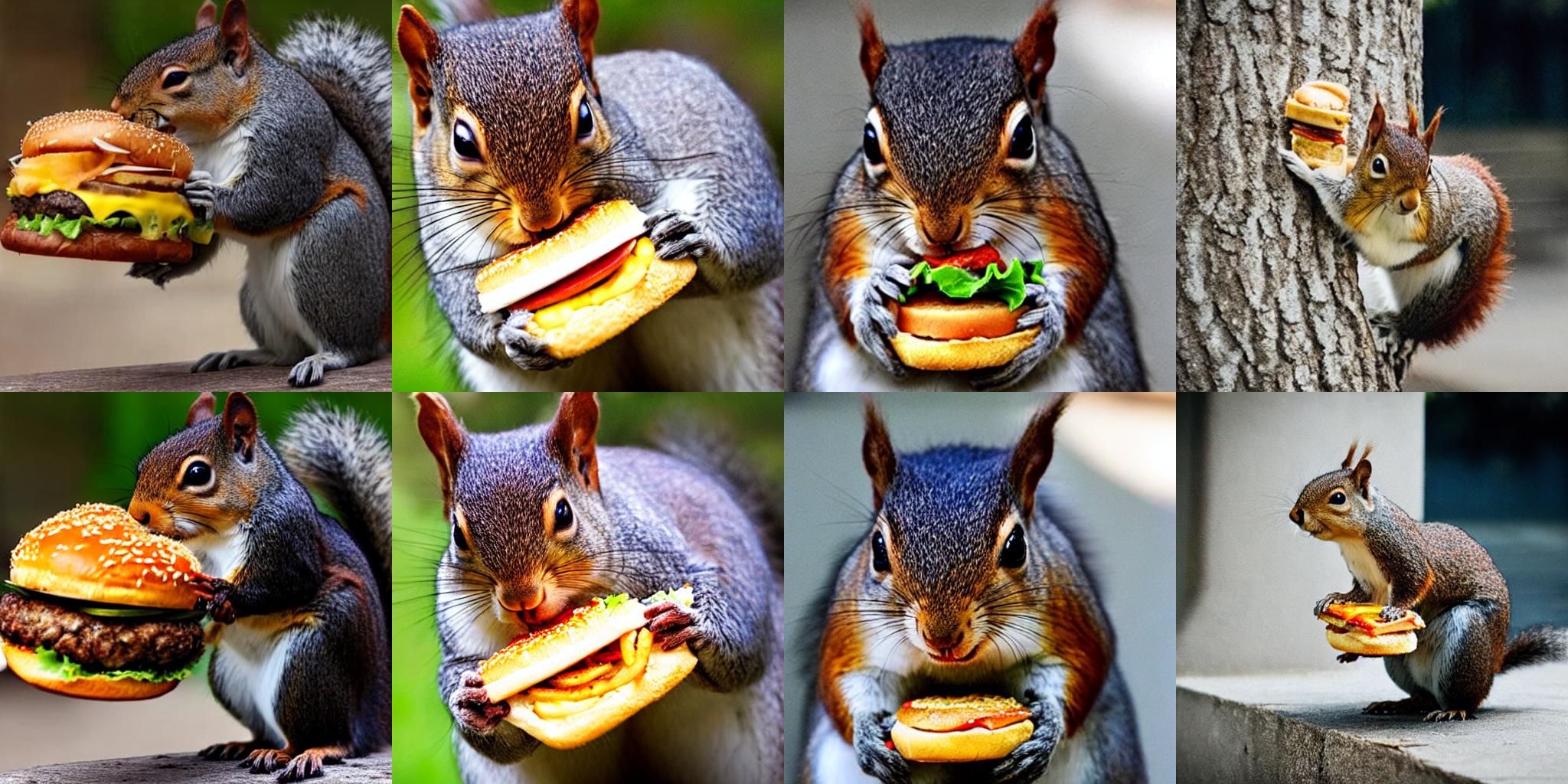
|
||||||
|
|
||||||
|
|
||||||
|
Let's see how Stable Diffusion 2 results are impacted:
|
||||||
|
|
||||||
|
```py
|
||||||
|
from diffusers import DiffusionPipeline
|
||||||
|
import torch
|
||||||
|
|
||||||
|
pipeline = DiffusionPipeline.from_pretrained(
|
||||||
|
"stabilityai/stable-diffusion-2-1", torch_dtype=torch.float16, safety_checker=None
|
||||||
|
).to("cuda")
|
||||||
|
|
||||||
|
prompt = "A squirrel eating a burger"
|
||||||
|
seed = 2023
|
||||||
|
|
||||||
|
pipeline.enable_freeu(s1=0.9, s2=0.2, b1=1.1, b2=1.2)
|
||||||
|
image = pipeline(prompt, generator=torch.manual_seed(seed)).images[0]
|
||||||
|
image
|
||||||
|
```
|
||||||
|
|
||||||
|
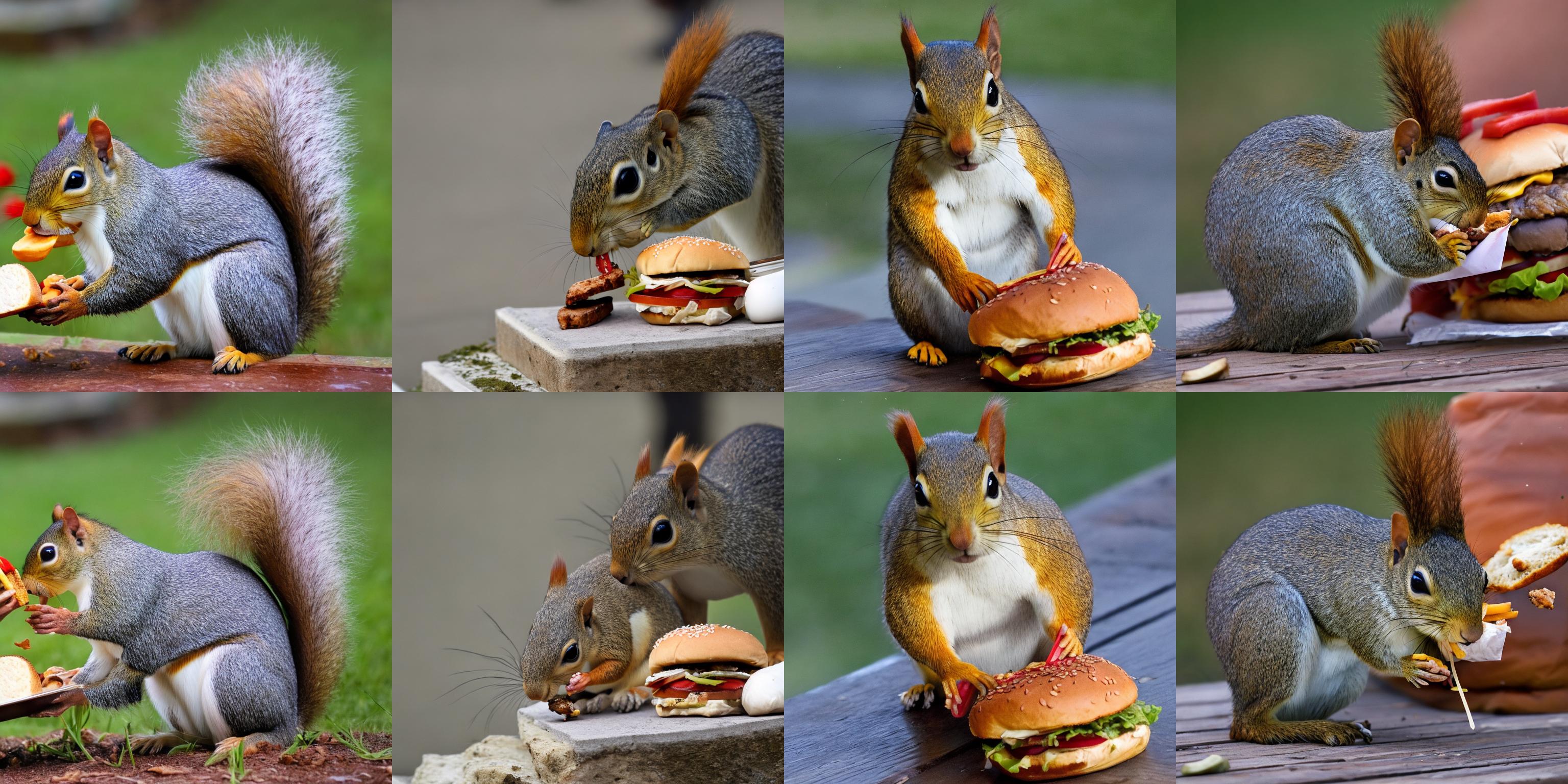
|
||||||
|
|
||||||
|
## Stable Diffusion XL
|
||||||
|
|
||||||
|
Finally, let's take a look at how FreeU affects Stable Diffusion XL results:
|
||||||
|
|
||||||
|
```py
|
||||||
|
from diffusers import DiffusionPipeline
|
||||||
|
import torch
|
||||||
|
|
||||||
|
pipeline = DiffusionPipeline.from_pretrained(
|
||||||
|
"stabilityai/stable-diffusion-xl-base-1.0", torch_dtype=torch.float16,
|
||||||
|
).to("cuda")
|
||||||
|
|
||||||
|
prompt = "A squirrel eating a burger"
|
||||||
|
seed = 2023
|
||||||
|
|
||||||
|
# Comes from
|
||||||
|
# https://wandb.ai/nasirk24/UNET-FreeU-SDXL/reports/FreeU-SDXL-Optimal-Parameters--Vmlldzo1NDg4NTUw
|
||||||
|
pipeline.enable_freeu(s1=0.6, s2=0.4, b1=1.1, b2=1.2)
|
||||||
|
image = pipeline(prompt, generator=torch.manual_seed(seed)).images[0]
|
||||||
|
image
|
||||||
|
```
|
||||||
|
|
||||||
|
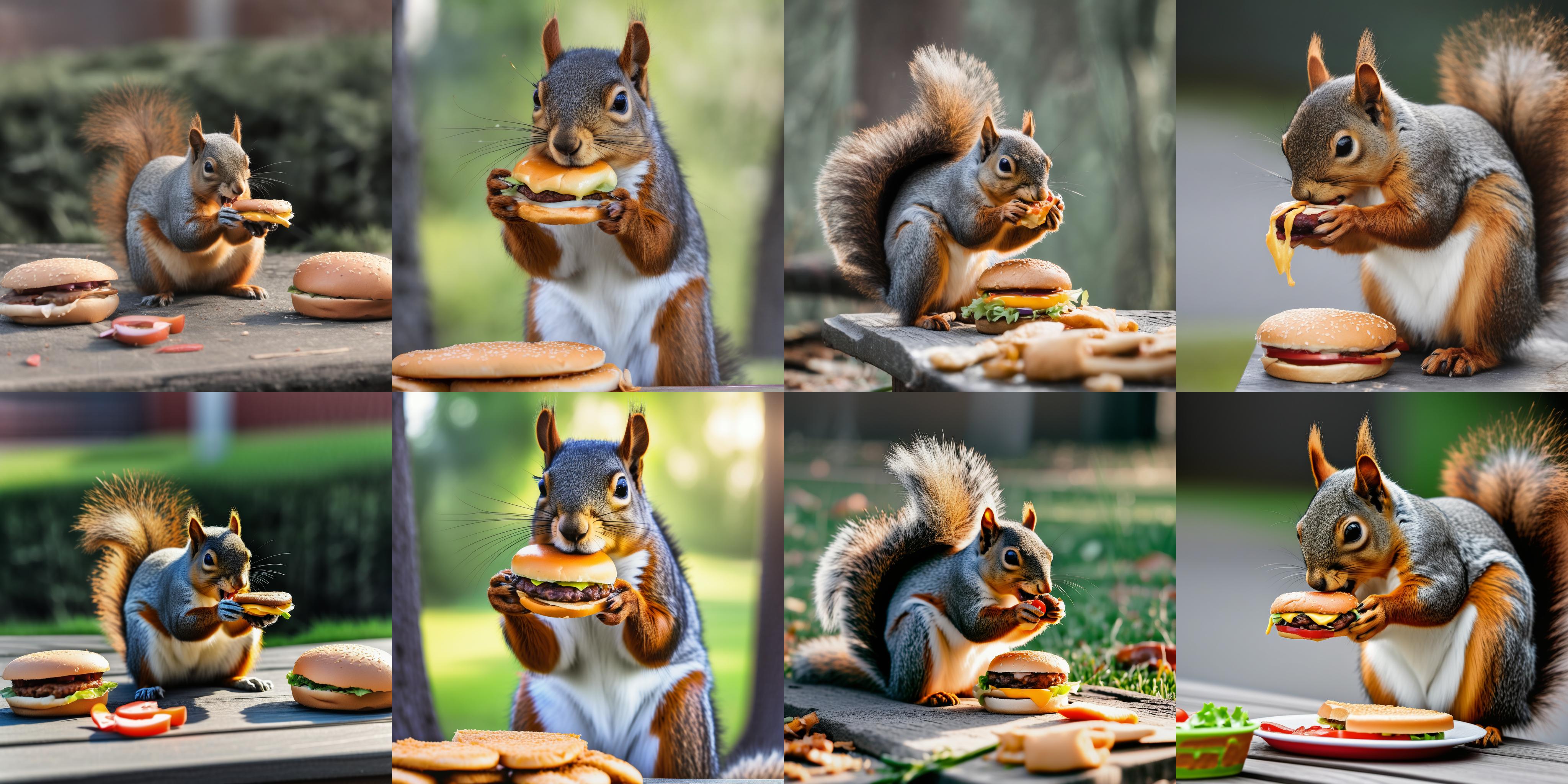
|
||||||
|
|
||||||
|
## Text-to-video generation
|
||||||
|
|
||||||
|
FreeU can also be used to improve video quality:
|
||||||
|
|
||||||
|
```python
|
||||||
|
from diffusers import DiffusionPipeline
|
||||||
|
from diffusers.utils import export_to_video
|
||||||
|
import torch
|
||||||
|
|
||||||
|
model_id = "cerspense/zeroscope_v2_576w"
|
||||||
|
pipe = DiffusionPipeline.from_pretrained(model_id, torch_dtype=torch.float16).to("cuda")
|
||||||
|
|
||||||
|
prompt = "an astronaut riding a horse on mars"
|
||||||
|
seed = 2023
|
||||||
|
|
||||||
|
# The values come from
|
||||||
|
# https://github.com/lyn-rgb/FreeU_Diffusers#video-pipelines
|
||||||
|
pipe.enable_freeu(b1=1.2, b2=1.4, s1=0.9, s2=0.2)
|
||||||
|
video_frames = pipe(prompt, height=320, width=576, num_frames=30, generator=torch.manual_seed(seed)).frames[0]
|
||||||
|
export_to_video(video_frames, "astronaut_rides_horse.mp4")
|
||||||
|
```
|
||||||
|
|
||||||
|
Thanks to [kadirnar](https://github.com/kadirnar/) for helping to integrate the feature, and to [justindujardin](https://github.com/justindujardin) for the helpful discussions.
|
||||||
@@ -1,190 +0,0 @@
|
|||||||
<!--Copyright 2024 The HuggingFace Team. All rights reserved.
|
|
||||||
|
|
||||||
Licensed under the Apache License, Version 2.0 (the "License"); you may not use this file except in compliance with
|
|
||||||
the License. You may obtain a copy of the License at
|
|
||||||
|
|
||||||
http://www.apache.org/licenses/LICENSE-2.0
|
|
||||||
|
|
||||||
Unless required by applicable law or agreed to in writing, software distributed under the License is distributed on
|
|
||||||
an "AS IS" BASIS, WITHOUT WARRANTIES OR CONDITIONS OF ANY KIND, either express or implied. See the License for the
|
|
||||||
specific language governing permissions and limitations under the License.
|
|
||||||
-->
|
|
||||||
|
|
||||||
# Controlling image quality
|
|
||||||
|
|
||||||
The components of a diffusion model, like the UNet and scheduler, can be optimized to improve the quality of generated images leading to better image lighting and details. These techniques are especially useful if you don't have the resources to simply use a larger model for inference. You can enable these techniques during inference without any additional training.
|
|
||||||
|
|
||||||
This guide will show you how to turn these techniques on in your pipeline and how to configure them to improve the quality of your generated images.
|
|
||||||
|
|
||||||
## Lighting
|
|
||||||
|
|
||||||
The Stable Diffusion models aren't very good at generating images that are very bright or dark because the scheduler doesn't start sampling from the last timestep and it doesn't enforce a zero signal-to-noise ratio (SNR). The [Common Diffusion Noise Schedules and Sample Steps are Flawed](https://hf.co/papers/2305.08891) paper fixes these issues which are now available in some Diffusers schedulers.
|
|
||||||
|
|
||||||
> [!TIP]
|
|
||||||
> For inference, you need a model that has been trained with *v_prediction*. To train your own model with *v_prediction*, add the following flag to the [train_text_to_image.py](https://github.com/huggingface/diffusers/blob/main/examples/text_to_image/train_text_to_image.py) or [train_text_to_image_lora.py](https://github.com/huggingface/diffusers/blob/main/examples/text_to_image/train_text_to_image_lora.py) scripts.
|
|
||||||
>
|
|
||||||
> ```bash
|
|
||||||
> --prediction_type="v_prediction"
|
|
||||||
> ```
|
|
||||||
|
|
||||||
For example, load the [ptx0/pseudo-journey-v2](https://hf.co/ptx0/pseudo-journey-v2) checkpoint which was trained with `v_prediction` and the [`DDIMScheduler`]. Now you should configure the following parameters in the [`DDIMScheduler`].
|
|
||||||
|
|
||||||
* `rescale_betas_zero_snr=True` to rescale the noise schedule to zero SNR
|
|
||||||
* `timestep_spacing="trailing"` to start sampling from the last timestep
|
|
||||||
|
|
||||||
Set `guidance_rescale` in the pipeline to prevent over-exposure. A lower value increases brightness but some of the details may appear washed out.
|
|
||||||
|
|
||||||
```py
|
|
||||||
from diffusers import DiffusionPipeline, DDIMScheduler
|
|
||||||
|
|
||||||
pipeline = DiffusionPipeline.from_pretrained("ptx0/pseudo-journey-v2", use_safetensors=True)
|
|
||||||
|
|
||||||
pipeline.scheduler = DDIMScheduler.from_config(
|
|
||||||
pipeline.scheduler.config, rescale_betas_zero_snr=True, timestep_spacing="trailing"
|
|
||||||
)
|
|
||||||
pipeline.to("cuda")
|
|
||||||
prompt = "cinematic photo of a snowy mountain at night with the northern lights aurora borealis overhead, 35mm photograph, film, professional, 4k, highly detailed"
|
|
||||||
generator = torch.Generator(device="cpu").manual_seed(23)
|
|
||||||
image = pipeline(prompt, guidance_rescale=0.7, generator=generator).images[0]
|
|
||||||
image
|
|
||||||
```
|
|
||||||
|
|
||||||
<div class="flex gap-4">
|
|
||||||
<div>
|
|
||||||
<img class="rounded-xl" src="https://huggingface.co/datasets/huggingface/documentation-images/resolve/main/diffusers/no-zero-snr.png"/>
|
|
||||||
<figcaption class="mt-2 text-center text-sm text-gray-500">default Stable Diffusion v2-1 image</figcaption>
|
|
||||||
</div>
|
|
||||||
<div>
|
|
||||||
<img class="rounded-xl" src="https://huggingface.co/datasets/huggingface/documentation-images/resolve/main/diffusers/zero-snr.png"/>
|
|
||||||
<figcaption class="mt-2 text-center text-sm text-gray-500">image with zero SNR and trailing timestep spacing enabled</figcaption>
|
|
||||||
</div>
|
|
||||||
</div>
|
|
||||||
|
|
||||||
## Details
|
|
||||||
|
|
||||||
[FreeU](https://hf.co/papers/2309.11497) improves image details by rebalancing the UNet's backbone and skip connection weights. The skip connections can cause the model to overlook some of the backbone semantics which may lead to unnatural image details in the generated image. This technique does not require any additional training and can be applied on the fly during inference for tasks like image-to-image and text-to-video.
|
|
||||||
|
|
||||||
Use the [`~pipelines.StableDiffusionMixin.enable_freeu`] method on your pipeline and configure the scaling factors for the backbone (`b1` and `b2`) and skip connections (`s1` and `s2`). The number after each scaling factor corresponds to the stage in the UNet where the factor is applied. Take a look at the [FreeU](https://github.com/ChenyangSi/FreeU#parameters) repository for reference hyperparameters for different models.
|
|
||||||
|
|
||||||
<hfoptions id="freeu">
|
|
||||||
<hfoption id="Stable Diffusion v1-5">
|
|
||||||
|
|
||||||
```py
|
|
||||||
import torch
|
|
||||||
from diffusers import DiffusionPipeline
|
|
||||||
|
|
||||||
pipeline = DiffusionPipeline.from_pretrained(
|
|
||||||
"runwayml/stable-diffusion-v1-5", torch_dtype=torch.float16, safety_checker=None
|
|
||||||
).to("cuda")
|
|
||||||
pipeline.enable_freeu(s1=0.9, s2=0.2, b1=1.5, b2=1.6)
|
|
||||||
generator = torch.Generator(device="cpu").manual_seed(33)
|
|
||||||
prompt = ""
|
|
||||||
image = pipeline(prompt, generator=generator).images[0]
|
|
||||||
image
|
|
||||||
```
|
|
||||||
|
|
||||||
<div class="flex gap-4">
|
|
||||||
<div>
|
|
||||||
<img class="rounded-xl" src="https://huggingface.co/datasets/huggingface/documentation-images/resolve/main/diffusers/sdv15-no-freeu.png"/>
|
|
||||||
<figcaption class="mt-2 text-center text-sm text-gray-500">FreeU disabled</figcaption>
|
|
||||||
</div>
|
|
||||||
<div>
|
|
||||||
<img class="rounded-xl" src="https://huggingface.co/datasets/huggingface/documentation-images/resolve/main/diffusers/sdv15-freeu.png"/>
|
|
||||||
<figcaption class="mt-2 text-center text-sm text-gray-500">FreeU enabled</figcaption>
|
|
||||||
</div>
|
|
||||||
</div>
|
|
||||||
|
|
||||||
</hfoption>
|
|
||||||
<hfoption id="Stable Diffusion v2-1">
|
|
||||||
|
|
||||||
```py
|
|
||||||
import torch
|
|
||||||
from diffusers import DiffusionPipeline
|
|
||||||
|
|
||||||
pipeline = DiffusionPipeline.from_pretrained(
|
|
||||||
"stabilityai/stable-diffusion-2-1", torch_dtype=torch.float16, safety_checker=None
|
|
||||||
).to("cuda")
|
|
||||||
pipeline.enable_freeu(s1=0.9, s2=0.2, b1=1.4, b2=1.6)
|
|
||||||
generator = torch.Generator(device="cpu").manual_seed(80)
|
|
||||||
prompt = "A squirrel eating a burger"
|
|
||||||
image = pipeline(prompt, generator=generator).images[0]
|
|
||||||
image
|
|
||||||
```
|
|
||||||
|
|
||||||
<div class="flex gap-4">
|
|
||||||
<div>
|
|
||||||
<img class="rounded-xl" src="https://huggingface.co/datasets/huggingface/documentation-images/resolve/main/diffusers/sdv21-no-freeu.png"/>
|
|
||||||
<figcaption class="mt-2 text-center text-sm text-gray-500">FreeU disabled</figcaption>
|
|
||||||
</div>
|
|
||||||
<div>
|
|
||||||
<img class="rounded-xl" src="https://huggingface.co/datasets/huggingface/documentation-images/resolve/main/diffusers/sdv21-freeu.png"/>
|
|
||||||
<figcaption class="mt-2 text-center text-sm text-gray-500">FreeU enabled</figcaption>
|
|
||||||
</div>
|
|
||||||
</div>
|
|
||||||
|
|
||||||
</hfoption>
|
|
||||||
<hfoption id="Stable Diffusion XL">
|
|
||||||
|
|
||||||
```py
|
|
||||||
import torch
|
|
||||||
from diffusers import DiffusionPipeline
|
|
||||||
|
|
||||||
pipeline = DiffusionPipeline.from_pretrained(
|
|
||||||
"stabilityai/stable-diffusion-xl-base-1.0", torch_dtype=torch.float16,
|
|
||||||
).to("cuda")
|
|
||||||
pipeline.enable_freeu(s1=0.9, s2=0.2, b1=1.3, b2=1.4)
|
|
||||||
generator = torch.Generator(device="cpu").manual_seed(13)
|
|
||||||
prompt = "A squirrel eating a burger"
|
|
||||||
image = pipeline(prompt, generator=generator).images[0]
|
|
||||||
image
|
|
||||||
```
|
|
||||||
|
|
||||||
<div class="flex gap-4">
|
|
||||||
<div>
|
|
||||||
<img class="rounded-xl" src="https://huggingface.co/datasets/huggingface/documentation-images/resolve/main/diffusers/sdxl-no-freeu.png"/>
|
|
||||||
<figcaption class="mt-2 text-center text-sm text-gray-500">FreeU disabled</figcaption>
|
|
||||||
</div>
|
|
||||||
<div>
|
|
||||||
<img class="rounded-xl" src="https://huggingface.co/datasets/huggingface/documentation-images/resolve/main/diffusers/sdxl-freeu.png"/>
|
|
||||||
<figcaption class="mt-2 text-center text-sm text-gray-500">FreeU enabled</figcaption>
|
|
||||||
</div>
|
|
||||||
</div>
|
|
||||||
|
|
||||||
</hfoption>
|
|
||||||
<hfoption id="Zeroscope">
|
|
||||||
|
|
||||||
```py
|
|
||||||
import torch
|
|
||||||
from diffusers import DiffusionPipeline
|
|
||||||
from diffusers.utils import export_to_video
|
|
||||||
|
|
||||||
pipeline = DiffusionPipeline.from_pretrained(
|
|
||||||
"damo-vilab/text-to-video-ms-1.7b", torch_dtype=torch.float16
|
|
||||||
).to("cuda")
|
|
||||||
# values come from https://github.com/lyn-rgb/FreeU_Diffusers#video-pipelines
|
|
||||||
pipeline.enable_freeu(b1=1.2, b2=1.4, s1=0.9, s2=0.2)
|
|
||||||
prompt = "Confident teddy bear surfer rides the wave in the tropics"
|
|
||||||
generator = torch.Generator(device="cpu").manual_seed(47)
|
|
||||||
video_frames = pipeline(prompt, generator=generator).frames[0]
|
|
||||||
export_to_video(video_frames, "teddy_bear.mp4", fps=10)
|
|
||||||
```
|
|
||||||
|
|
||||||
<div class="flex gap-4">
|
|
||||||
<div>
|
|
||||||
<img class="rounded-xl" src="https://huggingface.co/datasets/huggingface/documentation-images/resolve/main/diffusers/video-no-freeu.gif"/>
|
|
||||||
<figcaption class="mt-2 text-center text-sm text-gray-500">FreeU disabled</figcaption>
|
|
||||||
</div>
|
|
||||||
<div>
|
|
||||||
<img class="rounded-xl" src="https://huggingface.co/datasets/huggingface/documentation-images/resolve/main/diffusers/video-freeu.gif"/>
|
|
||||||
<figcaption class="mt-2 text-center text-sm text-gray-500">FreeU enabled</figcaption>
|
|
||||||
</div>
|
|
||||||
</div>
|
|
||||||
|
|
||||||
</hfoption>
|
|
||||||
</hfoptions>
|
|
||||||
|
|
||||||
Call the [`pipelines.StableDiffusionMixin.disable_freeu`] method to disable FreeU.
|
|
||||||
|
|
||||||
```py
|
|
||||||
pipeline.disable_freeu()
|
|
||||||
```
|
|
||||||
@@ -277,7 +277,7 @@ images = pipeline(
|
|||||||
|
|
||||||
### IP-Adapter masking
|
### IP-Adapter masking
|
||||||
|
|
||||||
Binary masks specify which portion of the output image should be assigned to an IP-Adapter. This is useful for composing more than one IP-Adapter image. For each input IP-Adapter image, you must provide a binary mask.
|
Binary masks specify which portion of the output image should be assigned to an IP-Adapter. This is useful for composing more than one IP-Adapter image. For each input IP-Adapter image, you must provide a binary mask an an IP-Adapter.
|
||||||
|
|
||||||
To start, preprocess the input IP-Adapter images with the [`~image_processor.IPAdapterMaskProcessor.preprocess()`] to generate their masks. For optimal results, provide the output height and width to [`~image_processor.IPAdapterMaskProcessor.preprocess()`]. This ensures masks with different aspect ratios are appropriately stretched. If the input masks already match the aspect ratio of the generated image, you don't have to set the `height` and `width`.
|
To start, preprocess the input IP-Adapter images with the [`~image_processor.IPAdapterMaskProcessor.preprocess()`] to generate their masks. For optimal results, provide the output height and width to [`~image_processor.IPAdapterMaskProcessor.preprocess()`]. This ensures masks with different aspect ratios are appropriately stretched. If the input masks already match the aspect ratio of the generated image, you don't have to set the `height` and `width`.
|
||||||
|
|
||||||
@@ -305,18 +305,13 @@ masks = processor.preprocess([mask1, mask2], height=output_height, width=output_
|
|||||||
</div>
|
</div>
|
||||||
</div>
|
</div>
|
||||||
|
|
||||||
When there is more than one input IP-Adapter image, load them as a list and provide the IP-Adapter scale list. Each of the input IP-Adapter images here corresponds to one of the masks generated above.
|
When there is more than one input IP-Adapter image, load them as a list to ensure each image is assigned to a different IP-Adapter. Each of the input IP-Adapter images here correspond to the masks generated above.
|
||||||
|
|
||||||
```py
|
```py
|
||||||
pipeline.load_ip_adapter("h94/IP-Adapter", subfolder="sdxl_models", weight_name=["ip-adapter-plus-face_sdxl_vit-h.safetensors"])
|
|
||||||
pipeline.set_ip_adapter_scale([[0.7, 0.7]]) # one scale for each image-mask pair
|
|
||||||
|
|
||||||
face_image1 = load_image("https://huggingface.co/datasets/huggingface/documentation-images/resolve/main/diffusers/ip_mask_girl1.png")
|
face_image1 = load_image("https://huggingface.co/datasets/huggingface/documentation-images/resolve/main/diffusers/ip_mask_girl1.png")
|
||||||
face_image2 = load_image("https://huggingface.co/datasets/huggingface/documentation-images/resolve/main/diffusers/ip_mask_girl2.png")
|
face_image2 = load_image("https://huggingface.co/datasets/huggingface/documentation-images/resolve/main/diffusers/ip_mask_girl2.png")
|
||||||
|
|
||||||
ip_images = [[face_image1, face_image2]]
|
ip_images = [[face_image1], [face_image2]]
|
||||||
|
|
||||||
masks = [masks.reshape(1, masks.shape[0], masks.shape[2], masks.shape[3])]
|
|
||||||
```
|
```
|
||||||
|
|
||||||
<div class="flex flex-row gap-4">
|
<div class="flex flex-row gap-4">
|
||||||
@@ -333,6 +328,8 @@ masks = [masks.reshape(1, masks.shape[0], masks.shape[2], masks.shape[3])]
|
|||||||
Now pass the preprocessed masks to `cross_attention_kwargs` in the pipeline call.
|
Now pass the preprocessed masks to `cross_attention_kwargs` in the pipeline call.
|
||||||
|
|
||||||
```py
|
```py
|
||||||
|
pipeline.load_ip_adapter("h94/IP-Adapter", subfolder="sdxl_models", weight_name=["ip-adapter-plus-face_sdxl_vit-h.safetensors"] * 2)
|
||||||
|
pipeline.set_ip_adapter_scale([0.7] * 2)
|
||||||
generator = torch.Generator(device="cpu").manual_seed(0)
|
generator = torch.Generator(device="cpu").manual_seed(0)
|
||||||
num_images = 1
|
num_images = 1
|
||||||
|
|
||||||
@@ -439,7 +436,7 @@ image = torch.from_numpy(faces[0].normed_embedding)
|
|||||||
ref_images_embeds.append(image.unsqueeze(0))
|
ref_images_embeds.append(image.unsqueeze(0))
|
||||||
ref_images_embeds = torch.stack(ref_images_embeds, dim=0).unsqueeze(0)
|
ref_images_embeds = torch.stack(ref_images_embeds, dim=0).unsqueeze(0)
|
||||||
neg_ref_images_embeds = torch.zeros_like(ref_images_embeds)
|
neg_ref_images_embeds = torch.zeros_like(ref_images_embeds)
|
||||||
id_embeds = torch.cat([neg_ref_images_embeds, ref_images_embeds]).to(dtype=torch.float16, device="cuda")
|
id_embeds = torch.cat([neg_ref_images_embeds, ref_images_embeds]).to(dtype=torch.float16, device="cuda"))
|
||||||
|
|
||||||
generator = torch.Generator(device="cpu").manual_seed(42)
|
generator = torch.Generator(device="cpu").manual_seed(42)
|
||||||
|
|
||||||
@@ -455,28 +452,13 @@ images = pipeline(
|
|||||||
Both IP-Adapter FaceID Plus and Plus v2 models require CLIP image embeddings. You can prepare face embeddings as shown previously, then you can extract and pass CLIP embeddings to the hidden image projection layers.
|
Both IP-Adapter FaceID Plus and Plus v2 models require CLIP image embeddings. You can prepare face embeddings as shown previously, then you can extract and pass CLIP embeddings to the hidden image projection layers.
|
||||||
|
|
||||||
```py
|
```py
|
||||||
from insightface.utils import face_align
|
clip_embeds = pipeline.prepare_ip_adapter_image_embeds([ip_adapter_images], None, torch.device("cuda"), num_images, True)[0]
|
||||||
|
|
||||||
ref_images_embeds = []
|
|
||||||
ip_adapter_images = []
|
|
||||||
app = FaceAnalysis(name="buffalo_l", providers=['CUDAExecutionProvider', 'CPUExecutionProvider'])
|
|
||||||
app.prepare(ctx_id=0, det_size=(640, 640))
|
|
||||||
image = cv2.cvtColor(np.asarray(image), cv2.COLOR_BGR2RGB)
|
|
||||||
faces = app.get(image)
|
|
||||||
ip_adapter_images.append(face_align.norm_crop(image, landmark=faces[0].kps, image_size=224))
|
|
||||||
image = torch.from_numpy(faces[0].normed_embedding)
|
|
||||||
ref_images_embeds.append(image.unsqueeze(0))
|
|
||||||
ref_images_embeds = torch.stack(ref_images_embeds, dim=0).unsqueeze(0)
|
|
||||||
neg_ref_images_embeds = torch.zeros_like(ref_images_embeds)
|
|
||||||
id_embeds = torch.cat([neg_ref_images_embeds, ref_images_embeds]).to(dtype=torch.float16, device="cuda")
|
|
||||||
|
|
||||||
clip_embeds = pipeline.prepare_ip_adapter_image_embeds(
|
|
||||||
[ip_adapter_images], None, torch.device("cuda"), num_images, True)[0]
|
|
||||||
|
|
||||||
pipeline.unet.encoder_hid_proj.image_projection_layers[0].clip_embeds = clip_embeds.to(dtype=torch.float16)
|
pipeline.unet.encoder_hid_proj.image_projection_layers[0].clip_embeds = clip_embeds.to(dtype=torch.float16)
|
||||||
pipeline.unet.encoder_hid_proj.image_projection_layers[0].shortcut = False # True if Plus v2
|
pipeline.unet.encoder_hid_proj.image_projection_layers[0].shortcut = False # True if Plus v2
|
||||||
```
|
```
|
||||||
|
|
||||||
|
|
||||||
### Multi IP-Adapter
|
### Multi IP-Adapter
|
||||||
|
|
||||||
More than one IP-Adapter can be used at the same time to generate specific images in more diverse styles. For example, you can use IP-Adapter-Face to generate consistent faces and characters, and IP-Adapter Plus to generate those faces in a specific style.
|
More than one IP-Adapter can be used at the same time to generate specific images in more diverse styles. For example, you can use IP-Adapter-Face to generate consistent faces and characters, and IP-Adapter Plus to generate those faces in a specific style.
|
||||||
@@ -661,16 +643,16 @@ image
|
|||||||
|
|
||||||
### Style & layout control
|
### Style & layout control
|
||||||
|
|
||||||
[InstantStyle](https://arxiv.org/abs/2404.02733) is a plug-and-play method on top of IP-Adapter, which disentangles style and layout from image prompt to control image generation. This way, you can generate images following only the style or layout from image prompt, with significantly improved diversity. This is achieved by only activating IP-Adapters to specific parts of the model.
|
[InstantStyle](https://arxiv.org/abs/2404.02733) is a plug-and-play method on top of IP-Adapter, which disentangles style and layout from image prompt to control image generation. This is achieved by only inserting IP-Adapters to some specific part of the model.
|
||||||
|
|
||||||
By default IP-Adapters are inserted to all layers of the model. Use the [`~loaders.IPAdapterMixin.set_ip_adapter_scale`] method with a dictionary to assign scales to IP-Adapter at different layers.
|
By default IP-Adapters are inserted to all layers of the model. Use the [`~loaders.IPAdapterMixin.set_ip_adapter_scale`] method with a dictionary to assign scales to IP-Adapter at different layers.
|
||||||
|
|
||||||
```py
|
```py
|
||||||
from diffusers import AutoPipelineForText2Image
|
from diffusers import AutoPipelineForImage2Image
|
||||||
from diffusers.utils import load_image
|
from diffusers.utils import load_image
|
||||||
import torch
|
import torch
|
||||||
|
|
||||||
pipeline = AutoPipelineForText2Image.from_pretrained("stabilityai/stable-diffusion-xl-base-1.0", torch_dtype=torch.float16).to("cuda")
|
pipeline = AutoPipelineForImage2Image.from_pretrained("stabilityai/stable-diffusion-xl-base-1.0", torch_dtype=torch.float16).to("cuda")
|
||||||
pipeline.load_ip_adapter("h94/IP-Adapter", subfolder="sdxl_models", weight_name="ip-adapter_sdxl.bin")
|
pipeline.load_ip_adapter("h94/IP-Adapter", subfolder="sdxl_models", weight_name="ip-adapter_sdxl.bin")
|
||||||
|
|
||||||
scale = {
|
scale = {
|
||||||
@@ -680,15 +662,15 @@ scale = {
|
|||||||
pipeline.set_ip_adapter_scale(scale)
|
pipeline.set_ip_adapter_scale(scale)
|
||||||
```
|
```
|
||||||
|
|
||||||
This will activate IP-Adapter at the second layer in the model's down-part block 2 and up-part block 0. The former is the layer where IP-Adapter injects layout information and the latter injects style. Inserting IP-Adapter to these two layers you can generate images following both the style and layout from image prompt, but with contents more aligned to text prompt.
|
This will activate IP-Adapter at the second layer in the model's down-part block 2 and up-part block 0. The former is the layer where IP-Adapter injects layout information and the latter injects style. Inserting IP-Adapter to these two layers you can generate images following the style and layout of image prompt, but with contents more aligned to text prompt.
|
||||||
|
|
||||||
```py
|
```py
|
||||||
style_image = load_image("https://huggingface.co/datasets/huggingface/documentation-images/resolve/0052a70beed5bf71b92610a43a52df6d286cd5f3/diffusers/rabbit.jpg")
|
style_image = load_image("https://huggingface.co/datasets/huggingface/documentation-images/resolve/0052a70beed5bf71b92610a43a52df6d286cd5f3/diffusers/rabbit.jpg")
|
||||||
|
|
||||||
generator = torch.Generator(device="cpu").manual_seed(26)
|
generator = torch.Generator(device="cpu").manual_seed(42)
|
||||||
image = pipeline(
|
image = pipeline(
|
||||||
prompt="a cat, masterpiece, best quality, high quality",
|
prompt="a cat, masterpiece, best quality, high quality",
|
||||||
ip_adapter_image=style_image,
|
image=style_image,
|
||||||
negative_prompt="text, watermark, lowres, low quality, worst quality, deformed, glitch, low contrast, noisy, saturation, blurry",
|
negative_prompt="text, watermark, lowres, low quality, worst quality, deformed, glitch, low contrast, noisy, saturation, blurry",
|
||||||
guidance_scale=5,
|
guidance_scale=5,
|
||||||
num_inference_steps=30,
|
num_inference_steps=30,
|
||||||
@@ -703,7 +685,7 @@ image
|
|||||||
<figcaption class="mt-2 text-center text-sm text-gray-500">IP-Adapter image</figcaption>
|
<figcaption class="mt-2 text-center text-sm text-gray-500">IP-Adapter image</figcaption>
|
||||||
</div>
|
</div>
|
||||||
<div class="flex-1">
|
<div class="flex-1">
|
||||||
<img class="rounded-xl" src="https://huggingface.co/datasets/huggingface/documentation-images/resolve/main/datasets/cat_style_layout.png"/>
|
<img class="rounded-xl" src="https://huggingface.co/datasets/huggingface/documentation-images/resolve/0052a70beed5bf71b92610a43a52df6d286cd5f3/diffusers/rabbit_style_layout_cat.png"/>
|
||||||
<figcaption class="mt-2 text-center text-sm text-gray-500">generated image</figcaption>
|
<figcaption class="mt-2 text-center text-sm text-gray-500">generated image</figcaption>
|
||||||
</div>
|
</div>
|
||||||
</div>
|
</div>
|
||||||
@@ -718,10 +700,10 @@ scale = {
|
|||||||
}
|
}
|
||||||
pipeline.set_ip_adapter_scale(scale)
|
pipeline.set_ip_adapter_scale(scale)
|
||||||
|
|
||||||
generator = torch.Generator(device="cpu").manual_seed(26)
|
generator = torch.Generator(device="cpu").manual_seed(42)
|
||||||
image = pipeline(
|
image = pipeline(
|
||||||
prompt="a cat, masterpiece, best quality, high quality",
|
prompt="a cat, masterpiece, best quality, high quality",
|
||||||
ip_adapter_image=style_image,
|
image=style_image,
|
||||||
negative_prompt="text, watermark, lowres, low quality, worst quality, deformed, glitch, low contrast, noisy, saturation, blurry",
|
negative_prompt="text, watermark, lowres, low quality, worst quality, deformed, glitch, low contrast, noisy, saturation, blurry",
|
||||||
guidance_scale=5,
|
guidance_scale=5,
|
||||||
num_inference_steps=30,
|
num_inference_steps=30,
|
||||||
@@ -732,11 +714,11 @@ image
|
|||||||
|
|
||||||
<div class="flex flex-row gap-4">
|
<div class="flex flex-row gap-4">
|
||||||
<div class="flex-1">
|
<div class="flex-1">
|
||||||
<img class="rounded-xl" src="https://huggingface.co/datasets/huggingface/documentation-images/resolve/main/datasets/cat_style_only.png"/>
|
<img class="rounded-xl" src="https://huggingface.co/datasets/huggingface/documentation-images/resolve/0052a70beed5bf71b92610a43a52df6d286cd5f3/diffusers/rabbit_style_cat.png"/>
|
||||||
<figcaption class="mt-2 text-center text-sm text-gray-500">IP-Adapter only in style layer</figcaption>
|
<figcaption class="mt-2 text-center text-sm text-gray-500">IP-Adapter only in style layer</figcaption>
|
||||||
</div>
|
</div>
|
||||||
<div class="flex-1">
|
<div class="flex-1">
|
||||||
<img class="rounded-xl" src="https://huggingface.co/datasets/huggingface/documentation-images/resolve/main/datasets/cat_ip_adapter.png"/>
|
<img class="rounded-xl" src="https://huggingface.co/datasets/huggingface/documentation-images/resolve/30518dfe089e6bf50008875077b44cb98fb2065c/diffusers/default_out.png"/>
|
||||||
<figcaption class="mt-2 text-center text-sm text-gray-500">IP-Adapter in all layers</figcaption>
|
<figcaption class="mt-2 text-center text-sm text-gray-500">IP-Adapter in all layers</figcaption>
|
||||||
</div>
|
</div>
|
||||||
</div>
|
</div>
|
||||||
|
|||||||
@@ -0,0 +1,191 @@
|
|||||||
|
<!--Copyright 2024 The HuggingFace Team. All rights reserved.
|
||||||
|
|
||||||
|
Licensed under the Apache License, Version 2.0 (the "License"); you may not use this file except in compliance with
|
||||||
|
the License. You may obtain a copy of the License at
|
||||||
|
|
||||||
|
http://www.apache.org/licenses/LICENSE-2.0
|
||||||
|
|
||||||
|
Unless required by applicable law or agreed to in writing, software distributed under the License is distributed on
|
||||||
|
an "AS IS" BASIS, WITHOUT WARRANTIES OR CONDITIONS OF ANY KIND, either express or implied. See the License for the
|
||||||
|
specific language governing permissions and limitations under the License.
|
||||||
|
-->
|
||||||
|
|
||||||
|
# Create reproducible pipelines
|
||||||
|
|
||||||
|
[[open-in-colab]]
|
||||||
|
|
||||||
|
Reproducibility is important for testing, replicating results, and can even be used to [improve image quality](reusing_seeds). However, the randomness in diffusion models is a desired property because it allows the pipeline to generate different images every time it is run. While you can't expect to get the exact same results across platforms, you can expect results to be reproducible across releases and platforms within a certain tolerance range. Even then, tolerance varies depending on the diffusion pipeline and checkpoint.
|
||||||
|
|
||||||
|
This is why it's important to understand how to control sources of randomness in diffusion models or use deterministic algorithms.
|
||||||
|
|
||||||
|
<Tip>
|
||||||
|
|
||||||
|
💡 We strongly recommend reading PyTorch's [statement about reproducibility](https://pytorch.org/docs/stable/notes/randomness.html):
|
||||||
|
|
||||||
|
> Completely reproducible results are not guaranteed across PyTorch releases, individual commits, or different platforms. Furthermore, results may not be reproducible between CPU and GPU executions, even when using identical seeds.
|
||||||
|
|
||||||
|
</Tip>
|
||||||
|
|
||||||
|
## Control randomness
|
||||||
|
|
||||||
|
During inference, pipelines rely heavily on random sampling operations which include creating the
|
||||||
|
Gaussian noise tensors to denoise and adding noise to the scheduling step.
|
||||||
|
|
||||||
|
Take a look at the tensor values in the [`DDIMPipeline`] after two inference steps:
|
||||||
|
|
||||||
|
```python
|
||||||
|
from diffusers import DDIMPipeline
|
||||||
|
import numpy as np
|
||||||
|
|
||||||
|
model_id = "google/ddpm-cifar10-32"
|
||||||
|
|
||||||
|
# load model and scheduler
|
||||||
|
ddim = DDIMPipeline.from_pretrained(model_id, use_safetensors=True)
|
||||||
|
|
||||||
|
# run pipeline for just two steps and return numpy tensor
|
||||||
|
image = ddim(num_inference_steps=2, output_type="np").images
|
||||||
|
print(np.abs(image).sum())
|
||||||
|
```
|
||||||
|
|
||||||
|
Running the code above prints one value, but if you run it again you get a different value. What is going on here?
|
||||||
|
|
||||||
|
Every time the pipeline is run, [`torch.randn`](https://pytorch.org/docs/stable/generated/torch.randn.html) uses a different random seed to create Gaussian noise which is denoised stepwise. This leads to a different result each time it is run, which is great for diffusion pipelines since it generates a different random image each time.
|
||||||
|
|
||||||
|
But if you need to reliably generate the same image, that'll depend on whether you're running the pipeline on a CPU or GPU.
|
||||||
|
|
||||||
|
### CPU
|
||||||
|
|
||||||
|
To generate reproducible results on a CPU, you'll need to use a PyTorch [`Generator`](https://pytorch.org/docs/stable/generated/torch.Generator.html) and set a seed:
|
||||||
|
|
||||||
|
```python
|
||||||
|
import torch
|
||||||
|
from diffusers import DDIMPipeline
|
||||||
|
import numpy as np
|
||||||
|
|
||||||
|
model_id = "google/ddpm-cifar10-32"
|
||||||
|
|
||||||
|
# load model and scheduler
|
||||||
|
ddim = DDIMPipeline.from_pretrained(model_id, use_safetensors=True)
|
||||||
|
|
||||||
|
# create a generator for reproducibility
|
||||||
|
generator = torch.Generator(device="cpu").manual_seed(0)
|
||||||
|
|
||||||
|
# run pipeline for just two steps and return numpy tensor
|
||||||
|
image = ddim(num_inference_steps=2, output_type="np", generator=generator).images
|
||||||
|
print(np.abs(image).sum())
|
||||||
|
```
|
||||||
|
|
||||||
|
Now when you run the code above, it always prints a value of `1491.1711` no matter what because the `Generator` object with the seed is passed to all the random functions of the pipeline.
|
||||||
|
|
||||||
|
If you run this code example on your specific hardware and PyTorch version, you should get a similar, if not the same, result.
|
||||||
|
|
||||||
|
<Tip>
|
||||||
|
|
||||||
|
💡 It might be a bit unintuitive at first to pass `Generator` objects to the pipeline instead of
|
||||||
|
just integer values representing the seed, but this is the recommended design when dealing with
|
||||||
|
probabilistic models in PyTorch, as `Generator`s are *random states* that can be
|
||||||
|
passed to multiple pipelines in a sequence.
|
||||||
|
|
||||||
|
</Tip>
|
||||||
|
|
||||||
|
### GPU
|
||||||
|
|
||||||
|
Writing a reproducible pipeline on a GPU is a bit trickier, and full reproducibility across different hardware is not guaranteed because matrix multiplication - which diffusion pipelines require a lot of - is less deterministic on a GPU than a CPU. For example, if you run the same code example above on a GPU:
|
||||||
|
|
||||||
|
```python
|
||||||
|
import torch
|
||||||
|
from diffusers import DDIMPipeline
|
||||||
|
import numpy as np
|
||||||
|
|
||||||
|
model_id = "google/ddpm-cifar10-32"
|
||||||
|
|
||||||
|
# load model and scheduler
|
||||||
|
ddim = DDIMPipeline.from_pretrained(model_id, use_safetensors=True)
|
||||||
|
ddim.to("cuda")
|
||||||
|
|
||||||
|
# create a generator for reproducibility
|
||||||
|
generator = torch.Generator(device="cuda").manual_seed(0)
|
||||||
|
|
||||||
|
# run pipeline for just two steps and return numpy tensor
|
||||||
|
image = ddim(num_inference_steps=2, output_type="np", generator=generator).images
|
||||||
|
print(np.abs(image).sum())
|
||||||
|
```
|
||||||
|
|
||||||
|
The result is not the same even though you're using an identical seed because the GPU uses a different random number generator than the CPU.
|
||||||
|
|
||||||
|
To circumvent this problem, 🧨 Diffusers has a [`~diffusers.utils.torch_utils.randn_tensor`] function for creating random noise on the CPU, and then moving the tensor to a GPU if necessary. The `randn_tensor` function is used everywhere inside the pipeline, allowing the user to **always** pass a CPU `Generator` even if the pipeline is run on a GPU.
|
||||||
|
|
||||||
|
You'll see the results are much closer now!
|
||||||
|
|
||||||
|
```python
|
||||||
|
import torch
|
||||||
|
from diffusers import DDIMPipeline
|
||||||
|
import numpy as np
|
||||||
|
|
||||||
|
model_id = "google/ddpm-cifar10-32"
|
||||||
|
|
||||||
|
# load model and scheduler
|
||||||
|
ddim = DDIMPipeline.from_pretrained(model_id, use_safetensors=True)
|
||||||
|
ddim.to("cuda")
|
||||||
|
|
||||||
|
# create a generator for reproducibility; notice you don't place it on the GPU!
|
||||||
|
generator = torch.manual_seed(0)
|
||||||
|
|
||||||
|
# run pipeline for just two steps and return numpy tensor
|
||||||
|
image = ddim(num_inference_steps=2, output_type="np", generator=generator).images
|
||||||
|
print(np.abs(image).sum())
|
||||||
|
```
|
||||||
|
|
||||||
|
<Tip>
|
||||||
|
|
||||||
|
💡 If reproducibility is important, we recommend always passing a CPU generator.
|
||||||
|
The performance loss is often neglectable, and you'll generate much more similar
|
||||||
|
values than if the pipeline had been run on a GPU.
|
||||||
|
|
||||||
|
</Tip>
|
||||||
|
|
||||||
|
Finally, for more complex pipelines such as [`UnCLIPPipeline`], these are often extremely
|
||||||
|
susceptible to precision error propagation. Don't expect similar results across
|
||||||
|
different GPU hardware or PyTorch versions. In this case, you'll need to run
|
||||||
|
exactly the same hardware and PyTorch version for full reproducibility.
|
||||||
|
|
||||||
|
## Deterministic algorithms
|
||||||
|
|
||||||
|
You can also configure PyTorch to use deterministic algorithms to create a reproducible pipeline. However, you should be aware that deterministic algorithms may be slower than nondeterministic ones and you may observe a decrease in performance. But if reproducibility is important to you, then this is the way to go!
|
||||||
|
|
||||||
|
Nondeterministic behavior occurs when operations are launched in more than one CUDA stream. To avoid this, set the environment variable [`CUBLAS_WORKSPACE_CONFIG`](https://docs.nvidia.com/cuda/cublas/index.html#results-reproducibility) to `:16:8` to only use one buffer size during runtime.
|
||||||
|
|
||||||
|
PyTorch typically benchmarks multiple algorithms to select the fastest one, but if you want reproducibility, you should disable this feature because the benchmark may select different algorithms each time. Lastly, pass `True` to [`torch.use_deterministic_algorithms`](https://pytorch.org/docs/stable/generated/torch.use_deterministic_algorithms.html) to enable deterministic algorithms.
|
||||||
|
|
||||||
|
```py
|
||||||
|
import os
|
||||||
|
import torch
|
||||||
|
|
||||||
|
os.environ["CUBLAS_WORKSPACE_CONFIG"] = ":16:8"
|
||||||
|
|
||||||
|
torch.backends.cudnn.benchmark = False
|
||||||
|
torch.use_deterministic_algorithms(True)
|
||||||
|
```
|
||||||
|
|
||||||
|
Now when you run the same pipeline twice, you'll get identical results.
|
||||||
|
|
||||||
|
```py
|
||||||
|
import torch
|
||||||
|
from diffusers import DDIMScheduler, StableDiffusionPipeline
|
||||||
|
|
||||||
|
model_id = "runwayml/stable-diffusion-v1-5"
|
||||||
|
pipe = StableDiffusionPipeline.from_pretrained(model_id, use_safetensors=True).to("cuda")
|
||||||
|
pipe.scheduler = DDIMScheduler.from_config(pipe.scheduler.config)
|
||||||
|
g = torch.Generator(device="cuda")
|
||||||
|
|
||||||
|
prompt = "A bear is playing a guitar on Times Square"
|
||||||
|
|
||||||
|
g.manual_seed(0)
|
||||||
|
result1 = pipe(prompt=prompt, num_inference_steps=50, generator=g, output_type="latent").images
|
||||||
|
|
||||||
|
g.manual_seed(0)
|
||||||
|
result2 = pipe(prompt=prompt, num_inference_steps=50, generator=g, output_type="latent").images
|
||||||
|
|
||||||
|
print("L_inf dist =", abs(result1 - result2).max())
|
||||||
|
"L_inf dist = tensor(0., device='cuda:0')"
|
||||||
|
```
|
||||||
@@ -10,179 +10,72 @@ an "AS IS" BASIS, WITHOUT WARRANTIES OR CONDITIONS OF ANY KIND, either express o
|
|||||||
specific language governing permissions and limitations under the License.
|
specific language governing permissions and limitations under the License.
|
||||||
-->
|
-->
|
||||||
|
|
||||||
# Reproducible pipelines
|
# Improve image quality with deterministic generation
|
||||||
|
|
||||||
Diffusion models are inherently random which is what allows it to generate different outputs every time it is run. But there are certain times when you want to generate the same output every time, like when you're testing, replicating results, and even [improving image quality](#deterministic-batch-generation). While you can't expect to get identical results across platforms, you can expect reproducible results across releases and platforms within a certain tolerance range (though even this may vary).
|
[[open-in-colab]]
|
||||||
|
|
||||||
This guide will show you how to control randomness for deterministic generation on a CPU and GPU.
|
A common way to improve the quality of generated images is with *deterministic batch generation*, generate a batch of images and select one image to improve with a more detailed prompt in a second round of inference. The key is to pass a list of [`torch.Generator`](https://pytorch.org/docs/stable/generated/torch.Generator.html#generator)'s to the pipeline for batched image generation, and tie each `Generator` to a seed so you can reuse it for an image.
|
||||||
|
|
||||||
> [!TIP]
|
Let's use [`runwayml/stable-diffusion-v1-5`](https://huggingface.co/runwayml/stable-diffusion-v1-5) for example, and generate several versions of the following prompt:
|
||||||
> We strongly recommend reading PyTorch's [statement about reproducibility](https://pytorch.org/docs/stable/notes/randomness.html):
|
|
||||||
>
|
|
||||||
> "Completely reproducible results are not guaranteed across PyTorch releases, individual commits, or different platforms. Furthermore, results may not be reproducible between CPU and GPU executions, even when using identical seeds."
|
|
||||||
|
|
||||||
## Control randomness
|
|
||||||
|
|
||||||
During inference, pipelines rely heavily on random sampling operations which include creating the
|
|
||||||
Gaussian noise tensors to denoise and adding noise to the scheduling step.
|
|
||||||
|
|
||||||
Take a look at the tensor values in the [`DDIMPipeline`] after two inference steps.
|
|
||||||
|
|
||||||
```python
|
|
||||||
from diffusers import DDIMPipeline
|
|
||||||
import numpy as np
|
|
||||||
|
|
||||||
ddim = DDIMPipeline.from_pretrained( "google/ddpm-cifar10-32", use_safetensors=True)
|
|
||||||
image = ddim(num_inference_steps=2, output_type="np").images
|
|
||||||
print(np.abs(image).sum())
|
|
||||||
```
|
|
||||||
|
|
||||||
Running the code above prints one value, but if you run it again you get a different value.
|
|
||||||
|
|
||||||
Each time the pipeline is run, [torch.randn](https://pytorch.org/docs/stable/generated/torch.randn.html) uses a different random seed to create the Gaussian noise tensors. This leads to a different result each time it is run and enables the diffusion pipeline to generate a different random image each time.
|
|
||||||
|
|
||||||
But if you need to reliably generate the same image, that depends on whether you're running the pipeline on a CPU or GPU.
|
|
||||||
|
|
||||||
> [!TIP]
|
|
||||||
> It might seem unintuitive to pass `Generator` objects to a pipeline instead of the integer value representing the seed. However, this is the recommended design when working with probabilistic models in PyTorch because a `Generator` is a *random state* that can be passed to multiple pipelines in a sequence. As soon as the `Generator` is consumed, the *state* is changed in place which means even if you passed the same `Generator` to a different pipeline, it won't produce the same result because the state is already changed.
|
|
||||||
|
|
||||||
<hfoptions id="hardware">
|
|
||||||
<hfoption id="CPU">
|
|
||||||
|
|
||||||
To generate reproducible results on a CPU, you'll need to use a PyTorch [Generator](https://pytorch.org/docs/stable/generated/torch.Generator.html) and set a seed. Now when you run the code, it always prints a value of `1491.1711` because the `Generator` object with the seed is passed to all the random functions in the pipeline. You should get a similar, if not the same, result on whatever hardware and PyTorch version you're using.
|
|
||||||
|
|
||||||
```python
|
|
||||||
import torch
|
|
||||||
import numpy as np
|
|
||||||
from diffusers import DDIMPipeline
|
|
||||||
|
|
||||||
ddim = DDIMPipeline.from_pretrained("google/ddpm-cifar10-32", use_safetensors=True)
|
|
||||||
generator = torch.Generator(device="cpu").manual_seed(0)
|
|
||||||
image = ddim(num_inference_steps=2, output_type="np", generator=generator).images
|
|
||||||
print(np.abs(image).sum())
|
|
||||||
```
|
|
||||||
|
|
||||||
</hfoption>
|
|
||||||
<hfoption id="GPU">
|
|
||||||
|
|
||||||
Writing a reproducible pipeline on a GPU is a bit trickier, and full reproducibility across different hardware is not guaranteed because matrix multiplication - which diffusion pipelines require a lot of - is less deterministic on a GPU than a CPU. For example, if you run the same code example from the CPU example, you'll get a different result even though the seed is identical. This is because the GPU uses a different random number generator than the CPU.
|
|
||||||
|
|
||||||
```python
|
|
||||||
import torch
|
|
||||||
import numpy as np
|
|
||||||
from diffusers import DDIMPipeline
|
|
||||||
|
|
||||||
ddim = DDIMPipeline.from_pretrained("google/ddpm-cifar10-32", use_safetensors=True)
|
|
||||||
ddim.to("cuda")
|
|
||||||
generator = torch.Generator(device="cuda").manual_seed(0)
|
|
||||||
image = ddim(num_inference_steps=2, output_type="np", generator=generator).images
|
|
||||||
print(np.abs(image).sum())
|
|
||||||
```
|
|
||||||
|
|
||||||
To avoid this issue, Diffusers has a [`~utils.torch_utils.randn_tensor`] function for creating random noise on the CPU, and then moving the tensor to a GPU if necessary. The [`~utils.torch_utils.randn_tensor`] function is used everywhere inside the pipeline. Now you can call [torch.manual_seed](https://pytorch.org/docs/stable/generated/torch.manual_seed.html) which automatically creates a CPU `Generator` that can be passed to the pipeline even if it is being run on a GPU.
|
|
||||||
|
|
||||||
```python
|
|
||||||
import torch
|
|
||||||
import numpy as np
|
|
||||||
from diffusers import DDIMPipeline
|
|
||||||
|
|
||||||
ddim = DDIMPipeline.from_pretrained("google/ddpm-cifar10-32", use_safetensors=True)
|
|
||||||
ddim.to("cuda")
|
|
||||||
generator = torch.manual_seed(0)
|
|
||||||
image = ddim(num_inference_steps=2, output_type="np", generator=generator).images
|
|
||||||
print(np.abs(image).sum())
|
|
||||||
```
|
|
||||||
|
|
||||||
> [!TIP]
|
|
||||||
> If reproducibility is important to your use case, we recommend always passing a CPU `Generator`. The performance loss is often negligible and you'll generate more similar values than if the pipeline had been run on a GPU.
|
|
||||||
|
|
||||||
Finally, more complex pipelines such as [`UnCLIPPipeline`], are often extremely
|
|
||||||
susceptible to precision error propagation. You'll need to use
|
|
||||||
exactly the same hardware and PyTorch version for full reproducibility.
|
|
||||||
|
|
||||||
</hfoption>
|
|
||||||
</hfoptions>
|
|
||||||
|
|
||||||
## Deterministic algorithms
|
|
||||||
|
|
||||||
You can also configure PyTorch to use deterministic algorithms to create a reproducible pipeline. The downside is that deterministic algorithms may be slower than non-deterministic ones and you may observe a decrease in performance.
|
|
||||||
|
|
||||||
Non-deterministic behavior occurs when operations are launched in more than one CUDA stream. To avoid this, set the environment variable [CUBLAS_WORKSPACE_CONFIG](https://docs.nvidia.com/cuda/cublas/index.html#results-reproducibility) to `:16:8` to only use one buffer size during runtime.
|
|
||||||
|
|
||||||
PyTorch typically benchmarks multiple algorithms to select the fastest one, but if you want reproducibility, you should disable this feature because the benchmark may select different algorithms each time. Set Diffusers [enable_full_determinism](https://github.com/huggingface/diffusers/blob/142f353e1c638ff1d20bd798402b68f72c1ebbdd/src/diffusers/utils/testing_utils.py#L861) to enable deterministic algorithms.
|
|
||||||
|
|
||||||
```py
|
```py
|
||||||
enable_full_determinism()
|
prompt = "Labrador in the style of Vermeer"
|
||||||
```
|
```
|
||||||
|
|
||||||
Now when you run the same pipeline twice, you'll get identical results.
|
Instantiate a pipeline with [`DiffusionPipeline.from_pretrained`] and place it on a GPU (if available):
|
||||||
|
|
||||||
```py
|
```python
|
||||||
import torch
|
|
||||||
from diffusers import DDIMScheduler, StableDiffusionPipeline
|
|
||||||
|
|
||||||
pipe = StableDiffusionPipeline.from_pretrained("runwayml/stable-diffusion-v1-5", use_safetensors=True).to("cuda")
|
|
||||||
pipe.scheduler = DDIMScheduler.from_config(pipe.scheduler.config)
|
|
||||||
g = torch.Generator(device="cuda")
|
|
||||||
|
|
||||||
prompt = "A bear is playing a guitar on Times Square"
|
|
||||||
|
|
||||||
g.manual_seed(0)
|
|
||||||
result1 = pipe(prompt=prompt, num_inference_steps=50, generator=g, output_type="latent").images
|
|
||||||
|
|
||||||
g.manual_seed(0)
|
|
||||||
result2 = pipe(prompt=prompt, num_inference_steps=50, generator=g, output_type="latent").images
|
|
||||||
|
|
||||||
print("L_inf dist =", abs(result1 - result2).max())
|
|
||||||
"L_inf dist = tensor(0., device='cuda:0')"
|
|
||||||
```
|
|
||||||
|
|
||||||
## Deterministic batch generation
|
|
||||||
|
|
||||||
A practical application of creating reproducible pipelines is *deterministic batch generation*. You generate a batch of images and select one image to improve with a more detailed prompt. The main idea is to pass a list of [Generator's](https://pytorch.org/docs/stable/generated/torch.Generator.html) to the pipeline and tie each `Generator` to a seed so you can reuse it.
|
|
||||||
|
|
||||||
Let's use the [runwayml/stable-diffusion-v1-5](https://huggingface.co/runwayml/stable-diffusion-v1-5) checkpoint and generate a batch of images.
|
|
||||||
|
|
||||||
```py
|
|
||||||
import torch
|
import torch
|
||||||
from diffusers import DiffusionPipeline
|
from diffusers import DiffusionPipeline
|
||||||
from diffusers.utils import make_image_grid
|
from diffusers.utils import make_image_grid
|
||||||
|
|
||||||
pipeline = DiffusionPipeline.from_pretrained(
|
pipe = DiffusionPipeline.from_pretrained(
|
||||||
"runwayml/stable-diffusion-v1-5", torch_dtype=torch.float16, use_safetensors=True
|
"runwayml/stable-diffusion-v1-5", torch_dtype=torch.float16, use_safetensors=True
|
||||||
)
|
)
|
||||||
pipeline = pipeline.to("cuda")
|
pipe = pipe.to("cuda")
|
||||||
```
|
```
|
||||||
|
|
||||||
Define four different `Generator`s and assign each `Generator` a seed (`0` to `3`). Then generate a batch of images and pick one to iterate on.
|
Now, define four different `Generator`s and assign each `Generator` a seed (`0` to `3`) so you can reuse a `Generator` later for a specific image:
|
||||||
|
|
||||||
> [!WARNING]
|
|
||||||
> Use a list comprehension that iterates over the batch size specified in `range()` to create a unique `Generator` object for each image in the batch. If you multiply the `Generator` by the batch size integer, it only creates *one* `Generator` object that is used sequentially for each image in the batch.
|
|
||||||
>
|
|
||||||
> ```py
|
|
||||||
> [torch.Generator().manual_seed(seed)] * 4
|
|
||||||
> ```
|
|
||||||
|
|
||||||
```python
|
```python
|
||||||
generator = [torch.Generator(device="cuda").manual_seed(i) for i in range(4)]
|
generator = [torch.Generator(device="cuda").manual_seed(i) for i in range(4)]
|
||||||
prompt = "Labrador in the style of Vermeer"
|
```
|
||||||
images = pipeline(prompt, generator=generator, num_images_per_prompt=4).images[0]
|
|
||||||
|
<Tip warning={true}>
|
||||||
|
|
||||||
|
To create a batched seed, you should use a list comprehension that iterates over the length specified in `range()`. This creates a unique `Generator` object for each image in the batch. If you only multiply the `Generator` by the batch size, this only creates one `Generator` object that is used sequentially for each image in the batch.
|
||||||
|
|
||||||
|
For example, if you want to use the same seed to create 4 identical images:
|
||||||
|
|
||||||
|
```py
|
||||||
|
❌ [torch.Generator().manual_seed(seed)] * 4
|
||||||
|
|
||||||
|
✅ [torch.Generator().manual_seed(seed) for _ in range(4)]
|
||||||
|
```
|
||||||
|
|
||||||
|
</Tip>
|
||||||
|
|
||||||
|
Generate the images and have a look:
|
||||||
|
|
||||||
|
```python
|
||||||
|
images = pipe(prompt, generator=generator, num_images_per_prompt=4).images
|
||||||
make_image_grid(images, rows=2, cols=2)
|
make_image_grid(images, rows=2, cols=2)
|
||||||
```
|
```
|
||||||
|
|
||||||
<div class="flex justify-center">
|
|
||||||
<img src="https://huggingface.co/datasets/diffusers/diffusers-images-docs/resolve/main/reusabe_seeds.jpg"/>
|
|
||||||
</div>
|
|
||||||
|
|
||||||
Let's improve the first image (you can choose any image you want) which corresponds to the `Generator` with seed `0`. Add some additional text to your prompt and then make sure you reuse the same `Generator` with seed `0`. All the generated images should resemble the first image.
|
In this example, you'll improve upon the first image - but in reality, you can use any image you want (even the image with double sets of eyes!). The first image used the `Generator` with seed `0`, so you'll reuse that `Generator` for the second round of inference. To improve the quality of the image, add some additional text to the prompt:
|
||||||
|
|
||||||
```python
|
```python
|
||||||
prompt = [prompt + t for t in [", highly realistic", ", artsy", ", trending", ", colorful"]]
|
prompt = [prompt + t for t in [", highly realistic", ", artsy", ", trending", ", colorful"]]
|
||||||
generator = [torch.Generator(device="cuda").manual_seed(0) for i in range(4)]
|
generator = [torch.Generator(device="cuda").manual_seed(0) for i in range(4)]
|
||||||
images = pipeline(prompt, generator=generator).images
|
```
|
||||||
|
|
||||||
|
Create four generators with seed `0`, and generate another batch of images, all of which should look like the first image from the previous round!
|
||||||
|
|
||||||
|
```python
|
||||||
|
images = pipe(prompt, generator=generator).images
|
||||||
make_image_grid(images, rows=2, cols=2)
|
make_image_grid(images, rows=2, cols=2)
|
||||||
```
|
```
|
||||||
|
|
||||||
<div class="flex justify-center">
|
|
||||||
<img src="https://huggingface.co/datasets/diffusers/diffusers-images-docs/resolve/main/reusabe_seeds_2.jpg"/>
|
|
||||||
</div>
|
|
||||||
|
|||||||
@@ -49,7 +49,7 @@ prompt = "portrait photo of a old warrior chief"
|
|||||||
pipeline = pipeline.to("cuda")
|
pipeline = pipeline.to("cuda")
|
||||||
```
|
```
|
||||||
|
|
||||||
同じイメージを使って改良できるようにするには、[`Generator`](https://pytorch.org/docs/stable/generated/torch.Generator.html)を使い、[reproducibility](./using-diffusers/reusing_seeds)の種を設定します:
|
同じイメージを使って改良できるようにするには、[`Generator`](https://pytorch.org/docs/stable/generated/torch.Generator.html)を使い、[reproducibility](./using-diffusers/reproducibility)の種を設定します:
|
||||||
|
|
||||||
```python
|
```python
|
||||||
import torch
|
import torch
|
||||||
|
|||||||
@@ -49,7 +49,7 @@ prompt = "portrait photo of a old warrior chief"
|
|||||||
pipeline = pipeline.to("cuda")
|
pipeline = pipeline.to("cuda")
|
||||||
```
|
```
|
||||||
|
|
||||||
동일한 이미지를 사용하고 개선할 수 있는지 확인하려면 [`Generator`](https://pytorch.org/docs/stable/generated/torch.Generator.html)를 사용하고 [재현성](./using-diffusers/reusing_seeds)에 대한 시드를 설정하세요:
|
동일한 이미지를 사용하고 개선할 수 있는지 확인하려면 [`Generator`](https://pytorch.org/docs/stable/generated/torch.Generator.html)를 사용하고 [재현성](./using-diffusers/reproducibility)에 대한 시드를 설정하세요:
|
||||||
|
|
||||||
```python
|
```python
|
||||||
import torch
|
import torch
|
||||||
|
|||||||
@@ -51,7 +51,7 @@ prompt = "portrait photo of a old warrior chief"
|
|||||||
pipeline = pipeline.to("cuda")
|
pipeline = pipeline.to("cuda")
|
||||||
```
|
```
|
||||||
|
|
||||||
为了确保您可以使用相同的图像并对其进行改进,使用 [`Generator`](https://pytorch.org/docs/stable/generated/torch.Generator.html) 方法,然后设置一个随机数种子 以确保其 [复现性](./using-diffusers/reusing_seeds):
|
为了确保您可以使用相同的图像并对其进行改进,使用 [`Generator`](https://pytorch.org/docs/stable/generated/torch.Generator.html) 方法,然后设置一个随机数种子 以确保其 [复现性](./using-diffusers/reproducibility):
|
||||||
|
|
||||||
```python
|
```python
|
||||||
import torch
|
import torch
|
||||||
|
|||||||
@@ -234,7 +234,7 @@ In ComfyUI we will load a LoRA and a textual embedding at the same time.
|
|||||||
SDXL's VAE is known to suffer from numerical instability issues. This is why we also expose a CLI argument namely `--pretrained_vae_model_name_or_path` that lets you specify the location of a better VAE (such as [this one](https://huggingface.co/madebyollin/sdxl-vae-fp16-fix)).
|
SDXL's VAE is known to suffer from numerical instability issues. This is why we also expose a CLI argument namely `--pretrained_vae_model_name_or_path` that lets you specify the location of a better VAE (such as [this one](https://huggingface.co/madebyollin/sdxl-vae-fp16-fix)).
|
||||||
|
|
||||||
### DoRA training
|
### DoRA training
|
||||||
The advanced script supports DoRA training too!
|
The advanced script now supports DoRA training too!
|
||||||
> Proposed in [DoRA: Weight-Decomposed Low-Rank Adaptation](https://arxiv.org/abs/2402.09353),
|
> Proposed in [DoRA: Weight-Decomposed Low-Rank Adaptation](https://arxiv.org/abs/2402.09353),
|
||||||
**DoRA** is very similar to LoRA, except it decomposes the pre-trained weight into two components, **magnitude** and **direction** and employs LoRA for _directional_ updates to efficiently minimize the number of trainable parameters.
|
**DoRA** is very similar to LoRA, except it decomposes the pre-trained weight into two components, **magnitude** and **direction** and employs LoRA for _directional_ updates to efficiently minimize the number of trainable parameters.
|
||||||
The authors found that by using DoRA, both the learning capacity and training stability of LoRA are enhanced without any additional overhead during inference.
|
The authors found that by using DoRA, both the learning capacity and training stability of LoRA are enhanced without any additional overhead during inference.
|
||||||
@@ -304,147 +304,6 @@ accelerate launch train_dreambooth_lora_sdxl_advanced.py \
|
|||||||
> [!CAUTION]
|
> [!CAUTION]
|
||||||
> Min-SNR gamma is not supported with the EDM-style training yet. When training with the PlaygroundAI model, it's recommended to not pass any "variant".
|
> Min-SNR gamma is not supported with the EDM-style training yet. When training with the PlaygroundAI model, it's recommended to not pass any "variant".
|
||||||
|
|
||||||
### B-LoRA training
|
|
||||||
The advanced script now supports B-LoRA training too!
|
|
||||||
> Proposed in [Implicit Style-Content Separation using B-LoRA](https://arxiv.org/abs/2403.14572),
|
|
||||||
B-LoRA is a method that leverages LoRA to implicitly separate the style and content components of a **single** image.
|
|
||||||
It was shown that learning the LoRA weights of two specific blocks (referred to as B-LoRAs)
|
|
||||||
achieves style-content separation that cannot be achieved by training each B-LoRA independently.
|
|
||||||
Once trained, the two B-LoRAs can be used as independent components to allow various image stylization tasks
|
|
||||||
|
|
||||||
**Usage**
|
|
||||||
Enable B-LoRA training by adding this flag
|
|
||||||
```bash
|
|
||||||
--use_blora
|
|
||||||
```
|
|
||||||
You can train a B-LoRA with as little as 1 image, and 1000 steps. Try this default configuration as a start:
|
|
||||||
```bash
|
|
||||||
!accelerate launch train_dreambooth_b-lora_sdxl.py \
|
|
||||||
--pretrained_model_name_or_path="stabilityai/stable-diffusion-xl-base-1.0" \
|
|
||||||
--instance_data_dir="linoyts/B-LoRA_teddy_bear" \
|
|
||||||
--output_dir="B-LoRA_teddy_bear" \
|
|
||||||
--instance_prompt="a [v18]" \
|
|
||||||
--resolution=1024 \
|
|
||||||
--rank=64 \
|
|
||||||
--train_batch_size=1 \
|
|
||||||
--learning_rate=5e-5 \
|
|
||||||
--lr_scheduler="constant" \
|
|
||||||
--lr_warmup_steps=0 \
|
|
||||||
--max_train_steps=1000 \
|
|
||||||
--checkpointing_steps=2000 \
|
|
||||||
--seed="0" \
|
|
||||||
--gradient_checkpointing \
|
|
||||||
--mixed_precision="fp16"
|
|
||||||
```
|
|
||||||
**Inference**
|
|
||||||
The inference is a bit different:
|
|
||||||
1. we need load *specific* unet layers (as opposed to a regular LoRA/DoRA)
|
|
||||||
2. the trained layers we load, changes based on our objective (e.g. style/content)
|
|
||||||
|
|
||||||
```python
|
|
||||||
import torch
|
|
||||||
from diffusers import StableDiffusionXLPipeline, AutoencoderKL
|
|
||||||
|
|
||||||
# taken & modified from B-LoRA repo - https://github.com/yardenfren1996/B-LoRA/blob/main/blora_utils.py
|
|
||||||
def is_belong_to_blocks(key, blocks):
|
|
||||||
try:
|
|
||||||
for g in blocks:
|
|
||||||
if g in key:
|
|
||||||
return True
|
|
||||||
return False
|
|
||||||
except Exception as e:
|
|
||||||
raise type(e)(f'failed to is_belong_to_block, due to: {e}')
|
|
||||||
|
|
||||||
def lora_lora_unet_blocks(lora_path, alpha, target_blocks):
|
|
||||||
state_dict, _ = pipeline.lora_state_dict(lora_path)
|
|
||||||
filtered_state_dict = {k: v * alpha for k, v in state_dict.items() if is_belong_to_blocks(k, target_blocks)}
|
|
||||||
return filtered_state_dict
|
|
||||||
|
|
||||||
vae = AutoencoderKL.from_pretrained("madebyollin/sdxl-vae-fp16-fix", torch_dtype=torch.float16)
|
|
||||||
pipeline = StableDiffusionXLPipeline.from_pretrained(
|
|
||||||
"stabilityai/stable-diffusion-xl-base-1.0",
|
|
||||||
vae=vae,
|
|
||||||
torch_dtype=torch.float16,
|
|
||||||
).to("cuda")
|
|
||||||
|
|
||||||
# pick a blora for content/style (you can also set one to None)
|
|
||||||
content_B_lora_path = "lora-library/B-LoRA-teddybear"
|
|
||||||
style_B_lora_path= "lora-library/B-LoRA-pen_sketch"
|
|
||||||
|
|
||||||
|
|
||||||
content_B_LoRA = lora_lora_unet_blocks(content_B_lora_path,alpha=1,target_blocks=["unet.up_blocks.0.attentions.0"])
|
|
||||||
style_B_LoRA = lora_lora_unet_blocks(style_B_lora_path,alpha=1.1,target_blocks=["unet.up_blocks.0.attentions.1"])
|
|
||||||
combined_lora = {**content_B_LoRA, **style_B_LoRA}
|
|
||||||
|
|
||||||
# Load both loras
|
|
||||||
pipeline.load_lora_into_unet(combined_lora, None, pipeline.unet)
|
|
||||||
|
|
||||||
#generate
|
|
||||||
prompt = "a [v18] in [v30] style"
|
|
||||||
pipeline(prompt, num_images_per_prompt=4).images
|
|
||||||
```
|
|
||||||
### LoRA training of Targeted U-net Blocks
|
|
||||||
The advanced script now supports custom choice of U-net blocks to train during Dreambooth LoRA tuning.
|
|
||||||
> [!NOTE]
|
|
||||||
> This feature is still experimental
|
|
||||||
|
|
||||||
> Recently, works like B-LoRA showed the potential advantages of learning the LoRA weights of specific U-net blocks, not only in speed & memory,
|
|
||||||
> but also in reducing the amount of needed data, improving style manipulation and overcoming overfitting issues.
|
|
||||||
> In light of this, we're introducing a new feature to the advanced script to allow for configurable U-net learned blocks.
|
|
||||||
|
|
||||||
**Usage**
|
|
||||||
Configure LoRA learned U-net blocks adding a `lora_unet_blocks` flag, with a comma seperated string specifying the targeted blocks.
|
|
||||||
e.g:
|
|
||||||
```bash
|
|
||||||
--lora_unet_blocks="unet.up_blocks.0.attentions.0,unet.up_blocks.0.attentions.1"
|
|
||||||
```
|
|
||||||
|
|
||||||
> [!NOTE]
|
|
||||||
> if you specify both `--use_blora` and `--lora_unet_blocks`, values given in --lora_unet_blocks will be ignored.
|
|
||||||
> When enabling --use_blora, targeted U-net blocks are automatically set to be "unet.up_blocks.0.attentions.0,unet.up_blocks.0.attentions.1" as discussed in the paper.
|
|
||||||
> If you wish to experiment with different blocks, specify `--lora_unet_blocks` only.
|
|
||||||
|
|
||||||
**Inference**
|
|
||||||
Inference is the same as for B-LoRAs, except the input targeted blocks should be modified based on your training configuration.
|
|
||||||
```python
|
|
||||||
import torch
|
|
||||||
from diffusers import StableDiffusionXLPipeline, AutoencoderKL
|
|
||||||
|
|
||||||
# taken & modified from B-LoRA repo - https://github.com/yardenfren1996/B-LoRA/blob/main/blora_utils.py
|
|
||||||
def is_belong_to_blocks(key, blocks):
|
|
||||||
try:
|
|
||||||
for g in blocks:
|
|
||||||
if g in key:
|
|
||||||
return True
|
|
||||||
return False
|
|
||||||
except Exception as e:
|
|
||||||
raise type(e)(f'failed to is_belong_to_block, due to: {e}')
|
|
||||||
|
|
||||||
def lora_lora_unet_blocks(lora_path, alpha, target_blocks):
|
|
||||||
state_dict, _ = pipeline.lora_state_dict(lora_path)
|
|
||||||
filtered_state_dict = {k: v * alpha for k, v in state_dict.items() if is_belong_to_blocks(k, target_blocks)}
|
|
||||||
return filtered_state_dict
|
|
||||||
|
|
||||||
vae = AutoencoderKL.from_pretrained("madebyollin/sdxl-vae-fp16-fix", torch_dtype=torch.float16)
|
|
||||||
pipeline = StableDiffusionXLPipeline.from_pretrained(
|
|
||||||
"stabilityai/stable-diffusion-xl-base-1.0",
|
|
||||||
vae=vae,
|
|
||||||
torch_dtype=torch.float16,
|
|
||||||
).to("cuda")
|
|
||||||
|
|
||||||
lora_path = "lora-library/B-LoRA-pen_sketch"
|
|
||||||
|
|
||||||
state_dict = lora_lora_unet_blocks(content_B_lora_path,alpha=1,target_blocks=["unet.up_blocks.0.attentions.0"])
|
|
||||||
|
|
||||||
# Load traine dlora layers into the unet
|
|
||||||
pipeline.load_lora_into_unet(state_dict, None, pipeline.unet)
|
|
||||||
|
|
||||||
#generate
|
|
||||||
prompt = "a dog in [v30] style"
|
|
||||||
pipeline(prompt, num_images_per_prompt=4).images
|
|
||||||
```
|
|
||||||
|
|
||||||
|
|
||||||
### Tips and Tricks
|
### Tips and Tricks
|
||||||
Check out [these recommended practices](https://huggingface.co/blog/sdxl_lora_advanced_script#additional-good-practices)
|
Check out [these recommended practices](https://huggingface.co/blog/sdxl_lora_advanced_script#additional-good-practices)
|
||||||
|
|
||||||
|
|||||||
@@ -15,6 +15,7 @@
|
|||||||
|
|
||||||
import argparse
|
import argparse
|
||||||
import gc
|
import gc
|
||||||
|
import hashlib
|
||||||
import itertools
|
import itertools
|
||||||
import json
|
import json
|
||||||
import logging
|
import logging
|
||||||
@@ -39,7 +40,6 @@ from accelerate import Accelerator
|
|||||||
from accelerate.logging import get_logger
|
from accelerate.logging import get_logger
|
||||||
from accelerate.utils import DistributedDataParallelKwargs, ProjectConfiguration, set_seed
|
from accelerate.utils import DistributedDataParallelKwargs, ProjectConfiguration, set_seed
|
||||||
from huggingface_hub import create_repo, hf_hub_download, upload_folder
|
from huggingface_hub import create_repo, hf_hub_download, upload_folder
|
||||||
from huggingface_hub.utils import insecure_hashlib
|
|
||||||
from packaging import version
|
from packaging import version
|
||||||
from peft import LoraConfig, set_peft_model_state_dict
|
from peft import LoraConfig, set_peft_model_state_dict
|
||||||
from peft.utils import get_peft_model_state_dict
|
from peft.utils import get_peft_model_state_dict
|
||||||
@@ -696,23 +696,6 @@ def parse_args(input_args=None):
|
|||||||
"Note: to use DoRA you need to install peft from main, `pip install git+https://github.com/huggingface/peft.git`"
|
"Note: to use DoRA you need to install peft from main, `pip install git+https://github.com/huggingface/peft.git`"
|
||||||
),
|
),
|
||||||
)
|
)
|
||||||
parser.add_argument(
|
|
||||||
"--lora_unet_blocks",
|
|
||||||
type=str,
|
|
||||||
default=None,
|
|
||||||
help=(
|
|
||||||
"the U-net blocks to tune during training. please specify them in a comma separated string, e.g. `unet.up_blocks.0.attentions.0,unet.up_blocks.0.attentions.1` etc."
|
|
||||||
"NOTE: By default (if not specified) - regular LoRA training is performed. "
|
|
||||||
"if --use_blora is enabled, this arg will be ignored, since in B-LoRA training, targeted U-net blocks are `unet.up_blocks.0.attentions.0` and `unet.up_blocks.0.attentions.1`"
|
|
||||||
),
|
|
||||||
)
|
|
||||||
parser.add_argument(
|
|
||||||
"--use_blora",
|
|
||||||
action="store_true",
|
|
||||||
help=(
|
|
||||||
"Whether to train a B-LoRA as proposed in- Implicit Style-Content Separation using B-LoRA https://arxiv.org/abs/2403.14572. "
|
|
||||||
),
|
|
||||||
)
|
|
||||||
parser.add_argument(
|
parser.add_argument(
|
||||||
"--cache_latents",
|
"--cache_latents",
|
||||||
action="store_true",
|
action="store_true",
|
||||||
@@ -737,11 +720,6 @@ def parse_args(input_args=None):
|
|||||||
"For full LoRA text encoder training check --train_text_encoder, for textual "
|
"For full LoRA text encoder training check --train_text_encoder, for textual "
|
||||||
"inversion training check `--train_text_encoder_ti`"
|
"inversion training check `--train_text_encoder_ti`"
|
||||||
)
|
)
|
||||||
if args.use_blora and args.lora_unet_blocks:
|
|
||||||
warnings.warn(
|
|
||||||
"You specified both `--use_blora` and `--lora_unet_blocks`, for B-LoRA training, target unet blocks are: `unet.up_blocks.0.attentions.0` and `unet.up_blocks.0.attentions.1`. "
|
|
||||||
"If you wish to target different U-net blocks, don't enable `--use_blora`"
|
|
||||||
)
|
|
||||||
|
|
||||||
env_local_rank = int(os.environ.get("LOCAL_RANK", -1))
|
env_local_rank = int(os.environ.get("LOCAL_RANK", -1))
|
||||||
if env_local_rank != -1 and env_local_rank != args.local_rank:
|
if env_local_rank != -1 and env_local_rank != args.local_rank:
|
||||||
@@ -762,40 +740,6 @@ def parse_args(input_args=None):
|
|||||||
return args
|
return args
|
||||||
|
|
||||||
|
|
||||||
# Taken (and slightly modified) from B-LoRA repo https://github.com/yardenfren1996/B-LoRA/blob/main/blora_utils.py
|
|
||||||
def is_belong_to_blocks(key, blocks):
|
|
||||||
try:
|
|
||||||
for g in blocks:
|
|
||||||
if g in key:
|
|
||||||
return True
|
|
||||||
return False
|
|
||||||
except Exception as e:
|
|
||||||
raise type(e)(f"failed to is_belong_to_block, due to: {e}")
|
|
||||||
|
|
||||||
|
|
||||||
def get_unet_lora_target_modules(unet, use_blora, target_blocks=None):
|
|
||||||
if use_blora:
|
|
||||||
content_b_lora_blocks = "unet.up_blocks.0.attentions.0"
|
|
||||||
style_b_lora_blocks = "unet.up_blocks.0.attentions.1"
|
|
||||||
target_blocks = [content_b_lora_blocks, style_b_lora_blocks]
|
|
||||||
try:
|
|
||||||
blocks = [(".").join(blk.split(".")[1:]) for blk in target_blocks]
|
|
||||||
|
|
||||||
attns = [
|
|
||||||
attn_processor_name.rsplit(".", 1)[0]
|
|
||||||
for attn_processor_name, _ in unet.attn_processors.items()
|
|
||||||
if is_belong_to_blocks(attn_processor_name, blocks)
|
|
||||||
]
|
|
||||||
|
|
||||||
target_modules = [f"{attn}.{mat}" for mat in ["to_k", "to_q", "to_v", "to_out.0"] for attn in attns]
|
|
||||||
return target_modules
|
|
||||||
except Exception as e:
|
|
||||||
raise type(e)(
|
|
||||||
f"failed to get_target_modules, due to: {e}. "
|
|
||||||
f"Please check the modules specified in --lora_unet_blocks are correct"
|
|
||||||
)
|
|
||||||
|
|
||||||
|
|
||||||
# Taken from https://github.com/replicate/cog-sdxl/blob/main/dataset_and_utils.py
|
# Taken from https://github.com/replicate/cog-sdxl/blob/main/dataset_and_utils.py
|
||||||
class TokenEmbeddingsHandler:
|
class TokenEmbeddingsHandler:
|
||||||
def __init__(self, text_encoders, tokenizers):
|
def __init__(self, text_encoders, tokenizers):
|
||||||
@@ -1002,20 +946,16 @@ class DreamBoothDataset(Dataset):
|
|||||||
transforms.Normalize([0.5], [0.5]),
|
transforms.Normalize([0.5], [0.5]),
|
||||||
]
|
]
|
||||||
)
|
)
|
||||||
# if using B-LoRA for single image. do not use transformations
|
|
||||||
single_image = len(self.instance_images) < 2
|
|
||||||
for image in self.instance_images:
|
for image in self.instance_images:
|
||||||
if not single_image:
|
image = exif_transpose(image)
|
||||||
image = exif_transpose(image)
|
|
||||||
if not image.mode == "RGB":
|
if not image.mode == "RGB":
|
||||||
image = image.convert("RGB")
|
image = image.convert("RGB")
|
||||||
self.original_sizes.append((image.height, image.width))
|
self.original_sizes.append((image.height, image.width))
|
||||||
image = train_resize(image)
|
image = train_resize(image)
|
||||||
|
if args.random_flip and random.random() < 0.5:
|
||||||
if not single_image and args.random_flip and random.random() < 0.5:
|
|
||||||
# flip
|
# flip
|
||||||
image = train_flip(image)
|
image = train_flip(image)
|
||||||
if args.center_crop or single_image:
|
if args.center_crop:
|
||||||
y1 = max(0, int(round((image.height - args.resolution) / 2.0)))
|
y1 = max(0, int(round((image.height - args.resolution) / 2.0)))
|
||||||
x1 = max(0, int(round((image.width - args.resolution) / 2.0)))
|
x1 = max(0, int(round((image.width - args.resolution) / 2.0)))
|
||||||
image = train_crop(image)
|
image = train_crop(image)
|
||||||
@@ -1276,7 +1216,7 @@ def main(args):
|
|||||||
images = pipeline(example["prompt"]).images
|
images = pipeline(example["prompt"]).images
|
||||||
|
|
||||||
for i, image in enumerate(images):
|
for i, image in enumerate(images):
|
||||||
hash_image = insecure_hashlib.sha1(image.tobytes()).hexdigest()
|
hash_image = hashlib.sha1(image.tobytes()).hexdigest()
|
||||||
image_filename = class_images_dir / f"{example['index'][i] + cur_class_images}-{hash_image}.jpg"
|
image_filename = class_images_dir / f"{example['index'][i] + cur_class_images}-{hash_image}.jpg"
|
||||||
image.save(image_filename)
|
image.save(image_filename)
|
||||||
|
|
||||||
@@ -1434,24 +1374,12 @@ def main(args):
|
|||||||
text_encoder_two.gradient_checkpointing_enable()
|
text_encoder_two.gradient_checkpointing_enable()
|
||||||
|
|
||||||
# now we will add new LoRA weights to the attention layers
|
# now we will add new LoRA weights to the attention layers
|
||||||
|
|
||||||
if args.use_blora:
|
|
||||||
# if using B-LoRA, the targeted blocks to train are automatically set
|
|
||||||
target_modules = get_unet_lora_target_modules(unet, use_blora=True)
|
|
||||||
elif args.lora_unet_blocks:
|
|
||||||
# if training specific unet blocks not in the B-LoRA scheme
|
|
||||||
target_blocks_list = "".join(args.lora_unet_blocks.split()).split(",")
|
|
||||||
logger.info(f"list of unet blocks to train: {target_blocks_list}")
|
|
||||||
target_modules = get_unet_lora_target_modules(unet, use_blora=False, target_blocks=target_blocks_list)
|
|
||||||
else:
|
|
||||||
target_modules = ["to_k", "to_q", "to_v", "to_out.0"]
|
|
||||||
|
|
||||||
unet_lora_config = LoraConfig(
|
unet_lora_config = LoraConfig(
|
||||||
r=args.rank,
|
r=args.rank,
|
||||||
use_dora=args.use_dora,
|
|
||||||
lora_alpha=args.rank,
|
lora_alpha=args.rank,
|
||||||
|
use_dora=args.use_dora,
|
||||||
init_lora_weights="gaussian",
|
init_lora_weights="gaussian",
|
||||||
target_modules=target_modules,
|
target_modules=["to_k", "to_q", "to_v", "to_out.0"],
|
||||||
)
|
)
|
||||||
unet.add_adapter(unet_lora_config)
|
unet.add_adapter(unet_lora_config)
|
||||||
|
|
||||||
@@ -1460,8 +1388,8 @@ def main(args):
|
|||||||
if args.train_text_encoder:
|
if args.train_text_encoder:
|
||||||
text_lora_config = LoraConfig(
|
text_lora_config = LoraConfig(
|
||||||
r=args.rank,
|
r=args.rank,
|
||||||
use_dora=args.use_dora,
|
|
||||||
lora_alpha=args.rank,
|
lora_alpha=args.rank,
|
||||||
|
use_dora=args.use_dora,
|
||||||
init_lora_weights="gaussian",
|
init_lora_weights="gaussian",
|
||||||
target_modules=["q_proj", "k_proj", "v_proj", "out_proj"],
|
target_modules=["q_proj", "k_proj", "v_proj", "out_proj"],
|
||||||
)
|
)
|
||||||
@@ -1577,7 +1505,6 @@ def main(args):
|
|||||||
models = [unet_]
|
models = [unet_]
|
||||||
if args.train_text_encoder:
|
if args.train_text_encoder:
|
||||||
models.extend([text_encoder_one_, text_encoder_two_])
|
models.extend([text_encoder_one_, text_encoder_two_])
|
||||||
# only upcast trainable parameters (LoRA) into fp32
|
|
||||||
cast_training_params(models)
|
cast_training_params(models)
|
||||||
|
|
||||||
accelerator.register_save_state_pre_hook(save_model_hook)
|
accelerator.register_save_state_pre_hook(save_model_hook)
|
||||||
@@ -1598,8 +1525,6 @@ def main(args):
|
|||||||
models = [unet]
|
models = [unet]
|
||||||
if args.train_text_encoder:
|
if args.train_text_encoder:
|
||||||
models.extend([text_encoder_one, text_encoder_two])
|
models.extend([text_encoder_one, text_encoder_two])
|
||||||
|
|
||||||
# only upcast trainable parameters (LoRA) into fp32
|
|
||||||
cast_training_params(models, dtype=torch.float32)
|
cast_training_params(models, dtype=torch.float32)
|
||||||
|
|
||||||
unet_lora_parameters = list(filter(lambda p: p.requires_grad, unet.parameters()))
|
unet_lora_parameters = list(filter(lambda p: p.requires_grad, unet.parameters()))
|
||||||
@@ -1855,12 +1780,7 @@ def main(args):
|
|||||||
# We need to initialize the trackers we use, and also store our configuration.
|
# We need to initialize the trackers we use, and also store our configuration.
|
||||||
# The trackers initializes automatically on the main process.
|
# The trackers initializes automatically on the main process.
|
||||||
if accelerator.is_main_process:
|
if accelerator.is_main_process:
|
||||||
tracker_name = (
|
accelerator.init_trackers("dreambooth-lora-sd-xl", config=vars(args))
|
||||||
"dreambooth-lora-sd-xl"
|
|
||||||
if "playground" not in args.pretrained_model_name_or_path
|
|
||||||
else "dreambooth-lora-playground"
|
|
||||||
)
|
|
||||||
accelerator.init_trackers(tracker_name, config=vars(args))
|
|
||||||
|
|
||||||
# Train!
|
# Train!
|
||||||
total_batch_size = args.train_batch_size * accelerator.num_processes * args.gradient_accumulation_steps
|
total_batch_size = args.train_batch_size * accelerator.num_processes * args.gradient_accumulation_steps
|
||||||
@@ -1913,6 +1833,7 @@ def main(args):
|
|||||||
)
|
)
|
||||||
|
|
||||||
def get_sigmas(timesteps, n_dim=4, dtype=torch.float32):
|
def get_sigmas(timesteps, n_dim=4, dtype=torch.float32):
|
||||||
|
# TODO: revisit other sampling algorithms
|
||||||
sigmas = noise_scheduler.sigmas.to(device=accelerator.device, dtype=dtype)
|
sigmas = noise_scheduler.sigmas.to(device=accelerator.device, dtype=dtype)
|
||||||
schedule_timesteps = noise_scheduler.timesteps.to(accelerator.device)
|
schedule_timesteps = noise_scheduler.timesteps.to(accelerator.device)
|
||||||
timesteps = timesteps.to(accelerator.device)
|
timesteps = timesteps.to(accelerator.device)
|
||||||
@@ -1931,7 +1852,6 @@ def main(args):
|
|||||||
# flag used for textual inversion
|
# flag used for textual inversion
|
||||||
pivoted = False
|
pivoted = False
|
||||||
for epoch in range(first_epoch, args.num_train_epochs):
|
for epoch in range(first_epoch, args.num_train_epochs):
|
||||||
unet.train()
|
|
||||||
# if performing any kind of optimization of text_encoder params
|
# if performing any kind of optimization of text_encoder params
|
||||||
if args.train_text_encoder or args.train_text_encoder_ti:
|
if args.train_text_encoder or args.train_text_encoder_ti:
|
||||||
if epoch == num_train_epochs_text_encoder:
|
if epoch == num_train_epochs_text_encoder:
|
||||||
@@ -1949,6 +1869,7 @@ def main(args):
|
|||||||
text_encoder_one.text_model.embeddings.requires_grad_(True)
|
text_encoder_one.text_model.embeddings.requires_grad_(True)
|
||||||
text_encoder_two.text_model.embeddings.requires_grad_(True)
|
text_encoder_two.text_model.embeddings.requires_grad_(True)
|
||||||
|
|
||||||
|
unet.train()
|
||||||
for step, batch in enumerate(train_dataloader):
|
for step, batch in enumerate(train_dataloader):
|
||||||
if pivoted:
|
if pivoted:
|
||||||
# stopping optimization of text_encoder params
|
# stopping optimization of text_encoder params
|
||||||
@@ -2049,8 +1970,7 @@ def main(args):
|
|||||||
timesteps,
|
timesteps,
|
||||||
prompt_embeds_input,
|
prompt_embeds_input,
|
||||||
added_cond_kwargs=unet_added_conditions,
|
added_cond_kwargs=unet_added_conditions,
|
||||||
return_dict=False,
|
).sample
|
||||||
)[0]
|
|
||||||
else:
|
else:
|
||||||
unet_added_conditions = {"time_ids": add_time_ids}
|
unet_added_conditions = {"time_ids": add_time_ids}
|
||||||
prompt_embeds, pooled_prompt_embeds = encode_prompt(
|
prompt_embeds, pooled_prompt_embeds = encode_prompt(
|
||||||
@@ -2068,8 +1988,7 @@ def main(args):
|
|||||||
timesteps,
|
timesteps,
|
||||||
prompt_embeds_input,
|
prompt_embeds_input,
|
||||||
added_cond_kwargs=unet_added_conditions,
|
added_cond_kwargs=unet_added_conditions,
|
||||||
return_dict=False,
|
).sample
|
||||||
)[0]
|
|
||||||
|
|
||||||
weighting = None
|
weighting = None
|
||||||
if args.do_edm_style_training:
|
if args.do_edm_style_training:
|
||||||
|
|||||||
@@ -359,16 +359,9 @@ class CLIPGuidedStableDiffusion(DiffusionPipeline, StableDiffusionMixin):
|
|||||||
|
|
||||||
# Preprocess image
|
# Preprocess image
|
||||||
image = preprocess(image, width, height)
|
image = preprocess(image, width, height)
|
||||||
if latents is None:
|
latents = self.prepare_latents(
|
||||||
latents = self.prepare_latents(
|
image, latent_timestep, batch_size, num_images_per_prompt, text_embeddings.dtype, self.device, generator
|
||||||
image,
|
)
|
||||||
latent_timestep,
|
|
||||||
batch_size,
|
|
||||||
num_images_per_prompt,
|
|
||||||
text_embeddings.dtype,
|
|
||||||
self.device,
|
|
||||||
generator,
|
|
||||||
)
|
|
||||||
|
|
||||||
if clip_guidance_scale > 0:
|
if clip_guidance_scale > 0:
|
||||||
if clip_prompt is not None:
|
if clip_prompt is not None:
|
||||||
|
|||||||
@@ -335,18 +335,17 @@ class LatentConsistencyModelImg2ImgPipeline(DiffusionPipeline):
|
|||||||
|
|
||||||
# 5. Prepare latent variable
|
# 5. Prepare latent variable
|
||||||
num_channels_latents = self.unet.config.in_channels
|
num_channels_latents = self.unet.config.in_channels
|
||||||
if latents is None:
|
latents = self.prepare_latents(
|
||||||
latents = self.prepare_latents(
|
image,
|
||||||
image,
|
latent_timestep,
|
||||||
latent_timestep,
|
batch_size * num_images_per_prompt,
|
||||||
batch_size * num_images_per_prompt,
|
num_channels_latents,
|
||||||
num_channels_latents,
|
height,
|
||||||
height,
|
width,
|
||||||
width,
|
prompt_embeds.dtype,
|
||||||
prompt_embeds.dtype,
|
device,
|
||||||
device,
|
latents,
|
||||||
latents,
|
)
|
||||||
)
|
|
||||||
bs = batch_size * num_images_per_prompt
|
bs = batch_size * num_images_per_prompt
|
||||||
|
|
||||||
# 6. Get Guidance Scale Embedding
|
# 6. Get Guidance Scale Embedding
|
||||||
|
|||||||
@@ -802,16 +802,15 @@ class StableDiffusionControlNetImg2ImgPipeline(DiffusionPipeline, StableDiffusio
|
|||||||
latent_timestep = timesteps[:1].repeat(batch_size * num_images_per_prompt)
|
latent_timestep = timesteps[:1].repeat(batch_size * num_images_per_prompt)
|
||||||
|
|
||||||
# 6. Prepare latent variables
|
# 6. Prepare latent variables
|
||||||
if latents is None:
|
latents = self.prepare_latents(
|
||||||
latents = self.prepare_latents(
|
image,
|
||||||
image,
|
latent_timestep,
|
||||||
latent_timestep,
|
batch_size,
|
||||||
batch_size,
|
num_images_per_prompt,
|
||||||
num_images_per_prompt,
|
prompt_embeds.dtype,
|
||||||
prompt_embeds.dtype,
|
device,
|
||||||
device,
|
generator,
|
||||||
generator,
|
)
|
||||||
)
|
|
||||||
|
|
||||||
# 7. Prepare extra step kwargs. TODO: Logic should ideally just be moved out of the pipeline
|
# 7. Prepare extra step kwargs. TODO: Logic should ideally just be moved out of the pipeline
|
||||||
extra_step_kwargs = self.prepare_extra_step_kwargs(generator, eta)
|
extra_step_kwargs = self.prepare_extra_step_kwargs(generator, eta)
|
||||||
|
|||||||
@@ -907,16 +907,15 @@ class StableDiffusionControlNetInpaintImg2ImgPipeline(DiffusionPipeline, StableD
|
|||||||
latent_timestep = timesteps[:1].repeat(batch_size * num_images_per_prompt)
|
latent_timestep = timesteps[:1].repeat(batch_size * num_images_per_prompt)
|
||||||
|
|
||||||
# 6. Prepare latent variables
|
# 6. Prepare latent variables
|
||||||
if latents is None:
|
latents = self.prepare_latents(
|
||||||
latents = self.prepare_latents(
|
image,
|
||||||
image,
|
latent_timestep,
|
||||||
latent_timestep,
|
batch_size,
|
||||||
batch_size,
|
num_images_per_prompt,
|
||||||
num_images_per_prompt,
|
prompt_embeds.dtype,
|
||||||
prompt_embeds.dtype,
|
device,
|
||||||
device,
|
generator,
|
||||||
generator,
|
)
|
||||||
)
|
|
||||||
|
|
||||||
mask_image_latents = self.prepare_mask_latents(
|
mask_image_latents = self.prepare_mask_latents(
|
||||||
mask_image,
|
mask_image,
|
||||||
|
|||||||
@@ -170,11 +170,6 @@ For our small Pokemons dataset, the effects of Min-SNR weighting strategy might
|
|||||||
|
|
||||||
Also, note that in this example, we either predict `epsilon` (i.e., the noise) or the `v_prediction`. For both of these cases, the formulation of the Min-SNR weighting strategy that we have used holds.
|
Also, note that in this example, we either predict `epsilon` (i.e., the noise) or the `v_prediction`. For both of these cases, the formulation of the Min-SNR weighting strategy that we have used holds.
|
||||||
|
|
||||||
#### Training with DREAM
|
|
||||||
|
|
||||||
We support training epsilon (noise) prediction models using the [DREAM (Diffusion Rectification and Estimation-Adaptive Models) strategy](https://arxiv.org/abs/2312.00210). DREAM claims to increase model fidelity for the performance cost of an extra grad-less unet `forward` step in the training loop. You can turn on DREAM training by using the `--dream_training` argument. The `--dream_detail_preservation` argument controls the detail preservation variable p and is the default of 1 from the paper.
|
|
||||||
|
|
||||||
|
|
||||||
## Training with LoRA
|
## Training with LoRA
|
||||||
|
|
||||||
Low-Rank Adaption of Large Language Models was first introduced by Microsoft in [LoRA: Low-Rank Adaptation of Large Language Models](https://arxiv.org/abs/2106.09685) by *Edward J. Hu, Yelong Shen, Phillip Wallis, Zeyuan Allen-Zhu, Yuanzhi Li, Shean Wang, Lu Wang, Weizhu Chen*.
|
Low-Rank Adaption of Large Language Models was first introduced by Microsoft in [LoRA: Low-Rank Adaptation of Large Language Models](https://arxiv.org/abs/2106.09685) by *Edward J. Hu, Yelong Shen, Phillip Wallis, Zeyuan Allen-Zhu, Yuanzhi Li, Shean Wang, Lu Wang, Weizhu Chen*.
|
||||||
|
|||||||
@@ -45,7 +45,7 @@ from transformers.utils import ContextManagers
|
|||||||
import diffusers
|
import diffusers
|
||||||
from diffusers import AutoencoderKL, DDPMScheduler, StableDiffusionPipeline, UNet2DConditionModel
|
from diffusers import AutoencoderKL, DDPMScheduler, StableDiffusionPipeline, UNet2DConditionModel
|
||||||
from diffusers.optimization import get_scheduler
|
from diffusers.optimization import get_scheduler
|
||||||
from diffusers.training_utils import EMAModel, compute_dream_and_update_latents, compute_snr
|
from diffusers.training_utils import EMAModel, compute_snr
|
||||||
from diffusers.utils import check_min_version, deprecate, is_wandb_available, make_image_grid
|
from diffusers.utils import check_min_version, deprecate, is_wandb_available, make_image_grid
|
||||||
from diffusers.utils.hub_utils import load_or_create_model_card, populate_model_card
|
from diffusers.utils.hub_utils import load_or_create_model_card, populate_model_card
|
||||||
from diffusers.utils.import_utils import is_xformers_available
|
from diffusers.utils.import_utils import is_xformers_available
|
||||||
@@ -361,20 +361,6 @@ def parse_args():
|
|||||||
help="SNR weighting gamma to be used if rebalancing the loss. Recommended value is 5.0. "
|
help="SNR weighting gamma to be used if rebalancing the loss. Recommended value is 5.0. "
|
||||||
"More details here: https://arxiv.org/abs/2303.09556.",
|
"More details here: https://arxiv.org/abs/2303.09556.",
|
||||||
)
|
)
|
||||||
parser.add_argument(
|
|
||||||
"--dream_training",
|
|
||||||
action="store_true",
|
|
||||||
help=(
|
|
||||||
"Use the DREAM training method, which makes training more efficient and accurate at the ",
|
|
||||||
"expense of doing an extra forward pass. See: https://arxiv.org/abs/2312.00210",
|
|
||||||
),
|
|
||||||
)
|
|
||||||
parser.add_argument(
|
|
||||||
"--dream_detail_preservation",
|
|
||||||
type=float,
|
|
||||||
default=1.0,
|
|
||||||
help="Dream detail preservation factor p (should be greater than 0; default=1.0, as suggested in the paper)",
|
|
||||||
)
|
|
||||||
parser.add_argument(
|
parser.add_argument(
|
||||||
"--use_8bit_adam", action="store_true", help="Whether or not to use 8-bit Adam from bitsandbytes."
|
"--use_8bit_adam", action="store_true", help="Whether or not to use 8-bit Adam from bitsandbytes."
|
||||||
)
|
)
|
||||||
@@ -962,18 +948,6 @@ def main():
|
|||||||
else:
|
else:
|
||||||
raise ValueError(f"Unknown prediction type {noise_scheduler.config.prediction_type}")
|
raise ValueError(f"Unknown prediction type {noise_scheduler.config.prediction_type}")
|
||||||
|
|
||||||
if args.dream_training:
|
|
||||||
noisy_latents, target = compute_dream_and_update_latents(
|
|
||||||
unet,
|
|
||||||
noise_scheduler,
|
|
||||||
timesteps,
|
|
||||||
noise,
|
|
||||||
noisy_latents,
|
|
||||||
target,
|
|
||||||
encoder_hidden_states,
|
|
||||||
args.dream_detail_preservation,
|
|
||||||
)
|
|
||||||
|
|
||||||
# Predict the noise residual and compute loss
|
# Predict the noise residual and compute loss
|
||||||
model_pred = unet(noisy_latents, timesteps, encoder_hidden_states, return_dict=False)[0]
|
model_pred = unet(noisy_latents, timesteps, encoder_hidden_states, return_dict=False)[0]
|
||||||
|
|
||||||
|
|||||||
@@ -1,7 +1,7 @@
|
|||||||
import argparse
|
import argparse
|
||||||
|
|
||||||
import torch
|
import torch
|
||||||
from safetensors.torch import load_file, save_file
|
from safetensors.torch import save_file
|
||||||
|
|
||||||
|
|
||||||
def convert_motion_module(original_state_dict):
|
def convert_motion_module(original_state_dict):
|
||||||
@@ -34,10 +34,7 @@ def get_args():
|
|||||||
if __name__ == "__main__":
|
if __name__ == "__main__":
|
||||||
args = get_args()
|
args = get_args()
|
||||||
|
|
||||||
if args.ckpt_path.endswith(".safetensors"):
|
state_dict = torch.load(args.ckpt_path, map_location="cpu")
|
||||||
state_dict = load_file(args.ckpt_path)
|
|
||||||
else:
|
|
||||||
state_dict = torch.load(args.ckpt_path, map_location="cpu")
|
|
||||||
|
|
||||||
if "state_dict" in state_dict.keys():
|
if "state_dict" in state_dict.keys():
|
||||||
state_dict = state_dict["state_dict"]
|
state_dict = state_dict["state_dict"]
|
||||||
|
|||||||
@@ -1,7 +1,6 @@
|
|||||||
import argparse
|
import argparse
|
||||||
|
|
||||||
import torch
|
import torch
|
||||||
from safetensors.torch import load_file
|
|
||||||
|
|
||||||
from diffusers import MotionAdapter
|
from diffusers import MotionAdapter
|
||||||
|
|
||||||
@@ -39,11 +38,7 @@ def get_args():
|
|||||||
if __name__ == "__main__":
|
if __name__ == "__main__":
|
||||||
args = get_args()
|
args = get_args()
|
||||||
|
|
||||||
if args.ckpt_path.endswith(".safetensors"):
|
state_dict = torch.load(args.ckpt_path, map_location="cpu")
|
||||||
state_dict = load_file(args.ckpt_path)
|
|
||||||
else:
|
|
||||||
state_dict = torch.load(args.ckpt_path, map_location="cpu")
|
|
||||||
|
|
||||||
if "state_dict" in state_dict.keys():
|
if "state_dict" in state_dict.keys():
|
||||||
state_dict = state_dict["state_dict"]
|
state_dict = state_dict["state_dict"]
|
||||||
|
|
||||||
|
|||||||
@@ -65,7 +65,6 @@ class AutoencoderKL(ModelMixin, ConfigMixin, FromOriginalVAEMixin):
|
|||||||
"""
|
"""
|
||||||
|
|
||||||
_supports_gradient_checkpointing = True
|
_supports_gradient_checkpointing = True
|
||||||
_no_split_modules = ["BasicTransformerBlock", "ResnetBlock2D"]
|
|
||||||
|
|
||||||
@register_to_config
|
@register_to_config
|
||||||
def __init__(
|
def __init__(
|
||||||
|
|||||||
@@ -57,8 +57,7 @@ else:
|
|||||||
|
|
||||||
if is_accelerate_available():
|
if is_accelerate_available():
|
||||||
import accelerate
|
import accelerate
|
||||||
from accelerate import infer_auto_device_map
|
from accelerate.utils import set_module_tensor_to_device
|
||||||
from accelerate.utils import get_balanced_memory, get_max_memory, set_module_tensor_to_device
|
|
||||||
from accelerate.utils.versions import is_torch_version
|
from accelerate.utils.versions import is_torch_version
|
||||||
|
|
||||||
|
|
||||||
@@ -100,29 +99,6 @@ def get_parameter_dtype(parameter: torch.nn.Module) -> torch.dtype:
|
|||||||
return first_tuple[1].dtype
|
return first_tuple[1].dtype
|
||||||
|
|
||||||
|
|
||||||
# Adapted from `transformers` (see modeling_utils.py)
|
|
||||||
def _determine_device_map(model: "ModelMixin", device_map, max_memory, torch_dtype):
|
|
||||||
if isinstance(device_map, str):
|
|
||||||
no_split_modules = model._get_no_split_modules(device_map)
|
|
||||||
device_map_kwargs = {"no_split_module_classes": no_split_modules}
|
|
||||||
|
|
||||||
if device_map != "sequential":
|
|
||||||
max_memory = get_balanced_memory(
|
|
||||||
model,
|
|
||||||
dtype=torch_dtype,
|
|
||||||
low_zero=(device_map == "balanced_low_0"),
|
|
||||||
max_memory=max_memory,
|
|
||||||
**device_map_kwargs,
|
|
||||||
)
|
|
||||||
else:
|
|
||||||
max_memory = get_max_memory(max_memory)
|
|
||||||
|
|
||||||
device_map_kwargs["max_memory"] = max_memory
|
|
||||||
device_map = infer_auto_device_map(model, dtype=torch_dtype, **device_map_kwargs)
|
|
||||||
|
|
||||||
return device_map
|
|
||||||
|
|
||||||
|
|
||||||
def load_state_dict(checkpoint_file: Union[str, os.PathLike], variant: Optional[str] = None):
|
def load_state_dict(checkpoint_file: Union[str, os.PathLike], variant: Optional[str] = None):
|
||||||
"""
|
"""
|
||||||
Reads a checkpoint file, returning properly formatted errors if they arise.
|
Reads a checkpoint file, returning properly formatted errors if they arise.
|
||||||
@@ -225,7 +201,6 @@ class ModelMixin(torch.nn.Module, PushToHubMixin):
|
|||||||
_automatically_saved_args = ["_diffusers_version", "_class_name", "_name_or_path"]
|
_automatically_saved_args = ["_diffusers_version", "_class_name", "_name_or_path"]
|
||||||
_supports_gradient_checkpointing = False
|
_supports_gradient_checkpointing = False
|
||||||
_keys_to_ignore_on_load_unexpected = None
|
_keys_to_ignore_on_load_unexpected = None
|
||||||
_no_split_modules = None
|
|
||||||
|
|
||||||
def __init__(self):
|
def __init__(self):
|
||||||
super().__init__()
|
super().__init__()
|
||||||
@@ -585,36 +560,6 @@ class ModelMixin(torch.nn.Module, PushToHubMixin):
|
|||||||
" dispatching. Please make sure to set `low_cpu_mem_usage=True`."
|
" dispatching. Please make sure to set `low_cpu_mem_usage=True`."
|
||||||
)
|
)
|
||||||
|
|
||||||
# change device_map into a map if we passed an int, a str or a torch.device
|
|
||||||
if isinstance(device_map, torch.device):
|
|
||||||
device_map = {"": device_map}
|
|
||||||
elif isinstance(device_map, str) and device_map not in ["auto", "balanced", "balanced_low_0", "sequential"]:
|
|
||||||
try:
|
|
||||||
device_map = {"": torch.device(device_map)}
|
|
||||||
except RuntimeError:
|
|
||||||
raise ValueError(
|
|
||||||
"When passing device_map as a string, the value needs to be a device name (e.g. cpu, cuda:0) or "
|
|
||||||
f"'auto', 'balanced', 'balanced_low_0', 'sequential' but found {device_map}."
|
|
||||||
)
|
|
||||||
elif isinstance(device_map, int):
|
|
||||||
if device_map < 0:
|
|
||||||
raise ValueError(
|
|
||||||
"You can't pass device_map as a negative int. If you want to put the model on the cpu, pass device_map = 'cpu' "
|
|
||||||
)
|
|
||||||
else:
|
|
||||||
device_map = {"": device_map}
|
|
||||||
|
|
||||||
if device_map is not None:
|
|
||||||
if low_cpu_mem_usage is None:
|
|
||||||
low_cpu_mem_usage = True
|
|
||||||
elif not low_cpu_mem_usage:
|
|
||||||
raise ValueError("Passing along a `device_map` requires `low_cpu_mem_usage=True`")
|
|
||||||
|
|
||||||
if low_cpu_mem_usage:
|
|
||||||
if device_map is not None and not is_torch_version(">=", "1.10"):
|
|
||||||
# The max memory utils require PyTorch >= 1.10 to have torch.cuda.mem_get_info.
|
|
||||||
raise ValueError("`low_cpu_mem_usage` and `device_map` require PyTorch >= 1.10.")
|
|
||||||
|
|
||||||
# Load config if we don't provide a configuration
|
# Load config if we don't provide a configuration
|
||||||
config_path = pretrained_model_name_or_path
|
config_path = pretrained_model_name_or_path
|
||||||
|
|
||||||
@@ -637,6 +582,10 @@ class ModelMixin(torch.nn.Module, PushToHubMixin):
|
|||||||
token=token,
|
token=token,
|
||||||
revision=revision,
|
revision=revision,
|
||||||
subfolder=subfolder,
|
subfolder=subfolder,
|
||||||
|
device_map=device_map,
|
||||||
|
max_memory=max_memory,
|
||||||
|
offload_folder=offload_folder,
|
||||||
|
offload_state_dict=offload_state_dict,
|
||||||
user_agent=user_agent,
|
user_agent=user_agent,
|
||||||
**kwargs,
|
**kwargs,
|
||||||
)
|
)
|
||||||
@@ -741,7 +690,6 @@ class ModelMixin(torch.nn.Module, PushToHubMixin):
|
|||||||
else: # else let accelerate handle loading and dispatching.
|
else: # else let accelerate handle loading and dispatching.
|
||||||
# Load weights and dispatch according to the device_map
|
# Load weights and dispatch according to the device_map
|
||||||
# by default the device_map is None and the weights are loaded on the CPU
|
# by default the device_map is None and the weights are loaded on the CPU
|
||||||
device_map = _determine_device_map(model, device_map, max_memory, torch_dtype)
|
|
||||||
try:
|
try:
|
||||||
accelerate.load_checkpoint_and_dispatch(
|
accelerate.load_checkpoint_and_dispatch(
|
||||||
model,
|
model,
|
||||||
@@ -933,36 +881,6 @@ class ModelMixin(torch.nn.Module, PushToHubMixin):
|
|||||||
|
|
||||||
return model, missing_keys, unexpected_keys, mismatched_keys, error_msgs
|
return model, missing_keys, unexpected_keys, mismatched_keys, error_msgs
|
||||||
|
|
||||||
# Adapted from `transformers` modeling_utils.py
|
|
||||||
def _get_no_split_modules(self, device_map: str):
|
|
||||||
"""
|
|
||||||
Get the modules of the model that should not be spit when using device_map. We iterate through the modules to
|
|
||||||
get the underlying `_no_split_modules`.
|
|
||||||
|
|
||||||
Args:
|
|
||||||
device_map (`str`):
|
|
||||||
The device map value. Options are ["auto", "balanced", "balanced_low_0", "sequential"]
|
|
||||||
|
|
||||||
Returns:
|
|
||||||
`List[str]`: List of modules that should not be split
|
|
||||||
"""
|
|
||||||
_no_split_modules = set()
|
|
||||||
modules_to_check = [self]
|
|
||||||
while len(modules_to_check) > 0:
|
|
||||||
module = modules_to_check.pop(-1)
|
|
||||||
# if the module does not appear in _no_split_modules, we also check the children
|
|
||||||
if module.__class__.__name__ not in _no_split_modules:
|
|
||||||
if isinstance(module, ModelMixin):
|
|
||||||
if module._no_split_modules is None:
|
|
||||||
raise ValueError(
|
|
||||||
f"{module.__class__.__name__} does not support `device_map='{device_map}'`. To implement support, the model "
|
|
||||||
"class needs to implement the `_no_split_modules` attribute."
|
|
||||||
)
|
|
||||||
else:
|
|
||||||
_no_split_modules = _no_split_modules | set(module._no_split_modules)
|
|
||||||
modules_to_check += list(module.children())
|
|
||||||
return list(_no_split_modules)
|
|
||||||
|
|
||||||
@property
|
@property
|
||||||
def device(self) -> torch.device:
|
def device(self) -> torch.device:
|
||||||
"""
|
"""
|
||||||
|
|||||||
@@ -72,7 +72,6 @@ class Transformer2DModel(ModelMixin, ConfigMixin):
|
|||||||
"""
|
"""
|
||||||
|
|
||||||
_supports_gradient_checkpointing = True
|
_supports_gradient_checkpointing = True
|
||||||
_no_split_modules = ["BasicTransformerBlock"]
|
|
||||||
|
|
||||||
@register_to_config
|
@register_to_config
|
||||||
def __init__(
|
def __init__(
|
||||||
|
|||||||
@@ -161,7 +161,6 @@ class UNet2DConditionModel(ModelMixin, ConfigMixin, UNet2DConditionLoadersMixin,
|
|||||||
"""
|
"""
|
||||||
|
|
||||||
_supports_gradient_checkpointing = True
|
_supports_gradient_checkpointing = True
|
||||||
_no_split_modules = ["BasicTransformerBlock", "ResnetBlock2D", "CrossAttnUpBlock2D"]
|
|
||||||
|
|
||||||
@register_to_config
|
@register_to_config
|
||||||
def __init__(
|
def __init__(
|
||||||
|
|||||||
@@ -45,7 +45,7 @@ from .kandinsky2_2 import (
|
|||||||
)
|
)
|
||||||
from .kandinsky3 import Kandinsky3Img2ImgPipeline, Kandinsky3Pipeline
|
from .kandinsky3 import Kandinsky3Img2ImgPipeline, Kandinsky3Pipeline
|
||||||
from .latent_consistency_models import LatentConsistencyModelImg2ImgPipeline, LatentConsistencyModelPipeline
|
from .latent_consistency_models import LatentConsistencyModelImg2ImgPipeline, LatentConsistencyModelPipeline
|
||||||
from .pixart_alpha import PixArtAlphaPipeline, PixArtSigmaPipeline
|
from .pixart_alpha import PixArtAlphaPipeline
|
||||||
from .stable_cascade import StableCascadeCombinedPipeline, StableCascadeDecoderPipeline
|
from .stable_cascade import StableCascadeCombinedPipeline, StableCascadeDecoderPipeline
|
||||||
from .stable_diffusion import (
|
from .stable_diffusion import (
|
||||||
StableDiffusionImg2ImgPipeline,
|
StableDiffusionImg2ImgPipeline,
|
||||||
@@ -73,8 +73,7 @@ AUTO_TEXT2IMAGE_PIPELINES_MAPPING = OrderedDict(
|
|||||||
("wuerstchen", WuerstchenCombinedPipeline),
|
("wuerstchen", WuerstchenCombinedPipeline),
|
||||||
("cascade", StableCascadeCombinedPipeline),
|
("cascade", StableCascadeCombinedPipeline),
|
||||||
("lcm", LatentConsistencyModelPipeline),
|
("lcm", LatentConsistencyModelPipeline),
|
||||||
("pixart-alpha", PixArtAlphaPipeline),
|
("pixart", PixArtAlphaPipeline),
|
||||||
("pixart-sigma", PixArtSigmaPipeline),
|
|
||||||
]
|
]
|
||||||
)
|
)
|
||||||
|
|
||||||
@@ -217,7 +216,7 @@ class AutoPipelineForText2Image(ConfigMixin):
|
|||||||
```
|
```
|
||||||
|
|
||||||
Parameters:
|
Parameters:
|
||||||
pretrained_model_or_path (`str` or `os.PathLike`, *optional*):
|
pretrained_model_name_or_path (`str` or `os.PathLike`, *optional*):
|
||||||
Can be either:
|
Can be either:
|
||||||
|
|
||||||
- A string, the *repo id* (for example `CompVis/ldm-text2im-large-256`) of a pretrained pipeline
|
- A string, the *repo id* (for example `CompVis/ldm-text2im-large-256`) of a pretrained pipeline
|
||||||
@@ -490,7 +489,7 @@ class AutoPipelineForImage2Image(ConfigMixin):
|
|||||||
```
|
```
|
||||||
|
|
||||||
Parameters:
|
Parameters:
|
||||||
pretrained_model_or_path (`str` or `os.PathLike`, *optional*):
|
pretrained_model_name_or_path (`str` or `os.PathLike`, *optional*):
|
||||||
Can be either:
|
Can be either:
|
||||||
|
|
||||||
- A string, the *repo id* (for example `CompVis/ldm-text2im-large-256`) of a pretrained pipeline
|
- A string, the *repo id* (for example `CompVis/ldm-text2im-large-256`) of a pretrained pipeline
|
||||||
@@ -766,7 +765,7 @@ class AutoPipelineForInpainting(ConfigMixin):
|
|||||||
```
|
```
|
||||||
|
|
||||||
Parameters:
|
Parameters:
|
||||||
pretrained_model_or_path (`str` or `os.PathLike`, *optional*):
|
pretrained_model_name_or_path (`str` or `os.PathLike`, *optional*):
|
||||||
Can be either:
|
Can be either:
|
||||||
|
|
||||||
- A string, the *repo id* (for example `CompVis/ldm-text2im-large-256`) of a pretrained pipeline
|
- A string, the *repo id* (for example `CompVis/ldm-text2im-large-256`) of a pretrained pipeline
|
||||||
|
|||||||
@@ -1169,16 +1169,15 @@ class StableDiffusionControlNetImg2ImgPipeline(
|
|||||||
self._num_timesteps = len(timesteps)
|
self._num_timesteps = len(timesteps)
|
||||||
|
|
||||||
# 6. Prepare latent variables
|
# 6. Prepare latent variables
|
||||||
if latents is None:
|
latents = self.prepare_latents(
|
||||||
latents = self.prepare_latents(
|
image,
|
||||||
image,
|
latent_timestep,
|
||||||
latent_timestep,
|
batch_size,
|
||||||
batch_size,
|
num_images_per_prompt,
|
||||||
num_images_per_prompt,
|
prompt_embeds.dtype,
|
||||||
prompt_embeds.dtype,
|
device,
|
||||||
device,
|
generator,
|
||||||
generator,
|
)
|
||||||
)
|
|
||||||
|
|
||||||
# 7. Prepare extra step kwargs. TODO: Logic should ideally just be moved out of the pipeline
|
# 7. Prepare extra step kwargs. TODO: Logic should ideally just be moved out of the pipeline
|
||||||
extra_step_kwargs = self.prepare_extra_step_kwargs(generator, eta)
|
extra_step_kwargs = self.prepare_extra_step_kwargs(generator, eta)
|
||||||
|
|||||||
@@ -151,12 +151,7 @@ def rescale_noise_cfg(noise_cfg, noise_pred_text, guidance_rescale=0.0):
|
|||||||
|
|
||||||
|
|
||||||
class StableDiffusionXLControlNetInpaintPipeline(
|
class StableDiffusionXLControlNetInpaintPipeline(
|
||||||
DiffusionPipeline,
|
DiffusionPipeline, StableDiffusionMixin, StableDiffusionXLLoraLoaderMixin, FromSingleFileMixin, IPAdapterMixin
|
||||||
StableDiffusionMixin,
|
|
||||||
StableDiffusionXLLoraLoaderMixin,
|
|
||||||
FromSingleFileMixin,
|
|
||||||
IPAdapterMixin,
|
|
||||||
TextualInversionLoaderMixin,
|
|
||||||
):
|
):
|
||||||
r"""
|
r"""
|
||||||
Pipeline for text-to-image generation using Stable Diffusion XL.
|
Pipeline for text-to-image generation using Stable Diffusion XL.
|
||||||
@@ -165,7 +160,6 @@ class StableDiffusionXLControlNetInpaintPipeline(
|
|||||||
library implements for all the pipelines (such as downloading or saving, running on a particular device, etc.)
|
library implements for all the pipelines (such as downloading or saving, running on a particular device, etc.)
|
||||||
|
|
||||||
The pipeline also inherits the following loading methods:
|
The pipeline also inherits the following loading methods:
|
||||||
- [`~loaders.TextualInversionLoaderMixin.load_textual_inversion`] for loading textual inversion embeddings
|
|
||||||
- [`~loaders.StableDiffusionXLLoraLoaderMixin.load_lora_weights`] for loading LoRA weights
|
- [`~loaders.StableDiffusionXLLoraLoaderMixin.load_lora_weights`] for loading LoRA weights
|
||||||
- [`~loaders.StableDiffusionXLLoraLoaderMixin.save_lora_weights`] for saving LoRA weights
|
- [`~loaders.StableDiffusionXLLoraLoaderMixin.save_lora_weights`] for saving LoRA weights
|
||||||
- [`~loaders.FromSingleFileMixin.from_single_file`] for loading `.ckpt` files
|
- [`~loaders.FromSingleFileMixin.from_single_file`] for loading `.ckpt` files
|
||||||
|
|||||||
@@ -89,8 +89,8 @@ EXAMPLE_DOC_STRING = """
|
|||||||
... variant="fp16",
|
... variant="fp16",
|
||||||
... use_safetensors=True,
|
... use_safetensors=True,
|
||||||
... torch_dtype=torch.float16,
|
... torch_dtype=torch.float16,
|
||||||
... )
|
... ).to("cuda")
|
||||||
>>> vae = AutoencoderKL.from_pretrained("madebyollin/sdxl-vae-fp16-fix", torch_dtype=torch.float16)
|
>>> vae = AutoencoderKL.from_pretrained("madebyollin/sdxl-vae-fp16-fix", torch_dtype=torch.float16).to("cuda")
|
||||||
>>> pipe = StableDiffusionXLControlNetImg2ImgPipeline.from_pretrained(
|
>>> pipe = StableDiffusionXLControlNetImg2ImgPipeline.from_pretrained(
|
||||||
... "stabilityai/stable-diffusion-xl-base-1.0",
|
... "stabilityai/stable-diffusion-xl-base-1.0",
|
||||||
... controlnet=controlnet,
|
... controlnet=controlnet,
|
||||||
@@ -98,7 +98,7 @@ EXAMPLE_DOC_STRING = """
|
|||||||
... variant="fp16",
|
... variant="fp16",
|
||||||
... use_safetensors=True,
|
... use_safetensors=True,
|
||||||
... torch_dtype=torch.float16,
|
... torch_dtype=torch.float16,
|
||||||
... )
|
... ).to("cuda")
|
||||||
>>> pipe.enable_model_cpu_offload()
|
>>> pipe.enable_model_cpu_offload()
|
||||||
|
|
||||||
|
|
||||||
@@ -1429,17 +1429,16 @@ class StableDiffusionXLControlNetImg2ImgPipeline(
|
|||||||
self._num_timesteps = len(timesteps)
|
self._num_timesteps = len(timesteps)
|
||||||
|
|
||||||
# 6. Prepare latent variables
|
# 6. Prepare latent variables
|
||||||
if latents is None:
|
latents = self.prepare_latents(
|
||||||
latents = self.prepare_latents(
|
image,
|
||||||
image,
|
latent_timestep,
|
||||||
latent_timestep,
|
batch_size,
|
||||||
batch_size,
|
num_images_per_prompt,
|
||||||
num_images_per_prompt,
|
prompt_embeds.dtype,
|
||||||
prompt_embeds.dtype,
|
device,
|
||||||
device,
|
generator,
|
||||||
generator,
|
True,
|
||||||
True,
|
)
|
||||||
)
|
|
||||||
|
|
||||||
# 7. Prepare extra step kwargs. TODO: Logic should ideally just be moved out of the pipeline
|
# 7. Prepare extra step kwargs. TODO: Logic should ideally just be moved out of the pipeline
|
||||||
extra_step_kwargs = self.prepare_extra_step_kwargs(generator, eta)
|
extra_step_kwargs = self.prepare_extra_step_kwargs(generator, eta)
|
||||||
|
|||||||
@@ -363,7 +363,6 @@ class UNetFlatConditionModel(ModelMixin, ConfigMixin):
|
|||||||
"""
|
"""
|
||||||
|
|
||||||
_supports_gradient_checkpointing = True
|
_supports_gradient_checkpointing = True
|
||||||
_no_split_modules = ["BasicTransformerBlock", "ResnetBlockFlat", "CrossAttnUpBlockFlat"]
|
|
||||||
|
|
||||||
@register_to_config
|
@register_to_config
|
||||||
def __init__(
|
def __init__(
|
||||||
|
|||||||
+3
-4
@@ -872,10 +872,9 @@ class LatentConsistencyModelImg2ImgPipeline(
|
|||||||
else self.scheduler.config.original_inference_steps
|
else self.scheduler.config.original_inference_steps
|
||||||
)
|
)
|
||||||
latent_timestep = timesteps[:1]
|
latent_timestep = timesteps[:1]
|
||||||
if latents is None:
|
latents = self.prepare_latents(
|
||||||
latents = self.prepare_latents(
|
image, latent_timestep, batch_size, num_images_per_prompt, prompt_embeds.dtype, device, generator
|
||||||
image, latent_timestep, batch_size, num_images_per_prompt, prompt_embeds.dtype, device, generator
|
)
|
||||||
)
|
|
||||||
bs = batch_size * num_images_per_prompt
|
bs = batch_size * num_images_per_prompt
|
||||||
|
|
||||||
# 6. Get Guidance Scale Embedding
|
# 6. Get Guidance Scale Embedding
|
||||||
|
|||||||
@@ -239,15 +239,15 @@ class ShapEImg2ImgPipeline(DiffusionPipeline):
|
|||||||
|
|
||||||
num_embeddings = self.prior.config.num_embeddings
|
num_embeddings = self.prior.config.num_embeddings
|
||||||
embedding_dim = self.prior.config.embedding_dim
|
embedding_dim = self.prior.config.embedding_dim
|
||||||
if latents is None:
|
|
||||||
latents = self.prepare_latents(
|
latents = self.prepare_latents(
|
||||||
(batch_size, num_embeddings * embedding_dim),
|
(batch_size, num_embeddings * embedding_dim),
|
||||||
image_embeds.dtype,
|
image_embeds.dtype,
|
||||||
device,
|
device,
|
||||||
generator,
|
generator,
|
||||||
latents,
|
latents,
|
||||||
self.scheduler,
|
self.scheduler,
|
||||||
)
|
)
|
||||||
|
|
||||||
# YiYi notes: for testing only to match ldm, we can directly create a latents with desired shape: batch_size, num_embeddings, embedding_dim
|
# YiYi notes: for testing only to match ldm, we can directly create a latents with desired shape: batch_size, num_embeddings, embedding_dim
|
||||||
latents = latents.reshape(latents.shape[0], num_embeddings, embedding_dim)
|
latents = latents.reshape(latents.shape[0], num_embeddings, embedding_dim)
|
||||||
|
|||||||
@@ -786,17 +786,16 @@ class StableUnCLIPImg2ImgPipeline(
|
|||||||
|
|
||||||
# 6. Prepare latent variables
|
# 6. Prepare latent variables
|
||||||
num_channels_latents = self.unet.config.in_channels
|
num_channels_latents = self.unet.config.in_channels
|
||||||
if latents is None:
|
latents = self.prepare_latents(
|
||||||
latents = self.prepare_latents(
|
batch_size=batch_size,
|
||||||
batch_size=batch_size,
|
num_channels_latents=num_channels_latents,
|
||||||
num_channels_latents=num_channels_latents,
|
height=height,
|
||||||
height=height,
|
width=width,
|
||||||
width=width,
|
dtype=prompt_embeds.dtype,
|
||||||
dtype=prompt_embeds.dtype,
|
device=device,
|
||||||
device=device,
|
generator=generator,
|
||||||
generator=generator,
|
latents=latents,
|
||||||
latents=latents,
|
)
|
||||||
)
|
|
||||||
|
|
||||||
# 7. Prepare extra step kwargs. TODO: Logic should ideally just be moved out of the pipeline
|
# 7. Prepare extra step kwargs. TODO: Logic should ideally just be moved out of the pipeline
|
||||||
extra_step_kwargs = self.prepare_extra_step_kwargs(generator, eta)
|
extra_step_kwargs = self.prepare_extra_step_kwargs(generator, eta)
|
||||||
|
|||||||
@@ -31,7 +31,6 @@ def cosine_distance(image_embeds, text_embeds):
|
|||||||
|
|
||||||
class StableDiffusionSafetyChecker(PreTrainedModel):
|
class StableDiffusionSafetyChecker(PreTrainedModel):
|
||||||
config_class = CLIPConfig
|
config_class = CLIPConfig
|
||||||
main_input_name = "clip_input"
|
|
||||||
|
|
||||||
_no_split_modules = ["CLIPEncoderLayer"]
|
_no_split_modules = ["CLIPEncoderLayer"]
|
||||||
|
|
||||||
|
|||||||
+10
-12
@@ -1247,19 +1247,17 @@ class StableDiffusionXLImg2ImgPipeline(
|
|||||||
latent_timestep = timesteps[:1].repeat(batch_size * num_images_per_prompt)
|
latent_timestep = timesteps[:1].repeat(batch_size * num_images_per_prompt)
|
||||||
|
|
||||||
add_noise = True if self.denoising_start is None else False
|
add_noise = True if self.denoising_start is None else False
|
||||||
|
|
||||||
# 6. Prepare latent variables
|
# 6. Prepare latent variables
|
||||||
if latents is None:
|
latents = self.prepare_latents(
|
||||||
latents = self.prepare_latents(
|
image,
|
||||||
image,
|
latent_timestep,
|
||||||
latent_timestep,
|
batch_size,
|
||||||
batch_size,
|
num_images_per_prompt,
|
||||||
num_images_per_prompt,
|
prompt_embeds.dtype,
|
||||||
prompt_embeds.dtype,
|
device,
|
||||||
device,
|
generator,
|
||||||
generator,
|
add_noise,
|
||||||
add_noise,
|
)
|
||||||
)
|
|
||||||
# 7. Prepare extra step kwargs.
|
# 7. Prepare extra step kwargs.
|
||||||
extra_step_kwargs = self.prepare_extra_step_kwargs(generator, eta)
|
extra_step_kwargs = self.prepare_extra_step_kwargs(generator, eta)
|
||||||
|
|
||||||
|
|||||||
@@ -28,15 +28,9 @@ class StableDiffusionXLWatermarker:
|
|||||||
|
|
||||||
images = (255 * (images / 2 + 0.5)).cpu().permute(0, 2, 3, 1).float().numpy()
|
images = (255 * (images / 2 + 0.5)).cpu().permute(0, 2, 3, 1).float().numpy()
|
||||||
|
|
||||||
# Convert RGB to BGR, which is the channel order expected by the watermark encoder.
|
images = [self.encoder.encode(image, "dwtDct") for image in images]
|
||||||
images = images[:, :, :, ::-1]
|
|
||||||
|
|
||||||
# Add watermark and convert BGR back to RGB
|
images = torch.from_numpy(np.array(images)).permute(0, 3, 1, 2)
|
||||||
images = [self.encoder.encode(image, "dwtDct")[:, :, ::-1] for image in images]
|
|
||||||
|
|
||||||
images = np.array(images)
|
|
||||||
|
|
||||||
images = torch.from_numpy(images).permute(0, 3, 1, 2)
|
|
||||||
|
|
||||||
images = torch.clamp(2 * (images / 255 - 0.5), min=-1.0, max=1.0)
|
images = torch.clamp(2 * (images / 255 - 0.5), min=-1.0, max=1.0)
|
||||||
return images
|
return images
|
||||||
|
|||||||
@@ -199,9 +199,6 @@ class StableVideoDiffusionPipeline(DiffusionPipeline):
|
|||||||
image = image.to(device=device)
|
image = image.to(device=device)
|
||||||
image_latents = self.vae.encode(image).latent_dist.mode()
|
image_latents = self.vae.encode(image).latent_dist.mode()
|
||||||
|
|
||||||
# duplicate image_latents for each generation per prompt, using mps friendly method
|
|
||||||
image_latents = image_latents.repeat(num_videos_per_prompt, 1, 1, 1)
|
|
||||||
|
|
||||||
if do_classifier_free_guidance:
|
if do_classifier_free_guidance:
|
||||||
negative_image_latents = torch.zeros_like(image_latents)
|
negative_image_latents = torch.zeros_like(image_latents)
|
||||||
|
|
||||||
@@ -210,6 +207,9 @@ class StableVideoDiffusionPipeline(DiffusionPipeline):
|
|||||||
# to avoid doing two forward passes
|
# to avoid doing two forward passes
|
||||||
image_latents = torch.cat([negative_image_latents, image_latents])
|
image_latents = torch.cat([negative_image_latents, image_latents])
|
||||||
|
|
||||||
|
# duplicate image_latents for each generation per prompt, using mps friendly method
|
||||||
|
image_latents = image_latents.repeat(num_videos_per_prompt, 1, 1, 1)
|
||||||
|
|
||||||
return image_latents
|
return image_latents
|
||||||
|
|
||||||
def _get_add_time_ids(
|
def _get_add_time_ids(
|
||||||
|
|||||||
@@ -14,7 +14,6 @@
|
|||||||
|
|
||||||
# DISCLAIMER: This file is strongly influenced by https://github.com/LuChengTHU/dpm-solver and https://github.com/NVlabs/edm
|
# DISCLAIMER: This file is strongly influenced by https://github.com/LuChengTHU/dpm-solver and https://github.com/NVlabs/edm
|
||||||
|
|
||||||
import math
|
|
||||||
from typing import List, Optional, Tuple, Union
|
from typing import List, Optional, Tuple, Union
|
||||||
|
|
||||||
import numpy as np
|
import numpy as np
|
||||||
@@ -45,10 +44,6 @@ class EDMDPMSolverMultistepScheduler(SchedulerMixin, ConfigMixin):
|
|||||||
range is [0.2, 80.0].
|
range is [0.2, 80.0].
|
||||||
sigma_data (`float`, *optional*, defaults to 0.5):
|
sigma_data (`float`, *optional*, defaults to 0.5):
|
||||||
The standard deviation of the data distribution. This is set to 0.5 in the EDM paper [1].
|
The standard deviation of the data distribution. This is set to 0.5 in the EDM paper [1].
|
||||||
sigma_schedule (`str`, *optional*, defaults to `karras`):
|
|
||||||
Sigma schedule to compute the `sigmas`. By default, we the schedule introduced in the EDM paper
|
|
||||||
(https://arxiv.org/abs/2206.00364). Other acceptable value is "exponential". The exponential schedule was
|
|
||||||
incorporated in this model: https://huggingface.co/stabilityai/cosxl.
|
|
||||||
num_train_timesteps (`int`, defaults to 1000):
|
num_train_timesteps (`int`, defaults to 1000):
|
||||||
The number of diffusion steps to train the model.
|
The number of diffusion steps to train the model.
|
||||||
solver_order (`int`, defaults to 2):
|
solver_order (`int`, defaults to 2):
|
||||||
@@ -94,7 +89,6 @@ class EDMDPMSolverMultistepScheduler(SchedulerMixin, ConfigMixin):
|
|||||||
sigma_min: float = 0.002,
|
sigma_min: float = 0.002,
|
||||||
sigma_max: float = 80.0,
|
sigma_max: float = 80.0,
|
||||||
sigma_data: float = 0.5,
|
sigma_data: float = 0.5,
|
||||||
sigma_schedule: str = "karras",
|
|
||||||
num_train_timesteps: int = 1000,
|
num_train_timesteps: int = 1000,
|
||||||
prediction_type: str = "epsilon",
|
prediction_type: str = "epsilon",
|
||||||
rho: float = 7.0,
|
rho: float = 7.0,
|
||||||
@@ -127,11 +121,7 @@ class EDMDPMSolverMultistepScheduler(SchedulerMixin, ConfigMixin):
|
|||||||
)
|
)
|
||||||
|
|
||||||
ramp = torch.linspace(0, 1, num_train_timesteps)
|
ramp = torch.linspace(0, 1, num_train_timesteps)
|
||||||
if sigma_schedule == "karras":
|
sigmas = self._compute_sigmas(ramp)
|
||||||
sigmas = self._compute_karras_sigmas(ramp)
|
|
||||||
elif sigma_schedule == "exponential":
|
|
||||||
sigmas = self._compute_exponential_sigmas(ramp)
|
|
||||||
|
|
||||||
self.timesteps = self.precondition_noise(sigmas)
|
self.timesteps = self.precondition_noise(sigmas)
|
||||||
|
|
||||||
self.sigmas = self.sigmas = torch.cat([sigmas, torch.zeros(1, device=sigmas.device)])
|
self.sigmas = self.sigmas = torch.cat([sigmas, torch.zeros(1, device=sigmas.device)])
|
||||||
@@ -246,10 +236,7 @@ class EDMDPMSolverMultistepScheduler(SchedulerMixin, ConfigMixin):
|
|||||||
self.num_inference_steps = num_inference_steps
|
self.num_inference_steps = num_inference_steps
|
||||||
|
|
||||||
ramp = np.linspace(0, 1, self.num_inference_steps)
|
ramp = np.linspace(0, 1, self.num_inference_steps)
|
||||||
if self.config.sigma_schedule == "karras":
|
sigmas = self._compute_sigmas(ramp)
|
||||||
sigmas = self._compute_karras_sigmas(ramp)
|
|
||||||
elif self.config.sigma_schedule == "exponential":
|
|
||||||
sigmas = self._compute_exponential_sigmas(ramp)
|
|
||||||
|
|
||||||
sigmas = torch.from_numpy(sigmas).to(dtype=torch.float32, device=device)
|
sigmas = torch.from_numpy(sigmas).to(dtype=torch.float32, device=device)
|
||||||
self.timesteps = self.precondition_noise(sigmas)
|
self.timesteps = self.precondition_noise(sigmas)
|
||||||
@@ -275,9 +262,10 @@ class EDMDPMSolverMultistepScheduler(SchedulerMixin, ConfigMixin):
|
|||||||
self._begin_index = None
|
self._begin_index = None
|
||||||
self.sigmas = self.sigmas.to("cpu") # to avoid too much CPU/GPU communication
|
self.sigmas = self.sigmas.to("cpu") # to avoid too much CPU/GPU communication
|
||||||
|
|
||||||
# Copied from diffusers.schedulers.scheduling_edm_euler.EDMEulerScheduler._compute_karras_sigmas
|
# Taken from https://github.com/crowsonkb/k-diffusion/blob/686dbad0f39640ea25c8a8c6a6e56bb40eacefa2/k_diffusion/sampling.py#L17
|
||||||
def _compute_karras_sigmas(self, ramp, sigma_min=None, sigma_max=None) -> torch.FloatTensor:
|
def _compute_sigmas(self, ramp, sigma_min=None, sigma_max=None) -> torch.FloatTensor:
|
||||||
"""Constructs the noise schedule of Karras et al. (2022)."""
|
"""Constructs the noise schedule of Karras et al. (2022)."""
|
||||||
|
|
||||||
sigma_min = sigma_min or self.config.sigma_min
|
sigma_min = sigma_min or self.config.sigma_min
|
||||||
sigma_max = sigma_max or self.config.sigma_max
|
sigma_max = sigma_max or self.config.sigma_max
|
||||||
|
|
||||||
@@ -285,18 +273,6 @@ class EDMDPMSolverMultistepScheduler(SchedulerMixin, ConfigMixin):
|
|||||||
min_inv_rho = sigma_min ** (1 / rho)
|
min_inv_rho = sigma_min ** (1 / rho)
|
||||||
max_inv_rho = sigma_max ** (1 / rho)
|
max_inv_rho = sigma_max ** (1 / rho)
|
||||||
sigmas = (max_inv_rho + ramp * (min_inv_rho - max_inv_rho)) ** rho
|
sigmas = (max_inv_rho + ramp * (min_inv_rho - max_inv_rho)) ** rho
|
||||||
|
|
||||||
return sigmas
|
|
||||||
|
|
||||||
# Copied from diffusers.schedulers.scheduling_edm_euler.EDMEulerScheduler._compute_exponential_sigmas
|
|
||||||
def _compute_exponential_sigmas(self, ramp, sigma_min=None, sigma_max=None) -> torch.FloatTensor:
|
|
||||||
"""Implementation closely follows k-diffusion.
|
|
||||||
|
|
||||||
https://github.com/crowsonkb/k-diffusion/blob/6ab5146d4a5ef63901326489f31f1d8e7dd36b48/k_diffusion/sampling.py#L26
|
|
||||||
"""
|
|
||||||
sigma_min = sigma_min or self.config.sigma_min
|
|
||||||
sigma_max = sigma_max or self.config.sigma_max
|
|
||||||
sigmas = torch.linspace(math.log(sigma_min), math.log(sigma_max), len(ramp)).exp().flip(0)
|
|
||||||
return sigmas
|
return sigmas
|
||||||
|
|
||||||
# Copied from diffusers.schedulers.scheduling_ddpm.DDPMScheduler._threshold_sample
|
# Copied from diffusers.schedulers.scheduling_ddpm.DDPMScheduler._threshold_sample
|
||||||
|
|||||||
@@ -12,7 +12,6 @@
|
|||||||
# See the License for the specific language governing permissions and
|
# See the License for the specific language governing permissions and
|
||||||
# limitations under the License.
|
# limitations under the License.
|
||||||
|
|
||||||
import math
|
|
||||||
from dataclasses import dataclass
|
from dataclasses import dataclass
|
||||||
from typing import Optional, Tuple, Union
|
from typing import Optional, Tuple, Union
|
||||||
|
|
||||||
@@ -66,10 +65,6 @@ class EDMEulerScheduler(SchedulerMixin, ConfigMixin):
|
|||||||
range is [0.2, 80.0].
|
range is [0.2, 80.0].
|
||||||
sigma_data (`float`, *optional*, defaults to 0.5):
|
sigma_data (`float`, *optional*, defaults to 0.5):
|
||||||
The standard deviation of the data distribution. This is set to 0.5 in the EDM paper [1].
|
The standard deviation of the data distribution. This is set to 0.5 in the EDM paper [1].
|
||||||
sigma_schedule (`str`, *optional*, defaults to `karras`):
|
|
||||||
Sigma schedule to compute the `sigmas`. By default, we the schedule introduced in the EDM paper
|
|
||||||
(https://arxiv.org/abs/2206.00364). Other acceptable value is "exponential". The exponential schedule was
|
|
||||||
incorporated in this model: https://huggingface.co/stabilityai/cosxl.
|
|
||||||
num_train_timesteps (`int`, defaults to 1000):
|
num_train_timesteps (`int`, defaults to 1000):
|
||||||
The number of diffusion steps to train the model.
|
The number of diffusion steps to train the model.
|
||||||
prediction_type (`str`, defaults to `epsilon`, *optional*):
|
prediction_type (`str`, defaults to `epsilon`, *optional*):
|
||||||
@@ -89,23 +84,15 @@ class EDMEulerScheduler(SchedulerMixin, ConfigMixin):
|
|||||||
sigma_min: float = 0.002,
|
sigma_min: float = 0.002,
|
||||||
sigma_max: float = 80.0,
|
sigma_max: float = 80.0,
|
||||||
sigma_data: float = 0.5,
|
sigma_data: float = 0.5,
|
||||||
sigma_schedule: str = "karras",
|
|
||||||
num_train_timesteps: int = 1000,
|
num_train_timesteps: int = 1000,
|
||||||
prediction_type: str = "epsilon",
|
prediction_type: str = "epsilon",
|
||||||
rho: float = 7.0,
|
rho: float = 7.0,
|
||||||
):
|
):
|
||||||
if sigma_schedule not in ["karras", "exponential"]:
|
|
||||||
raise ValueError(f"Wrong value for provided for `{sigma_schedule=}`.`")
|
|
||||||
|
|
||||||
# setable values
|
# setable values
|
||||||
self.num_inference_steps = None
|
self.num_inference_steps = None
|
||||||
|
|
||||||
ramp = torch.linspace(0, 1, num_train_timesteps)
|
ramp = torch.linspace(0, 1, num_train_timesteps)
|
||||||
if sigma_schedule == "karras":
|
sigmas = self._compute_sigmas(ramp)
|
||||||
sigmas = self._compute_karras_sigmas(ramp)
|
|
||||||
elif sigma_schedule == "exponential":
|
|
||||||
sigmas = self._compute_exponential_sigmas(ramp)
|
|
||||||
|
|
||||||
self.timesteps = self.precondition_noise(sigmas)
|
self.timesteps = self.precondition_noise(sigmas)
|
||||||
|
|
||||||
self.sigmas = torch.cat([sigmas, torch.zeros(1, device=sigmas.device)])
|
self.sigmas = torch.cat([sigmas, torch.zeros(1, device=sigmas.device)])
|
||||||
@@ -213,10 +200,7 @@ class EDMEulerScheduler(SchedulerMixin, ConfigMixin):
|
|||||||
self.num_inference_steps = num_inference_steps
|
self.num_inference_steps = num_inference_steps
|
||||||
|
|
||||||
ramp = np.linspace(0, 1, self.num_inference_steps)
|
ramp = np.linspace(0, 1, self.num_inference_steps)
|
||||||
if self.config.sigma_schedule == "karras":
|
sigmas = self._compute_sigmas(ramp)
|
||||||
sigmas = self._compute_karras_sigmas(ramp)
|
|
||||||
elif self.config.sigma_schedule == "exponential":
|
|
||||||
sigmas = self._compute_exponential_sigmas(ramp)
|
|
||||||
|
|
||||||
sigmas = torch.from_numpy(sigmas).to(dtype=torch.float32, device=device)
|
sigmas = torch.from_numpy(sigmas).to(dtype=torch.float32, device=device)
|
||||||
self.timesteps = self.precondition_noise(sigmas)
|
self.timesteps = self.precondition_noise(sigmas)
|
||||||
@@ -227,8 +211,9 @@ class EDMEulerScheduler(SchedulerMixin, ConfigMixin):
|
|||||||
self.sigmas = self.sigmas.to("cpu") # to avoid too much CPU/GPU communication
|
self.sigmas = self.sigmas.to("cpu") # to avoid too much CPU/GPU communication
|
||||||
|
|
||||||
# Taken from https://github.com/crowsonkb/k-diffusion/blob/686dbad0f39640ea25c8a8c6a6e56bb40eacefa2/k_diffusion/sampling.py#L17
|
# Taken from https://github.com/crowsonkb/k-diffusion/blob/686dbad0f39640ea25c8a8c6a6e56bb40eacefa2/k_diffusion/sampling.py#L17
|
||||||
def _compute_karras_sigmas(self, ramp, sigma_min=None, sigma_max=None) -> torch.FloatTensor:
|
def _compute_sigmas(self, ramp, sigma_min=None, sigma_max=None) -> torch.FloatTensor:
|
||||||
"""Constructs the noise schedule of Karras et al. (2022)."""
|
"""Constructs the noise schedule of Karras et al. (2022)."""
|
||||||
|
|
||||||
sigma_min = sigma_min or self.config.sigma_min
|
sigma_min = sigma_min or self.config.sigma_min
|
||||||
sigma_max = sigma_max or self.config.sigma_max
|
sigma_max = sigma_max or self.config.sigma_max
|
||||||
|
|
||||||
@@ -236,17 +221,6 @@ class EDMEulerScheduler(SchedulerMixin, ConfigMixin):
|
|||||||
min_inv_rho = sigma_min ** (1 / rho)
|
min_inv_rho = sigma_min ** (1 / rho)
|
||||||
max_inv_rho = sigma_max ** (1 / rho)
|
max_inv_rho = sigma_max ** (1 / rho)
|
||||||
sigmas = (max_inv_rho + ramp * (min_inv_rho - max_inv_rho)) ** rho
|
sigmas = (max_inv_rho + ramp * (min_inv_rho - max_inv_rho)) ** rho
|
||||||
|
|
||||||
return sigmas
|
|
||||||
|
|
||||||
def _compute_exponential_sigmas(self, ramp, sigma_min=None, sigma_max=None) -> torch.FloatTensor:
|
|
||||||
"""Implementation closely follows k-diffusion.
|
|
||||||
|
|
||||||
https://github.com/crowsonkb/k-diffusion/blob/6ab5146d4a5ef63901326489f31f1d8e7dd36b48/k_diffusion/sampling.py#L26
|
|
||||||
"""
|
|
||||||
sigma_min = sigma_min or self.config.sigma_min
|
|
||||||
sigma_max = sigma_max or self.config.sigma_max
|
|
||||||
sigmas = torch.linspace(math.log(sigma_min), math.log(sigma_max), len(ramp)).exp().flip(0)
|
|
||||||
return sigmas
|
return sigmas
|
||||||
|
|
||||||
# Copied from diffusers.schedulers.scheduling_euler_discrete.EulerDiscreteScheduler.index_for_timestep
|
# Copied from diffusers.schedulers.scheduling_euler_discrete.EulerDiscreteScheduler.index_for_timestep
|
||||||
|
|||||||
@@ -576,44 +576,5 @@ class EulerDiscreteScheduler(SchedulerMixin, ConfigMixin):
|
|||||||
noisy_samples = original_samples + noise * sigma
|
noisy_samples = original_samples + noise * sigma
|
||||||
return noisy_samples
|
return noisy_samples
|
||||||
|
|
||||||
def get_velocity(
|
|
||||||
self, sample: torch.FloatTensor, noise: torch.FloatTensor, timesteps: torch.FloatTensor
|
|
||||||
) -> torch.FloatTensor:
|
|
||||||
if (
|
|
||||||
isinstance(timesteps, int)
|
|
||||||
or isinstance(timesteps, torch.IntTensor)
|
|
||||||
or isinstance(timesteps, torch.LongTensor)
|
|
||||||
):
|
|
||||||
raise ValueError(
|
|
||||||
(
|
|
||||||
"Passing integer indices (e.g. from `enumerate(timesteps)`) as timesteps to"
|
|
||||||
" `EulerDiscreteScheduler.get_velocity()` is not supported. Make sure to pass"
|
|
||||||
" one of the `scheduler.timesteps` as a timestep."
|
|
||||||
),
|
|
||||||
)
|
|
||||||
|
|
||||||
if sample.device.type == "mps" and torch.is_floating_point(timesteps):
|
|
||||||
# mps does not support float64
|
|
||||||
schedule_timesteps = self.timesteps.to(sample.device, dtype=torch.float32)
|
|
||||||
timesteps = timesteps.to(sample.device, dtype=torch.float32)
|
|
||||||
else:
|
|
||||||
schedule_timesteps = self.timesteps.to(sample.device)
|
|
||||||
timesteps = timesteps.to(sample.device)
|
|
||||||
|
|
||||||
step_indices = [self.index_for_timestep(t, schedule_timesteps) for t in timesteps]
|
|
||||||
alphas_cumprod = self.alphas_cumprod.to(sample)
|
|
||||||
sqrt_alpha_prod = alphas_cumprod[step_indices] ** 0.5
|
|
||||||
sqrt_alpha_prod = sqrt_alpha_prod.flatten()
|
|
||||||
while len(sqrt_alpha_prod.shape) < len(sample.shape):
|
|
||||||
sqrt_alpha_prod = sqrt_alpha_prod.unsqueeze(-1)
|
|
||||||
|
|
||||||
sqrt_one_minus_alpha_prod = (1 - alphas_cumprod[step_indices]) ** 0.5
|
|
||||||
sqrt_one_minus_alpha_prod = sqrt_one_minus_alpha_prod.flatten()
|
|
||||||
while len(sqrt_one_minus_alpha_prod.shape) < len(sample.shape):
|
|
||||||
sqrt_one_minus_alpha_prod = sqrt_one_minus_alpha_prod.unsqueeze(-1)
|
|
||||||
|
|
||||||
velocity = sqrt_alpha_prod * noise - sqrt_one_minus_alpha_prod * sample
|
|
||||||
return velocity
|
|
||||||
|
|
||||||
def __len__(self):
|
def __len__(self):
|
||||||
return self.config.num_train_timesteps
|
return self.config.num_train_timesteps
|
||||||
|
|||||||
@@ -1,13 +1,12 @@
|
|||||||
import contextlib
|
import contextlib
|
||||||
import copy
|
import copy
|
||||||
import random
|
import random
|
||||||
from typing import Any, Dict, Iterable, List, Optional, Tuple, Union
|
from typing import Any, Dict, Iterable, List, Optional, Union
|
||||||
|
|
||||||
import numpy as np
|
import numpy as np
|
||||||
import torch
|
import torch
|
||||||
|
|
||||||
from .models import UNet2DConditionModel
|
from .models import UNet2DConditionModel
|
||||||
from .schedulers import SchedulerMixin
|
|
||||||
from .utils import (
|
from .utils import (
|
||||||
convert_state_dict_to_diffusers,
|
convert_state_dict_to_diffusers,
|
||||||
convert_state_dict_to_peft,
|
convert_state_dict_to_peft,
|
||||||
@@ -118,60 +117,6 @@ def resolve_interpolation_mode(interpolation_type: str):
|
|||||||
return interpolation_mode
|
return interpolation_mode
|
||||||
|
|
||||||
|
|
||||||
def compute_dream_and_update_latents(
|
|
||||||
unet: UNet2DConditionModel,
|
|
||||||
noise_scheduler: SchedulerMixin,
|
|
||||||
timesteps: torch.Tensor,
|
|
||||||
noise: torch.Tensor,
|
|
||||||
noisy_latents: torch.Tensor,
|
|
||||||
target: torch.Tensor,
|
|
||||||
encoder_hidden_states: torch.Tensor,
|
|
||||||
dream_detail_preservation: float = 1.0,
|
|
||||||
) -> Tuple[Optional[torch.Tensor], Optional[torch.Tensor]]:
|
|
||||||
"""
|
|
||||||
Implements "DREAM (Diffusion Rectification and Estimation-Adaptive Models)" from http://arxiv.org/abs/2312.00210.
|
|
||||||
DREAM helps align training with sampling to help training be more efficient and accurate at the cost of an extra
|
|
||||||
forward step without gradients.
|
|
||||||
|
|
||||||
Args:
|
|
||||||
`unet`: The state unet to use to make a prediction.
|
|
||||||
`noise_scheduler`: The noise scheduler used to add noise for the given timestep.
|
|
||||||
`timesteps`: The timesteps for the noise_scheduler to user.
|
|
||||||
`noise`: A tensor of noise in the shape of noisy_latents.
|
|
||||||
`noisy_latents`: Previously noise latents from the training loop.
|
|
||||||
`target`: The ground-truth tensor to predict after eps is removed.
|
|
||||||
`encoder_hidden_states`: Text embeddings from the text model.
|
|
||||||
`dream_detail_preservation`: A float value that indicates detail preservation level.
|
|
||||||
See reference.
|
|
||||||
|
|
||||||
Returns:
|
|
||||||
`tuple[torch.Tensor, torch.Tensor]`: Adjusted noisy_latents and target.
|
|
||||||
"""
|
|
||||||
alphas_cumprod = noise_scheduler.alphas_cumprod.to(timesteps.device)[timesteps, None, None, None]
|
|
||||||
sqrt_one_minus_alphas_cumprod = (1.0 - alphas_cumprod) ** 0.5
|
|
||||||
|
|
||||||
# The paper uses lambda = sqrt(1 - alpha) ** p, with p = 1 in their experiments.
|
|
||||||
dream_lambda = sqrt_one_minus_alphas_cumprod**dream_detail_preservation
|
|
||||||
|
|
||||||
pred = None
|
|
||||||
with torch.no_grad():
|
|
||||||
pred = unet(noisy_latents, timesteps, encoder_hidden_states).sample
|
|
||||||
|
|
||||||
noisy_latents, target = (None, None)
|
|
||||||
if noise_scheduler.config.prediction_type == "epsilon":
|
|
||||||
predicted_noise = pred
|
|
||||||
delta_noise = (noise - predicted_noise).detach()
|
|
||||||
delta_noise.mul_(dream_lambda)
|
|
||||||
noisy_latents = noisy_latents.add(sqrt_one_minus_alphas_cumprod * delta_noise)
|
|
||||||
target = target.add(delta_noise)
|
|
||||||
elif noise_scheduler.config.prediction_type == "v_prediction":
|
|
||||||
raise NotImplementedError("DREAM has not been implemented for v-prediction")
|
|
||||||
else:
|
|
||||||
raise ValueError(f"Unknown prediction type {noise_scheduler.config.prediction_type}")
|
|
||||||
|
|
||||||
return noisy_latents, target
|
|
||||||
|
|
||||||
|
|
||||||
def unet_lora_state_dict(unet: UNet2DConditionModel) -> Dict[str, torch.Tensor]:
|
def unet_lora_state_dict(unet: UNet2DConditionModel) -> Dict[str, torch.Tensor]:
|
||||||
r"""
|
r"""
|
||||||
Returns:
|
Returns:
|
||||||
|
|||||||
@@ -24,7 +24,6 @@ from typing import Dict, List, Tuple
|
|||||||
import numpy as np
|
import numpy as np
|
||||||
import requests_mock
|
import requests_mock
|
||||||
import torch
|
import torch
|
||||||
from accelerate.utils import compute_module_sizes
|
|
||||||
from huggingface_hub import ModelCard, delete_repo
|
from huggingface_hub import ModelCard, delete_repo
|
||||||
from huggingface_hub.utils import is_jinja_available
|
from huggingface_hub.utils import is_jinja_available
|
||||||
from requests.exceptions import HTTPError
|
from requests.exceptions import HTTPError
|
||||||
@@ -40,7 +39,6 @@ from diffusers.utils.testing_utils import (
|
|||||||
require_torch_2,
|
require_torch_2,
|
||||||
require_torch_accelerator_with_training,
|
require_torch_accelerator_with_training,
|
||||||
require_torch_gpu,
|
require_torch_gpu,
|
||||||
require_torch_multi_gpu,
|
|
||||||
run_test_in_subprocess,
|
run_test_in_subprocess,
|
||||||
torch_device,
|
torch_device,
|
||||||
)
|
)
|
||||||
@@ -202,21 +200,6 @@ class ModelTesterMixin:
|
|||||||
main_input_name = None # overwrite in model specific tester class
|
main_input_name = None # overwrite in model specific tester class
|
||||||
base_precision = 1e-3
|
base_precision = 1e-3
|
||||||
forward_requires_fresh_args = False
|
forward_requires_fresh_args = False
|
||||||
model_split_percents = [0.5, 0.7, 0.9]
|
|
||||||
|
|
||||||
def check_device_map_is_respected(self, model, device_map):
|
|
||||||
for param_name, param in model.named_parameters():
|
|
||||||
# Find device in device_map
|
|
||||||
while len(param_name) > 0 and param_name not in device_map:
|
|
||||||
param_name = ".".join(param_name.split(".")[:-1])
|
|
||||||
if param_name not in device_map:
|
|
||||||
raise ValueError("device map is incomplete, it does not contain any device for `param_name`.")
|
|
||||||
|
|
||||||
param_device = device_map[param_name]
|
|
||||||
if param_device in ["cpu", "disk"]:
|
|
||||||
self.assertEqual(param.device, torch.device("meta"))
|
|
||||||
else:
|
|
||||||
self.assertEqual(param.device, torch.device(param_device))
|
|
||||||
|
|
||||||
def test_from_save_pretrained(self, expected_max_diff=5e-5):
|
def test_from_save_pretrained(self, expected_max_diff=5e-5):
|
||||||
if self.forward_requires_fresh_args:
|
if self.forward_requires_fresh_args:
|
||||||
@@ -687,129 +670,6 @@ class ModelTesterMixin:
|
|||||||
" from `_deprecated_kwargs = [<deprecated_argument>]`"
|
" from `_deprecated_kwargs = [<deprecated_argument>]`"
|
||||||
)
|
)
|
||||||
|
|
||||||
@require_torch_gpu
|
|
||||||
def test_cpu_offload(self):
|
|
||||||
config, inputs_dict = self.prepare_init_args_and_inputs_for_common()
|
|
||||||
model = self.model_class(**config).eval()
|
|
||||||
if model._no_split_modules is None:
|
|
||||||
return
|
|
||||||
|
|
||||||
model = model.to(torch_device)
|
|
||||||
|
|
||||||
torch.manual_seed(0)
|
|
||||||
base_output = model(**inputs_dict)
|
|
||||||
|
|
||||||
model_size = compute_module_sizes(model)[""]
|
|
||||||
# We test several splits of sizes to make sure it works.
|
|
||||||
max_gpu_sizes = [int(p * model_size) for p in self.model_split_percents[1:]]
|
|
||||||
with tempfile.TemporaryDirectory() as tmp_dir:
|
|
||||||
model.cpu().save_pretrained(tmp_dir)
|
|
||||||
|
|
||||||
for max_size in max_gpu_sizes:
|
|
||||||
max_memory = {0: max_size, "cpu": model_size * 2}
|
|
||||||
new_model = self.model_class.from_pretrained(tmp_dir, device_map="auto", max_memory=max_memory)
|
|
||||||
# Making sure part of the model will actually end up offloaded
|
|
||||||
self.assertSetEqual(set(new_model.hf_device_map.values()), {0, "cpu"})
|
|
||||||
|
|
||||||
self.check_device_map_is_respected(new_model, new_model.hf_device_map)
|
|
||||||
torch.manual_seed(0)
|
|
||||||
new_output = new_model(**inputs_dict)
|
|
||||||
|
|
||||||
self.assertTrue(torch.allclose(base_output[0], new_output[0], atol=1e-5))
|
|
||||||
|
|
||||||
@require_torch_gpu
|
|
||||||
def test_disk_offload_without_safetensors(self):
|
|
||||||
config, inputs_dict = self.prepare_init_args_and_inputs_for_common()
|
|
||||||
model = self.model_class(**config).eval()
|
|
||||||
if model._no_split_modules is None:
|
|
||||||
return
|
|
||||||
|
|
||||||
model = model.to(torch_device)
|
|
||||||
|
|
||||||
torch.manual_seed(0)
|
|
||||||
base_output = model(**inputs_dict)
|
|
||||||
|
|
||||||
model_size = compute_module_sizes(model)[""]
|
|
||||||
with tempfile.TemporaryDirectory() as tmp_dir:
|
|
||||||
model.cpu().save_pretrained(tmp_dir, safe_serialization=False)
|
|
||||||
|
|
||||||
with self.assertRaises(ValueError):
|
|
||||||
max_size = int(self.model_split_percents[0] * model_size)
|
|
||||||
max_memory = {0: max_size, "cpu": max_size}
|
|
||||||
# This errors out because it's missing an offload folder
|
|
||||||
new_model = self.model_class.from_pretrained(tmp_dir, device_map="auto", max_memory=max_memory)
|
|
||||||
|
|
||||||
max_size = int(self.model_split_percents[0] * model_size)
|
|
||||||
max_memory = {0: max_size, "cpu": max_size}
|
|
||||||
new_model = self.model_class.from_pretrained(
|
|
||||||
tmp_dir, device_map="auto", max_memory=max_memory, offload_folder=tmp_dir
|
|
||||||
)
|
|
||||||
|
|
||||||
self.check_device_map_is_respected(new_model, new_model.hf_device_map)
|
|
||||||
torch.manual_seed(0)
|
|
||||||
new_output = new_model(**inputs_dict)
|
|
||||||
|
|
||||||
self.assertTrue(torch.allclose(base_output[0], new_output[0], atol=1e-5))
|
|
||||||
|
|
||||||
@require_torch_gpu
|
|
||||||
def test_disk_offload_with_safetensors(self):
|
|
||||||
config, inputs_dict = self.prepare_init_args_and_inputs_for_common()
|
|
||||||
model = self.model_class(**config).eval()
|
|
||||||
if model._no_split_modules is None:
|
|
||||||
return
|
|
||||||
|
|
||||||
model = model.to(torch_device)
|
|
||||||
|
|
||||||
torch.manual_seed(0)
|
|
||||||
base_output = model(**inputs_dict)
|
|
||||||
|
|
||||||
model_size = compute_module_sizes(model)[""]
|
|
||||||
with tempfile.TemporaryDirectory() as tmp_dir:
|
|
||||||
model.cpu().save_pretrained(tmp_dir)
|
|
||||||
|
|
||||||
max_size = int(self.model_split_percents[0] * model_size)
|
|
||||||
max_memory = {0: max_size, "cpu": max_size}
|
|
||||||
new_model = self.model_class.from_pretrained(
|
|
||||||
tmp_dir, device_map="auto", offload_folder=tmp_dir, max_memory=max_memory
|
|
||||||
)
|
|
||||||
|
|
||||||
self.check_device_map_is_respected(new_model, new_model.hf_device_map)
|
|
||||||
torch.manual_seed(0)
|
|
||||||
new_output = new_model(**inputs_dict)
|
|
||||||
|
|
||||||
self.assertTrue(torch.allclose(base_output[0], new_output[0], atol=1e-5))
|
|
||||||
|
|
||||||
@require_torch_multi_gpu
|
|
||||||
def test_model_parallelism(self):
|
|
||||||
config, inputs_dict = self.prepare_init_args_and_inputs_for_common()
|
|
||||||
model = self.model_class(**config).eval()
|
|
||||||
if model._no_split_modules is None:
|
|
||||||
return
|
|
||||||
|
|
||||||
model = model.to(torch_device)
|
|
||||||
|
|
||||||
torch.manual_seed(0)
|
|
||||||
base_output = model(**inputs_dict)
|
|
||||||
|
|
||||||
model_size = compute_module_sizes(model)[""]
|
|
||||||
# We test several splits of sizes to make sure it works.
|
|
||||||
max_gpu_sizes = [int(p * model_size) for p in self.model_split_percents[1:]]
|
|
||||||
with tempfile.TemporaryDirectory() as tmp_dir:
|
|
||||||
model.cpu().save_pretrained(tmp_dir)
|
|
||||||
|
|
||||||
for max_size in max_gpu_sizes:
|
|
||||||
max_memory = {0: max_size, 1: model_size * 2, "cpu": model_size * 2}
|
|
||||||
new_model = self.model_class.from_pretrained(tmp_dir, device_map="auto", max_memory=max_memory)
|
|
||||||
# Making sure part of the model will actually end up offloaded
|
|
||||||
self.assertSetEqual(set(new_model.hf_device_map.values()), {0, 1})
|
|
||||||
|
|
||||||
self.check_device_map_is_respected(new_model, new_model.hf_device_map)
|
|
||||||
|
|
||||||
torch.manual_seed(0)
|
|
||||||
new_output = new_model(**inputs_dict)
|
|
||||||
|
|
||||||
self.assertTrue(torch.allclose(base_output[0], new_output[0], atol=1e-5))
|
|
||||||
|
|
||||||
|
|
||||||
@is_staging_test
|
@is_staging_test
|
||||||
class ModelPushToHubTester(unittest.TestCase):
|
class ModelPushToHubTester(unittest.TestCase):
|
||||||
|
|||||||
@@ -300,8 +300,6 @@ def create_custom_diffusion_layers(model, mock_weights: bool = True):
|
|||||||
class UNet2DConditionModelTests(ModelTesterMixin, UNetTesterMixin, unittest.TestCase):
|
class UNet2DConditionModelTests(ModelTesterMixin, UNetTesterMixin, unittest.TestCase):
|
||||||
model_class = UNet2DConditionModel
|
model_class = UNet2DConditionModel
|
||||||
main_input_name = "sample"
|
main_input_name = "sample"
|
||||||
# We override the items here because the unet under consideration is small.
|
|
||||||
model_split_percents = [0.5, 0.3, 0.4]
|
|
||||||
|
|
||||||
@property
|
@property
|
||||||
def dummy_input(self):
|
def dummy_input(self):
|
||||||
|
|||||||
@@ -38,17 +38,17 @@ class AmusedPipelineFastTests(PipelineTesterMixin, unittest.TestCase):
|
|||||||
def get_dummy_components(self):
|
def get_dummy_components(self):
|
||||||
torch.manual_seed(0)
|
torch.manual_seed(0)
|
||||||
transformer = UVit2DModel(
|
transformer = UVit2DModel(
|
||||||
hidden_size=8,
|
hidden_size=32,
|
||||||
use_bias=False,
|
use_bias=False,
|
||||||
hidden_dropout=0.0,
|
hidden_dropout=0.0,
|
||||||
cond_embed_dim=8,
|
cond_embed_dim=32,
|
||||||
micro_cond_encode_dim=2,
|
micro_cond_encode_dim=2,
|
||||||
micro_cond_embed_dim=10,
|
micro_cond_embed_dim=10,
|
||||||
encoder_hidden_size=8,
|
encoder_hidden_size=32,
|
||||||
vocab_size=32,
|
vocab_size=32,
|
||||||
codebook_size=8,
|
codebook_size=32,
|
||||||
in_channels=8,
|
in_channels=32,
|
||||||
block_out_channels=8,
|
block_out_channels=32,
|
||||||
num_res_blocks=1,
|
num_res_blocks=1,
|
||||||
downsample=True,
|
downsample=True,
|
||||||
upsample=True,
|
upsample=True,
|
||||||
@@ -56,7 +56,7 @@ class AmusedPipelineFastTests(PipelineTesterMixin, unittest.TestCase):
|
|||||||
num_hidden_layers=1,
|
num_hidden_layers=1,
|
||||||
num_attention_heads=1,
|
num_attention_heads=1,
|
||||||
attention_dropout=0.0,
|
attention_dropout=0.0,
|
||||||
intermediate_size=8,
|
intermediate_size=32,
|
||||||
layer_norm_eps=1e-06,
|
layer_norm_eps=1e-06,
|
||||||
ln_elementwise_affine=True,
|
ln_elementwise_affine=True,
|
||||||
)
|
)
|
||||||
@@ -64,17 +64,17 @@ class AmusedPipelineFastTests(PipelineTesterMixin, unittest.TestCase):
|
|||||||
torch.manual_seed(0)
|
torch.manual_seed(0)
|
||||||
vqvae = VQModel(
|
vqvae = VQModel(
|
||||||
act_fn="silu",
|
act_fn="silu",
|
||||||
block_out_channels=[8],
|
block_out_channels=[32],
|
||||||
down_block_types=[
|
down_block_types=[
|
||||||
"DownEncoderBlock2D",
|
"DownEncoderBlock2D",
|
||||||
],
|
],
|
||||||
in_channels=3,
|
in_channels=3,
|
||||||
latent_channels=8,
|
latent_channels=32,
|
||||||
layers_per_block=1,
|
layers_per_block=2,
|
||||||
norm_num_groups=8,
|
norm_num_groups=32,
|
||||||
num_vq_embeddings=8,
|
num_vq_embeddings=32,
|
||||||
out_channels=3,
|
out_channels=3,
|
||||||
sample_size=8,
|
sample_size=32,
|
||||||
up_block_types=[
|
up_block_types=[
|
||||||
"UpDecoderBlock2D",
|
"UpDecoderBlock2D",
|
||||||
],
|
],
|
||||||
@@ -85,14 +85,14 @@ class AmusedPipelineFastTests(PipelineTesterMixin, unittest.TestCase):
|
|||||||
text_encoder_config = CLIPTextConfig(
|
text_encoder_config = CLIPTextConfig(
|
||||||
bos_token_id=0,
|
bos_token_id=0,
|
||||||
eos_token_id=2,
|
eos_token_id=2,
|
||||||
hidden_size=8,
|
hidden_size=32,
|
||||||
intermediate_size=8,
|
intermediate_size=64,
|
||||||
layer_norm_eps=1e-05,
|
layer_norm_eps=1e-05,
|
||||||
num_attention_heads=1,
|
num_attention_heads=8,
|
||||||
num_hidden_layers=1,
|
num_hidden_layers=3,
|
||||||
pad_token_id=1,
|
pad_token_id=1,
|
||||||
vocab_size=1000,
|
vocab_size=1000,
|
||||||
projection_dim=8,
|
projection_dim=32,
|
||||||
)
|
)
|
||||||
text_encoder = CLIPTextModelWithProjection(text_encoder_config)
|
text_encoder = CLIPTextModelWithProjection(text_encoder_config)
|
||||||
tokenizer = CLIPTokenizer.from_pretrained("hf-internal-testing/tiny-random-clip")
|
tokenizer = CLIPTokenizer.from_pretrained("hf-internal-testing/tiny-random-clip")
|
||||||
|
|||||||
@@ -42,17 +42,17 @@ class AmusedImg2ImgPipelineFastTests(PipelineTesterMixin, unittest.TestCase):
|
|||||||
def get_dummy_components(self):
|
def get_dummy_components(self):
|
||||||
torch.manual_seed(0)
|
torch.manual_seed(0)
|
||||||
transformer = UVit2DModel(
|
transformer = UVit2DModel(
|
||||||
hidden_size=8,
|
hidden_size=32,
|
||||||
use_bias=False,
|
use_bias=False,
|
||||||
hidden_dropout=0.0,
|
hidden_dropout=0.0,
|
||||||
cond_embed_dim=8,
|
cond_embed_dim=32,
|
||||||
micro_cond_encode_dim=2,
|
micro_cond_encode_dim=2,
|
||||||
micro_cond_embed_dim=10,
|
micro_cond_embed_dim=10,
|
||||||
encoder_hidden_size=8,
|
encoder_hidden_size=32,
|
||||||
vocab_size=32,
|
vocab_size=32,
|
||||||
codebook_size=8,
|
codebook_size=32,
|
||||||
in_channels=8,
|
in_channels=32,
|
||||||
block_out_channels=8,
|
block_out_channels=32,
|
||||||
num_res_blocks=1,
|
num_res_blocks=1,
|
||||||
downsample=True,
|
downsample=True,
|
||||||
upsample=True,
|
upsample=True,
|
||||||
@@ -60,7 +60,7 @@ class AmusedImg2ImgPipelineFastTests(PipelineTesterMixin, unittest.TestCase):
|
|||||||
num_hidden_layers=1,
|
num_hidden_layers=1,
|
||||||
num_attention_heads=1,
|
num_attention_heads=1,
|
||||||
attention_dropout=0.0,
|
attention_dropout=0.0,
|
||||||
intermediate_size=8,
|
intermediate_size=32,
|
||||||
layer_norm_eps=1e-06,
|
layer_norm_eps=1e-06,
|
||||||
ln_elementwise_affine=True,
|
ln_elementwise_affine=True,
|
||||||
)
|
)
|
||||||
@@ -68,17 +68,17 @@ class AmusedImg2ImgPipelineFastTests(PipelineTesterMixin, unittest.TestCase):
|
|||||||
torch.manual_seed(0)
|
torch.manual_seed(0)
|
||||||
vqvae = VQModel(
|
vqvae = VQModel(
|
||||||
act_fn="silu",
|
act_fn="silu",
|
||||||
block_out_channels=[8],
|
block_out_channels=[32],
|
||||||
down_block_types=[
|
down_block_types=[
|
||||||
"DownEncoderBlock2D",
|
"DownEncoderBlock2D",
|
||||||
],
|
],
|
||||||
in_channels=3,
|
in_channels=3,
|
||||||
latent_channels=8,
|
latent_channels=32,
|
||||||
layers_per_block=1,
|
layers_per_block=2,
|
||||||
norm_num_groups=8,
|
norm_num_groups=32,
|
||||||
num_vq_embeddings=32, # reducing this to 16 or 8 -> RuntimeError: "cdist_cuda" not implemented for 'Half'
|
num_vq_embeddings=32,
|
||||||
out_channels=3,
|
out_channels=3,
|
||||||
sample_size=8,
|
sample_size=32,
|
||||||
up_block_types=[
|
up_block_types=[
|
||||||
"UpDecoderBlock2D",
|
"UpDecoderBlock2D",
|
||||||
],
|
],
|
||||||
@@ -89,14 +89,14 @@ class AmusedImg2ImgPipelineFastTests(PipelineTesterMixin, unittest.TestCase):
|
|||||||
text_encoder_config = CLIPTextConfig(
|
text_encoder_config = CLIPTextConfig(
|
||||||
bos_token_id=0,
|
bos_token_id=0,
|
||||||
eos_token_id=2,
|
eos_token_id=2,
|
||||||
hidden_size=8,
|
hidden_size=32,
|
||||||
intermediate_size=8,
|
intermediate_size=64,
|
||||||
layer_norm_eps=1e-05,
|
layer_norm_eps=1e-05,
|
||||||
num_attention_heads=1,
|
num_attention_heads=8,
|
||||||
num_hidden_layers=1,
|
num_hidden_layers=3,
|
||||||
pad_token_id=1,
|
pad_token_id=1,
|
||||||
vocab_size=1000,
|
vocab_size=1000,
|
||||||
projection_dim=8,
|
projection_dim=32,
|
||||||
)
|
)
|
||||||
text_encoder = CLIPTextModelWithProjection(text_encoder_config)
|
text_encoder = CLIPTextModelWithProjection(text_encoder_config)
|
||||||
tokenizer = CLIPTokenizer.from_pretrained("hf-internal-testing/tiny-random-clip")
|
tokenizer = CLIPTokenizer.from_pretrained("hf-internal-testing/tiny-random-clip")
|
||||||
|
|||||||
@@ -42,17 +42,17 @@ class AmusedInpaintPipelineFastTests(PipelineTesterMixin, unittest.TestCase):
|
|||||||
def get_dummy_components(self):
|
def get_dummy_components(self):
|
||||||
torch.manual_seed(0)
|
torch.manual_seed(0)
|
||||||
transformer = UVit2DModel(
|
transformer = UVit2DModel(
|
||||||
hidden_size=8,
|
hidden_size=32,
|
||||||
use_bias=False,
|
use_bias=False,
|
||||||
hidden_dropout=0.0,
|
hidden_dropout=0.0,
|
||||||
cond_embed_dim=8,
|
cond_embed_dim=32,
|
||||||
micro_cond_encode_dim=2,
|
micro_cond_encode_dim=2,
|
||||||
micro_cond_embed_dim=10,
|
micro_cond_embed_dim=10,
|
||||||
encoder_hidden_size=8,
|
encoder_hidden_size=32,
|
||||||
vocab_size=32,
|
vocab_size=32,
|
||||||
codebook_size=32, # codebook size needs to be consistent with num_vq_embeddings for inpaint tests
|
codebook_size=32,
|
||||||
in_channels=8,
|
in_channels=32,
|
||||||
block_out_channels=8,
|
block_out_channels=32,
|
||||||
num_res_blocks=1,
|
num_res_blocks=1,
|
||||||
downsample=True,
|
downsample=True,
|
||||||
upsample=True,
|
upsample=True,
|
||||||
@@ -60,7 +60,7 @@ class AmusedInpaintPipelineFastTests(PipelineTesterMixin, unittest.TestCase):
|
|||||||
num_hidden_layers=1,
|
num_hidden_layers=1,
|
||||||
num_attention_heads=1,
|
num_attention_heads=1,
|
||||||
attention_dropout=0.0,
|
attention_dropout=0.0,
|
||||||
intermediate_size=8,
|
intermediate_size=32,
|
||||||
layer_norm_eps=1e-06,
|
layer_norm_eps=1e-06,
|
||||||
ln_elementwise_affine=True,
|
ln_elementwise_affine=True,
|
||||||
)
|
)
|
||||||
@@ -68,17 +68,17 @@ class AmusedInpaintPipelineFastTests(PipelineTesterMixin, unittest.TestCase):
|
|||||||
torch.manual_seed(0)
|
torch.manual_seed(0)
|
||||||
vqvae = VQModel(
|
vqvae = VQModel(
|
||||||
act_fn="silu",
|
act_fn="silu",
|
||||||
block_out_channels=[8],
|
block_out_channels=[32],
|
||||||
down_block_types=[
|
down_block_types=[
|
||||||
"DownEncoderBlock2D",
|
"DownEncoderBlock2D",
|
||||||
],
|
],
|
||||||
in_channels=3,
|
in_channels=3,
|
||||||
latent_channels=8,
|
latent_channels=32,
|
||||||
layers_per_block=1,
|
layers_per_block=2,
|
||||||
norm_num_groups=8,
|
norm_num_groups=32,
|
||||||
num_vq_embeddings=32, # reducing this to 16 or 8 -> RuntimeError: "cdist_cuda" not implemented for 'Half'
|
num_vq_embeddings=32,
|
||||||
out_channels=3,
|
out_channels=3,
|
||||||
sample_size=8,
|
sample_size=32,
|
||||||
up_block_types=[
|
up_block_types=[
|
||||||
"UpDecoderBlock2D",
|
"UpDecoderBlock2D",
|
||||||
],
|
],
|
||||||
@@ -89,14 +89,14 @@ class AmusedInpaintPipelineFastTests(PipelineTesterMixin, unittest.TestCase):
|
|||||||
text_encoder_config = CLIPTextConfig(
|
text_encoder_config = CLIPTextConfig(
|
||||||
bos_token_id=0,
|
bos_token_id=0,
|
||||||
eos_token_id=2,
|
eos_token_id=2,
|
||||||
hidden_size=8,
|
hidden_size=32,
|
||||||
intermediate_size=8,
|
intermediate_size=64,
|
||||||
layer_norm_eps=1e-05,
|
layer_norm_eps=1e-05,
|
||||||
num_attention_heads=1,
|
num_attention_heads=8,
|
||||||
num_hidden_layers=1,
|
num_hidden_layers=3,
|
||||||
pad_token_id=1,
|
pad_token_id=1,
|
||||||
vocab_size=1000,
|
vocab_size=1000,
|
||||||
projection_dim=8,
|
projection_dim=32,
|
||||||
)
|
)
|
||||||
text_encoder = CLIPTextModelWithProjection(text_encoder_config)
|
text_encoder = CLIPTextModelWithProjection(text_encoder_config)
|
||||||
tokenizer = CLIPTokenizer.from_pretrained("hf-internal-testing/tiny-random-clip")
|
tokenizer = CLIPTokenizer.from_pretrained("hf-internal-testing/tiny-random-clip")
|
||||||
|
|||||||
@@ -42,10 +42,9 @@ class DDIMPipelineFastTests(PipelineTesterMixin, unittest.TestCase):
|
|||||||
def get_dummy_components(self):
|
def get_dummy_components(self):
|
||||||
torch.manual_seed(0)
|
torch.manual_seed(0)
|
||||||
unet = UNet2DModel(
|
unet = UNet2DModel(
|
||||||
block_out_channels=(4, 8),
|
block_out_channels=(32, 64),
|
||||||
layers_per_block=1,
|
layers_per_block=2,
|
||||||
norm_num_groups=4,
|
sample_size=32,
|
||||||
sample_size=8,
|
|
||||||
in_channels=3,
|
in_channels=3,
|
||||||
out_channels=3,
|
out_channels=3,
|
||||||
down_block_types=("DownBlock2D", "AttnDownBlock2D"),
|
down_block_types=("DownBlock2D", "AttnDownBlock2D"),
|
||||||
@@ -80,8 +79,10 @@ class DDIMPipelineFastTests(PipelineTesterMixin, unittest.TestCase):
|
|||||||
image = pipe(**inputs).images
|
image = pipe(**inputs).images
|
||||||
image_slice = image[0, -3:, -3:, -1]
|
image_slice = image[0, -3:, -3:, -1]
|
||||||
|
|
||||||
self.assertEqual(image.shape, (1, 8, 8, 3))
|
self.assertEqual(image.shape, (1, 32, 32, 3))
|
||||||
expected_slice = np.array([0.0, 9.979e-01, 0.0, 9.999e-01, 9.986e-01, 9.991e-01, 7.106e-04, 0.0, 0.0])
|
expected_slice = np.array(
|
||||||
|
[1.000e00, 5.717e-01, 4.717e-01, 1.000e00, 0.000e00, 1.000e00, 3.000e-04, 0.000e00, 9.000e-04]
|
||||||
|
)
|
||||||
max_diff = np.abs(image_slice.flatten() - expected_slice).max()
|
max_diff = np.abs(image_slice.flatten() - expected_slice).max()
|
||||||
self.assertLessEqual(max_diff, 1e-3)
|
self.assertLessEqual(max_diff, 1e-3)
|
||||||
|
|
||||||
|
|||||||
@@ -30,10 +30,9 @@ class DDPMPipelineFastTests(unittest.TestCase):
|
|||||||
def dummy_uncond_unet(self):
|
def dummy_uncond_unet(self):
|
||||||
torch.manual_seed(0)
|
torch.manual_seed(0)
|
||||||
model = UNet2DModel(
|
model = UNet2DModel(
|
||||||
block_out_channels=(4, 8),
|
block_out_channels=(32, 64),
|
||||||
layers_per_block=1,
|
layers_per_block=2,
|
||||||
norm_num_groups=4,
|
sample_size=32,
|
||||||
sample_size=8,
|
|
||||||
in_channels=3,
|
in_channels=3,
|
||||||
out_channels=3,
|
out_channels=3,
|
||||||
down_block_types=("DownBlock2D", "AttnDownBlock2D"),
|
down_block_types=("DownBlock2D", "AttnDownBlock2D"),
|
||||||
@@ -59,8 +58,10 @@ class DDPMPipelineFastTests(unittest.TestCase):
|
|||||||
image_slice = image[0, -3:, -3:, -1]
|
image_slice = image[0, -3:, -3:, -1]
|
||||||
image_from_tuple_slice = image_from_tuple[0, -3:, -3:, -1]
|
image_from_tuple_slice = image_from_tuple[0, -3:, -3:, -1]
|
||||||
|
|
||||||
assert image.shape == (1, 8, 8, 3)
|
assert image.shape == (1, 32, 32, 3)
|
||||||
expected_slice = np.array([0.0, 0.9996672, 0.00329116, 1.0, 0.9995991, 1.0, 0.0060907, 0.00115037, 0.0])
|
expected_slice = np.array(
|
||||||
|
[9.956e-01, 5.785e-01, 4.675e-01, 9.930e-01, 0.0, 1.000, 1.199e-03, 2.648e-04, 5.101e-04]
|
||||||
|
)
|
||||||
|
|
||||||
assert np.abs(image_slice.flatten() - expected_slice).max() < 1e-2
|
assert np.abs(image_slice.flatten() - expected_slice).max() < 1e-2
|
||||||
assert np.abs(image_from_tuple_slice.flatten() - expected_slice).max() < 1e-2
|
assert np.abs(image_from_tuple_slice.flatten() - expected_slice).max() < 1e-2
|
||||||
@@ -82,7 +83,7 @@ class DDPMPipelineFastTests(unittest.TestCase):
|
|||||||
image_slice = image[0, -3:, -3:, -1]
|
image_slice = image[0, -3:, -3:, -1]
|
||||||
image_eps_slice = image_eps[0, -3:, -3:, -1]
|
image_eps_slice = image_eps[0, -3:, -3:, -1]
|
||||||
|
|
||||||
assert image.shape == (1, 8, 8, 3)
|
assert image.shape == (1, 32, 32, 3)
|
||||||
tolerance = 1e-2 if torch_device != "mps" else 3e-2
|
tolerance = 1e-2 if torch_device != "mps" else 3e-2
|
||||||
assert np.abs(image_slice.flatten() - image_eps_slice.flatten()).max() < tolerance
|
assert np.abs(image_slice.flatten() - image_eps_slice.flatten()).max() < tolerance
|
||||||
|
|
||||||
|
|||||||
Reference in New Issue
Block a user