Compare commits
120 Commits
| Author | SHA1 | Date | |
|---|---|---|---|
 sayakpaul sayakpaul
|
6dc4d694c4 | ||
|
sayakpaul
|
ca6895a114 | ||
|
sayakpaul
|
b08a0a61ce | ||
|
sayakpaul
|
26662de868 | ||
|
sayakpaul
|
332cbfd303 | ||
|
sayakpaul
|
5871ecc980 | ||
|
sayakpaul
|
bf7afc2f78 | ||
|
sayakpaul
|
c4ad76e16c | ||
|
sayakpaul
|
ef430bfae9 | ||
|
sayakpaul
|
4087dbfbb6 | ||
|
Sayak Paul
|
86f5980ce8 | ||
|
Sayak Paul
|
c6a04063cc | ||
|
Sayak Paul
|
567a2dee1a | ||
|
Sayak Paul
|
5ceb0a2f08 | ||
|
Sayak Paul
|
b42169482c | ||
|
Sayak Paul
|
13e8c87777 | ||
|
Sayak Paul
|
64284b1742 | ||
|
Sayak Paul
|
a054d80ceb | ||
|
sayakpaul
|
8dcc44ba31 | ||
|
sayakpaul
|
57d52b4e8e | ||
|
sayakpaul
|
9cfce5f19e | ||
|
sayakpaul
|
e1286db6d2 | ||
|
sayakpaul
|
05b7f8b2ba | ||
|
sayakpaul
|
87ee3728bc | ||
|
sayakpaul
|
b1099e8b51 | ||
|
sayakpaul
|
432fa6b65d | ||
|
sayakpaul
|
70c0c68428 | ||
|
sayakpaul
|
9699382311 | ||
|
sayakpaul
|
a66a46847a | ||
|
sayakpaul
|
f17befc1a0 | ||
|
Sayak Paul
|
dd0ce66cc4 | ||
|
Sayak Paul
|
367e6c0b25 | ||
|
Sayak Paul
|
ebec2119cf | ||
|
Sayak Paul
|
b35f61fac3 | ||
|
Sayak Paul
|
f7fde8a68d | ||
|
Sayak Paul
|
2027143f81 | ||
|
Sayak Paul
|
610be144b0 | ||
|
Sayak Paul
|
d901a9a04a | ||
|
Sayak Paul
|
8ad9b977f3 | ||
|
Sayak Paul
|
1bfbefba32 | ||
|
Sayak Paul
|
71f3c91ac2 | ||
|
Sayak Paul
|
33cfc2d64d | ||
|
Sayak Paul
|
8206ef02a2 | ||
|
Sayak Paul
|
e238f3a7a6 | ||
|
Sayak Paul
|
aa4f65f066 | ||
|
Sayak Paul
|
fa4782f3ec | ||
|
Sayak Paul
|
8f6608d670 | ||
|
Sayak Paul
|
11ddd6cecf | ||
|
Sayak Paul
|
d0e1cfb5d4 | ||
|
Sayak Paul
|
b3b7798a30 | ||
|
Sayak Paul
|
d16673242e | ||
|
Sayak Paul
|
11a85cdf25 | ||
|
Sayak Paul
|
5e5004da0d | ||
|
Sayak Paul
|
260bc7527e | ||
|
Sayak Paul
|
d88c806a5d | ||
|
Sayak Paul
|
95f09d8fb8 | ||
|
Sayak Paul
|
fbb2d7bf49 | ||
|
Sayak Paul
|
2baae10d26 | ||
|
Sayak Paul
|
e143979ad3 | ||
|
Sayak Paul
|
5bdb7bb25d | ||
|
Sayak Paul
|
0e42a2c850 | ||
|
Sayak Paul
|
e103f776c2 | ||
|
Sayak Paul
|
c35161dc9b | ||
|
Sayak Paul
|
d326f24fd5 | ||
|
Sayak Paul
|
101ceebe5a | ||
|
Sayak Paul
|
000f74cedb | ||
|
Sayak Paul
|
f9eb243c74 | ||
|
Sayak Paul
|
7c26e9037b | ||
|
Sayak Paul
|
9d43c953cc | ||
|
Sayak Paul
|
e871eeefd0 | ||
|
Sayak Paul
|
efec092b4d | ||
|
Sayak Paul
|
e2e547722c | ||
|
Sayak Paul
|
dc27a087dc | ||
|
Sayak Paul
|
c13e824570 | ||
|
Sayak Paul
|
182e4552a7 | ||
|
Sayak Paul
|
4c93de5db0 | ||
|
Sayak Paul
|
7e87bf935b | ||
|
Sayak Paul
|
6b6195fa8a | ||
|
Sayak Paul
|
13dffc3892 | ||
|
Sayak Paul
|
40480deb60 | ||
|
Sayak Paul
|
48257fb218 | ||
|
Sayak Paul
|
50f3f4a799 | ||
|
Sayak Paul
|
4436870fd9 | ||
|
Sayak Paul
|
e047c4e9bd | ||
|
Sayak Paul
|
58c9f985ae | ||
|
Sayak Paul
|
ae1a178b73 | ||
|
Sayak Paul
|
6295db5e17 | ||
|
Sayak Paul
|
a58abee3d5 | ||
|
Sayak Paul
|
12d7b5dfd9 | ||
|
Sayak Paul
|
00fea8a0e7 | ||
|
Sayak Paul
|
3924166bed | ||
|
Sayak Paul
|
c3e0dd830d | ||
|
Sayak Paul
|
e572736547 | ||
|
Sayak Paul
|
58604783b1 | ||
|
Sayak Paul
|
3ad63ea168 | ||
|
Sayak Paul
|
260d5cc619 | ||
|
Sayak Paul
|
8d19befc03 | ||
|
Sayak Paul
|
09003fb60c | ||
|
Sayak Paul
|
24a2551f66 | ||
|
Sayak Paul
|
6adc8d55d5 | ||
|
Sayak Paul
|
54d1508c5a | ||
|
Sayak Paul
|
e47b47dab6 | ||
|
Sayak Paul
|
04f663d664 | ||
|
Sayak Paul
|
dde7ed6431 | ||
|
Sayak Paul
|
df3dfe3668 | ||
|
Sayak Paul
|
4baa7e3945 | ||
|
Sayak Paul
|
a9dfd86311 | ||
|
Sayak Paul
|
86515e4491 | ||
|
Sayak Paul
|
070983480f | ||
|
Sayak Paul
|
c8ec943cba | ||
|
Sayak Paul
|
38fb6fe37b | ||
|
Sayak Paul
|
2257ba9dd3 | ||
|
Sayak Paul
|
6f9e14bcfc | ||
|
Sayak Paul
|
30dee21a34 | ||
|
Sayak Paul
|
e736960821 | ||
|
Sayak Paul
|
49327162c9 | ||
|
Sayak Paul
|
2d4ae0026d | ||
|
Sayak Paul
|
e9fe443cca | ||
|
Sayak Paul
|
9a78f038fa | ||
|
Sayak Paul
|
c7a369afd3 |
@@ -15,7 +15,6 @@ body:
|
||||
*The community cannot solve your issue if it cannot reproduce it. If your bug is related to training, add your training script and make everything needed to train public. Otherwise, just add a simple Python code snippet.*
|
||||
- 3. Add the **minimum amount of code / context that is needed to understand, reproduce your issue**.
|
||||
*Make the life of maintainers easy. `diffusers` is getting many issues every day. Make sure your issue is about one bug and one bug only. Make sure you add only the context, code needed to understand your issues - nothing more. Generally, every issue is a way of documenting this library, try to make it a good documentation entry.*
|
||||
- 4. For issues related to community pipelines (i.e., the pipelines located in the `examples/community` folder), please tag the author of the pipeline in your issue thread as those pipelines are not maintained.
|
||||
- type: markdown
|
||||
attributes:
|
||||
value: |
|
||||
@@ -71,7 +70,7 @@ body:
|
||||
|
||||
Questions on schedulers: @patrickvonplaten and @williamberman
|
||||
|
||||
Questions on models and pipelines: @patrickvonplaten, @sayakpaul, and @williamberman (for community pipelines, please tag the original author of the pipeline)
|
||||
Questions on models and pipelines: @patrickvonplaten, @sayakpaul, and @williamberman
|
||||
|
||||
Questions on JAX- and MPS-related things: @pcuenca
|
||||
|
||||
|
||||
@@ -41,7 +41,7 @@ Core library:
|
||||
- Schedulers: @williamberman and @patrickvonplaten
|
||||
- Pipelines: @patrickvonplaten and @sayakpaul
|
||||
- Training examples: @sayakpaul and @patrickvonplaten
|
||||
- Docs: @stevhliu and @yiyixuxu
|
||||
- Docs: @stevenliu and @yiyixu
|
||||
- JAX and MPS: @pcuenca
|
||||
- Audio: @sanchit-gandhi
|
||||
- General functionalities: @patrickvonplaten and @sayakpaul
|
||||
|
||||
@@ -26,7 +26,6 @@ jobs:
|
||||
image-name:
|
||||
- diffusers-pytorch-cpu
|
||||
- diffusers-pytorch-cuda
|
||||
- diffusers-pytorch-compile-cuda
|
||||
- diffusers-flax-cpu
|
||||
- diffusers-flax-tpu
|
||||
- diffusers-onnxruntime-cpu
|
||||
|
||||
@@ -20,7 +20,7 @@ jobs:
|
||||
- name: Set up Python
|
||||
uses: actions/setup-python@v4
|
||||
with:
|
||||
python-version: "3.8"
|
||||
python-version: "3.7"
|
||||
- name: Install dependencies
|
||||
run: |
|
||||
python -m pip install --upgrade pip
|
||||
|
||||
@@ -20,7 +20,7 @@ jobs:
|
||||
- name: Set up Python
|
||||
uses: actions/setup-python@v4
|
||||
with:
|
||||
python-version: "3.8"
|
||||
python-version: "3.7"
|
||||
- name: Install dependencies
|
||||
run: |
|
||||
python -m pip install --upgrade pip
|
||||
@@ -38,7 +38,7 @@ jobs:
|
||||
- name: Set up Python
|
||||
uses: actions/setup-python@v4
|
||||
with:
|
||||
python-version: "3.8"
|
||||
python-version: "3.7"
|
||||
- name: Install dependencies
|
||||
run: |
|
||||
python -m pip install --upgrade pip
|
||||
|
||||
@@ -1,67 +0,0 @@
|
||||
name: Fast tests for PRs - PEFT backend
|
||||
|
||||
on:
|
||||
pull_request:
|
||||
branches:
|
||||
- main
|
||||
|
||||
concurrency:
|
||||
group: ${{ github.workflow }}-${{ github.head_ref || github.run_id }}
|
||||
cancel-in-progress: true
|
||||
|
||||
env:
|
||||
DIFFUSERS_IS_CI: yes
|
||||
OMP_NUM_THREADS: 4
|
||||
MKL_NUM_THREADS: 4
|
||||
PYTEST_TIMEOUT: 60
|
||||
|
||||
jobs:
|
||||
run_fast_tests:
|
||||
strategy:
|
||||
fail-fast: false
|
||||
matrix:
|
||||
config:
|
||||
- name: LoRA
|
||||
framework: lora
|
||||
runner: docker-cpu
|
||||
image: diffusers/diffusers-pytorch-cpu
|
||||
report: torch_cpu_lora
|
||||
|
||||
|
||||
name: ${{ matrix.config.name }}
|
||||
|
||||
runs-on: ${{ matrix.config.runner }}
|
||||
|
||||
container:
|
||||
image: ${{ matrix.config.image }}
|
||||
options: --shm-size "16gb" --ipc host -v /mnt/hf_cache:/mnt/cache/
|
||||
|
||||
defaults:
|
||||
run:
|
||||
shell: bash
|
||||
|
||||
steps:
|
||||
- name: Checkout diffusers
|
||||
uses: actions/checkout@v3
|
||||
with:
|
||||
fetch-depth: 2
|
||||
|
||||
- name: Install dependencies
|
||||
run: |
|
||||
apt-get update && apt-get install libsndfile1-dev libgl1 -y
|
||||
python -m pip install -e .[quality,test]
|
||||
python -m pip install git+https://github.com/huggingface/accelerate.git
|
||||
python -m pip install -U git+https://github.com/huggingface/transformers.git
|
||||
python -m pip install -U git+https://github.com/huggingface/peft.git
|
||||
|
||||
- name: Environment
|
||||
run: |
|
||||
python utils/print_env.py
|
||||
|
||||
- name: Run fast PyTorch LoRA CPU tests with PEFT backend
|
||||
if: ${{ matrix.config.framework == 'lora' }}
|
||||
run: |
|
||||
python -m pytest -n 2 --max-worker-restart=0 --dist=loadfile \
|
||||
-s -v \
|
||||
--make-reports=tests_${{ matrix.config.report }} \
|
||||
tests/lora/test_lora_layers_peft.py
|
||||
@@ -34,11 +34,6 @@ jobs:
|
||||
runner: docker-cpu
|
||||
image: diffusers/diffusers-pytorch-cpu
|
||||
report: torch_cpu_models_schedulers
|
||||
- name: LoRA
|
||||
framework: lora
|
||||
runner: docker-cpu
|
||||
image: diffusers/diffusers-pytorch-cpu
|
||||
report: torch_cpu_lora
|
||||
- name: Fast Flax CPU tests
|
||||
framework: flax
|
||||
runner: docker-cpu
|
||||
@@ -72,7 +67,6 @@ jobs:
|
||||
run: |
|
||||
apt-get update && apt-get install libsndfile1-dev libgl1 -y
|
||||
python -m pip install -e .[quality,test]
|
||||
python -m pip install git+https://github.com/huggingface/accelerate.git
|
||||
|
||||
- name: Environment
|
||||
run: |
|
||||
@@ -94,14 +88,6 @@ jobs:
|
||||
--make-reports=tests_${{ matrix.config.report }} \
|
||||
tests/models tests/schedulers tests/others
|
||||
|
||||
- name: Run fast PyTorch LoRA CPU tests
|
||||
if: ${{ matrix.config.framework == 'lora' }}
|
||||
run: |
|
||||
python -m pytest -n 2 --max-worker-restart=0 --dist=loadfile \
|
||||
-s -v -k "not Flax and not Onnx and not Dependency" \
|
||||
--make-reports=tests_${{ matrix.config.report }} \
|
||||
tests/lora
|
||||
|
||||
- name: Run fast Flax TPU tests
|
||||
if: ${{ matrix.config.framework == 'flax' }}
|
||||
run: |
|
||||
@@ -183,4 +169,4 @@ jobs:
|
||||
uses: actions/upload-artifact@v2
|
||||
with:
|
||||
name: pr_${{ matrix.config.report }}_test_reports
|
||||
path: reports
|
||||
path: reports
|
||||
@@ -63,7 +63,6 @@ jobs:
|
||||
run: |
|
||||
apt-get update && apt-get install libsndfile1-dev libgl1 -y
|
||||
python -m pip install -e .[quality,test]
|
||||
python -m pip install git+https://github.com/huggingface/accelerate.git
|
||||
|
||||
- name: Environment
|
||||
run: |
|
||||
@@ -74,11 +73,11 @@ jobs:
|
||||
env:
|
||||
HUGGING_FACE_HUB_TOKEN: ${{ secrets.HUGGING_FACE_HUB_TOKEN }}
|
||||
# https://pytorch.org/docs/stable/notes/randomness.html#avoiding-nondeterministic-algorithms
|
||||
CUBLAS_WORKSPACE_CONFIG: :16:8
|
||||
CUBLAS_WORKSPACE_CONFIG: :16:8
|
||||
|
||||
run: |
|
||||
python -m pytest -n 1 --max-worker-restart=0 --dist=loadfile \
|
||||
-s -v -k "not Flax and not Onnx and not compile" \
|
||||
-s -v -k "not Flax and not Onnx" \
|
||||
--make-reports=tests_${{ matrix.config.report }} \
|
||||
tests/
|
||||
|
||||
@@ -113,50 +112,6 @@ jobs:
|
||||
name: ${{ matrix.config.report }}_test_reports
|
||||
path: reports
|
||||
|
||||
run_torch_compile_tests:
|
||||
name: PyTorch Compile CUDA tests
|
||||
|
||||
runs-on: docker-gpu
|
||||
|
||||
container:
|
||||
image: diffusers/diffusers-pytorch-compile-cuda
|
||||
options: --gpus 0 --shm-size "16gb" --ipc host -v /mnt/hf_cache:/mnt/cache/
|
||||
|
||||
steps:
|
||||
- name: Checkout diffusers
|
||||
uses: actions/checkout@v3
|
||||
with:
|
||||
fetch-depth: 2
|
||||
|
||||
- name: NVIDIA-SMI
|
||||
run: |
|
||||
nvidia-smi
|
||||
|
||||
- name: Install dependencies
|
||||
run: |
|
||||
python -m pip install -e .[quality,test,training]
|
||||
|
||||
- name: Environment
|
||||
run: |
|
||||
python utils/print_env.py
|
||||
|
||||
- name: Run example tests on GPU
|
||||
env:
|
||||
HUGGING_FACE_HUB_TOKEN: ${{ secrets.HUGGING_FACE_HUB_TOKEN }}
|
||||
run: |
|
||||
python -m pytest -n 1 --max-worker-restart=0 --dist=loadfile -s -v -k "compile" --make-reports=tests_torch_compile_cuda tests/
|
||||
|
||||
- name: Failure short reports
|
||||
if: ${{ failure() }}
|
||||
run: cat reports/tests_torch_compile_cuda_failures_short.txt
|
||||
|
||||
- name: Test suite reports artifacts
|
||||
if: ${{ always() }}
|
||||
uses: actions/upload-artifact@v2
|
||||
with:
|
||||
name: torch_compile_test_reports
|
||||
path: reports
|
||||
|
||||
run_examples_tests:
|
||||
name: Examples PyTorch CUDA tests on Ubuntu
|
||||
|
||||
|
||||
@@ -40,7 +40,7 @@ jobs:
|
||||
${CONDA_RUN} python -m pip install --upgrade pip
|
||||
${CONDA_RUN} python -m pip install -e .[quality,test]
|
||||
${CONDA_RUN} python -m pip install torch torchvision torchaudio
|
||||
${CONDA_RUN} python -m pip install git+https://github.com/huggingface/accelerate.git
|
||||
${CONDA_RUN} python -m pip install accelerate --upgrade
|
||||
${CONDA_RUN} python -m pip install transformers --upgrade
|
||||
|
||||
- name: Environment
|
||||
|
||||
@@ -17,7 +17,7 @@ jobs:
|
||||
- name: Setup Python
|
||||
uses: actions/setup-python@v1
|
||||
with:
|
||||
python-version: 3.8
|
||||
python-version: 3.7
|
||||
|
||||
- name: Install requirements
|
||||
run: |
|
||||
|
||||
@@ -10,9 +10,6 @@
|
||||
<a href="https://github.com/huggingface/diffusers/releases">
|
||||
<img alt="GitHub release" src="https://img.shields.io/github/release/huggingface/diffusers.svg">
|
||||
</a>
|
||||
<a href="https://pepy.tech/project/diffusers">
|
||||
<img alt="GitHub release" src="https://static.pepy.tech/badge/diffusers/month">
|
||||
</a>
|
||||
<a href="CODE_OF_CONDUCT.md">
|
||||
<img alt="Contributor Covenant" src="https://img.shields.io/badge/Contributor%20Covenant-2.0-4baaaa.svg">
|
||||
</a>
|
||||
|
||||
@@ -1,47 +0,0 @@
|
||||
FROM nvidia/cuda:11.7.1-cudnn8-runtime-ubuntu20.04
|
||||
LABEL maintainer="Hugging Face"
|
||||
LABEL repository="diffusers"
|
||||
|
||||
ENV DEBIAN_FRONTEND=noninteractive
|
||||
|
||||
RUN apt update && \
|
||||
apt install -y bash \
|
||||
build-essential \
|
||||
git \
|
||||
git-lfs \
|
||||
curl \
|
||||
ca-certificates \
|
||||
libsndfile1-dev \
|
||||
libgl1 \
|
||||
python3.9 \
|
||||
python3-pip \
|
||||
python3.9-venv && \
|
||||
rm -rf /var/lib/apt/lists
|
||||
|
||||
# make sure to use venv
|
||||
RUN python3 -m venv /opt/venv
|
||||
ENV PATH="/opt/venv/bin:$PATH"
|
||||
|
||||
# pre-install the heavy dependencies (these can later be overridden by the deps from setup.py)
|
||||
RUN python3 -m pip install --no-cache-dir --upgrade pip && \
|
||||
python3 -m pip install --no-cache-dir \
|
||||
torch \
|
||||
torchvision \
|
||||
torchaudio \
|
||||
invisible_watermark && \
|
||||
python3 -m pip install --no-cache-dir \
|
||||
accelerate \
|
||||
datasets \
|
||||
hf-doc-builder \
|
||||
huggingface-hub \
|
||||
Jinja2 \
|
||||
librosa \
|
||||
numpy \
|
||||
scipy \
|
||||
tensorboard \
|
||||
transformers \
|
||||
omegaconf \
|
||||
pytorch-lightning \
|
||||
xformers
|
||||
|
||||
CMD ["/bin/bash"]
|
||||
+21
-35
@@ -102,8 +102,6 @@
|
||||
title: InstructPix2Pix Training
|
||||
- local: training/custom_diffusion
|
||||
title: Custom Diffusion
|
||||
- local: training/t2i_adapters
|
||||
title: T2I-Adapters
|
||||
title: Training
|
||||
- sections:
|
||||
- local: using-diffusers/other-modalities
|
||||
@@ -113,35 +111,27 @@
|
||||
- sections:
|
||||
- local: optimization/opt_overview
|
||||
title: Overview
|
||||
- sections:
|
||||
- local: optimization/fp16
|
||||
title: Speed up inference
|
||||
- local: optimization/memory
|
||||
title: Reduce memory usage
|
||||
- local: optimization/torch2.0
|
||||
title: Torch 2.0
|
||||
- local: optimization/xformers
|
||||
title: xFormers
|
||||
- local: optimization/tome
|
||||
title: Token merging
|
||||
title: General optimizations
|
||||
- sections:
|
||||
- local: using-diffusers/stable_diffusion_jax_how_to
|
||||
title: JAX/Flax
|
||||
- local: optimization/onnx
|
||||
title: ONNX
|
||||
- local: optimization/open_vino
|
||||
title: OpenVINO
|
||||
- local: optimization/coreml
|
||||
title: Core ML
|
||||
title: Optimized model types
|
||||
- sections:
|
||||
- local: optimization/mps
|
||||
title: Metal Performance Shaders (MPS)
|
||||
- local: optimization/habana
|
||||
title: Habana Gaudi
|
||||
title: Optimized hardware
|
||||
title: Optimization
|
||||
- local: optimization/fp16
|
||||
title: Memory and Speed
|
||||
- local: optimization/torch2.0
|
||||
title: Torch2.0 support
|
||||
- local: using-diffusers/stable_diffusion_jax_how_to
|
||||
title: Stable Diffusion in JAX/Flax
|
||||
- local: optimization/xformers
|
||||
title: xFormers
|
||||
- local: optimization/onnx
|
||||
title: ONNX
|
||||
- local: optimization/open_vino
|
||||
title: OpenVINO
|
||||
- local: optimization/coreml
|
||||
title: Core ML
|
||||
- local: optimization/mps
|
||||
title: MPS
|
||||
- local: optimization/habana
|
||||
title: Habana Gaudi
|
||||
- local: optimization/tome
|
||||
title: Token Merging
|
||||
title: Optimization/Special Hardware
|
||||
- sections:
|
||||
- local: conceptual/philosophy
|
||||
title: Philosophy
|
||||
@@ -216,8 +206,6 @@
|
||||
title: AudioLDM 2
|
||||
- local: api/pipelines/auto_pipeline
|
||||
title: AutoPipeline
|
||||
- local: api/pipelines/blip_diffusion
|
||||
title: BLIP Diffusion
|
||||
- local: api/pipelines/consistency_models
|
||||
title: Consistency Models
|
||||
- local: api/pipelines/controlnet
|
||||
@@ -322,8 +310,6 @@
|
||||
title: Versatile Diffusion
|
||||
- local: api/pipelines/vq_diffusion
|
||||
title: VQ Diffusion
|
||||
- local: api/pipelines/wuerstchen
|
||||
title: Wuerstchen
|
||||
title: Pipelines
|
||||
- sections:
|
||||
- local: api/schedulers/overview
|
||||
|
||||
@@ -17,9 +17,6 @@ An attention processor is a class for applying different types of attention mech
|
||||
## CustomDiffusionAttnProcessor
|
||||
[[autodoc]] models.attention_processor.CustomDiffusionAttnProcessor
|
||||
|
||||
## CustomDiffusionAttnProcessor2_0
|
||||
[[autodoc]] models.attention_processor.CustomDiffusionAttnProcessor2_0
|
||||
|
||||
## AttnAddedKVProcessor
|
||||
[[autodoc]] models.attention_processor.AttnAddedKVProcessor
|
||||
|
||||
@@ -42,4 +39,4 @@ An attention processor is a class for applying different types of attention mech
|
||||
[[autodoc]] models.attention_processor.SlicedAttnProcessor
|
||||
|
||||
## SlicedAttnAddedKVProcessor
|
||||
[[autodoc]] models.attention_processor.SlicedAttnAddedKVProcessor
|
||||
[[autodoc]] models.attention_processor.SlicedAttnAddedKVProcessor
|
||||
@@ -28,10 +28,6 @@ Adapters (textual inversion, LoRA, hypernetworks) allow you to modify a diffusio
|
||||
|
||||
[[autodoc]] loaders.TextualInversionLoaderMixin
|
||||
|
||||
## StableDiffusionXLLoraLoaderMixin
|
||||
|
||||
[[autodoc]] loaders.StableDiffusionXLLoraLoaderMixin
|
||||
|
||||
## LoraLoaderMixin
|
||||
|
||||
[[autodoc]] loaders.LoraLoaderMixin
|
||||
|
||||
@@ -67,30 +67,30 @@ By default, `tqdm` progress bars are displayed during model download. [`logging.
|
||||
|
||||
## Base setters
|
||||
|
||||
[[autodoc]] utils.logging.set_verbosity_error
|
||||
[[autodoc]] logging.set_verbosity_error
|
||||
|
||||
[[autodoc]] utils.logging.set_verbosity_warning
|
||||
[[autodoc]] logging.set_verbosity_warning
|
||||
|
||||
[[autodoc]] utils.logging.set_verbosity_info
|
||||
[[autodoc]] logging.set_verbosity_info
|
||||
|
||||
[[autodoc]] utils.logging.set_verbosity_debug
|
||||
[[autodoc]] logging.set_verbosity_debug
|
||||
|
||||
## Other functions
|
||||
|
||||
[[autodoc]] utils.logging.get_verbosity
|
||||
[[autodoc]] logging.get_verbosity
|
||||
|
||||
[[autodoc]] utils.logging.set_verbosity
|
||||
[[autodoc]] logging.set_verbosity
|
||||
|
||||
[[autodoc]] utils.logging.get_logger
|
||||
[[autodoc]] logging.get_logger
|
||||
|
||||
[[autodoc]] utils.logging.enable_default_handler
|
||||
[[autodoc]] logging.enable_default_handler
|
||||
|
||||
[[autodoc]] utils.logging.disable_default_handler
|
||||
[[autodoc]] logging.disable_default_handler
|
||||
|
||||
[[autodoc]] utils.logging.enable_explicit_format
|
||||
[[autodoc]] logging.enable_explicit_format
|
||||
|
||||
[[autodoc]] utils.logging.reset_format
|
||||
[[autodoc]] logging.reset_format
|
||||
|
||||
[[autodoc]] utils.logging.enable_progress_bar
|
||||
[[autodoc]] logging.enable_progress_bar
|
||||
|
||||
[[autodoc]] utils.logging.disable_progress_bar
|
||||
[[autodoc]] logging.disable_progress_bar
|
||||
|
||||
@@ -42,7 +42,7 @@ Check out the [AutoPipeline](/tutorials/autopipeline) tutorial to learn how to u
|
||||
`AutoPipeline` supports text-to-image, image-to-image, and inpainting for the following diffusion models:
|
||||
|
||||
- [Stable Diffusion](./stable_diffusion)
|
||||
- [ControlNet](./controlnet)
|
||||
- [ControlNet](./api/pipelines/controlnet)
|
||||
- [Stable Diffusion XL (SDXL)](./stable_diffusion/stable_diffusion_xl)
|
||||
- [DeepFloyd IF](./if)
|
||||
- [Kandinsky](./kandinsky)
|
||||
|
||||
@@ -1,29 +0,0 @@
|
||||
# Blip Diffusion
|
||||
|
||||
Blip Diffusion was proposed in [BLIP-Diffusion: Pre-trained Subject Representation for Controllable Text-to-Image Generation and Editing](https://arxiv.org/abs/2305.14720). It enables zero-shot subject-driven generation and control-guided zero-shot generation.
|
||||
|
||||
|
||||
The abstract from the paper is:
|
||||
|
||||
*Subject-driven text-to-image generation models create novel renditions of an input subject based on text prompts. Existing models suffer from lengthy fine-tuning and difficulties preserving the subject fidelity. To overcome these limitations, we introduce BLIP-Diffusion, a new subject-driven image generation model that supports multimodal control which consumes inputs of subject images and text prompts. Unlike other subject-driven generation models, BLIP-Diffusion introduces a new multimodal encoder which is pre-trained to provide subject representation. We first pre-train the multimodal encoder following BLIP-2 to produce visual representation aligned with the text. Then we design a subject representation learning task which enables a diffusion model to leverage such visual representation and generates new subject renditions. Compared with previous methods such as DreamBooth, our model enables zero-shot subject-driven generation, and efficient fine-tuning for customized subject with up to 20x speedup. We also demonstrate that BLIP-Diffusion can be flexibly combined with existing techniques such as ControlNet and prompt-to-prompt to enable novel subject-driven generation and editing applications.*
|
||||
|
||||
The original codebase can be found at [salesforce/LAVIS](https://github.com/salesforce/LAVIS/tree/main/projects/blip-diffusion). You can find the official BLIP Diffusion checkpoints under the [hf.co/SalesForce](https://hf.co/SalesForce) organization.
|
||||
|
||||
`BlipDiffusionPipeline` and `BlipDiffusionControlNetPipeline` were contributed by [`ayushtues`](https://github.com/ayushtues/).
|
||||
|
||||
<Tip>
|
||||
|
||||
Make sure to check out the Schedulers [guide](/using-diffusers/schedulers) to learn how to explore the tradeoff between scheduler speed and quality, and see the [reuse components across pipelines](/using-diffusers/loading#reuse-components-across-pipelines) section to learn how to efficiently load the same components into multiple pipelines.
|
||||
|
||||
</Tip>
|
||||
|
||||
|
||||
## BlipDiffusionPipeline
|
||||
[[autodoc]] BlipDiffusionPipeline
|
||||
- all
|
||||
- __call__
|
||||
|
||||
## BlipDiffusionControlNetPipeline
|
||||
[[autodoc]] BlipDiffusionControlNetPipeline
|
||||
- all
|
||||
- __call__
|
||||
@@ -34,7 +34,5 @@ Make sure to check out the Schedulers [guide](/using-diffusers/schedulers) to le
|
||||
- load_lora_weights
|
||||
- save_lora_weights
|
||||
|
||||
## StableDiffusionXLInstructPix2PixPipeline
|
||||
[[autodoc]] StableDiffusionXLInstructPix2PixPipeline
|
||||
- __call__
|
||||
- all
|
||||
## StableDiffusionPipelineOutput
|
||||
[[autodoc]] pipelines.stable_diffusion.StableDiffusionPipelineOutput
|
||||
@@ -31,5 +31,5 @@ Make sure to check out the Schedulers [guide](/using-diffusers/schedulers) to le
|
||||
- __call__
|
||||
|
||||
## StableDiffusionSafePipelineOutput
|
||||
[[autodoc]] pipelines.semantic_stable_diffusion.pipeline_output.SemanticStableDiffusionPipelineOutput
|
||||
- all
|
||||
[[autodoc]] pipelines.semantic_stable_diffusion.SemanticStableDiffusionPipelineOutput
|
||||
- all
|
||||
@@ -20,7 +20,7 @@ The abstract from the paper is:
|
||||
|
||||
## Tips
|
||||
|
||||
- Most SDXL checkpoints work best with an image size of 1024x1024. Image sizes of 768x768 and 512x512 are also supported, but the results aren't as good. Anything below 512x512 is not recommended and likely won't for for default checkpoints like [stabilityai/stable-diffusion-xl-base-1.0](https://huggingface.co/stabilityai/stable-diffusion-xl-base-1.0).
|
||||
- SDXL works especially well with images between 768 and 1024.
|
||||
- SDXL can pass a different prompt for each of the text encoders it was trained on. We can even pass different parts of the same prompt to the text encoders.
|
||||
- SDXL output images can be improved by making use of a refiner model in an image-to-image setting.
|
||||
- SDXL offers `negative_original_size`, `negative_crops_coords_top_left`, and `negative_target_size` to negatively condition the model on image resolution and cropping parameters.
|
||||
|
||||
@@ -1,149 +0,0 @@
|
||||
# Würstchen
|
||||
|
||||
<img src="https://github.com/dome272/Wuerstchen/assets/61938694/0617c863-165a-43ee-9303-2a17299a0cf9">
|
||||
|
||||
[Würstchen: Efficient Pretraining of Text-to-Image Models](https://huggingface.co/papers/2306.00637) is by Pablo Pernias, Dominic Rampas, Mats L. Richter and Christopher Pal and Marc Aubreville.
|
||||
|
||||
The abstract from the paper is:
|
||||
|
||||
*We introduce Würstchen, a novel technique for text-to-image synthesis that unites competitive performance with unprecedented cost-effectiveness and ease of training on constrained hardware. Building on recent advancements in machine learning, our approach, which utilizes latent diffusion strategies at strong latent image compression rates, significantly reduces the computational burden, typically associated with state-of-the-art models, while preserving, if not enhancing, the quality of generated images. Wuerstchen achieves notable speed improvements at inference time, thereby rendering real-time applications more viable. One of the key advantages of our method lies in its modest training requirements of only 9,200 GPU hours, slashing the usual costs significantly without compromising the end performance. In a comparison against the state-of-the-art, we found the approach to yield strong competitiveness. This paper opens the door to a new line of research that prioritizes both performance and computational accessibility, hence democratizing the use of sophisticated AI technologies. Through Wuerstchen, we demonstrate a compelling stride forward in the realm of text-to-image synthesis, offering an innovative path to explore in future research.*
|
||||
|
||||
## Würstchen Overview
|
||||
Würstchen is a diffusion model, whose text-conditional model works in a highly compressed latent space of images. Why is this important? Compressing data can reduce computational costs for both training and inference by magnitudes. Training on 1024x1024 images is way more expensive than training on 32x32. Usually, other works make use of a relatively small compression, in the range of 4x - 8x spatial compression. Würstchen takes this to an extreme. Through its novel design, we achieve a 42x spatial compression. This was unseen before because common methods fail to faithfully reconstruct detailed images after 16x spatial compression. Würstchen employs a two-stage compression, what we call Stage A and Stage B. Stage A is a VQGAN, and Stage B is a Diffusion Autoencoder (more details can be found in the [paper](https://huggingface.co/papers/2306.00637) ). A third model, Stage C, is learned in that highly compressed latent space. This training requires fractions of the compute used for current top-performing models, while also allowing cheaper and faster inference.
|
||||
|
||||
## Würstchen v2 comes to Diffusers
|
||||
|
||||
After the initial paper release, we have improved numerous things in the architecture, training and sampling, making Würstchen competitive to current state-of-the-art models in many ways. We are excited to release this new version together with Diffusers. Here is a list of the improvements.
|
||||
|
||||
- Higher resolution (1024x1024 up to 2048x2048)
|
||||
- Faster inference
|
||||
- Multi Aspect Resolution Sampling
|
||||
- Better quality
|
||||
|
||||
|
||||
We are releasing 3 checkpoints for the text-conditional image generation model (Stage C). Those are:
|
||||
|
||||
- v2-base
|
||||
- v2-aesthetic
|
||||
- **(default)** v2-interpolated (50% interpolation between v2-base and v2-aesthetic)
|
||||
|
||||
We recommend using v2-interpolated, as it has a nice touch of both photorealism and aesthetics. Use v2-base for finetunings as it does not have a style bias and use v2-aesthetic for very artistic generations.
|
||||
A comparison can be seen here:
|
||||
|
||||
<img src="https://github.com/dome272/Wuerstchen/assets/61938694/2914830f-cbd3-461c-be64-d50734f4b49d" width=500>
|
||||
|
||||
## Text-to-Image Generation
|
||||
|
||||
For the sake of usability, Würstchen can be used with a single pipeline. This pipeline can be used as follows:
|
||||
|
||||
```python
|
||||
import torch
|
||||
from diffusers import AutoPipelineForText2Image
|
||||
from diffusers.pipelines.wuerstchen import DEFAULT_STAGE_C_TIMESTEPS
|
||||
|
||||
pipe = AutoPipelineForText2Image.from_pretrained("warp-ai/wuerstchen", torch_dtype=torch.float16).to("cuda")
|
||||
|
||||
caption = "Anthropomorphic cat dressed as a fire fighter"
|
||||
images = pipe(
|
||||
caption,
|
||||
width=1024,
|
||||
height=1536,
|
||||
prior_timesteps=DEFAULT_STAGE_C_TIMESTEPS,
|
||||
prior_guidance_scale=4.0,
|
||||
num_images_per_prompt=2,
|
||||
).images
|
||||
```
|
||||
|
||||
For explanation purposes, we can also initialize the two main pipelines of Würstchen individually. Würstchen consists of 3 stages: Stage C, Stage B, Stage A. They all have different jobs and work only together. When generating text-conditional images, Stage C will first generate the latents in a very compressed latent space. This is what happens in the `prior_pipeline`. Afterwards, the generated latents will be passed to Stage B, which decompresses the latents into a bigger latent space of a VQGAN. These latents can then be decoded by Stage A, which is a VQGAN, into the pixel-space. Stage B & Stage A are both encapsulated in the `decoder_pipeline`. For more details, take a look at the [paper](https://huggingface.co/papers/2306.00637).
|
||||
|
||||
```python
|
||||
import torch
|
||||
from diffusers import WuerstchenDecoderPipeline, WuerstchenPriorPipeline
|
||||
from diffusers.pipelines.wuerstchen import DEFAULT_STAGE_C_TIMESTEPS
|
||||
|
||||
device = "cuda"
|
||||
dtype = torch.float16
|
||||
num_images_per_prompt = 2
|
||||
|
||||
prior_pipeline = WuerstchenPriorPipeline.from_pretrained(
|
||||
"warp-ai/wuerstchen-prior", torch_dtype=dtype
|
||||
).to(device)
|
||||
decoder_pipeline = WuerstchenDecoderPipeline.from_pretrained(
|
||||
"warp-ai/wuerstchen", torch_dtype=dtype
|
||||
).to(device)
|
||||
|
||||
caption = "Anthropomorphic cat dressed as a fire fighter"
|
||||
negative_prompt = ""
|
||||
|
||||
prior_output = prior_pipeline(
|
||||
prompt=caption,
|
||||
height=1024,
|
||||
width=1536,
|
||||
timesteps=DEFAULT_STAGE_C_TIMESTEPS,
|
||||
negative_prompt=negative_prompt,
|
||||
guidance_scale=4.0,
|
||||
num_images_per_prompt=num_images_per_prompt,
|
||||
)
|
||||
decoder_output = decoder_pipeline(
|
||||
image_embeddings=prior_output.image_embeddings,
|
||||
prompt=caption,
|
||||
negative_prompt=negative_prompt,
|
||||
guidance_scale=0.0,
|
||||
output_type="pil",
|
||||
).images
|
||||
```
|
||||
|
||||
## Speed-Up Inference
|
||||
You can make use of `torch.compile` function and gain a speed-up of about 2-3x:
|
||||
|
||||
```python
|
||||
prior_pipeline.prior = torch.compile(prior_pipeline.prior, mode="reduce-overhead", fullgraph=True)
|
||||
decoder_pipeline.decoder = torch.compile(decoder_pipeline.decoder, mode="reduce-overhead", fullgraph=True)
|
||||
```
|
||||
|
||||
## Limitations
|
||||
|
||||
- Due to the high compression employed by Würstchen, generations can lack a good amount
|
||||
of detail. To our human eye, this is especially noticeable in faces, hands etc.
|
||||
- **Images can only be generated in 128-pixel steps**, e.g. the next higher resolution
|
||||
after 1024x1024 is 1152x1152
|
||||
- The model lacks the ability to render correct text in images
|
||||
- The model often does not achieve photorealism
|
||||
- Difficult compositional prompts are hard for the model
|
||||
|
||||
The original codebase, as well as experimental ideas, can be found at [dome272/Wuerstchen](https://github.com/dome272/Wuerstchen).
|
||||
|
||||
## WuerstchenCombinedPipeline
|
||||
|
||||
[[autodoc]] WuerstchenCombinedPipeline
|
||||
- all
|
||||
- __call__
|
||||
|
||||
## WuerstchenPriorPipeline
|
||||
|
||||
[[autodoc]] WuerstchenPriorPipeline
|
||||
- all
|
||||
- __call__
|
||||
|
||||
## WuerstchenPriorPipelineOutput
|
||||
|
||||
[[autodoc]] pipelines.wuerstchen.pipeline_wuerstchen_prior.WuerstchenPriorPipelineOutput
|
||||
|
||||
## WuerstchenDecoderPipeline
|
||||
|
||||
[[autodoc]] WuerstchenDecoderPipeline
|
||||
- all
|
||||
- __call__
|
||||
|
||||
## Citation
|
||||
|
||||
```bibtex
|
||||
@misc{pernias2023wuerstchen,
|
||||
title={Wuerstchen: Efficient Pretraining of Text-to-Image Models},
|
||||
author={Pablo Pernias and Dominic Rampas and Mats L. Richter and Christopher Pal and Marc Aubreville},
|
||||
year={2023},
|
||||
eprint={2306.00637},
|
||||
archivePrefix={arXiv},
|
||||
primaryClass={cs.CV}
|
||||
}
|
||||
```
|
||||
@@ -2,26 +2,30 @@
|
||||
|
||||
Utility and helper functions for working with 🤗 Diffusers.
|
||||
|
||||
## randn_tensor
|
||||
|
||||
[[autodoc]] diffusers.utils.randn_tensor
|
||||
|
||||
## numpy_to_pil
|
||||
|
||||
[[autodoc]] utils.numpy_to_pil
|
||||
[[autodoc]] utils.pil_utils.numpy_to_pil
|
||||
|
||||
## pt_to_pil
|
||||
|
||||
[[autodoc]] utils.pt_to_pil
|
||||
[[autodoc]] utils.pil_utils.pt_to_pil
|
||||
|
||||
## load_image
|
||||
|
||||
[[autodoc]] utils.load_image
|
||||
[[autodoc]] utils.testing_utils.load_image
|
||||
|
||||
## export_to_gif
|
||||
|
||||
[[autodoc]] utils.export_to_gif
|
||||
[[autodoc]] utils.testing_utils.export_to_gif
|
||||
|
||||
## export_to_video
|
||||
|
||||
[[autodoc]] utils.export_to_video
|
||||
[[autodoc]] utils.testing_utils.export_to_video
|
||||
|
||||
## make_image_grid
|
||||
|
||||
[[autodoc]] utils.pil_utils.make_image_grid
|
||||
[[autodoc]] utils.pil_utils.make_image_grid
|
||||
@@ -14,7 +14,7 @@ specific language governing permissions and limitations under the License.
|
||||
|
||||
Install 🤗 Diffusers for whichever deep learning library you're working with.
|
||||
|
||||
🤗 Diffusers is tested on Python 3.8+, PyTorch 1.7.0+ and Flax. Follow the installation instructions below for the deep learning library you are using:
|
||||
🤗 Diffusers is tested on Python 3.7+, PyTorch 1.7.0+ and Flax. Follow the installation instructions below for the deep learning library you are using:
|
||||
|
||||
- [PyTorch](https://pytorch.org/get-started/locally/) installation instructions.
|
||||
- [Flax](https://flax.readthedocs.io/en/latest/) installation instructions.
|
||||
@@ -106,7 +106,7 @@ pip install -e ".[flax]"
|
||||
|
||||
These commands will link the folder you cloned the repository to and your Python library paths.
|
||||
Python will now look inside the folder you cloned to in addition to the normal library paths.
|
||||
For example, if your Python packages are typically installed in `~/anaconda3/envs/main/lib/python3.8/site-packages/`, Python will also search the `~/diffusers/` folder you cloned to.
|
||||
For example, if your Python packages are typically installed in `~/anaconda3/envs/main/lib/python3.7/site-packages/`, Python will also search the `~/diffusers/` folder you cloned to.
|
||||
|
||||
<Tip warning={true}>
|
||||
|
||||
|
||||
@@ -10,19 +10,13 @@ an "AS IS" BASIS, WITHOUT WARRANTIES OR CONDITIONS OF ANY KIND, either express o
|
||||
specific language governing permissions and limitations under the License.
|
||||
-->
|
||||
|
||||
# Speed up inference
|
||||
# Memory and speed
|
||||
|
||||
There are several ways to optimize 🤗 Diffusers for inference speed. As a general rule of thumb, we recommend using either [xFormers](xformers) or `torch.nn.functional.scaled_dot_product_attention` in PyTorch 2.0 for their memory-efficient attention.
|
||||
We present some techniques and ideas to optimize 🤗 Diffusers _inference_ for memory or speed. As a general rule, we recommend the use of [xFormers](https://github.com/facebookresearch/xformers) for memory efficient attention, please see the recommended [installation instructions](xformers).
|
||||
|
||||
<Tip>
|
||||
We'll discuss how the following settings impact performance and memory.
|
||||
|
||||
In many cases, optimizing for speed or memory leads to improved performance in the other, so you should try to optimize for both whenever you can. This guide focuses on inference speed, but you can learn more about preserving memory in the [Reduce memory usage](memory) guide.
|
||||
|
||||
</Tip>
|
||||
|
||||
The results below are obtained from generating a single 512x512 image from the prompt `a photo of an astronaut riding a horse on mars` with 50 DDIM steps on a Nvidia Titan RTX, demonstrating the speed-up you can expect.
|
||||
|
||||
| | latency | speed-up |
|
||||
| | Latency | Speedup |
|
||||
| ---------------- | ------- | ------- |
|
||||
| original | 9.50s | x1 |
|
||||
| fp16 | 3.61s | x2.63 |
|
||||
@@ -30,9 +24,15 @@ The results below are obtained from generating a single 512x512 image from the p
|
||||
| traced UNet | 3.21s | x2.96 |
|
||||
| memory efficient attention | 2.63s | x3.61 |
|
||||
|
||||
## Use TensorFloat-32
|
||||
<em>
|
||||
obtained on NVIDIA TITAN RTX by generating a single image of size 512x512 from
|
||||
the prompt "a photo of an astronaut riding a horse on mars" with 50 DDIM
|
||||
steps.
|
||||
</em>
|
||||
|
||||
On Ampere and later CUDA devices, matrix multiplications and convolutions can use the [TensorFloat-32 (TF32)](https://blogs.nvidia.com/blog/2020/05/14/tensorfloat-32-precision-format/) mode for faster, but slightly less accurate computations. By default, PyTorch enables TF32 mode for convolutions but not matrix multiplications. Unless your network requires full float32 precision, we recommend enabling TF32 for matrix multiplications. It can significantly speeds up computations with typically negligible loss in numerical accuracy.
|
||||
### Use tf32 instead of fp32 (on Ampere and later CUDA devices)
|
||||
|
||||
On Ampere and later CUDA devices matrix multiplications and convolutions can use the TensorFloat32 (TF32) mode for faster but slightly less accurate computations. By default PyTorch enables TF32 mode for convolutions but not matrix multiplications, and unless a network requires full float32 precision we recommend enabling this setting for matrix multiplications, too. It can significantly speed up computations with typically negligible loss of numerical accuracy. You can read more about it [here](https://huggingface.co/docs/transformers/v4.18.0/en/performance#tf32). All you need to do is to add this before your inference:
|
||||
|
||||
```python
|
||||
import torch
|
||||
@@ -40,11 +40,9 @@ import torch
|
||||
torch.backends.cuda.matmul.allow_tf32 = True
|
||||
```
|
||||
|
||||
You can learn more about TF32 in the [Mixed precision training](https://huggingface.co/docs/transformers/en/perf_train_gpu_one#tf32) guide.
|
||||
## Half precision weights
|
||||
|
||||
## Half-precision weights
|
||||
|
||||
To save GPU memory and get more speed, try loading and running the model weights directly in half-precision or float16:
|
||||
To save more GPU memory and get more speed, you can load and run the model weights directly in half precision. This involves loading the float16 version of the weights, which was saved to a branch named `fp16`, and telling PyTorch to use the `float16` type when loading them:
|
||||
|
||||
```Python
|
||||
import torch
|
||||
@@ -63,6 +61,351 @@ image = pipe(prompt).images[0]
|
||||
|
||||
<Tip warning={true}>
|
||||
|
||||
Don't use [`torch.autocast`](https://pytorch.org/docs/stable/amp.html#torch.autocast) in any of the pipelines as it can lead to black images and is always slower than pure float16 precision.
|
||||
It is strongly discouraged to make use of [`torch.autocast`](https://pytorch.org/docs/stable/amp.html#torch.autocast) in any of the pipelines as it can lead to black images and is always slower than using pure
|
||||
float16 precision.
|
||||
|
||||
</Tip>
|
||||
</Tip>
|
||||
|
||||
## Sliced VAE decode for larger batches
|
||||
|
||||
To decode large batches of images with limited VRAM, or to enable batches with 32 images or more, you can use sliced VAE decode that decodes the batch latents one image at a time.
|
||||
|
||||
You likely want to couple this with [`~StableDiffusionPipeline.enable_xformers_memory_efficient_attention`] to further minimize memory use.
|
||||
|
||||
To perform the VAE decode one image at a time, invoke [`~StableDiffusionPipeline.enable_vae_slicing`] in your pipeline before inference. For example:
|
||||
|
||||
```Python
|
||||
import torch
|
||||
from diffusers import StableDiffusionPipeline
|
||||
|
||||
pipe = StableDiffusionPipeline.from_pretrained(
|
||||
"runwayml/stable-diffusion-v1-5",
|
||||
torch_dtype=torch.float16,
|
||||
use_safetensors=True,
|
||||
)
|
||||
pipe = pipe.to("cuda")
|
||||
|
||||
prompt = "a photo of an astronaut riding a horse on mars"
|
||||
pipe.enable_vae_slicing()
|
||||
images = pipe([prompt] * 32).images
|
||||
```
|
||||
|
||||
You may see a small performance boost in VAE decode on multi-image batches. There should be no performance impact on single-image batches.
|
||||
|
||||
|
||||
## Tiled VAE decode and encode for large images
|
||||
|
||||
Tiled VAE processing makes it possible to work with large images on limited VRAM. For example, generating 4k images in 8GB of VRAM. Tiled VAE decoder splits the image into overlapping tiles, decodes the tiles, and blends the outputs to make the final image.
|
||||
|
||||
You want to couple this with [`~StableDiffusionPipeline.enable_xformers_memory_efficient_attention`] to further minimize memory use.
|
||||
|
||||
To use tiled VAE processing, invoke [`~StableDiffusionPipeline.enable_vae_tiling`] in your pipeline before inference. For example:
|
||||
|
||||
```python
|
||||
import torch
|
||||
from diffusers import StableDiffusionPipeline, UniPCMultistepScheduler
|
||||
|
||||
pipe = StableDiffusionPipeline.from_pretrained(
|
||||
"runwayml/stable-diffusion-v1-5",
|
||||
torch_dtype=torch.float16,
|
||||
use_safetensors=True,
|
||||
)
|
||||
pipe.scheduler = UniPCMultistepScheduler.from_config(pipe.scheduler.config)
|
||||
pipe = pipe.to("cuda")
|
||||
prompt = "a beautiful landscape photograph"
|
||||
pipe.enable_vae_tiling()
|
||||
pipe.enable_xformers_memory_efficient_attention()
|
||||
|
||||
image = pipe([prompt], width=3840, height=2224, num_inference_steps=20).images[0]
|
||||
```
|
||||
|
||||
The output image will have some tile-to-tile tone variation from the tiles having separate decoders, but you shouldn't see sharp seams between the tiles. The tiling is turned off for images that are 512x512 or smaller.
|
||||
|
||||
|
||||
<a name="sequential_offloading"></a>
|
||||
## Offloading to CPU with accelerate for memory savings
|
||||
|
||||
For additional memory savings, you can offload the weights to CPU and only load them to GPU when performing the forward pass.
|
||||
|
||||
To perform CPU offloading, all you have to do is invoke [`~StableDiffusionPipeline.enable_sequential_cpu_offload`]:
|
||||
|
||||
```Python
|
||||
import torch
|
||||
from diffusers import StableDiffusionPipeline
|
||||
|
||||
pipe = StableDiffusionPipeline.from_pretrained(
|
||||
"runwayml/stable-diffusion-v1-5",
|
||||
torch_dtype=torch.float16,
|
||||
use_safetensors=True,
|
||||
)
|
||||
|
||||
prompt = "a photo of an astronaut riding a horse on mars"
|
||||
pipe.enable_sequential_cpu_offload()
|
||||
image = pipe(prompt).images[0]
|
||||
```
|
||||
|
||||
And you can get the memory consumption to < 3GB.
|
||||
|
||||
Note that this method works at the submodule level, not on whole models. This is the best way to minimize memory consumption, but inference is much slower due to the iterative nature of the process. The UNet component of the pipeline runs several times (as many as `num_inference_steps`); each time, the different submodules of the UNet are sequentially onloaded and then offloaded as they are needed, so the number of memory transfers is large.
|
||||
|
||||
<Tip>
|
||||
Consider using <a href="#model_offloading">model offloading</a> as another point in the optimization space: it will be much faster, but memory savings won't be as large.
|
||||
</Tip>
|
||||
|
||||
It is also possible to chain offloading with attention slicing for minimal memory consumption (< 2GB).
|
||||
|
||||
```Python
|
||||
import torch
|
||||
from diffusers import StableDiffusionPipeline
|
||||
|
||||
pipe = StableDiffusionPipeline.from_pretrained(
|
||||
"runwayml/stable-diffusion-v1-5",
|
||||
torch_dtype=torch.float16,
|
||||
use_safetensors=True,
|
||||
)
|
||||
|
||||
prompt = "a photo of an astronaut riding a horse on mars"
|
||||
pipe.enable_sequential_cpu_offload()
|
||||
|
||||
image = pipe(prompt).images[0]
|
||||
```
|
||||
|
||||
**Note**: When using `enable_sequential_cpu_offload()`, it is important to **not** move the pipeline to CUDA beforehand or else the gain in memory consumption will only be minimal. See [this issue](https://github.com/huggingface/diffusers/issues/1934) for more information.
|
||||
|
||||
**Note**: `enable_sequential_cpu_offload()` is a stateful operation that installs hooks on the models.
|
||||
|
||||
|
||||
<a name="model_offloading"></a>
|
||||
## Model offloading for fast inference and memory savings
|
||||
|
||||
[Sequential CPU offloading](#sequential_offloading), as discussed in the previous section, preserves a lot of memory but makes inference slower, because submodules are moved to GPU as needed, and immediately returned to CPU when a new module runs.
|
||||
|
||||
Full-model offloading is an alternative that moves whole models to the GPU, instead of handling each model's constituent _modules_. This results in a negligible impact on inference time (compared with moving the pipeline to `cuda`), while still providing some memory savings.
|
||||
|
||||
In this scenario, only one of the main components of the pipeline (typically: text encoder, unet and vae)
|
||||
will be in the GPU while the others wait in the CPU. Components like the UNet that run for multiple iterations will stay on GPU until they are no longer needed.
|
||||
|
||||
This feature can be enabled by invoking `enable_model_cpu_offload()` on the pipeline, as shown below.
|
||||
|
||||
```Python
|
||||
import torch
|
||||
from diffusers import StableDiffusionPipeline
|
||||
|
||||
pipe = StableDiffusionPipeline.from_pretrained(
|
||||
"runwayml/stable-diffusion-v1-5",
|
||||
torch_dtype=torch.float16,
|
||||
use_safetensors=True,
|
||||
)
|
||||
|
||||
prompt = "a photo of an astronaut riding a horse on mars"
|
||||
pipe.enable_model_cpu_offload()
|
||||
image = pipe(prompt).images[0]
|
||||
```
|
||||
|
||||
This is also compatible with attention slicing for additional memory savings.
|
||||
|
||||
```Python
|
||||
import torch
|
||||
from diffusers import StableDiffusionPipeline
|
||||
|
||||
pipe = StableDiffusionPipeline.from_pretrained(
|
||||
"runwayml/stable-diffusion-v1-5",
|
||||
torch_dtype=torch.float16,
|
||||
use_safetensors=True,
|
||||
)
|
||||
|
||||
prompt = "a photo of an astronaut riding a horse on mars"
|
||||
pipe.enable_model_cpu_offload()
|
||||
|
||||
image = pipe(prompt).images[0]
|
||||
```
|
||||
|
||||
<Tip>
|
||||
This feature requires `accelerate` version 0.17.0 or larger.
|
||||
</Tip>
|
||||
|
||||
**Note**: `enable_model_cpu_offload()` is a stateful operation that installs hooks on the models and state on the pipeline. In order to properly offload
|
||||
models after they are called, it is required that the entire pipeline is run and models are called in the order the pipeline expects them to be. Exercise caution
|
||||
if models are re-used outside the context of the pipeline after hooks have been installed. See [accelerate](https://huggingface.co/docs/accelerate/v0.18.0/en/package_reference/big_modeling#accelerate.hooks.remove_hook_from_module)
|
||||
for further docs on removing hooks.
|
||||
|
||||
## Using Channels Last memory format
|
||||
|
||||
Channels last memory format is an alternative way of ordering NCHW tensors in memory preserving dimensions ordering. Channels last tensors ordered in such a way that channels become the densest dimension (aka storing images pixel-per-pixel). Since not all operators currently support channels last format it may result in a worst performance, so it's better to try it and see if it works for your model.
|
||||
|
||||
For example, in order to set the UNet model in our pipeline to use channels last format, we can use the following:
|
||||
|
||||
```python
|
||||
print(pipe.unet.conv_out.state_dict()["weight"].stride()) # (2880, 9, 3, 1)
|
||||
pipe.unet.to(memory_format=torch.channels_last) # in-place operation
|
||||
print(
|
||||
pipe.unet.conv_out.state_dict()["weight"].stride()
|
||||
) # (2880, 1, 960, 320) having a stride of 1 for the 2nd dimension proves that it works
|
||||
```
|
||||
|
||||
## Tracing
|
||||
|
||||
Tracing runs an example input tensor through your model, and captures the operations that are invoked as that input makes its way through the model's layers so that an executable or `ScriptFunction` is returned that will be optimized using just-in-time compilation.
|
||||
|
||||
To trace our UNet model, we can use the following:
|
||||
|
||||
```python
|
||||
import time
|
||||
import torch
|
||||
from diffusers import StableDiffusionPipeline
|
||||
import functools
|
||||
|
||||
# torch disable grad
|
||||
torch.set_grad_enabled(False)
|
||||
|
||||
# set variables
|
||||
n_experiments = 2
|
||||
unet_runs_per_experiment = 50
|
||||
|
||||
|
||||
# load inputs
|
||||
def generate_inputs():
|
||||
sample = torch.randn(2, 4, 64, 64).half().cuda()
|
||||
timestep = torch.rand(1).half().cuda() * 999
|
||||
encoder_hidden_states = torch.randn(2, 77, 768).half().cuda()
|
||||
return sample, timestep, encoder_hidden_states
|
||||
|
||||
|
||||
pipe = StableDiffusionPipeline.from_pretrained(
|
||||
"runwayml/stable-diffusion-v1-5",
|
||||
torch_dtype=torch.float16,
|
||||
use_safetensors=True,
|
||||
).to("cuda")
|
||||
unet = pipe.unet
|
||||
unet.eval()
|
||||
unet.to(memory_format=torch.channels_last) # use channels_last memory format
|
||||
unet.forward = functools.partial(unet.forward, return_dict=False) # set return_dict=False as default
|
||||
|
||||
# warmup
|
||||
for _ in range(3):
|
||||
with torch.inference_mode():
|
||||
inputs = generate_inputs()
|
||||
orig_output = unet(*inputs)
|
||||
|
||||
# trace
|
||||
print("tracing..")
|
||||
unet_traced = torch.jit.trace(unet, inputs)
|
||||
unet_traced.eval()
|
||||
print("done tracing")
|
||||
|
||||
|
||||
# warmup and optimize graph
|
||||
for _ in range(5):
|
||||
with torch.inference_mode():
|
||||
inputs = generate_inputs()
|
||||
orig_output = unet_traced(*inputs)
|
||||
|
||||
|
||||
# benchmarking
|
||||
with torch.inference_mode():
|
||||
for _ in range(n_experiments):
|
||||
torch.cuda.synchronize()
|
||||
start_time = time.time()
|
||||
for _ in range(unet_runs_per_experiment):
|
||||
orig_output = unet_traced(*inputs)
|
||||
torch.cuda.synchronize()
|
||||
print(f"unet traced inference took {time.time() - start_time:.2f} seconds")
|
||||
for _ in range(n_experiments):
|
||||
torch.cuda.synchronize()
|
||||
start_time = time.time()
|
||||
for _ in range(unet_runs_per_experiment):
|
||||
orig_output = unet(*inputs)
|
||||
torch.cuda.synchronize()
|
||||
print(f"unet inference took {time.time() - start_time:.2f} seconds")
|
||||
|
||||
# save the model
|
||||
unet_traced.save("unet_traced.pt")
|
||||
```
|
||||
|
||||
Then we can replace the `unet` attribute of the pipeline with the traced model like the following
|
||||
|
||||
```python
|
||||
from diffusers import StableDiffusionPipeline
|
||||
import torch
|
||||
from dataclasses import dataclass
|
||||
|
||||
|
||||
@dataclass
|
||||
class UNet2DConditionOutput:
|
||||
sample: torch.FloatTensor
|
||||
|
||||
|
||||
pipe = StableDiffusionPipeline.from_pretrained(
|
||||
"runwayml/stable-diffusion-v1-5",
|
||||
torch_dtype=torch.float16,
|
||||
use_safetensors=True,
|
||||
).to("cuda")
|
||||
|
||||
# use jitted unet
|
||||
unet_traced = torch.jit.load("unet_traced.pt")
|
||||
|
||||
|
||||
# del pipe.unet
|
||||
class TracedUNet(torch.nn.Module):
|
||||
def __init__(self):
|
||||
super().__init__()
|
||||
self.in_channels = pipe.unet.in_channels
|
||||
self.device = pipe.unet.device
|
||||
|
||||
def forward(self, latent_model_input, t, encoder_hidden_states):
|
||||
sample = unet_traced(latent_model_input, t, encoder_hidden_states)[0]
|
||||
return UNet2DConditionOutput(sample=sample)
|
||||
|
||||
|
||||
pipe.unet = TracedUNet()
|
||||
|
||||
with torch.inference_mode():
|
||||
image = pipe([prompt] * 1, num_inference_steps=50).images[0]
|
||||
```
|
||||
|
||||
|
||||
## Memory Efficient Attention
|
||||
|
||||
Recent work on optimizing the bandwitdh in the attention block has generated huge speed ups and gains in GPU memory usage. The most recent being Flash Attention from @tridao: [code](https://github.com/HazyResearch/flash-attention), [paper](https://arxiv.org/pdf/2205.14135.pdf).
|
||||
|
||||
Here are the speedups we obtain on a few Nvidia GPUs when running the inference at 512x512 with a batch size of 1 (one prompt):
|
||||
|
||||
| GPU | Base Attention FP16 | Memory Efficient Attention FP16 |
|
||||
|------------------ |--------------------- |--------------------------------- |
|
||||
| NVIDIA Tesla T4 | 3.5it/s | 5.5it/s |
|
||||
| NVIDIA 3060 RTX | 4.6it/s | 7.8it/s |
|
||||
| NVIDIA A10G | 8.88it/s | 15.6it/s |
|
||||
| NVIDIA RTX A6000 | 11.7it/s | 21.09it/s |
|
||||
| NVIDIA TITAN RTX | 12.51it/s | 18.22it/s |
|
||||
| A100-SXM4-40GB | 18.6it/s | 29.it/s |
|
||||
| A100-SXM-80GB | 18.7it/s | 29.5it/s |
|
||||
|
||||
To leverage it just make sure you have:
|
||||
|
||||
<Tip warning={true}>
|
||||
|
||||
If you have PyTorch 2.0 installed, you shouldn't use xFormers!
|
||||
|
||||
</Tip>
|
||||
|
||||
- PyTorch > 1.12
|
||||
- Cuda available
|
||||
- [Installed the xformers library](xformers).
|
||||
```python
|
||||
from diffusers import DiffusionPipeline
|
||||
import torch
|
||||
|
||||
pipe = DiffusionPipeline.from_pretrained(
|
||||
"runwayml/stable-diffusion-v1-5",
|
||||
torch_dtype=torch.float16,
|
||||
use_safetensors=True,
|
||||
).to("cuda")
|
||||
|
||||
pipe.enable_xformers_memory_efficient_attention()
|
||||
|
||||
with torch.inference_mode():
|
||||
sample = pipe("a small cat")
|
||||
|
||||
# optional: You can disable it via
|
||||
# pipe.disable_xformers_memory_efficient_attention()
|
||||
```
|
||||
|
||||
@@ -10,22 +10,25 @@ an "AS IS" BASIS, WITHOUT WARRANTIES OR CONDITIONS OF ANY KIND, either express o
|
||||
specific language governing permissions and limitations under the License.
|
||||
-->
|
||||
|
||||
# Habana Gaudi
|
||||
# How to use Stable Diffusion on Habana Gaudi
|
||||
|
||||
🤗 Diffusers is compatible with Habana Gaudi through 🤗 [Optimum](https://huggingface.co/docs/optimum/habana/usage_guides/stable_diffusion). Follow the [installation](https://docs.habana.ai/en/latest/Installation_Guide/index.html) guide to install the SynapseAI and Gaudi drivers, and then install Optimum Habana:
|
||||
🤗 Diffusers is compatible with Habana Gaudi through 🤗 [Optimum Habana](https://huggingface.co/docs/optimum/habana/usage_guides/stable_diffusion).
|
||||
|
||||
```bash
|
||||
python -m pip install --upgrade-strategy eager optimum[habana]
|
||||
```
|
||||
## Requirements
|
||||
|
||||
- Optimum Habana 1.6 or later, [here](https://huggingface.co/docs/optimum/habana/installation) is how to install it.
|
||||
- SynapseAI 1.10.
|
||||
|
||||
|
||||
## Inference Pipeline
|
||||
|
||||
To generate images with Stable Diffusion 1 and 2 on Gaudi, you need to instantiate two instances:
|
||||
- A pipeline with [`GaudiStableDiffusionPipeline`](https://huggingface.co/docs/optimum/habana/package_reference/stable_diffusion_pipeline). This pipeline supports *text-to-image generation*.
|
||||
- A scheduler with [`GaudiDDIMScheduler`](https://huggingface.co/docs/optimum/habana/package_reference/stable_diffusion_pipeline#optimum.habana.diffusers.GaudiDDIMScheduler). This scheduler has been optimized for Habana Gaudi.
|
||||
|
||||
- [`~optimum.habana.diffusers.GaudiStableDiffusionPipeline`], a pipeline for text-to-image generation.
|
||||
- [`~optimum.habana.diffusers.GaudiDDIMScheduler`], a Gaudi-optimized scheduler.
|
||||
|
||||
When you initialize the pipeline, you have to specify `use_habana=True` to deploy it on HPUs and to get the fastest possible generation, you should enable **HPU graphs** with `use_hpu_graphs=True`.
|
||||
|
||||
Finally, specify a [`~optimum.habana.GaudiConfig`] which can be downloaded from the [Habana](https://huggingface.co/Habana) organization on the Hub.
|
||||
When initializing the pipeline, you have to specify `use_habana=True` to deploy it on HPUs.
|
||||
Furthermore, in order to get the fastest possible generations you should enable **HPU graphs** with `use_hpu_graphs=True`.
|
||||
Finally, you will need to specify a [Gaudi configuration](https://huggingface.co/docs/optimum/habana/package_reference/gaudi_config) which can be downloaded from the [Hugging Face Hub](https://huggingface.co/Habana).
|
||||
|
||||
```python
|
||||
from optimum.habana import GaudiConfig
|
||||
@@ -42,8 +45,7 @@ pipeline = GaudiStableDiffusionPipeline.from_pretrained(
|
||||
)
|
||||
```
|
||||
|
||||
Now you can call the pipeline to generate images by batches from one or several prompts:
|
||||
|
||||
You can then call the pipeline to generate images by batches from one or several prompts:
|
||||
```python
|
||||
outputs = pipeline(
|
||||
prompt=[
|
||||
@@ -55,21 +57,21 @@ outputs = pipeline(
|
||||
)
|
||||
```
|
||||
|
||||
For more information, check out 🤗 Optimum Habana's [documentation](https://huggingface.co/docs/optimum/habana/usage_guides/stable_diffusion) and the [example](https://github.com/huggingface/optimum-habana/tree/main/examples/stable-diffusion) provided in the official Github repository.
|
||||
For more information, check out Optimum Habana's [documentation](https://huggingface.co/docs/optimum/habana/usage_guides/stable_diffusion) and the [example](https://github.com/huggingface/optimum-habana/tree/main/examples/stable-diffusion) provided in the official Github repository.
|
||||
|
||||
|
||||
## Benchmark
|
||||
|
||||
We benchmarked Habana's first-generation Gaudi and Gaudi2 with the [Habana/stable-diffusion](https://huggingface.co/Habana/stable-diffusion) and [Habana/stable-diffusion-2](https://huggingface.co/Habana/stable-diffusion-2) Gaudi configurations (mixed precision bf16/fp32) to demonstrate their performance.
|
||||
Here are the latencies for Habana first-generation Gaudi and Gaudi2 with the [Habana/stable-diffusion](https://huggingface.co/Habana/stable-diffusion) and [Habana/stable-diffusion-2](https://huggingface.co/Habana/stable-diffusion-2) Gaudi configurations (mixed precision bf16/fp32):
|
||||
|
||||
For [Stable Diffusion v1.5](https://huggingface.co/runwayml/stable-diffusion-v1-5) on 512x512 images:
|
||||
- [Stable Diffusion v1.5](https://huggingface.co/runwayml/stable-diffusion-v1-5) (512x512 resolution):
|
||||
|
||||
| | Latency (batch size = 1) | Throughput |
|
||||
| | Latency (batch size = 1) | Throughput (batch size = 8) |
|
||||
| ---------------------- |:------------------------:|:---------------------------:|
|
||||
| first-generation Gaudi | 3.80s | 0.308 images/s (batch size = 8) |
|
||||
| Gaudi2 | 1.33s | 1.081 images/s (batch size = 8) |
|
||||
| first-generation Gaudi | 3.80s | 0.308 images/s |
|
||||
| Gaudi2 | 1.33s | 1.081 images/s |
|
||||
|
||||
For [Stable Diffusion v2.1](https://huggingface.co/stabilityai/stable-diffusion-2-1) on 768x768 images:
|
||||
- [Stable Diffusion v2.1](https://huggingface.co/stabilityai/stable-diffusion-2-1) (768x768 resolution):
|
||||
|
||||
| | Latency (batch size = 1) | Throughput |
|
||||
| ---------------------- |:------------------------:|:-------------------------------:|
|
||||
|
||||
@@ -1,367 +0,0 @@
|
||||
# Reduce memory usage
|
||||
|
||||
A barrier to using diffusion models is the large amount of memory required. To overcome this challenge, there are several memory-reducing techniques you can use to run even some of the largest models on free-tier or consumer GPUs. Some of these techniques can even be combined to further reduce memory usage.
|
||||
|
||||
<Tip>
|
||||
|
||||
In many cases, optimizing for memory or speed leads to improved performance in the other, so you should try to optimize for both whenever you can. This guide focuses on minimizing memory usage, but you can also learn more about how to [Speed up inference](fp16).
|
||||
|
||||
</Tip>
|
||||
|
||||
The results below are obtained from generating a single 512x512 image from the prompt a photo of an astronaut riding a horse on mars with 50 DDIM steps on a Nvidia Titan RTX, demonstrating the speed-up you can expect as a result of reduced memory consumption.
|
||||
|
||||
| | latency | speed-up |
|
||||
| ---------------- | ------- | ------- |
|
||||
| original | 9.50s | x1 |
|
||||
| fp16 | 3.61s | x2.63 |
|
||||
| channels last | 3.30s | x2.88 |
|
||||
| traced UNet | 3.21s | x2.96 |
|
||||
| memory-efficient attention | 2.63s | x3.61 |
|
||||
|
||||
|
||||
## Sliced VAE
|
||||
|
||||
Sliced VAE enables decoding large batches of images with limited VRAM or batches with 32 images or more by decoding the batches of latents one image at a time. You'll likely want to couple this with [`~ModelMixin.enable_xformers_memory_efficient_attention`] to further reduce memory use.
|
||||
|
||||
To use sliced VAE, call [`~StableDiffusionPipeline.enable_vae_slicing`] on your pipeline before inference:
|
||||
|
||||
```python
|
||||
import torch
|
||||
from diffusers import StableDiffusionPipeline
|
||||
|
||||
pipe = StableDiffusionPipeline.from_pretrained(
|
||||
"runwayml/stable-diffusion-v1-5",
|
||||
torch_dtype=torch.float16,
|
||||
use_safetensors=True,
|
||||
)
|
||||
pipe = pipe.to("cuda")
|
||||
|
||||
prompt = "a photo of an astronaut riding a horse on mars"
|
||||
pipe.enable_vae_slicing()
|
||||
images = pipe([prompt] * 32).images
|
||||
```
|
||||
|
||||
You may see a small performance boost in VAE decoding on multi-image batches, and there should be no performance impact on single-image batches.
|
||||
|
||||
## Tiled VAE
|
||||
|
||||
Tiled VAE processing also enables working with large images on limited VRAM (for example, generating 4k images on 8GB of VRAM) by splitting the image into overlapping tiles, decoding the tiles, and then blending the outputs together to compose the final image. You should also used tiled VAE with [`~ModelMixin.enable_xformers_memory_efficient_attention`] to further reduce memory use.
|
||||
|
||||
To use tiled VAE processing, call [`~StableDiffusionPipeline.enable_vae_tiling`] on your pipeline before inference:
|
||||
|
||||
```python
|
||||
import torch
|
||||
from diffusers import StableDiffusionPipeline, UniPCMultistepScheduler
|
||||
|
||||
pipe = StableDiffusionPipeline.from_pretrained(
|
||||
"runwayml/stable-diffusion-v1-5",
|
||||
torch_dtype=torch.float16,
|
||||
use_safetensors=True,
|
||||
)
|
||||
pipe.scheduler = UniPCMultistepScheduler.from_config(pipe.scheduler.config)
|
||||
pipe = pipe.to("cuda")
|
||||
prompt = "a beautiful landscape photograph"
|
||||
pipe.enable_vae_tiling()
|
||||
pipe.enable_xformers_memory_efficient_attention()
|
||||
|
||||
image = pipe([prompt], width=3840, height=2224, num_inference_steps=20).images[0]
|
||||
```
|
||||
|
||||
The output image has some tile-to-tile tone variation because the tiles are decoded separately, but you shouldn't see any sharp and obvious seams between the tiles. Tiling is turned off for images that are 512x512 or smaller.
|
||||
|
||||
## CPU offloading
|
||||
|
||||
Offloading the weights to the CPU and only loading them on the GPU when performing the forward pass can also save memory. Often, this technique can reduce memory consumption to less than 3GB.
|
||||
|
||||
To perform CPU offloading, call [`~StableDiffusionPipeline.enable_sequential_cpu_offload`]:
|
||||
|
||||
```Python
|
||||
import torch
|
||||
from diffusers import StableDiffusionPipeline
|
||||
|
||||
pipe = StableDiffusionPipeline.from_pretrained(
|
||||
"runwayml/stable-diffusion-v1-5",
|
||||
torch_dtype=torch.float16,
|
||||
use_safetensors=True,
|
||||
)
|
||||
|
||||
prompt = "a photo of an astronaut riding a horse on mars"
|
||||
pipe.enable_sequential_cpu_offload()
|
||||
image = pipe(prompt).images[0]
|
||||
```
|
||||
|
||||
CPU offloading works on submodules rather than whole models. This is the best way to minimize memory consumption, but inference is much slower due to the iterative nature of the diffusion process. The UNet component of the pipeline runs several times (as many as `num_inference_steps`); each time, the different UNet submodules are sequentially onloaded and offloaded as needed, resulting in a large number of memory transfers.
|
||||
|
||||
<Tip>
|
||||
|
||||
Consider using [model offloading](#model-offloading) if you want to optimize for speed because it is much faster. The tradeoff is your memory savings won't be as large.
|
||||
|
||||
</Tip>
|
||||
|
||||
CPU offloading can also be chained with attention slicing to reduce memory consumption to less than 2GB.
|
||||
|
||||
```Python
|
||||
import torch
|
||||
from diffusers import StableDiffusionPipeline
|
||||
|
||||
pipe = StableDiffusionPipeline.from_pretrained(
|
||||
"runwayml/stable-diffusion-v1-5",
|
||||
torch_dtype=torch.float16,
|
||||
use_safetensors=True,
|
||||
)
|
||||
|
||||
prompt = "a photo of an astronaut riding a horse on mars"
|
||||
pipe.enable_sequential_cpu_offload()
|
||||
|
||||
image = pipe(prompt).images[0]
|
||||
```
|
||||
|
||||
<Tip warning={true}>
|
||||
|
||||
When using [`~StableDiffusionPipeline.enable_sequential_cpu_offload`], don't move the pipeline to CUDA beforehand or else the gain in memory consumption will only be minimal (see this [issue](https://github.com/huggingface/diffusers/issues/1934) for more information).
|
||||
|
||||
[`~StableDiffusionPipeline.enable_sequential_cpu_offload`] is a stateful operation that installs hooks on the models.
|
||||
|
||||
</Tip>
|
||||
|
||||
## Model offloading
|
||||
|
||||
<Tip>
|
||||
|
||||
Model offloading requires 🤗 Accelerate version 0.17.0 or higher.
|
||||
|
||||
</Tip>
|
||||
|
||||
[Sequential CPU offloading](#cpu-offloading) preserves a lot of memory but it makes inference slower because submodules are moved to GPU as needed, and they're immediately returned to the CPU when a new module runs.
|
||||
|
||||
Full-model offloading is an alternative that moves whole models to the GPU, instead of handling each model's constituent *submodules*. There is a negligible impact on inference time (compared with moving the pipeline to `cuda`), and it still provides some memory savings.
|
||||
|
||||
During model offloading, only one of the main components of the pipeline (typically the text encoder, UNet and VAE)
|
||||
is placed on the GPU while the others wait on the CPU. Components like the UNet that run for multiple iterations stay on the GPU until they're no longer needed.
|
||||
|
||||
Enable model offloading by calling [`~StableDiffusionPipeline.enable_model_cpu_offload`] on the pipeline:
|
||||
|
||||
```Python
|
||||
import torch
|
||||
from diffusers import StableDiffusionPipeline
|
||||
|
||||
pipe = StableDiffusionPipeline.from_pretrained(
|
||||
"runwayml/stable-diffusion-v1-5",
|
||||
torch_dtype=torch.float16,
|
||||
use_safetensors=True,
|
||||
)
|
||||
|
||||
prompt = "a photo of an astronaut riding a horse on mars"
|
||||
pipe.enable_model_cpu_offload()
|
||||
image = pipe(prompt).images[0]
|
||||
```
|
||||
|
||||
Model offloading can also be combined with attention slicing for additional memory savings.
|
||||
|
||||
```Python
|
||||
import torch
|
||||
from diffusers import StableDiffusionPipeline
|
||||
|
||||
pipe = StableDiffusionPipeline.from_pretrained(
|
||||
"runwayml/stable-diffusion-v1-5",
|
||||
torch_dtype=torch.float16,
|
||||
use_safetensors=True,
|
||||
)
|
||||
|
||||
prompt = "a photo of an astronaut riding a horse on mars"
|
||||
pipe.enable_model_cpu_offload()
|
||||
|
||||
image = pipe(prompt).images[0]
|
||||
```
|
||||
|
||||
<Tip warning={true}>
|
||||
|
||||
In order to properly offload models after they're called, it is required to run the entire pipeline and models are called in the pipeline's expected order. Exercise caution if models are reused outside the context of the pipeline after hooks have been installed. See [Removing Hooks](https://huggingface.co/docs/accelerate/en/package_reference/big_modeling#accelerate.hooks.remove_hook_from_module)
|
||||
for more information.
|
||||
|
||||
[`~StableDiffusionPipeline.enable_model_cpu_offload`] is a stateful operation that installs hooks on the models and state on the pipeline.
|
||||
|
||||
</Tip>
|
||||
|
||||
## Channels-last memory format
|
||||
|
||||
The channels-last memory format is an alternative way of ordering NCHW tensors in memory to preserve dimension ordering. Channels-last tensors are ordered in such a way that the channels become the densest dimension (storing images pixel-per-pixel). Since not all operators currently support the channels-last format, it may result in worst performance but you should still try and see if it works for your model.
|
||||
|
||||
For example, to set the pipeline's UNet to use the channels-last format:
|
||||
|
||||
```python
|
||||
print(pipe.unet.conv_out.state_dict()["weight"].stride()) # (2880, 9, 3, 1)
|
||||
pipe.unet.to(memory_format=torch.channels_last) # in-place operation
|
||||
print(
|
||||
pipe.unet.conv_out.state_dict()["weight"].stride()
|
||||
) # (2880, 1, 960, 320) having a stride of 1 for the 2nd dimension proves that it works
|
||||
```
|
||||
|
||||
## Tracing
|
||||
|
||||
Tracing runs an example input tensor through the model and captures the operations that are performed on it as that input makes its way through the model's layers. The executable or `ScriptFunction` that is returned is optimized with just-in-time compilation.
|
||||
|
||||
To trace a UNet:
|
||||
|
||||
```python
|
||||
import time
|
||||
import torch
|
||||
from diffusers import StableDiffusionPipeline
|
||||
import functools
|
||||
|
||||
# torch disable grad
|
||||
torch.set_grad_enabled(False)
|
||||
|
||||
# set variables
|
||||
n_experiments = 2
|
||||
unet_runs_per_experiment = 50
|
||||
|
||||
|
||||
# load inputs
|
||||
def generate_inputs():
|
||||
sample = torch.randn(2, 4, 64, 64).half().cuda()
|
||||
timestep = torch.rand(1).half().cuda() * 999
|
||||
encoder_hidden_states = torch.randn(2, 77, 768).half().cuda()
|
||||
return sample, timestep, encoder_hidden_states
|
||||
|
||||
|
||||
pipe = StableDiffusionPipeline.from_pretrained(
|
||||
"runwayml/stable-diffusion-v1-5",
|
||||
torch_dtype=torch.float16,
|
||||
use_safetensors=True,
|
||||
).to("cuda")
|
||||
unet = pipe.unet
|
||||
unet.eval()
|
||||
unet.to(memory_format=torch.channels_last) # use channels_last memory format
|
||||
unet.forward = functools.partial(unet.forward, return_dict=False) # set return_dict=False as default
|
||||
|
||||
# warmup
|
||||
for _ in range(3):
|
||||
with torch.inference_mode():
|
||||
inputs = generate_inputs()
|
||||
orig_output = unet(*inputs)
|
||||
|
||||
# trace
|
||||
print("tracing..")
|
||||
unet_traced = torch.jit.trace(unet, inputs)
|
||||
unet_traced.eval()
|
||||
print("done tracing")
|
||||
|
||||
|
||||
# warmup and optimize graph
|
||||
for _ in range(5):
|
||||
with torch.inference_mode():
|
||||
inputs = generate_inputs()
|
||||
orig_output = unet_traced(*inputs)
|
||||
|
||||
|
||||
# benchmarking
|
||||
with torch.inference_mode():
|
||||
for _ in range(n_experiments):
|
||||
torch.cuda.synchronize()
|
||||
start_time = time.time()
|
||||
for _ in range(unet_runs_per_experiment):
|
||||
orig_output = unet_traced(*inputs)
|
||||
torch.cuda.synchronize()
|
||||
print(f"unet traced inference took {time.time() - start_time:.2f} seconds")
|
||||
for _ in range(n_experiments):
|
||||
torch.cuda.synchronize()
|
||||
start_time = time.time()
|
||||
for _ in range(unet_runs_per_experiment):
|
||||
orig_output = unet(*inputs)
|
||||
torch.cuda.synchronize()
|
||||
print(f"unet inference took {time.time() - start_time:.2f} seconds")
|
||||
|
||||
# save the model
|
||||
unet_traced.save("unet_traced.pt")
|
||||
```
|
||||
|
||||
Replace the `unet` attribute of the pipeline with the traced model:
|
||||
|
||||
```python
|
||||
from diffusers import StableDiffusionPipeline
|
||||
import torch
|
||||
from dataclasses import dataclass
|
||||
|
||||
|
||||
@dataclass
|
||||
class UNet2DConditionOutput:
|
||||
sample: torch.FloatTensor
|
||||
|
||||
|
||||
pipe = StableDiffusionPipeline.from_pretrained(
|
||||
"runwayml/stable-diffusion-v1-5",
|
||||
torch_dtype=torch.float16,
|
||||
use_safetensors=True,
|
||||
).to("cuda")
|
||||
|
||||
# use jitted unet
|
||||
unet_traced = torch.jit.load("unet_traced.pt")
|
||||
|
||||
|
||||
# del pipe.unet
|
||||
class TracedUNet(torch.nn.Module):
|
||||
def __init__(self):
|
||||
super().__init__()
|
||||
self.in_channels = pipe.unet.in_channels
|
||||
self.device = pipe.unet.device
|
||||
|
||||
def forward(self, latent_model_input, t, encoder_hidden_states):
|
||||
sample = unet_traced(latent_model_input, t, encoder_hidden_states)[0]
|
||||
return UNet2DConditionOutput(sample=sample)
|
||||
|
||||
|
||||
pipe.unet = TracedUNet()
|
||||
|
||||
with torch.inference_mode():
|
||||
image = pipe([prompt] * 1, num_inference_steps=50).images[0]
|
||||
```
|
||||
|
||||
## Memory-efficient attention
|
||||
|
||||
Recent work on optimizing bandwidth in the attention block has generated huge speed-ups and reductions in GPU memory usage. The most recent type of memory-efficient attention is [Flash Attention](https://arxiv.org/pdf/2205.14135.pdf) (you can check out the original code at [HazyResearch/flash-attention](https://github.com/HazyResearch/flash-attention)).
|
||||
|
||||
The table below details the speed-ups from a few different Nvidia GPUs when running inference on image sizes of 512x512 and a batch size of 1 (one prompt):
|
||||
|
||||
| GPU | base attention (fp16) | memory-efficient attention (fp16) |
|
||||
|------------------|-----------------------|-----------------------------------|
|
||||
| NVIDIA Tesla T4 | 3.5it/s | 5.5it/s |
|
||||
| NVIDIA 3060 RTX | 4.6it/s | 7.8it/s |
|
||||
| NVIDIA A10G | 8.88it/s | 15.6it/s |
|
||||
| NVIDIA RTX A6000 | 11.7it/s | 21.09it/s |
|
||||
| NVIDIA TITAN RTX | 12.51it/s | 18.22it/s |
|
||||
| A100-SXM4-40GB | 18.6it/s | 29.it/s |
|
||||
| A100-SXM-80GB | 18.7it/s | 29.5it/s |
|
||||
|
||||
<Tip warning={true}>
|
||||
|
||||
If you have PyTorch 2.0 installed, you shouldn't use xFormers!
|
||||
|
||||
</Tip>
|
||||
|
||||
To use Flash Attention, install the following:
|
||||
|
||||
- PyTorch > 1.12
|
||||
- CUDA available
|
||||
- [xFormers](xformers)
|
||||
|
||||
Then call [`~ModelMixin.enable_xformers_memory_efficient_attention`] on the pipeline:
|
||||
|
||||
```python
|
||||
from diffusers import DiffusionPipeline
|
||||
import torch
|
||||
|
||||
pipe = DiffusionPipeline.from_pretrained(
|
||||
"runwayml/stable-diffusion-v1-5",
|
||||
torch_dtype=torch.float16,
|
||||
use_safetensors=True,
|
||||
).to("cuda")
|
||||
|
||||
pipe.enable_xformers_memory_efficient_attention()
|
||||
|
||||
with torch.inference_mode():
|
||||
sample = pipe("a small cat")
|
||||
|
||||
# optional: You can disable it via
|
||||
# pipe.disable_xformers_memory_efficient_attention()
|
||||
```
|
||||
@@ -10,16 +10,29 @@ an "AS IS" BASIS, WITHOUT WARRANTIES OR CONDITIONS OF ANY KIND, either express o
|
||||
specific language governing permissions and limitations under the License.
|
||||
-->
|
||||
|
||||
# Metal Performance Shaders (MPS)
|
||||
# How to use Stable Diffusion in Apple Silicon (M1/M2)
|
||||
|
||||
🤗 Diffusers is compatible with Apple silicon (M1/M2 chips) using the PyTorch [`mps`](https://pytorch.org/docs/stable/notes/mps.html) device, which uses the Metal framework to leverage the GPU on MacOS devices. You'll need to have:
|
||||
🤗 Diffusers is compatible with Apple silicon for Stable Diffusion inference, using the PyTorch `mps` device. These are the steps you need to follow to use your M1 or M2 computer with Stable Diffusion.
|
||||
|
||||
- macOS computer with Apple silicon (M1/M2) hardware
|
||||
- macOS 12.6 or later (13.0 or later recommended)
|
||||
- arm64 version of Python
|
||||
- [PyTorch 2.0](https://pytorch.org/get-started/locally/) (recommended) or 1.13 (minimum version supported for `mps`)
|
||||
## Requirements
|
||||
|
||||
The `mps` backend uses PyTorch's `.to()` interface to move the Stable Diffusion pipeline on to your M1 or M2 device:
|
||||
- Mac computer with Apple silicon (M1/M2) hardware.
|
||||
- macOS 12.6 or later (13.0 or later recommended).
|
||||
- arm64 version of Python.
|
||||
- PyTorch 2.0 (recommended) or 1.13 (minimum version supported for `mps`). You can install it with `pip` or `conda` using the instructions in https://pytorch.org/get-started/locally/.
|
||||
|
||||
|
||||
## Inference Pipeline
|
||||
|
||||
The snippet below demonstrates how to use the `mps` backend using the familiar `to()` interface to move the Stable Diffusion pipeline to your M1 or M2 device.
|
||||
|
||||
<Tip warning={true}>
|
||||
|
||||
**If you are using PyTorch 1.13** you need to "prime" the pipeline using an additional one-time pass through it. This is a temporary workaround for a weird issue we detected: the first inference pass produces slightly different results than subsequent ones. You only need to do this pass once, and it's ok to use just one inference step and discard the result.
|
||||
|
||||
</Tip>
|
||||
|
||||
We strongly recommend you use PyTorch 2 or better, as it solves a number of problems like the one described in the previous tip.
|
||||
|
||||
```python
|
||||
from diffusers import DiffusionPipeline
|
||||
@@ -31,41 +44,24 @@ pipe = pipe.to("mps")
|
||||
pipe.enable_attention_slicing()
|
||||
|
||||
prompt = "a photo of an astronaut riding a horse on mars"
|
||||
```
|
||||
|
||||
<Tip warning={true}>
|
||||
|
||||
Generating multiple prompts in a batch can [crash](https://github.com/huggingface/diffusers/issues/363) or fail to work reliably. We believe this is related to the [`mps`](https://github.com/pytorch/pytorch/issues/84039) backend in PyTorch. While this is being investigated, you should iterate instead of batching.
|
||||
|
||||
</Tip>
|
||||
|
||||
If you're using **PyTorch 1.13**, you need to "prime" the pipeline with an additional one-time pass through it. This is a temporary workaround for an issue where the first inference pass produces slightly different results than subsequent ones. You only need to do this pass once, and after just one inference step you can discard the result.
|
||||
|
||||
```diff
|
||||
from diffusers import DiffusionPipeline
|
||||
|
||||
pipe = DiffusionPipeline.from_pretrained("runwayml/stable-diffusion-v1-5").to("mps")
|
||||
pipe.enable_attention_slicing()
|
||||
|
||||
prompt = "a photo of an astronaut riding a horse on mars"
|
||||
# First-time "warmup" pass if PyTorch version is 1.13
|
||||
+ _ = pipe(prompt, num_inference_steps=1)
|
||||
# First-time "warmup" pass if PyTorch version is 1.13 (see explanation above)
|
||||
_ = pipe(prompt, num_inference_steps=1)
|
||||
|
||||
# Results match those from the CPU device after the warmup pass.
|
||||
image = pipe(prompt).images[0]
|
||||
image = pipe(prompt).images[0]
|
||||
```
|
||||
|
||||
## Troubleshoot
|
||||
## Performance Recommendations
|
||||
|
||||
M1/M2 performance is very sensitive to memory pressure. When this occurs, the system automatically swaps if it needs to which significantly degrades performance.
|
||||
M1/M2 performance is very sensitive to memory pressure. The system will automatically swap if it needs to, but performance will degrade significantly when it does.
|
||||
|
||||
To prevent this from happening, we recommend *attention slicing* to reduce memory pressure during inference and prevent swapping. This is especially relevant if your computer has less than 64GB of system RAM, or if you generate images at non-standard resolutions larger than 512×512 pixels. Call the [`~DiffusionPipeline.enable_attention_slicing`] function on your pipeline:
|
||||
We recommend you use _attention slicing_ to reduce memory pressure during inference and prevent swapping, particularly if your computer has less than 64 GB of system RAM, or if you generate images at non-standard resolutions larger than 512 × 512 pixels. Attention slicing performs the costly attention operation in multiple steps instead of all at once. It usually has a performance impact of ~20% in computers without universal memory, but we have observed _better performance_ in most Apple Silicon computers, unless you have 64 GB or more.
|
||||
|
||||
```py
|
||||
from diffusers import DiffusionPipeline
|
||||
|
||||
pipeline = DiffusionPipeline.from_pretrained("runwayml/stable-diffusion-v1-5", torch_dtype=torch.float16, variant="fp16", use_safetensors=True).to("mps")
|
||||
```python
|
||||
pipeline.enable_attention_slicing()
|
||||
```
|
||||
|
||||
Attention slicing performs the costly attention operation in multiple steps instead of all at once. It usually improves performance by ~20% in computers without universal memory, but we've observed *better performance* in most Apple silicon computers unless you have 64GB of RAM or more.
|
||||
## Known Issues
|
||||
|
||||
- Generating multiple prompts in a batch [crashes or doesn't work reliably](https://github.com/huggingface/diffusers/issues/363). We believe this is related to the [`mps` backend in PyTorch](https://github.com/pytorch/pytorch/issues/84039). This is being resolved, but for now we recommend to iterate instead of batching.
|
||||
|
||||
@@ -11,19 +11,23 @@ specific language governing permissions and limitations under the License.
|
||||
-->
|
||||
|
||||
|
||||
# ONNX Runtime
|
||||
# How to use ONNX Runtime for inference
|
||||
|
||||
🤗 [Optimum](https://github.com/huggingface/optimum) provides a Stable Diffusion pipeline compatible with ONNX Runtime. You'll need to install 🤗 Optimum with the following command for ONNX Runtime support:
|
||||
🤗 [Optimum](https://github.com/huggingface/optimum) provides a Stable Diffusion pipeline compatible with ONNX Runtime.
|
||||
|
||||
```bash
|
||||
## Installation
|
||||
|
||||
Install 🤗 Optimum with the following command for ONNX Runtime support:
|
||||
|
||||
```
|
||||
pip install optimum["onnxruntime"]
|
||||
```
|
||||
|
||||
This guide will show you how to use the Stable Diffusion and Stable Diffusion XL (SDXL) pipelines with ONNX Runtime.
|
||||
|
||||
## Stable Diffusion
|
||||
|
||||
To load and run inference, use the [`~optimum.onnxruntime.ORTStableDiffusionPipeline`]. If you want to load a PyTorch model and convert it to the ONNX format on-the-fly, set `export=True`:
|
||||
### Inference
|
||||
|
||||
To load an ONNX model and run inference with ONNX Runtime, you need to replace [`StableDiffusionPipeline`] with `ORTStableDiffusionPipeline`. In case you want to load a PyTorch model and convert it to the ONNX format on-the-fly, you can set `export=True`.
|
||||
|
||||
```python
|
||||
from optimum.onnxruntime import ORTStableDiffusionPipeline
|
||||
@@ -35,20 +39,14 @@ image = pipeline(prompt).images[0]
|
||||
pipeline.save_pretrained("./onnx-stable-diffusion-v1-5")
|
||||
```
|
||||
|
||||
<Tip warning={true}>
|
||||
|
||||
Generating multiple prompts in a batch seems to take too much memory. While we look into it, you may need to iterate instead of batching.
|
||||
|
||||
</Tip>
|
||||
|
||||
To export the pipeline in the ONNX format offline and use it later for inference,
|
||||
use the [`optimum-cli export`](https://huggingface.co/docs/optimum/main/en/exporters/onnx/usage_guides/export_a_model#exporting-a-model-to-onnx-using-the-cli) command:
|
||||
If you want to export the pipeline in the ONNX format offline and later use it for inference,
|
||||
you can use the [`optimum-cli export`](https://huggingface.co/docs/optimum/main/en/exporters/onnx/usage_guides/export_a_model#exporting-a-model-to-onnx-using-the-cli) command:
|
||||
|
||||
```bash
|
||||
optimum-cli export onnx --model runwayml/stable-diffusion-v1-5 sd_v15_onnx/
|
||||
```
|
||||
|
||||
Then to perform inference (you don't have to specify `export=True` again):
|
||||
Then perform inference:
|
||||
|
||||
```python
|
||||
from optimum.onnxruntime import ORTStableDiffusionPipeline
|
||||
@@ -59,15 +57,36 @@ prompt = "sailing ship in storm by Leonardo da Vinci"
|
||||
image = pipeline(prompt).images[0]
|
||||
```
|
||||
|
||||
Notice that we didn't have to specify `export=True` above.
|
||||
|
||||
<div class="flex justify-center">
|
||||
<img src="https://huggingface.co/datasets/optimum/documentation-images/resolve/main/onnxruntime/stable_diffusion_v1_5_ort_sail_boat.png">
|
||||
</div>
|
||||
|
||||
You can find more examples in 🤗 Optimum [documentation](https://huggingface.co/docs/optimum/), and Stable Diffusion is supported for text-to-image, image-to-image, and inpainting.
|
||||
You can find more examples in [optimum documentation](https://huggingface.co/docs/optimum/).
|
||||
|
||||
|
||||
### Supported tasks
|
||||
|
||||
| Task | Loading Class |
|
||||
|--------------------------------------|--------------------------------------|
|
||||
| `text-to-image` | `ORTStableDiffusionPipeline` |
|
||||
| `image-to-image` | `ORTStableDiffusionImg2ImgPipeline` |
|
||||
| `inpaint` | `ORTStableDiffusionInpaintPipeline` |
|
||||
|
||||
## Stable Diffusion XL
|
||||
|
||||
To load and run inference with SDXL, use the [`~optimum.onnxruntime.ORTStableDiffusionXLPipeline`]:
|
||||
### Export
|
||||
|
||||
To export your model to ONNX, you can use the [Optimum CLI](https://huggingface.co/docs/optimum/main/en/exporters/onnx/usage_guides/export_a_model#exporting-a-model-to-onnx-using-the-cli) as follows :
|
||||
|
||||
```bash
|
||||
optimum-cli export onnx --model stabilityai/stable-diffusion-xl-base-1.0 --task stable-diffusion-xl sd_xl_onnx/
|
||||
```
|
||||
|
||||
### Inference
|
||||
|
||||
Here is an example of how you can load a SDXL ONNX model from [stabilityai/stable-diffusion-xl-base-1.0](https://huggingface.co/stabilityai/stable-diffusion-xl-base-1.0) and run inference with ONNX Runtime :
|
||||
|
||||
```python
|
||||
from optimum.onnxruntime import ORTStableDiffusionXLPipeline
|
||||
@@ -78,10 +97,13 @@ prompt = "sailing ship in storm by Leonardo da Vinci"
|
||||
image = pipeline(prompt).images[0]
|
||||
```
|
||||
|
||||
To export the pipeline in the ONNX format and use it later for inference, use the [`optimum-cli export`](https://huggingface.co/docs/optimum/main/en/exporters/onnx/usage_guides/export_a_model#exporting-a-model-to-onnx-using-the-cli) command:
|
||||
### Supported tasks
|
||||
|
||||
```bash
|
||||
optimum-cli export onnx --model stabilityai/stable-diffusion-xl-base-1.0 --task stable-diffusion-xl sd_xl_onnx/
|
||||
```
|
||||
| Task | Loading Class |
|
||||
|--------------------------------------|--------------------------------------|
|
||||
| `text-to-image` | `ORTStableDiffusionXLPipeline` |
|
||||
| `image-to-image` | `ORTStableDiffusionXLImg2ImgPipeline`|
|
||||
|
||||
SDXL in the ONNX format is supported for text-to-image and image-to-image.
|
||||
## Known Issues
|
||||
|
||||
- Generating multiple prompts in a batch seems to take too much memory. While we look into it, you may need to iterate instead of batching.
|
||||
|
||||
@@ -11,21 +11,26 @@ specific language governing permissions and limitations under the License.
|
||||
-->
|
||||
|
||||
|
||||
# OpenVINO
|
||||
# How to use OpenVINO for inference
|
||||
|
||||
🤗 [Optimum](https://github.com/huggingface/optimum-intel) provides Stable Diffusion pipelines compatible with OpenVINO to perform inference on a variety of Intel processors (see the [full list]((https://docs.openvino.ai/latest/openvino_docs_OV_UG_supported_plugins_Supported_Devices.html)) of supported devices).
|
||||
🤗 [Optimum](https://github.com/huggingface/optimum-intel) provides Stable Diffusion pipelines compatible with OpenVINO. You can now easily perform inference with OpenVINO Runtime on a variety of Intel processors ([see](https://docs.openvino.ai/latest/openvino_docs_OV_UG_supported_plugins_Supported_Devices.html) the full list of supported devices).
|
||||
|
||||
You'll need to install 🤗 Optimum Intel with the `--upgrade-strategy eager` option to ensure [`optimum-intel`](https://github.com/huggingface/optimum-intel) is using the latest version:
|
||||
## Installation
|
||||
|
||||
Install 🤗 Optimum Intel with the following command:
|
||||
|
||||
```
|
||||
pip install --upgrade-strategy eager optimum["openvino"]
|
||||
```
|
||||
|
||||
This guide will show you how to use the Stable Diffusion and Stable Diffusion XL (SDXL) pipelines with OpenVINO.
|
||||
The `--upgrade-strategy eager` option is needed to ensure [`optimum-intel`](https://github.com/huggingface/optimum-intel) is upgraded to its latest version.
|
||||
|
||||
|
||||
## Stable Diffusion
|
||||
|
||||
To load and run inference, use the [`~optimum.intel.OVStableDiffusionPipeline`]. If you want to load a PyTorch model and convert it to the OpenVINO format on-the-fly, set `export=True`:
|
||||
### Inference
|
||||
|
||||
To load an OpenVINO model and run inference with OpenVINO Runtime, you need to replace `StableDiffusionPipeline` with `OVStableDiffusionPipeline`. In case you want to load a PyTorch model and convert it to the OpenVINO format on-the-fly, you can set `export=True`.
|
||||
|
||||
```python
|
||||
from optimum.intel import OVStableDiffusionPipeline
|
||||
@@ -39,7 +44,7 @@ image = pipeline(prompt).images[0]
|
||||
pipeline.save_pretrained("openvino-sd-v1-5")
|
||||
```
|
||||
|
||||
To further speed-up inference, statically reshape the model. If you change any parameters such as the outputs height or width, you’ll need to statically reshape your model again.
|
||||
To further speed up inference, the model can be statically reshaped :
|
||||
|
||||
```python
|
||||
# Define the shapes related to the inputs and desired outputs
|
||||
@@ -57,15 +62,30 @@ image = pipeline(
|
||||
num_images_per_prompt=num_images,
|
||||
).images[0]
|
||||
```
|
||||
|
||||
In case you want to change any parameters such as the outputs height or width, you’ll need to statically reshape your model once again.
|
||||
|
||||
<div class="flex justify-center">
|
||||
<img src="https://huggingface.co/datasets/optimum/documentation-images/resolve/main/intel/openvino/stable_diffusion_v1_5_sail_boat_rembrandt.png">
|
||||
</div>
|
||||
|
||||
You can find more examples in the 🤗 Optimum [documentation](https://huggingface.co/docs/optimum/intel/inference#stable-diffusion), and Stable Diffusion is supported for text-to-image, image-to-image, and inpainting.
|
||||
|
||||
### Supported tasks
|
||||
|
||||
| Task | Loading Class |
|
||||
|--------------------------------------|--------------------------------------|
|
||||
| `text-to-image` | `OVStableDiffusionPipeline` |
|
||||
| `image-to-image` | `OVStableDiffusionImg2ImgPipeline` |
|
||||
| `inpaint` | `OVStableDiffusionInpaintPipeline` |
|
||||
|
||||
You can find more examples in the optimum [documentation](https://huggingface.co/docs/optimum/intel/inference#stable-diffusion).
|
||||
|
||||
|
||||
## Stable Diffusion XL
|
||||
|
||||
To load and run inference with SDXL, use the [`~optimum.intel.OVStableDiffusionXLPipeline`]:
|
||||
### Inference
|
||||
|
||||
Here is an example of how you can load a SDXL OpenVINO model from [stabilityai/stable-diffusion-xl-base-1.0](https://huggingface.co/stabilityai/stable-diffusion-xl-base-1.0) and run inference with OpenVINO Runtime :
|
||||
|
||||
```python
|
||||
from optimum.intel import OVStableDiffusionXLPipeline
|
||||
@@ -76,6 +96,15 @@ prompt = "sailing ship in storm by Rembrandt"
|
||||
image = pipeline(prompt).images[0]
|
||||
```
|
||||
|
||||
To further speed-up inference, [statically reshape](#stable-diffusion) the model as shown in the Stable Diffusion section.
|
||||
To further speed up inference, the model can be statically reshaped as showed above.
|
||||
You can find more examples in the optimum [documentation](https://huggingface.co/docs/optimum/intel/inference#stable-diffusion-xl).
|
||||
|
||||
### Supported tasks
|
||||
|
||||
| Task | Loading Class |
|
||||
|--------------------------------------|--------------------------------------|
|
||||
| `text-to-image` | `OVStableDiffusionXLPipeline` |
|
||||
| `image-to-image` | `OVStableDiffusionXLImg2ImgPipeline` |
|
||||
|
||||
|
||||
|
||||
You can find more examples in the 🤗 Optimum [documentation](https://huggingface.co/docs/optimum/intel/inference#stable-diffusion-xl), and running SDXL in OpenVINO is supported for text-to-image and image-to-image.
|
||||
|
||||
@@ -12,6 +12,6 @@ specific language governing permissions and limitations under the License.
|
||||
|
||||
# Overview
|
||||
|
||||
Generating high-quality outputs is computationally intensive, especially during each iterative step where you go from a noisy output to a less noisy output. One of 🤗 Diffuser's goal is to make this technology widely accessible to everyone, which includes enabling fast inference on consumer and specialized hardware.
|
||||
Generating high-quality outputs is computationally intensive, especially during each iterative step where you go from a noisy output to a less noisy output. One of 🧨 Diffuser's goal is to make this technology widely accessible to everyone, which includes enabling fast inference on consumer and specialized hardware.
|
||||
|
||||
This section will cover tips and tricks - like half-precision weights and sliced attention - for optimizing inference speed and reducing memory-consumption. You'll also learn how to speed up your PyTorch code with [`torch.compile`](https://pytorch.org/tutorials/intermediate/torch_compile_tutorial.html) or [ONNX Runtime](https://onnxruntime.ai/docs/), and enable memory-efficient attention with [xFormers](https://facebookresearch.github.io/xformers/). There are also guides for running inference on specific hardware like Apple Silicon, and Intel or Habana processors.
|
||||
This section will cover tips and tricks - like half-precision weights and sliced attention - for optimizing inference speed and reducing memory-consumption. You can also learn how to speed up your PyTorch code with [`torch.compile`](https://pytorch.org/tutorials/intermediate/torch_compile_tutorial.html) or [ONNX Runtime](https://onnxruntime.ai/docs/), and enable memory-efficient attention with [xFormers](https://facebookresearch.github.io/xformers/). There are also guides for running inference on specific hardware like Apple Silicon, and Intel or Habana processors.
|
||||
@@ -10,39 +10,35 @@ an "AS IS" BASIS, WITHOUT WARRANTIES OR CONDITIONS OF ANY KIND, either express o
|
||||
specific language governing permissions and limitations under the License.
|
||||
-->
|
||||
|
||||
# Token merging
|
||||
# Token Merging
|
||||
|
||||
[Token merging](https://huggingface.co/papers/2303.17604) (ToMe) merges redundant tokens/patches progressively in the forward pass of a Transformer-based network which can speed-up the inference latency of [`StableDiffusionPipeline`].
|
||||
Token Merging (introduced in [Token Merging: Your ViT But Faster](https://arxiv.org/abs/2210.09461)) works by merging the redundant tokens / patches progressively in the forward pass of a Transformer-based network. It can speed up the inference latency of the underlying network.
|
||||
|
||||
You can use ToMe from the [`tomesd`](https://github.com/dbolya/tomesd) library with the [`apply_patch`](https://github.com/dbolya/tomesd?tab=readme-ov-file#usage) function:
|
||||
After Token Merging (ToMe) was released, the authors released [Token Merging for Fast Stable Diffusion](https://arxiv.org/abs/2303.17604), which introduced a version of ToMe which is more compatible with Stable Diffusion. We can use ToMe to gracefully speed up the inference latency of a [`DiffusionPipeline`]. This doc discusses how to apply ToMe to the [`StableDiffusionPipeline`], the expected speedups, and the qualitative aspects of using ToMe on the [`StableDiffusionPipeline`].
|
||||
|
||||
## Using ToMe
|
||||
|
||||
The authors of ToMe released a convenient Python library called [`tomesd`](https://github.com/dbolya/tomesd) that lets us apply ToMe to a [`DiffusionPipeline`] like so:
|
||||
|
||||
```diff
|
||||
from diffusers import StableDiffusionPipeline
|
||||
import tomesd
|
||||
|
||||
pipeline = StableDiffusionPipeline.from_pretrained(
|
||||
"runwayml/stable-diffusion-v1-5", torch_dtype=torch.float16, use_safetensors=True,
|
||||
"runwayml/stable-diffusion-v1-5", torch_dtype=torch.float16
|
||||
).to("cuda")
|
||||
+ tomesd.apply_patch(pipeline, ratio=0.5)
|
||||
|
||||
image = pipeline("a photo of an astronaut riding a horse on mars").images[0]
|
||||
```
|
||||
|
||||
The `apply_patch` function exposes a number of [arguments](https://github.com/dbolya/tomesd#usage) to help strike a balance between pipeline inference speed and the quality of the generated tokens. The most important argument is `ratio` which controls the number of tokens that are merged during the forward pass.
|
||||
And that’s it!
|
||||
|
||||
As reported in the [paper](https://huggingface.co/papers/2303.17604), ToMe can greatly preserve the quality of the generated images while boosting inference speed. By increasing the `ratio`, you can speed-up inference even further, but at the cost of some degraded image quality.
|
||||
`tomesd.apply_patch()` exposes [a number of arguments](https://github.com/dbolya/tomesd#usage) to let us strike a balance between the pipeline inference speed and the quality of the generated tokens. Amongst those arguments, the most important one is `ratio`. `ratio` controls the number of tokens that will be merged during the forward pass. For more details on `tomesd`, please refer to the original repository https://github.com/dbolya/tomesd and [the paper](https://arxiv.org/abs/2303.17604).
|
||||
|
||||
To test the quality of the generated images, we sampled a few prompts from [Parti Prompts](https://parti.research.google/) and performed inference with the [`StableDiffusionPipeline`] with the following settings:
|
||||
## Benchmarking `tomesd` with `StableDiffusionPipeline`
|
||||
|
||||
<div class="flex justify-center">
|
||||
<img src="https://huggingface.co/datasets/diffusers/docs-images/resolve/main/tome/tome_samples.png">
|
||||
</div>
|
||||
|
||||
We didn’t notice any significant decrease in the quality of the generated samples, and you can check out the generated samples in this [WandB report](https://wandb.ai/sayakpaul/tomesd-results/runs/23j4bj3i?workspace=). If you're interested in reproducing this experiment, use this [script](https://gist.github.com/sayakpaul/8cac98d7f22399085a060992f411ecbd).
|
||||
|
||||
## Benchmarks
|
||||
|
||||
We also benchmarked the impact of `tomesd` on the [`StableDiffusionPipeline`] with [xFormers](https://huggingface.co/docs/diffusers/optimization/xformers) enabled across several image resolutions. The results are obtained from A100 and V100 GPUs in the following development environment:
|
||||
We benchmarked the impact of using `tomesd` on [`StableDiffusionPipeline`] along with [xformers](https://huggingface.co/docs/diffusers/optimization/xformers) across different image resolutions. We used A100 and V100 as our test GPU devices with the following development environment (with Python 3.8.5):
|
||||
|
||||
```bash
|
||||
- `diffusers` version: 0.15.1
|
||||
@@ -55,35 +51,66 @@ We also benchmarked the impact of `tomesd` on the [`StableDiffusionPipeline`] wi
|
||||
- tomesd version: 0.1.2
|
||||
```
|
||||
|
||||
To reproduce this benchmark, feel free to use this [script](https://gist.github.com/sayakpaul/27aec6bca7eb7b0e0aa4112205850335). The results are reported in seconds, and where applicable we report the speed-up percentage over the vanilla pipeline when using ToMe and ToMe + xFormers.
|
||||
We used this script for benchmarking: [https://gist.github.com/sayakpaul/27aec6bca7eb7b0e0aa4112205850335](https://gist.github.com/sayakpaul/27aec6bca7eb7b0e0aa4112205850335). Following are our findings:
|
||||
|
||||
| **GPU** | **Resolution** | **Batch size** | **Vanilla** | **ToMe** | **ToMe + xFormers** |
|
||||
|----------|----------------|----------------|-------------|----------------|---------------------|
|
||||
| **A100** | 512 | 10 | 6.88 | 5.26 (+23.55%) | 4.69 (+31.83%) |
|
||||
| | 768 | 10 | OOM | 14.71 | 11 |
|
||||
| | | 8 | OOM | 11.56 | 8.84 |
|
||||
| | | 4 | OOM | 5.98 | 4.66 |
|
||||
| | | 2 | 4.99 | 3.24 (+35.07%) | 2.1 (+37.88%) |
|
||||
| | | 1 | 3.29 | 2.24 (+31.91%) | 2.03 (+38.3%) |
|
||||
| | 1024 | 10 | OOM | OOM | OOM |
|
||||
| | | 8 | OOM | OOM | OOM |
|
||||
| | | 4 | OOM | 12.51 | 9.09 |
|
||||
| | | 2 | OOM | 6.52 | 4.96 |
|
||||
| | | 1 | 6.4 | 3.61 (+43.59%) | 2.81 (+56.09%) |
|
||||
| **V100** | 512 | 10 | OOM | 10.03 | 9.29 |
|
||||
| | | 8 | OOM | 8.05 | 7.47 |
|
||||
| | | 4 | 5.7 | 4.3 (+24.56%) | 3.98 (+30.18%) |
|
||||
| | | 2 | 3.14 | 2.43 (+22.61%) | 2.27 (+27.71%) |
|
||||
| | | 1 | 1.88 | 1.57 (+16.49%) | 1.57 (+16.49%) |
|
||||
| | 768 | 10 | OOM | OOM | 23.67 |
|
||||
| | | 8 | OOM | OOM | 18.81 |
|
||||
| | | 4 | OOM | 11.81 | 9.7 |
|
||||
| | | 2 | OOM | 6.27 | 5.2 |
|
||||
| | | 1 | 5.43 | 3.38 (+37.75%) | 2.82 (+48.07%) |
|
||||
| | 1024 | 10 | OOM | OOM | OOM |
|
||||
| | | 8 | OOM | OOM | OOM |
|
||||
| | | 4 | OOM | OOM | 19.35 |
|
||||
| | | 2 | OOM | 13 | 10.78 |
|
||||
| | | 1 | OOM | 6.66 | 5.54 |
|
||||
### A100
|
||||
|
||||
As seen in the tables above, the speed-up from `tomesd` becomes more pronounced for larger image resolutions. It is also interesting to note that with `tomesd`, it is possible to run the pipeline on a higher resolution like 1024x1024. You may be able to speed-up inference even more with [`torch.compile`](torch2.0).
|
||||
| Resolution | Batch size | Vanilla | ToMe | ToMe + xFormers | ToMe speedup (%) | ToMe + xFormers speedup (%) |
|
||||
| --- | --- | --- | --- | --- | --- | --- |
|
||||
| 512 | 10 | 6.88 | 5.26 | 4.69 | 23.54651163 | 31.83139535 |
|
||||
| | | | | | | |
|
||||
| 768 | 10 | OOM | 14.71 | 11 | | |
|
||||
| | 8 | OOM | 11.56 | 8.84 | | |
|
||||
| | 4 | OOM | 5.98 | 4.66 | | |
|
||||
| | 2 | 4.99 | 3.24 | 3.1 | 35.07014028 | 37.8757515 |
|
||||
| | 1 | 3.29 | 2.24 | 2.03 | 31.91489362 | 38.29787234 |
|
||||
| | | | | | | |
|
||||
| 1024 | 10 | OOM | OOM | OOM | | |
|
||||
| | 8 | OOM | OOM | OOM | | |
|
||||
| | 4 | OOM | 12.51 | 9.09 | | |
|
||||
| | 2 | OOM | 6.52 | 4.96 | | |
|
||||
| | 1 | 6.4 | 3.61 | 2.81 | 43.59375 | 56.09375 |
|
||||
|
||||
***The timings reported here are in seconds. Speedups are calculated over the `Vanilla` timings.***
|
||||
|
||||
### V100
|
||||
|
||||
| Resolution | Batch size | Vanilla | ToMe | ToMe + xFormers | ToMe speedup (%) | ToMe + xFormers speedup (%) |
|
||||
| --- | --- | --- | --- | --- | --- | --- |
|
||||
| 512 | 10 | OOM | 10.03 | 9.29 | | |
|
||||
| | 8 | OOM | 8.05 | 7.47 | | |
|
||||
| | 4 | 5.7 | 4.3 | 3.98 | 24.56140351 | 30.1754386 |
|
||||
| | 2 | 3.14 | 2.43 | 2.27 | 22.61146497 | 27.70700637 |
|
||||
| | 1 | 1.88 | 1.57 | 1.57 | 16.4893617 | 16.4893617 |
|
||||
| | | | | | | |
|
||||
| 768 | 10 | OOM | OOM | 23.67 | | |
|
||||
| | 8 | OOM | OOM | 18.81 | | |
|
||||
| | 4 | OOM | 11.81 | 9.7 | | |
|
||||
| | 2 | OOM | 6.27 | 5.2 | | |
|
||||
| | 1 | 5.43 | 3.38 | 2.82 | 37.75322284 | 48.06629834 |
|
||||
| | | | | | | |
|
||||
| 1024 | 10 | OOM | OOM | OOM | | |
|
||||
| | 8 | OOM | OOM | OOM | | |
|
||||
| | 4 | OOM | OOM | 19.35 | | |
|
||||
| | 2 | OOM | 13 | 10.78 | | |
|
||||
| | 1 | OOM | 6.66 | 5.54 | | |
|
||||
|
||||
As seen in the tables above, the speedup with `tomesd` becomes more pronounced for larger image resolutions. It is also interesting to note that with `tomesd`, it becomes possible to run the pipeline on a higher resolution, like 1024x1024.
|
||||
|
||||
It might be possible to speed up inference even further with [`torch.compile()`](https://huggingface.co/docs/diffusers/optimization/torch2.0).
|
||||
|
||||
## Quality
|
||||
|
||||
As reported in [the paper](https://arxiv.org/abs/2303.17604), ToMe can preserve the quality of the generated images to a great extent while speeding up inference. By increasing the `ratio`, it is possible to further speed up inference, but that might come at the cost of a deterioration in the image quality.
|
||||
|
||||
To test the quality of the generated samples using our setup, we sampled a few prompts from the “Parti Prompts” (introduced in [Parti](https://parti.research.google/)) and performed inference with the [`StableDiffusionPipeline`] in the following settings:
|
||||
|
||||
- Vanilla [`StableDiffusionPipeline`]
|
||||
- [`StableDiffusionPipeline`] + ToMe
|
||||
- [`StableDiffusionPipeline`] + ToMe + xformers
|
||||
|
||||
We didn’t notice any significant decrease in the quality of the generated samples. Here are samples:
|
||||
|
||||
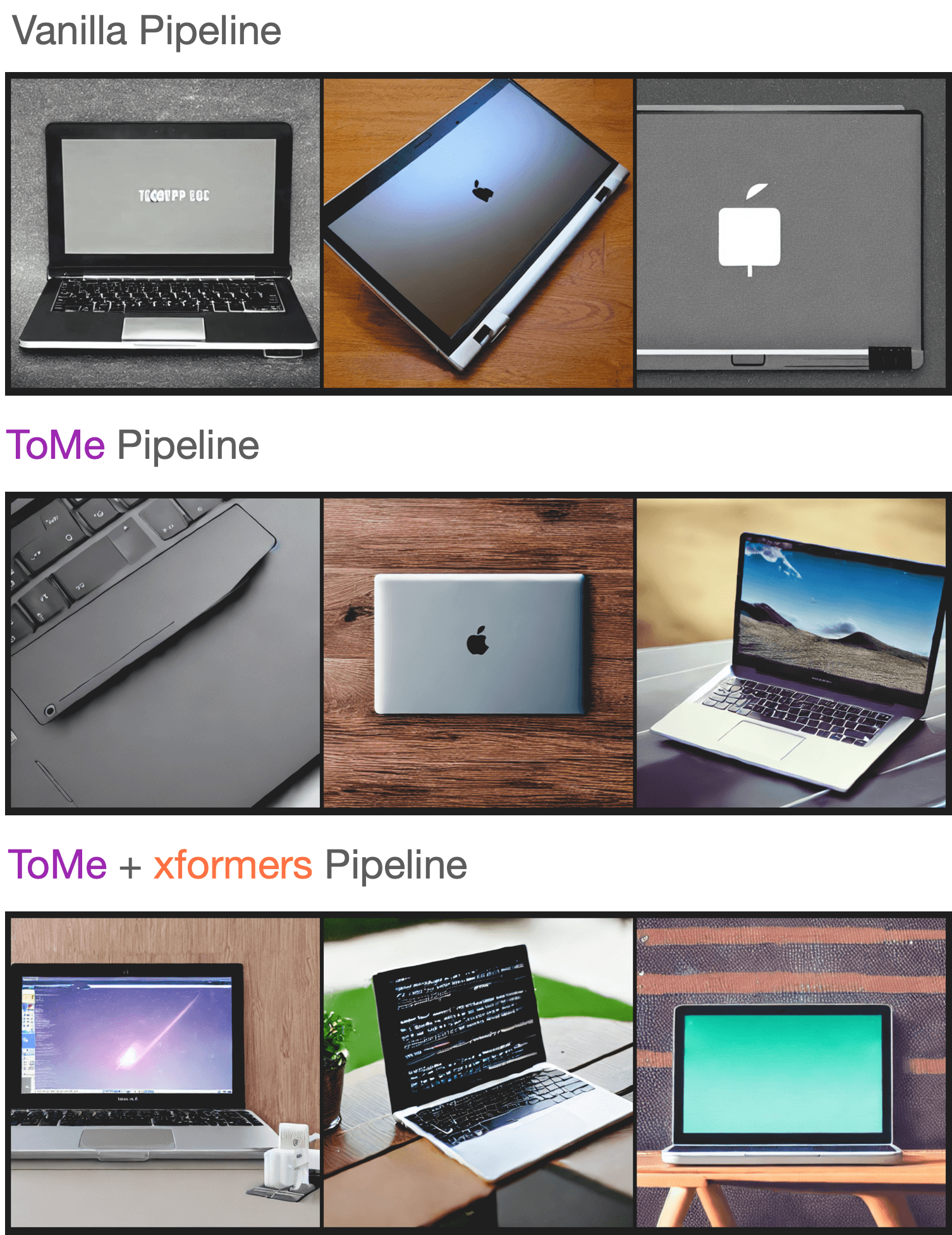
|
||||
|
||||
You can check out the generated samples [here](https://wandb.ai/sayakpaul/tomesd-results/runs/23j4bj3i?workspace=). We used [this script](https://gist.github.com/sayakpaul/8cac98d7f22399085a060992f411ecbd) for conducting this experiment.
|
||||
@@ -10,83 +10,96 @@ an "AS IS" BASIS, WITHOUT WARRANTIES OR CONDITIONS OF ANY KIND, either express o
|
||||
specific language governing permissions and limitations under the License.
|
||||
-->
|
||||
|
||||
# Torch 2.0
|
||||
# Accelerated PyTorch 2.0 support in Diffusers
|
||||
|
||||
🤗 Diffusers supports the latest optimizations from [PyTorch 2.0](https://pytorch.org/get-started/pytorch-2.0/) which include:
|
||||
Starting from version `0.13.0`, Diffusers supports the latest optimization from [PyTorch 2.0](https://pytorch.org/get-started/pytorch-2.0/). These include:
|
||||
1. Support for accelerated transformers implementation with memory-efficient attention – no extra dependencies (such as `xformers`) required.
|
||||
2. [torch.compile](https://pytorch.org/tutorials/intermediate/torch_compile_tutorial.html) support for extra performance boost when individual models are compiled.
|
||||
|
||||
1. A memory-efficient attention implementation, scaled dot product attention, without requiring any extra dependencies such as xFormers.
|
||||
2. [`torch.compile`](https://pytorch.org/tutorials/intermediate/torch_compile_tutorial.html), a just-in-time (JIT) compiler to provide an extra performance boost when individual models are compiled.
|
||||
|
||||
Both of these optimizations require PyTorch 2.0 or later and 🤗 Diffusers > 0.13.0.
|
||||
## Installation
|
||||
|
||||
To benefit from the accelerated attention implementation and `torch.compile()`, you just need to install the latest versions of PyTorch 2.0 from pip, and make sure you are on diffusers 0.13.0 or later. As explained below, diffusers automatically uses the optimized attention processor ([`AttnProcessor2_0`](https://github.com/huggingface/diffusers/blob/1a5797c6d4491a879ea5285c4efc377664e0332d/src/diffusers/models/attention_processor.py#L798)) (but not `torch.compile()`)
|
||||
when PyTorch 2.0 is available.
|
||||
|
||||
```bash
|
||||
pip install --upgrade torch diffusers
|
||||
```
|
||||
|
||||
## Scaled dot product attention
|
||||
## Using accelerated transformers and `torch.compile`.
|
||||
|
||||
[`torch.nn.functional.scaled_dot_product_attention`](https://pytorch.org/docs/master/generated/torch.nn.functional.scaled_dot_product_attention) (SDPA) is an optimized and memory-efficient attention (similar to xFormers) that automatically enables several other optimizations depending on the model inputs and GPU type. SDPA is enabled by default if you're using PyTorch 2.0 and the latest version of 🤗 Diffusers, so you don't need to add anything to your code.
|
||||
|
||||
However, if you want to explicitly enable it, you can set a [`DiffusionPipeline`] to use [`~models.attention_processor.AttnProcessor2_0`]:
|
||||
1. **Accelerated Transformers implementation**
|
||||
|
||||
```diff
|
||||
import torch
|
||||
from diffusers import DiffusionPipeline
|
||||
+ from diffusers.models.attention_processor import AttnProcessor2_0
|
||||
PyTorch 2.0 includes an optimized and memory-efficient attention implementation through the [`torch.nn.functional.scaled_dot_product_attention`](https://pytorch.org/docs/master/generated/torch.nn.functional.scaled_dot_product_attention) function, which automatically enables several optimizations depending on the inputs and the GPU type. This is similar to the `memory_efficient_attention` from [xFormers](https://github.com/facebookresearch/xformers), but built natively into PyTorch.
|
||||
|
||||
pipe = DiffusionPipeline.from_pretrained("runwayml/stable-diffusion-v1-5", torch_dtype=torch.float16, use_safetensors=True).to("cuda")
|
||||
+ pipe.unet.set_attn_processor(AttnProcessor2_0())
|
||||
These optimizations will be enabled by default in Diffusers if PyTorch 2.0 is installed and if `torch.nn.functional.scaled_dot_product_attention` is available. To use it, just install `torch 2.0` as suggested above and simply use the pipeline. For example:
|
||||
|
||||
prompt = "a photo of an astronaut riding a horse on mars"
|
||||
image = pipe(prompt).images[0]
|
||||
```
|
||||
```Python
|
||||
import torch
|
||||
from diffusers import DiffusionPipeline
|
||||
|
||||
SDPA should be as fast and memory efficient as `xFormers`; check the [benchmark](#benchmark) for more details.
|
||||
pipe = DiffusionPipeline.from_pretrained("runwayml/stable-diffusion-v1-5", torch_dtype=torch.float16, use_safetensors=True)
|
||||
pipe = pipe.to("cuda")
|
||||
|
||||
In some cases - such as making the pipeline more deterministic or converting it to other formats - it may be helpful to use the vanilla attention processor, [`~models.attention_processor.AttnProcessor`]. To revert to [`~models.attention_processor.AttnProcessor`], call the [`~UNet2DConditionModel.set_default_attn_processor`] function on the pipeline:
|
||||
prompt = "a photo of an astronaut riding a horse on mars"
|
||||
image = pipe(prompt).images[0]
|
||||
```
|
||||
|
||||
```diff
|
||||
import torch
|
||||
from diffusers import DiffusionPipeline
|
||||
from diffusers.models.attention_processor import AttnProcessor
|
||||
If you want to enable it explicitly (which is not required), you can do so as shown below.
|
||||
|
||||
pipe = DiffusionPipeline.from_pretrained("runwayml/stable-diffusion-v1-5", torch_dtype=torch.float16, use_safetensors=True).to("cuda")
|
||||
+ pipe.unet.set_default_attn_processor()
|
||||
```diff
|
||||
import torch
|
||||
from diffusers import DiffusionPipeline
|
||||
+ from diffusers.models.attention_processor import AttnProcessor2_0
|
||||
|
||||
prompt = "a photo of an astronaut riding a horse on mars"
|
||||
image = pipe(prompt).images[0]
|
||||
```
|
||||
pipe = DiffusionPipeline.from_pretrained("runwayml/stable-diffusion-v1-5", torch_dtype=torch.float16, use_safetensors=True).to("cuda")
|
||||
+ pipe.unet.set_attn_processor(AttnProcessor2_0())
|
||||
|
||||
## torch.compile
|
||||
prompt = "a photo of an astronaut riding a horse on mars"
|
||||
image = pipe(prompt).images[0]
|
||||
```
|
||||
|
||||
The `torch.compile` function can often provide an additional speed-up to your PyTorch code. In 🤗 Diffusers, it is usually best to wrap the UNet with `torch.compile` because it does most of the heavy lifting in the pipeline.
|
||||
This should be as fast and memory efficient as `xFormers`. More details [in our benchmark](#benchmark).
|
||||
|
||||
```python
|
||||
from diffusers import DiffusionPipeline
|
||||
import torch
|
||||
It is possible to revert to the vanilla attention processor ([`AttnProcessor`](https://github.com/huggingface/diffusers/blob/1a5797c6d4491a879ea5285c4efc377664e0332d/src/diffusers/models/attention_processor.py#L402)), which can be helpful to make the pipeline more deterministic, or if you need to convert a fine-tuned model to other formats such as [Core ML](https://huggingface.co/docs/diffusers/v0.16.0/en/optimization/coreml#how-to-run-stable-diffusion-with-core-ml). To use the normal attention processor you can use the [`~diffusers.UNet2DConditionModel.set_default_attn_processor`] function:
|
||||
|
||||
pipe = DiffusionPipeline.from_pretrained("runwayml/stable-diffusion-v1-5", torch_dtype=torch.float16, use_safetensors=True).to("cuda")
|
||||
pipe.unet = torch.compile(pipe.unet, mode="reduce-overhead", fullgraph=True)
|
||||
images = pipe(prompt, num_inference_steps=steps, num_images_per_prompt=batch_size).images[0]
|
||||
```
|
||||
```Python
|
||||
import torch
|
||||
from diffusers import DiffusionPipeline
|
||||
from diffusers.models.attention_processor import AttnProcessor
|
||||
|
||||
Depending on GPU type, `torch.compile` can provide an *addtional speed-up* of **5-300x** on top of SDPA! If you're using more recent GPU architectures such as Ampere (A100, 3090), Ada (4090), and Hopper (H100), `torch.compile` is able to squeeze even more performance out of these GPUs.
|
||||
pipe = DiffusionPipeline.from_pretrained("runwayml/stable-diffusion-v1-5", torch_dtype=torch.float16, use_safetensors=True).to("cuda")
|
||||
pipe.unet.set_default_attn_processor()
|
||||
|
||||
Compilation requires some time to complete, so it is best suited for situations where you prepare your pipeline once and then perform the same type of inference operations multiple times. For example, calling the compiled pipeline on a different image size triggers compilation again which can be expensive.
|
||||
prompt = "a photo of an astronaut riding a horse on mars"
|
||||
image = pipe(prompt).images[0]
|
||||
```
|
||||
|
||||
2. **torch.compile**
|
||||
|
||||
To get an additional speedup, we can use the new `torch.compile` feature. Since the UNet of the pipeline is usually the most computationally expensive, we wrap the `unet` with `torch.compile` leaving rest of the sub-models (text encoder and VAE) as is. For more information and different options, refer to the
|
||||
[torch compile docs](https://pytorch.org/tutorials/intermediate/torch_compile_tutorial.html).
|
||||
|
||||
```python
|
||||
pipe.unet = torch.compile(pipe.unet, mode="reduce-overhead", fullgraph=True)
|
||||
images = pipe(prompt, num_inference_steps=steps, num_images_per_prompt=batch_size).images
|
||||
```
|
||||
|
||||
Depending on the type of GPU, `compile()` can yield between **5% - 300%** of _additional speed-up_ over the accelerated transformer optimizations. Note, however, that compilation is able to squeeze more performance improvements in more recent GPU architectures such as Ampere (A100, 3090), Ada (4090) and Hopper (H100).
|
||||
|
||||
Compilation takes some time to complete, so it is best suited for situations where you need to prepare your pipeline once and then perform the same type of inference operations multiple times. Calling the compiled pipeline on a different image size will re-trigger compilation which can be expensive.
|
||||
|
||||
For more information and different options about `torch.compile`, refer to the [`torch_compile`](https://pytorch.org/tutorials/intermediate/torch_compile_tutorial.html) tutorial.
|
||||
|
||||
## Benchmark
|
||||
|
||||
We conducted a comprehensive benchmark with PyTorch 2.0's efficient attention implementation and `torch.compile` across different GPUs and batch sizes for five of our most used pipelines. The code is benchmarked on 🤗 Diffusers v0.17.0.dev0 to optimize `torch.compile` usage (see [here](https://github.com/huggingface/diffusers/pull/3313) for more details).
|
||||
We conducted a comprehensive benchmark with PyTorch 2.0's efficient attention implementation and `torch.compile` across different GPUs and batch sizes for five of our most used pipelines. We used `diffusers 0.17.0.dev0`, which [makes sure `torch.compile()` is leveraged optimally](https://github.com/huggingface/diffusers/pull/3313).
|
||||
|
||||
Expand the dropdown below to find the code used to benchmark each pipeline:
|
||||
### Benchmarking code
|
||||
|
||||
<details>
|
||||
#### Stable Diffusion text-to-image
|
||||
|
||||
### Stable Diffusion text-to-image
|
||||
|
||||
```python
|
||||
```python
|
||||
from diffusers import DiffusionPipeline
|
||||
import torch
|
||||
|
||||
@@ -108,7 +121,7 @@ for _ in range(3):
|
||||
images = pipe(prompt=prompt).images
|
||||
```
|
||||
|
||||
### Stable Diffusion image-to-image
|
||||
#### Stable Diffusion image-to-image
|
||||
|
||||
```python
|
||||
from diffusers import StableDiffusionImg2ImgPipeline
|
||||
@@ -141,7 +154,7 @@ for _ in range(3):
|
||||
image = pipe(prompt=prompt, image=init_image).images[0]
|
||||
```
|
||||
|
||||
### Stable Diffusion inpainting
|
||||
#### Stable Diffusion - inpainting
|
||||
|
||||
```python
|
||||
from diffusers import StableDiffusionInpaintPipeline
|
||||
@@ -181,7 +194,7 @@ for _ in range(3):
|
||||
image = pipe(prompt=prompt, image=init_image, mask_image=mask_image).images[0]
|
||||
```
|
||||
|
||||
### ControlNet
|
||||
#### ControlNet
|
||||
|
||||
```python
|
||||
from diffusers import StableDiffusionControlNetPipeline, ControlNetModel
|
||||
@@ -219,7 +232,7 @@ for _ in range(3):
|
||||
image = pipe(prompt=prompt, image=init_image).images[0]
|
||||
```
|
||||
|
||||
### DeepFloyd IF text-to-image + upscaling
|
||||
#### IF text-to-image + upscaling
|
||||
|
||||
```python
|
||||
from diffusers import DiffusionPipeline
|
||||
@@ -254,18 +267,24 @@ for _ in range(3):
|
||||
image_2 = pipe_2(image=image, prompt_embeds=prompt_embeds, negative_prompt_embeds=neg_prompt_embeds, output_type="pt").images
|
||||
image_3 = pipe_3(prompt=prompt, image=image, noise_level=100).images
|
||||
```
|
||||
</details>
|
||||
|
||||
The graph below highlights the relative speed-ups for the [`StableDiffusionPipeline`] across five GPU families with PyTorch 2.0 and `torch.compile` enabled. The benchmarks for the following graphs are measured in *number of iterations/second*.
|
||||
To give you a pictorial overview of the possible speed-ups that can be obtained with PyTorch 2.0 and `torch.compile()`,
|
||||
here is a plot that shows relative speed-ups for the [Stable Diffusion text-to-image pipeline](StableDiffusionPipeline) across five
|
||||
different GPU families (with a batch size of 4):
|
||||
|
||||
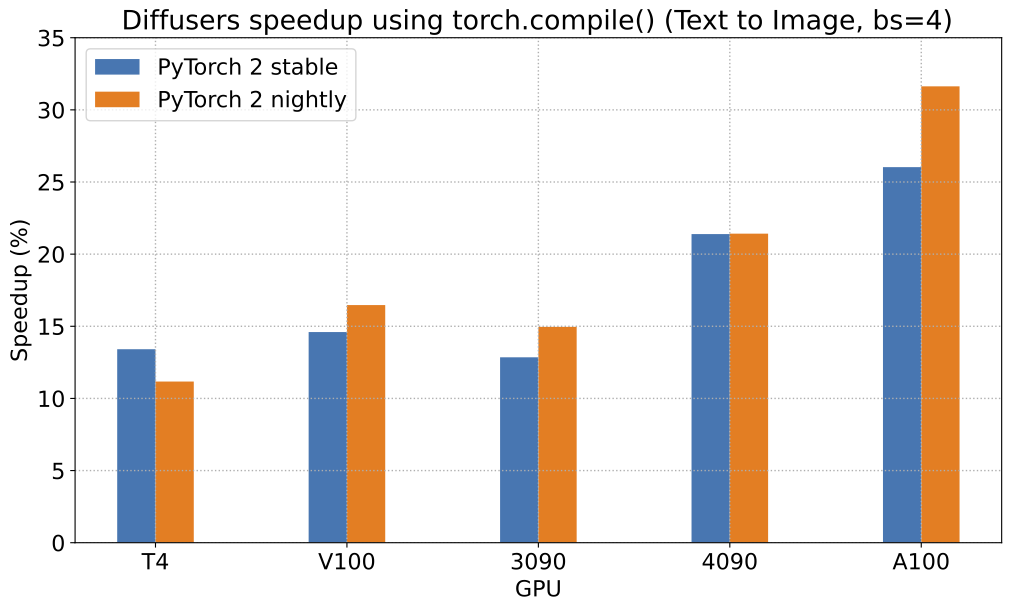
|
||||
|
||||
To give you an even better idea of how this speed-up holds for the other pipelines, consider the following
|
||||
graph for an A100 with PyTorch 2.0 and `torch.compile`:
|
||||
To give you an even better idea of how this speed-up holds for the other pipelines presented above, consider the following
|
||||
plot that shows the benchmarking numbers from an A100 across three different batch sizes
|
||||
(with PyTorch 2.0 nightly and `torch.compile()`):
|
||||
|
||||
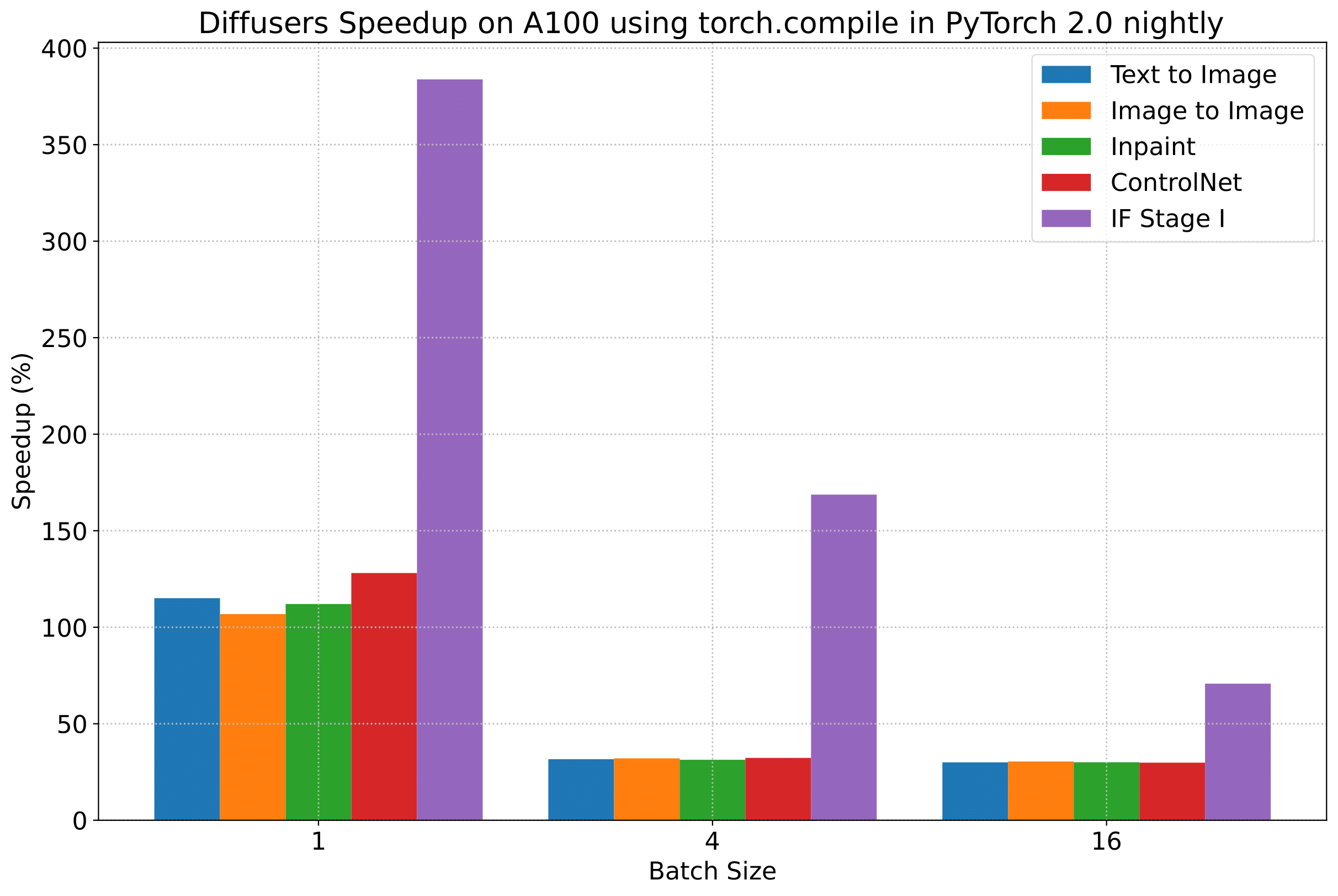
|
||||
|
||||
In the following tables, we report our findings in terms of the *number of iterations/second*.
|
||||
_(Our benchmarking metric for the plots above is **number of iterations/second**)_
|
||||
|
||||
But we reveal all the benchmarking numbers in the interest of transparency!
|
||||
|
||||
In the following tables, we report our findings in terms of the number of **_iterations processed per second_**.
|
||||
|
||||
### A100 (batch size: 1)
|
||||
|
||||
@@ -419,7 +438,7 @@ In the following tables, we report our findings in terms of the *number of itera
|
||||
|
||||
## Notes
|
||||
|
||||
* Follow this [PR](https://github.com/huggingface/diffusers/pull/3313) for more details on the environment used for conducting the benchmarks.
|
||||
* For the DeepFloyd IF pipeline where batch sizes > 1, we only used a batch size of > 1 in the first IF pipeline for text-to-image generation and NOT for upscaling. That means the two upscaling pipelines received a batch size of 1.
|
||||
* Follow [this PR](https://github.com/huggingface/diffusers/pull/3313) for more details on the environment used for conducting the benchmarks.
|
||||
* For the IF pipeline and batch sizes > 1, we only used a batch size of >1 in the first IF pipeline for text-to-image generation and NOT for upscaling. So, that means the two upscaling pipelines received a batch size of 1.
|
||||
|
||||
*Thanks to [Horace He](https://github.com/Chillee) from the PyTorch team for their support in improving our support of `torch.compile()` in Diffusers.*
|
||||
@@ -10,11 +10,11 @@ an "AS IS" BASIS, WITHOUT WARRANTIES OR CONDITIONS OF ANY KIND, either express o
|
||||
specific language governing permissions and limitations under the License.
|
||||
-->
|
||||
|
||||
# xFormers
|
||||
# Installing xFormers
|
||||
|
||||
We recommend [xFormers](https://github.com/facebookresearch/xformers) for both inference and training. In our tests, the optimizations performed in the attention blocks allow for both faster speed and reduced memory consumption.
|
||||
We recommend the use of [xFormers](https://github.com/facebookresearch/xformers) for both inference and training. In our tests, the optimizations performed in the attention blocks allow for both faster speed and reduced memory consumption.
|
||||
|
||||
Install xFormers from `pip`:
|
||||
Starting from version `0.0.16` of xFormers, released on January 2023, installation can be easily performed using pre-built pip wheels:
|
||||
|
||||
```bash
|
||||
pip install xformers
|
||||
@@ -22,14 +22,14 @@ pip install xformers
|
||||
|
||||
<Tip>
|
||||
|
||||
The xFormers `pip` package requires the latest version of PyTorch. If you need to use a previous version of PyTorch, then we recommend [installing xFormers from the source](https://github.com/facebookresearch/xformers#installing-xformers).
|
||||
The xFormers PIP package requires the latest version of PyTorch (1.13.1 as of xFormers 0.0.16). If you need to use a previous version of PyTorch, then we recommend you install xFormers from source using [the project instructions](https://github.com/facebookresearch/xformers#installing-xformers).
|
||||
|
||||
</Tip>
|
||||
|
||||
After xFormers is installed, you can use `enable_xformers_memory_efficient_attention()` for faster inference and reduced memory consumption as shown in this [section](memory#memory-efficient-attention).
|
||||
After xFormers is installed, you can use `enable_xformers_memory_efficient_attention()` for faster inference and reduced memory consumption, as discussed [here](fp16#memory-efficient-attention).
|
||||
|
||||
<Tip warning={true}>
|
||||
|
||||
According to this [issue](https://github.com/huggingface/diffusers/issues/2234#issuecomment-1416931212), xFormers `v0.0.16` cannot be used for training (fine-tune or DreamBooth) in some GPUs. If you observe this problem, please install a development version as indicated in the issue comments.
|
||||
According to [this issue](https://github.com/huggingface/diffusers/issues/2234#issuecomment-1416931212), xFormers `v0.0.16` cannot be used for training (fine-tune or Dreambooth) in some GPUs. If you observe that problem, please install a development version as indicated in that comment.
|
||||
|
||||
</Tip>
|
||||
|
||||
@@ -34,7 +34,7 @@ the attention layers of a language model is sufficient to obtain good downstream
|
||||
|
||||
[cloneofsimo](https://github.com/cloneofsimo) was the first to try out LoRA training for Stable Diffusion in the popular [lora](https://github.com/cloneofsimo/lora) GitHub repository. 🧨 Diffusers now supports finetuning with LoRA for [text-to-image generation](https://github.com/huggingface/diffusers/tree/main/examples/text_to_image#training-with-lora) and [DreamBooth](https://github.com/huggingface/diffusers/tree/main/examples/dreambooth#training-with-low-rank-adaptation-of-large-language-models-lora). This guide will show you how to do both.
|
||||
|
||||
If you'd like to store or share your model with the community, login to your Hugging Face account (create [one](https://hf.co/join) if you don't have one already):
|
||||
If you'd like to store or share your model with the community, login to your Hugging Face account (create [one](hf.co/join) if you don't have one already):
|
||||
|
||||
```bash
|
||||
huggingface-cli login
|
||||
@@ -301,133 +301,6 @@ You can call [`~diffusers.loaders.LoraLoaderMixin.fuse_lora`] on a pipeline to m
|
||||
|
||||
To undo `fuse_lora`, call [`~diffusers.loaders.LoraLoaderMixin.unfuse_lora`] on a pipeline.
|
||||
|
||||
## Working with different LoRA scales when using LoRA fusion
|
||||
|
||||
If you need to use `scale` when working with `fuse_lora()` to control the influence of the LoRA parameters on the outputs, you should specify `lora_scale` within `fuse_lora()`. Passing the `scale` parameter to `cross_attention_kwargs` when you call the pipeline won't work.
|
||||
|
||||
To use a different `lora_scale` with `fuse_lora()`, you should first call `unfuse_lora()` on the corresponding pipeline and call `fuse_lora()` again with the expected `lora_scale`.
|
||||
|
||||
```python
|
||||
from diffusers import DiffusionPipeline
|
||||
import torch
|
||||
|
||||
pipe = DiffusionPipeline.from_pretrained("stabilityai/stable-diffusion-xl-base-1.0", torch_dtype=torch.float16).to("cuda")
|
||||
lora_model_id = "hf-internal-testing/sdxl-1.0-lora"
|
||||
lora_filename = "sd_xl_offset_example-lora_1.0.safetensors"
|
||||
pipe.load_lora_weights(lora_model_id, weight_name=lora_filename)
|
||||
|
||||
# This uses a default `lora_scale` of 1.0.
|
||||
pipe.fuse_lora()
|
||||
|
||||
generator = torch.manual_seed(0)
|
||||
images_fusion = pipe(
|
||||
"masterpiece, best quality, mountain", generator=generator, num_inference_steps=2
|
||||
).images
|
||||
|
||||
# To work with a different `lora_scale`, first reverse the effects of `fuse_lora()`.
|
||||
pipe.unfuse_lora()
|
||||
|
||||
# Then proceed as follows.
|
||||
pipe.load_lora_weights(lora_model_id, weight_name=lora_filename)
|
||||
pipe.fuse_lora(lora_scale=0.5)
|
||||
|
||||
generator = torch.manual_seed(0)
|
||||
images_fusion = pipe(
|
||||
"masterpiece, best quality, mountain", generator=generator, num_inference_steps=2
|
||||
).images
|
||||
```
|
||||
|
||||
## Serializing pipelines with fused LoRA parameters
|
||||
|
||||
Let's say you want to load the pipeline above that has its UNet fused with the LoRA parameters. You can easily do so by simply calling the `save_pretrained()` method on `pipe`.
|
||||
|
||||
After loading the LoRA parameters into a pipeline, if you want to serialize the pipeline such that the affected model components are already fused with the LoRA parameters, you should:
|
||||
|
||||
* call `fuse_lora()` on the pipeline with the desired `lora_scale`, given you've already loaded the LoRA parameters into it.
|
||||
* call `save_pretrained()` on the pipeline.
|
||||
|
||||
Here is a complete example:
|
||||
|
||||
```python
|
||||
from diffusers import DiffusionPipeline
|
||||
import torch
|
||||
|
||||
pipe = DiffusionPipeline.from_pretrained("stabilityai/stable-diffusion-xl-base-1.0", torch_dtype=torch.float16).to("cuda")
|
||||
lora_model_id = "hf-internal-testing/sdxl-1.0-lora"
|
||||
lora_filename = "sd_xl_offset_example-lora_1.0.safetensors"
|
||||
pipe.load_lora_weights(lora_model_id, weight_name=lora_filename)
|
||||
|
||||
# First, fuse the LoRA parameters.
|
||||
pipe.fuse_lora()
|
||||
|
||||
# Then save.
|
||||
pipe.save_pretrained("my-pipeline-with-fused-lora")
|
||||
```
|
||||
|
||||
Now, you can load the pipeline and directly perform inference without having to load the LoRA parameters again:
|
||||
|
||||
```python
|
||||
from diffusers import DiffusionPipeline
|
||||
import torch
|
||||
|
||||
pipe = DiffusionPipeline.from_pretrained("my-pipeline-with-fused-lora", torch_dtype=torch.float16).to("cuda")
|
||||
|
||||
generator = torch.manual_seed(0)
|
||||
images_fusion = pipe(
|
||||
"masterpiece, best quality, mountain", generator=generator, num_inference_steps=2
|
||||
).images
|
||||
```
|
||||
|
||||
## Working with multiple LoRA checkpoints
|
||||
|
||||
With the `fuse_lora()` method as described above, it's possible to load multiple LoRA checkpoints. Let's work through a complete example. First we load the base pipeline:
|
||||
|
||||
```python
|
||||
from diffusers import StableDiffusionXLPipeline, AutoencoderKL
|
||||
import torch
|
||||
|
||||
vae = AutoencoderKL.from_pretrained("madebyollin/sdxl-vae-fp16-fix", torch_dtype=torch.float16)
|
||||
pipe = StableDiffusionXLPipeline.from_pretrained(
|
||||
"stabilityai/stable-diffusion-xl-base-1.0",
|
||||
vae=vae,
|
||||
torch_dtype=torch.float16,
|
||||
)
|
||||
pipe.to("cuda")
|
||||
```
|
||||
|
||||
Then let's two LoRA checkpoints and fuse them with specific `lora_scale` values:
|
||||
|
||||
```python
|
||||
# LoRA one.
|
||||
pipe.load_lora_weights("goofyai/cyborg_style_xl")
|
||||
pipe.fuse_lora(lora_scale=0.7)
|
||||
|
||||
# LoRA two.
|
||||
pipe.load_lora_weights("TheLastBen/Pikachu_SDXL")
|
||||
pipe.fuse_lora(lora_scale=0.7)
|
||||
```
|
||||
|
||||
<Tip>
|
||||
|
||||
Play with the `lora_scale` parameter when working with multiple LoRAs to control the amount of their influence on the final outputs.
|
||||
|
||||
</Tip>
|
||||
|
||||
Let's see them in action:
|
||||
|
||||
```python
|
||||
prompt = "cyborg style pikachu"
|
||||
image = pipe(prompt, num_inference_steps=30, guidance_scale=7.5).images[0]
|
||||
```
|
||||
|
||||
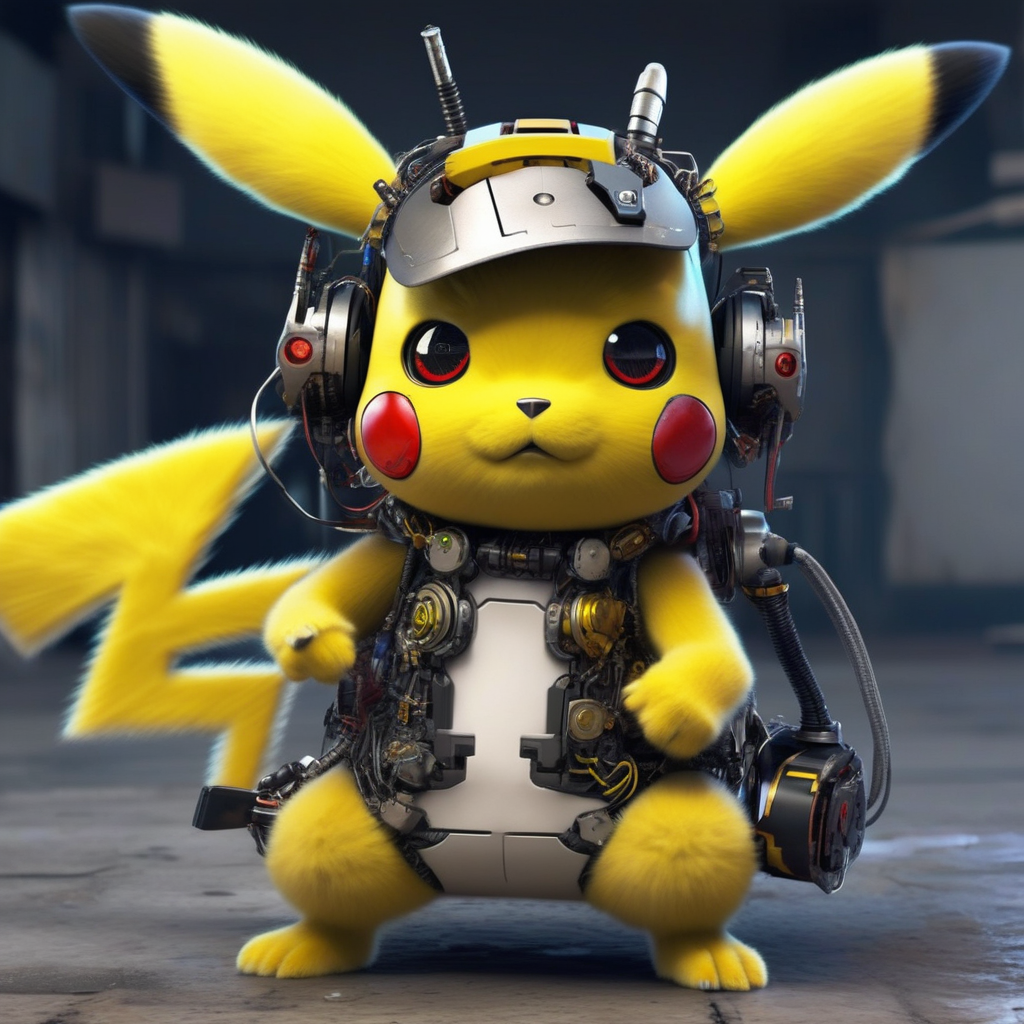
|
||||
|
||||
<Tip warning={true}>
|
||||
|
||||
Currently, unfusing multiple LoRA checkpoints is not possible.
|
||||
|
||||
</Tip>
|
||||
|
||||
## Supporting different LoRA checkpoints from Diffusers
|
||||
|
||||
🤗 Diffusers supports loading checkpoints from popular LoRA trainers such as [Kohya](https://github.com/kohya-ss/sd-scripts/) and [TheLastBen](https://github.com/TheLastBen/fast-stable-diffusion). In this section, we outline the current API's details and limitations.
|
||||
|
||||
@@ -34,16 +34,13 @@ If you feel like another important example should exist, we are more than happy
|
||||
Training examples show how to pretrain or fine-tune diffusion models for a variety of tasks. Currently we support:
|
||||
|
||||
- [Unconditional Training](./unconditional_training)
|
||||
- [Text-to-Image Training](./text2image)<sup>*</sup>
|
||||
- [Text-to-Image Training](./text2image)
|
||||
- [Text Inversion](./text_inversion)
|
||||
- [Dreambooth](./dreambooth)<sup>*</sup>
|
||||
- [LoRA Support](./lora)<sup>*</sup>
|
||||
- [ControlNet](./controlnet)<sup>*</sup>
|
||||
- [InstructPix2Pix](./instructpix2pix)<sup>*</sup>
|
||||
- [Dreambooth](./dreambooth)
|
||||
- [LoRA Support](./lora)
|
||||
- [ControlNet](./controlnet)
|
||||
- [InstructPix2Pix](./instructpix2pix)
|
||||
- [Custom Diffusion](./custom_diffusion)
|
||||
- [T2I-Adapters](./t2i_adapters)<sup>*</sup>
|
||||
|
||||
<sup>*</sup>: Supports [Stable Diffusion XL](../api/pipelines/stable_diffusion/stable_diffusion_xl).
|
||||
|
||||
If possible, please [install xFormers](../optimization/xformers) for memory efficient attention. This could help make your training faster and less memory intensive.
|
||||
|
||||
@@ -57,7 +54,6 @@ If possible, please [install xFormers](../optimization/xformers) for memory effi
|
||||
| [**ControlNet**](./controlnet) | ✅ | ✅ | - |
|
||||
| [**InstructPix2Pix**](./instructpix2pix) | ✅ | ✅ | - |
|
||||
| [**Custom Diffusion**](./custom_diffusion) | ✅ | ✅ | - |
|
||||
| [**T2I Adapters**](./t2i_adapters) | ✅ | ✅ | - |
|
||||
|
||||
## Community
|
||||
|
||||
|
||||
@@ -1,143 +0,0 @@
|
||||
<!--Copyright 2023 The HuggingFace Team. All rights reserved.
|
||||
|
||||
Licensed under the Apache License, Version 2.0 (the "License"); you may not use this file except in compliance with
|
||||
the License. You may obtain a copy of the License at
|
||||
|
||||
http://www.apache.org/licenses/LICENSE-2.0
|
||||
|
||||
Unless required by applicable law or agreed to in writing, software distributed under the License is distributed on
|
||||
an "AS IS" BASIS, WITHOUT WARRANTIES OR CONDITIONS OF ANY KIND, either express or implied. See the License for the
|
||||
specific language governing permissions and limitations under the License.
|
||||
-->
|
||||
|
||||
# T2I-Adapters for Stable Diffusion XL (SDXL)
|
||||
|
||||
The `train_t2i_adapter_sdxl.py` script (as shown below) shows how to implement the [T2I-Adapter training procedure](https://hf.co/papers/2302.08453) for [Stable Diffusion XL](https://huggingface.co/papers/2307.01952).
|
||||
|
||||
## Running locally with PyTorch
|
||||
|
||||
### Installing the dependencies
|
||||
|
||||
Before running the scripts, make sure to install the library's training dependencies:
|
||||
|
||||
**Important**
|
||||
|
||||
To make sure you can successfully run the latest versions of the example scripts, we highly recommend **installing from source** and keeping the install up to date as we update the example scripts frequently and install some example-specific requirements. To do this, execute the following steps in a new virtual environment:
|
||||
|
||||
```bash
|
||||
git clone https://github.com/huggingface/diffusers
|
||||
cd diffusers
|
||||
pip install -e .
|
||||
```
|
||||
|
||||
Then cd in the `examples/t2i_adapter` folder and run
|
||||
```bash
|
||||
pip install -r requirements_sdxl.txt
|
||||
```
|
||||
|
||||
And initialize an [🤗Accelerate](https://github.com/huggingface/accelerate/) environment with:
|
||||
|
||||
```bash
|
||||
accelerate config
|
||||
```
|
||||
|
||||
Or for a default accelerate configuration without answering questions about your environment
|
||||
|
||||
```bash
|
||||
accelerate config default
|
||||
```
|
||||
|
||||
Or if your environment doesn't support an interactive shell (e.g., a notebook)
|
||||
|
||||
```python
|
||||
from accelerate.utils import write_basic_config
|
||||
write_basic_config()
|
||||
```
|
||||
|
||||
When running `accelerate config`, if we specify torch compile mode to True there can be dramatic speedups.
|
||||
|
||||
## Circle filling dataset
|
||||
|
||||
The original dataset is hosted in the [ControlNet repo](https://huggingface.co/lllyasviel/ControlNet/blob/main/training/fill50k.zip). We re-uploaded it to be compatible with `datasets` [here](https://huggingface.co/datasets/fusing/fill50k). Note that `datasets` handles dataloading within the training script.
|
||||
|
||||
## Training
|
||||
|
||||
Our training examples use two test conditioning images. They can be downloaded by running
|
||||
|
||||
```sh
|
||||
wget https://huggingface.co/datasets/huggingface/documentation-images/resolve/main/diffusers/controlnet_training/conditioning_image_1.png
|
||||
|
||||
wget https://huggingface.co/datasets/huggingface/documentation-images/resolve/main/diffusers/controlnet_training/conditioning_image_2.png
|
||||
```
|
||||
|
||||
Then run `huggingface-cli login` to log into your Hugging Face account. This is needed to be able to push the trained T2IAdapter parameters to Hugging Face Hub.
|
||||
|
||||
```bash
|
||||
export MODEL_DIR="stabilityai/stable-diffusion-xl-base-1.0"
|
||||
export OUTPUT_DIR="path to save model"
|
||||
|
||||
accelerate launch train_t2i_adapter_sdxl.py \
|
||||
--pretrained_model_name_or_path=$MODEL_DIR \
|
||||
--output_dir=$OUTPUT_DIR \
|
||||
--dataset_name=fusing/fill50k \
|
||||
--mixed_precision="fp16" \
|
||||
--resolution=1024 \
|
||||
--learning_rate=1e-5 \
|
||||
--max_train_steps=15000 \
|
||||
--validation_image "./conditioning_image_1.png" "./conditioning_image_2.png" \
|
||||
--validation_prompt "red circle with blue background" "cyan circle with brown floral background" \
|
||||
--validation_steps=100 \
|
||||
--train_batch_size=1 \
|
||||
--gradient_accumulation_steps=4 \
|
||||
--report_to="wandb" \
|
||||
--seed=42 \
|
||||
--push_to_hub
|
||||
```
|
||||
|
||||
To better track our training experiments, we're using the following flags in the command above:
|
||||
|
||||
* `report_to="wandb` will ensure the training runs are tracked on Weights and Biases. To use it, be sure to install `wandb` with `pip install wandb`.
|
||||
* `validation_image`, `validation_prompt`, and `validation_steps` to allow the script to do a few validation inference runs. This allows us to qualitatively check if the training is progressing as expected.
|
||||
|
||||
Our experiments were conducted on a single 40GB A100 GPU.
|
||||
|
||||
### Inference
|
||||
|
||||
Once training is done, we can perform inference like so:
|
||||
|
||||
```python
|
||||
from diffusers import StableDiffusionXLAdapterPipeline, T2IAdapter, EulerAncestralDiscreteSchedulerTest
|
||||
from diffusers.utils import load_image
|
||||
import torch
|
||||
|
||||
base_model_path = "stabilityai/stable-diffusion-xl-base-1.0"
|
||||
adapter_path = "path to adapter"
|
||||
|
||||
adapter = T2IAdapter.from_pretrained(adapter_path, torch_dtype=torch.float16)
|
||||
pipe = StableDiffusionXLAdapterPipeline.from_pretrained(
|
||||
base_model_path, adapter=adapter, torch_dtype=torch.float16
|
||||
)
|
||||
|
||||
# speed up diffusion process with faster scheduler and memory optimization
|
||||
pipe.scheduler = EulerAncestralDiscreteSchedulerTest.from_config(pipe.scheduler.config)
|
||||
# remove following line if xformers is not installed or when using Torch 2.0.
|
||||
pipe.enable_xformers_memory_efficient_attention()
|
||||
# memory optimization.
|
||||
pipe.enable_model_cpu_offload()
|
||||
|
||||
control_image = load_image("./conditioning_image_1.png")
|
||||
prompt = "pale golden rod circle with old lace background"
|
||||
|
||||
# generate image
|
||||
generator = torch.manual_seed(0)
|
||||
image = pipe(
|
||||
prompt, num_inference_steps=20, generator=generator, image=control_image
|
||||
).images[0]
|
||||
image.save("./output.png")
|
||||
```
|
||||
|
||||
## Notes
|
||||
|
||||
### Specifying a better VAE
|
||||
|
||||
SDXL's VAE is known to suffer from numerical instability issues. This is why we also expose a CLI argument namely `--pretrained_vae_model_name_or_path` that lets you specify the location of a better VAE (such as [this one](https://huggingface.co/madebyollin/sdxl-vae-fp16-fix)).
|
||||
@@ -281,8 +281,3 @@ image.save("yoda-pokemon.png")
|
||||
|
||||
* We support fine-tuning the UNet shipped in [Stable Diffusion XL](https://huggingface.co/papers/2307.01952) via the `train_text_to_image_sdxl.py` script. Please refer to the docs [here](https://github.com/huggingface/diffusers/blob/main/examples/text_to_image/README_sdxl.md).
|
||||
* We also support fine-tuning of the UNet and Text Encoder shipped in [Stable Diffusion XL](https://huggingface.co/papers/2307.01952) with LoRA via the `train_text_to_image_lora_sdxl.py` script. Please refer to the docs [here](https://github.com/huggingface/diffusers/blob/main/examples/text_to_image/README_sdxl.md).
|
||||
|
||||
|
||||
## Kandinsky 2.2
|
||||
|
||||
* We support fine-tuning both the decoder and prior in Kandinsky2.2 with the `train_text_to_image_prior.py` and `train_text_to_image_decoder.py` scripts. LoRA support is also included. Please refer to the docs [here](https://github.com/huggingface/diffusers/blob/main/examples/kandinsky2_2/text_to_image/README_sdxl.md).
|
||||
@@ -10,597 +10,91 @@ an "AS IS" BASIS, WITHOUT WARRANTIES OR CONDITIONS OF ANY KIND, either express o
|
||||
specific language governing permissions and limitations under the License.
|
||||
-->
|
||||
|
||||
# Image-to-image
|
||||
# Text-guided image-to-image generation
|
||||
|
||||
[[open-in-colab]]
|
||||
|
||||
Image-to-image is similar to [text-to-image](conditional_image_generation), but in addition to a prompt, you can also pass an initial image as a starting point for the diffusion process. The initial image is encoded to latent space and noise is added to it. Then the latent diffusion model takes a prompt and the noisy latent image, predicts the added noise, and removes the predicted noise from the initial latent image to get the new latent image. Lastly, a decoder decodes the new latent image back into an image.
|
||||
The [`StableDiffusionImg2ImgPipeline`] lets you pass a text prompt and an initial image to condition the generation of new images.
|
||||
|
||||
With 🤗 Diffusers, this is as easy as 1-2-3:
|
||||
|
||||
1. Load a checkpoint into the [`AutoPipelineForImage2Image`] class; this pipeline automatically handles loading the correct pipeline class based on the checkpoint:
|
||||
Before you begin, make sure you have all the necessary libraries installed:
|
||||
|
||||
```py
|
||||
from diffusers import AutoPipelineForImage2Image
|
||||
from diffusers.utils import load_image
|
||||
|
||||
pipeline = AutoPipelineForImage2Image.from_pretrained(
|
||||
"kandinsky-community/kandinsky-2-2-decoder", torch_dtype=torch.float16, variant="fp16", use_safetensors=True
|
||||
).to("cuda")
|
||||
pipeline.enable_model_cpu_offload()
|
||||
pipeline.enable_xformers_memory_efficient_attention()
|
||||
# uncomment to install the necessary libraries in Colab
|
||||
#!pip install diffusers transformers ftfy accelerate
|
||||
```
|
||||
|
||||
Get started by creating a [`StableDiffusionImg2ImgPipeline`] with a pretrained Stable Diffusion model like [`nitrosocke/Ghibli-Diffusion`](https://huggingface.co/nitrosocke/Ghibli-Diffusion).
|
||||
|
||||
```python
|
||||
import torch
|
||||
import requests
|
||||
from PIL import Image
|
||||
from io import BytesIO
|
||||
from diffusers import StableDiffusionImg2ImgPipeline
|
||||
|
||||
device = "cuda"
|
||||
pipe = StableDiffusionImg2ImgPipeline.from_pretrained(
|
||||
"nitrosocke/Ghibli-Diffusion", torch_dtype=torch.float16, use_safetensors=True
|
||||
).to(device)
|
||||
```
|
||||
|
||||
Download and preprocess an initial image so you can pass it to the pipeline:
|
||||
|
||||
```python
|
||||
url = "https://raw.githubusercontent.com/CompVis/stable-diffusion/main/assets/stable-samples/img2img/sketch-mountains-input.jpg"
|
||||
|
||||
response = requests.get(url)
|
||||
init_image = Image.open(BytesIO(response.content)).convert("RGB")
|
||||
init_image.thumbnail((768, 768))
|
||||
init_image
|
||||
```
|
||||
|
||||
<div class="flex justify-center">
|
||||
<img src="https://huggingface.co/datasets/YiYiXu/test-doc-assets/resolve/main/image_2_image_using_diffusers_cell_8_output_0.jpeg"/>
|
||||
</div>
|
||||
|
||||
<Tip>
|
||||
|
||||
You'll notice throughout the guide, we use [`~DiffusionPipeline.enable_model_cpu_offload`] and [`~DiffusionPipeline.enable_xformers_memory_efficient_attention`], to save memory and increase inference speed. If you're using PyTorch 2.0, then you don't need to call [`~DiffusionPipeline.enable_xformers_memory_efficient_attention`] on your pipeline because it'll already be using PyTorch 2.0's native [scaled-dot product attention](/optimization/torch2.0#scaled-dot-product-attention).
|
||||
💡 `strength` is a value between 0.0 and 1.0 that controls the amount of noise added to the input image. Values that approach 1.0 allow for lots of variations but will also produce images that are not semantically consistent with the input.
|
||||
|
||||
</Tip>
|
||||
|
||||
2. Load an image to pass to the pipeline:
|
||||
Define the prompt (for this checkpoint finetuned on Ghibli-style art, you need to prefix the prompt with the `ghibli style` tokens) and run the pipeline:
|
||||
|
||||
```py
|
||||
init_image = load_image("https://huggingface.co/datasets/huggingface/documentation-images/resolve/main/diffusers/cat.png")
|
||||
```
|
||||
|
||||
3. Pass a prompt and image to the pipeline to generate an image:
|
||||
|
||||
```py
|
||||
prompt = "cat wizard, gandalf, lord of the rings, detailed, fantasy, cute, adorable, Pixar, Disney, 8k"
|
||||
image = pipeline(prompt, image=init_image).images[0]
|
||||
image
|
||||
```
|
||||
|
||||
<div class="flex gap-4">
|
||||
<div>
|
||||
<img class="rounded-xl" src="https://huggingface.co/datasets/huggingface/documentation-images/resolve/main/diffusers/cat.png"/>
|
||||
<figcaption class="mt-2 text-center text-sm text-gray-500">initial image</figcaption>
|
||||
</div>
|
||||
<div>
|
||||
<img class="rounded-xl" src="https://huggingface.co/datasets/huggingface/documentation-images/resolve/main/diffusers/img2img.png"/>
|
||||
<figcaption class="mt-2 text-center text-sm text-gray-500">generated image</figcaption>
|
||||
</div>
|
||||
</div>
|
||||
|
||||
## Popular models
|
||||
|
||||
The most popular image-to-image models are [Stable Diffusion v1.5](https://huggingface.co/runwayml/stable-diffusion-v1-5), [Stable Diffusion XL (SDXL)](https://huggingface.co/stabilityai/stable-diffusion-xl-base-1.0), and [Kandinsky 2.2](https://huggingface.co/kandinsky-community/kandinsky-2-2-decoder). The results from the Stable Diffusion and Kandinsky models vary due to their architecture differences and training process; you can generally expect SDXL to produce higher quality images than Stable Diffusion v1.5. Let's take a quick look at how to use each of these models and compare their results.
|
||||
|
||||
### Stable Diffusion v1.5
|
||||
|
||||
Stable Diffusion v1.5 is a latent diffusion model intialized from an earlier checkpoint, and further finetuned for 595K steps on 512x512 images. To use this pipeline for image-to-image, you'll need to prepare an initial image to pass to the pipeline. Then you can pass a prompt and the image to the pipeline to generate a new image:
|
||||
|
||||
```py
|
||||
import torch
|
||||
import requests
|
||||
from PIL import Image
|
||||
from io import BytesIO
|
||||
from diffusers import AutoPipelineForImage2Image
|
||||
|
||||
pipeline = AutoPipelineForImage2Image.from_pretrained(
|
||||
"runwayml/stable-diffusion-v1-5", torch_dtype=torch.float16, variant="fp16", use_safetensors=True
|
||||
).to("cuda")
|
||||
pipeline.enable_model_cpu_offload()
|
||||
pipeline.enable_xformers_memory_efficient_attention()
|
||||
|
||||
# prepare image
|
||||
url = "https://huggingface.co/datasets/huggingface/documentation-images/resolve/main/diffusers/img2img-init.png"
|
||||
response = requests.get(url)
|
||||
init_image = Image.open(BytesIO(response.content)).convert("RGB")
|
||||
|
||||
prompt = "Astronaut in a jungle, cold color palette, muted colors, detailed, 8k"
|
||||
|
||||
# pass prompt and image to pipeline
|
||||
image = pipeline(prompt, image=init_image).images[0]
|
||||
image
|
||||
```
|
||||
|
||||
<div class="flex gap-4">
|
||||
<div>
|
||||
<img class="rounded-xl" src="https://huggingface.co/datasets/huggingface/documentation-images/resolve/main/diffusers/img2img-init.png"/>
|
||||
<figcaption class="mt-2 text-center text-sm text-gray-500">initial image</figcaption>
|
||||
</div>
|
||||
<div>
|
||||
<img class="rounded-xl" src="https://huggingface.co/datasets/huggingface/documentation-images/resolve/main/diffusers/img2img-sdv1.5.png"/>
|
||||
<figcaption class="mt-2 text-center text-sm text-gray-500">generated image</figcaption>
|
||||
</div>
|
||||
</div>
|
||||
|
||||
### Stable Diffusion XL (SDXL)
|
||||
|
||||
SDXL is a more powerful version of the Stable Diffusion model. It uses a larger base model, and an additional refiner model to increase the quality of the base model's output. Read the [SDXL](sdxl) guide for a more detailed walkthrough of how to use this model, and other techniques it uses to produce high quality images.
|
||||
|
||||
```py
|
||||
import torch
|
||||
import requests
|
||||
from PIL import Image
|
||||
from io import BytesIO
|
||||
from diffusers import AutoPipelineForImage2Image
|
||||
|
||||
pipeline = AutoPipelineForImage2Image.from_pretrained(
|
||||
"stabilityai/stable-diffusion-xl-refiner-1.0", torch_dtype=torch.float16, variant="fp16", use_safetensors=True
|
||||
).to("cuda")
|
||||
pipeline.enable_model_cpu_offload()
|
||||
pipeline.enable_xformers_memory_efficient_attention()
|
||||
|
||||
# prepare image
|
||||
url = "https://huggingface.co/datasets/huggingface/documentation-images/resolve/main/diffusers/img2img-sdxl-init.png"
|
||||
response = requests.get(url)
|
||||
init_image = Image.open(BytesIO(response.content)).convert("RGB")
|
||||
|
||||
prompt = "Astronaut in a jungle, cold color palette, muted colors, detailed, 8k"
|
||||
|
||||
# pass prompt and image to pipeline
|
||||
image = pipeline(prompt, image=init_image, strength=).images[0]
|
||||
image
|
||||
```
|
||||
|
||||
<div class="flex gap-4">
|
||||
<div>
|
||||
<img class="rounded-xl" src="https://huggingface.co/datasets/huggingface/documentation-images/resolve/main/diffusers/img2img-sdxl-init.png"/>
|
||||
<figcaption class="mt-2 text-center text-sm text-gray-500">initial image</figcaption>
|
||||
</div>
|
||||
<div>
|
||||
<img class="rounded-xl" src="https://huggingface.co/datasets/huggingface/documentation-images/resolve/main/diffusers/img2img-sdxl.png"/>
|
||||
<figcaption class="mt-2 text-center text-sm text-gray-500">generated image</figcaption>
|
||||
</div>
|
||||
</div>
|
||||
|
||||
### Kandinsky 2.2
|
||||
|
||||
The Kandinsky model is different from the Stable Diffusion models because it uses an image prior model to create image embeddings. The embeddings help create a better alignment between text and images, allowing the latent diffusion model to generate better images.
|
||||
|
||||
The simplest way to use Kandinsky 2.2 is:
|
||||
|
||||
```py
|
||||
import torch
|
||||
import requests
|
||||
from PIL import Image
|
||||
from io import BytesIO
|
||||
from diffusers import AutoPipelineForImage2Image
|
||||
|
||||
pipeline = AutoPipelineForImage2Image.from_pretrained(
|
||||
"kandinsky-community/kandinsky-2-2-decoder", torch_dtype=torch.float16, variant="fp16", use_safetensors=True
|
||||
).to("cuda")
|
||||
pipeline.enable_model_cpu_offload()
|
||||
pipeline.enable_xformers_memory_efficient_attention()
|
||||
|
||||
# prepare image
|
||||
url = "https://huggingface.co/datasets/huggingface/documentation-images/resolve/main/diffusers/img2img-init.png"
|
||||
response = requests.get(url)
|
||||
init_image = Image.open(BytesIO(response.content)).convert("RGB")
|
||||
|
||||
prompt = "Astronaut in a jungle, cold color palette, muted colors, detailed, 8k"
|
||||
|
||||
# pass prompt and image to pipeline
|
||||
image = pipeline(prompt, image=init_image).images[0]
|
||||
image
|
||||
```
|
||||
|
||||
<div class="flex gap-4">
|
||||
<div>
|
||||
<img class="rounded-xl" src="https://huggingface.co/datasets/huggingface/documentation-images/resolve/main/diffusers/img2img-init.png"/>
|
||||
<figcaption class="mt-2 text-center text-sm text-gray-500">initial image</figcaption>
|
||||
</div>
|
||||
<div>
|
||||
<img class="rounded-xl" src="https://huggingface.co/datasets/huggingface/documentation-images/resolve/main/diffusers/img2img-kandinsky.png"/>
|
||||
<figcaption class="mt-2 text-center text-sm text-gray-500">generated image</figcaption>
|
||||
</div>
|
||||
</div>
|
||||
|
||||
## Configure pipeline parameters
|
||||
|
||||
There are several important parameters you can configure in the pipeline that'll affect the image generation process and image quality. Let's take a closer look at what these parameters do and how changing them affects the output.
|
||||
|
||||
### Strength
|
||||
|
||||
`strength` is one of the most important parameters to consider and it'll have a huge impact on your generated image. It determines how much the generated image resembles the initial image. In other words:
|
||||
|
||||
- 📈 a higher `strength` value gives the model more "creativity" to generate an image that's different from the initial image; a `strength` value of 1.0 means the initial image is more or less ignored
|
||||
- 📉 a lower `strength` value means the generated image is more similar to the initial image
|
||||
|
||||
The `strength` and `num_inference_steps` parameter are related because `strength` determines the number of noise steps to add. For example, if the `num_inference_steps` is 50 and `strength` is 0.8, then this means adding 40 (50 * 0.8) steps of noise to the initial image and then denoising for 40 steps to get the newly generated image.
|
||||
|
||||
```py
|
||||
import torch
|
||||
import requests
|
||||
from PIL import Image
|
||||
from io import BytesIO
|
||||
from diffusers import AutoPipelineForImage2Image
|
||||
|
||||
pipeline = AutoPipelineForImage2Image.from_pretrained(
|
||||
"runwayml/stable-diffusion-v1-5", torch_dtype=torch.float16, variant="fp16", use_safetensors=True
|
||||
).to("cuda")
|
||||
pipeline.enable_model_cpu_offload()
|
||||
pipeline.enable_xformers_memory_efficient_attention()
|
||||
|
||||
# prepare image
|
||||
url = "https://huggingface.co/datasets/huggingface/documentation-images/resolve/main/diffusers/img2img-init.png"
|
||||
response = requests.get(url)
|
||||
init_image = Image.open(BytesIO(response.content)).convert("RGB")
|
||||
|
||||
prompt = "Astronaut in a jungle, cold color palette, muted colors, detailed, 8k"
|
||||
image = init_image
|
||||
|
||||
# pass prompt and image to pipeline
|
||||
image = pipeline(prompt, image=init_image, strength=0.8).images[0]
|
||||
image
|
||||
```
|
||||
|
||||
<div class="flex flex-row gap-4">
|
||||
<div class="flex-1">
|
||||
<img class="rounded-xl" src="https://huggingface.co/datasets/huggingface/documentation-images/resolve/main/diffusers/img2img-strength-0.4.png"/>
|
||||
<figcaption class="mt-2 text-center text-sm text-gray-500">strength = 0.4</figcaption>
|
||||
</div>
|
||||
<div class="flex-1">
|
||||
<img class="rounded-xl" src="https://huggingface.co/datasets/huggingface/documentation-images/resolve/main/diffusers/img2img-strength-0.6.png"/>
|
||||
<figcaption class="mt-2 text-center text-sm text-gray-500">strength = 0.6</figcaption>
|
||||
</div>
|
||||
<div class="flex-1">
|
||||
<img class="rounded-xl" src="https://huggingface.co/datasets/huggingface/documentation-images/resolve/main/diffusers/img2img-strength-1.0.png"/>
|
||||
<figcaption class="mt-2 text-center text-sm text-gray-500">strength = 1.0</figcaption>
|
||||
</div>
|
||||
</div>
|
||||
|
||||
### Guidance scale
|
||||
|
||||
The `guidance_scale` parameter is used to control how closely aligned the generated image and text prompt are. A higher `guidance_scale` value means your generated image is more aligned with the prompt, while a lower `guidance_scale` value means your generated image has more space to deviate from the prompt.
|
||||
|
||||
You can combine `guidance_scale` with `strength` for even more precise control over how expressive the model is. For example, combine a high `strength + guidance_scale` for maximum creativity or use a combination of low `strength` and low `guidance_scale` to generate an image that resembles the initial image but is not as strictly bound to the prompt.
|
||||
|
||||
```py
|
||||
import torch
|
||||
import requests
|
||||
from PIL import Image
|
||||
from io import BytesIO
|
||||
from diffusers import AutoPipelineForImage2Image
|
||||
|
||||
pipeline = AutoPipelineForImage2Image.from_pretrained(
|
||||
"runwayml/stable-diffusion-v1-5", torch_dtype=torch.float16, variant="fp16", use_safetensors=True
|
||||
).to("cuda")
|
||||
pipeline.enable_model_cpu_offload()
|
||||
pipeline.enable_xformers_memory_efficient_attention()
|
||||
|
||||
# prepare image
|
||||
url = "https://huggingface.co/datasets/huggingface/documentation-images/resolve/main/diffusers/img2img-init.png"
|
||||
response = requests.get(url)
|
||||
init_image = Image.open(BytesIO(response.content)).convert("RGB")
|
||||
|
||||
prompt = "Astronaut in a jungle, cold color palette, muted colors, detailed, 8k"
|
||||
|
||||
# pass prompt and image to pipeline
|
||||
image = pipeline(prompt, image=init_image, guidance_scale=8.0).images[0]
|
||||
image
|
||||
```
|
||||
|
||||
<div class="flex flex-row gap-4">
|
||||
<div class="flex-1">
|
||||
<img class="rounded-xl" src="https://huggingface.co/datasets/huggingface/documentation-images/resolve/main/diffusers/img2img-guidance-0.1.png"/>
|
||||
<figcaption class="mt-2 text-center text-sm text-gray-500">guidance_scale = 0.1</figcaption>
|
||||
</div>
|
||||
<div class="flex-1">
|
||||
<img class="rounded-xl" src="https://huggingface.co/datasets/huggingface/documentation-images/resolve/main/diffusers/img2img-guidance-3.0.png"/>
|
||||
<figcaption class="mt-2 text-center text-sm text-gray-500">guidance_scale = 5.0</figcaption>
|
||||
</div>
|
||||
<div class="flex-1">
|
||||
<img class="rounded-xl" src="https://huggingface.co/datasets/huggingface/documentation-images/resolve/main/diffusers/img2img-guidance-7.5.png"/>
|
||||
<figcaption class="mt-2 text-center text-sm text-gray-500">guidance_scale = 10.0</figcaption>
|
||||
</div>
|
||||
</div>
|
||||
|
||||
### Negative prompt
|
||||
|
||||
A negative prompt conditions the model to *not* include things in an image, and it can be used to improve image quality or modify an image. For example, you can improve image quality by including negative prompts like "poor details" or "blurry" to encourage the model to generate a higher quality image. Or you can modify an image by specifying things to exclude from an image.
|
||||
|
||||
```py
|
||||
import torch
|
||||
import requests
|
||||
from PIL import Image
|
||||
from io import BytesIO
|
||||
from diffusers import AutoPipelineForImage2Image
|
||||
|
||||
pipeline = AutoPipelineForImage2Image.from_pretrained(
|
||||
"stabilityai/stable-diffusion-xl-refiner-1.0", torch_dtype=torch.float16, variant="fp16", use_safetensors=True
|
||||
).to("cuda")
|
||||
pipeline.enable_model_cpu_offload()
|
||||
pipeline.enable_xformers_memory_efficient_attention()
|
||||
|
||||
# prepare image
|
||||
url = "https://huggingface.co/datasets/huggingface/documentation-images/resolve/main/diffusers/img2img-init.png"
|
||||
response = requests.get(url)
|
||||
init_image = Image.open(BytesIO(response.content)).convert("RGB")
|
||||
|
||||
prompt = "Astronaut in a jungle, cold color palette, muted colors, detailed, 8k"
|
||||
negative_prompt = "ugly, deformed, disfigured, poor details, bad anatomy"
|
||||
|
||||
# pass prompt and image to pipeline
|
||||
image = pipeline(prompt, negative_prompt=negative_prompt, image=init_image).images[0]
|
||||
image
|
||||
```
|
||||
|
||||
<div class="flex flex-row gap-4">
|
||||
<div class="flex-1">
|
||||
<img class="rounded-xl" src="https://huggingface.co/datasets/huggingface/documentation-images/resolve/main/diffusers/img2img-negative-1.png"/>
|
||||
<figcaption class="mt-2 text-center text-sm text-gray-500">negative prompt = "ugly, deformed, disfigured, poor details, bad anatomy"</figcaption>
|
||||
</div>
|
||||
<div class="flex-1">
|
||||
<img class="rounded-xl" src="https://huggingface.co/datasets/huggingface/documentation-images/resolve/main/diffusers/img2img-negative-2.png"/>
|
||||
<figcaption class="mt-2 text-center text-sm text-gray-500">negative prompt = "jungle"</figcaption>
|
||||
</div>
|
||||
</div>
|
||||
|
||||
## Chained image-to-image pipelines
|
||||
|
||||
There are some other interesting ways you can use an image-to-image pipeline aside from just generating an image (although that is pretty cool too). You can take it a step further and chain it with other pipelines.
|
||||
|
||||
### Text-to-image-to-image
|
||||
|
||||
Chaining a text-to-image and image-to-image pipeline allows you to generate an image from text and use the generated image as the initial image for the image-to-image pipeline. This is useful if you want to generate an image entirely from scratch. For example, let's chain a Stable Diffusion and a Kandinsky model.
|
||||
|
||||
Start by generating an image with the text-to-image pipeline:
|
||||
|
||||
```py
|
||||
from diffusers import AutoPipelineForText2Image, AutoPipelineForImage2Image
|
||||
import torch
|
||||
|
||||
pipeline = AutoPipelineForText2Image.from_pretrained(
|
||||
"runwayml/stable-diffusion-v1-5", torch_dtype=torch.float16, variant="fp16", use_safetensors=True
|
||||
).to("cuda")
|
||||
pipeline.enable_model_cpu_offload()
|
||||
pipeline.enable_xformers_memory_efficient_attention()
|
||||
|
||||
image = pipeline("Astronaut in a jungle, cold color palette, muted colors, detailed, 8k").images[0]
|
||||
```
|
||||
|
||||
Now you can pass this generated image to the image-to-image pipeline:
|
||||
|
||||
```py
|
||||
pipeline = AutoPipelineForImage2Image.from_pretrained(
|
||||
"kandinsky-community/kandinsky-2-2-decoder", torch_dtype=torch.float16, variant="fp16", use_safetensors=True
|
||||
).to("cuda")
|
||||
pipeline.enable_model_cpu_offload()
|
||||
pipeline.enable_xformers_memory_efficient_attention()
|
||||
|
||||
image = pipeline("Astronaut in a jungle, cold color palette, muted colors, detailed, 8k", image=image).images[0]
|
||||
image
|
||||
```
|
||||
|
||||
### Image-to-image-to-image
|
||||
|
||||
You can also chain multiple image-to-image pipelines together to create more interesting images. This can be useful for iteratively performing style transfer on an image, generate short GIFs, restore color to an image, or restore missing areas of an image.
|
||||
|
||||
Start by generating an image:
|
||||
|
||||
```py
|
||||
import torch
|
||||
import requests
|
||||
from PIL import Image
|
||||
from io import BytesIO
|
||||
from diffusers import AutoPipelineForImage2Image
|
||||
|
||||
pipeline = AutoPipelineForImage2Image.from_pretrained(
|
||||
"runwayml/stable-diffusion-v1-5", torch_dtype=torch.float16, variant="fp16", use_safetensors=True
|
||||
).to("cuda")
|
||||
pipeline.enable_model_cpu_offload()
|
||||
pipeline.enable_xformers_memory_efficient_attention()
|
||||
|
||||
# prepare image
|
||||
url = "https://huggingface.co/datasets/huggingface/documentation-images/resolve/main/diffusers/img2img-init.png"
|
||||
response = requests.get(url)
|
||||
init_image = Image.open(BytesIO(response.content)).convert("RGB")
|
||||
|
||||
prompt = "Astronaut in a jungle, cold color palette, muted colors, detailed, 8k"
|
||||
|
||||
# pass prompt and image to pipeline
|
||||
image = pipeline(prompt, image=init_image, output_type="latent").images[0]
|
||||
```
|
||||
|
||||
<Tip>
|
||||
|
||||
It is important to specify `output_type="latent"` in the pipeline to keep all the outputs in latent space to avoid an unnecessary decode-encode step. This only works if the chained pipelines are using the same VAE.
|
||||
|
||||
</Tip>
|
||||
|
||||
Pass the latent output from this pipeline to the next pipeline to generate an image in a [comic book art style](https://huggingface.co/ogkalu/Comic-Diffusion):
|
||||
|
||||
```py
|
||||
pipelne = AutoPipelineForImage2Image.from_pretrained(
|
||||
"ogkalu/Comic-Diffusion", torch_dtype=torch.float16, variant="fp16", use_safetensors=True
|
||||
).to("cuda")
|
||||
pipeline.enable_model_cpu_offload()
|
||||
pipeline.enable_xformers_memory_efficient_attention()
|
||||
|
||||
# need to include the token "charliebo artstyle" in the prompt to use this checkpoint
|
||||
image = pipeline("Astronaut in a jungle, charliebo artstyle", image=image, output_type="latent").images[0]
|
||||
```
|
||||
|
||||
Repeat one more time to generate the final image in a [pixel art style](https://huggingface.co/kohbanye/pixel-art-style):
|
||||
|
||||
```py
|
||||
pipeline = AutoPipelineForImage2Image.from_pretrained(
|
||||
"kohbanye/pixel-art-style", torch_dtype=torch.float16, variant="fp16", use_safetensors=True
|
||||
).to("cuda")
|
||||
pipeline.enable_model_cpu_offload()
|
||||
pipeline.enable_xformers_memory_efficient_attention()
|
||||
|
||||
# need to include the token "pixelartstyle" in the prompt to use this checkpoint
|
||||
image = pipeline("Astronaut in a jungle, pixelartstyle", image=image).images[0]
|
||||
image
|
||||
```
|
||||
|
||||
### Image-to-upscaler-to-super-resolution
|
||||
|
||||
Another way you can chain your image-to-image pipeline is with an upscaler and super-resolution pipeline to really increase the level of details in an image.
|
||||
|
||||
Start with an image-to-image pipeline:
|
||||
|
||||
```py
|
||||
import torch
|
||||
import requests
|
||||
from PIL import Image
|
||||
from io import BytesIO
|
||||
from diffusers import AutoPipelineForImage2Image
|
||||
|
||||
pipeline = AutoPipelineForImage2Image.from_pretrained(
|
||||
"runwayml/stable-diffusion-v1-5", torch_dtype=torch.float16, variant="fp16", use_safetensors=True
|
||||
).to("cuda")
|
||||
pipeline.enable_model_cpu_offload()
|
||||
pipeline.enable_xformers_memory_efficient_attention()
|
||||
|
||||
# prepare image
|
||||
url = "https://huggingface.co/datasets/huggingface/documentation-images/resolve/main/diffusers/img2img-init.png"
|
||||
response = requests.get(url)
|
||||
init_image = Image.open(BytesIO(response.content)).convert("RGB")
|
||||
|
||||
prompt = "Astronaut in a jungle, cold color palette, muted colors, detailed, 8k"
|
||||
|
||||
# pass prompt and image to pipeline
|
||||
image_1 = pipeline(prompt, image=init_image, output_type="latent").images[0]
|
||||
```
|
||||
|
||||
<Tip>
|
||||
|
||||
It is important to specify `output_type="latent"` in the pipeline to keep all the outputs in *latent* space to avoid an unnecessary decode-encode step. This only works if the chained pipelines are using the same VAE.
|
||||
|
||||
</Tip>
|
||||
|
||||
Chain it to an upscaler pipeline to increase the image resolution:
|
||||
|
||||
```py
|
||||
upscaler = AutoPipelineForImage2Image.from_pretrained(
|
||||
"stabilityai/sd-x2-latent-upscaler", torch_dtype=torch.float16, variant="fp16", use_safetensors=True
|
||||
).to("cuda")
|
||||
upscaler.enable_model_cpu_offload()
|
||||
upscaler.enable_xformers_memory_efficient_attention()
|
||||
|
||||
image_2 = upscaler(prompt, image=image_1, output_type="latent").images[0]
|
||||
```
|
||||
|
||||
Finally, chain it to a super-resolution pipeline to further enhance the resolution:
|
||||
|
||||
```py
|
||||
super_res = AutoPipelineForImage2Image.from_pretrained(
|
||||
"stabilityai/stable-diffusion-x4-upscaler", torch_dtype=torch.float16, variant="fp16", use_safetensors=True
|
||||
).to("cuda")
|
||||
super_res.enable_model_cpu_offload()
|
||||
super_res.enable_xformers_memory_efficient_attention()
|
||||
|
||||
image_3 = upscaler(prompt, image=image_2).images[0]
|
||||
image_3
|
||||
```
|
||||
|
||||
## Control image generation
|
||||
|
||||
Trying to generate an image that looks exactly the way you want can be difficult, which is why controlled generation techniques and models are so useful. While you can use the `negative_prompt` to partially control image generation, there are more robust methods like prompt weighting and ControlNets.
|
||||
|
||||
### Prompt weighting
|
||||
|
||||
Prompt weighting allows you to scale the representation of each concept in a prompt. For example, in a prompt like "Astronaut in a jungle, cold color palette, muted colors, detailed, 8k", you can choose to increase or decrease the embeddings of "astronaut" and "jungle". The [Compel](https://github.com/damian0815/compel) library provides a simple syntax for adjusting prompt weights and generating the embeddings. You can learn how to create the embeddings in the [Prompt weighting](weighted_prompts) guide.
|
||||
|
||||
[`AutoPipelineForImage2Image`] has a `prompt_embeds` (and `negative_prompt_embeds` if you're using a negative prompt) parameter where you can pass the embeddings which replaces the `prompt` parameter.
|
||||
|
||||
```py
|
||||
from diffusers import AutoPipelineForImage2Image
|
||||
import torch
|
||||
|
||||
pipeline = AutoPipelineForImage2Image.from_pretrained(
|
||||
"runwayml/stable-diffusion-v1-5", torch_dtype=torch.float16, use_safetensors=True
|
||||
).to("cuda")
|
||||
pipeline.enable_model_cpu_offload()
|
||||
pipeline.enable_xformers_memory_efficient_attention()
|
||||
|
||||
image = pipeline(prompt_emebds=prompt_embeds, # generated from Compel
|
||||
negative_prompt_embeds, # generated from Compel
|
||||
image=init_image,
|
||||
).images[0]
|
||||
```
|
||||
|
||||
### ControlNet
|
||||
|
||||
ControlNets provide a more flexible and accurate way to control image generation because you can use an additional conditioning image. The conditioning image can be a canny image, depth map, image segmentation, and even scribbles! Whatever type of conditioning image you choose, the ControlNet generates an image that preserves the information in it.
|
||||
|
||||
For example, let's condition an image with a depth map to keep the spatial information in the image.
|
||||
|
||||
```py
|
||||
# prepare image
|
||||
url = "https://huggingface.co/datasets/huggingface/documentation-images/resolve/main/diffusers/img2img-init.png"
|
||||
response = requests.get(url)
|
||||
init_image = Image.open(BytesIO(response.content)).convert("RGB")
|
||||
init_image = init_image.resize((958, 960)) # resize to depth image dimensions
|
||||
depth_image = load_image("https://huggingface.co/lllyasviel/control_v11f1p_sd15_depth/resolve/main/images/control.png")
|
||||
```
|
||||
|
||||
Load a ControlNet model conditioned on depth maps and the [`AutoPipelineForImage2Image`]:
|
||||
|
||||
```py
|
||||
from diffusers import ControlNetModel, AutoPipelineForImage2Image
|
||||
from diffusers.utils import load_image
|
||||
import torch
|
||||
|
||||
controlnet = ControlNetModel.from_pretrained("lllyasviel/control_v11f1p_sd15_depth", torch_dtype=torch.float16, variant="fp16", use_safetensors=True)
|
||||
pipeline = AutoPipelineForImage2Image.from_pretrained(
|
||||
"runwayml/stable-diffusion-v1-5", controlnet=controlnet, torch_dtype=torch.float16, variant="fp16", use_safetensors=True
|
||||
).to("cuda")
|
||||
pipeline.enable_model_cpu_offload()
|
||||
pipeline.enable_xformers_memory_efficient_attention()
|
||||
```
|
||||
|
||||
Now generate a new image conditioned on the depth map, initial image, and prompt:
|
||||
|
||||
```py
|
||||
prompt = "Astronaut in a jungle, cold color palette, muted colors, detailed, 8k"
|
||||
image = pipeline(prompt, image=init_image, control_image=depth_image).images[0]
|
||||
image
|
||||
```
|
||||
|
||||
<div class="flex flex-row gap-4">
|
||||
<div class="flex-1">
|
||||
<img class="rounded-xl" src="https://huggingface.co/datasets/huggingface/documentation-images/resolve/main/diffusers/img2img-init.png"/>
|
||||
<figcaption class="mt-2 text-center text-sm text-gray-500">initial image</figcaption>
|
||||
</div>
|
||||
<div class="flex-1">
|
||||
<img class="rounded-xl" src="https://huggingface.co/lllyasviel/control_v11f1p_sd15_depth/resolve/main/images/control.png"/>
|
||||
<figcaption class="mt-2 text-center text-sm text-gray-500">depth image</figcaption>
|
||||
</div>
|
||||
<div class="flex-1">
|
||||
<img class="rounded-xl" src="https://huggingface.co/datasets/huggingface/documentation-images/resolve/main/diffusers/img2img-controlnet.png"/>
|
||||
<figcaption class="mt-2 text-center text-sm text-gray-500">ControlNet image</figcaption>
|
||||
</div>
|
||||
</div>
|
||||
|
||||
Let's apply a new [style](https://huggingface.co/nitrosocke/elden-ring-diffusion) to the image generated from the ControlNet by chaining it with an image-to-image pipeline:
|
||||
|
||||
```py
|
||||
pipeline = AutoPipelineForImage2Image.from_pretrained(
|
||||
"nitrosocke/elden-ring-diffusion", torch_dtype=torch.float16,
|
||||
).to("cuda")
|
||||
pipeline.enable_model_cpu_offload()
|
||||
pipeline.enable_xformers_memory_efficient_attention()
|
||||
|
||||
prompt = "elden ring style astronaut in a jungle" # include the token "elden ring style" in the prompt
|
||||
negative_prompt = "ugly, deformed, disfigured, poor details, bad anatomy"
|
||||
|
||||
image = pipeline(prompt, negative_prompt=negative_prompt, image=init_image, strength=0.45, guidance_scale=10.5).images[0]
|
||||
```python
|
||||
prompt = "ghibli style, a fantasy landscape with castles"
|
||||
generator = torch.Generator(device=device).manual_seed(1024)
|
||||
image = pipe(prompt=prompt, image=init_image, strength=0.75, guidance_scale=7.5, generator=generator).images[0]
|
||||
image
|
||||
```
|
||||
|
||||
<div class="flex justify-center">
|
||||
<img src="https://huggingface.co/datasets/huggingface/documentation-images/resolve/main/diffusers/img2img-elden-ring.png">
|
||||
<img src="https://huggingface.co/datasets/huggingface/documentation-images/resolve/main/diffusers/ghibli-castles.png"/>
|
||||
</div>
|
||||
|
||||
## Optimize
|
||||
You can also try experimenting with a different scheduler to see how that affects the output:
|
||||
|
||||
Running diffusion models is computationally expensive and intensive, but with a few optimization tricks, it is entirely possible to run them on consumer and free-tier GPUs. For example, you can use a more memory-efficient form of attention such as PyTorch 2.0's [scaled-dot product attention](optimization/torch2.0#scaled-dot-product-attention) or [xFormers](optimization/xformers) (you can use one or the other, but there's no need to use both). You can also offload the model to the GPU while the other pipeline components wait on the CPU.
|
||||
```python
|
||||
from diffusers import LMSDiscreteScheduler
|
||||
|
||||
```diff
|
||||
+ pipeline.enable_model_cpu_offload()
|
||||
+ pipeline.enable_xformers_memory_efficient_attention()
|
||||
lms = LMSDiscreteScheduler.from_config(pipe.scheduler.config)
|
||||
pipe.scheduler = lms
|
||||
generator = torch.Generator(device=device).manual_seed(1024)
|
||||
image = pipe(prompt=prompt, image=init_image, strength=0.75, guidance_scale=7.5, generator=generator).images[0]
|
||||
image
|
||||
```
|
||||
|
||||
With [`torch.compile`](optimization/torch2.0#torch.compile), you can boost your inference speed even more by wrapping your UNet with it:
|
||||
<div class="flex justify-center">
|
||||
<img src="https://huggingface.co/datasets/huggingface/documentation-images/resolve/main/diffusers/lms-ghibli.png"/>
|
||||
</div>
|
||||
|
||||
```py
|
||||
pipe.unet = torch.compile(pipe.unet, mode="reduce-overhead", fullgraph=True)
|
||||
```
|
||||
Check out the Spaces below, and try generating images with different values for `strength`. You'll notice that using lower values for `strength` produces images that are more similar to the original image.
|
||||
|
||||
To learn more, take a look at the [Reduce memory usage](optimization/memory) and [Torch 2.0](optimization/torch2.0) guides.
|
||||
Feel free to also switch the scheduler to the [`LMSDiscreteScheduler`] and see how that affects the output.
|
||||
|
||||
<iframe
|
||||
src="https://stevhliu-ghibli-img2img.hf.space"
|
||||
frameborder="0"
|
||||
width="850"
|
||||
height="500"
|
||||
></iframe>
|
||||
|
||||
@@ -116,7 +116,7 @@ mask_image_arr[mask_image_arr < 0.5] = 0
|
||||
mask_image_arr[mask_image_arr >= 0.5] = 1
|
||||
|
||||
# Take the masked pixels from the repainted image and the unmasked pixels from the initial image
|
||||
unmasked_unchanged_image_arr = (1 - mask_image_arr) * init_image + mask_image_arr * repainted_image
|
||||
unmasked_unchanged_image_arr = (1 - mask_image_arr) * init_image_arr + mask_image_arr * repainted_image_arr
|
||||
unmasked_unchanged_image = PIL.Image.fromarray(unmasked_unchanged_image_arr.round().astype("uint8"))
|
||||
unmasked_unchanged_image.save("force_unmasked_unchanged.png")
|
||||
```
|
||||
|
||||
@@ -28,7 +28,7 @@ This is why it's important to understand how to control sources of randomness in
|
||||
|
||||
## Control randomness
|
||||
|
||||
During inference, pipelines rely heavily on random sampling operations which include creating the
|
||||
During inference, pipelines rely heavily on random sampling operations which include creating the
|
||||
Gaussian noise tensors to denoise and adding noise to the scheduling step.
|
||||
|
||||
Take a look at the tensor values in the [`DDIMPipeline`] after two inference steps:
|
||||
@@ -47,7 +47,7 @@ image = ddim(num_inference_steps=2, output_type="np").images
|
||||
print(np.abs(image).sum())
|
||||
```
|
||||
|
||||
Running the code above prints one value, but if you run it again you get a different value. What is going on here?
|
||||
Running the code above prints one value, but if you run it again you get a different value. What is going on here?
|
||||
|
||||
Every time the pipeline is run, [`torch.randn`](https://pytorch.org/docs/stable/generated/torch.randn.html) uses a different random seed to create Gaussian noise which is denoised stepwise. This leads to a different result each time it is run, which is great for diffusion pipelines since it generates a different random image each time.
|
||||
|
||||
@@ -81,16 +81,16 @@ If you run this code example on your specific hardware and PyTorch version, you
|
||||
|
||||
<Tip>
|
||||
|
||||
💡 It might be a bit unintuitive at first to pass `Generator` objects to the pipeline instead of
|
||||
just integer values representing the seed, but this is the recommended design when dealing with
|
||||
probabilistic models in PyTorch as `Generator`'s are *random states* that can be
|
||||
💡 It might be a bit unintuitive at first to pass `Generator` objects to the pipeline instead of
|
||||
just integer values representing the seed, but this is the recommended design when dealing with
|
||||
probabilistic models in PyTorch as `Generator`'s are *random states* that can be
|
||||
passed to multiple pipelines in a sequence.
|
||||
|
||||
</Tip>
|
||||
|
||||
### GPU
|
||||
|
||||
Writing a reproducible pipeline on a GPU is a bit trickier, and full reproducibility across different hardware is not guaranteed because matrix multiplication - which diffusion pipelines require a lot of - is less deterministic on a GPU than a CPU. For example, if you run the same code example above on a GPU:
|
||||
Writing a reproducible pipeline on a GPU is a bit trickier, and full reproducibility across different hardware is not guaranteed because matrix multiplication - which diffusion pipelines require a lot of - is less deterministic on a GPU than a CPU. For example, if you run the same code example above on a GPU:
|
||||
|
||||
```python
|
||||
import torch
|
||||
@@ -113,7 +113,7 @@ print(np.abs(image).sum())
|
||||
|
||||
The result is not the same even though you're using an identical seed because the GPU uses a different random number generator than the CPU.
|
||||
|
||||
To circumvent this problem, 🧨 Diffusers has a [`~diffusers.utils.torch_utils.randn_tensor`] function for creating random noise on the CPU, and then moving the tensor to a GPU if necessary. The `randn_tensor` function is used everywhere inside the pipeline, allowing the user to **always** pass a CPU `Generator` even if the pipeline is run on a GPU.
|
||||
To circumvent this problem, 🧨 Diffusers has a [`~diffusers.utils.randn_tensor`] function for creating random noise on the CPU, and then moving the tensor to a GPU if necessary. The `randn_tensor` function is used everywhere inside the pipeline, allowing the user to **always** pass a CPU `Generator` even if the pipeline is run on a GPU.
|
||||
|
||||
You'll see the results are much closer now!
|
||||
|
||||
@@ -139,14 +139,14 @@ print(np.abs(image).sum())
|
||||
<Tip>
|
||||
|
||||
💡 If reproducibility is important, we recommend always passing a CPU generator.
|
||||
The performance loss is often neglectable, and you'll generate much more similar
|
||||
The performance loss is often neglectable, and you'll generate much more similar
|
||||
values than if the pipeline had been run on a GPU.
|
||||
|
||||
</Tip>
|
||||
|
||||
Finally, for more complex pipelines such as [`UnCLIPPipeline`], these are often extremely
|
||||
susceptible to precision error propagation. Don't expect similar results across
|
||||
different GPU hardware or PyTorch versions. In this case, you'll need to run
|
||||
Finally, for more complex pipelines such as [`UnCLIPPipeline`], these are often extremely
|
||||
susceptible to precision error propagation. Don't expect similar results across
|
||||
different GPU hardware or PyTorch versions. In this case, you'll need to run
|
||||
exactly the same hardware and PyTorch version for full reproducibility.
|
||||
|
||||
## Deterministic algorithms
|
||||
|
||||
@@ -61,7 +61,7 @@ refiner = StableDiffusionXLImg2ImgPipeline.from_single_file(
|
||||
|
||||
## Text-to-image
|
||||
|
||||
For text-to-image, pass a text prompt. By default, SDXL generates a 1024x1024 image for the best results. You can try setting the `height` and `width` parameters to 768x768 or 512x512, but anything below 512x512 is not likely to work.
|
||||
For text-to-image, pass a text prompt:
|
||||
|
||||
```py
|
||||
from diffusers import AutoPipelineForText2Image
|
||||
@@ -397,8 +397,6 @@ image = pipeline(prompt=prompt, prompt_2=prompt_2).images[0]
|
||||
<img src="https://huggingface.co/datasets/huggingface/documentation-images/resolve/main/diffusers/sdxl-double-prompt.png" alt="generated image of an astronaut in a jungle in the style of a van gogh painting"/>
|
||||
</div>
|
||||
|
||||
The dual text-encoders also support textual inversion embeddings that need to be loaded separately as explained in the [SDXL textual inversion](textual_inversion_inference#stable-diffusion-xl] section.
|
||||
|
||||
## Optimizations
|
||||
|
||||
SDXL is a large model, and you may need to optimize memory to get it to run on your hardware. Here are some tips to save memory and speed up inference.
|
||||
@@ -428,4 +426,4 @@ SDXL is a large model, and you may need to optimize memory to get it to run on y
|
||||
|
||||
## Other resources
|
||||
|
||||
If you're interested in experimenting with a minimal version of the [`UNet2DConditionModel`] used in SDXL, take a look at the [minSDXL](https://github.com/cloneofsimo/minSDXL) implementation which is written in PyTorch and directly compatible with 🤗 Diffusers.
|
||||
If you're interested in experimenting with a minimal version of the [`UNet2DConditionModel`] used in SDXL, take a look at the [minSDXL](https://github.com/cloneofsimo/minSDXL) implementation which is written in PyTorch and directly compatible with 🤗 Diffusers.
|
||||
@@ -1,41 +1,51 @@
|
||||
# JAX/Flax
|
||||
# 🧨 Stable Diffusion in JAX / Flax !
|
||||
|
||||
[[open-in-colab]]
|
||||
|
||||
🤗 Diffusers supports Flax for super fast inference on Google TPUs, such as those available in Colab, Kaggle or Google Cloud Platform. This guide shows you how to run inference with Stable Diffusion using JAX/Flax.
|
||||
🤗 Hugging Face [Diffusers](https://github.com/huggingface/diffusers) supports Flax since version `0.5.1`! This allows for super fast inference on Google TPUs, such as those available in Colab, Kaggle or Google Cloud Platform.
|
||||
|
||||
Before you begin, make sure you have the necessary libraries installed:
|
||||
This notebook shows how to run inference using JAX / Flax. If you want more details about how Stable Diffusion works or want to run it in GPU, please refer to [this notebook](https://huggingface.co/docs/diffusers/stable_diffusion).
|
||||
|
||||
First, make sure you are using a TPU backend. If you are running this notebook in Colab, select `Runtime` in the menu above, then select the option "Change runtime type" and then select `TPU` under the `Hardware accelerator` setting.
|
||||
|
||||
Note that JAX is not exclusive to TPUs, but it shines on that hardware because each TPU server has 8 TPU accelerators working in parallel.
|
||||
|
||||
## Setup
|
||||
|
||||
First make sure diffusers is installed.
|
||||
|
||||
```py
|
||||
# uncomment to install the necessary libraries in Colab
|
||||
#!pip install -q jax==0.3.25 jaxlib==0.3.25 flax transformers ftfy
|
||||
#!pip install -q diffusers
|
||||
#!pip install jax==0.3.25 jaxlib==0.3.25 flax transformers ftfy
|
||||
#!pip install diffusers
|
||||
```
|
||||
|
||||
You should also make sure you're using a TPU backend. While JAX does not run exclusively on TPUs, you'll get the best performance on a TPU because each server has 8 TPU accelerators working in parallel.
|
||||
```python
|
||||
import jax.tools.colab_tpu
|
||||
|
||||
If you are running this guide in Colab, select *Runtime* in the menu above, select the option *Change runtime type*, and then select *TPU* under the *Hardware accelerator* setting. Import JAX and quickly check whether you're using a TPU:
|
||||
jax.tools.colab_tpu.setup_tpu()
|
||||
import jax
|
||||
```
|
||||
|
||||
```python
|
||||
import jax
|
||||
import jax.tools.colab_tpu
|
||||
jax.tools.colab_tpu.setup_tpu()
|
||||
|
||||
num_devices = jax.device_count()
|
||||
device_type = jax.devices()[0].device_kind
|
||||
|
||||
print(f"Found {num_devices} JAX devices of type {device_type}.")
|
||||
assert (
|
||||
"TPU" in device_type,
|
||||
"Available device is not a TPU, please select TPU from Edit > Notebook settings > Hardware accelerator"
|
||||
)
|
||||
"Found 8 JAX devices of type Cloud TPU."
|
||||
"TPU" in device_type
|
||||
), "Available device is not a TPU, please select TPU from Edit > Notebook settings > Hardware accelerator"
|
||||
```
|
||||
|
||||
Great, now you can import the rest of the dependencies you'll need:
|
||||
```python out
|
||||
Found 8 JAX devices of type Cloud TPU.
|
||||
```
|
||||
|
||||
Then we import all the dependencies.
|
||||
|
||||
```python
|
||||
import numpy as np
|
||||
import jax
|
||||
import jax.numpy as jnp
|
||||
|
||||
from pathlib import Path
|
||||
@@ -48,12 +58,17 @@ from huggingface_hub import notebook_login
|
||||
from diffusers import FlaxStableDiffusionPipeline
|
||||
```
|
||||
|
||||
## Load a model
|
||||
## Model Loading
|
||||
|
||||
Flax is a functional framework, so models are stateless and parameters are stored outside of them. Loading a pretrained Flax pipeline returns *both* the pipeline and the model weights (or parameters). In this guide, you'll use `bfloat16`, a more efficient half-float type that is supported by TPUs (you can also use `float32` for full precision if you want).
|
||||
TPU devices support `bfloat16`, an efficient half-float type. We'll use it for our tests, but you can also use `float32` to use full precision instead.
|
||||
|
||||
```python
|
||||
dtype = jnp.bfloat16
|
||||
```
|
||||
|
||||
Flax is a functional framework, so models are stateless and parameters are stored outside them. Loading the pre-trained Flax pipeline will return both the pipeline itself and the model weights (or parameters). We are using a `bf16` version of the weights, which leads to type warnings that you can safely ignore.
|
||||
|
||||
```python
|
||||
pipeline, params = FlaxStableDiffusionPipeline.from_pretrained(
|
||||
"CompVis/stable-diffusion-v1-4",
|
||||
revision="bf16",
|
||||
@@ -63,87 +78,95 @@ pipeline, params = FlaxStableDiffusionPipeline.from_pretrained(
|
||||
|
||||
## Inference
|
||||
|
||||
TPUs usually have 8 devices working in parallel, so let's use the same prompt for each device. This means you can perform inference on 8 devices at once, with each device generating one image. As a result, you'll get 8 images in the same amount of time it takes for one chip to generate a single image!
|
||||
Since TPUs usually have 8 devices working in parallel, we'll replicate our prompt as many times as devices we have. Then we'll perform inference on the 8 devices at once, each responsible for generating one image. Thus, we'll get 8 images in the same amount of time it takes for one chip to generate a single one.
|
||||
|
||||
<Tip>
|
||||
|
||||
Learn more details in the [How does parallelization work?](#how-does-parallelization-work) section.
|
||||
|
||||
</Tip>
|
||||
|
||||
After replicating the prompt, get the tokenized text ids by calling the `prepare_inputs` function on the pipeline. The length of the tokenized text is set to 77 tokens as required by the configuration of the underlying CLIP text model.
|
||||
After replicating the prompt, we obtain the tokenized text ids by invoking the `prepare_inputs` function of the pipeline. The length of the tokenized text is set to 77 tokens, as required by the configuration of the underlying CLIP Text model.
|
||||
|
||||
```python
|
||||
prompt = "A cinematic film still of Morgan Freeman starring as Jimi Hendrix, portrait, 40mm lens, shallow depth of field, close up, split lighting, cinematic"
|
||||
prompt = [prompt] * jax.device_count()
|
||||
prompt_ids = pipeline.prepare_inputs(prompt)
|
||||
prompt_ids.shape
|
||||
"(8, 77)"
|
||||
```
|
||||
|
||||
Model parameters and inputs have to be replicated across the 8 parallel devices. The parameters dictionary is replicated with [`flax.jax_utils.replicate`](https://flax.readthedocs.io/en/latest/api_reference/flax.jax_utils.html#flax.jax_utils.replicate) which traverses the dictionary and changes the shape of the weights so they are repeated 8 times. Arrays are replicated using `shard`.
|
||||
```python out
|
||||
(8, 77)
|
||||
```
|
||||
|
||||
### Replication and parallelization
|
||||
|
||||
Model parameters and inputs have to be replicated across the 8 parallel devices we have. The parameters dictionary is replicated using `flax.jax_utils.replicate`, which traverses the dictionary and changes the shape of the weights so they are repeated 8 times. Arrays are replicated using `shard`.
|
||||
|
||||
```python
|
||||
# parameters
|
||||
p_params = replicate(params)
|
||||
|
||||
# arrays
|
||||
prompt_ids = shard(prompt_ids)
|
||||
prompt_ids.shape
|
||||
"(8, 1, 77)"
|
||||
```
|
||||
|
||||
This shape means each one of the 8 devices receives as an input a `jnp` array with shape `(1, 77)`, where `1` is the batch size per device. On TPUs with sufficient memory, you could have a batch size larger than `1` if you want to generate multiple images (per chip) at once.
|
||||
```python
|
||||
prompt_ids = shard(prompt_ids)
|
||||
prompt_ids.shape
|
||||
```
|
||||
|
||||
Next, create a random number generator to pass to the generation function. This is standard procedure in Flax, which is very serious and opinionated about random numbers. All functions that deal with random numbers are expected to receive a generator to ensure reproducibility, even when you're training across multiple distributed devices.
|
||||
```python out
|
||||
(8, 1, 77)
|
||||
```
|
||||
|
||||
The helper function below uses a seed to initialize a random number generator. As long as you use the same seed, you'll get the exact same results. Feel free to use different seeds when exploring results later in the guide.
|
||||
That shape means that each one of the `8` devices will receive as an input a `jnp` array with shape `(1, 77)`. `1` is therefore the batch size per device. In TPUs with sufficient memory, it could be larger than `1` if we wanted to generate multiple images (per chip) at once.
|
||||
|
||||
We are almost ready to generate images! We just need to create a random number generator to pass to the generation function. This is the standard procedure in Flax, which is very serious and opinionated about random numbers – all functions that deal with random numbers are expected to receive a generator. This ensures reproducibility, even when we are training across multiple distributed devices.
|
||||
|
||||
The helper function below uses a seed to initialize a random number generator. As long as we use the same seed, we'll get the exact same results. Feel free to use different seeds when exploring results later in the notebook.
|
||||
|
||||
```python
|
||||
def create_key(seed=0):
|
||||
return jax.random.PRNGKey(seed)
|
||||
```
|
||||
|
||||
The helper function, or `rng`, is split 8 times so each device receives a different generator and generates a different image.
|
||||
We obtain a rng and then "split" it 8 times so each device receives a different generator. Therefore, each device will create a different image, and the full process is reproducible.
|
||||
|
||||
```python
|
||||
rng = create_key(0)
|
||||
rng = jax.random.split(rng, jax.device_count())
|
||||
```
|
||||
|
||||
To take advantage of JAX's optimized speed on a TPU, pass `jit=True` to the pipeline to compile the JAX code into an efficient representation and to ensure the model runs in parallel across the 8 devices.
|
||||
JAX code can be compiled to an efficient representation that runs very fast. However, we need to ensure that all inputs have the same shape in subsequent calls; otherwise, JAX will have to recompile the code, and we wouldn't be able to take advantage of the optimized speed.
|
||||
|
||||
<Tip warning={true}>
|
||||
The Flax pipeline can compile the code for us if we pass `jit = True` as an argument. It will also ensure that the model runs in parallel in the 8 available devices.
|
||||
|
||||
You need to ensure all your inputs have the same shape in subsequent calls, other JAX will need to recompile the code which is slower.
|
||||
The first time we run the following cell it will take a long time to compile, but subequent calls (even with different inputs) will be much faster. For example, it took more than a minute to compile in a TPU v2-8 when I tested, but then it takes about **`7s`** for future inference runs.
|
||||
|
||||
</Tip>
|
||||
|
||||
The first inference run takes more time because it needs to compile the code, but subsequent calls (even with different inputs) are much faster. For example, it took more than a minute to compile on a TPU v2-8, but then it takes about **7s** on a future inference run!
|
||||
|
||||
```py
|
||||
```
|
||||
%%time
|
||||
images = pipeline(prompt_ids, p_params, rng, jit=True)[0]
|
||||
|
||||
"CPU times: user 56.2 s, sys: 42.5 s, total: 1min 38s"
|
||||
"Wall time: 1min 29s"
|
||||
```
|
||||
|
||||
The returned array has shape `(8, 1, 512, 512, 3)` which should be reshaped to remove the second dimension and get 8 images of `512 × 512 × 3`. Then you can use the [`~utils.numpy_to_pil`] function to convert the arrays into images.
|
||||
```python out
|
||||
CPU times: user 56.2 s, sys: 42.5 s, total: 1min 38s
|
||||
Wall time: 1min 29s
|
||||
```
|
||||
|
||||
The returned array has shape `(8, 1, 512, 512, 3)`. We reshape it to get rid of the second dimension and obtain 8 images of `512 × 512 × 3` and then convert them to PIL.
|
||||
|
||||
```python
|
||||
images = images.reshape((images.shape[0] * images.shape[1],) + images.shape[-3:])
|
||||
images = pipeline.numpy_to_pil(images)
|
||||
```
|
||||
|
||||
### Visualization
|
||||
|
||||
```python
|
||||
from diffusers import make_image_grid
|
||||
|
||||
images = images.reshape((images.shape[0] * images.shape[1],) + images.shape[-3:])
|
||||
images = pipeline.numpy_to_pil(images)
|
||||
make_image_grid(images, 2, 4)
|
||||
```
|
||||
|
||||
|
||||
|
||||
|
||||
## Using different prompts
|
||||
|
||||
You don't necessarily have to use the same prompt on all devices. For example, to generate 8 different prompts:
|
||||
We don't have to replicate the _same_ prompt in all the devices. We can do whatever we want: generate 2 prompts 4 times each, or even generate 8 different prompts at once. Let's do that!
|
||||
|
||||
First, we'll refactor the input preparation code into a handy function:
|
||||
|
||||
```python
|
||||
prompts = [
|
||||
@@ -156,7 +179,9 @@ prompts = [
|
||||
"Armchair in the shape of an avocado",
|
||||
"Clown astronaut in space, with Earth in the background",
|
||||
]
|
||||
```
|
||||
|
||||
```python
|
||||
prompt_ids = pipeline.prepare_inputs(prompts)
|
||||
prompt_ids = shard(prompt_ids)
|
||||
|
||||
@@ -172,41 +197,46 @@ make_image_grid(images, 2, 4)
|
||||
|
||||
## How does parallelization work?
|
||||
|
||||
The Flax pipeline in 🤗 Diffusers automatically compiles the model and runs it in parallel on all available devices. Let's take a closer look at how that process works.
|
||||
We said before that the `diffusers` Flax pipeline automatically compiles the model and runs it in parallel on all available devices. We'll now briefly look inside that process to show how it works.
|
||||
|
||||
JAX parallelization can be done in multiple ways. The easiest one revolves around using the [`jax.pmap`](https://jax.readthedocs.io/en/latest/_autosummary/jax.pmap.html) function to achieve single-program multiple-data (SPMD) parallelization. It means running several copies of the same code, each on different data inputs. More sophisticated approaches are possible, and you can go over to the JAX [documentation](https://jax.readthedocs.io/en/latest/index.html) to explore this topic in more detail if you are interested!
|
||||
JAX parallelization can be done in multiple ways. The easiest one revolves around using the `jax.pmap` function to achieve single-program, multiple-data (SPMD) parallelization. It means we'll run several copies of the same code, each on different data inputs. More sophisticated approaches are possible, we invite you to go over the [JAX documentation](https://jax.readthedocs.io/en/latest/index.html) and the [`pjit` pages](https://jax.readthedocs.io/en/latest/jax-101/08-pjit.html?highlight=pjit) to explore this topic if you are interested!
|
||||
|
||||
`jax.pmap` does two things:
|
||||
`jax.pmap` does two things for us:
|
||||
- Compiles (or `jit`s) the code, as if we had invoked `jax.jit()`. This does not happen when we call `pmap`, but the first time the pmapped function is invoked.
|
||||
- Ensures the compiled code runs in parallel in all the available devices.
|
||||
|
||||
1. Compiles (or "`jit`s") the code which is similar to `jax.jit()`. This does not happen when you call `pmap`, and only the first time the `pmap`ped function is called.
|
||||
2. Ensures the compiled code runs in parallel on all available devices.
|
||||
|
||||
To demonstrate, call `pmap` on the pipeline's `_generate` method (this is a private method that generates images and may be renamed or removed in future releases of 🤗 Diffusers):
|
||||
To show how it works we `pmap` the `_generate` method of the pipeline, which is the private method that runs generates images. Please, note that this method may be renamed or removed in future releases of `diffusers`.
|
||||
|
||||
```python
|
||||
p_generate = pmap(pipeline._generate)
|
||||
```
|
||||
|
||||
After calling `pmap`, the prepared function `p_generate` will:
|
||||
After we use `pmap`, the prepared function `p_generate` will conceptually do the following:
|
||||
* Invoke a copy of the underlying function `pipeline._generate` in each device.
|
||||
* Send each device a different portion of the input arguments. That's what sharding is used for. In our case, `prompt_ids` has shape `(8, 1, 77, 768)`. This array will be split in `8` and each copy of `_generate` will receive an input with shape `(1, 77, 768)`.
|
||||
|
||||
1. Make a copy of the underlying function, `pipeline._generate`, on each device.
|
||||
2. Send each device a different portion of the input arguments (this is why its necessary to call the *shard* function). In this case, `prompt_ids` has shape `(8, 1, 77, 768)` so the array is split into 8 and each copy of `_generate` receives an input with shape `(1, 77, 768)`.
|
||||
We can code `_generate` completely ignoring the fact that it will be invoked in parallel. We just care about our batch size (`1` in this example) and the dimensions that make sense for our code, and don't have to change anything to make it work in parallel.
|
||||
|
||||
The most important thing to pay attention to here is the batch size (1 in this example), and the input dimensions that make sense for your code. You don't have to change anything else to make the code work in parallel.
|
||||
The same way as when we used the pipeline call, the first time we run the following cell it will take a while, but then it will be much faster.
|
||||
|
||||
The first time you call the pipeline takes more time, but the calls afterward are much faster. The `block_until_ready` function is used to correctly measure inference time because JAX uses asynchronous dispatch and returns control to the Python loop as soon as it can. You don't need to use that in your code; blocking occurs automatically when you want to use the result of a computation that has not yet been materialized.
|
||||
|
||||
```py
|
||||
```
|
||||
%%time
|
||||
images = p_generate(prompt_ids, p_params, rng)
|
||||
images = images.block_until_ready()
|
||||
"CPU times: user 1min 15s, sys: 18.2 s, total: 1min 34s"
|
||||
"Wall time: 1min 15s"
|
||||
images.shape
|
||||
```
|
||||
|
||||
Check your image dimensions to see if they're correct:
|
||||
```python out
|
||||
CPU times: user 1min 15s, sys: 18.2 s, total: 1min 34s
|
||||
Wall time: 1min 15s
|
||||
```
|
||||
|
||||
```python
|
||||
images.shape
|
||||
"(8, 1, 512, 512, 3)"
|
||||
```
|
||||
```
|
||||
|
||||
```python out
|
||||
(8, 1, 512, 512, 3)
|
||||
```
|
||||
|
||||
We use `block_until_ready()` to correctly measure inference time, because JAX uses asynchronous dispatch and returns control to the Python loop as soon as it can. You don't need to use that in your code; blocking will occur automatically when you want to use the result of a computation that has not yet been materialized.
|
||||
@@ -28,8 +28,6 @@ from diffusers.utils import make_image_grid
|
||||
from transformers import CLIPFeatureExtractor, CLIPTextModel, CLIPTokenizer
|
||||
```
|
||||
|
||||
## Stable Diffusion 1 and 2
|
||||
|
||||
Pick a Stable Diffusion checkpoint and a pre-learned concept from the [Stable Diffusion Conceptualizer](https://huggingface.co/spaces/sd-concepts-library/stable-diffusion-conceptualizer):
|
||||
|
||||
```py
|
||||
@@ -71,50 +69,3 @@ grid
|
||||
<div class="flex justify-center">
|
||||
<img src="https://huggingface.co/datasets/huggingface/documentation-images/resolve/main/diffusers/textual_inversion_inference.png">
|
||||
</div>
|
||||
|
||||
|
||||
## Stable Diffusion XL
|
||||
|
||||
Stable Diffusion XL (SDXL) can also use textual inversion vectors for inference. In contrast to Stable Diffusion 1 and 2, SDXL has two text encoders so you'll need two textual inversion embeddings - one for each text encoder model.
|
||||
|
||||
Let's download the SDXL textual inversion embeddings and have a closer look at it's structure:
|
||||
|
||||
```py
|
||||
from huggingface_hub import hf_hub_download
|
||||
from safetensors.torch import load_file
|
||||
|
||||
file = hf_hub_download("dn118/unaestheticXL", filename="unaestheticXLv31.safetensors")
|
||||
state_dict = load_file(file)
|
||||
state_dict
|
||||
```
|
||||
|
||||
```
|
||||
{'clip_g': tensor([[ 0.0077, -0.0112, 0.0065, ..., 0.0195, 0.0159, 0.0275],
|
||||
...,
|
||||
[-0.0170, 0.0213, 0.0143, ..., -0.0302, -0.0240, -0.0362]],
|
||||
'clip_l': tensor([[ 0.0023, 0.0192, 0.0213, ..., -0.0385, 0.0048, -0.0011],
|
||||
...,
|
||||
[ 0.0475, -0.0508, -0.0145, ..., 0.0070, -0.0089, -0.0163]],
|
||||
```
|
||||
|
||||
There are two tensors, `"clip-g"` and `"clip-l"`.
|
||||
`"clip-g"` corresponds to the bigger text encoder in SDXL and refers to
|
||||
`pipe.text_encoder_2` and `"clip-l"` refers to `pipe.text_encoder`.
|
||||
|
||||
Now you can load each tensor separately by passing them along with the correct text encoder and tokenizer
|
||||
to [`~loaders.TextualInversionLoaderMixin.load_textual_inversion`]:
|
||||
|
||||
```py
|
||||
from diffusers import AutoPipelineForText2Image
|
||||
import torch
|
||||
|
||||
pipe = AutoPipelineForText2Image.from_pretrained("stabilityai/stable-diffusion-xl-base-1.0", variant="fp16", torch_dtype=torch.float16)
|
||||
pipe.to("cuda")
|
||||
|
||||
pipe.load_textual_inversion(state_dict["clip_g"], token="unaestheticXLv31", text_encoder=pipe.text_encoder_2, tokenizer=pipe.tokenizer_2)
|
||||
pipe.load_textual_inversion(state_dict["clip_l"], token="unaestheticXLv31", text_encoder=pipe.text_encoder, tokenizer=pipe.tokenizer)
|
||||
|
||||
# the embedding should be used as a negative embedding, so we pass it as a negative prompt
|
||||
generator = torch.Generator().manual_seed(33)
|
||||
image = pipe("a woman standing in front of a mountain", negative_prompt="unaestheticXLv31", generator=generator).images[0]
|
||||
```
|
||||
|
||||
@@ -0,0 +1,19 @@
|
||||
# What is safetensors ?
|
||||
|
||||
[safetensors](https://github.com/huggingface/safetensors) is a different format
|
||||
from the classic `.bin` which uses Pytorch which uses pickle.
|
||||
|
||||
Pickle is notoriously unsafe which allow any malicious file to execute arbitrary code.
|
||||
The hub itself tries to prevent issues from it, but it's not a silver bullet.
|
||||
|
||||
`safetensors` first and foremost goal is to make loading machine learning models *safe*
|
||||
in the sense that no takeover of your computer can be done.
|
||||
|
||||
# Why use safetensors ?
|
||||
|
||||
**Safety** can be one reason, if you're attempting to use a not well known model and
|
||||
you're not sure about the source of the file.
|
||||
|
||||
And a secondary reason, is **the speed of loading**. Safetensors can load models much faster
|
||||
than regular pickle files. If you spend a lot of times switching models, this can be
|
||||
a huge timesave.
|
||||
@@ -14,7 +14,7 @@ specific language governing permissions and limitations under the License.
|
||||
|
||||
사용하시는 라이브러리에 맞는 🤗 Diffusers를 설치하세요.
|
||||
|
||||
🤗 Diffusers는 Python 3.8+, PyTorch 1.7.0+ 및 flax에서 테스트되었습니다. 사용중인 딥러닝 라이브러리에 대한 아래의 설치 안내를 따르세요.
|
||||
🤗 Diffusers는 Python 3.7+, PyTorch 1.7.0+ 및 flax에서 테스트되었습니다. 사용중인 딥러닝 라이브러리에 대한 아래의 설치 안내를 따르세요.
|
||||
|
||||
- [PyTorch 설치 안내](https://pytorch.org/get-started/locally/)
|
||||
- [Flax 설치 안내](https://flax.readthedocs.io/en/latest/)
|
||||
@@ -105,7 +105,7 @@ pip install -e ".[flax]"
|
||||
|
||||
이러한 명령어들은 저장소를 복제한 폴더와 Python 라이브러리 경로를 연결합니다.
|
||||
Python은 이제 일반 라이브러리 경로에 더하여 복제한 폴더 내부를 살펴봅니다.
|
||||
예를들어 Python 패키지가 `~/anaconda3/envs/main/lib/python3.8/site-packages/`에 설치되어 있는 경우 Python은 복제한 폴더인 `~/diffusers/`도 검색합니다.
|
||||
예를들어 Python 패키지가 `~/anaconda3/envs/main/lib/python3.7/site-packages/`에 설치되어 있는 경우 Python은 복제한 폴더인 `~/diffusers/`도 검색합니다.
|
||||
|
||||
<Tip warning={true}>
|
||||
|
||||
|
||||
@@ -14,7 +14,7 @@ specific language governing permissions and limitations under the License.
|
||||
|
||||
在你正在使用的任意深度学习框架中安装 🤗 Diffusers 。
|
||||
|
||||
🤗 Diffusers已在Python 3.8+、PyTorch 1.7.0+和Flax上进行了测试。按照下面的安装说明,针对你正在使用的深度学习框架进行安装:
|
||||
🤗 Diffusers已在Python 3.7+、PyTorch 1.7.0+和Flax上进行了测试。按照下面的安装说明,针对你正在使用的深度学习框架进行安装:
|
||||
|
||||
- [PyTorch](https://pytorch.org/get-started/locally/) installation instructions.
|
||||
- [Flax](https://flax.readthedocs.io/en/latest/) installation instructions.
|
||||
@@ -107,7 +107,7 @@ pip install -e ".[flax]"
|
||||
|
||||
这些命令将连接到你克隆的版本库和你的 Python 库路径。
|
||||
现在,不只是在通常的库路径,Python 还会在你克隆的文件夹内寻找包。
|
||||
例如,如果你的 Python 包通常安装在 `~/anaconda3/envs/main/lib/python3.8/Site-packages/`,Python 也会搜索你克隆到的文件夹。`~/diffusers/`。
|
||||
例如,如果你的 Python 包通常安装在 `~/anaconda3/envs/main/lib/python3.7/Site-packages/`,Python 也会搜索你克隆到的文件夹。`~/diffusers/`。
|
||||
|
||||
<Tip warning={true}>
|
||||
|
||||
|
||||
@@ -43,7 +43,6 @@ If a community doesn't work as expected, please open an issue and ping the autho
|
||||
Stable Diffusion XL Long Weighted Prompt Pipeline | A pipeline support unlimited length of prompt and negative prompt, use A1111 style of prompt weighting | [Stable Diffusion XL Long Weighted Prompt Pipeline](#stable-diffusion-xl-long-weighted-prompt-pipeline) | - | [Andrew Zhu](https://xhinker.medium.com/) |
|
||||
FABRIC - Stable Diffusion with feedback Pipeline | pipeline supports feedback from liked and disliked images | [Stable Diffusion Fabric Pipline](#stable-diffusion-fabric-pipeline) | - | [Shauray Singh](https://shauray8.github.io/about_shauray/) |
|
||||
sketch inpaint - Inpainting with non-inpaint Stable Diffusion | sketch inpaint much like in automatic1111 | [Masked Im2Im Stable Diffusion Pipeline](#stable-diffusion-masked-im2im) | - | [Anatoly Belikov](https://github.com/noskill) |
|
||||
prompt-to-prompt | change parts of a prompt and retain image structure (see [paper page](https://prompt-to-prompt.github.io/)) | [Prompt2Prompt Pipeline](#prompt2prompt-pipeline) | - | [Umer H. Adil](https://twitter.com/UmerHAdil) |
|
||||
|
||||
|
||||
To load a custom pipeline you just need to pass the `custom_pipeline` argument to `DiffusionPipeline`, as one of the files in `diffusers/examples/community`. Feel free to send a PR with your own pipelines, we will merge them quickly.
|
||||
@@ -2061,89 +2060,3 @@ result:
|
||||
|
||||
<img src=https://github.com/noskill/diffusers/assets/733626/23a0a71d-51db-471e-926a-107ac62512a8 width="25%" >
|
||||
|
||||
|
||||
### Prompt2Prompt Pipeline
|
||||
|
||||
Prompt2Prompt allows the following edits:
|
||||
- ReplaceEdit (change words in prompt)
|
||||
- ReplaceEdit with local blend (change words in prompt, keep image part unrelated to changes constant)
|
||||
- RefineEdit (add words to prompt)
|
||||
- RefineEdit with local blend (add words to prompt, keep image part unrelated to changes constant)
|
||||
- ReweightEdit (modulate importance of words)
|
||||
|
||||
Here's a full example for `ReplaceEdit``:
|
||||
|
||||
```python
|
||||
import torch
|
||||
import numpy as np
|
||||
import matplotlib.pyplot as plt
|
||||
from diffusers.pipelines import Prompt2PromptPipeline
|
||||
|
||||
pipe = Prompt2PromptPipeline.from_pretrained("CompVis/stable-diffusion-v1-4").to("cuda")
|
||||
|
||||
prompts = ["A turtle playing with a ball",
|
||||
"A monkey playing with a ball"]
|
||||
|
||||
cross_attention_kwargs = {
|
||||
"edit_type": "replace",
|
||||
"cross_replace_steps": 0.4,
|
||||
"self_replace_steps": 0.4
|
||||
}
|
||||
|
||||
outputs = pipe(prompt=prompts, height=512, width=512, num_inference_steps=50, cross_attention_kwargs=cross_attention_kwargs)
|
||||
```
|
||||
|
||||
And abbreviated examples for the other edits:
|
||||
|
||||
`ReplaceEdit with local blend`
|
||||
```python
|
||||
prompts = ["A turtle playing with a ball",
|
||||
"A monkey playing with a ball"]
|
||||
|
||||
cross_attention_kwargs = {
|
||||
"edit_type": "replace",
|
||||
"cross_replace_steps": 0.4,
|
||||
"self_replace_steps": 0.4,
|
||||
"local_blend_words": ["turtle", "monkey"]
|
||||
}
|
||||
```
|
||||
|
||||
`RefineEdit`
|
||||
```python
|
||||
prompts = ["A turtle",
|
||||
"A turtle in a forest"]
|
||||
|
||||
cross_attention_kwargs = {
|
||||
"edit_type": "refine",
|
||||
"cross_replace_steps": 0.4,
|
||||
"self_replace_steps": 0.4,
|
||||
}
|
||||
```
|
||||
|
||||
`RefineEdit with local blend`
|
||||
```python
|
||||
prompts = ["A turtle",
|
||||
"A turtle in a forest"]
|
||||
|
||||
cross_attention_kwargs = {
|
||||
"edit_type": "refine",
|
||||
"cross_replace_steps": 0.4,
|
||||
"self_replace_steps": 0.4,
|
||||
"local_blend_words": ["in", "a" , "forest"]
|
||||
}
|
||||
```
|
||||
|
||||
`ReweightEdit`
|
||||
```python
|
||||
prompts = ["A smiling turtle"] * 2
|
||||
|
||||
edit_kcross_attention_kwargswargs = {
|
||||
"edit_type": "reweight",
|
||||
"cross_replace_steps": 0.4,
|
||||
"self_replace_steps": 0.4,
|
||||
"equalizer_words": ["smiling"],
|
||||
"equalizer_strengths": [5]
|
||||
}
|
||||
```
|
||||
|
||||
Side note: See [this GitHub gist](https://gist.github.com/UmerHA/b65bb5fb9626c9c73f3ade2869e36164) if you want to visualize the attention maps.
|
||||
|
||||
@@ -3,7 +3,7 @@ import inspect
|
||||
from typing import Optional, Union
|
||||
|
||||
import numpy as np
|
||||
import PIL.Image
|
||||
import PIL
|
||||
import torch
|
||||
from torch.nn import functional as F
|
||||
from torchvision import transforms
|
||||
@@ -19,8 +19,10 @@ from diffusers import (
|
||||
UNet2DConditionModel,
|
||||
)
|
||||
from diffusers.pipelines.stable_diffusion.pipeline_stable_diffusion import StableDiffusionPipelineOutput
|
||||
from diffusers.utils import PIL_INTERPOLATION
|
||||
from diffusers.utils.torch_utils import randn_tensor
|
||||
from diffusers.utils import (
|
||||
PIL_INTERPOLATION,
|
||||
randn_tensor,
|
||||
)
|
||||
|
||||
|
||||
def preprocess(image, w, h):
|
||||
|
||||
@@ -2,7 +2,7 @@ import inspect
|
||||
from typing import List, Optional, Union
|
||||
|
||||
import numpy as np
|
||||
import PIL.Image
|
||||
import PIL
|
||||
import torch
|
||||
from torch import nn
|
||||
from torch.nn import functional as F
|
||||
@@ -19,8 +19,11 @@ from diffusers import (
|
||||
UNet2DConditionModel,
|
||||
)
|
||||
from diffusers.pipelines.stable_diffusion.pipeline_stable_diffusion import StableDiffusionPipelineOutput
|
||||
from diffusers.utils import PIL_INTERPOLATION, deprecate
|
||||
from diffusers.utils.torch_utils import randn_tensor
|
||||
from diffusers.utils import (
|
||||
PIL_INTERPOLATION,
|
||||
deprecate,
|
||||
randn_tensor,
|
||||
)
|
||||
|
||||
|
||||
EXAMPLE_DOC_STRING = """
|
||||
|
||||
@@ -14,13 +14,13 @@
|
||||
|
||||
from typing import List, Optional, Tuple, Union
|
||||
|
||||
import PIL.Image
|
||||
import PIL
|
||||
import torch
|
||||
from torchvision import transforms
|
||||
|
||||
from diffusers.pipeline_utils import DiffusionPipeline, ImagePipelineOutput
|
||||
from diffusers.schedulers import DDIMScheduler
|
||||
from diffusers.utils.torch_utils import randn_tensor
|
||||
from diffusers.utils import randn_tensor
|
||||
|
||||
|
||||
trans = transforms.Compose(
|
||||
|
||||
@@ -7,7 +7,7 @@ import warnings
|
||||
from typing import List, Optional, Union
|
||||
|
||||
import numpy as np
|
||||
import PIL.Image
|
||||
import PIL
|
||||
import torch
|
||||
import torch.nn.functional as F
|
||||
from accelerate import Accelerator
|
||||
|
||||
@@ -2,7 +2,7 @@ import inspect
|
||||
from typing import Callable, List, Optional, Tuple, Union
|
||||
|
||||
import numpy as np
|
||||
import PIL.Image
|
||||
import PIL
|
||||
import torch
|
||||
from transformers import CLIPImageProcessor, CLIPTextModel, CLIPTokenizer
|
||||
|
||||
|
||||
@@ -3,7 +3,7 @@ import re
|
||||
from typing import Any, Callable, Dict, List, Optional, Union
|
||||
|
||||
import numpy as np
|
||||
import PIL.Image
|
||||
import PIL
|
||||
import torch
|
||||
from packaging import version
|
||||
from transformers import CLIPImageProcessor, CLIPTextModel, CLIPTokenizer
|
||||
@@ -21,8 +21,8 @@ from diffusers.utils import (
|
||||
is_accelerate_available,
|
||||
is_accelerate_version,
|
||||
logging,
|
||||
randn_tensor,
|
||||
)
|
||||
from diffusers.utils.torch_utils import randn_tensor
|
||||
|
||||
|
||||
# ------------------------------------------------------------------------------
|
||||
|
||||
@@ -3,7 +3,7 @@ import re
|
||||
from typing import Callable, List, Optional, Union
|
||||
|
||||
import numpy as np
|
||||
import PIL.Image
|
||||
import PIL
|
||||
import torch
|
||||
from packaging import version
|
||||
from transformers import CLIPImageProcessor, CLIPTokenizer
|
||||
|
||||
@@ -30,9 +30,9 @@ from diffusers.utils import (
|
||||
is_accelerate_version,
|
||||
is_invisible_watermark_available,
|
||||
logging,
|
||||
randn_tensor,
|
||||
replace_example_docstring,
|
||||
)
|
||||
from diffusers.utils.torch_utils import randn_tensor
|
||||
|
||||
|
||||
if is_invisible_watermark_available():
|
||||
@@ -1022,14 +1022,14 @@ class SDXLLongPromptWeightingPipeline(DiffusionPipeline, FromSingleFileMixin, Lo
|
||||
A kwargs dictionary that if specified is passed along to the `AttentionProcessor` as defined under
|
||||
`self.processor` in
|
||||
[diffusers.models.attention_processor](https://github.com/huggingface/diffusers/blob/main/src/diffusers/models/attention_processor.py).
|
||||
guidance_rescale (`float`, *optional*, defaults to 0.0):
|
||||
guidance_rescale (`float`, *optional*, defaults to 0.7):
|
||||
Guidance rescale factor proposed by [Common Diffusion Noise Schedules and Sample Steps are
|
||||
Flawed](https://arxiv.org/pdf/2305.08891.pdf) `guidance_scale` is defined as `φ` in equation 16. of
|
||||
[Common Diffusion Noise Schedules and Sample Steps are Flawed](https://arxiv.org/pdf/2305.08891.pdf).
|
||||
Guidance rescale factor should fix overexposure when using zero terminal SNR.
|
||||
original_size (`Tuple[int]`, *optional*, defaults to (1024, 1024)):
|
||||
If `original_size` is not the same as `target_size` the image will appear to be down- or upsampled.
|
||||
`original_size` defaults to `(height, width)` if not specified. Part of SDXL's micro-conditioning as
|
||||
`original_size` defaults to `(width, height)` if not specified. Part of SDXL's micro-conditioning as
|
||||
explained in section 2.2 of
|
||||
[https://huggingface.co/papers/2307.01952](https://huggingface.co/papers/2307.01952).
|
||||
crops_coords_top_left (`Tuple[int]`, *optional*, defaults to (0, 0)):
|
||||
@@ -1039,7 +1039,7 @@ class SDXLLongPromptWeightingPipeline(DiffusionPipeline, FromSingleFileMixin, Lo
|
||||
[https://huggingface.co/papers/2307.01952](https://huggingface.co/papers/2307.01952).
|
||||
target_size (`Tuple[int]`, *optional*, defaults to (1024, 1024)):
|
||||
For most cases, `target_size` should be set to the desired height and width of the generated image. If
|
||||
not specified it will default to `(height, width)`. Part of SDXL's micro-conditioning as explained in
|
||||
not specified it will default to `(width, height)`. Part of SDXL's micro-conditioning as explained in
|
||||
section 2.2 of [https://huggingface.co/papers/2307.01952](https://huggingface.co/papers/2307.01952).
|
||||
|
||||
Examples:
|
||||
@@ -1138,7 +1138,7 @@ class SDXLLongPromptWeightingPipeline(DiffusionPipeline, FromSingleFileMixin, Lo
|
||||
num_warmup_steps = max(len(timesteps) - num_inference_steps * self.scheduler.order, 0)
|
||||
|
||||
# 7.1 Apply denoising_end
|
||||
if denoising_end is not None and isinstance(denoising_end, float) and denoising_end > 0 and denoising_end < 1:
|
||||
if denoising_end is not None and type(denoising_end) == float and denoising_end > 0 and denoising_end < 1:
|
||||
discrete_timestep_cutoff = int(
|
||||
round(
|
||||
self.scheduler.config.num_train_timesteps
|
||||
|
||||
@@ -1,7 +1,7 @@
|
||||
from typing import Any, Callable, Dict, List, Optional, Union
|
||||
|
||||
import numpy as np
|
||||
import PIL.Image
|
||||
import PIL
|
||||
import torch
|
||||
|
||||
from diffusers import StableDiffusionImg2ImgPipeline
|
||||
|
||||
@@ -14,7 +14,6 @@
|
||||
from typing import List, Optional, Union
|
||||
|
||||
import torch
|
||||
from diffuser.utils.torch_utils import randn_tensor
|
||||
from packaging import version
|
||||
from PIL import Image
|
||||
from transformers import CLIPTextModel, CLIPTokenizer
|
||||
@@ -31,6 +30,7 @@ from diffusers.schedulers import EulerAncestralDiscreteScheduler, KarrasDiffusio
|
||||
from diffusers.utils import (
|
||||
deprecate,
|
||||
logging,
|
||||
randn_tensor,
|
||||
replace_example_docstring,
|
||||
)
|
||||
|
||||
|
||||
@@ -1,859 +0,0 @@
|
||||
# Copyright 2023 The HuggingFace Team. All rights reserved.
|
||||
#
|
||||
# Licensed under the Apache License, Version 2.0 (the "License");
|
||||
# you may not use this file except in compliance with the License.
|
||||
# You may obtain a copy of the License at
|
||||
#
|
||||
# http://www.apache.org/licenses/LICENSE-2.0
|
||||
#
|
||||
# Unless required by applicable law or agreed to in writing, software
|
||||
# distributed under the License is distributed on an "AS IS" BASIS,
|
||||
# WITHOUT WARRANTIES OR CONDITIONS OF ANY KIND, either express or implied.
|
||||
# See the License for the specific language governing permissions and
|
||||
# limitations under the License.
|
||||
|
||||
from __future__ import annotations
|
||||
|
||||
import abc
|
||||
from typing import Any, Callable, Dict, List, Optional, Tuple, Union
|
||||
|
||||
import numpy as np
|
||||
import torch
|
||||
import torch.nn.functional as F
|
||||
|
||||
from ...src.diffusers.models.attention import Attention
|
||||
from ...src.diffusers.pipelines.stable_diffusion import StableDiffusionPipeline, StableDiffusionPipelineOutput
|
||||
|
||||
|
||||
# Copied from diffusers.pipelines.stable_diffusion.pipeline_stable_diffusion.rescale_noise_cfg
|
||||
def rescale_noise_cfg(noise_cfg, noise_pred_text, guidance_rescale=0.0):
|
||||
"""
|
||||
Rescale `noise_cfg` according to `guidance_rescale`. Based on findings of [Common Diffusion Noise Schedules and
|
||||
Sample Steps are Flawed](https://arxiv.org/pdf/2305.08891.pdf). See Section 3.4
|
||||
"""
|
||||
std_text = noise_pred_text.std(dim=list(range(1, noise_pred_text.ndim)), keepdim=True)
|
||||
std_cfg = noise_cfg.std(dim=list(range(1, noise_cfg.ndim)), keepdim=True)
|
||||
# rescale the results from guidance (fixes overexposure)
|
||||
noise_pred_rescaled = noise_cfg * (std_text / std_cfg)
|
||||
# mix with the original results from guidance by factor guidance_rescale to avoid "plain looking" images
|
||||
noise_cfg = guidance_rescale * noise_pred_rescaled + (1 - guidance_rescale) * noise_cfg
|
||||
return noise_cfg
|
||||
|
||||
|
||||
class Prompt2PromptPipeline(StableDiffusionPipeline):
|
||||
r"""
|
||||
Args:
|
||||
Prompt-to-Prompt-Pipeline for text-to-image generation using Stable Diffusion. This model inherits from
|
||||
[`StableDiffusionPipeline`]. Check the superclass documentation for the generic methods the library implements for
|
||||
all the pipelines (such as downloading or saving, running on a particular device, etc.)
|
||||
vae ([`AutoencoderKL`]):
|
||||
Variational Auto-Encoder (VAE) Model to encode and decode images to and from latent representations.
|
||||
text_encoder ([`CLIPTextModel`]):
|
||||
Frozen text-encoder. Stable Diffusion uses the text portion of
|
||||
[CLIP](https://huggingface.co/docs/transformers/model_doc/clip#transformers.CLIPTextModel), specifically
|
||||
the [clip-vit-large-patch14](https://huggingface.co/openai/clip-vit-large-patch14) variant.
|
||||
tokenizer (`CLIPTokenizer`):
|
||||
Tokenizer of class
|
||||
[CLIPTokenizer](https://huggingface.co/docs/transformers/v4.21.0/en/model_doc/clip#transformers.CLIPTokenizer).
|
||||
unet ([`UNet2DConditionModel`]): Conditional U-Net architecture to denoise the encoded image latents. scheduler
|
||||
([`SchedulerMixin`]):
|
||||
A scheduler to be used in combination with `unet` to denoise the encoded image latents. Can be one of
|
||||
[`DDIMScheduler`], [`LMSDiscreteScheduler`], or [`PNDMScheduler`].
|
||||
safety_checker ([`StableDiffusionSafetyChecker`]):
|
||||
Classification module that estimates whether generated images could be considered offensive or harmful.
|
||||
Please, refer to the [model card](https://huggingface.co/runwayml/stable-diffusion-v1-5) for details.
|
||||
feature_extractor ([`CLIPFeatureExtractor`]):
|
||||
Model that extracts features from generated images to be used as inputs for the `safety_checker`.
|
||||
"""
|
||||
_optional_components = ["safety_checker", "feature_extractor"]
|
||||
|
||||
@torch.no_grad()
|
||||
def __call__(
|
||||
self,
|
||||
prompt: Union[str, List[str]],
|
||||
height: Optional[int] = None,
|
||||
width: Optional[int] = None,
|
||||
num_inference_steps: int = 50,
|
||||
guidance_scale: float = 7.5,
|
||||
negative_prompt: Optional[Union[str, List[str]]] = None,
|
||||
num_images_per_prompt: Optional[int] = 1,
|
||||
eta: float = 0.0,
|
||||
generator: Optional[Union[torch.Generator, List[torch.Generator]]] = None,
|
||||
latents: Optional[torch.FloatTensor] = None,
|
||||
prompt_embeds: Optional[torch.FloatTensor] = None,
|
||||
negative_prompt_embeds: Optional[torch.FloatTensor] = None,
|
||||
output_type: Optional[str] = "pil",
|
||||
return_dict: bool = True,
|
||||
callback: Optional[Callable[[int, int, torch.FloatTensor], None]] = None,
|
||||
callback_steps: Optional[int] = 1,
|
||||
cross_attention_kwargs: Optional[Dict[str, Any]] = None,
|
||||
guidance_rescale: float = 0.0,
|
||||
):
|
||||
r"""
|
||||
Function invoked when calling the pipeline for generation.
|
||||
|
||||
Args:
|
||||
prompt (`str` or `List[str]`):
|
||||
The prompt or prompts to guide the image generation.
|
||||
height (`int`, *optional*, defaults to self.unet.config.sample_size * self.vae_scale_factor):
|
||||
The height in pixels of the generated image.
|
||||
width (`int`, *optional*, defaults to self.unet.config.sample_size * self.vae_scale_factor):
|
||||
The width in pixels of the generated image.
|
||||
num_inference_steps (`int`, *optional*, defaults to 50):
|
||||
The number of denoising steps. More denoising steps usually lead to a higher quality image at the
|
||||
expense of slower inference.
|
||||
guidance_scale (`float`, *optional*, defaults to 7.5):
|
||||
Guidance scale as defined in [Classifier-Free Diffusion Guidance](https://arxiv.org/abs/2207.12598).
|
||||
`guidance_scale` is defined as `w` of equation 2. of [Imagen
|
||||
Paper](https://arxiv.org/pdf/2205.11487.pdf). Guidance scale is enabled by setting `guidance_scale >
|
||||
1`. Higher guidance scale encourages to generate images that are closely linked to the text `prompt`,
|
||||
usually at the expense of lower image quality.
|
||||
negative_prompt (`str` or `List[str]`, *optional*):
|
||||
The prompt or prompts not to guide the image generation. Ignored when not using guidance (i.e., ignored
|
||||
if `guidance_scale` is less than `1`).
|
||||
num_images_per_prompt (`int`, *optional*, defaults to 1):
|
||||
The number of images to generate per prompt.
|
||||
eta (`float`, *optional*, defaults to 0.0):
|
||||
Corresponds to parameter eta (η) in the DDIM paper: https://arxiv.org/abs/2010.02502. Only applies to
|
||||
[`schedulers.DDIMScheduler`], will be ignored for others.
|
||||
generator (`torch.Generator`, *optional*):
|
||||
One or a list of [torch generator(s)](https://pytorch.org/docs/stable/generated/torch.Generator.html)
|
||||
to make generation deterministic.
|
||||
latents (`torch.FloatTensor`, *optional*):
|
||||
Pre-generated noisy latents, sampled from a Gaussian distribution, to be used as inputs for image
|
||||
generation. Can be used to tweak the same generation with different prompts. If not provided, a latents
|
||||
tensor will ge generated by sampling using the supplied random `generator`.
|
||||
output_type (`str`, *optional*, defaults to `"pil"`):
|
||||
The output format of the generate image. Choose between
|
||||
[PIL](https://pillow.readthedocs.io/en/stable/): `PIL.Image.Image` or `np.array`.
|
||||
return_dict (`bool`, *optional*, defaults to `True`):
|
||||
Whether or not to return a [`~pipelines.stable_diffusion.StableDiffusionPipelineOutput`] instead of a
|
||||
plain tuple.
|
||||
callback (`Callable`, *optional*):
|
||||
A function that will be called every `callback_steps` steps during inference. The function will be
|
||||
called with the following arguments: `callback(step: int, timestep: int, latents: torch.FloatTensor)`.
|
||||
callback_steps (`int`, *optional*, defaults to 1):
|
||||
The frequency at which the `callback` function will be called. If not specified, the callback will be
|
||||
called at every step.
|
||||
cross_attention_kwargs (`dict`, *optional*):
|
||||
A kwargs dictionary that if specified is passed along to the [`AttentionProcessor`] as defined in
|
||||
[`self.processor`](https://github.com/huggingface/diffusers/blob/main/src/diffusers/models/attention_processor.py).
|
||||
|
||||
The keyword arguments to configure the edit are:
|
||||
- edit_type (`str`). The edit type to apply. Can be either of `replace`, `refine`, `reweight`.
|
||||
- n_cross_replace (`int`): Number of diffusion steps in which cross attention should be replaced
|
||||
- n_self_replace (`int`): Number of diffusion steps in which self attention should be replaced
|
||||
- local_blend_words(`List[str]`, *optional*, default to `None`): Determines which area should be
|
||||
changed. If None, then the whole image can be changed.
|
||||
- equalizer_words(`List[str]`, *optional*, default to `None`): Required for edit type `reweight`.
|
||||
Determines which words should be enhanced.
|
||||
- equalizer_strengths (`List[float]`, *optional*, default to `None`) Required for edit type `reweight`.
|
||||
Determines which how much the words in `equalizer_words` should be enhanced.
|
||||
|
||||
guidance_rescale (`float`, *optional*, defaults to 0.0):
|
||||
Guidance rescale factor from [Common Diffusion Noise Schedules and Sample Steps are
|
||||
Flawed](https://arxiv.org/pdf/2305.08891.pdf). Guidance rescale factor should fix overexposure when
|
||||
using zero terminal SNR.
|
||||
|
||||
Returns:
|
||||
[`~pipelines.stable_diffusion.StableDiffusionPipelineOutput`] or `tuple`:
|
||||
[`~pipelines.stable_diffusion.StableDiffusionPipelineOutput`] if `return_dict` is True, otherwise a `tuple.
|
||||
When returning a tuple, the first element is a list with the generated images, and the second element is a
|
||||
list of `bool`s denoting whether the corresponding generated image likely represents "not-safe-for-work"
|
||||
(nsfw) content, according to the `safety_checker`.
|
||||
"""
|
||||
|
||||
self.controller = create_controller(
|
||||
prompt, cross_attention_kwargs, num_inference_steps, tokenizer=self.tokenizer, device=self.device
|
||||
)
|
||||
self.register_attention_control(self.controller) # add attention controller
|
||||
|
||||
# 0. Default height and width to unet
|
||||
height = height or self.unet.config.sample_size * self.vae_scale_factor
|
||||
width = width or self.unet.config.sample_size * self.vae_scale_factor
|
||||
|
||||
# 1. Check inputs. Raise error if not correct
|
||||
self.check_inputs(prompt, height, width, callback_steps)
|
||||
|
||||
# 2. Define call parameters
|
||||
if prompt is not None and isinstance(prompt, str):
|
||||
batch_size = 1
|
||||
elif prompt is not None and isinstance(prompt, list):
|
||||
batch_size = len(prompt)
|
||||
else:
|
||||
batch_size = prompt_embeds.shape[0]
|
||||
|
||||
device = self._execution_device
|
||||
# here `guidance_scale` is defined analog to the guidance weight `w` of equation (2)
|
||||
# of the Imagen paper: https://arxiv.org/pdf/2205.11487.pdf . `guidance_scale = 1`
|
||||
# corresponds to doing no classifier free guidance.
|
||||
do_classifier_free_guidance = guidance_scale > 1.0
|
||||
|
||||
# 3. Encode input prompt
|
||||
text_encoder_lora_scale = (
|
||||
cross_attention_kwargs.get("scale", None) if cross_attention_kwargs is not None else None
|
||||
)
|
||||
prompt_embeds = self._encode_prompt(
|
||||
prompt,
|
||||
device,
|
||||
num_images_per_prompt,
|
||||
do_classifier_free_guidance,
|
||||
negative_prompt,
|
||||
prompt_embeds=prompt_embeds,
|
||||
negative_prompt_embeds=negative_prompt_embeds,
|
||||
lora_scale=text_encoder_lora_scale,
|
||||
)
|
||||
|
||||
# 4. Prepare timesteps
|
||||
self.scheduler.set_timesteps(num_inference_steps, device=device)
|
||||
timesteps = self.scheduler.timesteps
|
||||
|
||||
# 5. Prepare latent variables
|
||||
num_channels_latents = self.unet.config.in_channels
|
||||
latents = self.prepare_latents(
|
||||
batch_size * num_images_per_prompt,
|
||||
num_channels_latents,
|
||||
height,
|
||||
width,
|
||||
prompt_embeds.dtype,
|
||||
device,
|
||||
generator,
|
||||
latents,
|
||||
)
|
||||
|
||||
# 6. Prepare extra step kwargs. TODO: Logic should ideally just be moved out of the pipeline
|
||||
extra_step_kwargs = self.prepare_extra_step_kwargs(generator, eta)
|
||||
|
||||
# 7. Denoising loop
|
||||
num_warmup_steps = len(timesteps) - num_inference_steps * self.scheduler.order
|
||||
with self.progress_bar(total=num_inference_steps) as progress_bar:
|
||||
for i, t in enumerate(timesteps):
|
||||
# expand the latents if we are doing classifier free guidance
|
||||
latent_model_input = torch.cat([latents] * 2) if do_classifier_free_guidance else latents
|
||||
latent_model_input = self.scheduler.scale_model_input(latent_model_input, t)
|
||||
|
||||
# predict the noise residual
|
||||
noise_pred = self.unet(latent_model_input, t, encoder_hidden_states=prompt_embeds).sample
|
||||
|
||||
# perform guidance
|
||||
if do_classifier_free_guidance:
|
||||
noise_pred_uncond, noise_pred_text = noise_pred.chunk(2)
|
||||
noise_pred = noise_pred_uncond + guidance_scale * (noise_pred_text - noise_pred_uncond)
|
||||
|
||||
if do_classifier_free_guidance and guidance_rescale > 0.0:
|
||||
# Based on 3.4. in https://arxiv.org/pdf/2305.08891.pdf
|
||||
noise_pred = rescale_noise_cfg(noise_pred, noise_pred_text, guidance_rescale=guidance_rescale)
|
||||
|
||||
# compute the previous noisy sample x_t -> x_t-1
|
||||
latents = self.scheduler.step(noise_pred, t, latents, **extra_step_kwargs).prev_sample
|
||||
|
||||
# step callback
|
||||
latents = self.controller.step_callback(latents)
|
||||
|
||||
# call the callback, if provided
|
||||
if i == len(timesteps) - 1 or ((i + 1) > num_warmup_steps and (i + 1) % self.scheduler.order == 0):
|
||||
progress_bar.update()
|
||||
if callback is not None and i % callback_steps == 0:
|
||||
callback(i, t, latents)
|
||||
|
||||
# 8. Post-processing
|
||||
if not output_type == "latent":
|
||||
image = self.vae.decode(latents / self.vae.config.scaling_factor, return_dict=False)[0]
|
||||
image, has_nsfw_concept = self.run_safety_checker(image, device, prompt_embeds.dtype)
|
||||
else:
|
||||
image = latents
|
||||
has_nsfw_concept = None
|
||||
|
||||
# 9. Run safety checker
|
||||
if has_nsfw_concept is None:
|
||||
do_denormalize = [True] * image.shape[0]
|
||||
else:
|
||||
do_denormalize = [not has_nsfw for has_nsfw in has_nsfw_concept]
|
||||
|
||||
image = self.image_processor.postprocess(image, output_type=output_type, do_denormalize=do_denormalize)
|
||||
|
||||
# Offload last model to CPU
|
||||
if hasattr(self, "final_offload_hook") and self.final_offload_hook is not None:
|
||||
self.final_offload_hook.offload()
|
||||
|
||||
if not return_dict:
|
||||
return (image, has_nsfw_concept)
|
||||
|
||||
return StableDiffusionPipelineOutput(images=image, nsfw_content_detected=has_nsfw_concept)
|
||||
|
||||
def register_attention_control(self, controller):
|
||||
attn_procs = {}
|
||||
cross_att_count = 0
|
||||
for name in self.unet.attn_processors.keys():
|
||||
None if name.endswith("attn1.processor") else self.unet.config.cross_attention_dim
|
||||
if name.startswith("mid_block"):
|
||||
self.unet.config.block_out_channels[-1]
|
||||
place_in_unet = "mid"
|
||||
elif name.startswith("up_blocks"):
|
||||
block_id = int(name[len("up_blocks.")])
|
||||
list(reversed(self.unet.config.block_out_channels))[block_id]
|
||||
place_in_unet = "up"
|
||||
elif name.startswith("down_blocks"):
|
||||
block_id = int(name[len("down_blocks.")])
|
||||
self.unet.config.block_out_channels[block_id]
|
||||
place_in_unet = "down"
|
||||
else:
|
||||
continue
|
||||
cross_att_count += 1
|
||||
attn_procs[name] = P2PCrossAttnProcessor(controller=controller, place_in_unet=place_in_unet)
|
||||
|
||||
self.unet.set_attn_processor(attn_procs)
|
||||
controller.num_att_layers = cross_att_count
|
||||
|
||||
|
||||
class P2PCrossAttnProcessor:
|
||||
def __init__(self, controller, place_in_unet):
|
||||
super().__init__()
|
||||
self.controller = controller
|
||||
self.place_in_unet = place_in_unet
|
||||
|
||||
def __call__(self, attn: Attention, hidden_states, encoder_hidden_states=None, attention_mask=None):
|
||||
batch_size, sequence_length, _ = hidden_states.shape
|
||||
attention_mask = attn.prepare_attention_mask(attention_mask, sequence_length, batch_size)
|
||||
|
||||
query = attn.to_q(hidden_states)
|
||||
|
||||
is_cross = encoder_hidden_states is not None
|
||||
encoder_hidden_states = encoder_hidden_states if encoder_hidden_states is not None else hidden_states
|
||||
key = attn.to_k(encoder_hidden_states)
|
||||
value = attn.to_v(encoder_hidden_states)
|
||||
|
||||
query = attn.head_to_batch_dim(query)
|
||||
key = attn.head_to_batch_dim(key)
|
||||
value = attn.head_to_batch_dim(value)
|
||||
|
||||
attention_probs = attn.get_attention_scores(query, key, attention_mask)
|
||||
|
||||
# one line change
|
||||
self.controller(attention_probs, is_cross, self.place_in_unet)
|
||||
|
||||
hidden_states = torch.bmm(attention_probs, value)
|
||||
hidden_states = attn.batch_to_head_dim(hidden_states)
|
||||
|
||||
# linear proj
|
||||
hidden_states = attn.to_out[0](hidden_states)
|
||||
# dropout
|
||||
hidden_states = attn.to_out[1](hidden_states)
|
||||
|
||||
return hidden_states
|
||||
|
||||
|
||||
def create_controller(
|
||||
prompts: List[str], cross_attention_kwargs: Dict, num_inference_steps: int, tokenizer, device
|
||||
) -> AttentionControl:
|
||||
edit_type = cross_attention_kwargs.get("edit_type", None)
|
||||
local_blend_words = cross_attention_kwargs.get("local_blend_words", None)
|
||||
equalizer_words = cross_attention_kwargs.get("equalizer_words", None)
|
||||
equalizer_strengths = cross_attention_kwargs.get("equalizer_strengths", None)
|
||||
n_cross_replace = cross_attention_kwargs.get("n_cross_replace", 0.4)
|
||||
n_self_replace = cross_attention_kwargs.get("n_self_replace", 0.4)
|
||||
|
||||
# only replace
|
||||
if edit_type == "replace" and local_blend_words is None:
|
||||
return AttentionReplace(
|
||||
prompts, num_inference_steps, n_cross_replace, n_self_replace, tokenizer=tokenizer, device=device
|
||||
)
|
||||
|
||||
# replace + localblend
|
||||
if edit_type == "replace" and local_blend_words is not None:
|
||||
lb = LocalBlend(prompts, local_blend_words, tokenizer=tokenizer, device=device)
|
||||
return AttentionReplace(
|
||||
prompts, num_inference_steps, n_cross_replace, n_self_replace, lb, tokenizer=tokenizer, device=device
|
||||
)
|
||||
|
||||
# only refine
|
||||
if edit_type == "refine" and local_blend_words is None:
|
||||
return AttentionRefine(
|
||||
prompts, num_inference_steps, n_cross_replace, n_self_replace, tokenizer=tokenizer, device=device
|
||||
)
|
||||
|
||||
# refine + localblend
|
||||
if edit_type == "refine" and local_blend_words is not None:
|
||||
lb = LocalBlend(prompts, local_blend_words, tokenizer=tokenizer, device=device)
|
||||
return AttentionRefine(
|
||||
prompts, num_inference_steps, n_cross_replace, n_self_replace, lb, tokenizer=tokenizer, device=device
|
||||
)
|
||||
|
||||
# reweight
|
||||
if edit_type == "reweight":
|
||||
assert (
|
||||
equalizer_words is not None and equalizer_strengths is not None
|
||||
), "To use reweight edit, please specify equalizer_words and equalizer_strengths."
|
||||
assert len(equalizer_words) == len(
|
||||
equalizer_strengths
|
||||
), "equalizer_words and equalizer_strengths must be of same length."
|
||||
equalizer = get_equalizer(prompts[1], equalizer_words, equalizer_strengths, tokenizer=tokenizer)
|
||||
return AttentionReweight(
|
||||
prompts,
|
||||
num_inference_steps,
|
||||
n_cross_replace,
|
||||
n_self_replace,
|
||||
tokenizer=tokenizer,
|
||||
device=device,
|
||||
equalizer=equalizer,
|
||||
)
|
||||
|
||||
raise ValueError(f"Edit type {edit_type} not recognized. Use one of: replace, refine, reweight.")
|
||||
|
||||
|
||||
class AttentionControl(abc.ABC):
|
||||
def step_callback(self, x_t):
|
||||
return x_t
|
||||
|
||||
def between_steps(self):
|
||||
return
|
||||
|
||||
@property
|
||||
def num_uncond_att_layers(self):
|
||||
return 0
|
||||
|
||||
@abc.abstractmethod
|
||||
def forward(self, attn, is_cross: bool, place_in_unet: str):
|
||||
raise NotImplementedError
|
||||
|
||||
def __call__(self, attn, is_cross: bool, place_in_unet: str):
|
||||
if self.cur_att_layer >= self.num_uncond_att_layers:
|
||||
h = attn.shape[0]
|
||||
attn[h // 2 :] = self.forward(attn[h // 2 :], is_cross, place_in_unet)
|
||||
self.cur_att_layer += 1
|
||||
if self.cur_att_layer == self.num_att_layers + self.num_uncond_att_layers:
|
||||
self.cur_att_layer = 0
|
||||
self.cur_step += 1
|
||||
self.between_steps()
|
||||
return attn
|
||||
|
||||
def reset(self):
|
||||
self.cur_step = 0
|
||||
self.cur_att_layer = 0
|
||||
|
||||
def __init__(self):
|
||||
self.cur_step = 0
|
||||
self.num_att_layers = -1
|
||||
self.cur_att_layer = 0
|
||||
|
||||
|
||||
class EmptyControl(AttentionControl):
|
||||
def forward(self, attn, is_cross: bool, place_in_unet: str):
|
||||
return attn
|
||||
|
||||
|
||||
class AttentionStore(AttentionControl):
|
||||
@staticmethod
|
||||
def get_empty_store():
|
||||
return {"down_cross": [], "mid_cross": [], "up_cross": [], "down_self": [], "mid_self": [], "up_self": []}
|
||||
|
||||
def forward(self, attn, is_cross: bool, place_in_unet: str):
|
||||
key = f"{place_in_unet}_{'cross' if is_cross else 'self'}"
|
||||
if attn.shape[1] <= 32**2: # avoid memory overhead
|
||||
self.step_store[key].append(attn)
|
||||
return attn
|
||||
|
||||
def between_steps(self):
|
||||
if len(self.attention_store) == 0:
|
||||
self.attention_store = self.step_store
|
||||
else:
|
||||
for key in self.attention_store:
|
||||
for i in range(len(self.attention_store[key])):
|
||||
self.attention_store[key][i] += self.step_store[key][i]
|
||||
self.step_store = self.get_empty_store()
|
||||
|
||||
def get_average_attention(self):
|
||||
average_attention = {
|
||||
key: [item / self.cur_step for item in self.attention_store[key]] for key in self.attention_store
|
||||
}
|
||||
return average_attention
|
||||
|
||||
def reset(self):
|
||||
super(AttentionStore, self).reset()
|
||||
self.step_store = self.get_empty_store()
|
||||
self.attention_store = {}
|
||||
|
||||
def __init__(self):
|
||||
super(AttentionStore, self).__init__()
|
||||
self.step_store = self.get_empty_store()
|
||||
self.attention_store = {}
|
||||
|
||||
|
||||
class LocalBlend:
|
||||
def __call__(self, x_t, attention_store):
|
||||
k = 1
|
||||
maps = attention_store["down_cross"][2:4] + attention_store["up_cross"][:3]
|
||||
maps = [item.reshape(self.alpha_layers.shape[0], -1, 1, 16, 16, self.max_num_words) for item in maps]
|
||||
maps = torch.cat(maps, dim=1)
|
||||
maps = (maps * self.alpha_layers).sum(-1).mean(1)
|
||||
mask = F.max_pool2d(maps, (k * 2 + 1, k * 2 + 1), (1, 1), padding=(k, k))
|
||||
mask = F.interpolate(mask, size=(x_t.shape[2:]))
|
||||
mask = mask / mask.max(2, keepdims=True)[0].max(3, keepdims=True)[0]
|
||||
mask = mask.gt(self.threshold)
|
||||
mask = (mask[:1] + mask[1:]).float()
|
||||
x_t = x_t[:1] + mask * (x_t - x_t[:1])
|
||||
return x_t
|
||||
|
||||
def __init__(
|
||||
self, prompts: List[str], words: [List[List[str]]], tokenizer, device, threshold=0.3, max_num_words=77
|
||||
):
|
||||
self.max_num_words = 77
|
||||
|
||||
alpha_layers = torch.zeros(len(prompts), 1, 1, 1, 1, self.max_num_words)
|
||||
for i, (prompt, words_) in enumerate(zip(prompts, words)):
|
||||
if isinstance(words_, str):
|
||||
words_ = [words_]
|
||||
for word in words_:
|
||||
ind = get_word_inds(prompt, word, tokenizer)
|
||||
alpha_layers[i, :, :, :, :, ind] = 1
|
||||
self.alpha_layers = alpha_layers.to(device)
|
||||
self.threshold = threshold
|
||||
|
||||
|
||||
class AttentionControlEdit(AttentionStore, abc.ABC):
|
||||
def step_callback(self, x_t):
|
||||
if self.local_blend is not None:
|
||||
x_t = self.local_blend(x_t, self.attention_store)
|
||||
return x_t
|
||||
|
||||
def replace_self_attention(self, attn_base, att_replace):
|
||||
if att_replace.shape[2] <= 16**2:
|
||||
return attn_base.unsqueeze(0).expand(att_replace.shape[0], *attn_base.shape)
|
||||
else:
|
||||
return att_replace
|
||||
|
||||
@abc.abstractmethod
|
||||
def replace_cross_attention(self, attn_base, att_replace):
|
||||
raise NotImplementedError
|
||||
|
||||
def forward(self, attn, is_cross: bool, place_in_unet: str):
|
||||
super(AttentionControlEdit, self).forward(attn, is_cross, place_in_unet)
|
||||
# FIXME not replace correctly
|
||||
if is_cross or (self.num_self_replace[0] <= self.cur_step < self.num_self_replace[1]):
|
||||
h = attn.shape[0] // (self.batch_size)
|
||||
attn = attn.reshape(self.batch_size, h, *attn.shape[1:])
|
||||
attn_base, attn_repalce = attn[0], attn[1:]
|
||||
if is_cross:
|
||||
alpha_words = self.cross_replace_alpha[self.cur_step]
|
||||
attn_repalce_new = (
|
||||
self.replace_cross_attention(attn_base, attn_repalce) * alpha_words
|
||||
+ (1 - alpha_words) * attn_repalce
|
||||
)
|
||||
attn[1:] = attn_repalce_new
|
||||
else:
|
||||
attn[1:] = self.replace_self_attention(attn_base, attn_repalce)
|
||||
attn = attn.reshape(self.batch_size * h, *attn.shape[2:])
|
||||
return attn
|
||||
|
||||
def __init__(
|
||||
self,
|
||||
prompts,
|
||||
num_steps: int,
|
||||
cross_replace_steps: Union[float, Tuple[float, float], Dict[str, Tuple[float, float]]],
|
||||
self_replace_steps: Union[float, Tuple[float, float]],
|
||||
local_blend: Optional[LocalBlend],
|
||||
tokenizer,
|
||||
device,
|
||||
):
|
||||
super(AttentionControlEdit, self).__init__()
|
||||
# add tokenizer and device here
|
||||
|
||||
self.tokenizer = tokenizer
|
||||
self.device = device
|
||||
|
||||
self.batch_size = len(prompts)
|
||||
self.cross_replace_alpha = get_time_words_attention_alpha(
|
||||
prompts, num_steps, cross_replace_steps, self.tokenizer
|
||||
).to(self.device)
|
||||
if isinstance(self_replace_steps, float):
|
||||
self_replace_steps = 0, self_replace_steps
|
||||
self.num_self_replace = int(num_steps * self_replace_steps[0]), int(num_steps * self_replace_steps[1])
|
||||
self.local_blend = local_blend # 在外面定义后传进来
|
||||
|
||||
|
||||
class AttentionReplace(AttentionControlEdit):
|
||||
def replace_cross_attention(self, attn_base, att_replace):
|
||||
return torch.einsum("hpw,bwn->bhpn", attn_base, self.mapper)
|
||||
|
||||
def __init__(
|
||||
self,
|
||||
prompts,
|
||||
num_steps: int,
|
||||
cross_replace_steps: float,
|
||||
self_replace_steps: float,
|
||||
local_blend: Optional[LocalBlend] = None,
|
||||
tokenizer=None,
|
||||
device=None,
|
||||
):
|
||||
super(AttentionReplace, self).__init__(
|
||||
prompts, num_steps, cross_replace_steps, self_replace_steps, local_blend, tokenizer, device
|
||||
)
|
||||
self.mapper = get_replacement_mapper(prompts, self.tokenizer).to(self.device)
|
||||
|
||||
|
||||
class AttentionRefine(AttentionControlEdit):
|
||||
def replace_cross_attention(self, attn_base, att_replace):
|
||||
attn_base_replace = attn_base[:, :, self.mapper].permute(2, 0, 1, 3)
|
||||
attn_replace = attn_base_replace * self.alphas + att_replace * (1 - self.alphas)
|
||||
return attn_replace
|
||||
|
||||
def __init__(
|
||||
self,
|
||||
prompts,
|
||||
num_steps: int,
|
||||
cross_replace_steps: float,
|
||||
self_replace_steps: float,
|
||||
local_blend: Optional[LocalBlend] = None,
|
||||
tokenizer=None,
|
||||
device=None,
|
||||
):
|
||||
super(AttentionRefine, self).__init__(
|
||||
prompts, num_steps, cross_replace_steps, self_replace_steps, local_blend, tokenizer, device
|
||||
)
|
||||
self.mapper, alphas = get_refinement_mapper(prompts, self.tokenizer)
|
||||
self.mapper, alphas = self.mapper.to(self.device), alphas.to(self.device)
|
||||
self.alphas = alphas.reshape(alphas.shape[0], 1, 1, alphas.shape[1])
|
||||
|
||||
|
||||
class AttentionReweight(AttentionControlEdit):
|
||||
def replace_cross_attention(self, attn_base, att_replace):
|
||||
if self.prev_controller is not None:
|
||||
attn_base = self.prev_controller.replace_cross_attention(attn_base, att_replace)
|
||||
attn_replace = attn_base[None, :, :, :] * self.equalizer[:, None, None, :]
|
||||
return attn_replace
|
||||
|
||||
def __init__(
|
||||
self,
|
||||
prompts,
|
||||
num_steps: int,
|
||||
cross_replace_steps: float,
|
||||
self_replace_steps: float,
|
||||
equalizer,
|
||||
local_blend: Optional[LocalBlend] = None,
|
||||
controller: Optional[AttentionControlEdit] = None,
|
||||
tokenizer=None,
|
||||
device=None,
|
||||
):
|
||||
super(AttentionReweight, self).__init__(
|
||||
prompts, num_steps, cross_replace_steps, self_replace_steps, local_blend, tokenizer, device
|
||||
)
|
||||
self.equalizer = equalizer.to(self.device)
|
||||
self.prev_controller = controller
|
||||
|
||||
|
||||
### util functions for all Edits
|
||||
def update_alpha_time_word(
|
||||
alpha, bounds: Union[float, Tuple[float, float]], prompt_ind: int, word_inds: Optional[torch.Tensor] = None
|
||||
):
|
||||
if isinstance(bounds, float):
|
||||
bounds = 0, bounds
|
||||
start, end = int(bounds[0] * alpha.shape[0]), int(bounds[1] * alpha.shape[0])
|
||||
if word_inds is None:
|
||||
word_inds = torch.arange(alpha.shape[2])
|
||||
alpha[:start, prompt_ind, word_inds] = 0
|
||||
alpha[start:end, prompt_ind, word_inds] = 1
|
||||
alpha[end:, prompt_ind, word_inds] = 0
|
||||
return alpha
|
||||
|
||||
|
||||
def get_time_words_attention_alpha(
|
||||
prompts, num_steps, cross_replace_steps: Union[float, Dict[str, Tuple[float, float]]], tokenizer, max_num_words=77
|
||||
):
|
||||
if not isinstance(cross_replace_steps, dict):
|
||||
cross_replace_steps = {"default_": cross_replace_steps}
|
||||
if "default_" not in cross_replace_steps:
|
||||
cross_replace_steps["default_"] = (0.0, 1.0)
|
||||
alpha_time_words = torch.zeros(num_steps + 1, len(prompts) - 1, max_num_words)
|
||||
for i in range(len(prompts) - 1):
|
||||
alpha_time_words = update_alpha_time_word(alpha_time_words, cross_replace_steps["default_"], i)
|
||||
for key, item in cross_replace_steps.items():
|
||||
if key != "default_":
|
||||
inds = [get_word_inds(prompts[i], key, tokenizer) for i in range(1, len(prompts))]
|
||||
for i, ind in enumerate(inds):
|
||||
if len(ind) > 0:
|
||||
alpha_time_words = update_alpha_time_word(alpha_time_words, item, i, ind)
|
||||
alpha_time_words = alpha_time_words.reshape(num_steps + 1, len(prompts) - 1, 1, 1, max_num_words)
|
||||
return alpha_time_words
|
||||
|
||||
|
||||
### util functions for LocalBlend and ReplacementEdit
|
||||
def get_word_inds(text: str, word_place: int, tokenizer):
|
||||
split_text = text.split(" ")
|
||||
if isinstance(word_place, str):
|
||||
word_place = [i for i, word in enumerate(split_text) if word_place == word]
|
||||
elif isinstance(word_place, int):
|
||||
word_place = [word_place]
|
||||
out = []
|
||||
if len(word_place) > 0:
|
||||
words_encode = [tokenizer.decode([item]).strip("#") for item in tokenizer.encode(text)][1:-1]
|
||||
cur_len, ptr = 0, 0
|
||||
|
||||
for i in range(len(words_encode)):
|
||||
cur_len += len(words_encode[i])
|
||||
if ptr in word_place:
|
||||
out.append(i + 1)
|
||||
if cur_len >= len(split_text[ptr]):
|
||||
ptr += 1
|
||||
cur_len = 0
|
||||
return np.array(out)
|
||||
|
||||
|
||||
### util functions for ReplacementEdit
|
||||
def get_replacement_mapper_(x: str, y: str, tokenizer, max_len=77):
|
||||
words_x = x.split(" ")
|
||||
words_y = y.split(" ")
|
||||
if len(words_x) != len(words_y):
|
||||
raise ValueError(
|
||||
f"attention replacement edit can only be applied on prompts with the same length"
|
||||
f" but prompt A has {len(words_x)} words and prompt B has {len(words_y)} words."
|
||||
)
|
||||
inds_replace = [i for i in range(len(words_y)) if words_y[i] != words_x[i]]
|
||||
inds_source = [get_word_inds(x, i, tokenizer) for i in inds_replace]
|
||||
inds_target = [get_word_inds(y, i, tokenizer) for i in inds_replace]
|
||||
mapper = np.zeros((max_len, max_len))
|
||||
i = j = 0
|
||||
cur_inds = 0
|
||||
while i < max_len and j < max_len:
|
||||
if cur_inds < len(inds_source) and inds_source[cur_inds][0] == i:
|
||||
inds_source_, inds_target_ = inds_source[cur_inds], inds_target[cur_inds]
|
||||
if len(inds_source_) == len(inds_target_):
|
||||
mapper[inds_source_, inds_target_] = 1
|
||||
else:
|
||||
ratio = 1 / len(inds_target_)
|
||||
for i_t in inds_target_:
|
||||
mapper[inds_source_, i_t] = ratio
|
||||
cur_inds += 1
|
||||
i += len(inds_source_)
|
||||
j += len(inds_target_)
|
||||
elif cur_inds < len(inds_source):
|
||||
mapper[i, j] = 1
|
||||
i += 1
|
||||
j += 1
|
||||
else:
|
||||
mapper[j, j] = 1
|
||||
i += 1
|
||||
j += 1
|
||||
|
||||
return torch.from_numpy(mapper).float()
|
||||
|
||||
|
||||
def get_replacement_mapper(prompts, tokenizer, max_len=77):
|
||||
x_seq = prompts[0]
|
||||
mappers = []
|
||||
for i in range(1, len(prompts)):
|
||||
mapper = get_replacement_mapper_(x_seq, prompts[i], tokenizer, max_len)
|
||||
mappers.append(mapper)
|
||||
return torch.stack(mappers)
|
||||
|
||||
|
||||
### util functions for ReweightEdit
|
||||
def get_equalizer(
|
||||
text: str, word_select: Union[int, Tuple[int, ...]], values: Union[List[float], Tuple[float, ...]], tokenizer
|
||||
):
|
||||
if isinstance(word_select, (int, str)):
|
||||
word_select = (word_select,)
|
||||
equalizer = torch.ones(len(values), 77)
|
||||
values = torch.tensor(values, dtype=torch.float32)
|
||||
for word in word_select:
|
||||
inds = get_word_inds(text, word, tokenizer)
|
||||
equalizer[:, inds] = values
|
||||
return equalizer
|
||||
|
||||
|
||||
### util functions for RefinementEdit
|
||||
class ScoreParams:
|
||||
def __init__(self, gap, match, mismatch):
|
||||
self.gap = gap
|
||||
self.match = match
|
||||
self.mismatch = mismatch
|
||||
|
||||
def mis_match_char(self, x, y):
|
||||
if x != y:
|
||||
return self.mismatch
|
||||
else:
|
||||
return self.match
|
||||
|
||||
|
||||
def get_matrix(size_x, size_y, gap):
|
||||
matrix = np.zeros((size_x + 1, size_y + 1), dtype=np.int32)
|
||||
matrix[0, 1:] = (np.arange(size_y) + 1) * gap
|
||||
matrix[1:, 0] = (np.arange(size_x) + 1) * gap
|
||||
return matrix
|
||||
|
||||
|
||||
def get_traceback_matrix(size_x, size_y):
|
||||
matrix = np.zeros((size_x + 1, size_y + 1), dtype=np.int32)
|
||||
matrix[0, 1:] = 1
|
||||
matrix[1:, 0] = 2
|
||||
matrix[0, 0] = 4
|
||||
return matrix
|
||||
|
||||
|
||||
def global_align(x, y, score):
|
||||
matrix = get_matrix(len(x), len(y), score.gap)
|
||||
trace_back = get_traceback_matrix(len(x), len(y))
|
||||
for i in range(1, len(x) + 1):
|
||||
for j in range(1, len(y) + 1):
|
||||
left = matrix[i, j - 1] + score.gap
|
||||
up = matrix[i - 1, j] + score.gap
|
||||
diag = matrix[i - 1, j - 1] + score.mis_match_char(x[i - 1], y[j - 1])
|
||||
matrix[i, j] = max(left, up, diag)
|
||||
if matrix[i, j] == left:
|
||||
trace_back[i, j] = 1
|
||||
elif matrix[i, j] == up:
|
||||
trace_back[i, j] = 2
|
||||
else:
|
||||
trace_back[i, j] = 3
|
||||
return matrix, trace_back
|
||||
|
||||
|
||||
def get_aligned_sequences(x, y, trace_back):
|
||||
x_seq = []
|
||||
y_seq = []
|
||||
i = len(x)
|
||||
j = len(y)
|
||||
mapper_y_to_x = []
|
||||
while i > 0 or j > 0:
|
||||
if trace_back[i, j] == 3:
|
||||
x_seq.append(x[i - 1])
|
||||
y_seq.append(y[j - 1])
|
||||
i = i - 1
|
||||
j = j - 1
|
||||
mapper_y_to_x.append((j, i))
|
||||
elif trace_back[i][j] == 1:
|
||||
x_seq.append("-")
|
||||
y_seq.append(y[j - 1])
|
||||
j = j - 1
|
||||
mapper_y_to_x.append((j, -1))
|
||||
elif trace_back[i][j] == 2:
|
||||
x_seq.append(x[i - 1])
|
||||
y_seq.append("-")
|
||||
i = i - 1
|
||||
elif trace_back[i][j] == 4:
|
||||
break
|
||||
mapper_y_to_x.reverse()
|
||||
return x_seq, y_seq, torch.tensor(mapper_y_to_x, dtype=torch.int64)
|
||||
|
||||
|
||||
def get_mapper(x: str, y: str, tokenizer, max_len=77):
|
||||
x_seq = tokenizer.encode(x)
|
||||
y_seq = tokenizer.encode(y)
|
||||
score = ScoreParams(0, 1, -1)
|
||||
matrix, trace_back = global_align(x_seq, y_seq, score)
|
||||
mapper_base = get_aligned_sequences(x_seq, y_seq, trace_back)[-1]
|
||||
alphas = torch.ones(max_len)
|
||||
alphas[: mapper_base.shape[0]] = mapper_base[:, 1].ne(-1).float()
|
||||
mapper = torch.zeros(max_len, dtype=torch.int64)
|
||||
mapper[: mapper_base.shape[0]] = mapper_base[:, 1]
|
||||
mapper[mapper_base.shape[0] :] = len(y_seq) + torch.arange(max_len - len(y_seq))
|
||||
return mapper, alphas
|
||||
|
||||
|
||||
def get_refinement_mapper(prompts, tokenizer, max_len=77):
|
||||
x_seq = prompts[0]
|
||||
mappers, alphas = [], []
|
||||
for i in range(1, len(prompts)):
|
||||
mapper, alpha = get_mapper(x_seq, prompts[i], tokenizer, max_len)
|
||||
mappers.append(mapper)
|
||||
alphas.append(alpha)
|
||||
return torch.stack(mappers), torch.stack(alphas)
|
||||
@@ -6,7 +6,7 @@ from typing import Any, Callable, Dict, List, Optional, Union
|
||||
|
||||
import kornia
|
||||
import numpy as np
|
||||
import PIL.Image
|
||||
import PIL
|
||||
import torch
|
||||
from packaging import version
|
||||
from transformers import CLIPFeatureExtractor, CLIPVisionModelWithProjection
|
||||
@@ -35,9 +35,9 @@ from diffusers.utils import (
|
||||
is_accelerate_available,
|
||||
is_accelerate_version,
|
||||
logging,
|
||||
randn_tensor,
|
||||
replace_example_docstring,
|
||||
)
|
||||
from diffusers.utils.torch_utils import randn_tensor
|
||||
|
||||
|
||||
logger = logging.get_logger(__name__) # pylint: disable=invalid-name
|
||||
|
||||
@@ -19,9 +19,9 @@ from diffusers.schedulers import KarrasDiffusionSchedulers
|
||||
from diffusers.utils import (
|
||||
deprecate,
|
||||
logging,
|
||||
randn_tensor,
|
||||
replace_example_docstring,
|
||||
)
|
||||
from diffusers.utils.torch_utils import randn_tensor
|
||||
|
||||
|
||||
logger = logging.get_logger(__name__) # pylint: disable=invalid-name
|
||||
|
||||
@@ -23,9 +23,9 @@ from diffusers.schedulers import KarrasDiffusionSchedulers
|
||||
from diffusers.utils import (
|
||||
deprecate,
|
||||
logging,
|
||||
randn_tensor,
|
||||
replace_example_docstring,
|
||||
)
|
||||
from diffusers.utils.torch_utils import randn_tensor
|
||||
|
||||
|
||||
# Initialize CUDA
|
||||
|
||||
@@ -16,9 +16,9 @@ from diffusers.utils import (
|
||||
PIL_INTERPOLATION,
|
||||
is_accelerate_available,
|
||||
is_accelerate_version,
|
||||
randn_tensor,
|
||||
replace_example_docstring,
|
||||
)
|
||||
from diffusers.utils.torch_utils import randn_tensor
|
||||
|
||||
|
||||
logger = logging.get_logger(__name__) # pylint: disable=invalid-name
|
||||
|
||||
@@ -17,9 +17,9 @@ from diffusers.utils import (
|
||||
PIL_INTERPOLATION,
|
||||
is_accelerate_available,
|
||||
is_accelerate_version,
|
||||
randn_tensor,
|
||||
replace_example_docstring,
|
||||
)
|
||||
from diffusers.utils.torch_utils import randn_tensor
|
||||
|
||||
|
||||
logger = logging.get_logger(__name__) # pylint: disable=invalid-name
|
||||
|
||||
@@ -16,9 +16,9 @@ from diffusers.utils import (
|
||||
PIL_INTERPOLATION,
|
||||
is_accelerate_available,
|
||||
is_accelerate_version,
|
||||
randn_tensor,
|
||||
replace_example_docstring,
|
||||
)
|
||||
from diffusers.utils.torch_utils import randn_tensor
|
||||
|
||||
|
||||
logger = logging.get_logger(__name__) # pylint: disable=invalid-name
|
||||
|
||||
@@ -11,8 +11,7 @@ from diffusers.models.attention import BasicTransformerBlock
|
||||
from diffusers.models.unet_2d_blocks import CrossAttnDownBlock2D, CrossAttnUpBlock2D, DownBlock2D, UpBlock2D
|
||||
from diffusers.pipelines.controlnet.multicontrolnet import MultiControlNetModel
|
||||
from diffusers.pipelines.stable_diffusion import StableDiffusionPipelineOutput
|
||||
from diffusers.utils import logging
|
||||
from diffusers.utils.torch_utils import is_compiled_module, randn_tensor
|
||||
from diffusers.utils import is_compiled_module, logging, randn_tensor
|
||||
|
||||
|
||||
logger = logging.get_logger(__name__) # pylint: disable=invalid-name
|
||||
|
||||
@@ -31,9 +31,9 @@ from diffusers.utils import (
|
||||
is_accelerate_available,
|
||||
is_accelerate_version,
|
||||
logging,
|
||||
randn_tensor,
|
||||
replace_example_docstring,
|
||||
)
|
||||
from diffusers.utils.torch_utils import randn_tensor
|
||||
|
||||
|
||||
logger = logging.get_logger(__name__) # pylint: disable=invalid-name
|
||||
|
||||
@@ -10,8 +10,7 @@ from diffusers.models.attention import BasicTransformerBlock
|
||||
from diffusers.models.unet_2d_blocks import CrossAttnDownBlock2D, CrossAttnUpBlock2D, DownBlock2D, UpBlock2D
|
||||
from diffusers.pipelines.stable_diffusion import StableDiffusionPipelineOutput
|
||||
from diffusers.pipelines.stable_diffusion.pipeline_stable_diffusion import rescale_noise_cfg
|
||||
from diffusers.utils import PIL_INTERPOLATION, logging
|
||||
from diffusers.utils.torch_utils import randn_tensor
|
||||
from diffusers.utils import PIL_INTERPOLATION, logging, randn_tensor
|
||||
|
||||
|
||||
logger = logging.get_logger(__name__) # pylint: disable=invalid-name
|
||||
@@ -249,7 +248,7 @@ class StableDiffusionReferencePipeline(StableDiffusionPipeline):
|
||||
A kwargs dictionary that if specified is passed along to the `AttentionProcessor` as defined under
|
||||
`self.processor` in
|
||||
[diffusers.models.attention_processor](https://github.com/huggingface/diffusers/blob/main/src/diffusers/models/attention_processor.py).
|
||||
guidance_rescale (`float`, *optional*, defaults to 0.0):
|
||||
guidance_rescale (`float`, *optional*, defaults to 0.7):
|
||||
Guidance rescale factor proposed by [Common Diffusion Noise Schedules and Sample Steps are
|
||||
Flawed](https://arxiv.org/pdf/2305.08891.pdf) `guidance_scale` is defined as `φ` in equation 16. of
|
||||
[Common Diffusion Noise Schedules and Sample Steps are Flawed](https://arxiv.org/pdf/2305.08891.pdf).
|
||||
|
||||
@@ -16,7 +16,7 @@ import inspect
|
||||
from typing import Callable, List, Optional, Union
|
||||
|
||||
import numpy as np
|
||||
import PIL.Image
|
||||
import PIL
|
||||
import torch
|
||||
from packaging import version
|
||||
from transformers import CLIPImageProcessor, CLIPTextModel, CLIPTokenizer
|
||||
@@ -33,8 +33,8 @@ from diffusers.utils import (
|
||||
is_accelerate_available,
|
||||
is_accelerate_version,
|
||||
logging,
|
||||
randn_tensor,
|
||||
)
|
||||
from diffusers.utils.torch_utils import randn_tensor
|
||||
|
||||
|
||||
logger = logging.get_logger(__name__) # pylint: disable=invalid-name
|
||||
|
||||
@@ -24,7 +24,7 @@ from typing import List, Optional, Union
|
||||
import numpy as np
|
||||
import onnx
|
||||
import onnx_graphsurgeon as gs
|
||||
import PIL.Image
|
||||
import PIL
|
||||
import tensorrt as trt
|
||||
import torch
|
||||
from huggingface_hub import snapshot_download
|
||||
|
||||
@@ -24,7 +24,7 @@ from typing import List, Optional, Union
|
||||
import numpy as np
|
||||
import onnx
|
||||
import onnx_graphsurgeon as gs
|
||||
import PIL.Image
|
||||
import PIL
|
||||
import tensorrt as trt
|
||||
import torch
|
||||
from huggingface_hub import snapshot_download
|
||||
|
||||
@@ -15,8 +15,7 @@ from diffusers.models.unet_2d_blocks import (
|
||||
UpBlock2D,
|
||||
)
|
||||
from diffusers.pipelines.stable_diffusion_xl import StableDiffusionXLPipelineOutput
|
||||
from diffusers.utils import PIL_INTERPOLATION, logging
|
||||
from diffusers.utils.torch_utils import randn_tensor
|
||||
from diffusers.utils import PIL_INTERPOLATION, logging, randn_tensor
|
||||
|
||||
|
||||
logger = logging.get_logger(__name__) # pylint: disable=invalid-name
|
||||
@@ -701,7 +700,7 @@ class StableDiffusionXLReferencePipeline(StableDiffusionXLPipeline):
|
||||
num_warmup_steps = max(len(timesteps) - num_inference_steps * self.scheduler.order, 0)
|
||||
|
||||
# 10.1 Apply denoising_end
|
||||
if denoising_end is not None and isinstance(denoising_end, float) and denoising_end > 0 and denoising_end < 1:
|
||||
if denoising_end is not None and type(denoising_end) == float and denoising_end > 0 and denoising_end < 1:
|
||||
discrete_timestep_cutoff = int(
|
||||
round(
|
||||
self.scheduler.config.num_train_timesteps
|
||||
|
||||
@@ -8,8 +8,7 @@ from transformers.models.clip.modeling_clip import CLIPTextModelOutput
|
||||
from diffusers.models import PriorTransformer
|
||||
from diffusers.pipelines import DiffusionPipeline, StableDiffusionImageVariationPipeline
|
||||
from diffusers.schedulers import UnCLIPScheduler
|
||||
from diffusers.utils import logging
|
||||
from diffusers.utils.torch_utils import randn_tensor
|
||||
from diffusers.utils import logging, randn_tensor
|
||||
|
||||
|
||||
logger = logging.get_logger(__name__) # pylint: disable=invalid-name
|
||||
|
||||
@@ -1,6 +1,6 @@
|
||||
from typing import Callable, List, Optional, Union
|
||||
|
||||
import PIL.Image
|
||||
import PIL
|
||||
import torch
|
||||
from transformers import (
|
||||
CLIPImageProcessor,
|
||||
|
||||
@@ -16,7 +16,7 @@ import math
|
||||
from typing import Callable, List, Optional, Union
|
||||
|
||||
import numpy as np
|
||||
import PIL.Image
|
||||
import PIL
|
||||
import torch
|
||||
from PIL import Image
|
||||
from transformers import CLIPTextModel, CLIPTokenizer
|
||||
|
||||
@@ -1,7 +1,7 @@
|
||||
import inspect
|
||||
from typing import List, Optional, Union
|
||||
|
||||
import PIL.Image
|
||||
import PIL
|
||||
import torch
|
||||
from torch.nn import functional as F
|
||||
from transformers import (
|
||||
@@ -19,8 +19,7 @@ from diffusers import (
|
||||
UNet2DModel,
|
||||
)
|
||||
from diffusers.pipelines.unclip import UnCLIPTextProjModel
|
||||
from diffusers.utils import is_accelerate_available, logging
|
||||
from diffusers.utils.torch_utils import randn_tensor
|
||||
from diffusers.utils import is_accelerate_available, logging, randn_tensor
|
||||
|
||||
|
||||
logger = logging.get_logger(__name__) # pylint: disable=invalid-name
|
||||
|
||||
@@ -15,8 +15,7 @@ from diffusers import (
|
||||
UNet2DModel,
|
||||
)
|
||||
from diffusers.pipelines.unclip import UnCLIPTextProjModel
|
||||
from diffusers.utils import is_accelerate_available, logging
|
||||
from diffusers.utils.torch_utils import randn_tensor
|
||||
from diffusers.utils import is_accelerate_available, logging, randn_tensor
|
||||
|
||||
|
||||
logger = logging.get_logger(__name__) # pylint: disable=invalid-name
|
||||
|
||||
@@ -56,7 +56,7 @@ if is_wandb_available():
|
||||
import wandb
|
||||
|
||||
# Will error if the minimal version of diffusers is not installed. Remove at your own risks.
|
||||
check_min_version("0.22.0.dev0")
|
||||
check_min_version("0.21.0.dev0")
|
||||
|
||||
logger = get_logger(__name__)
|
||||
|
||||
@@ -785,17 +785,16 @@ def main(args):
|
||||
if version.parse(accelerate.__version__) >= version.parse("0.16.0"):
|
||||
# create custom saving & loading hooks so that `accelerator.save_state(...)` serializes in a nice format
|
||||
def save_model_hook(models, weights, output_dir):
|
||||
if accelerator.is_main_process:
|
||||
i = len(weights) - 1
|
||||
i = len(weights) - 1
|
||||
|
||||
while len(weights) > 0:
|
||||
weights.pop()
|
||||
model = models[i]
|
||||
while len(weights) > 0:
|
||||
weights.pop()
|
||||
model = models[i]
|
||||
|
||||
sub_dir = "controlnet"
|
||||
model.save_pretrained(os.path.join(output_dir, sub_dir))
|
||||
sub_dir = "controlnet"
|
||||
model.save_pretrained(os.path.join(output_dir, sub_dir))
|
||||
|
||||
i -= 1
|
||||
i -= 1
|
||||
|
||||
def load_model_hook(models, input_dir):
|
||||
while len(models) > 0:
|
||||
|
||||
@@ -59,7 +59,7 @@ if is_wandb_available():
|
||||
import wandb
|
||||
|
||||
# Will error if the minimal version of diffusers is not installed. Remove at your own risks.
|
||||
check_min_version("0.22.0.dev0")
|
||||
check_min_version("0.21.0.dev0")
|
||||
|
||||
logger = logging.getLogger(__name__)
|
||||
|
||||
@@ -907,17 +907,7 @@ def main():
|
||||
|
||||
if args.snr_gamma is not None:
|
||||
snr = jnp.array(compute_snr(timesteps))
|
||||
base_weights = jnp.where(snr < args.snr_gamma, snr, jnp.ones_like(snr) * args.snr_gamma) / snr
|
||||
if noise_scheduler.config.prediction_type == "v_prediction":
|
||||
snr_loss_weights = base_weights + 1
|
||||
else:
|
||||
# Epsilon and sample prediction use the base weights.
|
||||
snr_loss_weights = base_weights
|
||||
# For zero-terminal SNR, we have to handle the case where a sigma of Zero results in a Inf value.
|
||||
# When we run this, the MSE loss weights for this timestep is set unconditionally to 1.
|
||||
# If we do not run this, the loss value will go to NaN almost immediately, usually within one step.
|
||||
snr_loss_weights[snr == 0] = 1.0
|
||||
|
||||
snr_loss_weights = jnp.where(snr < args.snr_gamma, snr, jnp.ones_like(snr) * args.snr_gamma) / snr
|
||||
loss = loss * snr_loss_weights
|
||||
|
||||
loss = loss.mean()
|
||||
|
||||
@@ -58,7 +58,7 @@ if is_wandb_available():
|
||||
import wandb
|
||||
|
||||
# Will error if the minimal version of diffusers is not installed. Remove at your own risks.
|
||||
check_min_version("0.22.0.dev0")
|
||||
check_min_version("0.21.0.dev0")
|
||||
|
||||
logger = get_logger(__name__)
|
||||
|
||||
@@ -840,17 +840,16 @@ def main(args):
|
||||
if version.parse(accelerate.__version__) >= version.parse("0.16.0"):
|
||||
# create custom saving & loading hooks so that `accelerator.save_state(...)` serializes in a nice format
|
||||
def save_model_hook(models, weights, output_dir):
|
||||
if accelerator.is_main_process:
|
||||
i = len(weights) - 1
|
||||
i = len(weights) - 1
|
||||
|
||||
while len(weights) > 0:
|
||||
weights.pop()
|
||||
model = models[i]
|
||||
while len(weights) > 0:
|
||||
weights.pop()
|
||||
model = models[i]
|
||||
|
||||
sub_dir = "controlnet"
|
||||
model.save_pretrained(os.path.join(output_dir, sub_dir))
|
||||
sub_dir = "controlnet"
|
||||
model.save_pretrained(os.path.join(output_dir, sub_dir))
|
||||
|
||||
i -= 1
|
||||
i -= 1
|
||||
|
||||
def load_model_hook(models, input_dir):
|
||||
while len(models) > 0:
|
||||
|
||||
@@ -51,18 +51,14 @@ from diffusers import (
|
||||
UNet2DConditionModel,
|
||||
)
|
||||
from diffusers.loaders import AttnProcsLayers
|
||||
from diffusers.models.attention_processor import (
|
||||
CustomDiffusionAttnProcessor,
|
||||
CustomDiffusionAttnProcessor2_0,
|
||||
CustomDiffusionXFormersAttnProcessor,
|
||||
)
|
||||
from diffusers.models.attention_processor import CustomDiffusionAttnProcessor, CustomDiffusionXFormersAttnProcessor
|
||||
from diffusers.optimization import get_scheduler
|
||||
from diffusers.utils import check_min_version, is_wandb_available
|
||||
from diffusers.utils.import_utils import is_xformers_available
|
||||
|
||||
|
||||
# Will error if the minimal version of diffusers is not installed. Remove at your own risks.
|
||||
check_min_version("0.22.0.dev0")
|
||||
check_min_version("0.21.0.dev0")
|
||||
|
||||
logger = get_logger(__name__)
|
||||
|
||||
@@ -874,9 +870,7 @@ def main(args):
|
||||
unet.to(accelerator.device, dtype=weight_dtype)
|
||||
vae.to(accelerator.device, dtype=weight_dtype)
|
||||
|
||||
attention_class = (
|
||||
CustomDiffusionAttnProcessor2_0 if hasattr(F, "scaled_dot_product_attention") else CustomDiffusionAttnProcessor
|
||||
)
|
||||
attention_class = CustomDiffusionAttnProcessor
|
||||
if args.enable_xformers_memory_efficient_attention:
|
||||
if is_xformers_available():
|
||||
import xformers
|
||||
|
||||
@@ -60,7 +60,7 @@ if is_wandb_available():
|
||||
import wandb
|
||||
|
||||
# Will error if the minimal version of diffusers is not installed. Remove at your own risks.
|
||||
check_min_version("0.22.0.dev0")
|
||||
check_min_version("0.21.0.dev0")
|
||||
|
||||
logger = get_logger(__name__)
|
||||
|
||||
@@ -224,30 +224,6 @@ def import_model_class_from_model_name_or_path(pretrained_model_name_or_path: st
|
||||
raise ValueError(f"{model_class} is not supported.")
|
||||
|
||||
|
||||
def compute_snr(timesteps, noise_scheduler):
|
||||
"""
|
||||
Computes SNR as per https://github.com/TiankaiHang/Min-SNR-Diffusion-Training/blob/521b624bd70c67cee4bdf49225915f5945a872e3/guided_diffusion/gaussian_diffusion.py#L847-L849
|
||||
"""
|
||||
alphas_cumprod = noise_scheduler.alphas_cumprod
|
||||
sqrt_alphas_cumprod = alphas_cumprod**0.5
|
||||
sqrt_one_minus_alphas_cumprod = (1.0 - alphas_cumprod) ** 0.5
|
||||
# Expand the tensors.
|
||||
# Adapted from https://github.com/TiankaiHang/Min-SNR-Diffusion-Training/blob/521b624bd70c67cee4bdf49225915f5945a872e3/guided_diffusion/gaussian_diffusion.py#L1026
|
||||
sqrt_alphas_cumprod = sqrt_alphas_cumprod.to(device=timesteps.device)[timesteps].float()
|
||||
while len(sqrt_alphas_cumprod.shape) < len(timesteps.shape):
|
||||
sqrt_alphas_cumprod = sqrt_alphas_cumprod[..., None]
|
||||
alpha = sqrt_alphas_cumprod.expand(timesteps.shape)
|
||||
|
||||
sqrt_one_minus_alphas_cumprod = sqrt_one_minus_alphas_cumprod.to(device=timesteps.device)[timesteps].float()
|
||||
while len(sqrt_one_minus_alphas_cumprod.shape) < len(timesteps.shape):
|
||||
sqrt_one_minus_alphas_cumprod = sqrt_one_minus_alphas_cumprod[..., None]
|
||||
sigma = sqrt_one_minus_alphas_cumprod.expand(timesteps.shape)
|
||||
|
||||
# Compute SNR
|
||||
snr = (alpha / sigma) ** 2
|
||||
return snr
|
||||
|
||||
|
||||
def parse_args(input_args=None):
|
||||
parser = argparse.ArgumentParser(description="Simple example of a training script.")
|
||||
parser.add_argument(
|
||||
@@ -548,13 +524,6 @@ def parse_args(input_args=None):
|
||||
" See: https://www.crosslabs.org//blog/diffusion-with-offset-noise for more information."
|
||||
),
|
||||
)
|
||||
parser.add_argument(
|
||||
"--snr_gamma",
|
||||
type=float,
|
||||
default=None,
|
||||
help="SNR weighting gamma to be used if rebalancing the loss. Recommended value is 5.0. "
|
||||
"More details here: https://arxiv.org/abs/2303.09556.",
|
||||
)
|
||||
parser.add_argument(
|
||||
"--pre_compute_text_embeddings",
|
||||
action="store_true",
|
||||
@@ -951,13 +920,12 @@ def main(args):
|
||||
|
||||
# create custom saving & loading hooks so that `accelerator.save_state(...)` serializes in a nice format
|
||||
def save_model_hook(models, weights, output_dir):
|
||||
if accelerator.is_main_process:
|
||||
for model in models:
|
||||
sub_dir = "unet" if isinstance(model, type(accelerator.unwrap_model(unet))) else "text_encoder"
|
||||
model.save_pretrained(os.path.join(output_dir, sub_dir))
|
||||
for model in models:
|
||||
sub_dir = "unet" if isinstance(model, type(accelerator.unwrap_model(unet))) else "text_encoder"
|
||||
model.save_pretrained(os.path.join(output_dir, sub_dir))
|
||||
|
||||
# make sure to pop weight so that corresponding model is not saved again
|
||||
weights.pop()
|
||||
# make sure to pop weight so that corresponding model is not saved again
|
||||
weights.pop()
|
||||
|
||||
def load_model_hook(models, input_dir):
|
||||
while len(models) > 0:
|
||||
@@ -1292,34 +1260,17 @@ def main(args):
|
||||
# Chunk the noise and model_pred into two parts and compute the loss on each part separately.
|
||||
model_pred, model_pred_prior = torch.chunk(model_pred, 2, dim=0)
|
||||
target, target_prior = torch.chunk(target, 2, dim=0)
|
||||
|
||||
# Compute instance loss
|
||||
loss = F.mse_loss(model_pred.float(), target.float(), reduction="mean")
|
||||
|
||||
# Compute prior loss
|
||||
prior_loss = F.mse_loss(model_pred_prior.float(), target_prior.float(), reduction="mean")
|
||||
|
||||
# Compute instance loss
|
||||
if args.snr_gamma is None:
|
||||
loss = F.mse_loss(model_pred.float(), target.float(), reduction="mean")
|
||||
else:
|
||||
# Compute loss-weights as per Section 3.4 of https://arxiv.org/abs/2303.09556.
|
||||
# Since we predict the noise instead of x_0, the original formulation is slightly changed.
|
||||
# This is discussed in Section 4.2 of the same paper.
|
||||
snr = compute_snr(timesteps, noise_scheduler)
|
||||
base_weight = (
|
||||
torch.stack([snr, args.snr_gamma * torch.ones_like(timesteps)], dim=1).min(dim=1)[0] / snr
|
||||
)
|
||||
|
||||
if noise_scheduler.config.prediction_type == "v_prediction":
|
||||
# Velocity objective needs to be floored to an SNR weight of one.
|
||||
mse_loss_weights = base_weight + 1
|
||||
else:
|
||||
# Epsilon and sample both use the same loss weights.
|
||||
mse_loss_weights = base_weight
|
||||
loss = F.mse_loss(model_pred.float(), target.float(), reduction="none")
|
||||
loss = loss.mean(dim=list(range(1, len(loss.shape)))) * mse_loss_weights
|
||||
loss = loss.mean()
|
||||
|
||||
if args.with_prior_preservation:
|
||||
# Add the prior loss to the instance loss.
|
||||
loss = loss + args.prior_loss_weight * prior_loss
|
||||
else:
|
||||
loss = F.mse_loss(model_pred.float(), target.float(), reduction="mean")
|
||||
|
||||
accelerator.backward(loss)
|
||||
if accelerator.sync_gradients:
|
||||
|
||||
@@ -36,7 +36,7 @@ from diffusers.utils import check_min_version
|
||||
|
||||
|
||||
# Will error if the minimal version of diffusers is not installed. Remove at your own risks.
|
||||
check_min_version("0.22.0.dev0")
|
||||
check_min_version("0.21.0.dev0")
|
||||
|
||||
# Cache compiled models across invocations of this script.
|
||||
cc.initialize_cache(os.path.expanduser("~/.cache/jax/compilation_cache"))
|
||||
|
||||
@@ -70,7 +70,7 @@ from diffusers.utils.import_utils import is_xformers_available
|
||||
|
||||
|
||||
# Will error if the minimal version of diffusers is not installed. Remove at your own risks.
|
||||
check_min_version("0.22.0.dev0")
|
||||
check_min_version("0.21.0.dev0")
|
||||
|
||||
logger = get_logger(__name__)
|
||||
|
||||
@@ -894,28 +894,27 @@ def main(args):
|
||||
|
||||
# create custom saving & loading hooks so that `accelerator.save_state(...)` serializes in a nice format
|
||||
def save_model_hook(models, weights, output_dir):
|
||||
if accelerator.is_main_process:
|
||||
# there are only two options here. Either are just the unet attn processor layers
|
||||
# or there are the unet and text encoder atten layers
|
||||
unet_lora_layers_to_save = None
|
||||
text_encoder_lora_layers_to_save = None
|
||||
# there are only two options here. Either are just the unet attn processor layers
|
||||
# or there are the unet and text encoder atten layers
|
||||
unet_lora_layers_to_save = None
|
||||
text_encoder_lora_layers_to_save = None
|
||||
|
||||
for model in models:
|
||||
if isinstance(model, type(accelerator.unwrap_model(unet))):
|
||||
unet_lora_layers_to_save = unet_attn_processors_state_dict(model)
|
||||
elif isinstance(model, type(accelerator.unwrap_model(text_encoder))):
|
||||
text_encoder_lora_layers_to_save = text_encoder_lora_state_dict(model)
|
||||
else:
|
||||
raise ValueError(f"unexpected save model: {model.__class__}")
|
||||
for model in models:
|
||||
if isinstance(model, type(accelerator.unwrap_model(unet))):
|
||||
unet_lora_layers_to_save = unet_attn_processors_state_dict(model)
|
||||
elif isinstance(model, type(accelerator.unwrap_model(text_encoder))):
|
||||
text_encoder_lora_layers_to_save = text_encoder_lora_state_dict(model)
|
||||
else:
|
||||
raise ValueError(f"unexpected save model: {model.__class__}")
|
||||
|
||||
# make sure to pop weight so that corresponding model is not saved again
|
||||
weights.pop()
|
||||
# make sure to pop weight so that corresponding model is not saved again
|
||||
weights.pop()
|
||||
|
||||
LoraLoaderMixin.save_lora_weights(
|
||||
output_dir,
|
||||
unet_lora_layers=unet_lora_layers_to_save,
|
||||
text_encoder_lora_layers=text_encoder_lora_layers_to_save,
|
||||
)
|
||||
LoraLoaderMixin.save_lora_weights(
|
||||
output_dir,
|
||||
unet_lora_layers=unet_lora_layers_to_save,
|
||||
text_encoder_lora_layers=text_encoder_lora_layers_to_save,
|
||||
)
|
||||
|
||||
def load_model_hook(models, input_dir):
|
||||
unet_ = None
|
||||
|
||||
@@ -58,7 +58,7 @@ from diffusers.utils.import_utils import is_xformers_available
|
||||
|
||||
|
||||
# Will error if the minimal version of diffusers is not installed. Remove at your own risks.
|
||||
check_min_version("0.22.0.dev0")
|
||||
check_min_version("0.21.0.dev0")
|
||||
|
||||
logger = get_logger(__name__)
|
||||
|
||||
@@ -798,32 +798,31 @@ def main(args):
|
||||
|
||||
# create custom saving & loading hooks so that `accelerator.save_state(...)` serializes in a nice format
|
||||
def save_model_hook(models, weights, output_dir):
|
||||
if accelerator.is_main_process:
|
||||
# there are only two options here. Either are just the unet attn processor layers
|
||||
# or there are the unet and text encoder atten layers
|
||||
unet_lora_layers_to_save = None
|
||||
text_encoder_one_lora_layers_to_save = None
|
||||
text_encoder_two_lora_layers_to_save = None
|
||||
# there are only two options here. Either are just the unet attn processor layers
|
||||
# or there are the unet and text encoder atten layers
|
||||
unet_lora_layers_to_save = None
|
||||
text_encoder_one_lora_layers_to_save = None
|
||||
text_encoder_two_lora_layers_to_save = None
|
||||
|
||||
for model in models:
|
||||
if isinstance(model, type(accelerator.unwrap_model(unet))):
|
||||
unet_lora_layers_to_save = unet_attn_processors_state_dict(model)
|
||||
elif isinstance(model, type(accelerator.unwrap_model(text_encoder_one))):
|
||||
text_encoder_one_lora_layers_to_save = text_encoder_lora_state_dict(model)
|
||||
elif isinstance(model, type(accelerator.unwrap_model(text_encoder_two))):
|
||||
text_encoder_two_lora_layers_to_save = text_encoder_lora_state_dict(model)
|
||||
else:
|
||||
raise ValueError(f"unexpected save model: {model.__class__}")
|
||||
for model in models:
|
||||
if isinstance(model, type(accelerator.unwrap_model(unet))):
|
||||
unet_lora_layers_to_save = unet_attn_processors_state_dict(model)
|
||||
elif isinstance(model, type(accelerator.unwrap_model(text_encoder_one))):
|
||||
text_encoder_one_lora_layers_to_save = text_encoder_lora_state_dict(model)
|
||||
elif isinstance(model, type(accelerator.unwrap_model(text_encoder_two))):
|
||||
text_encoder_two_lora_layers_to_save = text_encoder_lora_state_dict(model)
|
||||
else:
|
||||
raise ValueError(f"unexpected save model: {model.__class__}")
|
||||
|
||||
# make sure to pop weight so that corresponding model is not saved again
|
||||
weights.pop()
|
||||
# make sure to pop weight so that corresponding model is not saved again
|
||||
weights.pop()
|
||||
|
||||
StableDiffusionXLPipeline.save_lora_weights(
|
||||
output_dir,
|
||||
unet_lora_layers=unet_lora_layers_to_save,
|
||||
text_encoder_lora_layers=text_encoder_one_lora_layers_to_save,
|
||||
text_encoder_2_lora_layers=text_encoder_two_lora_layers_to_save,
|
||||
)
|
||||
StableDiffusionXLPipeline.save_lora_weights(
|
||||
output_dir,
|
||||
unet_lora_layers=unet_lora_layers_to_save,
|
||||
text_encoder_lora_layers=text_encoder_one_lora_layers_to_save,
|
||||
text_encoder_2_lora_layers=text_encoder_two_lora_layers_to_save,
|
||||
)
|
||||
|
||||
def load_model_hook(models, input_dir):
|
||||
unet_ = None
|
||||
|
||||
@@ -52,7 +52,7 @@ from diffusers.utils.import_utils import is_xformers_available
|
||||
|
||||
|
||||
# Will error if the minimal version of diffusers is not installed. Remove at your own risks.
|
||||
check_min_version("0.22.0.dev0")
|
||||
check_min_version("0.21.0.dev0")
|
||||
|
||||
logger = get_logger(__name__, log_level="INFO")
|
||||
|
||||
@@ -485,15 +485,14 @@ def main():
|
||||
if version.parse(accelerate.__version__) >= version.parse("0.16.0"):
|
||||
# create custom saving & loading hooks so that `accelerator.save_state(...)` serializes in a nice format
|
||||
def save_model_hook(models, weights, output_dir):
|
||||
if accelerator.is_main_process:
|
||||
if args.use_ema:
|
||||
ema_unet.save_pretrained(os.path.join(output_dir, "unet_ema"))
|
||||
if args.use_ema:
|
||||
ema_unet.save_pretrained(os.path.join(output_dir, "unet_ema"))
|
||||
|
||||
for i, model in enumerate(models):
|
||||
model.save_pretrained(os.path.join(output_dir, "unet"))
|
||||
for i, model in enumerate(models):
|
||||
model.save_pretrained(os.path.join(output_dir, "unet"))
|
||||
|
||||
# make sure to pop weight so that corresponding model is not saved again
|
||||
weights.pop()
|
||||
# make sure to pop weight so that corresponding model is not saved again
|
||||
weights.pop()
|
||||
|
||||
def load_model_hook(models, input_dir):
|
||||
if args.use_ema:
|
||||
|
||||
@@ -55,7 +55,7 @@ from diffusers.utils.import_utils import is_xformers_available
|
||||
|
||||
|
||||
# Will error if the minimal version of diffusers is not installed. Remove at your own risks.
|
||||
check_min_version("0.22.0.dev0")
|
||||
check_min_version("0.21.0.dev0")
|
||||
|
||||
logger = get_logger(__name__, log_level="INFO")
|
||||
|
||||
@@ -63,7 +63,6 @@ DATASET_NAME_MAPPING = {
|
||||
"fusing/instructpix2pix-1000-samples": ("file_name", "edited_image", "edit_prompt"),
|
||||
}
|
||||
WANDB_TABLE_COL_NAMES = ["file_name", "edited_image", "edit_prompt"]
|
||||
TORCH_DTYPE_MAPPING = {"fp32": torch.float32, "fp16": torch.float16, "bf16": torch.bfloat16}
|
||||
|
||||
|
||||
def import_model_class_from_model_name_or_path(
|
||||
@@ -101,16 +100,6 @@ def parse_args():
|
||||
default=None,
|
||||
help="Path to an improved VAE to stabilize training. For more details check out: https://github.com/huggingface/diffusers/pull/4038.",
|
||||
)
|
||||
parser.add_argument(
|
||||
"--vae_precision",
|
||||
type=str,
|
||||
choices=["fp32", "fp16", "bf16"],
|
||||
default="fp32",
|
||||
help=(
|
||||
"The vanilla SDXL 1.0 VAE can cause NaNs due to large activation values. Some custom models might already have a solution"
|
||||
" to this problem, and this flag allows you to use mixed precision to stabilize training."
|
||||
),
|
||||
)
|
||||
parser.add_argument(
|
||||
"--revision",
|
||||
type=str,
|
||||
@@ -528,15 +517,14 @@ def main():
|
||||
if version.parse(accelerate.__version__) >= version.parse("0.16.0"):
|
||||
# create custom saving & loading hooks so that `accelerator.save_state(...)` serializes in a nice format
|
||||
def save_model_hook(models, weights, output_dir):
|
||||
if accelerator.is_main_process:
|
||||
if args.use_ema:
|
||||
ema_unet.save_pretrained(os.path.join(output_dir, "unet_ema"))
|
||||
if args.use_ema:
|
||||
ema_unet.save_pretrained(os.path.join(output_dir, "unet_ema"))
|
||||
|
||||
for i, model in enumerate(models):
|
||||
model.save_pretrained(os.path.join(output_dir, "unet"))
|
||||
for i, model in enumerate(models):
|
||||
model.save_pretrained(os.path.join(output_dir, "unet"))
|
||||
|
||||
# make sure to pop weight so that corresponding model is not saved again
|
||||
weights.pop()
|
||||
# make sure to pop weight so that corresponding model is not saved again
|
||||
weights.pop()
|
||||
|
||||
def load_model_hook(models, input_dir):
|
||||
if args.use_ema:
|
||||
@@ -890,7 +878,7 @@ def main():
|
||||
if args.pretrained_vae_model_name_or_path is not None:
|
||||
vae.to(accelerator.device, dtype=weight_dtype)
|
||||
else:
|
||||
vae.to(accelerator.device, dtype=TORCH_DTYPE_MAPPING[args.vae_precision])
|
||||
vae.to(accelerator.device, dtype=torch.float32)
|
||||
|
||||
# We need to recalculate our total training steps as the size of the training dataloader may have changed.
|
||||
num_update_steps_per_epoch = math.ceil(len(train_dataloader) / args.gradient_accumulation_steps)
|
||||
|
||||
@@ -1,317 +0,0 @@
|
||||
# Kandinsky2.2 text-to-image fine-tuning
|
||||
|
||||
Kandinsky 2.2 includes a prior pipeline that generates image embeddings from text prompts, and a decoder pipeline that generates the output image based on the image embeddings. We provide `train_text_to_image_prior.py` and `train_text_to_image_decoder.py` scripts to show you how to fine-tune the Kandinsky prior and decoder models separately based on your own dataset. To achieve the best results, you should fine-tune **_both_** your prior and decoder models.
|
||||
|
||||
___Note___:
|
||||
|
||||
___This script is experimental. The script fine-tunes the whole model and often times the model overfits and runs into issues like catastrophic forgetting. It's recommended to try different hyperparameters to get the best result on your dataset.___
|
||||
|
||||
|
||||
## Running locally with PyTorch
|
||||
|
||||
Before running the scripts, make sure to install the library's training dependencies:
|
||||
|
||||
**Important**
|
||||
|
||||
To make sure you can successfully run the latest versions of the example scripts, we highly recommend **installing from source** and keeping the install up to date as we update the example scripts frequently and install some example-specific requirements. To do this, execute the following steps in a new virtual environment:
|
||||
```bash
|
||||
git clone https://github.com/huggingface/diffusers
|
||||
cd diffusers
|
||||
pip install .
|
||||
```
|
||||
|
||||
Then cd in the example folder and run
|
||||
```bash
|
||||
pip install -r requirements.txt
|
||||
```
|
||||
|
||||
And initialize an [🤗Accelerate](https://github.com/huggingface/accelerate/) environment with:
|
||||
|
||||
```bash
|
||||
accelerate config
|
||||
```
|
||||
For this example we want to directly store the trained LoRA embeddings on the Hub, so we need to be logged in and add the --push_to_hub flag.
|
||||
|
||||
___
|
||||
|
||||
### Pokemon example
|
||||
|
||||
For all our examples, we will directly store the trained weights on the Hub, so we need to be logged in and add the `--push_to_hub` flag. In order to do that, you have to be a registered user on the 🤗 Hugging Face Hub, and you'll also need to use an access token for the code to work. For more information on access tokens, please refer to the [User Access Tokens](https://huggingface.co/docs/hub/security-tokens) guide.
|
||||
|
||||
Run the following command to authenticate your token
|
||||
|
||||
```bash
|
||||
huggingface-cli login
|
||||
```
|
||||
|
||||
We also use [Weights and Biases](https://docs.wandb.ai/quickstart) logging by default, because it is really useful to monitor the training progress by regularly generating sample images during training. To install wandb, run
|
||||
|
||||
```bash
|
||||
pip install wandb
|
||||
```
|
||||
|
||||
To disable wandb logging, remove the `--report_to=="wandb"` and `--validation_prompts="A robot pokemon, 4k photo"` flags from below examples
|
||||
|
||||
#### Fine-tune decoder
|
||||
<br>
|
||||
|
||||
<!-- accelerate_snippet_start -->
|
||||
```bash
|
||||
export DATASET_NAME="lambdalabs/pokemon-blip-captions"
|
||||
|
||||
accelerate launch --mixed_precision="fp16" train_text_to_image_decoder.py \
|
||||
--dataset_name=$DATASET_NAME \
|
||||
--resolution=768 \
|
||||
--train_batch_size=1 \
|
||||
--gradient_accumulation_steps=4 \
|
||||
--gradient_checkpointing \
|
||||
--max_train_steps=15000 \
|
||||
--learning_rate=1e-05 \
|
||||
--max_grad_norm=1 \
|
||||
--checkpoints_total_limit=3 \
|
||||
--lr_scheduler="constant" --lr_warmup_steps=0 \
|
||||
--validation_prompts="A robot pokemon, 4k photo" \
|
||||
--report_to="wandb" \
|
||||
--push_to_hub \
|
||||
--output_dir="kandi2-decoder-pokemon-model"
|
||||
```
|
||||
<!-- accelerate_snippet_end -->
|
||||
|
||||
|
||||
To train on your own training files, prepare the dataset according to the format required by `datasets`. You can find the instructions for how to do that in the [ImageFolder with metadata](https://huggingface.co/docs/datasets/en/image_load#imagefolder-with-metadata) guide.
|
||||
If you wish to use custom loading logic, you should modify the script and we have left pointers for that in the training script.
|
||||
|
||||
```bash
|
||||
export TRAIN_DIR="path_to_your_dataset"
|
||||
|
||||
accelerate launch --mixed_precision="fp16" train_text_to_image_decoder.py \
|
||||
--train_data_dir=$TRAIN_DIR \
|
||||
--resolution=768 \
|
||||
--train_batch_size=1 \
|
||||
--gradient_accumulation_steps=4 \
|
||||
--gradient_checkpointing \
|
||||
--max_train_steps=15000 \
|
||||
--learning_rate=1e-05 \
|
||||
--max_grad_norm=1 \
|
||||
--checkpoints_total_limit=3 \
|
||||
--lr_scheduler="constant" --lr_warmup_steps=0 \
|
||||
--validation_prompts="A robot pokemon, 4k photo" \
|
||||
--report_to="wandb" \
|
||||
--push_to_hub \
|
||||
--output_dir="kandi22-decoder-pokemon-model"
|
||||
```
|
||||
|
||||
|
||||
Once the training is finished the model will be saved in the `output_dir` specified in the command. In this example it's `kandi22-decoder-pokemon-model`. To load the fine-tuned model for inference just pass that path to `AutoPipelineForText2Image`
|
||||
|
||||
```python
|
||||
from diffusers import AutoPipelineForText2Image
|
||||
import torch
|
||||
|
||||
pipe = AutoPipelineForText2Image.from_pretrained(output_dir, torch_dtype=torch.float16)
|
||||
pipe.enable_model_cpu_offload()
|
||||
|
||||
prompt='A robot pokemon, 4k photo'
|
||||
images = pipe(prompt=prompt).images
|
||||
images[0].save("robot-pokemon.png")
|
||||
```
|
||||
|
||||
Checkpoints only save the unet, so to run inference from a checkpoint, just load the unet
|
||||
```python
|
||||
from diffusers import AutoPipelineForText2Image, UNet2DConditionModel
|
||||
|
||||
model_path = "path_to_saved_model"
|
||||
|
||||
unet = UNet2DConditionModel.from_pretrained(model_path + "/checkpoint-<N>/unet")
|
||||
|
||||
pipe = AutoPipelineForText2Image.from_pretrained("kandinsky-community/kandinsky-2-2-decoder", unet=unet, torch_dtype=torch.float16)
|
||||
pipe.enable_model_cpu_offload()
|
||||
|
||||
image = pipe(prompt="A robot pokemon, 4k photo").images[0]
|
||||
image.save("robot-pokemon.png")
|
||||
```
|
||||
|
||||
#### Fine-tune prior
|
||||
|
||||
You can fine-tune the Kandinsky prior model with `train_text_to_image_prior.py` script. Note that we currently do not support `--gradient_checkpointing` for prior model fine-tuning.
|
||||
|
||||
<br>
|
||||
|
||||
<!-- accelerate_snippet_start -->
|
||||
```bash
|
||||
export DATASET_NAME="lambdalabs/pokemon-blip-captions"
|
||||
|
||||
accelerate launch --mixed_precision="fp16" train_text_to_image_prior.py \
|
||||
--dataset_name=$DATASET_NAME \
|
||||
--resolution=768 \
|
||||
--train_batch_size=1 \
|
||||
--gradient_accumulation_steps=4 \
|
||||
--max_train_steps=15000 \
|
||||
--learning_rate=1e-05 \
|
||||
--max_grad_norm=1 \
|
||||
--checkpoints_total_limit=3 \
|
||||
--lr_scheduler="constant" --lr_warmup_steps=0 \
|
||||
--validation_prompts="A robot pokemon, 4k photo" \
|
||||
--report_to="wandb" \
|
||||
--push_to_hub \
|
||||
--output_dir="kandi2-prior-pokemon-model"
|
||||
```
|
||||
<!-- accelerate_snippet_end -->
|
||||
|
||||
|
||||
To perform inference with the fine-tuned prior model, you will need to first create a prior pipeline by passing the `output_dir` to `DiffusionPipeline`. Then create a `KandinskyV22CombinedPipeline` from a pretrained or fine-tuned decoder checkpoint along with all the modules of the prior pipeline you just created.
|
||||
|
||||
```python
|
||||
from diffusers import AutoPipelineForText2Image, DiffusionPipeline
|
||||
import torch
|
||||
|
||||
pipe_prior = DiffusionPipeline.from_pretrained(output_dir, torch_dtype=torch.float16)
|
||||
prior_components = {"prior_" + k: v for k,v in pipe_prior.components.items()}
|
||||
pipe = AutoPipelineForText2Image.from_pretrained("kandinsky-community/kandinsky-2-2-decoder", **prior_components, torch_dtype=torch.float16)
|
||||
|
||||
pipe.enable_model_cpu_offload()
|
||||
prompt='A robot pokemon, 4k photo'
|
||||
images = pipe(prompt=prompt, negative_prompt=negative_prompt).images
|
||||
images[0]
|
||||
```
|
||||
|
||||
If you want to use a fine-tuned decoder checkpoint along with your fine-tuned prior checkpoint, you can simply replace the "kandinsky-community/kandinsky-2-2-decoder" in above code with your custom model repo name. Note that in order to be able to create a `KandinskyV22CombinedPipeline`, your model repository need to have a prior tag. If you have created your model repo using our training script, the prior tag is automatically included.
|
||||
|
||||
#### Training with multiple GPUs
|
||||
|
||||
`accelerate` allows for seamless multi-GPU training. Follow the instructions [here](https://huggingface.co/docs/accelerate/basic_tutorials/launch)
|
||||
for running distributed training with `accelerate`. Here is an example command:
|
||||
|
||||
```bash
|
||||
export DATASET_NAME="lambdalabs/pokemon-blip-captions"
|
||||
|
||||
accelerate launch --mixed_precision="fp16" --multi_gpu train_text_to_image_decoder.py \
|
||||
--dataset_name=$DATASET_NAME \
|
||||
--resolution=768 \
|
||||
--train_batch_size=1 \
|
||||
--gradient_accumulation_steps=4 \
|
||||
--gradient_checkpointing \
|
||||
--max_train_steps=15000 \
|
||||
--learning_rate=1e-05 \
|
||||
--max_grad_norm=1 \
|
||||
--checkpoints_total_limit=3 \
|
||||
--lr_scheduler="constant" --lr_warmup_steps=0 \
|
||||
--validation_prompts="A robot pokemon, 4k photo" \
|
||||
--report_to="wandb" \
|
||||
--push_to_hub \
|
||||
--output_dir="kandi2-decoder-pokemon-model"
|
||||
```
|
||||
|
||||
|
||||
#### Training with Min-SNR weighting
|
||||
|
||||
We support training with the Min-SNR weighting strategy proposed in [Efficient Diffusion Training via Min-SNR Weighting Strategy](https://arxiv.org/abs/2303.09556) which helps achieve faster convergence
|
||||
by rebalancing the loss. Enable the `--snr_gamma` argument and set it to the recommended
|
||||
value of 5.0.
|
||||
|
||||
|
||||
## Training with LoRA
|
||||
|
||||
Low-Rank Adaption of Large Language Models was first introduced by Microsoft in [LoRA: Low-Rank Adaptation of Large Language Models](https://arxiv.org/abs/2106.09685) by *Edward J. Hu, Yelong Shen, Phillip Wallis, Zeyuan Allen-Zhu, Yuanzhi Li, Shean Wang, Lu Wang, Weizhu Chen*.
|
||||
|
||||
In a nutshell, LoRA allows adapting pretrained models by adding pairs of rank-decomposition matrices to existing weights and **only** training those newly added weights. This has a couple of advantages:
|
||||
|
||||
- Previous pretrained weights are kept frozen so that model is not prone to [catastrophic forgetting](https://www.pnas.org/doi/10.1073/pnas.1611835114).
|
||||
- Rank-decomposition matrices have significantly fewer parameters than original model, which means that trained LoRA weights are easily portable.
|
||||
- LoRA attention layers allow to control to which extent the model is adapted toward new training images via a `scale` parameter.
|
||||
|
||||
[cloneofsimo](https://github.com/cloneofsimo) was the first to try out LoRA training for Stable Diffusion in the popular [lora](https://github.com/cloneofsimo/lora) GitHub repository.
|
||||
|
||||
With LoRA, it's possible to fine-tune Kandinsky 2.2 on a custom image-caption pair dataset
|
||||
on consumer GPUs like Tesla T4, Tesla V100.
|
||||
|
||||
### Training
|
||||
|
||||
First, you need to set up your development environment as explained in the [installation](#installing-the-dependencies). Make sure to set the `MODEL_NAME` and `DATASET_NAME` environment variables. Here, we will use [Kandinsky 2.2](https://huggingface.co/kandinsky-community/kandinsky-2-2-decoder) and the [Pokemons dataset](https://huggingface.co/datasets/lambdalabs/pokemon-blip-captions).
|
||||
|
||||
|
||||
#### Train decoder
|
||||
|
||||
```bash
|
||||
export DATASET_NAME="lambdalabs/pokemon-blip-captions"
|
||||
|
||||
accelerate launch --mixed_precision="fp16" train_text_to_image_decoder_lora.py \
|
||||
--dataset_name=$DATASET_NAME --caption_column="text" \
|
||||
--resolution=768 \
|
||||
--train_batch_size=1 \
|
||||
--num_train_epochs=100 --checkpointing_steps=5000 \
|
||||
--learning_rate=1e-04 --lr_scheduler="constant" --lr_warmup_steps=0 \
|
||||
--seed=42 \
|
||||
--rank=4 \
|
||||
--gradient_checkpointing \
|
||||
--output_dir="kandi22-decoder-pokemon-lora" \
|
||||
--validation_prompt="cute dragon creature" --report_to="wandb" \
|
||||
--push_to_hub \
|
||||
```
|
||||
|
||||
#### Train prior
|
||||
|
||||
```bash
|
||||
export DATASET_NAME="lambdalabs/pokemon-blip-captions"
|
||||
|
||||
accelerate launch --mixed_precision="fp16" train_text_to_image_prior_lora.py \
|
||||
--dataset_name=$DATASET_NAME --caption_column="text" \
|
||||
--resolution=768 \
|
||||
--train_batch_size=1 \
|
||||
--num_train_epochs=100 --checkpointing_steps=5000 \
|
||||
--learning_rate=1e-04 --lr_scheduler="constant" --lr_warmup_steps=0 \
|
||||
--seed=42 \
|
||||
--rank=4 \
|
||||
--output_dir="kandi22-prior-pokemon-lora" \
|
||||
--validation_prompt="cute dragon creature" --report_to="wandb" \
|
||||
--push_to_hub \
|
||||
```
|
||||
|
||||
**___Note: When using LoRA we can use a much higher learning rate compared to non-LoRA fine-tuning. Here we use *1e-4* instead of the usual *1e-5*. Also, by using LoRA, it's possible to run above scripts in consumer GPUs like T4 or V100.___**
|
||||
|
||||
|
||||
### Inference
|
||||
|
||||
#### Inference using fine-tuned LoRA checkpoint for decoder
|
||||
|
||||
Once you have trained a Kandinsky decoder model using the above command, inference can be done with the `AutoPipelineForText2Image` after loading the trained LoRA weights. You need to pass the `output_dir` for loading the LoRA weights, which in this case is `kandi22-decoder-pokemon-lora`.
|
||||
|
||||
|
||||
```python
|
||||
from diffusers import AutoPipelineForText2Image
|
||||
import torch
|
||||
|
||||
pipe = AutoPipelineForText2Image.from_pretrained("kandinsky-community/kandinsky-2-2-decoder", torch_dtype=torch.float16)
|
||||
pipe.unet.load_attn_procs(output_dir)
|
||||
pipe.enable_model_cpu_offload()
|
||||
|
||||
prompt='A robot pokemon, 4k photo'
|
||||
image = pipe(prompt=prompt).images[0]
|
||||
image.save("robot_pokemon.png")
|
||||
```
|
||||
|
||||
#### Inference using fine-tuned LoRA checkpoint for prior
|
||||
|
||||
```python
|
||||
from diffusers import AutoPipelineForText2Image
|
||||
import torch
|
||||
|
||||
pipe = AutoPipelineForText2Image.from_pretrained("kandinsky-community/kandinsky-2-2-decoder", torch_dtype=torch.float16)
|
||||
pipe.prior_prior.load_attn_procs(output_dir)
|
||||
pipe.enable_model_cpu_offload()
|
||||
|
||||
prompt='A robot pokemon, 4k photo'
|
||||
image = pipe(prompt=prompt).images[0]
|
||||
image.save("robot_pokemon.png")
|
||||
image
|
||||
```
|
||||
|
||||
### Training with xFormers:
|
||||
|
||||
You can enable memory efficient attention by [installing xFormers](https://huggingface.co/docs/diffusers/main/en/optimization/xformers) and passing the `--enable_xformers_memory_efficient_attention` argument to the script.
|
||||
|
||||
xFormers training is not available for fine-tuning the prior model.
|
||||
|
||||
**Note**:
|
||||
|
||||
According to [this issue](https://github.com/huggingface/diffusers/issues/2234#issuecomment-1416931212), xFormers `v0.0.16` cannot be used for training in some GPUs. If you observe that problem, please install a development version as indicated in that comment.
|
||||
@@ -1,7 +0,0 @@
|
||||
accelerate>=0.16.0
|
||||
torchvision
|
||||
transformers>=4.25.1
|
||||
datasets
|
||||
ftfy
|
||||
tensorboard
|
||||
Jinja2
|
||||
@@ -1,949 +0,0 @@
|
||||
#!/usr/bin/env python
|
||||
# coding=utf-8
|
||||
# Copyright 2023 The HuggingFace Inc. team. All rights reserved.
|
||||
#
|
||||
# Licensed under the Apache License, Version 2.0 (the "License");
|
||||
# you may not use this file except in compliance with the License.
|
||||
# You may obtain a copy of the License at
|
||||
#
|
||||
# http://www.apache.org/licenses/LICENSE-2.0
|
||||
#
|
||||
# Unless required by applicable law or agreed to in writing, software
|
||||
# distributed under the License is distributed on an "AS IS" BASIS,
|
||||
# WITHOUT WARRANTIES OR CONDITIONS OF ANY KIND, either express or implied.
|
||||
# See the License for the specific language governing permissions and
|
||||
|
||||
import argparse
|
||||
import logging
|
||||
import math
|
||||
import os
|
||||
import shutil
|
||||
from pathlib import Path
|
||||
|
||||
import accelerate
|
||||
import datasets
|
||||
import numpy as np
|
||||
import torch
|
||||
import torch.nn.functional as F
|
||||
import torch.utils.checkpoint
|
||||
import transformers
|
||||
from accelerate import Accelerator
|
||||
from accelerate.logging import get_logger
|
||||
from accelerate.state import AcceleratorState
|
||||
from accelerate.utils import ProjectConfiguration, set_seed
|
||||
from datasets import load_dataset
|
||||
from huggingface_hub import create_repo, upload_folder
|
||||
from packaging import version
|
||||
from PIL import Image
|
||||
from tqdm import tqdm
|
||||
from transformers import CLIPImageProcessor, CLIPVisionModelWithProjection
|
||||
from transformers.utils import ContextManagers
|
||||
|
||||
import diffusers
|
||||
from diffusers import AutoPipelineForText2Image, DDPMScheduler, UNet2DConditionModel, VQModel
|
||||
from diffusers.optimization import get_scheduler
|
||||
from diffusers.training_utils import EMAModel
|
||||
from diffusers.utils import check_min_version, is_wandb_available, make_image_grid
|
||||
from diffusers.utils.import_utils import is_xformers_available
|
||||
|
||||
|
||||
if is_wandb_available():
|
||||
import wandb
|
||||
|
||||
|
||||
# Will error if the minimal version of diffusers is not installed. Remove at your own risks.
|
||||
check_min_version("0.21.0.dev0")
|
||||
|
||||
logger = get_logger(__name__, log_level="INFO")
|
||||
|
||||
|
||||
def save_model_card(
|
||||
args,
|
||||
repo_id: str,
|
||||
images=None,
|
||||
repo_folder=None,
|
||||
):
|
||||
img_str = ""
|
||||
if len(images) > 0:
|
||||
image_grid = make_image_grid(images, 1, len(args.validation_prompts))
|
||||
image_grid.save(os.path.join(repo_folder, "val_imgs_grid.png"))
|
||||
img_str += "\n"
|
||||
|
||||
yaml = f"""
|
||||
---
|
||||
license: creativeml-openrail-m
|
||||
base_model: {args.pretrained_decoder_model_name_or_path}
|
||||
datasets:
|
||||
- {args.dataset_name}
|
||||
prior:
|
||||
- {args.pretrained_prior_model_name_or_path}
|
||||
tags:
|
||||
- kandinsky
|
||||
- text-to-image
|
||||
- diffusers
|
||||
inference: true
|
||||
---
|
||||
"""
|
||||
model_card = f"""
|
||||
# Finetuning - {repo_id}
|
||||
|
||||
This pipeline was finetuned from **{args.pretrained_decoder_model_name_or_path}** on the **{args.dataset_name}** dataset. Below are some example images generated with the finetuned pipeline using the following prompts: {args.validation_prompts}: \n
|
||||
{img_str}
|
||||
|
||||
## Pipeline usage
|
||||
|
||||
You can use the pipeline like so:
|
||||
|
||||
```python
|
||||
from diffusers import DiffusionPipeline
|
||||
import torch
|
||||
|
||||
pipeline = AutoPipelineForText2Image.from_pretrained("{repo_id}", torch_dtype=torch.float16)
|
||||
prompt = "{args.validation_prompts[0]}"
|
||||
image = pipeline(prompt).images[0]
|
||||
image.save("my_image.png")
|
||||
```
|
||||
|
||||
## Training info
|
||||
|
||||
These are the key hyperparameters used during training:
|
||||
|
||||
* Epochs: {args.num_train_epochs}
|
||||
* Learning rate: {args.learning_rate}
|
||||
* Batch size: {args.train_batch_size}
|
||||
* Gradient accumulation steps: {args.gradient_accumulation_steps}
|
||||
* Image resolution: {args.resolution}
|
||||
* Mixed-precision: {args.mixed_precision}
|
||||
|
||||
"""
|
||||
wandb_info = ""
|
||||
if is_wandb_available():
|
||||
wandb_run_url = None
|
||||
if wandb.run is not None:
|
||||
wandb_run_url = wandb.run.url
|
||||
|
||||
if wandb_run_url is not None:
|
||||
wandb_info = f"""
|
||||
More information on all the CLI arguments and the environment are available on your [`wandb` run page]({wandb_run_url}).
|
||||
"""
|
||||
|
||||
model_card += wandb_info
|
||||
|
||||
with open(os.path.join(repo_folder, "README.md"), "w") as f:
|
||||
f.write(yaml + model_card)
|
||||
|
||||
|
||||
def log_validation(vae, image_encoder, image_processor, unet, args, accelerator, weight_dtype, epoch):
|
||||
logger.info("Running validation... ")
|
||||
|
||||
pipeline = AutoPipelineForText2Image.from_pretrained(
|
||||
args.pretrained_decoder_model_name_or_path,
|
||||
vae=accelerator.unwrap_model(vae),
|
||||
prior_image_encoder=accelerator.unwrap_model(image_encoder),
|
||||
prior_image_processor=image_processor,
|
||||
unet=accelerator.unwrap_model(unet),
|
||||
torch_dtype=weight_dtype,
|
||||
)
|
||||
pipeline = pipeline.to(accelerator.device)
|
||||
pipeline.set_progress_bar_config(disable=True)
|
||||
|
||||
if args.enable_xformers_memory_efficient_attention:
|
||||
pipeline.enable_xformers_memory_efficient_attention()
|
||||
|
||||
if args.seed is None:
|
||||
generator = None
|
||||
else:
|
||||
generator = torch.Generator(device=accelerator.device).manual_seed(args.seed)
|
||||
|
||||
images = []
|
||||
for i in range(len(args.validation_prompts)):
|
||||
with torch.autocast("cuda"):
|
||||
image = pipeline(args.validation_prompts[i], num_inference_steps=20, generator=generator).images[0]
|
||||
|
||||
images.append(image)
|
||||
|
||||
for tracker in accelerator.trackers:
|
||||
if tracker.name == "tensorboard":
|
||||
np_images = np.stack([np.asarray(img) for img in images])
|
||||
tracker.writer.add_images("validation", np_images, epoch, dataformats="NHWC")
|
||||
elif tracker.name == "wandb":
|
||||
tracker.log(
|
||||
{
|
||||
"validation": [
|
||||
wandb.Image(image, caption=f"{i}: {args.validation_prompts[i]}")
|
||||
for i, image in enumerate(images)
|
||||
]
|
||||
}
|
||||
)
|
||||
else:
|
||||
logger.warn(f"image logging not implemented for {tracker.name}")
|
||||
|
||||
del pipeline
|
||||
torch.cuda.empty_cache()
|
||||
|
||||
return images
|
||||
|
||||
|
||||
def parse_args():
|
||||
parser = argparse.ArgumentParser(description="Simple example of finetuning Kandinsky 2.2.")
|
||||
parser.add_argument(
|
||||
"--pretrained_decoder_model_name_or_path",
|
||||
type=str,
|
||||
default="kandinsky-community/kandinsky-2-2-decoder",
|
||||
required=False,
|
||||
help="Path to pretrained model or model identifier from huggingface.co/models.",
|
||||
)
|
||||
parser.add_argument(
|
||||
"--pretrained_prior_model_name_or_path",
|
||||
type=str,
|
||||
default="kandinsky-community/kandinsky-2-2-prior",
|
||||
required=False,
|
||||
help="Path to pretrained model or model identifier from huggingface.co/models.",
|
||||
)
|
||||
parser.add_argument(
|
||||
"--dataset_name",
|
||||
type=str,
|
||||
default=None,
|
||||
help=(
|
||||
"The name of the Dataset (from the HuggingFace hub) to train on (could be your own, possibly private,"
|
||||
" dataset). It can also be a path pointing to a local copy of a dataset in your filesystem,"
|
||||
" or to a folder containing files that 🤗 Datasets can understand."
|
||||
),
|
||||
)
|
||||
parser.add_argument(
|
||||
"--dataset_config_name",
|
||||
type=str,
|
||||
default=None,
|
||||
help="The config of the Dataset, leave as None if there's only one config.",
|
||||
)
|
||||
parser.add_argument(
|
||||
"--train_data_dir",
|
||||
type=str,
|
||||
default=None,
|
||||
help=(
|
||||
"A folder containing the training data. Folder contents must follow the structure described in"
|
||||
" https://huggingface.co/docs/datasets/image_dataset#imagefolder. In particular, a `metadata.jsonl` file"
|
||||
" must exist to provide the captions for the images. Ignored if `dataset_name` is specified."
|
||||
),
|
||||
)
|
||||
parser.add_argument(
|
||||
"--image_column", type=str, default="image", help="The column of the dataset containing an image."
|
||||
)
|
||||
parser.add_argument(
|
||||
"--max_train_samples",
|
||||
type=int,
|
||||
default=None,
|
||||
help=(
|
||||
"For debugging purposes or quicker training, truncate the number of training examples to this "
|
||||
"value if set."
|
||||
),
|
||||
)
|
||||
parser.add_argument(
|
||||
"--validation_prompts",
|
||||
type=str,
|
||||
default=None,
|
||||
nargs="+",
|
||||
help=("A set of prompts evaluated every `--validation_epochs` and logged to `--report_to`."),
|
||||
)
|
||||
parser.add_argument(
|
||||
"--output_dir",
|
||||
type=str,
|
||||
default="kandi_2_2-model-finetuned",
|
||||
help="The output directory where the model predictions and checkpoints will be written.",
|
||||
)
|
||||
parser.add_argument(
|
||||
"--cache_dir",
|
||||
type=str,
|
||||
default=None,
|
||||
help="The directory where the downloaded models and datasets will be stored.",
|
||||
)
|
||||
parser.add_argument("--seed", type=int, default=None, help="A seed for reproducible training.")
|
||||
parser.add_argument(
|
||||
"--resolution",
|
||||
type=int,
|
||||
default=512,
|
||||
help=(
|
||||
"The resolution for input images, all the images in the train/validation dataset will be resized to this"
|
||||
" resolution"
|
||||
),
|
||||
)
|
||||
parser.add_argument(
|
||||
"--train_batch_size", type=int, default=1, help="Batch size (per device) for the training dataloader."
|
||||
)
|
||||
parser.add_argument("--num_train_epochs", type=int, default=100)
|
||||
parser.add_argument(
|
||||
"--max_train_steps",
|
||||
type=int,
|
||||
default=None,
|
||||
help="Total number of training steps to perform. If provided, overrides num_train_epochs.",
|
||||
)
|
||||
parser.add_argument(
|
||||
"--gradient_accumulation_steps",
|
||||
type=int,
|
||||
default=1,
|
||||
help="Number of updates steps to accumulate before performing a backward/update pass.",
|
||||
)
|
||||
parser.add_argument(
|
||||
"--gradient_checkpointing",
|
||||
action="store_true",
|
||||
help="Whether or not to use gradient checkpointing to save memory at the expense of slower backward pass.",
|
||||
)
|
||||
parser.add_argument(
|
||||
"--learning_rate",
|
||||
type=float,
|
||||
default=1e-4,
|
||||
help="learning rate",
|
||||
)
|
||||
parser.add_argument(
|
||||
"--lr_scheduler",
|
||||
type=str,
|
||||
default="constant",
|
||||
help=(
|
||||
'The scheduler type to use. Choose between ["linear", "cosine", "cosine_with_restarts", "polynomial",'
|
||||
' "constant", "constant_with_warmup"]'
|
||||
),
|
||||
)
|
||||
parser.add_argument(
|
||||
"--lr_warmup_steps", type=int, default=500, help="Number of steps for the warmup in the lr scheduler."
|
||||
)
|
||||
parser.add_argument(
|
||||
"--snr_gamma",
|
||||
type=float,
|
||||
default=None,
|
||||
help="SNR weighting gamma to be used if rebalancing the loss. Recommended value is 5.0. "
|
||||
"More details here: https://arxiv.org/abs/2303.09556.",
|
||||
)
|
||||
parser.add_argument(
|
||||
"--use_8bit_adam", action="store_true", help="Whether or not to use 8-bit Adam from bitsandbytes."
|
||||
)
|
||||
parser.add_argument(
|
||||
"--allow_tf32",
|
||||
action="store_true",
|
||||
help=(
|
||||
"Whether or not to allow TF32 on Ampere GPUs. Can be used to speed up training. For more information, see"
|
||||
" https://pytorch.org/docs/stable/notes/cuda.html#tensorfloat-32-tf32-on-ampere-devices"
|
||||
),
|
||||
)
|
||||
parser.add_argument("--use_ema", action="store_true", help="Whether to use EMA model.")
|
||||
parser.add_argument(
|
||||
"--dataloader_num_workers",
|
||||
type=int,
|
||||
default=0,
|
||||
help=(
|
||||
"Number of subprocesses to use for data loading. 0 means that the data will be loaded in the main process."
|
||||
),
|
||||
)
|
||||
parser.add_argument("--adam_beta1", type=float, default=0.9, help="The beta1 parameter for the Adam optimizer.")
|
||||
parser.add_argument("--adam_beta2", type=float, default=0.999, help="The beta2 parameter for the Adam optimizer.")
|
||||
parser.add_argument(
|
||||
"--adam_weight_decay",
|
||||
type=float,
|
||||
default=0.0,
|
||||
required=False,
|
||||
help="weight decay_to_use",
|
||||
)
|
||||
parser.add_argument("--adam_epsilon", type=float, default=1e-08, help="Epsilon value for the Adam optimizer")
|
||||
parser.add_argument("--max_grad_norm", default=1.0, type=float, help="Max gradient norm.")
|
||||
parser.add_argument("--push_to_hub", action="store_true", help="Whether or not to push the model to the Hub.")
|
||||
parser.add_argument("--hub_token", type=str, default=None, help="The token to use to push to the Model Hub.")
|
||||
parser.add_argument(
|
||||
"--hub_model_id",
|
||||
type=str,
|
||||
default=None,
|
||||
help="The name of the repository to keep in sync with the local `output_dir`.",
|
||||
)
|
||||
parser.add_argument(
|
||||
"--logging_dir",
|
||||
type=str,
|
||||
default="logs",
|
||||
help=(
|
||||
"[TensorBoard](https://www.tensorflow.org/tensorboard) log directory. Will default to"
|
||||
" *output_dir/runs/**CURRENT_DATETIME_HOSTNAME***."
|
||||
),
|
||||
)
|
||||
parser.add_argument(
|
||||
"--mixed_precision",
|
||||
type=str,
|
||||
default=None,
|
||||
choices=["no", "fp16", "bf16"],
|
||||
help=(
|
||||
"Whether to use mixed precision. Choose between fp16 and bf16 (bfloat16). Bf16 requires PyTorch >="
|
||||
" 1.10.and an Nvidia Ampere GPU. Default to the value of accelerate config of the current system or the"
|
||||
" flag passed with the `accelerate.launch` command. Use this argument to override the accelerate config."
|
||||
),
|
||||
)
|
||||
parser.add_argument(
|
||||
"--report_to",
|
||||
type=str,
|
||||
default="tensorboard",
|
||||
help=(
|
||||
'The integration to report the results and logs to. Supported platforms are `"tensorboard"`'
|
||||
' (default), `"wandb"` and `"comet_ml"`. Use `"all"` to report to all integrations.'
|
||||
),
|
||||
)
|
||||
parser.add_argument("--local_rank", type=int, default=-1, help="For distributed training: local_rank")
|
||||
parser.add_argument(
|
||||
"--checkpointing_steps",
|
||||
type=int,
|
||||
default=500,
|
||||
help=(
|
||||
"Save a checkpoint of the training state every X updates. These checkpoints are only suitable for resuming"
|
||||
" training using `--resume_from_checkpoint`."
|
||||
),
|
||||
)
|
||||
parser.add_argument(
|
||||
"--checkpoints_total_limit",
|
||||
type=int,
|
||||
default=None,
|
||||
help=("Max number of checkpoints to store."),
|
||||
)
|
||||
parser.add_argument(
|
||||
"--resume_from_checkpoint",
|
||||
type=str,
|
||||
default=None,
|
||||
help=(
|
||||
"Whether training should be resumed from a previous checkpoint. Use a path saved by"
|
||||
' `--checkpointing_steps`, or `"latest"` to automatically select the last available checkpoint.'
|
||||
),
|
||||
)
|
||||
parser.add_argument(
|
||||
"--enable_xformers_memory_efficient_attention", action="store_true", help="Whether or not to use xformers."
|
||||
)
|
||||
parser.add_argument(
|
||||
"--validation_epochs",
|
||||
type=int,
|
||||
default=5,
|
||||
help="Run validation every X epochs.",
|
||||
)
|
||||
parser.add_argument(
|
||||
"--tracker_project_name",
|
||||
type=str,
|
||||
default="text2image-fine-tune",
|
||||
help=(
|
||||
"The `project_name` argument passed to Accelerator.init_trackers for"
|
||||
" more information see https://huggingface.co/docs/accelerate/v0.17.0/en/package_reference/accelerator#accelerate.Accelerator"
|
||||
),
|
||||
)
|
||||
|
||||
args = parser.parse_args()
|
||||
env_local_rank = int(os.environ.get("LOCAL_RANK", -1))
|
||||
if env_local_rank != -1 and env_local_rank != args.local_rank:
|
||||
args.local_rank = env_local_rank
|
||||
|
||||
# Sanity checks
|
||||
if args.dataset_name is None and args.train_data_dir is None:
|
||||
raise ValueError("Need either a dataset name or a training folder.")
|
||||
|
||||
return args
|
||||
|
||||
|
||||
def main():
|
||||
args = parse_args()
|
||||
logging_dir = os.path.join(args.output_dir, args.logging_dir)
|
||||
accelerator_project_config = ProjectConfiguration(
|
||||
total_limit=args.checkpoints_total_limit, project_dir=args.output_dir, logging_dir=logging_dir
|
||||
)
|
||||
accelerator = Accelerator(
|
||||
gradient_accumulation_steps=args.gradient_accumulation_steps,
|
||||
mixed_precision=args.mixed_precision,
|
||||
log_with=args.report_to,
|
||||
project_config=accelerator_project_config,
|
||||
)
|
||||
|
||||
# Make one log on every process with the configuration for debugging.
|
||||
logging.basicConfig(
|
||||
format="%(asctime)s - %(levelname)s - %(name)s - %(message)s",
|
||||
datefmt="%m/%d/%Y %H:%M:%S",
|
||||
level=logging.INFO,
|
||||
)
|
||||
logger.info(accelerator.state, main_process_only=False)
|
||||
if accelerator.is_local_main_process:
|
||||
datasets.utils.logging.set_verbosity_warning()
|
||||
transformers.utils.logging.set_verbosity_warning()
|
||||
diffusers.utils.logging.set_verbosity_info()
|
||||
else:
|
||||
datasets.utils.logging.set_verbosity_error()
|
||||
transformers.utils.logging.set_verbosity_error()
|
||||
diffusers.utils.logging.set_verbosity_error()
|
||||
|
||||
# If passed along, set the training seed now.
|
||||
if args.seed is not None:
|
||||
set_seed(args.seed)
|
||||
|
||||
# Handle the repository creation
|
||||
if accelerator.is_main_process:
|
||||
if args.output_dir is not None:
|
||||
os.makedirs(args.output_dir, exist_ok=True)
|
||||
|
||||
if args.push_to_hub:
|
||||
repo_id = create_repo(
|
||||
repo_id=args.hub_model_id or Path(args.output_dir).name, exist_ok=True, token=args.hub_token
|
||||
).repo_id
|
||||
noise_scheduler = DDPMScheduler.from_pretrained(args.pretrained_decoder_model_name_or_path, subfolder="scheduler")
|
||||
image_processor = CLIPImageProcessor.from_pretrained(
|
||||
args.pretrained_prior_model_name_or_path, subfolder="image_processor"
|
||||
)
|
||||
|
||||
def deepspeed_zero_init_disabled_context_manager():
|
||||
"""
|
||||
returns either a context list that includes one that will disable zero.Init or an empty context list
|
||||
"""
|
||||
deepspeed_plugin = AcceleratorState().deepspeed_plugin if accelerate.state.is_initialized() else None
|
||||
if deepspeed_plugin is None:
|
||||
return []
|
||||
|
||||
return [deepspeed_plugin.zero3_init_context_manager(enable=False)]
|
||||
|
||||
weight_dtype = torch.float32
|
||||
if accelerator.mixed_precision == "fp16":
|
||||
weight_dtype = torch.float16
|
||||
elif accelerator.mixed_precision == "bf16":
|
||||
weight_dtype = torch.bfloat16
|
||||
with ContextManagers(deepspeed_zero_init_disabled_context_manager()):
|
||||
vae = VQModel.from_pretrained(
|
||||
args.pretrained_decoder_model_name_or_path, subfolder="movq", torch_dtype=weight_dtype
|
||||
).eval()
|
||||
image_encoder = CLIPVisionModelWithProjection.from_pretrained(
|
||||
args.pretrained_prior_model_name_or_path, subfolder="image_encoder", torch_dtype=weight_dtype
|
||||
).eval()
|
||||
unet = UNet2DConditionModel.from_pretrained(args.pretrained_decoder_model_name_or_path, subfolder="unet")
|
||||
|
||||
# Freeze vae and image_encoder
|
||||
vae.requires_grad_(False)
|
||||
image_encoder.requires_grad_(False)
|
||||
|
||||
# Create EMA for the unet.
|
||||
if args.use_ema:
|
||||
ema_unet = UNet2DConditionModel.from_pretrained(args.pretrained_decoder_model_name_or_path, subfolder="unet")
|
||||
ema_unet = EMAModel(ema_unet.parameters(), model_cls=UNet2DConditionModel, model_config=ema_unet.config)
|
||||
ema_unet.to(accelerator.device)
|
||||
if args.enable_xformers_memory_efficient_attention:
|
||||
if is_xformers_available():
|
||||
import xformers
|
||||
|
||||
xformers_version = version.parse(xformers.__version__)
|
||||
if xformers_version == version.parse("0.0.16"):
|
||||
logger.warn(
|
||||
"xFormers 0.0.16 cannot be used for training in some GPUs. If you observe problems during training, please update xFormers to at least 0.0.17. See https://huggingface.co/docs/diffusers/main/en/optimization/xformers for more details."
|
||||
)
|
||||
unet.enable_xformers_memory_efficient_attention()
|
||||
else:
|
||||
raise ValueError("xformers is not available. Make sure it is installed correctly")
|
||||
|
||||
def compute_snr(timesteps):
|
||||
"""
|
||||
Computes SNR as per https://github.com/TiankaiHang/Min-SNR-Diffusion-Training/blob/521b624bd70c67cee4bdf49225915f5945a872e3/guided_diffusion/gaussian_diffusion.py#L847-L849
|
||||
"""
|
||||
alphas_cumprod = noise_scheduler.alphas_cumprod
|
||||
sqrt_alphas_cumprod = alphas_cumprod**0.5
|
||||
sqrt_one_minus_alphas_cumprod = (1.0 - alphas_cumprod) ** 0.5
|
||||
|
||||
# Expand the tensors.
|
||||
# Adapted from https://github.com/TiankaiHang/Min-SNR-Diffusion-Training/blob/521b624bd70c67cee4bdf49225915f5945a872e3/guided_diffusion/gaussian_diffusion.py#L1026
|
||||
sqrt_alphas_cumprod = sqrt_alphas_cumprod.to(device=timesteps.device)[timesteps].float()
|
||||
while len(sqrt_alphas_cumprod.shape) < len(timesteps.shape):
|
||||
sqrt_alphas_cumprod = sqrt_alphas_cumprod[..., None]
|
||||
alpha = sqrt_alphas_cumprod.expand(timesteps.shape)
|
||||
|
||||
sqrt_one_minus_alphas_cumprod = sqrt_one_minus_alphas_cumprod.to(device=timesteps.device)[timesteps].float()
|
||||
while len(sqrt_one_minus_alphas_cumprod.shape) < len(timesteps.shape):
|
||||
sqrt_one_minus_alphas_cumprod = sqrt_one_minus_alphas_cumprod[..., None]
|
||||
sigma = sqrt_one_minus_alphas_cumprod.expand(timesteps.shape)
|
||||
|
||||
# Compute SNR.
|
||||
snr = (alpha / sigma) ** 2
|
||||
return snr
|
||||
|
||||
# `accelerate` 0.16.0 will have better support for customized saving
|
||||
if version.parse(accelerate.__version__) >= version.parse("0.16.0"):
|
||||
# create custom saving & loading hooks so that `accelerator.save_state(...)` serializes in a nice format
|
||||
def save_model_hook(models, weights, output_dir):
|
||||
if args.use_ema:
|
||||
ema_unet.save_pretrained(os.path.join(output_dir, "unet_ema"))
|
||||
|
||||
for i, model in enumerate(models):
|
||||
model.save_pretrained(os.path.join(output_dir, "unet"))
|
||||
|
||||
# make sure to pop weight so that corresponding model is not saved again
|
||||
weights.pop()
|
||||
|
||||
def load_model_hook(models, input_dir):
|
||||
if args.use_ema:
|
||||
load_model = EMAModel.from_pretrained(os.path.join(input_dir, "unet_ema"), UNet2DConditionModel)
|
||||
ema_unet.load_state_dict(load_model.state_dict())
|
||||
ema_unet.to(accelerator.device)
|
||||
del load_model
|
||||
|
||||
for i in range(len(models)):
|
||||
# pop models so that they are not loaded again
|
||||
model = models.pop()
|
||||
|
||||
# load diffusers style into model
|
||||
load_model = UNet2DConditionModel.from_pretrained(input_dir, subfolder="unet")
|
||||
model.register_to_config(**load_model.config)
|
||||
|
||||
model.load_state_dict(load_model.state_dict())
|
||||
del load_model
|
||||
|
||||
accelerator.register_save_state_pre_hook(save_model_hook)
|
||||
accelerator.register_load_state_pre_hook(load_model_hook)
|
||||
|
||||
if args.gradient_checkpointing:
|
||||
unet.enable_gradient_checkpointing()
|
||||
|
||||
# Enable TF32 for faster training on Ampere GPUs,
|
||||
# cf https://pytorch.org/docs/stable/notes/cuda.html#tensorfloat-32-tf32-on-ampere-devices
|
||||
if args.allow_tf32:
|
||||
torch.backends.cuda.matmul.allow_tf32 = True
|
||||
|
||||
if args.use_8bit_adam:
|
||||
try:
|
||||
import bitsandbytes as bnb
|
||||
except ImportError:
|
||||
raise ImportError(
|
||||
"Please install bitsandbytes to use 8-bit Adam. You can do so by running `pip install bitsandbytes`"
|
||||
)
|
||||
|
||||
optimizer_cls = bnb.optim.AdamW8bit
|
||||
else:
|
||||
optimizer_cls = torch.optim.AdamW
|
||||
|
||||
optimizer = optimizer_cls(
|
||||
unet.parameters(),
|
||||
lr=args.learning_rate,
|
||||
betas=(args.adam_beta1, args.adam_beta2),
|
||||
weight_decay=args.adam_weight_decay,
|
||||
eps=args.adam_epsilon,
|
||||
)
|
||||
|
||||
# Get the datasets: you can either provide your own training and evaluation files (see below)
|
||||
# or specify a Dataset from the hub (the dataset will be downloaded automatically from the datasets Hub).
|
||||
|
||||
# In distributed training, the load_dataset function guarantees that only one local process can concurrently
|
||||
# download the dataset.
|
||||
if args.dataset_name is not None:
|
||||
# Downloading and loading a dataset from the hub.
|
||||
dataset = load_dataset(
|
||||
args.dataset_name,
|
||||
args.dataset_config_name,
|
||||
cache_dir=args.cache_dir,
|
||||
)
|
||||
else:
|
||||
data_files = {}
|
||||
if args.train_data_dir is not None:
|
||||
data_files["train"] = os.path.join(args.train_data_dir, "**")
|
||||
dataset = load_dataset(
|
||||
"imagefolder",
|
||||
data_files=data_files,
|
||||
cache_dir=args.cache_dir,
|
||||
)
|
||||
# See more about loading custom images at
|
||||
# https://huggingface.co/docs/datasets/v2.4.0/en/image_load#imagefolder
|
||||
|
||||
# Preprocessing the datasets.
|
||||
# We need to tokenize inputs and targets.
|
||||
column_names = dataset["train"].column_names
|
||||
|
||||
image_column = args.image_column
|
||||
if image_column not in column_names:
|
||||
raise ValueError(f"--image_column' value '{args.image_column}' needs to be one of: {', '.join(column_names)}")
|
||||
|
||||
def center_crop(image):
|
||||
width, height = image.size
|
||||
new_size = min(width, height)
|
||||
left = (width - new_size) / 2
|
||||
top = (height - new_size) / 2
|
||||
right = (width + new_size) / 2
|
||||
bottom = (height + new_size) / 2
|
||||
return image.crop((left, top, right, bottom))
|
||||
|
||||
def train_transforms(img):
|
||||
img = center_crop(img)
|
||||
img = img.resize((args.resolution, args.resolution), resample=Image.BICUBIC, reducing_gap=1)
|
||||
img = np.array(img).astype(np.float32) / 127.5 - 1
|
||||
img = torch.from_numpy(np.transpose(img, [2, 0, 1]))
|
||||
return img
|
||||
|
||||
def preprocess_train(examples):
|
||||
images = [image.convert("RGB") for image in examples[image_column]]
|
||||
examples["pixel_values"] = [train_transforms(image) for image in images]
|
||||
examples["clip_pixel_values"] = image_processor(images, return_tensors="pt").pixel_values
|
||||
return examples
|
||||
|
||||
with accelerator.main_process_first():
|
||||
if args.max_train_samples is not None:
|
||||
dataset["train"] = dataset["train"].shuffle(seed=args.seed).select(range(args.max_train_samples))
|
||||
# Set the training transforms
|
||||
train_dataset = dataset["train"].with_transform(preprocess_train)
|
||||
|
||||
def collate_fn(examples):
|
||||
pixel_values = torch.stack([example["pixel_values"] for example in examples])
|
||||
pixel_values = pixel_values.to(memory_format=torch.contiguous_format).float()
|
||||
clip_pixel_values = torch.stack([example["clip_pixel_values"] for example in examples])
|
||||
clip_pixel_values = clip_pixel_values.to(memory_format=torch.contiguous_format).float()
|
||||
return {"pixel_values": pixel_values, "clip_pixel_values": clip_pixel_values}
|
||||
|
||||
train_dataloader = torch.utils.data.DataLoader(
|
||||
train_dataset,
|
||||
shuffle=True,
|
||||
collate_fn=collate_fn,
|
||||
batch_size=args.train_batch_size,
|
||||
num_workers=args.dataloader_num_workers,
|
||||
)
|
||||
|
||||
# Scheduler and math around the number of training steps.
|
||||
overrode_max_train_steps = False
|
||||
num_update_steps_per_epoch = math.ceil(len(train_dataloader) / args.gradient_accumulation_steps)
|
||||
if args.max_train_steps is None:
|
||||
args.max_train_steps = args.num_train_epochs * num_update_steps_per_epoch
|
||||
overrode_max_train_steps = True
|
||||
|
||||
lr_scheduler = get_scheduler(
|
||||
args.lr_scheduler,
|
||||
optimizer=optimizer,
|
||||
num_warmup_steps=args.lr_warmup_steps * args.gradient_accumulation_steps,
|
||||
num_training_steps=args.max_train_steps * args.gradient_accumulation_steps,
|
||||
)
|
||||
unet, optimizer, train_dataloader, lr_scheduler = accelerator.prepare(
|
||||
unet, optimizer, train_dataloader, lr_scheduler
|
||||
)
|
||||
# Move image_encode and vae to gpu and cast to weight_dtype
|
||||
image_encoder.to(accelerator.device, dtype=weight_dtype)
|
||||
vae.to(accelerator.device, dtype=weight_dtype)
|
||||
# We need to recalculate our total training steps as the size of the training dataloader may have changed.
|
||||
num_update_steps_per_epoch = math.ceil(len(train_dataloader) / args.gradient_accumulation_steps)
|
||||
if overrode_max_train_steps:
|
||||
args.max_train_steps = args.num_train_epochs * num_update_steps_per_epoch
|
||||
# Afterwards we recalculate our number of training epochs
|
||||
args.num_train_epochs = math.ceil(args.max_train_steps / num_update_steps_per_epoch)
|
||||
|
||||
# We need to initialize the trackers we use, and also store our configuration.
|
||||
# The trackers initializes automatically on the main process.
|
||||
if accelerator.is_main_process:
|
||||
tracker_config = dict(vars(args))
|
||||
tracker_config.pop("validation_prompts")
|
||||
accelerator.init_trackers(args.tracker_project_name, tracker_config)
|
||||
|
||||
# Train!
|
||||
total_batch_size = args.train_batch_size * accelerator.num_processes * args.gradient_accumulation_steps
|
||||
|
||||
logger.info("***** Running training *****")
|
||||
logger.info(f" Num examples = {len(train_dataset)}")
|
||||
logger.info(f" Num Epochs = {args.num_train_epochs}")
|
||||
logger.info(f" Instantaneous batch size per device = {args.train_batch_size}")
|
||||
logger.info(f" Total train batch size (w. parallel, distributed & accumulation) = {total_batch_size}")
|
||||
logger.info(f" Gradient Accumulation steps = {args.gradient_accumulation_steps}")
|
||||
logger.info(f" Total optimization steps = {args.max_train_steps}")
|
||||
global_step = 0
|
||||
first_epoch = 0
|
||||
if args.resume_from_checkpoint:
|
||||
if args.resume_from_checkpoint != "latest":
|
||||
path = os.path.basename(args.resume_from_checkpoint)
|
||||
else:
|
||||
# Get the most recent checkpoint
|
||||
dirs = os.listdir(args.output_dir)
|
||||
dirs = [d for d in dirs if d.startswith("checkpoint")]
|
||||
dirs = sorted(dirs, key=lambda x: int(x.split("-")[1]))
|
||||
path = dirs[-1] if len(dirs) > 0 else None
|
||||
|
||||
if path is None:
|
||||
accelerator.print(
|
||||
f"Checkpoint '{args.resume_from_checkpoint}' does not exist. Starting a new training run."
|
||||
)
|
||||
args.resume_from_checkpoint = None
|
||||
else:
|
||||
accelerator.print(f"Resuming from checkpoint {path}")
|
||||
accelerator.load_state(os.path.join(args.output_dir, path))
|
||||
global_step = int(path.split("-")[1])
|
||||
|
||||
resume_global_step = global_step * args.gradient_accumulation_steps
|
||||
first_epoch = global_step // num_update_steps_per_epoch
|
||||
resume_step = resume_global_step % (num_update_steps_per_epoch * args.gradient_accumulation_steps)
|
||||
|
||||
progress_bar = tqdm(range(global_step, args.max_train_steps), disable=not accelerator.is_local_main_process)
|
||||
progress_bar.set_description("Steps")
|
||||
for epoch in range(first_epoch, args.num_train_epochs):
|
||||
unet.train()
|
||||
train_loss = 0.0
|
||||
for step, batch in enumerate(train_dataloader):
|
||||
# Skip steps until we reach the resumed step
|
||||
if args.resume_from_checkpoint and epoch == first_epoch and step < resume_step:
|
||||
if step % args.gradient_accumulation_steps == 0:
|
||||
progress_bar.update(1)
|
||||
continue
|
||||
|
||||
with accelerator.accumulate(unet):
|
||||
# Convert images to latent space
|
||||
images = batch["pixel_values"].to(weight_dtype)
|
||||
clip_images = batch["clip_pixel_values"].to(weight_dtype)
|
||||
latents = vae.encode(images).latents
|
||||
image_embeds = image_encoder(clip_images).image_embeds
|
||||
# Sample noise that we'll add to the latents
|
||||
noise = torch.randn_like(latents)
|
||||
bsz = latents.shape[0]
|
||||
# Sample a random timestep for each image
|
||||
timesteps = torch.randint(0, noise_scheduler.config.num_train_timesteps, (bsz,), device=latents.device)
|
||||
timesteps = timesteps.long()
|
||||
|
||||
noisy_latents = noise_scheduler.add_noise(latents, noise, timesteps)
|
||||
|
||||
target = noise
|
||||
|
||||
# Predict the noise residual and compute loss
|
||||
added_cond_kwargs = {"image_embeds": image_embeds}
|
||||
|
||||
model_pred = unet(noisy_latents, timesteps, None, added_cond_kwargs=added_cond_kwargs).sample[:, :4]
|
||||
|
||||
if args.snr_gamma is None:
|
||||
loss = F.mse_loss(model_pred.float(), target.float(), reduction="mean")
|
||||
else:
|
||||
# Compute loss-weights as per Section 3.4 of https://arxiv.org/abs/2303.09556.
|
||||
# Since we predict the noise instead of x_0, the original formulation is slightly changed.
|
||||
# This is discussed in Section 4.2 of the same paper.
|
||||
snr = compute_snr(timesteps)
|
||||
base_weight = (
|
||||
torch.stack([snr, args.snr_gamma * torch.ones_like(timesteps)], dim=1).min(dim=1)[0] / snr
|
||||
)
|
||||
|
||||
if noise_scheduler.config.prediction_type == "v_prediction":
|
||||
# Velocity objective needs to be floored to an SNR weight of one.
|
||||
mse_loss_weights = base_weight + 1
|
||||
else:
|
||||
# Epsilon and sample both use the same loss weights.
|
||||
mse_loss_weights = base_weight
|
||||
|
||||
# For zero-terminal SNR, we have to handle the case where a sigma of Zero results in a Inf value.
|
||||
# When we run this, the MSE loss weights for this timestep is set unconditionally to 1.
|
||||
# If we do not run this, the loss value will go to NaN almost immediately, usually within one step.
|
||||
mse_loss_weights[snr == 0] = 1.0
|
||||
|
||||
# We first calculate the original loss. Then we mean over the non-batch dimensions and
|
||||
# rebalance the sample-wise losses with their respective loss weights.
|
||||
# Finally, we take the mean of the rebalanced loss.
|
||||
loss = F.mse_loss(model_pred.float(), target.float(), reduction="none")
|
||||
loss = loss.mean(dim=list(range(1, len(loss.shape)))) * mse_loss_weights
|
||||
loss = loss.mean()
|
||||
|
||||
# Gather the losses across all processes for logging (if we use distributed training).
|
||||
avg_loss = accelerator.gather(loss.repeat(args.train_batch_size)).mean()
|
||||
train_loss += avg_loss.item() / args.gradient_accumulation_steps
|
||||
|
||||
# Backpropagate
|
||||
accelerator.backward(loss)
|
||||
if accelerator.sync_gradients:
|
||||
accelerator.clip_grad_norm_(unet.parameters(), args.max_grad_norm)
|
||||
optimizer.step()
|
||||
lr_scheduler.step()
|
||||
optimizer.zero_grad()
|
||||
|
||||
# Checks if the accelerator has performed an optimization step behind the scenes
|
||||
if accelerator.sync_gradients:
|
||||
if args.use_ema:
|
||||
ema_unet.step(unet.parameters())
|
||||
progress_bar.update(1)
|
||||
global_step += 1
|
||||
accelerator.log({"train_loss": train_loss}, step=global_step)
|
||||
train_loss = 0.0
|
||||
|
||||
if global_step % args.checkpointing_steps == 0:
|
||||
if accelerator.is_main_process:
|
||||
# _before_ saving state, check if this save would set us over the `checkpoints_total_limit`
|
||||
if args.checkpoints_total_limit is not None:
|
||||
checkpoints = os.listdir(args.output_dir)
|
||||
checkpoints = [d for d in checkpoints if d.startswith("checkpoint")]
|
||||
checkpoints = sorted(checkpoints, key=lambda x: int(x.split("-")[1]))
|
||||
|
||||
# before we save the new checkpoint, we need to have at _most_ `checkpoints_total_limit - 1` checkpoints
|
||||
if len(checkpoints) >= args.checkpoints_total_limit:
|
||||
num_to_remove = len(checkpoints) - args.checkpoints_total_limit + 1
|
||||
removing_checkpoints = checkpoints[0:num_to_remove]
|
||||
|
||||
logger.info(
|
||||
f"{len(checkpoints)} checkpoints already exist, removing {len(removing_checkpoints)} checkpoints"
|
||||
)
|
||||
logger.info(f"removing checkpoints: {', '.join(removing_checkpoints)}")
|
||||
|
||||
for removing_checkpoint in removing_checkpoints:
|
||||
removing_checkpoint = os.path.join(args.output_dir, removing_checkpoint)
|
||||
shutil.rmtree(removing_checkpoint)
|
||||
|
||||
save_path = os.path.join(args.output_dir, f"checkpoint-{global_step}")
|
||||
accelerator.save_state(save_path)
|
||||
logger.info(f"Saved state to {save_path}")
|
||||
|
||||
logs = {"step_loss": loss.detach().item(), "lr": lr_scheduler.get_last_lr()[0]}
|
||||
progress_bar.set_postfix(**logs)
|
||||
|
||||
if global_step >= args.max_train_steps:
|
||||
break
|
||||
|
||||
if accelerator.is_main_process:
|
||||
if args.validation_prompts is not None and epoch % args.validation_epochs == 0:
|
||||
if args.use_ema:
|
||||
# Store the UNet parameters temporarily and load the EMA parameters to perform inference.
|
||||
ema_unet.store(unet.parameters())
|
||||
ema_unet.copy_to(unet.parameters())
|
||||
log_validation(
|
||||
vae,
|
||||
image_encoder,
|
||||
image_processor,
|
||||
unet,
|
||||
args,
|
||||
accelerator,
|
||||
weight_dtype,
|
||||
global_step,
|
||||
)
|
||||
if args.use_ema:
|
||||
# Switch back to the original UNet parameters.
|
||||
ema_unet.restore(unet.parameters())
|
||||
|
||||
# Create the pipeline using the trained modules and save it.
|
||||
accelerator.wait_for_everyone()
|
||||
if accelerator.is_main_process:
|
||||
unet = accelerator.unwrap_model(unet)
|
||||
if args.use_ema:
|
||||
ema_unet.copy_to(unet.parameters())
|
||||
|
||||
pipeline = AutoPipelineForText2Image.from_pretrained(
|
||||
args.pretrained_decoder_model_name_or_path,
|
||||
vae=vae,
|
||||
unet=unet,
|
||||
)
|
||||
pipeline.decoder_pipe.save_pretrained(args.output_dir)
|
||||
|
||||
# Run a final round of inference.
|
||||
images = []
|
||||
if args.validation_prompts is not None:
|
||||
logger.info("Running inference for collecting generated images...")
|
||||
pipeline = pipeline.to(accelerator.device)
|
||||
pipeline.torch_dtype = weight_dtype
|
||||
pipeline.set_progress_bar_config(disable=True)
|
||||
pipeline.enable_model_cpu_offload()
|
||||
|
||||
if args.enable_xformers_memory_efficient_attention:
|
||||
pipeline.enable_xformers_memory_efficient_attention()
|
||||
|
||||
if args.seed is None:
|
||||
generator = None
|
||||
else:
|
||||
generator = torch.Generator(device=accelerator.device).manual_seed(args.seed)
|
||||
|
||||
for i in range(len(args.validation_prompts)):
|
||||
with torch.autocast("cuda"):
|
||||
image = pipeline(args.validation_prompts[i], num_inference_steps=20, generator=generator).images[0]
|
||||
images.append(image)
|
||||
|
||||
if args.push_to_hub:
|
||||
save_model_card(args, repo_id, images, repo_folder=args.output_dir)
|
||||
upload_folder(
|
||||
repo_id=repo_id,
|
||||
folder_path=args.output_dir,
|
||||
commit_message="End of training",
|
||||
ignore_patterns=["step_*", "epoch_*"],
|
||||
)
|
||||
|
||||
accelerator.end_training()
|
||||
|
||||
|
||||
if __name__ == "__main__":
|
||||
main()
|
||||
@@ -1,833 +0,0 @@
|
||||
# coding=utf-8
|
||||
# Copyright 2023 The HuggingFace Inc. team. All rights reserved.
|
||||
#
|
||||
# Licensed under the Apache License, Version 2.0 (the "License");
|
||||
# you may not use this file except in compliance with the License.
|
||||
# You may obtain a copy of the License at
|
||||
#
|
||||
# http://www.apache.org/licenses/LICENSE-2.0
|
||||
#
|
||||
# Unless required by applicable law or agreed to in writing, software
|
||||
# distributed under the License is distributed on an "AS IS" BASIS,
|
||||
# WITHOUT WARRANTIES OR CONDITIONS OF ANY KIND, either express or implied.
|
||||
# See the License for the specific language governing permissions and
|
||||
# limitations under the License.
|
||||
"""Fine-tuning script for Kandinsky with support for LoRA."""
|
||||
|
||||
import argparse
|
||||
import logging
|
||||
import math
|
||||
import os
|
||||
import shutil
|
||||
from pathlib import Path
|
||||
|
||||
import datasets
|
||||
import numpy as np
|
||||
import torch
|
||||
import torch.nn.functional as F
|
||||
import torch.utils.checkpoint
|
||||
import transformers
|
||||
from accelerate import Accelerator
|
||||
from accelerate.logging import get_logger
|
||||
from accelerate.utils import ProjectConfiguration, set_seed
|
||||
from datasets import load_dataset
|
||||
from huggingface_hub import create_repo, upload_folder
|
||||
from PIL import Image
|
||||
from tqdm import tqdm
|
||||
from transformers import CLIPImageProcessor, CLIPVisionModelWithProjection
|
||||
|
||||
import diffusers
|
||||
from diffusers import AutoPipelineForText2Image, DDPMScheduler, UNet2DConditionModel, VQModel
|
||||
from diffusers.loaders import AttnProcsLayers
|
||||
from diffusers.models.attention_processor import LoRAAttnAddedKVProcessor
|
||||
from diffusers.optimization import get_scheduler
|
||||
from diffusers.utils import check_min_version, is_wandb_available
|
||||
|
||||
|
||||
# Will error if the minimal version of diffusers is not installed. Remove at your own risks.
|
||||
check_min_version("0.21.0.dev0")
|
||||
|
||||
logger = get_logger(__name__, log_level="INFO")
|
||||
|
||||
|
||||
def save_model_card(repo_id: str, images=None, base_model=str, dataset_name=str, repo_folder=None):
|
||||
img_str = ""
|
||||
for i, image in enumerate(images):
|
||||
image.save(os.path.join(repo_folder, f"image_{i}.png"))
|
||||
img_str += f"\n"
|
||||
|
||||
yaml = f"""
|
||||
---
|
||||
license: creativeml-openrail-m
|
||||
base_model: {base_model}
|
||||
tags:
|
||||
- kandinsky
|
||||
- text-to-image
|
||||
- diffusers
|
||||
- lora
|
||||
inference: true
|
||||
---
|
||||
"""
|
||||
model_card = f"""
|
||||
# LoRA text2image fine-tuning - {repo_id}
|
||||
These are LoRA adaption weights for {base_model}. The weights were fine-tuned on the {dataset_name} dataset. You can find some example images in the following. \n
|
||||
{img_str}
|
||||
"""
|
||||
with open(os.path.join(repo_folder, "README.md"), "w") as f:
|
||||
f.write(yaml + model_card)
|
||||
|
||||
|
||||
def parse_args():
|
||||
parser = argparse.ArgumentParser(description="Simple example of finetuning Kandinsky 2.2 with LoRA.")
|
||||
parser.add_argument(
|
||||
"--pretrained_decoder_model_name_or_path",
|
||||
type=str,
|
||||
default="kandinsky-community/kandinsky-2-2-decoder",
|
||||
required=False,
|
||||
help="Path to pretrained model or model identifier from huggingface.co/models.",
|
||||
)
|
||||
parser.add_argument(
|
||||
"--pretrained_prior_model_name_or_path",
|
||||
type=str,
|
||||
default="kandinsky-community/kandinsky-2-2-prior",
|
||||
required=False,
|
||||
help="Path to pretrained model or model identifier from huggingface.co/models.",
|
||||
)
|
||||
parser.add_argument(
|
||||
"--dataset_name",
|
||||
type=str,
|
||||
default=None,
|
||||
help=(
|
||||
"The name of the Dataset (from the HuggingFace hub) to train on (could be your own, possibly private,"
|
||||
" dataset). It can also be a path pointing to a local copy of a dataset in your filesystem,"
|
||||
" or to a folder containing files that 🤗 Datasets can understand."
|
||||
),
|
||||
)
|
||||
parser.add_argument(
|
||||
"--dataset_config_name",
|
||||
type=str,
|
||||
default=None,
|
||||
help="The config of the Dataset, leave as None if there's only one config.",
|
||||
)
|
||||
parser.add_argument(
|
||||
"--train_data_dir",
|
||||
type=str,
|
||||
default=None,
|
||||
help=(
|
||||
"A folder containing the training data. Folder contents must follow the structure described in"
|
||||
" https://huggingface.co/docs/datasets/image_dataset#imagefolder. In particular, a `metadata.jsonl` file"
|
||||
" must exist to provide the captions for the images. Ignored if `dataset_name` is specified."
|
||||
),
|
||||
)
|
||||
parser.add_argument(
|
||||
"--image_column", type=str, default="image", help="The column of the dataset containing an image."
|
||||
)
|
||||
parser.add_argument(
|
||||
"--validation_prompt", type=str, default=None, help="A prompt that is sampled during training for inference."
|
||||
)
|
||||
parser.add_argument(
|
||||
"--num_validation_images",
|
||||
type=int,
|
||||
default=4,
|
||||
help="Number of images that should be generated during validation with `validation_prompt`.",
|
||||
)
|
||||
parser.add_argument(
|
||||
"--validation_epochs",
|
||||
type=int,
|
||||
default=1,
|
||||
help=(
|
||||
"Run fine-tuning validation every X epochs. The validation process consists of running the prompt"
|
||||
" `args.validation_prompt` multiple times: `args.num_validation_images`."
|
||||
),
|
||||
)
|
||||
parser.add_argument(
|
||||
"--max_train_samples",
|
||||
type=int,
|
||||
default=None,
|
||||
help=(
|
||||
"For debugging purposes or quicker training, truncate the number of training examples to this "
|
||||
"value if set."
|
||||
),
|
||||
)
|
||||
parser.add_argument(
|
||||
"--output_dir",
|
||||
type=str,
|
||||
default="kandi_2_2-model-finetuned-lora",
|
||||
help="The output directory where the model predictions and checkpoints will be written.",
|
||||
)
|
||||
parser.add_argument(
|
||||
"--cache_dir",
|
||||
type=str,
|
||||
default=None,
|
||||
help="The directory where the downloaded models and datasets will be stored.",
|
||||
)
|
||||
parser.add_argument("--seed", type=int, default=None, help="A seed for reproducible training.")
|
||||
parser.add_argument(
|
||||
"--resolution",
|
||||
type=int,
|
||||
default=512,
|
||||
help=(
|
||||
"The resolution for input images, all the images in the train/validation dataset will be resized to this"
|
||||
" resolution"
|
||||
),
|
||||
)
|
||||
parser.add_argument(
|
||||
"--train_batch_size", type=int, default=1, help="Batch size (per device) for the training dataloader."
|
||||
)
|
||||
parser.add_argument("--num_train_epochs", type=int, default=100)
|
||||
parser.add_argument(
|
||||
"--max_train_steps",
|
||||
type=int,
|
||||
default=None,
|
||||
help="Total number of training steps to perform. If provided, overrides num_train_epochs.",
|
||||
)
|
||||
parser.add_argument(
|
||||
"--gradient_accumulation_steps",
|
||||
type=int,
|
||||
default=1,
|
||||
help="Number of updates steps to accumulate before performing a backward/update pass.",
|
||||
)
|
||||
parser.add_argument(
|
||||
"--gradient_checkpointing",
|
||||
action="store_true",
|
||||
help="Whether or not to use gradient checkpointing to save memory at the expense of slower backward pass.",
|
||||
)
|
||||
parser.add_argument(
|
||||
"--learning_rate",
|
||||
type=float,
|
||||
default=1e-4,
|
||||
help="Initial learning rate (after the potential warmup period) to use.",
|
||||
)
|
||||
parser.add_argument(
|
||||
"--lr_scheduler",
|
||||
type=str,
|
||||
default="constant",
|
||||
help=(
|
||||
'The scheduler type to use. Choose between ["linear", "cosine", "cosine_with_restarts", "polynomial",'
|
||||
' "constant", "constant_with_warmup"]'
|
||||
),
|
||||
)
|
||||
parser.add_argument(
|
||||
"--lr_warmup_steps", type=int, default=500, help="Number of steps for the warmup in the lr scheduler."
|
||||
)
|
||||
parser.add_argument(
|
||||
"--snr_gamma",
|
||||
type=float,
|
||||
default=None,
|
||||
help="SNR weighting gamma to be used if rebalancing the loss. Recommended value is 5.0. "
|
||||
"More details here: https://arxiv.org/abs/2303.09556.",
|
||||
)
|
||||
parser.add_argument(
|
||||
"--use_8bit_adam", action="store_true", help="Whether or not to use 8-bit Adam from bitsandbytes."
|
||||
)
|
||||
parser.add_argument(
|
||||
"--allow_tf32",
|
||||
action="store_true",
|
||||
help=(
|
||||
"Whether or not to allow TF32 on Ampere GPUs. Can be used to speed up training. For more information, see"
|
||||
" https://pytorch.org/docs/stable/notes/cuda.html#tensorfloat-32-tf32-on-ampere-devices"
|
||||
),
|
||||
)
|
||||
parser.add_argument(
|
||||
"--dataloader_num_workers",
|
||||
type=int,
|
||||
default=0,
|
||||
help=(
|
||||
"Number of subprocesses to use for data loading. 0 means that the data will be loaded in the main process."
|
||||
),
|
||||
)
|
||||
parser.add_argument("--adam_beta1", type=float, default=0.9, help="The beta1 parameter for the Adam optimizer.")
|
||||
parser.add_argument("--adam_beta2", type=float, default=0.999, help="The beta2 parameter for the Adam optimizer.")
|
||||
parser.add_argument("--adam_weight_decay", type=float, default=0.0, help="Weight decay to use.")
|
||||
parser.add_argument("--adam_epsilon", type=float, default=1e-08, help="Epsilon value for the Adam optimizer")
|
||||
parser.add_argument("--max_grad_norm", default=1.0, type=float, help="Max gradient norm.")
|
||||
parser.add_argument("--push_to_hub", action="store_true", help="Whether or not to push the model to the Hub.")
|
||||
parser.add_argument("--hub_token", type=str, default=None, help="The token to use to push to the Model Hub.")
|
||||
parser.add_argument(
|
||||
"--hub_model_id",
|
||||
type=str,
|
||||
default=None,
|
||||
help="The name of the repository to keep in sync with the local `output_dir`.",
|
||||
)
|
||||
parser.add_argument(
|
||||
"--logging_dir",
|
||||
type=str,
|
||||
default="logs",
|
||||
help=(
|
||||
"[TensorBoard](https://www.tensorflow.org/tensorboard) log directory. Will default to"
|
||||
" *output_dir/runs/**CURRENT_DATETIME_HOSTNAME***."
|
||||
),
|
||||
)
|
||||
parser.add_argument(
|
||||
"--mixed_precision",
|
||||
type=str,
|
||||
default=None,
|
||||
choices=["no", "fp16", "bf16"],
|
||||
help=(
|
||||
"Whether to use mixed precision. Choose between fp16 and bf16 (bfloat16). Bf16 requires PyTorch >="
|
||||
" 1.10.and an Nvidia Ampere GPU. Default to the value of accelerate config of the current system or the"
|
||||
" flag passed with the `accelerate.launch` command. Use this argument to override the accelerate config."
|
||||
),
|
||||
)
|
||||
parser.add_argument(
|
||||
"--report_to",
|
||||
type=str,
|
||||
default="tensorboard",
|
||||
help=(
|
||||
'The integration to report the results and logs to. Supported platforms are `"tensorboard"`'
|
||||
' (default), `"wandb"` and `"comet_ml"`. Use `"all"` to report to all integrations.'
|
||||
),
|
||||
)
|
||||
parser.add_argument("--local_rank", type=int, default=-1, help="For distributed training: local_rank")
|
||||
parser.add_argument(
|
||||
"--checkpointing_steps",
|
||||
type=int,
|
||||
default=500,
|
||||
help=(
|
||||
"Save a checkpoint of the training state every X updates. These checkpoints are only suitable for resuming"
|
||||
" training using `--resume_from_checkpoint`."
|
||||
),
|
||||
)
|
||||
parser.add_argument(
|
||||
"--checkpoints_total_limit",
|
||||
type=int,
|
||||
default=None,
|
||||
help=("Max number of checkpoints to store."),
|
||||
)
|
||||
parser.add_argument(
|
||||
"--resume_from_checkpoint",
|
||||
type=str,
|
||||
default=None,
|
||||
help=(
|
||||
"Whether training should be resumed from a previous checkpoint. Use a path saved by"
|
||||
' `--checkpointing_steps`, or `"latest"` to automatically select the last available checkpoint.'
|
||||
),
|
||||
)
|
||||
parser.add_argument(
|
||||
"--rank",
|
||||
type=int,
|
||||
default=4,
|
||||
help=("The dimension of the LoRA update matrices."),
|
||||
)
|
||||
|
||||
args = parser.parse_args()
|
||||
env_local_rank = int(os.environ.get("LOCAL_RANK", -1))
|
||||
if env_local_rank != -1 and env_local_rank != args.local_rank:
|
||||
args.local_rank = env_local_rank
|
||||
|
||||
# Sanity checks
|
||||
if args.dataset_name is None and args.train_data_dir is None:
|
||||
raise ValueError("Need either a dataset name or a training folder.")
|
||||
|
||||
return args
|
||||
|
||||
|
||||
def main():
|
||||
args = parse_args()
|
||||
logging_dir = Path(args.output_dir, args.logging_dir)
|
||||
accelerator_project_config = ProjectConfiguration(
|
||||
total_limit=args.checkpoints_total_limit, project_dir=args.output_dir, logging_dir=logging_dir
|
||||
)
|
||||
accelerator = Accelerator(
|
||||
gradient_accumulation_steps=args.gradient_accumulation_steps,
|
||||
mixed_precision=args.mixed_precision,
|
||||
log_with=args.report_to,
|
||||
project_config=accelerator_project_config,
|
||||
)
|
||||
if args.report_to == "wandb":
|
||||
if not is_wandb_available():
|
||||
raise ImportError("Make sure to install wandb if you want to use it for logging during training.")
|
||||
import wandb
|
||||
|
||||
# Make one log on every process with the configuration for debugging.
|
||||
logging.basicConfig(
|
||||
format="%(asctime)s - %(levelname)s - %(name)s - %(message)s",
|
||||
datefmt="%m/%d/%Y %H:%M:%S",
|
||||
level=logging.INFO,
|
||||
)
|
||||
logger.info(accelerator.state, main_process_only=False)
|
||||
if accelerator.is_local_main_process:
|
||||
datasets.utils.logging.set_verbosity_warning()
|
||||
transformers.utils.logging.set_verbosity_warning()
|
||||
diffusers.utils.logging.set_verbosity_info()
|
||||
else:
|
||||
datasets.utils.logging.set_verbosity_error()
|
||||
transformers.utils.logging.set_verbosity_error()
|
||||
diffusers.utils.logging.set_verbosity_error()
|
||||
|
||||
# If passed along, set the training seed now.
|
||||
if args.seed is not None:
|
||||
set_seed(args.seed)
|
||||
|
||||
# Handle the repository creation
|
||||
if accelerator.is_main_process:
|
||||
if args.output_dir is not None:
|
||||
os.makedirs(args.output_dir, exist_ok=True)
|
||||
|
||||
if args.push_to_hub:
|
||||
repo_id = create_repo(
|
||||
repo_id=args.hub_model_id or Path(args.output_dir).name, exist_ok=True, token=args.hub_token
|
||||
).repo_id
|
||||
# Load scheduler, tokenizer and models.
|
||||
noise_scheduler = DDPMScheduler.from_pretrained(args.pretrained_decoder_model_name_or_path, subfolder="scheduler")
|
||||
image_processor = CLIPImageProcessor.from_pretrained(
|
||||
args.pretrained_prior_model_name_or_path, subfolder="image_processor"
|
||||
)
|
||||
image_encoder = CLIPVisionModelWithProjection.from_pretrained(
|
||||
args.pretrained_prior_model_name_or_path, subfolder="image_encoder"
|
||||
)
|
||||
|
||||
vae = VQModel.from_pretrained(args.pretrained_decoder_model_name_or_path, subfolder="movq")
|
||||
|
||||
unet = UNet2DConditionModel.from_pretrained(args.pretrained_decoder_model_name_or_path, subfolder="unet")
|
||||
# freeze parameters of models to save more memory
|
||||
unet.requires_grad_(False)
|
||||
vae.requires_grad_(False)
|
||||
|
||||
image_encoder.requires_grad_(False)
|
||||
|
||||
# For mixed precision training we cast all non-trainable weigths (vae, non-lora text_encoder and non-lora unet) to half-precision
|
||||
# as these weights are only used for inference, keeping weights in full precision is not required.
|
||||
weight_dtype = torch.float32
|
||||
if accelerator.mixed_precision == "fp16":
|
||||
weight_dtype = torch.float16
|
||||
elif accelerator.mixed_precision == "bf16":
|
||||
weight_dtype = torch.bfloat16
|
||||
|
||||
# Move unet, vae and text_encoder to device and cast to weight_dtype
|
||||
unet.to(accelerator.device, dtype=weight_dtype)
|
||||
vae.to(accelerator.device, dtype=weight_dtype)
|
||||
image_encoder.to(accelerator.device, dtype=weight_dtype)
|
||||
|
||||
lora_attn_procs = {}
|
||||
for name in unet.attn_processors.keys():
|
||||
cross_attention_dim = None if name.endswith("attn1.processor") else unet.config.cross_attention_dim
|
||||
if name.startswith("mid_block"):
|
||||
hidden_size = unet.config.block_out_channels[-1]
|
||||
elif name.startswith("up_blocks"):
|
||||
block_id = int(name[len("up_blocks.")])
|
||||
hidden_size = list(reversed(unet.config.block_out_channels))[block_id]
|
||||
elif name.startswith("down_blocks"):
|
||||
block_id = int(name[len("down_blocks.")])
|
||||
hidden_size = unet.config.block_out_channels[block_id]
|
||||
|
||||
lora_attn_procs[name] = LoRAAttnAddedKVProcessor(
|
||||
hidden_size=hidden_size,
|
||||
cross_attention_dim=cross_attention_dim,
|
||||
rank=args.rank,
|
||||
)
|
||||
|
||||
unet.set_attn_processor(lora_attn_procs)
|
||||
|
||||
def compute_snr(timesteps):
|
||||
"""
|
||||
Computes SNR as per https://github.com/TiankaiHang/Min-SNR-Diffusion-Training/blob/521b624bd70c67cee4bdf49225915f5945a872e3/guided_diffusion/gaussian_diffusion.py#L847-L849
|
||||
"""
|
||||
alphas_cumprod = noise_scheduler.alphas_cumprod
|
||||
sqrt_alphas_cumprod = alphas_cumprod**0.5
|
||||
sqrt_one_minus_alphas_cumprod = (1.0 - alphas_cumprod) ** 0.5
|
||||
|
||||
# Expand the tensors.
|
||||
# Adapted from https://github.com/TiankaiHang/Min-SNR-Diffusion-Training/blob/521b624bd70c67cee4bdf49225915f5945a872e3/guided_diffusion/gaussian_diffusion.py#L1026
|
||||
sqrt_alphas_cumprod = sqrt_alphas_cumprod.to(device=timesteps.device)[timesteps].float()
|
||||
while len(sqrt_alphas_cumprod.shape) < len(timesteps.shape):
|
||||
sqrt_alphas_cumprod = sqrt_alphas_cumprod[..., None]
|
||||
alpha = sqrt_alphas_cumprod.expand(timesteps.shape)
|
||||
|
||||
sqrt_one_minus_alphas_cumprod = sqrt_one_minus_alphas_cumprod.to(device=timesteps.device)[timesteps].float()
|
||||
while len(sqrt_one_minus_alphas_cumprod.shape) < len(timesteps.shape):
|
||||
sqrt_one_minus_alphas_cumprod = sqrt_one_minus_alphas_cumprod[..., None]
|
||||
sigma = sqrt_one_minus_alphas_cumprod.expand(timesteps.shape)
|
||||
|
||||
# Compute SNR.
|
||||
snr = (alpha / sigma) ** 2
|
||||
return snr
|
||||
|
||||
lora_layers = AttnProcsLayers(unet.attn_processors)
|
||||
|
||||
if args.allow_tf32:
|
||||
torch.backends.cuda.matmul.allow_tf32 = True
|
||||
|
||||
if args.use_8bit_adam:
|
||||
try:
|
||||
import bitsandbytes as bnb
|
||||
except ImportError:
|
||||
raise ImportError(
|
||||
"Please install bitsandbytes to use 8-bit Adam. You can do so by running `pip install bitsandbytes`"
|
||||
)
|
||||
|
||||
optimizer_cls = bnb.optim.AdamW8bit
|
||||
else:
|
||||
optimizer_cls = torch.optim.AdamW
|
||||
|
||||
optimizer = optimizer_cls(
|
||||
lora_layers.parameters(),
|
||||
lr=args.learning_rate,
|
||||
betas=(args.adam_beta1, args.adam_beta2),
|
||||
weight_decay=args.adam_weight_decay,
|
||||
eps=args.adam_epsilon,
|
||||
)
|
||||
|
||||
# Get the datasets: you can either provide your own training and evaluation files (see below)
|
||||
# or specify a Dataset from the hub (the dataset will be downloaded automatically from the datasets Hub).
|
||||
|
||||
# In distributed training, the load_dataset function guarantees that only one local process can concurrently
|
||||
# download the dataset.
|
||||
if args.dataset_name is not None:
|
||||
# Downloading and loading a dataset from the hub.
|
||||
dataset = load_dataset(
|
||||
args.dataset_name,
|
||||
args.dataset_config_name,
|
||||
cache_dir=args.cache_dir,
|
||||
)
|
||||
else:
|
||||
data_files = {}
|
||||
if args.train_data_dir is not None:
|
||||
data_files["train"] = os.path.join(args.train_data_dir, "**")
|
||||
dataset = load_dataset(
|
||||
"imagefolder",
|
||||
data_files=data_files,
|
||||
cache_dir=args.cache_dir,
|
||||
)
|
||||
# See more about loading custom images at
|
||||
# https://huggingface.co/docs/datasets/v2.4.0/en/image_load#imagefolder
|
||||
|
||||
# Preprocessing the datasets.
|
||||
# We need to tokenize inputs and targets.
|
||||
column_names = dataset["train"].column_names
|
||||
|
||||
image_column = args.image_column
|
||||
if image_column not in column_names:
|
||||
raise ValueError(f"--image_column' value '{args.image_column}' needs to be one of: {', '.join(column_names)}")
|
||||
|
||||
def center_crop(image):
|
||||
width, height = image.size
|
||||
new_size = min(width, height)
|
||||
left = (width - new_size) / 2
|
||||
top = (height - new_size) / 2
|
||||
right = (width + new_size) / 2
|
||||
bottom = (height + new_size) / 2
|
||||
return image.crop((left, top, right, bottom))
|
||||
|
||||
def train_transforms(img):
|
||||
img = center_crop(img)
|
||||
img = img.resize((args.resolution, args.resolution), resample=Image.BICUBIC, reducing_gap=1)
|
||||
img = np.array(img).astype(np.float32) / 127.5 - 1
|
||||
img = torch.from_numpy(np.transpose(img, [2, 0, 1]))
|
||||
return img
|
||||
|
||||
def preprocess_train(examples):
|
||||
images = [image.convert("RGB") for image in examples[image_column]]
|
||||
examples["pixel_values"] = [train_transforms(image) for image in images]
|
||||
examples["clip_pixel_values"] = image_processor(images, return_tensors="pt").pixel_values
|
||||
return examples
|
||||
|
||||
with accelerator.main_process_first():
|
||||
if args.max_train_samples is not None:
|
||||
dataset["train"] = dataset["train"].shuffle(seed=args.seed).select(range(args.max_train_samples))
|
||||
# Set the training transforms
|
||||
train_dataset = dataset["train"].with_transform(preprocess_train)
|
||||
|
||||
def collate_fn(examples):
|
||||
pixel_values = torch.stack([example["pixel_values"] for example in examples])
|
||||
pixel_values = pixel_values.to(memory_format=torch.contiguous_format).float()
|
||||
clip_pixel_values = torch.stack([example["clip_pixel_values"] for example in examples])
|
||||
clip_pixel_values = clip_pixel_values.to(memory_format=torch.contiguous_format).float()
|
||||
return {"pixel_values": pixel_values, "clip_pixel_values": clip_pixel_values}
|
||||
|
||||
train_dataloader = torch.utils.data.DataLoader(
|
||||
train_dataset,
|
||||
shuffle=True,
|
||||
collate_fn=collate_fn,
|
||||
batch_size=args.train_batch_size,
|
||||
num_workers=args.dataloader_num_workers,
|
||||
)
|
||||
|
||||
# Scheduler and math around the number of training steps.
|
||||
overrode_max_train_steps = False
|
||||
num_update_steps_per_epoch = math.ceil(len(train_dataloader) / args.gradient_accumulation_steps)
|
||||
if args.max_train_steps is None:
|
||||
args.max_train_steps = args.num_train_epochs * num_update_steps_per_epoch
|
||||
overrode_max_train_steps = True
|
||||
|
||||
lr_scheduler = get_scheduler(
|
||||
args.lr_scheduler,
|
||||
optimizer=optimizer,
|
||||
num_warmup_steps=args.lr_warmup_steps * args.gradient_accumulation_steps,
|
||||
num_training_steps=args.max_train_steps * args.gradient_accumulation_steps,
|
||||
)
|
||||
# Prepare everything with our `accelerator`.
|
||||
lora_layers, optimizer, train_dataloader, lr_scheduler = accelerator.prepare(
|
||||
lora_layers, optimizer, train_dataloader, lr_scheduler
|
||||
)
|
||||
|
||||
# We need to recalculate our total training steps as the size of the training dataloader may have changed.
|
||||
num_update_steps_per_epoch = math.ceil(len(train_dataloader) / args.gradient_accumulation_steps)
|
||||
if overrode_max_train_steps:
|
||||
args.max_train_steps = args.num_train_epochs * num_update_steps_per_epoch
|
||||
# Afterwards we recalculate our number of training epochs
|
||||
args.num_train_epochs = math.ceil(args.max_train_steps / num_update_steps_per_epoch)
|
||||
|
||||
# We need to initialize the trackers we use, and also store our configuration.
|
||||
# The trackers initializes automatically on the main process.
|
||||
if accelerator.is_main_process:
|
||||
accelerator.init_trackers("text2image-fine-tune", config=vars(args))
|
||||
|
||||
# Train!
|
||||
total_batch_size = args.train_batch_size * accelerator.num_processes * args.gradient_accumulation_steps
|
||||
|
||||
logger.info("***** Running training *****")
|
||||
logger.info(f" Num examples = {len(train_dataset)}")
|
||||
logger.info(f" Num Epochs = {args.num_train_epochs}")
|
||||
logger.info(f" Instantaneous batch size per device = {args.train_batch_size}")
|
||||
logger.info(f" Total train batch size (w. parallel, distributed & accumulation) = {total_batch_size}")
|
||||
logger.info(f" Gradient Accumulation steps = {args.gradient_accumulation_steps}")
|
||||
logger.info(f" Total optimization steps = {args.max_train_steps}")
|
||||
global_step = 0
|
||||
first_epoch = 0
|
||||
|
||||
# Potentially load in the weights and states from a previous save
|
||||
if args.resume_from_checkpoint:
|
||||
if args.resume_from_checkpoint != "latest":
|
||||
path = os.path.basename(args.resume_from_checkpoint)
|
||||
else:
|
||||
# Get the most recent checkpoint
|
||||
dirs = os.listdir(args.output_dir)
|
||||
dirs = [d for d in dirs if d.startswith("checkpoint")]
|
||||
dirs = sorted(dirs, key=lambda x: int(x.split("-")[1]))
|
||||
path = dirs[-1] if len(dirs) > 0 else None
|
||||
|
||||
if path is None:
|
||||
accelerator.print(
|
||||
f"Checkpoint '{args.resume_from_checkpoint}' does not exist. Starting a new training run."
|
||||
)
|
||||
args.resume_from_checkpoint = None
|
||||
else:
|
||||
accelerator.print(f"Resuming from checkpoint {path}")
|
||||
accelerator.load_state(os.path.join(args.output_dir, path))
|
||||
global_step = int(path.split("-")[1])
|
||||
|
||||
resume_global_step = global_step * args.gradient_accumulation_steps
|
||||
first_epoch = global_step // num_update_steps_per_epoch
|
||||
resume_step = resume_global_step % (num_update_steps_per_epoch * args.gradient_accumulation_steps)
|
||||
|
||||
# Only show the progress bar once on each machine.
|
||||
progress_bar = tqdm(range(global_step, args.max_train_steps), disable=not accelerator.is_local_main_process)
|
||||
progress_bar.set_description("Steps")
|
||||
|
||||
for epoch in range(first_epoch, args.num_train_epochs):
|
||||
unet.train()
|
||||
train_loss = 0.0
|
||||
for step, batch in enumerate(train_dataloader):
|
||||
# Skip steps until we reach the resumed step
|
||||
if args.resume_from_checkpoint and epoch == first_epoch and step < resume_step:
|
||||
if step % args.gradient_accumulation_steps == 0:
|
||||
progress_bar.update(1)
|
||||
continue
|
||||
|
||||
with accelerator.accumulate(unet):
|
||||
# Convert images to latent space
|
||||
images = batch["pixel_values"].to(weight_dtype)
|
||||
clip_images = batch["clip_pixel_values"].to(weight_dtype)
|
||||
latents = vae.encode(images).latents
|
||||
image_embeds = image_encoder(clip_images).image_embeds
|
||||
# Sample noise that we'll add to the latents
|
||||
noise = torch.randn_like(latents)
|
||||
bsz = latents.shape[0]
|
||||
# Sample a random timestep for each image
|
||||
timesteps = torch.randint(0, noise_scheduler.config.num_train_timesteps, (bsz,), device=latents.device)
|
||||
timesteps = timesteps.long()
|
||||
|
||||
noisy_latents = noise_scheduler.add_noise(latents, noise, timesteps)
|
||||
|
||||
target = noise
|
||||
|
||||
# Predict the noise residual and compute loss
|
||||
added_cond_kwargs = {"image_embeds": image_embeds}
|
||||
|
||||
model_pred = unet(noisy_latents, timesteps, None, added_cond_kwargs=added_cond_kwargs).sample[:, :4]
|
||||
|
||||
if args.snr_gamma is None:
|
||||
loss = F.mse_loss(model_pred.float(), target.float(), reduction="mean")
|
||||
else:
|
||||
# Compute loss-weights as per Section 3.4 of https://arxiv.org/abs/2303.09556.
|
||||
# Since we predict the noise instead of x_0, the original formulation is slightly changed.
|
||||
# This is discussed in Section 4.2 of the same paper.
|
||||
snr = compute_snr(timesteps)
|
||||
base_weight = (
|
||||
torch.stack([snr, args.snr_gamma * torch.ones_like(timesteps)], dim=1).min(dim=1)[0] / snr
|
||||
)
|
||||
|
||||
if noise_scheduler.config.prediction_type == "v_prediction":
|
||||
# Velocity objective needs to be floored to an SNR weight of one.
|
||||
mse_loss_weights = base_weight + 1
|
||||
else:
|
||||
# Epsilon and sample both use the same loss weights.
|
||||
mse_loss_weights = base_weight
|
||||
|
||||
# For zero-terminal SNR, we have to handle the case where a sigma of Zero results in a Inf value.
|
||||
# When we run this, the MSE loss weights for this timestep is set unconditionally to 1.
|
||||
# If we do not run this, the loss value will go to NaN almost immediately, usually within one step.
|
||||
mse_loss_weights[snr == 0] = 1.0
|
||||
|
||||
# We first calculate the original loss. Then we mean over the non-batch dimensions and
|
||||
# rebalance the sample-wise losses with their respective loss weights.
|
||||
# Finally, we take the mean of the rebalanced loss.
|
||||
loss = F.mse_loss(model_pred.float(), target.float(), reduction="none")
|
||||
loss = loss.mean(dim=list(range(1, len(loss.shape)))) * mse_loss_weights
|
||||
loss = loss.mean()
|
||||
|
||||
# Gather the losses across all processes for logging (if we use distributed training).
|
||||
avg_loss = accelerator.gather(loss.repeat(args.train_batch_size)).mean()
|
||||
train_loss += avg_loss.item() / args.gradient_accumulation_steps
|
||||
|
||||
# Backpropagate
|
||||
accelerator.backward(loss)
|
||||
if accelerator.sync_gradients:
|
||||
params_to_clip = lora_layers.parameters()
|
||||
accelerator.clip_grad_norm_(params_to_clip, args.max_grad_norm)
|
||||
optimizer.step()
|
||||
lr_scheduler.step()
|
||||
optimizer.zero_grad()
|
||||
|
||||
# Checks if the accelerator has performed an optimization step behind the scenes
|
||||
if accelerator.sync_gradients:
|
||||
progress_bar.update(1)
|
||||
global_step += 1
|
||||
accelerator.log({"train_loss": train_loss}, step=global_step)
|
||||
train_loss = 0.0
|
||||
|
||||
if global_step % args.checkpointing_steps == 0:
|
||||
if accelerator.is_main_process:
|
||||
# _before_ saving state, check if this save would set us over the `checkpoints_total_limit`
|
||||
if args.checkpoints_total_limit is not None:
|
||||
checkpoints = os.listdir(args.output_dir)
|
||||
checkpoints = [d for d in checkpoints if d.startswith("checkpoint")]
|
||||
checkpoints = sorted(checkpoints, key=lambda x: int(x.split("-")[1]))
|
||||
|
||||
# before we save the new checkpoint, we need to have at _most_ `checkpoints_total_limit - 1` checkpoints
|
||||
if len(checkpoints) >= args.checkpoints_total_limit:
|
||||
num_to_remove = len(checkpoints) - args.checkpoints_total_limit + 1
|
||||
removing_checkpoints = checkpoints[0:num_to_remove]
|
||||
|
||||
logger.info(
|
||||
f"{len(checkpoints)} checkpoints already exist, removing {len(removing_checkpoints)} checkpoints"
|
||||
)
|
||||
logger.info(f"removing checkpoints: {', '.join(removing_checkpoints)}")
|
||||
|
||||
for removing_checkpoint in removing_checkpoints:
|
||||
removing_checkpoint = os.path.join(args.output_dir, removing_checkpoint)
|
||||
shutil.rmtree(removing_checkpoint)
|
||||
|
||||
save_path = os.path.join(args.output_dir, f"checkpoint-{global_step}")
|
||||
accelerator.save_state(save_path)
|
||||
logger.info(f"Saved state to {save_path}")
|
||||
|
||||
logs = {"step_loss": loss.detach().item(), "lr": lr_scheduler.get_last_lr()[0]}
|
||||
progress_bar.set_postfix(**logs)
|
||||
|
||||
if global_step >= args.max_train_steps:
|
||||
break
|
||||
|
||||
if accelerator.is_main_process:
|
||||
if args.validation_prompt is not None and epoch % args.validation_epochs == 0:
|
||||
logger.info(
|
||||
f"Running validation... \n Generating {args.num_validation_images} images with prompt:"
|
||||
f" {args.validation_prompt}."
|
||||
)
|
||||
# create pipeline
|
||||
pipeline = AutoPipelineForText2Image.from_pretrained(
|
||||
args.pretrained_decoder_model_name_or_path,
|
||||
unet=accelerator.unwrap_model(unet),
|
||||
torch_dtype=weight_dtype,
|
||||
)
|
||||
pipeline = pipeline.to(accelerator.device)
|
||||
pipeline.set_progress_bar_config(disable=True)
|
||||
|
||||
# run inference
|
||||
generator = torch.Generator(device=accelerator.device)
|
||||
if args.seed is not None:
|
||||
generator = generator.manual_seed(args.seed)
|
||||
images = []
|
||||
for _ in range(args.num_validation_images):
|
||||
images.append(
|
||||
pipeline(args.validation_prompt, num_inference_steps=30, generator=generator).images[0]
|
||||
)
|
||||
|
||||
for tracker in accelerator.trackers:
|
||||
if tracker.name == "tensorboard":
|
||||
np_images = np.stack([np.asarray(img) for img in images])
|
||||
tracker.writer.add_images("validation", np_images, epoch, dataformats="NHWC")
|
||||
if tracker.name == "wandb":
|
||||
tracker.log(
|
||||
{
|
||||
"validation": [
|
||||
wandb.Image(image, caption=f"{i}: {args.validation_prompt}")
|
||||
for i, image in enumerate(images)
|
||||
]
|
||||
}
|
||||
)
|
||||
|
||||
del pipeline
|
||||
torch.cuda.empty_cache()
|
||||
|
||||
# Save the lora layers
|
||||
accelerator.wait_for_everyone()
|
||||
if accelerator.is_main_process:
|
||||
unet = unet.to(torch.float32)
|
||||
unet.save_attn_procs(args.output_dir)
|
||||
|
||||
if args.push_to_hub:
|
||||
save_model_card(
|
||||
repo_id,
|
||||
images=images,
|
||||
base_model=args.pretrained_decoder_model_name_or_path,
|
||||
dataset_name=args.dataset_name,
|
||||
repo_folder=args.output_dir,
|
||||
)
|
||||
upload_folder(
|
||||
repo_id=repo_id,
|
||||
folder_path=args.output_dir,
|
||||
commit_message="End of training",
|
||||
ignore_patterns=["step_*", "epoch_*"],
|
||||
)
|
||||
|
||||
# Final inference
|
||||
# Load previous pipeline
|
||||
pipeline = AutoPipelineForText2Image.from_pretrained(
|
||||
args.pretrained_decoder_model_name_or_path, torch_dtype=weight_dtype
|
||||
)
|
||||
pipeline = pipeline.to(accelerator.device)
|
||||
|
||||
# load attention processors
|
||||
pipeline.unet.load_attn_procs(args.output_dir)
|
||||
|
||||
# run inference
|
||||
generator = torch.Generator(device=accelerator.device)
|
||||
if args.seed is not None:
|
||||
generator = generator.manual_seed(args.seed)
|
||||
images = []
|
||||
for _ in range(args.num_validation_images):
|
||||
images.append(pipeline(args.validation_prompt, num_inference_steps=30, generator=generator).images[0])
|
||||
|
||||
if accelerator.is_main_process:
|
||||
for tracker in accelerator.trackers:
|
||||
if len(images) != 0:
|
||||
if tracker.name == "tensorboard":
|
||||
np_images = np.stack([np.asarray(img) for img in images])
|
||||
tracker.writer.add_images("test", np_images, epoch, dataformats="NHWC")
|
||||
if tracker.name == "wandb":
|
||||
tracker.log(
|
||||
{
|
||||
"test": [
|
||||
wandb.Image(image, caption=f"{i}: {args.validation_prompt}")
|
||||
for i, image in enumerate(images)
|
||||
]
|
||||
}
|
||||
)
|
||||
|
||||
accelerator.end_training()
|
||||
|
||||
|
||||
if __name__ == "__main__":
|
||||
main()
|
||||
@@ -1,863 +0,0 @@
|
||||
# coding=utf-8
|
||||
# Copyright 2023 The HuggingFace Inc. team. All rights reserved.
|
||||
#
|
||||
# Licensed under the Apache License, Version 2.0 (the "License");
|
||||
# you may not use this file except in compliance with the License.
|
||||
# You may obtain a copy of the License at
|
||||
#
|
||||
# http://www.apache.org/licenses/LICENSE-2.0
|
||||
#
|
||||
# Unless required by applicable law or agreed to in writing, software
|
||||
# distributed under the License is distributed on an "AS IS" BASIS,
|
||||
# WITHOUT WARRANTIES OR CONDITIONS OF ANY KIND, either express or implied.
|
||||
# See the License for the specific language governing permissions and
|
||||
# limitations under the License.
|
||||
"""Fine-tuning script for Stable Diffusion for text2image with support for LoRA."""
|
||||
|
||||
import argparse
|
||||
import logging
|
||||
import math
|
||||
import os
|
||||
import random
|
||||
import shutil
|
||||
from pathlib import Path
|
||||
|
||||
import datasets
|
||||
import numpy as np
|
||||
import torch
|
||||
import torch.nn.functional as F
|
||||
import torch.utils.checkpoint
|
||||
import transformers
|
||||
from accelerate import Accelerator
|
||||
from accelerate.logging import get_logger
|
||||
from accelerate.utils import ProjectConfiguration, set_seed
|
||||
from datasets import load_dataset
|
||||
from huggingface_hub import create_repo, upload_folder
|
||||
from tqdm import tqdm
|
||||
from transformers import CLIPImageProcessor, CLIPTextModelWithProjection, CLIPTokenizer, CLIPVisionModelWithProjection
|
||||
|
||||
import diffusers
|
||||
from diffusers import AutoPipelineForText2Image, DDPMScheduler, PriorTransformer
|
||||
from diffusers.loaders import AttnProcsLayers
|
||||
from diffusers.models.attention_processor import LoRAAttnProcessor
|
||||
from diffusers.optimization import get_scheduler
|
||||
from diffusers.utils import check_min_version, is_wandb_available
|
||||
|
||||
|
||||
# Will error if the minimal version of diffusers is not installed. Remove at your own risks.
|
||||
check_min_version("0.21.0.dev0")
|
||||
|
||||
logger = get_logger(__name__, log_level="INFO")
|
||||
|
||||
|
||||
def save_model_card(repo_id: str, images=None, base_model=str, dataset_name=str, repo_folder=None):
|
||||
img_str = ""
|
||||
for i, image in enumerate(images):
|
||||
image.save(os.path.join(repo_folder, f"image_{i}.png"))
|
||||
img_str += f"\n"
|
||||
|
||||
yaml = f"""
|
||||
---
|
||||
license: creativeml-openrail-m
|
||||
base_model: {base_model}
|
||||
tags:
|
||||
- kandinsky
|
||||
- text-to-image
|
||||
- diffusers
|
||||
- lora
|
||||
inference: true
|
||||
---
|
||||
"""
|
||||
model_card = f"""
|
||||
# LoRA text2image fine-tuning - {repo_id}
|
||||
These are LoRA adaption weights for {base_model}. The weights were fine-tuned on the {dataset_name} dataset. You can find some example images in the following. \n
|
||||
{img_str}
|
||||
"""
|
||||
with open(os.path.join(repo_folder, "README.md"), "w") as f:
|
||||
f.write(yaml + model_card)
|
||||
|
||||
|
||||
def parse_args():
|
||||
parser = argparse.ArgumentParser(description="Simple example of finetuning Kandinsky 2.2.")
|
||||
parser.add_argument(
|
||||
"--pretrained_decoder_model_name_or_path",
|
||||
type=str,
|
||||
default="kandinsky-community/kandinsky-2-2-decoder",
|
||||
required=False,
|
||||
help="Path to pretrained model or model identifier from huggingface.co/models.",
|
||||
)
|
||||
parser.add_argument(
|
||||
"--pretrained_prior_model_name_or_path",
|
||||
type=str,
|
||||
default="kandinsky-community/kandinsky-2-2-prior",
|
||||
required=False,
|
||||
help="Path to pretrained model or model identifier from huggingface.co/models.",
|
||||
)
|
||||
parser.add_argument(
|
||||
"--dataset_name",
|
||||
type=str,
|
||||
default=None,
|
||||
help=(
|
||||
"The name of the Dataset (from the HuggingFace hub) to train on (could be your own, possibly private,"
|
||||
" dataset). It can also be a path pointing to a local copy of a dataset in your filesystem,"
|
||||
" or to a folder containing files that 🤗 Datasets can understand."
|
||||
),
|
||||
)
|
||||
parser.add_argument(
|
||||
"--dataset_config_name",
|
||||
type=str,
|
||||
default=None,
|
||||
help="The config of the Dataset, leave as None if there's only one config.",
|
||||
)
|
||||
parser.add_argument(
|
||||
"--train_data_dir",
|
||||
type=str,
|
||||
default=None,
|
||||
help=(
|
||||
"A folder containing the training data. Folder contents must follow the structure described in"
|
||||
" https://huggingface.co/docs/datasets/image_dataset#imagefolder. In particular, a `metadata.jsonl` file"
|
||||
" must exist to provide the captions for the images. Ignored if `dataset_name` is specified."
|
||||
),
|
||||
)
|
||||
parser.add_argument(
|
||||
"--image_column", type=str, default="image", help="The column of the dataset containing an image."
|
||||
)
|
||||
parser.add_argument(
|
||||
"--caption_column",
|
||||
type=str,
|
||||
default="text",
|
||||
help="The column of the dataset containing a caption or a list of captions.",
|
||||
)
|
||||
parser.add_argument(
|
||||
"--validation_prompt", type=str, default=None, help="A prompt that is sampled during training for inference."
|
||||
)
|
||||
parser.add_argument(
|
||||
"--num_validation_images",
|
||||
type=int,
|
||||
default=4,
|
||||
help="Number of images that should be generated during validation with `validation_prompt`.",
|
||||
)
|
||||
parser.add_argument(
|
||||
"--validation_epochs",
|
||||
type=int,
|
||||
default=1,
|
||||
help=(
|
||||
"Run fine-tuning validation every X epochs. The validation process consists of running the prompt"
|
||||
" `args.validation_prompt` multiple times: `args.num_validation_images`."
|
||||
),
|
||||
)
|
||||
parser.add_argument(
|
||||
"--max_train_samples",
|
||||
type=int,
|
||||
default=None,
|
||||
help=(
|
||||
"For debugging purposes or quicker training, truncate the number of training examples to this "
|
||||
"value if set."
|
||||
),
|
||||
)
|
||||
parser.add_argument(
|
||||
"--output_dir",
|
||||
type=str,
|
||||
default="kandi_2_2-model-finetuned-lora",
|
||||
help="The output directory where the model predictions and checkpoints will be written.",
|
||||
)
|
||||
parser.add_argument(
|
||||
"--cache_dir",
|
||||
type=str,
|
||||
default=None,
|
||||
help="The directory where the downloaded models and datasets will be stored.",
|
||||
)
|
||||
parser.add_argument("--seed", type=int, default=None, help="A seed for reproducible training.")
|
||||
parser.add_argument(
|
||||
"--resolution",
|
||||
type=int,
|
||||
default=512,
|
||||
help=(
|
||||
"The resolution for input images, all the images in the train/validation dataset will be resized to this"
|
||||
" resolution"
|
||||
),
|
||||
)
|
||||
parser.add_argument(
|
||||
"--train_batch_size", type=int, default=1, help="Batch size (per device) for the training dataloader."
|
||||
)
|
||||
parser.add_argument("--num_train_epochs", type=int, default=100)
|
||||
parser.add_argument(
|
||||
"--max_train_steps",
|
||||
type=int,
|
||||
default=None,
|
||||
help="Total number of training steps to perform. If provided, overrides num_train_epochs.",
|
||||
)
|
||||
parser.add_argument(
|
||||
"--gradient_accumulation_steps",
|
||||
type=int,
|
||||
default=1,
|
||||
help="Number of updates steps to accumulate before performing a backward/update pass.",
|
||||
)
|
||||
parser.add_argument(
|
||||
"--learning_rate",
|
||||
type=float,
|
||||
default=1e-4,
|
||||
help="learning rate",
|
||||
)
|
||||
parser.add_argument(
|
||||
"--lr_scheduler",
|
||||
type=str,
|
||||
default="constant",
|
||||
help=(
|
||||
'The scheduler type to use. Choose between ["linear", "cosine", "cosine_with_restarts", "polynomial",'
|
||||
' "constant", "constant_with_warmup"]'
|
||||
),
|
||||
)
|
||||
parser.add_argument(
|
||||
"--lr_warmup_steps", type=int, default=500, help="Number of steps for the warmup in the lr scheduler."
|
||||
)
|
||||
parser.add_argument(
|
||||
"--snr_gamma",
|
||||
type=float,
|
||||
default=None,
|
||||
help="SNR weighting gamma to be used if rebalancing the loss. Recommended value is 5.0. "
|
||||
"More details here: https://arxiv.org/abs/2303.09556.",
|
||||
)
|
||||
parser.add_argument(
|
||||
"--use_8bit_adam", action="store_true", help="Whether or not to use 8-bit Adam from bitsandbytes."
|
||||
)
|
||||
parser.add_argument(
|
||||
"--allow_tf32",
|
||||
action="store_true",
|
||||
help=(
|
||||
"Whether or not to allow TF32 on Ampere GPUs. Can be used to speed up training. For more information, see"
|
||||
" https://pytorch.org/docs/stable/notes/cuda.html#tensorfloat-32-tf32-on-ampere-devices"
|
||||
),
|
||||
)
|
||||
parser.add_argument(
|
||||
"--dataloader_num_workers",
|
||||
type=int,
|
||||
default=0,
|
||||
help=(
|
||||
"Number of subprocesses to use for data loading. 0 means that the data will be loaded in the main process."
|
||||
),
|
||||
)
|
||||
parser.add_argument("--adam_beta1", type=float, default=0.9, help="The beta1 parameter for the Adam optimizer.")
|
||||
parser.add_argument("--adam_beta2", type=float, default=0.999, help="The beta2 parameter for the Adam optimizer.")
|
||||
parser.add_argument(
|
||||
"--adam_weight_decay",
|
||||
type=float,
|
||||
default=0.0,
|
||||
required=False,
|
||||
help="weight decay_to_use",
|
||||
)
|
||||
parser.add_argument("--adam_epsilon", type=float, default=1e-08, help="Epsilon value for the Adam optimizer")
|
||||
parser.add_argument("--max_grad_norm", default=1.0, type=float, help="Max gradient norm.")
|
||||
parser.add_argument("--push_to_hub", action="store_true", help="Whether or not to push the model to the Hub.")
|
||||
parser.add_argument("--hub_token", type=str, default=None, help="The token to use to push to the Model Hub.")
|
||||
parser.add_argument(
|
||||
"--hub_model_id",
|
||||
type=str,
|
||||
default=None,
|
||||
help="The name of the repository to keep in sync with the local `output_dir`.",
|
||||
)
|
||||
parser.add_argument(
|
||||
"--logging_dir",
|
||||
type=str,
|
||||
default="logs",
|
||||
help=(
|
||||
"[TensorBoard](https://www.tensorflow.org/tensorboard) log directory. Will default to"
|
||||
" *output_dir/runs/**CURRENT_DATETIME_HOSTNAME***."
|
||||
),
|
||||
)
|
||||
parser.add_argument(
|
||||
"--mixed_precision",
|
||||
type=str,
|
||||
default=None,
|
||||
choices=["no", "fp16", "bf16"],
|
||||
help=(
|
||||
"Whether to use mixed precision. Choose between fp16 and bf16 (bfloat16). Bf16 requires PyTorch >="
|
||||
" 1.10.and an Nvidia Ampere GPU. Default to the value of accelerate config of the current system or the"
|
||||
" flag passed with the `accelerate.launch` command. Use this argument to override the accelerate config."
|
||||
),
|
||||
)
|
||||
parser.add_argument(
|
||||
"--report_to",
|
||||
type=str,
|
||||
default="tensorboard",
|
||||
help=(
|
||||
'The integration to report the results and logs to. Supported platforms are `"tensorboard"`'
|
||||
' (default), `"wandb"` and `"comet_ml"`. Use `"all"` to report to all integrations.'
|
||||
),
|
||||
)
|
||||
parser.add_argument("--local_rank", type=int, default=-1, help="For distributed training: local_rank")
|
||||
parser.add_argument(
|
||||
"--checkpointing_steps",
|
||||
type=int,
|
||||
default=500,
|
||||
help=(
|
||||
"Save a checkpoint of the training state every X updates. These checkpoints are only suitable for resuming"
|
||||
" training using `--resume_from_checkpoint`."
|
||||
),
|
||||
)
|
||||
parser.add_argument(
|
||||
"--checkpoints_total_limit",
|
||||
type=int,
|
||||
default=None,
|
||||
help=("Max number of checkpoints to store."),
|
||||
)
|
||||
parser.add_argument(
|
||||
"--resume_from_checkpoint",
|
||||
type=str,
|
||||
default=None,
|
||||
help=(
|
||||
"Whether training should be resumed from a previous checkpoint. Use a path saved by"
|
||||
' `--checkpointing_steps`, or `"latest"` to automatically select the last available checkpoint.'
|
||||
),
|
||||
)
|
||||
parser.add_argument(
|
||||
"--rank",
|
||||
type=int,
|
||||
default=4,
|
||||
help=("The dimension of the LoRA update matrices."),
|
||||
)
|
||||
|
||||
args = parser.parse_args()
|
||||
env_local_rank = int(os.environ.get("LOCAL_RANK", -1))
|
||||
if env_local_rank != -1 and env_local_rank != args.local_rank:
|
||||
args.local_rank = env_local_rank
|
||||
|
||||
# Sanity checks
|
||||
if args.dataset_name is None and args.train_data_dir is None:
|
||||
raise ValueError("Need either a dataset name or a training folder.")
|
||||
|
||||
return args
|
||||
|
||||
|
||||
DATASET_NAME_MAPPING = {
|
||||
"lambdalabs/pokemon-blip-captions": ("image", "text"),
|
||||
}
|
||||
|
||||
|
||||
def main():
|
||||
args = parse_args()
|
||||
logging_dir = Path(args.output_dir, args.logging_dir)
|
||||
|
||||
accelerator_project_config = ProjectConfiguration(
|
||||
total_limit=args.checkpoints_total_limit, project_dir=args.output_dir, logging_dir=logging_dir
|
||||
)
|
||||
accelerator = Accelerator(
|
||||
gradient_accumulation_steps=args.gradient_accumulation_steps,
|
||||
mixed_precision=args.mixed_precision,
|
||||
log_with=args.report_to,
|
||||
project_config=accelerator_project_config,
|
||||
)
|
||||
if args.report_to == "wandb":
|
||||
if not is_wandb_available():
|
||||
raise ImportError("Make sure to install wandb if you want to use it for logging during training.")
|
||||
import wandb
|
||||
|
||||
# Make one log on every process with the configuration for debugging.
|
||||
logging.basicConfig(
|
||||
format="%(asctime)s - %(levelname)s - %(name)s - %(message)s",
|
||||
datefmt="%m/%d/%Y %H:%M:%S",
|
||||
level=logging.INFO,
|
||||
)
|
||||
logger.info(accelerator.state, main_process_only=False)
|
||||
if accelerator.is_local_main_process:
|
||||
datasets.utils.logging.set_verbosity_warning()
|
||||
transformers.utils.logging.set_verbosity_warning()
|
||||
diffusers.utils.logging.set_verbosity_info()
|
||||
else:
|
||||
datasets.utils.logging.set_verbosity_error()
|
||||
transformers.utils.logging.set_verbosity_error()
|
||||
diffusers.utils.logging.set_verbosity_error()
|
||||
|
||||
# If passed along, set the training seed now.
|
||||
if args.seed is not None:
|
||||
set_seed(args.seed)
|
||||
|
||||
# Handle the repository creation
|
||||
if accelerator.is_main_process:
|
||||
if args.output_dir is not None:
|
||||
os.makedirs(args.output_dir, exist_ok=True)
|
||||
|
||||
if args.push_to_hub:
|
||||
repo_id = create_repo(
|
||||
repo_id=args.hub_model_id or Path(args.output_dir).name, exist_ok=True, token=args.hub_token
|
||||
).repo_id
|
||||
# Load scheduler, image_processor, tokenizer and models.
|
||||
noise_scheduler = DDPMScheduler(beta_schedule="squaredcos_cap_v2", prediction_type="sample")
|
||||
image_processor = CLIPImageProcessor.from_pretrained(
|
||||
args.pretrained_prior_model_name_or_path, subfolder="image_processor"
|
||||
)
|
||||
tokenizer = CLIPTokenizer.from_pretrained(args.pretrained_prior_model_name_or_path, subfolder="tokenizer")
|
||||
image_encoder = CLIPVisionModelWithProjection.from_pretrained(
|
||||
args.pretrained_prior_model_name_or_path, subfolder="image_encoder"
|
||||
)
|
||||
text_encoder = CLIPTextModelWithProjection.from_pretrained(
|
||||
args.pretrained_prior_model_name_or_path, subfolder="text_encoder"
|
||||
)
|
||||
prior = PriorTransformer.from_pretrained(args.pretrained_prior_model_name_or_path, subfolder="prior")
|
||||
# freeze parameters of models to save more memory
|
||||
image_encoder.requires_grad_(False)
|
||||
prior.requires_grad_(False)
|
||||
text_encoder.requires_grad_(False)
|
||||
weight_dtype = torch.float32
|
||||
if accelerator.mixed_precision == "fp16":
|
||||
weight_dtype = torch.float16
|
||||
elif accelerator.mixed_precision == "bf16":
|
||||
weight_dtype = torch.bfloat16
|
||||
|
||||
# Move image_encoder, text_encoder and prior to device and cast to weight_dtype
|
||||
prior.to(accelerator.device, dtype=weight_dtype)
|
||||
image_encoder.to(accelerator.device, dtype=weight_dtype)
|
||||
text_encoder.to(accelerator.device, dtype=weight_dtype)
|
||||
lora_attn_procs = {}
|
||||
for name in prior.attn_processors.keys():
|
||||
lora_attn_procs[name] = LoRAAttnProcessor(hidden_size=2048, rank=args.rank)
|
||||
|
||||
prior.set_attn_processor(lora_attn_procs)
|
||||
|
||||
def compute_snr(timesteps):
|
||||
"""
|
||||
Computes SNR as per https://github.com/TiankaiHang/Min-SNR-Diffusion-Training/blob/521b624bd70c67cee4bdf49225915f5945a872e3/guided_diffusion/gaussian_diffusion.py#L847-L849
|
||||
"""
|
||||
alphas_cumprod = noise_scheduler.alphas_cumprod
|
||||
sqrt_alphas_cumprod = alphas_cumprod**0.5
|
||||
sqrt_one_minus_alphas_cumprod = (1.0 - alphas_cumprod) ** 0.5
|
||||
|
||||
# Expand the tensors.
|
||||
# Adapted from https://github.com/TiankaiHang/Min-SNR-Diffusion-Training/blob/521b624bd70c67cee4bdf49225915f5945a872e3/guided_diffusion/gaussian_diffusion.py#L1026
|
||||
sqrt_alphas_cumprod = sqrt_alphas_cumprod.to(device=timesteps.device)[timesteps].float()
|
||||
while len(sqrt_alphas_cumprod.shape) < len(timesteps.shape):
|
||||
sqrt_alphas_cumprod = sqrt_alphas_cumprod[..., None]
|
||||
alpha = sqrt_alphas_cumprod.expand(timesteps.shape)
|
||||
|
||||
sqrt_one_minus_alphas_cumprod = sqrt_one_minus_alphas_cumprod.to(device=timesteps.device)[timesteps].float()
|
||||
while len(sqrt_one_minus_alphas_cumprod.shape) < len(timesteps.shape):
|
||||
sqrt_one_minus_alphas_cumprod = sqrt_one_minus_alphas_cumprod[..., None]
|
||||
sigma = sqrt_one_minus_alphas_cumprod.expand(timesteps.shape)
|
||||
|
||||
# Compute SNR.
|
||||
snr = (alpha / sigma) ** 2
|
||||
return snr
|
||||
|
||||
lora_layers = AttnProcsLayers(prior.attn_processors)
|
||||
|
||||
if args.allow_tf32:
|
||||
torch.backends.cuda.matmul.allow_tf32 = True
|
||||
|
||||
if args.use_8bit_adam:
|
||||
try:
|
||||
import bitsandbytes as bnb
|
||||
except ImportError:
|
||||
raise ImportError(
|
||||
"Please install bitsandbytes to use 8-bit Adam. You can do so by running `pip install bitsandbytes`"
|
||||
)
|
||||
|
||||
optimizer_cls = bnb.optim.AdamW8bit
|
||||
else:
|
||||
optimizer_cls = torch.optim.AdamW
|
||||
|
||||
optimizer = optimizer_cls(
|
||||
lora_layers.parameters(),
|
||||
lr=args.learning_rate,
|
||||
betas=(args.adam_beta1, args.adam_beta2),
|
||||
weight_decay=args.adam_weight_decay,
|
||||
eps=args.adam_epsilon,
|
||||
)
|
||||
|
||||
# Get the datasets: you can either provide your own training and evaluation files (see below)
|
||||
# or specify a Dataset from the hub (the dataset will be downloaded automatically from the datasets Hub).
|
||||
|
||||
# In distributed training, the load_dataset function guarantees that only one local process can concurrently
|
||||
# download the dataset.
|
||||
if args.dataset_name is not None:
|
||||
# Downloading and loading a dataset from the hub.
|
||||
dataset = load_dataset(
|
||||
args.dataset_name,
|
||||
args.dataset_config_name,
|
||||
cache_dir=args.cache_dir,
|
||||
)
|
||||
else:
|
||||
data_files = {}
|
||||
if args.train_data_dir is not None:
|
||||
data_files["train"] = os.path.join(args.train_data_dir, "**")
|
||||
dataset = load_dataset(
|
||||
"imagefolder",
|
||||
data_files=data_files,
|
||||
cache_dir=args.cache_dir,
|
||||
)
|
||||
# See more about loading custom images at
|
||||
# https://huggingface.co/docs/datasets/v2.4.0/en/image_load#imagefolder
|
||||
|
||||
# Preprocessing the datasets.
|
||||
# We need to tokenize inputs and targets.
|
||||
column_names = dataset["train"].column_names
|
||||
|
||||
# 6. Get the column names for input/target.
|
||||
dataset_columns = DATASET_NAME_MAPPING.get(args.dataset_name, None)
|
||||
if args.image_column is None:
|
||||
image_column = dataset_columns[0] if dataset_columns is not None else column_names[0]
|
||||
else:
|
||||
image_column = args.image_column
|
||||
if image_column not in column_names:
|
||||
raise ValueError(
|
||||
f"--image_column' value '{args.image_column}' needs to be one of: {', '.join(column_names)}"
|
||||
)
|
||||
if args.caption_column is None:
|
||||
caption_column = dataset_columns[1] if dataset_columns is not None else column_names[1]
|
||||
else:
|
||||
caption_column = args.caption_column
|
||||
if caption_column not in column_names:
|
||||
raise ValueError(
|
||||
f"--caption_column' value '{args.caption_column}' needs to be one of: {', '.join(column_names)}"
|
||||
)
|
||||
|
||||
# Preprocessing the datasets.
|
||||
# We need to tokenize input captions and transform the images.
|
||||
def tokenize_captions(examples, is_train=True):
|
||||
captions = []
|
||||
for caption in examples[caption_column]:
|
||||
if isinstance(caption, str):
|
||||
captions.append(caption)
|
||||
elif isinstance(caption, (list, np.ndarray)):
|
||||
# take a random caption if there are multiple
|
||||
captions.append(random.choice(caption) if is_train else caption[0])
|
||||
else:
|
||||
raise ValueError(
|
||||
f"Caption column `{caption_column}` should contain either strings or lists of strings."
|
||||
)
|
||||
inputs = tokenizer(
|
||||
captions, max_length=tokenizer.model_max_length, padding="max_length", truncation=True, return_tensors="pt"
|
||||
)
|
||||
text_input_ids = inputs.input_ids
|
||||
text_mask = inputs.attention_mask.bool()
|
||||
return text_input_ids, text_mask
|
||||
|
||||
def preprocess_train(examples):
|
||||
images = [image.convert("RGB") for image in examples[image_column]]
|
||||
examples["clip_pixel_values"] = image_processor(images, return_tensors="pt").pixel_values
|
||||
examples["text_input_ids"], examples["text_mask"] = tokenize_captions(examples)
|
||||
return examples
|
||||
|
||||
with accelerator.main_process_first():
|
||||
if args.max_train_samples is not None:
|
||||
dataset["train"] = dataset["train"].shuffle(seed=args.seed).select(range(args.max_train_samples))
|
||||
# Set the training transforms
|
||||
train_dataset = dataset["train"].with_transform(preprocess_train)
|
||||
|
||||
def collate_fn(examples):
|
||||
clip_pixel_values = torch.stack([example["clip_pixel_values"] for example in examples])
|
||||
clip_pixel_values = clip_pixel_values.to(memory_format=torch.contiguous_format).float()
|
||||
text_input_ids = torch.stack([example["text_input_ids"] for example in examples])
|
||||
text_mask = torch.stack([example["text_mask"] for example in examples])
|
||||
return {"clip_pixel_values": clip_pixel_values, "text_input_ids": text_input_ids, "text_mask": text_mask}
|
||||
|
||||
# DataLoaders creation:
|
||||
train_dataloader = torch.utils.data.DataLoader(
|
||||
train_dataset,
|
||||
shuffle=True,
|
||||
collate_fn=collate_fn,
|
||||
batch_size=args.train_batch_size,
|
||||
num_workers=args.dataloader_num_workers,
|
||||
)
|
||||
|
||||
# Scheduler and math around the number of training steps.
|
||||
overrode_max_train_steps = False
|
||||
num_update_steps_per_epoch = math.ceil(len(train_dataloader) / args.gradient_accumulation_steps)
|
||||
if args.max_train_steps is None:
|
||||
args.max_train_steps = args.num_train_epochs * num_update_steps_per_epoch
|
||||
overrode_max_train_steps = True
|
||||
|
||||
lr_scheduler = get_scheduler(
|
||||
args.lr_scheduler,
|
||||
optimizer=optimizer,
|
||||
num_warmup_steps=args.lr_warmup_steps * args.gradient_accumulation_steps,
|
||||
num_training_steps=args.max_train_steps * args.gradient_accumulation_steps,
|
||||
)
|
||||
clip_mean = prior.clip_mean.clone()
|
||||
clip_std = prior.clip_std.clone()
|
||||
lora_layers, optimizer, train_dataloader, lr_scheduler = accelerator.prepare(
|
||||
lora_layers, optimizer, train_dataloader, lr_scheduler
|
||||
)
|
||||
|
||||
# We need to recalculate our total training steps as the size of the training dataloader may have changed.
|
||||
num_update_steps_per_epoch = math.ceil(len(train_dataloader) / args.gradient_accumulation_steps)
|
||||
if overrode_max_train_steps:
|
||||
args.max_train_steps = args.num_train_epochs * num_update_steps_per_epoch
|
||||
# Afterwards we recalculate our number of training epochs
|
||||
args.num_train_epochs = math.ceil(args.max_train_steps / num_update_steps_per_epoch)
|
||||
|
||||
# We need to initialize the trackers we use, and also store our configuration.
|
||||
# The trackers initializes automatically on the main process.
|
||||
if accelerator.is_main_process:
|
||||
accelerator.init_trackers("text2image-fine-tune", config=vars(args))
|
||||
|
||||
# Train!
|
||||
total_batch_size = args.train_batch_size * accelerator.num_processes * args.gradient_accumulation_steps
|
||||
|
||||
logger.info("***** Running training *****")
|
||||
logger.info(f" Num examples = {len(train_dataset)}")
|
||||
logger.info(f" Num Epochs = {args.num_train_epochs}")
|
||||
logger.info(f" Instantaneous batch size per device = {args.train_batch_size}")
|
||||
logger.info(f" Total train batch size (w. parallel, distributed & accumulation) = {total_batch_size}")
|
||||
logger.info(f" Gradient Accumulation steps = {args.gradient_accumulation_steps}")
|
||||
logger.info(f" Total optimization steps = {args.max_train_steps}")
|
||||
global_step = 0
|
||||
first_epoch = 0
|
||||
|
||||
# Potentially load in the weights and states from a previous save
|
||||
if args.resume_from_checkpoint:
|
||||
if args.resume_from_checkpoint != "latest":
|
||||
path = os.path.basename(args.resume_from_checkpoint)
|
||||
else:
|
||||
# Get the most recent checkpoint
|
||||
dirs = os.listdir(args.output_dir)
|
||||
dirs = [d for d in dirs if d.startswith("checkpoint")]
|
||||
dirs = sorted(dirs, key=lambda x: int(x.split("-")[1]))
|
||||
path = dirs[-1] if len(dirs) > 0 else None
|
||||
|
||||
if path is None:
|
||||
accelerator.print(
|
||||
f"Checkpoint '{args.resume_from_checkpoint}' does not exist. Starting a new training run."
|
||||
)
|
||||
args.resume_from_checkpoint = None
|
||||
else:
|
||||
accelerator.print(f"Resuming from checkpoint {path}")
|
||||
accelerator.load_state(os.path.join(args.output_dir, path))
|
||||
global_step = int(path.split("-")[1])
|
||||
|
||||
resume_global_step = global_step * args.gradient_accumulation_steps
|
||||
first_epoch = global_step // num_update_steps_per_epoch
|
||||
resume_step = resume_global_step % (num_update_steps_per_epoch * args.gradient_accumulation_steps)
|
||||
|
||||
# Only show the progress bar once on each machine.
|
||||
progress_bar = tqdm(range(global_step, args.max_train_steps), disable=not accelerator.is_local_main_process)
|
||||
progress_bar.set_description("Steps")
|
||||
clip_mean = clip_mean.to(weight_dtype).to(accelerator.device)
|
||||
clip_std = clip_std.to(weight_dtype).to(accelerator.device)
|
||||
for epoch in range(first_epoch, args.num_train_epochs):
|
||||
prior.train()
|
||||
train_loss = 0.0
|
||||
for step, batch in enumerate(train_dataloader):
|
||||
# Skip steps until we reach the resumed step
|
||||
if args.resume_from_checkpoint and epoch == first_epoch and step < resume_step:
|
||||
if step % args.gradient_accumulation_steps == 0:
|
||||
progress_bar.update(1)
|
||||
continue
|
||||
|
||||
with accelerator.accumulate(prior):
|
||||
# Convert images to latent space
|
||||
text_input_ids, text_mask, clip_images = (
|
||||
batch["text_input_ids"],
|
||||
batch["text_mask"],
|
||||
batch["clip_pixel_values"].to(weight_dtype),
|
||||
)
|
||||
with torch.no_grad():
|
||||
text_encoder_output = text_encoder(text_input_ids)
|
||||
prompt_embeds = text_encoder_output.text_embeds
|
||||
text_encoder_hidden_states = text_encoder_output.last_hidden_state
|
||||
|
||||
image_embeds = image_encoder(clip_images).image_embeds
|
||||
# Sample noise that we'll add to the image_embeds
|
||||
noise = torch.randn_like(image_embeds)
|
||||
bsz = image_embeds.shape[0]
|
||||
# Sample a random timestep for each image
|
||||
timesteps = torch.randint(
|
||||
0, noise_scheduler.config.num_train_timesteps, (bsz,), device=image_embeds.device
|
||||
)
|
||||
timesteps = timesteps.long()
|
||||
image_embeds = (image_embeds - clip_mean) / clip_std
|
||||
noisy_latents = noise_scheduler.add_noise(image_embeds, noise, timesteps)
|
||||
|
||||
target = image_embeds
|
||||
|
||||
# Predict the noise residual and compute loss
|
||||
model_pred = prior(
|
||||
noisy_latents,
|
||||
timestep=timesteps,
|
||||
proj_embedding=prompt_embeds,
|
||||
encoder_hidden_states=text_encoder_hidden_states,
|
||||
attention_mask=text_mask,
|
||||
).predicted_image_embedding
|
||||
|
||||
if args.snr_gamma is None:
|
||||
loss = F.mse_loss(model_pred.float(), target.float(), reduction="mean")
|
||||
else:
|
||||
# Compute loss-weights as per Section 3.4 of https://arxiv.org/abs/2303.09556.
|
||||
# Since we predict the noise instead of x_0, the original formulation is slightly changed.
|
||||
# This is discussed in Section 4.2 of the same paper.
|
||||
snr = compute_snr(timesteps)
|
||||
base_weight = (
|
||||
torch.stack([snr, args.snr_gamma * torch.ones_like(timesteps)], dim=1).min(dim=1)[0] / snr
|
||||
)
|
||||
|
||||
if noise_scheduler.config.prediction_type == "v_prediction":
|
||||
# Velocity objective needs to be floored to an SNR weight of one.
|
||||
mse_loss_weights = base_weight + 1
|
||||
else:
|
||||
# Epsilon and sample both use the same loss weights.
|
||||
mse_loss_weights = base_weight
|
||||
|
||||
# For zero-terminal SNR, we have to handle the case where a sigma of Zero results in a Inf value.
|
||||
# When we run this, the MSE loss weights for this timestep is set unconditionally to 1.
|
||||
# If we do not run this, the loss value will go to NaN almost immediately, usually within one step.
|
||||
mse_loss_weights[snr == 0] = 1.0
|
||||
|
||||
# We first calculate the original loss. Then we mean over the non-batch dimensions and
|
||||
# rebalance the sample-wise losses with their respective loss weights.
|
||||
# Finally, we take the mean of the rebalanced loss.
|
||||
loss = F.mse_loss(model_pred.float(), target.float(), reduction="none")
|
||||
loss = loss.mean(dim=list(range(1, len(loss.shape)))) * mse_loss_weights
|
||||
loss = loss.mean()
|
||||
|
||||
# Gather the losses across all processes for logging (if we use distributed training).
|
||||
avg_loss = accelerator.gather(loss.repeat(args.train_batch_size)).mean()
|
||||
train_loss += avg_loss.item() / args.gradient_accumulation_steps
|
||||
|
||||
# Backpropagate
|
||||
accelerator.backward(loss)
|
||||
if accelerator.sync_gradients:
|
||||
accelerator.clip_grad_norm_(prior.parameters(), args.max_grad_norm)
|
||||
optimizer.step()
|
||||
lr_scheduler.step()
|
||||
optimizer.zero_grad()
|
||||
|
||||
# Checks if the accelerator has performed an optimization step behind the scenes
|
||||
if accelerator.sync_gradients:
|
||||
progress_bar.update(1)
|
||||
global_step += 1
|
||||
accelerator.log({"train_loss": train_loss}, step=global_step)
|
||||
train_loss = 0.0
|
||||
|
||||
if global_step % args.checkpointing_steps == 0:
|
||||
if accelerator.is_main_process:
|
||||
# _before_ saving state, check if this save would set us over the `checkpoints_total_limit`
|
||||
if args.checkpoints_total_limit is not None:
|
||||
checkpoints = os.listdir(args.output_dir)
|
||||
checkpoints = [d for d in checkpoints if d.startswith("checkpoint")]
|
||||
checkpoints = sorted(checkpoints, key=lambda x: int(x.split("-")[1]))
|
||||
|
||||
# before we save the new checkpoint, we need to have at _most_ `checkpoints_total_limit - 1` checkpoints
|
||||
if len(checkpoints) >= args.checkpoints_total_limit:
|
||||
num_to_remove = len(checkpoints) - args.checkpoints_total_limit + 1
|
||||
removing_checkpoints = checkpoints[0:num_to_remove]
|
||||
|
||||
logger.info(
|
||||
f"{len(checkpoints)} checkpoints already exist, removing {len(removing_checkpoints)} checkpoints"
|
||||
)
|
||||
logger.info(f"removing checkpoints: {', '.join(removing_checkpoints)}")
|
||||
|
||||
for removing_checkpoint in removing_checkpoints:
|
||||
removing_checkpoint = os.path.join(args.output_dir, removing_checkpoint)
|
||||
shutil.rmtree(removing_checkpoint)
|
||||
|
||||
save_path = os.path.join(args.output_dir, f"checkpoint-{global_step}")
|
||||
accelerator.save_state(save_path)
|
||||
logger.info(f"Saved state to {save_path}")
|
||||
|
||||
logs = {"step_loss": loss.detach().item(), "lr": lr_scheduler.get_last_lr()[0]}
|
||||
progress_bar.set_postfix(**logs)
|
||||
|
||||
if global_step >= args.max_train_steps:
|
||||
break
|
||||
|
||||
if accelerator.is_main_process:
|
||||
if args.validation_prompt is not None and epoch % args.validation_epochs == 0:
|
||||
logger.info(
|
||||
f"Running validation... \n Generating {args.num_validation_images} images with prompt:"
|
||||
f" {args.validation_prompt}."
|
||||
)
|
||||
# create pipeline
|
||||
pipeline = AutoPipelineForText2Image.from_pretrained(
|
||||
args.pretrained_decoder_model_name_or_path,
|
||||
prior_prior=accelerator.unwrap_model(prior),
|
||||
torch_dtype=weight_dtype,
|
||||
)
|
||||
pipeline = pipeline.to(accelerator.device)
|
||||
pipeline.set_progress_bar_config(disable=True)
|
||||
|
||||
# run inference
|
||||
generator = torch.Generator(device=accelerator.device)
|
||||
if args.seed is not None:
|
||||
generator = generator.manual_seed(args.seed)
|
||||
images = []
|
||||
for _ in range(args.num_validation_images):
|
||||
images.append(
|
||||
pipeline(args.validation_prompt, num_inference_steps=30, generator=generator).images[0]
|
||||
)
|
||||
|
||||
for tracker in accelerator.trackers:
|
||||
if tracker.name == "tensorboard":
|
||||
np_images = np.stack([np.asarray(img) for img in images])
|
||||
tracker.writer.add_images("validation", np_images, epoch, dataformats="NHWC")
|
||||
if tracker.name == "wandb":
|
||||
tracker.log(
|
||||
{
|
||||
"validation": [
|
||||
wandb.Image(image, caption=f"{i}: {args.validation_prompt}")
|
||||
for i, image in enumerate(images)
|
||||
]
|
||||
}
|
||||
)
|
||||
|
||||
del pipeline
|
||||
torch.cuda.empty_cache()
|
||||
|
||||
# Save the lora layers
|
||||
accelerator.wait_for_everyone()
|
||||
if accelerator.is_main_process:
|
||||
prior = prior.to(torch.float32)
|
||||
prior.save_attn_procs(args.output_dir)
|
||||
|
||||
if args.push_to_hub:
|
||||
save_model_card(
|
||||
repo_id,
|
||||
images=images,
|
||||
base_model=args.pretrained_prior_model_name_or_path,
|
||||
dataset_name=args.dataset_name,
|
||||
repo_folder=args.output_dir,
|
||||
)
|
||||
upload_folder(
|
||||
repo_id=repo_id,
|
||||
folder_path=args.output_dir,
|
||||
commit_message="End of training",
|
||||
ignore_patterns=["step_*", "epoch_*"],
|
||||
)
|
||||
|
||||
# Final inference
|
||||
# Load previous pipeline
|
||||
pipeline = AutoPipelineForText2Image.from_pretrained(
|
||||
args.pretrained_decoder_model_name_or_path, torch_dtype=weight_dtype
|
||||
)
|
||||
pipeline = pipeline.to(accelerator.device)
|
||||
|
||||
# load attention processors
|
||||
pipeline.prior_prior.load_attn_procs(args.output_dir)
|
||||
|
||||
# run inference
|
||||
generator = torch.Generator(device=accelerator.device)
|
||||
if args.seed is not None:
|
||||
generator = generator.manual_seed(args.seed)
|
||||
images = []
|
||||
for _ in range(args.num_validation_images):
|
||||
images.append(pipeline(args.validation_prompt, num_inference_steps=30, generator=generator).images[0])
|
||||
|
||||
if accelerator.is_main_process:
|
||||
for tracker in accelerator.trackers:
|
||||
if len(images) != 0:
|
||||
if tracker.name == "tensorboard":
|
||||
np_images = np.stack([np.asarray(img) for img in images])
|
||||
tracker.writer.add_images("test", np_images, epoch, dataformats="NHWC")
|
||||
if tracker.name == "wandb":
|
||||
tracker.log(
|
||||
{
|
||||
"test": [
|
||||
wandb.Image(image, caption=f"{i}: {args.validation_prompt}")
|
||||
for i, image in enumerate(images)
|
||||
]
|
||||
}
|
||||
)
|
||||
|
||||
accelerator.end_training()
|
||||
|
||||
|
||||
if __name__ == "__main__":
|
||||
main()
|
||||
@@ -1,979 +0,0 @@
|
||||
#!/usr/bin/env python
|
||||
# coding=utf-8
|
||||
# Copyright 2023 The HuggingFace Inc. team. All rights reserved.
|
||||
#
|
||||
# Licensed under the Apache License, Version 2.0 (the "License");
|
||||
# you may not use this file except in compliance with the License.
|
||||
# You may obtain a copy of the License at
|
||||
#
|
||||
# http://www.apache.org/licenses/LICENSE-2.0
|
||||
#
|
||||
# Unless required by applicable law or agreed to in writing, software
|
||||
# distributed under the License is distributed on an "AS IS" BASIS,
|
||||
# WITHOUT WARRANTIES OR CONDITIONS OF ANY KIND, either express or implied.
|
||||
# See the License for the specific language governing permissions and
|
||||
|
||||
import argparse
|
||||
import logging
|
||||
import math
|
||||
import os
|
||||
import random
|
||||
import shutil
|
||||
from pathlib import Path
|
||||
|
||||
import accelerate
|
||||
import datasets
|
||||
import numpy as np
|
||||
import torch
|
||||
import torch.nn.functional as F
|
||||
import torch.utils.checkpoint
|
||||
import transformers
|
||||
from accelerate import Accelerator
|
||||
from accelerate.logging import get_logger
|
||||
from accelerate.state import AcceleratorState
|
||||
from accelerate.utils import ProjectConfiguration, set_seed
|
||||
from datasets import load_dataset
|
||||
from huggingface_hub import create_repo, upload_folder
|
||||
from packaging import version
|
||||
from tqdm import tqdm
|
||||
from transformers import CLIPImageProcessor, CLIPTextModelWithProjection, CLIPTokenizer, CLIPVisionModelWithProjection
|
||||
from transformers.utils import ContextManagers
|
||||
|
||||
import diffusers
|
||||
from diffusers import AutoPipelineForText2Image, DDPMScheduler, PriorTransformer
|
||||
from diffusers.optimization import get_scheduler
|
||||
from diffusers.training_utils import EMAModel
|
||||
from diffusers.utils import check_min_version, is_wandb_available, make_image_grid
|
||||
|
||||
|
||||
if is_wandb_available():
|
||||
import wandb
|
||||
|
||||
|
||||
# Will error if the minimal version of diffusers is not installed. Remove at your own risks.
|
||||
check_min_version("0.21.0.dev0")
|
||||
|
||||
logger = get_logger(__name__, log_level="INFO")
|
||||
|
||||
DATASET_NAME_MAPPING = {
|
||||
"lambdalabs/pokemon-blip-captions": ("image", "text"),
|
||||
}
|
||||
|
||||
|
||||
def save_model_card(
|
||||
args,
|
||||
repo_id: str,
|
||||
images=None,
|
||||
repo_folder=None,
|
||||
):
|
||||
img_str = ""
|
||||
if len(images) > 0:
|
||||
image_grid = make_image_grid(images, 1, len(args.validation_prompts))
|
||||
image_grid.save(os.path.join(repo_folder, "val_imgs_grid.png"))
|
||||
img_str += "\n"
|
||||
|
||||
yaml = f"""
|
||||
---
|
||||
license: creativeml-openrail-m
|
||||
base_model: {args.pretrained_prior_model_name_or_path}
|
||||
datasets:
|
||||
- {args.dataset_name}
|
||||
tags:
|
||||
- kandinsky
|
||||
- text-to-image
|
||||
- diffusers
|
||||
inference: true
|
||||
---
|
||||
"""
|
||||
model_card = f"""
|
||||
# Finetuning - {repo_id}
|
||||
|
||||
This pipeline was finetuned from **{args.pretrained_prior_model_name_or_path}** on the **{args.dataset_name}** dataset. Below are some example images generated with the finetuned pipeline using the following prompts: {args.validation_prompts}: \n
|
||||
{img_str}
|
||||
|
||||
## Pipeline usage
|
||||
|
||||
You can use the pipeline like so:
|
||||
|
||||
```python
|
||||
from diffusers import DiffusionPipeline
|
||||
import torch
|
||||
|
||||
pipe_prior = DiffusionPipeline.from_pretrained("{repo_id}", torch_dtype=torch.float16)
|
||||
pipe_t2i = DiffusionPipeline.from_pretrained("{args.pretrained_decoder_model_name_or_path}", torch_dtype=torch.float16)
|
||||
prompt = "{args.validation_prompts[0]}"
|
||||
image_embeds, negative_image_embeds = pipe_prior(prompt, guidance_scale=1.0).to_tuple()
|
||||
image = pipe_t2i(image_embeds=image_embeds, negative_image_embeds=negative_image_embeds).images[0]
|
||||
image.save("my_image.png")
|
||||
```
|
||||
|
||||
## Training info
|
||||
|
||||
These are the key hyperparameters used during training:
|
||||
|
||||
* Epochs: {args.num_train_epochs}
|
||||
* Learning rate: {args.learning_rate}
|
||||
* Batch size: {args.train_batch_size}
|
||||
* Gradient accumulation steps: {args.gradient_accumulation_steps}
|
||||
* Image resolution: {args.resolution}
|
||||
* Mixed-precision: {args.mixed_precision}
|
||||
|
||||
"""
|
||||
wandb_info = ""
|
||||
if is_wandb_available():
|
||||
wandb_run_url = None
|
||||
if wandb.run is not None:
|
||||
wandb_run_url = wandb.run.url
|
||||
|
||||
if wandb_run_url is not None:
|
||||
wandb_info = f"""
|
||||
More information on all the CLI arguments and the environment are available on your [`wandb` run page]({wandb_run_url}).
|
||||
"""
|
||||
|
||||
model_card += wandb_info
|
||||
|
||||
with open(os.path.join(repo_folder, "README.md"), "w") as f:
|
||||
f.write(yaml + model_card)
|
||||
|
||||
|
||||
def log_validation(
|
||||
image_encoder, image_processor, text_encoder, tokenizer, prior, args, accelerator, weight_dtype, epoch
|
||||
):
|
||||
logger.info("Running validation... ")
|
||||
|
||||
pipeline = AutoPipelineForText2Image.from_pretrained(
|
||||
args.pretrained_decoder_model_name_or_path,
|
||||
prior_image_encoder=accelerator.unwrap_model(image_encoder),
|
||||
prior_image_processor=image_processor,
|
||||
prior_text_encoder=accelerator.unwrap_model(text_encoder),
|
||||
prior_tokenizer=tokenizer,
|
||||
prior_prior=accelerator.unwrap_model(prior),
|
||||
torch_dtype=weight_dtype,
|
||||
)
|
||||
pipeline = pipeline.to(accelerator.device)
|
||||
pipeline.set_progress_bar_config(disable=True)
|
||||
|
||||
if args.seed is None:
|
||||
generator = None
|
||||
else:
|
||||
generator = torch.Generator(device=accelerator.device).manual_seed(args.seed)
|
||||
|
||||
images = []
|
||||
for i in range(len(args.validation_prompts)):
|
||||
with torch.autocast("cuda"):
|
||||
image = pipeline(args.validation_prompts[i], num_inference_steps=20, generator=generator).images[0]
|
||||
|
||||
images.append(image)
|
||||
|
||||
for tracker in accelerator.trackers:
|
||||
if tracker.name == "tensorboard":
|
||||
np_images = np.stack([np.asarray(img) for img in images])
|
||||
tracker.writer.add_images("validation", np_images, epoch, dataformats="NHWC")
|
||||
elif tracker.name == "wandb":
|
||||
tracker.log(
|
||||
{
|
||||
"validation": [
|
||||
wandb.Image(image, caption=f"{i}: {args.validation_prompts[i]}")
|
||||
for i, image in enumerate(images)
|
||||
]
|
||||
}
|
||||
)
|
||||
else:
|
||||
logger.warn(f"image logging not implemented for {tracker.name}")
|
||||
|
||||
del pipeline
|
||||
torch.cuda.empty_cache()
|
||||
|
||||
return images
|
||||
|
||||
|
||||
def parse_args():
|
||||
parser = argparse.ArgumentParser(description="Simple example of finetuning Kandinsky 2.2.")
|
||||
parser.add_argument(
|
||||
"--pretrained_decoder_model_name_or_path",
|
||||
type=str,
|
||||
default="kandinsky-community/kandinsky-2-2-decoder",
|
||||
required=False,
|
||||
help="Path to pretrained model or model identifier from huggingface.co/models.",
|
||||
)
|
||||
parser.add_argument(
|
||||
"--pretrained_prior_model_name_or_path",
|
||||
type=str,
|
||||
default="kandinsky-community/kandinsky-2-2-prior",
|
||||
required=False,
|
||||
help="Path to pretrained model or model identifier from huggingface.co/models.",
|
||||
)
|
||||
parser.add_argument(
|
||||
"--dataset_name",
|
||||
type=str,
|
||||
default=None,
|
||||
help=(
|
||||
"The name of the Dataset (from the HuggingFace hub) to train on (could be your own, possibly private,"
|
||||
" dataset). It can also be a path pointing to a local copy of a dataset in your filesystem,"
|
||||
" or to a folder containing files that 🤗 Datasets can understand."
|
||||
),
|
||||
)
|
||||
parser.add_argument(
|
||||
"--dataset_config_name",
|
||||
type=str,
|
||||
default=None,
|
||||
help="The config of the Dataset, leave as None if there's only one config.",
|
||||
)
|
||||
parser.add_argument(
|
||||
"--train_data_dir",
|
||||
type=str,
|
||||
default=None,
|
||||
help=(
|
||||
"A folder containing the training data. Folder contents must follow the structure described in"
|
||||
" https://huggingface.co/docs/datasets/image_dataset#imagefolder. In particular, a `metadata.jsonl` file"
|
||||
" must exist to provide the captions for the images. Ignored if `dataset_name` is specified."
|
||||
),
|
||||
)
|
||||
parser.add_argument(
|
||||
"--image_column", type=str, default="image", help="The column of the dataset containing an image."
|
||||
)
|
||||
parser.add_argument(
|
||||
"--caption_column",
|
||||
type=str,
|
||||
default="text",
|
||||
help="The column of the dataset containing a caption or a list of captions.",
|
||||
)
|
||||
parser.add_argument(
|
||||
"--max_train_samples",
|
||||
type=int,
|
||||
default=None,
|
||||
help=(
|
||||
"For debugging purposes or quicker training, truncate the number of training examples to this "
|
||||
"value if set."
|
||||
),
|
||||
)
|
||||
parser.add_argument(
|
||||
"--validation_prompts",
|
||||
type=str,
|
||||
default=None,
|
||||
nargs="+",
|
||||
help=("A set of prompts evaluated every `--validation_epochs` and logged to `--report_to`."),
|
||||
)
|
||||
parser.add_argument(
|
||||
"--output_dir",
|
||||
type=str,
|
||||
default="kandi_2_2-model-finetuned",
|
||||
help="The output directory where the model predictions and checkpoints will be written.",
|
||||
)
|
||||
parser.add_argument(
|
||||
"--cache_dir",
|
||||
type=str,
|
||||
default=None,
|
||||
help="The directory where the downloaded models and datasets will be stored.",
|
||||
)
|
||||
parser.add_argument("--seed", type=int, default=None, help="A seed for reproducible training.")
|
||||
parser.add_argument(
|
||||
"--resolution",
|
||||
type=int,
|
||||
default=512,
|
||||
help=(
|
||||
"The resolution for input images, all the images in the train/validation dataset will be resized to this"
|
||||
" resolution"
|
||||
),
|
||||
)
|
||||
parser.add_argument(
|
||||
"--train_batch_size", type=int, default=1, help="Batch size (per device) for the training dataloader."
|
||||
)
|
||||
parser.add_argument("--num_train_epochs", type=int, default=100)
|
||||
parser.add_argument(
|
||||
"--max_train_steps",
|
||||
type=int,
|
||||
default=None,
|
||||
help="Total number of training steps to perform. If provided, overrides num_train_epochs.",
|
||||
)
|
||||
parser.add_argument(
|
||||
"--gradient_accumulation_steps",
|
||||
type=int,
|
||||
default=1,
|
||||
help="Number of updates steps to accumulate before performing a backward/update pass.",
|
||||
)
|
||||
parser.add_argument(
|
||||
"--learning_rate",
|
||||
type=float,
|
||||
default=1e-4,
|
||||
help="learning rate",
|
||||
)
|
||||
parser.add_argument(
|
||||
"--lr_scheduler",
|
||||
type=str,
|
||||
default="constant",
|
||||
help=(
|
||||
'The scheduler type to use. Choose between ["linear", "cosine", "cosine_with_restarts", "polynomial",'
|
||||
' "constant", "constant_with_warmup"]'
|
||||
),
|
||||
)
|
||||
parser.add_argument(
|
||||
"--lr_warmup_steps", type=int, default=500, help="Number of steps for the warmup in the lr scheduler."
|
||||
)
|
||||
parser.add_argument(
|
||||
"--snr_gamma",
|
||||
type=float,
|
||||
default=None,
|
||||
help="SNR weighting gamma to be used if rebalancing the loss. Recommended value is 5.0. "
|
||||
"More details here: https://arxiv.org/abs/2303.09556.",
|
||||
)
|
||||
parser.add_argument(
|
||||
"--use_8bit_adam", action="store_true", help="Whether or not to use 8-bit Adam from bitsandbytes."
|
||||
)
|
||||
parser.add_argument(
|
||||
"--allow_tf32",
|
||||
action="store_true",
|
||||
help=(
|
||||
"Whether or not to allow TF32 on Ampere GPUs. Can be used to speed up training. For more information, see"
|
||||
" https://pytorch.org/docs/stable/notes/cuda.html#tensorfloat-32-tf32-on-ampere-devices"
|
||||
),
|
||||
)
|
||||
parser.add_argument("--use_ema", action="store_true", help="Whether to use EMA model.")
|
||||
parser.add_argument(
|
||||
"--dataloader_num_workers",
|
||||
type=int,
|
||||
default=0,
|
||||
help=(
|
||||
"Number of subprocesses to use for data loading. 0 means that the data will be loaded in the main process."
|
||||
),
|
||||
)
|
||||
parser.add_argument("--adam_beta1", type=float, default=0.9, help="The beta1 parameter for the Adam optimizer.")
|
||||
parser.add_argument("--adam_beta2", type=float, default=0.999, help="The beta2 parameter for the Adam optimizer.")
|
||||
parser.add_argument(
|
||||
"--adam_weight_decay",
|
||||
type=float,
|
||||
default=0.0,
|
||||
required=False,
|
||||
help="weight decay_to_use",
|
||||
)
|
||||
parser.add_argument("--adam_epsilon", type=float, default=1e-08, help="Epsilon value for the Adam optimizer")
|
||||
parser.add_argument("--max_grad_norm", default=1.0, type=float, help="Max gradient norm.")
|
||||
parser.add_argument("--push_to_hub", action="store_true", help="Whether or not to push the model to the Hub.")
|
||||
parser.add_argument("--hub_token", type=str, default=None, help="The token to use to push to the Model Hub.")
|
||||
parser.add_argument(
|
||||
"--hub_model_id",
|
||||
type=str,
|
||||
default=None,
|
||||
help="The name of the repository to keep in sync with the local `output_dir`.",
|
||||
)
|
||||
parser.add_argument(
|
||||
"--logging_dir",
|
||||
type=str,
|
||||
default="logs",
|
||||
help=(
|
||||
"[TensorBoard](https://www.tensorflow.org/tensorboard) log directory. Will default to"
|
||||
" *output_dir/runs/**CURRENT_DATETIME_HOSTNAME***."
|
||||
),
|
||||
)
|
||||
parser.add_argument(
|
||||
"--mixed_precision",
|
||||
type=str,
|
||||
default=None,
|
||||
choices=["no", "fp16", "bf16"],
|
||||
help=(
|
||||
"Whether to use mixed precision. Choose between fp16 and bf16 (bfloat16). Bf16 requires PyTorch >="
|
||||
" 1.10.and an Nvidia Ampere GPU. Default to the value of accelerate config of the current system or the"
|
||||
" flag passed with the `accelerate.launch` command. Use this argument to override the accelerate config."
|
||||
),
|
||||
)
|
||||
parser.add_argument(
|
||||
"--report_to",
|
||||
type=str,
|
||||
default="tensorboard",
|
||||
help=(
|
||||
'The integration to report the results and logs to. Supported platforms are `"tensorboard"`'
|
||||
' (default), `"wandb"` and `"comet_ml"`. Use `"all"` to report to all integrations.'
|
||||
),
|
||||
)
|
||||
parser.add_argument("--local_rank", type=int, default=-1, help="For distributed training: local_rank")
|
||||
parser.add_argument(
|
||||
"--checkpointing_steps",
|
||||
type=int,
|
||||
default=500,
|
||||
help=(
|
||||
"Save a checkpoint of the training state every X updates. These checkpoints are only suitable for resuming"
|
||||
" training using `--resume_from_checkpoint`."
|
||||
),
|
||||
)
|
||||
parser.add_argument(
|
||||
"--checkpoints_total_limit",
|
||||
type=int,
|
||||
default=None,
|
||||
help=("Max number of checkpoints to store."),
|
||||
)
|
||||
parser.add_argument(
|
||||
"--resume_from_checkpoint",
|
||||
type=str,
|
||||
default=None,
|
||||
help=(
|
||||
"Whether training should be resumed from a previous checkpoint. Use a path saved by"
|
||||
' `--checkpointing_steps`, or `"latest"` to automatically select the last available checkpoint.'
|
||||
),
|
||||
)
|
||||
parser.add_argument(
|
||||
"--validation_epochs",
|
||||
type=int,
|
||||
default=5,
|
||||
help="Run validation every X epochs.",
|
||||
)
|
||||
parser.add_argument(
|
||||
"--tracker_project_name",
|
||||
type=str,
|
||||
default="text2image-fine-tune",
|
||||
help=(
|
||||
"The `project_name` argument passed to Accelerator.init_trackers for"
|
||||
" more information see https://huggingface.co/docs/accelerate/v0.17.0/en/package_reference/accelerator#accelerate.Accelerator"
|
||||
),
|
||||
)
|
||||
|
||||
args = parser.parse_args()
|
||||
env_local_rank = int(os.environ.get("LOCAL_RANK", -1))
|
||||
if env_local_rank != -1 and env_local_rank != args.local_rank:
|
||||
args.local_rank = env_local_rank
|
||||
|
||||
# Sanity checks
|
||||
if args.dataset_name is None and args.train_data_dir is None:
|
||||
raise ValueError("Need either a dataset name or a training folder.")
|
||||
|
||||
return args
|
||||
|
||||
|
||||
def main():
|
||||
args = parse_args()
|
||||
logging_dir = os.path.join(args.output_dir, args.logging_dir)
|
||||
accelerator_project_config = ProjectConfiguration(
|
||||
total_limit=args.checkpoints_total_limit, project_dir=args.output_dir, logging_dir=logging_dir
|
||||
)
|
||||
accelerator = Accelerator(
|
||||
gradient_accumulation_steps=args.gradient_accumulation_steps,
|
||||
mixed_precision=args.mixed_precision,
|
||||
log_with=args.report_to,
|
||||
project_config=accelerator_project_config,
|
||||
)
|
||||
|
||||
# Make one log on every process with the configuration for debugging.
|
||||
logging.basicConfig(
|
||||
format="%(asctime)s - %(levelname)s - %(name)s - %(message)s",
|
||||
datefmt="%m/%d/%Y %H:%M:%S",
|
||||
level=logging.INFO,
|
||||
)
|
||||
logger.info(accelerator.state, main_process_only=False)
|
||||
if accelerator.is_local_main_process:
|
||||
datasets.utils.logging.set_verbosity_warning()
|
||||
transformers.utils.logging.set_verbosity_warning()
|
||||
diffusers.utils.logging.set_verbosity_info()
|
||||
else:
|
||||
datasets.utils.logging.set_verbosity_error()
|
||||
transformers.utils.logging.set_verbosity_error()
|
||||
diffusers.utils.logging.set_verbosity_error()
|
||||
|
||||
# If passed along, set the training seed now.
|
||||
if args.seed is not None:
|
||||
set_seed(args.seed)
|
||||
|
||||
# Handle the repository creation
|
||||
if accelerator.is_main_process:
|
||||
if args.output_dir is not None:
|
||||
os.makedirs(args.output_dir, exist_ok=True)
|
||||
|
||||
if args.push_to_hub:
|
||||
repo_id = create_repo(
|
||||
repo_id=args.hub_model_id or Path(args.output_dir).name, exist_ok=True, token=args.hub_token
|
||||
).repo_id
|
||||
|
||||
# Load scheduler, image_processor, tokenizer and models.
|
||||
noise_scheduler = DDPMScheduler(beta_schedule="squaredcos_cap_v2", prediction_type="sample")
|
||||
image_processor = CLIPImageProcessor.from_pretrained(
|
||||
args.pretrained_prior_model_name_or_path, subfolder="image_processor"
|
||||
)
|
||||
tokenizer = CLIPTokenizer.from_pretrained(args.pretrained_prior_model_name_or_path, subfolder="tokenizer")
|
||||
|
||||
def deepspeed_zero_init_disabled_context_manager():
|
||||
"""
|
||||
returns either a context list that includes one that will disable zero.Init or an empty context list
|
||||
"""
|
||||
deepspeed_plugin = AcceleratorState().deepspeed_plugin if accelerate.state.is_initialized() else None
|
||||
if deepspeed_plugin is None:
|
||||
return []
|
||||
|
||||
return [deepspeed_plugin.zero3_init_context_manager(enable=False)]
|
||||
|
||||
weight_dtype = torch.float32
|
||||
if accelerator.mixed_precision == "fp16":
|
||||
weight_dtype = torch.float16
|
||||
elif accelerator.mixed_precision == "bf16":
|
||||
weight_dtype = torch.bfloat16
|
||||
with ContextManagers(deepspeed_zero_init_disabled_context_manager()):
|
||||
image_encoder = CLIPVisionModelWithProjection.from_pretrained(
|
||||
args.pretrained_prior_model_name_or_path, subfolder="image_encoder", torch_dtype=weight_dtype
|
||||
).eval()
|
||||
text_encoder = CLIPTextModelWithProjection.from_pretrained(
|
||||
args.pretrained_prior_model_name_or_path, subfolder="text_encoder", torch_dtype=weight_dtype
|
||||
).eval()
|
||||
|
||||
prior = PriorTransformer.from_pretrained(args.pretrained_prior_model_name_or_path, subfolder="prior")
|
||||
|
||||
# Freeze text_encoder and image_encoder
|
||||
text_encoder.requires_grad_(False)
|
||||
image_encoder.requires_grad_(False)
|
||||
|
||||
# Create EMA for the prior.
|
||||
if args.use_ema:
|
||||
ema_prior = PriorTransformer.from_pretrained(args.pretrained_prior_model_name_or_path, subfolder="prior")
|
||||
ema_prior = EMAModel(ema_prior.parameters(), model_cls=PriorTransformer, model_config=ema_prior.config)
|
||||
ema_prior.to(accelerator.device)
|
||||
|
||||
def compute_snr(timesteps):
|
||||
"""
|
||||
Computes SNR as per https://github.com/TiankaiHang/Min-SNR-Diffusion-Training/blob/521b624bd70c67cee4bdf49225915f5945a872e3/guided_diffusion/gaussian_diffusion.py#L847-L849
|
||||
"""
|
||||
alphas_cumprod = noise_scheduler.alphas_cumprod
|
||||
sqrt_alphas_cumprod = alphas_cumprod**0.5
|
||||
sqrt_one_minus_alphas_cumprod = (1.0 - alphas_cumprod) ** 0.5
|
||||
|
||||
# Expand the tensors.
|
||||
# Adapted from https://github.com/TiankaiHang/Min-SNR-Diffusion-Training/blob/521b624bd70c67cee4bdf49225915f5945a872e3/guided_diffusion/gaussian_diffusion.py#L1026
|
||||
sqrt_alphas_cumprod = sqrt_alphas_cumprod.to(device=timesteps.device)[timesteps].float()
|
||||
while len(sqrt_alphas_cumprod.shape) < len(timesteps.shape):
|
||||
sqrt_alphas_cumprod = sqrt_alphas_cumprod[..., None]
|
||||
alpha = sqrt_alphas_cumprod.expand(timesteps.shape)
|
||||
|
||||
sqrt_one_minus_alphas_cumprod = sqrt_one_minus_alphas_cumprod.to(device=timesteps.device)[timesteps].float()
|
||||
while len(sqrt_one_minus_alphas_cumprod.shape) < len(timesteps.shape):
|
||||
sqrt_one_minus_alphas_cumprod = sqrt_one_minus_alphas_cumprod[..., None]
|
||||
sigma = sqrt_one_minus_alphas_cumprod.expand(timesteps.shape)
|
||||
|
||||
# Compute SNR.
|
||||
snr = (alpha / sigma) ** 2
|
||||
return snr
|
||||
|
||||
# `accelerate` 0.16.0 will have better support for customized saving
|
||||
if version.parse(accelerate.__version__) >= version.parse("0.16.0"):
|
||||
# create custom saving & loading hooks so that `accelerator.save_state(...)` serializes in a nice format
|
||||
def save_model_hook(models, weights, output_dir):
|
||||
if args.use_ema:
|
||||
ema_prior.save_pretrained(os.path.join(output_dir, "prior_ema"))
|
||||
|
||||
for i, model in enumerate(models):
|
||||
model.save_pretrained(os.path.join(output_dir, "prior"))
|
||||
|
||||
# make sure to pop weight so that corresponding model is not saved again
|
||||
weights.pop()
|
||||
|
||||
def load_model_hook(models, input_dir):
|
||||
if args.use_ema:
|
||||
load_model = EMAModel.from_pretrained(os.path.join(input_dir, "prior_ema"), PriorTransformer)
|
||||
ema_prior.load_state_dict(load_model.state_dict())
|
||||
ema_prior.to(accelerator.device)
|
||||
del load_model
|
||||
|
||||
for i in range(len(models)):
|
||||
# pop models so that they are not loaded again
|
||||
model = models.pop()
|
||||
|
||||
# load diffusers style into model
|
||||
load_model = PriorTransformer.from_pretrained(input_dir, subfolder="prior")
|
||||
model.register_to_config(**load_model.config)
|
||||
|
||||
model.load_state_dict(load_model.state_dict())
|
||||
del load_model
|
||||
|
||||
accelerator.register_save_state_pre_hook(save_model_hook)
|
||||
accelerator.register_load_state_pre_hook(load_model_hook)
|
||||
|
||||
if args.allow_tf32:
|
||||
torch.backends.cuda.matmul.allow_tf32 = True
|
||||
|
||||
if args.use_8bit_adam:
|
||||
try:
|
||||
import bitsandbytes as bnb
|
||||
except ImportError:
|
||||
raise ImportError(
|
||||
"Please install bitsandbytes to use 8-bit Adam. You can do so by running `pip install bitsandbytes`"
|
||||
)
|
||||
|
||||
optimizer_cls = bnb.optim.AdamW8bit
|
||||
else:
|
||||
optimizer_cls = torch.optim.AdamW
|
||||
optimizer = optimizer_cls(
|
||||
prior.parameters(),
|
||||
lr=args.learning_rate,
|
||||
betas=(args.adam_beta1, args.adam_beta2),
|
||||
weight_decay=args.adam_weight_decay,
|
||||
eps=args.adam_epsilon,
|
||||
)
|
||||
|
||||
# Get the datasets: you can either provide your own training and evaluation files (see below)
|
||||
# or specify a Dataset from the hub (the dataset will be downloaded automatically from the datasets Hub).
|
||||
|
||||
# In distributed training, the load_dataset function guarantees that only one local process can concurrently
|
||||
# download the dataset.
|
||||
if args.dataset_name is not None:
|
||||
# Downloading and loading a dataset from the hub.
|
||||
dataset = load_dataset(
|
||||
args.dataset_name,
|
||||
args.dataset_config_name,
|
||||
cache_dir=args.cache_dir,
|
||||
)
|
||||
else:
|
||||
data_files = {}
|
||||
if args.train_data_dir is not None:
|
||||
data_files["train"] = os.path.join(args.train_data_dir, "**")
|
||||
dataset = load_dataset(
|
||||
"imagefolder",
|
||||
data_files=data_files,
|
||||
cache_dir=args.cache_dir,
|
||||
)
|
||||
# See more about loading custom images at
|
||||
# https://huggingface.co/docs/datasets/v2.4.0/en/image_load#imagefolder
|
||||
|
||||
# Preprocessing the datasets.
|
||||
# We need to tokenize inputs and targets.
|
||||
column_names = dataset["train"].column_names
|
||||
|
||||
# 6. Get the column names for input/target.
|
||||
dataset_columns = DATASET_NAME_MAPPING.get(args.dataset_name, None)
|
||||
if args.image_column is None:
|
||||
image_column = dataset_columns[0] if dataset_columns is not None else column_names[0]
|
||||
else:
|
||||
image_column = args.image_column
|
||||
if image_column not in column_names:
|
||||
raise ValueError(
|
||||
f"--image_column' value '{args.image_column}' needs to be one of: {', '.join(column_names)}"
|
||||
)
|
||||
if args.caption_column is None:
|
||||
caption_column = dataset_columns[1] if dataset_columns is not None else column_names[1]
|
||||
else:
|
||||
caption_column = args.caption_column
|
||||
if caption_column not in column_names:
|
||||
raise ValueError(
|
||||
f"--caption_column' value '{args.caption_column}' needs to be one of: {', '.join(column_names)}"
|
||||
)
|
||||
|
||||
# Preprocessing the datasets.
|
||||
# We need to tokenize input captions and transform the images.
|
||||
def tokenize_captions(examples, is_train=True):
|
||||
captions = []
|
||||
for caption in examples[caption_column]:
|
||||
if isinstance(caption, str):
|
||||
captions.append(caption)
|
||||
elif isinstance(caption, (list, np.ndarray)):
|
||||
# take a random caption if there are multiple
|
||||
captions.append(random.choice(caption) if is_train else caption[0])
|
||||
else:
|
||||
raise ValueError(
|
||||
f"Caption column `{caption_column}` should contain either strings or lists of strings."
|
||||
)
|
||||
inputs = tokenizer(
|
||||
captions, max_length=tokenizer.model_max_length, padding="max_length", truncation=True, return_tensors="pt"
|
||||
)
|
||||
text_input_ids = inputs.input_ids
|
||||
text_mask = inputs.attention_mask.bool()
|
||||
return text_input_ids, text_mask
|
||||
|
||||
def preprocess_train(examples):
|
||||
images = [image.convert("RGB") for image in examples[image_column]]
|
||||
examples["clip_pixel_values"] = image_processor(images, return_tensors="pt").pixel_values
|
||||
examples["text_input_ids"], examples["text_mask"] = tokenize_captions(examples)
|
||||
return examples
|
||||
|
||||
with accelerator.main_process_first():
|
||||
if args.max_train_samples is not None:
|
||||
dataset["train"] = dataset["train"].shuffle(seed=args.seed).select(range(args.max_train_samples))
|
||||
# Set the training transforms
|
||||
train_dataset = dataset["train"].with_transform(preprocess_train)
|
||||
|
||||
def collate_fn(examples):
|
||||
clip_pixel_values = torch.stack([example["clip_pixel_values"] for example in examples])
|
||||
clip_pixel_values = clip_pixel_values.to(memory_format=torch.contiguous_format).float()
|
||||
text_input_ids = torch.stack([example["text_input_ids"] for example in examples])
|
||||
text_mask = torch.stack([example["text_mask"] for example in examples])
|
||||
return {"clip_pixel_values": clip_pixel_values, "text_input_ids": text_input_ids, "text_mask": text_mask}
|
||||
|
||||
# DataLoaders creation:
|
||||
train_dataloader = torch.utils.data.DataLoader(
|
||||
train_dataset,
|
||||
shuffle=True,
|
||||
collate_fn=collate_fn,
|
||||
batch_size=args.train_batch_size,
|
||||
num_workers=args.dataloader_num_workers,
|
||||
)
|
||||
|
||||
# Scheduler and math around the number of training steps.
|
||||
overrode_max_train_steps = False
|
||||
num_update_steps_per_epoch = math.ceil(len(train_dataloader) / args.gradient_accumulation_steps)
|
||||
if args.max_train_steps is None:
|
||||
args.max_train_steps = args.num_train_epochs * num_update_steps_per_epoch
|
||||
overrode_max_train_steps = True
|
||||
|
||||
lr_scheduler = get_scheduler(
|
||||
args.lr_scheduler,
|
||||
optimizer=optimizer,
|
||||
num_warmup_steps=args.lr_warmup_steps * args.gradient_accumulation_steps,
|
||||
num_training_steps=args.max_train_steps * args.gradient_accumulation_steps,
|
||||
)
|
||||
|
||||
clip_mean = prior.clip_mean.clone()
|
||||
clip_std = prior.clip_std.clone()
|
||||
|
||||
prior, optimizer, train_dataloader, lr_scheduler = accelerator.prepare(
|
||||
prior, optimizer, train_dataloader, lr_scheduler
|
||||
)
|
||||
|
||||
image_encoder.to(accelerator.device, dtype=weight_dtype)
|
||||
text_encoder.to(accelerator.device, dtype=weight_dtype)
|
||||
# We need to recalculate our total training steps as the size of the training dataloader may have changed.
|
||||
num_update_steps_per_epoch = math.ceil(len(train_dataloader) / args.gradient_accumulation_steps)
|
||||
if overrode_max_train_steps:
|
||||
args.max_train_steps = args.num_train_epochs * num_update_steps_per_epoch
|
||||
# Afterwards we recalculate our number of training epochs
|
||||
args.num_train_epochs = math.ceil(args.max_train_steps / num_update_steps_per_epoch)
|
||||
|
||||
# We need to initialize the trackers we use, and also store our configuration.
|
||||
# The trackers initializes automatically on the main process.
|
||||
if accelerator.is_main_process:
|
||||
tracker_config = dict(vars(args))
|
||||
tracker_config.pop("validation_prompts")
|
||||
accelerator.init_trackers(args.tracker_project_name, tracker_config)
|
||||
|
||||
# Train!
|
||||
total_batch_size = args.train_batch_size * accelerator.num_processes * args.gradient_accumulation_steps
|
||||
|
||||
logger.info("***** Running training *****")
|
||||
logger.info(f" Num examples = {len(train_dataset)}")
|
||||
logger.info(f" Num Epochs = {args.num_train_epochs}")
|
||||
logger.info(f" Instantaneous batch size per device = {args.train_batch_size}")
|
||||
logger.info(f" Total train batch size (w. parallel, distributed & accumulation) = {total_batch_size}")
|
||||
logger.info(f" Gradient Accumulation steps = {args.gradient_accumulation_steps}")
|
||||
logger.info(f" Total optimization steps = {args.max_train_steps}")
|
||||
global_step = 0
|
||||
first_epoch = 0
|
||||
|
||||
# Potentially load in the weights and states from a previous save
|
||||
if args.resume_from_checkpoint:
|
||||
if args.resume_from_checkpoint != "latest":
|
||||
path = os.path.basename(args.resume_from_checkpoint)
|
||||
else:
|
||||
# Get the most recent checkpoint
|
||||
dirs = os.listdir(args.output_dir)
|
||||
dirs = [d for d in dirs if d.startswith("checkpoint")]
|
||||
dirs = sorted(dirs, key=lambda x: int(x.split("-")[1]))
|
||||
path = dirs[-1] if len(dirs) > 0 else None
|
||||
|
||||
if path is None:
|
||||
accelerator.print(
|
||||
f"Checkpoint '{args.resume_from_checkpoint}' does not exist. Starting a new training run."
|
||||
)
|
||||
args.resume_from_checkpoint = None
|
||||
else:
|
||||
accelerator.print(f"Resuming from checkpoint {path}")
|
||||
accelerator.load_state(os.path.join(args.output_dir, path))
|
||||
global_step = int(path.split("-")[1])
|
||||
|
||||
resume_global_step = global_step * args.gradient_accumulation_steps
|
||||
first_epoch = global_step // num_update_steps_per_epoch
|
||||
resume_step = resume_global_step % (num_update_steps_per_epoch * args.gradient_accumulation_steps)
|
||||
|
||||
# Only show the progress bar once on each machine.
|
||||
progress_bar = tqdm(range(global_step, args.max_train_steps), disable=not accelerator.is_local_main_process)
|
||||
progress_bar.set_description("Steps")
|
||||
|
||||
clip_mean = clip_mean.to(weight_dtype).to(accelerator.device)
|
||||
clip_std = clip_std.to(weight_dtype).to(accelerator.device)
|
||||
|
||||
for epoch in range(first_epoch, args.num_train_epochs):
|
||||
prior.train()
|
||||
train_loss = 0.0
|
||||
for step, batch in enumerate(train_dataloader):
|
||||
# Skip steps until we reach the resumed step
|
||||
if args.resume_from_checkpoint and epoch == first_epoch and step < resume_step:
|
||||
if step % args.gradient_accumulation_steps == 0:
|
||||
progress_bar.update(1)
|
||||
continue
|
||||
|
||||
with accelerator.accumulate(prior):
|
||||
# Convert images to latent space
|
||||
text_input_ids, text_mask, clip_images = (
|
||||
batch["text_input_ids"],
|
||||
batch["text_mask"],
|
||||
batch["clip_pixel_values"].to(weight_dtype),
|
||||
)
|
||||
with torch.no_grad():
|
||||
text_encoder_output = text_encoder(text_input_ids)
|
||||
prompt_embeds = text_encoder_output.text_embeds
|
||||
text_encoder_hidden_states = text_encoder_output.last_hidden_state
|
||||
|
||||
image_embeds = image_encoder(clip_images).image_embeds
|
||||
# Sample noise that we'll add to the image_embeds
|
||||
noise = torch.randn_like(image_embeds)
|
||||
bsz = image_embeds.shape[0]
|
||||
# Sample a random timestep for each image
|
||||
timesteps = torch.randint(
|
||||
0, noise_scheduler.config.num_train_timesteps, (bsz,), device=image_embeds.device
|
||||
)
|
||||
timesteps = timesteps.long()
|
||||
image_embeds = (image_embeds - clip_mean) / clip_std
|
||||
noisy_latents = noise_scheduler.add_noise(image_embeds, noise, timesteps)
|
||||
|
||||
target = image_embeds
|
||||
|
||||
# Predict the noise residual and compute loss
|
||||
model_pred = prior(
|
||||
noisy_latents,
|
||||
timestep=timesteps,
|
||||
proj_embedding=prompt_embeds,
|
||||
encoder_hidden_states=text_encoder_hidden_states,
|
||||
attention_mask=text_mask,
|
||||
).predicted_image_embedding
|
||||
|
||||
if args.snr_gamma is None:
|
||||
loss = F.mse_loss(model_pred.float(), target.float(), reduction="mean")
|
||||
else:
|
||||
# Compute loss-weights as per Section 3.4 of https://arxiv.org/abs/2303.09556.
|
||||
# Since we predict the noise instead of x_0, the original formulation is slightly changed.
|
||||
# This is discussed in Section 4.2 of the same paper.
|
||||
snr = compute_snr(timesteps)
|
||||
base_weight = (
|
||||
torch.stack([snr, args.snr_gamma * torch.ones_like(timesteps)], dim=1).min(dim=1)[0] / snr
|
||||
)
|
||||
|
||||
if noise_scheduler.config.prediction_type == "v_prediction":
|
||||
# Velocity objective needs to be floored to an SNR weight of one.
|
||||
mse_loss_weights = base_weight + 1
|
||||
else:
|
||||
# Epsilon and sample both use the same loss weights.
|
||||
mse_loss_weights = base_weight
|
||||
|
||||
# For zero-terminal SNR, we have to handle the case where a sigma of Zero results in a Inf value.
|
||||
# When we run this, the MSE loss weights for this timestep is set unconditionally to 1.
|
||||
# If we do not run this, the loss value will go to NaN almost immediately, usually within one step.
|
||||
mse_loss_weights[snr == 0] = 1.0
|
||||
|
||||
# We first calculate the original loss. Then we mean over the non-batch dimensions and
|
||||
# rebalance the sample-wise losses with their respective loss weights.
|
||||
# Finally, we take the mean of the rebalanced loss.
|
||||
loss = F.mse_loss(model_pred.float(), target.float(), reduction="none")
|
||||
loss = loss.mean(dim=list(range(1, len(loss.shape)))) * mse_loss_weights
|
||||
loss = loss.mean()
|
||||
|
||||
# Gather the losses across all processes for logging (if we use distributed training).
|
||||
avg_loss = accelerator.gather(loss.repeat(args.train_batch_size)).mean()
|
||||
train_loss += avg_loss.item() / args.gradient_accumulation_steps
|
||||
|
||||
# Backpropagate
|
||||
accelerator.backward(loss)
|
||||
if accelerator.sync_gradients:
|
||||
accelerator.clip_grad_norm_(prior.parameters(), args.max_grad_norm)
|
||||
optimizer.step()
|
||||
lr_scheduler.step()
|
||||
optimizer.zero_grad()
|
||||
|
||||
# Checks if the accelerator has performed an optimization step behind the scenes
|
||||
if accelerator.sync_gradients:
|
||||
if args.use_ema:
|
||||
ema_prior.step(prior.parameters())
|
||||
progress_bar.update(1)
|
||||
global_step += 1
|
||||
accelerator.log({"train_loss": train_loss}, step=global_step)
|
||||
train_loss = 0.0
|
||||
|
||||
if global_step % args.checkpointing_steps == 0:
|
||||
if accelerator.is_main_process:
|
||||
# _before_ saving state, check if this save would set us over the `checkpoints_total_limit`
|
||||
if args.checkpoints_total_limit is not None:
|
||||
checkpoints = os.listdir(args.output_dir)
|
||||
checkpoints = [d for d in checkpoints if d.startswith("checkpoint")]
|
||||
checkpoints = sorted(checkpoints, key=lambda x: int(x.split("-")[1]))
|
||||
|
||||
# before we save the new checkpoint, we need to have at _most_ `checkpoints_total_limit - 1` checkpoints
|
||||
if len(checkpoints) >= args.checkpoints_total_limit:
|
||||
num_to_remove = len(checkpoints) - args.checkpoints_total_limit + 1
|
||||
removing_checkpoints = checkpoints[0:num_to_remove]
|
||||
|
||||
logger.info(
|
||||
f"{len(checkpoints)} checkpoints already exist, removing {len(removing_checkpoints)} checkpoints"
|
||||
)
|
||||
logger.info(f"removing checkpoints: {', '.join(removing_checkpoints)}")
|
||||
|
||||
for removing_checkpoint in removing_checkpoints:
|
||||
removing_checkpoint = os.path.join(args.output_dir, removing_checkpoint)
|
||||
shutil.rmtree(removing_checkpoint)
|
||||
|
||||
save_path = os.path.join(args.output_dir, f"checkpoint-{global_step}")
|
||||
accelerator.save_state(save_path)
|
||||
logger.info(f"Saved state to {save_path}")
|
||||
|
||||
logs = {"step_loss": loss.detach().item(), "lr": lr_scheduler.get_last_lr()[0]}
|
||||
progress_bar.set_postfix(**logs)
|
||||
|
||||
if global_step >= args.max_train_steps:
|
||||
break
|
||||
|
||||
if accelerator.is_main_process:
|
||||
if args.validation_prompts is not None and epoch % args.validation_epochs == 0:
|
||||
if args.use_ema:
|
||||
# Store the UNet parameters temporarily and load the EMA parameters to perform inference.
|
||||
ema_prior.store(prior.parameters())
|
||||
ema_prior.copy_to(prior.parameters())
|
||||
log_validation(
|
||||
image_encoder,
|
||||
image_processor,
|
||||
text_encoder,
|
||||
tokenizer,
|
||||
prior,
|
||||
args,
|
||||
accelerator,
|
||||
weight_dtype,
|
||||
global_step,
|
||||
)
|
||||
if args.use_ema:
|
||||
# Switch back to the original UNet parameters.
|
||||
ema_prior.restore(prior.parameters())
|
||||
|
||||
# Create the pipeline using the trained modules and save it.
|
||||
accelerator.wait_for_everyone()
|
||||
if accelerator.is_main_process:
|
||||
prior = accelerator.unwrap_model(prior)
|
||||
if args.use_ema:
|
||||
ema_prior.copy_to(prior.parameters())
|
||||
|
||||
pipeline = AutoPipelineForText2Image.from_pretrained(
|
||||
args.pretrained_decoder_model_name_or_path,
|
||||
prior_image_encoder=image_encoder,
|
||||
prior_text_encoder=text_encoder,
|
||||
prior_prior=prior,
|
||||
)
|
||||
pipeline.prior_pipe.save_pretrained(args.output_dir)
|
||||
|
||||
# Run a final round of inference.
|
||||
images = []
|
||||
if args.validation_prompts is not None:
|
||||
logger.info("Running inference for collecting generated images...")
|
||||
pipeline = pipeline.to(accelerator.device)
|
||||
pipeline.torch_dtype = weight_dtype
|
||||
pipeline.set_progress_bar_config(disable=True)
|
||||
|
||||
if args.seed is None:
|
||||
generator = None
|
||||
else:
|
||||
generator = torch.Generator(device=accelerator.device).manual_seed(args.seed)
|
||||
|
||||
for i in range(len(args.validation_prompts)):
|
||||
with torch.autocast("cuda"):
|
||||
image = pipeline(args.validation_prompts[i], num_inference_steps=20, generator=generator).images[0]
|
||||
images.append(image)
|
||||
|
||||
if args.push_to_hub:
|
||||
save_model_card(args, repo_id, images, repo_folder=args.output_dir)
|
||||
upload_folder(
|
||||
repo_id=repo_id,
|
||||
folder_path=args.output_dir,
|
||||
commit_message="End of training",
|
||||
ignore_patterns=["step_*", "epoch_*"],
|
||||
)
|
||||
|
||||
accelerator.end_training()
|
||||
|
||||
|
||||
if __name__ == "__main__":
|
||||
main()
|
||||
@@ -1010,17 +1010,16 @@ def main(args):
|
||||
if version.parse(accelerate.__version__) >= version.parse("0.16.0"):
|
||||
# create custom saving & loading hooks so that `accelerator.save_state(...)` serializes in a nice format
|
||||
def save_model_hook(models, weights, output_dir):
|
||||
if accelerator.is_main_process:
|
||||
i = len(weights) - 1
|
||||
i = len(weights) - 1
|
||||
|
||||
while len(weights) > 0:
|
||||
weights.pop()
|
||||
model = models[i]
|
||||
while len(weights) > 0:
|
||||
weights.pop()
|
||||
model = models[i]
|
||||
|
||||
sub_dir = "controlnet"
|
||||
model.save_pretrained(os.path.join(output_dir, sub_dir))
|
||||
sub_dir = "controlnet"
|
||||
model.save_pretrained(os.path.join(output_dir, sub_dir))
|
||||
|
||||
i -= 1
|
||||
i -= 1
|
||||
|
||||
def load_model_hook(models, input_dir):
|
||||
while len(models) > 0:
|
||||
|
||||
@@ -552,15 +552,14 @@ def main():
|
||||
if version.parse(accelerate.__version__) >= version.parse("0.16.0"):
|
||||
# create custom saving & loading hooks so that `accelerator.save_state(...)` serializes in a nice format
|
||||
def save_model_hook(models, weights, output_dir):
|
||||
if accelerator.is_main_process:
|
||||
if args.use_ema:
|
||||
ema_unet.save_pretrained(os.path.join(output_dir, "unet_ema"))
|
||||
if args.use_ema:
|
||||
ema_unet.save_pretrained(os.path.join(output_dir, "unet_ema"))
|
||||
|
||||
for i, model in enumerate(models):
|
||||
model.save_pretrained(os.path.join(output_dir, "unet"))
|
||||
for i, model in enumerate(models):
|
||||
model.save_pretrained(os.path.join(output_dir, "unet"))
|
||||
|
||||
# make sure to pop weight so that corresponding model is not saved again
|
||||
weights.pop()
|
||||
# make sure to pop weight so that corresponding model is not saved again
|
||||
weights.pop()
|
||||
|
||||
def load_model_hook(models, input_dir):
|
||||
if args.use_ema:
|
||||
@@ -872,21 +871,9 @@ def main():
|
||||
# Since we predict the noise instead of x_0, the original formulation is slightly changed.
|
||||
# This is discussed in Section 4.2 of the same paper.
|
||||
snr = compute_snr(timesteps)
|
||||
base_weight = (
|
||||
mse_loss_weights = (
|
||||
torch.stack([snr, args.snr_gamma * torch.ones_like(timesteps)], dim=1).min(dim=1)[0] / snr
|
||||
)
|
||||
if noise_scheduler.config.prediction_type == "v_prediction":
|
||||
# velocity objective prediction requires SNR weights to be floored to a min value of 1.
|
||||
mse_loss_weights = base_weight + 1
|
||||
else:
|
||||
# Epsilon and sample prediction use the base weights.
|
||||
mse_loss_weights = base_weight
|
||||
|
||||
# For zero-terminal SNR, we have to handle the case where a sigma of Zero results in a Inf value.
|
||||
# When we run this, the MSE loss weights for this timestep is set unconditionally to 1.
|
||||
# If we do not run this, the loss value will go to NaN almost immediately, usually within one step.
|
||||
mse_loss_weights[snr == 0] = 1.0
|
||||
|
||||
# We first calculate the original loss. Then we mean over the non-batch dimensions and
|
||||
# rebalance the sample-wise losses with their respective loss weights.
|
||||
# Finally, we take the mean of the rebalanced loss.
|
||||
|
||||
+6
-7
@@ -313,15 +313,14 @@ def main(args):
|
||||
if version.parse(accelerate.__version__) >= version.parse("0.16.0"):
|
||||
# create custom saving & loading hooks so that `accelerator.save_state(...)` serializes in a nice format
|
||||
def save_model_hook(models, weights, output_dir):
|
||||
if accelerator.is_main_process:
|
||||
if args.use_ema:
|
||||
ema_model.save_pretrained(os.path.join(output_dir, "unet_ema"))
|
||||
if args.use_ema:
|
||||
ema_model.save_pretrained(os.path.join(output_dir, "unet_ema"))
|
||||
|
||||
for i, model in enumerate(models):
|
||||
model.save_pretrained(os.path.join(output_dir, "unet"))
|
||||
for i, model in enumerate(models):
|
||||
model.save_pretrained(os.path.join(output_dir, "unet"))
|
||||
|
||||
# make sure to pop weight so that corresponding model is not saved again
|
||||
weights.pop()
|
||||
# make sure to pop weight so that corresponding model is not saved again
|
||||
weights.pop()
|
||||
|
||||
def load_model_hook(models, input_dir):
|
||||
if args.use_ema:
|
||||
|
||||
@@ -1 +0,0 @@
|
||||
We don't yet support training T2I-Adapters on Stable Diffusion yet. For training T2I-Adapters on Stable Diffusion XL, refer [here](./README_sdxl.md).
|
||||
@@ -1,131 +0,0 @@
|
||||
# T2I-Adapter training example for Stable Diffusion XL (SDXL)
|
||||
|
||||
The `train_t2i_adapter_sdxl.py` script shows how to implement the [T2I-Adapter training procedure](https://hf.co/papers/2302.08453) for [Stable Diffusion XL](https://huggingface.co/papers/2307.01952).
|
||||
|
||||
## Running locally with PyTorch
|
||||
|
||||
### Installing the dependencies
|
||||
|
||||
Before running the scripts, make sure to install the library's training dependencies:
|
||||
|
||||
**Important**
|
||||
|
||||
To make sure you can successfully run the latest versions of the example scripts, we highly recommend **installing from source** and keeping the install up to date as we update the example scripts frequently and install some example-specific requirements. To do this, execute the following steps in a new virtual environment:
|
||||
|
||||
```bash
|
||||
git clone https://github.com/huggingface/diffusers
|
||||
cd diffusers
|
||||
pip install -e .
|
||||
```
|
||||
|
||||
Then cd in the `examples/t2i_adapter` folder and run
|
||||
```bash
|
||||
pip install -r requirements_sdxl.txt
|
||||
```
|
||||
|
||||
And initialize an [🤗Accelerate](https://github.com/huggingface/accelerate/) environment with:
|
||||
|
||||
```bash
|
||||
accelerate config
|
||||
```
|
||||
|
||||
Or for a default accelerate configuration without answering questions about your environment
|
||||
|
||||
```bash
|
||||
accelerate config default
|
||||
```
|
||||
|
||||
Or if your environment doesn't support an interactive shell (e.g., a notebook)
|
||||
|
||||
```python
|
||||
from accelerate.utils import write_basic_config
|
||||
write_basic_config()
|
||||
```
|
||||
|
||||
When running `accelerate config`, if we specify torch compile mode to True there can be dramatic speedups.
|
||||
|
||||
## Circle filling dataset
|
||||
|
||||
The original dataset is hosted in the [ControlNet repo](https://huggingface.co/lllyasviel/ControlNet/blob/main/training/fill50k.zip). We re-uploaded it to be compatible with `datasets` [here](https://huggingface.co/datasets/fusing/fill50k). Note that `datasets` handles dataloading within the training script.
|
||||
|
||||
## Training
|
||||
|
||||
Our training examples use two test conditioning images. They can be downloaded by running
|
||||
|
||||
```sh
|
||||
wget https://huggingface.co/datasets/huggingface/documentation-images/resolve/main/diffusers/controlnet_training/conditioning_image_1.png
|
||||
|
||||
wget https://huggingface.co/datasets/huggingface/documentation-images/resolve/main/diffusers/controlnet_training/conditioning_image_2.png
|
||||
```
|
||||
|
||||
Then run `huggingface-cli login` to log into your Hugging Face account. This is needed to be able to push the trained T2IAdapter parameters to Hugging Face Hub.
|
||||
|
||||
```bash
|
||||
export MODEL_DIR="stabilityai/stable-diffusion-xl-base-1.0"
|
||||
export OUTPUT_DIR="path to save model"
|
||||
|
||||
accelerate launch train_t2i_adapter_sdxl.py \
|
||||
--pretrained_model_name_or_path=$MODEL_DIR \
|
||||
--output_dir=$OUTPUT_DIR \
|
||||
--dataset_name=fusing/fill50k \
|
||||
--mixed_precision="fp16" \
|
||||
--resolution=1024 \
|
||||
--learning_rate=1e-5 \
|
||||
--max_train_steps=15000 \
|
||||
--validation_image "./conditioning_image_1.png" "./conditioning_image_2.png" \
|
||||
--validation_prompt "red circle with blue background" "cyan circle with brown floral background" \
|
||||
--validation_steps=100 \
|
||||
--train_batch_size=1 \
|
||||
--gradient_accumulation_steps=4 \
|
||||
--report_to="wandb" \
|
||||
--seed=42 \
|
||||
--push_to_hub
|
||||
```
|
||||
|
||||
To better track our training experiments, we're using the following flags in the command above:
|
||||
|
||||
* `report_to="wandb` will ensure the training runs are tracked on Weights and Biases. To use it, be sure to install `wandb` with `pip install wandb`.
|
||||
* `validation_image`, `validation_prompt`, and `validation_steps` to allow the script to do a few validation inference runs. This allows us to qualitatively check if the training is progressing as expected.
|
||||
|
||||
Our experiments were conducted on a single 40GB A100 GPU.
|
||||
|
||||
### Inference
|
||||
|
||||
Once training is done, we can perform inference like so:
|
||||
|
||||
```python
|
||||
from diffusers import StableDiffusionXLAdapterPipeline, T2IAdapter, EulerAncestralDiscreteSchedulerTest
|
||||
from diffusers.utils import load_image
|
||||
import torch
|
||||
|
||||
base_model_path = "stabilityai/stable-diffusion-xl-base-1.0"
|
||||
adapter_path = "path to adapter"
|
||||
|
||||
adapter = T2IAdapter.from_pretrained(adapter_path, torch_dtype=torch.float16)
|
||||
pipe = StableDiffusionXLAdapterPipeline.from_pretrained(
|
||||
base_model_path, adapter=adapter, torch_dtype=torch.float16
|
||||
)
|
||||
|
||||
# speed up diffusion process with faster scheduler and memory optimization
|
||||
pipe.scheduler = EulerAncestralDiscreteSchedulerTest.from_config(pipe.scheduler.config)
|
||||
# remove following line if xformers is not installed or when using Torch 2.0.
|
||||
pipe.enable_xformers_memory_efficient_attention()
|
||||
# memory optimization.
|
||||
pipe.enable_model_cpu_offload()
|
||||
|
||||
control_image = load_image("./conditioning_image_1.png")
|
||||
prompt = "pale golden rod circle with old lace background"
|
||||
|
||||
# generate image
|
||||
generator = torch.manual_seed(0)
|
||||
image = pipe(
|
||||
prompt, num_inference_steps=20, generator=generator, image=control_image
|
||||
).images[0]
|
||||
image.save("./output.png")
|
||||
```
|
||||
|
||||
## Notes
|
||||
|
||||
### Specifying a better VAE
|
||||
|
||||
SDXL's VAE is known to suffer from numerical instability issues. This is why we also expose a CLI argument namely `--pretrained_vae_model_name_or_path` that lets you specify the location of a better VAE (such as [this one](https://huggingface.co/madebyollin/sdxl-vae-fp16-fix)).
|
||||
@@ -1,8 +0,0 @@
|
||||
transformers>=4.25.1
|
||||
accelerate>=0.16.0
|
||||
safetensors
|
||||
datasets
|
||||
torchvision
|
||||
ftfy
|
||||
tensorboard
|
||||
wandb
|
||||
File diff suppressed because it is too large
Load Diff
Some files were not shown because too many files have changed in this diff Show More
Reference in New Issue
Block a user