Compare commits
53 Commits
| Author | SHA1 | Date | |
|---|---|---|---|
 Dhruv Nair Dhruv Nair
|
f319e27318 | ||
|
Sayak Paul
|
30c977d1f5 | ||
|
Dhruv Nair
|
f0fa17dd8e | ||
|
Sai-Suraj-27
|
c726d02beb | ||
|
Wentian
|
a68503f221 | ||
|
Sayak Paul
|
9d50f7eec1 | ||
|
UmerHA
|
fda1531d8a | ||
|
Sayak Paul
|
cf6e0407e0 | ||
|
Sayak Paul
|
1c000d46e1 | ||
|
Sayak Paul
|
08bf754507 | ||
|
kabachuha
|
2f23437618 | ||
|
Benjamin Bossan
|
2523390c26 | ||
|
Sai-Suraj-27
|
279de3c3ff | ||
|
Yiqin Zhao
|
8e14535708 | ||
|
dg845
|
0bee4d336b | ||
|
Steven Munn
|
42f25d601a | ||
|
Sayak Paul
|
33c5d125cb | ||
|
YiYi Xu
|
aa1f00fd01 | ||
|
Steven Liu
|
d95b993427 | ||
|
Steven Liu
|
1d480298c1 | ||
|
Sayak Paul
|
b2323aa2b7 | ||
|
satani99
|
37e9d695af | ||
|
Sayak Paul
|
a402431de0 | ||
|
IDKiro
|
b99b1617cf | ||
|
Sayak Paul
|
3e4a6bd2d4 | ||
|
Sayak Paul
|
c827e94da0 | ||
|
Sayak Paul
|
44f6b859bf | ||
|
Sayak Paul
|
ac7ff7d4a3 | ||
|
Fabio Rigano
|
a0cf607667 | ||
|
YiYi Xu
|
a341b536a8 | ||
|
Christopher Beckham
|
8e46d97cd8 | ||
|
Junjie
|
7e808e768a | ||
|
w4ffl35
|
7e39516627 | ||
|
Nguyễn Công Tú Anh
|
56a76082ed | ||
|
YiYi Xu
|
6133d98ff7 | ||
|
Sayak Paul
|
1c60e094de | ||
|
UmerHA
|
71f49a5d2a | ||
|
Abhinav Gopal
|
35db2fdea9 | ||
|
Sayak Paul
|
ad55ce6100 | ||
|
Sayak Paul
|
a9a5b14f35 | ||
|
Beinsezii
|
aa19025989 | ||
|
Beinsezii
|
19ab04ff56 | ||
|
Sayak Paul
|
4a34307702 | ||
|
Bagheera
|
8e963d1c2a | ||
|
Sayak Paul
|
2b04ec2ff7 | ||
|
Sayak Paul
|
000fa82a1e | ||
|
Sayak Paul
|
5d83f50c23 | ||
|
Dhruv Nair
|
5d21d4a204 | ||
|
Álvaro Somoza
|
73ba81090e | ||
|
YiYi Xu
|
7956c36aaa | ||
|
haikmanukyan
|
5266ab7935 | ||
|
YiYi Xu
|
7f724a930e | ||
|
Jianbing Wu
|
9bef9f4be7 |
@@ -31,7 +31,6 @@ jobs:
|
||||
nvidia-smi
|
||||
- name: Install dependencies
|
||||
run: |
|
||||
apt-get update && apt-get install libsndfile1-dev libgl1 -y
|
||||
python -m venv /opt/venv && export PATH="/opt/venv/bin:$PATH"
|
||||
python -m uv pip install -e [quality,test]
|
||||
python -m uv pip install pandas peft
|
||||
|
||||
@@ -20,7 +20,7 @@ env:
|
||||
|
||||
jobs:
|
||||
test-build-docker-images:
|
||||
runs-on: ubuntu-latest
|
||||
runs-on: [ self-hosted, intel-cpu, 8-cpu, ci ]
|
||||
if: github.event_name == 'pull_request'
|
||||
steps:
|
||||
- name: Set up Docker Buildx
|
||||
@@ -50,7 +50,7 @@ jobs:
|
||||
if: steps.file_changes.outputs.all != ''
|
||||
|
||||
build-and-push-docker-images:
|
||||
runs-on: ubuntu-latest
|
||||
runs-on: [ self-hosted, intel-cpu, 8-cpu, ci ]
|
||||
if: github.event_name != 'pull_request'
|
||||
|
||||
permissions:
|
||||
@@ -73,13 +73,13 @@ jobs:
|
||||
steps:
|
||||
- name: Checkout repository
|
||||
uses: actions/checkout@v3
|
||||
|
||||
- name: Set up Docker Buildx
|
||||
uses: docker/setup-buildx-action@v1
|
||||
- name: Login to Docker Hub
|
||||
uses: docker/login-action@v2
|
||||
with:
|
||||
username: ${{ env.REGISTRY }}
|
||||
password: ${{ secrets.DOCKERHUB_TOKEN }}
|
||||
|
||||
- name: Build and push
|
||||
uses: docker/build-push-action@v3
|
||||
with:
|
||||
|
||||
@@ -1,6 +1,7 @@
|
||||
name: Nightly tests on main
|
||||
name: Nightly and release tests on main/release branch
|
||||
|
||||
on:
|
||||
workflow_dispatch:
|
||||
schedule:
|
||||
- cron: "0 0 * * *" # every day at midnight
|
||||
|
||||
@@ -69,7 +70,6 @@ jobs:
|
||||
|
||||
- name: Install dependencies
|
||||
run: |
|
||||
apt-get update && apt-get install libsndfile1-dev libgl1 -y
|
||||
python -m venv /opt/venv && export PATH="/opt/venv/bin:$PATH"
|
||||
python -m uv pip install -e [quality,test]
|
||||
python -m uv pip install accelerate@git+https://github.com/huggingface/accelerate.git
|
||||
@@ -130,7 +130,6 @@ jobs:
|
||||
|
||||
- name: Install dependencies
|
||||
run: |
|
||||
apt-get update && apt-get install libsndfile1-dev libgl1 -y
|
||||
python -m venv /opt/venv && export PATH="/opt/venv/bin:$PATH"
|
||||
python -m uv pip install -e [quality,test]
|
||||
python -m uv pip install accelerate@git+https://github.com/huggingface/accelerate.git
|
||||
@@ -201,7 +200,6 @@ jobs:
|
||||
|
||||
- name: Install dependencies
|
||||
run: |
|
||||
apt-get update && apt-get install libsndfile1-dev libgl1 -y
|
||||
python -m venv /opt/venv && export PATH="/opt/venv/bin:$PATH"
|
||||
python -m uv pip install -e [quality,test]
|
||||
python -m uv pip install accelerate@git+https://github.com/huggingface/accelerate.git
|
||||
@@ -245,6 +243,8 @@ jobs:
|
||||
run_flax_tpu_tests:
|
||||
name: Nightly Flax TPU Tests
|
||||
runs-on: docker-tpu
|
||||
if: github.event_name == 'schedule'
|
||||
|
||||
container:
|
||||
image: diffusers/diffusers-flax-tpu
|
||||
options: --shm-size "16gb" --ipc host -v /mnt/hf_cache:/mnt/cache/ --privileged
|
||||
@@ -259,7 +259,6 @@ jobs:
|
||||
|
||||
- name: Install dependencies
|
||||
run: |
|
||||
apt-get update && apt-get install libsndfile1-dev libgl1 -y
|
||||
python -m venv /opt/venv && export PATH="/opt/venv/bin:$PATH"
|
||||
python -m uv pip install -e [quality,test]
|
||||
python -m uv pip install accelerate@git+https://github.com/huggingface/accelerate.git
|
||||
@@ -355,6 +354,7 @@ jobs:
|
||||
run_nightly_tests_apple_m1:
|
||||
name: Nightly PyTorch MPS tests on MacOS
|
||||
runs-on: [ self-hosted, apple-m1 ]
|
||||
if: github.event_name == 'schedule'
|
||||
|
||||
steps:
|
||||
- name: Checkout diffusers
|
||||
|
||||
@@ -32,7 +32,6 @@ jobs:
|
||||
fetch-depth: 0
|
||||
- name: Install dependencies
|
||||
run: |
|
||||
apt-get update && apt-get install libsndfile1-dev libgl1 -y
|
||||
python -m venv /opt/venv && export PATH="/opt/venv/bin:$PATH"
|
||||
python -m uv pip install -e [quality,test]
|
||||
- name: Environment
|
||||
@@ -89,7 +88,6 @@ jobs:
|
||||
|
||||
- name: Install dependencies
|
||||
run: |
|
||||
apt-get update && apt-get install libsndfile1-dev libgl1 -y
|
||||
python -m venv /opt/venv && export PATH="/opt/venv/bin:$PATH"
|
||||
python -m pip install -e [quality,test]
|
||||
python -m pip install accelerate
|
||||
@@ -147,7 +145,6 @@ jobs:
|
||||
|
||||
- name: Install dependencies
|
||||
run: |
|
||||
apt-get update && apt-get install libsndfile1-dev libgl1 -y
|
||||
python -m venv /opt/venv && export PATH="/opt/venv/bin:$PATH"
|
||||
python -m pip install -e [quality,test]
|
||||
|
||||
|
||||
@@ -32,9 +32,7 @@ jobs:
|
||||
python -m pip install --upgrade pip
|
||||
pip install .[quality]
|
||||
- name: Check quality
|
||||
run: |
|
||||
ruff check examples tests src utils scripts
|
||||
ruff format examples tests src utils scripts --check
|
||||
run: make quality
|
||||
- name: Check if failure
|
||||
if: ${{ failure() }}
|
||||
run: |
|
||||
@@ -53,7 +51,7 @@ jobs:
|
||||
run: |
|
||||
python -m pip install --upgrade pip
|
||||
pip install .[quality]
|
||||
- name: Check quality
|
||||
- name: Check repo consistency
|
||||
run: |
|
||||
python utils/check_copies.py
|
||||
python utils/check_dummies.py
|
||||
@@ -73,7 +71,7 @@ jobs:
|
||||
|
||||
name: LoRA - ${{ matrix.lib-versions }}
|
||||
|
||||
runs-on: docker-cpu
|
||||
runs-on: [ self-hosted, intel-cpu, 8-cpu, ci ]
|
||||
|
||||
container:
|
||||
image: diffusers/diffusers-pytorch-cpu
|
||||
@@ -91,11 +89,10 @@ jobs:
|
||||
|
||||
- name: Install dependencies
|
||||
run: |
|
||||
apt-get update && apt-get install libsndfile1-dev libgl1 -y
|
||||
python -m venv /opt/venv && export PATH="/opt/venv/bin:$PATH"
|
||||
python -m uv pip install -e [quality,test]
|
||||
if [ "${{ matrix.lib-versions }}" == "main" ]; then
|
||||
python -m uv pip install -U peft@git+https://github.com/huggingface/peft.git
|
||||
python -m pip install -U peft@git+https://github.com/huggingface/peft.git
|
||||
python -m uv pip install -U transformers@git+https://github.com/huggingface/transformers.git
|
||||
python -m uv pip install -U accelerate@git+https://github.com/huggingface/accelerate.git
|
||||
else
|
||||
@@ -110,7 +107,7 @@ jobs:
|
||||
- name: Run fast PyTorch LoRA CPU tests with PEFT backend
|
||||
run: |
|
||||
python -m venv /opt/venv && export PATH="/opt/venv/bin:$PATH"
|
||||
python -m pytest -n 1 --max-worker-restart=0 --dist=loadfile \
|
||||
python -m pytest -n 4 --max-worker-restart=0 --dist=loadfile \
|
||||
-s -v \
|
||||
--make-reports=tests_${{ matrix.config.report }} \
|
||||
tests/lora/
|
||||
|
||||
@@ -40,9 +40,7 @@ jobs:
|
||||
python -m pip install --upgrade pip
|
||||
pip install .[quality]
|
||||
- name: Check quality
|
||||
run: |
|
||||
ruff check examples tests src utils scripts
|
||||
ruff format examples tests src utils scripts --check
|
||||
run: make quality
|
||||
- name: Check if failure
|
||||
if: ${{ failure() }}
|
||||
run: |
|
||||
@@ -61,7 +59,7 @@ jobs:
|
||||
run: |
|
||||
python -m pip install --upgrade pip
|
||||
pip install .[quality]
|
||||
- name: Check quality
|
||||
- name: Check repo consistency
|
||||
run: |
|
||||
python utils/check_copies.py
|
||||
python utils/check_dummies.py
|
||||
@@ -79,22 +77,22 @@ jobs:
|
||||
config:
|
||||
- name: Fast PyTorch Pipeline CPU tests
|
||||
framework: pytorch_pipelines
|
||||
runner: docker-cpu
|
||||
runner: [ self-hosted, intel-cpu, 32-cpu, 256-ram, ci ]
|
||||
image: diffusers/diffusers-pytorch-cpu
|
||||
report: torch_cpu_pipelines
|
||||
- name: Fast PyTorch Models & Schedulers CPU tests
|
||||
framework: pytorch_models
|
||||
runner: docker-cpu
|
||||
runner: [ self-hosted, intel-cpu, 8-cpu, ci ]
|
||||
image: diffusers/diffusers-pytorch-cpu
|
||||
report: torch_cpu_models_schedulers
|
||||
- name: Fast Flax CPU tests
|
||||
framework: flax
|
||||
runner: docker-cpu
|
||||
runner: [ self-hosted, intel-cpu, 8-cpu, ci ]
|
||||
image: diffusers/diffusers-flax-cpu
|
||||
report: flax_cpu
|
||||
- name: PyTorch Example CPU tests
|
||||
framework: pytorch_examples
|
||||
runner: docker-cpu
|
||||
runner: [ self-hosted, intel-cpu, 8-cpu, ci ]
|
||||
image: diffusers/diffusers-pytorch-cpu
|
||||
report: torch_example_cpu
|
||||
|
||||
@@ -118,7 +116,6 @@ jobs:
|
||||
|
||||
- name: Install dependencies
|
||||
run: |
|
||||
apt-get update && apt-get install libsndfile1-dev libgl1 -y
|
||||
python -m venv /opt/venv && export PATH="/opt/venv/bin:$PATH"
|
||||
python -m uv pip install -e [quality,test]
|
||||
python -m uv pip install accelerate
|
||||
@@ -132,7 +129,7 @@ jobs:
|
||||
if: ${{ matrix.config.framework == 'pytorch_pipelines' }}
|
||||
run: |
|
||||
python -m venv /opt/venv && export PATH="/opt/venv/bin:$PATH"
|
||||
python -m pytest -n 2 --max-worker-restart=0 --dist=loadfile \
|
||||
python -m pytest -n 8 --max-worker-restart=0 --dist=loadfile \
|
||||
-s -v -k "not Flax and not Onnx" \
|
||||
--make-reports=tests_${{ matrix.config.report }} \
|
||||
tests/pipelines
|
||||
@@ -141,7 +138,7 @@ jobs:
|
||||
if: ${{ matrix.config.framework == 'pytorch_models' }}
|
||||
run: |
|
||||
python -m venv /opt/venv && export PATH="/opt/venv/bin:$PATH"
|
||||
python -m pytest -n 2 --max-worker-restart=0 --dist=loadfile \
|
||||
python -m pytest -n 4 --max-worker-restart=0 --dist=loadfile \
|
||||
-s -v -k "not Flax and not Onnx and not Dependency" \
|
||||
--make-reports=tests_${{ matrix.config.report }} \
|
||||
tests/models tests/schedulers tests/others
|
||||
@@ -150,7 +147,7 @@ jobs:
|
||||
if: ${{ matrix.config.framework == 'flax' }}
|
||||
run: |
|
||||
python -m venv /opt/venv && export PATH="/opt/venv/bin:$PATH"
|
||||
python -m pytest -n 2 --max-worker-restart=0 --dist=loadfile \
|
||||
python -m pytest -n 4 --max-worker-restart=0 --dist=loadfile \
|
||||
-s -v -k "Flax" \
|
||||
--make-reports=tests_${{ matrix.config.report }} \
|
||||
tests
|
||||
@@ -160,7 +157,7 @@ jobs:
|
||||
run: |
|
||||
python -m venv /opt/venv && export PATH="/opt/venv/bin:$PATH"
|
||||
python -m uv pip install peft
|
||||
python -m pytest -n 2 --max-worker-restart=0 --dist=loadfile \
|
||||
python -m pytest -n 4 --max-worker-restart=0 --dist=loadfile \
|
||||
--make-reports=tests_${{ matrix.config.report }} \
|
||||
examples
|
||||
|
||||
@@ -183,7 +180,7 @@ jobs:
|
||||
config:
|
||||
- name: Hub tests for models, schedulers, and pipelines
|
||||
framework: hub_tests_pytorch
|
||||
runner: docker-cpu
|
||||
runner: [ self-hosted, intel-cpu, 8-cpu, ci ]
|
||||
image: diffusers/diffusers-pytorch-cpu
|
||||
report: torch_hub
|
||||
|
||||
@@ -207,7 +204,6 @@ jobs:
|
||||
|
||||
- name: Install dependencies
|
||||
run: |
|
||||
apt-get update && apt-get install libsndfile1-dev libgl1 -y
|
||||
python -m venv /opt/venv && export PATH="/opt/venv/bin:$PATH"
|
||||
python -m uv pip install -e [quality,test]
|
||||
|
||||
|
||||
@@ -71,7 +71,6 @@ jobs:
|
||||
nvidia-smi
|
||||
- name: Install dependencies
|
||||
run: |
|
||||
apt-get update && apt-get install libsndfile1-dev libgl1 -y
|
||||
python -m venv /opt/venv && export PATH="/opt/venv/bin:$PATH"
|
||||
python -m uv pip install -e [quality,test]
|
||||
python -m uv pip install accelerate@git+https://github.com/huggingface/accelerate.git
|
||||
@@ -121,7 +120,6 @@ jobs:
|
||||
|
||||
- name: Install dependencies
|
||||
run: |
|
||||
apt-get update && apt-get install libsndfile1-dev libgl1 -y
|
||||
python -m venv /opt/venv && export PATH="/opt/venv/bin:$PATH"
|
||||
python -m uv pip install -e [quality,test]
|
||||
python -m uv pip install accelerate@git+https://github.com/huggingface/accelerate.git
|
||||
@@ -171,11 +169,10 @@ jobs:
|
||||
|
||||
- name: Install dependencies
|
||||
run: |
|
||||
apt-get update && apt-get install libsndfile1-dev libgl1 -y
|
||||
python -m venv /opt/venv && export PATH="/opt/venv/bin:$PATH"
|
||||
python -m uv pip install -e [quality,test]
|
||||
python -m uv pip install accelerate@git+https://github.com/huggingface/accelerate.git
|
||||
python -m uv pip install peft@git+https://github.com/huggingface/peft.git
|
||||
python -m pip install -U peft@git+https://github.com/huggingface/peft.git
|
||||
|
||||
- name: Environment
|
||||
run: |
|
||||
@@ -222,7 +219,6 @@ jobs:
|
||||
|
||||
- name: Install dependencies
|
||||
run: |
|
||||
apt-get update && apt-get install libsndfile1-dev libgl1 -y
|
||||
python -m venv /opt/venv && export PATH="/opt/venv/bin:$PATH"
|
||||
python -m uv pip install -e [quality,test]
|
||||
python -m uv pip install accelerate@git+https://github.com/huggingface/accelerate.git
|
||||
@@ -270,7 +266,6 @@ jobs:
|
||||
|
||||
- name: Install dependencies
|
||||
run: |
|
||||
apt-get update && apt-get install libsndfile1-dev libgl1 -y
|
||||
python -m venv /opt/venv && export PATH="/opt/venv/bin:$PATH"
|
||||
python -m uv pip install -e [quality,test]
|
||||
python -m uv pip install accelerate@git+https://github.com/huggingface/accelerate.git
|
||||
|
||||
@@ -29,22 +29,22 @@ jobs:
|
||||
config:
|
||||
- name: Fast PyTorch CPU tests on Ubuntu
|
||||
framework: pytorch
|
||||
runner: docker-cpu
|
||||
runner: [ self-hosted, intel-cpu, 8-cpu, ci ]
|
||||
image: diffusers/diffusers-pytorch-cpu
|
||||
report: torch_cpu
|
||||
- name: Fast Flax CPU tests on Ubuntu
|
||||
framework: flax
|
||||
runner: docker-cpu
|
||||
runner: [ self-hosted, intel-cpu, 8-cpu, ci ]
|
||||
image: diffusers/diffusers-flax-cpu
|
||||
report: flax_cpu
|
||||
- name: Fast ONNXRuntime CPU tests on Ubuntu
|
||||
framework: onnxruntime
|
||||
runner: docker-cpu
|
||||
runner: [ self-hosted, intel-cpu, 8-cpu, ci ]
|
||||
image: diffusers/diffusers-onnxruntime-cpu
|
||||
report: onnx_cpu
|
||||
- name: PyTorch Example CPU tests on Ubuntu
|
||||
framework: pytorch_examples
|
||||
runner: docker-cpu
|
||||
runner: [ self-hosted, intel-cpu, 8-cpu, ci ]
|
||||
image: diffusers/diffusers-pytorch-cpu
|
||||
report: torch_example_cpu
|
||||
|
||||
@@ -68,7 +68,6 @@ jobs:
|
||||
|
||||
- name: Install dependencies
|
||||
run: |
|
||||
apt-get update && apt-get install libsndfile1-dev libgl1 -y
|
||||
python -m venv /opt/venv && export PATH="/opt/venv/bin:$PATH"
|
||||
python -m uv pip install -e [quality,test]
|
||||
|
||||
@@ -81,7 +80,7 @@ jobs:
|
||||
if: ${{ matrix.config.framework == 'pytorch' }}
|
||||
run: |
|
||||
python -m venv /opt/venv && export PATH="/opt/venv/bin:$PATH"
|
||||
python -m pytest -n 2 --max-worker-restart=0 --dist=loadfile \
|
||||
python -m pytest -n 4 --max-worker-restart=0 --dist=loadfile \
|
||||
-s -v -k "not Flax and not Onnx" \
|
||||
--make-reports=tests_${{ matrix.config.report }} \
|
||||
tests/
|
||||
@@ -90,7 +89,7 @@ jobs:
|
||||
if: ${{ matrix.config.framework == 'flax' }}
|
||||
run: |
|
||||
python -m venv /opt/venv && export PATH="/opt/venv/bin:$PATH"
|
||||
python -m pytest -n 2 --max-worker-restart=0 --dist=loadfile \
|
||||
python -m pytest -n 4 --max-worker-restart=0 --dist=loadfile \
|
||||
-s -v -k "Flax" \
|
||||
--make-reports=tests_${{ matrix.config.report }} \
|
||||
tests/
|
||||
@@ -99,7 +98,7 @@ jobs:
|
||||
if: ${{ matrix.config.framework == 'onnxruntime' }}
|
||||
run: |
|
||||
python -m venv /opt/venv && export PATH="/opt/venv/bin:$PATH"
|
||||
python -m pytest -n 2 --max-worker-restart=0 --dist=loadfile \
|
||||
python -m pytest -n 4 --max-worker-restart=0 --dist=loadfile \
|
||||
-s -v -k "Onnx" \
|
||||
--make-reports=tests_${{ matrix.config.report }} \
|
||||
tests/
|
||||
@@ -109,7 +108,7 @@ jobs:
|
||||
run: |
|
||||
python -m venv /opt/venv && export PATH="/opt/venv/bin:$PATH"
|
||||
python -m uv pip install peft
|
||||
python -m pytest -n 2 --max-worker-restart=0 --dist=loadfile \
|
||||
python -m pytest -n 4 --max-worker-restart=0 --dist=loadfile \
|
||||
--make-reports=tests_${{ matrix.config.report }} \
|
||||
examples
|
||||
|
||||
|
||||
@@ -0,0 +1,30 @@
|
||||
name: Update Diffusers metadata
|
||||
|
||||
on:
|
||||
workflow_dispatch:
|
||||
push:
|
||||
branches:
|
||||
- main
|
||||
- update_diffusers_metadata*
|
||||
|
||||
jobs:
|
||||
update_metadata:
|
||||
runs-on: ubuntu-22.04
|
||||
defaults:
|
||||
run:
|
||||
shell: bash -l {0}
|
||||
|
||||
steps:
|
||||
- uses: actions/checkout@v3
|
||||
|
||||
- name: Setup environment
|
||||
run: |
|
||||
pip install --upgrade pip
|
||||
pip install datasets pandas
|
||||
pip install .[torch]
|
||||
|
||||
- name: Update metadata
|
||||
env:
|
||||
HUGGING_FACE_HUB_TOKEN: ${{ secrets.SAYAK_HF_TOKEN }}
|
||||
run: |
|
||||
python utils/update_metadata.py --commit_sha ${{ github.sha }}
|
||||
@@ -42,6 +42,7 @@ repo-consistency:
|
||||
quality:
|
||||
ruff check $(check_dirs) setup.py
|
||||
ruff format --check $(check_dirs) setup.py
|
||||
doc-builder style src/diffusers docs/source --max_len 119 --check_only
|
||||
python utils/check_doc_toc.py
|
||||
|
||||
# Format source code automatically and check is there are any problems left that need manual fixing
|
||||
@@ -55,6 +56,7 @@ extra_style_checks:
|
||||
style:
|
||||
ruff check $(check_dirs) setup.py --fix
|
||||
ruff format $(check_dirs) setup.py
|
||||
doc-builder style src/diffusers docs/source --max_len 119
|
||||
${MAKE} autogenerate_code
|
||||
${MAKE} extra_style_checks
|
||||
|
||||
|
||||
@@ -12,6 +12,7 @@ RUN apt update && \
|
||||
curl \
|
||||
ca-certificates \
|
||||
libsndfile1-dev \
|
||||
libgl1 \
|
||||
python3.8 \
|
||||
python3-pip \
|
||||
python3.8-venv && \
|
||||
|
||||
@@ -12,6 +12,7 @@ RUN apt update && \
|
||||
curl \
|
||||
ca-certificates \
|
||||
libsndfile1-dev \
|
||||
libgl1 \
|
||||
python3.8 \
|
||||
python3-pip \
|
||||
python3.8-venv && \
|
||||
|
||||
@@ -12,6 +12,7 @@ RUN apt update && \
|
||||
curl \
|
||||
ca-certificates \
|
||||
libsndfile1-dev \
|
||||
libgl1 \
|
||||
python3.8 \
|
||||
python3-pip \
|
||||
python3.8-venv && \
|
||||
|
||||
@@ -12,6 +12,7 @@ RUN apt update && \
|
||||
curl \
|
||||
ca-certificates \
|
||||
libsndfile1-dev \
|
||||
libgl1 \
|
||||
python3.8 \
|
||||
python3-pip \
|
||||
python3.8-venv && \
|
||||
|
||||
@@ -71,7 +71,7 @@
|
||||
- local: using-diffusers/control_brightness
|
||||
title: Control image brightness
|
||||
- local: using-diffusers/weighted_prompts
|
||||
title: Prompt weighting
|
||||
title: Prompt techniques
|
||||
- local: using-diffusers/freeu
|
||||
title: Improve generation quality with FreeU
|
||||
title: Techniques
|
||||
@@ -86,6 +86,8 @@
|
||||
title: Kandinsky
|
||||
- local: using-diffusers/controlnet
|
||||
title: ControlNet
|
||||
- local: using-diffusers/t2i_adapter
|
||||
title: T2I-Adapter
|
||||
- local: using-diffusers/shap-e
|
||||
title: Shap-E
|
||||
- local: using-diffusers/diffedit
|
||||
@@ -170,6 +172,8 @@
|
||||
title: Token merging
|
||||
- local: optimization/deepcache
|
||||
title: DeepCache
|
||||
- local: optimization/tgate
|
||||
title: TGATE
|
||||
title: General optimizations
|
||||
- sections:
|
||||
- local: using-diffusers/stable_diffusion_jax_how_to
|
||||
@@ -280,6 +284,10 @@
|
||||
title: ControlNet
|
||||
- local: api/pipelines/controlnet_sdxl
|
||||
title: ControlNet with Stable Diffusion XL
|
||||
- local: api/pipelines/controlnetxs
|
||||
title: ControlNet-XS
|
||||
- local: api/pipelines/controlnetxs_sdxl
|
||||
title: ControlNet-XS with Stable Diffusion XL
|
||||
- local: api/pipelines/dance_diffusion
|
||||
title: Dance Diffusion
|
||||
- local: api/pipelines/ddim
|
||||
@@ -358,7 +366,7 @@
|
||||
- local: api/pipelines/stable_diffusion/ldm3d_diffusion
|
||||
title: LDM3D Text-to-(RGB, Depth), Text-to-(RGB-pano, Depth-pano), LDM3D Upscaler
|
||||
- local: api/pipelines/stable_diffusion/adapter
|
||||
title: Stable Diffusion T2I-Adapter
|
||||
title: T2I-Adapter
|
||||
- local: api/pipelines/stable_diffusion/gligen
|
||||
title: GLIGEN (Grounded Language-to-Image Generation)
|
||||
title: Stable Diffusion
|
||||
|
||||
@@ -20,7 +20,8 @@ The abstract of the paper is the following:
|
||||
|
||||
*Although audio generation shares commonalities across different types of audio, such as speech, music, and sound effects, designing models for each type requires careful consideration of specific objectives and biases that can significantly differ from those of other types. To bring us closer to a unified perspective of audio generation, this paper proposes a framework that utilizes the same learning method for speech, music, and sound effect generation. Our framework introduces a general representation of audio, called "language of audio" (LOA). Any audio can be translated into LOA based on AudioMAE, a self-supervised pre-trained representation learning model. In the generation process, we translate any modalities into LOA by using a GPT-2 model, and we perform self-supervised audio generation learning with a latent diffusion model conditioned on LOA. The proposed framework naturally brings advantages such as in-context learning abilities and reusable self-supervised pretrained AudioMAE and latent diffusion models. Experiments on the major benchmarks of text-to-audio, text-to-music, and text-to-speech demonstrate state-of-the-art or competitive performance against previous approaches. Our code, pretrained model, and demo are available at [this https URL](https://audioldm.github.io/audioldm2).*
|
||||
|
||||
This pipeline was contributed by [sanchit-gandhi](https://huggingface.co/sanchit-gandhi). The original codebase can be found at [haoheliu/audioldm2](https://github.com/haoheliu/audioldm2).
|
||||
This pipeline was contributed by [sanchit-gandhi](https://huggingface.co/sanchit-gandhi) and [Nguyễn Công Tú Anh](https://github.com/tuanh123789). The original codebase can be
|
||||
found at [haoheliu/audioldm2](https://github.com/haoheliu/audioldm2).
|
||||
|
||||
## Tips
|
||||
|
||||
@@ -36,6 +37,8 @@ See table below for details on the three checkpoints:
|
||||
| [audioldm2](https://huggingface.co/cvssp/audioldm2) | Text-to-audio | 350M | 1.1B | 1150k |
|
||||
| [audioldm2-large](https://huggingface.co/cvssp/audioldm2-large) | Text-to-audio | 750M | 1.5B | 1150k |
|
||||
| [audioldm2-music](https://huggingface.co/cvssp/audioldm2-music) | Text-to-music | 350M | 1.1B | 665k |
|
||||
| [audioldm2-gigaspeech](https://huggingface.co/anhnct/audioldm2_gigaspeech) | Text-to-speech | 350M | 1.1B |10k |
|
||||
| [audioldm2-ljspeech](https://huggingface.co/anhnct/audioldm2_ljspeech) | Text-to-speech | 350M | 1.1B | |
|
||||
|
||||
### Constructing a prompt
|
||||
|
||||
@@ -53,7 +56,7 @@ See table below for details on the three checkpoints:
|
||||
* The quality of the generated waveforms can vary significantly based on the seed. Try generating with different seeds until you find a satisfactory generation.
|
||||
* Multiple waveforms can be generated in one go: set `num_waveforms_per_prompt` to a value greater than 1. Automatic scoring will be performed between the generated waveforms and prompt text, and the audios ranked from best to worst accordingly.
|
||||
|
||||
The following example demonstrates how to construct good music generation using the aforementioned tips: [example](https://huggingface.co/docs/diffusers/main/en/api/pipelines/audioldm2#diffusers.AudioLDM2Pipeline.__call__.example).
|
||||
The following example demonstrates how to construct good music and speech generation using the aforementioned tips: [example](https://huggingface.co/docs/diffusers/main/en/api/pipelines/audioldm2#diffusers.AudioLDM2Pipeline.__call__.example).
|
||||
|
||||
<Tip>
|
||||
|
||||
|
||||
+24
-1
@@ -1,3 +1,15 @@
|
||||
<!--Copyright 2023 The HuggingFace Team. All rights reserved.
|
||||
|
||||
Licensed under the Apache License, Version 2.0 (the "License"); you may not use this file except in compliance with
|
||||
the License. You may obtain a copy of the License at
|
||||
|
||||
http://www.apache.org/licenses/LICENSE-2.0
|
||||
|
||||
Unless required by applicable law or agreed to in writing, software distributed under the License is distributed on
|
||||
an "AS IS" BASIS, WITHOUT WARRANTIES OR CONDITIONS OF ANY KIND, either express or implied. See the License for the
|
||||
specific language governing permissions and limitations under the License.
|
||||
-->
|
||||
|
||||
# ControlNet-XS
|
||||
|
||||
ControlNet-XS was introduced in [ControlNet-XS](https://vislearn.github.io/ControlNet-XS/) by Denis Zavadski and Carsten Rother. It is based on the observation that the control model in the [original ControlNet](https://huggingface.co/papers/2302.05543) can be made much smaller and still produce good results.
|
||||
@@ -12,5 +24,16 @@ Here's the overview from the [project page](https://vislearn.github.io/ControlNe
|
||||
|
||||
This model was contributed by [UmerHA](https://twitter.com/UmerHAdil). ❤️
|
||||
|
||||
<Tip>
|
||||
|
||||
> 🧠 Make sure to check out the Schedulers [guide](https://huggingface.co/docs/diffusers/main/en/using-diffusers/schedulers) to learn how to explore the tradeoff between scheduler speed and quality, and see the [reuse components across pipelines](https://huggingface.co/docs/diffusers/main/en/using-diffusers/loading#reuse-components-across-pipelines) section to learn how to efficiently load the same components into multiple pipelines.
|
||||
Make sure to check out the Schedulers [guide](../../using-diffusers/schedulers) to learn how to explore the tradeoff between scheduler speed and quality, and see the [reuse components across pipelines](../../using-diffusers/loading#reuse-components-across-pipelines) section to learn how to efficiently load the same components into multiple pipelines.
|
||||
|
||||
</Tip>
|
||||
|
||||
## StableDiffusionControlNetXSPipeline
|
||||
[[autodoc]] StableDiffusionControlNetXSPipeline
|
||||
- all
|
||||
- __call__
|
||||
|
||||
## StableDiffusionPipelineOutput
|
||||
[[autodoc]] pipelines.stable_diffusion.StableDiffusionPipelineOutput
|
||||
+31
-1
@@ -1,3 +1,15 @@
|
||||
<!--Copyright 2023 The HuggingFace Team. All rights reserved.
|
||||
|
||||
Licensed under the Apache License, Version 2.0 (the "License"); you may not use this file except in compliance with
|
||||
the License. You may obtain a copy of the License at
|
||||
|
||||
http://www.apache.org/licenses/LICENSE-2.0
|
||||
|
||||
Unless required by applicable law or agreed to in writing, software distributed under the License is distributed on
|
||||
an "AS IS" BASIS, WITHOUT WARRANTIES OR CONDITIONS OF ANY KIND, either express or implied. See the License for the
|
||||
specific language governing permissions and limitations under the License.
|
||||
-->
|
||||
|
||||
# ControlNet-XS with Stable Diffusion XL
|
||||
|
||||
ControlNet-XS was introduced in [ControlNet-XS](https://vislearn.github.io/ControlNet-XS/) by Denis Zavadski and Carsten Rother. It is based on the observation that the control model in the [original ControlNet](https://huggingface.co/papers/2302.05543) can be made much smaller and still produce good results.
|
||||
@@ -12,4 +24,22 @@ Here's the overview from the [project page](https://vislearn.github.io/ControlNe
|
||||
|
||||
This model was contributed by [UmerHA](https://twitter.com/UmerHAdil). ❤️
|
||||
|
||||
> 🧠 Make sure to check out the Schedulers [guide](https://huggingface.co/docs/diffusers/main/en/using-diffusers/schedulers) to learn how to explore the tradeoff between scheduler speed and quality, and see the [reuse components across pipelines](https://huggingface.co/docs/diffusers/main/en/using-diffusers/loading#reuse-components-across-pipelines) section to learn how to efficiently load the same components into multiple pipelines.
|
||||
<Tip warning={true}>
|
||||
|
||||
🧪 Many of the SDXL ControlNet checkpoints are experimental, and there is a lot of room for improvement. Feel free to open an [Issue](https://github.com/huggingface/diffusers/issues/new/choose) and leave us feedback on how we can improve!
|
||||
|
||||
</Tip>
|
||||
|
||||
<Tip>
|
||||
|
||||
Make sure to check out the Schedulers [guide](../../using-diffusers/schedulers) to learn how to explore the tradeoff between scheduler speed and quality, and see the [reuse components across pipelines](../../using-diffusers/loading#reuse-components-across-pipelines) section to learn how to efficiently load the same components into multiple pipelines.
|
||||
|
||||
</Tip>
|
||||
|
||||
## StableDiffusionXLControlNetXSPipeline
|
||||
[[autodoc]] StableDiffusionXLControlNetXSPipeline
|
||||
- all
|
||||
- __call__
|
||||
|
||||
## StableDiffusionPipelineOutput
|
||||
[[autodoc]] pipelines.stable_diffusion.StableDiffusionPipelineOutput
|
||||
@@ -10,9 +10,7 @@ an "AS IS" BASIS, WITHOUT WARRANTIES OR CONDITIONS OF ANY KIND, either express o
|
||||
specific language governing permissions and limitations under the License.
|
||||
-->
|
||||
|
||||
# Text-to-Image Generation with Adapter Conditioning
|
||||
|
||||
## Overview
|
||||
# T2I-Adapter
|
||||
|
||||
[T2I-Adapter: Learning Adapters to Dig out More Controllable Ability for Text-to-Image Diffusion Models](https://arxiv.org/abs/2302.08453) by Chong Mou, Xintao Wang, Liangbin Xie, Jian Zhang, Zhongang Qi, Ying Shan, Xiaohu Qie.
|
||||
|
||||
@@ -24,236 +22,26 @@ The abstract of the paper is the following:
|
||||
|
||||
This model was contributed by the community contributor [HimariO](https://github.com/HimariO) ❤️ .
|
||||
|
||||
## Available Pipelines:
|
||||
|
||||
| Pipeline | Tasks | Demo
|
||||
|---|---|:---:|
|
||||
| [StableDiffusionAdapterPipeline](https://github.com/huggingface/diffusers/blob/main/src/diffusers/pipelines/t2i_adapter/pipeline_stable_diffusion_adapter.py) | *Text-to-Image Generation with T2I-Adapter Conditioning* | -
|
||||
| [StableDiffusionXLAdapterPipeline](https://github.com/huggingface/diffusers/blob/main/src/diffusers/pipelines/t2i_adapter/pipeline_stable_diffusion_xl_adapter.py) | *Text-to-Image Generation with T2I-Adapter Conditioning on StableDiffusion-XL* | -
|
||||
|
||||
## Usage example with the base model of StableDiffusion-1.4/1.5
|
||||
|
||||
In the following we give a simple example of how to use a *T2I-Adapter* checkpoint with Diffusers for inference based on StableDiffusion-1.4/1.5.
|
||||
All adapters use the same pipeline.
|
||||
|
||||
1. Images are first converted into the appropriate *control image* format.
|
||||
2. The *control image* and *prompt* are passed to the [`StableDiffusionAdapterPipeline`].
|
||||
|
||||
Let's have a look at a simple example using the [Color Adapter](https://huggingface.co/TencentARC/t2iadapter_color_sd14v1).
|
||||
|
||||
```python
|
||||
from diffusers.utils import load_image, make_image_grid
|
||||
|
||||
image = load_image("https://huggingface.co/datasets/diffusers/docs-images/resolve/main/t2i-adapter/color_ref.png")
|
||||
```
|
||||
|
||||
|
||||
|
||||
|
||||
Then we can create our color palette by simply resizing it to 8 by 8 pixels and then scaling it back to original size.
|
||||
|
||||
```python
|
||||
from PIL import Image
|
||||
|
||||
color_palette = image.resize((8, 8))
|
||||
color_palette = color_palette.resize((512, 512), resample=Image.Resampling.NEAREST)
|
||||
```
|
||||
|
||||
Let's take a look at the processed image.
|
||||
|
||||

|
||||
|
||||
|
||||
Next, create the adapter pipeline
|
||||
|
||||
```py
|
||||
import torch
|
||||
from diffusers import StableDiffusionAdapterPipeline, T2IAdapter
|
||||
|
||||
adapter = T2IAdapter.from_pretrained("TencentARC/t2iadapter_color_sd14v1", torch_dtype=torch.float16)
|
||||
pipe = StableDiffusionAdapterPipeline.from_pretrained(
|
||||
"CompVis/stable-diffusion-v1-4",
|
||||
adapter=adapter,
|
||||
torch_dtype=torch.float16,
|
||||
)
|
||||
pipe.to("cuda")
|
||||
```
|
||||
|
||||
Finally, pass the prompt and control image to the pipeline
|
||||
|
||||
```py
|
||||
# fix the random seed, so you will get the same result as the example
|
||||
generator = torch.Generator("cuda").manual_seed(7)
|
||||
|
||||
out_image = pipe(
|
||||
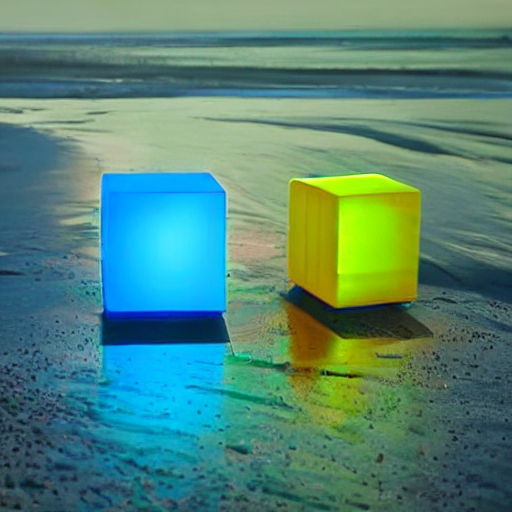
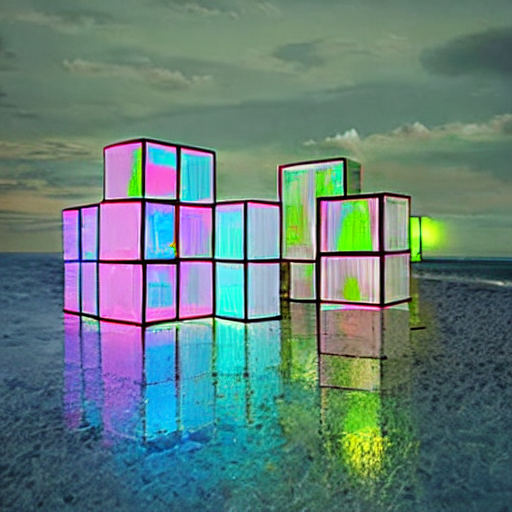
"At night, glowing cubes in front of the beach",
|
||||
image=color_palette,
|
||||
generator=generator,
|
||||
).images[0]
|
||||
make_image_grid([image, color_palette, out_image], rows=1, cols=3)
|
||||
```
|
||||
|
||||
|
||||
|
||||
## Usage example with the base model of StableDiffusion-XL
|
||||
|
||||
In the following we give a simple example of how to use a *T2I-Adapter* checkpoint with Diffusers for inference based on StableDiffusion-XL.
|
||||
All adapters use the same pipeline.
|
||||
|
||||
1. Images are first downloaded into the appropriate *control image* format.
|
||||
2. The *control image* and *prompt* are passed to the [`StableDiffusionXLAdapterPipeline`].
|
||||
|
||||
Let's have a look at a simple example using the [Sketch Adapter](https://huggingface.co/Adapter/t2iadapter/tree/main/sketch_sdxl_1.0).
|
||||
|
||||
```python
|
||||
from diffusers.utils import load_image, make_image_grid
|
||||
|
||||
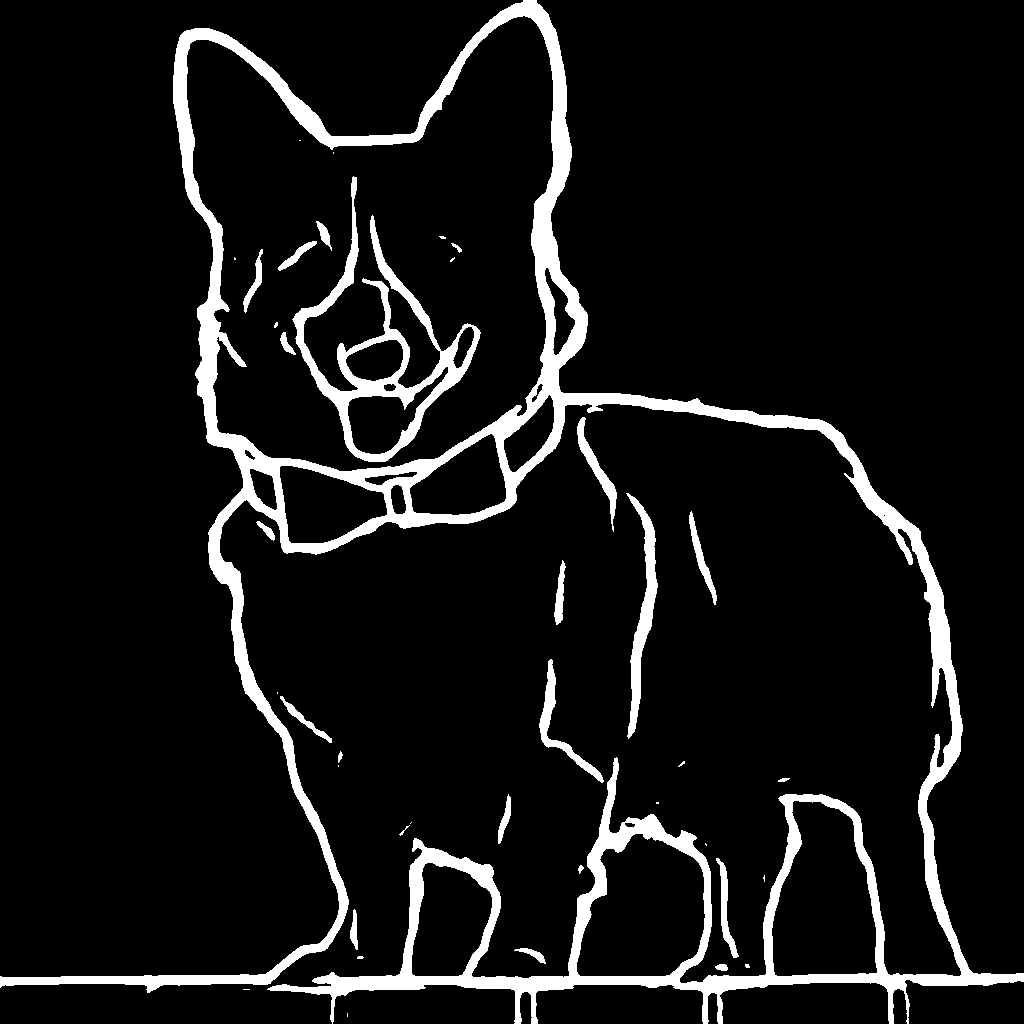
sketch_image = load_image("https://huggingface.co/Adapter/t2iadapter/resolve/main/sketch.png").convert("L")
|
||||
```
|
||||
|
||||
|
||||
|
||||
Then, create the adapter pipeline
|
||||
|
||||
```py
|
||||
import torch
|
||||
from diffusers import (
|
||||
T2IAdapter,
|
||||
StableDiffusionXLAdapterPipeline,
|
||||
DDPMScheduler
|
||||
)
|
||||
|
||||
model_id = "stabilityai/stable-diffusion-xl-base-1.0"
|
||||
adapter = T2IAdapter.from_pretrained("Adapter/t2iadapter", subfolder="sketch_sdxl_1.0", torch_dtype=torch.float16, adapter_type="full_adapter_xl")
|
||||
scheduler = DDPMScheduler.from_pretrained(model_id, subfolder="scheduler")
|
||||
|
||||
pipe = StableDiffusionXLAdapterPipeline.from_pretrained(
|
||||
model_id, adapter=adapter, safety_checker=None, torch_dtype=torch.float16, variant="fp16", scheduler=scheduler
|
||||
)
|
||||
|
||||
pipe.to("cuda")
|
||||
```
|
||||
|
||||
Finally, pass the prompt and control image to the pipeline
|
||||
|
||||
```py
|
||||
# fix the random seed, so you will get the same result as the example
|
||||
generator = torch.Generator().manual_seed(42)
|
||||
|
||||
sketch_image_out = pipe(
|
||||
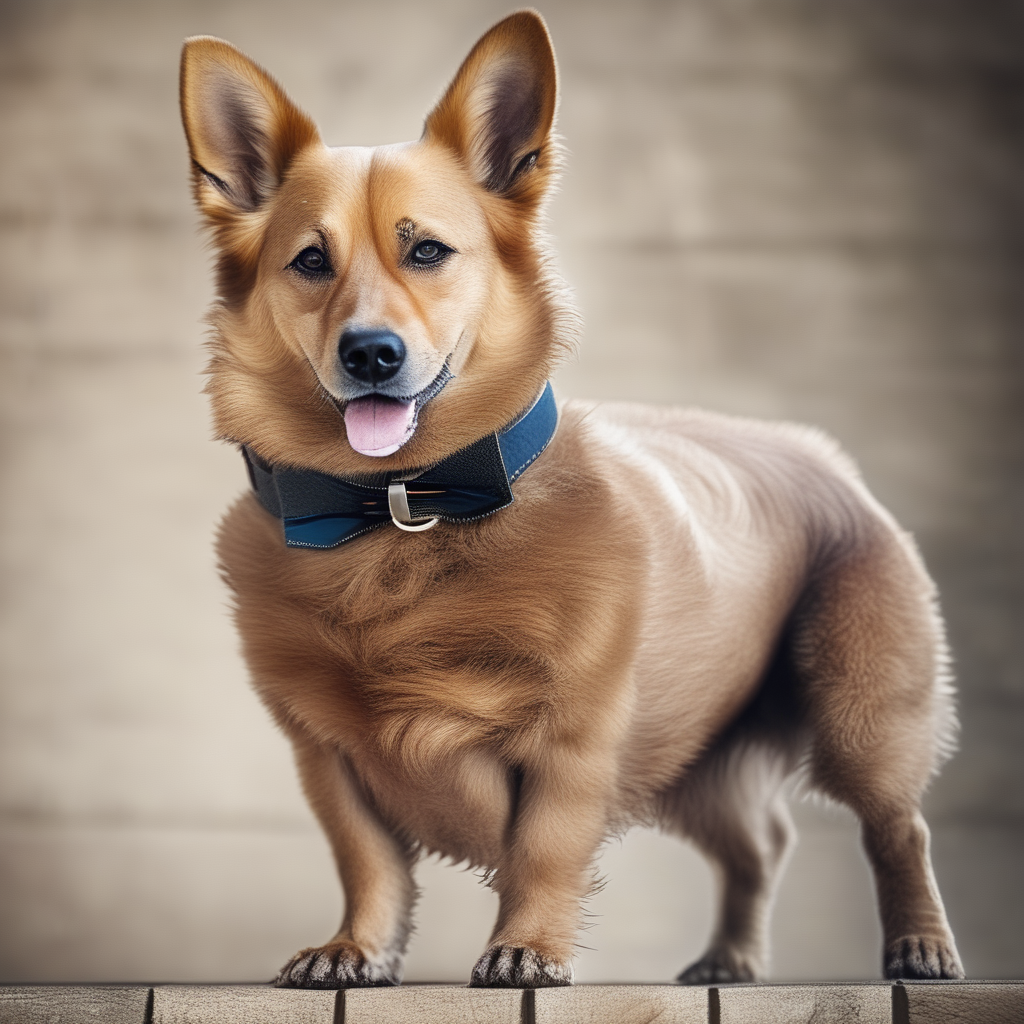
prompt="a photo of a dog in real world, high quality",
|
||||
negative_prompt="extra digit, fewer digits, cropped, worst quality, low quality",
|
||||
image=sketch_image,
|
||||
generator=generator,
|
||||
guidance_scale=7.5
|
||||
).images[0]
|
||||
make_image_grid([sketch_image, sketch_image_out], rows=1, cols=2)
|
||||
```
|
||||
|
||||
|
||||
|
||||
## Available checkpoints
|
||||
|
||||
Non-diffusers checkpoints can be found under [TencentARC/T2I-Adapter](https://huggingface.co/TencentARC/T2I-Adapter/tree/main/models).
|
||||
|
||||
### T2I-Adapter with Stable Diffusion 1.4
|
||||
|
||||
| Model Name | Control Image Overview| Control Image Example | Generated Image Example |
|
||||
|---|---|---|---|
|
||||
|[TencentARC/t2iadapter_color_sd14v1](https://huggingface.co/TencentARC/t2iadapter_color_sd14v1)<br/> *Trained with spatial color palette* | An image with 8x8 color palette.|<a href="https://huggingface.co/datasets/diffusers/docs-images/resolve/main/t2i-adapter/color_sample_input.png"><img width="64" style="margin:0;padding:0;" src="https://huggingface.co/datasets/diffusers/docs-images/resolve/main/t2i-adapter/color_sample_input.png"/></a>|<a href="https://huggingface.co/datasets/diffusers/docs-images/resolve/main/t2i-adapter/color_sample_output.png"><img width="64" src="https://huggingface.co/datasets/diffusers/docs-images/resolve/main/t2i-adapter/color_sample_output.png"/></a>|
|
||||
|[TencentARC/t2iadapter_canny_sd14v1](https://huggingface.co/TencentARC/t2iadapter_canny_sd14v1)<br/> *Trained with canny edge detection* | A monochrome image with white edges on a black background.|<a href="https://huggingface.co/datasets/diffusers/docs-images/resolve/main/t2i-adapter/canny_sample_input.png"><img width="64" style="margin:0;padding:0;" src="https://huggingface.co/datasets/diffusers/docs-images/resolve/main/t2i-adapter/canny_sample_input.png"/></a>|<a href="https://huggingface.co/datasets/diffusers/docs-images/resolve/main/t2i-adapter/canny_sample_output.png"><img width="64" src="https://huggingface.co/datasets/diffusers/docs-images/resolve/main/t2i-adapter/canny_sample_output.png"/></a>|
|
||||
|[TencentARC/t2iadapter_sketch_sd14v1](https://huggingface.co/TencentARC/t2iadapter_sketch_sd14v1)<br/> *Trained with [PidiNet](https://github.com/zhuoinoulu/pidinet) edge detection* | A hand-drawn monochrome image with white outlines on a black background.|<a href="https://huggingface.co/datasets/diffusers/docs-images/resolve/main/t2i-adapter/sketch_sample_input.png"><img width="64" style="margin:0;padding:0;" src="https://huggingface.co/datasets/diffusers/docs-images/resolve/main/t2i-adapter/sketch_sample_input.png"/></a>|<a href="https://huggingface.co/datasets/diffusers/docs-images/resolve/main/t2i-adapter/sketch_sample_output.png"><img width="64" src="https://huggingface.co/datasets/diffusers/docs-images/resolve/main/t2i-adapter/sketch_sample_output.png"/></a>|
|
||||
|[TencentARC/t2iadapter_depth_sd14v1](https://huggingface.co/TencentARC/t2iadapter_depth_sd14v1)<br/> *Trained with Midas depth estimation* | A grayscale image with black representing deep areas and white representing shallow areas.|<a href="https://huggingface.co/datasets/diffusers/docs-images/resolve/main/t2i-adapter/depth_sample_input.png"><img width="64" src="https://huggingface.co/datasets/diffusers/docs-images/resolve/main/t2i-adapter/depth_sample_input.png"/></a>|<a href="https://huggingface.co/datasets/diffusers/docs-images/resolve/main/t2i-adapter/depth_sample_output.png"><img width="64" src="https://huggingface.co/datasets/diffusers/docs-images/resolve/main/t2i-adapter/depth_sample_output.png"/></a>|
|
||||
|[TencentARC/t2iadapter_openpose_sd14v1](https://huggingface.co/TencentARC/t2iadapter_openpose_sd14v1)<br/> *Trained with OpenPose bone image* | A [OpenPose bone](https://github.com/CMU-Perceptual-Computing-Lab/openpose) image.|<a href="https://huggingface.co/datasets/diffusers/docs-images/resolve/main/t2i-adapter/openpose_sample_input.png"><img width="64" src="https://huggingface.co/datasets/diffusers/docs-images/resolve/main/t2i-adapter/openpose_sample_input.png"/></a>|<a href="https://huggingface.co/datasets/diffusers/docs-images/resolve/main/t2i-adapter/openpose_sample_output.png"><img width="64" src="https://huggingface.co/datasets/diffusers/docs-images/resolve/main/t2i-adapter/openpose_sample_output.png"/></a>|
|
||||
|[TencentARC/t2iadapter_keypose_sd14v1](https://huggingface.co/TencentARC/t2iadapter_keypose_sd14v1)<br/> *Trained with mmpose skeleton image* | A [mmpose skeleton](https://github.com/open-mmlab/mmpose) image.|<a href="https://huggingface.co/datasets/diffusers/docs-images/resolve/main/t2i-adapter/keypose_sample_input.png"><img width="64" src="https://huggingface.co/datasets/diffusers/docs-images/resolve/main/t2i-adapter/keypose_sample_input.png"/></a>|<a href="https://huggingface.co/datasets/diffusers/docs-images/resolve/main/t2i-adapter/keypose_sample_output.png"><img width="64" src="https://huggingface.co/datasets/diffusers/docs-images/resolve/main/t2i-adapter/keypose_sample_output.png"/></a>|
|
||||
|[TencentARC/t2iadapter_seg_sd14v1](https://huggingface.co/TencentARC/t2iadapter_seg_sd14v1)<br/>*Trained with semantic segmentation* | An [custom](https://github.com/TencentARC/T2I-Adapter/discussions/25) segmentation protocol image.|<a href="https://huggingface.co/datasets/diffusers/docs-images/resolve/main/t2i-adapter/seg_sample_input.png"><img width="64" src="https://huggingface.co/datasets/diffusers/docs-images/resolve/main/t2i-adapter/seg_sample_input.png"/></a>|<a href="https://huggingface.co/datasets/diffusers/docs-images/resolve/main/t2i-adapter/seg_sample_output.png"><img width="64" src="https://huggingface.co/datasets/diffusers/docs-images/resolve/main/t2i-adapter/seg_sample_output.png"/></a> |
|
||||
|[TencentARC/t2iadapter_canny_sd15v2](https://huggingface.co/TencentARC/t2iadapter_canny_sd15v2)||
|
||||
|[TencentARC/t2iadapter_depth_sd15v2](https://huggingface.co/TencentARC/t2iadapter_depth_sd15v2)||
|
||||
|[TencentARC/t2iadapter_sketch_sd15v2](https://huggingface.co/TencentARC/t2iadapter_sketch_sd15v2)||
|
||||
|[TencentARC/t2iadapter_zoedepth_sd15v1](https://huggingface.co/TencentARC/t2iadapter_zoedepth_sd15v1)||
|
||||
|[Adapter/t2iadapter, subfolder='sketch_sdxl_1.0'](https://huggingface.co/Adapter/t2iadapter/tree/main/sketch_sdxl_1.0)||
|
||||
|[Adapter/t2iadapter, subfolder='canny_sdxl_1.0'](https://huggingface.co/Adapter/t2iadapter/tree/main/canny_sdxl_1.0)||
|
||||
|[Adapter/t2iadapter, subfolder='openpose_sdxl_1.0'](https://huggingface.co/Adapter/t2iadapter/tree/main/openpose_sdxl_1.0)||
|
||||
|
||||
## Combining multiple adapters
|
||||
|
||||
[`MultiAdapter`] can be used for applying multiple conditionings at once.
|
||||
|
||||
Here we use the keypose adapter for the character posture and the depth adapter for creating the scene.
|
||||
|
||||
```py
|
||||
from diffusers.utils import load_image, make_image_grid
|
||||
|
||||
cond_keypose = load_image(
|
||||
"https://huggingface.co/datasets/diffusers/docs-images/resolve/main/t2i-adapter/keypose_sample_input.png"
|
||||
)
|
||||
cond_depth = load_image(
|
||||
"https://huggingface.co/datasets/diffusers/docs-images/resolve/main/t2i-adapter/depth_sample_input.png"
|
||||
)
|
||||
cond = [cond_keypose, cond_depth]
|
||||
|
||||
prompt = ["A man walking in an office room with a nice view"]
|
||||
```
|
||||
|
||||
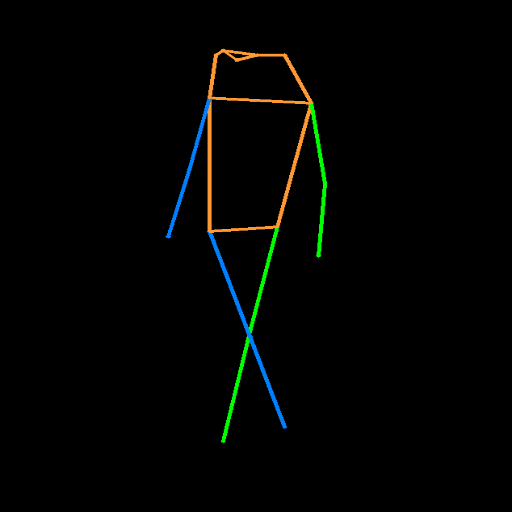
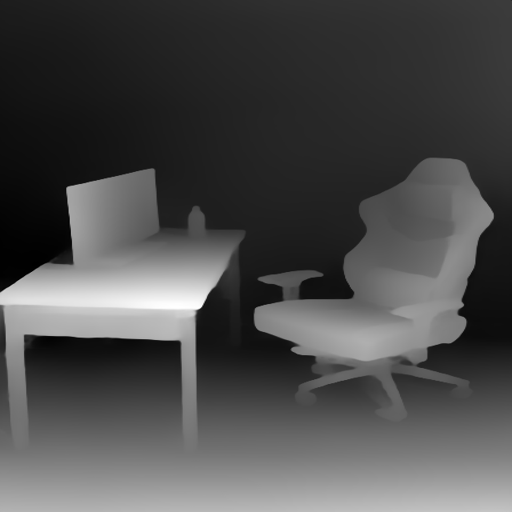
The two control images look as such:
|
||||
|
||||
|
||||
|
||||
|
||||
|
||||
`MultiAdapter` combines keypose and depth adapters.
|
||||
|
||||
`adapter_conditioning_scale` balances the relative influence of the different adapters.
|
||||
|
||||
```py
|
||||
import torch
|
||||
from diffusers import StableDiffusionAdapterPipeline, MultiAdapter, T2IAdapter
|
||||
|
||||
adapters = MultiAdapter(
|
||||
[
|
||||
T2IAdapter.from_pretrained("TencentARC/t2iadapter_keypose_sd14v1"),
|
||||
T2IAdapter.from_pretrained("TencentARC/t2iadapter_depth_sd14v1"),
|
||||
]
|
||||
)
|
||||
adapters = adapters.to(torch.float16)
|
||||
|
||||
pipe = StableDiffusionAdapterPipeline.from_pretrained(
|
||||
"CompVis/stable-diffusion-v1-4",
|
||||
torch_dtype=torch.float16,
|
||||
adapter=adapters,
|
||||
).to("cuda")
|
||||
|
||||
image = pipe(prompt, cond, adapter_conditioning_scale=[0.8, 0.8]).images[0]
|
||||
make_image_grid([cond_keypose, cond_depth, image], rows=1, cols=3)
|
||||
```
|
||||
|
||||

|
||||
|
||||
|
||||
## T2I-Adapter vs ControlNet
|
||||
|
||||
T2I-Adapter is similar to [ControlNet](https://huggingface.co/docs/diffusers/main/en/api/pipelines/controlnet).
|
||||
T2I-Adapter uses a smaller auxiliary network which is only run once for the entire diffusion process.
|
||||
However, T2I-Adapter performs slightly worse than ControlNet.
|
||||
|
||||
## StableDiffusionAdapterPipeline
|
||||
|
||||
[[autodoc]] StableDiffusionAdapterPipeline
|
||||
- all
|
||||
- __call__
|
||||
- enable_attention_slicing
|
||||
- disable_attention_slicing
|
||||
- enable_vae_slicing
|
||||
- disable_vae_slicing
|
||||
- enable_xformers_memory_efficient_attention
|
||||
- disable_xformers_memory_efficient_attention
|
||||
- all
|
||||
- __call__
|
||||
- enable_attention_slicing
|
||||
- disable_attention_slicing
|
||||
- enable_vae_slicing
|
||||
- disable_vae_slicing
|
||||
- enable_xformers_memory_efficient_attention
|
||||
- disable_xformers_memory_efficient_attention
|
||||
|
||||
## StableDiffusionXLAdapterPipeline
|
||||
|
||||
[[autodoc]] StableDiffusionXLAdapterPipeline
|
||||
- all
|
||||
- __call__
|
||||
- enable_attention_slicing
|
||||
- disable_attention_slicing
|
||||
- enable_vae_slicing
|
||||
- disable_vae_slicing
|
||||
- enable_xformers_memory_efficient_attention
|
||||
- disable_xformers_memory_efficient_attention
|
||||
- all
|
||||
- __call__
|
||||
- enable_attention_slicing
|
||||
- disable_attention_slicing
|
||||
- enable_vae_slicing
|
||||
- disable_vae_slicing
|
||||
- enable_xformers_memory_efficient_attention
|
||||
- disable_xformers_memory_efficient_attention
|
||||
|
||||
@@ -0,0 +1,179 @@
|
||||
# T-GATE
|
||||
|
||||
[T-GATE](https://github.com/HaozheLiu-ST/T-GATE/tree/main) accelerates inference for [Stable Diffusion](../api/pipelines/stable_diffusion/overview), [PixArt](../api/pipelines/pixart), and [Latency Consistency Model](../api/pipelines/latent_consistency_models.md) pipelines by skipping the cross-attention calculation once it converges. This method doesn't require any additional training and it can speed up inference from 10-50%. T-GATE is also compatible with other optimization methods like [DeepCache](./deepcache).
|
||||
|
||||
Before you begin, make sure you install T-GATE.
|
||||
|
||||
```bash
|
||||
pip install tgate
|
||||
pip install -U pytorch diffusers transformers accelerate DeepCache
|
||||
```
|
||||
|
||||
|
||||
To use T-GATE with a pipeline, you need to use its corresponding loader.
|
||||
|
||||
| Pipeline | T-GATE Loader |
|
||||
|---|---|
|
||||
| PixArt | TgatePixArtLoader |
|
||||
| Stable Diffusion XL | TgateSDXLLoader |
|
||||
| Stable Diffusion XL + DeepCache | TgateSDXLDeepCacheLoader |
|
||||
| Stable Diffusion | TgateSDLoader |
|
||||
| Stable Diffusion + DeepCache | TgateSDDeepCacheLoader |
|
||||
|
||||
Next, create a `TgateLoader` with a pipeline, the gate step (the time step to stop calculating the cross attention), and the number of inference steps. Then call the `tgate` method on the pipeline with a prompt, gate step, and the number of inference steps.
|
||||
|
||||
Let's see how to enable this for several different pipelines.
|
||||
|
||||
<hfoptions id="pipelines">
|
||||
<hfoption id="PixArt">
|
||||
|
||||
Accelerate `PixArtAlphaPipeline` with T-GATE:
|
||||
|
||||
```py
|
||||
import torch
|
||||
from diffusers import PixArtAlphaPipeline
|
||||
from tgate import TgatePixArtLoader
|
||||
|
||||
pipe = PixArtAlphaPipeline.from_pretrained("PixArt-alpha/PixArt-XL-2-1024-MS", torch_dtype=torch.float16)
|
||||
pipe = TgatePixArtLoader(
|
||||
pipe,
|
||||
gate_step=8,
|
||||
num_inference_steps=25,
|
||||
).to("cuda")
|
||||
|
||||
image = pipe.tgate(
|
||||
"An alpaca made of colorful building blocks, cyberpunk.",
|
||||
gate_step=gate_step,
|
||||
num_inference_steps=inference_step,
|
||||
).images[0]
|
||||
```
|
||||
</hfoption>
|
||||
<hfoption id="Stable Diffusion XL">
|
||||
|
||||
Accelerate `StableDiffusionXLPipeline` with T-GATE:
|
||||
|
||||
```py
|
||||
import torch
|
||||
from diffusers import StableDiffusionXLPipeline
|
||||
from diffusers import DPMSolverMultistepScheduler
|
||||
|
||||
pipe = StableDiffusionXLPipeline.from_pretrained(
|
||||
"stabilityai/stable-diffusion-xl-base-1.0",
|
||||
torch_dtype=torch.float16,
|
||||
variant="fp16",
|
||||
use_safetensors=True,
|
||||
)
|
||||
pipe.scheduler = DPMSolverMultistepScheduler.from_config(pipe.scheduler.config)
|
||||
|
||||
from tgate import TgateSDXLLoader
|
||||
gate_step = 10
|
||||
inference_step = 25
|
||||
pipe = TgateSDXLLoader(
|
||||
pipe,
|
||||
gate_step=gate_step,
|
||||
num_inference_steps=inference_step,
|
||||
).to("cuda")
|
||||
|
||||
image = pipe.tgate(
|
||||
"Astronaut in a jungle, cold color palette, muted colors, detailed, 8k.",
|
||||
gate_step=gate_step,
|
||||
num_inference_steps=inference_step
|
||||
).images[0]
|
||||
```
|
||||
</hfoption>
|
||||
<hfoption id="StableDiffusionXL with DeepCache">
|
||||
|
||||
Accelerate `StableDiffusionXLPipeline` with [DeepCache](https://github.com/horseee/DeepCache) and T-GATE:
|
||||
|
||||
```py
|
||||
import torch
|
||||
from diffusers import StableDiffusionXLPipeline
|
||||
from diffusers import DPMSolverMultistepScheduler
|
||||
|
||||
pipe = StableDiffusionXLPipeline.from_pretrained(
|
||||
"stabilityai/stable-diffusion-xl-base-1.0",
|
||||
torch_dtype=torch.float16,
|
||||
variant="fp16",
|
||||
use_safetensors=True,
|
||||
)
|
||||
pipe.scheduler = DPMSolverMultistepScheduler.from_config(pipe.scheduler.config)
|
||||
|
||||
from tgate import TgateSDXLDeepCacheLoader
|
||||
gate_step = 10
|
||||
inference_step = 25
|
||||
pipe = TgateSDXLDeepCacheLoader(
|
||||
pipe,
|
||||
cache_interval=3,
|
||||
cache_branch_id=0,
|
||||
).to("cuda")
|
||||
|
||||
image = pipe.tgate(
|
||||
"Astronaut in a jungle, cold color palette, muted colors, detailed, 8k.",
|
||||
gate_step=gate_step,
|
||||
num_inference_steps=inference_step
|
||||
).images[0]
|
||||
```
|
||||
</hfoption>
|
||||
<hfoption id="Latent Consistency Model">
|
||||
|
||||
Accelerate `latent-consistency/lcm-sdxl` with T-GATE:
|
||||
|
||||
```py
|
||||
import torch
|
||||
from diffusers import StableDiffusionXLPipeline
|
||||
from diffusers import UNet2DConditionModel, LCMScheduler
|
||||
from diffusers import DPMSolverMultistepScheduler
|
||||
|
||||
unet = UNet2DConditionModel.from_pretrained(
|
||||
"latent-consistency/lcm-sdxl",
|
||||
torch_dtype=torch.float16,
|
||||
variant="fp16",
|
||||
)
|
||||
pipe = StableDiffusionXLPipeline.from_pretrained(
|
||||
"stabilityai/stable-diffusion-xl-base-1.0",
|
||||
unet=unet,
|
||||
torch_dtype=torch.float16,
|
||||
variant="fp16",
|
||||
)
|
||||
pipe.scheduler = LCMScheduler.from_config(pipe.scheduler.config)
|
||||
|
||||
from tgate import TgateSDXLLoader
|
||||
gate_step = 1
|
||||
inference_step = 4
|
||||
pipe = TgateSDXLLoader(
|
||||
pipe,
|
||||
gate_step=gate_step,
|
||||
num_inference_steps=inference_step,
|
||||
lcm=True
|
||||
).to("cuda")
|
||||
|
||||
image = pipe.tgate(
|
||||
"Astronaut in a jungle, cold color palette, muted colors, detailed, 8k.",
|
||||
gate_step=gate_step,
|
||||
num_inference_steps=inference_step
|
||||
).images[0]
|
||||
```
|
||||
</hfoption>
|
||||
</hfoptions>
|
||||
|
||||
T-GATE also supports [`StableDiffusionPipeline`] and [PixArt-alpha/PixArt-LCM-XL-2-1024-MS](https://hf.co/PixArt-alpha/PixArt-LCM-XL-2-1024-MS).
|
||||
|
||||
## Benchmarks
|
||||
| Model | MACs | Param | Latency | Zero-shot 10K-FID on MS-COCO |
|
||||
|-----------------------|----------|-----------|---------|---------------------------|
|
||||
| SD-1.5 | 16.938T | 859.520M | 7.032s | 23.927 |
|
||||
| SD-1.5 w/ T-GATE | 9.875T | 815.557M | 4.313s | 20.789 |
|
||||
| SD-2.1 | 38.041T | 865.785M | 16.121s | 22.609 |
|
||||
| SD-2.1 w/ T-GATE | 22.208T | 815.433 M | 9.878s | 19.940 |
|
||||
| SD-XL | 149.438T | 2.570B | 53.187s | 24.628 |
|
||||
| SD-XL w/ T-GATE | 84.438T | 2.024B | 27.932s | 22.738 |
|
||||
| Pixart-Alpha | 107.031T | 611.350M | 61.502s | 38.669 |
|
||||
| Pixart-Alpha w/ T-GATE | 65.318T | 462.585M | 37.867s | 35.825 |
|
||||
| DeepCache (SD-XL) | 57.888T | - | 19.931s | 23.755 |
|
||||
| DeepCache w/ T-GATE | 43.868T | - | 14.666s | 23.999 |
|
||||
| LCM (SD-XL) | 11.955T | 2.570B | 3.805s | 25.044 |
|
||||
| LCM w/ T-GATE | 11.171T | 2.024B | 3.533s | 25.028 |
|
||||
| LCM (Pixart-Alpha) | 8.563T | 611.350M | 4.733s | 36.086 |
|
||||
| LCM w/ T-GATE | 7.623T | 462.585M | 4.543s | 37.048 |
|
||||
|
||||
The latency is tested on an NVIDIA 1080TI, MACs and Params are calculated with [calflops](https://github.com/MrYxJ/calculate-flops.pytorch), and the FID is calculated with [PytorchFID](https://github.com/mseitzer/pytorch-fid).
|
||||
@@ -52,6 +52,76 @@ To learn more, take a look at the [Distributed Inference with 🤗 Accelerate](h
|
||||
|
||||
</Tip>
|
||||
|
||||
### Device placement
|
||||
|
||||
> [!WARNING]
|
||||
> This feature is experimental and its APIs might change in the future.
|
||||
|
||||
With Accelerate, you can use the `device_map` to determine how to distribute the models of a pipeline across multiple devices. This is useful in situations where you have more than one GPU.
|
||||
|
||||
For example, if you have two 8GB GPUs, then using [`~DiffusionPipeline.enable_model_cpu_offload`] may not work so well because:
|
||||
|
||||
* it only works on a single GPU
|
||||
* a single model might not fit on a single GPU ([`~DiffusionPipeline.enable_sequential_cpu_offload`] might work but it will be extremely slow and it is also limited to a single GPU)
|
||||
|
||||
To make use of both GPUs, you can use the "balanced" device placement strategy which splits the models across all available GPUs.
|
||||
|
||||
> [!WARNING]
|
||||
> Only the "balanced" strategy is supported at the moment, and we plan to support additional mapping strategies in the future.
|
||||
|
||||
```diff
|
||||
from diffusers import DiffusionPipeline
|
||||
import torch
|
||||
|
||||
pipeline = DiffusionPipeline.from_pretrained(
|
||||
- "runwayml/stable-diffusion-v1-5", torch_dtype=torch.float16, use_safetensors=True,
|
||||
+ "runwayml/stable-diffusion-v1-5", torch_dtype=torch.float16, use_safetensors=True, device_map="balanced"
|
||||
)
|
||||
image = pipeline("a dog").images[0]
|
||||
image
|
||||
```
|
||||
|
||||
You can also pass a dictionary to enforce the maximum GPU memory that can be used on each device:
|
||||
|
||||
```diff
|
||||
from diffusers import DiffusionPipeline
|
||||
import torch
|
||||
|
||||
max_memory = {0:"1GB", 1:"1GB"}
|
||||
pipeline = DiffusionPipeline.from_pretrained(
|
||||
"runwayml/stable-diffusion-v1-5",
|
||||
torch_dtype=torch.float16,
|
||||
use_safetensors=True,
|
||||
device_map="balanced",
|
||||
+ max_memory=max_memory
|
||||
)
|
||||
image = pipeline("a dog").images[0]
|
||||
image
|
||||
```
|
||||
|
||||
If a device is not present in `max_memory`, then it will be completely ignored and will not participate in the device placement.
|
||||
|
||||
By default, Diffusers uses the maximum memory of all devices. If the models don't fit on the GPUs, they are offloaded to the CPU. If the CPU doesn't have enough memory, then you might see an error. In that case, you could defer to using [`~DiffusionPipeline.enable_sequential_cpu_offload`] and [`~DiffusionPipeline.enable_model_cpu_offload`].
|
||||
|
||||
Call [`~DiffusionPipeline.reset_device_map`] to reset the `device_map` of a pipeline. This is also necessary if you want to use methods like `to()`, [`~DiffusionPipeline.enable_sequential_cpu_offload`], and [`~DiffusionPipeline.enable_model_cpu_offload`] on a pipeline that was device-mapped.
|
||||
|
||||
```py
|
||||
pipeline.reset_device_map()
|
||||
```
|
||||
|
||||
Once a pipeline has been device-mapped, you can also access its device map via `hf_device_map`:
|
||||
|
||||
```py
|
||||
print(pipeline.hf_device_map)
|
||||
```
|
||||
|
||||
An example device map would look like so:
|
||||
|
||||
|
||||
```bash
|
||||
{'unet': 1, 'vae': 1, 'safety_checker': 0, 'text_encoder': 0}
|
||||
```
|
||||
|
||||
## PyTorch Distributed
|
||||
|
||||
PyTorch supports [`DistributedDataParallel`](https://pytorch.org/docs/stable/generated/torch.nn.parallel.DistributedDataParallel.html) which enables data parallelism.
|
||||
|
||||
@@ -148,9 +148,9 @@ pipeline = AutoPipelineForText2Image.from_pretrained(
|
||||
use_safetensors=True
|
||||
).to("cuda")
|
||||
|
||||
image = pipe(
|
||||
prompt = "A croissant shaped like a cute bear."
|
||||
negative_prompt = "Deformed, ugly, bad anatomy"
|
||||
image = pipeline(
|
||||
prompt="A croissant shaped like a cute bear.",
|
||||
negative_prompt="Deformed, ugly, bad anatomy",
|
||||
callback_on_step_end=decode_tensors,
|
||||
callback_on_step_end_tensor_inputs=["latents"],
|
||||
).images[0]
|
||||
|
||||
@@ -179,6 +179,210 @@ stable_diffusion_img2img = StableDiffusionImg2ImgPipeline(
|
||||
)
|
||||
```
|
||||
|
||||
### Switch loaded pippelines
|
||||
|
||||
There are many diffuser pipelines that use the same pre-trained model as [`StableDiffusionPipeline`] and [`StableDiffusionXLPipeline`], but they implement specific features to help you achieve better generation results. This guide will show you how to use the `from_pipe` API to create multiple pipelines without increasing memory usage. By using this approach, you can easily switch between pipelines to use different features.
|
||||
|
||||
Let's take an example where we first create a [`StableDiffusionPipeline`] and then reuse the already loaded model components to create a [`StableDiffusionSAGPipeline`] to enhance generation quality.
|
||||
|
||||
we will generate an image of a bear eating pizza using Stable Diffusion with the IP-Adapter
|
||||
|
||||
```python
|
||||
from diffusers import DiffusionPipeline, StableDiffusionSAGPipeline
|
||||
import torch
|
||||
import gc
|
||||
from diffusers.utils import load_image
|
||||
from accelerate.utils import compute_module_sizes
|
||||
|
||||
base_repo = "SG161222/Realistic_Vision_V6.0_B1_noVAE"
|
||||
num_inference_steps = 50
|
||||
image = load_image("https://huggingface.co/datasets/huggingface/documentation-images/resolve/main/diffusers/load_neg_embed.png")
|
||||
prompt="bear eats pizza"
|
||||
negative_prompt = "wrong white balance, dark, sketches,worst quality,low quality"
|
||||
|
||||
pipe_sd = DiffusionPipeline.from_pretrained(base_repo, torch_dtype=torch.float16)
|
||||
pipe_sd.load_ip_adapter("h94/IP-Adapter", subfolder="models", weight_name="ip-adapter_sd15.bin")
|
||||
pipe_sd.set_ip_adapter_scale(0.6)
|
||||
pipe_sd.to("cuda")
|
||||
|
||||
generator = torch.Generator(device="cpu").manual_seed(33)
|
||||
out_sd = pipe_sd(
|
||||
prompt=prompt,
|
||||
negative_prompt=negative_prompt,
|
||||
ip_adapter_image=image,
|
||||
num_inference_steps=num_inference_steps,
|
||||
generator=generator,
|
||||
).images[0]
|
||||
```
|
||||
|
||||
let’s take a look at the image and also print out the memory used
|
||||
|
||||
<div class="flex justify-center">
|
||||
<img class="rounded-xl" src="https://huggingface.co/datasets/YiYiXu/testing-images/resolve/main/from_pipe_out_sd_0.png"/>
|
||||
</div>
|
||||
|
||||
```python
|
||||
def bytes_to_giga_bytes(bytes):
|
||||
return bytes / 1024 / 1024 / 1024
|
||||
print(
|
||||
f"Max memory allocated: {bytes_to_giga_bytes(torch.cuda.max_memory_allocated())} GB"
|
||||
)
|
||||
```
|
||||
|
||||
```bash
|
||||
Max memory allocated: 4.406213283538818 GB
|
||||
```
|
||||
|
||||
Now, we can use `from_pipe` to switch to the SAG pipeline.
|
||||
|
||||
```python
|
||||
pipe_sag = StableDiffusionSAGPipeline.from_pipe(
|
||||
pipe_sd,
|
||||
)
|
||||
```
|
||||
|
||||
It already has IP-Adapter loaded so that you can pass the same bear image as `ip_adapter_image`
|
||||
|
||||
```python
|
||||
generator = torch.Generator(device="cpu").manual_seed(33)
|
||||
out_sag = pipe_sag(
|
||||
prompt = prompt,
|
||||
negative_prompt=negative_prompt,
|
||||
ip_adapter_image=image,
|
||||
num_inference_steps=num_inference_steps,
|
||||
generator=generator,
|
||||
guidance_scale=1.0,
|
||||
sag_scale=0.75).images[0]
|
||||
```
|
||||
|
||||
You can see a pretty nice improvement in the output
|
||||
|
||||
<div class="flex justify-center">
|
||||
<img class="rounded-xl" src="https://huggingface.co/datasets/YiYiXu/testing-images/resolve/main/from_pipe_out_sag_1.png"/>
|
||||
</div>
|
||||
|
||||
Now we have both `stableDiffusionPipeline` and `StableDiffusionSAGPipeline` co-existing with the same loaded model components; You can use them interchangeably without additional memory.
|
||||
|
||||
```
|
||||
print(
|
||||
f"Max memory allocated: {bytes_to_giga_bytes(torch.cuda.max_memory_allocated())} GB"
|
||||
)
|
||||
```
|
||||
|
||||
```bash
|
||||
Max memory allocated: 4.406213283538818 GB
|
||||
```
|
||||
|
||||
Let's unload the IP adapter from the SAG pipeline. It's important to note that methods like `load_ip_adapter` and `unload_ip_adapter` modify the state of the model components. Therefore, when you use these methods on one pipeline, it will affect all other pipelines that share the same model components.
|
||||
|
||||
```bash
|
||||
pipe_sag.unload_ip_adapter()
|
||||
```
|
||||
|
||||
If you try to use the Stable Diffusion pipeline with IP adapter again, it will fail
|
||||
|
||||
```bash
|
||||
generator = torch.Generator(device="cpu").manual_seed(33)
|
||||
out_sd = pipe_sd(
|
||||
prompt=prompt,
|
||||
negative_prompt=negative_prompt,
|
||||
ip_adapter_image=image,
|
||||
num_inference_steps=num_inference_steps,
|
||||
generator=generator,
|
||||
).images[0]
|
||||
```
|
||||
|
||||
```bash
|
||||
AttributeError: 'NoneType' object has no attribute 'image_projection_layers'
|
||||
```
|
||||
|
||||
Please note that the pipeline methods may not function properly on a new pipeline created using the `from_pipe` method. For instance, the `enable_model_cpu_offload` method installs hooks to the model components based on a unique offloading sequence for each pipeline. Therefore, if the models are executed in a different order in the new pipeline, the CPU offloading may not work correctly.
|
||||
|
||||
To ensure proper functionality, we recommend re-applying the pipeline methods on the new pipeline created using the `from_pipe` method.
|
||||
|
||||
You can also add or subtract model components when you create new pipelines. Let's now create a AnimateDiff pipeline with an additional `MotionAdapter` module
|
||||
|
||||
```bash
|
||||
from diffusers import AnimateDiffPipeline, MotionAdapter, DDIMScheduler
|
||||
from diffusers.utils import export_to_gif
|
||||
|
||||
adapter = MotionAdapter.from_pretrained("guoyww/animatediff-motion-adapter-v1-5-2", torch_dtype=torch.float16)
|
||||
|
||||
pipe_animate = AnimateDiffPipeline.from_pipe(pipe_sd, motion_adapter=adapter)
|
||||
pipe_animate.scheduler = DDIMScheduler.from_config(pipe_animate.scheduler.config, beta_schedule="linear")
|
||||
# load ip_adapter again and load lora weights
|
||||
pipe_animate.load_ip_adapter("h94/IP-Adapter", subfolder="models", weight_name="ip-adapter_sd15.bin")
|
||||
pipe_animate.load_lora_weights("guoyww/animatediff-motion-lora-zoom-out", adapter_name="zoom-out")
|
||||
pipe_animate.to("cuda")
|
||||
|
||||
generator = torch.Generator(device="cpu").manual_seed(33)
|
||||
pipe_animate.set_adapters("zoom-out", adapter_weights=0.75)
|
||||
out = pipe_animate(
|
||||
prompt= prompt,
|
||||
num_frames=16,
|
||||
num_inference_steps=num_inference_steps,
|
||||
ip_adapter_image = image,
|
||||
generator=generator,
|
||||
).frames[0]
|
||||
export_to_gif(out, "out_animate.gif")
|
||||
```
|
||||
<div class="flex justify-center">
|
||||
<img class="rounded-xl" src="https://huggingface.co/datasets/YiYiXu/testing-images/resolve/main/from_pipe_out_animate_3.gif"/>
|
||||
</div>
|
||||
|
||||
|
||||
When creating multiple pipelines using the `from_pipe` method, it is important to note that the memory requirement will be determined by the pipeline with the highest memory usage. This means that regardless of the number of pipelines you create, the total memory requirement will always be the same as the highest memory requirement among the pipelines.
|
||||
|
||||
For example, we have created three pipelines - `stableDiffusionPipeline`, `StableDiffusionSAGPipeline`, and `AnimateDiffPipeline` - and the `AnimateDiffPipeline` has the highest memory requirement, then the total memory usage will be based on the memory requirement of the `AnimateDiffPipeline`.
|
||||
|
||||
Therefore, creating additional pipelines will not add up to the total memory requirement. Each pipeline can be used interchangeably without any additional memory overhead.
|
||||
|
||||
|
||||
Did you know that you can use `from_pipe` with a community pipeline? Let me show you an example of using long negative prompt and prompt weighting!
|
||||
|
||||
```bash
|
||||
pipe_lpw = DiffusionPipeline.from_pipe(
|
||||
pipe_sd,
|
||||
custom_pipeline="lpw_stable_diffusion",
|
||||
).to("cuda")
|
||||
|
||||
prompt = "best_quality (1girl:1.3) bow bride brown_hair closed_mouth frilled_bow frilled_hair_tubes frills (full_body:1.3) fox_ear hair_bow hair_tubes happy hood japanese_clothes kimono long_sleeves red_bow smile solo tabi uchikake white_kimono wide_sleeves cherry_blossoms"
|
||||
neg_prompt = "lowres, bad_anatomy, error_body, error_hair, error_arm, error_hands, bad_hands, error_fingers, bad_fingers, missing_fingers, error_legs, bad_legs, multiple_legs, missing_legs, error_lighting, error_shadow, error_reflection, text, error, extra_digit, fewer_digits, cropped, worst_quality, low_quality, normal_quality, jpeg_artifacts, signature, watermark, username, blurry"
|
||||
generator = torch.Generator(device="cpu").manual_seed(33)
|
||||
out_lpw = pipe_lpw.text2img(
|
||||
prompt,
|
||||
negative_prompt=neg_prompt,
|
||||
width=512,height=512,
|
||||
max_embeddings_multiples=3,
|
||||
num_inference_steps=num_inference_steps,
|
||||
generator=generator,
|
||||
).images[0]
|
||||
```
|
||||
|
||||
<div class="flex justify-center">
|
||||
<img class="rounded-xl" src="https://huggingface.co/datasets/YiYiXu/testing-images/resolve/main/from_pipe_out_lpw_4.png"/>
|
||||
</div>
|
||||
|
||||
let’s run StableDiffusionPipeline with the same inputs to compare: the result from the long prompt weighting pipeline is more aligned with the text prompt.
|
||||
|
||||
```
|
||||
generator = torch.Generator(device="cpu").manual_seed(33)
|
||||
out_sd = pipe_sd(
|
||||
prompt=prompt,
|
||||
negative_prompt=negative_prompt,
|
||||
generator=generator,
|
||||
num_inference_steps=num_inference_steps,
|
||||
).images[0]
|
||||
out_sd
|
||||
```
|
||||
<div class="flex justify-center">
|
||||
<img class="rounded-xl" src="https://huggingface.co/datasets/YiYiXu/testing-images/resolve/main/from_pipe_out_sd_5.png"/>
|
||||
</div>
|
||||
|
||||
|
||||
You can easily switch between different pipelines using the `from_pipe` method, similar to turning on and off a feature on your pipeline. To switch between tasks, you can use the `from_pipe` method with `AutoPipeline`, which automatically identifies the pipeline class based on the task. You can find more information about this feature at the [AutoPipe Guide](https://huggingface.co/docs/diffusers/tutorials/autopipeline).
|
||||
|
||||
|
||||
## Checkpoint variants
|
||||
|
||||
A checkpoint variant is usually a checkpoint whose weights are:
|
||||
|
||||
@@ -0,0 +1,219 @@
|
||||
<!--Copyright 2024 The HuggingFace Team. All rights reserved.
|
||||
|
||||
Licensed under the Apache License, Version 2.0 (the "License"); you may not use this file except in compliance with
|
||||
the License. You may obtain a copy of the License at
|
||||
|
||||
http://www.apache.org/licenses/LICENSE-2.0
|
||||
|
||||
Unless required by applicable law or agreed to in writing, software distributed under the License is distributed on
|
||||
an "AS IS" BASIS, WITHOUT WARRANTIES OR CONDITIONS OF ANY KIND, either express or implied. See the License for the
|
||||
specific language governing permissions and limitations under the License.
|
||||
-->
|
||||
|
||||
# T2I-Adapter
|
||||
|
||||
[T2I-Adapter](https://hf.co/papers/2302.08453) is a lightweight adapter for controlling and providing more accurate
|
||||
structure guidance for text-to-image models. It works by learning an alignment between the internal knowledge of the
|
||||
text-to-image model and an external control signal, such as edge detection or depth estimation.
|
||||
|
||||
The T2I-Adapter design is simple, the condition is passed to four feature extraction blocks and three downsample
|
||||
blocks. This makes it fast and easy to train different adapters for different conditions which can be plugged into the
|
||||
text-to-image model. T2I-Adapter is similar to [ControlNet](controlnet) except it is smaller (~77M parameters) and
|
||||
faster because it only runs once during the diffusion process. The downside is that performance may be slightly worse
|
||||
than ControlNet.
|
||||
|
||||
This guide will show you how to use T2I-Adapter with different Stable Diffusion models and how you can compose multiple
|
||||
T2I-Adapters to impose more than one condition.
|
||||
|
||||
> [!TIP]
|
||||
> There are several T2I-Adapters available for different conditions, such as color palette, depth, sketch, pose, and
|
||||
> segmentation. Check out the [TencentARC](https://hf.co/TencentARC) repository to try them out!
|
||||
|
||||
Before you begin, make sure you have the following libraries installed.
|
||||
|
||||
```py
|
||||
# uncomment to install the necessary libraries in Colab
|
||||
#!pip install -q diffusers accelerate controlnet-aux==0.0.7
|
||||
```
|
||||
|
||||
## Text-to-image
|
||||
|
||||
Text-to-image models rely on a prompt to generate an image, but sometimes, text alone may not be enough to provide more
|
||||
accurate structural guidance. T2I-Adapter allows you to provide an additional control image to guide the generation
|
||||
process. For example, you can provide a canny image (a white outline of an image on a black background) to guide the
|
||||
model to generate an image with a similar structure.
|
||||
|
||||
<hfoptions id="stablediffusion">
|
||||
<hfoption id="Stable Diffusion 1.5">
|
||||
|
||||
Create a canny image with the [opencv-library](https://github.com/opencv/opencv-python).
|
||||
|
||||
```py
|
||||
import cv2
|
||||
import numpy as np
|
||||
from PIL import Image
|
||||
from diffusers.utils import load_image
|
||||
|
||||
image = load_image("https://huggingface.co/datasets/hf-internal-testing/diffusers-images/resolve/main/sd_controlnet/hf-logo.png")
|
||||
image = np.array(image)
|
||||
|
||||
low_threshold = 100
|
||||
high_threshold = 200
|
||||
|
||||
image = cv2.Canny(image, low_threshold, high_threshold)
|
||||
image = Image.fromarray(image)
|
||||
```
|
||||
|
||||
Now load a T2I-Adapter conditioned on [canny images](https://hf.co/TencentARC/t2iadapter_canny_sd15v2) and pass it to
|
||||
the [`StableDiffusionAdapterPipeline`].
|
||||
|
||||
```py
|
||||
import torch
|
||||
from diffusers import StableDiffusionAdapterPipeline, T2IAdapter
|
||||
|
||||
adapter = T2IAdapter.from_pretrained("TencentARC/t2iadapter_canny_sd15v2", torch_dtype=torch.float16)
|
||||
pipeline = StableDiffusionAdapterPipeline.from_pretrained(
|
||||
"runwayml/stable-diffusion-v1-5",
|
||||
adapter=adapter,
|
||||
torch_dtype=torch.float16,
|
||||
)
|
||||
pipeline.to("cuda")
|
||||
```
|
||||
|
||||
Finally, pass your prompt and control image to the pipeline.
|
||||
|
||||
```py
|
||||
generator = torch.Generator("cuda").manual_seed(0)
|
||||
|
||||
image = pipeline(
|
||||
prompt="cinematic photo of a plush and soft midcentury style rug on a wooden floor, 35mm photograph, film, professional, 4k, highly detailed",
|
||||
image=image,
|
||||
generator=generator,
|
||||
).images[0]
|
||||
image
|
||||
```
|
||||
|
||||
<div class="flex justify-center">
|
||||
<img class="rounded-xl" src="https://huggingface.co/datasets/huggingface/documentation-images/resolve/main/diffusers/t2i-sd1.5.png"/>
|
||||
</div>
|
||||
|
||||
</hfoption>
|
||||
<hfoption id="Stable Diffusion XL">
|
||||
|
||||
Create a canny image with the [controlnet-aux](https://github.com/huggingface/controlnet_aux) library.
|
||||
|
||||
```py
|
||||
from controlnet_aux.canny import CannyDetector
|
||||
from diffusers.utils import load_image
|
||||
|
||||
canny_detector = CannyDetector()
|
||||
|
||||
image = load_image("https://huggingface.co/datasets/hf-internal-testing/diffusers-images/resolve/main/sd_controlnet/hf-logo.png")
|
||||
image = canny_detector(image, detect_resolution=384, image_resolution=1024)
|
||||
```
|
||||
|
||||
Now load a T2I-Adapter conditioned on [canny images](https://hf.co/TencentARC/t2i-adapter-canny-sdxl-1.0) and pass it
|
||||
to the [`StableDiffusionXLAdapterPipeline`].
|
||||
|
||||
```py
|
||||
import torch
|
||||
from diffusers import StableDiffusionXLAdapterPipeline, T2IAdapter, EulerAncestralDiscreteScheduler, AutoencoderKL
|
||||
|
||||
scheduler = EulerAncestralDiscreteScheduler.from_pretrained("stabilityai/stable-diffusion-xl-base-1.0", subfolder="scheduler")
|
||||
vae = AutoencoderKL.from_pretrained("madebyollin/sdxl-vae-fp16-fix", torch_dtype=torch.float16)
|
||||
adapter = T2IAdapter.from_pretrained("TencentARC/t2i-adapter-canny-sdxl-1.0", torch_dtype=torch.float16)
|
||||
pipeline = StableDiffusionXLAdapterPipeline.from_pretrained(
|
||||
"stabilityai/stable-diffusion-xl-base-1.0",
|
||||
adapter=adapter,
|
||||
vae=vae,
|
||||
scheduler=scheduler,
|
||||
torch_dtype=torch.float16,
|
||||
variant="fp16",
|
||||
)
|
||||
pipeline.to("cuda")
|
||||
```
|
||||
|
||||
Finally, pass your prompt and control image to the pipeline.
|
||||
|
||||
```py
|
||||
generator = torch.Generator("cuda").manual_seed(0)
|
||||
|
||||
image = pipeline(
|
||||
prompt="cinematic photo of a plush and soft midcentury style rug on a wooden floor, 35mm photograph, film, professional, 4k, highly detailed",
|
||||
image=image,
|
||||
generator=generator,
|
||||
).images[0]
|
||||
image
|
||||
```
|
||||
|
||||
<div class="flex justify-center">
|
||||
<img class="rounded-xl" src="https://huggingface.co/datasets/huggingface/documentation-images/resolve/main/diffusers/t2i-sdxl.png"/>
|
||||
</div>
|
||||
|
||||
</hfoption>
|
||||
</hfoptions>
|
||||
|
||||
## MultiAdapter
|
||||
|
||||
T2I-Adapters are also composable, allowing you to use more than one adapter to impose multiple control conditions on an
|
||||
image. For example, you can use a pose map to provide structural control and a depth map for depth control. This is
|
||||
enabled by the [`MultiAdapter`] class.
|
||||
|
||||
Let's condition a text-to-image model with a pose and depth adapter. Create and place your depth and pose image and in a list.
|
||||
|
||||
```py
|
||||
from diffusers.utils import load_image
|
||||
|
||||
pose_image = load_image(
|
||||
"https://huggingface.co/datasets/diffusers/docs-images/resolve/main/t2i-adapter/keypose_sample_input.png"
|
||||
)
|
||||
depth_image = load_image(
|
||||
"https://huggingface.co/datasets/diffusers/docs-images/resolve/main/t2i-adapter/depth_sample_input.png"
|
||||
)
|
||||
cond = [pose_image, depth_image]
|
||||
prompt = ["Santa Claus walking into an office room with a beautiful city view"]
|
||||
```
|
||||
|
||||
<div class="flex gap-4">
|
||||
<div>
|
||||
<img class="rounded-xl" src="https://huggingface.co/datasets/diffusers/docs-images/resolve/main/t2i-adapter/depth_sample_input.png"/>
|
||||
<figcaption class="mt-2 text-center text-sm text-gray-500">depth image</figcaption>
|
||||
</div>
|
||||
<div>
|
||||
<img class="rounded-xl" src="https://huggingface.co/datasets/diffusers/docs-images/resolve/main/t2i-adapter/keypose_sample_input.png"/>
|
||||
<figcaption class="mt-2 text-center text-sm text-gray-500">pose image</figcaption>
|
||||
</div>
|
||||
</div>
|
||||
|
||||
Load the corresponding pose and depth adapters as a list in the [`MultiAdapter`] class.
|
||||
|
||||
```py
|
||||
import torch
|
||||
from diffusers import StableDiffusionAdapterPipeline, MultiAdapter, T2IAdapter
|
||||
|
||||
adapters = MultiAdapter(
|
||||
[
|
||||
T2IAdapter.from_pretrained("TencentARC/t2iadapter_keypose_sd14v1"),
|
||||
T2IAdapter.from_pretrained("TencentARC/t2iadapter_depth_sd14v1"),
|
||||
]
|
||||
)
|
||||
adapters = adapters.to(torch.float16)
|
||||
```
|
||||
|
||||
Finally, load a [`StableDiffusionAdapterPipeline`] with the adapters, and pass your prompt and conditioned images to
|
||||
it. Use the [`adapter_conditioning_scale`] to adjust the weight of each adapter on the image.
|
||||
|
||||
```py
|
||||
pipeline = StableDiffusionAdapterPipeline.from_pretrained(
|
||||
"CompVis/stable-diffusion-v1-4",
|
||||
torch_dtype=torch.float16,
|
||||
adapter=adapters,
|
||||
).to("cuda")
|
||||
|
||||
image = pipeline(prompt, cond, adapter_conditioning_scale=[0.7, 0.7]).images[0]
|
||||
image
|
||||
```
|
||||
|
||||
<div class="flex justify-center">
|
||||
<img class="rounded-xl" src="https://huggingface.co/datasets/huggingface/documentation-images/resolve/main/diffusers/t2i-multi.png"/>
|
||||
</div>
|
||||
@@ -10,10 +10,209 @@ an "AS IS" BASIS, WITHOUT WARRANTIES OR CONDITIONS OF ANY KIND, either express o
|
||||
specific language governing permissions and limitations under the License.
|
||||
-->
|
||||
|
||||
# Prompt weighting
|
||||
# Prompt techniques
|
||||
|
||||
[[open-in-colab]]
|
||||
|
||||
Prompts are important because they describe what you want a diffusion model to generate. The best prompts are detailed, specific, and well-structured to help the model realize your vision. But crafting a great prompt takes time and effort and sometimes it may not be enough because language and words can be imprecise. This is where you need to boost your prompt with other techniques, such as prompt enhancing and prompt weighting, to get the results you want.
|
||||
|
||||
This guide will show you how you can use these prompt techniques to generate high-quality images with lower effort and adjust the weight of certain keywords in a prompt.
|
||||
|
||||
## Prompt engineering
|
||||
|
||||
> [!TIP]
|
||||
> This is not an exhaustive guide on prompt engineering, but it will help you understand the necessary parts of a good prompt. We encourage you to continue experimenting with different prompts and combine them in new ways to see what works best. As you write more prompts, you'll develop an intuition for what works and what doesn't!
|
||||
|
||||
New diffusion models do a pretty good job of generating high-quality images from a basic prompt, but it is still important to create a well-written prompt to get the best results. Here are a few tips for writing a good prompt:
|
||||
|
||||
1. What is the image *medium*? Is it a photo, a painting, a 3D illustration, or something else?
|
||||
2. What is the image *subject*? Is it a person, animal, object, or scene?
|
||||
3. What *details* would you like to see in the image? This is where you can get really creative and have a lot of fun experimenting with different words to bring your image to life. For example, what is the lighting like? What is the vibe and aesthetic? What kind of art or illustration style are you looking for? The more specific and precise words you use, the better the model will understand what you want to generate.
|
||||
|
||||
<div class="flex gap-4">
|
||||
<div>
|
||||
<img class="rounded-xl" src="https://huggingface.co/datasets/huggingface/documentation-images/resolve/main/diffusers/plain-prompt.png"/>
|
||||
<figcaption class="mt-2 text-center text-sm text-gray-500">"A photo of a banana-shaped couch in a living room"</figcaption>
|
||||
</div>
|
||||
<div>
|
||||
<img class="rounded-xl" src="https://huggingface.co/datasets/huggingface/documentation-images/resolve/main/diffusers/detail-prompt.png"/>
|
||||
<figcaption class="mt-2 text-center text-sm text-gray-500">"A vibrant yellow banana-shaped couch sits in a cozy living room, its curve cradling a pile of colorful cushions. on the wooden floor, a patterned rug adds a touch of eclectic charm, and a potted plant sits in the corner, reaching towards the sunlight filtering through the windows"</figcaption>
|
||||
</div>
|
||||
</div>
|
||||
|
||||
## Prompt enhancing with GPT2
|
||||
|
||||
Prompt enhancing is a technique for quickly improving prompt quality without spending too much effort constructing one. It uses a model like GPT2 pretrained on Stable Diffusion text prompts to automatically enrich a prompt with additional important keywords to generate high-quality images.
|
||||
|
||||
The technique works by curating a list of specific keywords and forcing the model to generate those words to enhance the original prompt. This way, your prompt can be "a cat" and GPT2 can enhance the prompt to "cinematic film still of a cat basking in the sun on a roof in Turkey, highly detailed, high budget hollywood movie, cinemascope, moody, epic, gorgeous, film grain quality sharp focus beautiful detailed intricate stunning amazing epic".
|
||||
|
||||
> [!TIP]
|
||||
> You should also use a [*offset noise*](https://www.crosslabs.org//blog/diffusion-with-offset-noise) LoRA to improve the contrast in bright and dark images and create better lighting overall. This [LoRA](https://hf.co/stabilityai/stable-diffusion-xl-base-1.0/blob/main/sd_xl_offset_example-lora_1.0.safetensors) is available from [stabilityai/stable-diffusion-xl-base-1.0](https://hf.co/stabilityai/stable-diffusion-xl-base-1.0).
|
||||
|
||||
Start by defining certain styles and a list of words (you can check out a more comprehensive list of [words](https://hf.co/LykosAI/GPT-Prompt-Expansion-Fooocus-v2/blob/main/positive.txt) and [styles](https://github.com/lllyasviel/Fooocus/tree/main/sdxl_styles) used by Fooocus) to enhance a prompt with.
|
||||
|
||||
```py
|
||||
import torch
|
||||
from transformers import GenerationConfig, GPT2LMHeadModel, GPT2Tokenizer, LogitsProcessor, LogitsProcessorList
|
||||
from diffusers import StableDiffusionXLPipeline
|
||||
|
||||
styles = {
|
||||
"cinematic": "cinematic film still of {prompt}, highly detailed, high budget hollywood movie, cinemascope, moody, epic, gorgeous, film grain",
|
||||
"anime": "anime artwork of {prompt}, anime style, key visual, vibrant, studio anime, highly detailed",
|
||||
"photographic": "cinematic photo of {prompt}, 35mm photograph, film, professional, 4k, highly detailed",
|
||||
"comic": "comic of {prompt}, graphic illustration, comic art, graphic novel art, vibrant, highly detailed",
|
||||
"lineart": "line art drawing {prompt}, professional, sleek, modern, minimalist, graphic, line art, vector graphics",
|
||||
"pixelart": " pixel-art {prompt}, low-res, blocky, pixel art style, 8-bit graphics",
|
||||
}
|
||||
|
||||
words = [
|
||||
"aesthetic", "astonishing", "beautiful", "breathtaking", "composition", "contrasted", "epic", "moody", "enhanced",
|
||||
"exceptional", "fascinating", "flawless", "glamorous", "glorious", "illumination", "impressive", "improved",
|
||||
"inspirational", "magnificent", "majestic", "hyperrealistic", "smooth", "sharp", "focus", "stunning", "detailed",
|
||||
"intricate", "dramatic", "high", "quality", "perfect", "light", "ultra", "highly", "radiant", "satisfying",
|
||||
"soothing", "sophisticated", "stylish", "sublime", "terrific", "touching", "timeless", "wonderful", "unbelievable",
|
||||
"elegant", "awesome", "amazing", "dynamic", "trendy",
|
||||
]
|
||||
```
|
||||
|
||||
You may have noticed in the `words` list, there are certain words that can be paired together to create something more meaningful. For example, the words "high" and "quality" can be combined to create "high quality". Let's pair these words together and remove the words that can't be paired.
|
||||
|
||||
```py
|
||||
word_pairs = ["highly detailed", "high quality", "enhanced quality", "perfect composition", "dynamic light"]
|
||||
|
||||
def find_and_order_pairs(s, pairs):
|
||||
words = s.split()
|
||||
found_pairs = []
|
||||
for pair in pairs:
|
||||
pair_words = pair.split()
|
||||
if pair_words[0] in words and pair_words[1] in words:
|
||||
found_pairs.append(pair)
|
||||
words.remove(pair_words[0])
|
||||
words.remove(pair_words[1])
|
||||
|
||||
for word in words[:]:
|
||||
for pair in pairs:
|
||||
if word in pair.split():
|
||||
words.remove(word)
|
||||
break
|
||||
ordered_pairs = ", ".join(found_pairs)
|
||||
remaining_s = ", ".join(words)
|
||||
return ordered_pairs, remaining_s
|
||||
```
|
||||
|
||||
Next, implement a custom [`~transformers.LogitsProcessor`] class that assigns tokens in the `words` list a value of 0 and assigns tokens not in the `words` list a negative value so they aren't picked during generation. This way, generation is biased towards words in the `words` list. After a word from the list is used, it is also assigned a negative value so it isn't picked again.
|
||||
|
||||
```py
|
||||
class CustomLogitsProcessor(LogitsProcessor):
|
||||
def __init__(self, bias):
|
||||
super().__init__()
|
||||
self.bias = bias
|
||||
|
||||
def __call__(self, input_ids, scores):
|
||||
if len(input_ids.shape) == 2:
|
||||
last_token_id = input_ids[0, -1]
|
||||
self.bias[last_token_id] = -1e10
|
||||
return scores + self.bias
|
||||
|
||||
word_ids = [tokenizer.encode(word, add_prefix_space=True)[0] for word in words]
|
||||
bias = torch.full((tokenizer.vocab_size,), -float("Inf")).to("cuda")
|
||||
bias[word_ids] = 0
|
||||
processor = CustomLogitsProcessor(bias)
|
||||
processor_list = LogitsProcessorList([processor])
|
||||
```
|
||||
|
||||
Combine the prompt and the `cinematic` style prompt defined in the `styles` dictionary earlier.
|
||||
|
||||
```py
|
||||
prompt = "a cat basking in the sun on a roof in Turkey"
|
||||
style = "cinematic"
|
||||
|
||||
prompt = styles[style].format(prompt=prompt)
|
||||
prompt
|
||||
"cinematic film still of a cat basking in the sun on a roof in Turkey, highly detailed, high budget hollywood movie, cinemascope, moody, epic, gorgeous, film grain"
|
||||
```
|
||||
|
||||
Load a GPT2 tokenizer and model from the [Gustavosta/MagicPrompt-Stable-Diffusion](https://huggingface.co/Gustavosta/MagicPrompt-Stable-Diffusion) checkpoint (this specific checkpoint is trained to generate prompts) to enhance the prompt.
|
||||
|
||||
```py
|
||||
tokenizer = GPT2Tokenizer.from_pretrained("Gustavosta/MagicPrompt-Stable-Diffusion")
|
||||
model = GPT2LMHeadModel.from_pretrained("Gustavosta/MagicPrompt-Stable-Diffusion", torch_dtype=torch.float16).to(
|
||||
"cuda"
|
||||
)
|
||||
model.eval()
|
||||
|
||||
inputs = tokenizer(prompt, return_tensors="pt").to("cuda")
|
||||
token_count = inputs["input_ids"].shape[1]
|
||||
max_new_tokens = 50 - token_count
|
||||
|
||||
generation_config = GenerationConfig(
|
||||
penalty_alpha=0.7,
|
||||
top_k=50,
|
||||
eos_token_id=model.config.eos_token_id,
|
||||
pad_token_id=model.config.eos_token_id,
|
||||
pad_token=model.config.pad_token_id,
|
||||
do_sample=True,
|
||||
)
|
||||
|
||||
with torch.no_grad():
|
||||
generated_ids = model.generate(
|
||||
input_ids=inputs["input_ids"],
|
||||
attention_mask=inputs["attention_mask"],
|
||||
max_new_tokens=max_new_tokens,
|
||||
generation_config=generation_config,
|
||||
logits_processor=proccesor_list,
|
||||
)
|
||||
```
|
||||
|
||||
Then you can combine the input prompt and the generated prompt. Feel free to take a look at what the generated prompt (`generated_part`) is, the word pairs that were found (`pairs`), and the remaining words (`words`). This is all packed together in the `enhanced_prompt`.
|
||||
|
||||
```py
|
||||
output_tokens = [tokenizer.decode(generated_id, skip_special_tokens=True) for generated_id in generated_ids]
|
||||
input_part, generated_part = output_tokens[0][: len(prompt)], output_tokens[0][len(prompt) :]
|
||||
pairs, words = find_and_order_pairs(generated_part, word_pairs)
|
||||
formatted_generated_part = pairs + ", " + words
|
||||
enhanced_prompt = input_part + ", " + formatted_generated_part
|
||||
enhanced_prompt
|
||||
["cinematic film still of a cat basking in the sun on a roof in Turkey, highly detailed, high budget hollywood movie, cinemascope, moody, epic, gorgeous, film grain quality sharp focus beautiful detailed intricate stunning amazing epic"]
|
||||
```
|
||||
|
||||
Finally, load a pipeline and the offset noise LoRA with a *low weight* to generate an image with the enhanced prompt.
|
||||
|
||||
```py
|
||||
pipeline = StableDiffusionXLPipeline.from_pretrained(
|
||||
"RunDiffusion/Juggernaut-XL-v9", torch_dtype=torch.float16, variant="fp16"
|
||||
).to("cuda")
|
||||
|
||||
pipeline.load_lora_weights(
|
||||
"stabilityai/stable-diffusion-xl-base-1.0",
|
||||
weight_name="sd_xl_offset_example-lora_1.0.safetensors",
|
||||
adapter_name="offset",
|
||||
)
|
||||
pipeline.set_adapters(["offset"], adapter_weights=[0.2])
|
||||
|
||||
image = pipeline(
|
||||
enhanced_prompt,
|
||||
width=1152,
|
||||
height=896,
|
||||
guidance_scale=7.5,
|
||||
num_inference_steps=25,
|
||||
).images[0]
|
||||
image
|
||||
```
|
||||
|
||||
<div class="flex gap-4">
|
||||
<div>
|
||||
<img class="rounded-xl" src="https://huggingface.co/datasets/huggingface/documentation-images/resolve/main/diffusers/non-enhanced-prompt.png"/>
|
||||
<figcaption class="mt-2 text-center text-sm text-gray-500">"a cat basking in the sun on a roof in Turkey"</figcaption>
|
||||
</div>
|
||||
<div>
|
||||
<img class="rounded-xl" src="https://huggingface.co/datasets/huggingface/documentation-images/resolve/main/diffusers/enhanced-prompt.png"/>
|
||||
<figcaption class="mt-2 text-center text-sm text-gray-500">"cinematic film still of a cat basking in the sun on a roof in Turkey, highly detailed, high budget hollywood movie, cinemascope, moody, epic, gorgeous, film grain"</figcaption>
|
||||
</div>
|
||||
</div>
|
||||
|
||||
## Prompt weighting
|
||||
|
||||
Prompt weighting provides a way to emphasize or de-emphasize certain parts of a prompt, allowing for more control over the generated image. A prompt can include several concepts, which gets turned into contextualized text embeddings. The embeddings are used by the model to condition its cross-attention layers to generate an image (read the Stable Diffusion [blog post](https://huggingface.co/blog/stable_diffusion) to learn more about how it works).
|
||||
|
||||
Prompt weighting works by increasing or decreasing the scale of the text embedding vector that corresponds to its concept in the prompt because you may not necessarily want the model to focus on all concepts equally. The easiest way to prepare the prompt-weighted embeddings is to use [Compel](https://github.com/damian0815/compel), a text prompt-weighting and blending library. Once you have the prompt-weighted embeddings, you can pass them to any pipeline that has a [`prompt_embeds`](https://huggingface.co/docs/diffusers/en/api/pipelines/stable_diffusion/text2img#diffusers.StableDiffusionPipeline.__call__.prompt_embeds) (and optionally [`negative_prompt_embeds`](https://huggingface.co/docs/diffusers/en/api/pipelines/stable_diffusion/text2img#diffusers.StableDiffusionPipeline.__call__.negative_prompt_embeds)) parameter, such as [`StableDiffusionPipeline`], [`StableDiffusionControlNetPipeline`], and [`StableDiffusionXLPipeline`].
|
||||
@@ -55,7 +254,7 @@ image
|
||||
<img class="rounded-xl" src="https://huggingface.co/datasets/hf-internal-testing/diffusers-images/resolve/main/compel/forest_0.png"/>
|
||||
</div>
|
||||
|
||||
## Weighting
|
||||
### Weighting
|
||||
|
||||
You'll notice there is no "ball" in the image! Let's use compel to upweight the concept of "ball" in the prompt. Create a [`Compel`](https://github.com/damian0815/compel/blob/main/doc/compel.md#compel-objects) object, and pass it a tokenizer and text encoder:
|
||||
|
||||
@@ -123,7 +322,7 @@ image
|
||||
<img class="rounded-xl" src="https://huggingface.co/datasets/huggingface/documentation-images/resolve/main/diffusers/compel-pos-neg.png"/>
|
||||
</div>
|
||||
|
||||
## Blending
|
||||
### Blending
|
||||
|
||||
You can also create a weighted *blend* of prompts by adding `.blend()` to a list of prompts and passing it some weights. Your blend may not always produce the result you expect because it breaks some assumptions about how the text encoder functions, so just have fun and experiment with it!
|
||||
|
||||
@@ -139,7 +338,7 @@ image
|
||||
<img class="rounded-xl" src="https://huggingface.co/datasets/huggingface/documentation-images/resolve/main/diffusers/compel-blend.png"/>
|
||||
</div>
|
||||
|
||||
## Conjunction
|
||||
### Conjunction
|
||||
|
||||
A conjunction diffuses each prompt independently and concatenates their results by their weighted sum. Add `.and()` to the end of a list of prompts to create a conjunction:
|
||||
|
||||
@@ -155,7 +354,7 @@ image
|
||||
<img class="rounded-xl" src="https://huggingface.co/datasets/huggingface/documentation-images/resolve/main/diffusers/compel-conj.png"/>
|
||||
</div>
|
||||
|
||||
## Textual inversion
|
||||
### Textual inversion
|
||||
|
||||
[Textual inversion](../training/text_inversion) is a technique for learning a specific concept from some images which you can use to generate new images conditioned on that concept.
|
||||
|
||||
@@ -195,7 +394,7 @@ image
|
||||
<img class="rounded-xl" src="https://huggingface.co/datasets/huggingface/documentation-images/resolve/main/diffusers/compel-text-inversion.png"/>
|
||||
</div>
|
||||
|
||||
## DreamBooth
|
||||
### DreamBooth
|
||||
|
||||
[DreamBooth](../training/dreambooth) is a technique for generating contextualized images of a subject given just a few images of the subject to train on. It is similar to textual inversion, but DreamBooth trains the full model whereas textual inversion only fine-tunes the text embeddings. This means you should use [`~DiffusionPipeline.from_pretrained`] to load the DreamBooth model (feel free to browse the [Stable Diffusion Dreambooth Concepts Library](https://huggingface.co/sd-dreambooth-library) for 100+ trained models):
|
||||
|
||||
@@ -221,7 +420,7 @@ image
|
||||
<img class="rounded-xl" src="https://huggingface.co/datasets/huggingface/documentation-images/resolve/main/diffusers/compel-dreambooth.png"/>
|
||||
</div>
|
||||
|
||||
## Stable Diffusion XL
|
||||
### Stable Diffusion XL
|
||||
|
||||
Stable Diffusion XL (SDXL) has two tokenizers and text encoders so it's usage is a bit different. To address this, you should pass both tokenizers and encoders to the `Compel` class:
|
||||
|
||||
|
||||
@@ -23,6 +23,7 @@ import os
|
||||
import re
|
||||
import shutil
|
||||
import warnings
|
||||
from contextlib import nullcontext
|
||||
from pathlib import Path
|
||||
from typing import List, Optional
|
||||
|
||||
@@ -1844,7 +1845,12 @@ def main(args):
|
||||
generator = torch.Generator(device=accelerator.device).manual_seed(args.seed) if args.seed else None
|
||||
pipeline_args = {"prompt": args.validation_prompt}
|
||||
|
||||
with torch.cuda.amp.autocast():
|
||||
if torch.backends.mps.is_available():
|
||||
autocast_ctx = nullcontext()
|
||||
else:
|
||||
autocast_ctx = torch.autocast(accelerator.device.type)
|
||||
|
||||
with autocast_ctx:
|
||||
images = [
|
||||
pipeline(**pipeline_args, generator=generator).images[0]
|
||||
for _ in range(args.num_validation_images)
|
||||
|
||||
@@ -14,7 +14,6 @@
|
||||
# See the License for the specific language governing permissions and
|
||||
|
||||
import argparse
|
||||
import contextlib
|
||||
import gc
|
||||
import hashlib
|
||||
import itertools
|
||||
@@ -26,6 +25,7 @@ import random
|
||||
import re
|
||||
import shutil
|
||||
import warnings
|
||||
from contextlib import nullcontext
|
||||
from pathlib import Path
|
||||
from typing import List, Optional
|
||||
|
||||
@@ -2192,13 +2192,12 @@ def main(args):
|
||||
# run inference
|
||||
generator = torch.Generator(device=accelerator.device).manual_seed(args.seed) if args.seed else None
|
||||
pipeline_args = {"prompt": args.validation_prompt}
|
||||
inference_ctx = (
|
||||
contextlib.nullcontext()
|
||||
if "playground" in args.pretrained_model_name_or_path
|
||||
else torch.cuda.amp.autocast()
|
||||
)
|
||||
if torch.backends.mps.is_available() or "playground" in args.pretrained_model_name_or_path:
|
||||
autocast_ctx = nullcontext()
|
||||
else:
|
||||
autocast_ctx = torch.autocast(accelerator.device.type)
|
||||
|
||||
with inference_ctx:
|
||||
with autocast_ctx:
|
||||
images = [
|
||||
pipeline(**pipeline_args, generator=generator).images[0]
|
||||
for _ in range(args.num_validation_images)
|
||||
|
||||
@@ -430,6 +430,9 @@ def main(args):
|
||||
log_with=args.report_to,
|
||||
project_config=accelerator_project_config,
|
||||
)
|
||||
# Disable AMP for MPS.
|
||||
if torch.backends.mps.is_available():
|
||||
accelerator.native_amp = False
|
||||
|
||||
if accelerator.is_main_process:
|
||||
os.makedirs(args.output_dir, exist_ok=True)
|
||||
|
||||
+274
-64
@@ -10,10 +10,12 @@ Please also check out our [Community Scripts](https://github.com/huggingface/dif
|
||||
|
||||
| Example | Description | Code Example | Colab | Author |
|
||||
|:--------------------------------------------------------------------------------------------------------------------------------------|:---------------------------------------------------------------------------------------------------------------------------------------------------------------------------------------------------------------------------------------------------------------------------------------------------------------------------------------------------------------------------------------------------------------------------------------------------------------------------------------------------------|:------------------------------------------------------------------------------------------|:-------------------------------------------------------------------------------------------------------------------------------------------------------------------------------------------------------------------|--------------------------------------------------------------:|
|
||||
|Differential Diffusion|[Differential Diffusion](https://github.com/exx8/differential-diffusion) modifies an image according to a text prompt, and according to a map that specifies the amount of change in each region.|[Differential Diffusion](#differential-diffusion)|[](https://huggingface.co/spaces/exx8/differential-diffusion) [](https://colab.research.google.com/github/exx8/differential-diffusion/blob/main/examples/SD2.ipynb)|[Eran Levin](https://github.com/exx8) and [Ohad Fried](https://www.ohadf.com/)|
|
||||
| HD-Painter | [HD-Painter](https://github.com/Picsart-AI-Research/HD-Painter) enables prompt-faithfull and high resolution (up to 2k) image inpainting upon any diffusion-based image inpainting method. | [HD-Painter](#hd-painter) | [](https://huggingface.co/spaces/PAIR/HD-Painter) | [Manukyan Hayk](https://github.com/haikmanukyan) and [Sargsyan Andranik](https://github.com/AndranikSargsyan) |
|
||||
| Marigold Monocular Depth Estimation | A universal monocular depth estimator, utilizing Stable Diffusion, delivering sharp predictions in the wild. (See the [project page](https://marigoldmonodepth.github.io) and [full codebase](https://github.com/prs-eth/marigold) for more details.) | [Marigold Depth Estimation](#marigold-depth-estimation) | [](https://huggingface.co/spaces/toshas/marigold) [](https://colab.research.google.com/drive/12G8reD13DdpMie5ZQlaFNo2WCGeNUH-u?usp=sharing) | [Bingxin Ke](https://github.com/markkua) and [Anton Obukhov](https://github.com/toshas) |
|
||||
| LLM-grounded Diffusion (LMD+) | LMD greatly improves the prompt following ability of text-to-image generation models by introducing an LLM as a front-end prompt parser and layout planner. [Project page.](https://llm-grounded-diffusion.github.io/) [See our full codebase (also with diffusers).](https://github.com/TonyLianLong/LLM-groundedDiffusion) | [LLM-grounded Diffusion (LMD+)](#llm-grounded-diffusion) | [Huggingface Demo](https://huggingface.co/spaces/longlian/llm-grounded-diffusion) [](https://colab.research.google.com/drive/1SXzMSeAB-LJYISb2yrUOdypLz4OYWUKj) | [Long (Tony) Lian](https://tonylian.com/) |
|
||||
| CLIP Guided Stable Diffusion | Doing CLIP guidance for text to image generation with Stable Diffusion | [CLIP Guided Stable Diffusion](#clip-guided-stable-diffusion) | [](https://colab.research.google.com/github/huggingface/notebooks/blob/main/diffusers/CLIP_Guided_Stable_diffusion_with_diffusers.ipynb) | [Suraj Patil](https://github.com/patil-suraj/) |
|
||||
| One Step U-Net (Dummy) | Example showcasing of how to use Community Pipelines (see https://github.com/huggingface/diffusers/issues/841) | [One Step U-Net](#one-step-unet) | - | [Patrick von Platen](https://github.com/patrickvonplaten/) |
|
||||
| One Step U-Net (Dummy) | Example showcasing of how to use Community Pipelines (see <https://github.com/huggingface/diffusers/issues/841>) | [One Step U-Net](#one-step-unet) | - | [Patrick von Platen](https://github.com/patrickvonplaten/) |
|
||||
| Stable Diffusion Interpolation | Interpolate the latent space of Stable Diffusion between different prompts/seeds | [Stable Diffusion Interpolation](#stable-diffusion-interpolation) | - | [Nate Raw](https://github.com/nateraw/) |
|
||||
| Stable Diffusion Mega | **One** Stable Diffusion Pipeline with all functionalities of [Text2Image](https://github.com/huggingface/diffusers/blob/main/src/diffusers/pipelines/stable_diffusion/pipeline_stable_diffusion.py), [Image2Image](https://github.com/huggingface/diffusers/blob/main/src/diffusers/pipelines/stable_diffusion/pipeline_stable_diffusion_img2img.py) and [Inpainting](https://github.com/huggingface/diffusers/blob/main/src/diffusers/pipelines/stable_diffusion/pipeline_stable_diffusion_inpaint.py) | [Stable Diffusion Mega](#stable-diffusion-mega) | - | [Patrick von Platen](https://github.com/patrickvonplaten/) |
|
||||
| Long Prompt Weighting Stable Diffusion | **One** Stable Diffusion Pipeline without tokens length limit, and support parsing weighting in prompt. | [Long Prompt Weighting Stable Diffusion](#long-prompt-weighting-stable-diffusion) | - | [SkyTNT](https://github.com/SkyTNT) |
|
||||
@@ -44,7 +46,7 @@ Please also check out our [Community Scripts](https://github.com/huggingface/dif
|
||||
| CLIP Guided Images Mixing Stable Diffusion Pipeline | Сombine images using usual diffusion models. | [CLIP Guided Images Mixing Using Stable Diffusion](#clip-guided-images-mixing-with-stable-diffusion) | - | [Karachev Denis](https://github.com/TheDenk) |
|
||||
| TensorRT Stable Diffusion Inpainting Pipeline | Accelerates the Stable Diffusion Inpainting Pipeline using TensorRT | [TensorRT Stable Diffusion Inpainting Pipeline](#tensorrt-inpainting-stable-diffusion-pipeline) | - | [Asfiya Baig](https://github.com/asfiyab-nvidia) |
|
||||
| IADB Pipeline | Implementation of [Iterative α-(de)Blending: a Minimalist Deterministic Diffusion Model](https://arxiv.org/abs/2305.03486) | [IADB Pipeline](#iadb-pipeline) | - | [Thomas Chambon](https://github.com/tchambon)
|
||||
| Zero1to3 Pipeline | Implementation of [Zero-1-to-3: Zero-shot One Image to 3D Object](https://arxiv.org/abs/2303.11328) | [Zero1to3 Pipeline](#Zero1to3-pipeline) | - | [Xin Kong](https://github.com/kxhit) |
|
||||
| Zero1to3 Pipeline | Implementation of [Zero-1-to-3: Zero-shot One Image to 3D Object](https://arxiv.org/abs/2303.11328) | [Zero1to3 Pipeline](#zero1to3-pipeline) | - | [Xin Kong](https://github.com/kxhit) |
|
||||
| Stable Diffusion XL Long Weighted Prompt Pipeline | A pipeline support unlimited length of prompt and negative prompt, use A1111 style of prompt weighting | [Stable Diffusion XL Long Weighted Prompt Pipeline](#stable-diffusion-xl-long-weighted-prompt-pipeline) | [](https://colab.research.google.com/drive/1LsqilswLR40XLLcp6XFOl5nKb_wOe26W?usp=sharing) | [Andrew Zhu](https://xhinker.medium.com/) |
|
||||
| FABRIC - Stable Diffusion with feedback Pipeline | pipeline supports feedback from liked and disliked images | [Stable Diffusion Fabric Pipeline](#stable-diffusion-fabric-pipeline) | - | [Shauray Singh](https://shauray8.github.io/about_shauray/) |
|
||||
| sketch inpaint - Inpainting with non-inpaint Stable Diffusion | sketch inpaint much like in automatic1111 | [Masked Im2Im Stable Diffusion Pipeline](#stable-diffusion-masked-im2im) | - | [Anatoly Belikov](https://github.com/noskill) |
|
||||
@@ -56,10 +58,10 @@ Please also check out our [Community Scripts](https://github.com/huggingface/dif
|
||||
| Regional Prompting Pipeline | Assign multiple prompts for different regions | [Regional Prompting Pipeline](#regional-prompting-pipeline) | - | [hako-mikan](https://github.com/hako-mikan) |
|
||||
| LDM3D-sr (LDM3D upscaler) | Upscale low resolution RGB and depth inputs to high resolution | [StableDiffusionUpscaleLDM3D Pipeline](https://github.com/estelleafl/diffusers/tree/ldm3d_upscaler_community/examples/community#stablediffusionupscaleldm3d-pipeline) | - | [Estelle Aflalo](https://github.com/estelleafl) |
|
||||
| AnimateDiff ControlNet Pipeline | Combines AnimateDiff with precise motion control using ControlNets | [AnimateDiff ControlNet Pipeline](#animatediff-controlnet-pipeline) | [](https://colab.research.google.com/drive/1SKboYeGjEQmQPWoFC0aLYpBlYdHXkvAu?usp=sharing) | [Aryan V S](https://github.com/a-r-r-o-w) and [Edoardo Botta](https://github.com/EdoardoBotta) |
|
||||
| DemoFusion Pipeline | Implementation of [DemoFusion: Democratising High-Resolution Image Generation With No $$$](https://arxiv.org/abs/2311.16973) | [DemoFusion Pipeline](#DemoFusion) | - | [Ruoyi Du](https://github.com/RuoyiDu) |
|
||||
| DemoFusion Pipeline | Implementation of [DemoFusion: Democratising High-Resolution Image Generation With No $$$](https://arxiv.org/abs/2311.16973) | [DemoFusion Pipeline](#demofusion) | - | [Ruoyi Du](https://github.com/RuoyiDu) |
|
||||
| Instaflow Pipeline | Implementation of [InstaFlow! One-Step Stable Diffusion with Rectified Flow](https://arxiv.org/abs/2309.06380) | [Instaflow Pipeline](#instaflow-pipeline) | - | [Ayush Mangal](https://github.com/ayushtues) |
|
||||
| Null-Text Inversion Pipeline | Implement [Null-text Inversion for Editing Real Images using Guided Diffusion Models](https://arxiv.org/abs/2211.09794) as a pipeline. | [Null-Text Inversion](https://github.com/google/prompt-to-prompt/) | - | [Junsheng Luan](https://github.com/Junsheng121) |
|
||||
| Rerender A Video Pipeline | Implementation of [[SIGGRAPH Asia 2023] Rerender A Video: Zero-Shot Text-Guided Video-to-Video Translation](https://arxiv.org/abs/2306.07954) | [Rerender A Video Pipeline](#Rerender-A-Video) | - | [Yifan Zhou](https://github.com/SingleZombie) |
|
||||
| Rerender A Video Pipeline | Implementation of [[SIGGRAPH Asia 2023] Rerender A Video: Zero-Shot Text-Guided Video-to-Video Translation](https://arxiv.org/abs/2306.07954) | [Rerender A Video Pipeline](#rerender-a-video) | - | [Yifan Zhou](https://github.com/SingleZombie) |
|
||||
| StyleAligned Pipeline | Implementation of [Style Aligned Image Generation via Shared Attention](https://arxiv.org/abs/2312.02133) | [StyleAligned Pipeline](#stylealigned-pipeline) | [](https://drive.google.com/file/d/15X2E0jFPTajUIjS0FzX50OaHsCbP2lQ0/view?usp=sharing) | [Aryan V S](https://github.com/a-r-r-o-w) |
|
||||
| AnimateDiff Image-To-Video Pipeline | Experimental Image-To-Video support for AnimateDiff (open to improvements) | [AnimateDiff Image To Video Pipeline](#animatediff-image-to-video-pipeline) | [](https://drive.google.com/file/d/1TvzCDPHhfFtdcJZe4RLloAwyoLKuttWK/view?usp=sharing) | [Aryan V S](https://github.com/a-r-r-o-w) |
|
||||
| IP Adapter FaceID Stable Diffusion | Stable Diffusion Pipeline that supports IP Adapter Face ID | [IP Adapter Face ID](#ip-adapter-face-id) | - | [Fabio Rigano](https://github.com/fabiorigano) |
|
||||
@@ -75,6 +77,125 @@ pipe = DiffusionPipeline.from_pretrained("runwayml/stable-diffusion-v1-5", custo
|
||||
|
||||
## Example usages
|
||||
|
||||
### Differential Diffusion
|
||||
|
||||
**Eran Levin, Ohad Fried**
|
||||
|
||||
**Tel Aviv University, Reichman University**
|
||||
|
||||
Diffusion models have revolutionized image generation and editing, producing state-of-the-art results in conditioned and unconditioned image synthesis. While current techniques enable user control over the degree of change in an image edit, the controllability is limited to global changes over an entire edited region. This paper introduces a novel framework that enables customization of the amount of change per pixel or per image region. Our framework can be integrated into any existing diffusion model, enhancing it with this capability. Such granular control on the quantity of change opens up a diverse array of new editing capabilities, such as control of the extent to which individual objects are modified, or the ability to introduce gradual spatial changes. Furthermore, we showcase the framework's effectiveness in soft-inpainting---the completion of portions of an image while subtly adjusting the surrounding areas to ensure seamless integration. Additionally, we introduce a new tool for exploring the effects of different change quantities. Our framework operates solely during inference, requiring no model training or fine-tuning. We demonstrate our method with the current open state-of-the-art models, and validate it via both quantitative and qualitative comparisons, and a user study.
|
||||
|
||||

|
||||
|
||||
You can find additional information about Differential Diffusion in the [paper](https://differential-diffusion.github.io/paper.pdf) or in the [project website](https://differential-diffusion.github.io/).
|
||||
|
||||
#### Usage example
|
||||
|
||||
```python
|
||||
import torch
|
||||
from torchvision import transforms
|
||||
|
||||
from diffusers import DPMSolverMultistepScheduler
|
||||
from diffusers.utils import load_image
|
||||
from examples.community.pipeline_stable_diffusion_xl_differential_img2img import (
|
||||
StableDiffusionXLDifferentialImg2ImgPipeline,
|
||||
)
|
||||
|
||||
|
||||
pipeline = StableDiffusionXLDifferentialImg2ImgPipeline.from_pretrained(
|
||||
"SG161222/RealVisXL_V4.0", torch_dtype=torch.float16, variant="fp16"
|
||||
).to("cuda")
|
||||
pipeline.scheduler = DPMSolverMultistepScheduler.from_config(pipeline.scheduler.config, use_karras_sigmas=True)
|
||||
|
||||
|
||||
def preprocess_image(image):
|
||||
image = image.convert("RGB")
|
||||
image = transforms.CenterCrop((image.size[1] // 64 * 64, image.size[0] // 64 * 64))(image)
|
||||
image = transforms.ToTensor()(image)
|
||||
image = image * 2 - 1
|
||||
image = image.unsqueeze(0).to("cuda")
|
||||
return image
|
||||
|
||||
|
||||
def preprocess_map(map):
|
||||
map = map.convert("L")
|
||||
map = transforms.CenterCrop((map.size[1] // 64 * 64, map.size[0] // 64 * 64))(map)
|
||||
map = transforms.ToTensor()(map)
|
||||
map = map.to("cuda")
|
||||
return map
|
||||
|
||||
|
||||
image = preprocess_image(
|
||||
load_image(
|
||||
"https://huggingface.co/datasets/OzzyGT/testing-resources/resolve/main/differential/20240329211129_4024911930.png?download=true"
|
||||
)
|
||||
)
|
||||
|
||||
mask = preprocess_map(
|
||||
load_image(
|
||||
"https://huggingface.co/datasets/OzzyGT/testing-resources/resolve/main/differential/gradient_mask.png?download=true"
|
||||
)
|
||||
)
|
||||
|
||||
prompt = "a green pear"
|
||||
negative_prompt = "blurry"
|
||||
|
||||
image = pipeline(
|
||||
prompt=prompt,
|
||||
negative_prompt=negative_prompt,
|
||||
guidance_scale=7.5,
|
||||
num_inference_steps=25,
|
||||
original_image=image,
|
||||
image=image,
|
||||
strength=1.0,
|
||||
map=mask,
|
||||
).images[0]
|
||||
|
||||
image.save("result.png")
|
||||
```
|
||||
|
||||
### HD-Painter
|
||||
|
||||
Implementation of [HD-Painter: High-Resolution and Prompt-Faithful Text-Guided Image Inpainting with Diffusion Models](https://arxiv.org/abs/2312.14091).
|
||||
|
||||
|
||||
|
||||
The abstract from the paper is:
|
||||
|
||||
Recent progress in text-guided image inpainting, based on the unprecedented success of text-to-image diffusion models, has led to exceptionally realistic and visually plausible results.
|
||||
However, there is still significant potential for improvement in current text-to-image inpainting models, particularly in better aligning the inpainted area with user prompts and performing high-resolution inpainting.
|
||||
Therefore, in this paper we introduce _HD-Painter_, a completely **training-free** approach that **accurately follows to prompts** and coherently **scales to high-resolution** image inpainting.
|
||||
To this end, we design the _Prompt-Aware Introverted Attention (PAIntA)_ layer enhancing self-attention scores by prompt information and resulting in better text alignment generations.
|
||||
To further improve the prompt coherence we introduce the _Reweighting Attention Score Guidance (RASG)_ mechanism seamlessly integrating a post-hoc sampling strategy into general form of DDIM to prevent out-of-distribution latent shifts.
|
||||
Moreover, HD-Painter allows extension to larger scales by introducing a specialized super-resolution technique customized for inpainting, enabling the completion of missing regions in images of up to 2K resolution.
|
||||
Our experiments demonstrate that HD-Painter surpasses existing state-of-the-art approaches qualitatively and quantitatively, achieving an impressive generation accuracy improvement of **61.4** vs **51.9**.
|
||||
We will make the codes publicly available.
|
||||
|
||||
You can find additional information about Text2Video-Zero in the [paper](https://arxiv.org/abs/2312.14091) or the [original codebase](https://github.com/Picsart-AI-Research/HD-Painter).
|
||||
|
||||
#### Usage example
|
||||
|
||||
```python
|
||||
import torch
|
||||
from diffusers import DiffusionPipeline, DDIMScheduler
|
||||
from diffusers.utils import load_image, make_image_grid
|
||||
|
||||
pipe = DiffusionPipeline.from_pretrained(
|
||||
"stabilityai/stable-diffusion-2-inpainting",
|
||||
custom_pipeline="hd_painter"
|
||||
)
|
||||
pipe.scheduler = DDIMScheduler.from_config(pipe.scheduler.config)
|
||||
|
||||
prompt = "wooden boat"
|
||||
init_image = load_image("https://raw.githubusercontent.com/Picsart-AI-Research/HD-Painter/main/__assets__/samples/images/2.jpg")
|
||||
mask_image = load_image("https://raw.githubusercontent.com/Picsart-AI-Research/HD-Painter/main/__assets__/samples/masks/2.png")
|
||||
|
||||
image = pipe (prompt, init_image, mask_image, use_rasg = True, use_painta = True, generator=torch.manual_seed(12345)).images[0]
|
||||
|
||||
make_image_grid([init_image, mask_image, image], rows=1, cols=3)
|
||||
|
||||
```
|
||||
|
||||
### Marigold Depth Estimation
|
||||
|
||||
Marigold is a universal monocular depth estimator that delivers accurate and sharp predictions in the wild. Based on Stable Diffusion, it is trained exclusively with synthetic depth data and excels in zero-shot adaptation to real-world imagery. This pipeline is an official implementation of the inference process. More details can be found on our [project page](https://marigoldmonodepth.github.io) and [full codebase](https://github.com/prs-eth/marigold) (also implemented with diffusers).
|
||||
@@ -154,6 +275,7 @@ This pipeline can be used with an LLM or on its own. We provide a parser that pa
|
||||
The following code has been tested on 1x RTX 4090, but it should also support GPUs with lower GPU memory.
|
||||
|
||||
#### Use this pipeline with an LLM
|
||||
|
||||
```python
|
||||
import torch
|
||||
from diffusers import DiffusionPipeline
|
||||
@@ -189,6 +311,7 @@ images[0].save("./lmd_plus_generation.jpg")
|
||||
```
|
||||
|
||||
#### Use this pipeline on its own for layout generation
|
||||
|
||||
```python
|
||||
import torch
|
||||
from diffusers import DiffusionPipeline
|
||||
@@ -284,7 +407,7 @@ pipe = DiffusionPipeline.from_pretrained("google/ddpm-cifar10-32", custom_pipeli
|
||||
pipe()
|
||||
```
|
||||
|
||||
**Note**: This community pipeline is not useful as a feature, but rather just serves as an example of how community pipelines can be added (see https://github.com/huggingface/diffusers/issues/841).
|
||||
**Note**: This community pipeline is not useful as a feature, but rather just serves as an example of how community pipelines can be added (see <https://github.com/huggingface/diffusers/issues/841>).
|
||||
|
||||
### Stable Diffusion Interpolation
|
||||
|
||||
@@ -318,7 +441,7 @@ frame_filepaths = pipe.walk(
|
||||
|
||||
The output of the `walk(...)` function returns a list of images saved under the folder as defined in `output_dir`. You can use these images to create videos of stable diffusion.
|
||||
|
||||
> **Please have a look at https://github.com/nateraw/stable-diffusion-videos for more in-detail information on how to create videos using stable diffusion as well as more feature-complete functionality.**
|
||||
> **Please have a look at <https://github.com/nateraw/stable-diffusion-videos> for more in-detail information on how to create videos using stable diffusion as well as more feature-complete functionality.**
|
||||
|
||||
### Stable Diffusion Mega
|
||||
|
||||
@@ -368,7 +491,9 @@ images = pipe.inpaint(prompt=prompt, image=init_image, mask_image=mask_image, st
|
||||
As shown above this one pipeline can run all both "text-to-image", "image-to-image", and "inpainting" in one pipeline.
|
||||
|
||||
### Long Prompt Weighting Stable Diffusion
|
||||
|
||||
Features of this custom pipeline:
|
||||
|
||||
- Input a prompt without the 77 token length limit.
|
||||
- Includes tx2img, img2img. and inpainting pipelines.
|
||||
- Emphasize/weigh part of your prompt with parentheses as so: `a baby deer with (big eyes)`
|
||||
@@ -376,6 +501,7 @@ Features of this custom pipeline:
|
||||
- Precisely weigh part of your prompt as so: `a baby deer with (big eyes:1.3)`
|
||||
|
||||
Prompt weighting equivalents:
|
||||
|
||||
- `a baby deer with` == `(a baby deer with:1.0)`
|
||||
- `(big eyes)` == `(big eyes:1.1)`
|
||||
- `((big eyes))` == `(big eyes:1.21)`
|
||||
@@ -469,12 +595,14 @@ diffuser_pipeline = diffuser_pipeline.to(device)
|
||||
output = diffuser_pipeline(speech_data)
|
||||
plt.imshow(output.images[0])
|
||||
```
|
||||
|
||||
This example produces the following image:
|
||||
|
||||
|
||||
|
||||
### Wildcard Stable Diffusion
|
||||
Following the great examples from https://github.com/jtkelm2/stable-diffusion-webui-1/blob/master/scripts/wildcards.py and https://github.com/AUTOMATIC1111/stable-diffusion-webui/wiki/Custom-Scripts#wildcards, here's a minimal implementation that allows for users to add "wildcards", denoted by `__wildcard__` to prompts that are used as placeholders for randomly sampled values given by either a dictionary or a `.txt` file. For example:
|
||||
|
||||
Following the great examples from <https://github.com/jtkelm2/stable-diffusion-webui-1/blob/master/scripts/wildcards.py> and <https://github.com/AUTOMATIC1111/stable-diffusion-webui/wiki/Custom-Scripts#wildcards>, here's a minimal implementation that allows for users to add "wildcards", denoted by `__wildcard__` to prompts that are used as placeholders for randomly sampled values given by either a dictionary or a `.txt` file. For example:
|
||||
|
||||
Say we have a prompt:
|
||||
|
||||
@@ -581,6 +709,7 @@ tvu.save_image(grid, f'{prompt}_{args.weights}' + '.png')
|
||||
```
|
||||
|
||||
### Imagic Stable Diffusion
|
||||
|
||||
Allows you to edit an image using stable diffusion.
|
||||
|
||||
```python
|
||||
@@ -622,6 +751,7 @@ image.save('./imagic/imagic_image_alpha_2.png')
|
||||
```
|
||||
|
||||
### Seed Resizing
|
||||
|
||||
Test seed resizing. Originally generate an image in 512 by 512, then generate image with same seed at 512 by 592 using seed resizing. Finally, generate 512 by 592 using original stable diffusion pipeline.
|
||||
|
||||
```python
|
||||
@@ -772,6 +902,7 @@ This example produces the following images:
|
||||
|
||||
|
||||
### GlueGen Stable Diffusion Pipeline
|
||||
|
||||
GlueGen is a minimal adapter that allow alignment between any encoder (Text Encoder of different language, Multilingual Roberta, AudioClip) and CLIP text encoder used in standard Stable Diffusion model. This method allows easy language adaptation to available english Stable Diffusion checkpoints without the need of an image captioning dataset as well as long training hours.
|
||||
|
||||
Make sure you downloaded `gluenet_French_clip_overnorm_over3_noln.ckpt` for French (there are also pre-trained weights for Chinese, Italian, Japanese, Spanish or train your own) at [GlueGen's official repo](https://github.com/salesforce/GlueGen/tree/main)
|
||||
@@ -810,6 +941,7 @@ if __name__ == "__main__":
|
||||
image = pipeline(prompt, generator=generator).images[0]
|
||||
image.save("gluegen_output_fr.png")
|
||||
```
|
||||
|
||||
Which will produce:
|
||||
|
||||
|
||||
@@ -884,7 +1016,8 @@ image = pipe(image=image, text=text, prompt=prompt).images[0]
|
||||
```
|
||||
|
||||
### Bit Diffusion
|
||||
Based https://arxiv.org/abs/2208.04202, this is used for diffusion on discrete data - eg, discreate image data, DNA sequence data. An unconditional discreate image can be generated like this:
|
||||
|
||||
Based <https://arxiv.org/abs/2208.04202>, this is used for diffusion on discrete data - eg, discreate image data, DNA sequence data. An unconditional discreate image can be generated like this:
|
||||
|
||||
```python
|
||||
from diffusers import DiffusionPipeline
|
||||
@@ -895,7 +1028,7 @@ image = pipe().images[0]
|
||||
|
||||
### Stable Diffusion with K Diffusion
|
||||
|
||||
Make sure you have @crowsonkb's https://github.com/crowsonkb/k-diffusion installed:
|
||||
Make sure you have @crowsonkb's <https://github.com/crowsonkb/k-diffusion> installed:
|
||||
|
||||
```
|
||||
pip install k-diffusion
|
||||
@@ -920,6 +1053,7 @@ image.save("./astronaut_heun_k_diffusion.png")
|
||||
To make sure that K Diffusion and `diffusers` yield the same results:
|
||||
|
||||
**Diffusers**:
|
||||
|
||||
```python
|
||||
from diffusers import DiffusionPipeline, EulerDiscreteScheduler
|
||||
|
||||
@@ -936,6 +1070,7 @@ image = pipe(prompt, generator=generator, num_inference_steps=50).images[0]
|
||||

|
||||
|
||||
**K Diffusion**:
|
||||
|
||||
```python
|
||||
from diffusers import DiffusionPipeline, EulerDiscreteScheduler
|
||||
|
||||
@@ -953,12 +1088,14 @@ image = pipe(prompt, generator=generator, num_inference_steps=50).images[0]
|
||||

|
||||
|
||||
### Checkpoint Merger Pipeline
|
||||
|
||||
Based on the AUTOMATIC1111/webui for checkpoint merging. This is a custom pipeline that merges upto 3 pretrained model checkpoints as long as they are in the HuggingFace model_index.json format.
|
||||
|
||||
The checkpoint merging is currently memory intensive as it modifies the weights of a DiffusionPipeline object in place. Expect at least 13GB RAM Usage on Kaggle GPU kernels and
|
||||
on colab you might run out of the 12GB memory even while merging two checkpoints.
|
||||
|
||||
Usage:-
|
||||
|
||||
```python
|
||||
from diffusers import DiffusionPipeline
|
||||
|
||||
@@ -984,6 +1121,7 @@ prompt = "An astronaut riding a horse on Mars"
|
||||
image = merged_pipe(prompt).images[0]
|
||||
|
||||
```
|
||||
|
||||
Some examples along with the merge details:
|
||||
|
||||
1. "CompVis/stable-diffusion-v1-4" + "hakurei/waifu-diffusion" ; Sigmoid interpolation; alpha = 0.8
|
||||
@@ -994,15 +1132,14 @@ Some examples along with the merge details:
|
||||
|
||||

|
||||
|
||||
|
||||
3. "CompVis/stable-diffusion-v1-4" + "hakurei/waifu-diffusion" + "prompthero/openjourney"; Add Difference interpolation; alpha = 0.5
|
||||
|
||||

|
||||
|
||||
|
||||
### Stable Diffusion Comparisons
|
||||
|
||||
This Community Pipeline enables the comparison between the 4 checkpoints that exist for Stable Diffusion. They can be found through the following links:
|
||||
|
||||
1. [Stable Diffusion v1.1](https://huggingface.co/CompVis/stable-diffusion-v1-1)
|
||||
2. [Stable Diffusion v1.2](https://huggingface.co/CompVis/stable-diffusion-v1-2)
|
||||
3. [Stable Diffusion v1.3](https://huggingface.co/CompVis/stable-diffusion-v1-3)
|
||||
@@ -1045,6 +1182,7 @@ As a result, you can look at a grid of all 4 generated images being shown togeth
|
||||
Implementation of the [MagicMix: Semantic Mixing with Diffusion Models](https://arxiv.org/abs/2210.16056) paper. This is a Diffusion Pipeline for semantic mixing of an image and a text prompt to create a new concept while preserving the spatial layout and geometry of the subject in the image. The pipeline takes an image that provides the layout semantics and a prompt that provides the content semantics for the mixing process.
|
||||
|
||||
There are 3 parameters for the method-
|
||||
|
||||
- `mix_factor`: It is the interpolation constant used in the layout generation phase. The greater the value of `mix_factor`, the greater the influence of the prompt on the layout generation process.
|
||||
- `kmax` and `kmin`: These determine the range for the layout and content generation process. A higher value of kmax results in loss of more information about the layout of the original image and a higher value of kmin results in more steps for content generation process.
|
||||
|
||||
@@ -1070,6 +1208,7 @@ mix_img = pipe(
|
||||
)
|
||||
mix_img.save('phone_bed_mix.jpg')
|
||||
```
|
||||
|
||||
The `mix_img` is a PIL image that can be saved locally or displayed directly in a google colab. Generated image is a mix of the layout semantics of the given image and the content semantics of the prompt.
|
||||
|
||||
E.g. the above script generates the following image:
|
||||
@@ -1084,7 +1223,6 @@ E.g. the above script generates the following image:
|
||||
|
||||
For more example generations check out this [demo notebook](https://github.com/daspartho/MagicMix/blob/main/demo.ipynb).
|
||||
|
||||
|
||||
### Stable UnCLIP
|
||||
|
||||
UnCLIPPipeline("kakaobrain/karlo-v1-alpha") provide a prior model that can generate clip image embedding from text.
|
||||
@@ -1166,10 +1304,8 @@ print(pipeline.prior_scheduler)
|
||||
# }
|
||||
```
|
||||
|
||||
|
||||
`shiba-inu.jpg`
|
||||
|
||||
|
||||
|
||||
|
||||
### UnCLIP Text Interpolation Pipeline
|
||||
@@ -1237,6 +1373,7 @@ output = pipe(image = images ,steps = 6, generator = generator)
|
||||
for i,image in enumerate(output.images):
|
||||
image.save('starry_to_flowers_%s.jpg' % i)
|
||||
```
|
||||
|
||||
The original images:-
|
||||
|
||||

|
||||
@@ -1252,7 +1389,9 @@ The resulting images in order:-
|
||||
|
||||
|
||||
### DDIM Noise Comparative Analysis Pipeline
|
||||
|
||||
#### **Research question: What visual concepts do the diffusion models learn from each noise level during training?**
|
||||
|
||||
The [P2 weighting (CVPR 2022)](https://arxiv.org/abs/2204.00227) paper proposed an approach to answer the above question, which is their second contribution.
|
||||
The approach consists of the following steps:
|
||||
|
||||
@@ -1382,6 +1521,7 @@ image.save('tensorrt_mt_fuji.png')
|
||||
### EDICT Image Editing Pipeline
|
||||
|
||||
This pipeline implements the text-guided image editing approach from the paper [EDICT: Exact Diffusion Inversion via Coupled Transformations](https://arxiv.org/abs/2211.12446). You have to pass:
|
||||
|
||||
- (`PIL`) `image` you want to edit.
|
||||
- `base_prompt`: the text prompt describing the current image (before editing).
|
||||
- `target_prompt`: the text prompt describing with the edits.
|
||||
@@ -1541,6 +1681,7 @@ image.save('tensorrt_img2img_new_zealand_hills.png')
|
||||
This pipeline uses the Reference Control. Refer to the [sd-webui-controlnet discussion: Reference-only Control](https://github.com/Mikubill/sd-webui-controlnet/discussions/1236)[sd-webui-controlnet discussion: Reference-adain Control](https://github.com/Mikubill/sd-webui-controlnet/discussions/1280).
|
||||
|
||||
Based on [this issue](https://github.com/huggingface/diffusers/issues/3566),
|
||||
|
||||
- `EulerAncestralDiscreteScheduler` got poor results.
|
||||
|
||||
```py
|
||||
@@ -1586,6 +1727,7 @@ Output Image of `reference_attn=True` and `reference_adain=True`
|
||||
This pipeline uses the Reference Control with ControlNet. Refer to the [sd-webui-controlnet discussion: Reference-only Control](https://github.com/Mikubill/sd-webui-controlnet/discussions/1236)[sd-webui-controlnet discussion: Reference-adain Control](https://github.com/Mikubill/sd-webui-controlnet/discussions/1280).
|
||||
|
||||
Based on [this issue](https://github.com/huggingface/diffusers/issues/3566),
|
||||
|
||||
- `EulerAncestralDiscreteScheduler` got poor results.
|
||||
- `guess_mode=True` works well for ControlNet v1.1
|
||||
|
||||
@@ -1631,12 +1773,12 @@ Output Image
|
||||
|
||||
|
||||
|
||||
|
||||
### Stable Diffusion on IPEX
|
||||
|
||||
This diffusion pipeline aims to accelarate the inference of Stable-Diffusion on Intel Xeon CPUs with BF16/FP32 precision using [IPEX](https://github.com/intel/intel-extension-for-pytorch).
|
||||
|
||||
To use this pipeline, you need to:
|
||||
|
||||
1. Install [IPEX](https://github.com/intel/intel-extension-for-pytorch)
|
||||
|
||||
**Note:** For each PyTorch release, there is a corresponding release of the IPEX. Here is the mapping relationship. It is recommended to install Pytorch/IPEX2.0 to get the best performance.
|
||||
@@ -1647,10 +1789,13 @@ To use this pipeline, you need to:
|
||||
|[v1.13.\*](https://github.com/pytorch/pytorch/tree/v1.13.0 "v1.13.0")|[v1.13.\*](https://github.com/intel/intel-extension-for-pytorch/tree/v1.13.100+cpu)|
|
||||
|
||||
You can simply use pip to install IPEX with the latest version.
|
||||
|
||||
```python
|
||||
python -m pip install intel_extension_for_pytorch
|
||||
```
|
||||
|
||||
**Note:** To install a specific version, run with the following command:
|
||||
|
||||
```
|
||||
python -m pip install intel_extension_for_pytorch==<version_name> -f https://developer.intel.com/ipex-whl-stable-cpu
|
||||
```
|
||||
@@ -1658,6 +1803,7 @@ python -m pip install intel_extension_for_pytorch==<version_name> -f https://dev
|
||||
2. After pipeline initialization, `prepare_for_ipex()` should be called to enable IPEX accelaration. Supported inference datatypes are Float32 and BFloat16.
|
||||
|
||||
**Note:** The setting of generated image height/width for `prepare_for_ipex()` should be same as the setting of pipeline inference.
|
||||
|
||||
```python
|
||||
pipe = DiffusionPipeline.from_pretrained("runwayml/stable-diffusion-v1-5", custom_pipeline="stable_diffusion_ipex")
|
||||
# For Float32
|
||||
@@ -1667,6 +1813,7 @@ pipe.prepare_for_ipex(prompt, dtype=torch.bfloat16, height=512, width=512) #valu
|
||||
```
|
||||
|
||||
Then you can use the ipex pipeline in a similar way to the default stable diffusion pipeline.
|
||||
|
||||
```python
|
||||
# For Float32
|
||||
image = pipe(prompt, num_inference_steps=20, height=512, width=512).images[0] #value of image height/width should be consistent with 'prepare_for_ipex()'
|
||||
@@ -1735,6 +1882,7 @@ print("Latency of StableDiffusionPipeline--fp32",latency)
|
||||
This diffusion pipeline aims to accelarate the inference of Stable-Diffusion XL on Intel Xeon CPUs with BF16/FP32 precision using [IPEX](https://github.com/intel/intel-extension-for-pytorch).
|
||||
|
||||
To use this pipeline, you need to:
|
||||
|
||||
1. Install [IPEX](https://github.com/intel/intel-extension-for-pytorch)
|
||||
|
||||
**Note:** For each PyTorch release, there is a corresponding release of IPEX. Here is the mapping relationship. It is recommended to install Pytorch/IPEX2.0 to get the best performance.
|
||||
@@ -1745,10 +1893,13 @@ To use this pipeline, you need to:
|
||||
|[v1.13.\*](https://github.com/pytorch/pytorch/tree/v1.13.0 "v1.13.0")|[v1.13.\*](https://github.com/intel/intel-extension-for-pytorch/tree/v1.13.100+cpu)|
|
||||
|
||||
You can simply use pip to install IPEX with the latest version.
|
||||
|
||||
```python
|
||||
python -m pip install intel_extension_for_pytorch
|
||||
```
|
||||
|
||||
**Note:** To install a specific version, run with the following command:
|
||||
|
||||
```
|
||||
python -m pip install intel_extension_for_pytorch==<version_name> -f https://developer.intel.com/ipex-whl-stable-cpu
|
||||
```
|
||||
@@ -1767,6 +1918,7 @@ pipe.prepare_for_ipex(torch.bfloat16, prompt, height=512, width=512)
|
||||
```
|
||||
|
||||
Then you can use the ipex pipeline in a similar way to the default stable diffusion xl pipeline.
|
||||
|
||||
```python
|
||||
# value of image height/width should be consistent with 'prepare_for_ipex()'
|
||||
# For Float32
|
||||
@@ -1843,7 +1995,6 @@ CLIP guided stable diffusion images mixing pipeline allows to combine two images
|
||||
This approach is using (optional) CoCa model to avoid writing image description.
|
||||
[More code examples](https://github.com/TheDenk/images_mixing)
|
||||
|
||||
|
||||
### Stable Diffusion XL Long Weighted Prompt Pipeline
|
||||
|
||||
This SDXL pipeline support unlimited length prompt and negative prompt, compatible with A1111 prompt weighted style.
|
||||
@@ -1910,6 +2061,7 @@ In the above code, the `prompt2` is appended to the `prompt`, which is more than
|
||||
For more results, checkout [PR #6114](https://github.com/huggingface/diffusers/pull/6114).
|
||||
|
||||
### Example Images Mixing (with CoCa)
|
||||
|
||||
```python
|
||||
import requests
|
||||
from io import BytesIO
|
||||
@@ -2012,6 +2164,7 @@ image = pipeline(
|
||||
num_inference_steps=50,
|
||||
)["images"][0]
|
||||
```
|
||||
|
||||

|
||||
|
||||
### TensorRT Inpainting Stable Diffusion Pipeline
|
||||
@@ -2088,10 +2241,10 @@ output = pipeline(
|
||||
seed=5525475061,
|
||||
)["images"][0]
|
||||
```
|
||||
|
||||

|
||||

|
||||
|
||||
|
||||
### IADB pipeline
|
||||
|
||||
This pipeline is the implementation of the [α-(de)Blending: a Minimalist Deterministic Diffusion Model](https://arxiv.org/abs/2305.03486) paper.
|
||||
@@ -2175,7 +2328,7 @@ pipe = pipe.to("cuda")
|
||||
num_images_per_prompt = 4
|
||||
|
||||
# test inference pipeline
|
||||
# x y z, Polar angle (vertical rotation in degrees) Azimuth angle (horizontal rotation in degrees) Zoom (relative distance from center)
|
||||
# x y z, Polar angle (vertical rotation in degrees) Azimuth angle (horizontal rotation in degrees) Zoom (relative distance from center)
|
||||
query_pose1 = [-75.0, 100.0, 0.0]
|
||||
query_pose2 = [-20.0, 125.0, 0.0]
|
||||
query_pose3 = [-55.0, 90.0, 0.0]
|
||||
@@ -2234,7 +2387,6 @@ for obj in range(bs):
|
||||
|
||||
This pipeline uses the Reference . Refer to the [stable_diffusion_reference](https://github.com/huggingface/diffusers/blob/main/examples/community/README.md#stable-diffusion-reference).
|
||||
|
||||
|
||||
```py
|
||||
import torch
|
||||
from PIL import Image
|
||||
@@ -2279,7 +2431,6 @@ Output Image
|
||||
Reference Image
|
||||

|
||||
|
||||
|
||||
Output Image
|
||||
|
||||
`prompt: A dog`
|
||||
@@ -2303,7 +2454,6 @@ FABRIC approach applicable to a wide range of popular diffusion models, which ex
|
||||
the self-attention layer present in the most widely used architectures to condition
|
||||
the diffusion process on a set of feedback images.
|
||||
|
||||
|
||||
```python
|
||||
import requests
|
||||
import torch
|
||||
@@ -2357,13 +2507,12 @@ image.save("black_to_blue.png")
|
||||
|
||||
The original codebase can be found at [sd-fabric/fabric](https://github.com/sd-fabric/fabric), and available checkpoints are [dreamlike-art/dreamlike-photoreal-2.0](https://huggingface.co/dreamlike-art/dreamlike-photoreal-2.0), [runwayml/stable-diffusion-v1-5](https://huggingface.co/runwayml/stable-diffusion-v1-5), and [stabilityai/stable-diffusion-2-1](https://huggingface.co/stabilityai/stable-diffusion-2-1) (may give unexpected results).
|
||||
|
||||
Let's have a look at the images (*512X512*)
|
||||
Let's have a look at the images (_512X512_)
|
||||
|
||||
| Without Feedback | With Feedback (1st image) |
|
||||
|---------------------|---------------------|
|
||||
|  |  |
|
||||
|
||||
|
||||
### Masked Im2Im Stable Diffusion Pipeline
|
||||
|
||||
This pipeline reimplements sketch inpaint feature from A1111 for non-inpaint models. The following code reads two images, original and one with mask painted over it. It computes mask as a difference of two images and does the inpainting in the area defined by the mask.
|
||||
@@ -2389,20 +2538,20 @@ result.images[0].save("result.png")
|
||||
|
||||
original image mech.png
|
||||
|
||||
<img src=https://github.com/noskill/diffusers/assets/733626/10ad972d-d655-43cb-8de1-039e3d79e849 width="25%" >
|
||||
<img src=<https://github.com/noskill/diffusers/assets/733626/10ad972d-d655-43cb-8de1-039e3d79e849> width="25%" >
|
||||
|
||||
image with mask mech_painted.png
|
||||
|
||||
<img src=https://github.com/noskill/diffusers/assets/733626/c334466a-67fe-4377-9ff7-f46021b9c224 width="25%" >
|
||||
<img src=<https://github.com/noskill/diffusers/assets/733626/c334466a-67fe-4377-9ff7-f46021b9c224> width="25%" >
|
||||
|
||||
result:
|
||||
|
||||
<img src=https://github.com/noskill/diffusers/assets/733626/23a0a71d-51db-471e-926a-107ac62512a8 width="25%" >
|
||||
|
||||
<img src=<https://github.com/noskill/diffusers/assets/733626/23a0a71d-51db-471e-926a-107ac62512a8> width="25%" >
|
||||
|
||||
### Prompt2Prompt Pipeline
|
||||
|
||||
Prompt2Prompt allows the following edits:
|
||||
|
||||
- ReplaceEdit (change words in prompt)
|
||||
- ReplaceEdit with local blend (change words in prompt, keep image part unrelated to changes constant)
|
||||
- RefineEdit (add words to prompt)
|
||||
@@ -2434,6 +2583,7 @@ outputs = pipe(prompt=prompts, height=512, width=512, num_inference_steps=50, cr
|
||||
And abbreviated examples for the other edits:
|
||||
|
||||
`ReplaceEdit with local blend`
|
||||
|
||||
```python
|
||||
prompts = ["A turtle playing with a ball",
|
||||
"A monkey playing with a ball"]
|
||||
@@ -2447,6 +2597,7 @@ cross_attention_kwargs = {
|
||||
```
|
||||
|
||||
`RefineEdit`
|
||||
|
||||
```python
|
||||
prompts = ["A turtle",
|
||||
"A turtle in a forest"]
|
||||
@@ -2459,6 +2610,7 @@ cross_attention_kwargs = {
|
||||
```
|
||||
|
||||
`RefineEdit with local blend`
|
||||
|
||||
```python
|
||||
prompts = ["A turtle",
|
||||
"A turtle in a forest"]
|
||||
@@ -2472,6 +2624,7 @@ cross_attention_kwargs = {
|
||||
```
|
||||
|
||||
`ReweightEdit`
|
||||
|
||||
```python
|
||||
prompts = ["A smiling turtle"] * 2
|
||||
|
||||
@@ -2488,7 +2641,7 @@ Side note: See [this GitHub gist](https://gist.github.com/UmerHA/b65bb5fb9626c9c
|
||||
|
||||
### Latent Consistency Pipeline
|
||||
|
||||
Latent Consistency Models was proposed in [Latent Consistency Models: Synthesizing High-Resolution Images with Few-Step Inference](https://arxiv.org/abs/2310.04378) by *Simian Luo, Yiqin Tan, Longbo Huang, Jian Li, Hang Zhao* from Tsinghua University.
|
||||
Latent Consistency Models was proposed in [Latent Consistency Models: Synthesizing High-Resolution Images with Few-Step Inference](https://arxiv.org/abs/2310.04378) by _Simian Luo, Yiqin Tan, Longbo Huang, Jian Li, Hang Zhao_ from Tsinghua University.
|
||||
|
||||
The abstract of the paper reads as follows:
|
||||
|
||||
@@ -2496,7 +2649,7 @@ The abstract of the paper reads as follows:
|
||||
|
||||
The model can be used with `diffusers` as follows:
|
||||
|
||||
- *1. Load the model from the community pipeline.*
|
||||
- *1. Load the model from the community pipeline.*
|
||||
|
||||
```py
|
||||
from diffusers import DiffusionPipeline
|
||||
@@ -2523,8 +2676,6 @@ For any questions or feedback, feel free to reach out to [Simian Luo](https://gi
|
||||
|
||||
You can also try this pipeline directly in the [🚀 official spaces](https://huggingface.co/spaces/SimianLuo/Latent_Consistency_Model).
|
||||
|
||||
|
||||
|
||||
### Latent Consistency Img2img Pipeline
|
||||
|
||||
This pipeline extends the Latent Consistency Pipeline to allow it to take an input image.
|
||||
@@ -2555,8 +2706,6 @@ num_inference_steps = 4
|
||||
images = pipe(prompt=prompt, image=input_image, strength=strength, num_inference_steps=num_inference_steps, guidance_scale=8.0, lcm_origin_steps=50, output_type="pil").images
|
||||
```
|
||||
|
||||
|
||||
|
||||
### Latent Consistency Interpolation Pipeline
|
||||
|
||||
This pipeline extends the Latent Consistency Pipeline to allow for interpolation of the latent space between multiple prompts. It is similar to the [Stable Diffusion Interpolate](https://github.com/huggingface/diffusers/blob/main/examples/community/interpolate_stable_diffusion.py) and [unCLIP Interpolate](https://github.com/huggingface/diffusers/blob/main/examples/community/unclip_text_interpolation.py) community pipelines.
|
||||
@@ -2602,13 +2751,15 @@ images = pipe(
|
||||
assert len(images) == (len(prompts) - 1) * num_interpolation_steps
|
||||
```
|
||||
|
||||
### StableDiffusionUpscaleLDM3D Pipeline
|
||||
### StableDiffusionUpscaleLDM3D Pipeline
|
||||
|
||||
[LDM3D-VR](https://arxiv.org/pdf/2311.03226.pdf) is an extended version of LDM3D.
|
||||
|
||||
The abstract from the paper is:
|
||||
*Latent diffusion models have proven to be state-of-the-art in the creation and manipulation of visual outputs. However, as far as we know, the generation of depth maps jointly with RGB is still limited. We introduce LDM3D-VR, a suite of diffusion models targeting virtual reality development that includes LDM3D-pano and LDM3D-SR. These models enable the generation of panoramic RGBD based on textual prompts and the upscaling of low-resolution inputs to high-resolution RGBD, respectively. Our models are fine-tuned from existing pretrained models on datasets containing panoramic/high-resolution RGB images, depth maps and captions. Both models are evaluated in comparison to existing related methods*
|
||||
|
||||
Two checkpoints are available for use:
|
||||
|
||||
- [ldm3d-pano](https://huggingface.co/Intel/ldm3d-pano). This checkpoint enables the generation of panoramic images and requires the StableDiffusionLDM3DPipeline pipeline to be used.
|
||||
- [ldm3d-sr](https://huggingface.co/Intel/ldm3d-sr). This checkpoint enables the upscaling of RGB and depth images. Can be used in cascade after the original LDM3D pipeline using the StableDiffusionUpscaleLDM3DPipeline pipeline.
|
||||
|
||||
@@ -2618,7 +2769,8 @@ import os
|
||||
import torch
|
||||
from diffusers import StableDiffusionLDM3DPipeline, DiffusionPipeline
|
||||
|
||||
#Generate a rgb/depth output from LDM3D
|
||||
# Generate a rgb/depth output from LDM3D
|
||||
|
||||
pipe_ldm3d = StableDiffusionLDM3DPipeline.from_pretrained("Intel/ldm3d-4c")
|
||||
pipe_ldm3d.to("cuda")
|
||||
|
||||
@@ -2628,8 +2780,8 @@ rgb_image, depth_image = output.rgb, output.depth
|
||||
rgb_image[0].save(f"lemons_ldm3d_rgb.jpg")
|
||||
depth_image[0].save(f"lemons_ldm3d_depth.png")
|
||||
|
||||
# Upscale the previous output to a resolution of (1024, 1024)
|
||||
|
||||
#Upscale the previous output to a resolution of (1024, 1024)
|
||||
pipe_ldm3d_upscale = DiffusionPipeline.from_pretrained("Intel/ldm3d-sr", custom_pipeline="pipeline_stable_diffusion_upscale_ldm3d")
|
||||
|
||||
pipe_ldm3d_upscale.to("cuda")
|
||||
@@ -2644,6 +2796,7 @@ upscaled_depth.save(f"upscaled_lemons_depth.png")
|
||||
'''
|
||||
|
||||
### ControlNet + T2I Adapter Pipeline
|
||||
|
||||
This pipelines combines both ControlNet and T2IAdapter into a single pipeline, where the forward pass is executed once.
|
||||
It receives `control_image` and `adapter_image`, as well as `controlnet_conditioning_scale` and `adapter_conditioning_scale`, for the ControlNet and Adapter modules, respectively. Whenever `adapter_conditioning_scale = 0` or `controlnet_conditioning_scale = 0`, it will act as a full ControlNet module or as a full T2IAdapter module, respectively.
|
||||
|
||||
@@ -2712,6 +2865,7 @@ images[0].save("controlnet_and_adapter.png")
|
||||
```
|
||||
|
||||
### ControlNet + T2I Adapter + Inpainting Pipeline
|
||||
|
||||
```py
|
||||
import cv2
|
||||
import numpy as np
|
||||
@@ -2782,13 +2936,16 @@ images[0].save("controlnet_and_adapter_inpaint.png")
|
||||
```
|
||||
|
||||
### Regional Prompting Pipeline
|
||||
|
||||
This pipeline is a port of the [Regional Prompter extension](https://github.com/hako-mikan/sd-webui-regional-prompter) for [Stable Diffusion web UI](https://github.com/AUTOMATIC1111/stable-diffusion-webui) to diffusers.
|
||||
This code implements a pipeline for the Stable Diffusion model, enabling the division of the canvas into multiple regions, with different prompts applicable to each region. Users can specify regions in two ways: using `Cols` and `Rows` modes for grid-like divisions, or the `Prompt` mode for regions calculated based on prompts.
|
||||
|
||||

|
||||
|
||||
### Usage
|
||||
|
||||
### Sample Code
|
||||
|
||||
```
|
||||
from from examples.community.regional_prompting_stable_diffusion import RegionalPromptingStableDiffusionPipeline
|
||||
pipe = RegionalPromptingStableDiffusionPipeline.from_single_file(model_path, vae=vae)
|
||||
@@ -2822,11 +2979,14 @@ for image in images:
|
||||
fileName = f'img-{time}-{i+1}.png'
|
||||
image.save(fileName)
|
||||
```
|
||||
|
||||
### Cols, Rows mode
|
||||
|
||||
In the Cols, Rows mode, you can split the screen vertically and horizontally and assign prompts to each region. The split ratio can be specified by 'div', and you can set the division ratio like '3;3;2' or '0.1;0.5'. Furthermore, as will be described later, you can also subdivide the split Cols, Rows to specify more complex regions.
|
||||
|
||||
In this image, the image is divided into three parts, and a separate prompt is applied to each. The prompts are divided by 'BREAK', and each is applied to the respective region.
|
||||

|
||||
|
||||
```
|
||||
green hair twintail BREAK
|
||||
red blouse BREAK
|
||||
@@ -2834,7 +2994,9 @@ blue skirt
|
||||
```
|
||||
|
||||
### 2-Dimentional division
|
||||
|
||||
The prompt consists of instructions separated by the term `BREAK` and is assigned to different regions of a two-dimensional space. The image is initially split in the main splitting direction, which in this case is rows, due to the presence of a single semicolon`;`, dividing the space into an upper and a lower section. Additional sub-splitting is then applied, indicated by commas. The upper row is split into ratios of `2:1:1`, while the lower row is split into a ratio of `4:6`. Rows themselves are split in a `1:2` ratio. According to the reference image, the blue sky is designated as the first region, green hair as the second, the bookshelf as the third, and so on, in a sequence based on their position from the top left. The terrarium is placed on the desk in the fourth region, and the orange dress and sofa are in the fifth region, conforming to their respective splits.
|
||||
|
||||
```
|
||||
rp_args = {
|
||||
"mode":"rows",
|
||||
@@ -2849,12 +3011,16 @@ terrarium on desk BREAK
|
||||
orange dress and sofa
|
||||
"""
|
||||
```
|
||||
|
||||

|
||||
|
||||
### Prompt Mode
|
||||
|
||||
There are limitations to methods of specifying regions in advance. This is because specifying regions can be a hindrance when designating complex shapes or dynamic compositions. In the region specified by the prompt, the regions is determined after the image generation has begun. This allows us to accommodate compositions and complex regions.
|
||||
For further infomagen, see [here](https://github.com/hako-mikan/sd-webui-regional-prompter/blob/main/prompt_en.md).
|
||||
|
||||
### syntax
|
||||
|
||||
```
|
||||
baseprompt target1 target2 BREAK
|
||||
effect1, target1 BREAK
|
||||
@@ -2868,10 +3034,13 @@ target2 baseprompt target1 BREAK
|
||||
effect1, target1 BREAK
|
||||
effect2 ,target2
|
||||
```
|
||||
|
||||
is also effective.
|
||||
|
||||
### Sample
|
||||
|
||||
In this example, masks are calculated for shirt, tie, skirt, and color prompts are specified only for those regions.
|
||||
|
||||
```
|
||||
rp_args = {
|
||||
"mode":"prompt-ex",
|
||||
@@ -2886,8 +3055,11 @@ green, tie BREAK
|
||||
blue , skirt
|
||||
"""
|
||||
```
|
||||
|
||||

|
||||
|
||||
### threshold
|
||||
|
||||
The threshold used to determine the mask created by the prompt. This can be set as many times as there are masks, as the range varies widely depending on the target prompt. If multiple regions are used, enter them separated by commas. For example, hair tends to be ambiguous and requires a small value, while face tends to be large and requires a small value. These should be ordered by BREAK.
|
||||
|
||||
```
|
||||
@@ -2895,44 +3067,56 @@ a lady ,hair, face BREAK
|
||||
red, hair BREAK
|
||||
tanned ,face
|
||||
```
|
||||
|
||||
`threshold : 0.4,0.6`
|
||||
If only one input is given for multiple regions, they are all assumed to be the same value.
|
||||
|
||||
### Prompt and Prompt-EX
|
||||
|
||||
The difference is that in Prompt, duplicate regions are added, whereas in Prompt-EX, duplicate regions are overwritten sequentially. Since they are processed in order, setting a TARGET with a large regions first makes it easier for the effect of small regions to remain unmuffled.
|
||||
|
||||
### Accuracy
|
||||
|
||||
In the case of a 512 x 512 image, Attention mode reduces the size of the region to about 8 x 8 pixels deep in the U-Net, so that small regions get mixed up; Latent mode calculates 64*64, so that the region is exact.
|
||||
|
||||
```
|
||||
girl hair twintail frills,ribbons, dress, face BREAK
|
||||
girl, ,face
|
||||
```
|
||||
|
||||
### Mask
|
||||
|
||||
When an image is generated, the generated mask is displayed. It is generated at the same size as the image, but is actually used at a much smaller size.
|
||||
|
||||
|
||||
### Use common prompt
|
||||
|
||||
You can attach the prompt up to ADDCOMM to all prompts by separating it first with ADDCOMM. This is useful when you want to include elements common to all regions. For example, when generating pictures of three people with different appearances, it's necessary to include the instruction of 'three people' in all regions. It's also useful when inserting quality tags and other things."For example, if you write as follows:
|
||||
|
||||
```
|
||||
best quality, 3persons in garden, ADDCOMM
|
||||
a girl white dress BREAK
|
||||
a boy blue shirt BREAK
|
||||
an old man red suit
|
||||
```
|
||||
|
||||
If common is enabled, this prompt is converted to the following:
|
||||
|
||||
```
|
||||
best quality, 3persons in garden, a girl white dress BREAK
|
||||
best quality, 3persons in garden, a boy blue shirt BREAK
|
||||
best quality, 3persons in garden, an old man red suit
|
||||
```
|
||||
|
||||
### Negative prompt
|
||||
|
||||
Negative prompts are equally effective across all regions, but it is possible to set region-specific prompts for negative prompts as well. The number of BREAKs must be the same as the number of prompts. If the number of prompts does not match, the negative prompts will be used without being divided into regions.
|
||||
|
||||
### Parameters
|
||||
|
||||
To activate Regional Prompter, it is necessary to enter settings in rp_args. The items that can be set are as follows. rp_args is a dictionary type.
|
||||
|
||||
### Input Parameters
|
||||
|
||||
Parameters are specified through the `rp_arg`(dictionary type).
|
||||
|
||||
```
|
||||
@@ -2944,20 +3128,22 @@ rp_args = {
|
||||
pipe(prompt =prompt, rp_args = rp_args)
|
||||
```
|
||||
|
||||
|
||||
|
||||
### Required Parameters
|
||||
|
||||
- `mode`: Specifies the method for defining regions. Choose from `Cols`, `Rows`, `Prompt` or `Prompt-Ex`. This parameter is case-insensitive.
|
||||
- `divide`: Used in `Cols` and `Rows` modes. Details on how to specify this are provided under the respective `Cols` and `Rows` sections.
|
||||
- `th`: Used in `Prompt` mode. The method of specification is detailed under the `Prompt` section.
|
||||
|
||||
### Optional Parameters
|
||||
|
||||
- `save_mask`: In `Prompt` mode, choose whether to output the generated mask along with the image. The default is `False`.
|
||||
|
||||
The Pipeline supports `compel` syntax. Input prompts using the `compel` structure will be automatically applied and processed.
|
||||
|
||||
### Diffusion Posterior Sampling Pipeline
|
||||
* Reference paper
|
||||
|
||||
- Reference paper
|
||||
|
||||
```
|
||||
@article{chung2022diffusion,
|
||||
title={Diffusion posterior sampling for general noisy inverse problems},
|
||||
@@ -2966,9 +3152,12 @@ The Pipeline supports `compel` syntax. Input prompts using the `compel` structur
|
||||
year={2022}
|
||||
}
|
||||
```
|
||||
* This pipeline allows zero-shot conditional sampling from the posterior distribution $p(x|y)$, given observation on $y$, unconditional generative model $p(x)$ and differentiable operator $y=f(x)$.
|
||||
* For example, $f(.)$ can be downsample operator, then $y$ is a downsampled image, and the pipeline becomes a super-resolution pipeline.
|
||||
* To use this pipeline, you need to know your operator $f(.)$ and corrupted image $y$, and pass them during the call. For example, as in the main function of dps_pipeline.py, you need to first define the Gaussian blurring operator $f(.)$. The operator should be a callable nn.Module, with all the parameter gradient disabled:
|
||||
|
||||
- This pipeline allows zero-shot conditional sampling from the posterior distribution $p(x|y)$, given observation on $y$, unconditional generative model $p(x)$ and differentiable operator $y=f(x)$.
|
||||
|
||||
- For example, $f(.)$ can be downsample operator, then $y$ is a downsampled image, and the pipeline becomes a super-resolution pipeline.
|
||||
- To use this pipeline, you need to know your operator $f(.)$ and corrupted image $y$, and pass them during the call. For example, as in the main function of dps_pipeline.py, you need to first define the Gaussian blurring operator $f(.)$. The operator should be a callable nn.Module, with all the parameter gradient disabled:
|
||||
|
||||
```python
|
||||
import torch.nn.functional as F
|
||||
import scipy
|
||||
@@ -3038,7 +3227,9 @@ The Pipeline supports `compel` syntax. Input prompts using the `compel` structur
|
||||
def get_kernel(self):
|
||||
return self.kernel.view(1, 1, self.kernel_size, self.kernel_size)
|
||||
```
|
||||
* Next, you should obtain the corrupted image $y$ by the operator. In this example, we generate $y$ from the source image $x$. However in practice, having the operator $f(.)$ and corrupted image $y$ is enough:
|
||||
|
||||
- Next, you should obtain the corrupted image $y$ by the operator. In this example, we generate $y$ from the source image $x$. However in practice, having the operator $f(.)$ and corrupted image $y$ is enough:
|
||||
|
||||
```python
|
||||
# set up source image
|
||||
src = Image.open('sample.png')
|
||||
@@ -3056,18 +3247,23 @@ The Pipeline supports `compel` syntax. Input prompts using the `compel` structur
|
||||
save_image((src+1.0)/2.0, "dps_src.png")
|
||||
save_image((measurement+1.0)/2.0, "dps_mea.png")
|
||||
```
|
||||
* We provide an example pair of saved source and corrupted images, using the Gaussian blur operator above
|
||||
* Source image:
|
||||
* 
|
||||
* Gaussian blurred image:
|
||||
* 
|
||||
* You can download those image to run the example on your own.
|
||||
* Next, we need to define a loss function used for diffusion posterior sample. For most of the cases, the RMSE is fine:
|
||||
|
||||
- We provide an example pair of saved source and corrupted images, using the Gaussian blur operator above
|
||||
- Source image:
|
||||
- 
|
||||
- Gaussian blurred image:
|
||||
- 
|
||||
- You can download those image to run the example on your own.
|
||||
|
||||
- Next, we need to define a loss function used for diffusion posterior sample. For most of the cases, the RMSE is fine:
|
||||
|
||||
```python
|
||||
def RMSELoss(yhat, y):
|
||||
return torch.sqrt(torch.sum((yhat-y)**2))
|
||||
```
|
||||
* And next, as any other diffusion models, we need the score estimator and scheduler. As we are working with $256x256$ face images, we use ddmp-celebahq-256:
|
||||
|
||||
- And next, as any other diffusion models, we need the score estimator and scheduler. As we are working with $256x256$ face images, we use ddmp-celebahq-256:
|
||||
|
||||
```python
|
||||
# set up scheduler
|
||||
scheduler = DDPMScheduler.from_pretrained("google/ddpm-celebahq-256")
|
||||
@@ -3076,7 +3272,9 @@ The Pipeline supports `compel` syntax. Input prompts using the `compel` structur
|
||||
# set up model
|
||||
model = UNet2DModel.from_pretrained("google/ddpm-celebahq-256").to("cuda")
|
||||
```
|
||||
* And finally, run the pipeline:
|
||||
|
||||
- And finally, run the pipeline:
|
||||
|
||||
```python
|
||||
# finally, the pipeline
|
||||
dpspipe = DPSPipeline(model, scheduler)
|
||||
@@ -3088,15 +3286,17 @@ The Pipeline supports `compel` syntax. Input prompts using the `compel` structur
|
||||
).images[0]
|
||||
image.save("dps_generated_image.png")
|
||||
```
|
||||
* The zeta is a hyperparameter that is in range of $[0,1]$. It need to be tuned for best effect. By setting zeta=1, you should be able to have the reconstructed result:
|
||||
* Reconstructed image:
|
||||
* 
|
||||
* The reconstruction is perceptually similar to the source image, but different in details.
|
||||
* In dps_pipeline.py, we also provide a super-resolution example, which should produce:
|
||||
* Downsampled image:
|
||||
* 
|
||||
* Reconstructed image:
|
||||
* 
|
||||
|
||||
- The zeta is a hyperparameter that is in range of $[0,1]$. It need to be tuned for best effect. By setting zeta=1, you should be able to have the reconstructed result:
|
||||
- Reconstructed image:
|
||||
- 
|
||||
|
||||
- The reconstruction is perceptually similar to the source image, but different in details.
|
||||
- In dps_pipeline.py, we also provide a super-resolution example, which should produce:
|
||||
- Downsampled image:
|
||||
- 
|
||||
- Reconstructed image:
|
||||
- 
|
||||
|
||||
### AnimateDiff ControlNet Pipeline
|
||||
|
||||
@@ -3240,6 +3440,7 @@ export_to_gif(result.frames[0], "result.gif")
|
||||
|
||||
This pipeline is the official implementation of [DemoFusion: Democratising High-Resolution Image Generation With No $$$](https://arxiv.org/abs/2311.16973).
|
||||
The original repo can be found at [repo](https://github.com/PRIS-CV/DemoFusion).
|
||||
|
||||
- `view_batch_size` (`int`, defaults to 16):
|
||||
The batch size for multiple denoising paths. Typically, a larger batch size can result in higher efficiency but comes with increased GPU memory requirements.
|
||||
|
||||
@@ -3263,6 +3464,7 @@ The original repo can be found at [repo](https://github.com/PRIS-CV/DemoFusion).
|
||||
|
||||
- `show_image` (`bool`, defaults to False):
|
||||
Determine whether to show intermediate results during generation.
|
||||
|
||||
```py
|
||||
from diffusers import DiffusionPipeline
|
||||
|
||||
@@ -3294,7 +3496,9 @@ images = pipe(
|
||||
show_image=True
|
||||
)
|
||||
```
|
||||
|
||||
You can display and save the generated images as:
|
||||
|
||||
```py
|
||||
def image_grid(imgs, save_path=None):
|
||||
|
||||
@@ -3318,6 +3522,7 @@ def image_grid(imgs, save_path=None):
|
||||
|
||||
image_grid(images, save_path="./outputs/")
|
||||
```
|
||||
|
||||

|
||||
|
||||
### SDE Drag pipeline
|
||||
@@ -3360,6 +3565,7 @@ output_image.save("./output.png")
|
||||
```
|
||||
|
||||
### Instaflow Pipeline
|
||||
|
||||
InstaFlow is an ultra-fast, one-step image generator that achieves image quality close to Stable Diffusion, significantly reducing the demand of computational resources. This efficiency is made possible through a recent [Rectified Flow](https://github.com/gnobitab/RectifiedFlow) technique, which trains probability flows with straight trajectories, hence inherently requiring only a single step for fast inference.
|
||||
|
||||
```python
|
||||
@@ -3376,9 +3582,10 @@ images = pipe(prompt=prompt,
|
||||
guidance_scale=0.0).images
|
||||
images[0].save("./image.png")
|
||||
```
|
||||
|
||||

|
||||
|
||||
You can also combine it with LORA out of the box, like https://huggingface.co/artificialguybr/logo-redmond-1-5v-logo-lora-for-liberteredmond-sd-1-5, to unlock cool use cases in single step!
|
||||
You can also combine it with LORA out of the box, like <https://huggingface.co/artificialguybr/logo-redmond-1-5v-logo-lora-for-liberteredmond-sd-1-5>, to unlock cool use cases in single step!
|
||||
|
||||
```python
|
||||
from diffusers import DiffusionPipeline
|
||||
@@ -3394,12 +3601,15 @@ images = pipe(prompt=prompt,
|
||||
guidance_scale=0.0).images
|
||||
images[0].save("./image.png")
|
||||
```
|
||||
|
||||

|
||||
|
||||
### Null-Text Inversion pipeline
|
||||
|
||||
This pipeline provides null-text inversion for editing real images. It enables null-text optimization, and DDIM reconstruction via w, w/o null-text optimization. No prompt-to-prompt code is implemented as there is a Prompt2PromptPipeline.
|
||||
* Reference paper
|
||||
|
||||
- Reference paper
|
||||
|
||||
```@article{hertz2022prompt,
|
||||
title={Prompt-to-prompt image editing with cross attention control},
|
||||
author={Hertz, Amir and Mokady, Ron and Tenenbaum, Jay and Aberman, Kfir and Pritch, Yael and Cohen-Or, Daniel},
|
||||
|
||||
@@ -0,0 +1,994 @@
|
||||
import math
|
||||
import numbers
|
||||
from typing import Any, Callable, Dict, List, Optional, Union
|
||||
|
||||
import torch
|
||||
import torch.nn.functional as F
|
||||
from torch import nn
|
||||
|
||||
from diffusers.image_processor import PipelineImageInput
|
||||
from diffusers.models import AsymmetricAutoencoderKL, ImageProjection
|
||||
from diffusers.models.attention_processor import Attention, AttnProcessor
|
||||
from diffusers.pipelines.stable_diffusion import StableDiffusionPipelineOutput
|
||||
from diffusers.pipelines.stable_diffusion.pipeline_stable_diffusion_inpaint import (
|
||||
StableDiffusionInpaintPipeline,
|
||||
retrieve_timesteps,
|
||||
)
|
||||
from diffusers.utils import deprecate
|
||||
|
||||
|
||||
class RASGAttnProcessor:
|
||||
def __init__(self, mask, token_idx, scale_factor):
|
||||
self.attention_scores = None # Stores the last output of the similarity matrix here. Each layer will get its own RASGAttnProcessor assigned
|
||||
self.mask = mask
|
||||
self.token_idx = token_idx
|
||||
self.scale_factor = scale_factor
|
||||
self.mask_resoltuion = mask.shape[-1] * mask.shape[-2] # 64 x 64 if the image is 512x512
|
||||
|
||||
def __call__(
|
||||
self,
|
||||
attn: Attention,
|
||||
hidden_states: torch.FloatTensor,
|
||||
encoder_hidden_states: Optional[torch.FloatTensor] = None,
|
||||
attention_mask: Optional[torch.FloatTensor] = None,
|
||||
temb: Optional[torch.FloatTensor] = None,
|
||||
scale: float = 1.0,
|
||||
) -> torch.Tensor:
|
||||
# Same as the default AttnProcessor up untill the part where similarity matrix gets saved
|
||||
downscale_factor = self.mask_resoltuion // hidden_states.shape[1]
|
||||
residual = hidden_states
|
||||
|
||||
if attn.spatial_norm is not None:
|
||||
hidden_states = attn.spatial_norm(hidden_states, temb)
|
||||
|
||||
input_ndim = hidden_states.ndim
|
||||
|
||||
if input_ndim == 4:
|
||||
batch_size, channel, height, width = hidden_states.shape
|
||||
hidden_states = hidden_states.view(batch_size, channel, height * width).transpose(1, 2)
|
||||
|
||||
batch_size, sequence_length, _ = (
|
||||
hidden_states.shape if encoder_hidden_states is None else encoder_hidden_states.shape
|
||||
)
|
||||
attention_mask = attn.prepare_attention_mask(attention_mask, sequence_length, batch_size)
|
||||
|
||||
if attn.group_norm is not None:
|
||||
hidden_states = attn.group_norm(hidden_states.transpose(1, 2)).transpose(1, 2)
|
||||
|
||||
query = attn.to_q(hidden_states)
|
||||
|
||||
if encoder_hidden_states is None:
|
||||
encoder_hidden_states = hidden_states
|
||||
elif attn.norm_cross:
|
||||
encoder_hidden_states = attn.norm_encoder_hidden_states(encoder_hidden_states)
|
||||
|
||||
key = attn.to_k(encoder_hidden_states)
|
||||
value = attn.to_v(encoder_hidden_states)
|
||||
|
||||
query = attn.head_to_batch_dim(query)
|
||||
key = attn.head_to_batch_dim(key)
|
||||
value = attn.head_to_batch_dim(value)
|
||||
|
||||
# Automatically recognize the resolution and save the attention similarity values
|
||||
# We need to use the values before the softmax function, hence the rewritten get_attention_scores function.
|
||||
if downscale_factor == self.scale_factor**2:
|
||||
self.attention_scores = get_attention_scores(attn, query, key, attention_mask)
|
||||
attention_probs = self.attention_scores.softmax(dim=-1)
|
||||
attention_probs = attention_probs.to(query.dtype)
|
||||
else:
|
||||
attention_probs = attn.get_attention_scores(query, key, attention_mask) # Original code
|
||||
|
||||
hidden_states = torch.bmm(attention_probs, value)
|
||||
hidden_states = attn.batch_to_head_dim(hidden_states)
|
||||
|
||||
# linear proj
|
||||
hidden_states = attn.to_out[0](hidden_states)
|
||||
# dropout
|
||||
hidden_states = attn.to_out[1](hidden_states)
|
||||
|
||||
if input_ndim == 4:
|
||||
hidden_states = hidden_states.transpose(-1, -2).reshape(batch_size, channel, height, width)
|
||||
|
||||
if attn.residual_connection:
|
||||
hidden_states = hidden_states + residual
|
||||
|
||||
hidden_states = hidden_states / attn.rescale_output_factor
|
||||
|
||||
return hidden_states
|
||||
|
||||
|
||||
class PAIntAAttnProcessor:
|
||||
def __init__(self, transformer_block, mask, token_idx, do_classifier_free_guidance, scale_factors):
|
||||
self.transformer_block = transformer_block # Stores the parent transformer block.
|
||||
self.mask = mask
|
||||
self.scale_factors = scale_factors
|
||||
self.do_classifier_free_guidance = do_classifier_free_guidance
|
||||
self.token_idx = token_idx
|
||||
self.shape = mask.shape[2:]
|
||||
self.mask_resoltuion = mask.shape[-1] * mask.shape[-2] # 64 x 64
|
||||
self.default_processor = AttnProcessor()
|
||||
|
||||
def __call__(
|
||||
self,
|
||||
attn: Attention,
|
||||
hidden_states: torch.FloatTensor,
|
||||
encoder_hidden_states: Optional[torch.FloatTensor] = None,
|
||||
attention_mask: Optional[torch.FloatTensor] = None,
|
||||
temb: Optional[torch.FloatTensor] = None,
|
||||
scale: float = 1.0,
|
||||
) -> torch.Tensor:
|
||||
# Automatically recognize the resolution of the current attention layer and resize the masks accordingly
|
||||
downscale_factor = self.mask_resoltuion // hidden_states.shape[1]
|
||||
|
||||
mask = None
|
||||
for factor in self.scale_factors:
|
||||
if downscale_factor == factor**2:
|
||||
shape = (self.shape[0] // factor, self.shape[1] // factor)
|
||||
mask = F.interpolate(self.mask, shape, mode="bicubic") # B, 1, H, W
|
||||
break
|
||||
if mask is None:
|
||||
return self.default_processor(attn, hidden_states, encoder_hidden_states, attention_mask, temb, scale)
|
||||
|
||||
# STARTS HERE
|
||||
residual = hidden_states
|
||||
# Save the input hidden_states for later use
|
||||
input_hidden_states = hidden_states
|
||||
|
||||
# ================================================== #
|
||||
# =============== SELF ATTENTION 1 ================= #
|
||||
# ================================================== #
|
||||
|
||||
if attn.spatial_norm is not None:
|
||||
hidden_states = attn.spatial_norm(hidden_states, temb)
|
||||
|
||||
input_ndim = hidden_states.ndim
|
||||
|
||||
if input_ndim == 4:
|
||||
batch_size, channel, height, width = hidden_states.shape
|
||||
hidden_states = hidden_states.view(batch_size, channel, height * width).transpose(1, 2)
|
||||
|
||||
batch_size, sequence_length, _ = (
|
||||
hidden_states.shape if encoder_hidden_states is None else encoder_hidden_states.shape
|
||||
)
|
||||
attention_mask = attn.prepare_attention_mask(attention_mask, sequence_length, batch_size)
|
||||
|
||||
if attn.group_norm is not None:
|
||||
hidden_states = attn.group_norm(hidden_states.transpose(1, 2)).transpose(1, 2)
|
||||
|
||||
query = attn.to_q(hidden_states)
|
||||
|
||||
if encoder_hidden_states is None:
|
||||
encoder_hidden_states = hidden_states
|
||||
elif attn.norm_cross:
|
||||
encoder_hidden_states = attn.norm_encoder_hidden_states(encoder_hidden_states)
|
||||
|
||||
key = attn.to_k(encoder_hidden_states)
|
||||
value = attn.to_v(encoder_hidden_states)
|
||||
|
||||
query = attn.head_to_batch_dim(query)
|
||||
key = attn.head_to_batch_dim(key)
|
||||
value = attn.head_to_batch_dim(value)
|
||||
|
||||
# self_attention_probs = attn.get_attention_scores(query, key, attention_mask) # We can't use post-softmax attention scores in this case
|
||||
self_attention_scores = get_attention_scores(
|
||||
attn, query, key, attention_mask
|
||||
) # The custom function returns pre-softmax probabilities
|
||||
self_attention_probs = self_attention_scores.softmax(
|
||||
dim=-1
|
||||
) # Manually compute the probabilities here, the scores will be reused in the second part of PAIntA
|
||||
self_attention_probs = self_attention_probs.to(query.dtype)
|
||||
|
||||
hidden_states = torch.bmm(self_attention_probs, value)
|
||||
hidden_states = attn.batch_to_head_dim(hidden_states)
|
||||
|
||||
# linear proj
|
||||
hidden_states = attn.to_out[0](hidden_states)
|
||||
# dropout
|
||||
hidden_states = attn.to_out[1](hidden_states)
|
||||
|
||||
# x = x + self.attn1(self.norm1(x))
|
||||
|
||||
if input_ndim == 4:
|
||||
hidden_states = hidden_states.transpose(-1, -2).reshape(batch_size, channel, height, width)
|
||||
|
||||
if attn.residual_connection: # So many residuals everywhere
|
||||
hidden_states = hidden_states + residual
|
||||
|
||||
self_attention_output_hidden_states = hidden_states / attn.rescale_output_factor
|
||||
|
||||
# ================================================== #
|
||||
# ============ BasicTransformerBlock =============== #
|
||||
# ================================================== #
|
||||
# We use a hack by running the code from the BasicTransformerBlock that is between Self and Cross attentions here
|
||||
# The other option would've been modifying the BasicTransformerBlock and adding this functionality here.
|
||||
# I assumed that changing the BasicTransformerBlock would have been a bigger deal and decided to use this hack isntead.
|
||||
|
||||
# The SelfAttention block recieves the normalized latents from the BasicTransformerBlock,
|
||||
# But the residual of the output is the non-normalized version.
|
||||
# Therefore we unnormalize the input hidden state here
|
||||
unnormalized_input_hidden_states = (
|
||||
input_hidden_states + self.transformer_block.norm1.bias
|
||||
) * self.transformer_block.norm1.weight
|
||||
|
||||
# TODO: return if neccessary
|
||||
# if self.use_ada_layer_norm_zero:
|
||||
# attn_output = gate_msa.unsqueeze(1) * attn_output
|
||||
# elif self.use_ada_layer_norm_single:
|
||||
# attn_output = gate_msa * attn_output
|
||||
|
||||
transformer_hidden_states = self_attention_output_hidden_states + unnormalized_input_hidden_states
|
||||
if transformer_hidden_states.ndim == 4:
|
||||
transformer_hidden_states = transformer_hidden_states.squeeze(1)
|
||||
|
||||
# TODO: return if neccessary
|
||||
# 2.5 GLIGEN Control
|
||||
# if gligen_kwargs is not None:
|
||||
# transformer_hidden_states = self.fuser(transformer_hidden_states, gligen_kwargs["objs"])
|
||||
# NOTE: we experimented with using GLIGEN and HDPainter together, the results were not that great
|
||||
|
||||
# 3. Cross-Attention
|
||||
if self.transformer_block.use_ada_layer_norm:
|
||||
# transformer_norm_hidden_states = self.transformer_block.norm2(transformer_hidden_states, timestep)
|
||||
raise NotImplementedError()
|
||||
elif self.transformer_block.use_ada_layer_norm_zero or self.transformer_block.use_layer_norm:
|
||||
transformer_norm_hidden_states = self.transformer_block.norm2(transformer_hidden_states)
|
||||
elif self.transformer_block.use_ada_layer_norm_single:
|
||||
# For PixArt norm2 isn't applied here:
|
||||
# https://github.com/PixArt-alpha/PixArt-alpha/blob/0f55e922376d8b797edd44d25d0e7464b260dcab/diffusion/model/nets/PixArtMS.py#L70C1-L76C103
|
||||
transformer_norm_hidden_states = transformer_hidden_states
|
||||
elif self.transformer_block.use_ada_layer_norm_continuous:
|
||||
# transformer_norm_hidden_states = self.transformer_block.norm2(transformer_hidden_states, added_cond_kwargs["pooled_text_emb"])
|
||||
raise NotImplementedError()
|
||||
else:
|
||||
raise ValueError("Incorrect norm")
|
||||
|
||||
if self.transformer_block.pos_embed is not None and self.transformer_block.use_ada_layer_norm_single is False:
|
||||
transformer_norm_hidden_states = self.transformer_block.pos_embed(transformer_norm_hidden_states)
|
||||
|
||||
# ================================================== #
|
||||
# ================= CROSS ATTENTION ================ #
|
||||
# ================================================== #
|
||||
|
||||
# We do an initial pass of the CrossAttention up to obtaining the similarity matrix here.
|
||||
# The similarity matrix is used to obtain scaling coefficients for the attention matrix of the self attention
|
||||
# We reuse the previously computed self-attention matrix, and only repeat the steps after the softmax
|
||||
|
||||
cross_attention_input_hidden_states = (
|
||||
transformer_norm_hidden_states # Renaming the variable for the sake of readability
|
||||
)
|
||||
|
||||
# TODO: check if classifier_free_guidance is being used before splitting here
|
||||
if self.do_classifier_free_guidance:
|
||||
# Our scaling coefficients depend only on the conditional part, so we split the inputs
|
||||
(
|
||||
_cross_attention_input_hidden_states_unconditional,
|
||||
cross_attention_input_hidden_states_conditional,
|
||||
) = cross_attention_input_hidden_states.chunk(2)
|
||||
|
||||
# Same split for the encoder_hidden_states i.e. the tokens
|
||||
# Since the SelfAttention processors don't get the encoder states as input, we inject them into the processor in the begining.
|
||||
_encoder_hidden_states_unconditional, encoder_hidden_states_conditional = self.encoder_hidden_states.chunk(
|
||||
2
|
||||
)
|
||||
else:
|
||||
cross_attention_input_hidden_states_conditional = cross_attention_input_hidden_states
|
||||
encoder_hidden_states_conditional = self.encoder_hidden_states.chunk(2)
|
||||
|
||||
# Rename the variables for the sake of readability
|
||||
# The part below is the beginning of the __call__ function of the following CrossAttention layer
|
||||
cross_attention_hidden_states = cross_attention_input_hidden_states_conditional
|
||||
cross_attention_encoder_hidden_states = encoder_hidden_states_conditional
|
||||
|
||||
attn2 = self.transformer_block.attn2
|
||||
|
||||
if attn2.spatial_norm is not None:
|
||||
cross_attention_hidden_states = attn2.spatial_norm(cross_attention_hidden_states, temb)
|
||||
|
||||
input_ndim = cross_attention_hidden_states.ndim
|
||||
|
||||
if input_ndim == 4:
|
||||
batch_size, channel, height, width = cross_attention_hidden_states.shape
|
||||
cross_attention_hidden_states = cross_attention_hidden_states.view(
|
||||
batch_size, channel, height * width
|
||||
).transpose(1, 2)
|
||||
|
||||
(
|
||||
batch_size,
|
||||
sequence_length,
|
||||
_,
|
||||
) = cross_attention_hidden_states.shape # It is definitely a cross attention, so no need for an if block
|
||||
# TODO: change the attention_mask here
|
||||
attention_mask = attn2.prepare_attention_mask(
|
||||
None, sequence_length, batch_size
|
||||
) # I assume the attention mask is the same...
|
||||
|
||||
if attn2.group_norm is not None:
|
||||
cross_attention_hidden_states = attn2.group_norm(cross_attention_hidden_states.transpose(1, 2)).transpose(
|
||||
1, 2
|
||||
)
|
||||
|
||||
query2 = attn2.to_q(cross_attention_hidden_states)
|
||||
|
||||
if attn2.norm_cross:
|
||||
cross_attention_encoder_hidden_states = attn2.norm_encoder_hidden_states(
|
||||
cross_attention_encoder_hidden_states
|
||||
)
|
||||
|
||||
key2 = attn2.to_k(cross_attention_encoder_hidden_states)
|
||||
query2 = attn2.head_to_batch_dim(query2)
|
||||
key2 = attn2.head_to_batch_dim(key2)
|
||||
|
||||
cross_attention_probs = attn2.get_attention_scores(query2, key2, attention_mask)
|
||||
|
||||
# CrossAttention ends here, the remaining part is not used
|
||||
|
||||
# ================================================== #
|
||||
# ================ SELF ATTENTION 2 ================ #
|
||||
# ================================================== #
|
||||
# DEJA VU!
|
||||
|
||||
mask = (mask > 0.5).to(self_attention_output_hidden_states.dtype)
|
||||
m = mask.to(self_attention_output_hidden_states.device)
|
||||
# m = rearrange(m, 'b c h w -> b (h w) c').contiguous()
|
||||
m = m.permute(0, 2, 3, 1).reshape((m.shape[0], -1, m.shape[1])).contiguous() # B HW 1
|
||||
m = torch.matmul(m, m.permute(0, 2, 1)) + (1 - m)
|
||||
|
||||
# # Compute scaling coefficients for the similarity matrix
|
||||
# # Select the cross attention values for the correct tokens only!
|
||||
# cross_attention_probs = cross_attention_probs.mean(dim = 0)
|
||||
# cross_attention_probs = cross_attention_probs[:, self.token_idx].sum(dim=1)
|
||||
|
||||
# cross_attention_probs = cross_attention_probs.reshape(shape)
|
||||
# gaussian_smoothing = GaussianSmoothing(channels=1, kernel_size=3, sigma=0.5, dim=2).to(self_attention_output_hidden_states.device)
|
||||
# cross_attention_probs = gaussian_smoothing(cross_attention_probs.unsqueeze(0))[0] # optional smoothing
|
||||
# cross_attention_probs = cross_attention_probs.reshape(-1)
|
||||
# cross_attention_probs = ((cross_attention_probs - torch.median(cross_attention_probs.ravel())) / torch.max(cross_attention_probs.ravel())).clip(0, 1)
|
||||
|
||||
# c = (1 - m) * cross_attention_probs.reshape(1, 1, -1) + m # PAIntA scaling coefficients
|
||||
|
||||
# Compute scaling coefficients for the similarity matrix
|
||||
# Select the cross attention values for the correct tokens only!
|
||||
|
||||
batch_size, dims, channels = cross_attention_probs.shape
|
||||
batch_size = batch_size // attn.heads
|
||||
cross_attention_probs = cross_attention_probs.reshape((batch_size, attn.heads, dims, channels)) # B, D, HW, T
|
||||
|
||||
cross_attention_probs = cross_attention_probs.mean(dim=1) # B, HW, T
|
||||
cross_attention_probs = cross_attention_probs[..., self.token_idx].sum(dim=-1) # B, HW
|
||||
cross_attention_probs = cross_attention_probs.reshape((batch_size,) + shape) # , B, H, W
|
||||
|
||||
gaussian_smoothing = GaussianSmoothing(channels=1, kernel_size=3, sigma=0.5, dim=2).to(
|
||||
self_attention_output_hidden_states.device
|
||||
)
|
||||
cross_attention_probs = gaussian_smoothing(cross_attention_probs[:, None])[:, 0] # optional smoothing B, H, W
|
||||
|
||||
# Median normalization
|
||||
cross_attention_probs = cross_attention_probs.reshape(batch_size, -1) # B, HW
|
||||
cross_attention_probs = (
|
||||
cross_attention_probs - cross_attention_probs.median(dim=-1, keepdim=True).values
|
||||
) / cross_attention_probs.max(dim=-1, keepdim=True).values
|
||||
cross_attention_probs = cross_attention_probs.clip(0, 1)
|
||||
|
||||
c = (1 - m) * cross_attention_probs.reshape(batch_size, 1, -1) + m
|
||||
c = c.repeat_interleave(attn.heads, 0) # BD, HW
|
||||
if self.do_classifier_free_guidance:
|
||||
c = torch.cat([c, c]) # 2BD, HW
|
||||
|
||||
# Rescaling the original self-attention matrix
|
||||
self_attention_scores_rescaled = self_attention_scores * c
|
||||
self_attention_probs_rescaled = self_attention_scores_rescaled.softmax(dim=-1)
|
||||
|
||||
# Continuing the self attention normally using the new matrix
|
||||
hidden_states = torch.bmm(self_attention_probs_rescaled, value)
|
||||
hidden_states = attn.batch_to_head_dim(hidden_states)
|
||||
|
||||
# linear proj
|
||||
hidden_states = attn.to_out[0](hidden_states)
|
||||
# dropout
|
||||
hidden_states = attn.to_out[1](hidden_states)
|
||||
|
||||
if input_ndim == 4:
|
||||
hidden_states = hidden_states.transpose(-1, -2).reshape(batch_size, channel, height, width)
|
||||
|
||||
if attn.residual_connection:
|
||||
hidden_states = hidden_states + input_hidden_states
|
||||
|
||||
hidden_states = hidden_states / attn.rescale_output_factor
|
||||
|
||||
return hidden_states
|
||||
|
||||
|
||||
class StableDiffusionHDPainterPipeline(StableDiffusionInpaintPipeline):
|
||||
def get_tokenized_prompt(self, prompt):
|
||||
out = self.tokenizer(prompt)
|
||||
return [self.tokenizer.decode(x) for x in out["input_ids"]]
|
||||
|
||||
def init_attn_processors(
|
||||
self,
|
||||
mask,
|
||||
token_idx,
|
||||
use_painta=True,
|
||||
use_rasg=True,
|
||||
painta_scale_factors=[2, 4], # 64x64 -> [16x16, 32x32]
|
||||
rasg_scale_factor=4, # 64x64 -> 16x16
|
||||
self_attention_layer_name="attn1",
|
||||
cross_attention_layer_name="attn2",
|
||||
list_of_painta_layer_names=None,
|
||||
list_of_rasg_layer_names=None,
|
||||
):
|
||||
default_processor = AttnProcessor()
|
||||
width, height = mask.shape[-2:]
|
||||
width, height = width // self.vae_scale_factor, height // self.vae_scale_factor
|
||||
|
||||
painta_scale_factors = [x * self.vae_scale_factor for x in painta_scale_factors]
|
||||
rasg_scale_factor = self.vae_scale_factor * rasg_scale_factor
|
||||
|
||||
attn_processors = {}
|
||||
for x in self.unet.attn_processors:
|
||||
if (list_of_painta_layer_names is None and self_attention_layer_name in x) or (
|
||||
list_of_painta_layer_names is not None and x in list_of_painta_layer_names
|
||||
):
|
||||
if use_painta:
|
||||
transformer_block = self.unet.get_submodule(x.replace(".attn1.processor", ""))
|
||||
attn_processors[x] = PAIntAAttnProcessor(
|
||||
transformer_block, mask, token_idx, self.do_classifier_free_guidance, painta_scale_factors
|
||||
)
|
||||
else:
|
||||
attn_processors[x] = default_processor
|
||||
elif (list_of_rasg_layer_names is None and cross_attention_layer_name in x) or (
|
||||
list_of_rasg_layer_names is not None and x in list_of_rasg_layer_names
|
||||
):
|
||||
if use_rasg:
|
||||
attn_processors[x] = RASGAttnProcessor(mask, token_idx, rasg_scale_factor)
|
||||
else:
|
||||
attn_processors[x] = default_processor
|
||||
|
||||
self.unet.set_attn_processor(attn_processors)
|
||||
# import json
|
||||
# with open('/home/hayk.manukyan/repos/diffusers/debug.txt', 'a') as f:
|
||||
# json.dump({x:str(y) for x,y in self.unet.attn_processors.items()}, f, indent=4)
|
||||
|
||||
@torch.no_grad()
|
||||
def __call__(
|
||||
self,
|
||||
prompt: Union[str, List[str]] = None,
|
||||
image: PipelineImageInput = None,
|
||||
mask_image: PipelineImageInput = None,
|
||||
masked_image_latents: torch.FloatTensor = None,
|
||||
height: Optional[int] = None,
|
||||
width: Optional[int] = None,
|
||||
padding_mask_crop: Optional[int] = None,
|
||||
strength: float = 1.0,
|
||||
num_inference_steps: int = 50,
|
||||
timesteps: List[int] = None,
|
||||
guidance_scale: float = 7.5,
|
||||
positive_prompt: Optional[str] = "",
|
||||
negative_prompt: Optional[Union[str, List[str]]] = None,
|
||||
num_images_per_prompt: Optional[int] = 1,
|
||||
eta: float = 0.01,
|
||||
generator: Optional[Union[torch.Generator, List[torch.Generator]]] = None,
|
||||
latents: Optional[torch.FloatTensor] = None,
|
||||
prompt_embeds: Optional[torch.FloatTensor] = None,
|
||||
negative_prompt_embeds: Optional[torch.FloatTensor] = None,
|
||||
ip_adapter_image: Optional[PipelineImageInput] = None,
|
||||
output_type: Optional[str] = "pil",
|
||||
return_dict: bool = True,
|
||||
cross_attention_kwargs: Optional[Dict[str, Any]] = None,
|
||||
clip_skip: int = None,
|
||||
callback_on_step_end: Optional[Callable[[int, int, Dict], None]] = None,
|
||||
callback_on_step_end_tensor_inputs: List[str] = ["latents"],
|
||||
use_painta=True,
|
||||
use_rasg=True,
|
||||
self_attention_layer_name=".attn1",
|
||||
cross_attention_layer_name=".attn2",
|
||||
painta_scale_factors=[2, 4], # 16 x 16 and 32 x 32
|
||||
rasg_scale_factor=4, # 16x16 by default
|
||||
list_of_painta_layer_names=None,
|
||||
list_of_rasg_layer_names=None,
|
||||
**kwargs,
|
||||
):
|
||||
callback = kwargs.pop("callback", None)
|
||||
callback_steps = kwargs.pop("callback_steps", None)
|
||||
|
||||
if callback is not None:
|
||||
deprecate(
|
||||
"callback",
|
||||
"1.0.0",
|
||||
"Passing `callback` as an input argument to `__call__` is deprecated, consider use `callback_on_step_end`",
|
||||
)
|
||||
if callback_steps is not None:
|
||||
deprecate(
|
||||
"callback_steps",
|
||||
"1.0.0",
|
||||
"Passing `callback_steps` as an input argument to `__call__` is deprecated, consider use `callback_on_step_end`",
|
||||
)
|
||||
|
||||
# 0. Default height and width to unet
|
||||
height = height or self.unet.config.sample_size * self.vae_scale_factor
|
||||
width = width or self.unet.config.sample_size * self.vae_scale_factor
|
||||
|
||||
#
|
||||
prompt_no_positives = prompt
|
||||
if isinstance(prompt, list):
|
||||
prompt = [x + positive_prompt for x in prompt]
|
||||
else:
|
||||
prompt = prompt + positive_prompt
|
||||
|
||||
# 1. Check inputs
|
||||
self.check_inputs(
|
||||
prompt,
|
||||
image,
|
||||
mask_image,
|
||||
height,
|
||||
width,
|
||||
strength,
|
||||
callback_steps,
|
||||
negative_prompt,
|
||||
prompt_embeds,
|
||||
negative_prompt_embeds,
|
||||
callback_on_step_end_tensor_inputs,
|
||||
padding_mask_crop,
|
||||
)
|
||||
|
||||
self._guidance_scale = guidance_scale
|
||||
self._clip_skip = clip_skip
|
||||
self._cross_attention_kwargs = cross_attention_kwargs
|
||||
self._interrupt = False
|
||||
|
||||
# 2. Define call parameters
|
||||
if prompt is not None and isinstance(prompt, str):
|
||||
batch_size = 1
|
||||
elif prompt is not None and isinstance(prompt, list):
|
||||
batch_size = len(prompt)
|
||||
else:
|
||||
batch_size = prompt_embeds.shape[0]
|
||||
|
||||
# assert batch_size == 1, "Does not work with batch size > 1 currently"
|
||||
|
||||
device = self._execution_device
|
||||
|
||||
# 3. Encode input prompt
|
||||
text_encoder_lora_scale = (
|
||||
cross_attention_kwargs.get("scale", None) if cross_attention_kwargs is not None else None
|
||||
)
|
||||
prompt_embeds, negative_prompt_embeds = self.encode_prompt(
|
||||
prompt,
|
||||
device,
|
||||
num_images_per_prompt,
|
||||
self.do_classifier_free_guidance,
|
||||
negative_prompt,
|
||||
prompt_embeds=prompt_embeds,
|
||||
negative_prompt_embeds=negative_prompt_embeds,
|
||||
lora_scale=text_encoder_lora_scale,
|
||||
clip_skip=self.clip_skip,
|
||||
)
|
||||
# For classifier free guidance, we need to do two forward passes.
|
||||
# Here we concatenate the unconditional and text embeddings into a single batch
|
||||
# to avoid doing two forward passes
|
||||
if self.do_classifier_free_guidance:
|
||||
prompt_embeds = torch.cat([negative_prompt_embeds, prompt_embeds])
|
||||
|
||||
if ip_adapter_image is not None:
|
||||
output_hidden_state = False if isinstance(self.unet.encoder_hid_proj, ImageProjection) else True
|
||||
image_embeds, negative_image_embeds = self.encode_image(
|
||||
ip_adapter_image, device, num_images_per_prompt, output_hidden_state
|
||||
)
|
||||
if self.do_classifier_free_guidance:
|
||||
image_embeds = torch.cat([negative_image_embeds, image_embeds])
|
||||
|
||||
# 4. set timesteps
|
||||
timesteps, num_inference_steps = retrieve_timesteps(self.scheduler, num_inference_steps, device, timesteps)
|
||||
timesteps, num_inference_steps = self.get_timesteps(
|
||||
num_inference_steps=num_inference_steps, strength=strength, device=device
|
||||
)
|
||||
# check that number of inference steps is not < 1 - as this doesn't make sense
|
||||
if num_inference_steps < 1:
|
||||
raise ValueError(
|
||||
f"After adjusting the num_inference_steps by strength parameter: {strength}, the number of pipeline"
|
||||
f"steps is {num_inference_steps} which is < 1 and not appropriate for this pipeline."
|
||||
)
|
||||
# at which timestep to set the initial noise (n.b. 50% if strength is 0.5)
|
||||
latent_timestep = timesteps[:1].repeat(batch_size * num_images_per_prompt)
|
||||
# create a boolean to check if the strength is set to 1. if so then initialise the latents with pure noise
|
||||
is_strength_max = strength == 1.0
|
||||
|
||||
# 5. Preprocess mask and image
|
||||
|
||||
if padding_mask_crop is not None:
|
||||
crops_coords = self.mask_processor.get_crop_region(mask_image, width, height, pad=padding_mask_crop)
|
||||
resize_mode = "fill"
|
||||
else:
|
||||
crops_coords = None
|
||||
resize_mode = "default"
|
||||
|
||||
original_image = image
|
||||
init_image = self.image_processor.preprocess(
|
||||
image, height=height, width=width, crops_coords=crops_coords, resize_mode=resize_mode
|
||||
)
|
||||
init_image = init_image.to(dtype=torch.float32)
|
||||
|
||||
# 6. Prepare latent variables
|
||||
num_channels_latents = self.vae.config.latent_channels
|
||||
num_channels_unet = self.unet.config.in_channels
|
||||
return_image_latents = num_channels_unet == 4
|
||||
|
||||
latents_outputs = self.prepare_latents(
|
||||
batch_size * num_images_per_prompt,
|
||||
num_channels_latents,
|
||||
height,
|
||||
width,
|
||||
prompt_embeds.dtype,
|
||||
device,
|
||||
generator,
|
||||
latents,
|
||||
image=init_image,
|
||||
timestep=latent_timestep,
|
||||
is_strength_max=is_strength_max,
|
||||
return_noise=True,
|
||||
return_image_latents=return_image_latents,
|
||||
)
|
||||
|
||||
if return_image_latents:
|
||||
latents, noise, image_latents = latents_outputs
|
||||
else:
|
||||
latents, noise = latents_outputs
|
||||
|
||||
# 7. Prepare mask latent variables
|
||||
mask_condition = self.mask_processor.preprocess(
|
||||
mask_image, height=height, width=width, resize_mode=resize_mode, crops_coords=crops_coords
|
||||
)
|
||||
|
||||
if masked_image_latents is None:
|
||||
masked_image = init_image * (mask_condition < 0.5)
|
||||
else:
|
||||
masked_image = masked_image_latents
|
||||
|
||||
mask, masked_image_latents = self.prepare_mask_latents(
|
||||
mask_condition,
|
||||
masked_image,
|
||||
batch_size * num_images_per_prompt,
|
||||
height,
|
||||
width,
|
||||
prompt_embeds.dtype,
|
||||
device,
|
||||
generator,
|
||||
self.do_classifier_free_guidance,
|
||||
)
|
||||
|
||||
# 7.5 Setting up HD-Painter
|
||||
|
||||
# Get the indices of the tokens to be modified by both RASG and PAIntA
|
||||
token_idx = list(range(1, self.get_tokenized_prompt(prompt_no_positives).index("<|endoftext|>"))) + [
|
||||
self.get_tokenized_prompt(prompt).index("<|endoftext|>")
|
||||
]
|
||||
|
||||
# Setting up the attention processors
|
||||
self.init_attn_processors(
|
||||
mask_condition,
|
||||
token_idx,
|
||||
use_painta,
|
||||
use_rasg,
|
||||
painta_scale_factors=painta_scale_factors,
|
||||
rasg_scale_factor=rasg_scale_factor,
|
||||
self_attention_layer_name=self_attention_layer_name,
|
||||
cross_attention_layer_name=cross_attention_layer_name,
|
||||
list_of_painta_layer_names=list_of_painta_layer_names,
|
||||
list_of_rasg_layer_names=list_of_rasg_layer_names,
|
||||
)
|
||||
|
||||
# 8. Check that sizes of mask, masked image and latents match
|
||||
if num_channels_unet == 9:
|
||||
# default case for runwayml/stable-diffusion-inpainting
|
||||
num_channels_mask = mask.shape[1]
|
||||
num_channels_masked_image = masked_image_latents.shape[1]
|
||||
if num_channels_latents + num_channels_mask + num_channels_masked_image != self.unet.config.in_channels:
|
||||
raise ValueError(
|
||||
f"Incorrect configuration settings! The config of `pipeline.unet`: {self.unet.config} expects"
|
||||
f" {self.unet.config.in_channels} but received `num_channels_latents`: {num_channels_latents} +"
|
||||
f" `num_channels_mask`: {num_channels_mask} + `num_channels_masked_image`: {num_channels_masked_image}"
|
||||
f" = {num_channels_latents+num_channels_masked_image+num_channels_mask}. Please verify the config of"
|
||||
" `pipeline.unet` or your `mask_image` or `image` input."
|
||||
)
|
||||
elif num_channels_unet != 4:
|
||||
raise ValueError(
|
||||
f"The unet {self.unet.__class__} should have either 4 or 9 input channels, not {self.unet.config.in_channels}."
|
||||
)
|
||||
|
||||
# 9. Prepare extra step kwargs. TODO: Logic should ideally just be moved out of the pipeline
|
||||
extra_step_kwargs = self.prepare_extra_step_kwargs(generator, eta)
|
||||
|
||||
if use_rasg:
|
||||
extra_step_kwargs["generator"] = None
|
||||
|
||||
# 9.1 Add image embeds for IP-Adapter
|
||||
added_cond_kwargs = {"image_embeds": image_embeds} if ip_adapter_image is not None else None
|
||||
|
||||
# 9.2 Optionally get Guidance Scale Embedding
|
||||
timestep_cond = None
|
||||
if self.unet.config.time_cond_proj_dim is not None:
|
||||
guidance_scale_tensor = torch.tensor(self.guidance_scale - 1).repeat(batch_size * num_images_per_prompt)
|
||||
timestep_cond = self.get_guidance_scale_embedding(
|
||||
guidance_scale_tensor, embedding_dim=self.unet.config.time_cond_proj_dim
|
||||
).to(device=device, dtype=latents.dtype)
|
||||
|
||||
# 10. Denoising loop
|
||||
num_warmup_steps = len(timesteps) - num_inference_steps * self.scheduler.order
|
||||
self._num_timesteps = len(timesteps)
|
||||
painta_active = True
|
||||
|
||||
with self.progress_bar(total=num_inference_steps) as progress_bar:
|
||||
for i, t in enumerate(timesteps):
|
||||
if self.interrupt:
|
||||
continue
|
||||
|
||||
if t < 500 and painta_active:
|
||||
self.init_attn_processors(
|
||||
mask_condition,
|
||||
token_idx,
|
||||
False,
|
||||
use_rasg,
|
||||
painta_scale_factors=painta_scale_factors,
|
||||
rasg_scale_factor=rasg_scale_factor,
|
||||
self_attention_layer_name=self_attention_layer_name,
|
||||
cross_attention_layer_name=cross_attention_layer_name,
|
||||
list_of_painta_layer_names=list_of_painta_layer_names,
|
||||
list_of_rasg_layer_names=list_of_rasg_layer_names,
|
||||
)
|
||||
painta_active = False
|
||||
|
||||
with torch.enable_grad():
|
||||
self.unet.zero_grad()
|
||||
latents = latents.detach()
|
||||
latents.requires_grad = True
|
||||
|
||||
# expand the latents if we are doing classifier free guidance
|
||||
latent_model_input = torch.cat([latents] * 2) if self.do_classifier_free_guidance else latents
|
||||
|
||||
# concat latents, mask, masked_image_latents in the channel dimension
|
||||
latent_model_input = self.scheduler.scale_model_input(latent_model_input, t)
|
||||
|
||||
if num_channels_unet == 9:
|
||||
latent_model_input = torch.cat([latent_model_input, mask, masked_image_latents], dim=1)
|
||||
|
||||
self.scheduler.latents = latents
|
||||
self.encoder_hidden_states = prompt_embeds
|
||||
for attn_processor in self.unet.attn_processors.values():
|
||||
attn_processor.encoder_hidden_states = prompt_embeds
|
||||
|
||||
# predict the noise residual
|
||||
noise_pred = self.unet(
|
||||
latent_model_input,
|
||||
t,
|
||||
encoder_hidden_states=prompt_embeds,
|
||||
timestep_cond=timestep_cond,
|
||||
cross_attention_kwargs=self.cross_attention_kwargs,
|
||||
added_cond_kwargs=added_cond_kwargs,
|
||||
return_dict=False,
|
||||
)[0]
|
||||
|
||||
# perform guidance
|
||||
if self.do_classifier_free_guidance:
|
||||
noise_pred_uncond, noise_pred_text = noise_pred.chunk(2)
|
||||
noise_pred = noise_pred_uncond + self.guidance_scale * (noise_pred_text - noise_pred_uncond)
|
||||
|
||||
if use_rasg:
|
||||
# Perform RASG
|
||||
_, _, height, width = mask_condition.shape # 512 x 512
|
||||
scale_factor = self.vae_scale_factor * rasg_scale_factor # 8 * 4 = 32
|
||||
|
||||
# TODO: Fix for > 1 batch_size
|
||||
rasg_mask = F.interpolate(
|
||||
mask_condition, (height // scale_factor, width // scale_factor), mode="bicubic"
|
||||
)[0, 0] # mode is nearest by default, B, H, W
|
||||
|
||||
# Aggregate the saved attention maps
|
||||
attn_map = []
|
||||
for processor in self.unet.attn_processors.values():
|
||||
if hasattr(processor, "attention_scores") and processor.attention_scores is not None:
|
||||
if self.do_classifier_free_guidance:
|
||||
attn_map.append(processor.attention_scores.chunk(2)[1]) # (B/2) x H, 256, 77
|
||||
else:
|
||||
attn_map.append(processor.attention_scores) # B x H, 256, 77 ?
|
||||
|
||||
attn_map = (
|
||||
torch.cat(attn_map)
|
||||
.mean(0)
|
||||
.permute(1, 0)
|
||||
.reshape((-1, height // scale_factor, width // scale_factor))
|
||||
) # 77, 16, 16
|
||||
|
||||
# Compute the attention score
|
||||
attn_score = -sum(
|
||||
[
|
||||
F.binary_cross_entropy_with_logits(x - 1.0, rasg_mask.to(device))
|
||||
for x in attn_map[token_idx]
|
||||
]
|
||||
)
|
||||
|
||||
# Backward the score and compute the gradients
|
||||
attn_score.backward()
|
||||
|
||||
# Normalzie the gradients and compute the noise component
|
||||
variance_noise = latents.grad.detach()
|
||||
# print("VARIANCE SHAPE", variance_noise.shape)
|
||||
variance_noise -= torch.mean(variance_noise, [1, 2, 3], keepdim=True)
|
||||
variance_noise /= torch.std(variance_noise, [1, 2, 3], keepdim=True)
|
||||
else:
|
||||
variance_noise = None
|
||||
|
||||
# compute the previous noisy sample x_t -> x_t-1
|
||||
latents = self.scheduler.step(
|
||||
noise_pred, t, latents, **extra_step_kwargs, return_dict=False, variance_noise=variance_noise
|
||||
)[0]
|
||||
|
||||
if num_channels_unet == 4:
|
||||
init_latents_proper = image_latents
|
||||
if self.do_classifier_free_guidance:
|
||||
init_mask, _ = mask.chunk(2)
|
||||
else:
|
||||
init_mask = mask
|
||||
|
||||
if i < len(timesteps) - 1:
|
||||
noise_timestep = timesteps[i + 1]
|
||||
init_latents_proper = self.scheduler.add_noise(
|
||||
init_latents_proper, noise, torch.tensor([noise_timestep])
|
||||
)
|
||||
|
||||
latents = (1 - init_mask) * init_latents_proper + init_mask * latents
|
||||
|
||||
if callback_on_step_end is not None:
|
||||
callback_kwargs = {}
|
||||
for k in callback_on_step_end_tensor_inputs:
|
||||
callback_kwargs[k] = locals()[k]
|
||||
callback_outputs = callback_on_step_end(self, i, t, callback_kwargs)
|
||||
|
||||
latents = callback_outputs.pop("latents", latents)
|
||||
prompt_embeds = callback_outputs.pop("prompt_embeds", prompt_embeds)
|
||||
negative_prompt_embeds = callback_outputs.pop("negative_prompt_embeds", negative_prompt_embeds)
|
||||
mask = callback_outputs.pop("mask", mask)
|
||||
masked_image_latents = callback_outputs.pop("masked_image_latents", masked_image_latents)
|
||||
|
||||
# call the callback, if provided
|
||||
if i == len(timesteps) - 1 or ((i + 1) > num_warmup_steps and (i + 1) % self.scheduler.order == 0):
|
||||
progress_bar.update()
|
||||
if callback is not None and i % callback_steps == 0:
|
||||
step_idx = i // getattr(self.scheduler, "order", 1)
|
||||
callback(step_idx, t, latents)
|
||||
|
||||
if not output_type == "latent":
|
||||
condition_kwargs = {}
|
||||
if isinstance(self.vae, AsymmetricAutoencoderKL):
|
||||
init_image = init_image.to(device=device, dtype=masked_image_latents.dtype)
|
||||
init_image_condition = init_image.clone()
|
||||
init_image = self._encode_vae_image(init_image, generator=generator)
|
||||
mask_condition = mask_condition.to(device=device, dtype=masked_image_latents.dtype)
|
||||
condition_kwargs = {"image": init_image_condition, "mask": mask_condition}
|
||||
image = self.vae.decode(
|
||||
latents / self.vae.config.scaling_factor, return_dict=False, generator=generator, **condition_kwargs
|
||||
)[0]
|
||||
image, has_nsfw_concept = self.run_safety_checker(image, device, prompt_embeds.dtype)
|
||||
else:
|
||||
image = latents
|
||||
has_nsfw_concept = None
|
||||
|
||||
if has_nsfw_concept is None:
|
||||
do_denormalize = [True] * image.shape[0]
|
||||
else:
|
||||
do_denormalize = [not has_nsfw for has_nsfw in has_nsfw_concept]
|
||||
|
||||
image = self.image_processor.postprocess(image, output_type=output_type, do_denormalize=do_denormalize)
|
||||
|
||||
if padding_mask_crop is not None:
|
||||
image = [self.image_processor.apply_overlay(mask_image, original_image, i, crops_coords) for i in image]
|
||||
|
||||
# Offload all models
|
||||
self.maybe_free_model_hooks()
|
||||
|
||||
if not return_dict:
|
||||
return (image, has_nsfw_concept)
|
||||
|
||||
return StableDiffusionPipelineOutput(images=image, nsfw_content_detected=has_nsfw_concept)
|
||||
|
||||
|
||||
# ============= Utility Functions ============== #
|
||||
|
||||
|
||||
class GaussianSmoothing(nn.Module):
|
||||
"""
|
||||
Apply gaussian smoothing on a
|
||||
1d, 2d or 3d tensor. Filtering is performed seperately for each channel
|
||||
in the input using a depthwise convolution.
|
||||
Arguments:
|
||||
channels (int, sequence): Number of channels of the input tensors. Output will
|
||||
have this number of channels as well.
|
||||
kernel_size (int, sequence): Size of the gaussian kernel.
|
||||
sigma (float, sequence): Standard deviation of the gaussian kernel.
|
||||
dim (int, optional): The number of dimensions of the data.
|
||||
Default value is 2 (spatial).
|
||||
"""
|
||||
|
||||
def __init__(self, channels, kernel_size, sigma, dim=2):
|
||||
super(GaussianSmoothing, self).__init__()
|
||||
if isinstance(kernel_size, numbers.Number):
|
||||
kernel_size = [kernel_size] * dim
|
||||
if isinstance(sigma, numbers.Number):
|
||||
sigma = [sigma] * dim
|
||||
|
||||
# The gaussian kernel is the product of the
|
||||
# gaussian function of each dimension.
|
||||
kernel = 1
|
||||
meshgrids = torch.meshgrid([torch.arange(size, dtype=torch.float32) for size in kernel_size])
|
||||
for size, std, mgrid in zip(kernel_size, sigma, meshgrids):
|
||||
mean = (size - 1) / 2
|
||||
kernel *= 1 / (std * math.sqrt(2 * math.pi)) * torch.exp(-(((mgrid - mean) / (2 * std)) ** 2))
|
||||
|
||||
# Make sure sum of values in gaussian kernel equals 1.
|
||||
kernel = kernel / torch.sum(kernel)
|
||||
|
||||
# Reshape to depthwise convolutional weight
|
||||
kernel = kernel.view(1, 1, *kernel.size())
|
||||
kernel = kernel.repeat(channels, *[1] * (kernel.dim() - 1))
|
||||
|
||||
self.register_buffer("weight", kernel)
|
||||
self.groups = channels
|
||||
|
||||
if dim == 1:
|
||||
self.conv = F.conv1d
|
||||
elif dim == 2:
|
||||
self.conv = F.conv2d
|
||||
elif dim == 3:
|
||||
self.conv = F.conv3d
|
||||
else:
|
||||
raise RuntimeError("Only 1, 2 and 3 dimensions are supported. Received {}.".format(dim))
|
||||
|
||||
def forward(self, input):
|
||||
"""
|
||||
Apply gaussian filter to input.
|
||||
Arguments:
|
||||
input (torch.Tensor): Input to apply gaussian filter on.
|
||||
Returns:
|
||||
filtered (torch.Tensor): Filtered output.
|
||||
"""
|
||||
return self.conv(input, weight=self.weight.to(input.dtype), groups=self.groups, padding="same")
|
||||
|
||||
|
||||
def get_attention_scores(
|
||||
self, query: torch.Tensor, key: torch.Tensor, attention_mask: torch.Tensor = None
|
||||
) -> torch.Tensor:
|
||||
r"""
|
||||
Compute the attention scores.
|
||||
|
||||
Args:
|
||||
query (`torch.Tensor`): The query tensor.
|
||||
key (`torch.Tensor`): The key tensor.
|
||||
attention_mask (`torch.Tensor`, *optional*): The attention mask to use. If `None`, no mask is applied.
|
||||
|
||||
Returns:
|
||||
`torch.Tensor`: The attention probabilities/scores.
|
||||
"""
|
||||
if self.upcast_attention:
|
||||
query = query.float()
|
||||
key = key.float()
|
||||
|
||||
if attention_mask is None:
|
||||
baddbmm_input = torch.empty(
|
||||
query.shape[0], query.shape[1], key.shape[1], dtype=query.dtype, device=query.device
|
||||
)
|
||||
beta = 0
|
||||
else:
|
||||
baddbmm_input = attention_mask
|
||||
beta = 1
|
||||
|
||||
attention_scores = torch.baddbmm(
|
||||
baddbmm_input,
|
||||
query,
|
||||
key.transpose(-1, -2),
|
||||
beta=beta,
|
||||
alpha=self.scale,
|
||||
)
|
||||
del baddbmm_input
|
||||
|
||||
if self.upcast_softmax:
|
||||
attention_scores = attention_scores.float()
|
||||
|
||||
return attention_scores
|
||||
@@ -439,7 +439,9 @@ class StableDiffusionLongPromptWeightingPipeline(
|
||||
Model that extracts features from generated images to be used as inputs for the `safety_checker`.
|
||||
"""
|
||||
|
||||
model_cpu_offload_seq = "text_encoder-->unet->vae"
|
||||
_optional_components = ["safety_checker", "feature_extractor"]
|
||||
_exclude_from_cpu_offload = ["safety_checker"]
|
||||
|
||||
def __init__(
|
||||
self,
|
||||
|
||||
File diff suppressed because it is too large
Load Diff
@@ -23,6 +23,7 @@ import math
|
||||
import os
|
||||
import random
|
||||
import shutil
|
||||
from contextlib import nullcontext
|
||||
from pathlib import Path
|
||||
from typing import List, Union
|
||||
|
||||
@@ -238,6 +239,10 @@ class SDText2ImageDataset:
|
||||
|
||||
def log_validation(vae, unet, args, accelerator, weight_dtype, step):
|
||||
logger.info("Running validation... ")
|
||||
if torch.backends.mps.is_available():
|
||||
autocast_ctx = nullcontext()
|
||||
else:
|
||||
autocast_ctx = torch.autocast(accelerator.device.type, dtype=weight_dtype)
|
||||
|
||||
unet = accelerator.unwrap_model(unet)
|
||||
pipeline = StableDiffusionPipeline.from_pretrained(
|
||||
@@ -274,7 +279,7 @@ def log_validation(vae, unet, args, accelerator, weight_dtype, step):
|
||||
|
||||
for _, prompt in enumerate(validation_prompts):
|
||||
images = []
|
||||
with torch.autocast("cuda", dtype=weight_dtype):
|
||||
with autocast_ctx:
|
||||
images = pipeline(
|
||||
prompt=prompt,
|
||||
num_inference_steps=4,
|
||||
@@ -1172,6 +1177,11 @@ def main(args):
|
||||
).input_ids.to(accelerator.device)
|
||||
uncond_prompt_embeds = text_encoder(uncond_input_ids)[0]
|
||||
|
||||
if torch.backends.mps.is_available():
|
||||
autocast_ctx = nullcontext()
|
||||
else:
|
||||
autocast_ctx = torch.autocast(accelerator.device.type)
|
||||
|
||||
# 16. Train!
|
||||
total_batch_size = args.train_batch_size * accelerator.num_processes * args.gradient_accumulation_steps
|
||||
|
||||
@@ -1300,7 +1310,7 @@ def main(args):
|
||||
# estimates to predict the data point in the augmented PF-ODE trajectory corresponding to the next ODE
|
||||
# solver timestep.
|
||||
with torch.no_grad():
|
||||
with torch.autocast("cuda"):
|
||||
with autocast_ctx:
|
||||
# 1. Get teacher model prediction on noisy_model_input z_{t_{n + k}} and conditional embedding c
|
||||
cond_teacher_output = teacher_unet(
|
||||
noisy_model_input.to(weight_dtype),
|
||||
@@ -1359,7 +1369,7 @@ def main(args):
|
||||
# 9. Get target LCM prediction on x_prev, w, c, t_n (timesteps)
|
||||
# Note that we do not use a separate target network for LCM-LoRA distillation.
|
||||
with torch.no_grad():
|
||||
with torch.autocast("cuda", dtype=weight_dtype):
|
||||
with autocast_ctx:
|
||||
target_noise_pred = unet(
|
||||
x_prev.float(),
|
||||
timesteps,
|
||||
|
||||
@@ -22,6 +22,7 @@ import math
|
||||
import os
|
||||
import random
|
||||
import shutil
|
||||
from contextlib import nullcontext
|
||||
from pathlib import Path
|
||||
|
||||
import accelerate
|
||||
@@ -146,7 +147,12 @@ def log_validation(vae, args, accelerator, weight_dtype, step, unet=None, is_fin
|
||||
|
||||
for _, prompt in enumerate(validation_prompts):
|
||||
images = []
|
||||
with torch.autocast("cuda", dtype=weight_dtype):
|
||||
if torch.backends.mps.is_available():
|
||||
autocast_ctx = nullcontext()
|
||||
else:
|
||||
autocast_ctx = torch.autocast(accelerator.device.type, dtype=weight_dtype)
|
||||
|
||||
with autocast_ctx:
|
||||
images = pipeline(
|
||||
prompt=prompt,
|
||||
num_inference_steps=4,
|
||||
|
||||
@@ -24,6 +24,7 @@ import math
|
||||
import os
|
||||
import random
|
||||
import shutil
|
||||
from contextlib import nullcontext
|
||||
from pathlib import Path
|
||||
from typing import List, Union
|
||||
|
||||
@@ -256,6 +257,10 @@ class SDXLText2ImageDataset:
|
||||
|
||||
def log_validation(vae, unet, args, accelerator, weight_dtype, step):
|
||||
logger.info("Running validation... ")
|
||||
if torch.backends.mps.is_available():
|
||||
autocast_ctx = nullcontext()
|
||||
else:
|
||||
autocast_ctx = torch.autocast(accelerator.device.type, dtype=weight_dtype)
|
||||
|
||||
unet = accelerator.unwrap_model(unet)
|
||||
pipeline = StableDiffusionXLPipeline.from_pretrained(
|
||||
@@ -291,7 +296,7 @@ def log_validation(vae, unet, args, accelerator, weight_dtype, step):
|
||||
|
||||
for _, prompt in enumerate(validation_prompts):
|
||||
images = []
|
||||
with torch.autocast("cuda", dtype=weight_dtype):
|
||||
with autocast_ctx:
|
||||
images = pipeline(
|
||||
prompt=prompt,
|
||||
num_inference_steps=4,
|
||||
@@ -1353,7 +1358,12 @@ def main(args):
|
||||
# estimates to predict the data point in the augmented PF-ODE trajectory corresponding to the next ODE
|
||||
# solver timestep.
|
||||
with torch.no_grad():
|
||||
with torch.autocast("cuda"):
|
||||
if torch.backends.mps.is_available() or "playground" in args.pretrained_model_name_or_path:
|
||||
autocast_ctx = nullcontext()
|
||||
else:
|
||||
autocast_ctx = torch.autocast(accelerator.device.type)
|
||||
|
||||
with autocast_ctx:
|
||||
# 1. Get teacher model prediction on noisy_model_input z_{t_{n + k}} and conditional embedding c
|
||||
cond_teacher_output = teacher_unet(
|
||||
noisy_model_input.to(weight_dtype),
|
||||
@@ -1416,7 +1426,12 @@ def main(args):
|
||||
# 9. Get target LCM prediction on x_prev, w, c, t_n (timesteps)
|
||||
# Note that we do not use a separate target network for LCM-LoRA distillation.
|
||||
with torch.no_grad():
|
||||
with torch.autocast("cuda", enabled=True, dtype=weight_dtype):
|
||||
if torch.backends.mps.is_available():
|
||||
autocast_ctx = nullcontext()
|
||||
else:
|
||||
autocast_ctx = torch.autocast(accelerator.device.type, dtype=weight_dtype)
|
||||
|
||||
with autocast_ctx:
|
||||
target_noise_pred = unet(
|
||||
x_prev.float(),
|
||||
timesteps,
|
||||
|
||||
@@ -23,6 +23,7 @@ import math
|
||||
import os
|
||||
import random
|
||||
import shutil
|
||||
from contextlib import nullcontext
|
||||
from pathlib import Path
|
||||
from typing import List, Union
|
||||
|
||||
@@ -252,7 +253,12 @@ def log_validation(vae, unet, args, accelerator, weight_dtype, step, name="targe
|
||||
|
||||
for _, prompt in enumerate(validation_prompts):
|
||||
images = []
|
||||
with torch.autocast("cuda"):
|
||||
if torch.backends.mps.is_available():
|
||||
autocast_ctx = nullcontext()
|
||||
else:
|
||||
autocast_ctx = torch.autocast(accelerator.device.type)
|
||||
|
||||
with autocast_ctx:
|
||||
images = pipeline(
|
||||
prompt=prompt,
|
||||
num_inference_steps=4,
|
||||
@@ -939,7 +945,7 @@ def main(args):
|
||||
|
||||
# 8. Create target student U-Net. This will be updated via EMA updates (polyak averaging).
|
||||
# Initialize from (online) unet
|
||||
target_unet = UNet2DConditionModel(**teacher_unet.config)
|
||||
target_unet = UNet2DConditionModel.from_config(unet.config)
|
||||
target_unet.load_state_dict(unet.state_dict())
|
||||
target_unet.train()
|
||||
target_unet.requires_grad_(False)
|
||||
@@ -1257,7 +1263,12 @@ def main(args):
|
||||
# estimates to predict the data point in the augmented PF-ODE trajectory corresponding to the next ODE
|
||||
# solver timestep.
|
||||
with torch.no_grad():
|
||||
with torch.autocast("cuda"):
|
||||
if torch.backends.mps.is_available():
|
||||
autocast_ctx = nullcontext()
|
||||
else:
|
||||
autocast_ctx = torch.autocast(accelerator.device.type)
|
||||
|
||||
with autocast_ctx:
|
||||
# 1. Get teacher model prediction on noisy_model_input z_{t_{n + k}} and conditional embedding c
|
||||
cond_teacher_output = teacher_unet(
|
||||
noisy_model_input.to(weight_dtype),
|
||||
@@ -1315,7 +1326,12 @@ def main(args):
|
||||
|
||||
# 9. Get target LCM prediction on x_prev, w, c, t_n (timesteps)
|
||||
with torch.no_grad():
|
||||
with torch.autocast("cuda", dtype=weight_dtype):
|
||||
if torch.backends.mps.is_available():
|
||||
autocast_ctx = nullcontext()
|
||||
else:
|
||||
autocast_ctx = torch.autocast(accelerator.device.type, dtype=weight_dtype)
|
||||
|
||||
with autocast_ctx:
|
||||
target_noise_pred = target_unet(
|
||||
x_prev.float(),
|
||||
timesteps,
|
||||
|
||||
@@ -24,6 +24,7 @@ import math
|
||||
import os
|
||||
import random
|
||||
import shutil
|
||||
from contextlib import nullcontext
|
||||
from pathlib import Path
|
||||
from typing import List, Union
|
||||
|
||||
@@ -270,7 +271,12 @@ def log_validation(vae, unet, args, accelerator, weight_dtype, step, name="targe
|
||||
|
||||
for _, prompt in enumerate(validation_prompts):
|
||||
images = []
|
||||
with torch.autocast("cuda"):
|
||||
if torch.backends.mps.is_available():
|
||||
autocast_ctx = nullcontext()
|
||||
else:
|
||||
autocast_ctx = torch.autocast(accelerator.device.type)
|
||||
|
||||
with autocast_ctx:
|
||||
images = pipeline(
|
||||
prompt=prompt,
|
||||
num_inference_steps=4,
|
||||
@@ -998,7 +1004,7 @@ def main(args):
|
||||
|
||||
# 8. Create target student U-Net. This will be updated via EMA updates (polyak averaging).
|
||||
# Initialize from (online) unet
|
||||
target_unet = UNet2DConditionModel(**teacher_unet.config)
|
||||
target_unet = UNet2DConditionModel.from_config(unet.config)
|
||||
target_unet.load_state_dict(unet.state_dict())
|
||||
target_unet.train()
|
||||
target_unet.requires_grad_(False)
|
||||
@@ -1355,7 +1361,12 @@ def main(args):
|
||||
# estimates to predict the data point in the augmented PF-ODE trajectory corresponding to the next ODE
|
||||
# solver timestep.
|
||||
with torch.no_grad():
|
||||
with torch.autocast("cuda"):
|
||||
if torch.backends.mps.is_available():
|
||||
autocast_ctx = nullcontext()
|
||||
else:
|
||||
autocast_ctx = torch.autocast(accelerator.device.type)
|
||||
|
||||
with autocast_ctx:
|
||||
# 1. Get teacher model prediction on noisy_model_input z_{t_{n + k}} and conditional embedding c
|
||||
cond_teacher_output = teacher_unet(
|
||||
noisy_model_input.to(weight_dtype),
|
||||
@@ -1417,7 +1428,12 @@ def main(args):
|
||||
|
||||
# 9. Get target LCM prediction on x_prev, w, c, t_n (timesteps)
|
||||
with torch.no_grad():
|
||||
with torch.autocast("cuda", dtype=weight_dtype):
|
||||
if torch.backends.mps.is_available():
|
||||
autocast_ctx = nullcontext()
|
||||
else:
|
||||
autocast_ctx = torch.autocast(accelerator.device.type, dtype=weight_dtype)
|
||||
|
||||
with autocast_ctx:
|
||||
target_noise_pred = target_unet(
|
||||
x_prev.float(),
|
||||
timesteps,
|
||||
|
||||
@@ -752,6 +752,10 @@ def main(args):
|
||||
project_config=accelerator_project_config,
|
||||
)
|
||||
|
||||
# Disable AMP for MPS.
|
||||
if torch.backends.mps.is_available():
|
||||
accelerator.native_amp = False
|
||||
|
||||
# Make one log on every process with the configuration for debugging.
|
||||
logging.basicConfig(
|
||||
format="%(asctime)s - %(levelname)s - %(name)s - %(message)s",
|
||||
|
||||
@@ -14,7 +14,6 @@
|
||||
# See the License for the specific language governing permissions and
|
||||
|
||||
import argparse
|
||||
import contextlib
|
||||
import functools
|
||||
import gc
|
||||
import logging
|
||||
@@ -22,6 +21,7 @@ import math
|
||||
import os
|
||||
import random
|
||||
import shutil
|
||||
from contextlib import nullcontext
|
||||
from pathlib import Path
|
||||
|
||||
import accelerate
|
||||
@@ -125,11 +125,10 @@ def log_validation(vae, unet, controlnet, args, accelerator, weight_dtype, step,
|
||||
)
|
||||
|
||||
image_logs = []
|
||||
inference_ctx = (
|
||||
contextlib.nullcontext()
|
||||
if (is_final_validation or torch.backends.mps.is_available())
|
||||
else torch.autocast("cuda")
|
||||
)
|
||||
if is_final_validation or torch.backends.mps.is_available():
|
||||
autocast_ctx = nullcontext()
|
||||
else:
|
||||
autocast_ctx = torch.autocast(accelerator.device.type)
|
||||
|
||||
for validation_prompt, validation_image in zip(validation_prompts, validation_images):
|
||||
validation_image = Image.open(validation_image).convert("RGB")
|
||||
@@ -138,7 +137,7 @@ def log_validation(vae, unet, controlnet, args, accelerator, weight_dtype, step,
|
||||
images = []
|
||||
|
||||
for _ in range(args.num_validation_images):
|
||||
with inference_ctx:
|
||||
with autocast_ctx:
|
||||
image = pipeline(
|
||||
prompt=validation_prompt, image=validation_image, num_inference_steps=20, generator=generator
|
||||
).images[0]
|
||||
@@ -811,6 +810,10 @@ def main(args):
|
||||
project_config=accelerator_project_config,
|
||||
)
|
||||
|
||||
# Disable AMP for MPS.
|
||||
if torch.backends.mps.is_available():
|
||||
accelerator.native_amp = False
|
||||
|
||||
# Make one log on every process with the configuration for debugging.
|
||||
logging.basicConfig(
|
||||
format="%(asctime)s - %(levelname)s - %(name)s - %(message)s",
|
||||
|
||||
@@ -676,6 +676,10 @@ def main(args):
|
||||
project_config=accelerator_project_config,
|
||||
)
|
||||
|
||||
# Disable AMP for MPS.
|
||||
if torch.backends.mps.is_available():
|
||||
accelerator.native_amp = False
|
||||
|
||||
if args.report_to == "wandb":
|
||||
if not is_wandb_available():
|
||||
raise ImportError("Make sure to install wandb if you want to use it for logging during training.")
|
||||
|
||||
@@ -821,6 +821,10 @@ def main(args):
|
||||
project_config=accelerator_project_config,
|
||||
)
|
||||
|
||||
# Disable AMP for MPS.
|
||||
if torch.backends.mps.is_available():
|
||||
accelerator.native_amp = False
|
||||
|
||||
if args.report_to == "wandb":
|
||||
if not is_wandb_available():
|
||||
raise ImportError("Make sure to install wandb if you want to use it for logging during training.")
|
||||
|
||||
@@ -749,6 +749,10 @@ def main(args):
|
||||
project_config=accelerator_project_config,
|
||||
)
|
||||
|
||||
# Disable AMP for MPS.
|
||||
if torch.backends.mps.is_available():
|
||||
accelerator.native_amp = False
|
||||
|
||||
if args.report_to == "wandb":
|
||||
if not is_wandb_available():
|
||||
raise ImportError("Make sure to install wandb if you want to use it for logging during training.")
|
||||
|
||||
@@ -23,6 +23,7 @@ import os
|
||||
import random
|
||||
import shutil
|
||||
import warnings
|
||||
from contextlib import nullcontext
|
||||
from pathlib import Path
|
||||
|
||||
import numpy as np
|
||||
@@ -207,18 +208,12 @@ def log_validation(
|
||||
generator = torch.Generator(device=accelerator.device).manual_seed(args.seed) if args.seed else None
|
||||
# Currently the context determination is a bit hand-wavy. We can improve it in the future if there's a better
|
||||
# way to condition it. Reference: https://github.com/huggingface/diffusers/pull/7126#issuecomment-1968523051
|
||||
enable_autocast = True
|
||||
if torch.backends.mps.is_available() or (
|
||||
accelerator.mixed_precision == "fp16" or accelerator.mixed_precision == "bf16"
|
||||
):
|
||||
enable_autocast = False
|
||||
if "playground" in args.pretrained_model_name_or_path:
|
||||
enable_autocast = False
|
||||
if torch.backends.mps.is_available() or "playground" in args.pretrained_model_name_or_path:
|
||||
autocast_ctx = nullcontext()
|
||||
else:
|
||||
autocast_ctx = torch.autocast(accelerator.device.type)
|
||||
|
||||
with torch.autocast(
|
||||
accelerator.device.type,
|
||||
enabled=enable_autocast,
|
||||
):
|
||||
with autocast_ctx:
|
||||
images = [pipeline(**pipeline_args, generator=generator).images[0] for _ in range(args.num_validation_images)]
|
||||
|
||||
for tracker in accelerator.trackers:
|
||||
@@ -992,6 +987,10 @@ def main(args):
|
||||
kwargs_handlers=[kwargs],
|
||||
)
|
||||
|
||||
# Disable AMP for MPS.
|
||||
if torch.backends.mps.is_available():
|
||||
accelerator.native_amp = False
|
||||
|
||||
if args.report_to == "wandb":
|
||||
if not is_wandb_available():
|
||||
raise ImportError("Make sure to install wandb if you want to use it for logging during training.")
|
||||
|
||||
@@ -21,6 +21,7 @@ import logging
|
||||
import math
|
||||
import os
|
||||
import shutil
|
||||
from contextlib import nullcontext
|
||||
from pathlib import Path
|
||||
|
||||
import accelerate
|
||||
@@ -52,6 +53,9 @@ from diffusers.utils.import_utils import is_xformers_available
|
||||
from diffusers.utils.torch_utils import is_compiled_module
|
||||
|
||||
|
||||
if is_wandb_available():
|
||||
import wandb
|
||||
|
||||
# Will error if the minimal version of diffusers is not installed. Remove at your own risks.
|
||||
check_min_version("0.28.0.dev0")
|
||||
|
||||
@@ -63,6 +67,48 @@ DATASET_NAME_MAPPING = {
|
||||
WANDB_TABLE_COL_NAMES = ["original_image", "edited_image", "edit_prompt"]
|
||||
|
||||
|
||||
def log_validation(
|
||||
pipeline,
|
||||
args,
|
||||
accelerator,
|
||||
generator,
|
||||
):
|
||||
logger.info(
|
||||
f"Running validation... \n Generating {args.num_validation_images} images with prompt:"
|
||||
f" {args.validation_prompt}."
|
||||
)
|
||||
pipeline = pipeline.to(accelerator.device)
|
||||
pipeline.set_progress_bar_config(disable=True)
|
||||
|
||||
# run inference
|
||||
original_image = download_image(args.val_image_url)
|
||||
edited_images = []
|
||||
if torch.backends.mps.is_available():
|
||||
autocast_ctx = nullcontext()
|
||||
else:
|
||||
autocast_ctx = torch.autocast(accelerator.device.type)
|
||||
|
||||
with autocast_ctx:
|
||||
for _ in range(args.num_validation_images):
|
||||
edited_images.append(
|
||||
pipeline(
|
||||
args.validation_prompt,
|
||||
image=original_image,
|
||||
num_inference_steps=20,
|
||||
image_guidance_scale=1.5,
|
||||
guidance_scale=7,
|
||||
generator=generator,
|
||||
).images[0]
|
||||
)
|
||||
|
||||
for tracker in accelerator.trackers:
|
||||
if tracker.name == "wandb":
|
||||
wandb_table = wandb.Table(columns=WANDB_TABLE_COL_NAMES)
|
||||
for edited_image in edited_images:
|
||||
wandb_table.add_data(wandb.Image(original_image), wandb.Image(edited_image), args.validation_prompt)
|
||||
tracker.log({"validation": wandb_table})
|
||||
|
||||
|
||||
def parse_args():
|
||||
parser = argparse.ArgumentParser(description="Simple example of a training script for InstructPix2Pix.")
|
||||
parser.add_argument(
|
||||
@@ -404,12 +450,11 @@ def main():
|
||||
project_config=accelerator_project_config,
|
||||
)
|
||||
|
||||
generator = torch.Generator(device=accelerator.device).manual_seed(args.seed)
|
||||
# Disable AMP for MPS.
|
||||
if torch.backends.mps.is_available():
|
||||
accelerator.native_amp = False
|
||||
|
||||
if args.report_to == "wandb":
|
||||
if not is_wandb_available():
|
||||
raise ImportError("Make sure to install wandb if you want to use it for logging during training.")
|
||||
import wandb
|
||||
generator = torch.Generator(device=accelerator.device).manual_seed(args.seed)
|
||||
|
||||
# Make one log on every process with the configuration for debugging.
|
||||
logging.basicConfig(
|
||||
@@ -512,7 +557,8 @@ def main():
|
||||
model.save_pretrained(os.path.join(output_dir, "unet"))
|
||||
|
||||
# make sure to pop weight so that corresponding model is not saved again
|
||||
weights.pop()
|
||||
if weights:
|
||||
weights.pop()
|
||||
|
||||
def load_model_hook(models, input_dir):
|
||||
if args.use_ema:
|
||||
@@ -918,11 +964,6 @@ def main():
|
||||
and (args.validation_prompt is not None)
|
||||
and (epoch % args.validation_epochs == 0)
|
||||
):
|
||||
logger.info(
|
||||
f"Running validation... \n Generating {args.num_validation_images} images with prompt:"
|
||||
f" {args.validation_prompt}."
|
||||
)
|
||||
# create pipeline
|
||||
if args.use_ema:
|
||||
# Store the UNet parameters temporarily and load the EMA parameters to perform inference.
|
||||
ema_unet.store(unet.parameters())
|
||||
@@ -937,35 +978,14 @@ def main():
|
||||
variant=args.variant,
|
||||
torch_dtype=weight_dtype,
|
||||
)
|
||||
pipeline = pipeline.to(accelerator.device)
|
||||
pipeline.set_progress_bar_config(disable=True)
|
||||
|
||||
# run inference
|
||||
original_image = download_image(args.val_image_url)
|
||||
edited_images = []
|
||||
with torch.autocast(
|
||||
str(accelerator.device).replace(":0", ""), enabled=accelerator.mixed_precision == "fp16"
|
||||
):
|
||||
for _ in range(args.num_validation_images):
|
||||
edited_images.append(
|
||||
pipeline(
|
||||
args.validation_prompt,
|
||||
image=original_image,
|
||||
num_inference_steps=20,
|
||||
image_guidance_scale=1.5,
|
||||
guidance_scale=7,
|
||||
generator=generator,
|
||||
).images[0]
|
||||
)
|
||||
log_validation(
|
||||
pipeline,
|
||||
args,
|
||||
accelerator,
|
||||
generator,
|
||||
)
|
||||
|
||||
for tracker in accelerator.trackers:
|
||||
if tracker.name == "wandb":
|
||||
wandb_table = wandb.Table(columns=WANDB_TABLE_COL_NAMES)
|
||||
for edited_image in edited_images:
|
||||
wandb_table.add_data(
|
||||
wandb.Image(original_image), wandb.Image(edited_image), args.validation_prompt
|
||||
)
|
||||
tracker.log({"validation": wandb_table})
|
||||
if args.use_ema:
|
||||
# Switch back to the original UNet parameters.
|
||||
ema_unet.restore(unet.parameters())
|
||||
@@ -976,7 +996,6 @@ def main():
|
||||
# Create the pipeline using the trained modules and save it.
|
||||
accelerator.wait_for_everyone()
|
||||
if accelerator.is_main_process:
|
||||
unet = unwrap_model(unet)
|
||||
if args.use_ema:
|
||||
ema_unet.copy_to(unet.parameters())
|
||||
|
||||
@@ -984,7 +1003,7 @@ def main():
|
||||
args.pretrained_model_name_or_path,
|
||||
text_encoder=unwrap_model(text_encoder),
|
||||
vae=unwrap_model(vae),
|
||||
unet=unet,
|
||||
unet=unwrap_model(unet),
|
||||
revision=args.revision,
|
||||
variant=args.variant,
|
||||
)
|
||||
@@ -998,31 +1017,13 @@ def main():
|
||||
ignore_patterns=["step_*", "epoch_*"],
|
||||
)
|
||||
|
||||
if args.validation_prompt is not None:
|
||||
edited_images = []
|
||||
pipeline = pipeline.to(accelerator.device)
|
||||
with torch.autocast(str(accelerator.device).replace(":0", "")):
|
||||
for _ in range(args.num_validation_images):
|
||||
edited_images.append(
|
||||
pipeline(
|
||||
args.validation_prompt,
|
||||
image=original_image,
|
||||
num_inference_steps=20,
|
||||
image_guidance_scale=1.5,
|
||||
guidance_scale=7,
|
||||
generator=generator,
|
||||
).images[0]
|
||||
)
|
||||
|
||||
for tracker in accelerator.trackers:
|
||||
if tracker.name == "wandb":
|
||||
wandb_table = wandb.Table(columns=WANDB_TABLE_COL_NAMES)
|
||||
for edited_image in edited_images:
|
||||
wandb_table.add_data(
|
||||
wandb.Image(original_image), wandb.Image(edited_image), args.validation_prompt
|
||||
)
|
||||
tracker.log({"test": wandb_table})
|
||||
|
||||
if (args.val_image_url is not None) and (args.validation_prompt is not None):
|
||||
log_validation(
|
||||
pipeline,
|
||||
args,
|
||||
accelerator,
|
||||
generator,
|
||||
)
|
||||
accelerator.end_training()
|
||||
|
||||
|
||||
|
||||
@@ -20,6 +20,7 @@ import math
|
||||
import os
|
||||
import shutil
|
||||
import warnings
|
||||
from contextlib import nullcontext
|
||||
from pathlib import Path
|
||||
from urllib.parse import urlparse
|
||||
|
||||
@@ -70,9 +71,7 @@ WANDB_TABLE_COL_NAMES = ["file_name", "edited_image", "edit_prompt"]
|
||||
TORCH_DTYPE_MAPPING = {"fp32": torch.float32, "fp16": torch.float16, "bf16": torch.bfloat16}
|
||||
|
||||
|
||||
def log_validation(
|
||||
pipeline, args, accelerator, generator, global_step, is_final_validation=False, enable_autocast=True
|
||||
):
|
||||
def log_validation(pipeline, args, accelerator, generator, global_step, is_final_validation=False):
|
||||
logger.info(
|
||||
f"Running validation... \n Generating {args.num_validation_images} images with prompt:"
|
||||
f" {args.validation_prompt}."
|
||||
@@ -91,7 +90,12 @@ def log_validation(
|
||||
else Image.open(image_url_or_path).convert("RGB")
|
||||
)(args.val_image_url_or_path)
|
||||
|
||||
with torch.autocast(accelerator.device.type, enabled=enable_autocast):
|
||||
if torch.backends.mps.is_available():
|
||||
autocast_ctx = nullcontext()
|
||||
else:
|
||||
autocast_ctx = torch.autocast(accelerator.device.type)
|
||||
|
||||
with autocast_ctx:
|
||||
edited_images = []
|
||||
# Run inference
|
||||
for val_img_idx in range(args.num_validation_images):
|
||||
@@ -507,6 +511,10 @@ def main():
|
||||
project_config=accelerator_project_config,
|
||||
)
|
||||
|
||||
# Disable AMP for MPS.
|
||||
if torch.backends.mps.is_available():
|
||||
accelerator.native_amp = False
|
||||
|
||||
generator = torch.Generator(device=accelerator.device).manual_seed(args.seed)
|
||||
|
||||
# Make one log on every process with the configuration for debugging.
|
||||
@@ -983,13 +991,6 @@ def main():
|
||||
if accelerator.is_main_process:
|
||||
accelerator.init_trackers("instruct-pix2pix-xl", config=vars(args))
|
||||
|
||||
# Some configurations require autocast to be disabled.
|
||||
enable_autocast = True
|
||||
if torch.backends.mps.is_available() or (
|
||||
accelerator.mixed_precision == "fp16" or accelerator.mixed_precision == "bf16"
|
||||
):
|
||||
enable_autocast = False
|
||||
|
||||
# Train!
|
||||
total_batch_size = args.train_batch_size * accelerator.num_processes * args.gradient_accumulation_steps
|
||||
|
||||
@@ -1202,7 +1203,6 @@ def main():
|
||||
generator,
|
||||
global_step,
|
||||
is_final_validation=False,
|
||||
enable_autocast=enable_autocast,
|
||||
)
|
||||
|
||||
if args.use_ema:
|
||||
@@ -1252,7 +1252,6 @@ def main():
|
||||
generator,
|
||||
global_step,
|
||||
is_final_validation=True,
|
||||
enable_autocast=enable_autocast,
|
||||
)
|
||||
|
||||
accelerator.end_training()
|
||||
|
||||
@@ -458,6 +458,10 @@ def main():
|
||||
project_config=accelerator_project_config,
|
||||
)
|
||||
|
||||
# Disable AMP for MPS.
|
||||
if torch.backends.mps.is_available():
|
||||
accelerator.native_amp = False
|
||||
|
||||
# Make one log on every process with the configuration for debugging.
|
||||
logging.basicConfig(
|
||||
format="%(asctime)s - %(levelname)s - %(name)s - %(message)s",
|
||||
|
||||
@@ -343,6 +343,11 @@ def main():
|
||||
log_with=args.report_to,
|
||||
project_config=accelerator_project_config,
|
||||
)
|
||||
|
||||
# Disable AMP for MPS.
|
||||
if torch.backends.mps.is_available():
|
||||
accelerator.native_amp = False
|
||||
|
||||
if args.report_to == "wandb":
|
||||
if not is_wandb_available():
|
||||
raise ImportError("Make sure to install wandb if you want to use it for logging during training.")
|
||||
|
||||
@@ -356,6 +356,11 @@ def main():
|
||||
log_with=args.report_to,
|
||||
project_config=accelerator_project_config,
|
||||
)
|
||||
|
||||
# Disable AMP for MPS.
|
||||
if torch.backends.mps.is_available():
|
||||
accelerator.native_amp = False
|
||||
|
||||
if args.report_to == "wandb":
|
||||
if not is_wandb_available():
|
||||
raise ImportError("Make sure to install wandb if you want to use it for logging during training.")
|
||||
|
||||
@@ -459,6 +459,10 @@ def main():
|
||||
project_config=accelerator_project_config,
|
||||
)
|
||||
|
||||
# Disable AMP for MPS.
|
||||
if torch.backends.mps.is_available():
|
||||
accelerator.native_amp = False
|
||||
|
||||
# Make one log on every process with the configuration for debugging.
|
||||
logging.basicConfig(
|
||||
format="%(asctime)s - %(levelname)s - %(name)s - %(message)s",
|
||||
|
||||
@@ -916,6 +916,10 @@ def main(args):
|
||||
project_config=accelerator_project_config,
|
||||
)
|
||||
|
||||
# Disable AMP for MPS.
|
||||
if torch.backends.mps.is_available():
|
||||
accelerator.native_amp = False
|
||||
|
||||
# Make one log on every process with the configuration for debugging.
|
||||
logging.basicConfig(
|
||||
format="%(asctime)s - %(levelname)s - %(name)s - %(message)s",
|
||||
|
||||
File diff suppressed because it is too large
Load Diff
@@ -1,58 +0,0 @@
|
||||
# !pip install opencv-python transformers accelerate
|
||||
import argparse
|
||||
|
||||
import cv2
|
||||
import numpy as np
|
||||
import torch
|
||||
from controlnetxs import ControlNetXSModel
|
||||
from PIL import Image
|
||||
from pipeline_controlnet_xs import StableDiffusionControlNetXSPipeline
|
||||
|
||||
from diffusers.utils import load_image
|
||||
|
||||
|
||||
parser = argparse.ArgumentParser()
|
||||
parser.add_argument(
|
||||
"--prompt", type=str, default="aerial view, a futuristic research complex in a bright foggy jungle, hard lighting"
|
||||
)
|
||||
parser.add_argument("--negative_prompt", type=str, default="low quality, bad quality, sketches")
|
||||
parser.add_argument("--controlnet_conditioning_scale", type=float, default=0.7)
|
||||
parser.add_argument(
|
||||
"--image_path",
|
||||
type=str,
|
||||
default="https://hf.co/datasets/hf-internal-testing/diffusers-images/resolve/main/sd_controlnet/hf-logo.png",
|
||||
)
|
||||
parser.add_argument("--num_inference_steps", type=int, default=50)
|
||||
|
||||
args = parser.parse_args()
|
||||
|
||||
prompt = args.prompt
|
||||
negative_prompt = args.negative_prompt
|
||||
# download an image
|
||||
image = load_image(args.image_path)
|
||||
|
||||
# initialize the models and pipeline
|
||||
controlnet_conditioning_scale = args.controlnet_conditioning_scale
|
||||
controlnet = ControlNetXSModel.from_pretrained("UmerHA/ConrolNetXS-SD2.1-canny", torch_dtype=torch.float16)
|
||||
pipe = StableDiffusionControlNetXSPipeline.from_pretrained(
|
||||
"stabilityai/stable-diffusion-2-1", controlnet=controlnet, torch_dtype=torch.float16
|
||||
)
|
||||
pipe.enable_model_cpu_offload()
|
||||
|
||||
# get canny image
|
||||
image = np.array(image)
|
||||
image = cv2.Canny(image, 100, 200)
|
||||
image = image[:, :, None]
|
||||
image = np.concatenate([image, image, image], axis=2)
|
||||
canny_image = Image.fromarray(image)
|
||||
|
||||
num_inference_steps = args.num_inference_steps
|
||||
|
||||
# generate image
|
||||
image = pipe(
|
||||
prompt,
|
||||
controlnet_conditioning_scale=controlnet_conditioning_scale,
|
||||
image=canny_image,
|
||||
num_inference_steps=num_inference_steps,
|
||||
).images[0]
|
||||
image.save("cnxs_sd.canny.png")
|
||||
@@ -1,57 +0,0 @@
|
||||
# !pip install opencv-python transformers accelerate
|
||||
import argparse
|
||||
|
||||
import cv2
|
||||
import numpy as np
|
||||
import torch
|
||||
from controlnetxs import ControlNetXSModel
|
||||
from PIL import Image
|
||||
from pipeline_controlnet_xs import StableDiffusionControlNetXSPipeline
|
||||
|
||||
from diffusers.utils import load_image
|
||||
|
||||
|
||||
parser = argparse.ArgumentParser()
|
||||
parser.add_argument(
|
||||
"--prompt", type=str, default="aerial view, a futuristic research complex in a bright foggy jungle, hard lighting"
|
||||
)
|
||||
parser.add_argument("--negative_prompt", type=str, default="low quality, bad quality, sketches")
|
||||
parser.add_argument("--controlnet_conditioning_scale", type=float, default=0.7)
|
||||
parser.add_argument(
|
||||
"--image_path",
|
||||
type=str,
|
||||
default="https://hf.co/datasets/hf-internal-testing/diffusers-images/resolve/main/sd_controlnet/hf-logo.png",
|
||||
)
|
||||
parser.add_argument("--num_inference_steps", type=int, default=50)
|
||||
|
||||
args = parser.parse_args()
|
||||
|
||||
prompt = args.prompt
|
||||
negative_prompt = args.negative_prompt
|
||||
# download an image
|
||||
image = load_image(args.image_path)
|
||||
# initialize the models and pipeline
|
||||
controlnet_conditioning_scale = args.controlnet_conditioning_scale
|
||||
controlnet = ControlNetXSModel.from_pretrained("UmerHA/ConrolNetXS-SDXL-canny", torch_dtype=torch.float16)
|
||||
pipe = StableDiffusionControlNetXSPipeline.from_pretrained(
|
||||
"stabilityai/stable-diffusion-xl-base-1.0", controlnet=controlnet, torch_dtype=torch.float16
|
||||
)
|
||||
pipe.enable_model_cpu_offload()
|
||||
|
||||
# get canny image
|
||||
image = np.array(image)
|
||||
image = cv2.Canny(image, 100, 200)
|
||||
image = image[:, :, None]
|
||||
image = np.concatenate([image, image, image], axis=2)
|
||||
canny_image = Image.fromarray(image)
|
||||
|
||||
num_inference_steps = args.num_inference_steps
|
||||
|
||||
# generate image
|
||||
image = pipe(
|
||||
prompt,
|
||||
controlnet_conditioning_scale=controlnet_conditioning_scale,
|
||||
image=canny_image,
|
||||
num_inference_steps=num_inference_steps,
|
||||
).images[0]
|
||||
image.save("cnxs_sdxl.canny.png")
|
||||
@@ -484,6 +484,10 @@ def main(args):
|
||||
project_config=accelerator_project_config,
|
||||
)
|
||||
|
||||
# Disable AMP for MPS.
|
||||
if torch.backends.mps.is_available():
|
||||
accelerator.native_amp = False
|
||||
|
||||
# Make one log on every process with the configuration for debugging.
|
||||
logging.basicConfig(
|
||||
format="%(asctime)s - %(levelname)s - %(name)s - %(message)s",
|
||||
|
||||
@@ -526,6 +526,10 @@ def main(args):
|
||||
project_config=accelerator_project_config,
|
||||
)
|
||||
|
||||
# Disable AMP for MPS.
|
||||
if torch.backends.mps.is_available():
|
||||
accelerator.native_amp = False
|
||||
|
||||
# Make one log on every process with the configuration for debugging.
|
||||
logging.basicConfig(
|
||||
format="%(asctime)s - %(levelname)s - %(name)s - %(message)s",
|
||||
|
||||
@@ -516,6 +516,10 @@ def main(args):
|
||||
project_config=accelerator_project_config,
|
||||
)
|
||||
|
||||
# Disable AMP for MPS.
|
||||
if torch.backends.mps.is_available():
|
||||
accelerator.native_amp = False
|
||||
|
||||
# Make one log on every process with the configuration for debugging.
|
||||
logging.basicConfig(
|
||||
format="%(asctime)s - %(levelname)s - %(name)s - %(message)s",
|
||||
|
||||
@@ -623,6 +623,10 @@ def main(args):
|
||||
project_config=accelerator_project_config,
|
||||
)
|
||||
|
||||
# Disable AMP for MPS.
|
||||
if torch.backends.mps.is_available():
|
||||
accelerator.native_amp = False
|
||||
|
||||
# Make one log on every process with the configuration for debugging.
|
||||
logging.basicConfig(
|
||||
format="%(asctime)s - %(levelname)s - %(name)s - %(message)s",
|
||||
|
||||
@@ -21,6 +21,7 @@ import logging
|
||||
import math
|
||||
import os
|
||||
import shutil
|
||||
from contextlib import nullcontext
|
||||
from pathlib import Path
|
||||
|
||||
import accelerate
|
||||
@@ -410,6 +411,10 @@ def main():
|
||||
project_config=accelerator_project_config,
|
||||
)
|
||||
|
||||
# Disable AMP for MPS.
|
||||
if torch.backends.mps.is_available():
|
||||
accelerator.native_amp = False
|
||||
|
||||
generator = torch.Generator(device=accelerator.device).manual_seed(args.seed)
|
||||
|
||||
if args.report_to == "wandb":
|
||||
@@ -967,9 +972,12 @@ def main():
|
||||
# run inference
|
||||
original_image = download_image(args.val_image_url)
|
||||
edited_images = []
|
||||
with torch.autocast(
|
||||
str(accelerator.device).replace(":0", ""), enabled=accelerator.mixed_precision == "fp16"
|
||||
):
|
||||
if torch.backends.mps.is_available():
|
||||
autocast_ctx = nullcontext()
|
||||
else:
|
||||
autocast_ctx = torch.autocast(accelerator.device.type)
|
||||
|
||||
with autocast_ctx:
|
||||
for _ in range(args.num_validation_images):
|
||||
edited_images.append(
|
||||
pipeline(
|
||||
|
||||
@@ -378,6 +378,10 @@ def main():
|
||||
project_config=accelerator_project_config,
|
||||
)
|
||||
|
||||
# Disable AMP for MPS.
|
||||
if torch.backends.mps.is_available():
|
||||
accelerator.native_amp = False
|
||||
|
||||
# If passed along, set the training seed now.
|
||||
if args.seed is not None:
|
||||
set_seed(args.seed)
|
||||
|
||||
@@ -411,6 +411,11 @@ def main():
|
||||
log_with=args.report_to,
|
||||
project_config=accelerator_project_config,
|
||||
)
|
||||
|
||||
# Disable AMP for MPS.
|
||||
if torch.backends.mps.is_available():
|
||||
accelerator.native_amp = False
|
||||
|
||||
if args.report_to == "wandb":
|
||||
if not is_wandb_available():
|
||||
raise ImportError("Make sure to install wandb if you want to use it for logging during training.")
|
||||
|
||||
@@ -698,6 +698,10 @@ def main(args):
|
||||
project_config=accelerator_project_config,
|
||||
)
|
||||
|
||||
# Disable AMP for MPS.
|
||||
if torch.backends.mps.is_available():
|
||||
accelerator.native_amp = False
|
||||
|
||||
if args.report_to == "wandb":
|
||||
if not is_wandb_available():
|
||||
raise ImportError("Make sure to install wandb if you want to use it for logging during training.")
|
||||
|
||||
@@ -566,6 +566,10 @@ def main():
|
||||
project_config=accelerator_project_config,
|
||||
)
|
||||
|
||||
# Disable AMP for MPS.
|
||||
if torch.backends.mps.is_available():
|
||||
accelerator.native_amp = False
|
||||
|
||||
if args.report_to == "wandb":
|
||||
if not is_wandb_available():
|
||||
raise ImportError("Make sure to install wandb if you want to use it for logging during training.")
|
||||
|
||||
@@ -439,6 +439,10 @@ def main():
|
||||
project_config=accelerator_project_config,
|
||||
)
|
||||
|
||||
# Disable AMP for MPS.
|
||||
if torch.backends.mps.is_available():
|
||||
accelerator.native_amp = False
|
||||
|
||||
# Make one log on every process with the configuration for debugging.
|
||||
logging.basicConfig(
|
||||
format="%(asctime)s - %(levelname)s - %(name)s - %(message)s",
|
||||
|
||||
@@ -581,6 +581,10 @@ def main():
|
||||
project_config=accelerator_project_config,
|
||||
)
|
||||
|
||||
# Disable AMP for MPS.
|
||||
if torch.backends.mps.is_available():
|
||||
accelerator.native_amp = False
|
||||
|
||||
if args.report_to == "wandb":
|
||||
if not is_wandb_available():
|
||||
raise ImportError("Make sure to install wandb if you want to use it for logging during training.")
|
||||
|
||||
+4
@@ -295,6 +295,10 @@ def main(args):
|
||||
project_config=accelerator_project_config,
|
||||
)
|
||||
|
||||
# Disable AMP for MPS.
|
||||
if torch.backends.mps.is_available():
|
||||
accelerator.native_amp = False
|
||||
|
||||
if args.logger == "tensorboard":
|
||||
if not is_tensorboard_available():
|
||||
raise ImportError("Make sure to install tensorboard if you want to use it for logging during training.")
|
||||
|
||||
@@ -0,0 +1,15 @@
|
||||
# Scheduled Pseudo-Huber Loss for Diffusers
|
||||
|
||||
These are the modifications of to include the possibility of training text2image models with Scheduled Pseudo Huber loss, introduced in https://arxiv.org/abs/2403.16728. (https://github.com/kabachuha/SPHL-for-stable-diffusion)
|
||||
|
||||
## Why this might be useful?
|
||||
|
||||
- If you suspect that the part of the training dataset might be corrupted, and you don't want these outliers to distort the model's supposed output
|
||||
|
||||
- If you want to improve the aesthetic quality of pictures by helping the model disentangle concepts and be less influenced by another sorts of pictures.
|
||||
|
||||
See https://github.com/huggingface/diffusers/issues/7488 for the detailed description.
|
||||
|
||||
## Instructions
|
||||
|
||||
The same usage as in the case of the corresponding vanilla Diffusers scripts https://github.com/huggingface/diffusers/tree/main/examples
|
||||
+1518
File diff suppressed because it is too large
Load Diff
+1504
File diff suppressed because it is too large
Load Diff
+2078
File diff suppressed because it is too large
Load Diff
+1162
File diff suppressed because it is too large
Load Diff
+1051
File diff suppressed because it is too large
Load Diff
+1384
File diff suppressed because it is too large
Load Diff
+1394
File diff suppressed because it is too large
Load Diff
@@ -799,6 +799,10 @@ def main(args):
|
||||
project_config=accelerator_project_config,
|
||||
)
|
||||
|
||||
# Disable AMP for MPS.
|
||||
if torch.backends.mps.is_available():
|
||||
accelerator.native_amp = False
|
||||
|
||||
# Make one log on every process with the configuration for debugging.
|
||||
logging.basicConfig(
|
||||
format="%(asctime)s - %(levelname)s - %(name)s - %(message)s",
|
||||
|
||||
@@ -20,6 +20,7 @@ import math
|
||||
import os
|
||||
import random
|
||||
import shutil
|
||||
from contextlib import nullcontext
|
||||
from pathlib import Path
|
||||
|
||||
import accelerate
|
||||
@@ -164,7 +165,12 @@ def log_validation(vae, text_encoder, tokenizer, unet, args, accelerator, weight
|
||||
|
||||
images = []
|
||||
for i in range(len(args.validation_prompts)):
|
||||
with torch.autocast("cuda"):
|
||||
if torch.backends.mps.is_available():
|
||||
autocast_ctx = nullcontext()
|
||||
else:
|
||||
autocast_ctx = torch.autocast(accelerator.device.type)
|
||||
|
||||
with autocast_ctx:
|
||||
image = pipeline(args.validation_prompts[i], num_inference_steps=20, generator=generator).images[0]
|
||||
|
||||
images.append(image)
|
||||
@@ -523,6 +529,10 @@ def main():
|
||||
project_config=accelerator_project_config,
|
||||
)
|
||||
|
||||
# Disable AMP for MPS.
|
||||
if torch.backends.mps.is_available():
|
||||
accelerator.native_amp = False
|
||||
|
||||
# Make one log on every process with the configuration for debugging.
|
||||
logging.basicConfig(
|
||||
format="%(asctime)s - %(levelname)s - %(name)s - %(message)s",
|
||||
|
||||
@@ -21,6 +21,7 @@ import math
|
||||
import os
|
||||
import random
|
||||
import shutil
|
||||
from contextlib import nullcontext
|
||||
from pathlib import Path
|
||||
|
||||
import datasets
|
||||
@@ -408,6 +409,11 @@ def main():
|
||||
log_with=args.report_to,
|
||||
project_config=accelerator_project_config,
|
||||
)
|
||||
|
||||
# Disable AMP for MPS.
|
||||
if torch.backends.mps.is_available():
|
||||
accelerator.native_amp = False
|
||||
|
||||
if args.report_to == "wandb":
|
||||
if not is_wandb_available():
|
||||
raise ImportError("Make sure to install wandb if you want to use it for logging during training.")
|
||||
@@ -878,7 +884,12 @@ def main():
|
||||
if args.seed is not None:
|
||||
generator = generator.manual_seed(args.seed)
|
||||
images = []
|
||||
with torch.cuda.amp.autocast():
|
||||
if torch.backends.mps.is_available():
|
||||
autocast_ctx = nullcontext()
|
||||
else:
|
||||
autocast_ctx = torch.autocast(accelerator.device.type)
|
||||
|
||||
with autocast_ctx:
|
||||
for _ in range(args.num_validation_images):
|
||||
images.append(
|
||||
pipeline(args.validation_prompt, num_inference_steps=30, generator=generator).images[0]
|
||||
@@ -948,7 +959,12 @@ def main():
|
||||
if args.seed is not None:
|
||||
generator = generator.manual_seed(args.seed)
|
||||
images = []
|
||||
with torch.cuda.amp.autocast():
|
||||
if torch.backends.mps.is_available():
|
||||
autocast_ctx = nullcontext()
|
||||
else:
|
||||
autocast_ctx = torch.autocast(accelerator.device.type)
|
||||
|
||||
with autocast_ctx:
|
||||
for _ in range(args.num_validation_images):
|
||||
images.append(
|
||||
pipeline(args.validation_prompt, num_inference_steps=30, generator=generator).images[0]
|
||||
|
||||
@@ -21,6 +21,7 @@ import math
|
||||
import os
|
||||
import random
|
||||
import shutil
|
||||
from contextlib import nullcontext
|
||||
from pathlib import Path
|
||||
|
||||
import datasets
|
||||
@@ -979,13 +980,6 @@ def main(args):
|
||||
if accelerator.is_main_process:
|
||||
accelerator.init_trackers("text2image-fine-tune", config=vars(args))
|
||||
|
||||
# Some configurations require autocast to be disabled.
|
||||
enable_autocast = True
|
||||
if torch.backends.mps.is_available() or (
|
||||
accelerator.mixed_precision == "fp16" or accelerator.mixed_precision == "bf16"
|
||||
):
|
||||
enable_autocast = False
|
||||
|
||||
# Train!
|
||||
total_batch_size = args.train_batch_size * accelerator.num_processes * args.gradient_accumulation_steps
|
||||
|
||||
@@ -1211,11 +1205,12 @@ def main(args):
|
||||
# run inference
|
||||
generator = torch.Generator(device=accelerator.device).manual_seed(args.seed) if args.seed else None
|
||||
pipeline_args = {"prompt": args.validation_prompt}
|
||||
if torch.backends.mps.is_available():
|
||||
autocast_ctx = nullcontext()
|
||||
else:
|
||||
autocast_ctx = torch.autocast(accelerator.device.type)
|
||||
|
||||
with torch.autocast(
|
||||
accelerator.device.type,
|
||||
enabled=enable_autocast,
|
||||
):
|
||||
with autocast_ctx:
|
||||
images = [
|
||||
pipeline(**pipeline_args, generator=generator).images[0]
|
||||
for _ in range(args.num_validation_images)
|
||||
|
||||
@@ -23,6 +23,7 @@ import math
|
||||
import os
|
||||
import random
|
||||
import shutil
|
||||
from contextlib import nullcontext
|
||||
from pathlib import Path
|
||||
|
||||
import accelerate
|
||||
@@ -603,6 +604,10 @@ def main(args):
|
||||
project_config=accelerator_project_config,
|
||||
)
|
||||
|
||||
# Disable AMP for MPS.
|
||||
if torch.backends.mps.is_available():
|
||||
accelerator.native_amp = False
|
||||
|
||||
if args.report_to == "wandb":
|
||||
if not is_wandb_available():
|
||||
raise ImportError("Make sure to install wandb if you want to use it for logging during training.")
|
||||
@@ -986,12 +991,10 @@ def main(args):
|
||||
model = model._orig_mod if is_compiled_module(model) else model
|
||||
return model
|
||||
|
||||
# Some configurations require autocast to be disabled.
|
||||
enable_autocast = True
|
||||
if torch.backends.mps.is_available() or (
|
||||
accelerator.mixed_precision == "fp16" or accelerator.mixed_precision == "bf16"
|
||||
):
|
||||
enable_autocast = False
|
||||
if torch.backends.mps.is_available() or "playground" in args.pretrained_model_name_or_path:
|
||||
autocast_ctx = nullcontext()
|
||||
else:
|
||||
autocast_ctx = torch.autocast(accelerator.device.type)
|
||||
|
||||
# Train!
|
||||
total_batch_size = args.train_batch_size * accelerator.num_processes * args.gradient_accumulation_steps
|
||||
@@ -1226,10 +1229,7 @@ def main(args):
|
||||
generator = torch.Generator(device=accelerator.device).manual_seed(args.seed) if args.seed else None
|
||||
pipeline_args = {"prompt": args.validation_prompt}
|
||||
|
||||
with torch.autocast(
|
||||
accelerator.device.type,
|
||||
enabled=enable_autocast,
|
||||
):
|
||||
with autocast_ctx:
|
||||
images = [
|
||||
pipeline(**pipeline_args, generator=generator, num_inference_steps=25).images[0]
|
||||
for _ in range(args.num_validation_images)
|
||||
@@ -1252,6 +1252,10 @@ def main(args):
|
||||
del pipeline
|
||||
torch.cuda.empty_cache()
|
||||
|
||||
if args.use_ema:
|
||||
# Switch back to the original UNet parameters.
|
||||
ema_unet.restore(unet.parameters())
|
||||
|
||||
accelerator.wait_for_everyone()
|
||||
if accelerator.is_main_process:
|
||||
unet = unwrap_model(unet)
|
||||
@@ -1284,7 +1288,8 @@ def main(args):
|
||||
if args.validation_prompt and args.num_validation_images > 0:
|
||||
pipeline = pipeline.to(accelerator.device)
|
||||
generator = torch.Generator(device=accelerator.device).manual_seed(args.seed) if args.seed else None
|
||||
with torch.autocast(accelerator.device.type, enabled=enable_autocast):
|
||||
|
||||
with autocast_ctx:
|
||||
images = [
|
||||
pipeline(args.validation_prompt, num_inference_steps=25, generator=generator).images[0]
|
||||
for _ in range(args.num_validation_images)
|
||||
|
||||
@@ -20,6 +20,7 @@ import os
|
||||
import random
|
||||
import shutil
|
||||
import warnings
|
||||
from contextlib import nullcontext
|
||||
from pathlib import Path
|
||||
|
||||
import numpy as np
|
||||
@@ -143,7 +144,12 @@ def log_validation(text_encoder, tokenizer, unet, vae, args, accelerator, weight
|
||||
generator = None if args.seed is None else torch.Generator(device=accelerator.device).manual_seed(args.seed)
|
||||
images = []
|
||||
for _ in range(args.num_validation_images):
|
||||
with torch.autocast("cuda"):
|
||||
if torch.backends.mps.is_available():
|
||||
autocast_ctx = nullcontext()
|
||||
else:
|
||||
autocast_ctx = torch.autocast(accelerator.device.type)
|
||||
|
||||
with autocast_ctx:
|
||||
image = pipeline(args.validation_prompt, num_inference_steps=25, generator=generator).images[0]
|
||||
images.append(image)
|
||||
|
||||
@@ -600,6 +606,10 @@ def main():
|
||||
project_config=accelerator_project_config,
|
||||
)
|
||||
|
||||
# Disable AMP for MPS.
|
||||
if torch.backends.mps.is_available():
|
||||
accelerator.native_amp = False
|
||||
|
||||
if args.report_to == "wandb":
|
||||
if not is_wandb_available():
|
||||
raise ImportError("Make sure to install wandb if you want to use it for logging during training.")
|
||||
|
||||
@@ -605,6 +605,10 @@ def main():
|
||||
project_config=accelerator_project_config,
|
||||
)
|
||||
|
||||
# Disable AMP for MPS.
|
||||
if torch.backends.mps.is_available():
|
||||
accelerator.native_amp = False
|
||||
|
||||
if args.report_to == "wandb":
|
||||
if not is_wandb_available():
|
||||
raise ImportError("Make sure to install wandb if you want to use it for logging during training.")
|
||||
|
||||
@@ -460,6 +460,10 @@ def main():
|
||||
project_config=accelerator_project_config,
|
||||
)
|
||||
|
||||
# Disable AMP for MPS.
|
||||
if torch.backends.mps.is_available():
|
||||
accelerator.native_amp = False
|
||||
|
||||
# Make one log on every process with the configuration for debugging.
|
||||
logging.basicConfig(
|
||||
format="%(asctime)s - %(levelname)s - %(name)s - %(message)s",
|
||||
|
||||
@@ -458,6 +458,10 @@ def main():
|
||||
project_config=accelerator_project_config,
|
||||
)
|
||||
|
||||
# Disable AMP for MPS.
|
||||
if torch.backends.mps.is_available():
|
||||
accelerator.native_amp = False
|
||||
|
||||
# Make one log on every process with the configuration for debugging.
|
||||
logging.basicConfig(
|
||||
format="%(asctime)s - %(levelname)s - %(name)s - %(message)s",
|
||||
|
||||
+5
-3
@@ -1,15 +1,17 @@
|
||||
[tool.ruff]
|
||||
line-length = 119
|
||||
|
||||
[tool.ruff.lint]
|
||||
# Never enforce `E501` (line length violations).
|
||||
ignore = ["C901", "E501", "E741", "F402", "F823"]
|
||||
select = ["C", "E", "F", "I", "W"]
|
||||
line-length = 119
|
||||
|
||||
# Ignore import violations in all `__init__.py` files.
|
||||
[tool.ruff.per-file-ignores]
|
||||
[tool.ruff.lint.per-file-ignores]
|
||||
"__init__.py" = ["E402", "F401", "F403", "F811"]
|
||||
"src/diffusers/utils/dummy_*.py" = ["F401"]
|
||||
|
||||
[tool.ruff.isort]
|
||||
[tool.ruff.lint.isort]
|
||||
lines-after-imports = 2
|
||||
known-first-party = ["diffusers"]
|
||||
|
||||
|
||||
@@ -23,13 +23,14 @@ To create the package for PyPI.
|
||||
If releasing on a special branch, copy the updated README.md on the main branch for the commit you will make
|
||||
for the post-release and run `make fix-copies` on the main branch as well.
|
||||
|
||||
2. Run Tests for Amazon Sagemaker. The documentation is located in `./tests/sagemaker/README.md`, otherwise @philschmid.
|
||||
2. Unpin specific versions from setup.py that use a git install.
|
||||
|
||||
3. Unpin specific versions from setup.py that use a git install.
|
||||
|
||||
4. Checkout the release branch (v<RELEASE>-release, for example v4.19-release), and commit these changes with the
|
||||
3. Checkout the release branch (v<RELEASE>-release, for example v4.19-release), and commit these changes with the
|
||||
message: "Release: <RELEASE>" and push.
|
||||
|
||||
4. Manually trigger the "Nightly and release tests on main/release branch" workflow from the release branch. Wait for
|
||||
the tests to complete. We can safely ignore the known test failures.
|
||||
|
||||
5. Wait for the tests on main to be completed and be green (otherwise revert and fix bugs).
|
||||
|
||||
6. Add a tag in git to mark the release: "git tag v<RELEASE> -m 'Adds tag v<RELEASE> for PyPI'"
|
||||
@@ -133,6 +134,7 @@ _deps = [
|
||||
"torchvision",
|
||||
"transformers>=4.25.1",
|
||||
"urllib3<=2.0.0",
|
||||
"black",
|
||||
]
|
||||
|
||||
# this is a lookup table with items like:
|
||||
|
||||
@@ -80,6 +80,7 @@ else:
|
||||
"AutoencoderTiny",
|
||||
"ConsistencyDecoderVAE",
|
||||
"ControlNetModel",
|
||||
"ControlNetXSAdapter",
|
||||
"I2VGenXLUNet",
|
||||
"Kandinsky3UNet",
|
||||
"ModelMixin",
|
||||
@@ -94,6 +95,7 @@ else:
|
||||
"UNet2DConditionModel",
|
||||
"UNet2DModel",
|
||||
"UNet3DConditionModel",
|
||||
"UNetControlNetXSModel",
|
||||
"UNetMotionModel",
|
||||
"UNetSpatioTemporalConditionModel",
|
||||
"UVit2DModel",
|
||||
@@ -270,6 +272,7 @@ else:
|
||||
"StableDiffusionControlNetImg2ImgPipeline",
|
||||
"StableDiffusionControlNetInpaintPipeline",
|
||||
"StableDiffusionControlNetPipeline",
|
||||
"StableDiffusionControlNetXSPipeline",
|
||||
"StableDiffusionDepth2ImgPipeline",
|
||||
"StableDiffusionDiffEditPipeline",
|
||||
"StableDiffusionGLIGENPipeline",
|
||||
@@ -293,6 +296,7 @@ else:
|
||||
"StableDiffusionXLControlNetImg2ImgPipeline",
|
||||
"StableDiffusionXLControlNetInpaintPipeline",
|
||||
"StableDiffusionXLControlNetPipeline",
|
||||
"StableDiffusionXLControlNetXSPipeline",
|
||||
"StableDiffusionXLImg2ImgPipeline",
|
||||
"StableDiffusionXLInpaintPipeline",
|
||||
"StableDiffusionXLInstructPix2PixPipeline",
|
||||
@@ -474,6 +478,7 @@ if TYPE_CHECKING or DIFFUSERS_SLOW_IMPORT:
|
||||
AutoencoderTiny,
|
||||
ConsistencyDecoderVAE,
|
||||
ControlNetModel,
|
||||
ControlNetXSAdapter,
|
||||
I2VGenXLUNet,
|
||||
Kandinsky3UNet,
|
||||
ModelMixin,
|
||||
@@ -487,6 +492,7 @@ if TYPE_CHECKING or DIFFUSERS_SLOW_IMPORT:
|
||||
UNet2DConditionModel,
|
||||
UNet2DModel,
|
||||
UNet3DConditionModel,
|
||||
UNetControlNetXSModel,
|
||||
UNetMotionModel,
|
||||
UNetSpatioTemporalConditionModel,
|
||||
UVit2DModel,
|
||||
@@ -642,6 +648,7 @@ if TYPE_CHECKING or DIFFUSERS_SLOW_IMPORT:
|
||||
StableDiffusionControlNetImg2ImgPipeline,
|
||||
StableDiffusionControlNetInpaintPipeline,
|
||||
StableDiffusionControlNetPipeline,
|
||||
StableDiffusionControlNetXSPipeline,
|
||||
StableDiffusionDepth2ImgPipeline,
|
||||
StableDiffusionDiffEditPipeline,
|
||||
StableDiffusionGLIGENPipeline,
|
||||
@@ -665,6 +672,7 @@ if TYPE_CHECKING or DIFFUSERS_SLOW_IMPORT:
|
||||
StableDiffusionXLControlNetImg2ImgPipeline,
|
||||
StableDiffusionXLControlNetInpaintPipeline,
|
||||
StableDiffusionXLControlNetPipeline,
|
||||
StableDiffusionXLControlNetXSPipeline,
|
||||
StableDiffusionXLImg2ImgPipeline,
|
||||
StableDiffusionXLInpaintPipeline,
|
||||
StableDiffusionXLInstructPix2PixPipeline,
|
||||
|
||||
@@ -42,4 +42,5 @@ deps = {
|
||||
"torchvision": "torchvision",
|
||||
"transformers": "transformers>=4.25.1",
|
||||
"urllib3": "urllib3<=2.0.0",
|
||||
"black": "black",
|
||||
}
|
||||
|
||||
@@ -173,8 +173,9 @@ class VaeImageProcessor(ConfigMixin):
|
||||
@staticmethod
|
||||
def get_crop_region(mask_image: PIL.Image.Image, width: int, height: int, pad=0):
|
||||
"""
|
||||
Finds a rectangular region that contains all masked ares in an image, and expands region to match the aspect ratio of the original image;
|
||||
for example, if user drew mask in a 128x32 region, and the dimensions for processing are 512x512, the region will be expanded to 128x128.
|
||||
Finds a rectangular region that contains all masked ares in an image, and expands region to match the aspect
|
||||
ratio of the original image; for example, if user drew mask in a 128x32 region, and the dimensions for
|
||||
processing are 512x512, the region will be expanded to 128x128.
|
||||
|
||||
Args:
|
||||
mask_image (PIL.Image.Image): Mask image.
|
||||
@@ -183,7 +184,8 @@ class VaeImageProcessor(ConfigMixin):
|
||||
pad (int, optional): Padding to be added to the crop region. Defaults to 0.
|
||||
|
||||
Returns:
|
||||
tuple: (x1, y1, x2, y2) represent a rectangular region that contains all masked ares in an image and matches the original aspect ratio.
|
||||
tuple: (x1, y1, x2, y2) represent a rectangular region that contains all masked ares in an image and
|
||||
matches the original aspect ratio.
|
||||
"""
|
||||
|
||||
mask_image = mask_image.convert("L")
|
||||
@@ -265,7 +267,8 @@ class VaeImageProcessor(ConfigMixin):
|
||||
height: int,
|
||||
) -> PIL.Image.Image:
|
||||
"""
|
||||
Resize the image to fit within the specified width and height, maintaining the aspect ratio, and then center the image within the dimensions, filling empty with data from image.
|
||||
Resize the image to fit within the specified width and height, maintaining the aspect ratio, and then center
|
||||
the image within the dimensions, filling empty with data from image.
|
||||
|
||||
Args:
|
||||
image: The image to resize.
|
||||
@@ -309,7 +312,8 @@ class VaeImageProcessor(ConfigMixin):
|
||||
height: int,
|
||||
) -> PIL.Image.Image:
|
||||
"""
|
||||
Resize the image to fit within the specified width and height, maintaining the aspect ratio, and then center the image within the dimensions, cropping the excess.
|
||||
Resize the image to fit within the specified width and height, maintaining the aspect ratio, and then center
|
||||
the image within the dimensions, cropping the excess.
|
||||
|
||||
Args:
|
||||
image: The image to resize.
|
||||
@@ -346,12 +350,12 @@ class VaeImageProcessor(ConfigMixin):
|
||||
The width to resize to.
|
||||
resize_mode (`str`, *optional*, defaults to `default`):
|
||||
The resize mode to use, can be one of `default` or `fill`. If `default`, will resize the image to fit
|
||||
within the specified width and height, and it may not maintaining the original aspect ratio.
|
||||
If `fill`, will resize the image to fit within the specified width and height, maintaining the aspect ratio, and then center the image
|
||||
within the dimensions, filling empty with data from image.
|
||||
If `crop`, will resize the image to fit within the specified width and height, maintaining the aspect ratio, and then center the image
|
||||
within the dimensions, cropping the excess.
|
||||
Note that resize_mode `fill` and `crop` are only supported for PIL image input.
|
||||
within the specified width and height, and it may not maintaining the original aspect ratio. If `fill`,
|
||||
will resize the image to fit within the specified width and height, maintaining the aspect ratio, and
|
||||
then center the image within the dimensions, filling empty with data from image. If `crop`, will resize
|
||||
the image to fit within the specified width and height, maintaining the aspect ratio, and then center
|
||||
the image within the dimensions, cropping the excess. Note that resize_mode `fill` and `crop` are only
|
||||
supported for PIL image input.
|
||||
|
||||
Returns:
|
||||
`PIL.Image.Image`, `np.ndarray` or `torch.Tensor`:
|
||||
@@ -456,19 +460,21 @@ class VaeImageProcessor(ConfigMixin):
|
||||
|
||||
Args:
|
||||
image (`pipeline_image_input`):
|
||||
The image input, accepted formats are PIL images, NumPy arrays, PyTorch tensors; Also accept list of supported formats.
|
||||
The image input, accepted formats are PIL images, NumPy arrays, PyTorch tensors; Also accept list of
|
||||
supported formats.
|
||||
height (`int`, *optional*, defaults to `None`):
|
||||
The height in preprocessed image. If `None`, will use the `get_default_height_width()` to get default height.
|
||||
The height in preprocessed image. If `None`, will use the `get_default_height_width()` to get default
|
||||
height.
|
||||
width (`int`, *optional*`, defaults to `None`):
|
||||
The width in preprocessed. If `None`, will use get_default_height_width()` to get the default width.
|
||||
The width in preprocessed. If `None`, will use get_default_height_width()` to get the default width.
|
||||
resize_mode (`str`, *optional*, defaults to `default`):
|
||||
The resize mode, can be one of `default` or `fill`. If `default`, will resize the image to fit
|
||||
within the specified width and height, and it may not maintaining the original aspect ratio.
|
||||
If `fill`, will resize the image to fit within the specified width and height, maintaining the aspect ratio, and then center the image
|
||||
within the dimensions, filling empty with data from image.
|
||||
If `crop`, will resize the image to fit within the specified width and height, maintaining the aspect ratio, and then center the image
|
||||
within the dimensions, cropping the excess.
|
||||
Note that resize_mode `fill` and `crop` are only supported for PIL image input.
|
||||
The resize mode, can be one of `default` or `fill`. If `default`, will resize the image to fit within
|
||||
the specified width and height, and it may not maintaining the original aspect ratio. If `fill`, will
|
||||
resize the image to fit within the specified width and height, maintaining the aspect ratio, and then
|
||||
center the image within the dimensions, filling empty with data from image. If `crop`, will resize the
|
||||
image to fit within the specified width and height, maintaining the aspect ratio, and then center the
|
||||
image within the dimensions, cropping the excess. Note that resize_mode `fill` and `crop` are only
|
||||
supported for PIL image input.
|
||||
crops_coords (`List[Tuple[int, int, int, int]]`, *optional*, defaults to `None`):
|
||||
The crop coordinates for each image in the batch. If `None`, will not crop the image.
|
||||
"""
|
||||
@@ -930,8 +936,8 @@ class IPAdapterMaskProcessor(VaeImageProcessor):
|
||||
@staticmethod
|
||||
def downsample(mask: torch.FloatTensor, batch_size: int, num_queries: int, value_embed_dim: int):
|
||||
"""
|
||||
Downsamples the provided mask tensor to match the expected dimensions for scaled dot-product attention.
|
||||
If the aspect ratio of the mask does not match the aspect ratio of the output image, a warning is issued.
|
||||
Downsamples the provided mask tensor to match the expected dimensions for scaled dot-product attention. If the
|
||||
aspect ratio of the mask does not match the aspect ratio of the output image, a warning is issued.
|
||||
|
||||
Args:
|
||||
mask (`torch.FloatTensor`):
|
||||
|
||||
@@ -67,17 +67,18 @@ class IPAdapterMixin:
|
||||
- A [torch state
|
||||
dict](https://pytorch.org/tutorials/beginner/saving_loading_models.html#what-is-a-state-dict).
|
||||
subfolder (`str` or `List[str]`):
|
||||
The subfolder location of a model file within a larger model repository on the Hub or locally.
|
||||
If a list is passed, it should have the same length as `weight_name`.
|
||||
The subfolder location of a model file within a larger model repository on the Hub or locally. If a
|
||||
list is passed, it should have the same length as `weight_name`.
|
||||
weight_name (`str` or `List[str]`):
|
||||
The name of the weight file to load. If a list is passed, it should have the same length as
|
||||
`weight_name`.
|
||||
image_encoder_folder (`str`, *optional*, defaults to `image_encoder`):
|
||||
The subfolder location of the image encoder within a larger model repository on the Hub or locally.
|
||||
Pass `None` to not load the image encoder. If the image encoder is located in a folder inside `subfolder`,
|
||||
you only need to pass the name of the folder that contains image encoder weights, e.g. `image_encoder_folder="image_encoder"`.
|
||||
If the image encoder is located in a folder other than `subfolder`, you should pass the path to the folder that contains image encoder weights,
|
||||
for example, `image_encoder_folder="different_subfolder/image_encoder"`.
|
||||
Pass `None` to not load the image encoder. If the image encoder is located in a folder inside
|
||||
`subfolder`, you only need to pass the name of the folder that contains image encoder weights, e.g.
|
||||
`image_encoder_folder="image_encoder"`. If the image encoder is located in a folder other than
|
||||
`subfolder`, you should pass the path to the folder that contains image encoder weights, for example,
|
||||
`image_encoder_folder="different_subfolder/image_encoder"`.
|
||||
cache_dir (`Union[str, os.PathLike]`, *optional*):
|
||||
Path to a directory where a downloaded pretrained model configuration is cached if the standard cache
|
||||
is not used.
|
||||
|
||||
@@ -1267,6 +1267,10 @@ class LoraLoaderMixin:
|
||||
for adapter_name in adapter_names:
|
||||
unet_module.lora_A[adapter_name].to(device)
|
||||
unet_module.lora_B[adapter_name].to(device)
|
||||
# this is a param, not a module, so device placement is not in-place -> re-assign
|
||||
unet_module.lora_magnitude_vector[adapter_name] = unet_module.lora_magnitude_vector[
|
||||
adapter_name
|
||||
].to(device)
|
||||
|
||||
# Handle the text encoder
|
||||
modules_to_process = []
|
||||
@@ -1283,6 +1287,10 @@ class LoraLoaderMixin:
|
||||
for adapter_name in adapter_names:
|
||||
text_encoder_module.lora_A[adapter_name].to(device)
|
||||
text_encoder_module.lora_B[adapter_name].to(device)
|
||||
# this is a param, not a module, so device placement is not in-place -> re-assign
|
||||
text_encoder_module.lora_magnitude_vector[
|
||||
adapter_name
|
||||
] = text_encoder_module.lora_magnitude_vector[adapter_name].to(device)
|
||||
|
||||
|
||||
class StableDiffusionXLLoraLoaderMixin(LoraLoaderMixin):
|
||||
|
||||
@@ -20,7 +20,8 @@ from ..utils import MIN_PEFT_VERSION, check_peft_version, is_peft_available
|
||||
class PeftAdapterMixin:
|
||||
"""
|
||||
A class containing all functions for loading and using adapters weights that are supported in PEFT library. For
|
||||
more details about adapters and injecting them in a transformer-based model, check out the PEFT [documentation](https://huggingface.co/docs/peft/index).
|
||||
more details about adapters and injecting them in a transformer-based model, check out the PEFT
|
||||
[documentation](https://huggingface.co/docs/peft/index).
|
||||
|
||||
Install the latest version of PEFT, and use this mixin to:
|
||||
|
||||
@@ -143,8 +144,8 @@ class PeftAdapterMixin:
|
||||
|
||||
def enable_adapters(self) -> None:
|
||||
"""
|
||||
Enable adapters that are attached to the model. The model uses `self.active_adapters()` to retrieve the
|
||||
list of adapters to enable.
|
||||
Enable adapters that are attached to the model. The model uses `self.active_adapters()` to retrieve the list of
|
||||
adapters to enable.
|
||||
|
||||
If you are not familiar with adapters and PEFT methods, we invite you to read more about them on the PEFT
|
||||
[documentation](https://huggingface.co/docs/peft).
|
||||
|
||||
@@ -198,19 +198,24 @@ class FromSingleFileMixin:
|
||||
model_type (`str`, *optional*):
|
||||
The type of model to load. If not provided, the model type will be inferred from the checkpoint file.
|
||||
image_size (`int`, *optional*):
|
||||
The size of the image output. It's used to configure the `sample_size` parameter of the UNet and VAE model.
|
||||
The size of the image output. It's used to configure the `sample_size` parameter of the UNet and VAE
|
||||
model.
|
||||
load_safety_checker (`bool`, *optional*, defaults to `False`):
|
||||
Whether to load the safety checker model or not. By default, the safety checker is not loaded unless a `safety_checker` component is passed to the `kwargs`.
|
||||
Whether to load the safety checker model or not. By default, the safety checker is not loaded unless a
|
||||
`safety_checker` component is passed to the `kwargs`.
|
||||
num_in_channels (`int`, *optional*):
|
||||
Specify the number of input channels for the UNet model. Read more about how to configure UNet model with this parameter
|
||||
Specify the number of input channels for the UNet model. Read more about how to configure UNet model
|
||||
with this parameter
|
||||
[here](https://huggingface.co/docs/diffusers/training/adapt_a_model#configure-unet2dconditionmodel-parameters).
|
||||
scaling_factor (`float`, *optional*):
|
||||
The scaling factor to use for the VAE model. If not provided, it is inferred from the config file first.
|
||||
If the scaling factor is not found in the config file, the default value 0.18215 is used.
|
||||
The scaling factor to use for the VAE model. If not provided, it is inferred from the config file
|
||||
first. If the scaling factor is not found in the config file, the default value 0.18215 is used.
|
||||
scheduler_type (`str`, *optional*):
|
||||
The type of scheduler to load. If not provided, the scheduler type will be inferred from the checkpoint file.
|
||||
The type of scheduler to load. If not provided, the scheduler type will be inferred from the checkpoint
|
||||
file.
|
||||
prediction_type (`str`, *optional*):
|
||||
The type of prediction to load. If not provided, the prediction type will be inferred from the checkpoint file.
|
||||
The type of prediction to load. If not provided, the prediction type will be inferred from the
|
||||
checkpoint file.
|
||||
kwargs (remaining dictionary of keyword arguments, *optional*):
|
||||
Can be used to overwrite load and saveable variables (the pipeline components of the specific pipeline
|
||||
class). The overwritten components are passed directly to the pipelines `__init__` method. See example
|
||||
|
||||
@@ -487,20 +487,35 @@ class TextualInversionLoaderMixin:
|
||||
|
||||
# Example 3: unload from SDXL
|
||||
pipeline = AutoPipelineForText2Image.from_pretrained("stabilityai/stable-diffusion-xl-base-1.0")
|
||||
embedding_path = hf_hub_download(repo_id="linoyts/web_y2k", filename="web_y2k_emb.safetensors", repo_type="model")
|
||||
embedding_path = hf_hub_download(
|
||||
repo_id="linoyts/web_y2k", filename="web_y2k_emb.safetensors", repo_type="model"
|
||||
)
|
||||
|
||||
# load embeddings to the text encoders
|
||||
state_dict = load_file(embedding_path)
|
||||
|
||||
# load embeddings of text_encoder 1 (CLIP ViT-L/14)
|
||||
pipeline.load_textual_inversion(state_dict["clip_l"], token=["<s0>", "<s1>"], text_encoder=pipeline.text_encoder, tokenizer=pipeline.tokenizer)
|
||||
pipeline.load_textual_inversion(
|
||||
state_dict["clip_l"],
|
||||
token=["<s0>", "<s1>"],
|
||||
text_encoder=pipeline.text_encoder,
|
||||
tokenizer=pipeline.tokenizer,
|
||||
)
|
||||
# load embeddings of text_encoder 2 (CLIP ViT-G/14)
|
||||
pipeline.load_textual_inversion(state_dict["clip_g"], token=["<s0>", "<s1>"], text_encoder=pipeline.text_encoder_2, tokenizer=pipeline.tokenizer_2)
|
||||
pipeline.load_textual_inversion(
|
||||
state_dict["clip_g"],
|
||||
token=["<s0>", "<s1>"],
|
||||
text_encoder=pipeline.text_encoder_2,
|
||||
tokenizer=pipeline.tokenizer_2,
|
||||
)
|
||||
|
||||
# Unload explicitly from both text encoders abd tokenizers
|
||||
pipeline.unload_textual_inversion(tokens=["<s0>", "<s1>"], text_encoder=pipeline.text_encoder, tokenizer=pipeline.tokenizer)
|
||||
pipeline.unload_textual_inversion(tokens=["<s0>", "<s1>"], text_encoder=pipeline.text_encoder_2, tokenizer=pipeline.tokenizer_2)
|
||||
|
||||
pipeline.unload_textual_inversion(
|
||||
tokens=["<s0>", "<s1>"], text_encoder=pipeline.text_encoder, tokenizer=pipeline.tokenizer
|
||||
)
|
||||
pipeline.unload_textual_inversion(
|
||||
tokens=["<s0>", "<s1>"], text_encoder=pipeline.text_encoder_2, tokenizer=pipeline.tokenizer_2
|
||||
)
|
||||
```
|
||||
"""
|
||||
|
||||
|
||||
@@ -998,7 +998,7 @@ class FromOriginalUNetMixin:
|
||||
if is_accelerate_available():
|
||||
unexpected_keys = load_model_dict_into_meta(model, diffusers_format_checkpoint, dtype=torch_dtype)
|
||||
if len(unexpected_keys) > 0:
|
||||
logger.warn(
|
||||
logger.warning(
|
||||
f"Some weights of the model checkpoint were not used when initializing {cls.__name__}: \n {[', '.join(unexpected_keys)]}"
|
||||
)
|
||||
|
||||
|
||||
@@ -74,37 +74,24 @@ def _maybe_expand_lora_scales_for_one_adapter(
|
||||
|
||||
E.g. turns
|
||||
```python
|
||||
scales = {
|
||||
'down': 2,
|
||||
'mid': 3,
|
||||
'up': {
|
||||
'block_0': 4,
|
||||
'block_1': [5, 6, 7]
|
||||
}
|
||||
}
|
||||
blocks_with_transformer = {
|
||||
'down': [1,2],
|
||||
'up': [0,1]
|
||||
}
|
||||
transformer_per_block = {
|
||||
'down': 2,
|
||||
'up': 3
|
||||
}
|
||||
scales = {"down": 2, "mid": 3, "up": {"block_0": 4, "block_1": [5, 6, 7]}}
|
||||
blocks_with_transformer = {"down": [1, 2], "up": [0, 1]}
|
||||
transformer_per_block = {"down": 2, "up": 3}
|
||||
```
|
||||
into
|
||||
```python
|
||||
{
|
||||
'down.block_1.0': 2,
|
||||
'down.block_1.1': 2,
|
||||
'down.block_2.0': 2,
|
||||
'down.block_2.1': 2,
|
||||
'mid': 3,
|
||||
'up.block_0.0': 4,
|
||||
'up.block_0.1': 4,
|
||||
'up.block_0.2': 4,
|
||||
'up.block_1.0': 5,
|
||||
'up.block_1.1': 6,
|
||||
'up.block_1.2': 7,
|
||||
"down.block_1.0": 2,
|
||||
"down.block_1.1": 2,
|
||||
"down.block_2.0": 2,
|
||||
"down.block_2.1": 2,
|
||||
"mid": 3,
|
||||
"up.block_0.0": 4,
|
||||
"up.block_0.1": 4,
|
||||
"up.block_0.2": 4,
|
||||
"up.block_1.0": 5,
|
||||
"up.block_1.1": 6,
|
||||
"up.block_1.2": 7,
|
||||
}
|
||||
```
|
||||
"""
|
||||
|
||||
@@ -32,6 +32,7 @@ if is_torch_available():
|
||||
_import_structure["autoencoders.autoencoder_tiny"] = ["AutoencoderTiny"]
|
||||
_import_structure["autoencoders.consistency_decoder_vae"] = ["ConsistencyDecoderVAE"]
|
||||
_import_structure["controlnet"] = ["ControlNetModel"]
|
||||
_import_structure["controlnet_xs"] = ["ControlNetXSAdapter", "UNetControlNetXSModel"]
|
||||
_import_structure["dual_transformer_2d"] = ["DualTransformer2DModel"]
|
||||
_import_structure["embeddings"] = ["ImageProjection"]
|
||||
_import_structure["modeling_utils"] = ["ModelMixin"]
|
||||
@@ -68,6 +69,7 @@ if TYPE_CHECKING or DIFFUSERS_SLOW_IMPORT:
|
||||
ConsistencyDecoderVAE,
|
||||
)
|
||||
from .controlnet import ControlNetModel
|
||||
from .controlnet_xs import ControlNetXSAdapter, UNetControlNetXSModel
|
||||
from .embeddings import ImageProjection
|
||||
from .modeling_utils import ModelMixin
|
||||
from .transformers import (
|
||||
|
||||
@@ -634,7 +634,6 @@ class FeedForward(nn.Module):
|
||||
if inner_dim is None:
|
||||
inner_dim = int(dim * mult)
|
||||
dim_out = dim_out if dim_out is not None else dim
|
||||
linear_cls = nn.Linear
|
||||
|
||||
if activation_fn == "gelu":
|
||||
act_fn = GELU(dim, inner_dim, bias=bias)
|
||||
@@ -651,7 +650,7 @@ class FeedForward(nn.Module):
|
||||
# project dropout
|
||||
self.net.append(nn.Dropout(dropout))
|
||||
# project out
|
||||
self.net.append(linear_cls(inner_dim, dim_out, bias=bias))
|
||||
self.net.append(nn.Linear(inner_dim, dim_out, bias=bias))
|
||||
# FF as used in Vision Transformer, MLP-Mixer, etc. have a final dropout
|
||||
if final_dropout:
|
||||
self.net.append(nn.Dropout(dropout))
|
||||
|
||||
@@ -13,7 +13,7 @@
|
||||
# limitations under the License.
|
||||
import inspect
|
||||
from importlib import import_module
|
||||
from typing import Callable, Optional, Union
|
||||
from typing import Callable, List, Optional, Union
|
||||
|
||||
import torch
|
||||
import torch.nn.functional as F
|
||||
@@ -181,25 +181,22 @@ class Attention(nn.Module):
|
||||
f"unknown cross_attention_norm: {cross_attention_norm}. Should be None, 'layer_norm' or 'group_norm'"
|
||||
)
|
||||
|
||||
linear_cls = nn.Linear
|
||||
|
||||
self.linear_cls = linear_cls
|
||||
self.to_q = linear_cls(query_dim, self.inner_dim, bias=bias)
|
||||
self.to_q = nn.Linear(query_dim, self.inner_dim, bias=bias)
|
||||
|
||||
if not self.only_cross_attention:
|
||||
# only relevant for the `AddedKVProcessor` classes
|
||||
self.to_k = linear_cls(self.cross_attention_dim, self.inner_dim, bias=bias)
|
||||
self.to_v = linear_cls(self.cross_attention_dim, self.inner_dim, bias=bias)
|
||||
self.to_k = nn.Linear(self.cross_attention_dim, self.inner_dim, bias=bias)
|
||||
self.to_v = nn.Linear(self.cross_attention_dim, self.inner_dim, bias=bias)
|
||||
else:
|
||||
self.to_k = None
|
||||
self.to_v = None
|
||||
|
||||
if self.added_kv_proj_dim is not None:
|
||||
self.add_k_proj = linear_cls(added_kv_proj_dim, self.inner_dim)
|
||||
self.add_v_proj = linear_cls(added_kv_proj_dim, self.inner_dim)
|
||||
self.add_k_proj = nn.Linear(added_kv_proj_dim, self.inner_dim)
|
||||
self.add_v_proj = nn.Linear(added_kv_proj_dim, self.inner_dim)
|
||||
|
||||
self.to_out = nn.ModuleList([])
|
||||
self.to_out.append(linear_cls(self.inner_dim, self.out_dim, bias=out_bias))
|
||||
self.to_out.append(nn.Linear(self.inner_dim, self.out_dim, bias=out_bias))
|
||||
self.to_out.append(nn.Dropout(dropout))
|
||||
|
||||
# set attention processor
|
||||
@@ -706,7 +703,7 @@ class Attention(nn.Module):
|
||||
out_features = concatenated_weights.shape[0]
|
||||
|
||||
# create a new single projection layer and copy over the weights.
|
||||
self.to_qkv = self.linear_cls(in_features, out_features, bias=self.use_bias, device=device, dtype=dtype)
|
||||
self.to_qkv = nn.Linear(in_features, out_features, bias=self.use_bias, device=device, dtype=dtype)
|
||||
self.to_qkv.weight.copy_(concatenated_weights)
|
||||
if self.use_bias:
|
||||
concatenated_bias = torch.cat([self.to_q.bias.data, self.to_k.bias.data, self.to_v.bias.data])
|
||||
@@ -717,7 +714,7 @@ class Attention(nn.Module):
|
||||
in_features = concatenated_weights.shape[1]
|
||||
out_features = concatenated_weights.shape[0]
|
||||
|
||||
self.to_kv = self.linear_cls(in_features, out_features, bias=self.use_bias, device=device, dtype=dtype)
|
||||
self.to_kv = nn.Linear(in_features, out_features, bias=self.use_bias, device=device, dtype=dtype)
|
||||
self.to_kv.weight.copy_(concatenated_weights)
|
||||
if self.use_bias:
|
||||
concatenated_bias = torch.cat([self.to_k.bias.data, self.to_v.bias.data])
|
||||
@@ -1301,9 +1298,9 @@ class AttnProcessor2_0:
|
||||
|
||||
class FusedAttnProcessor2_0:
|
||||
r"""
|
||||
Processor for implementing scaled dot-product attention (enabled by default if you're using PyTorch 2.0).
|
||||
It uses fused projection layers. For self-attention modules, all projection matrices (i.e., query,
|
||||
key, value) are fused. For cross-attention modules, key and value projection matrices are fused.
|
||||
Processor for implementing scaled dot-product attention (enabled by default if you're using PyTorch 2.0). It uses
|
||||
fused projection layers. For self-attention modules, all projection matrices (i.e., query, key, value) are fused.
|
||||
For cross-attention modules, key and value projection matrices are fused.
|
||||
|
||||
<Tip warning={true}>
|
||||
|
||||
@@ -2198,15 +2195,33 @@ class IPAdapterAttnProcessor(nn.Module):
|
||||
hidden_states = attn.batch_to_head_dim(hidden_states)
|
||||
|
||||
if ip_adapter_masks is not None:
|
||||
if not isinstance(ip_adapter_masks, torch.Tensor) or ip_adapter_masks.ndim != 4:
|
||||
if not isinstance(ip_adapter_masks, List):
|
||||
# for backward compatibility, we accept `ip_adapter_mask` as a tensor of shape [num_ip_adapter, 1, height, width]
|
||||
ip_adapter_masks = list(ip_adapter_masks.unsqueeze(1))
|
||||
if not (len(ip_adapter_masks) == len(self.scale) == len(ip_hidden_states)):
|
||||
raise ValueError(
|
||||
" ip_adapter_mask should be a tensor with shape [num_ip_adapter, 1, height, width]."
|
||||
" Please use `IPAdapterMaskProcessor` to preprocess your mask"
|
||||
)
|
||||
if len(ip_adapter_masks) != len(self.scale):
|
||||
raise ValueError(
|
||||
f"Number of ip_adapter_masks ({len(ip_adapter_masks)}) must match number of IP-Adapters ({len(self.scale)})"
|
||||
f"Length of ip_adapter_masks array ({len(ip_adapter_masks)}) must match "
|
||||
f"length of self.scale array ({len(self.scale)}) and number of ip_hidden_states "
|
||||
f"({len(ip_hidden_states)})"
|
||||
)
|
||||
else:
|
||||
for index, (mask, scale, ip_state) in enumerate(zip(ip_adapter_masks, self.scale, ip_hidden_states)):
|
||||
if not isinstance(mask, torch.Tensor) or mask.ndim != 4:
|
||||
raise ValueError(
|
||||
"Each element of the ip_adapter_masks array should be a tensor with shape "
|
||||
"[1, num_images_for_ip_adapter, height, width]."
|
||||
" Please use `IPAdapterMaskProcessor` to preprocess your mask"
|
||||
)
|
||||
if mask.shape[1] != ip_state.shape[1]:
|
||||
raise ValueError(
|
||||
f"Number of masks ({mask.shape[1]}) does not match "
|
||||
f"number of ip images ({ip_state.shape[1]}) at index {index}"
|
||||
)
|
||||
if isinstance(scale, list) and not len(scale) == mask.shape[1]:
|
||||
raise ValueError(
|
||||
f"Number of masks ({mask.shape[1]}) does not match "
|
||||
f"number of scales ({len(scale)}) at index {index}"
|
||||
)
|
||||
else:
|
||||
ip_adapter_masks = [None] * len(self.scale)
|
||||
|
||||
@@ -2214,26 +2229,44 @@ class IPAdapterAttnProcessor(nn.Module):
|
||||
for current_ip_hidden_states, scale, to_k_ip, to_v_ip, mask in zip(
|
||||
ip_hidden_states, self.scale, self.to_k_ip, self.to_v_ip, ip_adapter_masks
|
||||
):
|
||||
ip_key = to_k_ip(current_ip_hidden_states)
|
||||
ip_value = to_v_ip(current_ip_hidden_states)
|
||||
|
||||
ip_key = attn.head_to_batch_dim(ip_key)
|
||||
ip_value = attn.head_to_batch_dim(ip_value)
|
||||
|
||||
ip_attention_probs = attn.get_attention_scores(query, ip_key, None)
|
||||
current_ip_hidden_states = torch.bmm(ip_attention_probs, ip_value)
|
||||
current_ip_hidden_states = attn.batch_to_head_dim(current_ip_hidden_states)
|
||||
|
||||
if mask is not None:
|
||||
mask_downsample = IPAdapterMaskProcessor.downsample(
|
||||
mask, batch_size, current_ip_hidden_states.shape[1], current_ip_hidden_states.shape[2]
|
||||
)
|
||||
if not isinstance(scale, list):
|
||||
scale = [scale]
|
||||
|
||||
mask_downsample = mask_downsample.to(dtype=query.dtype, device=query.device)
|
||||
current_num_images = mask.shape[1]
|
||||
for i in range(current_num_images):
|
||||
ip_key = to_k_ip(current_ip_hidden_states[:, i, :, :])
|
||||
ip_value = to_v_ip(current_ip_hidden_states[:, i, :, :])
|
||||
|
||||
current_ip_hidden_states = current_ip_hidden_states * mask_downsample
|
||||
ip_key = attn.head_to_batch_dim(ip_key)
|
||||
ip_value = attn.head_to_batch_dim(ip_value)
|
||||
|
||||
hidden_states = hidden_states + scale * current_ip_hidden_states
|
||||
ip_attention_probs = attn.get_attention_scores(query, ip_key, None)
|
||||
_current_ip_hidden_states = torch.bmm(ip_attention_probs, ip_value)
|
||||
_current_ip_hidden_states = attn.batch_to_head_dim(_current_ip_hidden_states)
|
||||
|
||||
mask_downsample = IPAdapterMaskProcessor.downsample(
|
||||
mask[:, i, :, :],
|
||||
batch_size,
|
||||
_current_ip_hidden_states.shape[1],
|
||||
_current_ip_hidden_states.shape[2],
|
||||
)
|
||||
|
||||
mask_downsample = mask_downsample.to(dtype=query.dtype, device=query.device)
|
||||
|
||||
hidden_states = hidden_states + scale[i] * (_current_ip_hidden_states * mask_downsample)
|
||||
else:
|
||||
ip_key = to_k_ip(current_ip_hidden_states)
|
||||
ip_value = to_v_ip(current_ip_hidden_states)
|
||||
|
||||
ip_key = attn.head_to_batch_dim(ip_key)
|
||||
ip_value = attn.head_to_batch_dim(ip_value)
|
||||
|
||||
ip_attention_probs = attn.get_attention_scores(query, ip_key, None)
|
||||
current_ip_hidden_states = torch.bmm(ip_attention_probs, ip_value)
|
||||
current_ip_hidden_states = attn.batch_to_head_dim(current_ip_hidden_states)
|
||||
|
||||
hidden_states = hidden_states + scale * current_ip_hidden_states
|
||||
|
||||
# linear proj
|
||||
hidden_states = attn.to_out[0](hidden_states)
|
||||
@@ -2372,15 +2405,33 @@ class IPAdapterAttnProcessor2_0(torch.nn.Module):
|
||||
hidden_states = hidden_states.to(query.dtype)
|
||||
|
||||
if ip_adapter_masks is not None:
|
||||
if not isinstance(ip_adapter_masks, torch.Tensor) or ip_adapter_masks.ndim != 4:
|
||||
if not isinstance(ip_adapter_masks, List):
|
||||
# for backward compatibility, we accept `ip_adapter_mask` as a tensor of shape [num_ip_adapter, 1, height, width]
|
||||
ip_adapter_masks = list(ip_adapter_masks.unsqueeze(1))
|
||||
if not (len(ip_adapter_masks) == len(self.scale) == len(ip_hidden_states)):
|
||||
raise ValueError(
|
||||
" ip_adapter_mask should be a tensor with shape [num_ip_adapter, 1, height, width]."
|
||||
" Please use `IPAdapterMaskProcessor` to preprocess your mask"
|
||||
)
|
||||
if len(ip_adapter_masks) != len(self.scale):
|
||||
raise ValueError(
|
||||
f"Number of ip_adapter_masks ({len(ip_adapter_masks)}) must match number of IP-Adapters ({len(self.scale)})"
|
||||
f"Length of ip_adapter_masks array ({len(ip_adapter_masks)}) must match "
|
||||
f"length of self.scale array ({len(self.scale)}) and number of ip_hidden_states "
|
||||
f"({len(ip_hidden_states)})"
|
||||
)
|
||||
else:
|
||||
for index, (mask, scale, ip_state) in enumerate(zip(ip_adapter_masks, self.scale, ip_hidden_states)):
|
||||
if not isinstance(mask, torch.Tensor) or mask.ndim != 4:
|
||||
raise ValueError(
|
||||
"Each element of the ip_adapter_masks array should be a tensor with shape "
|
||||
"[1, num_images_for_ip_adapter, height, width]."
|
||||
" Please use `IPAdapterMaskProcessor` to preprocess your mask"
|
||||
)
|
||||
if mask.shape[1] != ip_state.shape[1]:
|
||||
raise ValueError(
|
||||
f"Number of masks ({mask.shape[1]}) does not match "
|
||||
f"number of ip images ({ip_state.shape[1]}) at index {index}"
|
||||
)
|
||||
if isinstance(scale, list) and not len(scale) == mask.shape[1]:
|
||||
raise ValueError(
|
||||
f"Number of masks ({mask.shape[1]}) does not match "
|
||||
f"number of scales ({len(scale)}) at index {index}"
|
||||
)
|
||||
else:
|
||||
ip_adapter_masks = [None] * len(self.scale)
|
||||
|
||||
@@ -2388,33 +2439,57 @@ class IPAdapterAttnProcessor2_0(torch.nn.Module):
|
||||
for current_ip_hidden_states, scale, to_k_ip, to_v_ip, mask in zip(
|
||||
ip_hidden_states, self.scale, self.to_k_ip, self.to_v_ip, ip_adapter_masks
|
||||
):
|
||||
ip_key = to_k_ip(current_ip_hidden_states)
|
||||
ip_value = to_v_ip(current_ip_hidden_states)
|
||||
|
||||
ip_key = ip_key.view(batch_size, -1, attn.heads, head_dim).transpose(1, 2)
|
||||
ip_value = ip_value.view(batch_size, -1, attn.heads, head_dim).transpose(1, 2)
|
||||
|
||||
# the output of sdp = (batch, num_heads, seq_len, head_dim)
|
||||
# TODO: add support for attn.scale when we move to Torch 2.1
|
||||
current_ip_hidden_states = F.scaled_dot_product_attention(
|
||||
query, ip_key, ip_value, attn_mask=None, dropout_p=0.0, is_causal=False
|
||||
)
|
||||
|
||||
current_ip_hidden_states = current_ip_hidden_states.transpose(1, 2).reshape(
|
||||
batch_size, -1, attn.heads * head_dim
|
||||
)
|
||||
current_ip_hidden_states = current_ip_hidden_states.to(query.dtype)
|
||||
|
||||
if mask is not None:
|
||||
mask_downsample = IPAdapterMaskProcessor.downsample(
|
||||
mask, batch_size, current_ip_hidden_states.shape[1], current_ip_hidden_states.shape[2]
|
||||
if not isinstance(scale, list):
|
||||
scale = [scale]
|
||||
|
||||
current_num_images = mask.shape[1]
|
||||
for i in range(current_num_images):
|
||||
ip_key = to_k_ip(current_ip_hidden_states[:, i, :, :])
|
||||
ip_value = to_v_ip(current_ip_hidden_states[:, i, :, :])
|
||||
|
||||
ip_key = ip_key.view(batch_size, -1, attn.heads, head_dim).transpose(1, 2)
|
||||
ip_value = ip_value.view(batch_size, -1, attn.heads, head_dim).transpose(1, 2)
|
||||
|
||||
# the output of sdp = (batch, num_heads, seq_len, head_dim)
|
||||
# TODO: add support for attn.scale when we move to Torch 2.1
|
||||
_current_ip_hidden_states = F.scaled_dot_product_attention(
|
||||
query, ip_key, ip_value, attn_mask=None, dropout_p=0.0, is_causal=False
|
||||
)
|
||||
|
||||
_current_ip_hidden_states = _current_ip_hidden_states.transpose(1, 2).reshape(
|
||||
batch_size, -1, attn.heads * head_dim
|
||||
)
|
||||
_current_ip_hidden_states = _current_ip_hidden_states.to(query.dtype)
|
||||
|
||||
mask_downsample = IPAdapterMaskProcessor.downsample(
|
||||
mask[:, i, :, :],
|
||||
batch_size,
|
||||
_current_ip_hidden_states.shape[1],
|
||||
_current_ip_hidden_states.shape[2],
|
||||
)
|
||||
|
||||
mask_downsample = mask_downsample.to(dtype=query.dtype, device=query.device)
|
||||
hidden_states = hidden_states + scale[i] * (_current_ip_hidden_states * mask_downsample)
|
||||
else:
|
||||
ip_key = to_k_ip(current_ip_hidden_states)
|
||||
ip_value = to_v_ip(current_ip_hidden_states)
|
||||
|
||||
ip_key = ip_key.view(batch_size, -1, attn.heads, head_dim).transpose(1, 2)
|
||||
ip_value = ip_value.view(batch_size, -1, attn.heads, head_dim).transpose(1, 2)
|
||||
|
||||
# the output of sdp = (batch, num_heads, seq_len, head_dim)
|
||||
# TODO: add support for attn.scale when we move to Torch 2.1
|
||||
current_ip_hidden_states = F.scaled_dot_product_attention(
|
||||
query, ip_key, ip_value, attn_mask=None, dropout_p=0.0, is_causal=False
|
||||
)
|
||||
|
||||
mask_downsample = mask_downsample.to(dtype=query.dtype, device=query.device)
|
||||
current_ip_hidden_states = current_ip_hidden_states.transpose(1, 2).reshape(
|
||||
batch_size, -1, attn.heads * head_dim
|
||||
)
|
||||
current_ip_hidden_states = current_ip_hidden_states.to(query.dtype)
|
||||
|
||||
current_ip_hidden_states = current_ip_hidden_states * mask_downsample
|
||||
|
||||
hidden_states = hidden_states + scale * current_ip_hidden_states
|
||||
hidden_states = hidden_states + scale * current_ip_hidden_states
|
||||
|
||||
# linear proj
|
||||
hidden_states = attn.to_out[0](hidden_states)
|
||||
|
||||
@@ -453,8 +453,8 @@ class AutoencoderKL(ModelMixin, ConfigMixin, FromOriginalVAEMixin):
|
||||
# Copied from diffusers.models.unets.unet_2d_condition.UNet2DConditionModel.fuse_qkv_projections
|
||||
def fuse_qkv_projections(self):
|
||||
"""
|
||||
Enables fused QKV projections. For self-attention modules, all projection matrices (i.e., query,
|
||||
key, value) are fused. For cross-attention modules, key and value projection matrices are fused.
|
||||
Enables fused QKV projections. For self-attention modules, all projection matrices (i.e., query, key, value)
|
||||
are fused. For cross-attention modules, key and value projection matrices are fused.
|
||||
|
||||
<Tip warning={true}>
|
||||
|
||||
|
||||
@@ -102,6 +102,7 @@ class AutoencoderTiny(ModelMixin, ConfigMixin):
|
||||
encoder_block_out_channels: Tuple[int, ...] = (64, 64, 64, 64),
|
||||
decoder_block_out_channels: Tuple[int, ...] = (64, 64, 64, 64),
|
||||
act_fn: str = "relu",
|
||||
upsample_fn: str = "nearest",
|
||||
latent_channels: int = 4,
|
||||
upsampling_scaling_factor: int = 2,
|
||||
num_encoder_blocks: Tuple[int, ...] = (1, 3, 3, 3),
|
||||
@@ -133,6 +134,7 @@ class AutoencoderTiny(ModelMixin, ConfigMixin):
|
||||
block_out_channels=decoder_block_out_channels,
|
||||
upsampling_scaling_factor=upsampling_scaling_factor,
|
||||
act_fn=act_fn,
|
||||
upsample_fn=upsample_fn,
|
||||
)
|
||||
|
||||
self.latent_magnitude = latent_magnitude
|
||||
|
||||
@@ -926,6 +926,7 @@ class DecoderTiny(nn.Module):
|
||||
block_out_channels: Tuple[int, ...],
|
||||
upsampling_scaling_factor: int,
|
||||
act_fn: str,
|
||||
upsample_fn: str,
|
||||
):
|
||||
super().__init__()
|
||||
|
||||
@@ -942,7 +943,7 @@ class DecoderTiny(nn.Module):
|
||||
layers.append(AutoencoderTinyBlock(num_channels, num_channels, act_fn))
|
||||
|
||||
if not is_final_block:
|
||||
layers.append(nn.Upsample(scale_factor=upsampling_scaling_factor))
|
||||
layers.append(nn.Upsample(scale_factor=upsampling_scaling_factor, mode=upsample_fn))
|
||||
|
||||
conv_out_channel = num_channels if not is_final_block else out_channels
|
||||
layers.append(
|
||||
|
||||
Some files were not shown because too many files have changed in this diff Show More
Reference in New Issue
Block a user