Compare commits
2 Commits
| Author | SHA1 | Date | |
|---|---|---|---|
 Patrick von Platen Patrick von Platen
|
6530f8d592 | ||
|
Patrick von Platen
|
6cc1f9137e |
@@ -13,6 +13,5 @@ jobs:
|
||||
with:
|
||||
commit_sha: ${{ github.sha }}
|
||||
package: diffusers
|
||||
languages: en ko
|
||||
secrets:
|
||||
token: ${{ secrets.HUGGINGFACE_PUSH }}
|
||||
|
||||
@@ -14,4 +14,3 @@ jobs:
|
||||
commit_sha: ${{ github.event.pull_request.head.sha }}
|
||||
pr_number: ${{ github.event.number }}
|
||||
package: diffusers
|
||||
languages: en ko
|
||||
|
||||
@@ -45,14 +45,12 @@ quality:
|
||||
isort --check-only $(check_dirs)
|
||||
flake8 $(check_dirs)
|
||||
doc-builder style src/diffusers docs/source --max_len 119 --check_only --path_to_docs docs/source
|
||||
python utils/check_doc_toc.py
|
||||
|
||||
# Format source code automatically and check is there are any problems left that need manual fixing
|
||||
|
||||
extra_style_checks:
|
||||
python utils/custom_init_isort.py
|
||||
doc-builder style src/diffusers docs/source --max_len 119 --path_to_docs docs/source
|
||||
python utils/check_doc_toc.py --fix_and_overwrite
|
||||
|
||||
# this target runs checks on all files and potentially modifies some of them
|
||||
|
||||
|
||||
@@ -1,6 +1,6 @@
|
||||
<p align="center">
|
||||
<br>
|
||||
<img src="./docs/source/en/imgs/diffusers_library.jpg" width="400"/>
|
||||
<img src="https://github.com/huggingface/diffusers/raw/main/docs/source/imgs/diffusers_library.jpg" width="400"/>
|
||||
<br>
|
||||
<p>
|
||||
<p align="center">
|
||||
|
||||
+1
-1
@@ -54,7 +54,7 @@ doc-builder preview {package_name} {path_to_docs}
|
||||
For example:
|
||||
|
||||
```bash
|
||||
doc-builder preview diffusers docs/source/en
|
||||
doc-builder preview diffusers docs/source/
|
||||
```
|
||||
|
||||
The docs will be viewable at [http://localhost:3000](http://localhost:3000). You can also preview the docs once you have opened a PR. You will see a bot add a comment to a link where the documentation with your changes lives.
|
||||
|
||||
@@ -1,57 +0,0 @@
|
||||
### Translating the Diffusers documentation into your language
|
||||
|
||||
As part of our mission to democratize machine learning, we'd love to make the Diffusers library available in many more languages! Follow the steps below if you want to help translate the documentation into your language 🙏.
|
||||
|
||||
**🗞️ Open an issue**
|
||||
|
||||
To get started, navigate to the [Issues](https://github.com/huggingface/diffusers/issues) page of this repo and check if anyone else has opened an issue for your language. If not, open a new issue by selecting the "Translation template" from the "New issue" button.
|
||||
|
||||
Once an issue exists, post a comment to indicate which chapters you'd like to work on, and we'll add your name to the list.
|
||||
|
||||
|
||||
**🍴 Fork the repository**
|
||||
|
||||
First, you'll need to [fork the Diffusers repo](https://docs.github.com/en/get-started/quickstart/fork-a-repo). You can do this by clicking on the **Fork** button on the top-right corner of this repo's page.
|
||||
|
||||
Once you've forked the repo, you'll want to get the files on your local machine for editing. You can do that by cloning the fork with Git as follows:
|
||||
|
||||
```bash
|
||||
git clone https://github.com/YOUR-USERNAME/diffusers.git
|
||||
```
|
||||
|
||||
**📋 Copy-paste the English version with a new language code**
|
||||
|
||||
The documentation files are in one leading directory:
|
||||
|
||||
- [`docs/source`](https://github.com/huggingface/diffusers/tree/main/docs/source): All the documentation materials are organized here by language.
|
||||
|
||||
You'll only need to copy the files in the [`docs/source/en`](https://github.com/huggingface/diffusers/tree/main/docs/source/en) directory, so first navigate to your fork of the repo and run the following:
|
||||
|
||||
```bash
|
||||
cd ~/path/to/diffusers/docs
|
||||
cp -r source/en source/LANG-ID
|
||||
```
|
||||
|
||||
Here, `LANG-ID` should be one of the ISO 639-1 or ISO 639-2 language codes -- see [here](https://www.loc.gov/standards/iso639-2/php/code_list.php) for a handy table.
|
||||
|
||||
**✍️ Start translating**
|
||||
|
||||
The fun part comes - translating the text!
|
||||
|
||||
The first thing we recommend is translating the part of the `_toctree.yml` file that corresponds to your doc chapter. This file is used to render the table of contents on the website.
|
||||
|
||||
> 🙋 If the `_toctree.yml` file doesn't yet exist for your language, you can create one by copy-pasting from the English version and deleting the sections unrelated to your chapter. Just make sure it exists in the `docs/source/LANG-ID/` directory!
|
||||
|
||||
The fields you should add are `local` (with the name of the file containing the translation; e.g. `autoclass_tutorial`), and `title` (with the title of the doc in your language; e.g. `Load pretrained instances with an AutoClass`) -- as a reference, here is the `_toctree.yml` for [English](https://github.com/huggingface/diffusers/blob/main/docs/source/en/_toctree.yml):
|
||||
|
||||
```yaml
|
||||
- sections:
|
||||
- local: pipeline_tutorial # Do not change this! Use the same name for your .md file
|
||||
title: Pipelines for inference # Translate this!
|
||||
...
|
||||
title: Tutorials # Translate this!
|
||||
```
|
||||
|
||||
Once you have translated the `_toctree.yml` file, you can start translating the [MDX](https://mdxjs.com/) files associated with your docs chapter.
|
||||
|
||||
> 🙋 If you'd like others to help you with the translation, you should [open an issue](https://github.com/huggingface/diffusers/issues) and tag @patrickvonplaten.
|
||||
@@ -1,194 +1,193 @@
|
||||
- sections:
|
||||
- local: index
|
||||
title: 🧨 Diffusers
|
||||
title: "🧨 Diffusers"
|
||||
- local: quicktour
|
||||
title: Quicktour
|
||||
- local: stable_diffusion
|
||||
title: Stable Diffusion
|
||||
title: "Quicktour"
|
||||
- local: installation
|
||||
title: Installation
|
||||
title: Get started
|
||||
title: "Installation"
|
||||
title: "Get started"
|
||||
- sections:
|
||||
- sections:
|
||||
- local: using-diffusers/loading
|
||||
title: Loading Pipelines, Models, and Schedulers
|
||||
title: "Loading Pipelines, Models, and Schedulers"
|
||||
- local: using-diffusers/schedulers
|
||||
title: Using different Schedulers
|
||||
title: "Using different Schedulers"
|
||||
- local: using-diffusers/configuration
|
||||
title: Configuring Pipelines, Models, and Schedulers
|
||||
title: "Configuring Pipelines, Models, and Schedulers"
|
||||
- local: using-diffusers/custom_pipeline_overview
|
||||
title: Loading and Adding Custom Pipelines
|
||||
title: Loading & Hub
|
||||
title: "Loading and Adding Custom Pipelines"
|
||||
title: "Loading & Hub"
|
||||
- sections:
|
||||
- local: using-diffusers/unconditional_image_generation
|
||||
title: Unconditional Image Generation
|
||||
title: "Unconditional Image Generation"
|
||||
- local: using-diffusers/conditional_image_generation
|
||||
title: Text-to-Image Generation
|
||||
title: "Text-to-Image Generation"
|
||||
- local: using-diffusers/img2img
|
||||
title: Text-Guided Image-to-Image
|
||||
title: "Text-Guided Image-to-Image"
|
||||
- local: using-diffusers/inpaint
|
||||
title: Text-Guided Image-Inpainting
|
||||
title: "Text-Guided Image-Inpainting"
|
||||
- local: using-diffusers/depth2img
|
||||
title: Text-Guided Depth-to-Image
|
||||
title: "Text-Guided Depth-to-Image"
|
||||
- local: using-diffusers/reusing_seeds
|
||||
title: Reusing seeds for deterministic generation
|
||||
title: "Reusing seeds for deterministic generation"
|
||||
- local: using-diffusers/custom_pipeline_examples
|
||||
title: Community Pipelines
|
||||
title: "Community Pipelines"
|
||||
- local: using-diffusers/contribute_pipeline
|
||||
title: How to contribute a Pipeline
|
||||
title: Pipelines for Inference
|
||||
title: "How to contribute a Pipeline"
|
||||
title: "Pipelines for Inference"
|
||||
- sections:
|
||||
- local: using-diffusers/rl
|
||||
title: Reinforcement Learning
|
||||
title: "Reinforcement Learning"
|
||||
- local: using-diffusers/audio
|
||||
title: Audio
|
||||
title: "Audio"
|
||||
- local: using-diffusers/other-modalities
|
||||
title: Other Modalities
|
||||
title: Taking Diffusers Beyond Images
|
||||
title: Using Diffusers
|
||||
title: "Other Modalities"
|
||||
title: "Taking Diffusers Beyond Images"
|
||||
title: "Using Diffusers"
|
||||
- sections:
|
||||
- local: optimization/fp16
|
||||
title: Memory and Speed
|
||||
title: "Memory and Speed"
|
||||
- local: optimization/xformers
|
||||
title: xFormers
|
||||
title: "xFormers"
|
||||
- local: optimization/onnx
|
||||
title: ONNX
|
||||
title: "ONNX"
|
||||
- local: optimization/open_vino
|
||||
title: OpenVINO
|
||||
title: "OpenVINO"
|
||||
- local: optimization/mps
|
||||
title: MPS
|
||||
title: "MPS"
|
||||
- local: optimization/habana
|
||||
title: Habana Gaudi
|
||||
title: Optimization/Special Hardware
|
||||
title: "Habana Gaudi"
|
||||
title: "Optimization/Special Hardware"
|
||||
- sections:
|
||||
- local: training/overview
|
||||
title: Overview
|
||||
title: "Overview"
|
||||
- local: training/unconditional_training
|
||||
title: Unconditional Image Generation
|
||||
title: "Unconditional Image Generation"
|
||||
- local: training/text_inversion
|
||||
title: Textual Inversion
|
||||
title: "Textual Inversion"
|
||||
- local: training/dreambooth
|
||||
title: Dreambooth
|
||||
title: "Dreambooth"
|
||||
- local: training/text2image
|
||||
title: Text-to-image fine-tuning
|
||||
title: Training
|
||||
title: "Text-to-image fine-tuning"
|
||||
title: "Training"
|
||||
- sections:
|
||||
- local: conceptual/stable_diffusion
|
||||
title: "Stable Diffusion"
|
||||
- local: conceptual/philosophy
|
||||
title: Philosophy
|
||||
title: "Philosophy"
|
||||
- local: conceptual/contribution
|
||||
title: How to contribute?
|
||||
title: Conceptual Guides
|
||||
title: "How to contribute?"
|
||||
title: "Conceptual Guides"
|
||||
- sections:
|
||||
- sections:
|
||||
- local: api/models
|
||||
title: Models
|
||||
title: "Models"
|
||||
- local: api/diffusion_pipeline
|
||||
title: Diffusion Pipeline
|
||||
title: "Diffusion Pipeline"
|
||||
- local: api/logging
|
||||
title: Logging
|
||||
title: "Logging"
|
||||
- local: api/configuration
|
||||
title: Configuration
|
||||
title: "Configuration"
|
||||
- local: api/outputs
|
||||
title: Outputs
|
||||
title: Main Classes
|
||||
title: "Outputs"
|
||||
title: "Main Classes"
|
||||
|
||||
- sections:
|
||||
- local: api/pipelines/overview
|
||||
title: Overview
|
||||
title: "Overview"
|
||||
- local: api/pipelines/alt_diffusion
|
||||
title: AltDiffusion
|
||||
- local: api/pipelines/audio_diffusion
|
||||
title: Audio Diffusion
|
||||
title: "AltDiffusion"
|
||||
- local: api/pipelines/cycle_diffusion
|
||||
title: Cycle Diffusion
|
||||
- local: api/pipelines/dance_diffusion
|
||||
title: Dance Diffusion
|
||||
title: "Cycle Diffusion"
|
||||
- local: api/pipelines/ddim
|
||||
title: DDIM
|
||||
title: "DDIM"
|
||||
- local: api/pipelines/ddpm
|
||||
title: DDPM
|
||||
title: "DDPM"
|
||||
- local: api/pipelines/latent_diffusion
|
||||
title: Latent Diffusion
|
||||
title: "Latent Diffusion"
|
||||
- local: api/pipelines/latent_diffusion_uncond
|
||||
title: "Unconditional Latent Diffusion"
|
||||
- local: api/pipelines/paint_by_example
|
||||
title: PaintByExample
|
||||
title: "PaintByExample"
|
||||
- local: api/pipelines/pndm
|
||||
title: PNDM
|
||||
- local: api/pipelines/repaint
|
||||
title: RePaint
|
||||
- local: api/pipelines/stable_diffusion_safe
|
||||
title: Safe Stable Diffusion
|
||||
title: "PNDM"
|
||||
- local: api/pipelines/score_sde_ve
|
||||
title: Score SDE VE
|
||||
title: "Score SDE VE"
|
||||
- sections:
|
||||
- local: api/pipelines/stable_diffusion/overview
|
||||
title: Overview
|
||||
title: "Overview"
|
||||
- local: api/pipelines/stable_diffusion/text2img
|
||||
title: Text-to-Image
|
||||
title: "Text-to-Image"
|
||||
- local: api/pipelines/stable_diffusion/img2img
|
||||
title: Image-to-Image
|
||||
title: "Image-to-Image"
|
||||
- local: api/pipelines/stable_diffusion/inpaint
|
||||
title: Inpaint
|
||||
title: "Inpaint"
|
||||
- local: api/pipelines/stable_diffusion/depth2img
|
||||
title: Depth-to-Image
|
||||
title: "Depth-to-Image"
|
||||
- local: api/pipelines/stable_diffusion/image_variation
|
||||
title: Image-Variation
|
||||
title: "Image-Variation"
|
||||
- local: api/pipelines/stable_diffusion/upscale
|
||||
title: Super-Resolution
|
||||
title: Stable Diffusion
|
||||
title: "Super-Resolution"
|
||||
title: "Stable Diffusion"
|
||||
- local: api/pipelines/stable_diffusion_2
|
||||
title: Stable Diffusion 2
|
||||
title: "Stable Diffusion 2"
|
||||
- local: api/pipelines/stable_diffusion_safe
|
||||
title: "Safe Stable Diffusion"
|
||||
- local: api/pipelines/stochastic_karras_ve
|
||||
title: Stochastic Karras VE
|
||||
title: "Stochastic Karras VE"
|
||||
- local: api/pipelines/dance_diffusion
|
||||
title: "Dance Diffusion"
|
||||
- local: api/pipelines/unclip
|
||||
title: UnCLIP
|
||||
- local: api/pipelines/latent_diffusion_uncond
|
||||
title: Unconditional Latent Diffusion
|
||||
title: "UnCLIP"
|
||||
- local: api/pipelines/versatile_diffusion
|
||||
title: Versatile Diffusion
|
||||
title: "Versatile Diffusion"
|
||||
- local: api/pipelines/vq_diffusion
|
||||
title: VQ Diffusion
|
||||
title: Pipelines
|
||||
title: "VQ Diffusion"
|
||||
- local: api/pipelines/repaint
|
||||
title: "RePaint"
|
||||
- local: api/pipelines/audio_diffusion
|
||||
title: "Audio Diffusion"
|
||||
title: "Pipelines"
|
||||
- sections:
|
||||
- local: api/schedulers/overview
|
||||
title: Overview
|
||||
title: "Overview"
|
||||
- local: api/schedulers/ddim
|
||||
title: DDIM
|
||||
title: "DDIM"
|
||||
- local: api/schedulers/ddpm
|
||||
title: DDPM
|
||||
- local: api/schedulers/deis
|
||||
title: DEIS
|
||||
- local: api/schedulers/dpm_discrete
|
||||
title: DPM Discrete Scheduler
|
||||
- local: api/schedulers/dpm_discrete_ancestral
|
||||
title: DPM Discrete Scheduler with ancestral sampling
|
||||
- local: api/schedulers/euler_ancestral
|
||||
title: Euler Ancestral Scheduler
|
||||
- local: api/schedulers/euler
|
||||
title: Euler scheduler
|
||||
- local: api/schedulers/heun
|
||||
title: Heun Scheduler
|
||||
- local: api/schedulers/ipndm
|
||||
title: IPNDM
|
||||
- local: api/schedulers/lms_discrete
|
||||
title: Linear Multistep
|
||||
- local: api/schedulers/multistep_dpm_solver
|
||||
title: Multistep DPM-Solver
|
||||
- local: api/schedulers/pndm
|
||||
title: PNDM
|
||||
- local: api/schedulers/repaint
|
||||
title: RePaint Scheduler
|
||||
title: "DDPM"
|
||||
- local: api/schedulers/singlestep_dpm_solver
|
||||
title: Singlestep DPM-Solver
|
||||
title: "Singlestep DPM-Solver"
|
||||
- local: api/schedulers/multistep_dpm_solver
|
||||
title: "Multistep DPM-Solver"
|
||||
- local: api/schedulers/heun
|
||||
title: "Heun Scheduler"
|
||||
- local: api/schedulers/dpm_discrete
|
||||
title: "DPM Discrete Scheduler"
|
||||
- local: api/schedulers/dpm_discrete_ancestral
|
||||
title: "DPM Discrete Scheduler with ancestral sampling"
|
||||
- local: api/schedulers/stochastic_karras_ve
|
||||
title: Stochastic Kerras VE
|
||||
title: "Stochastic Kerras VE"
|
||||
- local: api/schedulers/lms_discrete
|
||||
title: "Linear Multistep"
|
||||
- local: api/schedulers/pndm
|
||||
title: "PNDM"
|
||||
- local: api/schedulers/score_sde_ve
|
||||
title: VE-SDE
|
||||
title: "VE-SDE"
|
||||
- local: api/schedulers/ipndm
|
||||
title: "IPNDM"
|
||||
- local: api/schedulers/score_sde_vp
|
||||
title: VP-SDE
|
||||
title: "VP-SDE"
|
||||
- local: api/schedulers/euler
|
||||
title: "Euler scheduler"
|
||||
- local: api/schedulers/euler_ancestral
|
||||
title: "Euler Ancestral Scheduler"
|
||||
- local: api/schedulers/vq_diffusion
|
||||
title: VQDiffusionScheduler
|
||||
title: Schedulers
|
||||
title: "VQDiffusionScheduler"
|
||||
- local: api/schedulers/repaint
|
||||
title: "RePaint Scheduler"
|
||||
title: "Schedulers"
|
||||
- sections:
|
||||
- local: api/experimental/rl
|
||||
title: RL Planning
|
||||
title: Experimental Features
|
||||
title: API
|
||||
title: "RL Planning"
|
||||
title: "Experimental Features"
|
||||
title: "API"
|
||||
+56
@@ -75,3 +75,59 @@ If you want to use all possible use cases in a single `DiffusionPipeline` you ca
|
||||
|
||||
## StableDiffusionPipelineOutput
|
||||
[[autodoc]] pipelines.stable_diffusion.StableDiffusionPipelineOutput
|
||||
|
||||
## StableDiffusionPipeline
|
||||
[[autodoc]] StableDiffusionPipeline
|
||||
- all
|
||||
- __call__
|
||||
- enable_attention_slicing
|
||||
- disable_attention_slicing
|
||||
- enable_xformers_memory_efficient_attention
|
||||
- disable_xformers_memory_efficient_attention
|
||||
|
||||
|
||||
|
||||
## StableDiffusionImg2ImgPipeline
|
||||
[[autodoc]] StableDiffusionImg2ImgPipeline
|
||||
- all
|
||||
- __call__
|
||||
- enable_attention_slicing
|
||||
- disable_attention_slicing
|
||||
- enable_xformers_memory_efficient_attention
|
||||
- disable_xformers_memory_efficient_attention
|
||||
|
||||
## StableDiffusionInpaintPipeline
|
||||
[[autodoc]] StableDiffusionInpaintPipeline
|
||||
- all
|
||||
- __call__
|
||||
- enable_attention_slicing
|
||||
- disable_attention_slicing
|
||||
- enable_xformers_memory_efficient_attention
|
||||
- disable_xformers_memory_efficient_attention
|
||||
|
||||
## StableDiffusionDepth2ImgPipeline
|
||||
[[autodoc]] StableDiffusionDepth2ImgPipeline
|
||||
- all
|
||||
- __call__
|
||||
- enable_attention_slicing
|
||||
- disable_attention_slicing
|
||||
- enable_xformers_memory_efficient_attention
|
||||
- disable_xformers_memory_efficient_attention
|
||||
|
||||
## StableDiffusionImageVariationPipeline
|
||||
[[autodoc]] StableDiffusionImageVariationPipeline
|
||||
- all
|
||||
- __call__
|
||||
- enable_attention_slicing
|
||||
- disable_attention_slicing
|
||||
- enable_xformers_memory_efficient_attention
|
||||
- disable_xformers_memory_efficient_attention
|
||||
|
||||
## StableDiffusionUpscalePipeline
|
||||
[[autodoc]] StableDiffusionUpscalePipeline
|
||||
- all
|
||||
- __call__
|
||||
- enable_attention_slicing
|
||||
- disable_attention_slicing
|
||||
- enable_xformers_memory_efficient_attention
|
||||
- disable_xformers_memory_efficient_attention
|
||||
@@ -10,7 +10,6 @@ an "AS IS" BASIS, WITHOUT WARRANTIES OR CONDITIONS OF ANY KIND, either express o
|
||||
specific language governing permissions and limitations under the License.
|
||||
-->
|
||||
|
||||
# 번역중
|
||||
# Stable Diffusion
|
||||
|
||||
열심히 번역을 진행중입니다. 조금만 기다려주세요.
|
||||
감사합니다!
|
||||
Please visit this [very in-detail blog post](https://huggingface.co/blog/stable_diffusion) on Stable Diffusion!
|
||||
@@ -1,22 +0,0 @@
|
||||
<!--Copyright 2022 The HuggingFace Team. All rights reserved.
|
||||
|
||||
Licensed under the Apache License, Version 2.0 (the "License"); you may not use this file except in compliance with
|
||||
the License. You may obtain a copy of the License at
|
||||
|
||||
http://www.apache.org/licenses/LICENSE-2.0
|
||||
|
||||
Unless required by applicable law or agreed to in writing, software distributed under the License is distributed on
|
||||
an "AS IS" BASIS, WITHOUT WARRANTIES OR CONDITIONS OF ANY KIND, either express or implied. See the License for the
|
||||
specific language governing permissions and limitations under the License.
|
||||
-->
|
||||
|
||||
# DEIS
|
||||
|
||||
Fast Sampling of Diffusion Models with Exponential Integrator.
|
||||
|
||||
## Overview
|
||||
|
||||
Original paper can be found [here](https://arxiv.org/abs/2204.13902). The original implementation can be found [here](https://github.com/qsh-zh/deis).
|
||||
|
||||
## DEISMultistepScheduler
|
||||
[[autodoc]] DEISMultistepScheduler
|
||||
@@ -1,333 +0,0 @@
|
||||
<!--Copyright 2022 The HuggingFace Team. All rights reserved.
|
||||
|
||||
Licensed under the Apache License, Version 2.0 (the "License"); you may not use this file except in compliance with
|
||||
the License. You may obtain a copy of the License at
|
||||
|
||||
http://www.apache.org/licenses/LICENSE-2.0
|
||||
|
||||
Unless required by applicable law or agreed to in writing, software distributed under the License is distributed on
|
||||
an "AS IS" BASIS, WITHOUT WARRANTIES OR CONDITIONS OF ANY KIND, either express or implied. See the License for the
|
||||
specific language governing permissions and limitations under the License.
|
||||
-->
|
||||
|
||||
# The Stable Diffusion Guide 🎨
|
||||
<a target="_blank" href="https://colab.research.google.com/github/huggingface/notebooks/blob/main/diffusers/sd_101_guide.ipynb">
|
||||
<img src="https://colab.research.google.com/assets/colab-badge.svg" alt="Open In Colab"/>
|
||||
</a>
|
||||
|
||||
## Intro
|
||||
|
||||
Stable Diffusion is a [Latent Diffusion model](https://github.com/CompVis/latent-diffusion) developed by researchers from the Machine Vision and Learning group at LMU Munich, *a.k.a* CompVis.
|
||||
Model checkpoints were publicly released at the end of August 2022 by a collaboration of Stability AI, CompVis, and Runway with support from EleutherAI and LAION. For more information, you can check out [the official blog post](https://stability.ai/blog/stable-diffusion-public-release).
|
||||
|
||||
Since its public release the community has done an incredible job at working together to make the stable diffusion checkpoints **faster**, **more memory efficient**, and **more performant**.
|
||||
|
||||
🧨 Diffusers offers a simple API to run stable diffusion with all memory, computing, and quality improvements.
|
||||
|
||||
This notebook walks you through the improvements one-by-one so you can best leverage [`StableDiffusionPipeline`] for **inference**.
|
||||
|
||||
## Prompt Engineering 🎨
|
||||
|
||||
When running *Stable Diffusion* in inference, we usually want to generate a certain type, or style of image and then improve upon it. Improving upon a previously generated image means running inference over and over again with a different prompt and potentially a different seed until we are happy with our generation.
|
||||
|
||||
So to begin with, it is most important to speed up stable diffusion as much as possible to generate as many pictures as possible in a given amount of time.
|
||||
|
||||
This can be done by both improving the **computational efficiency** (speed) and the **memory efficiency** (GPU RAM).
|
||||
|
||||
Let's start by looking into computational efficiency first.
|
||||
|
||||
Throughout the notebook, we will focus on [runwayml/stable-diffusion-v1-5](https://huggingface.co/runwayml/stable-diffusion-v1-5):
|
||||
|
||||
``` python
|
||||
model_id = "runwayml/stable-diffusion-v1-5"
|
||||
```
|
||||
|
||||
Let's load the pipeline.
|
||||
|
||||
## Speed Optimization
|
||||
|
||||
``` python
|
||||
from diffusers import StableDiffusionPipeline
|
||||
|
||||
pipe = StableDiffusionPipeline.from_pretrained(model_id)
|
||||
```
|
||||
|
||||
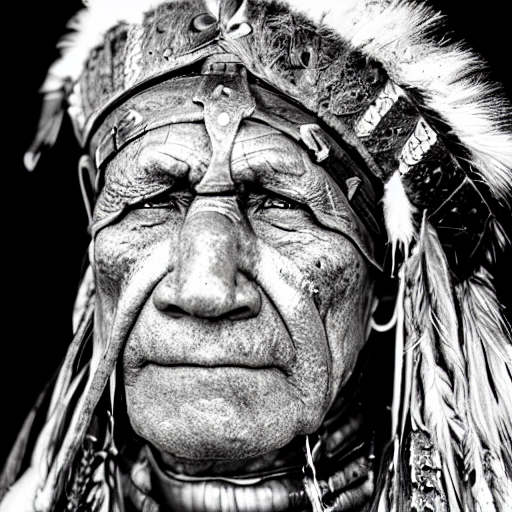
We aim at generating a beautiful photograph of an *old warrior chief* and will later try to find the best prompt to generate such a photograph. For now, let's keep the prompt simple:
|
||||
|
||||
``` python
|
||||
prompt = "portrait photo of a old warrior chief"
|
||||
```
|
||||
|
||||
To begin with, we should make sure we run inference on GPU, so let's move the pipeline to GPU, just like you would with any PyTorch module.
|
||||
|
||||
``` python
|
||||
pipe = pipe.to("cuda")
|
||||
```
|
||||
|
||||
To generate an image, you should use the [~`StableDiffusionPipeline.__call__`] method.
|
||||
|
||||
To make sure we can reproduce more or less the same image in every call, let's make use of the generator. See the documentation on reproducibility [here](./conceptual/reproducibility) for more information.
|
||||
|
||||
``` python
|
||||
generator = torch.Generator("cuda").manual_seed(0)
|
||||
```
|
||||
|
||||
Now, let's take a spin on it.
|
||||
|
||||
``` python
|
||||
image = pipe(prompt, generator=generator).images[0]
|
||||
image
|
||||
```
|
||||
|
||||

|
||||
|
||||
Cool, this now took roughly 30 seconds on a T4 GPU (you might see faster inference if your allocated GPU is better than a T4).
|
||||
|
||||
The default run we did above used full float32 precision and ran the default number of inference steps (50). The easiest speed-ups come from switching to float16 (or half) precision and simply running fewer inference steps. Let's load the model now in float16 instead.
|
||||
|
||||
``` python
|
||||
import torch
|
||||
|
||||
pipe = StableDiffusionPipeline.from_pretrained(model_id, torch_dtype=torch.float16)
|
||||
pipe = pipe.to("cuda")
|
||||
```
|
||||
|
||||
And we can again call the pipeline to generate an image.
|
||||
|
||||
``` python
|
||||
generator = torch.Generator("cuda").manual_seed(0)
|
||||
|
||||
image = pipe(prompt, generator=generator).images[0]
|
||||
image
|
||||
```
|
||||

|
||||
|
||||
Cool, this is almost three times as fast for arguably the same image quality.
|
||||
|
||||
We strongly suggest always running your pipelines in float16 as so far we have very rarely seen degradations in quality because of it.
|
||||
|
||||
Next, let's see if we need to use 50 inference steps or whether we could use significantly fewer. The number of inference steps is associated with the denoising scheduler we use. Choosing a more efficient scheduler could help us decrease the number of steps.
|
||||
|
||||
Let's have a look at all the schedulers the stable diffusion pipeline is compatible with.
|
||||
|
||||
``` python
|
||||
pipe.scheduler.compatibles
|
||||
```
|
||||
|
||||
```
|
||||
[diffusers.schedulers.scheduling_dpmsolver_singlestep.DPMSolverSinglestepScheduler,
|
||||
diffusers.schedulers.scheduling_lms_discrete.LMSDiscreteScheduler,
|
||||
diffusers.schedulers.scheduling_heun_discrete.HeunDiscreteScheduler,
|
||||
diffusers.schedulers.scheduling_pndm.PNDMScheduler,
|
||||
diffusers.schedulers.scheduling_euler_discrete.EulerDiscreteScheduler,
|
||||
diffusers.schedulers.scheduling_euler_ancestral_discrete.EulerAncestralDiscreteScheduler,
|
||||
diffusers.schedulers.scheduling_dpmsolver_multistep.DPMSolverMultistepScheduler,
|
||||
diffusers.schedulers.scheduling_ddpm.DDPMScheduler,
|
||||
diffusers.schedulers.scheduling_ddim.DDIMScheduler]
|
||||
```
|
||||
|
||||
Cool, that's a lot of schedulers.
|
||||
|
||||
🧨 Diffusers is constantly adding a bunch of novel schedulers/samplers that can be used with Stable Diffusion. For more information, we recommend taking a look at the official documentation [here](https://huggingface.co/docs/diffusers/main/en/api/schedulers/overview).
|
||||
|
||||
Alright, right now Stable Diffusion is using the `PNDMScheduler` which usually requires around 50 inference steps. However, other schedulers such as `DPMSolverMultistepScheduler` or `DPMSolverSinglestepScheduler` seem to get away with just 20 to 25 inference steps. Let's try them out.
|
||||
|
||||
You can set a new scheduler by making use of the [from_config](https://huggingface.co/docs/diffusers/main/en/api/configuration#diffusers.ConfigMixin.from_config) function.
|
||||
|
||||
``` python
|
||||
from diffusers import DPMSolverMultistepScheduler
|
||||
|
||||
pipe.scheduler = DPMSolverMultistepScheduler.from_config(pipe.scheduler.config)
|
||||
```
|
||||
|
||||
Now, let's try to reduce the number of inference steps to just 20.
|
||||
|
||||
``` python
|
||||
generator = torch.Generator("cuda").manual_seed(0)
|
||||
|
||||
image = pipe(prompt, generator=generator, num_inference_steps=20).images[0]
|
||||
image
|
||||
```
|
||||
|
||||
|
||||
|
||||
The image now does look a little different, but it's arguably still of equally high quality. We now cut inference time to just 4 seconds though 😍.
|
||||
|
||||
## Memory Optimization
|
||||
|
||||
Less memory used in generation indirectly implies more speed, since we're often trying to maximize how many images we can generate per second. Usually, the more images per inference run, the more images per second too.
|
||||
|
||||
The easiest way to see how many images we can generate at once is to simply try it out, and see when we get a *"Out-of-memory (OOM)"* error.
|
||||
|
||||
We can run batched inference by simply passing a list of prompts and generators. Let's define a quick function that generates a batch for us.
|
||||
|
||||
``` python
|
||||
def get_inputs(batch_size=1):
|
||||
generator = [torch.Generator("cuda").manual_seed(i) for i in range(batch_size)]
|
||||
prompts = batch_size * [prompt]
|
||||
num_inference_steps = 20
|
||||
|
||||
return {"prompt": prompts, "generator": generator, "num_inference_steps": num_inference_steps}
|
||||
```
|
||||
This function returns a list of prompts and a list of generators, so we can reuse the generator that produced a result we like.
|
||||
|
||||
We also need a method that allows us to easily display a batch of images.
|
||||
|
||||
``` python
|
||||
from PIL import Image
|
||||
|
||||
def image_grid(imgs, rows=2, cols=2):
|
||||
w, h = imgs[0].size
|
||||
grid = Image.new('RGB', size=(cols*w, rows*h))
|
||||
|
||||
for i, img in enumerate(imgs):
|
||||
grid.paste(img, box=(i%cols*w, i//cols*h))
|
||||
return grid
|
||||
```
|
||||
|
||||
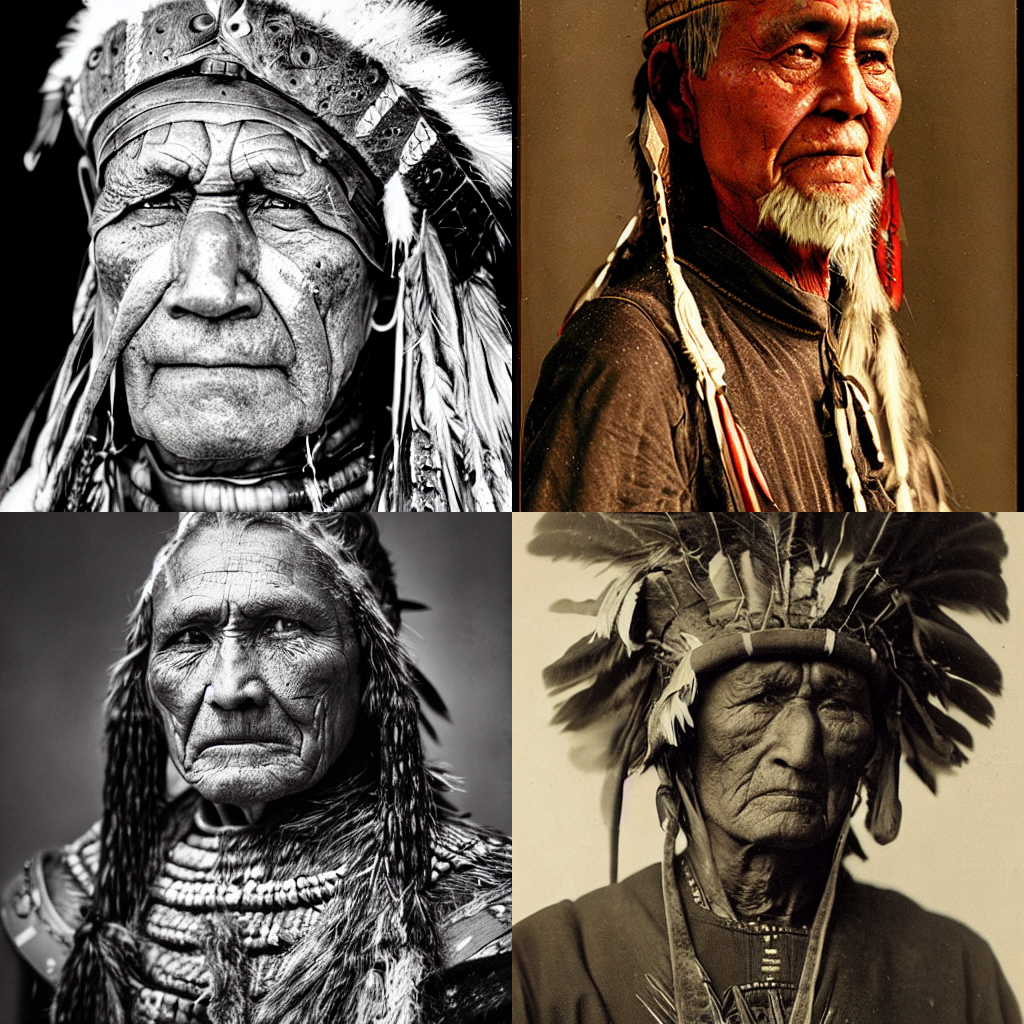
Cool, let's see how much memory we can use starting with `batch_size=4`.
|
||||
|
||||
``` python
|
||||
images = pipe(**get_inputs(batch_size=4)).images
|
||||
image_grid(images)
|
||||
```
|
||||
|
||||
|
||||
|
||||
Going over a batch_size of 4 will error out in this notebook (assuming we are running it on a T4 GPU). Also, we can see we only generate slightly more images per second (3.75s/image) compared to 4s/image previously.
|
||||
|
||||
However, the community has found some nice tricks to improve the memory constraints further. After stable diffusion was released, the community found improvements within days and shared them freely over GitHub - open-source at its finest! I believe the original idea came from [this](https://github.com/basujindal/stable-diffusion/pull/117) GitHub thread.
|
||||
|
||||
By far most of the memory is taken up by the cross-attention layers. Instead of running this operation in batch, one can run it sequentially to save a significant amount of memory.
|
||||
|
||||
It can easily be enabled by calling `enable_attention_slicing` as is documented [here](https://huggingface.co/docs/diffusers/main/en/api/pipelines/stable_diffusion/text2img#diffusers.StableDiffusionPipeline.enable_attention_slicing).
|
||||
|
||||
``` python
|
||||
pipe.enable_attention_slicing()
|
||||
```
|
||||
|
||||
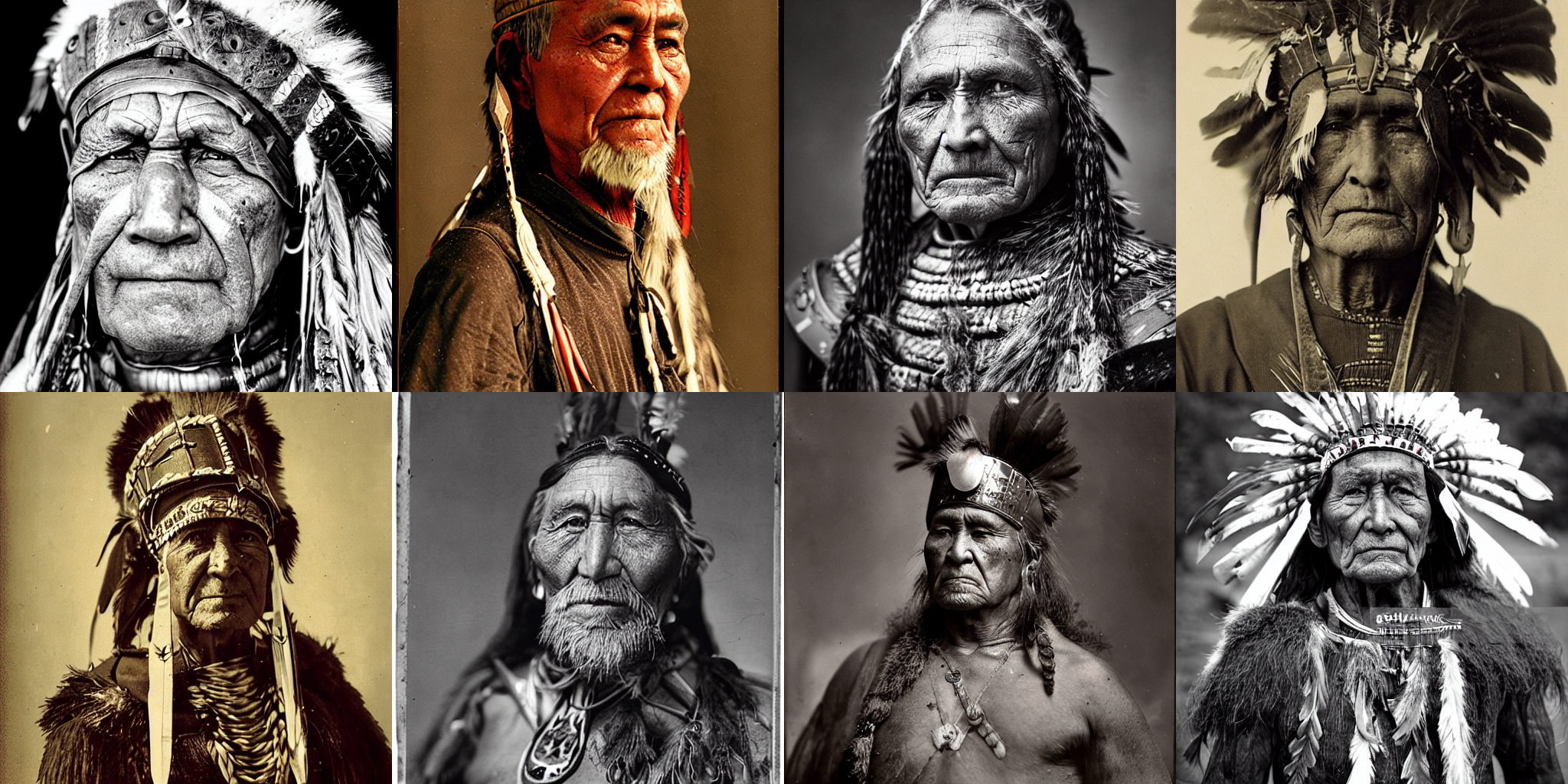
Great, now that attention slicing is enabled, let's try to double the batch size again, going for `batch_size=8`.
|
||||
|
||||
``` python
|
||||
images = pipe(**get_inputs(batch_size=8)).images
|
||||
image_grid(images, rows=2, cols=4)
|
||||
```
|
||||
|
||||
|
||||
|
||||
Nice, it works. However, the speed gain is again not very big (it might however be much more significant on other GPUs).
|
||||
|
||||
We're at roughly 3.5 seconds per image 🔥 which is probably the fastest we can be with a simple T4 without sacrificing quality.
|
||||
|
||||
Next, let's look into how to improve the quality!
|
||||
|
||||
## Quality Improvements
|
||||
|
||||
Now that our image generation pipeline is blazing fast, let's try to get maximum image quality.
|
||||
|
||||
First of all, image quality is extremely subjective, so it's difficult to make general claims here.
|
||||
|
||||
The most obvious step to take to improve quality is to use *better checkpoints*. Since the release of Stable Diffusion, many improved versions have been released, which are summarized here:
|
||||
|
||||
- *Official Release - 22 Aug 2022*: [Stable-Diffusion 1.4](https://huggingface.co/CompVis/stable-diffusion-v1-4)
|
||||
- *20 October 2022*: [Stable-Diffusion 1.5](https://huggingface.co/runwayml/stable-diffusion-v1-5)
|
||||
- *24 Nov 2022*: [Stable-Diffusion 2.0](https://huggingface.co/stabilityai/stable-diffusion-2-0)
|
||||
- *7 Dec 2022*: [Stable-Diffusion 2.1](https://huggingface.co/stabilityai/stable-diffusion-2-1)
|
||||
|
||||
Newer versions don't necessarily mean better image quality with the same parameters. People mentioned that *2.0* is slightly worse than *1.5* for certain prompts, but given the right prompt engineering *2.0* and *2.1* seem to be better.
|
||||
|
||||
Overall, we strongly recommend just trying the models out and reading up on advice online (e.g. it has been shown that using negative prompts is very important for 2.0 and 2.1 to get the highest possible quality. See for example [this nice blog post](https://minimaxir.com/2022/11/stable-diffusion-negative-prompt/).
|
||||
|
||||
Additionally, the community has started fine-tuning many of the above versions on certain styles with some of them having an extremely high quality and gaining a lot of traction.
|
||||
|
||||
We recommend having a look at all [diffusers checkpoints sorted by downloads and trying out the different checkpoints](https://huggingface.co/models?library=diffusers).
|
||||
|
||||
For the following, we will stick to v1.5 for simplicity.
|
||||
|
||||
Next, we can also try to optimize single components of the pipeline, e.g. switching out the latent decoder. For more details on how the whole Stable Diffusion pipeline works, please have a look at [this blog post](https://huggingface.co/blog/stable_diffusion).
|
||||
|
||||
Let's load [stabilityai's newest auto-decoder](https://huggingface.co/stabilityai/stable-diffusion-2-1).
|
||||
|
||||
``` python
|
||||
from diffusers import AutoencoderKL
|
||||
|
||||
vae = AutoencoderKL.from_pretrained("stabilityai/sd-vae-ft-mse", torch_dtype=torch.float16).to("cuda")
|
||||
```
|
||||
|
||||
Now we can set it to the vae of the pipeline to use it.
|
||||
|
||||
``` python
|
||||
pipe.vae = vae
|
||||
```
|
||||
|
||||
Let's run the same prompt as before to compare quality.
|
||||
|
||||
``` python
|
||||
images = pipe(**get_inputs(batch_size=8)).images
|
||||
image_grid(images, rows=2, cols=4)
|
||||
```
|
||||
|
||||

|
||||
|
||||
Seems like the difference is only very minor, but the new generations are arguably a bit *sharper*.
|
||||
|
||||
Cool, finally, let's look a bit into prompt engineering.
|
||||
|
||||
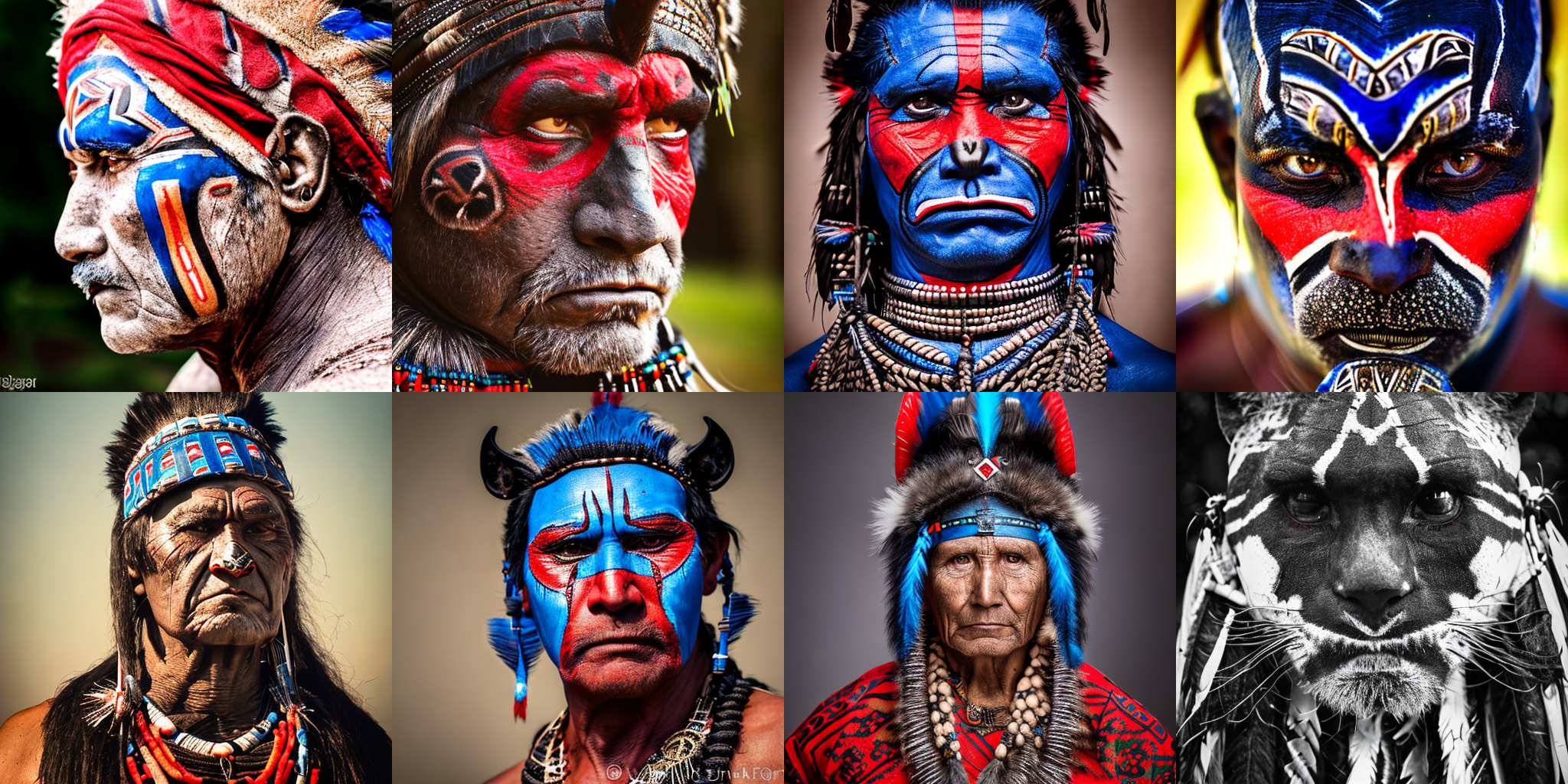
Our goal was to generate a photo of an old warrior chief. Let's now try to bring a bit more color into the photos and make the look more impressive.
|
||||
|
||||
Originally our prompt was "*portrait photo of an old warrior chief*".
|
||||
|
||||
To improve the prompt, it often helps to add cues that could have been used online to save high-quality photos, as well as add more details.
|
||||
Essentially, when doing prompt engineering, one has to think:
|
||||
|
||||
- How was the photo or similar photos of the one I want probably stored on the internet?
|
||||
- What additional detail can I give that steers the models into the style that I want?
|
||||
|
||||
Cool, let's add more details.
|
||||
|
||||
``` python
|
||||
prompt += ", tribal panther make up, blue on red, side profile, looking away, serious eyes"
|
||||
```
|
||||
|
||||
and let's also add some cues that usually help to generate higher quality images.
|
||||
|
||||
``` python
|
||||
prompt += " 50mm portrait photography, hard rim lighting photography--beta --ar 2:3 --beta --upbeta"
|
||||
prompt
|
||||
```
|
||||
|
||||
Cool, let's now try this prompt.
|
||||
|
||||
``` python
|
||||
images = pipe(**get_inputs(batch_size=8)).images
|
||||
image_grid(images, rows=2, cols=4)
|
||||
```
|
||||
|
||||
|
||||
|
||||
Pretty impressive! We got some very high-quality image generations there. The 2nd image is my personal favorite, so I'll re-use this seed and see whether I can tweak the prompts slightly by using "oldest warrior", "old", "", and "young" instead of "old".
|
||||
|
||||
``` python
|
||||
prompts = [
|
||||
"portrait photo of the oldest warrior chief, tribal panther make up, blue on red, side profile, looking away, serious eyes 50mm portrait photography, hard rim lighting photography--beta --ar 2:3 --beta --upbeta",
|
||||
"portrait photo of a old warrior chief, tribal panther make up, blue on red, side profile, looking away, serious eyes 50mm portrait photography, hard rim lighting photography--beta --ar 2:3 --beta --upbeta",
|
||||
"portrait photo of a warrior chief, tribal panther make up, blue on red, side profile, looking away, serious eyes 50mm portrait photography, hard rim lighting photography--beta --ar 2:3 --beta --upbeta",
|
||||
"portrait photo of a young warrior chief, tribal panther make up, blue on red, side profile, looking away, serious eyes 50mm portrait photography, hard rim lighting photography--beta --ar 2:3 --beta --upbeta",
|
||||
]
|
||||
|
||||
generator = [torch.Generator("cuda").manual_seed(1) for _ in range(len(prompts))] # 1 because we want the 2nd image
|
||||
|
||||
images = pipe(prompt=prompts, generator=generator, num_inference_steps=25).images
|
||||
image_grid(images)
|
||||
```
|
||||
|
||||

|
||||
|
||||
The first picture looks nice! The eye movement slightly changed and looks nice. This finished up our 101-guide on how to use Stable Diffusion 🤗.
|
||||
|
||||
For more information on optimization or other guides, I recommend taking a look at the following:
|
||||
|
||||
- [Blog post about Stable Diffusion](https://huggingface.co/blog/stable_diffusion): In-detail blog post explaining Stable Diffusion.
|
||||
- [FlashAttention](https://huggingface.co/docs/diffusers/optimization/xformers): XFormers flash attention can optimize your model even further with more speed and memory improvements.
|
||||
- [Dreambooth](https://huggingface.co/docs/diffusers/training/dreambooth) - Quickly customize the model by fine-tuning it.
|
||||
- [General info on Stable Diffusion](https://huggingface.co/docs/diffusers/main/en/api/pipelines/stable_diffusion/overview) - Info on other tasks that are powered by Stable Diffusion.
|
||||

|
Before Width: | Height: | Size: 102 KiB After Width: | Height: | Size: 102 KiB |

|
Before Width: | Height: | Size: 14 KiB After Width: | Height: | Size: 14 KiB |
@@ -1,193 +0,0 @@
|
||||
- sections:
|
||||
- local: index
|
||||
title: "🧨 Diffusers"
|
||||
- local: quicktour
|
||||
title: "훑어보기"
|
||||
- local: installation
|
||||
title: "설치"
|
||||
title: "시작하기"
|
||||
- sections:
|
||||
- sections:
|
||||
- local: in_translation
|
||||
title: "Loading Pipelines, Models, and Schedulers"
|
||||
- local: in_translation
|
||||
title: "Using different Schedulers"
|
||||
- local: in_translation
|
||||
title: "Configuring Pipelines, Models, and Schedulers"
|
||||
- local: in_translation
|
||||
title: "Loading and Adding Custom Pipelines"
|
||||
title: "불러오기 & 허브 (번역 예정)"
|
||||
- sections:
|
||||
- local: in_translation
|
||||
title: "Unconditional Image Generation"
|
||||
- local: in_translation
|
||||
title: "Text-to-Image Generation"
|
||||
- local: in_translation
|
||||
title: "Text-Guided Image-to-Image"
|
||||
- local: in_translation
|
||||
title: "Text-Guided Image-Inpainting"
|
||||
- local: in_translation
|
||||
title: "Text-Guided Depth-to-Image"
|
||||
- local: in_translation
|
||||
title: "Reusing seeds for deterministic generation"
|
||||
- local: in_translation
|
||||
title: "Community Pipelines"
|
||||
- local: in_translation
|
||||
title: "How to contribute a Pipeline"
|
||||
title: "추론을 위한 파이프라인 (번역 예정)"
|
||||
- sections:
|
||||
- local: in_translation
|
||||
title: "Reinforcement Learning"
|
||||
- local: in_translation
|
||||
title: "Audio"
|
||||
- local: in_translation
|
||||
title: "Other Modalities"
|
||||
title: "Taking Diffusers Beyond Images"
|
||||
title: "Diffusers 사용법 (번역 예정)"
|
||||
- sections:
|
||||
- local: in_translation
|
||||
title: "Memory and Speed"
|
||||
- local: in_translation
|
||||
title: "xFormers"
|
||||
- local: in_translation
|
||||
title: "ONNX"
|
||||
- local: in_translation
|
||||
title: "OpenVINO"
|
||||
- local: in_translation
|
||||
title: "MPS"
|
||||
- local: in_translation
|
||||
title: "Habana Gaudi"
|
||||
title: "최적화/특수 하드웨어 (번역 예정)"
|
||||
- sections:
|
||||
- local: in_translation
|
||||
title: "Overview"
|
||||
- local: in_translation
|
||||
title: "Unconditional Image Generation"
|
||||
- local: in_translation
|
||||
title: "Textual Inversion"
|
||||
- local: in_translation
|
||||
title: "Dreambooth"
|
||||
- local: in_translation
|
||||
title: "Text-to-image fine-tuning"
|
||||
title: "학습 (번역 예정)"
|
||||
- sections:
|
||||
- local: in_translation
|
||||
title: "Stable Diffusion"
|
||||
- local: in_translation
|
||||
title: "Philosophy"
|
||||
- local: in_translation
|
||||
title: "How to contribute?"
|
||||
title: "개념 설명 (번역 예정)"
|
||||
- sections:
|
||||
- sections:
|
||||
- local: in_translation
|
||||
title: "Models"
|
||||
- local: in_translation
|
||||
title: "Diffusion Pipeline"
|
||||
- local: in_translation
|
||||
title: "Logging"
|
||||
- local: in_translation
|
||||
title: "Configuration"
|
||||
- local: in_translation
|
||||
title: "Outputs"
|
||||
title: "Main Classes"
|
||||
|
||||
- sections:
|
||||
- local: in_translation
|
||||
title: "Overview"
|
||||
- local: in_translation
|
||||
title: "AltDiffusion"
|
||||
- local: in_translation
|
||||
title: "Cycle Diffusion"
|
||||
- local: in_translation
|
||||
title: "DDIM"
|
||||
- local: in_translation
|
||||
title: "DDPM"
|
||||
- local: in_translation
|
||||
title: "Latent Diffusion"
|
||||
- local: in_translation
|
||||
title: "Unconditional Latent Diffusion"
|
||||
- local: in_translation
|
||||
title: "PaintByExample"
|
||||
- local: in_translation
|
||||
title: "PNDM"
|
||||
- local: in_translation
|
||||
title: "Score SDE VE"
|
||||
- sections:
|
||||
- local: in_translation
|
||||
title: "Overview"
|
||||
- local: in_translation
|
||||
title: "Text-to-Image"
|
||||
- local: in_translation
|
||||
title: "Image-to-Image"
|
||||
- local: in_translation
|
||||
title: "Inpaint"
|
||||
- local: in_translation
|
||||
title: "Depth-to-Image"
|
||||
- local: in_translation
|
||||
title: "Image-Variation"
|
||||
- local: in_translation
|
||||
title: "Super-Resolution"
|
||||
title: "Stable Diffusion"
|
||||
- local: in_translation
|
||||
title: "Stable Diffusion 2"
|
||||
- local: in_translation
|
||||
title: "Safe Stable Diffusion"
|
||||
- local: in_translation
|
||||
title: "Stochastic Karras VE"
|
||||
- local: in_translation
|
||||
title: "Dance Diffusion"
|
||||
- local: in_translation
|
||||
title: "UnCLIP"
|
||||
- local: in_translation
|
||||
title: "Versatile Diffusion"
|
||||
- local: in_translation
|
||||
title: "VQ Diffusion"
|
||||
- local: in_translation
|
||||
title: "RePaint"
|
||||
- local: in_translation
|
||||
title: "Audio Diffusion"
|
||||
title: "파이프라인 (번역 예정)"
|
||||
- sections:
|
||||
- local: in_translation
|
||||
title: "Overview"
|
||||
- local: in_translation
|
||||
title: "DDIM"
|
||||
- local: in_translation
|
||||
title: "DDPM"
|
||||
- local: in_translation
|
||||
title: "Singlestep DPM-Solver"
|
||||
- local: in_translation
|
||||
title: "Multistep DPM-Solver"
|
||||
- local: in_translation
|
||||
title: "Heun Scheduler"
|
||||
- local: in_translation
|
||||
title: "DPM Discrete Scheduler"
|
||||
- local: in_translation
|
||||
title: "DPM Discrete Scheduler with ancestral sampling"
|
||||
- local: in_translation
|
||||
title: "Stochastic Kerras VE"
|
||||
- local: in_translation
|
||||
title: "Linear Multistep"
|
||||
- local: in_translation
|
||||
title: "PNDM"
|
||||
- local: in_translation
|
||||
title: "VE-SDE"
|
||||
- local: in_translation
|
||||
title: "IPNDM"
|
||||
- local: in_translation
|
||||
title: "VP-SDE"
|
||||
- local: in_translation
|
||||
title: "Euler scheduler"
|
||||
- local: in_translation
|
||||
title: "Euler Ancestral Scheduler"
|
||||
- local: in_translation
|
||||
title: "VQDiffusionScheduler"
|
||||
- local: in_translation
|
||||
title: "RePaint Scheduler"
|
||||
title: "스케줄러 (번역 예정)"
|
||||
- sections:
|
||||
- local: in_translation
|
||||
title: "RL Planning"
|
||||
title: "Experimental Features"
|
||||
title: "API (번역 예정)"
|
||||
@@ -1,63 +0,0 @@
|
||||
<!--Copyright 2022 The HuggingFace Team. All rights reserved.
|
||||
|
||||
Licensed under the Apache License, Version 2.0 (the "License"); you may not use this file except in compliance with
|
||||
the License. You may obtain a copy of the License at
|
||||
|
||||
http://www.apache.org/licenses/LICENSE-2.0
|
||||
|
||||
Unless required by applicable law or agreed to in writing, software distributed under the License is distributed on
|
||||
an "AS IS" BASIS, WITHOUT WARRANTIES OR CONDITIONS OF ANY KIND, either express or implied. See the License for the
|
||||
specific language governing permissions and limitations under the License.
|
||||
-->
|
||||
|
||||
<p align="center">
|
||||
<br>
|
||||
<img src="https://raw.githubusercontent.com/huggingface/diffusers/77aadfee6a891ab9fcfb780f87c693f7a5beeb8e/docs/source/imgs/diffusers_library.jpg" width="400"/>
|
||||
<br>
|
||||
</p>
|
||||
|
||||
# 🧨 Diffusers
|
||||
|
||||
🤗 Diffusers는 사전학습된 비전 및 오디오 확산 모델을 제공하고, 추론 및 학습을 위한 모듈식 도구 상자 역할을 합니다.
|
||||
|
||||
보다 정확하게, 🤗 Diffusers는 다음을 제공합니다:
|
||||
|
||||
- 단 몇 줄의 코드로 추론을 실행할 수 있는 최신 확산 파이프라인을 제공합니다. ([**Using Diffusers**](./using-diffusers/conditional_image_generation)를 살펴보세요) 지원되는 모든 파이프라인과 해당 논문에 대한 개요를 보려면 [**Pipelines**](#pipelines)을 살펴보세요.
|
||||
- 추론에서 속도 vs 품질의 절충을 위해 상호교환적으로 사용할 수 있는 다양한 노이즈 스케줄러를 제공합니다. 자세한 내용은 [**Schedulers**](./api/schedulers/overview)를 참고하세요.
|
||||
- UNet과 같은 여러 유형의 모델을 end-to-end 확산 시스템의 구성 요소로 사용할 수 있습니다. 자세한 내용은 [**Models**](./api/models)을 참고하세요.
|
||||
- 가장 인기있는 확산 모델 테스크를 학습하는 방법을 보여주는 예제들을 제공합니다. 자세한 내용은 [**Training**](./training/overview)를 참고하세요.
|
||||
|
||||
## 🧨 Diffusers 파이프라인
|
||||
|
||||
다음 표에는 공시적으로 지원되는 모든 파이프라인, 관련 논문, 직접 사용해 볼 수 있는 Colab 노트북(사용 가능한 경우)이 요약되어 있습니다.
|
||||
|
||||
| Pipeline | Paper | Tasks | Colab
|
||||
|---|---|:---:|:---:|
|
||||
| [alt_diffusion](./api/pipelines/alt_diffusion) | [**AltDiffusion**](https://arxiv.org/abs/2211.06679) | Image-to-Image Text-Guided Generation |
|
||||
| [audio_diffusion](./api/pipelines/audio_diffusion) | [**Audio Diffusion**](https://github.com/teticio/audio-diffusion.git) | Unconditional Audio Generation | [](https://colab.research.google.com/github/teticio/audio-diffusion/blob/master/notebooks/audio_diffusion_pipeline.ipynb)
|
||||
| [cycle_diffusion](./api/pipelines/cycle_diffusion) | [**Cycle Diffusion**](https://arxiv.org/abs/2210.05559) | Image-to-Image Text-Guided Generation |
|
||||
| [dance_diffusion](./api/pipelines/dance_diffusion) | [**Dance Diffusion**](https://github.com/williamberman/diffusers.git) | Unconditional Audio Generation |
|
||||
| [ddpm](./api/pipelines/ddpm) | [**Denoising Diffusion Probabilistic Models**](https://arxiv.org/abs/2006.11239) | Unconditional Image Generation |
|
||||
| [ddim](./api/pipelines/ddim) | [**Denoising Diffusion Implicit Models**](https://arxiv.org/abs/2010.02502) | Unconditional Image Generation |
|
||||
| [latent_diffusion](./api/pipelines/latent_diffusion) | [**High-Resolution Image Synthesis with Latent Diffusion Models**](https://arxiv.org/abs/2112.10752)| Text-to-Image Generation |
|
||||
| [latent_diffusion](./api/pipelines/latent_diffusion) | [**High-Resolution Image Synthesis with Latent Diffusion Models**](https://arxiv.org/abs/2112.10752)| Super Resolution Image-to-Image |
|
||||
| [latent_diffusion_uncond](./api/pipelines/latent_diffusion_uncond) | [**High-Resolution Image Synthesis with Latent Diffusion Models**](https://arxiv.org/abs/2112.10752) | Unconditional Image Generation |
|
||||
| [paint_by_example](./api/pipelines/paint_by_example) | [**Paint by Example: Exemplar-based Image Editing with Diffusion Models**](https://arxiv.org/abs/2211.13227) | Image-Guided Image Inpainting |
|
||||
| [pndm](./api/pipelines/pndm) | [**Pseudo Numerical Methods for Diffusion Models on Manifolds**](https://arxiv.org/abs/2202.09778) | Unconditional Image Generation |
|
||||
| [score_sde_ve](./api/pipelines/score_sde_ve) | [**Score-Based Generative Modeling through Stochastic Differential Equations**](https://openreview.net/forum?id=PxTIG12RRHS) | Unconditional Image Generation |
|
||||
| [score_sde_vp](./api/pipelines/score_sde_vp) | [**Score-Based Generative Modeling through Stochastic Differential Equations**](https://openreview.net/forum?id=PxTIG12RRHS) | Unconditional Image Generation |
|
||||
| [stable_diffusion](./api/pipelines/stable_diffusion/text2img) | [**Stable Diffusion**](https://stability.ai/blog/stable-diffusion-public-release) | Text-to-Image Generation | [](https://colab.research.google.com/github/huggingface/notebooks/blob/main/diffusers/training_example.ipynb)
|
||||
| [stable_diffusion](./api/pipelines/stable_diffusion/img2img) | [**Stable Diffusion**](https://stability.ai/blog/stable-diffusion-public-release) | Image-to-Image Text-Guided Generation | [](https://colab.research.google.com/github/huggingface/notebooks/blob/main/diffusers/image_2_image_using_diffusers.ipynb)
|
||||
| [stable_diffusion](./api/pipelines/stable_diffusion/inpaint) | [**Stable Diffusion**](https://stability.ai/blog/stable-diffusion-public-release) | Text-Guided Image Inpainting | [](https://colab.research.google.com/github/huggingface/notebooks/blob/main/diffusers/in_painting_with_stable_diffusion_using_diffusers.ipynb)
|
||||
| [stable_diffusion_2](./api/pipelines/stable_diffusion_2) | [**Stable Diffusion 2**](https://stability.ai/blog/stable-diffusion-v2-release) | Text-to-Image Generation |
|
||||
| [stable_diffusion_2](./api/pipelines/stable_diffusion_2) | [**Stable Diffusion 2**](https://stability.ai/blog/stable-diffusion-v2-release) | Text-Guided Image Inpainting |
|
||||
| [stable_diffusion_2](./api/pipelines/stable_diffusion_2) | [**Stable Diffusion 2**](https://stability.ai/blog/stable-diffusion-v2-release) | Text-Guided Super Resolution Image-to-Image |
|
||||
| [stable_diffusion_safe](./api/pipelines/stable_diffusion_safe) | [**Safe Stable Diffusion**](https://arxiv.org/abs/2211.05105) | Text-Guided Generation | [](https://colab.research.google.com/github/ml-research/safe-latent-diffusion/blob/main/examples/Safe%20Latent%20Diffusion.ipynb)
|
||||
| [stochastic_karras_ve](./api/pipelines/stochastic_karras_ve) | [**Elucidating the Design Space of Diffusion-Based Generative Models**](https://arxiv.org/abs/2206.00364) | Unconditional Image Generation |
|
||||
| [unclip](./api/pipelines/unclip) | [Hierarchical Text-Conditional Image Generation with CLIP Latents](https://arxiv.org/abs/2204.06125) | Text-to-Image Generation |
|
||||
| [versatile_diffusion](./api/pipelines/versatile_diffusion) | [Versatile Diffusion: Text, Images and Variations All in One Diffusion Model](https://arxiv.org/abs/2211.08332) | Text-to-Image Generation |
|
||||
| [versatile_diffusion](./api/pipelines/versatile_diffusion) | [Versatile Diffusion: Text, Images and Variations All in One Diffusion Model](https://arxiv.org/abs/2211.08332) | Image Variations Generation |
|
||||
| [versatile_diffusion](./api/pipelines/versatile_diffusion) | [Versatile Diffusion: Text, Images and Variations All in One Diffusion Model](https://arxiv.org/abs/2211.08332) | Dual Image and Text Guided Generation |
|
||||
| [vq_diffusion](./api/pipelines/vq_diffusion) | [Vector Quantized Diffusion Model for Text-to-Image Synthesis](https://arxiv.org/abs/2111.14822) | Text-to-Image Generation |
|
||||
|
||||
**참고**: 파이프라인은 해당 문서에 설명된 대로 확산 시스템을 사용한 방법에 대한 간단한 예입니다.
|
||||
@@ -1,142 +0,0 @@
|
||||
<!--Copyright 2022 The HuggingFace Team. All rights reserved.
|
||||
|
||||
Licensed under the Apache License, Version 2.0 (the "License"); you may not use this file except in compliance with
|
||||
the License. You may obtain a copy of the License at
|
||||
|
||||
http://www.apache.org/licenses/LICENSE-2.0
|
||||
|
||||
Unless required by applicable law or agreed to in writing, software distributed under the License is distributed on
|
||||
an "AS IS" BASIS, WITHOUT WARRANTIES OR CONDITIONS OF ANY KIND, either express or implied. See the License for the
|
||||
specific language governing permissions and limitations under the License.
|
||||
-->
|
||||
|
||||
# 설치
|
||||
|
||||
사용하시는 라이브러리에 맞는 🤗 Diffusers를 설치하세요.
|
||||
|
||||
🤗 Diffusers는 Python 3.7+, PyTorch 1.7.0+ 및 flax에서 테스트되었습니다. 사용중인 딥러닝 라이브러리에 대한 아래의 설치 안내를 따르세요.
|
||||
|
||||
- [PyTorch 설치 안내](https://pytorch.org/get-started/locally/)
|
||||
- [Flax 설치 안내](https://flax.readthedocs.io/en/latest/)
|
||||
|
||||
## pip를 이용한 설치
|
||||
|
||||
[가상 환경](https://docs.python.org/3/library/venv.html)에 🤗 Diffusers를 설치해야 합니다.
|
||||
Python 가상 환경에 익숙하지 않은 경우 [가상환경 pip 설치 가이드](https://packaging.python.org/guides/installing-using-pip-and-virtual-environments/)를 살펴보세요.
|
||||
가상 환경을 사용하면 서로 다른 프로젝트를 더 쉽게 관리하고, 종속성간의 호환성 문제를 피할 수 있습니다.
|
||||
|
||||
프로젝트 디렉토리에 가상 환경을 생성하는 것으로 시작하세요:
|
||||
|
||||
```bash
|
||||
python -m venv .env
|
||||
```
|
||||
|
||||
그리고 가상 환경을 활성화합니다:
|
||||
|
||||
```bash
|
||||
source .env/bin/activate
|
||||
```
|
||||
|
||||
이제 다음의 명령어로 🤗 Diffusers를 설치할 준비가 되었습니다:
|
||||
|
||||
**PyTorch의 경우**
|
||||
|
||||
```bash
|
||||
pip install diffusers["torch"]
|
||||
```
|
||||
|
||||
**Flax의 경우**
|
||||
|
||||
```bash
|
||||
pip install diffusers["flax"]
|
||||
```
|
||||
|
||||
## 소스로부터 설치
|
||||
|
||||
소스에서 `diffusers`를 설치하기 전에, `torch` 및 `accelerate`이 설치되어 있는지 확인하세요.
|
||||
|
||||
`torch` 설치에 대해서는 [torch docs](https://pytorch.org/get-started/locally/#start-locally)를 참고하세요.
|
||||
|
||||
다음과 같이 `accelerate`을 설치하세요.
|
||||
|
||||
```bash
|
||||
pip install accelerate
|
||||
```
|
||||
|
||||
다음 명령어를 사용하여 소스에서 🤗 Diffusers를 설치하세요:
|
||||
|
||||
```bash
|
||||
pip install git+https://github.com/huggingface/diffusers
|
||||
```
|
||||
|
||||
이 명령어는 최신 `stable` 버전이 아닌 최첨단 `main` 버전을 설치합니다.
|
||||
`main` 버전은 최신 개발 정보를 최신 상태로 유지하는 데 유용합니다.
|
||||
예를 들어 마지막 공식 릴리즈 이후 버그가 수정되었지만, 새 릴리즈가 아직 출시되지 않은 경우입니다.
|
||||
그러나 이는 `main` 버전이 항상 안정적이지 않을 수 있음을 의미합니다.
|
||||
우리는 `main` 버전이 지속적으로 작동하도록 노력하고 있으며, 대부분의 문제는 보통 몇 시간 또는 하루 안에 해결됩니다.
|
||||
문제가 발생하면 더 빨리 해결할 수 있도록 [Issue](https://github.com/huggingface/transformers/issues)를 열어주세요!
|
||||
|
||||
|
||||
## 편집가능한 설치
|
||||
|
||||
다음을 수행하려면 편집가능한 설치가 필요합니다:
|
||||
|
||||
* 소스 코드의 `main` 버전을 사용
|
||||
* 🤗 Diffusers에 기여 (코드의 변경 사항을 테스트하기 위해 필요)
|
||||
|
||||
저장소를 복제하고 다음 명령어를 사용하여 🤗 Diffusers를 설치합니다:
|
||||
|
||||
```bash
|
||||
git clone https://github.com/huggingface/diffusers.git
|
||||
cd diffusers
|
||||
```
|
||||
|
||||
**PyTorch의 경우**
|
||||
|
||||
```
|
||||
pip install -e ".[torch]"
|
||||
```
|
||||
|
||||
**Flax의 경우**
|
||||
|
||||
```
|
||||
pip install -e ".[flax]"
|
||||
```
|
||||
|
||||
이러한 명령어들은 저장소를 복제한 폴더와 Python 라이브러리 경로를 연결합니다.
|
||||
Python은 이제 일반 라이브러리 경로에 더하여 복제한 폴더 내부를 살펴봅니다.
|
||||
예를들어 Python 패키지가 `~/anaconda3/envs/main/lib/python3.7/site-packages/`에 설치되어 있는 경우 Python은 복제한 폴더인 `~/diffusers/`도 검색합니다.
|
||||
|
||||
<Tip warning={true}>
|
||||
|
||||
라이브러리를 계속 사용하려면 `diffusers` 폴더를 유지해야 합니다.
|
||||
|
||||
</Tip>
|
||||
|
||||
이제 다음 명령어를 사용하여 최신 버전의 🤗 Diffusers로 쉽게 업데이트할 수 있습니다:
|
||||
|
||||
```bash
|
||||
cd ~/diffusers/
|
||||
git pull
|
||||
```
|
||||
|
||||
이렇게 하면, 다음에 실행할 때 Python 환경이 🤗 Diffusers의 `main` 버전을 찾게 됩니다.
|
||||
|
||||
## 텔레메트리 로깅에 대한 알림
|
||||
|
||||
우리 라이브러리는 `from_pretrained()` 요청 중에 텔레메트리 정보를 원격으로 수집합니다.
|
||||
이 데이터에는 Diffusers 및 PyTorch/Flax의 버전, 요청된 모델 또는 파이프라인 클래스, 그리고 허브에서 호스팅되는 경우 사전학습된 체크포인트에 대한 경로를 포함합니다.
|
||||
이 사용 데이터는 문제를 디버깅하고 새로운 기능의 우선순위를 지정하는데 도움이 됩니다.
|
||||
텔레메트리는 HuggingFace 허브에서 모델과 파이프라인을 불러올 때만 전송되며, 로컬 사용 중에는 수집되지 않습니다.
|
||||
|
||||
우리는 추가 정보를 공유하지 않기를 원하는 사람이 있다는 것을 이해하고 개인 정보를 존중하므로, 터미널에서 `DISABLE_TELEMETRY` 환경 변수를 설정하여 텔레메트리 수집을 비활성화할 수 있습니다.
|
||||
|
||||
Linux/MacOS에서:
|
||||
```bash
|
||||
export DISABLE_TELEMETRY=YES
|
||||
```
|
||||
|
||||
Windows에서:
|
||||
```bash
|
||||
set DISABLE_TELEMETRY=YES
|
||||
```
|
||||
@@ -1,123 +0,0 @@
|
||||
<!--Copyright 2022 The HuggingFace Team. All rights reserved.
|
||||
|
||||
Licensed under the Apache License, Version 2.0 (the "License"); you may not use this file except in compliance with
|
||||
the License. You may obtain a copy of the License at
|
||||
|
||||
http://www.apache.org/licenses/LICENSE-2.0
|
||||
|
||||
Unless required by applicable law or agreed to in writing, software distributed under the License is distributed on
|
||||
an "AS IS" BASIS, WITHOUT WARRANTIES OR CONDITIONS OF ANY KIND, either express or implied. See the License for the
|
||||
specific language governing permissions and limitations under the License.
|
||||
-->
|
||||
|
||||
# 훑어보기
|
||||
|
||||
🧨 Diffusers로 빠르게 시작하고 실행하세요!
|
||||
이 훑어보기는 여러분이 개발자, 일반사용자 상관없이 시작하는 데 도움을 주며, 추론을 위해 [`DiffusionPipeline`] 사용하는 방법을 보여줍니다.
|
||||
|
||||
시작하기에 앞서서, 필요한 모든 라이브러리가 설치되어 있는지 확인하세요:
|
||||
|
||||
```bash
|
||||
pip install --upgrade diffusers accelerate transformers
|
||||
```
|
||||
|
||||
- [`accelerate`](https://huggingface.co/docs/accelerate/index)은 추론 및 학습을 위한 모델 불러오기 속도를 높입니다.
|
||||
- [`transformers`](https://huggingface.co/docs/transformers/index)는 [Stable Diffusion](https://huggingface.co/docs/diffusers/api/pipelines/stable_diffusion/overview)과 같이 가장 널리 사용되는 확산 모델을 실행하기 위해 필요합니다.
|
||||
|
||||
## DiffusionPipeline
|
||||
|
||||
[`DiffusionPipeline`]은 추론을 위해 사전학습된 확산 시스템을 사용하는 가장 쉬운 방법입니다. 다양한 양식의 많은 작업에 [`DiffusionPipeline`]을 바로 사용할 수 있습니다. 지원되는 작업은 아래의 표를 참고하세요:
|
||||
|
||||
| **Task** | **Description** | **Pipeline**
|
||||
|------------------------------|--------------------------------------------------------------------------------------------------------------|-----------------|
|
||||
| Unconditional Image Generation | 가우시안 노이즈에서 이미지 생성 | [unconditional_image_generation](./using-diffusers/unconditional_image_generation`) |
|
||||
| Text-Guided Image Generation | 텍스트 프롬프트로 이미지 생성 | [conditional_image_generation](./using-diffusers/conditional_image_generation) |
|
||||
| Text-Guided Image-to-Image Translation | 텍스트 프롬프트에 따라 이미지 조정 | [img2img](./using-diffusers/img2img) |
|
||||
| Text-Guided Image-Inpainting | 마스크 및 텍스트 프롬프트가 주어진 이미지의 마스킹된 부분을 채우기 | [inpaint](./using-diffusers/inpaint) |
|
||||
| Text-Guided Depth-to-Image Translation | 깊이 추정을 통해 구조를 유지하면서 텍스트 프롬프트에 따라 이미지의 일부를 조정 | [depth2image](./using-diffusers/depth2image) |
|
||||
|
||||
확산 파이프라인이 다양한 작업에 대해 어떻게 작동하는지는 [**Using Diffusers**](./using-diffusers/overview)를 참고하세요.
|
||||
|
||||
예를들어, [`DiffusionPipeline`] 인스턴스를 생성하여 시작하고, 다운로드하려는 파이프라인 체크포인트를 지정합니다.
|
||||
모든 [Diffusers' checkpoint](https://huggingface.co/models?library=diffusers&sort=downloads)에 대해 [`DiffusionPipeline`]을 사용할 수 있습니다.
|
||||
하지만, 이 가이드에서는 [Stable Diffusion](https://huggingface.co/CompVis/stable-diffusion)을 사용하여 text-to-image를 하는데 [`DiffusionPipeline`]을 사용합니다.
|
||||
|
||||
[Stable Diffusion](https://huggingface.co/CompVis/stable-diffusion) 기반 모델을 실행하기 전에 [license](https://huggingface.co/spaces/CompVis/stable-diffusion-license)를 주의 깊게 읽으세요.
|
||||
이는 모델의 향상된 이미지 생성 기능과 이것으로 생성될 수 있는 유해한 콘텐츠 때문입니다. 선택한 Stable Diffusion 모델(*예*: [`runwayml/stable-diffusion-v1-5`](https://huggingface.co/runwayml/stable-diffusion-v1-5))로 이동하여 라이센스를 읽으세요.
|
||||
|
||||
다음과 같이 모델을 로드할 수 있습니다:
|
||||
|
||||
```python
|
||||
>>> from diffusers import DiffusionPipeline
|
||||
|
||||
>>> pipeline = DiffusionPipeline.from_pretrained("runwayml/stable-diffusion-v1-5")
|
||||
```
|
||||
|
||||
[`DiffusionPipeline`]은 모든 모델링, 토큰화 및 스케줄링 구성요소를 다운로드하고 캐시합니다.
|
||||
모델은 약 14억개의 매개변수로 구성되어 있으므로 GPU에서 실행하는 것이 좋습니다.
|
||||
PyTorch에서와 마찬가지로 생성기 객체를 GPU로 옮길 수 있습니다.
|
||||
|
||||
```python
|
||||
>>> pipeline.to("cuda")
|
||||
```
|
||||
|
||||
이제 `pipeline`을 사용할 수 있습니다:
|
||||
|
||||
```python
|
||||
>>> image = pipeline("An image of a squirrel in Picasso style").images[0]
|
||||
```
|
||||
|
||||
출력은 기본적으로 [PIL Image object](https://pillow.readthedocs.io/en/stable/reference/Image.html?highlight=image#the-image-class)로 래핑됩니다.
|
||||
|
||||
다음과 같이 함수를 호출하여 이미지를 저장할 수 있습니다:
|
||||
|
||||
```python
|
||||
>>> image.save("image_of_squirrel_painting.png")
|
||||
```
|
||||
|
||||
**참고**: 다음을 통해 가중치를 다운로드하여 로컬에서 파이프라인을 사용할 수도 있습니다:
|
||||
|
||||
```
|
||||
git lfs install
|
||||
git clone https://huggingface.co/runwayml/stable-diffusion-v1-5
|
||||
```
|
||||
|
||||
그리고 저장된 가중치를 파이프라인에 불러옵니다.
|
||||
|
||||
```python
|
||||
>>> pipeline = DiffusionPipeline.from_pretrained("./stable-diffusion-v1-5")
|
||||
```
|
||||
|
||||
파이프라인 실행은 동일한 모델 아키텍처이므로 위의 코드와 동일합니다.
|
||||
|
||||
```python
|
||||
>>> generator.to("cuda")
|
||||
>>> image = generator("An image of a squirrel in Picasso style").images[0]
|
||||
>>> image.save("image_of_squirrel_painting.png")
|
||||
```
|
||||
|
||||
확산 시스템은 각각 장점이 있는 여러 다른 [schedulers](./api/schedulers/overview)와 함께 사용할 수 있습니다. 기본적으로 Stable Diffusion은 `PNDMScheduler`로 실행되지만 다른 스케줄러를 사용하는 방법은 매우 간단합니다. *예* [`EulerDiscreteScheduler`] 스케줄러를 사용하려는 경우, 다음과 같이 사용할 수 있습니다:
|
||||
|
||||
```python
|
||||
>>> from diffusers import EulerDiscreteScheduler
|
||||
|
||||
>>> pipeline = StableDiffusionPipeline.from_pretrained("runwayml/stable-diffusion-v1-5")
|
||||
|
||||
>>> # change scheduler to Euler
|
||||
>>> pipeline.scheduler = EulerDiscreteScheduler.from_config(pipeline.scheduler.config)
|
||||
```
|
||||
|
||||
스케줄러 변경 방법에 대한 자세한 내용은 [Using Schedulers](./using-diffusers/schedulers) 가이드를 참고하세요.
|
||||
|
||||
[Stability AI's](https://stability.ai/)의 Stable Diffusion 모델은 인상적인 이미지 생성 모델이며 텍스트에서 이미지를 생성하는 것보다 훨씬 더 많은 작업을 수행할 수 있습니다. 우리는 Stable Diffusion만을 위한 전체 문서 페이지를 제공합니다 [link](./conceptual/stable_diffusion).
|
||||
|
||||
만약 더 적은 메모리, 더 높은 추론 속도, Mac과 같은 특정 하드웨어 또는 ONNX 런타임에서 실행되도록 Stable Diffusion을 최적화하는 방법을 알고 싶다면 최적화 페이지를 살펴보세요:
|
||||
|
||||
- [Optimized PyTorch on GPU](./optimization/fp16)
|
||||
- [Mac OS with PyTorch](./optimization/mps)
|
||||
- [ONNX](./optimization/onnx)
|
||||
- [OpenVINO](./optimization/open_vino)
|
||||
|
||||
확산 모델을 미세조정하거나 학습시키려면, [**training section**](./training/overview)을 살펴보세요.
|
||||
|
||||
마지막으로, 생성된 이미지를 공개적으로 배포할 때 신중을 기해 주세요 🤗.
|
||||
@@ -5,8 +5,7 @@ from typing import Dict, List, Union
|
||||
import torch
|
||||
|
||||
from diffusers import DiffusionPipeline, __version__
|
||||
from diffusers.schedulers.scheduling_utils import SCHEDULER_CONFIG_NAME
|
||||
from diffusers.utils import CONFIG_NAME, DIFFUSERS_CACHE, ONNX_WEIGHTS_NAME, WEIGHTS_NAME
|
||||
from diffusers.utils import CONFIG_NAME, DIFFUSERS_CACHE, ONNX_WEIGHTS_NAME, SCHEDULER_CONFIG_NAME, WEIGHTS_NAME
|
||||
from huggingface_hub import snapshot_download
|
||||
|
||||
|
||||
|
||||
@@ -229,7 +229,7 @@ class ImagicStableDiffusionPipeline(DiffusionPipeline):
|
||||
prompt,
|
||||
padding="max_length",
|
||||
max_length=self.tokenizer.model_max_length,
|
||||
truncation=True,
|
||||
truncaton=True,
|
||||
return_tensors="pt",
|
||||
)
|
||||
text_embeddings = torch.nn.Parameter(
|
||||
|
||||
@@ -1,298 +0,0 @@
|
||||
# Copyright 2022 Peter Willemsen <peter@codebuffet.co>. All rights reserved.
|
||||
#
|
||||
# Licensed under the Apache License, Version 2.0 (the "License");
|
||||
# you may not use this file except in compliance with the License.
|
||||
# You may obtain a copy of the License at
|
||||
#
|
||||
# http://www.apache.org/licenses/LICENSE-2.0
|
||||
#
|
||||
# Unless required by applicable law or agreed to in writing, software
|
||||
# distributed under the License is distributed on an "AS IS" BASIS,
|
||||
# WITHOUT WARRANTIES OR CONDITIONS OF ANY KIND, either express or implied.
|
||||
# See the License for the specific language governing permissions and
|
||||
# limitations under the License.
|
||||
|
||||
import math
|
||||
from typing import Callable, List, Optional, Union
|
||||
|
||||
import numpy as np
|
||||
import torch
|
||||
|
||||
import PIL
|
||||
from diffusers.models import AutoencoderKL, UNet2DConditionModel
|
||||
from diffusers.pipelines.stable_diffusion.pipeline_stable_diffusion_upscale import StableDiffusionUpscalePipeline
|
||||
from diffusers.schedulers import DDIMScheduler, DDPMScheduler, LMSDiscreteScheduler, PNDMScheduler
|
||||
from PIL import Image
|
||||
from transformers import CLIPTextModel, CLIPTokenizer
|
||||
|
||||
|
||||
def make_transparency_mask(size, overlap_pixels, remove_borders=[]):
|
||||
size_x = size[0] - overlap_pixels * 2
|
||||
size_y = size[1] - overlap_pixels * 2
|
||||
for letter in ["l", "r"]:
|
||||
if letter in remove_borders:
|
||||
size_x += overlap_pixels
|
||||
for letter in ["t", "b"]:
|
||||
if letter in remove_borders:
|
||||
size_y += overlap_pixels
|
||||
mask = np.ones((size_y, size_x), dtype=np.uint8) * 255
|
||||
mask = np.pad(mask, mode="linear_ramp", pad_width=overlap_pixels, end_values=0)
|
||||
|
||||
if "l" in remove_borders:
|
||||
mask = mask[:, overlap_pixels : mask.shape[1]]
|
||||
if "r" in remove_borders:
|
||||
mask = mask[:, 0 : mask.shape[1] - overlap_pixels]
|
||||
if "t" in remove_borders:
|
||||
mask = mask[overlap_pixels : mask.shape[0], :]
|
||||
if "b" in remove_borders:
|
||||
mask = mask[0 : mask.shape[0] - overlap_pixels, :]
|
||||
return mask
|
||||
|
||||
|
||||
def clamp(n, smallest, largest):
|
||||
return max(smallest, min(n, largest))
|
||||
|
||||
|
||||
def clamp_rect(rect: [int], min: [int], max: [int]):
|
||||
return (
|
||||
clamp(rect[0], min[0], max[0]),
|
||||
clamp(rect[1], min[1], max[1]),
|
||||
clamp(rect[2], min[0], max[0]),
|
||||
clamp(rect[3], min[1], max[1]),
|
||||
)
|
||||
|
||||
|
||||
def add_overlap_rect(rect: [int], overlap: int, image_size: [int]):
|
||||
rect = list(rect)
|
||||
rect[0] -= overlap
|
||||
rect[1] -= overlap
|
||||
rect[2] += overlap
|
||||
rect[3] += overlap
|
||||
rect = clamp_rect(rect, [0, 0], [image_size[0], image_size[1]])
|
||||
return rect
|
||||
|
||||
|
||||
def squeeze_tile(tile, original_image, original_slice, slice_x):
|
||||
result = Image.new("RGB", (tile.size[0] + original_slice, tile.size[1]))
|
||||
result.paste(
|
||||
original_image.resize((tile.size[0], tile.size[1]), Image.BICUBIC).crop(
|
||||
(slice_x, 0, slice_x + original_slice, tile.size[1])
|
||||
),
|
||||
(0, 0),
|
||||
)
|
||||
result.paste(tile, (original_slice, 0))
|
||||
return result
|
||||
|
||||
|
||||
def unsqueeze_tile(tile, original_image_slice):
|
||||
crop_rect = (original_image_slice * 4, 0, tile.size[0], tile.size[1])
|
||||
tile = tile.crop(crop_rect)
|
||||
return tile
|
||||
|
||||
|
||||
def next_divisible(n, d):
|
||||
divisor = n % d
|
||||
return n - divisor
|
||||
|
||||
|
||||
class StableDiffusionTiledUpscalePipeline(StableDiffusionUpscalePipeline):
|
||||
r"""
|
||||
Pipeline for tile-based text-guided image super-resolution using Stable Diffusion 2, trading memory for compute
|
||||
to create gigantic images.
|
||||
|
||||
This model inherits from [`StableDiffusionUpscalePipeline`]. Check the superclass documentation for the generic methods the
|
||||
library implements for all the pipelines (such as downloading or saving, running on a particular device, etc.)
|
||||
|
||||
Args:
|
||||
vae ([`AutoencoderKL`]):
|
||||
Variational Auto-Encoder (VAE) Model to encode and decode images to and from latent representations.
|
||||
text_encoder ([`CLIPTextModel`]):
|
||||
Frozen text-encoder. Stable Diffusion uses the text portion of
|
||||
[CLIP](https://huggingface.co/docs/transformers/model_doc/clip#transformers.CLIPTextModel), specifically
|
||||
the [clip-vit-large-patch14](https://huggingface.co/openai/clip-vit-large-patch14) variant.
|
||||
tokenizer (`CLIPTokenizer`):
|
||||
Tokenizer of class
|
||||
[CLIPTokenizer](https://huggingface.co/docs/transformers/v4.21.0/en/model_doc/clip#transformers.CLIPTokenizer).
|
||||
unet ([`UNet2DConditionModel`]): Conditional U-Net architecture to denoise the encoded image latents.
|
||||
low_res_scheduler ([`SchedulerMixin`]):
|
||||
A scheduler used to add initial noise to the low res conditioning image. It must be an instance of
|
||||
[`DDPMScheduler`].
|
||||
scheduler ([`SchedulerMixin`]):
|
||||
A scheduler to be used in combination with `unet` to denoise the encoded image latents. Can be one of
|
||||
[`DDIMScheduler`], [`LMSDiscreteScheduler`], or [`PNDMScheduler`].
|
||||
"""
|
||||
|
||||
def __init__(
|
||||
self,
|
||||
vae: AutoencoderKL,
|
||||
text_encoder: CLIPTextModel,
|
||||
tokenizer: CLIPTokenizer,
|
||||
unet: UNet2DConditionModel,
|
||||
low_res_scheduler: DDPMScheduler,
|
||||
scheduler: Union[DDIMScheduler, PNDMScheduler, LMSDiscreteScheduler],
|
||||
max_noise_level: int = 350,
|
||||
):
|
||||
super().__init__(
|
||||
vae=vae,
|
||||
text_encoder=text_encoder,
|
||||
tokenizer=tokenizer,
|
||||
unet=unet,
|
||||
low_res_scheduler=low_res_scheduler,
|
||||
scheduler=scheduler,
|
||||
max_noise_level=max_noise_level,
|
||||
)
|
||||
|
||||
def _process_tile(self, original_image_slice, x, y, tile_size, tile_border, image, final_image, **kwargs):
|
||||
torch.manual_seed(0)
|
||||
crop_rect = (
|
||||
min(image.size[0] - (tile_size + original_image_slice), x * tile_size),
|
||||
min(image.size[1] - (tile_size + original_image_slice), y * tile_size),
|
||||
min(image.size[0], (x + 1) * tile_size),
|
||||
min(image.size[1], (y + 1) * tile_size),
|
||||
)
|
||||
crop_rect_with_overlap = add_overlap_rect(crop_rect, tile_border, image.size)
|
||||
tile = image.crop(crop_rect_with_overlap)
|
||||
translated_slice_x = ((crop_rect[0] + ((crop_rect[2] - crop_rect[0]) / 2)) / image.size[0]) * tile.size[0]
|
||||
translated_slice_x = translated_slice_x - (original_image_slice / 2)
|
||||
translated_slice_x = max(0, translated_slice_x)
|
||||
to_input = squeeze_tile(tile, image, original_image_slice, translated_slice_x)
|
||||
orig_input_size = to_input.size
|
||||
to_input = to_input.resize((tile_size, tile_size), Image.BICUBIC)
|
||||
upscaled_tile = super(StableDiffusionTiledUpscalePipeline, self).__call__(image=to_input, **kwargs).images[0]
|
||||
upscaled_tile = upscaled_tile.resize((orig_input_size[0] * 4, orig_input_size[1] * 4), Image.BICUBIC)
|
||||
upscaled_tile = unsqueeze_tile(upscaled_tile, original_image_slice)
|
||||
upscaled_tile = upscaled_tile.resize((tile.size[0] * 4, tile.size[1] * 4), Image.BICUBIC)
|
||||
remove_borders = []
|
||||
if x == 0:
|
||||
remove_borders.append("l")
|
||||
elif crop_rect[2] == image.size[0]:
|
||||
remove_borders.append("r")
|
||||
if y == 0:
|
||||
remove_borders.append("t")
|
||||
elif crop_rect[3] == image.size[1]:
|
||||
remove_borders.append("b")
|
||||
transparency_mask = Image.fromarray(
|
||||
make_transparency_mask(
|
||||
(upscaled_tile.size[0], upscaled_tile.size[1]), tile_border * 4, remove_borders=remove_borders
|
||||
),
|
||||
mode="L",
|
||||
)
|
||||
final_image.paste(
|
||||
upscaled_tile, (crop_rect_with_overlap[0] * 4, crop_rect_with_overlap[1] * 4), transparency_mask
|
||||
)
|
||||
|
||||
@torch.no_grad()
|
||||
def __call__(
|
||||
self,
|
||||
prompt: Union[str, List[str]],
|
||||
image: Union[PIL.Image.Image, List[PIL.Image.Image]],
|
||||
num_inference_steps: int = 75,
|
||||
guidance_scale: float = 9.0,
|
||||
noise_level: int = 50,
|
||||
negative_prompt: Optional[Union[str, List[str]]] = None,
|
||||
num_images_per_prompt: Optional[int] = 1,
|
||||
eta: float = 0.0,
|
||||
generator: Optional[torch.Generator] = None,
|
||||
latents: Optional[torch.FloatTensor] = None,
|
||||
callback: Optional[Callable[[int, int, torch.FloatTensor], None]] = None,
|
||||
callback_steps: Optional[int] = 1,
|
||||
tile_size: int = 128,
|
||||
tile_border: int = 32,
|
||||
original_image_slice: int = 32,
|
||||
):
|
||||
r"""
|
||||
Function invoked when calling the pipeline for generation.
|
||||
|
||||
Args:
|
||||
prompt (`str` or `List[str]`):
|
||||
The prompt or prompts to guide the image generation.
|
||||
image (`PIL.Image.Image` or List[`PIL.Image.Image`] or `torch.FloatTensor`):
|
||||
`Image`, or tensor representing an image batch which will be upscaled. *
|
||||
num_inference_steps (`int`, *optional*, defaults to 50):
|
||||
The number of denoising steps. More denoising steps usually lead to a higher quality image at the
|
||||
expense of slower inference.
|
||||
guidance_scale (`float`, *optional*, defaults to 7.5):
|
||||
Guidance scale as defined in [Classifier-Free Diffusion Guidance](https://arxiv.org/abs/2207.12598).
|
||||
`guidance_scale` is defined as `w` of equation 2. of [Imagen
|
||||
Paper](https://arxiv.org/pdf/2205.11487.pdf). Guidance scale is enabled by setting `guidance_scale >
|
||||
1`. Higher guidance scale encourages to generate images that are closely linked to the text `prompt`,
|
||||
usually at the expense of lower image quality.
|
||||
negative_prompt (`str` or `List[str]`, *optional*):
|
||||
The prompt or prompts not to guide the image generation. Ignored when not using guidance (i.e., ignored
|
||||
if `guidance_scale` is less than `1`).
|
||||
num_images_per_prompt (`int`, *optional*, defaults to 1):
|
||||
The number of images to generate per prompt.
|
||||
eta (`float`, *optional*, defaults to 0.0):
|
||||
Corresponds to parameter eta (η) in the DDIM paper: https://arxiv.org/abs/2010.02502. Only applies to
|
||||
[`schedulers.DDIMScheduler`], will be ignored for others.
|
||||
generator (`torch.Generator`, *optional*):
|
||||
A [torch generator](https://pytorch.org/docs/stable/generated/torch.Generator.html) to make generation
|
||||
deterministic.
|
||||
latents (`torch.FloatTensor`, *optional*):
|
||||
Pre-generated noisy latents, sampled from a Gaussian distribution, to be used as inputs for image
|
||||
generation. Can be used to tweak the same generation with different prompts. If not provided, a latents
|
||||
tensor will ge generated by sampling using the supplied random `generator`.
|
||||
tile_size (`int`, *optional*):
|
||||
The size of the tiles. Too big can result in an OOM-error.
|
||||
tile_border (`int`, *optional*):
|
||||
The number of pixels around a tile to consider (bigger means less seams, too big can lead to an OOM-error).
|
||||
original_image_slice (`int`, *optional*):
|
||||
The amount of pixels of the original image to calculate with the current tile (bigger means more depth
|
||||
is preserved, less blur occurs in the final image, too big can lead to an OOM-error or loss in detail).
|
||||
callback (`Callable`, *optional*):
|
||||
A function that take a callback function with a single argument, a dict,
|
||||
that contains the (partially) processed image under "image",
|
||||
as well as the progress (0 to 1, where 1 is completed) under "progress".
|
||||
|
||||
Returns: A PIL.Image that is 4 times larger than the original input image.
|
||||
|
||||
"""
|
||||
|
||||
final_image = Image.new("RGB", (image.size[0] * 4, image.size[1] * 4))
|
||||
tcx = math.ceil(image.size[0] / tile_size)
|
||||
tcy = math.ceil(image.size[1] / tile_size)
|
||||
total_tile_count = tcx * tcy
|
||||
current_count = 0
|
||||
for y in range(tcy):
|
||||
for x in range(tcx):
|
||||
self._process_tile(
|
||||
original_image_slice,
|
||||
x,
|
||||
y,
|
||||
tile_size,
|
||||
tile_border,
|
||||
image,
|
||||
final_image,
|
||||
prompt=prompt,
|
||||
num_inference_steps=num_inference_steps,
|
||||
guidance_scale=guidance_scale,
|
||||
noise_level=noise_level,
|
||||
negative_prompt=negative_prompt,
|
||||
num_images_per_prompt=num_images_per_prompt,
|
||||
eta=eta,
|
||||
generator=generator,
|
||||
latents=latents,
|
||||
)
|
||||
current_count += 1
|
||||
if callback is not None:
|
||||
callback({"progress": current_count / total_tile_count, "image": final_image})
|
||||
return final_image
|
||||
|
||||
|
||||
def main():
|
||||
# Run a demo
|
||||
model_id = "stabilityai/stable-diffusion-x4-upscaler"
|
||||
pipe = StableDiffusionTiledUpscalePipeline.from_pretrained(model_id, revision="fp16", torch_dtype=torch.float16)
|
||||
pipe = pipe.to("cuda")
|
||||
image = Image.open("../../docs/source/imgs/diffusers_library.jpg")
|
||||
|
||||
def callback(obj):
|
||||
print(f"progress: {obj['progress']:.4f}")
|
||||
obj["image"].save("diffusers_library_progress.jpg")
|
||||
|
||||
final_image = pipe(image=image, prompt="Black font, white background, vector", noise_level=40, callback=callback)
|
||||
final_image.save("diffusers_library.jpg")
|
||||
|
||||
|
||||
if __name__ == "__main__":
|
||||
main()
|
||||
Some files were not shown because too many files have changed in this diff Show More
Reference in New Issue
Block a user