Compare commits
3 Commits
| Author | SHA1 | Date | |
|---|---|---|---|
 Patrick von Platen Patrick von Platen
|
c16ecac3c7 | ||
|
Patrick von Platen
|
2fedbbf9af | ||
|
Patrick von Platen
|
234600ce03 |
@@ -13,7 +13,7 @@ body:
|
||||
*Give your issue a fitting title. Assume that someone which very limited knowledge of diffusers can understand your issue. Add links to the source code, documentation other issues, pull requests etc...*
|
||||
- 2. If your issue is about something not working, **always** provide a reproducible code snippet. The reader should be able to reproduce your issue by **only copy-pasting your code snippet into a Python shell**.
|
||||
*The community cannot solve your issue if it cannot reproduce it. If your bug is related to training, add your training script and make everything needed to train public. Otherwise, just add a simple Python code snippet.*
|
||||
- 3. Add the **minimum** amount of code / context that is needed to understand, reproduce your issue.
|
||||
- 3. Add the **minimum amount of code / context that is needed to understand, reproduce your issue**.
|
||||
*Make the life of maintainers easy. `diffusers` is getting many issues every day. Make sure your issue is about one bug and one bug only. Make sure you add only the context, code needed to understand your issues - nothing more. Generally, every issue is a way of documenting this library, try to make it a good documentation entry.*
|
||||
- 4. For issues related to community pipelines (i.e., the pipelines located in the `examples/community` folder), please tag the author of the pipeline in your issue thread as those pipelines are not maintained.
|
||||
- type: markdown
|
||||
@@ -61,46 +61,21 @@ body:
|
||||
All issues are read by one of the core maintainers, so if you don't know who to tag, just leave this blank and
|
||||
a core maintainer will ping the right person.
|
||||
|
||||
Please tag a maximum of 2 people.
|
||||
Please tag fewer than 3 people.
|
||||
|
||||
General library related questions: @patrickvonplaten and @sayakpaul
|
||||
|
||||
Questions on DiffusionPipeline (Saving, Loading, From pretrained, ...):
|
||||
Questions on the training examples: @williamberman, @sayakpaul, @yiyixuxu
|
||||
|
||||
Questions on pipelines:
|
||||
- Stable Diffusion @yiyixuxu @DN6 @patrickvonplaten @sayakpaul @patrickvonplaten
|
||||
- Stable Diffusion XL @yiyixuxu @sayakpaul @DN6 @patrickvonplaten
|
||||
- Kandinsky @yiyixuxu @patrickvonplaten
|
||||
- ControlNet @sayakpaul @yiyixuxu @DN6 @patrickvonplaten
|
||||
- T2I Adapter @sayakpaul @yiyixuxu @DN6 @patrickvonplaten
|
||||
- IF @DN6 @patrickvonplaten
|
||||
- Text-to-Video / Video-to-Video @DN6 @sayakpaul @patrickvonplaten
|
||||
- Wuerstchen @DN6 @patrickvonplaten
|
||||
- Other: @yiyixuxu @DN6
|
||||
Questions on memory optimizations, LoRA, float16, etc.: @williamberman, @patrickvonplaten, and @sayakpaul
|
||||
|
||||
Questions on models:
|
||||
- UNet @DN6 @yiyixuxu @sayakpaul @patrickvonplaten
|
||||
- VAE @sayakpaul @DN6 @yiyixuxu @patrickvonplaten
|
||||
- Transformers/Attention @DN6 @yiyixuxu @sayakpaul @DN6 @patrickvonplaten
|
||||
Questions on schedulers: @patrickvonplaten and @williamberman
|
||||
|
||||
Questions on Schedulers: @yiyixuxu @patrickvonplaten
|
||||
|
||||
Questions on LoRA: @sayakpaul @patrickvonplaten
|
||||
|
||||
Questions on Textual Inversion: @sayakpaul @patrickvonplaten
|
||||
|
||||
Questions on Training:
|
||||
- DreamBooth @sayakpaul @patrickvonplaten
|
||||
- Text-to-Image Fine-tuning @sayakpaul @patrickvonplaten
|
||||
- Textual Inversion @sayakpaul @patrickvonplaten
|
||||
- ControlNet @sayakpaul @patrickvonplaten
|
||||
|
||||
Questions on Tests: @DN6 @sayakpaul @yiyixuxu
|
||||
|
||||
Questions on Documentation: @stevhliu
|
||||
Questions on models and pipelines: @patrickvonplaten, @sayakpaul, and @williamberman (for community pipelines, please tag the original author of the pipeline)
|
||||
|
||||
Questions on JAX- and MPS-related things: @pcuenca
|
||||
|
||||
Questions on audio pipelines: @DN6 @patrickvonplaten
|
||||
|
||||
|
||||
Questions on audio pipelines: @patrickvonplaten, @kashif, and @sanchit-gandhi
|
||||
|
||||
Documentation: @stevhliu and @yiyixuxu
|
||||
placeholder: "@Username ..."
|
||||
|
||||
@@ -27,7 +27,6 @@ jobs:
|
||||
- diffusers-pytorch-cpu
|
||||
- diffusers-pytorch-cuda
|
||||
- diffusers-pytorch-compile-cuda
|
||||
- diffusers-pytorch-xformers-cuda
|
||||
- diffusers-flax-cpu
|
||||
- diffusers-flax-tpu
|
||||
- diffusers-onnxruntime-cpu
|
||||
|
||||
@@ -1,11 +1,10 @@
|
||||
name: Slow Tests on main
|
||||
name: Slow tests on main
|
||||
|
||||
on:
|
||||
push:
|
||||
branches:
|
||||
- main
|
||||
|
||||
|
||||
env:
|
||||
DIFFUSERS_IS_CI: yes
|
||||
HF_HOME: /mnt/cache
|
||||
@@ -13,115 +12,53 @@ env:
|
||||
MKL_NUM_THREADS: 8
|
||||
PYTEST_TIMEOUT: 600
|
||||
RUN_SLOW: yes
|
||||
PIPELINE_USAGE_CUTOFF: 50000
|
||||
|
||||
jobs:
|
||||
setup_torch_cuda_pipeline_matrix:
|
||||
name: Setup Torch Pipelines CUDA Slow Tests Matrix
|
||||
runs-on: docker-gpu
|
||||
container:
|
||||
image: diffusers/diffusers-pytorch-cpu # this is a CPU image, but we need it to fetch the matrix
|
||||
options: --shm-size "16gb" --ipc host
|
||||
outputs:
|
||||
pipeline_test_matrix: ${{ steps.fetch_pipeline_matrix.outputs.pipeline_test_matrix }}
|
||||
steps:
|
||||
- name: Checkout diffusers
|
||||
uses: actions/checkout@v3
|
||||
with:
|
||||
fetch-depth: 2
|
||||
- name: Install dependencies
|
||||
run: |
|
||||
apt-get update && apt-get install libsndfile1-dev libgl1 -y
|
||||
python -m pip install -e .[quality,test]
|
||||
python -m pip install git+https://github.com/huggingface/accelerate.git
|
||||
|
||||
- name: Environment
|
||||
run: |
|
||||
python utils/print_env.py
|
||||
|
||||
- name: Fetch Pipeline Matrix
|
||||
id: fetch_pipeline_matrix
|
||||
run: |
|
||||
matrix=$(python utils/fetch_torch_cuda_pipeline_test_matrix.py)
|
||||
echo $matrix
|
||||
echo "pipeline_test_matrix=$matrix" >> $GITHUB_OUTPUT
|
||||
|
||||
- name: Pipeline Tests Artifacts
|
||||
if: ${{ always() }}
|
||||
uses: actions/upload-artifact@v2
|
||||
with:
|
||||
name: test-pipelines.json
|
||||
path: reports
|
||||
|
||||
torch_pipelines_cuda_tests:
|
||||
name: Torch Pipelines CUDA Slow Tests
|
||||
needs: setup_torch_cuda_pipeline_matrix
|
||||
run_slow_tests:
|
||||
strategy:
|
||||
fail-fast: false
|
||||
max-parallel: 1
|
||||
matrix:
|
||||
module: ${{ fromJson(needs.setup_torch_cuda_pipeline_matrix.outputs.pipeline_test_matrix) }}
|
||||
runs-on: docker-gpu
|
||||
container:
|
||||
image: diffusers/diffusers-pytorch-cuda
|
||||
options: --shm-size "16gb" --ipc host -v /mnt/hf_cache:/mnt/cache/ --gpus 0
|
||||
steps:
|
||||
- name: Checkout diffusers
|
||||
uses: actions/checkout@v3
|
||||
with:
|
||||
fetch-depth: 2
|
||||
- name: NVIDIA-SMI
|
||||
run: |
|
||||
nvidia-smi
|
||||
- name: Install dependencies
|
||||
run: |
|
||||
apt-get update && apt-get install libsndfile1-dev libgl1 -y
|
||||
python -m pip install -e .[quality,test]
|
||||
python -m pip install git+https://github.com/huggingface/accelerate.git
|
||||
- name: Environment
|
||||
run: |
|
||||
python utils/print_env.py
|
||||
- name: Slow PyTorch CUDA checkpoint tests on Ubuntu
|
||||
env:
|
||||
HUGGING_FACE_HUB_TOKEN: ${{ secrets.HUGGING_FACE_HUB_TOKEN }}
|
||||
# https://pytorch.org/docs/stable/notes/randomness.html#avoiding-nondeterministic-algorithms
|
||||
CUBLAS_WORKSPACE_CONFIG: :16:8
|
||||
run: |
|
||||
python -m pytest -n 1 --max-worker-restart=0 --dist=loadfile \
|
||||
-s -v -k "not Flax and not Onnx" \
|
||||
--make-reports=tests_pipeline_${{ matrix.module }}_cuda \
|
||||
tests/pipelines/${{ matrix.module }}
|
||||
- name: Failure short reports
|
||||
if: ${{ failure() }}
|
||||
run: |
|
||||
cat reports/tests_pipeline_${{ matrix.module }}_cuda_stats.txt
|
||||
cat reports/tests_pipeline_${{ matrix.module }}_cuda_failures_short.txt
|
||||
config:
|
||||
- name: Slow PyTorch CUDA tests on Ubuntu
|
||||
framework: pytorch
|
||||
runner: docker-gpu
|
||||
image: diffusers/diffusers-pytorch-cuda
|
||||
report: torch_cuda
|
||||
- name: Slow Flax TPU tests on Ubuntu
|
||||
framework: flax
|
||||
runner: docker-tpu
|
||||
image: diffusers/diffusers-flax-tpu
|
||||
report: flax_tpu
|
||||
- name: Slow ONNXRuntime CUDA tests on Ubuntu
|
||||
framework: onnxruntime
|
||||
runner: docker-gpu
|
||||
image: diffusers/diffusers-onnxruntime-cuda
|
||||
report: onnx_cuda
|
||||
|
||||
- name: Test suite reports artifacts
|
||||
if: ${{ always() }}
|
||||
uses: actions/upload-artifact@v2
|
||||
with:
|
||||
name: pipeline_${{ matrix.module }}_test_reports
|
||||
path: reports
|
||||
name: ${{ matrix.config.name }}
|
||||
|
||||
runs-on: ${{ matrix.config.runner }}
|
||||
|
||||
torch_cuda_tests:
|
||||
name: Torch CUDA Tests
|
||||
runs-on: docker-gpu
|
||||
container:
|
||||
image: diffusers/diffusers-pytorch-cuda
|
||||
options: --shm-size "16gb" --ipc host -v /mnt/hf_cache:/mnt/cache/ --gpus 0
|
||||
image: ${{ matrix.config.image }}
|
||||
options: --shm-size "16gb" --ipc host -v /mnt/hf_cache:/mnt/cache/ ${{ matrix.config.runner == 'docker-tpu' && '--privileged' || '--gpus 0'}}
|
||||
|
||||
defaults:
|
||||
run:
|
||||
shell: bash
|
||||
strategy:
|
||||
matrix:
|
||||
module: [models, schedulers, lora, others]
|
||||
|
||||
steps:
|
||||
- name: Checkout diffusers
|
||||
uses: actions/checkout@v3
|
||||
with:
|
||||
fetch-depth: 2
|
||||
|
||||
- name: NVIDIA-SMI
|
||||
if : ${{ matrix.config.runner == 'docker-gpu' }}
|
||||
run: |
|
||||
nvidia-smi
|
||||
|
||||
- name: Install dependencies
|
||||
run: |
|
||||
apt-get update && apt-get install libsndfile1-dev libgl1 -y
|
||||
@@ -133,121 +70,47 @@ jobs:
|
||||
python utils/print_env.py
|
||||
|
||||
- name: Run slow PyTorch CUDA tests
|
||||
if: ${{ matrix.config.framework == 'pytorch' }}
|
||||
env:
|
||||
HUGGING_FACE_HUB_TOKEN: ${{ secrets.HUGGING_FACE_HUB_TOKEN }}
|
||||
# https://pytorch.org/docs/stable/notes/randomness.html#avoiding-nondeterministic-algorithms
|
||||
CUBLAS_WORKSPACE_CONFIG: :16:8
|
||||
|
||||
run: |
|
||||
python -m pytest -n 1 --max-worker-restart=0 --dist=loadfile \
|
||||
-s -v -k "not Flax and not Onnx" \
|
||||
--make-reports=tests_torch_cuda \
|
||||
tests/${{ matrix.module }}
|
||||
|
||||
- name: Failure short reports
|
||||
if: ${{ failure() }}
|
||||
run: |
|
||||
cat reports/tests_torch_cuda_stats.txt
|
||||
cat reports/tests_torch_cuda_failures_short.txt
|
||||
|
||||
- name: Test suite reports artifacts
|
||||
if: ${{ always() }}
|
||||
uses: actions/upload-artifact@v2
|
||||
with:
|
||||
name: torch_cuda_test_reports
|
||||
path: reports
|
||||
|
||||
flax_tpu_tests:
|
||||
name: Flax TPU Tests
|
||||
runs-on: docker-tpu
|
||||
container:
|
||||
image: diffusers/diffusers-flax-tpu
|
||||
options: --shm-size "16gb" --ipc host -v /mnt/hf_cache:/mnt/cache/ --privileged
|
||||
defaults:
|
||||
run:
|
||||
shell: bash
|
||||
steps:
|
||||
- name: Checkout diffusers
|
||||
uses: actions/checkout@v3
|
||||
with:
|
||||
fetch-depth: 2
|
||||
|
||||
- name: Install dependencies
|
||||
run: |
|
||||
apt-get update && apt-get install libsndfile1-dev libgl1 -y
|
||||
python -m pip install -e .[quality,test]
|
||||
python -m pip install git+https://github.com/huggingface/accelerate.git
|
||||
|
||||
- name: Environment
|
||||
run: |
|
||||
python utils/print_env.py
|
||||
-s -v -k "not Flax and not Onnx and not compile" \
|
||||
--make-reports=tests_${{ matrix.config.report }} \
|
||||
tests/
|
||||
|
||||
- name: Run slow Flax TPU tests
|
||||
if: ${{ matrix.config.framework == 'flax' }}
|
||||
env:
|
||||
HUGGING_FACE_HUB_TOKEN: ${{ secrets.HUGGING_FACE_HUB_TOKEN }}
|
||||
run: |
|
||||
python -m pytest -n 0 \
|
||||
-s -v -k "Flax" \
|
||||
--make-reports=tests_flax_tpu \
|
||||
--make-reports=tests_${{ matrix.config.report }} \
|
||||
tests/
|
||||
|
||||
- name: Failure short reports
|
||||
if: ${{ failure() }}
|
||||
run: |
|
||||
cat reports/tests_flax_tpu_stats.txt
|
||||
cat reports/tests_flax_tpu_failures_short.txt
|
||||
|
||||
- name: Test suite reports artifacts
|
||||
if: ${{ always() }}
|
||||
uses: actions/upload-artifact@v2
|
||||
with:
|
||||
name: flax_tpu_test_reports
|
||||
path: reports
|
||||
|
||||
onnx_cuda_tests:
|
||||
name: ONNX CUDA Tests
|
||||
runs-on: docker-gpu
|
||||
container:
|
||||
image: diffusers/diffusers-onnxruntime-cuda
|
||||
options: --shm-size "16gb" --ipc host -v /mnt/hf_cache:/mnt/cache/ --gpus 0
|
||||
defaults:
|
||||
run:
|
||||
shell: bash
|
||||
steps:
|
||||
- name: Checkout diffusers
|
||||
uses: actions/checkout@v3
|
||||
with:
|
||||
fetch-depth: 2
|
||||
|
||||
- name: Install dependencies
|
||||
run: |
|
||||
apt-get update && apt-get install libsndfile1-dev libgl1 -y
|
||||
python -m pip install -e .[quality,test]
|
||||
python -m pip install git+https://github.com/huggingface/accelerate.git
|
||||
|
||||
- name: Environment
|
||||
run: |
|
||||
python utils/print_env.py
|
||||
|
||||
- name: Run slow ONNXRuntime CUDA tests
|
||||
if: ${{ matrix.config.framework == 'onnxruntime' }}
|
||||
env:
|
||||
HUGGING_FACE_HUB_TOKEN: ${{ secrets.HUGGING_FACE_HUB_TOKEN }}
|
||||
run: |
|
||||
python -m pytest -n 1 --max-worker-restart=0 --dist=loadfile \
|
||||
-s -v -k "Onnx" \
|
||||
--make-reports=tests_onnx_cuda \
|
||||
--make-reports=tests_${{ matrix.config.report }} \
|
||||
tests/
|
||||
|
||||
- name: Failure short reports
|
||||
if: ${{ failure() }}
|
||||
run: |
|
||||
cat reports/tests_onnx_cuda_stats.txt
|
||||
cat reports/tests_onnx_cuda_failures_short.txt
|
||||
run: cat reports/tests_${{ matrix.config.report }}_failures_short.txt
|
||||
|
||||
- name: Test suite reports artifacts
|
||||
if: ${{ always() }}
|
||||
uses: actions/upload-artifact@v2
|
||||
with:
|
||||
name: onnx_cuda_test_reports
|
||||
name: ${{ matrix.config.report }}_test_reports
|
||||
path: reports
|
||||
|
||||
run_torch_compile_tests:
|
||||
@@ -268,17 +131,21 @@ jobs:
|
||||
- name: NVIDIA-SMI
|
||||
run: |
|
||||
nvidia-smi
|
||||
|
||||
- name: Install dependencies
|
||||
run: |
|
||||
python -m pip install -e .[quality,test,training]
|
||||
|
||||
- name: Environment
|
||||
run: |
|
||||
python utils/print_env.py
|
||||
|
||||
- name: Run example tests on GPU
|
||||
env:
|
||||
HUGGING_FACE_HUB_TOKEN: ${{ secrets.HUGGING_FACE_HUB_TOKEN }}
|
||||
run: |
|
||||
python -m pytest -n 1 --max-worker-restart=0 --dist=loadfile -s -v -k "compile" --make-reports=tests_torch_compile_cuda tests/
|
||||
|
||||
- name: Failure short reports
|
||||
if: ${{ failure() }}
|
||||
run: cat reports/tests_torch_compile_cuda_failures_short.txt
|
||||
@@ -290,46 +157,6 @@ jobs:
|
||||
name: torch_compile_test_reports
|
||||
path: reports
|
||||
|
||||
run_xformers_tests:
|
||||
name: PyTorch xformers CUDA tests
|
||||
|
||||
runs-on: docker-gpu
|
||||
|
||||
container:
|
||||
image: diffusers/diffusers-pytorch-xformers-cuda
|
||||
options: --gpus 0 --shm-size "16gb" --ipc host -v /mnt/hf_cache:/mnt/cache/
|
||||
|
||||
steps:
|
||||
- name: Checkout diffusers
|
||||
uses: actions/checkout@v3
|
||||
with:
|
||||
fetch-depth: 2
|
||||
|
||||
- name: NVIDIA-SMI
|
||||
run: |
|
||||
nvidia-smi
|
||||
- name: Install dependencies
|
||||
run: |
|
||||
python -m pip install -e .[quality,test,training]
|
||||
- name: Environment
|
||||
run: |
|
||||
python utils/print_env.py
|
||||
- name: Run example tests on GPU
|
||||
env:
|
||||
HUGGING_FACE_HUB_TOKEN: ${{ secrets.HUGGING_FACE_HUB_TOKEN }}
|
||||
run: |
|
||||
python -m pytest -n 1 --max-worker-restart=0 --dist=loadfile -s -v -k "xformers" --make-reports=tests_torch_xformers_cuda tests/
|
||||
- name: Failure short reports
|
||||
if: ${{ failure() }}
|
||||
run: cat reports/tests_torch_xformers_cuda_failures_short.txt
|
||||
|
||||
- name: Test suite reports artifacts
|
||||
if: ${{ always() }}
|
||||
uses: actions/upload-artifact@v2
|
||||
with:
|
||||
name: torch_xformers_test_reports
|
||||
path: reports
|
||||
|
||||
run_examples_tests:
|
||||
name: Examples PyTorch CUDA tests on Ubuntu
|
||||
|
||||
@@ -365,13 +192,11 @@ jobs:
|
||||
|
||||
- name: Failure short reports
|
||||
if: ${{ failure() }}
|
||||
run: |
|
||||
cat reports/examples_torch_cuda_stats.txt
|
||||
cat reports/examples_torch_cuda_failures_short.txt
|
||||
run: cat reports/examples_torch_cuda_failures_short.txt
|
||||
|
||||
- name: Test suite reports artifacts
|
||||
if: ${{ always() }}
|
||||
uses: actions/upload-artifact@v2
|
||||
with:
|
||||
name: examples_test_reports
|
||||
path: reports
|
||||
path: reports
|
||||
|
||||
+3
-3
@@ -40,7 +40,7 @@ In the following, we give an overview of different ways to contribute, ranked by
|
||||
As said before, **all contributions are valuable to the community**.
|
||||
In the following, we will explain each contribution a bit more in detail.
|
||||
|
||||
For all contributions 4.-9. you will need to open a PR. It is explained in detail how to do so in [Opening a pull request](#how-to-open-a-pr)
|
||||
For all contributions 4.-9. you will need to open a PR. It is explained in detail how to do so in [Opening a pull requst](#how-to-open-a-pr)
|
||||
|
||||
### 1. Asking and answering questions on the Diffusers discussion forum or on the Diffusers Discord
|
||||
|
||||
@@ -63,7 +63,7 @@ In the same spirit, you are of immense help to the community by answering such q
|
||||
|
||||
**Please** keep in mind that the more effort you put into asking or answering a question, the higher
|
||||
the quality of the publicly documented knowledge. In the same way, well-posed and well-answered questions create a high-quality knowledge database accessible to everybody, while badly posed questions or answers reduce the overall quality of the public knowledge database.
|
||||
In short, a high quality question or answer is *precise*, *concise*, *relevant*, *easy-to-understand*, *accessible*, and *well-formated/well-posed*. For more information, please have a look through the [How to write a good issue](#how-to-write-a-good-issue) section.
|
||||
In short, a high quality question or answer is *precise*, *concise*, *relevant*, *easy-to-understand*, *accesible*, and *well-formated/well-posed*. For more information, please have a look through the [How to write a good issue](#how-to-write-a-good-issue) section.
|
||||
|
||||
**NOTE about channels**:
|
||||
[*The forum*](https://discuss.huggingface.co/c/discussion-related-to-httpsgithubcomhuggingfacediffusers/63) is much better indexed by search engines, such as Google. Posts are ranked by popularity rather than chronologically. Hence, it's easier to look up questions and answers that we posted some time ago.
|
||||
@@ -168,7 +168,7 @@ more precise, provide the link to a duplicated issue or redirect them to [the fo
|
||||
If you have verified that the issued bug report is correct and requires a correction in the source code,
|
||||
please have a look at the next sections.
|
||||
|
||||
For all of the following contributions, you will need to open a PR. It is explained in detail how to do so in the [Opening a pull request](#how-to-open-a-pr) section.
|
||||
For all of the following contributions, you will need to open a PR. It is explained in detail how to do so in the [Opening a pull requst](#how-to-open-a-pr) section.
|
||||
|
||||
### 4. Fixing a "Good first issue"
|
||||
|
||||
|
||||
@@ -1,4 +1,4 @@
|
||||
FROM nvidia/cuda:12.1.0-runtime-ubuntu20.04
|
||||
FROM nvidia/cuda:11.7.1-cudnn8-runtime-ubuntu20.04
|
||||
LABEL maintainer="Hugging Face"
|
||||
LABEL repository="diffusers"
|
||||
|
||||
@@ -6,41 +6,42 @@ ENV DEBIAN_FRONTEND=noninteractive
|
||||
|
||||
RUN apt update && \
|
||||
apt install -y bash \
|
||||
build-essential \
|
||||
git \
|
||||
git-lfs \
|
||||
curl \
|
||||
ca-certificates \
|
||||
libsndfile1-dev \
|
||||
libgl1 \
|
||||
python3.9 \
|
||||
python3.9-dev \
|
||||
python3-pip \
|
||||
python3.9-venv && \
|
||||
build-essential \
|
||||
git \
|
||||
git-lfs \
|
||||
curl \
|
||||
ca-certificates \
|
||||
libsndfile1-dev \
|
||||
libgl1 \
|
||||
python3.9 \
|
||||
python3-pip \
|
||||
python3.9-venv && \
|
||||
rm -rf /var/lib/apt/lists
|
||||
|
||||
# make sure to use venv
|
||||
RUN python3.9 -m venv /opt/venv
|
||||
RUN python3 -m venv /opt/venv
|
||||
ENV PATH="/opt/venv/bin:$PATH"
|
||||
|
||||
# pre-install the heavy dependencies (these can later be overridden by the deps from setup.py)
|
||||
RUN python3.9 -m pip install --no-cache-dir --upgrade pip && \
|
||||
python3.9 -m pip install --no-cache-dir \
|
||||
torch \
|
||||
torchvision \
|
||||
torchaudio \
|
||||
invisible_watermark && \
|
||||
python3.9 -m pip install --no-cache-dir \
|
||||
accelerate \
|
||||
datasets \
|
||||
hf-doc-builder \
|
||||
huggingface-hub \
|
||||
Jinja2 \
|
||||
librosa \
|
||||
numpy \
|
||||
scipy \
|
||||
tensorboard \
|
||||
transformers \
|
||||
omegaconf
|
||||
RUN python3 -m pip install --no-cache-dir --upgrade pip && \
|
||||
python3 -m pip install --no-cache-dir \
|
||||
torch \
|
||||
torchvision \
|
||||
torchaudio \
|
||||
invisible_watermark && \
|
||||
python3 -m pip install --no-cache-dir \
|
||||
accelerate \
|
||||
datasets \
|
||||
hf-doc-builder \
|
||||
huggingface-hub \
|
||||
Jinja2 \
|
||||
librosa \
|
||||
numpy \
|
||||
scipy \
|
||||
tensorboard \
|
||||
transformers \
|
||||
omegaconf \
|
||||
pytorch-lightning \
|
||||
xformers
|
||||
|
||||
CMD ["/bin/bash"]
|
||||
|
||||
@@ -1,4 +1,4 @@
|
||||
FROM nvidia/cuda:12.1.0-runtime-ubuntu20.04
|
||||
FROM nvidia/cuda:11.7.1-cudnn8-runtime-ubuntu20.04
|
||||
LABEL maintainer="Hugging Face"
|
||||
LABEL repository="diffusers"
|
||||
|
||||
@@ -6,16 +6,16 @@ ENV DEBIAN_FRONTEND=noninteractive
|
||||
|
||||
RUN apt update && \
|
||||
apt install -y bash \
|
||||
build-essential \
|
||||
git \
|
||||
git-lfs \
|
||||
curl \
|
||||
ca-certificates \
|
||||
libsndfile1-dev \
|
||||
libgl1 \
|
||||
python3.8 \
|
||||
python3-pip \
|
||||
python3.8-venv && \
|
||||
build-essential \
|
||||
git \
|
||||
git-lfs \
|
||||
curl \
|
||||
ca-certificates \
|
||||
libsndfile1-dev \
|
||||
libgl1 \
|
||||
python3.8 \
|
||||
python3-pip \
|
||||
python3.8-venv && \
|
||||
rm -rf /var/lib/apt/lists
|
||||
|
||||
# make sure to use venv
|
||||
@@ -25,21 +25,23 @@ ENV PATH="/opt/venv/bin:$PATH"
|
||||
# pre-install the heavy dependencies (these can later be overridden by the deps from setup.py)
|
||||
RUN python3 -m pip install --no-cache-dir --upgrade pip && \
|
||||
python3 -m pip install --no-cache-dir \
|
||||
torch \
|
||||
torchvision \
|
||||
torchaudio \
|
||||
invisible_watermark && \
|
||||
torch \
|
||||
torchvision \
|
||||
torchaudio \
|
||||
invisible_watermark && \
|
||||
python3 -m pip install --no-cache-dir \
|
||||
accelerate \
|
||||
datasets \
|
||||
hf-doc-builder \
|
||||
huggingface-hub \
|
||||
Jinja2 \
|
||||
librosa \
|
||||
numpy \
|
||||
scipy \
|
||||
tensorboard \
|
||||
transformers \
|
||||
omegaconf
|
||||
accelerate \
|
||||
datasets \
|
||||
hf-doc-builder \
|
||||
huggingface-hub \
|
||||
Jinja2 \
|
||||
librosa \
|
||||
numpy \
|
||||
scipy \
|
||||
tensorboard \
|
||||
transformers \
|
||||
omegaconf \
|
||||
pytorch-lightning \
|
||||
xformers
|
||||
|
||||
CMD ["/bin/bash"]
|
||||
|
||||
@@ -1,46 +0,0 @@
|
||||
FROM nvidia/cuda:11.7.1-cudnn8-runtime-ubuntu20.04
|
||||
LABEL maintainer="Hugging Face"
|
||||
LABEL repository="diffusers"
|
||||
|
||||
ENV DEBIAN_FRONTEND=noninteractive
|
||||
|
||||
RUN apt update && \
|
||||
apt install -y bash \
|
||||
build-essential \
|
||||
git \
|
||||
git-lfs \
|
||||
curl \
|
||||
ca-certificates \
|
||||
libsndfile1-dev \
|
||||
libgl1 \
|
||||
python3.8 \
|
||||
python3-pip \
|
||||
python3.8-venv && \
|
||||
rm -rf /var/lib/apt/lists
|
||||
|
||||
# make sure to use venv
|
||||
RUN python3 -m venv /opt/venv
|
||||
ENV PATH="/opt/venv/bin:$PATH"
|
||||
|
||||
# pre-install the heavy dependencies (these can later be overridden by the deps from setup.py)
|
||||
RUN python3 -m pip install --no-cache-dir --upgrade pip && \
|
||||
python3 -m pip install --no-cache-dir \
|
||||
torch==2.0.1 \
|
||||
torchvision==0.15.2 \
|
||||
torchaudio \
|
||||
invisible_watermark && \
|
||||
python3 -m pip install --no-cache-dir \
|
||||
accelerate \
|
||||
datasets \
|
||||
hf-doc-builder \
|
||||
huggingface-hub \
|
||||
Jinja2 \
|
||||
librosa \
|
||||
numpy \
|
||||
scipy \
|
||||
tensorboard \
|
||||
transformers \
|
||||
omegaconf \
|
||||
xformers
|
||||
|
||||
CMD ["/bin/bash"]
|
||||
+8
-8
@@ -128,7 +128,7 @@ When adding a new pipeline:
|
||||
- Possible an end-to-end example of how to use it
|
||||
- Add all the pipeline classes that should be linked in the diffusion model. These classes should be added using our Markdown syntax. By default as follows:
|
||||
|
||||
```py
|
||||
```
|
||||
## XXXPipeline
|
||||
|
||||
[[autodoc]] XXXPipeline
|
||||
@@ -138,7 +138,7 @@ When adding a new pipeline:
|
||||
|
||||
This will include every public method of the pipeline that is documented, as well as the `__call__` method that is not documented by default. If you just want to add additional methods that are not documented, you can put the list of all methods to add in a list that contains `all`.
|
||||
|
||||
```py
|
||||
```
|
||||
[[autodoc]] XXXPipeline
|
||||
- all
|
||||
- __call__
|
||||
@@ -172,7 +172,7 @@ Arguments should be defined with the `Args:` (or `Arguments:` or `Parameters:`)
|
||||
an indentation. The argument should be followed by its type, with its shape if it is a tensor, a colon, and its
|
||||
description:
|
||||
|
||||
```py
|
||||
```
|
||||
Args:
|
||||
n_layers (`int`): The number of layers of the model.
|
||||
```
|
||||
@@ -182,7 +182,7 @@ after the argument.
|
||||
|
||||
Here's an example showcasing everything so far:
|
||||
|
||||
```py
|
||||
```
|
||||
Args:
|
||||
input_ids (`torch.LongTensor` of shape `(batch_size, sequence_length)`):
|
||||
Indices of input sequence tokens in the vocabulary.
|
||||
@@ -196,13 +196,13 @@ Here's an example showcasing everything so far:
|
||||
For optional arguments or arguments with defaults we follow the following syntax: imagine we have a function with the
|
||||
following signature:
|
||||
|
||||
```py
|
||||
```
|
||||
def my_function(x: str = None, a: float = 1):
|
||||
```
|
||||
|
||||
then its documentation should look like this:
|
||||
|
||||
```py
|
||||
```
|
||||
Args:
|
||||
x (`str`, *optional*):
|
||||
This argument controls ...
|
||||
@@ -235,14 +235,14 @@ building the return.
|
||||
|
||||
Here's an example of a single value return:
|
||||
|
||||
```py
|
||||
```
|
||||
Returns:
|
||||
`List[int]`: A list of integers in the range [0, 1] --- 1 for a special token, 0 for a sequence token.
|
||||
```
|
||||
|
||||
Here's an example of a tuple return, comprising several objects:
|
||||
|
||||
```py
|
||||
```
|
||||
Returns:
|
||||
`tuple(torch.FloatTensor)` comprising various elements depending on the configuration ([`BertConfig`]) and inputs:
|
||||
- ** loss** (*optional*, returned when `masked_lm_labels` is provided) `torch.FloatTensor` of shape `(1,)` --
|
||||
|
||||
@@ -17,8 +17,6 @@
|
||||
title: AutoPipeline
|
||||
- local: tutorials/basic_training
|
||||
title: Train a diffusion model
|
||||
- local: tutorials/using_peft_for_inference
|
||||
title: Inference with PEFT
|
||||
title: Tutorials
|
||||
- sections:
|
||||
- sections:
|
||||
@@ -60,8 +58,6 @@
|
||||
title: Control image brightness
|
||||
- local: using-diffusers/weighted_prompts
|
||||
title: Prompt weighting
|
||||
- local: using-diffusers/freeu
|
||||
title: Improve generation quality with FreeU
|
||||
title: Techniques
|
||||
- sections:
|
||||
- local: using-diffusers/pipeline_overview
|
||||
@@ -108,8 +104,6 @@
|
||||
title: Custom Diffusion
|
||||
- local: training/t2i_adapters
|
||||
title: T2I-Adapters
|
||||
- local: training/ddpo
|
||||
title: Reinforcement learning training with DDPO
|
||||
title: Training
|
||||
- sections:
|
||||
- local: using-diffusers/other-modalities
|
||||
|
||||
@@ -34,7 +34,7 @@ this in the generated mask, you simply have to set the embeddings related to the
|
||||
`source_prompt` and "dog" to `target_prompt`.
|
||||
* When generating partially inverted latents using `invert`, assign a caption or text embedding describing the
|
||||
overall image to the `prompt` argument to help guide the inverse latent sampling process. In most cases, the
|
||||
source concept is sufficiently descriptive to yield good results, but feel free to explore alternatives.
|
||||
source concept is sufficently descriptive to yield good results, but feel free to explore alternatives.
|
||||
* When calling the pipeline to generate the final edited image, assign the source concept to `negative_prompt`
|
||||
and the target concept to `prompt`. Taking the above example, you simply have to set the embeddings related to
|
||||
the phrases including "cat" to `negative_prompt` and "dog" to `prompt`.
|
||||
|
||||
@@ -396,7 +396,7 @@ t2i_pipe.unet.set_attn_processor(AttnAddedKVProcessor())
|
||||
```
|
||||
|
||||
With PyTorch >= 2.0, you can also use Kandinsky with `torch.compile` which depending
|
||||
on your hardware can significantly speed-up your inference time once the model is compiled.
|
||||
on your hardware can signficantly speed-up your inference time once the model is compiled.
|
||||
To use Kandinsksy with `torch.compile`, you can do:
|
||||
|
||||
```py
|
||||
|
||||
@@ -263,7 +263,7 @@ t2i_pipe.unet.set_attn_processor(AttnAddedKVProcessor())
|
||||
```
|
||||
|
||||
With PyTorch >= 2.0, you can also use Kandinsky with `torch.compile` which depending
|
||||
on your hardware can significantly speed-up your inference time once the model is compiled.
|
||||
on your hardware can signficantly speed-up your inference time once the model is compiled.
|
||||
To use Kandinsksy with `torch.compile`, you can do:
|
||||
|
||||
```py
|
||||
|
||||
@@ -28,8 +28,8 @@ This model was contributed by the community contributor [HimariO](https://github
|
||||
|
||||
| Pipeline | Tasks | Demo
|
||||
|---|---|:---:|
|
||||
| [StableDiffusionAdapterPipeline](https://github.com/huggingface/diffusers/blob/main/src/diffusers/pipelines/t2i_adapter/pipeline_stable_diffusion_adapter.py) | *Text-to-Image Generation with T2I-Adapter Conditioning* | -
|
||||
| [StableDiffusionXLAdapterPipeline](https://github.com/huggingface/diffusers/blob/main/src/diffusers/pipelines/t2i_adapter/pipeline_stable_diffusion_xl_adapter.py) | *Text-to-Image Generation with T2I-Adapter Conditioning on StableDiffusion-XL* | -
|
||||
| [StableDiffusionAdapterPipeline](https://github.com/huggingface/diffusers/blob/main/src/diffusers/pipelines/stable_diffusion/pipeline_stable_diffusion_adapter.py) | *Text-to-Image Generation with T2I-Adapter Conditioning* | -
|
||||
| [StableDiffusionXLAdapterPipeline](https://github.com/huggingface/diffusers/blob/main/src/diffusers/pipelines/stable_diffusion/pipeline_stable_diffusion_xl_adapter.py) | *Text-to-Image Generation with T2I-Adapter Conditioning on StableDiffusion-XL* | -
|
||||
|
||||
## Usage example with the base model of StableDiffusion-1.4/1.5
|
||||
|
||||
|
||||
@@ -40,7 +40,7 @@ In the following, we give an overview of different ways to contribute, ranked by
|
||||
As said before, **all contributions are valuable to the community**.
|
||||
In the following, we will explain each contribution a bit more in detail.
|
||||
|
||||
For all contributions 4.-9. you will need to open a PR. It is explained in detail how to do so in [Opening a pull request](#how-to-open-a-pr)
|
||||
For all contributions 4.-9. you will need to open a PR. It is explained in detail how to do so in [Opening a pull requst](#how-to-open-a-pr)
|
||||
|
||||
### 1. Asking and answering questions on the Diffusers discussion forum or on the Diffusers Discord
|
||||
|
||||
@@ -63,7 +63,7 @@ In the same spirit, you are of immense help to the community by answering such q
|
||||
|
||||
**Please** keep in mind that the more effort you put into asking or answering a question, the higher
|
||||
the quality of the publicly documented knowledge. In the same way, well-posed and well-answered questions create a high-quality knowledge database accessible to everybody, while badly posed questions or answers reduce the overall quality of the public knowledge database.
|
||||
In short, a high quality question or answer is *precise*, *concise*, *relevant*, *easy-to-understand*, *accessible*, and *well-formated/well-posed*. For more information, please have a look through the [How to write a good issue](#how-to-write-a-good-issue) section.
|
||||
In short, a high quality question or answer is *precise*, *concise*, *relevant*, *easy-to-understand*, *accesible*, and *well-formated/well-posed*. For more information, please have a look through the [How to write a good issue](#how-to-write-a-good-issue) section.
|
||||
|
||||
**NOTE about channels**:
|
||||
[*The forum*](https://discuss.huggingface.co/c/discussion-related-to-httpsgithubcomhuggingfacediffusers/63) is much better indexed by search engines, such as Google. Posts are ranked by popularity rather than chronologically. Hence, it's easier to look up questions and answers that we posted some time ago.
|
||||
@@ -168,7 +168,7 @@ more precise, provide the link to a duplicated issue or redirect them to [the fo
|
||||
If you have verified that the issued bug report is correct and requires a correction in the source code,
|
||||
please have a look at the next sections.
|
||||
|
||||
For all of the following contributions, you will need to open a PR. It is explained in detail how to do so in the [Opening a pull request](#how-to-open-a-pr) section.
|
||||
For all of the following contributions, you will need to open a PR. It is explained in detail how to do so in the [Opening a pull requst](#how-to-open-a-pr) section.
|
||||
|
||||
### 4. Fixing a `Good first issue`
|
||||
|
||||
|
||||
@@ -321,9 +321,21 @@ with torch.inference_mode():
|
||||
|
||||
Recent work on optimizing bandwidth in the attention block has generated huge speed-ups and reductions in GPU memory usage. The most recent type of memory-efficient attention is [Flash Attention](https://arxiv.org/pdf/2205.14135.pdf) (you can check out the original code at [HazyResearch/flash-attention](https://github.com/HazyResearch/flash-attention)).
|
||||
|
||||
<Tip>
|
||||
The table below details the speed-ups from a few different Nvidia GPUs when running inference on image sizes of 512x512 and a batch size of 1 (one prompt):
|
||||
|
||||
If you have PyTorch >= 2.0 installed, you should not expect a speed-up for inference when enabling `xformers`.
|
||||
| GPU | base attention (fp16) | memory-efficient attention (fp16) |
|
||||
|------------------|-----------------------|-----------------------------------|
|
||||
| NVIDIA Tesla T4 | 3.5it/s | 5.5it/s |
|
||||
| NVIDIA 3060 RTX | 4.6it/s | 7.8it/s |
|
||||
| NVIDIA A10G | 8.88it/s | 15.6it/s |
|
||||
| NVIDIA RTX A6000 | 11.7it/s | 21.09it/s |
|
||||
| NVIDIA TITAN RTX | 12.51it/s | 18.22it/s |
|
||||
| A100-SXM4-40GB | 18.6it/s | 29.it/s |
|
||||
| A100-SXM-80GB | 18.7it/s | 29.5it/s |
|
||||
|
||||
<Tip warning={true}>
|
||||
|
||||
If you have PyTorch 2.0 installed, you shouldn't use xFormers!
|
||||
|
||||
</Tip>
|
||||
|
||||
@@ -353,5 +365,3 @@ with torch.inference_mode():
|
||||
# optional: You can disable it via
|
||||
# pipe.disable_xformers_memory_efficient_attention()
|
||||
```
|
||||
|
||||
The iteration speed when using `xformers` should match the iteration speed of Torch 2.0 as described [here](torch2.0).
|
||||
|
||||
@@ -70,7 +70,7 @@ pipe.unet = torch.compile(pipe.unet, mode="reduce-overhead", fullgraph=True)
|
||||
images = pipe(prompt, num_inference_steps=steps, num_images_per_prompt=batch_size).images[0]
|
||||
```
|
||||
|
||||
Depending on GPU type, `torch.compile` can provide an *additional speed-up* of **5-300x** on top of SDPA! If you're using more recent GPU architectures such as Ampere (A100, 3090), Ada (4090), and Hopper (H100), `torch.compile` is able to squeeze even more performance out of these GPUs.
|
||||
Depending on GPU type, `torch.compile` can provide an *addtional speed-up* of **5-300x** on top of SDPA! If you're using more recent GPU architectures such as Ampere (A100, 3090), Ada (4090), and Hopper (H100), `torch.compile` is able to squeeze even more performance out of these GPUs.
|
||||
|
||||
Compilation requires some time to complete, so it is best suited for situations where you prepare your pipeline once and then perform the same type of inference operations multiple times. For example, calling the compiled pipeline on a different image size triggers compilation again which can be expensive.
|
||||
|
||||
@@ -276,7 +276,6 @@ In the following tables, we report our findings in terms of the *number of itera
|
||||
| SD - inpaint | 22.24 | 23.23 | 43.76 | 49.25 |
|
||||
| SD - controlnet | 15.02 | 15.82 | 32.13 | 36.08 |
|
||||
| IF | 20.21 / <br>13.84 / <br>24.00 | 20.12 / <br>13.70 / <br>24.03 | ❌ | 97.34 / <br>27.23 / <br>111.66 |
|
||||
| SDXL - txt2img | 8.64 | 9.9 | - | - |
|
||||
|
||||
### A100 (batch size: 4)
|
||||
|
||||
@@ -287,7 +286,6 @@ In the following tables, we report our findings in terms of the *number of itera
|
||||
| SD - inpaint | 11.67 | 13.31 | 14.88 | 17.48 |
|
||||
| SD - controlnet | 8.28 | 9.38 | 10.51 | 12.41 |
|
||||
| IF | 25.02 | 18.04 | ❌ | 48.47 |
|
||||
| SDXL - txt2img | 2.44 | 2.74 | - | - |
|
||||
|
||||
### A100 (batch size: 16)
|
||||
|
||||
@@ -298,7 +296,6 @@ In the following tables, we report our findings in terms of the *number of itera
|
||||
| SD - inpaint | 3.04 | 3.66 | 3.9 | 4.76 |
|
||||
| SD - controlnet | 2.15 | 2.58 | 2.74 | 3.35 |
|
||||
| IF | 8.78 | 9.82 | ❌ | 16.77 |
|
||||
| SDXL - txt2img | 0.64 | 0.72 | - | - |
|
||||
|
||||
### V100 (batch size: 1)
|
||||
|
||||
@@ -339,7 +336,6 @@ In the following tables, we report our findings in terms of the *number of itera
|
||||
| SD - inpaint | 6.91 | 6.7 | 7.01 | 7.37 |
|
||||
| SD - controlnet | 4.89 | 4.86 | 5.35 | 5.48 |
|
||||
| IF | 17.42 / <br>2.47 / <br>18.52 | 16.96 / <br>2.45 / <br>18.69 | ❌ | 24.63 / <br>2.47 / <br>23.39 |
|
||||
| SDXL - txt2img | 1.15 | 1.16 | - | - |
|
||||
|
||||
### T4 (batch size: 4)
|
||||
|
||||
@@ -350,7 +346,6 @@ In the following tables, we report our findings in terms of the *number of itera
|
||||
| SD - inpaint | 1.81 | 1.82 | 2.09 | 2.09 |
|
||||
| SD - controlnet | 1.34 | 1.27 | 1.47 | 1.46 |
|
||||
| IF | 5.79 | 5.61 | ❌ | 7.39 |
|
||||
| SDXL - txt2img | 0.288 | 0.289 | - | - |
|
||||
|
||||
### T4 (batch size: 16)
|
||||
|
||||
@@ -361,7 +356,6 @@ In the following tables, we report our findings in terms of the *number of itera
|
||||
| SD - inpaint | 2.30s | 2.26s | OOM after 2nd iteration | 1.95s |
|
||||
| SD - controlnet | OOM after 2nd iteration | OOM after 2nd iteration | OOM after warmup | OOM after warmup |
|
||||
| IF * | 1.44 | 1.44 | ❌ | 1.94 |
|
||||
| SDXL - txt2img | OOM | OOM | - | - |
|
||||
|
||||
### RTX 3090 (batch size: 1)
|
||||
|
||||
@@ -402,7 +396,6 @@ In the following tables, we report our findings in terms of the *number of itera
|
||||
| SD - inpaint | 40.51 | 41.88 | 44.58 | 49.72 |
|
||||
| SD - controlnet | 29.27 | 30.29 | 32.26 | 36.03 |
|
||||
| IF | 69.71 / <br>18.78 / <br>85.49 | 69.13 / <br>18.80 / <br>85.56 | ❌ | 124.60 / <br>26.37 / <br>138.79 |
|
||||
| SDXL - txt2img | 6.8 | 8.18 | - | - |
|
||||
|
||||
### RTX 4090 (batch size: 4)
|
||||
|
||||
@@ -413,7 +406,6 @@ In the following tables, we report our findings in terms of the *number of itera
|
||||
| SD - inpaint | 12.65 | 12.81 | 15.3 | 15.58 |
|
||||
| SD - controlnet | 9.1 | 9.25 | 11.03 | 11.22 |
|
||||
| IF | 31.88 | 31.14 | ❌ | 43.92 |
|
||||
| SDXL - txt2img | 2.19 | 2.35 | - | - |
|
||||
|
||||
### RTX 4090 (batch size: 16)
|
||||
|
||||
@@ -424,11 +416,10 @@ In the following tables, we report our findings in terms of the *number of itera
|
||||
| SD - inpaint | 3.17 | 3.2 | 3.85 | 3.85 |
|
||||
| SD - controlnet | 2.23 | 2.3 | 2.7 | 2.75 |
|
||||
| IF | 9.26 | 9.2 | ❌ | 13.31 |
|
||||
| SDXL - txt2img | 0.52 | 0.53 | - | - |
|
||||
|
||||
## Notes
|
||||
|
||||
* Follow this [PR](https://github.com/huggingface/diffusers/pull/3313) for more details on the environment used for conducting the benchmarks.
|
||||
* For the DeepFloyd IF pipeline where batch sizes > 1, we only used a batch size of > 1 in the first IF pipeline for text-to-image generation and NOT for upscaling. That means the two upscaling pipelines received a batch size of 1.
|
||||
|
||||
*Thanks to [Horace He](https://github.com/Chillee) from the PyTorch team for their support in improving our support of `torch.compile()` in Diffusers.*
|
||||
*Thanks to [Horace He](https://github.com/Chillee) from the PyTorch team for their support in improving our support of `torch.compile()` in Diffusers.*
|
||||
@@ -87,4 +87,4 @@ accelerate launch --mixed_precision="fp16" train_text_to_image.py \
|
||||
|
||||
Now that you've created a dataset, you can plug it into the `train_data_dir` (if your dataset is local) or `dataset_name` (if your dataset is on the Hub) arguments of a training script.
|
||||
|
||||
For your next steps, feel free to try and use your dataset to train a model for [unconditional generation](unconditional_training) or [text-to-image generation](text2image)!
|
||||
For your next steps, feel free to try and use your dataset to train a model for [unconditional generation](uncondtional_training) or [text-to-image generation](text2image)!
|
||||
@@ -69,7 +69,7 @@ write_basic_config()
|
||||
|
||||
Now let's get our dataset. Download dataset from [here](https://www.cs.cmu.edu/~custom-diffusion/assets/data.zip) and unzip it. To use your own dataset, take a look at the [Create a dataset for training](create_dataset) guide.
|
||||
|
||||
We also collect 200 real images using `clip-retrieval` which are combined with the target images in the training dataset as a regularization. This prevents overfitting to the given target image. The following flags enable the regularization `with_prior_preservation`, `real_prior` with `prior_loss_weight=1.`.
|
||||
We also collect 200 real images using `clip-retrieval` which are combined with the target images in the training dataset as a regularization. This prevents overfitting to the the given target image. The following flags enable the regularization `with_prior_preservation`, `real_prior` with `prior_loss_weight=1.`.
|
||||
The `class_prompt` should be the category name same as target image. The collected real images are with text captions similar to the `class_prompt`. The retrieved image are saved in `class_data_dir`. You can disable `real_prior` to use generated images as regularization. To collect the real images use this command first before training.
|
||||
|
||||
```bash
|
||||
@@ -106,7 +106,7 @@ accelerate launch train_custom_diffusion.py \
|
||||
|
||||
**Use `--enable_xformers_memory_efficient_attention` for faster training with lower VRAM requirement (16GB per GPU). Follow [this guide](https://github.com/facebookresearch/xformers) for installation instructions.**
|
||||
|
||||
To track your experiments using Weights and Biases (`wandb`) and to save intermediate results (which we HIGHLY recommend), follow these steps:
|
||||
To track your experiments using Weights and Biases (`wandb`) and to save intermediate results (whcih we HIGHLY recommend), follow these steps:
|
||||
|
||||
* Install `wandb`: `pip install wandb`.
|
||||
* Authorize: `wandb login`.
|
||||
|
||||
@@ -1,17 +0,0 @@
|
||||
<!--Copyright 2023 The HuggingFace Team. All rights reserved.
|
||||
|
||||
Licensed under the Apache License, Version 2.0 (the "License"); you may not use this file except in compliance with
|
||||
the License. You may obtain a copy of the License at
|
||||
|
||||
http://www.apache.org/licenses/LICENSE-2.0
|
||||
|
||||
Unless required by applicable law or agreed to in writing, software distributed under the License is distributed on
|
||||
an "AS IS" BASIS, WITHOUT WARRANTIES OR CONDITIONS OF ANY KIND, either express or implied. See the License for the
|
||||
specific language governing permissions and limitations under the License.
|
||||
-->
|
||||
|
||||
# Reinforcement learning training with DDPO
|
||||
|
||||
You can fine-tune Stable Diffusion on a reward function via reinforcement learning with the 🤗 TRL library and 🤗 Diffusers. This is done with the Denoising Diffusion Policy Optimization (DDPO) algorithm introduced by Black et al. in [Training Diffusion Models with Reinforcement Learning](https://arxiv.org/abs/2305.13301), which is implemented in 🤗 TRL with the [`~trl.DDPOTrainer`].
|
||||
|
||||
For more information, check out the [`~trl.DDPOTrainer`] API reference and the [Finetune Stable Diffusion Models with DDPO via TRL](https://huggingface.co/blog/trl-ddpo) blog post.
|
||||
@@ -527,8 +527,8 @@ base_model_id = "stabilityai/stable-diffusion-xl-base-0.9"
|
||||
pipeline = DiffusionPipeline.from_pretrained(base_model_id, torch_dtype=torch.float16).to("cuda")
|
||||
pipeline.load_lora_weights(".", weight_name="Kamepan.safetensors")
|
||||
|
||||
prompt = "anime screencap, glint, drawing, best quality, light smile, shy, a full body of a girl wearing wedding dress in the middle of the forest beneath the trees, fireflies, big eyes, 2d, cute, anime girl, waifu, cel shading, magical girl, vivid colors, (outline:1.1), manga anime artstyle, masterpiece, official wallpaper, glint <lora:kame_sdxl_v2:1>"
|
||||
negative_prompt = "(deformed, bad quality, sketch, depth of field, blurry:1.1), grainy, bad anatomy, bad perspective, old, ugly, realistic, cartoon, disney, bad proportions"
|
||||
prompt = "anime screencap, glint, drawing, best quality, light smile, shy, a full body of a girl wearing wedding dress in the middle of the forest beneath the trees, fireflies, big eyes, 2d, cute, anime girl, waifu, cel shading, magical girl, vivid colors, (outline:1.1), manga anime artstyle, masterpiece, offical wallpaper, glint <lora:kame_sdxl_v2:1>"
|
||||
negative_prompt = "(deformed, bad quality, sketch, depth of field, blurry:1.1), grainy, bad anatomy, bad perspective, old, ugly, realistic, cartoon, disney, bad propotions"
|
||||
generator = torch.manual_seed(2947883060)
|
||||
num_inference_steps = 30
|
||||
guidance_scale = 7
|
||||
|
||||
@@ -192,7 +192,7 @@ been added to the text encoder embedding matrix and consequently been trained.
|
||||
<Tip>
|
||||
|
||||
💡 The community has created a large library of different textual inversion embedding vectors, called [sd-concepts-library](https://huggingface.co/sd-concepts-library).
|
||||
Instead of training textual inversion embeddings from scratch you can also see whether a fitting textual inversion embedding has already been added to the library.
|
||||
Instead of training textual inversion embeddings from scratch you can also see whether a fitting textual inversion embedding has already been added to the libary.
|
||||
|
||||
</Tip>
|
||||
|
||||
|
||||
@@ -284,11 +284,22 @@ Now you can wrap all these components together in a training loop with 🤗 Acce
|
||||
|
||||
```py
|
||||
>>> from accelerate import Accelerator
|
||||
>>> from huggingface_hub import create_repo, upload_folder
|
||||
>>> from huggingface_hub import HfFolder, Repository, whoami
|
||||
>>> from tqdm.auto import tqdm
|
||||
>>> from pathlib import Path
|
||||
>>> import os
|
||||
|
||||
|
||||
>>> def get_full_repo_name(model_id: str, organization: str = None, token: str = None):
|
||||
... if token is None:
|
||||
... token = HfFolder.get_token()
|
||||
... if organization is None:
|
||||
... username = whoami(token)["name"]
|
||||
... return f"{username}/{model_id}"
|
||||
... else:
|
||||
... return f"{organization}/{model_id}"
|
||||
|
||||
|
||||
>>> def train_loop(config, model, noise_scheduler, optimizer, train_dataloader, lr_scheduler):
|
||||
... # Initialize accelerator and tensorboard logging
|
||||
... accelerator = Accelerator(
|
||||
@@ -298,12 +309,11 @@ Now you can wrap all these components together in a training loop with 🤗 Acce
|
||||
... project_dir=os.path.join(config.output_dir, "logs"),
|
||||
... )
|
||||
... if accelerator.is_main_process:
|
||||
... if config.output_dir is not None:
|
||||
... os.makedirs(config.output_dir, exist_ok=True)
|
||||
... if config.push_to_hub:
|
||||
... repo_id = create_repo(
|
||||
... repo_id=config.hub_model_id or Path(config.output_dir).name, exist_ok=True
|
||||
... ).repo_id
|
||||
... repo_name = get_full_repo_name(Path(config.output_dir).name)
|
||||
... repo = Repository(config.output_dir, clone_from=repo_name)
|
||||
... elif config.output_dir is not None:
|
||||
... os.makedirs(config.output_dir, exist_ok=True)
|
||||
... accelerator.init_trackers("train_example")
|
||||
|
||||
... # Prepare everything
|
||||
@@ -361,12 +371,7 @@ Now you can wrap all these components together in a training loop with 🤗 Acce
|
||||
|
||||
... if (epoch + 1) % config.save_model_epochs == 0 or epoch == config.num_epochs - 1:
|
||||
... if config.push_to_hub:
|
||||
... upload_folder(
|
||||
... repo_id=repo_id,
|
||||
... folder_path=config.output_dir,
|
||||
... commit_message=f"Epoch {epoch}",
|
||||
... ignore_patterns=["step_*", "epoch_*"],
|
||||
... )
|
||||
... repo.push_to_hub(commit_message=f"Epoch {epoch}", blocking=True)
|
||||
... else:
|
||||
... pipeline.save_pretrained(config.output_dir)
|
||||
```
|
||||
|
||||
@@ -1,165 +0,0 @@
|
||||
<!--Copyright 2023 The HuggingFace Team. All rights reserved.
|
||||
|
||||
Licensed under the Apache License, Version 2.0 (the "License"); you may not use this file except in compliance with
|
||||
the License. You may obtain a copy of the License at
|
||||
|
||||
http://www.apache.org/licenses/LICENSE-2.0
|
||||
|
||||
Unless required by applicable law or agreed to in writing, software distributed under the License is distributed on
|
||||
an "AS IS" BASIS, WITHOUT WARRANTIES OR CONDITIONS OF ANY KIND, either express or implied. See the License for the
|
||||
specific language governing permissions and limitations under the License.
|
||||
-->
|
||||
|
||||
[[open-in-colab]]
|
||||
|
||||
# Inference with PEFT
|
||||
|
||||
There are many adapters trained in different styles to achieve different effects. You can even combine multiple adapters to create new and unique images. With the 🤗 [PEFT](https://huggingface.co/docs/peft/index) integration in 🤗 Diffusers, it is really easy to load and manage adapters for inference. In this guide, you'll learn how to use different adapters with [Stable Diffusion XL (SDXL)](./pipelines/stable_diffusion/stable_diffusion_xl) for inference.
|
||||
|
||||
Throughout this guide, you'll use LoRA as the main adapter technique, so we'll use the terms LoRA and adapter interchangeably. You should have some familiarity with LoRA, and if you don't, we welcome you to check out the [LoRA guide](https://huggingface.co/docs/peft/conceptual_guides/lora).
|
||||
|
||||
Let's first install all the required libraries.
|
||||
|
||||
```bash
|
||||
!pip install -q transformers accelerate
|
||||
# Will be updated once the stable releases are done.
|
||||
!pip install -q git+https://github.com/huggingface/peft.git
|
||||
!pip install -q git+https://github.com/huggingface/diffusers.git
|
||||
```
|
||||
|
||||
Now, let's load a pipeline with a SDXL checkpoint:
|
||||
|
||||
```python
|
||||
from diffusers import DiffusionPipeline
|
||||
import torch
|
||||
|
||||
pipe_id = "stabilityai/stable-diffusion-xl-base-1.0"
|
||||
pipe = DiffusionPipeline.from_pretrained(pipe_id, torch_dtype=torch.float16).to("cuda")
|
||||
```
|
||||
|
||||
|
||||
Next, load a LoRA checkpoint with the [`~diffusers.loaders.StableDiffusionXLLoraLoaderMixin.load_lora_weights`] method.
|
||||
|
||||
With the 🤗 PEFT integration, you can assign a specific `adapter_name` to the checkpoint, which let's you easily switch between different LoRA checkpoints. Let's call this adapter `"toy"`.
|
||||
|
||||
```python
|
||||
pipe.load_lora_weights("CiroN2022/toy-face", weight_name="toy_face_sdxl.safetensors", adapter_name="toy")
|
||||
```
|
||||
|
||||
And then perform inference:
|
||||
|
||||
```python
|
||||
prompt = "toy_face of a hacker with a hoodie"
|
||||
|
||||
lora_scale= 0.9
|
||||
image = pipe(
|
||||
prompt, num_inference_steps=30, cross_attention_kwargs={"scale": lora_scale}, generator=torch.manual_seed(0)
|
||||
).images[0]
|
||||
image
|
||||
```
|
||||
|
||||

|
||||
|
||||
|
||||
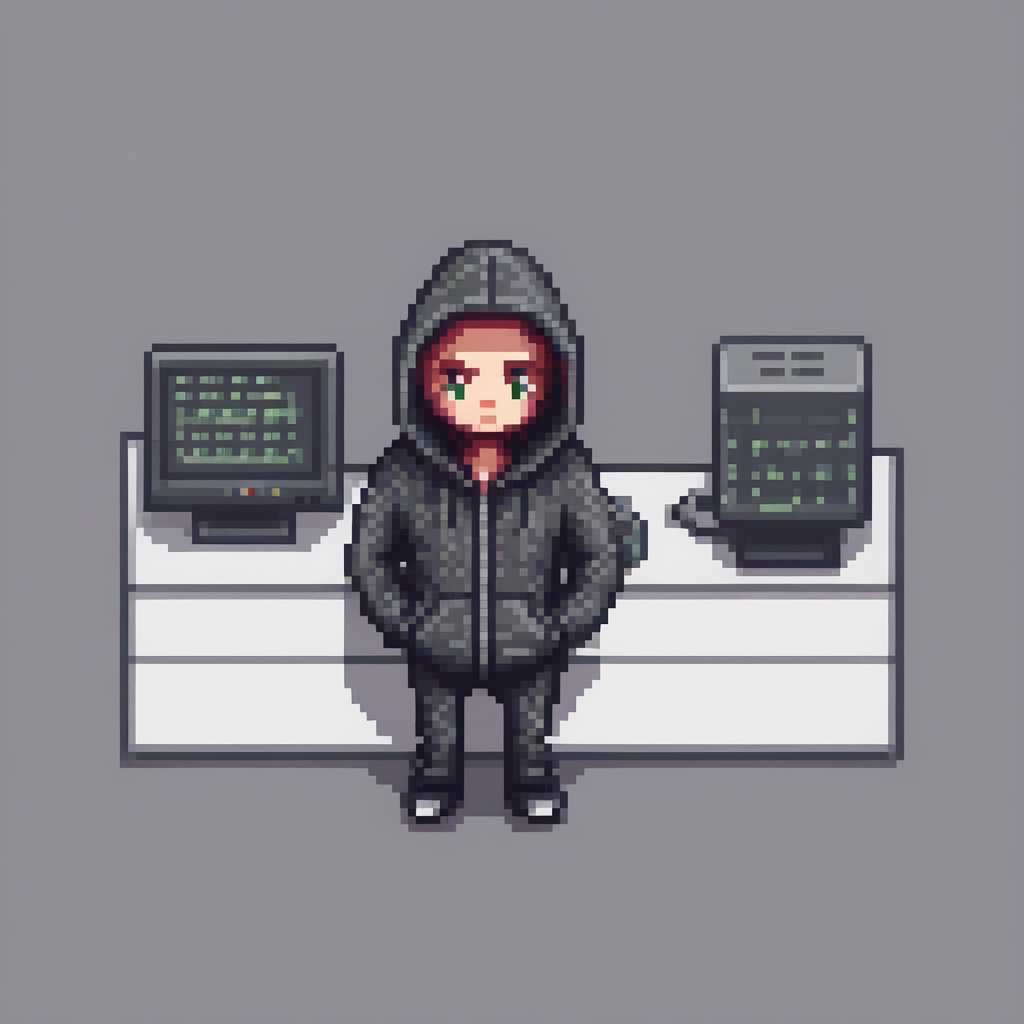
With the `adapter_name` parameter, it is really easy to use another adapter for inference! Load the [nerijs/pixel-art-xl](https://huggingface.co/nerijs/pixel-art-xl) adapter that has been fine-tuned to generate pixel art images, and let's call it `"pixel"`.
|
||||
|
||||
The pipeline automatically sets the first loaded adapter (`"toy"`) as the active adapter. But you can activate the `"pixel"` adapter with the [`~diffusers.loaders.set_adapters`] method as shown below:
|
||||
|
||||
```python
|
||||
pipe.load_lora_weights("nerijs/pixel-art-xl", weight_name="pixel-art-xl.safetensors", adapter_name="pixel")
|
||||
pipe.set_adapters("pixel")
|
||||
```
|
||||
|
||||
Let's now generate an image with the second adapter and check the result:
|
||||
|
||||
```python
|
||||
prompt = "a hacker with a hoodie, pixel art"
|
||||
image = pipe(
|
||||
prompt, num_inference_steps=30, cross_attention_kwargs={"scale": lora_scale}, generator=torch.manual_seed(0)
|
||||
).images[0]
|
||||
image
|
||||
```
|
||||
|
||||
|
||||
|
||||
## Combine multiple adapters
|
||||
|
||||
You can also perform multi-adapter inference where you combine different adapter checkpoints for inference.
|
||||
|
||||
Once again, use the [`~diffusers.loaders.set_adapters`] method to activate two LoRA checkpoints and specify the weight for how the checkpoints should be combined.
|
||||
|
||||
```python
|
||||
pipe.set_adapters(["pixel", "toy"], adapter_weights=[0.5, 1.0])
|
||||
```
|
||||
|
||||
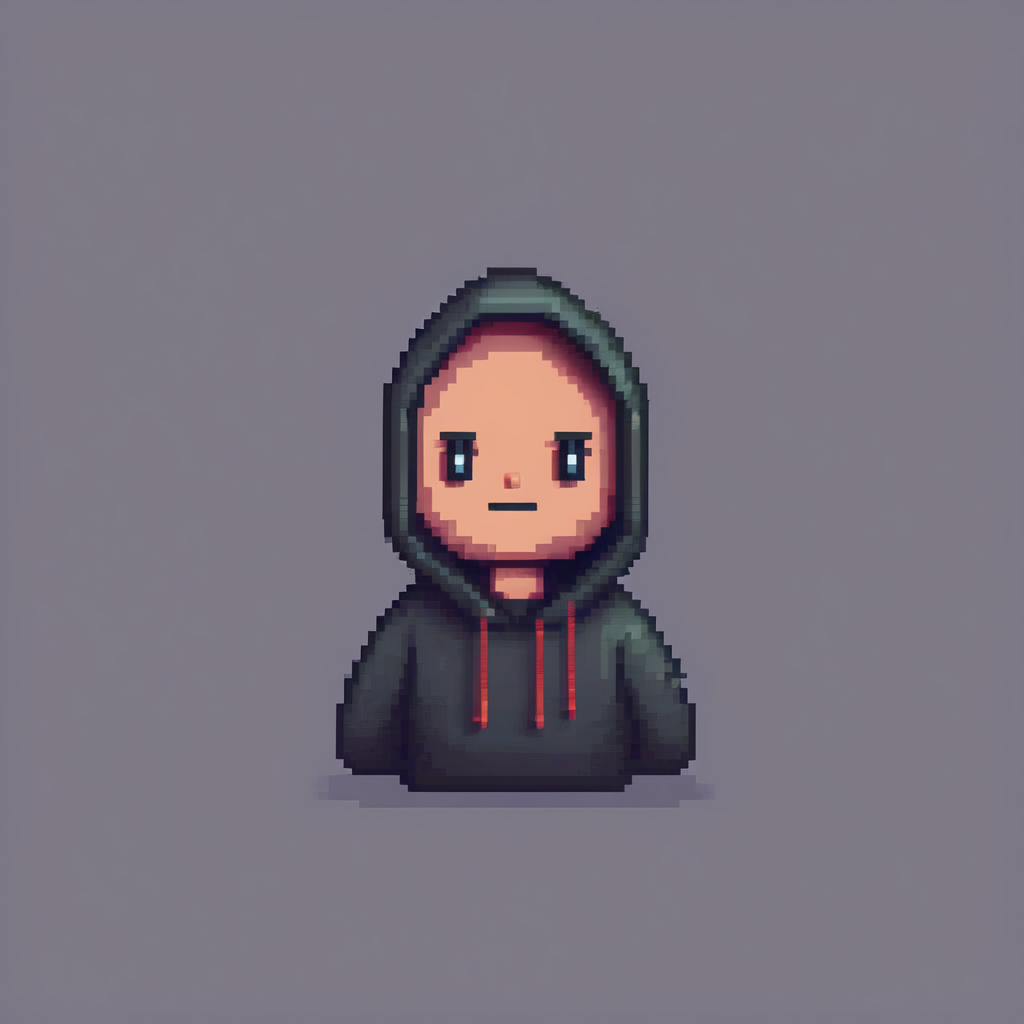
Now that we have set these two adapters, let's generate an image from the combined adapters!
|
||||
|
||||
<Tip>
|
||||
|
||||
LoRA checkpoints in the diffusion community are almost always obtained with [DreamBooth](https://huggingface.co/docs/diffusers/main/en/training/dreambooth). DreamBooth training often relies on "trigger" words in the input text prompts in order for the generation results to look as expected. When you combine multiple LoRA checkpoints, it's important to ensure the trigger words for the corresponding LoRA checkpoints are present in the input text prompts.
|
||||
|
||||
</Tip>
|
||||
|
||||
The trigger words for [CiroN2022/toy-face](https://hf.co/CiroN2022/toy-face) and [nerijs/pixel-art-xl](https://hf.co/nerijs/pixel-art-xl) are found in their repositories.
|
||||
|
||||
|
||||
```python
|
||||
# Notice how the prompt is constructed.
|
||||
prompt = "toy_face of a hacker with a hoodie, pixel art"
|
||||
image = pipe(
|
||||
prompt, num_inference_steps=30, cross_attention_kwargs={"scale": 1.0}, generator=torch.manual_seed(0)
|
||||
).images[0]
|
||||
image
|
||||
```
|
||||
|
||||
|
||||
|
||||
Impressive! As you can see, the model was able to generate an image that mixes the characteristics of both adapters.
|
||||
|
||||
If you want to go back to using only one adapter, use the [`~diffusers.loaders.set_adapters`] method to activate the `"toy"` adapter:
|
||||
|
||||
```python
|
||||
# First, set the adapter.
|
||||
pipe.set_adapters("toy")
|
||||
|
||||
# Then, run inference.
|
||||
prompt = "toy_face of a hacker with a hoodie"
|
||||
lora_scale= 0.9
|
||||
image = pipe(
|
||||
prompt, num_inference_steps=30, cross_attention_kwargs={"scale": lora_scale}, generator=torch.manual_seed(0)
|
||||
).images[0]
|
||||
image
|
||||
```
|
||||
|
||||

|
||||
|
||||
|
||||
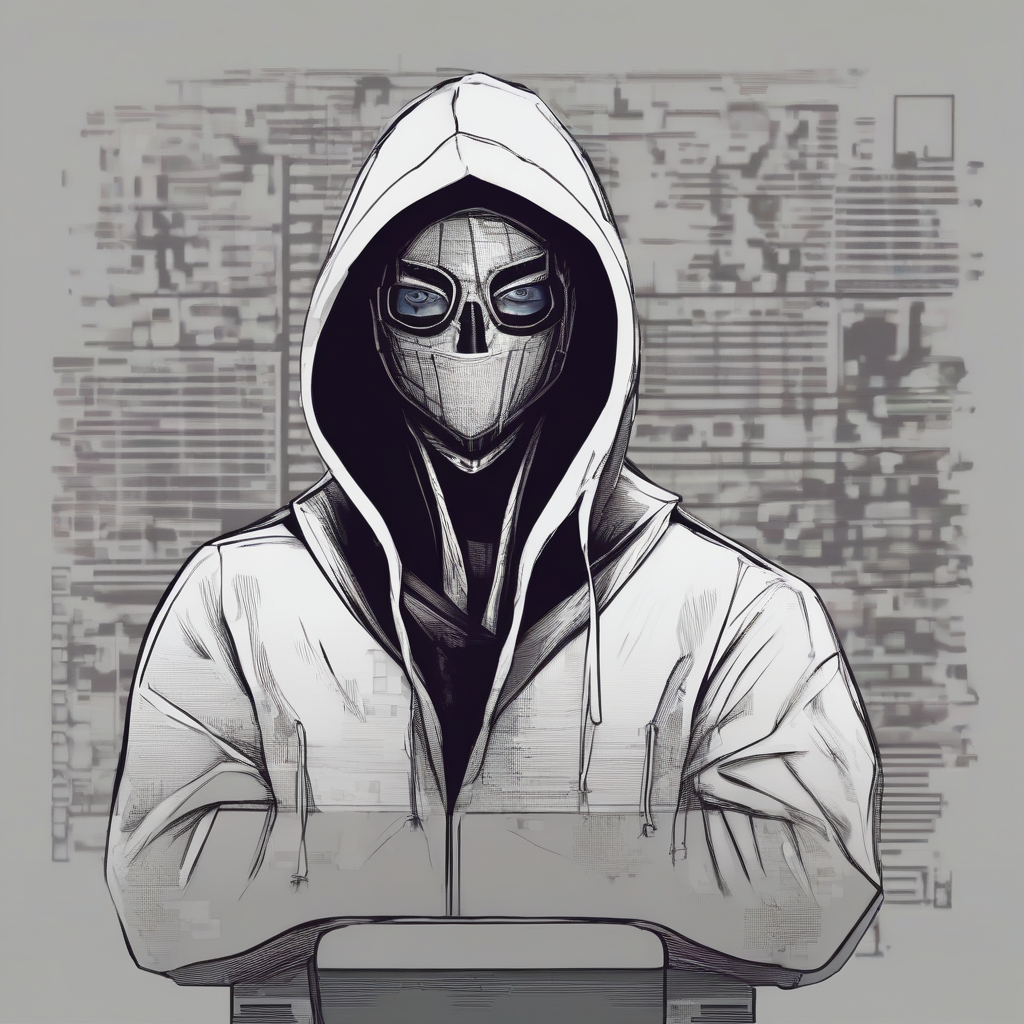
If you want to switch to only the base model, disable all LoRAs with the [`~diffusers.loaders.disable_lora`] method.
|
||||
|
||||
|
||||
```python
|
||||
pipe.disable_lora()
|
||||
|
||||
prompt = "toy_face of a hacker with a hoodie"
|
||||
lora_scale= 0.9
|
||||
image = pipe(prompt, num_inference_steps=30, generator=torch.manual_seed(0)).images[0]
|
||||
image
|
||||
```
|
||||
|
||||
|
||||
|
||||
## Monitoring active adapters
|
||||
|
||||
You have attached multiple adapters in this tutorial, and if you're feeling a bit lost on what adapters have been attached to the pipeline's components, you can easily check the list of active adapters using the [`~diffusers.loaders.get_active_adapters`] method:
|
||||
|
||||
```python
|
||||
active_adapters = pipe.get_active_adapters()
|
||||
>>> ["toy", "pixel"]
|
||||
```
|
||||
|
||||
You can also get the active adapters of each pipeline component with [`~diffusers.loaders.get_list_adapters`]:
|
||||
|
||||
```python
|
||||
list_adapters_component_wise = pipe.get_list_adapters()
|
||||
>>> {"text_encoder": ["toy", "pixel"], "unet": ["toy", "pixel"], "text_encoder_2": ["toy", "pixel"]}
|
||||
```
|
||||
@@ -10,297 +10,51 @@ an "AS IS" BASIS, WITHOUT WARRANTIES OR CONDITIONS OF ANY KIND, either express o
|
||||
specific language governing permissions and limitations under the License.
|
||||
-->
|
||||
|
||||
# Text-to-image
|
||||
# Conditional image generation
|
||||
|
||||
[[open-in-colab]]
|
||||
|
||||
When you think of diffusion models, text-to-image is usually one of the first things that come to mind. Text-to-image generates an image from a text description (for example, "Astronaut in a jungle, cold color palette, muted colors, detailed, 8k") which is also known as a *prompt*.
|
||||
Conditional image generation allows you to generate images from a text prompt. The text is converted into embeddings which are used to condition the model to generate an image from noise.
|
||||
|
||||
From a very high level, a diffusion model takes a prompt and some random initial noise, and iteratively removes the noise to construct an image. The *denoising* process is guided by the prompt, and once the denoising process ends after a predetermined number of time steps, the image representation is decoded into an image.
|
||||
The [`DiffusionPipeline`] is the easiest way to use a pre-trained diffusion system for inference.
|
||||
|
||||
<Tip>
|
||||
Start by creating an instance of [`DiffusionPipeline`] and specify which pipeline [checkpoint](https://huggingface.co/models?library=diffusers&sort=downloads) you would like to download.
|
||||
|
||||
Read the [How does Stable Diffusion work?](https://huggingface.co/blog/stable_diffusion#how-does-stable-diffusion-work) blog post to learn more about how a latent diffusion model works.
|
||||
In this guide, you'll use [`DiffusionPipeline`] for text-to-image generation with [`runwayml/stable-diffusion-v1-5`](https://huggingface.co/runwayml/stable-diffusion-v1-5):
|
||||
|
||||
</Tip>
|
||||
```python
|
||||
>>> from diffusers import DiffusionPipeline
|
||||
|
||||
You can generate images from a prompt in 🤗 Diffusers in two steps:
|
||||
|
||||
1. Load a checkpoint into the [`AutoPipelineForText2Image`] class, which automatically detects the appropriate pipeline class to use based on the checkpoint:
|
||||
|
||||
```py
|
||||
from diffusers import AutoPipelineForText2Image
|
||||
|
||||
pipeline = AutoPipelineForText2Image.from_pretrained(
|
||||
"runwayml/stable-diffusion-v1-5", torch_dtype=torch.float16, variant="fp16"
|
||||
).to("cuda")
|
||||
>>> generator = DiffusionPipeline.from_pretrained("runwayml/stable-diffusion-v1-5", use_safetensors=True)
|
||||
```
|
||||
|
||||
2. Pass a prompt to the pipeline to generate an image:
|
||||
The [`DiffusionPipeline`] downloads and caches all modeling, tokenization, and scheduling components.
|
||||
Because the model consists of roughly 1.4 billion parameters, we strongly recommend running it on a GPU.
|
||||
You can move the generator object to a GPU, just like you would in PyTorch:
|
||||
|
||||
```py
|
||||
image = pipeline(
|
||||
"stained glass of darth vader, backlight, centered composition, masterpiece, photorealistic, 8k"
|
||||
).images[0]
|
||||
```python
|
||||
>>> generator.to("cuda")
|
||||
```
|
||||
|
||||
<div class="flex justify-center">
|
||||
<img src="https://huggingface.co/datasets/huggingface/documentation-images/resolve/main/diffusers/text2img-vader.png"/>
|
||||
</div>
|
||||
Now you can use the `generator` on your text prompt:
|
||||
|
||||
## Popular models
|
||||
|
||||
The most common text-to-image models are [Stable Diffusion v1.5](https://huggingface.co/runwayml/stable-diffusion-v1-5), [Stable Diffusion XL (SDXL)](https://huggingface.co/stabilityai/stable-diffusion-xl-base-1.0), and [Kandinsky 2.2](https://huggingface.co/kandinsky-community/kandinsky-2-2-decoder). There are also ControlNet models or adapters that can be used with text-to-image models for more direct control in generating images. The results from each model are slightly different because of their architecture and training process, but no matter which model you choose, their usage is more or less the same. Let's use the same prompt for each model and compare their results.
|
||||
|
||||
### Stable Diffusion v1.5
|
||||
|
||||
[Stable Diffusion v1.5](https://huggingface.co/runwayml/stable-diffusion-v1-5) is a latent diffusion model initialized from [Stable Diffusion v1-4](https://huggingface.co/CompVis/stable-diffusion-v1-4), and finetuned for 595K steps on 512x512 images from the LAION-Aesthetics V2 dataset. You can use this model like:
|
||||
|
||||
```py
|
||||
from diffusers import AutoPipelineForText2Image
|
||||
import torch
|
||||
|
||||
pipeline = AutoPipelineForText2Image.from_pretrained(
|
||||
"runwayml/stable-diffusion-v1-5", torch_dtype=torch.float16, variant="fp16"
|
||||
).to("cuda")
|
||||
generator = torch.Generator("cuda").manual_seed(31)
|
||||
image = pipeline("Astronaut in a jungle, cold color palette, muted colors, detailed, 8k", generator=generator).images[0]
|
||||
```python
|
||||
>>> image = generator("An image of a squirrel in Picasso style").images[0]
|
||||
```
|
||||
|
||||
### Stable Diffusion XL
|
||||
The output is by default wrapped into a [`PIL.Image`](https://pillow.readthedocs.io/en/stable/reference/Image.html?highlight=image#the-image-class) object.
|
||||
|
||||
SDXL is a much larger version of the previous Stable Diffusion models, and involves a two-stage model process that adds even more details to an image. It also includes some additional *micro-conditionings* to generate high-quality images centered subjects. Take a look at the more comprehensive [SDXL](sdxl) guide to learn more about how to use it. In general, you can use SDXL like:
|
||||
You can save the image by calling:
|
||||
|
||||
```py
|
||||
from diffusers import AutoPipelineForText2Image
|
||||
import torch
|
||||
|
||||
pipeline = AutoPipelineForText2Image.from_pretrained(
|
||||
"stabilityai/stable-diffusion-xl-base-1.0", torch_dtype=torch.float16, variant="fp16"
|
||||
).to("cuda")
|
||||
generator = torch.Generator("cuda").manual_seed(31)
|
||||
image = pipeline("Astronaut in a jungle, cold color palette, muted colors, detailed, 8k", generator=generator).images[0]
|
||||
```python
|
||||
>>> image.save("image_of_squirrel_painting.png")
|
||||
```
|
||||
|
||||
### Kandinsky 2.2
|
||||
Try out the Spaces below, and feel free to play around with the guidance scale parameter to see how it affects the image quality!
|
||||
|
||||
The Kandinsky model is a bit different from the Stable Diffusion models because it also uses an image prior model to create embeddings that are used to better align text and images in the diffusion model.
|
||||
|
||||
The easiest way to use Kandinsky 2.2 is:
|
||||
|
||||
```py
|
||||
from diffusers import AutoPipelineForText2Image
|
||||
import torch
|
||||
|
||||
pipeline = AutoPipelineForText2Image.from_pretrained(
|
||||
"kandinsky-community/kandinsky-2-2-decoder", torch_dtype=torch.float16, variant="fp16"
|
||||
).to("cuda")
|
||||
generator = torch.Generator("cuda").manual_seed(31)
|
||||
image = pipeline("Astronaut in a jungle, cold color palette, muted colors, detailed, 8k", generator=generator).images[0]
|
||||
```
|
||||
|
||||
### ControlNet
|
||||
|
||||
ControlNet are auxiliary models or adapters that are finetuned on top of text-to-image models, such as [Stable Diffusion V1.5](https://huggingface.co/runwayml/stable-diffusion-v1-5). Using ControlNet models in combination with text-to-image models offers diverse options for more explicit control over how to generate an image. With ControlNet's, you add an additional conditioning input image to the model. For example, if you provide an image of a human pose (usually represented as multiple keypoints that are connected into a skeleton) as a conditioning input, the model generates an image that follows the pose of the image. Check out the more in-depth [ControlNet](controlnet) guide to learn more about other conditioning inputs and how to use them.
|
||||
|
||||
In this example, let's condition the ControlNet with a human pose estimation image. Load the ControlNet model pretrained on human pose estimations:
|
||||
|
||||
```py
|
||||
from diffusers import ControlNetModel, AutoPipelineForText2Image
|
||||
from diffusers.utils import load_image
|
||||
import torch
|
||||
|
||||
controlnet = ControlNetModel.from_pretrained(
|
||||
"lllyasviel/control_v11p_sd15_openpose", torch_dtype=torch.float16, variant="fp16"
|
||||
).to("cuda")
|
||||
pose_image = load_image("https://huggingface.co/lllyasviel/control_v11p_sd15_openpose/resolve/main/images/control.png")
|
||||
```
|
||||
|
||||
Pass the `controlnet` to the [`AutoPipelineForText2Image`], and provide the prompt and pose estimation image:
|
||||
|
||||
```py
|
||||
pipeline = AutoPipelineForText2Image.from_pretrained(
|
||||
"runwayml/stable-diffusion-v1-5", controlnet=controlnet, torch_dtype=torch.float16, variant="fp16"
|
||||
).to("cuda")
|
||||
generator = torch.Generator("cuda").manual_seed(31)
|
||||
image = pipeline("Astronaut in a jungle, cold color palette, muted colors, detailed, 8k", image=pose_image, generator=generator).images[0]
|
||||
```
|
||||
|
||||
<div class="flex flex-row gap-4">
|
||||
<div class="flex-1">
|
||||
<img class="rounded-xl" src="https://huggingface.co/datasets/huggingface/documentation-images/resolve/main/diffusers/text2img-1.png"/>
|
||||
<figcaption class="mt-2 text-center text-sm text-gray-500">Stable Diffusion v1.5</figcaption>
|
||||
</div>
|
||||
<div class="flex-1">
|
||||
<img class="rounded-xl" src="https://huggingface.co/datasets/huggingface/documentation-images/resolve/main/diffusers/sdxl-text2img.png"/>
|
||||
<figcaption class="mt-2 text-center text-sm text-gray-500">Stable Diffusion XL</figcaption>
|
||||
</div>
|
||||
<div class="flex-1">
|
||||
<img class="rounded-xl" src="https://huggingface.co/datasets/huggingface/documentation-images/resolve/main/diffusers/text2img-2.png"/>
|
||||
<figcaption class="mt-2 text-center text-sm text-gray-500">Kandinsky 2.2</figcaption>
|
||||
</div>
|
||||
<div class="flex-1">
|
||||
<img class="rounded-xl" src="https://huggingface.co/datasets/huggingface/documentation-images/resolve/main/diffusers/text2img-3.png"/>
|
||||
<figcaption class="mt-2 text-center text-sm text-gray-500">ControlNet (pose conditioning)</figcaption>
|
||||
</div>
|
||||
</div>
|
||||
|
||||
## Configure pipeline parameters
|
||||
|
||||
There are a number of parameters that can be configured in the pipeline that affect how an image is generated. You can change the image's output size, specify a negative prompt to improve image quality, and more. This section dives deeper into how to use these parameters.
|
||||
|
||||
### Height and width
|
||||
|
||||
The `height` and `width` parameters control the height and width (in pixels) of the generated image. By default, the Stable Diffusion v1.5 model outputs 512x512 images, but you can change this to any size that is a multiple of 8. For example, to create a rectangular image:
|
||||
|
||||
```py
|
||||
from diffusers import AutoPipelineForText2Image
|
||||
import torch
|
||||
|
||||
pipeline = AutoPipelineForText2Image.from_pretrained(
|
||||
"runwayml/stable-diffusion-v1-5", torch_dtype=torch.float16, variant="fp16"
|
||||
).to("cuda")
|
||||
image = pipeline(
|
||||
"Astronaut in a jungle, cold color palette, muted colors, detailed, 8k", height=768, width=512
|
||||
).images[0]
|
||||
```
|
||||
|
||||
<div class="flex justify-center">
|
||||
<img class="rounded-xl" src="https://huggingface.co/datasets/huggingface/documentation-images/resolve/main/diffusers/text2img-hw.png"/>
|
||||
</div>
|
||||
|
||||
<Tip warning={true}>
|
||||
|
||||
Other models may have different default image sizes depending on the image size's in the training dataset. For example, SDXL's default image size is 1024x1024 and using lower `height` and `width` values may result in lower quality images. Make sure you check the model's API reference first!
|
||||
|
||||
</Tip>
|
||||
|
||||
### Guidance scale
|
||||
|
||||
The `guidance_scale` parameter affects how much the prompt influences image generation. A lower value gives the model "creativity" to generate images that are more loosely related to the prompt. Higher `guidance_scale` values push the model to follow the prompt more closely, and if this value is too high, you may observe some artifacts in the generated image.
|
||||
|
||||
```py
|
||||
from diffusers import AutoPipelineForText2Image
|
||||
import torch
|
||||
|
||||
pipeline = AutoPipelineForText2Image.from_pretrained(
|
||||
"runwayml/stable-diffusion-v1-5", torch_dtype=torch.float16
|
||||
).to("cuda")
|
||||
image = pipeline(
|
||||
"Astronaut in a jungle, cold color palette, muted colors, detailed, 8k", guidance_scale=3.5
|
||||
).images[0]
|
||||
```
|
||||
|
||||
<div class="flex flex-row gap-4">
|
||||
<div class="flex-1">
|
||||
<img class="rounded-xl" src="https://huggingface.co/datasets/huggingface/documentation-images/resolve/main/diffusers/text2img-guidance-scale-2.5.png"/>
|
||||
<figcaption class="mt-2 text-center text-sm text-gray-500">guidance_scale = 2.5</figcaption>
|
||||
</div>
|
||||
<div class="flex-1">
|
||||
<img class="rounded-xl" src="https://huggingface.co/datasets/huggingface/documentation-images/resolve/main/diffusers/text2img-guidance-scale-7.5.png"/>
|
||||
<figcaption class="mt-2 text-center text-sm text-gray-500">guidance_scale = 7.5</figcaption>
|
||||
</div>
|
||||
<div class="flex-1">
|
||||
<img class="rounded-xl" src="https://huggingface.co/datasets/huggingface/documentation-images/resolve/main/diffusers/text2img-guidance-scale-10.5.png"/>
|
||||
<figcaption class="mt-2 text-center text-sm text-gray-500">guidance_scale = 10.5</figcaption>
|
||||
</div>
|
||||
</div>
|
||||
|
||||
### Negative prompt
|
||||
|
||||
Just like how a prompt guides generation, a *negative prompt* steers the model away from things you don't want the model to generate. This is commonly used to improve overall image quality by removing poor or bad image features such as "low resolution" or "bad details". You can also use a negative prompt to remove or modify the content and style of an image.
|
||||
|
||||
```py
|
||||
from diffusers import AutoPipelineForText2Image
|
||||
import torch
|
||||
|
||||
pipeline = AutoPipelineForText2Image.from_pretrained(
|
||||
"runwayml/stable-diffusion-v1-5", torch_dtype=torch.float16
|
||||
).to("cuda")
|
||||
image = pipeline(
|
||||
prompt="Astronaut in a jungle, cold color palette, muted colors, detailed, 8k",
|
||||
negative_prompt="ugly, deformed, disfigured, poor details, bad anatomy",
|
||||
).images[0]
|
||||
```
|
||||
|
||||
<div class="flex flex-row gap-4">
|
||||
<div class="flex-1">
|
||||
<img class="rounded-xl" src="https://huggingface.co/datasets/huggingface/documentation-images/resolve/main/diffusers/text2img-neg-prompt-1.png"/>
|
||||
<figcaption class="mt-2 text-center text-sm text-gray-500">negative prompt = "ugly, deformed, disfigured, poor details, bad anatomy"</figcaption>
|
||||
</div>
|
||||
<div class="flex-1">
|
||||
<img class="rounded-xl" src="https://huggingface.co/datasets/huggingface/documentation-images/resolve/main/diffusers/text2img-neg-prompt-2.png"/>
|
||||
<figcaption class="mt-2 text-center text-sm text-gray-500">negative prompt = "astronaut"</figcaption>
|
||||
</div>
|
||||
</div>
|
||||
|
||||
### Generator
|
||||
|
||||
A [`torch.Generator`](https://pytorch.org/docs/stable/generated/torch.Generator.html#generator) object enables reproducibility in a pipeline by setting a manual seed. You can use a `Generator` to generate batches of images and iteratively improve on an image generated from a seed as detailed in the [Improve image quality with deterministic generation](reusing_seeds) guide.
|
||||
|
||||
You can set a seed and `Generator` as shown below. Creating an image with a `Generator` should return the same result each time instead of randomly generating a new image.
|
||||
|
||||
```py
|
||||
from diffusers import AutoPipelineForText2Image
|
||||
import torch
|
||||
|
||||
pipeline = AutoPipelineForText2Image.from_pretrained(
|
||||
"runwayml/stable-diffusion-v1-5", torch_dtype=torch.float16
|
||||
).to("cuda")
|
||||
generator = torch.Generator(device="cuda").manual_seed(30)
|
||||
image = pipeline(
|
||||
"Astronaut in a jungle, cold color palette, muted colors, detailed, 8k",
|
||||
generator=generator,
|
||||
).images[0]
|
||||
```
|
||||
|
||||
## Control image generation
|
||||
|
||||
There are several ways to exert more control over how an image is generated outside of configuring a pipeline's parameters, such as prompt weighting and ControlNet models.
|
||||
|
||||
### Prompt weighting
|
||||
|
||||
Prompt weighting is a technique for increasing or decreasing the importance of concepts in a prompt to emphasize or minimize certain features in an image. We recommend using the [Compel](https://github.com/damian0815/compel) library to help you generate the weighted prompt embeddings.
|
||||
|
||||
<Tip>
|
||||
|
||||
Learn how to create the prompt embeddings in the [Prompt weighting](weighted_prompts) guide. This example focuses on how to use the prompt embeddings in the pipeline.
|
||||
|
||||
</Tip>
|
||||
|
||||
Once you've created the embeddings, you can pass them to the `prompt_embeds` (and `negative_prompt_embeds` if you're using a negative prompt) parameter in the pipeline.
|
||||
|
||||
```py
|
||||
from diffusers import AutoPipelineForText2Image
|
||||
import torch
|
||||
|
||||
pipeline = AutoPipelineForText2Image.from_pretrained(
|
||||
"runwayml/stable-diffusion-v1-5", torch_dtype=torch.float16
|
||||
).to("cuda")
|
||||
image = pipeline(
|
||||
prompt_emebds=prompt_embeds, # generated from Compel
|
||||
negative_prompt_embeds=negative_prompt_embeds, # generated from Compel
|
||||
).images[0]
|
||||
```
|
||||
|
||||
### ControlNet
|
||||
|
||||
As you saw in the [ControlNet](#controlnet) section, these models offer a more flexible and accurate way to generate images by incorporating an additional conditioning image input. Each ControlNet model is pretrained on a particular type of conditioning image to generate new images that resemble it. For example, if you take a ControlNet pretrained on depth maps, you can give the model a depth map as a conditioning input and it'll generate an image that preserves the spatial information in it. This is quicker and easier than specifying the depth information in a prompt. You can even combine multiple conditioning inputs with a [MultiControlNet](controlnet#multicontrolnet)!
|
||||
|
||||
There are many types of conditioning inputs you can use, and 🤗 Diffusers supports ControlNet for Stable Diffusion and SDXL models. Take a look at the more comprehensive [ControlNet](controlnet) guide to learn how you can use these models.
|
||||
|
||||
## Optimize
|
||||
|
||||
Diffusion models are large, and the iterative nature of denoising an image is computationally expensive and intensive. But this doesn't mean you need access to powerful - or even many - GPUs to use them. There are many optimization techniques for running diffusion models on consumer and free-tier resources. For example, you can load model weights in half-precision to save GPU memory and increase speed or offload the entire model to the GPU to save even more memory.
|
||||
|
||||
PyTorch 2.0 also supports a more memory-efficient attention mechanism called [*scaled dot product attention*](../optimization/torch2.0#scaled-dot-product-attention) that is automatically enabled if you're using PyTorch 2.0. You can combine this with [`torch.compile`](https://pytorch.org/tutorials/intermediate/torch_compile_tutorial.html) to speed your code up even more:
|
||||
|
||||
```py
|
||||
from diffusers import AutoPipelineForText2Image
|
||||
import torch
|
||||
|
||||
pipeline = AutoPipelineForText2Image.from_pretrained("runwayml/stable-diffusion-v1-5", torch_dtype=torch.float16, variant="fp16").to("cuda")
|
||||
pipeline.unet = torch.compile(pipeline.unet, mode="reduce-overheard", fullgraph=True)
|
||||
```
|
||||
|
||||
For more tips on how to optimize your code to save memory and speed up inference, read the [Memory and speed](../optimization/fp16) and [Torch 2.0](../optimization/torch2.0) guides.
|
||||
<iframe
|
||||
src="https://stabilityai-stable-diffusion.hf.space"
|
||||
frameborder="0"
|
||||
width="850"
|
||||
height="500"
|
||||
></iframe>
|
||||
@@ -434,7 +434,7 @@ high_threshold = 200
|
||||
|
||||
canny_image = cv2.Canny(canny_image, low_threshold, high_threshold)
|
||||
|
||||
# zero out middle columns of image where pose will be overlaid
|
||||
# zero out middle columns of image where pose will be overlayed
|
||||
zero_start = canny_image.shape[1] // 4
|
||||
zero_end = zero_start + canny_image.shape[1] // 2
|
||||
canny_image[:, zero_start:zero_end] = 0
|
||||
|
||||
@@ -1,123 +0,0 @@
|
||||
# Improve generation quality with FreeU
|
||||
|
||||
[[open-in-colab]]
|
||||
|
||||
The UNet is responsible for denoising during the reverse diffusion process, and there are two distinct features in its architecture:
|
||||
|
||||
1. Backbone features primarily contribute to the denoising process
|
||||
2. Skip features mainly introduce high-frequency features into the decoder module and can make the network overlook the semantics in the backbone features
|
||||
|
||||
However, the skip connection can sometimes introduce unnatural image details. [FreeU](https://hf.co/papers/2309.11497) is a technique for improving image quality by rebalancing the contributions from the UNet’s skip connections and backbone feature maps.
|
||||
|
||||
FreeU is applied during inference and it does not require any additional training. The technique works for different tasks such as text-to-image, image-to-image, and text-to-video.
|
||||
|
||||
In this guide, you will apply FreeU to the [`StableDiffusionPipeline`], [`StableDiffusionXLPipeline`], and [`TextToVideoSDPipeline`].
|
||||
|
||||
## StableDiffusionPipeline
|
||||
|
||||
Load the pipeline:
|
||||
|
||||
```py
|
||||
from diffusers import DiffusionPipeline
|
||||
import torch
|
||||
|
||||
pipeline = DiffusionPipeline.from_pretrained(
|
||||
"runwayml/stable-diffusion-v1-5", torch_dtype=torch.float16, safety_checker=None
|
||||
).to("cuda")
|
||||
```
|
||||
|
||||
Then enable the FreeU mechanism with the FreeU-specific hyperparameters. These values are scaling factors for the backbone and skip features.
|
||||
|
||||
```py
|
||||
pipeline.enable_freeu(s1=0.9, s2=0.2, b1=1.2, b2=1.4)
|
||||
```
|
||||
|
||||
The values above are from the official FreeU [code repository](https://github.com/ChenyangSi/FreeU) where you can also find [reference hyperparameters](https://github.com/ChenyangSi/FreeU#range-for-more-parameters) for different models.
|
||||
|
||||
<Tip>
|
||||
|
||||
Disable the FreeU mechanism by calling `disable_freeu()` on a pipeline.
|
||||
|
||||
</Tip>
|
||||
|
||||
And then run inference:
|
||||
|
||||
```py
|
||||
prompt = "A squirrel eating a burger"
|
||||
seed = 2023
|
||||
image = pipeline(prompt, generator=torch.manual_seed(seed)).images[0]
|
||||
```
|
||||
|
||||
The figure below compares non-FreeU and FreeU results respectively for the same hyperparameters used above (`prompt` and `seed`):
|
||||
|
||||
|
||||
|
||||
|
||||
Let's see how Stable Diffusion 2 results are impacted:
|
||||
|
||||
```py
|
||||
from diffusers import DiffusionPipeline
|
||||
import torch
|
||||
|
||||
pipeline = DiffusionPipeline.from_pretrained(
|
||||
"stabilityai/stable-diffusion-2-1", torch_dtype=torch.float16, safety_checker=None
|
||||
).to("cuda")
|
||||
|
||||
prompt = "A squirrel eating a burger"
|
||||
seed = 2023
|
||||
|
||||
pipeline.enable_freeu(s1=0.9, s2=0.2, b1=1.1, b2=1.2)
|
||||
image = pipeline(prompt, generator=torch.manual_seed(seed)).images[0]
|
||||
```
|
||||
|
||||
|
||||
|
||||
|
||||
## Stable Diffusion XL
|
||||
|
||||
Finally, let's take a look at how FreeU affects Stable Diffusion XL results:
|
||||
|
||||
```py
|
||||
from diffusers import DiffusionPipeline
|
||||
import torch
|
||||
|
||||
pipeline = DiffusionPipeline.from_pretrained(
|
||||
"stabilityai/stable-diffusion-xl-base-1.0", torch_dtype=torch.float16,
|
||||
).to("cuda")
|
||||
|
||||
prompt = "A squirrel eating a burger"
|
||||
seed = 2023
|
||||
|
||||
# Comes from
|
||||
# https://wandb.ai/nasirk24/UNET-FreeU-SDXL/reports/FreeU-SDXL-Optimal-Parameters--Vmlldzo1NDg4NTUw
|
||||
pipeline.enable_freeu(s1=0.6, s2=0.4, b1=1.1, b2=1.2)
|
||||
image = pipeline(prompt, generator=torch.manual_seed(seed)).images[0]
|
||||
```
|
||||
|
||||
|
||||
|
||||
|
||||
## Text-to-video generation
|
||||
|
||||
FreeU can also be used to improve video quality:
|
||||
|
||||
```python
|
||||
from diffusers import DiffusionPipeline
|
||||
from diffusers.utils import export_to_video
|
||||
import torch
|
||||
|
||||
model_id = "cerspense/zeroscope_v2_576w"
|
||||
pipe = DiffusionPipeline.from_pretrained("cerspense/zeroscope_v2_576w", torch_dtype=torch.float16).to("cuda")
|
||||
pipe = pipe.to("cuda")
|
||||
|
||||
prompt = "an astronaut riding a horse on mars"
|
||||
seed = 2023
|
||||
|
||||
# The values come from
|
||||
# https://github.com/lyn-rgb/FreeU_Diffusers#video-pipelines
|
||||
pipe.enable_freeu(b1=1.2, b2=1.4, s1=0.9, s2=0.2)
|
||||
video_frames = pipe(prompt, height=320, width=576, num_frames=30, generator=torch.manual_seed(seed)).frames
|
||||
export_to_video(video_frames, "astronaut_rides_horse.mp4")
|
||||
```
|
||||
|
||||
Thanks to [kadirnar](https://github.com/kadirnar/) for helping to integrate the feature, and to [justindujardin](https://github.com/justindujardin) for the helpful discussions.
|
||||
@@ -33,7 +33,7 @@ pipeline.enable_xformers_memory_efficient_attention()
|
||||
|
||||
<Tip>
|
||||
|
||||
You'll notice throughout the guide, we use [`~DiffusionPipeline.enable_model_cpu_offload`] and [`~DiffusionPipeline.enable_xformers_memory_efficient_attention`], to save memory and increase inference speed. If you're using PyTorch 2.0, then you don't need to call [`~DiffusionPipeline.enable_xformers_memory_efficient_attention`] on your pipeline because it'll already be using PyTorch 2.0's native [scaled-dot product attention](../optimization/torch2.0#scaled-dot-product-attention).
|
||||
You'll notice throughout the guide, we use [`~DiffusionPipeline.enable_model_cpu_offload`] and [`~DiffusionPipeline.enable_xformers_memory_efficient_attention`], to save memory and increase inference speed. If you're using PyTorch 2.0, then you don't need to call [`~DiffusionPipeline.enable_xformers_memory_efficient_attention`] on your pipeline because it'll already be using PyTorch 2.0's native [scaled-dot product attention](/optimization/torch2.0#scaled-dot-product-attention).
|
||||
|
||||
</Tip>
|
||||
|
||||
@@ -68,7 +68,7 @@ The most popular image-to-image models are [Stable Diffusion v1.5](https://huggi
|
||||
|
||||
### Stable Diffusion v1.5
|
||||
|
||||
Stable Diffusion v1.5 is a latent diffusion model initialized from an earlier checkpoint, and further finetuned for 595K steps on 512x512 images. To use this pipeline for image-to-image, you'll need to prepare an initial image to pass to the pipeline. Then you can pass a prompt and the image to the pipeline to generate a new image:
|
||||
Stable Diffusion v1.5 is a latent diffusion model intialized from an earlier checkpoint, and further finetuned for 595K steps on 512x512 images. To use this pipeline for image-to-image, you'll need to prepare an initial image to pass to the pipeline. Then you can pass a prompt and the image to the pipeline to generate a new image:
|
||||
|
||||
```py
|
||||
import torch
|
||||
@@ -131,7 +131,7 @@ init_image = Image.open(BytesIO(response.content)).convert("RGB")
|
||||
prompt = "Astronaut in a jungle, cold color palette, muted colors, detailed, 8k"
|
||||
|
||||
# pass prompt and image to pipeline
|
||||
image = pipeline(prompt, image=init_image, strength=0.5).images[0]
|
||||
image = pipeline(prompt, image=init_image, strength=).images[0]
|
||||
image
|
||||
```
|
||||
|
||||
@@ -590,17 +590,17 @@ image
|
||||
|
||||
## Optimize
|
||||
|
||||
Running diffusion models is computationally expensive and intensive, but with a few optimization tricks, it is entirely possible to run them on consumer and free-tier GPUs. For example, you can use a more memory-efficient form of attention such as PyTorch 2.0's [scaled-dot product attention](../optimization/torch2.0#scaled-dot-product-attention) or [xFormers](../optimization/xformers) (you can use one or the other, but there's no need to use both). You can also offload the model to the GPU while the other pipeline components wait on the CPU.
|
||||
Running diffusion models is computationally expensive and intensive, but with a few optimization tricks, it is entirely possible to run them on consumer and free-tier GPUs. For example, you can use a more memory-efficient form of attention such as PyTorch 2.0's [scaled-dot product attention](optimization/torch2.0#scaled-dot-product-attention) or [xFormers](optimization/xformers) (you can use one or the other, but there's no need to use both). You can also offload the model to the GPU while the other pipeline components wait on the CPU.
|
||||
|
||||
```diff
|
||||
+ pipeline.enable_model_cpu_offload()
|
||||
+ pipeline.enable_xformers_memory_efficient_attention()
|
||||
```
|
||||
|
||||
With [`torch.compile`](../optimization/torch2.0#torch.compile), you can boost your inference speed even more by wrapping your UNet with it:
|
||||
With [`torch.compile`](optimization/torch2.0#torch.compile), you can boost your inference speed even more by wrapping your UNet with it:
|
||||
|
||||
```py
|
||||
pipe.unet = torch.compile(pipe.unet, mode="reduce-overhead", fullgraph=True)
|
||||
```
|
||||
|
||||
To learn more, take a look at the [Reduce memory usage](../optimization/memory) and [Torch 2.0](../optimization/torch2.0) guides.
|
||||
To learn more, take a look at the [Reduce memory usage](optimization/memory) and [Torch 2.0](optimization/torch2.0) guides.
|
||||
|
||||
@@ -10,302 +10,87 @@ an "AS IS" BASIS, WITHOUT WARRANTIES OR CONDITIONS OF ANY KIND, either express o
|
||||
specific language governing permissions and limitations under the License.
|
||||
-->
|
||||
|
||||
# Inpainting
|
||||
# Text-guided image-inpainting
|
||||
|
||||
[[open-in-colab]]
|
||||
|
||||
Inpainting replaces or edits specific areas of an image. This makes it a useful tool for image restoration like removing defects and artifacts, or even replacing an image area with something entirely new. Inpainting relies on a mask to determine which regions of an image to fill in; the area to inpaint is represented by white pixels and the area to keep is represented by black pixels. The white pixels are filled in by the prompt.
|
||||
The [`StableDiffusionInpaintPipeline`] allows you to edit specific parts of an image by providing a mask and a text prompt. It uses a version of Stable Diffusion, like [`runwayml/stable-diffusion-inpainting`](https://huggingface.co/runwayml/stable-diffusion-inpainting) specifically trained for inpainting tasks.
|
||||
|
||||
With 🤗 Diffusers, here is how you can do inpainting:
|
||||
Get started by loading an instance of the [`StableDiffusionInpaintPipeline`]:
|
||||
|
||||
1. Load an inpainting checkpoint with the [`AutoPipelineForInpainting`] class. This'll automatically detect the appropriate pipeline class to load based on the checkpoint:
|
||||
|
||||
```py
|
||||
```python
|
||||
import PIL
|
||||
import requests
|
||||
import torch
|
||||
from diffusers import AutoPipelineForInpainting
|
||||
from diffusers.utils import load_image
|
||||
from io import BytesIO
|
||||
|
||||
pipeline = AutoPipelineForInpainting.from_pretrained(
|
||||
"kandinsky-community/kandinsky-2-2-decoder-inpaint", torch_dtype=torch.float16
|
||||
).to("cuda")
|
||||
pipeline.enable_model_cpu_offload()
|
||||
pipeline.enable_xformers_memory_efficient_attention()
|
||||
from diffusers import StableDiffusionInpaintPipeline
|
||||
|
||||
pipeline = StableDiffusionInpaintPipeline.from_pretrained(
|
||||
"runwayml/stable-diffusion-inpainting",
|
||||
torch_dtype=torch.float16,
|
||||
use_safetensors=True,
|
||||
variant="fp16",
|
||||
)
|
||||
pipeline = pipeline.to("cuda")
|
||||
```
|
||||
|
||||
<Tip>
|
||||
Download an image and a mask of a dog which you'll eventually replace:
|
||||
|
||||
You'll notice throughout the guide, we use [`~DiffusionPipeline.enable_model_cpu_offload`] and [`~DiffusionPipeline.enable_xformers_memory_efficient_attention`], to save memory and increase inference speed. If you're using PyTorch 2.0, it's not necessary to call [`~DiffusionPipeline.enable_xformers_memory_efficient_attention`] on your pipeline because it'll already be using PyTorch 2.0's native [scaled-dot product attention](../optimization/torch2.0#scaled-dot-product-attention).
|
||||
```python
|
||||
def download_image(url):
|
||||
response = requests.get(url)
|
||||
return PIL.Image.open(BytesIO(response.content)).convert("RGB")
|
||||
|
||||
|
||||
img_url = "https://raw.githubusercontent.com/CompVis/latent-diffusion/main/data/inpainting_examples/overture-creations-5sI6fQgYIuo.png"
|
||||
mask_url = "https://raw.githubusercontent.com/CompVis/latent-diffusion/main/data/inpainting_examples/overture-creations-5sI6fQgYIuo_mask.png"
|
||||
|
||||
init_image = download_image(img_url).resize((512, 512))
|
||||
mask_image = download_image(mask_url).resize((512, 512))
|
||||
```
|
||||
|
||||
Now you can create a prompt to replace the mask with something else:
|
||||
|
||||
```python
|
||||
prompt = "Face of a yellow cat, high resolution, sitting on a park bench"
|
||||
image = pipeline(prompt=prompt, image=init_image, mask_image=mask_image).images[0]
|
||||
```
|
||||
|
||||
`image` | `mask_image` | `prompt` | output |
|
||||
:-------------------------:|:-------------------------:|:-------------------------:|-------------------------:|
|
||||
<img src="https://raw.githubusercontent.com/CompVis/latent-diffusion/main/data/inpainting_examples/overture-creations-5sI6fQgYIuo.png" alt="drawing" width="250"/> | <img src="https://raw.githubusercontent.com/CompVis/latent-diffusion/main/data/inpainting_examples/overture-creations-5sI6fQgYIuo_mask.png" alt="drawing" width="250"/> | ***Face of a yellow cat, high resolution, sitting on a park bench*** | <img src="https://huggingface.co/datasets/hf-internal-testing/diffusers-images/resolve/main/in_paint/yellow_cat_sitting_on_a_park_bench.png" alt="drawing" width="250"/> |
|
||||
|
||||
|
||||
<Tip warning={true}>
|
||||
|
||||
A previous experimental implementation of inpainting used a different, lower-quality process. To ensure backwards compatibility, loading a pretrained pipeline that doesn't contain the new model will still apply the old inpainting method.
|
||||
|
||||
</Tip>
|
||||
|
||||
2. Load the base and mask images:
|
||||
|
||||
```py
|
||||
init_image = load_image("https://huggingface.co/datasets/huggingface/documentation-images/resolve/main/diffusers/inpaint.png").convert("RGB")
|
||||
mask_image = load_image("https://huggingface.co/datasets/huggingface/documentation-images/resolve/main/diffusers/inpaint_mask.png").convert("RGB")
|
||||
```
|
||||
|
||||
3. Create a prompt to inpaint the image with and pass it to the pipeline with the base and mask images:
|
||||
|
||||
```py
|
||||
prompt = "a black cat with glowing eyes, cute, adorable, disney, pixar, highly detailed, 8k"
|
||||
negative_prompt = "bad anatomy, deformed, ugly, disfigured"
|
||||
image = pipeline(prompt=prompt, negative_prompt=negative_prompt, image=init_image, mask_image=mask_image).images[0]
|
||||
```
|
||||
|
||||
<div class="flex gap-4">
|
||||
<div>
|
||||
<img class="rounded-xl" src="https://huggingface.co/datasets/huggingface/documentation-images/resolve/main/diffusers/inpaint.png"/>
|
||||
<figcaption class="mt-2 text-center text-sm text-gray-500">base image</figcaption>
|
||||
</div>
|
||||
<div>
|
||||
<img class="rounded-xl" src="https://huggingface.co/datasets/huggingface/documentation-images/resolve/main/diffusers/inpaint-cat.png"/>
|
||||
<figcaption class="mt-2 text-center text-sm text-gray-500">generated image</figcaption>
|
||||
</div>
|
||||
</div>
|
||||
|
||||
## Create a mask image
|
||||
|
||||
Throughout this guide, the mask image is provided in all of the code examples for convenience. You can inpaint on your own images, but you'll need to create a mask image for it. Use the Space below to easily create a mask image.
|
||||
|
||||
Upload a base image to inpaint on and use the sketch tool to draw a mask. Once you're done, click **Run** to generate and download the mask image.
|
||||
Check out the Spaces below to try out image inpainting yourself!
|
||||
|
||||
<iframe
|
||||
src="https://stevhliu-inpaint-mask-maker.hf.space"
|
||||
src="https://runwayml-stable-diffusion-inpainting.hf.space"
|
||||
frameborder="0"
|
||||
width="850"
|
||||
height="450"
|
||||
height="500"
|
||||
></iframe>
|
||||
|
||||
## Popular models
|
||||
## Preserving the Unmasked Area of the Image
|
||||
|
||||
[Stable Diffusion Inpainting](https://huggingface.co/runwayml/stable-diffusion-inpainting), [Stable Diffusion XL (SDXL) Inpainting](https://huggingface.co/diffusers/stable-diffusion-xl-1.0-inpainting-0.1), and [Kandinsky 2.2](https://huggingface.co/kandinsky-community/kandinsky-2-2-decoder-inpaint) are among the most popular models for inpainting. SDXL typically produces higher resolution images than Stable Diffusion v1.5, and Kandinsky 2.2 is also capable of generating high-quality images.
|
||||
Generally speaking, [`StableDiffusionInpaintPipeline`] (and other inpainting pipelines) will change the unmasked part of the image as well. If this behavior is undesirable, you can force the unmasked area to remain the same as follows:
|
||||
|
||||
### Stable Diffusion Inpainting
|
||||
|
||||
Stable Diffusion Inpainting is a latent diffusion model finetuned on 512x512 images on inpainting. It is a good starting point because it is relatively fast and generates good quality images. To use this model for inpainting, you'll need to pass a prompt, base and mask image to the pipeline:
|
||||
|
||||
```py
|
||||
import torch
|
||||
from diffusers import AutoPipelineForInpainting
|
||||
from diffusers.utils import load_image
|
||||
|
||||
pipeline = AutoPipelineForInpainting.from_pretrained(
|
||||
"runwayml/stable-diffusion-inpainting", torch_dtype=torch.float16, variant="fp16"
|
||||
).to("cuda")
|
||||
pipeline.enable_model_cpu_offload()
|
||||
pipeline.enable_xformers_memory_efficient_attention()
|
||||
|
||||
# load base and mask image
|
||||
init_image = load_image("https://huggingface.co/datasets/huggingface/documentation-images/resolve/main/diffusers/inpaint.png").convert("RGB")
|
||||
mask_image = load_image("https://huggingface.co/datasets/huggingface/documentation-images/resolve/main/diffusers/inpaint_mask.png").convert("RGB")
|
||||
|
||||
generator = torch.Generator("cuda").manual_seed(92)
|
||||
prompt = "concept art digital painting of an elven castle, inspired by lord of the rings, highly detailed, 8k"
|
||||
image = pipeline(prompt=prompt, image=init_image, mask_image=mask_image, generator=generator).images[0]
|
||||
```
|
||||
|
||||
### Stable Diffusion XL (SDXL) Inpainting
|
||||
|
||||
SDXL is a larger and more powerful version of Stable Diffusion v1.5. This model can follow a two-stage model process (though each model can also be used alone); the base model generates an image, and a refiner model takes that image and further enhances its details and quality. Take a look at the [SDXL](sdxl) guide for a more comprehensive guide on how to use SDXL and configure it's parameters.
|
||||
|
||||
```py
|
||||
import torch
|
||||
from diffusers import AutoPipelineForInpainting
|
||||
from diffusers.utils import load_image
|
||||
|
||||
pipeline = AutoPipelineForInpainting.from_pretrained(
|
||||
"diffusers/stable-diffusion-xl-1.0-inpainting-0.1", torch_dtype=torch.float16, variant="fp16"
|
||||
).to("cuda")
|
||||
pipeline.enable_model_cpu_offload()
|
||||
pipeline.enable_xformers_memory_efficient_attention()
|
||||
|
||||
# load base and mask image
|
||||
init_image = load_image("https://huggingface.co/datasets/huggingface/documentation-images/resolve/main/diffusers/inpaint.png").convert("RGB")
|
||||
mask_image = load_image("https://huggingface.co/datasets/huggingface/documentation-images/resolve/main/diffusers/inpaint_mask.png").convert("RGB")
|
||||
|
||||
generator = torch.Generator("cuda").manual_seed(92)
|
||||
prompt = "concept art digital painting of an elven castle, inspired by lord of the rings, highly detailed, 8k"
|
||||
image = pipeline(prompt=prompt, image=init_image, mask_image=mask_image, generator=generator).images[0]
|
||||
```
|
||||
|
||||
### Kandinsky 2.2 Inpainting
|
||||
|
||||
The Kandinsky model family is similar to SDXL because it uses two models as well; the image prior model creates image embeddings, and the diffusion model generates images from them. You can load the image prior and diffusion model separately, but the easiest way to use Kandinsky 2.2 is to load it into the [`AutoPipelineForInpainting`] class which uses the [`KandinskyV22InpaintCombinedPipeline`] under the hood.
|
||||
|
||||
```py
|
||||
import torch
|
||||
from diffusers import AutoPipelineForInpainting
|
||||
from diffusers.utils import load_image
|
||||
|
||||
pipeline = AutoPipelineForInpainting.from_pretrained(
|
||||
"kandinsky-community/kandinsky-2-2-decoder-inpaint", torch_dtype=torch.float16
|
||||
).to("cuda")
|
||||
pipeline.enable_model_cpu_offload()
|
||||
pipeline.enable_xformers_memory_efficient_attention()
|
||||
|
||||
# load base and mask image
|
||||
init_image = load_image("https://huggingface.co/datasets/huggingface/documentation-images/resolve/main/diffusers/inpaint.png").convert("RGB")
|
||||
mask_image = load_image("https://huggingface.co/datasets/huggingface/documentation-images/resolve/main/diffusers/inpaint_mask.png").convert("RGB")
|
||||
|
||||
generator = torch.Generator("cuda").manual_seed(92)
|
||||
prompt = "concept art digital painting of an elven castle, inspired by lord of the rings, highly detailed, 8k"
|
||||
image = pipeline(prompt=prompt, image=init_image, mask_image=mask_image, generator=generator).images[0]
|
||||
```
|
||||
|
||||
<div class="flex flex-row gap-4">
|
||||
<div class="flex-1">
|
||||
<img class="rounded-xl" src="https://huggingface.co/datasets/huggingface/documentation-images/resolve/main/diffusers/inpaint.png"/>
|
||||
<figcaption class="mt-2 text-center text-sm text-gray-500">base image</figcaption>
|
||||
</div>
|
||||
<div class="flex-1">
|
||||
<img class="rounded-xl" src="https://huggingface.co/datasets/huggingface/documentation-images/resolve/main/diffusers/inpaint-sdv1.5.png"/>
|
||||
<figcaption class="mt-2 text-center text-sm text-gray-500">Stable Diffusion Inpainting</figcaption>
|
||||
</div>
|
||||
<div class="flex-1">
|
||||
<img class="rounded-xl" src="https://huggingface.co/datasets/huggingface/documentation-images/resolve/main/diffusers/inpaint-sdxl.png"/>
|
||||
<figcaption class="mt-2 text-center text-sm text-gray-500">Stable Diffusion XL Inpainting</figcaption>
|
||||
</div>
|
||||
<div class="flex-1">
|
||||
<img class="rounded-xl" src="https://huggingface.co/datasets/huggingface/documentation-images/resolve/main/diffusers/inpaint-kandinsky.png"/>
|
||||
<figcaption class="mt-2 text-center text-sm text-gray-500">Kandinsky 2.2 Inpainting</figcaption>
|
||||
</div>
|
||||
</div>
|
||||
|
||||
## Configure pipeline parameters
|
||||
|
||||
Image features - like quality and "creativity" - are dependent on pipeline parameters. Knowing what these parameters do is important for getting the results you want. Let's take a look at the most important parameters and see how changing them affects the output.
|
||||
|
||||
### Strength
|
||||
|
||||
`strength` is a measure of how much noise is added to the base image, which influences how similar the output is to the base image.
|
||||
|
||||
* 📈 a high `strength` value means more noise is added to an image and the denoising process takes longer, but you'll get higher quality images that are more different from the base image
|
||||
* 📉 a low `strength` value means less noise is added to an image and the denoising process is faster, but the image quality may not be as great and the generated image resembles the base image more
|
||||
|
||||
```py
|
||||
import torch
|
||||
from diffusers import AutoPipelineForInpainting
|
||||
from diffusers.utils import load_image
|
||||
|
||||
pipeline = AutoPipelineForInpainting.from_pretrained(
|
||||
"runwayml/stable-diffusion-inpainting", torch_dtype=torch.float16, variant="fp16"
|
||||
).to("cuda")
|
||||
pipeline.enable_model_cpu_offload()
|
||||
pipeline.enable_xformers_memory_efficient_attention()
|
||||
|
||||
# load base and mask image
|
||||
init_image = load_image("https://huggingface.co/datasets/huggingface/documentation-images/resolve/main/diffusers/inpaint.png").convert("RGB")
|
||||
mask_image = load_image("https://huggingface.co/datasets/huggingface/documentation-images/resolve/main/diffusers/inpaint_mask.png").convert("RGB")
|
||||
|
||||
prompt = "concept art digital painting of an elven castle, inspired by lord of the rings, highly detailed, 8k"
|
||||
image = pipeline(prompt=prompt, image=init_image, mask_image=mask_image, strength=0.6).images[0]
|
||||
```
|
||||
|
||||
<div class="flex flex-row gap-4">
|
||||
<div class="flex-1">
|
||||
<img class="rounded-xl" src="https://huggingface.co/datasets/huggingface/documentation-images/resolve/main/diffusers/inpaint-strength-0.6.png"/>
|
||||
<figcaption class="mt-2 text-center text-sm text-gray-500">strength = 0.6</figcaption>
|
||||
</div>
|
||||
<div class="flex-1">
|
||||
<img class="rounded-xl" src="https://huggingface.co/datasets/huggingface/documentation-images/resolve/main/diffusers/inpaint-strength-0.8.png"/>
|
||||
<figcaption class="mt-2 text-center text-sm text-gray-500">strength = 0.8</figcaption>
|
||||
</div>
|
||||
<div class="flex-1">
|
||||
<img class="rounded-xl" src="https://huggingface.co/datasets/huggingface/documentation-images/resolve/main/diffusers/inpaint-strength-1.0.png"/>
|
||||
<figcaption class="mt-2 text-center text-sm text-gray-500">strength = 1.0</figcaption>
|
||||
</div>
|
||||
</div>
|
||||
|
||||
### Guidance scale
|
||||
|
||||
`guidance_scale` affects how aligned the text prompt and generated image are.
|
||||
|
||||
* 📈 a high `guidance_scale` value means the prompt and generated image are closely aligned, so the output is a stricter interpretation of the prompt
|
||||
* 📉 a low `guidance_scale` value means the prompt and generated image are more loosely aligned, so the output may be more varied from the prompt
|
||||
|
||||
You can use `strength` and `guidance_scale` together for more control over how expressive the model is. For example, a combination high `strength` and `guidance_scale` values gives the model the most creative freedom.
|
||||
|
||||
```py
|
||||
import torch
|
||||
from diffusers import AutoPipelineForInpainting
|
||||
from diffusers.utils import load_image
|
||||
|
||||
pipeline = AutoPipelineForInpainting.from_pretrained(
|
||||
"runwayml/stable-diffusion-inpainting", torch_dtype=torch.float16, variant="fp16"
|
||||
).to("cuda")
|
||||
pipeline.enable_model_cpu_offload()
|
||||
pipeline.enable_xformers_memory_efficient_attention()
|
||||
|
||||
# load base and mask image
|
||||
init_image = load_image("https://huggingface.co/datasets/huggingface/documentation-images/resolve/main/diffusers/inpaint.png").convert("RGB")
|
||||
mask_image = load_image("https://huggingface.co/datasets/huggingface/documentation-images/resolve/main/diffusers/inpaint_mask.png").convert("RGB")
|
||||
|
||||
prompt = "concept art digital painting of an elven castle, inspired by lord of the rings, highly detailed, 8k"
|
||||
image = pipeline(prompt=prompt, image=init_image, mask_image=mask_image, guidance_scale=2.5).images[0]
|
||||
```
|
||||
|
||||
<div class="flex flex-row gap-4">
|
||||
<div class="flex-1">
|
||||
<img class="rounded-xl" src="https://huggingface.co/datasets/huggingface/documentation-images/resolve/main/diffusers/inpaint-guidance-2.5.png"/>
|
||||
<figcaption class="mt-2 text-center text-sm text-gray-500">guidance_scale = 2.5</figcaption>
|
||||
</div>
|
||||
<div class="flex-1">
|
||||
<img class="rounded-xl" src="https://huggingface.co/datasets/huggingface/documentation-images/resolve/main/diffusers/inpaint-guidance-7.5.png"/>
|
||||
<figcaption class="mt-2 text-center text-sm text-gray-500">guidance_scale = 7.5</figcaption>
|
||||
</div>
|
||||
<div class="flex-1">
|
||||
<img class="rounded-xl" src="https://huggingface.co/datasets/huggingface/documentation-images/resolve/main/diffusers/inpaint-guidance-12.5.png"/>
|
||||
<figcaption class="mt-2 text-center text-sm text-gray-500">guidance_scale = 12.5</figcaption>
|
||||
</div>
|
||||
</div>
|
||||
|
||||
### Negative prompt
|
||||
|
||||
A negative prompt assumes the opposite role of a prompt; it guides the model away from generating certain things in an image. This is useful for quickly improving image quality and preventing the model from generating things you don't want.
|
||||
|
||||
```py
|
||||
import torch
|
||||
from diffusers import AutoPipelineForInpainting
|
||||
from diffusers.utils import load_image
|
||||
|
||||
pipeline = AutoPipelineForInpainting.from_pretrained(
|
||||
"runwayml/stable-diffusion-inpainting", torch_dtype=torch.float16, variant="fp16"
|
||||
).to("cuda")
|
||||
pipeline.enable_model_cpu_offload()
|
||||
pipeline.enable_xformers_memory_efficient_attention()
|
||||
|
||||
# load base and mask image
|
||||
init_image = load_image("https://huggingface.co/datasets/huggingface/documentation-images/resolve/main/diffusers/inpaint.png").convert("RGB")
|
||||
mask_image = load_image("https://huggingface.co/datasets/huggingface/documentation-images/resolve/main/diffusers/inpaint_mask.png").convert("RGB")
|
||||
|
||||
prompt = "concept art digital painting of an elven castle, inspired by lord of the rings, highly detailed, 8k"
|
||||
negative_prompt = "bad architecture, unstable, poor details, blurry"
|
||||
image = pipeline(prompt=prompt, negative_prompt=negative_prompt, image=init_image, mask_image=mask_image).images[0]
|
||||
image
|
||||
```
|
||||
|
||||
<div class="flex justify-center">
|
||||
<figure>
|
||||
<img class="rounded-xl" src="https://huggingface.co/datasets/huggingface/documentation-images/resolve/main/diffusers/inpaint-negative.png" />
|
||||
<figcaption class="text-center">negative_prompt = "bad architecture, unstable, poor details, blurry"</figcaption>
|
||||
</figure>
|
||||
</div>
|
||||
|
||||
## Preserve unmasked areas
|
||||
|
||||
The [`AutoPipelineForInpainting`] (and other inpainting pipelines) generally changes the unmasked parts of an image to create a more natural transition between the masked and unmasked region. If this behavior is undesirable, you can force the unmasked area to remain the same. However, forcing the unmasked portion of the image to remain the same may result in some unusual transitions between the unmasked and masked areas.
|
||||
|
||||
```py
|
||||
```python
|
||||
import PIL
|
||||
import numpy as np
|
||||
import torch
|
||||
|
||||
from diffusers import AutoPipelineForInpainting
|
||||
from diffusers import StableDiffusionInpaintPipeline
|
||||
from diffusers.utils import load_image
|
||||
|
||||
device = "cuda"
|
||||
pipeline = AutoPipelineForInpainting.from_pretrained(
|
||||
pipeline = StableDiffusionInpaintPipeline.from_pretrained(
|
||||
"runwayml/stable-diffusion-inpainting",
|
||||
torch_dtype=torch.float16,
|
||||
)
|
||||
@@ -336,257 +121,4 @@ unmasked_unchanged_image = PIL.Image.fromarray(unmasked_unchanged_image_arr.roun
|
||||
unmasked_unchanged_image.save("force_unmasked_unchanged.png")
|
||||
```
|
||||
|
||||
## Chained inpainting pipelines
|
||||
|
||||
[`AutoPipelineForInpainting`] can be chained with other 🤗 Diffusers pipelines to edit their outputs. This is often useful for improving the output quality from your other diffusion pipelines, and if you're using multiple pipelines, it can be more memory-efficient to chain them together to keep the outputs in latent space and reuse the same pipeline components.
|
||||
|
||||
### Text-to-image-to-inpaint
|
||||
|
||||
Chaining a text-to-image and inpainting pipeline allows you to inpaint the generated image, and you don't have to provide a base image to begin with. This makes it convenient to edit your favorite text-to-image outputs without having to generate an entirely new image.
|
||||
|
||||
Start with the text-to-image pipeline to create a castle:
|
||||
|
||||
```py
|
||||
import torch
|
||||
from diffusers import AutoPipelineForText2Image, AutoPipelineForInpainting
|
||||
from diffusers.utils import load_image
|
||||
|
||||
pipeline = AutoPipelineForText2Image.from_pretrained(
|
||||
"runwayml/stable-diffusion-v1-5", torch_dtype=torch.float16, variant="fp16", use_safetensors=True
|
||||
).to("cuda")
|
||||
pipeline.enable_model_cpu_offload()
|
||||
pipeline.enable_xformers_memory_efficient_attention()
|
||||
|
||||
image = pipeline("concept art digital painting of an elven castle, inspired by lord of the rings, highly detailed, 8k").images[0]
|
||||
```
|
||||
|
||||
Load the mask image of the output from above:
|
||||
|
||||
```py
|
||||
mask_image = load_image("https://huggingface.co/datasets/huggingface/documentation-images/resolve/main/diffusers/inpaint_text-chain-mask.png").convert("RGB")
|
||||
```
|
||||
|
||||
And let's inpaint the masked area with a waterfall:
|
||||
|
||||
```py
|
||||
pipeline = AutoPipelineForInpainting.from_pretrained(
|
||||
"kandinsky-community/kandinsky-2-2-decoder-inpaint", torch_dtype=torch.float16, variant="fp16"
|
||||
).to("cuda")
|
||||
pipeline.enable_model_cpu_offload()
|
||||
pipeline.enable_xformers_memory_efficient_attention()
|
||||
|
||||
prompt = "digital painting of a fantasy waterfall, cloudy"
|
||||
image = pipeline(prompt=prompt, image=image, mask_image=mask_image).images[0]
|
||||
image
|
||||
```
|
||||
|
||||
<div class="flex flex-row gap-4">
|
||||
<div class="flex-1">
|
||||
<img class="rounded-xl" src="https://huggingface.co/datasets/huggingface/documentation-images/resolve/main/diffusers/inpaint-text-chain.png"/>
|
||||
<figcaption class="mt-2 text-center text-sm text-gray-500">text-to-image</figcaption>
|
||||
</div>
|
||||
<div class="flex-1">
|
||||
<img class="rounded-xl" src="https://huggingface.co/datasets/huggingface/documentation-images/resolve/main/diffusers/inpaint-text-chain-out.png"/>
|
||||
<figcaption class="mt-2 text-center text-sm text-gray-500">inpaint</figcaption>
|
||||
</div>
|
||||
</div>
|
||||
|
||||
|
||||
### Inpaint-to-image-to-image
|
||||
|
||||
You can also chain an inpainting pipeline before another pipeline like image-to-image or an upscaler to improve the quality.
|
||||
|
||||
Begin by inpainting an image:
|
||||
|
||||
```py
|
||||
import torch
|
||||
from diffusers import AutoPipelineForInpainting, AutoPipelineForImage2Image
|
||||
from diffusers.utils import load_image
|
||||
|
||||
pipeline = AutoPipelineForInpainting.from_pretrained(
|
||||
"runwayml/stable-diffusion-inpainting", torch_dtype=torch.float16, variant="fp16"
|
||||
).to("cuda")
|
||||
pipeline.enable_model_cpu_offload()
|
||||
pipeline.enable_xformers_memory_efficient_attention()
|
||||
|
||||
# load base and mask image
|
||||
init_image = load_image("https://huggingface.co/datasets/huggingface/documentation-images/resolve/main/diffusers/inpaint.png").convert("RGB")
|
||||
mask_image = load_image("https://huggingface.co/datasets/huggingface/documentation-images/resolve/main/diffusers/inpaint_mask.png").convert("RGB")
|
||||
|
||||
prompt = "concept art digital painting of an elven castle, inspired by lord of the rings, highly detailed, 8k"
|
||||
image = pipeline(prompt=prompt, image=init_image, mask_image=mask_image).images[0]
|
||||
|
||||
# resize image to 1024x1024 for SDXL
|
||||
image = image.resize((1024, 1024))
|
||||
```
|
||||
|
||||
Now let's pass the image to another inpainting pipeline with SDXL's refiner model to enhance the image details and quality:
|
||||
|
||||
```py
|
||||
pipeline = AutoPipelineForInpainting.from_pretrained(
|
||||
"stabilityai/stable-diffusion-xl-refiner-1.0", torch_dtype=torch.float16, variant="fp16"
|
||||
).to("cuda")
|
||||
pipeline.enable_model_cpu_offload()
|
||||
pipeline.enable_xformers_memory_efficient_attention()
|
||||
|
||||
image = pipeline(prompt=prompt, image=image, mask_image=mask_image, output_type="latent").images[0]
|
||||
```
|
||||
|
||||
<Tip>
|
||||
|
||||
It is important to specify `output_type="latent"` in the pipeline to keep all the outputs in latent space to avoid an unnecessary decode-encode step. This only works if the chained pipelines are using the same VAE. For example, in the [Text-to-image-to-inpaint](#text-to-image-to-inpaint) section, Kandinsky 2.2 uses a different VAE class than the Stable Diffusion model so it won't work. But if you use Stable Diffusion v1.5 for both pipelines, then you can keep everything in latent space because they both use [`AutoencoderKL`].
|
||||
|
||||
</Tip>
|
||||
|
||||
Finally, you can pass this image to an image-to-image pipeline to put the finishing touches on it. It is more efficient to use the [`~AutoPipelineForImage2Image.from_pipe`] method to reuse the existing pipeline components, and avoid unnecessarily loading all the pipeline components into memory again.
|
||||
|
||||
```py
|
||||
pipeline = AutoPipelineForImage2Image.from_pipe(pipeline)
|
||||
pipeline.enable_xformers_memory_efficient_attention()
|
||||
|
||||
image = pipeline(prompt=prompt, image=image).images[0]
|
||||
```
|
||||
|
||||
<div class="flex flex-row gap-4">
|
||||
<div class="flex-1">
|
||||
<img class="rounded-xl" src="https://huggingface.co/datasets/huggingface/documentation-images/resolve/main/diffusers/inpaint.png"/>
|
||||
<figcaption class="mt-2 text-center text-sm text-gray-500">initial image</figcaption>
|
||||
</div>
|
||||
<div class="flex-1">
|
||||
<img class="rounded-xl" src="https://huggingface.co/datasets/huggingface/documentation-images/resolve/main/diffusers/inpaint-to-image-chain.png"/>
|
||||
<figcaption class="mt-2 text-center text-sm text-gray-500">inpaint</figcaption>
|
||||
</div>
|
||||
<div class="flex-1">
|
||||
<img class="rounded-xl" src="https://huggingface.co/datasets/huggingface/documentation-images/resolve/main/diffusers/inpaint-to-image-final.png"/>
|
||||
<figcaption class="mt-2 text-center text-sm text-gray-500">image-to-image</figcaption>
|
||||
</div>
|
||||
</div>
|
||||
|
||||
Image-to-image and inpainting are actually very similar tasks. Image-to-image generates a new image that resembles the existing provided image. Inpainting does the same thing, but it only transforms the image area defined by the mask and the rest of the image is unchanged. You can think of inpainting as a more precise tool for making specific changes and image-to-image has a broader scope for making more sweeping changes.
|
||||
|
||||
## Control image generation
|
||||
|
||||
Getting an image to look exactly the way you want is challenging because the denoising process is random. While you can control certain aspects of generation by configuring parameters like `negative_prompt`, there are better and more efficient methods for controlling image generation.
|
||||
|
||||
### Prompt weighting
|
||||
|
||||
Prompt weighting provides a quantifiable way to scale the representation of concepts in a prompt. You can use it to increase or decrease the magnitude of the text embedding vector for each concept in the prompt, which subsequently determines how much of each concept is generated. The [Compel](https://github.com/damian0815/compel) library offers an intuitive syntax for scaling the prompt weights and generating the embeddings. Learn how to create the embeddings in the [Prompt weighting](../using-diffusers/weighted_prompts) guide.
|
||||
|
||||
Once you've generated the embeddings, pass them to the `prompt_embeds` (and `negative_prompt_embeds` if you're using a negative prompt) parameter in the [`AutoPipelineForInpainting`]. The embeddings replace the `prompt` parameter:
|
||||
|
||||
```py
|
||||
import torch
|
||||
from diffusers import AutoPipelineForInpainting
|
||||
|
||||
pipeline = AutoPipelineForInpainting.from_pretrained(
|
||||
"runwayml/stable-diffusion-inpainting", torch_dtype=torch.float16,
|
||||
).to("cuda")
|
||||
pipeline.enable_model_cpu_offload()
|
||||
pipeline.enable_xformers_memory_efficient_attention()
|
||||
|
||||
image = pipeline(prompt_emebds=prompt_embeds, # generated from Compel
|
||||
negative_prompt_embeds, # generated from Compel
|
||||
image=init_image,
|
||||
mask_image=mask_image
|
||||
).images[0]
|
||||
```
|
||||
|
||||
### ControlNet
|
||||
|
||||
ControlNet models are used with other diffusion models like Stable Diffusion, and they provide an even more flexible and accurate way to control how an image is generated. A ControlNet accepts an additional conditioning image input that guides the diffusion model to preserve the features in it.
|
||||
|
||||
For example, let's condition an image with a ControlNet pretrained on inpaint images:
|
||||
|
||||
```py
|
||||
import torch
|
||||
import numpy as np
|
||||
from diffusers import ControlNetModel, StableDiffusionControlNetInpaintPipeline
|
||||
from diffusers.utils import load_image
|
||||
|
||||
# load ControlNet
|
||||
controlnet = ControlNetModel.from_pretrained("lllyasviel/control_v11p_sd15_inpaint", torch_dtype=torch.float16, variant="fp16")
|
||||
|
||||
# pass ControlNet to the pipeline
|
||||
pipeline = StableDiffusionControlNetInpaintPipeline.from_pretrained(
|
||||
"runwayml/stable-diffusion-inpainting", controlnet=controlnet, torch_dtype=torch.float16, variant="fp16"
|
||||
).to("cuda")
|
||||
pipeline.enable_model_cpu_offload()
|
||||
pipeline.enable_xformers_memory_efficient_attention()
|
||||
|
||||
# load base and mask image
|
||||
init_image = load_image("https://huggingface.co/datasets/huggingface/documentation-images/resolve/main/diffusers/inpaint.png").convert("RGB")
|
||||
mask_image = load_image("https://huggingface.co/datasets/huggingface/documentation-images/resolve/main/diffusers/inpaint_mask.png").convert("RGB")
|
||||
|
||||
# prepare control image
|
||||
def make_inpaint_condition(init_image, mask_image):
|
||||
init_image = np.array(init_image.convert("RGB")).astype(np.float32) / 255.0
|
||||
mask_image = np.array(mask_image.convert("L")).astype(np.float32) / 255.0
|
||||
|
||||
assert init_image.shape[0:1] == mask_image.shape[0:1], "image and image_mask must have the same image size"
|
||||
init_image[mask_image > 0.5] = -1.0 # set as masked pixel
|
||||
init_image = np.expand_dims(init_image, 0).transpose(0, 3, 1, 2)
|
||||
init_image = torch.from_numpy(init_image)
|
||||
return init_image
|
||||
|
||||
control_image = make_inpaint_condition(init_image, mask_image)
|
||||
```
|
||||
|
||||
Now generate an image from the base, mask and control images. You'll notice features of the base image are strongly preserved in the generated image.
|
||||
|
||||
```py
|
||||
prompt = "concept art digital painting of an elven castle, inspired by lord of the rings, highly detailed, 8k"
|
||||
image = pipeline(prompt=prompt, image=init_image, mask_image=mask_image, control_image=control_image).images[0]
|
||||
image
|
||||
```
|
||||
|
||||
You can take this a step further and chain it with an image-to-image pipeline to apply a new [style](https://huggingface.co/nitrosocke/elden-ring-diffusion):
|
||||
|
||||
```py
|
||||
from diffusers import AutoPipelineForImage2Image
|
||||
|
||||
pipeline = AutoPipelineForImage2Image.from_pretrained(
|
||||
"nitrosocke/elden-ring-diffusion", torch_dtype=torch.float16,
|
||||
).to("cuda")
|
||||
pipeline.enable_model_cpu_offload()
|
||||
pipeline.enable_xformers_memory_efficient_attention()
|
||||
|
||||
prompt = "elden ring style castle" # include the token "elden ring style" in the prompt
|
||||
negative_prompt = "bad architecture, deformed, disfigured, poor details"
|
||||
|
||||
image = pipeline(prompt, negative_prompt=negative_prompt, image=image).images[0]
|
||||
image
|
||||
```
|
||||
|
||||
<div class="flex flex-row gap-4">
|
||||
<div class="flex-1">
|
||||
<img class="rounded-xl" src="https://huggingface.co/datasets/huggingface/documentation-images/resolve/main/diffusers/inpaint.png"/>
|
||||
<figcaption class="mt-2 text-center text-sm text-gray-500">initial image</figcaption>
|
||||
</div>
|
||||
<div class="flex-1">
|
||||
<img class="rounded-xl" src="https://huggingface.co/datasets/huggingface/documentation-images/resolve/main/diffusers/inpaint-controlnet.png"/>
|
||||
<figcaption class="mt-2 text-center text-sm text-gray-500">ControlNet inpaint</figcaption>
|
||||
</div>
|
||||
<div class="flex-1">
|
||||
<img class="rounded-xl" src="https://huggingface.co/datasets/huggingface/documentation-images/resolve/main/diffusers/inpaint-img2img.png"/>
|
||||
<figcaption class="mt-2 text-center text-sm text-gray-500">image-to-image</figcaption>
|
||||
</div>
|
||||
</div>
|
||||
|
||||
## Optimize
|
||||
|
||||
It can be difficult and slow to run diffusion models if you're resource constrained, but it doesn't have to be with a few optimization tricks. One of the biggest (and easiest) optimizations you can enable is switching to memory-efficient attention. If you're using PyTorch 2.0, [scaled-dot product attention](../optimization/torch2.0#scaled-dot-product-attention) is automatically enabled and you don't need to do anything else. For non-PyTorch 2.0 users, you can install and use [xFormers](../optimization/xformers)'s implementation of memory-efficient attention. Both options reduce memory usage and accelerate inference.
|
||||
|
||||
You can also offload the model to the GPU to save even more memory:
|
||||
|
||||
```diff
|
||||
+ pipeline.enable_xformers_memory_efficient_attention()
|
||||
+ pipeline.enable_model_cpu_offload()
|
||||
```
|
||||
|
||||
To speed-up your inference code even more, use [`torch_compile`](../optimization/torch2.0#torch.compile). You should wrap `torch.compile` around the most intensive component in the pipeline which is typically the UNet:
|
||||
|
||||
```py
|
||||
pipe.unet = torch.compile(pipe.unet, mode="reduce-overhead", fullgraph=True)
|
||||
```
|
||||
|
||||
Learn more in the [Reduce memory usage](../optimization/memory) and [Torch 2.0](../optimization/torch2.0) guides.
|
||||
Forcing the unmasked portion of the image to remain the same might result in some weird transitions between the unmasked and masked areas, since the model will typically change the masked and unmasked areas to make the transition more natural.
|
||||
|
||||
@@ -153,7 +153,7 @@ exactly the same hardware and PyTorch version for full reproducibility.
|
||||
|
||||
You can also configure PyTorch to use deterministic algorithms to create a reproducible pipeline. However, you should be aware that deterministic algorithms may be slower than nondeterministic ones and you may observe a decrease in performance. But if reproducibility is important to you, then this is the way to go!
|
||||
|
||||
Nondeterministic behavior occurs when operations are launched in more than one CUDA stream. To avoid this, set the environment variable [`CUBLAS_WORKSPACE_CONFIG`](https://docs.nvidia.com/cuda/cublas/index.html#results-reproducibility) to `:16:8` to only use one buffer size during runtime.
|
||||
Nondeterministic behavior occurs when operations are launched in more than one CUDA stream. To avoid this, set the environment varibale [`CUBLAS_WORKSPACE_CONFIG`](https://docs.nvidia.com/cuda/cublas/index.html#results-reproducibility) to `:16:8` to only use one buffer size during runtime.
|
||||
|
||||
PyTorch typically benchmarks multiple algorithms to select the fastest one, but if you want reproducibility, you should disable this feature because the benchmark may select different algorithms each time. Lastly, pass `True` to [`torch.use_deterministic_algorithms`](https://pytorch.org/docs/stable/generated/torch.use_deterministic_algorithms.html) to enable deterministic algorithms.
|
||||
|
||||
|
||||
@@ -39,7 +39,7 @@ pipeline = StableDiffusionXLPipeline.from_pretrained(
|
||||
"stabilityai/stable-diffusion-xl-base-1.0", torch_dtype=torch.float16, variant="fp16", use_safetensors=True
|
||||
).to("cuda")
|
||||
|
||||
refiner = StableDiffusionXLImg2ImgPipeline.from_pretrained(
|
||||
refiner = StableDiffusionXLImg2ImgPipeline.from_single_file(
|
||||
"stabilityai/stable-diffusion-xl-refiner-1.0", torch_dtype=torch.float16, use_safetensors=True, variant="fp16"
|
||||
).to("cuda")
|
||||
```
|
||||
|
||||
@@ -62,7 +62,7 @@ export_to_gif(images[1], "cake_3d.gif")
|
||||
|
||||
## Image-to-3D
|
||||
|
||||
To generate a 3D object from another image, use the [`ShapEImg2ImgPipeline`]. You can use an existing image or generate an entirely new one. Let's use the [Kandinsky 2.1](../api/pipelines/kandinsky) model to generate a new image.
|
||||
To generate a 3D object from another image, use the [`ShapEImg2ImgPipeline`]. You can use an existing image or generate an entirely new one. Let's use the the [Kandinsky 2.1](../api/pipelines/kandinsky) model to generate a new image.
|
||||
|
||||
```py
|
||||
from diffusers import DiffusionPipeline
|
||||
|
||||
@@ -112,7 +112,7 @@ As you can see, this is already more complex than the DDPM pipeline which only c
|
||||
|
||||
<Tip>
|
||||
|
||||
💡 Read the [How does Stable Diffusion work?](https://huggingface.co/blog/stable_diffusion#how-does-stable-diffusion-work) blog for more details about how the VAE, UNet, and text encoder models work.
|
||||
💡 Read the [How does Stable Diffusion work?](https://huggingface.co/blog/stable_diffusion#how-does-stable-diffusion-work) blog for more details about how the VAE, UNet, and text encoder models.
|
||||
|
||||
</Tip>
|
||||
|
||||
@@ -169,7 +169,7 @@ Feel free to choose any prompt you like if you want to generate something else!
|
||||
>>> width = 512 # default width of Stable Diffusion
|
||||
>>> num_inference_steps = 25 # Number of denoising steps
|
||||
>>> guidance_scale = 7.5 # Scale for classifier-free guidance
|
||||
>>> generator = torch.manual_seed(0) # Seed generator to create the initial latent noise
|
||||
>>> generator = torch.manual_seed(0) # Seed generator to create the inital latent noise
|
||||
>>> batch_size = len(prompt)
|
||||
```
|
||||
|
||||
@@ -214,7 +214,7 @@ Next, generate some initial random noise as a starting point for the diffusion p
|
||||
|
||||
```py
|
||||
>>> latents = torch.randn(
|
||||
... (batch_size, unet.config.in_channels, height // 8, width // 8),
|
||||
... (batch_size, unet.in_channels, height // 8, width // 8),
|
||||
... generator=generator,
|
||||
... )
|
||||
>>> latents = latents.to(torch_device)
|
||||
|
||||
@@ -283,27 +283,36 @@ TensorBoard에 로깅, 그래디언트 누적 및 혼합 정밀도 학습을 쉽
|
||||
|
||||
```py
|
||||
>>> from accelerate import Accelerator
|
||||
>>> from huggingface_hub import create_repo, upload_folder
|
||||
>>> from huggingface_hub import HfFolder, Repository, whoami
|
||||
>>> from tqdm.auto import tqdm
|
||||
>>> from pathlib import Path
|
||||
>>> import os
|
||||
|
||||
|
||||
>>> def get_full_repo_name(model_id: str, organization: str = None, token: str = None):
|
||||
... if token is None:
|
||||
... token = HfFolder.get_token()
|
||||
... if organization is None:
|
||||
... username = whoami(token)["name"]
|
||||
... return f"{username}/{model_id}"
|
||||
... else:
|
||||
... return f"{organization}/{model_id}"
|
||||
|
||||
|
||||
>>> def train_loop(config, model, noise_scheduler, optimizer, train_dataloader, lr_scheduler):
|
||||
... # Initialize accelerator and tensorboard logging
|
||||
... # accelerator와 tensorboard 로깅 초기화
|
||||
... accelerator = Accelerator(
|
||||
... mixed_precision=config.mixed_precision,
|
||||
... gradient_accumulation_steps=config.gradient_accumulation_steps,
|
||||
... log_with="tensorboard",
|
||||
... project_dir=os.path.join(config.output_dir, "logs"),
|
||||
... logging_dir=os.path.join(config.output_dir, "logs"),
|
||||
... )
|
||||
... if accelerator.is_main_process:
|
||||
... if config.output_dir is not None:
|
||||
... os.makedirs(config.output_dir, exist_ok=True)
|
||||
... if config.push_to_hub:
|
||||
... repo_id = create_repo(
|
||||
... repo_id=config.hub_model_id or Path(config.output_dir).name, exist_ok=True
|
||||
... ).repo_id
|
||||
... repo_name = get_full_repo_name(Path(config.output_dir).name)
|
||||
... repo = Repository(config.output_dir, clone_from=repo_name)
|
||||
... elif config.output_dir is not None:
|
||||
... os.makedirs(config.output_dir, exist_ok=True)
|
||||
... accelerator.init_trackers("train_example")
|
||||
|
||||
... # 모든 것이 준비되었습니다.
|
||||
@@ -360,12 +369,7 @@ TensorBoard에 로깅, 그래디언트 누적 및 혼합 정밀도 학습을 쉽
|
||||
|
||||
... if (epoch + 1) % config.save_model_epochs == 0 or epoch == config.num_epochs - 1:
|
||||
... if config.push_to_hub:
|
||||
... upload_folder(
|
||||
... repo_id=repo_id,
|
||||
... folder_path=config.output_dir,
|
||||
... commit_message=f"Epoch {epoch}",
|
||||
... ignore_patterns=["step_*", "epoch_*"],
|
||||
... )
|
||||
... repo.push_to_hub(commit_message=f"Epoch {epoch}", blocking=True)
|
||||
... else:
|
||||
... pipeline.save_pretrained(config.output_dir)
|
||||
```
|
||||
|
||||
@@ -29,32 +29,26 @@ Unconditional 이미지 생성은 비교적 간단한 작업입니다. 모델이
|
||||
|
||||
이 가이드에서는 unconditional 이미지 생성에 ['DiffusionPipeline']과 [DDPM](https://arxiv.org/abs/2006.11239)을 사용합니다:
|
||||
|
||||
```python
|
||||
```python
|
||||
>>> from diffusers import DiffusionPipeline
|
||||
|
||||
>>> generator = DiffusionPipeline.from_pretrained("anton-l/ddpm-butterflies-128")
|
||||
```
|
||||
|
||||
```
|
||||
[diffusion 파이프라인]은 모든 모델링, 토큰화, 스케줄링 구성 요소를 다운로드하고 캐시합니다. 이 모델은 약 14억 개의 파라미터로 구성되어 있기 때문에 GPU에서 실행할 것을 강력히 권장합니다. PyTorch에서와 마찬가지로 제너레이터 객체를 GPU로 옮길 수 있습니다:
|
||||
|
||||
```python
|
||||
```python
|
||||
>>> generator.to("cuda")
|
||||
```
|
||||
|
||||
```
|
||||
이제 제너레이터를 사용하여 이미지를 생성할 수 있습니다:
|
||||
|
||||
```python
|
||||
```python
|
||||
>>> image = generator().images[0]
|
||||
```
|
||||
|
||||
```
|
||||
출력은 기본적으로 [PIL.Image](https://pillow.readthedocs.io/en/stable/reference/Image.html?highlight=image#the-image-class) 객체로 감싸집니다.
|
||||
|
||||
다음을 호출하여 이미지를 저장할 수 있습니다:
|
||||
|
||||
```python
|
||||
```python
|
||||
>>> image.save("generated_image.png")
|
||||
```
|
||||
```
|
||||
|
||||
아래 스페이스(데모 링크)를 이용해 보고, 추론 단계의 매개변수를 자유롭게 조절하여 이미지 품질에 어떤 영향을 미치는지 확인해 보세요!
|
||||
|
||||
<iframe src="https://stevhliu-ddpm-butterflies-128.hf.space" frameborder="0" width="850" height="500"></iframe>
|
||||
<iframe src="https://stevhliu-ddpm-butterflies-128.hf.space" frameborder="0" width="850" height="500"></iframe>
|
||||
@@ -3,8 +3,6 @@
|
||||
title: 🧨 Diffusers
|
||||
- local: quicktour
|
||||
title: 快速入门
|
||||
- local: stable_diffusion
|
||||
title: 有效和高效的扩散
|
||||
- local: installation
|
||||
title: 安装
|
||||
title: 开始
|
||||
|
||||
@@ -1,264 +0,0 @@
|
||||
<!--Copyright 2023 The HuggingFace Team. All rights reserved.
|
||||
|
||||
Licensed under the Apache License, Version 2.0 (the "License"); you may not use this file except in compliance with
|
||||
the License. You may obtain a copy of the License at
|
||||
|
||||
http://www.apache.org/licenses/LICENSE-2.0
|
||||
|
||||
Unless required by applicable law or agreed to in writing, software distributed under the License is distributed on
|
||||
an "AS IS" BASIS, WITHOUT WARRANTIES OR CONDITIONS OF ANY KIND, either express or implied. See the License for the
|
||||
specific language governing permissions and limitations under the License.
|
||||
-->
|
||||
|
||||
# 有效且高效的扩散
|
||||
|
||||
[[open-in-colab]]
|
||||
|
||||
让 [`DiffusionPipeline`] 生成特定风格或包含你所想要的内容的图像可能会有些棘手。 通常情况下,你需要多次运行 [`DiffusionPipeline`] 才能得到满意的图像。但是从无到有生成图像是一个计算密集的过程,特别是如果你要一遍又一遍地进行推理运算。
|
||||
|
||||
这就是为什么从pipeline中获得最高的 *computational* (speed) 和 *memory* (GPU RAM) 非常重要 ,以减少推理周期之间的时间,从而使迭代速度更快。
|
||||
|
||||
|
||||
本教程将指导您如何通过 [`DiffusionPipeline`] 更快、更好地生成图像。
|
||||
|
||||
|
||||
首先,加载 [`runwayml/stable-diffusion-v1-5`](https://huggingface.co/runwayml/stable-diffusion-v1-5) 模型:
|
||||
|
||||
```python
|
||||
from diffusers import DiffusionPipeline
|
||||
|
||||
model_id = "runwayml/stable-diffusion-v1-5"
|
||||
pipeline = DiffusionPipeline.from_pretrained(model_id, use_safetensors=True)
|
||||
```
|
||||
|
||||
本教程将使用的提示词是 [`portrait photo of a old warrior chief`] ,但是你可以随心所欲的想象和构造自己的提示词:
|
||||
|
||||
```python
|
||||
prompt = "portrait photo of a old warrior chief"
|
||||
```
|
||||
|
||||
## 速度
|
||||
|
||||
<Tip>
|
||||
|
||||
💡 如果你没有 GPU, 你可以从像 [Colab](https://colab.research.google.com/) 这样的 GPU 提供商获取免费的 GPU !
|
||||
|
||||
</Tip>
|
||||
|
||||
加速推理的最简单方法之一是将 pipeline 放在 GPU 上 ,就像使用任何 PyTorch 模块一样:
|
||||
|
||||
```python
|
||||
pipeline = pipeline.to("cuda")
|
||||
```
|
||||
|
||||
为了确保您可以使用相同的图像并对其进行改进,使用 [`Generator`](https://pytorch.org/docs/stable/generated/torch.Generator.html) 方法,然后设置一个随机数种子 以确保其 [复现性](./using-diffusers/reproducibility):
|
||||
|
||||
```python
|
||||
import torch
|
||||
|
||||
generator = torch.Generator("cuda").manual_seed(0)
|
||||
```
|
||||
|
||||
现在,你可以生成一个图像:
|
||||
|
||||
```python
|
||||
image = pipeline(prompt, generator=generator).images[0]
|
||||
image
|
||||
```
|
||||
|
||||
<div class="flex justify-center">
|
||||
<img src="https://huggingface.co/datasets/diffusers/docs-images/resolve/main/stable_diffusion_101/sd_101_1.png">
|
||||
</div>
|
||||
|
||||
在 T4 GPU 上,这个过程大概要30秒(如果你的 GPU 比 T4 好,可能会更快)。在默认情况下,[`DiffusionPipeline`] 使用完整的 `float32` 精度进行 50 步推理。你可以通过降低精度(如 `float16` )或者减少推理步数来加速整个过程
|
||||
|
||||
|
||||
让我们把模型的精度降低至 `float16` ,然后生成一张图像:
|
||||
|
||||
```python
|
||||
import torch
|
||||
|
||||
pipeline = DiffusionPipeline.from_pretrained(model_id, torch_dtype=torch.float16, use_safetensors=True)
|
||||
pipeline = pipeline.to("cuda")
|
||||
generator = torch.Generator("cuda").manual_seed(0)
|
||||
image = pipeline(prompt, generator=generator).images[0]
|
||||
image
|
||||
```
|
||||
|
||||
<div class="flex justify-center">
|
||||
<img src="https://huggingface.co/datasets/diffusers/docs-images/resolve/main/stable_diffusion_101/sd_101_2.png">
|
||||
</div>
|
||||
|
||||
这一次,生成图像只花了约 11 秒,比之前快了近 3 倍!
|
||||
|
||||
<Tip>
|
||||
|
||||
💡 我们强烈建议把 pipeline 精度降低至 `float16` , 到目前为止, 我们很少看到输出质量有任何下降。
|
||||
|
||||
</Tip>
|
||||
|
||||
另一个选择是减少推理步数。 你可以选择一个更高效的调度器 (*scheduler*) 可以减少推理步数同时保证输出质量。您可以在 [DiffusionPipeline] 中通过调用compatibles方法找到与当前模型兼容的调度器 (*scheduler*)。
|
||||
|
||||
```python
|
||||
pipeline.scheduler.compatibles
|
||||
[
|
||||
diffusers.schedulers.scheduling_lms_discrete.LMSDiscreteScheduler,
|
||||
diffusers.schedulers.scheduling_unipc_multistep.UniPCMultistepScheduler,
|
||||
diffusers.schedulers.scheduling_k_dpm_2_discrete.KDPM2DiscreteScheduler,
|
||||
diffusers.schedulers.scheduling_deis_multistep.DEISMultistepScheduler,
|
||||
diffusers.schedulers.scheduling_euler_discrete.EulerDiscreteScheduler,
|
||||
diffusers.schedulers.scheduling_dpmsolver_multistep.DPMSolverMultistepScheduler,
|
||||
diffusers.schedulers.scheduling_ddpm.DDPMScheduler,
|
||||
diffusers.schedulers.scheduling_dpmsolver_singlestep.DPMSolverSinglestepScheduler,
|
||||
diffusers.schedulers.scheduling_k_dpm_2_ancestral_discrete.KDPM2AncestralDiscreteScheduler,
|
||||
diffusers.schedulers.scheduling_heun_discrete.HeunDiscreteScheduler,
|
||||
diffusers.schedulers.scheduling_pndm.PNDMScheduler,
|
||||
diffusers.schedulers.scheduling_euler_ancestral_discrete.EulerAncestralDiscreteScheduler,
|
||||
diffusers.schedulers.scheduling_ddim.DDIMScheduler,
|
||||
]
|
||||
```
|
||||
|
||||
Stable Diffusion 模型默认使用的是 [`PNDMScheduler`] ,通常要大概50步推理, 但是像 [`DPMSolverMultistepScheduler`] 这样更高效的调度器只要大概 20 或 25 步推理. 使用 [`ConfigMixin.from_config`] 方法加载新的调度器:
|
||||
|
||||
```python
|
||||
from diffusers import DPMSolverMultistepScheduler
|
||||
|
||||
pipeline.scheduler = DPMSolverMultistepScheduler.from_config(pipeline.scheduler.config)
|
||||
```
|
||||
|
||||
现在将 `num_inference_steps` 设置为 20:
|
||||
|
||||
```python
|
||||
generator = torch.Generator("cuda").manual_seed(0)
|
||||
image = pipeline(prompt, generator=generator, num_inference_steps=20).images[0]
|
||||
image
|
||||
```
|
||||
|
||||
<div class="flex justify-center">
|
||||
<img src="https://huggingface.co/datasets/diffusers/docs-images/resolve/main/stable_diffusion_101/sd_101_3.png">
|
||||
</div>
|
||||
|
||||
太棒了!你成功把推理时间缩短到 4 秒!⚡️
|
||||
|
||||
## 内存
|
||||
|
||||
改善 pipeline 性能的另一个关键是减少内存的使用量,这间接意味着速度更快,因为你经常试图最大化每秒生成的图像数量。要想知道你一次可以生成多少张图片,最简单的方法是尝试不同的batch size,直到出现`OutOfMemoryError` (OOM)。
|
||||
|
||||
创建一个函数,为每一批要生成的图像分配提示词和 `Generators` 。请务必为每个`Generator` 分配一个种子,以便于复现良好的结果。
|
||||
|
||||
|
||||
```python
|
||||
def get_inputs(batch_size=1):
|
||||
generator = [torch.Generator("cuda").manual_seed(i) for i in range(batch_size)]
|
||||
prompts = batch_size * [prompt]
|
||||
num_inference_steps = 20
|
||||
|
||||
return {"prompt": prompts, "generator": generator, "num_inference_steps": num_inference_steps}
|
||||
```
|
||||
|
||||
设置 `batch_size=4` ,然后看一看我们消耗了多少内存:
|
||||
|
||||
```python
|
||||
from diffusers.utils import make_image_grid
|
||||
|
||||
images = pipeline(**get_inputs(batch_size=4)).images
|
||||
make_image_grid(images, 2, 2)
|
||||
```
|
||||
|
||||
除非你有一个更大内存的GPU, 否则上述代码会返回 `OOM` 错误! 大部分内存被 cross-attention 层使用。按顺序运行可以节省大量内存,而不是在批处理中进行。你可以为 pipeline 配置 [`~DiffusionPipeline.enable_attention_slicing`] 函数:
|
||||
|
||||
```python
|
||||
pipeline.enable_attention_slicing()
|
||||
```
|
||||
|
||||
现在尝试把 `batch_size` 增加到 8!
|
||||
|
||||
```python
|
||||
images = pipeline(**get_inputs(batch_size=8)).images
|
||||
make_image_grid(images, rows=2, cols=4)
|
||||
```
|
||||
|
||||
<div class="flex justify-center">
|
||||
<img src="https://huggingface.co/datasets/diffusers/docs-images/resolve/main/stable_diffusion_101/sd_101_5.png">
|
||||
</div>
|
||||
|
||||
以前你不能一批生成 4 张图片,而现在你可以在一张图片里面生成八张图片而只需要大概3.5秒!这可能是 T4 GPU 在不牺牲质量的情况运行速度最快的一种方法。
|
||||
|
||||
## 质量
|
||||
|
||||
在最后两节中, 你要学习如何通过 `fp16` 来优化 pipeline 的速度, 通过使用性能更高的调度器来减少推理步数, 使用注意力切片(*enabling attention slicing*)方法来节省内存。现在,你将关注的是如何提高图像的质量。
|
||||
|
||||
### 更好的 checkpoints
|
||||
|
||||
有个显而易见的方法是使用更好的 checkpoints。 Stable Diffusion 模型是一个很好的起点, 自正式发布以来,还发布了几个改进版本。然而, 使用更新的版本并不意味着你会得到更好的结果。你仍然需要尝试不同的 checkpoints ,并做一些研究 (例如使用 [negative prompts](https://minimaxir.com/2022/11/stable-diffusion-negative-prompt/)) 来获得更好的结果。
|
||||
|
||||
随着该领域的发展, 有越来越多经过微调的高质量的 checkpoints 用来生成不一样的风格. 在 [Hub](https://huggingface.co/models?library=diffusers&sort=downloads) 和 [Diffusers Gallery](https://huggingface.co/spaces/huggingface-projects/diffusers-gallery) 寻找你感兴趣的一种!
|
||||
|
||||
### 更好的 pipeline 组件
|
||||
|
||||
也可以尝试用新版本替换当前 pipeline 组件。让我们加载最新的 [autodecoder](https://huggingface.co/stabilityai/stable-diffusion-2-1/tree/main/vae) 从 Stability AI 加载到 pipeline, 并生成一些图像:
|
||||
|
||||
```python
|
||||
from diffusers import AutoencoderKL
|
||||
|
||||
vae = AutoencoderKL.from_pretrained("stabilityai/sd-vae-ft-mse", torch_dtype=torch.float16).to("cuda")
|
||||
pipeline.vae = vae
|
||||
images = pipeline(**get_inputs(batch_size=8)).images
|
||||
make_image_grid(images, rows=2, cols=4)
|
||||
```
|
||||
|
||||
<div class="flex justify-center">
|
||||
<img src="https://huggingface.co/datasets/diffusers/docs-images/resolve/main/stable_diffusion_101/sd_101_6.png">
|
||||
</div>
|
||||
|
||||
### 更好的提示词工程
|
||||
|
||||
用于生成图像的文本非常重要, 因此被称为 *提示词工程*。 在设计提示词工程应注意如下事项:
|
||||
|
||||
- 我想生成的图像或类似图像如何存储在互联网上?
|
||||
- 我可以提供哪些额外的细节来引导模型朝着我想要的风格生成?
|
||||
|
||||
考虑到这一点,让我们改进提示词,以包含颜色和更高质量的细节:
|
||||
|
||||
```python
|
||||
prompt += ", tribal panther make up, blue on red, side profile, looking away, serious eyes"
|
||||
prompt += " 50mm portrait photography, hard rim lighting photography--beta --ar 2:3 --beta --upbeta"
|
||||
```
|
||||
|
||||
使用新的提示词生成一批图像:
|
||||
|
||||
```python
|
||||
images = pipeline(**get_inputs(batch_size=8)).images
|
||||
make_image_grid(images, rows=2, cols=4)
|
||||
```
|
||||
|
||||
<div class="flex justify-center">
|
||||
<img src="https://huggingface.co/datasets/diffusers/docs-images/resolve/main/stable_diffusion_101/sd_101_7.png">
|
||||
</div>
|
||||
|
||||
非常的令人印象深刻! Let's tweak the second image - 把 `Generator` 的种子设置为 `1` - 添加一些关于年龄的主题文本:
|
||||
|
||||
```python
|
||||
prompts = [
|
||||
"portrait photo of the oldest warrior chief, tribal panther make up, blue on red, side profile, looking away, serious eyes 50mm portrait photography, hard rim lighting photography--beta --ar 2:3 --beta --upbeta",
|
||||
"portrait photo of a old warrior chief, tribal panther make up, blue on red, side profile, looking away, serious eyes 50mm portrait photography, hard rim lighting photography--beta --ar 2:3 --beta --upbeta",
|
||||
"portrait photo of a warrior chief, tribal panther make up, blue on red, side profile, looking away, serious eyes 50mm portrait photography, hard rim lighting photography--beta --ar 2:3 --beta --upbeta",
|
||||
"portrait photo of a young warrior chief, tribal panther make up, blue on red, side profile, looking away, serious eyes 50mm portrait photography, hard rim lighting photography--beta --ar 2:3 --beta --upbeta",
|
||||
]
|
||||
|
||||
generator = [torch.Generator("cuda").manual_seed(1) for _ in range(len(prompts))]
|
||||
images = pipeline(prompt=prompts, generator=generator, num_inference_steps=25).images
|
||||
make_image_grid(images, 2, 2)
|
||||
```
|
||||
|
||||
<div class="flex justify-center">
|
||||
<img src="https://huggingface.co/datasets/diffusers/docs-images/resolve/main/stable_diffusion_101/sd_101_8.png">
|
||||
</div>
|
||||
|
||||
## 最后
|
||||
|
||||
在本教程中, 您学习了如何优化[`DiffusionPipeline`]以提高计算和内存效率,以及提高生成输出的质量. 如果你有兴趣让你的 pipeline 更快, 可以看一看以下资源:
|
||||
|
||||
- 学习 [PyTorch 2.0](./optimization/torch2.0) 和 [`torch.compile`](https://pytorch.org/docs/stable/generated/torch.compile.html) 可以让推理速度提高 5 - 300% . 在 A100 GPU 上, 推理速度可以提高 50% !
|
||||
- 如果你没法用 PyTorch 2, 我们建议你安装 [xFormers](./optimization/xformers)。它的内存高效注意力机制(*memory-efficient attention mechanism*)与PyTorch 1.13.1配合使用,速度更快,内存消耗更少。
|
||||
- 其他的优化技术, 如:模型卸载(*model offloading*), 包含在 [这份指南](./optimization/fp16).
|
||||
@@ -41,10 +41,9 @@ If a community doesn't work as expected, please open an issue and ping the autho
|
||||
| IADB Pipeline | Implementation of [Iterative α-(de)Blending: a Minimalist Deterministic Diffusion Model](https://arxiv.org/abs/2305.03486) | [IADB Pipeline](#iadb-pipeline) | - | [Thomas Chambon](https://github.com/tchambon)
|
||||
| Zero1to3 Pipeline | Implementation of [Zero-1-to-3: Zero-shot One Image to 3D Object](https://arxiv.org/abs/2303.11328) | [Zero1to3 Pipeline](#Zero1to3-pipeline) | - | [Xin Kong](https://github.com/kxhit) |
|
||||
Stable Diffusion XL Long Weighted Prompt Pipeline | A pipeline support unlimited length of prompt and negative prompt, use A1111 style of prompt weighting | [Stable Diffusion XL Long Weighted Prompt Pipeline](#stable-diffusion-xl-long-weighted-prompt-pipeline) | - | [Andrew Zhu](https://xhinker.medium.com/) |
|
||||
FABRIC - Stable Diffusion with feedback Pipeline | pipeline supports feedback from liked and disliked images | [Stable Diffusion Fabric Pipeline](#stable-diffusion-fabric-pipeline) | - | [Shauray Singh](https://shauray8.github.io/about_shauray/) |
|
||||
FABRIC - Stable Diffusion with feedback Pipeline | pipeline supports feedback from liked and disliked images | [Stable Diffusion Fabric Pipline](#stable-diffusion-fabric-pipeline) | - | [Shauray Singh](https://shauray8.github.io/about_shauray/) |
|
||||
sketch inpaint - Inpainting with non-inpaint Stable Diffusion | sketch inpaint much like in automatic1111 | [Masked Im2Im Stable Diffusion Pipeline](#stable-diffusion-masked-im2im) | - | [Anatoly Belikov](https://github.com/noskill) |
|
||||
prompt-to-prompt | change parts of a prompt and retain image structure (see [paper page](https://prompt-to-prompt.github.io/)) | [Prompt2Prompt Pipeline](#prompt2prompt-pipeline) | - | [Umer H. Adil](https://twitter.com/UmerHAdil) |
|
||||
| Latent Consistency Pipeline | Implementation of [Latent Consistency Models: Synthesizing High-Resolution Images with Few-Step Inference](https://arxiv.org/abs/2310.04378) | [Latent Consistency Pipeline](#latent-consistency-pipeline) | - | [Simian Luo](https://github.com/luosiallen) |
|
||||
|
||||
|
||||
To load a custom pipeline you just need to pass the `custom_pipeline` argument to `DiffusionPipeline`, as one of the files in `diffusers/examples/community`. Feel free to send a PR with your own pipelines, we will merge them quickly.
|
||||
@@ -766,7 +765,7 @@ pipe = DiffusionPipeline.from_pretrained("CompVis/stable-diffusion-v1-4", custom
|
||||
#There are multiple possible scenarios:
|
||||
#The pipeline with the merged checkpoints is returned in all the scenarios
|
||||
|
||||
#Compatible checkpoints a.k.a matched model_index.json files. Ignores the meta attributes in model_index.json during comparison.( attrs with _ as prefix )
|
||||
#Compatible checkpoints a.k.a matched model_index.json files. Ignores the meta attributes in model_index.json during comparision.( attrs with _ as prefix )
|
||||
merged_pipe = pipe.merge(["CompVis/stable-diffusion-v1-4","CompVis/stable-diffusion-v1-2"], interp = "sigmoid", alpha = 0.4)
|
||||
|
||||
#Incompatible checkpoints in model_index.json but merge might be possible. Use force = True to ignore model_index.json compatibility
|
||||
@@ -1530,14 +1529,14 @@ print("Latency of StableDiffusionPipeline--fp32",latency)
|
||||
|
||||

|
||||
|
||||
CLIP guided stable diffusion images mixing pipeline allows to combine two images using standard diffusion models.
|
||||
CLIP guided stable diffusion images mixing pipline allows to combine two images using standard diffusion models.
|
||||
This approach is using (optional) CoCa model to avoid writing image description.
|
||||
[More code examples](https://github.com/TheDenk/images_mixing)
|
||||
|
||||
|
||||
### Stable Diffusion XL Long Weighted Prompt Pipeline
|
||||
|
||||
This SDXL pipeline support unlimited length prompt and negative prompt, compatible with A1111 prompt weighted style.
|
||||
This SDXL pipeline support unlimted length prompt and negative prompt, compatible with A1111 prompt weighted style.
|
||||
|
||||
You can provide both `prompt` and `prompt_2`. if only one prompt is provided, `prompt_2` will be a copy of the provided `prompt`. Here is a sample code to use this pipeline.
|
||||
|
||||
@@ -1606,7 +1605,7 @@ coca_transform = open_clip.image_transform(
|
||||
)
|
||||
coca_tokenizer = SimpleTokenizer()
|
||||
|
||||
# Pipeline creating
|
||||
# Pipline creating
|
||||
mixing_pipeline = DiffusionPipeline.from_pretrained(
|
||||
"CompVis/stable-diffusion-v1-4",
|
||||
custom_pipeline="clip_guided_images_mixing_stable_diffusion",
|
||||
@@ -1620,7 +1619,7 @@ mixing_pipeline = DiffusionPipeline.from_pretrained(
|
||||
mixing_pipeline.enable_attention_slicing()
|
||||
mixing_pipeline = mixing_pipeline.to("cuda")
|
||||
|
||||
# Pipeline running
|
||||
# Pipline running
|
||||
generator = torch.Generator(device="cuda").manual_seed(17)
|
||||
|
||||
def download_image(url):
|
||||
@@ -2148,40 +2147,3 @@ edit_kcross_attention_kwargswargs = {
|
||||
```
|
||||
|
||||
Side note: See [this GitHub gist](https://gist.github.com/UmerHA/b65bb5fb9626c9c73f3ade2869e36164) if you want to visualize the attention maps.
|
||||
|
||||
### Latent Consistency Pipeline
|
||||
|
||||
Latent Consistency Models was proposed in [Latent Consistency Models: Synthesizing High-Resolution Images with Few-Step Inference](https://arxiv.org/abs/2310.04378) by *Simian Luo, Yiqin Tan, Longbo Huang, Jian Li, Hang Zhao* from Tsinghua University.
|
||||
|
||||
The abstract of the paper reads as follows:
|
||||
|
||||
*Latent Diffusion models (LDMs) have achieved remarkable results in synthesizing high-resolution images. However, the iterative sampling process is computationally intensive and leads to slow generation. Inspired by Consistency Models (song et al.), we propose Latent Consistency Models (LCMs), enabling swift inference with minimal steps on any pre-trained LDMs, including Stable Diffusion (rombach et al). Viewing the guided reverse diffusion process as solving an augmented probability flow ODE (PF-ODE), LCMs are designed to directly predict the solution of such ODE in latent space, mitigating the need for numerous iterations and allowing rapid, high-fidelity sampling. Efficiently distilled from pre-trained classifier-free guided diffusion models, a high-quality 768 x 768 2~4-step LCM takes only 32 A100 GPU hours for training. Furthermore, we introduce Latent Consistency Fine-tuning (LCF), a novel method that is tailored for fine-tuning LCMs on customized image datasets. Evaluation on the LAION-5B-Aesthetics dataset demonstrates that LCMs achieve state-of-the-art text-to-image generation performance with few-step inference. Project Page: [this https URL](https://latent-consistency-models.github.io/)*
|
||||
|
||||
The model can be used with `diffusers` as follows:
|
||||
|
||||
- *1. Load the model from the community pipeline.*
|
||||
|
||||
```py
|
||||
from diffusers import DiffusionPipeline
|
||||
import torch
|
||||
|
||||
pipe = DiffusionPipeline.from_pretrained("SimianLuo/LCM_Dreamshaper_v7", custom_pipeline="latent_consistency_txt2img")
|
||||
|
||||
# To save GPU memory, torch.float16 can be used, but it may compromise image quality.
|
||||
pipe.to(torch_device="cuda", torch_dtype=torch.float32)
|
||||
```
|
||||
|
||||
- 2. Run inference with as little as 4 steps:
|
||||
|
||||
```py
|
||||
prompt = "Self-portrait oil painting, a beautiful cyborg with golden hair, 8k"
|
||||
|
||||
# Can be set to 1~50 steps. LCM support fast inference even <= 4 steps. Recommend: 1~8 steps.
|
||||
num_inference_steps = 4
|
||||
|
||||
images = pipe(prompt=prompt, num_inference_steps=num_inference_steps, guidance_scale=8.0, lcm_origin_steps=50, output_type="pil").images
|
||||
```
|
||||
|
||||
For any questions or feedback, feel free to reach out to [Simian Luo](https://github.com/luosiallen).
|
||||
|
||||
You can also try this pipeline directly in the [🚀 official spaces](https://huggingface.co/spaces/SimianLuo/Latent_Consistency_Model).
|
||||
|
||||
@@ -562,8 +562,7 @@ class ComposableStableDiffusionPipeline(DiffusionPipeline):
|
||||
if i == len(timesteps) - 1 or ((i + 1) > num_warmup_steps and (i + 1) % self.scheduler.order == 0):
|
||||
progress_bar.update()
|
||||
if callback is not None and i % callback_steps == 0:
|
||||
step_idx = i // getattr(self.scheduler, "order", 1)
|
||||
callback(step_idx, t, latents)
|
||||
callback(i, t, latents)
|
||||
|
||||
# 8. Post-processing
|
||||
image = self.decode_latents(latents)
|
||||
|
||||
@@ -434,8 +434,7 @@ class ImageToImageInpaintingPipeline(DiffusionPipeline):
|
||||
|
||||
# call the callback, if provided
|
||||
if callback is not None and i % callback_steps == 0:
|
||||
step_idx = i // getattr(self.scheduler, "order", 1)
|
||||
callback(step_idx, t, latents)
|
||||
callback(i, t, latents)
|
||||
|
||||
latents = 1 / 0.18215 * latents
|
||||
image = self.vae.decode(latents).sample
|
||||
|
||||
@@ -372,8 +372,7 @@ class StableDiffusionWalkPipeline(DiffusionPipeline):
|
||||
|
||||
# call the callback, if provided
|
||||
if callback is not None and i % callback_steps == 0:
|
||||
step_idx = i // getattr(self.scheduler, "order", 1)
|
||||
callback(step_idx, t, latents)
|
||||
callback(i, t, latents)
|
||||
|
||||
latents = 1 / 0.18215 * latents
|
||||
image = self.vae.decode(latents).sample
|
||||
|
||||
@@ -1,730 +0,0 @@
|
||||
# Copyright 2023 Stanford University Team and The HuggingFace Team. All rights reserved.
|
||||
#
|
||||
# Licensed under the Apache License, Version 2.0 (the "License");
|
||||
# you may not use this file except in compliance with the License.
|
||||
# You may obtain a copy of the License at
|
||||
#
|
||||
# http://www.apache.org/licenses/LICENSE-2.0
|
||||
#
|
||||
# Unless required by applicable law or agreed to in writing, software
|
||||
# distributed under the License is distributed on an "AS IS" BASIS,
|
||||
# WITHOUT WARRANTIES OR CONDITIONS OF ANY KIND, either express or implied.
|
||||
# See the License for the specific language governing permissions and
|
||||
# limitations under the License.
|
||||
|
||||
# DISCLAIMER: This code is strongly influenced by https://github.com/pesser/pytorch_diffusion
|
||||
# and https://github.com/hojonathanho/diffusion
|
||||
|
||||
import math
|
||||
from dataclasses import dataclass
|
||||
from typing import Any, Dict, List, Optional, Tuple, Union
|
||||
|
||||
import numpy as np
|
||||
import torch
|
||||
from transformers import CLIPImageProcessor, CLIPTextModel, CLIPTokenizer
|
||||
|
||||
from diffusers import AutoencoderKL, ConfigMixin, DiffusionPipeline, SchedulerMixin, UNet2DConditionModel, logging
|
||||
from diffusers.configuration_utils import register_to_config
|
||||
from diffusers.image_processor import VaeImageProcessor
|
||||
from diffusers.pipelines.stable_diffusion import StableDiffusionPipelineOutput
|
||||
from diffusers.pipelines.stable_diffusion.safety_checker import StableDiffusionSafetyChecker
|
||||
from diffusers.utils import BaseOutput
|
||||
|
||||
|
||||
logger = logging.get_logger(__name__) # pylint: disable=invalid-name
|
||||
|
||||
|
||||
class LatentConsistencyModelPipeline(DiffusionPipeline):
|
||||
_optional_components = ["scheduler"]
|
||||
|
||||
def __init__(
|
||||
self,
|
||||
vae: AutoencoderKL,
|
||||
text_encoder: CLIPTextModel,
|
||||
tokenizer: CLIPTokenizer,
|
||||
unet: UNet2DConditionModel,
|
||||
scheduler: "LCMScheduler",
|
||||
safety_checker: StableDiffusionSafetyChecker,
|
||||
feature_extractor: CLIPImageProcessor,
|
||||
requires_safety_checker: bool = True,
|
||||
):
|
||||
super().__init__()
|
||||
|
||||
scheduler = (
|
||||
scheduler
|
||||
if scheduler is not None
|
||||
else LCMScheduler(
|
||||
beta_start=0.00085, beta_end=0.0120, beta_schedule="scaled_linear", prediction_type="epsilon"
|
||||
)
|
||||
)
|
||||
|
||||
self.register_modules(
|
||||
vae=vae,
|
||||
text_encoder=text_encoder,
|
||||
tokenizer=tokenizer,
|
||||
unet=unet,
|
||||
scheduler=scheduler,
|
||||
safety_checker=safety_checker,
|
||||
feature_extractor=feature_extractor,
|
||||
)
|
||||
self.vae_scale_factor = 2 ** (len(self.vae.config.block_out_channels) - 1)
|
||||
self.image_processor = VaeImageProcessor(vae_scale_factor=self.vae_scale_factor)
|
||||
|
||||
def _encode_prompt(
|
||||
self,
|
||||
prompt,
|
||||
device,
|
||||
num_images_per_prompt,
|
||||
prompt_embeds: None,
|
||||
):
|
||||
r"""
|
||||
Encodes the prompt into text encoder hidden states.
|
||||
Args:
|
||||
prompt (`str` or `List[str]`, *optional*):
|
||||
prompt to be encoded
|
||||
device: (`torch.device`):
|
||||
torch device
|
||||
num_images_per_prompt (`int`):
|
||||
number of images that should be generated per prompt
|
||||
prompt_embeds (`torch.FloatTensor`, *optional*):
|
||||
Pre-generated text embeddings. Can be used to easily tweak text inputs, *e.g.* prompt weighting. If not
|
||||
provided, text embeddings will be generated from `prompt` input argument.
|
||||
"""
|
||||
|
||||
if prompt is not None and isinstance(prompt, str):
|
||||
pass
|
||||
elif prompt is not None and isinstance(prompt, list):
|
||||
len(prompt)
|
||||
else:
|
||||
prompt_embeds.shape[0]
|
||||
|
||||
if prompt_embeds is None:
|
||||
text_inputs = self.tokenizer(
|
||||
prompt,
|
||||
padding="max_length",
|
||||
max_length=self.tokenizer.model_max_length,
|
||||
truncation=True,
|
||||
return_tensors="pt",
|
||||
)
|
||||
text_input_ids = text_inputs.input_ids
|
||||
untruncated_ids = self.tokenizer(prompt, padding="longest", return_tensors="pt").input_ids
|
||||
|
||||
if untruncated_ids.shape[-1] >= text_input_ids.shape[-1] and not torch.equal(
|
||||
text_input_ids, untruncated_ids
|
||||
):
|
||||
removed_text = self.tokenizer.batch_decode(
|
||||
untruncated_ids[:, self.tokenizer.model_max_length - 1 : -1]
|
||||
)
|
||||
logger.warning(
|
||||
"The following part of your input was truncated because CLIP can only handle sequences up to"
|
||||
f" {self.tokenizer.model_max_length} tokens: {removed_text}"
|
||||
)
|
||||
|
||||
if hasattr(self.text_encoder.config, "use_attention_mask") and self.text_encoder.config.use_attention_mask:
|
||||
attention_mask = text_inputs.attention_mask.to(device)
|
||||
else:
|
||||
attention_mask = None
|
||||
|
||||
prompt_embeds = self.text_encoder(
|
||||
text_input_ids.to(device),
|
||||
attention_mask=attention_mask,
|
||||
)
|
||||
prompt_embeds = prompt_embeds[0]
|
||||
|
||||
if self.text_encoder is not None:
|
||||
prompt_embeds_dtype = self.text_encoder.dtype
|
||||
elif self.unet is not None:
|
||||
prompt_embeds_dtype = self.unet.dtype
|
||||
else:
|
||||
prompt_embeds_dtype = prompt_embeds.dtype
|
||||
|
||||
prompt_embeds = prompt_embeds.to(dtype=prompt_embeds_dtype, device=device)
|
||||
|
||||
bs_embed, seq_len, _ = prompt_embeds.shape
|
||||
# duplicate text embeddings for each generation per prompt, using mps friendly method
|
||||
prompt_embeds = prompt_embeds.repeat(1, num_images_per_prompt, 1)
|
||||
prompt_embeds = prompt_embeds.view(bs_embed * num_images_per_prompt, seq_len, -1)
|
||||
|
||||
# Don't need to get uncond prompt embedding because of LCM Guided Distillation
|
||||
return prompt_embeds
|
||||
|
||||
def run_safety_checker(self, image, device, dtype):
|
||||
if self.safety_checker is None:
|
||||
has_nsfw_concept = None
|
||||
else:
|
||||
if torch.is_tensor(image):
|
||||
feature_extractor_input = self.image_processor.postprocess(image, output_type="pil")
|
||||
else:
|
||||
feature_extractor_input = self.image_processor.numpy_to_pil(image)
|
||||
safety_checker_input = self.feature_extractor(feature_extractor_input, return_tensors="pt").to(device)
|
||||
image, has_nsfw_concept = self.safety_checker(
|
||||
images=image, clip_input=safety_checker_input.pixel_values.to(dtype)
|
||||
)
|
||||
return image, has_nsfw_concept
|
||||
|
||||
def prepare_latents(self, batch_size, num_channels_latents, height, width, dtype, device, latents=None):
|
||||
shape = (batch_size, num_channels_latents, height // self.vae_scale_factor, width // self.vae_scale_factor)
|
||||
if latents is None:
|
||||
latents = torch.randn(shape, dtype=dtype).to(device)
|
||||
else:
|
||||
latents = latents.to(device)
|
||||
# scale the initial noise by the standard deviation required by the scheduler
|
||||
latents = latents * self.scheduler.init_noise_sigma
|
||||
return latents
|
||||
|
||||
def get_w_embedding(self, w, embedding_dim=512, dtype=torch.float32):
|
||||
"""
|
||||
see https://github.com/google-research/vdm/blob/dc27b98a554f65cdc654b800da5aa1846545d41b/model_vdm.py#L298
|
||||
Args:
|
||||
timesteps: torch.Tensor: generate embedding vectors at these timesteps
|
||||
embedding_dim: int: dimension of the embeddings to generate
|
||||
dtype: data type of the generated embeddings
|
||||
Returns:
|
||||
embedding vectors with shape `(len(timesteps), embedding_dim)`
|
||||
"""
|
||||
assert len(w.shape) == 1
|
||||
w = w * 1000.0
|
||||
|
||||
half_dim = embedding_dim // 2
|
||||
emb = torch.log(torch.tensor(10000.0)) / (half_dim - 1)
|
||||
emb = torch.exp(torch.arange(half_dim, dtype=dtype) * -emb)
|
||||
emb = w.to(dtype)[:, None] * emb[None, :]
|
||||
emb = torch.cat([torch.sin(emb), torch.cos(emb)], dim=1)
|
||||
if embedding_dim % 2 == 1: # zero pad
|
||||
emb = torch.nn.functional.pad(emb, (0, 1))
|
||||
assert emb.shape == (w.shape[0], embedding_dim)
|
||||
return emb
|
||||
|
||||
@torch.no_grad()
|
||||
def __call__(
|
||||
self,
|
||||
prompt: Union[str, List[str]] = None,
|
||||
height: Optional[int] = 768,
|
||||
width: Optional[int] = 768,
|
||||
guidance_scale: float = 7.5,
|
||||
num_images_per_prompt: Optional[int] = 1,
|
||||
latents: Optional[torch.FloatTensor] = None,
|
||||
num_inference_steps: int = 4,
|
||||
lcm_origin_steps: int = 50,
|
||||
prompt_embeds: Optional[torch.FloatTensor] = None,
|
||||
output_type: Optional[str] = "pil",
|
||||
return_dict: bool = True,
|
||||
cross_attention_kwargs: Optional[Dict[str, Any]] = None,
|
||||
):
|
||||
# 0. Default height and width to unet
|
||||
height = height or self.unet.config.sample_size * self.vae_scale_factor
|
||||
width = width or self.unet.config.sample_size * self.vae_scale_factor
|
||||
|
||||
# 2. Define call parameters
|
||||
if prompt is not None and isinstance(prompt, str):
|
||||
batch_size = 1
|
||||
elif prompt is not None and isinstance(prompt, list):
|
||||
batch_size = len(prompt)
|
||||
else:
|
||||
batch_size = prompt_embeds.shape[0]
|
||||
|
||||
device = self._execution_device
|
||||
# do_classifier_free_guidance = guidance_scale > 0.0 # In LCM Implementation: cfg_noise = noise_cond + cfg_scale * (noise_cond - noise_uncond) , (cfg_scale > 0.0 using CFG)
|
||||
|
||||
# 3. Encode input prompt
|
||||
prompt_embeds = self._encode_prompt(
|
||||
prompt,
|
||||
device,
|
||||
num_images_per_prompt,
|
||||
prompt_embeds=prompt_embeds,
|
||||
)
|
||||
|
||||
# 4. Prepare timesteps
|
||||
self.scheduler.set_timesteps(num_inference_steps, lcm_origin_steps)
|
||||
timesteps = self.scheduler.timesteps
|
||||
|
||||
# 5. Prepare latent variable
|
||||
num_channels_latents = self.unet.config.in_channels
|
||||
latents = self.prepare_latents(
|
||||
batch_size * num_images_per_prompt,
|
||||
num_channels_latents,
|
||||
height,
|
||||
width,
|
||||
prompt_embeds.dtype,
|
||||
device,
|
||||
latents,
|
||||
)
|
||||
bs = batch_size * num_images_per_prompt
|
||||
|
||||
# 6. Get Guidance Scale Embedding
|
||||
w = torch.tensor(guidance_scale).repeat(bs)
|
||||
w_embedding = self.get_w_embedding(w, embedding_dim=256).to(device=device, dtype=latents.dtype)
|
||||
|
||||
# 7. LCM MultiStep Sampling Loop:
|
||||
with self.progress_bar(total=num_inference_steps) as progress_bar:
|
||||
for i, t in enumerate(timesteps):
|
||||
ts = torch.full((bs,), t, device=device, dtype=torch.long)
|
||||
latents = latents.to(prompt_embeds.dtype)
|
||||
|
||||
# model prediction (v-prediction, eps, x)
|
||||
model_pred = self.unet(
|
||||
latents,
|
||||
ts,
|
||||
timestep_cond=w_embedding,
|
||||
encoder_hidden_states=prompt_embeds,
|
||||
cross_attention_kwargs=cross_attention_kwargs,
|
||||
return_dict=False,
|
||||
)[0]
|
||||
|
||||
# compute the previous noisy sample x_t -> x_t-1
|
||||
latents, denoised = self.scheduler.step(model_pred, i, t, latents, return_dict=False)
|
||||
|
||||
# # call the callback, if provided
|
||||
# if i == len(timesteps) - 1:
|
||||
progress_bar.update()
|
||||
|
||||
denoised = denoised.to(prompt_embeds.dtype)
|
||||
if not output_type == "latent":
|
||||
image = self.vae.decode(denoised / self.vae.config.scaling_factor, return_dict=False)[0]
|
||||
image, has_nsfw_concept = self.run_safety_checker(image, device, prompt_embeds.dtype)
|
||||
else:
|
||||
image = denoised
|
||||
has_nsfw_concept = None
|
||||
|
||||
if has_nsfw_concept is None:
|
||||
do_denormalize = [True] * image.shape[0]
|
||||
else:
|
||||
do_denormalize = [not has_nsfw for has_nsfw in has_nsfw_concept]
|
||||
|
||||
image = self.image_processor.postprocess(image, output_type=output_type, do_denormalize=do_denormalize)
|
||||
|
||||
if not return_dict:
|
||||
return (image, has_nsfw_concept)
|
||||
|
||||
return StableDiffusionPipelineOutput(images=image, nsfw_content_detected=has_nsfw_concept)
|
||||
|
||||
|
||||
@dataclass
|
||||
# Copied from diffusers.schedulers.scheduling_ddpm.DDPMSchedulerOutput with DDPM->DDIM
|
||||
class LCMSchedulerOutput(BaseOutput):
|
||||
"""
|
||||
Output class for the scheduler's `step` function output.
|
||||
Args:
|
||||
prev_sample (`torch.FloatTensor` of shape `(batch_size, num_channels, height, width)` for images):
|
||||
Computed sample `(x_{t-1})` of previous timestep. `prev_sample` should be used as next model input in the
|
||||
denoising loop.
|
||||
pred_original_sample (`torch.FloatTensor` of shape `(batch_size, num_channels, height, width)` for images):
|
||||
The predicted denoised sample `(x_{0})` based on the model output from the current timestep.
|
||||
`pred_original_sample` can be used to preview progress or for guidance.
|
||||
"""
|
||||
|
||||
prev_sample: torch.FloatTensor
|
||||
denoised: Optional[torch.FloatTensor] = None
|
||||
|
||||
|
||||
# Copied from diffusers.schedulers.scheduling_ddpm.betas_for_alpha_bar
|
||||
def betas_for_alpha_bar(
|
||||
num_diffusion_timesteps,
|
||||
max_beta=0.999,
|
||||
alpha_transform_type="cosine",
|
||||
):
|
||||
"""
|
||||
Create a beta schedule that discretizes the given alpha_t_bar function, which defines the cumulative product of
|
||||
(1-beta) over time from t = [0,1].
|
||||
Contains a function alpha_bar that takes an argument t and transforms it to the cumulative product of (1-beta) up
|
||||
to that part of the diffusion process.
|
||||
Args:
|
||||
num_diffusion_timesteps (`int`): the number of betas to produce.
|
||||
max_beta (`float`): the maximum beta to use; use values lower than 1 to
|
||||
prevent singularities.
|
||||
alpha_transform_type (`str`, *optional*, default to `cosine`): the type of noise schedule for alpha_bar.
|
||||
Choose from `cosine` or `exp`
|
||||
Returns:
|
||||
betas (`np.ndarray`): the betas used by the scheduler to step the model outputs
|
||||
"""
|
||||
if alpha_transform_type == "cosine":
|
||||
|
||||
def alpha_bar_fn(t):
|
||||
return math.cos((t + 0.008) / 1.008 * math.pi / 2) ** 2
|
||||
|
||||
elif alpha_transform_type == "exp":
|
||||
|
||||
def alpha_bar_fn(t):
|
||||
return math.exp(t * -12.0)
|
||||
|
||||
else:
|
||||
raise ValueError(f"Unsupported alpha_tranform_type: {alpha_transform_type}")
|
||||
|
||||
betas = []
|
||||
for i in range(num_diffusion_timesteps):
|
||||
t1 = i / num_diffusion_timesteps
|
||||
t2 = (i + 1) / num_diffusion_timesteps
|
||||
betas.append(min(1 - alpha_bar_fn(t2) / alpha_bar_fn(t1), max_beta))
|
||||
return torch.tensor(betas, dtype=torch.float32)
|
||||
|
||||
|
||||
def rescale_zero_terminal_snr(betas):
|
||||
"""
|
||||
Rescales betas to have zero terminal SNR Based on https://arxiv.org/pdf/2305.08891.pdf (Algorithm 1)
|
||||
Args:
|
||||
betas (`torch.FloatTensor`):
|
||||
the betas that the scheduler is being initialized with.
|
||||
Returns:
|
||||
`torch.FloatTensor`: rescaled betas with zero terminal SNR
|
||||
"""
|
||||
# Convert betas to alphas_bar_sqrt
|
||||
alphas = 1.0 - betas
|
||||
alphas_cumprod = torch.cumprod(alphas, dim=0)
|
||||
alphas_bar_sqrt = alphas_cumprod.sqrt()
|
||||
|
||||
# Store old values.
|
||||
alphas_bar_sqrt_0 = alphas_bar_sqrt[0].clone()
|
||||
alphas_bar_sqrt_T = alphas_bar_sqrt[-1].clone()
|
||||
|
||||
# Shift so the last timestep is zero.
|
||||
alphas_bar_sqrt -= alphas_bar_sqrt_T
|
||||
|
||||
# Scale so the first timestep is back to the old value.
|
||||
alphas_bar_sqrt *= alphas_bar_sqrt_0 / (alphas_bar_sqrt_0 - alphas_bar_sqrt_T)
|
||||
|
||||
# Convert alphas_bar_sqrt to betas
|
||||
alphas_bar = alphas_bar_sqrt**2 # Revert sqrt
|
||||
alphas = alphas_bar[1:] / alphas_bar[:-1] # Revert cumprod
|
||||
alphas = torch.cat([alphas_bar[0:1], alphas])
|
||||
betas = 1 - alphas
|
||||
|
||||
return betas
|
||||
|
||||
|
||||
class LCMScheduler(SchedulerMixin, ConfigMixin):
|
||||
"""
|
||||
`LCMScheduler` extends the denoising procedure introduced in denoising diffusion probabilistic models (DDPMs) with
|
||||
non-Markovian guidance.
|
||||
This model inherits from [`SchedulerMixin`] and [`ConfigMixin`]. Check the superclass documentation for the generic
|
||||
methods the library implements for all schedulers such as loading and saving.
|
||||
Args:
|
||||
num_train_timesteps (`int`, defaults to 1000):
|
||||
The number of diffusion steps to train the model.
|
||||
beta_start (`float`, defaults to 0.0001):
|
||||
The starting `beta` value of inference.
|
||||
beta_end (`float`, defaults to 0.02):
|
||||
The final `beta` value.
|
||||
beta_schedule (`str`, defaults to `"linear"`):
|
||||
The beta schedule, a mapping from a beta range to a sequence of betas for stepping the model. Choose from
|
||||
`linear`, `scaled_linear`, or `squaredcos_cap_v2`.
|
||||
trained_betas (`np.ndarray`, *optional*):
|
||||
Pass an array of betas directly to the constructor to bypass `beta_start` and `beta_end`.
|
||||
clip_sample (`bool`, defaults to `True`):
|
||||
Clip the predicted sample for numerical stability.
|
||||
clip_sample_range (`float`, defaults to 1.0):
|
||||
The maximum magnitude for sample clipping. Valid only when `clip_sample=True`.
|
||||
set_alpha_to_one (`bool`, defaults to `True`):
|
||||
Each diffusion step uses the alphas product value at that step and at the previous one. For the final step
|
||||
there is no previous alpha. When this option is `True` the previous alpha product is fixed to `1`,
|
||||
otherwise it uses the alpha value at step 0.
|
||||
steps_offset (`int`, defaults to 0):
|
||||
An offset added to the inference steps. You can use a combination of `offset=1` and
|
||||
`set_alpha_to_one=False` to make the last step use step 0 for the previous alpha product like in Stable
|
||||
Diffusion.
|
||||
prediction_type (`str`, defaults to `epsilon`, *optional*):
|
||||
Prediction type of the scheduler function; can be `epsilon` (predicts the noise of the diffusion process),
|
||||
`sample` (directly predicts the noisy sample`) or `v_prediction` (see section 2.4 of [Imagen
|
||||
Video](https://imagen.research.google/video/paper.pdf) paper).
|
||||
thresholding (`bool`, defaults to `False`):
|
||||
Whether to use the "dynamic thresholding" method. This is unsuitable for latent-space diffusion models such
|
||||
as Stable Diffusion.
|
||||
dynamic_thresholding_ratio (`float`, defaults to 0.995):
|
||||
The ratio for the dynamic thresholding method. Valid only when `thresholding=True`.
|
||||
sample_max_value (`float`, defaults to 1.0):
|
||||
The threshold value for dynamic thresholding. Valid only when `thresholding=True`.
|
||||
timestep_spacing (`str`, defaults to `"leading"`):
|
||||
The way the timesteps should be scaled. Refer to Table 2 of the [Common Diffusion Noise Schedules and
|
||||
Sample Steps are Flawed](https://huggingface.co/papers/2305.08891) for more information.
|
||||
rescale_betas_zero_snr (`bool`, defaults to `False`):
|
||||
Whether to rescale the betas to have zero terminal SNR. This enables the model to generate very bright and
|
||||
dark samples instead of limiting it to samples with medium brightness. Loosely related to
|
||||
[`--offset_noise`](https://github.com/huggingface/diffusers/blob/74fd735eb073eb1d774b1ab4154a0876eb82f055/examples/dreambooth/train_dreambooth.py#L506).
|
||||
"""
|
||||
|
||||
# _compatibles = [e.name for e in KarrasDiffusionSchedulers]
|
||||
order = 1
|
||||
|
||||
@register_to_config
|
||||
def __init__(
|
||||
self,
|
||||
num_train_timesteps: int = 1000,
|
||||
beta_start: float = 0.0001,
|
||||
beta_end: float = 0.02,
|
||||
beta_schedule: str = "linear",
|
||||
trained_betas: Optional[Union[np.ndarray, List[float]]] = None,
|
||||
clip_sample: bool = True,
|
||||
set_alpha_to_one: bool = True,
|
||||
steps_offset: int = 0,
|
||||
prediction_type: str = "epsilon",
|
||||
thresholding: bool = False,
|
||||
dynamic_thresholding_ratio: float = 0.995,
|
||||
clip_sample_range: float = 1.0,
|
||||
sample_max_value: float = 1.0,
|
||||
timestep_spacing: str = "leading",
|
||||
rescale_betas_zero_snr: bool = False,
|
||||
):
|
||||
if trained_betas is not None:
|
||||
self.betas = torch.tensor(trained_betas, dtype=torch.float32)
|
||||
elif beta_schedule == "linear":
|
||||
self.betas = torch.linspace(beta_start, beta_end, num_train_timesteps, dtype=torch.float32)
|
||||
elif beta_schedule == "scaled_linear":
|
||||
# this schedule is very specific to the latent diffusion model.
|
||||
self.betas = (
|
||||
torch.linspace(beta_start**0.5, beta_end**0.5, num_train_timesteps, dtype=torch.float32) ** 2
|
||||
)
|
||||
elif beta_schedule == "squaredcos_cap_v2":
|
||||
# Glide cosine schedule
|
||||
self.betas = betas_for_alpha_bar(num_train_timesteps)
|
||||
else:
|
||||
raise NotImplementedError(f"{beta_schedule} does is not implemented for {self.__class__}")
|
||||
|
||||
# Rescale for zero SNR
|
||||
if rescale_betas_zero_snr:
|
||||
self.betas = rescale_zero_terminal_snr(self.betas)
|
||||
|
||||
self.alphas = 1.0 - self.betas
|
||||
self.alphas_cumprod = torch.cumprod(self.alphas, dim=0)
|
||||
|
||||
# At every step in ddim, we are looking into the previous alphas_cumprod
|
||||
# For the final step, there is no previous alphas_cumprod because we are already at 0
|
||||
# `set_alpha_to_one` decides whether we set this parameter simply to one or
|
||||
# whether we use the final alpha of the "non-previous" one.
|
||||
self.final_alpha_cumprod = torch.tensor(1.0) if set_alpha_to_one else self.alphas_cumprod[0]
|
||||
|
||||
# standard deviation of the initial noise distribution
|
||||
self.init_noise_sigma = 1.0
|
||||
|
||||
# setable values
|
||||
self.num_inference_steps = None
|
||||
self.timesteps = torch.from_numpy(np.arange(0, num_train_timesteps)[::-1].copy().astype(np.int64))
|
||||
|
||||
def scale_model_input(self, sample: torch.FloatTensor, timestep: Optional[int] = None) -> torch.FloatTensor:
|
||||
"""
|
||||
Ensures interchangeability with schedulers that need to scale the denoising model input depending on the
|
||||
current timestep.
|
||||
Args:
|
||||
sample (`torch.FloatTensor`):
|
||||
The input sample.
|
||||
timestep (`int`, *optional*):
|
||||
The current timestep in the diffusion chain.
|
||||
Returns:
|
||||
`torch.FloatTensor`:
|
||||
A scaled input sample.
|
||||
"""
|
||||
return sample
|
||||
|
||||
def _get_variance(self, timestep, prev_timestep):
|
||||
alpha_prod_t = self.alphas_cumprod[timestep]
|
||||
alpha_prod_t_prev = self.alphas_cumprod[prev_timestep] if prev_timestep >= 0 else self.final_alpha_cumprod
|
||||
beta_prod_t = 1 - alpha_prod_t
|
||||
beta_prod_t_prev = 1 - alpha_prod_t_prev
|
||||
|
||||
variance = (beta_prod_t_prev / beta_prod_t) * (1 - alpha_prod_t / alpha_prod_t_prev)
|
||||
|
||||
return variance
|
||||
|
||||
# Copied from diffusers.schedulers.scheduling_ddpm.DDPMScheduler._threshold_sample
|
||||
def _threshold_sample(self, sample: torch.FloatTensor) -> torch.FloatTensor:
|
||||
"""
|
||||
"Dynamic thresholding: At each sampling step we set s to a certain percentile absolute pixel value in xt0 (the
|
||||
prediction of x_0 at timestep t), and if s > 1, then we threshold xt0 to the range [-s, s] and then divide by
|
||||
s. Dynamic thresholding pushes saturated pixels (those near -1 and 1) inwards, thereby actively preventing
|
||||
pixels from saturation at each step. We find that dynamic thresholding results in significantly better
|
||||
photorealism as well as better image-text alignment, especially when using very large guidance weights."
|
||||
https://arxiv.org/abs/2205.11487
|
||||
"""
|
||||
dtype = sample.dtype
|
||||
batch_size, channels, height, width = sample.shape
|
||||
|
||||
if dtype not in (torch.float32, torch.float64):
|
||||
sample = sample.float() # upcast for quantile calculation, and clamp not implemented for cpu half
|
||||
|
||||
# Flatten sample for doing quantile calculation along each image
|
||||
sample = sample.reshape(batch_size, channels * height * width)
|
||||
|
||||
abs_sample = sample.abs() # "a certain percentile absolute pixel value"
|
||||
|
||||
s = torch.quantile(abs_sample, self.config.dynamic_thresholding_ratio, dim=1)
|
||||
s = torch.clamp(
|
||||
s, min=1, max=self.config.sample_max_value
|
||||
) # When clamped to min=1, equivalent to standard clipping to [-1, 1]
|
||||
|
||||
s = s.unsqueeze(1) # (batch_size, 1) because clamp will broadcast along dim=0
|
||||
sample = torch.clamp(sample, -s, s) / s # "we threshold xt0 to the range [-s, s] and then divide by s"
|
||||
|
||||
sample = sample.reshape(batch_size, channels, height, width)
|
||||
sample = sample.to(dtype)
|
||||
|
||||
return sample
|
||||
|
||||
def set_timesteps(self, num_inference_steps: int, lcm_origin_steps: int, device: Union[str, torch.device] = None):
|
||||
"""
|
||||
Sets the discrete timesteps used for the diffusion chain (to be run before inference).
|
||||
Args:
|
||||
num_inference_steps (`int`):
|
||||
The number of diffusion steps used when generating samples with a pre-trained model.
|
||||
"""
|
||||
|
||||
if num_inference_steps > self.config.num_train_timesteps:
|
||||
raise ValueError(
|
||||
f"`num_inference_steps`: {num_inference_steps} cannot be larger than `self.config.train_timesteps`:"
|
||||
f" {self.config.num_train_timesteps} as the unet model trained with this scheduler can only handle"
|
||||
f" maximal {self.config.num_train_timesteps} timesteps."
|
||||
)
|
||||
|
||||
self.num_inference_steps = num_inference_steps
|
||||
|
||||
# LCM Timesteps Setting: # Linear Spacing
|
||||
c = self.config.num_train_timesteps // lcm_origin_steps
|
||||
lcm_origin_timesteps = np.asarray(list(range(1, lcm_origin_steps + 1))) * c - 1 # LCM Training Steps Schedule
|
||||
skipping_step = len(lcm_origin_timesteps) // num_inference_steps
|
||||
timesteps = lcm_origin_timesteps[::-skipping_step][:num_inference_steps] # LCM Inference Steps Schedule
|
||||
|
||||
self.timesteps = torch.from_numpy(timesteps.copy()).to(device)
|
||||
|
||||
def get_scalings_for_boundary_condition_discrete(self, t):
|
||||
self.sigma_data = 0.5 # Default: 0.5
|
||||
|
||||
# By dividing 0.1: This is almost a delta function at t=0.
|
||||
c_skip = self.sigma_data**2 / ((t / 0.1) ** 2 + self.sigma_data**2)
|
||||
c_out = (t / 0.1) / ((t / 0.1) ** 2 + self.sigma_data**2) ** 0.5
|
||||
return c_skip, c_out
|
||||
|
||||
def step(
|
||||
self,
|
||||
model_output: torch.FloatTensor,
|
||||
timeindex: int,
|
||||
timestep: int,
|
||||
sample: torch.FloatTensor,
|
||||
eta: float = 0.0,
|
||||
use_clipped_model_output: bool = False,
|
||||
generator=None,
|
||||
variance_noise: Optional[torch.FloatTensor] = None,
|
||||
return_dict: bool = True,
|
||||
) -> Union[LCMSchedulerOutput, Tuple]:
|
||||
"""
|
||||
Predict the sample from the previous timestep by reversing the SDE. This function propagates the diffusion
|
||||
process from the learned model outputs (most often the predicted noise).
|
||||
Args:
|
||||
model_output (`torch.FloatTensor`):
|
||||
The direct output from learned diffusion model.
|
||||
timestep (`float`):
|
||||
The current discrete timestep in the diffusion chain.
|
||||
sample (`torch.FloatTensor`):
|
||||
A current instance of a sample created by the diffusion process.
|
||||
eta (`float`):
|
||||
The weight of noise for added noise in diffusion step.
|
||||
use_clipped_model_output (`bool`, defaults to `False`):
|
||||
If `True`, computes "corrected" `model_output` from the clipped predicted original sample. Necessary
|
||||
because predicted original sample is clipped to [-1, 1] when `self.config.clip_sample` is `True`. If no
|
||||
clipping has happened, "corrected" `model_output` would coincide with the one provided as input and
|
||||
`use_clipped_model_output` has no effect.
|
||||
generator (`torch.Generator`, *optional*):
|
||||
A random number generator.
|
||||
variance_noise (`torch.FloatTensor`):
|
||||
Alternative to generating noise with `generator` by directly providing the noise for the variance
|
||||
itself. Useful for methods such as [`CycleDiffusion`].
|
||||
return_dict (`bool`, *optional*, defaults to `True`):
|
||||
Whether or not to return a [`~schedulers.scheduling_lcm.LCMSchedulerOutput`] or `tuple`.
|
||||
Returns:
|
||||
[`~schedulers.scheduling_utils.LCMSchedulerOutput`] or `tuple`:
|
||||
If return_dict is `True`, [`~schedulers.scheduling_lcm.LCMSchedulerOutput`] is returned, otherwise a
|
||||
tuple is returned where the first element is the sample tensor.
|
||||
"""
|
||||
if self.num_inference_steps is None:
|
||||
raise ValueError(
|
||||
"Number of inference steps is 'None', you need to run 'set_timesteps' after creating the scheduler"
|
||||
)
|
||||
|
||||
# 1. get previous step value
|
||||
prev_timeindex = timeindex + 1
|
||||
if prev_timeindex < len(self.timesteps):
|
||||
prev_timestep = self.timesteps[prev_timeindex]
|
||||
else:
|
||||
prev_timestep = timestep
|
||||
|
||||
# 2. compute alphas, betas
|
||||
alpha_prod_t = self.alphas_cumprod[timestep]
|
||||
alpha_prod_t_prev = self.alphas_cumprod[prev_timestep] if prev_timestep >= 0 else self.final_alpha_cumprod
|
||||
|
||||
beta_prod_t = 1 - alpha_prod_t
|
||||
beta_prod_t_prev = 1 - alpha_prod_t_prev
|
||||
|
||||
# 3. Get scalings for boundary conditions
|
||||
c_skip, c_out = self.get_scalings_for_boundary_condition_discrete(timestep)
|
||||
|
||||
# 4. Different Parameterization:
|
||||
parameterization = self.config.prediction_type
|
||||
|
||||
if parameterization == "epsilon": # noise-prediction
|
||||
pred_x0 = (sample - beta_prod_t.sqrt() * model_output) / alpha_prod_t.sqrt()
|
||||
|
||||
elif parameterization == "sample": # x-prediction
|
||||
pred_x0 = model_output
|
||||
|
||||
elif parameterization == "v_prediction": # v-prediction
|
||||
pred_x0 = alpha_prod_t.sqrt() * sample - beta_prod_t.sqrt() * model_output
|
||||
|
||||
# 4. Denoise model output using boundary conditions
|
||||
denoised = c_out * pred_x0 + c_skip * sample
|
||||
|
||||
# 5. Sample z ~ N(0, I), For MultiStep Inference
|
||||
# Noise is not used for one-step sampling.
|
||||
if len(self.timesteps) > 1:
|
||||
noise = torch.randn(model_output.shape).to(model_output.device)
|
||||
prev_sample = alpha_prod_t_prev.sqrt() * denoised + beta_prod_t_prev.sqrt() * noise
|
||||
else:
|
||||
prev_sample = denoised
|
||||
|
||||
if not return_dict:
|
||||
return (prev_sample, denoised)
|
||||
|
||||
return LCMSchedulerOutput(prev_sample=prev_sample, denoised=denoised)
|
||||
|
||||
# Copied from diffusers.schedulers.scheduling_ddpm.DDPMScheduler.add_noise
|
||||
def add_noise(
|
||||
self,
|
||||
original_samples: torch.FloatTensor,
|
||||
noise: torch.FloatTensor,
|
||||
timesteps: torch.IntTensor,
|
||||
) -> torch.FloatTensor:
|
||||
# Make sure alphas_cumprod and timestep have same device and dtype as original_samples
|
||||
alphas_cumprod = self.alphas_cumprod.to(device=original_samples.device, dtype=original_samples.dtype)
|
||||
timesteps = timesteps.to(original_samples.device)
|
||||
|
||||
sqrt_alpha_prod = alphas_cumprod[timesteps] ** 0.5
|
||||
sqrt_alpha_prod = sqrt_alpha_prod.flatten()
|
||||
while len(sqrt_alpha_prod.shape) < len(original_samples.shape):
|
||||
sqrt_alpha_prod = sqrt_alpha_prod.unsqueeze(-1)
|
||||
|
||||
sqrt_one_minus_alpha_prod = (1 - alphas_cumprod[timesteps]) ** 0.5
|
||||
sqrt_one_minus_alpha_prod = sqrt_one_minus_alpha_prod.flatten()
|
||||
while len(sqrt_one_minus_alpha_prod.shape) < len(original_samples.shape):
|
||||
sqrt_one_minus_alpha_prod = sqrt_one_minus_alpha_prod.unsqueeze(-1)
|
||||
|
||||
noisy_samples = sqrt_alpha_prod * original_samples + sqrt_one_minus_alpha_prod * noise
|
||||
return noisy_samples
|
||||
|
||||
# Copied from diffusers.schedulers.scheduling_ddpm.DDPMScheduler.get_velocity
|
||||
def get_velocity(
|
||||
self, sample: torch.FloatTensor, noise: torch.FloatTensor, timesteps: torch.IntTensor
|
||||
) -> torch.FloatTensor:
|
||||
# Make sure alphas_cumprod and timestep have same device and dtype as sample
|
||||
alphas_cumprod = self.alphas_cumprod.to(device=sample.device, dtype=sample.dtype)
|
||||
timesteps = timesteps.to(sample.device)
|
||||
|
||||
sqrt_alpha_prod = alphas_cumprod[timesteps] ** 0.5
|
||||
sqrt_alpha_prod = sqrt_alpha_prod.flatten()
|
||||
while len(sqrt_alpha_prod.shape) < len(sample.shape):
|
||||
sqrt_alpha_prod = sqrt_alpha_prod.unsqueeze(-1)
|
||||
|
||||
sqrt_one_minus_alpha_prod = (1 - alphas_cumprod[timesteps]) ** 0.5
|
||||
sqrt_one_minus_alpha_prod = sqrt_one_minus_alpha_prod.flatten()
|
||||
while len(sqrt_one_minus_alpha_prod.shape) < len(sample.shape):
|
||||
sqrt_one_minus_alpha_prod = sqrt_one_minus_alpha_prod.unsqueeze(-1)
|
||||
|
||||
velocity = sqrt_alpha_prod * noise - sqrt_one_minus_alpha_prod * sample
|
||||
return velocity
|
||||
|
||||
def __len__(self):
|
||||
return self.config.num_train_timesteps
|
||||
@@ -1088,8 +1088,7 @@ class StableDiffusionLongPromptWeightingPipeline(
|
||||
progress_bar.update()
|
||||
if i % callback_steps == 0:
|
||||
if callback is not None:
|
||||
step_idx = i // getattr(self.scheduler, "order", 1)
|
||||
callback(step_idx, t, latents)
|
||||
callback(i, t, latents)
|
||||
if is_cancelled_callback is not None and is_cancelled_callback():
|
||||
return None
|
||||
|
||||
|
||||
@@ -846,8 +846,7 @@ class OnnxStableDiffusionLongPromptWeightingPipeline(OnnxStableDiffusionPipeline
|
||||
# call the callback, if provided
|
||||
if i % callback_steps == 0:
|
||||
if callback is not None:
|
||||
step_idx = i // getattr(self.scheduler, "order", 1)
|
||||
callback(step_idx, t, latents)
|
||||
callback(i, t, latents)
|
||||
if is_cancelled_callback is not None and is_cancelled_callback():
|
||||
return None
|
||||
|
||||
|
||||
@@ -1182,8 +1182,7 @@ class SDXLLongPromptWeightingPipeline(DiffusionPipeline, FromSingleFileMixin, Lo
|
||||
if i == len(timesteps) - 1 or ((i + 1) > num_warmup_steps and (i + 1) % self.scheduler.order == 0):
|
||||
progress_bar.update()
|
||||
if callback is not None and i % callback_steps == 0:
|
||||
step_idx = i // getattr(self.scheduler, "order", 1)
|
||||
callback(step_idx, t, latents)
|
||||
callback(i, t, latents)
|
||||
|
||||
if not output_type == "latent":
|
||||
# make sure the VAE is in float32 mode, as it overflows in float16
|
||||
|
||||
@@ -202,8 +202,7 @@ class MaskedStableDiffusionImg2ImgPipeline(StableDiffusionImg2ImgPipeline):
|
||||
if i == len(timesteps) - 1 or ((i + 1) > num_warmup_steps and (i + 1) % self.scheduler.order == 0):
|
||||
progress_bar.update()
|
||||
if callback is not None and i % callback_steps == 0:
|
||||
step_idx = i // getattr(self.scheduler, "order", 1)
|
||||
callback(step_idx, t, latents)
|
||||
callback(i, t, latents)
|
||||
|
||||
if not output_type == "latent":
|
||||
scaled = latents / self.vae.config.scaling_factor
|
||||
|
||||
@@ -407,8 +407,7 @@ class MultilingualStableDiffusion(DiffusionPipeline):
|
||||
|
||||
# call the callback, if provided
|
||||
if callback is not None and i % callback_steps == 0:
|
||||
step_idx = i // getattr(self.scheduler, "order", 1)
|
||||
callback(step_idx, t, latents)
|
||||
callback(i, t, latents)
|
||||
|
||||
latents = 1 / 0.18215 * latents
|
||||
image = self.vae.decode(latents).sample
|
||||
|
||||
@@ -254,8 +254,7 @@ class Prompt2PromptPipeline(StableDiffusionPipeline):
|
||||
if i == len(timesteps) - 1 or ((i + 1) > num_warmup_steps and (i + 1) % self.scheduler.order == 0):
|
||||
progress_bar.update()
|
||||
if callback is not None and i % callback_steps == 0:
|
||||
step_idx = i // getattr(self.scheduler, "order", 1)
|
||||
callback(step_idx, t, latents)
|
||||
callback(i, t, latents)
|
||||
|
||||
# 8. Post-processing
|
||||
if not output_type == "latent":
|
||||
|
||||
@@ -865,8 +865,7 @@ class Zero1to3StableDiffusionPipeline(DiffusionPipeline):
|
||||
if i == len(timesteps) - 1 or ((i + 1) > num_warmup_steps and (i + 1) % self.scheduler.order == 0):
|
||||
progress_bar.update()
|
||||
if callback is not None and i % callback_steps == 0:
|
||||
step_idx = i // getattr(self.scheduler, "order", 1)
|
||||
callback(step_idx, t, latents)
|
||||
callback(i, t, latents)
|
||||
|
||||
# 8. Post-processing
|
||||
has_nsfw_concept = None
|
||||
|
||||
@@ -553,7 +553,7 @@ class OnnxStableDiffusionControlNetImg2ImgPipeline(DiffusionPipeline):
|
||||
instead.
|
||||
image (`torch.FloatTensor`, `PIL.Image.Image`, `np.ndarray`, `List[torch.FloatTensor]`, `List[PIL.Image.Image]`, `List[np.ndarray]`,:
|
||||
`List[List[torch.FloatTensor]]`, `List[List[np.ndarray]]` or `List[List[PIL.Image.Image]]`):
|
||||
The initial image will be used as the starting point for the image generation process. Can also accept
|
||||
The initial image will be used as the starting point for the image generation process. Can also accpet
|
||||
image latents as `image`, if passing latents directly, it will not be encoded again.
|
||||
control_image (`torch.FloatTensor`, `PIL.Image.Image`, `np.ndarray`, `List[torch.FloatTensor]`, `List[PIL.Image.Image]`, `List[np.ndarray]`,:
|
||||
`List[List[torch.FloatTensor]]`, `List[List[np.ndarray]]` or `List[List[PIL.Image.Image]]`):
|
||||
@@ -815,8 +815,7 @@ class OnnxStableDiffusionControlNetImg2ImgPipeline(DiffusionPipeline):
|
||||
if i == len(timesteps) - 1 or ((i + 1) > num_warmup_steps and (i + 1) % self.scheduler.order == 0):
|
||||
progress_bar.update()
|
||||
if callback is not None and i % callback_steps == 0:
|
||||
step_idx = i // getattr(self.scheduler, "order", 1)
|
||||
callback(step_idx, t, latents)
|
||||
callback(i, t, latents)
|
||||
|
||||
if not output_type == "latent":
|
||||
_latents = latents.cpu().detach().numpy() / 0.18215
|
||||
@@ -887,7 +886,7 @@ if __name__ == "__main__":
|
||||
onnx_pipeline = onnx_pipeline.to("cuda")
|
||||
|
||||
prompt = "a cute cat fly to the moon"
|
||||
negative_prompt = "paintings, sketches, worst quality, low quality, normal quality, lowres, normal quality, monochrome, grayscale, skin spots, acnes, skin blemishes, age spot, glans, nsfw, nipples, necklace, worst quality, low quality, watermark, username, signature, multiple breasts, lowres, bad anatomy, bad hands, error, missing fingers, extra digit, fewer digits, cropped, worst quality, low quality, normal quality, jpeg artifacts, signature, watermark, username, blurry, bad feet, single color, ugly, duplicate, morbid, mutilated, extra fingers, mutated hands, poorly drawn hands, poorly drawn face, mutation, deformed, ugly, blurry, bad anatomy, bad proportions, extra limbs, disfigured, bad anatomy, gross proportions, malformed limbs, missing arms, missing legs, extra arms, extra legs, mutated hands, fused fingers, too many fingers, long neck, bad body perspect"
|
||||
negative_prompt = "paintings, sketches, worst quality, low quality, normal quality, lowres, normal quality, monochrome, grayscale, skin spots, acnes, skin blemishes, age spot, glans, nsfw, nipples, necklace, worst quality, low quality, watermark, username, signature, multiple breasts, lowres, bad anatomy, bad hands, error, missing fingers, extra digit, fewer digits, cropped, worst quality, low quality, normal quality, jpeg artifacts, signature, watermark, username, blurry, bad feet, single color, ugly, duplicate, morbid, mutilated, tranny, trans, trannsexual, hermaphrodite, extra fingers, mutated hands, poorly drawn hands, poorly drawn face, mutation, deformed, ugly, blurry, bad anatomy, bad proportions, extra limbs, disfigured, bad anatomy, gross proportions, malformed limbs, missing arms, missing legs, extra arms, extra legs, mutated hands, fused fingers, too many fingers, long neck, bad body perspect"
|
||||
|
||||
for i in range(10):
|
||||
start_time = time.time()
|
||||
|
||||
@@ -657,7 +657,7 @@ class TensorRTStableDiffusionControlNetImg2ImgPipeline(DiffusionPipeline):
|
||||
instead.
|
||||
image (`torch.FloatTensor`, `PIL.Image.Image`, `np.ndarray`, `List[torch.FloatTensor]`, `List[PIL.Image.Image]`, `List[np.ndarray]`,:
|
||||
`List[List[torch.FloatTensor]]`, `List[List[np.ndarray]]` or `List[List[PIL.Image.Image]]`):
|
||||
The initial image will be used as the starting point for the image generation process. Can also accept
|
||||
The initial image will be used as the starting point for the image generation process. Can also accpet
|
||||
image latents as `image`, if passing latents directly, it will not be encoded again.
|
||||
control_image (`torch.FloatTensor`, `PIL.Image.Image`, `np.ndarray`, `List[torch.FloatTensor]`, `List[PIL.Image.Image]`, `List[np.ndarray]`,:
|
||||
`List[List[torch.FloatTensor]]`, `List[List[np.ndarray]]` or `List[List[PIL.Image.Image]]`):
|
||||
@@ -919,8 +919,7 @@ class TensorRTStableDiffusionControlNetImg2ImgPipeline(DiffusionPipeline):
|
||||
if i == len(timesteps) - 1 or ((i + 1) > num_warmup_steps and (i + 1) % self.scheduler.order == 0):
|
||||
progress_bar.update()
|
||||
if callback is not None and i % callback_steps == 0:
|
||||
step_idx = i // getattr(self.scheduler, "order", 1)
|
||||
callback(step_idx, t, latents)
|
||||
callback(i, t, latents)
|
||||
|
||||
if not output_type == "latent":
|
||||
_latents = latents.cpu().detach().numpy() / 0.18215
|
||||
@@ -998,7 +997,7 @@ if __name__ == "__main__":
|
||||
onnx_pipeline = onnx_pipeline.to("cuda")
|
||||
|
||||
prompt = "a cute cat fly to the moon"
|
||||
negative_prompt = "paintings, sketches, worst quality, low quality, normal quality, lowres, normal quality, monochrome, grayscale, skin spots, acnes, skin blemishes, age spot, glans, nsfw, nipples, necklace, worst quality, low quality, watermark, username, signature, multiple breasts, lowres, bad anatomy, bad hands, error, missing fingers, extra digit, fewer digits, cropped, worst quality, low quality, normal quality, jpeg artifacts, signature, watermark, username, blurry, bad feet, single color, ugly, duplicate, morbid, mutilated, extra fingers, mutated hands, poorly drawn hands, poorly drawn face, mutation, deformed, ugly, blurry, bad anatomy, bad proportions, extra limbs, disfigured, bad anatomy, gross proportions, malformed limbs, missing arms, missing legs, extra arms, extra legs, mutated hands, fused fingers, too many fingers, long neck, bad body perspect"
|
||||
negative_prompt = "paintings, sketches, worst quality, low quality, normal quality, lowres, normal quality, monochrome, grayscale, skin spots, acnes, skin blemishes, age spot, glans, nsfw, nipples, necklace, worst quality, low quality, watermark, username, signature, multiple breasts, lowres, bad anatomy, bad hands, error, missing fingers, extra digit, fewer digits, cropped, worst quality, low quality, normal quality, jpeg artifacts, signature, watermark, username, blurry, bad feet, single color, ugly, duplicate, morbid, mutilated, tranny, trans, trannsexual, hermaphrodite, extra fingers, mutated hands, poorly drawn hands, poorly drawn face, mutation, deformed, ugly, blurry, bad anatomy, bad proportions, extra limbs, disfigured, bad anatomy, gross proportions, malformed limbs, missing arms, missing legs, extra arms, extra legs, mutated hands, fused fingers, too many fingers, long neck, bad body perspect"
|
||||
|
||||
for i in range(10):
|
||||
start_time = time.time()
|
||||
|
||||
@@ -337,8 +337,7 @@ class SeedResizeStableDiffusionPipeline(DiffusionPipeline):
|
||||
|
||||
# call the callback, if provided
|
||||
if callback is not None and i % callback_steps == 0:
|
||||
step_idx = i // getattr(self.scheduler, "order", 1)
|
||||
callback(step_idx, t, latents)
|
||||
callback(i, t, latents)
|
||||
|
||||
latents = 1 / 0.18215 * latents
|
||||
image = self.vae.decode(latents).sample
|
||||
|
||||
@@ -242,8 +242,7 @@ class SpeechToImagePipeline(DiffusionPipeline):
|
||||
|
||||
# call the callback, if provided
|
||||
if callback is not None and i % callback_steps == 0:
|
||||
step_idx = i // getattr(self.scheduler, "order", 1)
|
||||
callback(step_idx, t, latents)
|
||||
callback(i, t, latents)
|
||||
|
||||
latents = 1 / 0.18215 * latents
|
||||
image = self.vae.decode(latents).sample
|
||||
|
||||
@@ -951,8 +951,7 @@ class StableDiffusionControlNetImg2ImgPipeline(DiffusionPipeline):
|
||||
if i == len(timesteps) - 1 or ((i + 1) > num_warmup_steps and (i + 1) % self.scheduler.order == 0):
|
||||
progress_bar.update()
|
||||
if callback is not None and i % callback_steps == 0:
|
||||
step_idx = i // getattr(self.scheduler, "order", 1)
|
||||
callback(step_idx, t, latents)
|
||||
callback(i, t, latents)
|
||||
|
||||
# If we do sequential model offloading, let's offload unet and controlnet
|
||||
# manually for max memory savings
|
||||
|
||||
@@ -1100,8 +1100,7 @@ class StableDiffusionControlNetInpaintPipeline(DiffusionPipeline):
|
||||
if i == len(timesteps) - 1 or ((i + 1) > num_warmup_steps and (i + 1) % self.scheduler.order == 0):
|
||||
progress_bar.update()
|
||||
if callback is not None and i % callback_steps == 0:
|
||||
step_idx = i // getattr(self.scheduler, "order", 1)
|
||||
callback(step_idx, t, latents)
|
||||
callback(i, t, latents)
|
||||
|
||||
# If we do sequential model offloading, let's offload unet and controlnet
|
||||
# manually for max memory savings
|
||||
|
||||
@@ -1081,8 +1081,7 @@ class StableDiffusionControlNetInpaintImg2ImgPipeline(DiffusionPipeline):
|
||||
if i == len(timesteps) - 1 or ((i + 1) > num_warmup_steps and (i + 1) % self.scheduler.order == 0):
|
||||
progress_bar.update()
|
||||
if callback is not None and i % callback_steps == 0:
|
||||
step_idx = i // getattr(self.scheduler, "order", 1)
|
||||
callback(step_idx, t, latents)
|
||||
callback(i, t, latents)
|
||||
|
||||
# If we do sequential model offloading, let's offload unet and controlnet
|
||||
# manually for max memory savings
|
||||
|
||||
@@ -802,8 +802,7 @@ class StableDiffusionControlNetReferencePipeline(StableDiffusionControlNetPipeli
|
||||
if i == len(timesteps) - 1 or ((i + 1) > num_warmup_steps and (i + 1) % self.scheduler.order == 0):
|
||||
progress_bar.update()
|
||||
if callback is not None and i % callback_steps == 0:
|
||||
step_idx = i // getattr(self.scheduler, "order", 1)
|
||||
callback(step_idx, t, latents)
|
||||
callback(i, t, latents)
|
||||
|
||||
# If we do sequential model offloading, let's offload unet and controlnet
|
||||
# manually for max memory savings
|
||||
|
||||
@@ -817,8 +817,7 @@ class StableDiffusionIPEXPipeline(DiffusionPipeline):
|
||||
if i == len(timesteps) - 1 or ((i + 1) > num_warmup_steps and (i + 1) % self.scheduler.order == 0):
|
||||
progress_bar.update()
|
||||
if callback is not None and i % callback_steps == 0:
|
||||
step_idx = i // getattr(self.scheduler, "order", 1)
|
||||
callback(step_idx, t, latents)
|
||||
callback(i, t, latents)
|
||||
|
||||
if output_type == "latent":
|
||||
image = latents
|
||||
|
||||
@@ -770,8 +770,7 @@ class StableDiffusionReferencePipeline(StableDiffusionPipeline):
|
||||
if i == len(timesteps) - 1 or ((i + 1) > num_warmup_steps and (i + 1) % self.scheduler.order == 0):
|
||||
progress_bar.update()
|
||||
if callback is not None and i % callback_steps == 0:
|
||||
step_idx = i // getattr(self.scheduler, "order", 1)
|
||||
callback(step_idx, t, latents)
|
||||
callback(i, t, latents)
|
||||
|
||||
if not output_type == "latent":
|
||||
image = self.vae.decode(latents / self.vae.config.scaling_factor, return_dict=False)[0]
|
||||
|
||||
@@ -932,8 +932,7 @@ class StableDiffusionRepaintPipeline(DiffusionPipeline, TextualInversionLoaderMi
|
||||
# call the callback, if provided
|
||||
progress_bar.update()
|
||||
if callback is not None and i % callback_steps == 0:
|
||||
step_idx = i // getattr(self.scheduler, "order", 1)
|
||||
callback(step_idx, t, latents)
|
||||
callback(i, t, latents)
|
||||
|
||||
t_last = t
|
||||
|
||||
|
||||
@@ -771,8 +771,7 @@ class StableDiffusionXLReferencePipeline(StableDiffusionXLPipeline):
|
||||
if i == len(timesteps) - 1 or ((i + 1) > num_warmup_steps and (i + 1) % self.scheduler.order == 0):
|
||||
progress_bar.update()
|
||||
if callback is not None and i % callback_steps == 0:
|
||||
step_idx = i // getattr(self.scheduler, "order", 1)
|
||||
callback(step_idx, t, latents)
|
||||
callback(i, t, latents)
|
||||
|
||||
if not output_type == "latent":
|
||||
# make sure the VAE is in float32 mode, as it overflows in float16
|
||||
|
||||
@@ -389,8 +389,7 @@ class WildcardStableDiffusionPipeline(DiffusionPipeline):
|
||||
|
||||
# call the callback, if provided
|
||||
if callback is not None and i % callback_steps == 0:
|
||||
step_idx = i // getattr(self.scheduler, "order", 1)
|
||||
callback(step_idx, t, latents)
|
||||
callback(i, t, latents)
|
||||
|
||||
latents = 1 / 0.18215 * latents
|
||||
image = self.vae.decode(latents).sample
|
||||
|
||||
@@ -907,10 +907,17 @@ def main():
|
||||
|
||||
if args.snr_gamma is not None:
|
||||
snr = jnp.array(compute_snr(timesteps))
|
||||
base_weights = jnp.where(snr < args.snr_gamma, snr, jnp.ones_like(snr) * args.snr_gamma) / snr
|
||||
if noise_scheduler.config.prediction_type == "v_prediction":
|
||||
# Velocity objective requires that we add one to SNR values before we divide by them.
|
||||
snr = snr + 1
|
||||
snr_loss_weights = jnp.where(snr < args.snr_gamma, snr, jnp.ones_like(snr) * args.snr_gamma) / snr
|
||||
snr_loss_weights = base_weights + 1
|
||||
else:
|
||||
# Epsilon and sample prediction use the base weights.
|
||||
snr_loss_weights = base_weights
|
||||
# For zero-terminal SNR, we have to handle the case where a sigma of Zero results in a Inf value.
|
||||
# When we run this, the MSE loss weights for this timestep is set unconditionally to 1.
|
||||
# If we do not run this, the loss value will go to NaN almost immediately, usually within one step.
|
||||
snr_loss_weights[snr == 0] = 1.0
|
||||
|
||||
loss = loss * snr_loss_weights
|
||||
|
||||
loss = loss.mean()
|
||||
|
||||
@@ -48,7 +48,7 @@ write_basic_config()
|
||||
|
||||
Now let's get our dataset. Download dataset from [here](https://www.cs.cmu.edu/~custom-diffusion/assets/data.zip) and unzip it.
|
||||
|
||||
We also collect 200 real images using `clip-retrieval` which are combined with the target images in the training dataset as a regularization. This prevents overfitting to the given target image. The following flags enable the regularization `with_prior_preservation`, `real_prior` with `prior_loss_weight=1.`.
|
||||
We also collect 200 real images using `clip-retrieval` which are combined with the target images in the training dataset as a regularization. This prevents overfitting to the the given target image. The following flags enable the regularization `with_prior_preservation`, `real_prior` with `prior_loss_weight=1.`.
|
||||
The `class_prompt` should be the category name same as target image. The collected real images are with text captions similar to the `class_prompt`. The retrieved image are saved in `class_data_dir`. You can disable `real_prior` to use generated images as regularization. To collect the real images use this command first before training.
|
||||
|
||||
```bash
|
||||
@@ -82,7 +82,7 @@ accelerate launch train_custom_diffusion.py \
|
||||
|
||||
**Use `--enable_xformers_memory_efficient_attention` for faster training with lower VRAM requirement (16GB per GPU). Follow [this guide](https://github.com/facebookresearch/xformers) for installation instructions.**
|
||||
|
||||
To track your experiments using Weights and Biases (`wandb`) and to save intermediate results (which we HIGHLY recommend), follow these steps:
|
||||
To track your experiments using Weights and Biases (`wandb`) and to save intermediate results (whcih we HIGHLY recommend), follow these steps:
|
||||
|
||||
* Install `wandb`: `pip install wandb`.
|
||||
* Authorize: `wandb login`.
|
||||
|
||||
@@ -207,7 +207,7 @@ class CustomDiffusionDataset(Dataset):
|
||||
with open(concept["class_prompt"], "r") as f:
|
||||
class_prompt = f.read().splitlines()
|
||||
|
||||
class_img_path = list(zip(class_images_path, class_prompt))
|
||||
class_img_path = [(x, y) for (x, y) in zip(class_images_path, class_prompt)]
|
||||
self.class_images_path.extend(class_img_path[:num_class_images])
|
||||
|
||||
random.shuffle(self.instance_images_path)
|
||||
@@ -1075,30 +1075,30 @@ def main(args):
|
||||
f"Checkpoint '{args.resume_from_checkpoint}' does not exist. Starting a new training run."
|
||||
)
|
||||
args.resume_from_checkpoint = None
|
||||
initial_global_step = 0
|
||||
else:
|
||||
accelerator.print(f"Resuming from checkpoint {path}")
|
||||
accelerator.load_state(os.path.join(args.output_dir, path))
|
||||
global_step = int(path.split("-")[1])
|
||||
|
||||
initial_global_step = global_step
|
||||
resume_global_step = global_step * args.gradient_accumulation_steps
|
||||
first_epoch = global_step // num_update_steps_per_epoch
|
||||
else:
|
||||
initial_global_step = 0
|
||||
resume_step = resume_global_step % (num_update_steps_per_epoch * args.gradient_accumulation_steps)
|
||||
|
||||
progress_bar = tqdm(
|
||||
range(0, args.max_train_steps),
|
||||
initial=initial_global_step,
|
||||
desc="Steps",
|
||||
# Only show the progress bar once on each machine.
|
||||
disable=not accelerator.is_local_main_process,
|
||||
)
|
||||
# Only show the progress bar once on each machine.
|
||||
progress_bar = tqdm(range(global_step, args.max_train_steps), disable=not accelerator.is_local_main_process)
|
||||
progress_bar.set_description("Steps")
|
||||
|
||||
for epoch in range(first_epoch, args.num_train_epochs):
|
||||
unet.train()
|
||||
if args.modifier_token is not None:
|
||||
text_encoder.train()
|
||||
for step, batch in enumerate(train_dataloader):
|
||||
# Skip steps until we reach the resumed step
|
||||
if args.resume_from_checkpoint and epoch == first_epoch and step < resume_step:
|
||||
if step % args.gradient_accumulation_steps == 0:
|
||||
progress_bar.update(1)
|
||||
continue
|
||||
|
||||
with accelerator.accumulate(unet), accelerator.accumulate(text_encoder):
|
||||
# Convert images to latent space
|
||||
latents = vae.encode(batch["pixel_values"].to(dtype=weight_dtype)).latent_dist.sample()
|
||||
@@ -1214,52 +1214,50 @@ def main(args):
|
||||
if global_step >= args.max_train_steps:
|
||||
break
|
||||
|
||||
if accelerator.is_main_process:
|
||||
images = []
|
||||
if accelerator.is_main_process:
|
||||
images = []
|
||||
|
||||
if args.validation_prompt is not None and global_step % args.validation_steps == 0:
|
||||
logger.info(
|
||||
f"Running validation... \n Generating {args.num_validation_images} images with prompt:"
|
||||
f" {args.validation_prompt}."
|
||||
)
|
||||
# create pipeline
|
||||
pipeline = DiffusionPipeline.from_pretrained(
|
||||
args.pretrained_model_name_or_path,
|
||||
unet=accelerator.unwrap_model(unet),
|
||||
text_encoder=accelerator.unwrap_model(text_encoder),
|
||||
tokenizer=tokenizer,
|
||||
revision=args.revision,
|
||||
torch_dtype=weight_dtype,
|
||||
)
|
||||
pipeline.scheduler = DPMSolverMultistepScheduler.from_config(pipeline.scheduler.config)
|
||||
pipeline = pipeline.to(accelerator.device)
|
||||
pipeline.set_progress_bar_config(disable=True)
|
||||
if args.validation_prompt is not None and global_step % args.validation_steps == 0:
|
||||
logger.info(
|
||||
f"Running validation... \n Generating {args.num_validation_images} images with prompt:"
|
||||
f" {args.validation_prompt}."
|
||||
)
|
||||
# create pipeline
|
||||
pipeline = DiffusionPipeline.from_pretrained(
|
||||
args.pretrained_model_name_or_path,
|
||||
unet=accelerator.unwrap_model(unet),
|
||||
text_encoder=accelerator.unwrap_model(text_encoder),
|
||||
tokenizer=tokenizer,
|
||||
revision=args.revision,
|
||||
torch_dtype=weight_dtype,
|
||||
)
|
||||
pipeline.scheduler = DPMSolverMultistepScheduler.from_config(pipeline.scheduler.config)
|
||||
pipeline = pipeline.to(accelerator.device)
|
||||
pipeline.set_progress_bar_config(disable=True)
|
||||
|
||||
# run inference
|
||||
generator = torch.Generator(device=accelerator.device).manual_seed(args.seed)
|
||||
images = [
|
||||
pipeline(args.validation_prompt, num_inference_steps=25, generator=generator, eta=1.0).images[
|
||||
0
|
||||
]
|
||||
for _ in range(args.num_validation_images)
|
||||
]
|
||||
# run inference
|
||||
generator = torch.Generator(device=accelerator.device).manual_seed(args.seed)
|
||||
images = [
|
||||
pipeline(args.validation_prompt, num_inference_steps=25, generator=generator, eta=1.0).images[0]
|
||||
for _ in range(args.num_validation_images)
|
||||
]
|
||||
|
||||
for tracker in accelerator.trackers:
|
||||
if tracker.name == "tensorboard":
|
||||
np_images = np.stack([np.asarray(img) for img in images])
|
||||
tracker.writer.add_images("validation", np_images, epoch, dataformats="NHWC")
|
||||
if tracker.name == "wandb":
|
||||
tracker.log(
|
||||
{
|
||||
"validation": [
|
||||
wandb.Image(image, caption=f"{i}: {args.validation_prompt}")
|
||||
for i, image in enumerate(images)
|
||||
]
|
||||
}
|
||||
)
|
||||
for tracker in accelerator.trackers:
|
||||
if tracker.name == "tensorboard":
|
||||
np_images = np.stack([np.asarray(img) for img in images])
|
||||
tracker.writer.add_images("validation", np_images, epoch, dataformats="NHWC")
|
||||
if tracker.name == "wandb":
|
||||
tracker.log(
|
||||
{
|
||||
"validation": [
|
||||
wandb.Image(image, caption=f"{i}: {args.validation_prompt}")
|
||||
for i, image in enumerate(images)
|
||||
]
|
||||
}
|
||||
)
|
||||
|
||||
del pipeline
|
||||
torch.cuda.empty_cache()
|
||||
del pipeline
|
||||
torch.cuda.empty_cache()
|
||||
|
||||
# Save the custom diffusion layers
|
||||
accelerator.wait_for_everyone()
|
||||
|
||||
@@ -52,7 +52,6 @@ from diffusers import (
|
||||
UNet2DConditionModel,
|
||||
)
|
||||
from diffusers.optimization import get_scheduler
|
||||
from diffusers.training_utils import compute_snr
|
||||
from diffusers.utils import check_min_version, is_wandb_available
|
||||
from diffusers.utils.import_utils import is_xformers_available
|
||||
|
||||
@@ -225,6 +224,30 @@ def import_model_class_from_model_name_or_path(pretrained_model_name_or_path: st
|
||||
raise ValueError(f"{model_class} is not supported.")
|
||||
|
||||
|
||||
def compute_snr(timesteps, noise_scheduler):
|
||||
"""
|
||||
Computes SNR as per https://github.com/TiankaiHang/Min-SNR-Diffusion-Training/blob/521b624bd70c67cee4bdf49225915f5945a872e3/guided_diffusion/gaussian_diffusion.py#L847-L849
|
||||
"""
|
||||
alphas_cumprod = noise_scheduler.alphas_cumprod
|
||||
sqrt_alphas_cumprod = alphas_cumprod**0.5
|
||||
sqrt_one_minus_alphas_cumprod = (1.0 - alphas_cumprod) ** 0.5
|
||||
# Expand the tensors.
|
||||
# Adapted from https://github.com/TiankaiHang/Min-SNR-Diffusion-Training/blob/521b624bd70c67cee4bdf49225915f5945a872e3/guided_diffusion/gaussian_diffusion.py#L1026
|
||||
sqrt_alphas_cumprod = sqrt_alphas_cumprod.to(device=timesteps.device)[timesteps].float()
|
||||
while len(sqrt_alphas_cumprod.shape) < len(timesteps.shape):
|
||||
sqrt_alphas_cumprod = sqrt_alphas_cumprod[..., None]
|
||||
alpha = sqrt_alphas_cumprod.expand(timesteps.shape)
|
||||
|
||||
sqrt_one_minus_alphas_cumprod = sqrt_one_minus_alphas_cumprod.to(device=timesteps.device)[timesteps].float()
|
||||
while len(sqrt_one_minus_alphas_cumprod.shape) < len(timesteps.shape):
|
||||
sqrt_one_minus_alphas_cumprod = sqrt_one_minus_alphas_cumprod[..., None]
|
||||
sigma = sqrt_one_minus_alphas_cumprod.expand(timesteps.shape)
|
||||
|
||||
# Compute SNR
|
||||
snr = (alpha / sigma) ** 2
|
||||
return snr
|
||||
|
||||
|
||||
def parse_args(input_args=None):
|
||||
parser = argparse.ArgumentParser(description="Simple example of a training script.")
|
||||
parser.add_argument(
|
||||
@@ -1119,7 +1142,7 @@ def main(args):
|
||||
unet, optimizer, train_dataloader, lr_scheduler
|
||||
)
|
||||
|
||||
# For mixed precision training we cast all non-trainable weights (vae, non-lora text_encoder and non-lora unet) to half-precision
|
||||
# For mixed precision training we cast all non-trainable weigths (vae, non-lora text_encoder and non-lora unet) to half-precision
|
||||
# as these weights are only used for inference, keeping weights in full precision is not required.
|
||||
weight_dtype = torch.float32
|
||||
if accelerator.mixed_precision == "fp16":
|
||||
@@ -1178,30 +1201,30 @@ def main(args):
|
||||
f"Checkpoint '{args.resume_from_checkpoint}' does not exist. Starting a new training run."
|
||||
)
|
||||
args.resume_from_checkpoint = None
|
||||
initial_global_step = 0
|
||||
else:
|
||||
accelerator.print(f"Resuming from checkpoint {path}")
|
||||
accelerator.load_state(os.path.join(args.output_dir, path))
|
||||
global_step = int(path.split("-")[1])
|
||||
|
||||
initial_global_step = global_step
|
||||
resume_global_step = global_step * args.gradient_accumulation_steps
|
||||
first_epoch = global_step // num_update_steps_per_epoch
|
||||
else:
|
||||
initial_global_step = 0
|
||||
resume_step = resume_global_step % (num_update_steps_per_epoch * args.gradient_accumulation_steps)
|
||||
|
||||
progress_bar = tqdm(
|
||||
range(0, args.max_train_steps),
|
||||
initial=initial_global_step,
|
||||
desc="Steps",
|
||||
# Only show the progress bar once on each machine.
|
||||
disable=not accelerator.is_local_main_process,
|
||||
)
|
||||
# Only show the progress bar once on each machine.
|
||||
progress_bar = tqdm(range(global_step, args.max_train_steps), disable=not accelerator.is_local_main_process)
|
||||
progress_bar.set_description("Steps")
|
||||
|
||||
for epoch in range(first_epoch, args.num_train_epochs):
|
||||
unet.train()
|
||||
if args.train_text_encoder:
|
||||
text_encoder.train()
|
||||
for step, batch in enumerate(train_dataloader):
|
||||
# Skip steps until we reach the resumed step
|
||||
if args.resume_from_checkpoint and epoch == first_epoch and step < resume_step:
|
||||
if step % args.gradient_accumulation_steps == 0:
|
||||
progress_bar.update(1)
|
||||
continue
|
||||
|
||||
with accelerator.accumulate(unet):
|
||||
pixel_values = batch["pixel_values"].to(dtype=weight_dtype)
|
||||
|
||||
@@ -1279,7 +1302,7 @@ def main(args):
|
||||
# Compute loss-weights as per Section 3.4 of https://arxiv.org/abs/2303.09556.
|
||||
# Since we predict the noise instead of x_0, the original formulation is slightly changed.
|
||||
# This is discussed in Section 4.2 of the same paper.
|
||||
snr = compute_snr(noise_scheduler, timesteps)
|
||||
snr = compute_snr(timesteps, noise_scheduler)
|
||||
base_weight = (
|
||||
torch.stack([snr, args.snr_gamma * torch.ones_like(timesteps)], dim=1).min(dim=1)[0] / snr
|
||||
)
|
||||
|
||||
@@ -4,6 +4,7 @@ import logging
|
||||
import math
|
||||
import os
|
||||
from pathlib import Path
|
||||
from typing import Optional
|
||||
|
||||
import jax
|
||||
import jax.numpy as jnp
|
||||
@@ -15,7 +16,7 @@ import transformers
|
||||
from flax import jax_utils
|
||||
from flax.training import train_state
|
||||
from flax.training.common_utils import shard
|
||||
from huggingface_hub import create_repo, upload_folder
|
||||
from huggingface_hub import HfFolder, Repository, create_repo, whoami
|
||||
from jax.experimental.compilation_cache import compilation_cache as cc
|
||||
from PIL import Image
|
||||
from torch.utils.data import Dataset
|
||||
@@ -317,6 +318,16 @@ class PromptDataset(Dataset):
|
||||
return example
|
||||
|
||||
|
||||
def get_full_repo_name(model_id: str, organization: Optional[str] = None, token: Optional[str] = None):
|
||||
if token is None:
|
||||
token = HfFolder.get_token()
|
||||
if organization is None:
|
||||
username = whoami(token)["name"]
|
||||
return f"{username}/{model_id}"
|
||||
else:
|
||||
return f"{organization}/{model_id}"
|
||||
|
||||
|
||||
def get_params_to_save(params):
|
||||
return jax.device_get(jax.tree_util.tree_map(lambda x: x[0], params))
|
||||
|
||||
@@ -381,13 +392,21 @@ def main():
|
||||
|
||||
# Handle the repository creation
|
||||
if jax.process_index() == 0:
|
||||
if args.output_dir is not None:
|
||||
os.makedirs(args.output_dir, exist_ok=True)
|
||||
|
||||
if args.push_to_hub:
|
||||
repo_id = create_repo(
|
||||
repo_id=args.hub_model_id or Path(args.output_dir).name, exist_ok=True, token=args.hub_token
|
||||
).repo_id
|
||||
if args.hub_model_id is None:
|
||||
repo_name = get_full_repo_name(Path(args.output_dir).name, token=args.hub_token)
|
||||
else:
|
||||
repo_name = args.hub_model_id
|
||||
create_repo(repo_name, exist_ok=True, token=args.hub_token)
|
||||
repo = Repository(args.output_dir, clone_from=repo_name, token=args.hub_token)
|
||||
|
||||
with open(os.path.join(args.output_dir, ".gitignore"), "w+") as gitignore:
|
||||
if "step_*" not in gitignore:
|
||||
gitignore.write("step_*\n")
|
||||
if "epoch_*" not in gitignore:
|
||||
gitignore.write("epoch_*\n")
|
||||
elif args.output_dir is not None:
|
||||
os.makedirs(args.output_dir, exist_ok=True)
|
||||
|
||||
# Load the tokenizer and add the placeholder token as a additional special token
|
||||
if args.tokenizer_name:
|
||||
@@ -649,12 +668,7 @@ def main():
|
||||
|
||||
if args.push_to_hub:
|
||||
message = f"checkpoint-{step}" if step is not None else "End of training"
|
||||
upload_folder(
|
||||
repo_id=repo_id,
|
||||
folder_path=args.output_dir,
|
||||
commit_message=message,
|
||||
ignore_patterns=["step_*", "epoch_*"],
|
||||
)
|
||||
repo.push_to_hub(commit_message=message, blocking=False, auto_lfs_prune=True)
|
||||
|
||||
global_step = 0
|
||||
|
||||
|
||||
@@ -24,6 +24,7 @@ import os
|
||||
import shutil
|
||||
import warnings
|
||||
from pathlib import Path
|
||||
from typing import Dict
|
||||
|
||||
import numpy as np
|
||||
import torch
|
||||
@@ -58,11 +59,12 @@ from diffusers.loaders import (
|
||||
from diffusers.models.attention_processor import (
|
||||
AttnAddedKVProcessor,
|
||||
AttnAddedKVProcessor2_0,
|
||||
LoRAAttnAddedKVProcessor,
|
||||
LoRAAttnProcessor,
|
||||
LoRAAttnProcessor2_0,
|
||||
SlicedAttnAddedKVProcessor,
|
||||
)
|
||||
from diffusers.models.lora import LoRALinearLayer
|
||||
from diffusers.optimization import get_scheduler
|
||||
from diffusers.training_utils import unet_lora_state_dict
|
||||
from diffusers.utils import check_min_version, is_wandb_available
|
||||
from diffusers.utils.import_utils import is_xformers_available
|
||||
|
||||
@@ -656,6 +658,22 @@ def encode_prompt(text_encoder, input_ids, attention_mask, text_encoder_use_atte
|
||||
return prompt_embeds
|
||||
|
||||
|
||||
def unet_attn_processors_state_dict(unet) -> Dict[str, torch.tensor]:
|
||||
r"""
|
||||
Returns:
|
||||
a state dict containing just the attention processor parameters.
|
||||
"""
|
||||
attn_processors = unet.attn_processors
|
||||
|
||||
attn_processors_state_dict = {}
|
||||
|
||||
for attn_processor_key, attn_processor in attn_processors.items():
|
||||
for parameter_key, parameter in attn_processor.state_dict().items():
|
||||
attn_processors_state_dict[f"{attn_processor_key}.{parameter_key}"] = parameter
|
||||
|
||||
return attn_processors_state_dict
|
||||
|
||||
|
||||
def main(args):
|
||||
logging_dir = Path(args.output_dir, args.logging_dir)
|
||||
|
||||
@@ -794,7 +812,7 @@ def main(args):
|
||||
text_encoder.requires_grad_(False)
|
||||
unet.requires_grad_(False)
|
||||
|
||||
# For mixed precision training we cast all non-trainable weights (vae, non-lora text_encoder and non-lora unet) to half-precision
|
||||
# For mixed precision training we cast all non-trainable weigths (vae, non-lora text_encoder and non-lora unet) to half-precision
|
||||
# as these weights are only used for inference, keeping weights in full precision is not required.
|
||||
weight_dtype = torch.float32
|
||||
if accelerator.mixed_precision == "fp16":
|
||||
@@ -836,64 +854,37 @@ def main(args):
|
||||
# For Stable Diffusion, it should be equal to:
|
||||
# - down blocks (2x attention layers) * (2x transformer layers) * (3x down blocks) = 12
|
||||
# - mid blocks (2x attention layers) * (1x transformer layers) * (1x mid blocks) = 2
|
||||
# - up blocks (2x attention layers) * (3x transformer layers) * (3x up blocks) = 18
|
||||
# - up blocks (2x attention layers) * (3x transformer layers) * (3x down blocks) = 18
|
||||
# => 32 layers
|
||||
|
||||
# Set correct lora layers
|
||||
unet_lora_attn_procs = {}
|
||||
unet_lora_parameters = []
|
||||
for attn_processor_name, attn_processor in unet.attn_processors.items():
|
||||
# Parse the attention module.
|
||||
attn_module = unet
|
||||
for n in attn_processor_name.split(".")[:-1]:
|
||||
attn_module = getattr(attn_module, n)
|
||||
|
||||
# Set the `lora_layer` attribute of the attention-related matrices.
|
||||
attn_module.to_q.set_lora_layer(
|
||||
LoRALinearLayer(
|
||||
in_features=attn_module.to_q.in_features, out_features=attn_module.to_q.out_features, rank=args.rank
|
||||
)
|
||||
)
|
||||
attn_module.to_k.set_lora_layer(
|
||||
LoRALinearLayer(
|
||||
in_features=attn_module.to_k.in_features, out_features=attn_module.to_k.out_features, rank=args.rank
|
||||
)
|
||||
)
|
||||
attn_module.to_v.set_lora_layer(
|
||||
LoRALinearLayer(
|
||||
in_features=attn_module.to_v.in_features, out_features=attn_module.to_v.out_features, rank=args.rank
|
||||
)
|
||||
)
|
||||
attn_module.to_out[0].set_lora_layer(
|
||||
LoRALinearLayer(
|
||||
in_features=attn_module.to_out[0].in_features,
|
||||
out_features=attn_module.to_out[0].out_features,
|
||||
rank=args.rank,
|
||||
)
|
||||
)
|
||||
|
||||
# Accumulate the LoRA params to optimize.
|
||||
unet_lora_parameters.extend(attn_module.to_q.lora_layer.parameters())
|
||||
unet_lora_parameters.extend(attn_module.to_k.lora_layer.parameters())
|
||||
unet_lora_parameters.extend(attn_module.to_v.lora_layer.parameters())
|
||||
unet_lora_parameters.extend(attn_module.to_out[0].lora_layer.parameters())
|
||||
for name, attn_processor in unet.attn_processors.items():
|
||||
cross_attention_dim = None if name.endswith("attn1.processor") else unet.config.cross_attention_dim
|
||||
if name.startswith("mid_block"):
|
||||
hidden_size = unet.config.block_out_channels[-1]
|
||||
elif name.startswith("up_blocks"):
|
||||
block_id = int(name[len("up_blocks.")])
|
||||
hidden_size = list(reversed(unet.config.block_out_channels))[block_id]
|
||||
elif name.startswith("down_blocks"):
|
||||
block_id = int(name[len("down_blocks.")])
|
||||
hidden_size = unet.config.block_out_channels[block_id]
|
||||
|
||||
if isinstance(attn_processor, (AttnAddedKVProcessor, SlicedAttnAddedKVProcessor, AttnAddedKVProcessor2_0)):
|
||||
attn_module.add_k_proj.set_lora_layer(
|
||||
LoRALinearLayer(
|
||||
in_features=attn_module.add_k_proj.in_features,
|
||||
out_features=attn_module.add_k_proj.out_features,
|
||||
rank=args.rank,
|
||||
)
|
||||
lora_attn_processor_class = LoRAAttnAddedKVProcessor
|
||||
else:
|
||||
lora_attn_processor_class = (
|
||||
LoRAAttnProcessor2_0 if hasattr(F, "scaled_dot_product_attention") else LoRAAttnProcessor
|
||||
)
|
||||
attn_module.add_v_proj.set_lora_layer(
|
||||
LoRALinearLayer(
|
||||
in_features=attn_module.add_v_proj.in_features,
|
||||
out_features=attn_module.add_v_proj.out_features,
|
||||
rank=args.rank,
|
||||
)
|
||||
)
|
||||
unet_lora_parameters.extend(attn_module.add_k_proj.lora_layer.parameters())
|
||||
unet_lora_parameters.extend(attn_module.add_v_proj.lora_layer.parameters())
|
||||
|
||||
module = lora_attn_processor_class(
|
||||
hidden_size=hidden_size, cross_attention_dim=cross_attention_dim, rank=args.rank
|
||||
)
|
||||
unet_lora_attn_procs[name] = module
|
||||
unet_lora_parameters.extend(module.parameters())
|
||||
|
||||
unet.set_attn_processor(unet_lora_attn_procs)
|
||||
|
||||
# The text encoder comes from 🤗 transformers, so we cannot directly modify it.
|
||||
# So, instead, we monkey-patch the forward calls of its attention-blocks.
|
||||
@@ -911,7 +902,7 @@ def main(args):
|
||||
|
||||
for model in models:
|
||||
if isinstance(model, type(accelerator.unwrap_model(unet))):
|
||||
unet_lora_layers_to_save = unet_lora_state_dict(model)
|
||||
unet_lora_layers_to_save = unet_attn_processors_state_dict(model)
|
||||
elif isinstance(model, type(accelerator.unwrap_model(text_encoder))):
|
||||
text_encoder_lora_layers_to_save = text_encoder_lora_state_dict(model)
|
||||
else:
|
||||
@@ -1117,30 +1108,30 @@ def main(args):
|
||||
f"Checkpoint '{args.resume_from_checkpoint}' does not exist. Starting a new training run."
|
||||
)
|
||||
args.resume_from_checkpoint = None
|
||||
initial_global_step = 0
|
||||
else:
|
||||
accelerator.print(f"Resuming from checkpoint {path}")
|
||||
accelerator.load_state(os.path.join(args.output_dir, path))
|
||||
global_step = int(path.split("-")[1])
|
||||
|
||||
initial_global_step = global_step
|
||||
resume_global_step = global_step * args.gradient_accumulation_steps
|
||||
first_epoch = global_step // num_update_steps_per_epoch
|
||||
else:
|
||||
initial_global_step = 0
|
||||
resume_step = resume_global_step % (num_update_steps_per_epoch * args.gradient_accumulation_steps)
|
||||
|
||||
progress_bar = tqdm(
|
||||
range(0, args.max_train_steps),
|
||||
initial=initial_global_step,
|
||||
desc="Steps",
|
||||
# Only show the progress bar once on each machine.
|
||||
disable=not accelerator.is_local_main_process,
|
||||
)
|
||||
# Only show the progress bar once on each machine.
|
||||
progress_bar = tqdm(range(global_step, args.max_train_steps), disable=not accelerator.is_local_main_process)
|
||||
progress_bar.set_description("Steps")
|
||||
|
||||
for epoch in range(first_epoch, args.num_train_epochs):
|
||||
unet.train()
|
||||
if args.train_text_encoder:
|
||||
text_encoder.train()
|
||||
for step, batch in enumerate(train_dataloader):
|
||||
# Skip steps until we reach the resumed step
|
||||
if args.resume_from_checkpoint and epoch == first_epoch and step < resume_step:
|
||||
if step % args.gradient_accumulation_steps == 0:
|
||||
progress_bar.update(1)
|
||||
continue
|
||||
|
||||
with accelerator.accumulate(unet):
|
||||
pixel_values = batch["pixel_values"].to(dtype=weight_dtype)
|
||||
|
||||
@@ -1347,7 +1338,7 @@ def main(args):
|
||||
if accelerator.is_main_process:
|
||||
unet = accelerator.unwrap_model(unet)
|
||||
unet = unet.to(torch.float32)
|
||||
unet_lora_layers = unet_lora_state_dict(unet)
|
||||
unet_lora_layers = unet_attn_processors_state_dict(unet)
|
||||
|
||||
if text_encoder is not None and args.train_text_encoder:
|
||||
text_encoder = accelerator.unwrap_model(text_encoder)
|
||||
|
||||
@@ -23,6 +23,7 @@ import os
|
||||
import shutil
|
||||
import warnings
|
||||
from pathlib import Path
|
||||
from typing import Dict
|
||||
|
||||
import numpy as np
|
||||
import torch
|
||||
@@ -50,9 +51,8 @@ from diffusers import (
|
||||
UNet2DConditionModel,
|
||||
)
|
||||
from diffusers.loaders import LoraLoaderMixin, text_encoder_lora_state_dict
|
||||
from diffusers.models.lora import LoRALinearLayer
|
||||
from diffusers.models.attention_processor import LoRAAttnProcessor, LoRAAttnProcessor2_0
|
||||
from diffusers.optimization import get_scheduler
|
||||
from diffusers.training_utils import unet_lora_state_dict
|
||||
from diffusers.utils import check_min_version, is_wandb_available
|
||||
from diffusers.utils.import_utils import is_xformers_available
|
||||
|
||||
@@ -575,6 +575,22 @@ def encode_prompt(text_encoders, tokenizers, prompt, text_input_ids_list=None):
|
||||
return prompt_embeds, pooled_prompt_embeds
|
||||
|
||||
|
||||
def unet_attn_processors_state_dict(unet) -> Dict[str, torch.tensor]:
|
||||
"""
|
||||
Returns:
|
||||
a state dict containing just the attention processor parameters.
|
||||
"""
|
||||
attn_processors = unet.attn_processors
|
||||
|
||||
attn_processors_state_dict = {}
|
||||
|
||||
for attn_processor_key, attn_processor in attn_processors.items():
|
||||
for parameter_key, parameter in attn_processor.state_dict().items():
|
||||
attn_processors_state_dict[f"{attn_processor_key}.{parameter_key}"] = parameter
|
||||
|
||||
return attn_processors_state_dict
|
||||
|
||||
|
||||
def main(args):
|
||||
logging_dir = Path(args.output_dir, args.logging_dir)
|
||||
|
||||
@@ -707,7 +723,7 @@ def main(args):
|
||||
text_encoder_two.requires_grad_(False)
|
||||
unet.requires_grad_(False)
|
||||
|
||||
# For mixed precision training we cast all non-trainable weights (vae, non-lora text_encoder and non-lora unet) to half-precision
|
||||
# For mixed precision training we cast all non-trainable weigths (vae, non-lora text_encoder and non-lora unet) to half-precision
|
||||
# as these weights are only used for inference, keeping weights in full precision is not required.
|
||||
weight_dtype = torch.float32
|
||||
if accelerator.mixed_precision == "fp16":
|
||||
@@ -745,42 +761,29 @@ def main(args):
|
||||
|
||||
# now we will add new LoRA weights to the attention layers
|
||||
# Set correct lora layers
|
||||
unet_lora_attn_procs = {}
|
||||
unet_lora_parameters = []
|
||||
for attn_processor_name, attn_processor in unet.attn_processors.items():
|
||||
# Parse the attention module.
|
||||
attn_module = unet
|
||||
for n in attn_processor_name.split(".")[:-1]:
|
||||
attn_module = getattr(attn_module, n)
|
||||
for name, attn_processor in unet.attn_processors.items():
|
||||
cross_attention_dim = None if name.endswith("attn1.processor") else unet.config.cross_attention_dim
|
||||
if name.startswith("mid_block"):
|
||||
hidden_size = unet.config.block_out_channels[-1]
|
||||
elif name.startswith("up_blocks"):
|
||||
block_id = int(name[len("up_blocks.")])
|
||||
hidden_size = list(reversed(unet.config.block_out_channels))[block_id]
|
||||
elif name.startswith("down_blocks"):
|
||||
block_id = int(name[len("down_blocks.")])
|
||||
hidden_size = unet.config.block_out_channels[block_id]
|
||||
|
||||
# Set the `lora_layer` attribute of the attention-related matrices.
|
||||
attn_module.to_q.set_lora_layer(
|
||||
LoRALinearLayer(
|
||||
in_features=attn_module.to_q.in_features, out_features=attn_module.to_q.out_features, rank=args.rank
|
||||
)
|
||||
lora_attn_processor_class = (
|
||||
LoRAAttnProcessor2_0 if hasattr(F, "scaled_dot_product_attention") else LoRAAttnProcessor
|
||||
)
|
||||
attn_module.to_k.set_lora_layer(
|
||||
LoRALinearLayer(
|
||||
in_features=attn_module.to_k.in_features, out_features=attn_module.to_k.out_features, rank=args.rank
|
||||
)
|
||||
)
|
||||
attn_module.to_v.set_lora_layer(
|
||||
LoRALinearLayer(
|
||||
in_features=attn_module.to_v.in_features, out_features=attn_module.to_v.out_features, rank=args.rank
|
||||
)
|
||||
)
|
||||
attn_module.to_out[0].set_lora_layer(
|
||||
LoRALinearLayer(
|
||||
in_features=attn_module.to_out[0].in_features,
|
||||
out_features=attn_module.to_out[0].out_features,
|
||||
rank=args.rank,
|
||||
)
|
||||
module = lora_attn_processor_class(
|
||||
hidden_size=hidden_size, cross_attention_dim=cross_attention_dim, rank=args.rank
|
||||
)
|
||||
unet_lora_attn_procs[name] = module
|
||||
unet_lora_parameters.extend(module.parameters())
|
||||
|
||||
# Accumulate the LoRA params to optimize.
|
||||
unet_lora_parameters.extend(attn_module.to_q.lora_layer.parameters())
|
||||
unet_lora_parameters.extend(attn_module.to_k.lora_layer.parameters())
|
||||
unet_lora_parameters.extend(attn_module.to_v.lora_layer.parameters())
|
||||
unet_lora_parameters.extend(attn_module.to_out[0].lora_layer.parameters())
|
||||
unet.set_attn_processor(unet_lora_attn_procs)
|
||||
|
||||
# The text encoder comes from 🤗 transformers, so we cannot directly modify it.
|
||||
# So, instead, we monkey-patch the forward calls of its attention-blocks.
|
||||
@@ -804,7 +807,7 @@ def main(args):
|
||||
|
||||
for model in models:
|
||||
if isinstance(model, type(accelerator.unwrap_model(unet))):
|
||||
unet_lora_layers_to_save = unet_lora_state_dict(model)
|
||||
unet_lora_layers_to_save = unet_attn_processors_state_dict(model)
|
||||
elif isinstance(model, type(accelerator.unwrap_model(text_encoder_one))):
|
||||
text_encoder_one_lora_layers_to_save = text_encoder_lora_state_dict(model)
|
||||
elif isinstance(model, type(accelerator.unwrap_model(text_encoder_two))):
|
||||
@@ -1045,25 +1048,18 @@ def main(args):
|
||||
f"Checkpoint '{args.resume_from_checkpoint}' does not exist. Starting a new training run."
|
||||
)
|
||||
args.resume_from_checkpoint = None
|
||||
initial_global_step = 0
|
||||
else:
|
||||
accelerator.print(f"Resuming from checkpoint {path}")
|
||||
accelerator.load_state(os.path.join(args.output_dir, path))
|
||||
global_step = int(path.split("-")[1])
|
||||
|
||||
initial_global_step = global_step
|
||||
resume_global_step = global_step * args.gradient_accumulation_steps
|
||||
first_epoch = global_step // num_update_steps_per_epoch
|
||||
resume_step = resume_global_step % (num_update_steps_per_epoch * args.gradient_accumulation_steps)
|
||||
|
||||
else:
|
||||
initial_global_step = 0
|
||||
|
||||
progress_bar = tqdm(
|
||||
range(0, args.max_train_steps),
|
||||
initial=initial_global_step,
|
||||
desc="Steps",
|
||||
# Only show the progress bar once on each machine.
|
||||
disable=not accelerator.is_local_main_process,
|
||||
)
|
||||
# Only show the progress bar once on each machine.
|
||||
progress_bar = tqdm(range(global_step, args.max_train_steps), disable=not accelerator.is_local_main_process)
|
||||
progress_bar.set_description("Steps")
|
||||
|
||||
for epoch in range(first_epoch, args.num_train_epochs):
|
||||
unet.train()
|
||||
@@ -1071,6 +1067,12 @@ def main(args):
|
||||
text_encoder_one.train()
|
||||
text_encoder_two.train()
|
||||
for step, batch in enumerate(train_dataloader):
|
||||
# Skip steps until we reach the resumed step
|
||||
if args.resume_from_checkpoint and epoch == first_epoch and step < resume_step:
|
||||
if step % args.gradient_accumulation_steps == 0:
|
||||
progress_bar.update(1)
|
||||
continue
|
||||
|
||||
with accelerator.accumulate(unet):
|
||||
pixel_values = batch["pixel_values"].to(dtype=vae.dtype)
|
||||
|
||||
@@ -1271,7 +1273,7 @@ def main(args):
|
||||
if accelerator.is_main_process:
|
||||
unet = accelerator.unwrap_model(unet)
|
||||
unet = unet.to(torch.float32)
|
||||
unet_lora_layers = unet_lora_state_dict(unet)
|
||||
unet_lora_layers = unet_attn_processors_state_dict(unet)
|
||||
|
||||
if args.train_text_encoder:
|
||||
text_encoder_one = accelerator.unwrap_model(text_encoder_one)
|
||||
|
||||
@@ -726,9 +726,6 @@ def main():
|
||||
text_encoder_1.requires_grad_(False)
|
||||
text_encoder_2.requires_grad_(False)
|
||||
|
||||
# Set UNet to trainable.
|
||||
unet.train()
|
||||
|
||||
# Adapted from pipelines.StableDiffusionXLPipeline.encode_prompt
|
||||
def encode_prompt(text_encoders, tokenizers, prompt):
|
||||
prompt_embeds_list = []
|
||||
@@ -936,28 +933,29 @@ def main():
|
||||
f"Checkpoint '{args.resume_from_checkpoint}' does not exist. Starting a new training run."
|
||||
)
|
||||
args.resume_from_checkpoint = None
|
||||
initial_global_step = 0
|
||||
else:
|
||||
accelerator.print(f"Resuming from checkpoint {path}")
|
||||
accelerator.load_state(os.path.join(args.output_dir, path))
|
||||
global_step = int(path.split("-")[1])
|
||||
|
||||
initial_global_step = global_step
|
||||
resume_global_step = global_step * args.gradient_accumulation_steps
|
||||
first_epoch = global_step // num_update_steps_per_epoch
|
||||
else:
|
||||
initial_global_step = 0
|
||||
resume_step = resume_global_step % (num_update_steps_per_epoch * args.gradient_accumulation_steps)
|
||||
|
||||
progress_bar = tqdm(
|
||||
range(0, args.max_train_steps),
|
||||
initial=initial_global_step,
|
||||
desc="Steps",
|
||||
# Only show the progress bar once on each machine.
|
||||
disable=not accelerator.is_local_main_process,
|
||||
)
|
||||
# Only show the progress bar once on each machine.
|
||||
progress_bar = tqdm(range(global_step, args.max_train_steps), disable=not accelerator.is_local_main_process)
|
||||
progress_bar.set_description("Steps")
|
||||
|
||||
for epoch in range(first_epoch, args.num_train_epochs):
|
||||
unet.train()
|
||||
train_loss = 0.0
|
||||
for step, batch in enumerate(train_dataloader):
|
||||
# Skip steps until we reach the resumed step
|
||||
if args.resume_from_checkpoint and epoch == first_epoch and step < resume_step:
|
||||
if step % args.gradient_accumulation_steps == 0:
|
||||
progress_bar.update(1)
|
||||
continue
|
||||
|
||||
with accelerator.accumulate(unet):
|
||||
# We want to learn the denoising process w.r.t the edited images which
|
||||
# are conditioned on the original image (which was edited) and the edit instruction.
|
||||
|
||||
@@ -42,7 +42,7 @@ from transformers.utils import ContextManagers
|
||||
import diffusers
|
||||
from diffusers import AutoPipelineForText2Image, DDPMScheduler, UNet2DConditionModel, VQModel
|
||||
from diffusers.optimization import get_scheduler
|
||||
from diffusers.training_utils import EMAModel, compute_snr
|
||||
from diffusers.training_utils import EMAModel
|
||||
from diffusers.utils import check_min_version, is_wandb_available, make_image_grid
|
||||
from diffusers.utils.import_utils import is_xformers_available
|
||||
|
||||
@@ -512,9 +512,6 @@ def main():
|
||||
vae.requires_grad_(False)
|
||||
image_encoder.requires_grad_(False)
|
||||
|
||||
# Set unet to trainable.
|
||||
unet.train()
|
||||
|
||||
# Create EMA for the unet.
|
||||
if args.use_ema:
|
||||
ema_unet = UNet2DConditionModel.from_pretrained(args.pretrained_decoder_model_name_or_path, subfolder="unet")
|
||||
@@ -533,6 +530,30 @@ def main():
|
||||
else:
|
||||
raise ValueError("xformers is not available. Make sure it is installed correctly")
|
||||
|
||||
def compute_snr(timesteps):
|
||||
"""
|
||||
Computes SNR as per https://github.com/TiankaiHang/Min-SNR-Diffusion-Training/blob/521b624bd70c67cee4bdf49225915f5945a872e3/guided_diffusion/gaussian_diffusion.py#L847-L849
|
||||
"""
|
||||
alphas_cumprod = noise_scheduler.alphas_cumprod
|
||||
sqrt_alphas_cumprod = alphas_cumprod**0.5
|
||||
sqrt_one_minus_alphas_cumprod = (1.0 - alphas_cumprod) ** 0.5
|
||||
|
||||
# Expand the tensors.
|
||||
# Adapted from https://github.com/TiankaiHang/Min-SNR-Diffusion-Training/blob/521b624bd70c67cee4bdf49225915f5945a872e3/guided_diffusion/gaussian_diffusion.py#L1026
|
||||
sqrt_alphas_cumprod = sqrt_alphas_cumprod.to(device=timesteps.device)[timesteps].float()
|
||||
while len(sqrt_alphas_cumprod.shape) < len(timesteps.shape):
|
||||
sqrt_alphas_cumprod = sqrt_alphas_cumprod[..., None]
|
||||
alpha = sqrt_alphas_cumprod.expand(timesteps.shape)
|
||||
|
||||
sqrt_one_minus_alphas_cumprod = sqrt_one_minus_alphas_cumprod.to(device=timesteps.device)[timesteps].float()
|
||||
while len(sqrt_one_minus_alphas_cumprod.shape) < len(timesteps.shape):
|
||||
sqrt_one_minus_alphas_cumprod = sqrt_one_minus_alphas_cumprod[..., None]
|
||||
sigma = sqrt_one_minus_alphas_cumprod.expand(timesteps.shape)
|
||||
|
||||
# Compute SNR.
|
||||
snr = (alpha / sigma) ** 2
|
||||
return snr
|
||||
|
||||
# `accelerate` 0.16.0 will have better support for customized saving
|
||||
if version.parse(accelerate.__version__) >= version.parse("0.16.0"):
|
||||
# create custom saving & loading hooks so that `accelerator.save_state(...)` serializes in a nice format
|
||||
@@ -730,28 +751,27 @@ def main():
|
||||
f"Checkpoint '{args.resume_from_checkpoint}' does not exist. Starting a new training run."
|
||||
)
|
||||
args.resume_from_checkpoint = None
|
||||
initial_global_step = 0
|
||||
else:
|
||||
accelerator.print(f"Resuming from checkpoint {path}")
|
||||
accelerator.load_state(os.path.join(args.output_dir, path))
|
||||
global_step = int(path.split("-")[1])
|
||||
|
||||
initial_global_step = global_step
|
||||
resume_global_step = global_step * args.gradient_accumulation_steps
|
||||
first_epoch = global_step // num_update_steps_per_epoch
|
||||
else:
|
||||
initial_global_step = 0
|
||||
|
||||
progress_bar = tqdm(
|
||||
range(0, args.max_train_steps),
|
||||
initial=initial_global_step,
|
||||
desc="Steps",
|
||||
# Only show the progress bar once on each machine.
|
||||
disable=not accelerator.is_local_main_process,
|
||||
)
|
||||
resume_step = resume_global_step % (num_update_steps_per_epoch * args.gradient_accumulation_steps)
|
||||
|
||||
progress_bar = tqdm(range(global_step, args.max_train_steps), disable=not accelerator.is_local_main_process)
|
||||
progress_bar.set_description("Steps")
|
||||
for epoch in range(first_epoch, args.num_train_epochs):
|
||||
unet.train()
|
||||
train_loss = 0.0
|
||||
for step, batch in enumerate(train_dataloader):
|
||||
# Skip steps until we reach the resumed step
|
||||
if args.resume_from_checkpoint and epoch == first_epoch and step < resume_step:
|
||||
if step % args.gradient_accumulation_steps == 0:
|
||||
progress_bar.update(1)
|
||||
continue
|
||||
|
||||
with accelerator.accumulate(unet):
|
||||
# Convert images to latent space
|
||||
images = batch["pixel_values"].to(weight_dtype)
|
||||
@@ -780,14 +800,26 @@ def main():
|
||||
# Compute loss-weights as per Section 3.4 of https://arxiv.org/abs/2303.09556.
|
||||
# Since we predict the noise instead of x_0, the original formulation is slightly changed.
|
||||
# This is discussed in Section 4.2 of the same paper.
|
||||
snr = compute_snr(noise_scheduler, timesteps)
|
||||
if noise_scheduler.config.prediction_type == "v_prediction":
|
||||
# Velocity objective requires that we add one to SNR values before we divide by them.
|
||||
snr = snr + 1
|
||||
mse_loss_weights = (
|
||||
snr = compute_snr(timesteps)
|
||||
base_weight = (
|
||||
torch.stack([snr, args.snr_gamma * torch.ones_like(timesteps)], dim=1).min(dim=1)[0] / snr
|
||||
)
|
||||
|
||||
if noise_scheduler.config.prediction_type == "v_prediction":
|
||||
# Velocity objective needs to be floored to an SNR weight of one.
|
||||
mse_loss_weights = base_weight + 1
|
||||
else:
|
||||
# Epsilon and sample both use the same loss weights.
|
||||
mse_loss_weights = base_weight
|
||||
|
||||
# For zero-terminal SNR, we have to handle the case where a sigma of Zero results in a Inf value.
|
||||
# When we run this, the MSE loss weights for this timestep is set unconditionally to 1.
|
||||
# If we do not run this, the loss value will go to NaN almost immediately, usually within one step.
|
||||
mse_loss_weights[snr == 0] = 1.0
|
||||
|
||||
# We first calculate the original loss. Then we mean over the non-batch dimensions and
|
||||
# rebalance the sample-wise losses with their respective loss weights.
|
||||
# Finally, we take the mean of the rebalanced loss.
|
||||
loss = F.mse_loss(model_pred.float(), target.float(), reduction="none")
|
||||
loss = loss.mean(dim=list(range(1, len(loss.shape)))) * mse_loss_weights
|
||||
loss = loss.mean()
|
||||
|
||||
@@ -41,7 +41,6 @@ from diffusers import AutoPipelineForText2Image, DDPMScheduler, UNet2DConditionM
|
||||
from diffusers.loaders import AttnProcsLayers
|
||||
from diffusers.models.attention_processor import LoRAAttnAddedKVProcessor
|
||||
from diffusers.optimization import get_scheduler
|
||||
from diffusers.training_utils import compute_snr
|
||||
from diffusers.utils import check_min_version, is_wandb_available
|
||||
|
||||
|
||||
@@ -420,6 +419,30 @@ def main():
|
||||
|
||||
unet.set_attn_processor(lora_attn_procs)
|
||||
|
||||
def compute_snr(timesteps):
|
||||
"""
|
||||
Computes SNR as per https://github.com/TiankaiHang/Min-SNR-Diffusion-Training/blob/521b624bd70c67cee4bdf49225915f5945a872e3/guided_diffusion/gaussian_diffusion.py#L847-L849
|
||||
"""
|
||||
alphas_cumprod = noise_scheduler.alphas_cumprod
|
||||
sqrt_alphas_cumprod = alphas_cumprod**0.5
|
||||
sqrt_one_minus_alphas_cumprod = (1.0 - alphas_cumprod) ** 0.5
|
||||
|
||||
# Expand the tensors.
|
||||
# Adapted from https://github.com/TiankaiHang/Min-SNR-Diffusion-Training/blob/521b624bd70c67cee4bdf49225915f5945a872e3/guided_diffusion/gaussian_diffusion.py#L1026
|
||||
sqrt_alphas_cumprod = sqrt_alphas_cumprod.to(device=timesteps.device)[timesteps].float()
|
||||
while len(sqrt_alphas_cumprod.shape) < len(timesteps.shape):
|
||||
sqrt_alphas_cumprod = sqrt_alphas_cumprod[..., None]
|
||||
alpha = sqrt_alphas_cumprod.expand(timesteps.shape)
|
||||
|
||||
sqrt_one_minus_alphas_cumprod = sqrt_one_minus_alphas_cumprod.to(device=timesteps.device)[timesteps].float()
|
||||
while len(sqrt_one_minus_alphas_cumprod.shape) < len(timesteps.shape):
|
||||
sqrt_one_minus_alphas_cumprod = sqrt_one_minus_alphas_cumprod[..., None]
|
||||
sigma = sqrt_one_minus_alphas_cumprod.expand(timesteps.shape)
|
||||
|
||||
# Compute SNR.
|
||||
snr = (alpha / sigma) ** 2
|
||||
return snr
|
||||
|
||||
lora_layers = AttnProcsLayers(unet.attn_processors)
|
||||
|
||||
if args.allow_tf32:
|
||||
@@ -579,29 +602,29 @@ def main():
|
||||
f"Checkpoint '{args.resume_from_checkpoint}' does not exist. Starting a new training run."
|
||||
)
|
||||
args.resume_from_checkpoint = None
|
||||
initial_global_step = 0
|
||||
else:
|
||||
accelerator.print(f"Resuming from checkpoint {path}")
|
||||
accelerator.load_state(os.path.join(args.output_dir, path))
|
||||
global_step = int(path.split("-")[1])
|
||||
|
||||
initial_global_step = global_step
|
||||
resume_global_step = global_step * args.gradient_accumulation_steps
|
||||
first_epoch = global_step // num_update_steps_per_epoch
|
||||
else:
|
||||
initial_global_step = 0
|
||||
resume_step = resume_global_step % (num_update_steps_per_epoch * args.gradient_accumulation_steps)
|
||||
|
||||
progress_bar = tqdm(
|
||||
range(0, args.max_train_steps),
|
||||
initial=initial_global_step,
|
||||
desc="Steps",
|
||||
# Only show the progress bar once on each machine.
|
||||
disable=not accelerator.is_local_main_process,
|
||||
)
|
||||
# Only show the progress bar once on each machine.
|
||||
progress_bar = tqdm(range(global_step, args.max_train_steps), disable=not accelerator.is_local_main_process)
|
||||
progress_bar.set_description("Steps")
|
||||
|
||||
for epoch in range(first_epoch, args.num_train_epochs):
|
||||
unet.train()
|
||||
train_loss = 0.0
|
||||
for step, batch in enumerate(train_dataloader):
|
||||
# Skip steps until we reach the resumed step
|
||||
if args.resume_from_checkpoint and epoch == first_epoch and step < resume_step:
|
||||
if step % args.gradient_accumulation_steps == 0:
|
||||
progress_bar.update(1)
|
||||
continue
|
||||
|
||||
with accelerator.accumulate(unet):
|
||||
# Convert images to latent space
|
||||
images = batch["pixel_values"].to(weight_dtype)
|
||||
@@ -630,14 +653,26 @@ def main():
|
||||
# Compute loss-weights as per Section 3.4 of https://arxiv.org/abs/2303.09556.
|
||||
# Since we predict the noise instead of x_0, the original formulation is slightly changed.
|
||||
# This is discussed in Section 4.2 of the same paper.
|
||||
snr = compute_snr(noise_scheduler, timesteps)
|
||||
if noise_scheduler.config.prediction_type == "v_prediction":
|
||||
# Velocity objective requires that we add one to SNR values before we divide by them.
|
||||
snr = snr + 1
|
||||
mse_loss_weights = (
|
||||
snr = compute_snr(timesteps)
|
||||
base_weight = (
|
||||
torch.stack([snr, args.snr_gamma * torch.ones_like(timesteps)], dim=1).min(dim=1)[0] / snr
|
||||
)
|
||||
|
||||
if noise_scheduler.config.prediction_type == "v_prediction":
|
||||
# Velocity objective needs to be floored to an SNR weight of one.
|
||||
mse_loss_weights = base_weight + 1
|
||||
else:
|
||||
# Epsilon and sample both use the same loss weights.
|
||||
mse_loss_weights = base_weight
|
||||
|
||||
# For zero-terminal SNR, we have to handle the case where a sigma of Zero results in a Inf value.
|
||||
# When we run this, the MSE loss weights for this timestep is set unconditionally to 1.
|
||||
# If we do not run this, the loss value will go to NaN almost immediately, usually within one step.
|
||||
mse_loss_weights[snr == 0] = 1.0
|
||||
|
||||
# We first calculate the original loss. Then we mean over the non-batch dimensions and
|
||||
# rebalance the sample-wise losses with their respective loss weights.
|
||||
# Finally, we take the mean of the rebalanced loss.
|
||||
loss = F.mse_loss(model_pred.float(), target.float(), reduction="none")
|
||||
loss = loss.mean(dim=list(range(1, len(loss.shape)))) * mse_loss_weights
|
||||
loss = loss.mean()
|
||||
|
||||
@@ -41,7 +41,6 @@ from diffusers import AutoPipelineForText2Image, DDPMScheduler, PriorTransformer
|
||||
from diffusers.loaders import AttnProcsLayers
|
||||
from diffusers.models.attention_processor import LoRAAttnProcessor
|
||||
from diffusers.optimization import get_scheduler
|
||||
from diffusers.training_utils import compute_snr
|
||||
from diffusers.utils import check_min_version, is_wandb_available
|
||||
|
||||
|
||||
@@ -414,6 +413,31 @@ def main():
|
||||
lora_attn_procs[name] = LoRAAttnProcessor(hidden_size=2048, rank=args.rank)
|
||||
|
||||
prior.set_attn_processor(lora_attn_procs)
|
||||
|
||||
def compute_snr(timesteps):
|
||||
"""
|
||||
Computes SNR as per https://github.com/TiankaiHang/Min-SNR-Diffusion-Training/blob/521b624bd70c67cee4bdf49225915f5945a872e3/guided_diffusion/gaussian_diffusion.py#L847-L849
|
||||
"""
|
||||
alphas_cumprod = noise_scheduler.alphas_cumprod
|
||||
sqrt_alphas_cumprod = alphas_cumprod**0.5
|
||||
sqrt_one_minus_alphas_cumprod = (1.0 - alphas_cumprod) ** 0.5
|
||||
|
||||
# Expand the tensors.
|
||||
# Adapted from https://github.com/TiankaiHang/Min-SNR-Diffusion-Training/blob/521b624bd70c67cee4bdf49225915f5945a872e3/guided_diffusion/gaussian_diffusion.py#L1026
|
||||
sqrt_alphas_cumprod = sqrt_alphas_cumprod.to(device=timesteps.device)[timesteps].float()
|
||||
while len(sqrt_alphas_cumprod.shape) < len(timesteps.shape):
|
||||
sqrt_alphas_cumprod = sqrt_alphas_cumprod[..., None]
|
||||
alpha = sqrt_alphas_cumprod.expand(timesteps.shape)
|
||||
|
||||
sqrt_one_minus_alphas_cumprod = sqrt_one_minus_alphas_cumprod.to(device=timesteps.device)[timesteps].float()
|
||||
while len(sqrt_one_minus_alphas_cumprod.shape) < len(timesteps.shape):
|
||||
sqrt_one_minus_alphas_cumprod = sqrt_one_minus_alphas_cumprod[..., None]
|
||||
sigma = sqrt_one_minus_alphas_cumprod.expand(timesteps.shape)
|
||||
|
||||
# Compute SNR.
|
||||
snr = (alpha / sigma) ** 2
|
||||
return snr
|
||||
|
||||
lora_layers = AttnProcsLayers(prior.attn_processors)
|
||||
|
||||
if args.allow_tf32:
|
||||
@@ -595,33 +619,30 @@ def main():
|
||||
f"Checkpoint '{args.resume_from_checkpoint}' does not exist. Starting a new training run."
|
||||
)
|
||||
args.resume_from_checkpoint = None
|
||||
initial_global_step = 0
|
||||
else:
|
||||
accelerator.print(f"Resuming from checkpoint {path}")
|
||||
accelerator.load_state(os.path.join(args.output_dir, path))
|
||||
global_step = int(path.split("-")[1])
|
||||
|
||||
initial_global_step = global_step
|
||||
resume_global_step = global_step * args.gradient_accumulation_steps
|
||||
first_epoch = global_step // num_update_steps_per_epoch
|
||||
resume_step = resume_global_step % (num_update_steps_per_epoch * args.gradient_accumulation_steps)
|
||||
|
||||
else:
|
||||
initial_global_step = 0
|
||||
|
||||
progress_bar = tqdm(
|
||||
range(0, args.max_train_steps),
|
||||
initial=initial_global_step,
|
||||
desc="Steps",
|
||||
# Only show the progress bar once on each machine.
|
||||
disable=not accelerator.is_local_main_process,
|
||||
)
|
||||
|
||||
# Only show the progress bar once on each machine.
|
||||
progress_bar = tqdm(range(global_step, args.max_train_steps), disable=not accelerator.is_local_main_process)
|
||||
progress_bar.set_description("Steps")
|
||||
clip_mean = clip_mean.to(weight_dtype).to(accelerator.device)
|
||||
clip_std = clip_std.to(weight_dtype).to(accelerator.device)
|
||||
|
||||
for epoch in range(first_epoch, args.num_train_epochs):
|
||||
prior.train()
|
||||
train_loss = 0.0
|
||||
for step, batch in enumerate(train_dataloader):
|
||||
# Skip steps until we reach the resumed step
|
||||
if args.resume_from_checkpoint and epoch == first_epoch and step < resume_step:
|
||||
if step % args.gradient_accumulation_steps == 0:
|
||||
progress_bar.update(1)
|
||||
continue
|
||||
|
||||
with accelerator.accumulate(prior):
|
||||
# Convert images to latent space
|
||||
text_input_ids, text_mask, clip_images = (
|
||||
@@ -663,14 +684,26 @@ def main():
|
||||
# Compute loss-weights as per Section 3.4 of https://arxiv.org/abs/2303.09556.
|
||||
# Since we predict the noise instead of x_0, the original formulation is slightly changed.
|
||||
# This is discussed in Section 4.2 of the same paper.
|
||||
snr = compute_snr(noise_scheduler, timesteps)
|
||||
if noise_scheduler.config.prediction_type == "v_prediction":
|
||||
# Velocity objective requires that we add one to SNR values before we divide by them.
|
||||
snr = snr + 1
|
||||
mse_loss_weights = (
|
||||
snr = compute_snr(timesteps)
|
||||
base_weight = (
|
||||
torch.stack([snr, args.snr_gamma * torch.ones_like(timesteps)], dim=1).min(dim=1)[0] / snr
|
||||
)
|
||||
|
||||
if noise_scheduler.config.prediction_type == "v_prediction":
|
||||
# Velocity objective needs to be floored to an SNR weight of one.
|
||||
mse_loss_weights = base_weight + 1
|
||||
else:
|
||||
# Epsilon and sample both use the same loss weights.
|
||||
mse_loss_weights = base_weight
|
||||
|
||||
# For zero-terminal SNR, we have to handle the case where a sigma of Zero results in a Inf value.
|
||||
# When we run this, the MSE loss weights for this timestep is set unconditionally to 1.
|
||||
# If we do not run this, the loss value will go to NaN almost immediately, usually within one step.
|
||||
mse_loss_weights[snr == 0] = 1.0
|
||||
|
||||
# We first calculate the original loss. Then we mean over the non-batch dimensions and
|
||||
# rebalance the sample-wise losses with their respective loss weights.
|
||||
# Finally, we take the mean of the rebalanced loss.
|
||||
loss = F.mse_loss(model_pred.float(), target.float(), reduction="none")
|
||||
loss = loss.mean(dim=list(range(1, len(loss.shape)))) * mse_loss_weights
|
||||
loss = loss.mean()
|
||||
|
||||
@@ -42,7 +42,7 @@ from transformers.utils import ContextManagers
|
||||
import diffusers
|
||||
from diffusers import AutoPipelineForText2Image, DDPMScheduler, PriorTransformer
|
||||
from diffusers.optimization import get_scheduler
|
||||
from diffusers.training_utils import EMAModel, compute_snr
|
||||
from diffusers.training_utils import EMAModel
|
||||
from diffusers.utils import check_min_version, is_wandb_available, make_image_grid
|
||||
|
||||
|
||||
@@ -517,15 +517,36 @@ def main():
|
||||
text_encoder.requires_grad_(False)
|
||||
image_encoder.requires_grad_(False)
|
||||
|
||||
# Set prior to trainable.
|
||||
prior.train()
|
||||
|
||||
# Create EMA for the prior.
|
||||
if args.use_ema:
|
||||
ema_prior = PriorTransformer.from_pretrained(args.pretrained_prior_model_name_or_path, subfolder="prior")
|
||||
ema_prior = EMAModel(ema_prior.parameters(), model_cls=PriorTransformer, model_config=ema_prior.config)
|
||||
ema_prior.to(accelerator.device)
|
||||
|
||||
def compute_snr(timesteps):
|
||||
"""
|
||||
Computes SNR as per https://github.com/TiankaiHang/Min-SNR-Diffusion-Training/blob/521b624bd70c67cee4bdf49225915f5945a872e3/guided_diffusion/gaussian_diffusion.py#L847-L849
|
||||
"""
|
||||
alphas_cumprod = noise_scheduler.alphas_cumprod
|
||||
sqrt_alphas_cumprod = alphas_cumprod**0.5
|
||||
sqrt_one_minus_alphas_cumprod = (1.0 - alphas_cumprod) ** 0.5
|
||||
|
||||
# Expand the tensors.
|
||||
# Adapted from https://github.com/TiankaiHang/Min-SNR-Diffusion-Training/blob/521b624bd70c67cee4bdf49225915f5945a872e3/guided_diffusion/gaussian_diffusion.py#L1026
|
||||
sqrt_alphas_cumprod = sqrt_alphas_cumprod.to(device=timesteps.device)[timesteps].float()
|
||||
while len(sqrt_alphas_cumprod.shape) < len(timesteps.shape):
|
||||
sqrt_alphas_cumprod = sqrt_alphas_cumprod[..., None]
|
||||
alpha = sqrt_alphas_cumprod.expand(timesteps.shape)
|
||||
|
||||
sqrt_one_minus_alphas_cumprod = sqrt_one_minus_alphas_cumprod.to(device=timesteps.device)[timesteps].float()
|
||||
while len(sqrt_one_minus_alphas_cumprod.shape) < len(timesteps.shape):
|
||||
sqrt_one_minus_alphas_cumprod = sqrt_one_minus_alphas_cumprod[..., None]
|
||||
sigma = sqrt_one_minus_alphas_cumprod.expand(timesteps.shape)
|
||||
|
||||
# Compute SNR.
|
||||
snr = (alpha / sigma) ** 2
|
||||
return snr
|
||||
|
||||
# `accelerate` 0.16.0 will have better support for customized saving
|
||||
if version.parse(accelerate.__version__) >= version.parse("0.16.0"):
|
||||
# create custom saving & loading hooks so that `accelerator.save_state(...)` serializes in a nice format
|
||||
@@ -744,31 +765,32 @@ def main():
|
||||
f"Checkpoint '{args.resume_from_checkpoint}' does not exist. Starting a new training run."
|
||||
)
|
||||
args.resume_from_checkpoint = None
|
||||
initial_global_step = 0
|
||||
else:
|
||||
accelerator.print(f"Resuming from checkpoint {path}")
|
||||
accelerator.load_state(os.path.join(args.output_dir, path))
|
||||
global_step = int(path.split("-")[1])
|
||||
|
||||
initial_global_step = global_step
|
||||
resume_global_step = global_step * args.gradient_accumulation_steps
|
||||
first_epoch = global_step // num_update_steps_per_epoch
|
||||
else:
|
||||
initial_global_step = 0
|
||||
resume_step = resume_global_step % (num_update_steps_per_epoch * args.gradient_accumulation_steps)
|
||||
|
||||
progress_bar = tqdm(
|
||||
range(0, args.max_train_steps),
|
||||
initial=initial_global_step,
|
||||
desc="Steps",
|
||||
# Only show the progress bar once on each machine.
|
||||
disable=not accelerator.is_local_main_process,
|
||||
)
|
||||
# Only show the progress bar once on each machine.
|
||||
progress_bar = tqdm(range(global_step, args.max_train_steps), disable=not accelerator.is_local_main_process)
|
||||
progress_bar.set_description("Steps")
|
||||
|
||||
clip_mean = clip_mean.to(weight_dtype).to(accelerator.device)
|
||||
clip_std = clip_std.to(weight_dtype).to(accelerator.device)
|
||||
|
||||
for epoch in range(first_epoch, args.num_train_epochs):
|
||||
prior.train()
|
||||
train_loss = 0.0
|
||||
for step, batch in enumerate(train_dataloader):
|
||||
# Skip steps until we reach the resumed step
|
||||
if args.resume_from_checkpoint and epoch == first_epoch and step < resume_step:
|
||||
if step % args.gradient_accumulation_steps == 0:
|
||||
progress_bar.update(1)
|
||||
continue
|
||||
|
||||
with accelerator.accumulate(prior):
|
||||
# Convert images to latent space
|
||||
text_input_ids, text_mask, clip_images = (
|
||||
@@ -810,14 +832,26 @@ def main():
|
||||
# Compute loss-weights as per Section 3.4 of https://arxiv.org/abs/2303.09556.
|
||||
# Since we predict the noise instead of x_0, the original formulation is slightly changed.
|
||||
# This is discussed in Section 4.2 of the same paper.
|
||||
snr = compute_snr(noise_scheduler, timesteps)
|
||||
if noise_scheduler.config.prediction_type == "v_prediction":
|
||||
# Velocity objective requires that we add one to SNR values before we divide by them.
|
||||
snr = snr + 1
|
||||
mse_loss_weights = (
|
||||
snr = compute_snr(timesteps)
|
||||
base_weight = (
|
||||
torch.stack([snr, args.snr_gamma * torch.ones_like(timesteps)], dim=1).min(dim=1)[0] / snr
|
||||
)
|
||||
|
||||
if noise_scheduler.config.prediction_type == "v_prediction":
|
||||
# Velocity objective needs to be floored to an SNR weight of one.
|
||||
mse_loss_weights = base_weight + 1
|
||||
else:
|
||||
# Epsilon and sample both use the same loss weights.
|
||||
mse_loss_weights = base_weight
|
||||
|
||||
# For zero-terminal SNR, we have to handle the case where a sigma of Zero results in a Inf value.
|
||||
# When we run this, the MSE loss weights for this timestep is set unconditionally to 1.
|
||||
# If we do not run this, the loss value will go to NaN almost immediately, usually within one step.
|
||||
mse_loss_weights[snr == 0] = 1.0
|
||||
|
||||
# We first calculate the original loss. Then we mean over the non-batch dimensions and
|
||||
# rebalance the sample-wise losses with their respective loss weights.
|
||||
# Finally, we take the mean of the rebalanced loss.
|
||||
loss = F.mse_loss(model_pred.float(), target.float(), reduction="none")
|
||||
loss = loss.mean(dim=list(range(1, len(loss.shape)))) * mse_loss_weights
|
||||
loss = loss.mean()
|
||||
|
||||
@@ -41,7 +41,7 @@ The `text` include the tag `Teyvat`, `Name`,`Element`, `Weapon`, `Region`, `Mode
|
||||
|
||||
## Training
|
||||
|
||||
The argument `placement` can be `cpu`, `auto`, `cuda`, with `cpu` the GPU RAM required can be minimized to 4GB but will deceleration, with `cuda` you can also reduce GPU memory by half but accelerated training, with `auto` a more balanced solution for speed and memory can be obtained。
|
||||
The arguement `placement` can be `cpu`, `auto`, `cuda`, with `cpu` the GPU RAM required can be minimized to 4GB but will deceleration, with `cuda` you can also reduce GPU memory by half but accelerated training, with `auto` a more balanced solution for speed and memory can be obtained。
|
||||
|
||||
**___Note: Change the `resolution` to 768 if you are using the [stable-diffusion-2](https://huggingface.co/stabilityai/stable-diffusion-2) 768x768 model.___**
|
||||
|
||||
|
||||
@@ -4,7 +4,7 @@ import math
|
||||
import os
|
||||
import random
|
||||
from pathlib import Path
|
||||
from typing import Iterable
|
||||
from typing import Iterable, Optional
|
||||
|
||||
import numpy as np
|
||||
import PIL
|
||||
@@ -13,7 +13,7 @@ import torch.nn.functional as F
|
||||
import torch.utils.checkpoint
|
||||
from accelerate import Accelerator
|
||||
from accelerate.utils import ProjectConfiguration, set_seed
|
||||
from huggingface_hub import create_repo, upload_folder
|
||||
from huggingface_hub import HfFolder, Repository, whoami
|
||||
from neural_compressor.utils import logger
|
||||
from packaging import version
|
||||
from PIL import Image
|
||||
@@ -413,6 +413,16 @@ class TextualInversionDataset(Dataset):
|
||||
return example
|
||||
|
||||
|
||||
def get_full_repo_name(model_id: str, organization: Optional[str] = None, token: Optional[str] = None):
|
||||
if token is None:
|
||||
token = HfFolder.get_token()
|
||||
if organization is None:
|
||||
username = whoami(token)["name"]
|
||||
return f"{username}/{model_id}"
|
||||
else:
|
||||
return f"{organization}/{model_id}"
|
||||
|
||||
|
||||
def freeze_params(params):
|
||||
for param in params:
|
||||
param.requires_grad = False
|
||||
@@ -451,13 +461,20 @@ def main():
|
||||
|
||||
# Handle the repository creation
|
||||
if accelerator.is_main_process:
|
||||
if args.output_dir is not None:
|
||||
os.makedirs(args.output_dir, exist_ok=True)
|
||||
|
||||
if args.push_to_hub:
|
||||
repo_id = create_repo(
|
||||
repo_id=args.hub_model_id or Path(args.output_dir).name, exist_ok=True, token=args.hub_token
|
||||
).repo_id
|
||||
if args.hub_model_id is None:
|
||||
repo_name = get_full_repo_name(Path(args.output_dir).name, token=args.hub_token)
|
||||
else:
|
||||
repo_name = args.hub_model_id
|
||||
repo = Repository(args.output_dir, clone_from=repo_name)
|
||||
|
||||
with open(os.path.join(args.output_dir, ".gitignore"), "w+") as gitignore:
|
||||
if "step_*" not in gitignore:
|
||||
gitignore.write("step_*\n")
|
||||
if "epoch_*" not in gitignore:
|
||||
gitignore.write("epoch_*\n")
|
||||
elif args.output_dir is not None:
|
||||
os.makedirs(args.output_dir, exist_ok=True)
|
||||
|
||||
# Load the tokenizer and add the placeholder token as a additional special token
|
||||
if args.tokenizer_name:
|
||||
@@ -965,12 +982,7 @@ def main():
|
||||
)
|
||||
|
||||
if args.push_to_hub:
|
||||
upload_folder(
|
||||
repo_id=repo_id,
|
||||
folder_path=args.output_dir,
|
||||
commit_message="End of training",
|
||||
ignore_patterns=["step_*", "epoch_*"],
|
||||
)
|
||||
repo.push_to_hub(commit_message="End of training", blocking=False, auto_lfs_prune=True)
|
||||
|
||||
accelerator.end_training()
|
||||
|
||||
|
||||
@@ -323,7 +323,7 @@ accelerate launch train_dreambooth.py \
|
||||
|
||||
### Using DreamBooth for other pipelines than Stable Diffusion
|
||||
|
||||
Altdiffusion also support dreambooth now, the runing comman is basically the same as above, all you need to do is replace the `MODEL_NAME` like this:
|
||||
Altdiffusion also support dreambooth now, the runing comman is basically the same as abouve, all you need to do is replace the `MODEL_NAME` like this:
|
||||
One can now simply change the `pretrained_model_name_or_path` to another architecture such as [`AltDiffusion`](https://huggingface.co/docs/diffusers/api/pipelines/alt_diffusion).
|
||||
|
||||
```
|
||||
|
||||
@@ -44,7 +44,7 @@ from transformers.utils import ContextManagers
|
||||
import diffusers
|
||||
from diffusers import AutoencoderKL, DDPMScheduler, StableDiffusionPipeline, UNet2DConditionModel
|
||||
from diffusers.optimization import get_scheduler
|
||||
from diffusers.training_utils import EMAModel, compute_snr
|
||||
from diffusers.training_utils import EMAModel
|
||||
from diffusers.utils import check_min_version, deprecate, is_wandb_available
|
||||
from diffusers.utils.import_utils import is_xformers_available
|
||||
|
||||
@@ -524,6 +524,30 @@ def main():
|
||||
else:
|
||||
raise ValueError("xformers is not available. Make sure it is installed correctly")
|
||||
|
||||
def compute_snr(timesteps):
|
||||
"""
|
||||
Computes SNR as per https://github.com/TiankaiHang/Min-SNR-Diffusion-Training/blob/521b624bd70c67cee4bdf49225915f5945a872e3/guided_diffusion/gaussian_diffusion.py#L847-L849
|
||||
"""
|
||||
alphas_cumprod = noise_scheduler.alphas_cumprod
|
||||
sqrt_alphas_cumprod = alphas_cumprod**0.5
|
||||
sqrt_one_minus_alphas_cumprod = (1.0 - alphas_cumprod) ** 0.5
|
||||
|
||||
# Expand the tensors.
|
||||
# Adapted from https://github.com/TiankaiHang/Min-SNR-Diffusion-Training/blob/521b624bd70c67cee4bdf49225915f5945a872e3/guided_diffusion/gaussian_diffusion.py#L1026
|
||||
sqrt_alphas_cumprod = sqrt_alphas_cumprod.to(device=timesteps.device)[timesteps].float()
|
||||
while len(sqrt_alphas_cumprod.shape) < len(timesteps.shape):
|
||||
sqrt_alphas_cumprod = sqrt_alphas_cumprod[..., None]
|
||||
alpha = sqrt_alphas_cumprod.expand(timesteps.shape)
|
||||
|
||||
sqrt_one_minus_alphas_cumprod = sqrt_one_minus_alphas_cumprod.to(device=timesteps.device)[timesteps].float()
|
||||
while len(sqrt_one_minus_alphas_cumprod.shape) < len(timesteps.shape):
|
||||
sqrt_one_minus_alphas_cumprod = sqrt_one_minus_alphas_cumprod[..., None]
|
||||
sigma = sqrt_one_minus_alphas_cumprod.expand(timesteps.shape)
|
||||
|
||||
# Compute SNR.
|
||||
snr = (alpha / sigma) ** 2
|
||||
return snr
|
||||
|
||||
# `accelerate` 0.16.0 will have better support for customized saving
|
||||
if version.parse(accelerate.__version__) >= version.parse("0.16.0"):
|
||||
# create custom saving & loading hooks so that `accelerator.save_state(...)` serializes in a nice format
|
||||
@@ -847,14 +871,25 @@ def main():
|
||||
# Compute loss-weights as per Section 3.4 of https://arxiv.org/abs/2303.09556.
|
||||
# Since we predict the noise instead of x_0, the original formulation is slightly changed.
|
||||
# This is discussed in Section 4.2 of the same paper.
|
||||
snr = compute_snr(noise_scheduler, timesteps)
|
||||
if noise_scheduler.config.prediction_type == "v_prediction":
|
||||
# Velocity objective requires that we add one to SNR values before we divide by them.
|
||||
snr = snr + 1
|
||||
mse_loss_weights = (
|
||||
snr = compute_snr(timesteps)
|
||||
base_weight = (
|
||||
torch.stack([snr, args.snr_gamma * torch.ones_like(timesteps)], dim=1).min(dim=1)[0] / snr
|
||||
)
|
||||
if noise_scheduler.config.prediction_type == "v_prediction":
|
||||
# velocity objective prediction requires SNR weights to be floored to a min value of 1.
|
||||
mse_loss_weights = base_weight + 1
|
||||
else:
|
||||
# Epsilon and sample prediction use the base weights.
|
||||
mse_loss_weights = base_weight
|
||||
|
||||
# For zero-terminal SNR, we have to handle the case where a sigma of Zero results in a Inf value.
|
||||
# When we run this, the MSE loss weights for this timestep is set unconditionally to 1.
|
||||
# If we do not run this, the loss value will go to NaN almost immediately, usually within one step.
|
||||
mse_loss_weights[snr == 0] = 1.0
|
||||
|
||||
# We first calculate the original loss. Then we mean over the non-batch dimensions and
|
||||
# rebalance the sample-wise losses with their respective loss weights.
|
||||
# Finally, we take the mean of the rebalanced loss.
|
||||
loss = F.mse_loss(model_pred.float(), target.float(), reduction="none")
|
||||
loss = loss.mean(dim=list(range(1, len(loss.shape)))) * mse_loss_weights
|
||||
loss = loss.mean()
|
||||
|
||||
+27
-13
@@ -4,6 +4,7 @@ import logging
|
||||
import math
|
||||
import os
|
||||
from pathlib import Path
|
||||
from typing import Optional
|
||||
|
||||
import accelerate
|
||||
import datasets
|
||||
@@ -13,7 +14,7 @@ from accelerate import Accelerator
|
||||
from accelerate.logging import get_logger
|
||||
from accelerate.utils import ProjectConfiguration
|
||||
from datasets import load_dataset
|
||||
from huggingface_hub import create_repo, upload_folder
|
||||
from huggingface_hub import HfFolder, Repository, create_repo, whoami
|
||||
from onnxruntime.training.optim.fp16_optimizer import FP16_Optimizer as ORT_FP16_Optimizer
|
||||
from onnxruntime.training.ortmodule import ORTModule
|
||||
from packaging import version
|
||||
@@ -276,6 +277,16 @@ def parse_args():
|
||||
return args
|
||||
|
||||
|
||||
def get_full_repo_name(model_id: str, organization: Optional[str] = None, token: Optional[str] = None):
|
||||
if token is None:
|
||||
token = HfFolder.get_token()
|
||||
if organization is None:
|
||||
username = whoami(token)["name"]
|
||||
return f"{username}/{model_id}"
|
||||
else:
|
||||
return f"{organization}/{model_id}"
|
||||
|
||||
|
||||
def main(args):
|
||||
logging_dir = os.path.join(args.output_dir, args.logging_dir)
|
||||
accelerator_project_config = ProjectConfiguration(
|
||||
@@ -349,13 +360,21 @@ def main(args):
|
||||
|
||||
# Handle the repository creation
|
||||
if accelerator.is_main_process:
|
||||
if args.output_dir is not None:
|
||||
os.makedirs(args.output_dir, exist_ok=True)
|
||||
|
||||
if args.push_to_hub:
|
||||
repo_id = create_repo(
|
||||
repo_id=args.hub_model_id or Path(args.output_dir).name, exist_ok=True, token=args.hub_token
|
||||
).repo_id
|
||||
if args.hub_model_id is None:
|
||||
repo_name = get_full_repo_name(Path(args.output_dir).name, token=args.hub_token)
|
||||
else:
|
||||
repo_name = args.hub_model_id
|
||||
create_repo(repo_name, exist_ok=True, token=args.hub_token)
|
||||
repo = Repository(args.output_dir, clone_from=repo_name, token=args.hub_token)
|
||||
|
||||
with open(os.path.join(args.output_dir, ".gitignore"), "w+") as gitignore:
|
||||
if "step_*" not in gitignore:
|
||||
gitignore.write("step_*\n")
|
||||
if "epoch_*" not in gitignore:
|
||||
gitignore.write("epoch_*\n")
|
||||
elif args.output_dir is not None:
|
||||
os.makedirs(args.output_dir, exist_ok=True)
|
||||
|
||||
# Initialize the model
|
||||
if args.model_config_name_or_path is None:
|
||||
@@ -672,12 +691,7 @@ def main(args):
|
||||
ema_model.restore(unet.parameters())
|
||||
|
||||
if args.push_to_hub:
|
||||
upload_folder(
|
||||
repo_id=repo_id,
|
||||
folder_path=args.output_dir,
|
||||
commit_message=f"Epoch {epoch}",
|
||||
ignore_patterns=["step_*", "epoch_*"],
|
||||
)
|
||||
repo.push_to_hub(commit_message=f"Epoch {epoch}", blocking=False)
|
||||
|
||||
accelerator.end_training()
|
||||
|
||||
|
||||
@@ -432,8 +432,7 @@ class RDMPipeline(DiffusionPipeline):
|
||||
|
||||
# call the callback, if provided
|
||||
if callback is not None and i % callback_steps == 0:
|
||||
step_idx = i // getattr(self.scheduler, "order", 1)
|
||||
callback(step_idx, t, latents)
|
||||
callback(i, t, latents)
|
||||
if not output_type == "latent":
|
||||
image = self.vae.decode(latents / self.vae.config.scaling_factor, return_dict=False)[0]
|
||||
else:
|
||||
|
||||
@@ -1,243 +0,0 @@
|
||||
# Stable Diffusion XL for JAX + TPUv5e
|
||||
|
||||
[TPU v5e](https://cloud.google.com/blog/products/compute/how-cloud-tpu-v5e-accelerates-large-scale-ai-inference) is a new generation of TPUs from Google Cloud. It is the most cost-effective, versatile, and scalable Cloud TPU to date. This makes them ideal for serving and scaling large diffusion models.
|
||||
|
||||
[JAX](https://github.com/google/jax) is a high-performance numerical computation library that is well-suited to develop and deploy diffusion models:
|
||||
|
||||
- **High performance**. All JAX operations are implemented in terms of operations in [XLA](https://www.tensorflow.org/xla/) - the Accelerated Linear Algebra compiler
|
||||
|
||||
- **Compilation**. JAX uses just-in-time (jit) compilation of JAX Python functions so it can be executed efficiently in XLA. In order to get the best performance, we must use static shapes for jitted functions, this is because JAX transforms work by tracing a function and to determine its effect on inputs of a specific shape and type. When a new shape is introduced to an already compiled function, it retriggers compilation on the new shape, which can greatly reduce performance. **Note**: JIT compilation is particularly well-suited for text-to-image generation because all inputs and outputs (image input / output sizes) are static.
|
||||
|
||||
- **Parallelization**. Workloads can be scaled across multiple devices using JAX's [pmap](https://jax.readthedocs.io/en/latest/_autosummary/jax.pmap.html), which expresses single-program multiple-data (SPMD) programs. Applying pmap to a function will compile a function with XLA, then execute in parallel on XLA devices. For text-to-image generation workloads this means that increasing the number of images rendered simultaneously is straightforward to implement and doesn't compromise performance.
|
||||
|
||||
👉 Try it out for yourself:
|
||||
|
||||
[](https://huggingface.co/spaces/google/sdxl)
|
||||
|
||||
## Stable Diffusion XL pipeline in JAX
|
||||
|
||||
Upon having access to a TPU VM (TPUs higher than version 3), you should first install
|
||||
a TPU-compatible version of JAX:
|
||||
```
|
||||
pip install jax[tpu] -f https://storage.googleapis.com/jax-releases/libtpu_releases.html
|
||||
```
|
||||
|
||||
Next, we can install [flax](https://github.com/google/flax) and the diffusers library:
|
||||
|
||||
```
|
||||
pip install flax diffusers transformers
|
||||
```
|
||||
|
||||
In [sdxl_single.py](./sdxl_single.py) we give a simple example of how to write a text-to-image generation pipeline in JAX using [StabilityAI's Stable Diffusion XL](stabilityai/stable-diffusion-xl-base-1.0).
|
||||
|
||||
Let's explain it step-by-step:
|
||||
|
||||
**Imports and Setup**
|
||||
|
||||
```python
|
||||
import jax
|
||||
import jax.numpy as jnp
|
||||
import numpy as np
|
||||
from flax.jax_utils import replicate
|
||||
from diffusers import FlaxStableDiffusionXLPipeline
|
||||
|
||||
from jax.experimental.compilation_cache import compilation_cache as cc
|
||||
cc.initialize_cache("/tmp/sdxl_cache")
|
||||
import time
|
||||
|
||||
NUM_DEVICES = jax.device_count()
|
||||
```
|
||||
|
||||
First, we import the necessary libraries:
|
||||
- `jax` is provides the primitives for TPU operations
|
||||
- `flax.jax_utils` contains some useful utility functions for `Flax`, a neural network library built on top of JAX
|
||||
- `diffusers` has all the code that is relevant for SDXL.
|
||||
- We also initialize a cache to speed up the JAX model compilation.
|
||||
- We automatically determine the number of available TPU devices.
|
||||
|
||||
**1. Downloading Model and Loading Pipeline**
|
||||
|
||||
```python
|
||||
pipeline, params = FlaxStableDiffusionXLPipeline.from_pretrained(
|
||||
"stabilityai/stable-diffusion-xl-base-1.0", revision="refs/pr/95", split_head_dim=True
|
||||
)
|
||||
```
|
||||
Here, a pre-trained model `stable-diffusion-xl-base-1.0` from the namespace `stabilityai` is loaded. It returns a pipeline for inference and its parameters.
|
||||
|
||||
**2. Casting Parameter Types**
|
||||
|
||||
```python
|
||||
scheduler_state = params.pop("scheduler")
|
||||
params = jax.tree_util.tree_map(lambda x: x.astype(jnp.bfloat16), params)
|
||||
params["scheduler"] = scheduler_state
|
||||
```
|
||||
This section adjusts the data types of the model parameters.
|
||||
We convert all parameters to `bfloat16` to speed-up the computation with model weights.
|
||||
**Note** that the scheduler parameters are **not** converted to `blfoat16` as the loss
|
||||
in precision is degrading the pipeline's performance too significantly.
|
||||
|
||||
**3. Define Inputs to Pipeline**
|
||||
|
||||
```python
|
||||
default_prompt = ...
|
||||
default_neg_prompt = ...
|
||||
default_seed = 33
|
||||
default_guidance_scale = 5.0
|
||||
default_num_steps = 25
|
||||
```
|
||||
Here, various default inputs for the pipeline are set, including the prompt, negative prompt, random seed, guidance scale, and the number of inference steps.
|
||||
|
||||
**4. Tokenizing Inputs**
|
||||
|
||||
```python
|
||||
def tokenize_prompt(prompt, neg_prompt):
|
||||
prompt_ids = pipeline.prepare_inputs(prompt)
|
||||
neg_prompt_ids = pipeline.prepare_inputs(neg_prompt)
|
||||
return prompt_ids, neg_prompt_ids
|
||||
```
|
||||
This function tokenizes the given prompts. It's essential because the text encoders of SDXL don't understand raw text; they work with numbers. Tokenization converts text to numbers.
|
||||
|
||||
**5. Parallelization and Replication**
|
||||
|
||||
```python
|
||||
p_params = replicate(params)
|
||||
|
||||
def replicate_all(prompt_ids, neg_prompt_ids, seed):
|
||||
...
|
||||
```
|
||||
To utilize JAX's parallel capabilities, the parameters and input tensors are duplicated across devices. The `replicate_all` function also ensures that every device produces a different image by creating a unique random seed for each device.
|
||||
|
||||
**6. Putting Everything Together**
|
||||
|
||||
```python
|
||||
def generate(...):
|
||||
...
|
||||
```
|
||||
This function integrates all the steps to produce the desired outputs from the model. It takes in prompts, tokenizes them, replicates them across devices, runs them through the pipeline, and converts the images to a format that's more interpretable (PIL format).
|
||||
|
||||
**7. Compilation Step**
|
||||
|
||||
```python
|
||||
start = time.time()
|
||||
print(f"Compiling ...")
|
||||
generate(default_prompt, default_neg_prompt)
|
||||
print(f"Compiled in {time.time() - start}")
|
||||
```
|
||||
The initial run of the `generate` function will be slow because JAX compiles the function during this call. By running it once here, subsequent calls will be much faster. This section measures and prints the compilation time.
|
||||
|
||||
**8. Fast Inference**
|
||||
|
||||
```python
|
||||
start = time.time()
|
||||
prompt = ...
|
||||
neg_prompt = ...
|
||||
images = generate(prompt, neg_prompt)
|
||||
print(f"Inference in {time.time() - start}")
|
||||
```
|
||||
Now that the function is compiled, this section shows how to use it for fast inference. It measures and prints the inference time.
|
||||
|
||||
In summary, the code demonstrates how to load a pre-trained model using Flax and JAX, prepare it for inference, and run it efficiently using JAX's capabilities.
|
||||
|
||||
## Ahead of Time (AOT) Compilation
|
||||
|
||||
FlaxStableDiffusionXLPipeline takes care of parallelization across multiple devices using jit. Now let's build parallelization ourselves.
|
||||
|
||||
For this we will be using a JAX feature called [Ahead of Time](https://jax.readthedocs.io/en/latest/aot.html) (AOT) lowering and compilation. AOT allows to fully compile prior to execution time and have control over different parts of the compilation process.
|
||||
|
||||
In [sdxl_single_aot.py](./sdxl_single_aot.py) we give a simple example of how to write our own parallelization logic for text-to-image generation pipeline in JAX using [StabilityAI's Stable Diffusion XL](stabilityai/stable-diffusion-xl-base-1.0)
|
||||
|
||||
We add a `aot_compile` function that compiles the `pipeline._generate` function
|
||||
telling JAX which input arguments are static, that is, arguments that
|
||||
are known at compile time and won't change. In our case, it is num_inference_steps,
|
||||
height, width and return_latents.
|
||||
|
||||
Once the function is compiled, these parameters are omitted from future calls and
|
||||
cannot be changed without modifying the code and recompiling.
|
||||
|
||||
```python
|
||||
def aot_compile(
|
||||
prompt=default_prompt,
|
||||
negative_prompt=default_neg_prompt,
|
||||
seed=default_seed,
|
||||
guidance_scale=default_guidance_scale,
|
||||
num_inference_steps=default_num_steps
|
||||
):
|
||||
prompt_ids, neg_prompt_ids = tokenize_prompt(prompt, negative_prompt)
|
||||
prompt_ids, neg_prompt_ids, rng = replicate_all(prompt_ids, neg_prompt_ids, seed)
|
||||
g = jnp.array([guidance_scale] * prompt_ids.shape[0], dtype=jnp.float32)
|
||||
g = g[:, None]
|
||||
|
||||
return pmap(
|
||||
pipeline._generate,static_broadcasted_argnums=[3, 4, 5, 9]
|
||||
).lower(
|
||||
prompt_ids,
|
||||
p_params,
|
||||
rng,
|
||||
num_inference_steps, # num_inference_steps
|
||||
height, # height
|
||||
width, # width
|
||||
g,
|
||||
None,
|
||||
neg_prompt_ids,
|
||||
False # return_latents
|
||||
).compile()
|
||||
````
|
||||
|
||||
Next we can compile the generate function by executing `aot_compile`.
|
||||
|
||||
```python
|
||||
start = time.time()
|
||||
print("Compiling ...")
|
||||
p_generate = aot_compile()
|
||||
print(f"Compiled in {time.time() - start}")
|
||||
```
|
||||
And again we put everything together in a `generate` function.
|
||||
|
||||
```python
|
||||
def generate(
|
||||
prompt,
|
||||
negative_prompt,
|
||||
seed=default_seed,
|
||||
guidance_scale=default_guidance_scale
|
||||
):
|
||||
prompt_ids, neg_prompt_ids = tokenize_prompt(prompt, negative_prompt)
|
||||
prompt_ids, neg_prompt_ids, rng = replicate_all(prompt_ids, neg_prompt_ids, seed)
|
||||
g = jnp.array([guidance_scale] * prompt_ids.shape[0], dtype=jnp.float32)
|
||||
g = g[:, None]
|
||||
images = p_generate(
|
||||
prompt_ids,
|
||||
p_params,
|
||||
rng,
|
||||
g,
|
||||
None,
|
||||
neg_prompt_ids)
|
||||
|
||||
# convert the images to PIL
|
||||
images = images.reshape((images.shape[0] * images.shape[1], ) + images.shape[-3:])
|
||||
return pipeline.numpy_to_pil(np.array(images))
|
||||
```
|
||||
|
||||
The first forward pass after AOT compilation still takes a while longer than
|
||||
subsequent passes, this is because on the first pass, JAX uses Python dispatch, which
|
||||
Fills the C++ dispatch cache.
|
||||
When using jit, this extra step is done automatically, but when using AOT compilation,
|
||||
it doesn't happen until the function call is made.
|
||||
|
||||
```python
|
||||
start = time.time()
|
||||
prompt = "photo of a rhino dressed suit and tie sitting at a table in a bar with a bar stools, award winning photography, Elke vogelsang"
|
||||
neg_prompt = "cartoon, illustration, animation. face. male, female"
|
||||
images = generate(prompt, neg_prompt)
|
||||
print(f"First inference in {time.time() - start}")
|
||||
```
|
||||
|
||||
From this point forward, any calls to generate should result in a faster inference
|
||||
time and it won't change.
|
||||
|
||||
```python
|
||||
start = time.time()
|
||||
prompt = "photo of a rhino dressed suit and tie sitting at a table in a bar with a bar stools, award winning photography, Elke vogelsang"
|
||||
neg_prompt = "cartoon, illustration, animation. face. male, female"
|
||||
images = generate(prompt, neg_prompt)
|
||||
print(f"Inference in {time.time() - start}")
|
||||
```
|
||||
@@ -1,106 +0,0 @@
|
||||
# Show best practices for SDXL JAX
|
||||
import time
|
||||
|
||||
import jax
|
||||
import jax.numpy as jnp
|
||||
import numpy as np
|
||||
from flax.jax_utils import replicate
|
||||
|
||||
# Let's cache the model compilation, so that it doesn't take as long the next time around.
|
||||
from jax.experimental.compilation_cache import compilation_cache as cc
|
||||
|
||||
from diffusers import FlaxStableDiffusionXLPipeline
|
||||
|
||||
|
||||
cc.initialize_cache("/tmp/sdxl_cache")
|
||||
|
||||
|
||||
NUM_DEVICES = jax.device_count()
|
||||
|
||||
# 1. Let's start by downloading the model and loading it into our pipeline class
|
||||
# Adhering to JAX's functional approach, the model's parameters are returned seperatetely and
|
||||
# will have to be passed to the pipeline during inference
|
||||
pipeline, params = FlaxStableDiffusionXLPipeline.from_pretrained(
|
||||
"stabilityai/stable-diffusion-xl-base-1.0", revision="refs/pr/95", split_head_dim=True
|
||||
)
|
||||
|
||||
# 2. We cast all parameters to bfloat16 EXCEPT the scheduler which we leave in
|
||||
# float32 to keep maximal precision
|
||||
scheduler_state = params.pop("scheduler")
|
||||
params = jax.tree_util.tree_map(lambda x: x.astype(jnp.bfloat16), params)
|
||||
params["scheduler"] = scheduler_state
|
||||
|
||||
# 3. Next, we define the different inputs to the pipeline
|
||||
default_prompt = "a colorful photo of a castle in the middle of a forest with trees and bushes, by Ismail Inceoglu, shadows, high contrast, dynamic shading, hdr, detailed vegetation, digital painting, digital drawing, detailed painting, a detailed digital painting, gothic art, featured on deviantart"
|
||||
default_neg_prompt = "fog, grainy, purple"
|
||||
default_seed = 33
|
||||
default_guidance_scale = 5.0
|
||||
default_num_steps = 25
|
||||
|
||||
|
||||
# 4. In order to be able to compile the pipeline
|
||||
# all inputs have to be tensors or strings
|
||||
# Let's tokenize the prompt and negative prompt
|
||||
def tokenize_prompt(prompt, neg_prompt):
|
||||
prompt_ids = pipeline.prepare_inputs(prompt)
|
||||
neg_prompt_ids = pipeline.prepare_inputs(neg_prompt)
|
||||
return prompt_ids, neg_prompt_ids
|
||||
|
||||
|
||||
# 5. To make full use of JAX's parallelization capabilities
|
||||
# the parameters and input tensors are duplicated across devices
|
||||
# To make sure every device generates a different image, we create
|
||||
# different seeds for each image. The model parameters won't change
|
||||
# during inference so we do not wrap them into a function
|
||||
p_params = replicate(params)
|
||||
|
||||
|
||||
def replicate_all(prompt_ids, neg_prompt_ids, seed):
|
||||
p_prompt_ids = replicate(prompt_ids)
|
||||
p_neg_prompt_ids = replicate(neg_prompt_ids)
|
||||
rng = jax.random.PRNGKey(seed)
|
||||
rng = jax.random.split(rng, NUM_DEVICES)
|
||||
return p_prompt_ids, p_neg_prompt_ids, rng
|
||||
|
||||
|
||||
# 6. Let's now put it all together in a generate function
|
||||
def generate(
|
||||
prompt,
|
||||
negative_prompt,
|
||||
seed=default_seed,
|
||||
guidance_scale=default_guidance_scale,
|
||||
num_inference_steps=default_num_steps,
|
||||
):
|
||||
prompt_ids, neg_prompt_ids = tokenize_prompt(prompt, negative_prompt)
|
||||
prompt_ids, neg_prompt_ids, rng = replicate_all(prompt_ids, neg_prompt_ids, seed)
|
||||
images = pipeline(
|
||||
prompt_ids,
|
||||
p_params,
|
||||
rng,
|
||||
num_inference_steps=num_inference_steps,
|
||||
neg_prompt_ids=neg_prompt_ids,
|
||||
guidance_scale=guidance_scale,
|
||||
jit=True,
|
||||
).images
|
||||
|
||||
# convert the images to PIL
|
||||
images = images.reshape((images.shape[0] * images.shape[1],) + images.shape[-3:])
|
||||
return pipeline.numpy_to_pil(np.array(images))
|
||||
|
||||
|
||||
# 7. Remember that the first call will compile the function and hence be very slow. Let's run generate once
|
||||
# so that the pipeline call is compiled
|
||||
start = time.time()
|
||||
print("Compiling ...")
|
||||
generate(default_prompt, default_neg_prompt)
|
||||
print(f"Compiled in {time.time() - start}")
|
||||
|
||||
# 8. Now the model forward pass will run very quickly, let's try it again
|
||||
start = time.time()
|
||||
prompt = "photo of a rhino dressed suit and tie sitting at a table in a bar with a bar stools, award winning photography, Elke vogelsang"
|
||||
neg_prompt = "cartoon, illustration, animation. face. male, female"
|
||||
images = generate(prompt, neg_prompt)
|
||||
print(f"Inference in {time.time() - start}")
|
||||
|
||||
for i, image in enumerate(images):
|
||||
image.save(f"castle_{i}.png")
|
||||
@@ -1,143 +0,0 @@
|
||||
import time
|
||||
|
||||
import jax
|
||||
import jax.numpy as jnp
|
||||
import numpy as np
|
||||
from flax.jax_utils import replicate
|
||||
from jax import pmap
|
||||
|
||||
# Let's cache the model compilation, so that it doesn't take as long the next time around.
|
||||
from jax.experimental.compilation_cache import compilation_cache as cc
|
||||
|
||||
from diffusers import FlaxStableDiffusionXLPipeline
|
||||
|
||||
|
||||
cc.initialize_cache("/tmp/sdxl_cache")
|
||||
|
||||
|
||||
NUM_DEVICES = jax.device_count()
|
||||
|
||||
# 1. Let's start by downloading the model and loading it into our pipeline class
|
||||
# Adhering to JAX's functional approach, the model's parameters are returned seperatetely and
|
||||
# will have to be passed to the pipeline during inference
|
||||
pipeline, params = FlaxStableDiffusionXLPipeline.from_pretrained(
|
||||
"stabilityai/stable-diffusion-xl-base-1.0", revision="refs/pr/95", split_head_dim=True
|
||||
)
|
||||
|
||||
# 2. We cast all parameters to bfloat16 EXCEPT the scheduler which we leave in
|
||||
# float32 to keep maximal precision
|
||||
scheduler_state = params.pop("scheduler")
|
||||
params = jax.tree_util.tree_map(lambda x: x.astype(jnp.bfloat16), params)
|
||||
params["scheduler"] = scheduler_state
|
||||
|
||||
# 3. Next, we define the different inputs to the pipeline
|
||||
default_prompt = "a colorful photo of a castle in the middle of a forest with trees and bushes, by Ismail Inceoglu, shadows, high contrast, dynamic shading, hdr, detailed vegetation, digital painting, digital drawing, detailed painting, a detailed digital painting, gothic art, featured on deviantart"
|
||||
default_neg_prompt = "fog, grainy, purple"
|
||||
default_seed = 33
|
||||
default_guidance_scale = 5.0
|
||||
default_num_steps = 25
|
||||
width = 1024
|
||||
height = 1024
|
||||
|
||||
|
||||
# 4. In order to be able to compile the pipeline
|
||||
# all inputs have to be tensors or strings
|
||||
# Let's tokenize the prompt and negative prompt
|
||||
def tokenize_prompt(prompt, neg_prompt):
|
||||
prompt_ids = pipeline.prepare_inputs(prompt)
|
||||
neg_prompt_ids = pipeline.prepare_inputs(neg_prompt)
|
||||
return prompt_ids, neg_prompt_ids
|
||||
|
||||
|
||||
# 5. To make full use of JAX's parallelization capabilities
|
||||
# the parameters and input tensors are duplicated across devices
|
||||
# To make sure every device generates a different image, we create
|
||||
# different seeds for each image. The model parameters won't change
|
||||
# during inference so we do not wrap them into a function
|
||||
p_params = replicate(params)
|
||||
|
||||
|
||||
def replicate_all(prompt_ids, neg_prompt_ids, seed):
|
||||
p_prompt_ids = replicate(prompt_ids)
|
||||
p_neg_prompt_ids = replicate(neg_prompt_ids)
|
||||
rng = jax.random.PRNGKey(seed)
|
||||
rng = jax.random.split(rng, NUM_DEVICES)
|
||||
return p_prompt_ids, p_neg_prompt_ids, rng
|
||||
|
||||
|
||||
# 6. To compile the pipeline._generate function, we must pass all parameters
|
||||
# to the function and tell JAX which are static arguments, that is, arguments that
|
||||
# are known at compile time and won't change. In our case, it is num_inference_steps,
|
||||
# height, width and return_latents.
|
||||
# Once the function is compiled, these parameters are ommited from future calls and
|
||||
# cannot be changed without modifying the code and recompiling.
|
||||
def aot_compile(
|
||||
prompt=default_prompt,
|
||||
negative_prompt=default_neg_prompt,
|
||||
seed=default_seed,
|
||||
guidance_scale=default_guidance_scale,
|
||||
num_inference_steps=default_num_steps,
|
||||
):
|
||||
prompt_ids, neg_prompt_ids = tokenize_prompt(prompt, negative_prompt)
|
||||
prompt_ids, neg_prompt_ids, rng = replicate_all(prompt_ids, neg_prompt_ids, seed)
|
||||
g = jnp.array([guidance_scale] * prompt_ids.shape[0], dtype=jnp.float32)
|
||||
g = g[:, None]
|
||||
|
||||
return (
|
||||
pmap(pipeline._generate, static_broadcasted_argnums=[3, 4, 5, 9])
|
||||
.lower(
|
||||
prompt_ids,
|
||||
p_params,
|
||||
rng,
|
||||
num_inference_steps, # num_inference_steps
|
||||
height, # height
|
||||
width, # width
|
||||
g,
|
||||
None,
|
||||
neg_prompt_ids,
|
||||
False, # return_latents
|
||||
)
|
||||
.compile()
|
||||
)
|
||||
|
||||
|
||||
start = time.time()
|
||||
print("Compiling ...")
|
||||
p_generate = aot_compile()
|
||||
print(f"Compiled in {time.time() - start}")
|
||||
|
||||
|
||||
# 7. Let's now put it all together in a generate function.
|
||||
def generate(prompt, negative_prompt, seed=default_seed, guidance_scale=default_guidance_scale):
|
||||
prompt_ids, neg_prompt_ids = tokenize_prompt(prompt, negative_prompt)
|
||||
prompt_ids, neg_prompt_ids, rng = replicate_all(prompt_ids, neg_prompt_ids, seed)
|
||||
g = jnp.array([guidance_scale] * prompt_ids.shape[0], dtype=jnp.float32)
|
||||
g = g[:, None]
|
||||
images = p_generate(prompt_ids, p_params, rng, g, None, neg_prompt_ids)
|
||||
|
||||
# convert the images to PIL
|
||||
images = images.reshape((images.shape[0] * images.shape[1],) + images.shape[-3:])
|
||||
return pipeline.numpy_to_pil(np.array(images))
|
||||
|
||||
|
||||
# 8. The first forward pass after AOT compilation still takes a while longer than
|
||||
# subsequent passes, this is because on the first pass, JAX uses Python dispatch, which
|
||||
# Fills the C++ dispatch cache.
|
||||
# When using jit, this extra step is done automatically, but when using AOT compilation,
|
||||
# it doesn't happen until the function call is made.
|
||||
start = time.time()
|
||||
prompt = "photo of a rhino dressed suit and tie sitting at a table in a bar with a bar stools, award winning photography, Elke vogelsang"
|
||||
neg_prompt = "cartoon, illustration, animation. face. male, female"
|
||||
images = generate(prompt, neg_prompt)
|
||||
print(f"First inference in {time.time() - start}")
|
||||
|
||||
# 9. From this point forward, any calls to generate should result in a faster inference
|
||||
# time and it won't change.
|
||||
start = time.time()
|
||||
prompt = "photo of a rhino dressed suit and tie sitting at a table in a bar with a bar stools, award winning photography, Elke vogelsang"
|
||||
neg_prompt = "cartoon, illustration, animation. face. male, female"
|
||||
images = generate(prompt, neg_prompt)
|
||||
print(f"Inference in {time.time() - start}")
|
||||
|
||||
for i, image in enumerate(images):
|
||||
image.save(f"castle_{i}.png")
|
||||
@@ -20,7 +20,7 @@ pip install -e .
|
||||
|
||||
Then cd in the `examples/t2i_adapter` folder and run
|
||||
```bash
|
||||
pip install -r requirements.txt
|
||||
pip install -r requirements_sdxl.txt
|
||||
```
|
||||
|
||||
And initialize an [🤗Accelerate](https://github.com/huggingface/accelerate/) environment with:
|
||||
|
||||
@@ -44,7 +44,7 @@ from accelerate.utils import write_basic_config
|
||||
write_basic_config()
|
||||
```
|
||||
|
||||
When running `accelerate config`, if we specify torch compile mode to True there can be dramatic speedups.
|
||||
When running `accelerate config`, if we specify torch compile mode to True there can be dramatic speedups.
|
||||
|
||||
### Training
|
||||
|
||||
@@ -73,10 +73,10 @@ accelerate launch train_text_to_image_sdxl.py \
|
||||
--push_to_hub
|
||||
```
|
||||
|
||||
**Notes**:
|
||||
**Notes**:
|
||||
|
||||
* The `train_text_to_image_sdxl.py` script pre-computes text embeddings and the VAE encodings and keeps them in memory. While for smaller datasets like [`lambdalabs/pokemon-blip-captions`](https://hf.co/datasets/lambdalabs/pokemon-blip-captions), it might not be a problem, it can definitely lead to memory problems when the script is used on a larger dataset. For those purposes, you would want to serialize these pre-computed representations to disk separately and load them during the fine-tuning process. Refer to [this PR](https://github.com/huggingface/diffusers/pull/4505) for a more in-depth discussion.
|
||||
* The training script is compute-intensive and may not run on a consumer GPU like Tesla T4.
|
||||
* The `train_text_to_image_sdxl.py` script pre-computes text embeddings and the VAE encodings and keeps them in memory. While for smaller datasets like [`lambdalabs/pokemon-blip-captions`](https://hf.co/datasets/lambdalabs/pokemon-blip-captions), it might not be a problem, it can definitely lead to memory problems when the script is used on a larger dataset. For those purposes, you would want to serialize these pre-computed representations to disk separately and load them during the fine-tuning process. Refer to [this PR](https://github.com/huggingface/diffusers/pull/4505) for a more in-depth discussion.
|
||||
* The training script is compute-intensive and may not run on a consumer GPU like Tesla T4.
|
||||
* The training command shown above performs intermediate quality validation in between the training epochs and logs the results to Weights and Biases. `--report_to`, `--validation_prompt`, and `--validation_epochs` are the relevant CLI arguments here.
|
||||
* SDXL's VAE is known to suffer from numerical instability issues. This is why we also expose a CLI argument namely `--pretrained_vae_model_name_or_path` that lets you specify the location of a better VAE (such as [this one](https://huggingface.co/madebyollin/sdxl-vae-fp16-fix)).
|
||||
|
||||
@@ -95,35 +95,6 @@ image = pipe(prompt, num_inference_steps=30, guidance_scale=7.5).images[0]
|
||||
image.save("pokemon.png")
|
||||
```
|
||||
|
||||
### Inference in Pytorch XLA
|
||||
```python
|
||||
from diffusers import DiffusionPipeline
|
||||
import torch
|
||||
import torch_xla.core.xla_model as xm
|
||||
|
||||
model_id = "stabilityai/stable-diffusion-xl-base-1.0"
|
||||
pipe = DiffusionPipeline.from_pretrained(model_id)
|
||||
|
||||
device = xm.xla_device()
|
||||
pipe.to(device)
|
||||
|
||||
prompt = "A pokemon with green eyes and red legs."
|
||||
start = time()
|
||||
image = pipe(prompt, num_inference_steps=inference_steps).images[0]
|
||||
print(f'Compilation time is {time()-start} sec')
|
||||
image.save("pokemon.png")
|
||||
|
||||
start = time()
|
||||
image = pipe(prompt, num_inference_steps=inference_steps).images[0]
|
||||
print(f'Inference time is {time()-start} sec after compilation')
|
||||
```
|
||||
|
||||
Note: There is a warmup step in PyTorch XLA. This takes longer because of
|
||||
compilation and optimization. To see the real benefits of Pytorch XLA and
|
||||
speedup, we need to call the pipe again on the input with the same length
|
||||
as the original prompt to reuse the optimized graph and get the performance
|
||||
boost.
|
||||
|
||||
## LoRA training example for Stable Diffusion XL (SDXL)
|
||||
|
||||
Low-Rank Adaption of Large Language Models was first introduced by Microsoft in [LoRA: Low-Rank Adaptation of Large Language Models](https://arxiv.org/abs/2106.09685) by *Edward J. Hu, Yelong Shen, Phillip Wallis, Zeyuan Allen-Zhu, Yuanzhi Li, Shean Wang, Lu Wang, Weizhu Chen*.
|
||||
@@ -141,7 +112,7 @@ on consumer GPUs like Tesla T4, Tesla V100.
|
||||
|
||||
### Training
|
||||
|
||||
First, you need to set up your development environment as is explained in the [installation section](#installing-the-dependencies). Make sure to set the `MODEL_NAME` and `DATASET_NAME` environment variables and, optionally, the `VAE_NAME` variable. Here, we will use [Stable Diffusion XL 1.0-base](https://huggingface.co/stabilityai/stable-diffusion-xl-base-1.0) and the [Pokemons dataset](https://huggingface.co/datasets/lambdalabs/pokemon-blip-captions).
|
||||
First, you need to set up your development environment as is explained in the [installation section](#installing-the-dependencies). Make sure to set the `MODEL_NAME` and `DATASET_NAME` environment variables and, optionally, the `VAE_NAME` variable. Here, we will use [Stable Diffusion XL 1.0-base](https://huggingface.co/stabilityai/stable-diffusion-xl-base-1.0) and the [Pokemons dataset](https://huggingface.co/datasets/lambdalabs/pokemon-blip-captions).
|
||||
|
||||
**___Note: It is quite useful to monitor the training progress by regularly generating sample images during training. [Weights and Biases](https://docs.wandb.ai/quickstart) is a nice solution to easily see generating images during training. All you need to do is to run `pip install wandb` before training to automatically log images.___**
|
||||
|
||||
@@ -151,7 +122,7 @@ export VAE_NAME="madebyollin/sdxl-vae-fp16-fix"
|
||||
export DATASET_NAME="lambdalabs/pokemon-blip-captions"
|
||||
```
|
||||
|
||||
For this example we want to directly store the trained LoRA embeddings on the Hub, so
|
||||
For this example we want to directly store the trained LoRA embeddings on the Hub, so
|
||||
we need to be logged in and add the `--push_to_hub` flag.
|
||||
|
||||
```bash
|
||||
@@ -178,7 +149,7 @@ accelerate launch train_text_to_image_lora_sdxl.py \
|
||||
|
||||
The above command will also run inference as fine-tuning progresses and log the results to Weights and Biases.
|
||||
|
||||
**Notes**:
|
||||
**Notes**:
|
||||
|
||||
* SDXL's VAE is known to suffer from numerical instability issues. This is why we also expose a CLI argument namely `--pretrained_vae_model_name_or_path` that lets you specify the location of a better VAE (such as [this one](https://huggingface.co/madebyollin/sdxl-vae-fp16-fix)).
|
||||
|
||||
@@ -207,7 +178,7 @@ accelerate launch train_text_to_image_lora_sdxl.py \
|
||||
|
||||
### Inference
|
||||
|
||||
Once you have trained a model using above command, the inference can be done simply using the `DiffusionPipeline` after loading the trained LoRA weights. You
|
||||
Once you have trained a model using above command, the inference can be done simply using the `DiffusionPipeline` after loading the trained LoRA weights. You
|
||||
need to pass the `output_dir` for loading the LoRA weights which, in this case, is `sd-pokemon-model-lora-sdxl`.
|
||||
|
||||
```python
|
||||
|
||||
@@ -4,4 +4,3 @@ transformers>=4.25.1
|
||||
ftfy
|
||||
tensorboard
|
||||
Jinja2
|
||||
datasets
|
||||
|
||||
@@ -43,7 +43,7 @@ from transformers.utils import ContextManagers
|
||||
import diffusers
|
||||
from diffusers import AutoencoderKL, DDPMScheduler, StableDiffusionPipeline, UNet2DConditionModel
|
||||
from diffusers.optimization import get_scheduler
|
||||
from diffusers.training_utils import EMAModel, compute_snr
|
||||
from diffusers.training_utils import EMAModel
|
||||
from diffusers.utils import check_min_version, deprecate, is_wandb_available, make_image_grid
|
||||
from diffusers.utils.import_utils import is_xformers_available
|
||||
|
||||
@@ -577,10 +577,9 @@ def main():
|
||||
args.pretrained_model_name_or_path, subfolder="unet", revision=args.non_ema_revision
|
||||
)
|
||||
|
||||
# Freeze vae and text_encoder and set unet to trainable
|
||||
# Freeze vae and text_encoder
|
||||
vae.requires_grad_(False)
|
||||
text_encoder.requires_grad_(False)
|
||||
unet.train()
|
||||
|
||||
# Create EMA for the unet.
|
||||
if args.use_ema:
|
||||
@@ -602,6 +601,30 @@ def main():
|
||||
else:
|
||||
raise ValueError("xformers is not available. Make sure it is installed correctly")
|
||||
|
||||
def compute_snr(timesteps):
|
||||
"""
|
||||
Computes SNR as per https://github.com/TiankaiHang/Min-SNR-Diffusion-Training/blob/521b624bd70c67cee4bdf49225915f5945a872e3/guided_diffusion/gaussian_diffusion.py#L847-L849
|
||||
"""
|
||||
alphas_cumprod = noise_scheduler.alphas_cumprod
|
||||
sqrt_alphas_cumprod = alphas_cumprod**0.5
|
||||
sqrt_one_minus_alphas_cumprod = (1.0 - alphas_cumprod) ** 0.5
|
||||
|
||||
# Expand the tensors.
|
||||
# Adapted from https://github.com/TiankaiHang/Min-SNR-Diffusion-Training/blob/521b624bd70c67cee4bdf49225915f5945a872e3/guided_diffusion/gaussian_diffusion.py#L1026
|
||||
sqrt_alphas_cumprod = sqrt_alphas_cumprod.to(device=timesteps.device)[timesteps].float()
|
||||
while len(sqrt_alphas_cumprod.shape) < len(timesteps.shape):
|
||||
sqrt_alphas_cumprod = sqrt_alphas_cumprod[..., None]
|
||||
alpha = sqrt_alphas_cumprod.expand(timesteps.shape)
|
||||
|
||||
sqrt_one_minus_alphas_cumprod = sqrt_one_minus_alphas_cumprod.to(device=timesteps.device)[timesteps].float()
|
||||
while len(sqrt_one_minus_alphas_cumprod.shape) < len(timesteps.shape):
|
||||
sqrt_one_minus_alphas_cumprod = sqrt_one_minus_alphas_cumprod[..., None]
|
||||
sigma = sqrt_one_minus_alphas_cumprod.expand(timesteps.shape)
|
||||
|
||||
# Compute SNR.
|
||||
snr = (alpha / sigma) ** 2
|
||||
return snr
|
||||
|
||||
# `accelerate` 0.16.0 will have better support for customized saving
|
||||
if version.parse(accelerate.__version__) >= version.parse("0.16.0"):
|
||||
# create custom saving & loading hooks so that `accelerator.save_state(...)` serializes in a nice format
|
||||
@@ -855,29 +878,29 @@ def main():
|
||||
f"Checkpoint '{args.resume_from_checkpoint}' does not exist. Starting a new training run."
|
||||
)
|
||||
args.resume_from_checkpoint = None
|
||||
initial_global_step = 0
|
||||
else:
|
||||
accelerator.print(f"Resuming from checkpoint {path}")
|
||||
accelerator.load_state(os.path.join(args.output_dir, path))
|
||||
global_step = int(path.split("-")[1])
|
||||
|
||||
initial_global_step = global_step
|
||||
resume_global_step = global_step * args.gradient_accumulation_steps
|
||||
first_epoch = global_step // num_update_steps_per_epoch
|
||||
resume_step = resume_global_step % (num_update_steps_per_epoch * args.gradient_accumulation_steps)
|
||||
|
||||
else:
|
||||
initial_global_step = 0
|
||||
|
||||
progress_bar = tqdm(
|
||||
range(0, args.max_train_steps),
|
||||
initial=initial_global_step,
|
||||
desc="Steps",
|
||||
# Only show the progress bar once on each machine.
|
||||
disable=not accelerator.is_local_main_process,
|
||||
)
|
||||
# Only show the progress bar once on each machine.
|
||||
progress_bar = tqdm(range(global_step, args.max_train_steps), disable=not accelerator.is_local_main_process)
|
||||
progress_bar.set_description("Steps")
|
||||
|
||||
for epoch in range(first_epoch, args.num_train_epochs):
|
||||
unet.train()
|
||||
train_loss = 0.0
|
||||
for step, batch in enumerate(train_dataloader):
|
||||
# Skip steps until we reach the resumed step
|
||||
if args.resume_from_checkpoint and epoch == first_epoch and step < resume_step:
|
||||
if step % args.gradient_accumulation_steps == 0:
|
||||
progress_bar.update(1)
|
||||
continue
|
||||
|
||||
with accelerator.accumulate(unet):
|
||||
# Convert images to latent space
|
||||
latents = vae.encode(batch["pixel_values"].to(weight_dtype)).latent_dist.sample()
|
||||
@@ -928,14 +951,26 @@ def main():
|
||||
# Compute loss-weights as per Section 3.4 of https://arxiv.org/abs/2303.09556.
|
||||
# Since we predict the noise instead of x_0, the original formulation is slightly changed.
|
||||
# This is discussed in Section 4.2 of the same paper.
|
||||
snr = compute_snr(noise_scheduler, timesteps)
|
||||
if noise_scheduler.config.prediction_type == "v_prediction":
|
||||
# Velocity objective requires that we add one to SNR values before we divide by them.
|
||||
snr = snr + 1
|
||||
mse_loss_weights = (
|
||||
snr = compute_snr(timesteps)
|
||||
base_weight = (
|
||||
torch.stack([snr, args.snr_gamma * torch.ones_like(timesteps)], dim=1).min(dim=1)[0] / snr
|
||||
)
|
||||
|
||||
if noise_scheduler.config.prediction_type == "v_prediction":
|
||||
# Velocity objective needs to be floored to an SNR weight of one.
|
||||
mse_loss_weights = base_weight + 1
|
||||
else:
|
||||
# Epsilon and sample both use the same loss weights.
|
||||
mse_loss_weights = base_weight
|
||||
|
||||
# For zero-terminal SNR, we have to handle the case where a sigma of Zero results in a Inf value.
|
||||
# When we run this, the MSE loss weights for this timestep is set unconditionally to 1.
|
||||
# If we do not run this, the loss value will go to NaN almost immediately, usually within one step.
|
||||
mse_loss_weights[snr == 0] = 1.0
|
||||
|
||||
# We first calculate the original loss. Then we mean over the non-batch dimensions and
|
||||
# rebalance the sample-wise losses with their respective loss weights.
|
||||
# Finally, we take the mean of the rebalanced loss.
|
||||
loss = F.mse_loss(model_pred.float(), target.float(), reduction="none")
|
||||
loss = loss.mean(dim=list(range(1, len(loss.shape)))) * mse_loss_weights
|
||||
loss = loss.mean()
|
||||
|
||||
@@ -43,7 +43,6 @@ from diffusers import AutoencoderKL, DDPMScheduler, DiffusionPipeline, UNet2DCon
|
||||
from diffusers.loaders import AttnProcsLayers
|
||||
from diffusers.models.attention_processor import LoRAAttnProcessor
|
||||
from diffusers.optimization import get_scheduler
|
||||
from diffusers.training_utils import compute_snr
|
||||
from diffusers.utils import check_min_version, is_wandb_available
|
||||
from diffusers.utils.import_utils import is_xformers_available
|
||||
|
||||
@@ -429,6 +428,7 @@ def main():
|
||||
# freeze parameters of models to save more memory
|
||||
unet.requires_grad_(False)
|
||||
vae.requires_grad_(False)
|
||||
|
||||
text_encoder.requires_grad_(False)
|
||||
|
||||
# For mixed precision training we cast all non-trainable weigths (vae, non-lora text_encoder and non-lora unet) to half-precision
|
||||
@@ -491,6 +491,30 @@ def main():
|
||||
else:
|
||||
raise ValueError("xformers is not available. Make sure it is installed correctly")
|
||||
|
||||
def compute_snr(timesteps):
|
||||
"""
|
||||
Computes SNR as per https://github.com/TiankaiHang/Min-SNR-Diffusion-Training/blob/521b624bd70c67cee4bdf49225915f5945a872e3/guided_diffusion/gaussian_diffusion.py#L847-L849
|
||||
"""
|
||||
alphas_cumprod = noise_scheduler.alphas_cumprod
|
||||
sqrt_alphas_cumprod = alphas_cumprod**0.5
|
||||
sqrt_one_minus_alphas_cumprod = (1.0 - alphas_cumprod) ** 0.5
|
||||
|
||||
# Expand the tensors.
|
||||
# Adapted from https://github.com/TiankaiHang/Min-SNR-Diffusion-Training/blob/521b624bd70c67cee4bdf49225915f5945a872e3/guided_diffusion/gaussian_diffusion.py#L1026
|
||||
sqrt_alphas_cumprod = sqrt_alphas_cumprod.to(device=timesteps.device)[timesteps].float()
|
||||
while len(sqrt_alphas_cumprod.shape) < len(timesteps.shape):
|
||||
sqrt_alphas_cumprod = sqrt_alphas_cumprod[..., None]
|
||||
alpha = sqrt_alphas_cumprod.expand(timesteps.shape)
|
||||
|
||||
sqrt_one_minus_alphas_cumprod = sqrt_one_minus_alphas_cumprod.to(device=timesteps.device)[timesteps].float()
|
||||
while len(sqrt_one_minus_alphas_cumprod.shape) < len(timesteps.shape):
|
||||
sqrt_one_minus_alphas_cumprod = sqrt_one_minus_alphas_cumprod[..., None]
|
||||
sigma = sqrt_one_minus_alphas_cumprod.expand(timesteps.shape)
|
||||
|
||||
# Compute SNR.
|
||||
snr = (alpha / sigma) ** 2
|
||||
return snr
|
||||
|
||||
lora_layers = AttnProcsLayers(unet.attn_processors)
|
||||
|
||||
# Enable TF32 for faster training on Ampere GPUs,
|
||||
@@ -689,29 +713,29 @@ def main():
|
||||
f"Checkpoint '{args.resume_from_checkpoint}' does not exist. Starting a new training run."
|
||||
)
|
||||
args.resume_from_checkpoint = None
|
||||
initial_global_step = 0
|
||||
else:
|
||||
accelerator.print(f"Resuming from checkpoint {path}")
|
||||
accelerator.load_state(os.path.join(args.output_dir, path))
|
||||
global_step = int(path.split("-")[1])
|
||||
|
||||
initial_global_step = global_step
|
||||
resume_global_step = global_step * args.gradient_accumulation_steps
|
||||
first_epoch = global_step // num_update_steps_per_epoch
|
||||
else:
|
||||
initial_global_step = 0
|
||||
resume_step = resume_global_step % (num_update_steps_per_epoch * args.gradient_accumulation_steps)
|
||||
|
||||
progress_bar = tqdm(
|
||||
range(0, args.max_train_steps),
|
||||
initial=initial_global_step,
|
||||
desc="Steps",
|
||||
# Only show the progress bar once on each machine.
|
||||
disable=not accelerator.is_local_main_process,
|
||||
)
|
||||
# Only show the progress bar once on each machine.
|
||||
progress_bar = tqdm(range(global_step, args.max_train_steps), disable=not accelerator.is_local_main_process)
|
||||
progress_bar.set_description("Steps")
|
||||
|
||||
for epoch in range(first_epoch, args.num_train_epochs):
|
||||
unet.train()
|
||||
train_loss = 0.0
|
||||
for step, batch in enumerate(train_dataloader):
|
||||
# Skip steps until we reach the resumed step
|
||||
if args.resume_from_checkpoint and epoch == first_epoch and step < resume_step:
|
||||
if step % args.gradient_accumulation_steps == 0:
|
||||
progress_bar.update(1)
|
||||
continue
|
||||
|
||||
with accelerator.accumulate(unet):
|
||||
# Convert images to latent space
|
||||
latents = vae.encode(batch["pixel_values"].to(dtype=weight_dtype)).latent_dist.sample()
|
||||
@@ -758,14 +782,26 @@ def main():
|
||||
# Compute loss-weights as per Section 3.4 of https://arxiv.org/abs/2303.09556.
|
||||
# Since we predict the noise instead of x_0, the original formulation is slightly changed.
|
||||
# This is discussed in Section 4.2 of the same paper.
|
||||
snr = compute_snr(noise_scheduler, timesteps)
|
||||
if noise_scheduler.config.prediction_type == "v_prediction":
|
||||
# Velocity objective requires that we add one to SNR values before we divide by them.
|
||||
snr = snr + 1
|
||||
mse_loss_weights = (
|
||||
snr = compute_snr(timesteps)
|
||||
base_weight = (
|
||||
torch.stack([snr, args.snr_gamma * torch.ones_like(timesteps)], dim=1).min(dim=1)[0] / snr
|
||||
)
|
||||
|
||||
if noise_scheduler.config.prediction_type == "v_prediction":
|
||||
# Velocity objective needs to be floored to an SNR weight of one.
|
||||
mse_loss_weights = base_weight + 1
|
||||
else:
|
||||
# Epsilon and sample both use the same loss weights.
|
||||
mse_loss_weights = base_weight
|
||||
|
||||
# For zero-terminal SNR, we have to handle the case where a sigma of Zero results in a Inf value.
|
||||
# When we run this, the MSE loss weights for this timestep is set unconditionally to 1.
|
||||
# If we do not run this, the loss value will go to NaN almost immediately, usually within one step.
|
||||
mse_loss_weights[snr == 0] = 1.0
|
||||
|
||||
# We first calculate the original loss. Then we mean over the non-batch dimensions and
|
||||
# rebalance the sample-wise losses with their respective loss weights.
|
||||
# Finally, we take the mean of the rebalanced loss.
|
||||
loss = F.mse_loss(model_pred.float(), target.float(), reduction="none")
|
||||
loss = loss.mean(dim=list(range(1, len(loss.shape)))) * mse_loss_weights
|
||||
loss = loss.mean()
|
||||
|
||||
@@ -50,9 +50,8 @@ from diffusers import (
|
||||
UNet2DConditionModel,
|
||||
)
|
||||
from diffusers.loaders import LoraLoaderMixin, text_encoder_lora_state_dict
|
||||
from diffusers.models.lora import LoRALinearLayer
|
||||
from diffusers.models.attention_processor import LoRAAttnProcessor, LoRAAttnProcessor2_0
|
||||
from diffusers.optimization import get_scheduler
|
||||
from diffusers.training_utils import compute_snr
|
||||
from diffusers.utils import check_min_version, is_wandb_available
|
||||
from diffusers.utils.import_utils import is_xformers_available
|
||||
|
||||
@@ -609,42 +608,53 @@ def main(args):
|
||||
|
||||
# now we will add new LoRA weights to the attention layers
|
||||
# Set correct lora layers
|
||||
unet_lora_attn_procs = {}
|
||||
unet_lora_parameters = []
|
||||
for attn_processor_name, attn_processor in unet.attn_processors.items():
|
||||
# Parse the attention module.
|
||||
attn_module = unet
|
||||
for n in attn_processor_name.split(".")[:-1]:
|
||||
attn_module = getattr(attn_module, n)
|
||||
for name, attn_processor in unet.attn_processors.items():
|
||||
cross_attention_dim = None if name.endswith("attn1.processor") else unet.config.cross_attention_dim
|
||||
if name.startswith("mid_block"):
|
||||
hidden_size = unet.config.block_out_channels[-1]
|
||||
elif name.startswith("up_blocks"):
|
||||
block_id = int(name[len("up_blocks.")])
|
||||
hidden_size = list(reversed(unet.config.block_out_channels))[block_id]
|
||||
elif name.startswith("down_blocks"):
|
||||
block_id = int(name[len("down_blocks.")])
|
||||
hidden_size = unet.config.block_out_channels[block_id]
|
||||
|
||||
# Set the `lora_layer` attribute of the attention-related matrices.
|
||||
attn_module.to_q.set_lora_layer(
|
||||
LoRALinearLayer(
|
||||
in_features=attn_module.to_q.in_features, out_features=attn_module.to_q.out_features, rank=args.rank
|
||||
)
|
||||
lora_attn_processor_class = (
|
||||
LoRAAttnProcessor2_0 if hasattr(F, "scaled_dot_product_attention") else LoRAAttnProcessor
|
||||
)
|
||||
attn_module.to_k.set_lora_layer(
|
||||
LoRALinearLayer(
|
||||
in_features=attn_module.to_k.in_features, out_features=attn_module.to_k.out_features, rank=args.rank
|
||||
)
|
||||
)
|
||||
attn_module.to_v.set_lora_layer(
|
||||
LoRALinearLayer(
|
||||
in_features=attn_module.to_v.in_features, out_features=attn_module.to_v.out_features, rank=args.rank
|
||||
)
|
||||
)
|
||||
attn_module.to_out[0].set_lora_layer(
|
||||
LoRALinearLayer(
|
||||
in_features=attn_module.to_out[0].in_features,
|
||||
out_features=attn_module.to_out[0].out_features,
|
||||
rank=args.rank,
|
||||
)
|
||||
module = lora_attn_processor_class(
|
||||
hidden_size=hidden_size, cross_attention_dim=cross_attention_dim, rank=args.rank
|
||||
)
|
||||
unet_lora_attn_procs[name] = module
|
||||
unet_lora_parameters.extend(module.parameters())
|
||||
|
||||
# Accumulate the LoRA params to optimize.
|
||||
unet_lora_parameters.extend(attn_module.to_q.lora_layer.parameters())
|
||||
unet_lora_parameters.extend(attn_module.to_k.lora_layer.parameters())
|
||||
unet_lora_parameters.extend(attn_module.to_v.lora_layer.parameters())
|
||||
unet_lora_parameters.extend(attn_module.to_out[0].lora_layer.parameters())
|
||||
unet.set_attn_processor(unet_lora_attn_procs)
|
||||
|
||||
def compute_snr(timesteps):
|
||||
"""
|
||||
Computes SNR as per https://github.com/TiankaiHang/Min-SNR-Diffusion-Training/blob/521b624bd70c67cee4bdf49225915f5945a872e3/guided_diffusion/gaussian_diffusion.py#L847-L849
|
||||
"""
|
||||
alphas_cumprod = noise_scheduler.alphas_cumprod
|
||||
sqrt_alphas_cumprod = alphas_cumprod**0.5
|
||||
sqrt_one_minus_alphas_cumprod = (1.0 - alphas_cumprod) ** 0.5
|
||||
|
||||
# Expand the tensors.
|
||||
# Adapted from https://github.com/TiankaiHang/Min-SNR-Diffusion-Training/blob/521b624bd70c67cee4bdf49225915f5945a872e3/guided_diffusion/gaussian_diffusion.py#L1026
|
||||
sqrt_alphas_cumprod = sqrt_alphas_cumprod.to(device=timesteps.device)[timesteps].float()
|
||||
while len(sqrt_alphas_cumprod.shape) < len(timesteps.shape):
|
||||
sqrt_alphas_cumprod = sqrt_alphas_cumprod[..., None]
|
||||
alpha = sqrt_alphas_cumprod.expand(timesteps.shape)
|
||||
|
||||
sqrt_one_minus_alphas_cumprod = sqrt_one_minus_alphas_cumprod.to(device=timesteps.device)[timesteps].float()
|
||||
while len(sqrt_one_minus_alphas_cumprod.shape) < len(timesteps.shape):
|
||||
sqrt_one_minus_alphas_cumprod = sqrt_one_minus_alphas_cumprod[..., None]
|
||||
sigma = sqrt_one_minus_alphas_cumprod.expand(timesteps.shape)
|
||||
|
||||
# Compute SNR.
|
||||
snr = (alpha / sigma) ** 2
|
||||
return snr
|
||||
|
||||
# The text encoder comes from 🤗 transformers, so we cannot directly modify it.
|
||||
# So, instead, we monkey-patch the forward calls of its attention-blocks.
|
||||
@@ -839,7 +849,7 @@ def main(args):
|
||||
all_images = []
|
||||
crop_top_lefts = []
|
||||
for image in images:
|
||||
original_sizes.append((image.width, image.height))
|
||||
original_sizes.append((image.height, image.width))
|
||||
image = train_resize(image)
|
||||
if args.center_crop:
|
||||
y1 = max(0, int(round((image.height - args.resolution) / 2.0)))
|
||||
@@ -960,25 +970,18 @@ def main(args):
|
||||
f"Checkpoint '{args.resume_from_checkpoint}' does not exist. Starting a new training run."
|
||||
)
|
||||
args.resume_from_checkpoint = None
|
||||
initial_global_step = 0
|
||||
else:
|
||||
accelerator.print(f"Resuming from checkpoint {path}")
|
||||
accelerator.load_state(os.path.join(args.output_dir, path))
|
||||
global_step = int(path.split("-")[1])
|
||||
|
||||
initial_global_step = global_step
|
||||
resume_global_step = global_step * args.gradient_accumulation_steps
|
||||
first_epoch = global_step // num_update_steps_per_epoch
|
||||
resume_step = resume_global_step % (num_update_steps_per_epoch * args.gradient_accumulation_steps)
|
||||
|
||||
else:
|
||||
initial_global_step = 0
|
||||
|
||||
progress_bar = tqdm(
|
||||
range(0, args.max_train_steps),
|
||||
initial=initial_global_step,
|
||||
desc="Steps",
|
||||
# Only show the progress bar once on each machine.
|
||||
disable=not accelerator.is_local_main_process,
|
||||
)
|
||||
# Only show the progress bar once on each machine.
|
||||
progress_bar = tqdm(range(global_step, args.max_train_steps), disable=not accelerator.is_local_main_process)
|
||||
progress_bar.set_description("Steps")
|
||||
|
||||
for epoch in range(first_epoch, args.num_train_epochs):
|
||||
unet.train()
|
||||
@@ -987,6 +990,12 @@ def main(args):
|
||||
text_encoder_two.train()
|
||||
train_loss = 0.0
|
||||
for step, batch in enumerate(train_dataloader):
|
||||
# Skip steps until we reach the resumed step
|
||||
if args.resume_from_checkpoint and epoch == first_epoch and step < resume_step:
|
||||
if step % args.gradient_accumulation_steps == 0:
|
||||
progress_bar.update(1)
|
||||
continue
|
||||
|
||||
with accelerator.accumulate(unet):
|
||||
# Convert images to latent space
|
||||
if args.pretrained_vae_model_name_or_path is not None:
|
||||
@@ -1062,14 +1071,26 @@ def main(args):
|
||||
# Compute loss-weights as per Section 3.4 of https://arxiv.org/abs/2303.09556.
|
||||
# Since we predict the noise instead of x_0, the original formulation is slightly changed.
|
||||
# This is discussed in Section 4.2 of the same paper.
|
||||
snr = compute_snr(noise_scheduler, timesteps)
|
||||
if noise_scheduler.config.prediction_type == "v_prediction":
|
||||
# Velocity objective requires that we add one to SNR values before we divide by them.
|
||||
snr = snr + 1
|
||||
mse_loss_weights = (
|
||||
snr = compute_snr(timesteps)
|
||||
base_weight = (
|
||||
torch.stack([snr, args.snr_gamma * torch.ones_like(timesteps)], dim=1).min(dim=1)[0] / snr
|
||||
)
|
||||
|
||||
if noise_scheduler.config.prediction_type == "v_prediction":
|
||||
# Velocity objective needs to be floored to an SNR weight of one.
|
||||
mse_loss_weights = base_weight + 1
|
||||
else:
|
||||
# Epsilon and sample both use the same loss weights.
|
||||
mse_loss_weights = base_weight
|
||||
|
||||
# For zero-terminal SNR, we have to handle the case where a sigma of Zero results in a Inf value.
|
||||
# When we run this, the MSE loss weights for this timestep is set unconditionally to 1.
|
||||
# If we do not run this, the loss value will go to NaN almost immediately, usually within one step.
|
||||
mse_loss_weights[snr == 0] = 1.0
|
||||
|
||||
# We first calculate the original loss. Then we mean over the non-batch dimensions and
|
||||
# rebalance the sample-wise losses with their respective loss weights.
|
||||
# Finally, we take the mean of the rebalanced loss.
|
||||
loss = F.mse_loss(model_pred.float(), target.float(), reduction="none")
|
||||
loss = loss.mean(dim=list(range(1, len(loss.shape)))) * mse_loss_weights
|
||||
loss = loss.mean()
|
||||
|
||||
@@ -51,7 +51,7 @@ from diffusers import (
|
||||
UNet2DConditionModel,
|
||||
)
|
||||
from diffusers.optimization import get_scheduler
|
||||
from diffusers.training_utils import EMAModel, compute_snr
|
||||
from diffusers.training_utils import EMAModel
|
||||
from diffusers.utils import check_min_version, is_wandb_available
|
||||
from diffusers.utils.import_utils import is_xformers_available
|
||||
|
||||
@@ -657,8 +657,6 @@ def main(args):
|
||||
vae.requires_grad_(False)
|
||||
text_encoder_one.requires_grad_(False)
|
||||
text_encoder_two.requires_grad_(False)
|
||||
# Set unet as trainable.
|
||||
unet.train()
|
||||
|
||||
# For mixed precision training we cast all non-trainable weigths to half-precision
|
||||
# as these weights are only used for inference, keeping weights in full precision is not required.
|
||||
@@ -694,6 +692,30 @@ def main(args):
|
||||
else:
|
||||
raise ValueError("xformers is not available. Make sure it is installed correctly")
|
||||
|
||||
def compute_snr(timesteps):
|
||||
"""
|
||||
Computes SNR as per https://github.com/TiankaiHang/Min-SNR-Diffusion-Training/blob/521b624bd70c67cee4bdf49225915f5945a872e3/guided_diffusion/gaussian_diffusion.py#L847-L849
|
||||
"""
|
||||
alphas_cumprod = noise_scheduler.alphas_cumprod
|
||||
sqrt_alphas_cumprod = alphas_cumprod**0.5
|
||||
sqrt_one_minus_alphas_cumprod = (1.0 - alphas_cumprod) ** 0.5
|
||||
|
||||
# Expand the tensors.
|
||||
# Adapted from https://github.com/TiankaiHang/Min-SNR-Diffusion-Training/blob/521b624bd70c67cee4bdf49225915f5945a872e3/guided_diffusion/gaussian_diffusion.py#L1026
|
||||
sqrt_alphas_cumprod = sqrt_alphas_cumprod.to(device=timesteps.device)[timesteps].float()
|
||||
while len(sqrt_alphas_cumprod.shape) < len(timesteps.shape):
|
||||
sqrt_alphas_cumprod = sqrt_alphas_cumprod[..., None]
|
||||
alpha = sqrt_alphas_cumprod.expand(timesteps.shape)
|
||||
|
||||
sqrt_one_minus_alphas_cumprod = sqrt_one_minus_alphas_cumprod.to(device=timesteps.device)[timesteps].float()
|
||||
while len(sqrt_one_minus_alphas_cumprod.shape) < len(timesteps.shape):
|
||||
sqrt_one_minus_alphas_cumprod = sqrt_one_minus_alphas_cumprod[..., None]
|
||||
sigma = sqrt_one_minus_alphas_cumprod.expand(timesteps.shape)
|
||||
|
||||
# Compute SNR.
|
||||
snr = (alpha / sigma) ** 2
|
||||
return snr
|
||||
|
||||
# `accelerate` 0.16.0 will have better support for customized saving
|
||||
if version.parse(accelerate.__version__) >= version.parse("0.16.0"):
|
||||
# create custom saving & loading hooks so that `accelerator.save_state(...)` serializes in a nice format
|
||||
@@ -825,7 +847,7 @@ def main(args):
|
||||
all_images = []
|
||||
crop_top_lefts = []
|
||||
for image in images:
|
||||
original_sizes.append((image.width, image.height))
|
||||
original_sizes.append((image.height, image.width))
|
||||
image = train_resize(image)
|
||||
if args.center_crop:
|
||||
y1 = max(0, int(round((image.height - args.resolution) / 2.0)))
|
||||
@@ -969,29 +991,29 @@ def main(args):
|
||||
f"Checkpoint '{args.resume_from_checkpoint}' does not exist. Starting a new training run."
|
||||
)
|
||||
args.resume_from_checkpoint = None
|
||||
initial_global_step = 0
|
||||
else:
|
||||
accelerator.print(f"Resuming from checkpoint {path}")
|
||||
accelerator.load_state(os.path.join(args.output_dir, path))
|
||||
global_step = int(path.split("-")[1])
|
||||
|
||||
initial_global_step = global_step
|
||||
resume_global_step = global_step * args.gradient_accumulation_steps
|
||||
first_epoch = global_step // num_update_steps_per_epoch
|
||||
resume_step = resume_global_step % (num_update_steps_per_epoch * args.gradient_accumulation_steps)
|
||||
|
||||
else:
|
||||
initial_global_step = 0
|
||||
|
||||
progress_bar = tqdm(
|
||||
range(0, args.max_train_steps),
|
||||
initial=initial_global_step,
|
||||
desc="Steps",
|
||||
# Only show the progress bar once on each machine.
|
||||
disable=not accelerator.is_local_main_process,
|
||||
)
|
||||
# Only show the progress bar once on each machine.
|
||||
progress_bar = tqdm(range(global_step, args.max_train_steps), disable=not accelerator.is_local_main_process)
|
||||
progress_bar.set_description("Steps")
|
||||
|
||||
for epoch in range(first_epoch, args.num_train_epochs):
|
||||
unet.train()
|
||||
train_loss = 0.0
|
||||
for step, batch in enumerate(train_dataloader):
|
||||
# Skip steps until we reach the resumed step
|
||||
if args.resume_from_checkpoint and epoch == first_epoch and step < resume_step:
|
||||
if step % args.gradient_accumulation_steps == 0:
|
||||
progress_bar.update(1)
|
||||
continue
|
||||
|
||||
with accelerator.accumulate(unet):
|
||||
# Sample noise that we'll add to the latents
|
||||
model_input = batch["model_input"].to(accelerator.device)
|
||||
@@ -1038,6 +1060,7 @@ def main(args):
|
||||
prompt_embeds = batch["prompt_embeds"].to(accelerator.device)
|
||||
pooled_prompt_embeds = batch["pooled_prompt_embeds"].to(accelerator.device)
|
||||
unet_added_conditions.update({"text_embeds": pooled_prompt_embeds})
|
||||
prompt_embeds = prompt_embeds
|
||||
model_pred = unet(
|
||||
noisy_model_input, timesteps, prompt_embeds, added_cond_kwargs=unet_added_conditions
|
||||
).sample
|
||||
@@ -1065,14 +1088,26 @@ def main(args):
|
||||
# Compute loss-weights as per Section 3.4 of https://arxiv.org/abs/2303.09556.
|
||||
# Since we predict the noise instead of x_0, the original formulation is slightly changed.
|
||||
# This is discussed in Section 4.2 of the same paper.
|
||||
snr = compute_snr(noise_scheduler, timesteps)
|
||||
if noise_scheduler.config.prediction_type == "v_prediction":
|
||||
# Velocity objective requires that we add one to SNR values before we divide by them.
|
||||
snr = snr + 1
|
||||
mse_loss_weights = (
|
||||
snr = compute_snr(timesteps)
|
||||
base_weight = (
|
||||
torch.stack([snr, args.snr_gamma * torch.ones_like(timesteps)], dim=1).min(dim=1)[0] / snr
|
||||
)
|
||||
|
||||
if noise_scheduler.config.prediction_type == "v_prediction":
|
||||
# Velocity objective needs to be floored to an SNR weight of one.
|
||||
mse_loss_weights = base_weight + 1
|
||||
else:
|
||||
# Epsilon and sample both use the same loss weights.
|
||||
mse_loss_weights = base_weight
|
||||
|
||||
# For zero-terminal SNR, we have to handle the case where a sigma of Zero results in a Inf value.
|
||||
# When we run this, the MSE loss weights for this timestep is set unconditionally to 1.
|
||||
# If we do not run this, the loss value will go to NaN almost immediately, usually within one step.
|
||||
mse_loss_weights[snr == 0] = 1.0
|
||||
|
||||
# We first calculate the original loss. Then we mean over the non-batch dimensions and
|
||||
# rebalance the sample-wise losses with their respective loss weights.
|
||||
# Finally, we take the mean of the rebalanced loss.
|
||||
loss = F.mse_loss(model_pred.float(), target.float(), reduction="none")
|
||||
loss = loss.mean(dim=list(range(1, len(loss.shape)))) * mse_loss_weights
|
||||
loss = loss.mean()
|
||||
|
||||
@@ -809,25 +809,18 @@ def main():
|
||||
f"Checkpoint '{args.resume_from_checkpoint}' does not exist. Starting a new training run."
|
||||
)
|
||||
args.resume_from_checkpoint = None
|
||||
initial_global_step = 0
|
||||
else:
|
||||
accelerator.print(f"Resuming from checkpoint {path}")
|
||||
accelerator.load_state(os.path.join(args.output_dir, path))
|
||||
global_step = int(path.split("-")[1])
|
||||
|
||||
initial_global_step = global_step
|
||||
resume_global_step = global_step * args.gradient_accumulation_steps
|
||||
first_epoch = global_step // num_update_steps_per_epoch
|
||||
resume_step = resume_global_step % (num_update_steps_per_epoch * args.gradient_accumulation_steps)
|
||||
|
||||
else:
|
||||
initial_global_step = 0
|
||||
|
||||
progress_bar = tqdm(
|
||||
range(0, args.max_train_steps),
|
||||
initial=initial_global_step,
|
||||
desc="Steps",
|
||||
# Only show the progress bar once on each machine.
|
||||
disable=not accelerator.is_local_main_process,
|
||||
)
|
||||
# Only show the progress bar once on each machine.
|
||||
progress_bar = tqdm(range(global_step, args.max_train_steps), disable=not accelerator.is_local_main_process)
|
||||
progress_bar.set_description("Steps")
|
||||
|
||||
# keep original embeddings as reference
|
||||
orig_embeds_params = accelerator.unwrap_model(text_encoder).get_input_embeddings().weight.data.clone()
|
||||
@@ -835,6 +828,12 @@ def main():
|
||||
for epoch in range(first_epoch, args.num_train_epochs):
|
||||
text_encoder.train()
|
||||
for step, batch in enumerate(train_dataloader):
|
||||
# Skip steps until we reach the resumed step
|
||||
if args.resume_from_checkpoint and epoch == first_epoch and step < resume_step:
|
||||
if step % args.gradient_accumulation_steps == 0:
|
||||
progress_bar.update(1)
|
||||
continue
|
||||
|
||||
with accelerator.accumulate(text_encoder):
|
||||
# Convert images to latent space
|
||||
latents = vae.encode(batch["pixel_values"].to(dtype=weight_dtype)).latent_dist.sample().detach()
|
||||
|
||||
@@ -6,6 +6,7 @@ import os
|
||||
import shutil
|
||||
from datetime import timedelta
|
||||
from pathlib import Path
|
||||
from typing import Optional
|
||||
|
||||
import accelerate
|
||||
import datasets
|
||||
@@ -15,7 +16,7 @@ from accelerate import Accelerator, InitProcessGroupKwargs
|
||||
from accelerate.logging import get_logger
|
||||
from accelerate.utils import ProjectConfiguration
|
||||
from datasets import load_dataset
|
||||
from huggingface_hub import create_repo, upload_folder
|
||||
from huggingface_hub import HfFolder, Repository, create_repo, whoami
|
||||
from packaging import version
|
||||
from torchvision import transforms
|
||||
from tqdm.auto import tqdm
|
||||
@@ -272,6 +273,16 @@ def parse_args():
|
||||
return args
|
||||
|
||||
|
||||
def get_full_repo_name(model_id: str, organization: Optional[str] = None, token: Optional[str] = None):
|
||||
if token is None:
|
||||
token = HfFolder.get_token()
|
||||
if organization is None:
|
||||
username = whoami(token)["name"]
|
||||
return f"{username}/{model_id}"
|
||||
else:
|
||||
return f"{organization}/{model_id}"
|
||||
|
||||
|
||||
def main(args):
|
||||
logging_dir = os.path.join(args.output_dir, args.logging_dir)
|
||||
accelerator_project_config = ProjectConfiguration(project_dir=args.output_dir, logging_dir=logging_dir)
|
||||
@@ -345,13 +356,21 @@ def main(args):
|
||||
|
||||
# Handle the repository creation
|
||||
if accelerator.is_main_process:
|
||||
if args.output_dir is not None:
|
||||
os.makedirs(args.output_dir, exist_ok=True)
|
||||
|
||||
if args.push_to_hub:
|
||||
repo_id = create_repo(
|
||||
repo_id=args.hub_model_id or Path(args.output_dir).name, exist_ok=True, token=args.hub_token
|
||||
).repo_id
|
||||
if args.hub_model_id is None:
|
||||
repo_name = get_full_repo_name(Path(args.output_dir).name, token=args.hub_token)
|
||||
else:
|
||||
repo_name = args.hub_model_id
|
||||
create_repo(repo_name, exist_ok=True, token=args.hub_token)
|
||||
repo = Repository(args.output_dir, clone_from=repo_name, token=args.hub_token)
|
||||
|
||||
with open(os.path.join(args.output_dir, ".gitignore"), "w+") as gitignore:
|
||||
if "step_*" not in gitignore:
|
||||
gitignore.write("step_*\n")
|
||||
if "epoch_*" not in gitignore:
|
||||
gitignore.write("epoch_*\n")
|
||||
elif args.output_dir is not None:
|
||||
os.makedirs(args.output_dir, exist_ok=True)
|
||||
|
||||
# Initialize the model
|
||||
if args.model_config_name_or_path is None:
|
||||
@@ -394,14 +413,6 @@ def main(args):
|
||||
model_config=model.config,
|
||||
)
|
||||
|
||||
weight_dtype = torch.float32
|
||||
if accelerator.mixed_precision == "fp16":
|
||||
weight_dtype = torch.float16
|
||||
args.mixed_precision = accelerator.mixed_precision
|
||||
elif accelerator.mixed_precision == "bf16":
|
||||
weight_dtype = torch.bfloat16
|
||||
args.mixed_precision = accelerator.mixed_precision
|
||||
|
||||
if args.enable_xformers_memory_efficient_attention:
|
||||
if is_xformers_available():
|
||||
import xformers
|
||||
@@ -548,9 +559,11 @@ def main(args):
|
||||
progress_bar.update(1)
|
||||
continue
|
||||
|
||||
clean_images = batch["input"].to(weight_dtype)
|
||||
clean_images = batch["input"]
|
||||
# Sample noise that we'll add to the images
|
||||
noise = torch.randn(clean_images.shape, dtype=weight_dtype, device=clean_images.device)
|
||||
noise = torch.randn(
|
||||
clean_images.shape, dtype=(torch.float32 if args.mixed_precision == "no" else torch.float16)
|
||||
).to(clean_images.device)
|
||||
bsz = clean_images.shape[0]
|
||||
# Sample a random timestep for each image
|
||||
timesteps = torch.randint(
|
||||
@@ -566,14 +579,15 @@ def main(args):
|
||||
model_output = model(noisy_images, timesteps).sample
|
||||
|
||||
if args.prediction_type == "epsilon":
|
||||
loss = F.mse_loss(model_output.float(), noise.float()) # this could have different weights!
|
||||
loss = F.mse_loss(model_output, noise) # this could have different weights!
|
||||
elif args.prediction_type == "sample":
|
||||
alpha_t = _extract_into_tensor(
|
||||
noise_scheduler.alphas_cumprod, timesteps, (clean_images.shape[0], 1, 1, 1)
|
||||
)
|
||||
snr_weights = alpha_t / (1 - alpha_t)
|
||||
# use SNR weighting from distillation paper
|
||||
loss = snr_weights * F.mse_loss(model_output.float(), clean_images.float(), reduction="none")
|
||||
loss = snr_weights * F.mse_loss(
|
||||
model_output, clean_images, reduction="none"
|
||||
) # use SNR weighting from distillation paper
|
||||
loss = loss.mean()
|
||||
else:
|
||||
raise ValueError(f"Unsupported prediction type: {args.prediction_type}")
|
||||
@@ -593,28 +607,28 @@ def main(args):
|
||||
progress_bar.update(1)
|
||||
global_step += 1
|
||||
|
||||
if accelerator.is_main_process:
|
||||
if global_step % args.checkpointing_steps == 0:
|
||||
# _before_ saving state, check if this save would set us over the `checkpoints_total_limit`
|
||||
if args.checkpoints_total_limit is not None:
|
||||
checkpoints = os.listdir(args.output_dir)
|
||||
checkpoints = [d for d in checkpoints if d.startswith("checkpoint")]
|
||||
checkpoints = sorted(checkpoints, key=lambda x: int(x.split("-")[1]))
|
||||
if global_step % args.checkpointing_steps == 0:
|
||||
# _before_ saving state, check if this save would set us over the `checkpoints_total_limit`
|
||||
if args.checkpoints_total_limit is not None:
|
||||
checkpoints = os.listdir(args.output_dir)
|
||||
checkpoints = [d for d in checkpoints if d.startswith("checkpoint")]
|
||||
checkpoints = sorted(checkpoints, key=lambda x: int(x.split("-")[1]))
|
||||
|
||||
# before we save the new checkpoint, we need to have at _most_ `checkpoints_total_limit - 1` checkpoints
|
||||
if len(checkpoints) >= args.checkpoints_total_limit:
|
||||
num_to_remove = len(checkpoints) - args.checkpoints_total_limit + 1
|
||||
removing_checkpoints = checkpoints[0:num_to_remove]
|
||||
# before we save the new checkpoint, we need to have at _most_ `checkpoints_total_limit - 1` checkpoints
|
||||
if len(checkpoints) >= args.checkpoints_total_limit:
|
||||
num_to_remove = len(checkpoints) - args.checkpoints_total_limit + 1
|
||||
removing_checkpoints = checkpoints[0:num_to_remove]
|
||||
|
||||
logger.info(
|
||||
f"{len(checkpoints)} checkpoints already exist, removing {len(removing_checkpoints)} checkpoints"
|
||||
)
|
||||
logger.info(f"removing checkpoints: {', '.join(removing_checkpoints)}")
|
||||
logger.info(
|
||||
f"{len(checkpoints)} checkpoints already exist, removing {len(removing_checkpoints)} checkpoints"
|
||||
)
|
||||
logger.info(f"removing checkpoints: {', '.join(removing_checkpoints)}")
|
||||
|
||||
for removing_checkpoint in removing_checkpoints:
|
||||
removing_checkpoint = os.path.join(args.output_dir, removing_checkpoint)
|
||||
shutil.rmtree(removing_checkpoint)
|
||||
for removing_checkpoint in removing_checkpoints:
|
||||
removing_checkpoint = os.path.join(args.output_dir, removing_checkpoint)
|
||||
shutil.rmtree(removing_checkpoint)
|
||||
|
||||
if accelerator.is_main_process:
|
||||
save_path = os.path.join(args.output_dir, f"checkpoint-{global_step}")
|
||||
accelerator.save_state(save_path)
|
||||
logger.info(f"Saved state to {save_path}")
|
||||
@@ -689,12 +703,7 @@ def main(args):
|
||||
ema_model.restore(unet.parameters())
|
||||
|
||||
if args.push_to_hub:
|
||||
upload_folder(
|
||||
repo_id=repo_id,
|
||||
folder_path=args.output_dir,
|
||||
commit_message=f"Epoch {epoch}",
|
||||
ignore_patterns=["step_*", "epoch_*"],
|
||||
)
|
||||
repo.push_to_hub(commit_message=f"Epoch {epoch}", blocking=False)
|
||||
|
||||
accelerator.end_training()
|
||||
|
||||
|
||||
@@ -1,93 +0,0 @@
|
||||
# Würstchen text-to-image fine-tuning
|
||||
|
||||
## Running locally with PyTorch
|
||||
|
||||
Before running the scripts, make sure to install the library's training dependencies:
|
||||
|
||||
**Important**
|
||||
|
||||
To make sure you can successfully run the latest versions of the example scripts, we highly recommend **installing from source** and keeping the install up to date. To do this, execute the following steps in a new virtual environment:
|
||||
```bash
|
||||
git clone https://github.com/huggingface/diffusers
|
||||
cd diffusers
|
||||
pip install .
|
||||
```
|
||||
|
||||
Then cd into the example folder and run
|
||||
```bash
|
||||
cd examples/wuerstchen/text_to_image
|
||||
pip install -r requirements.txt
|
||||
```
|
||||
|
||||
And initialize an [🤗Accelerate](https://github.com/huggingface/accelerate/) environment with:
|
||||
|
||||
```bash
|
||||
accelerate config
|
||||
```
|
||||
For this example we want to directly store the trained LoRA embeddings on the Hub, so we need to be logged in and add the `--push_to_hub` flag to the training script. To log in, run:
|
||||
```bash
|
||||
huggingface-cli login
|
||||
```
|
||||
|
||||
## Prior training
|
||||
|
||||
You can fine-tune the Würstchen prior model with the `train_text_to_image_prior.py` script. Note that we currently support `--gradient_checkpointing` for prior model fine-tuning so you can use it for more GPU memory constrained setups.
|
||||
|
||||
<br>
|
||||
|
||||
<!-- accelerate_snippet_start -->
|
||||
```bash
|
||||
export DATASET_NAME="lambdalabs/pokemon-blip-captions"
|
||||
|
||||
accelerate launch train_text_to_image_prior.py \
|
||||
--mixed_precision="fp16" \
|
||||
--dataset_name=$DATASET_NAME \
|
||||
--resolution=768 \
|
||||
--train_batch_size=4 \
|
||||
--gradient_accumulation_steps=4 \
|
||||
--gradient_checkpointing \
|
||||
--dataloader_num_workers=4 \
|
||||
--max_train_steps=15000 \
|
||||
--learning_rate=1e-05 \
|
||||
--max_grad_norm=1 \
|
||||
--checkpoints_total_limit=3 \
|
||||
--lr_scheduler="constant" --lr_warmup_steps=0 \
|
||||
--validation_prompts="A robot pokemon, 4k photo" \
|
||||
--report_to="wandb" \
|
||||
--push_to_hub \
|
||||
--output_dir="wuerstchen-prior-pokemon-model"
|
||||
```
|
||||
<!-- accelerate_snippet_end -->
|
||||
|
||||
## Training with LoRA
|
||||
|
||||
Low-Rank Adaption of Large Language Models (or LoRA) was first introduced by Microsoft in [LoRA: Low-Rank Adaptation of Large Language Models](https://arxiv.org/abs/2106.09685) by *Edward J. Hu, Yelong Shen, Phillip Wallis, Zeyuan Allen-Zhu, Yuanzhi Li, Shean Wang, Lu Wang, Weizhu Chen*.
|
||||
|
||||
In a nutshell, LoRA allows adapting pretrained models by adding pairs of rank-decomposition matrices to existing weights and **only** training those newly added weights. This has a couple of advantages:
|
||||
|
||||
- Previous pretrained weights are kept frozen so that the model is not prone to [catastrophic forgetting](https://www.pnas.org/doi/10.1073/pnas.1611835114).
|
||||
- Rank-decomposition matrices have significantly fewer parameters than original model, which means that trained LoRA weights are easily portable.
|
||||
- LoRA attention layers allow to control to which extent the model is adapted toward new training images via a `scale` parameter.
|
||||
|
||||
|
||||
### Prior Training
|
||||
|
||||
First, you need to set up your development environment as explained in the [installation](#Running-locally-with-PyTorch) section. Make sure to set the `DATASET_NAME` environment variable. Here, we will use the [Pokemon captions dataset](https://huggingface.co/datasets/lambdalabs/pokemon-blip-captions).
|
||||
|
||||
```bash
|
||||
export DATASET_NAME="lambdalabs/pokemon-blip-captions"
|
||||
|
||||
accelerate launch train_text_to_image_prior_lora.py \
|
||||
--mixed_precision="fp16" \
|
||||
--dataset_name=$DATASET_NAME --caption_column="text" \
|
||||
--resolution=768 \
|
||||
--train_batch_size=8 \
|
||||
--num_train_epochs=100 --checkpointing_steps=5000 \
|
||||
--learning_rate=1e-04 --lr_scheduler="constant" --lr_warmup_steps=0 \
|
||||
--seed=42 \
|
||||
--rank=4 \
|
||||
--validation_prompt="cute dragon creature" \
|
||||
--report_to="wandb" \
|
||||
--push_to_hub \
|
||||
--output_dir="wuerstchen-prior-pokemon-lora"
|
||||
```
|
||||
@@ -1,23 +0,0 @@
|
||||
import torch.nn as nn
|
||||
from torchvision.models import efficientnet_v2_l, efficientnet_v2_s
|
||||
|
||||
from diffusers.configuration_utils import ConfigMixin, register_to_config
|
||||
from diffusers.models.modeling_utils import ModelMixin
|
||||
|
||||
|
||||
class EfficientNetEncoder(ModelMixin, ConfigMixin):
|
||||
@register_to_config
|
||||
def __init__(self, c_latent=16, c_cond=1280, effnet="efficientnet_v2_s"):
|
||||
super().__init__()
|
||||
|
||||
if effnet == "efficientnet_v2_s":
|
||||
self.backbone = efficientnet_v2_s(weights="DEFAULT").features
|
||||
else:
|
||||
self.backbone = efficientnet_v2_l(weights="DEFAULT").features
|
||||
self.mapper = nn.Sequential(
|
||||
nn.Conv2d(c_cond, c_latent, kernel_size=1, bias=False),
|
||||
nn.BatchNorm2d(c_latent), # then normalize them to have mean 0 and std 1
|
||||
)
|
||||
|
||||
def forward(self, x):
|
||||
return self.mapper(self.backbone(x))
|
||||
@@ -1,7 +0,0 @@
|
||||
accelerate>=0.16.0
|
||||
torchvision
|
||||
transformers>=4.25.1
|
||||
wandb
|
||||
huggingface-cli
|
||||
bitsandbytes
|
||||
deepspeed
|
||||
@@ -1,888 +0,0 @@
|
||||
# Copyright 2023 The HuggingFace Inc. team. All rights reserved.
|
||||
#
|
||||
# Licensed under the Apache License, Version 2.0 (the "License");
|
||||
# you may not use this file except in compliance with the License.
|
||||
# You may obtain a copy of the License at
|
||||
#
|
||||
# http://www.apache.org/licenses/LICENSE-2.0
|
||||
#
|
||||
# Unless required by applicable law or agreed to in writing, software
|
||||
# distributed under the License is distributed on an "AS IS" BASIS,
|
||||
# WITHOUT WARRANTIES OR CONDITIONS OF ANY KIND, either express or implied.
|
||||
# See the License for the specific language governing permissions and
|
||||
|
||||
import argparse
|
||||
import logging
|
||||
import math
|
||||
import os
|
||||
import random
|
||||
import shutil
|
||||
from pathlib import Path
|
||||
|
||||
import datasets
|
||||
import numpy as np
|
||||
import torch
|
||||
import torch.nn.functional as F
|
||||
import transformers
|
||||
from accelerate import Accelerator
|
||||
from accelerate.logging import get_logger
|
||||
from accelerate.state import AcceleratorState, is_initialized
|
||||
from accelerate.utils import ProjectConfiguration, set_seed
|
||||
from datasets import load_dataset
|
||||
from huggingface_hub import create_repo, hf_hub_download, upload_folder
|
||||
from modeling_efficient_net_encoder import EfficientNetEncoder
|
||||
from torchvision import transforms
|
||||
from tqdm import tqdm
|
||||
from transformers import CLIPTextModel, PreTrainedTokenizerFast
|
||||
from transformers.utils import ContextManagers
|
||||
|
||||
from diffusers import AutoPipelineForText2Image, DDPMWuerstchenScheduler, WuerstchenPriorPipeline
|
||||
from diffusers.loaders import AttnProcsLayers
|
||||
from diffusers.models.attention_processor import LoRAAttnProcessor
|
||||
from diffusers.optimization import get_scheduler
|
||||
from diffusers.pipelines.wuerstchen import DEFAULT_STAGE_C_TIMESTEPS, WuerstchenPrior
|
||||
from diffusers.utils import check_min_version, is_wandb_available, make_image_grid
|
||||
from diffusers.utils.logging import set_verbosity_error, set_verbosity_info
|
||||
|
||||
|
||||
if is_wandb_available():
|
||||
import wandb
|
||||
|
||||
|
||||
# Will error if the minimal version of diffusers is not installed. Remove at your own risks.
|
||||
check_min_version("0.22.0")
|
||||
|
||||
logger = get_logger(__name__, log_level="INFO")
|
||||
|
||||
DATASET_NAME_MAPPING = {
|
||||
"lambdalabs/pokemon-blip-captions": ("image", "text"),
|
||||
}
|
||||
|
||||
|
||||
def save_model_card(
|
||||
args,
|
||||
repo_id: str,
|
||||
images=None,
|
||||
repo_folder=None,
|
||||
):
|
||||
img_str = ""
|
||||
if len(images) > 0:
|
||||
image_grid = make_image_grid(images, 1, len(args.validation_prompts))
|
||||
image_grid.save(os.path.join(repo_folder, "val_imgs_grid.png"))
|
||||
img_str += "\n"
|
||||
|
||||
yaml = f"""
|
||||
---
|
||||
license: mit
|
||||
base_model: {args.pretrained_prior_model_name_or_path}
|
||||
datasets:
|
||||
- {args.dataset_name}
|
||||
tags:
|
||||
- wuerstchen
|
||||
- text-to-image
|
||||
- diffusers
|
||||
- lora
|
||||
inference: true
|
||||
---
|
||||
"""
|
||||
model_card = f"""
|
||||
# LoRA Finetuning - {repo_id}
|
||||
|
||||
This pipeline was finetuned from **{args.pretrained_prior_model_name_or_path}** on the **{args.dataset_name}** dataset. Below are some example images generated with the finetuned pipeline using the following prompts: {args.validation_prompts}: \n
|
||||
{img_str}
|
||||
|
||||
## Pipeline usage
|
||||
|
||||
You can use the pipeline like so:
|
||||
|
||||
```python
|
||||
from diffusers import DiffusionPipeline
|
||||
import torch
|
||||
|
||||
pipeline = AutoPipelineForText2Image.from_pretrained(
|
||||
"{args.pretrained_decoder_model_name_or_path}", torch_dtype={args.weight_dtype}
|
||||
)
|
||||
# load lora weights from folder:
|
||||
pipeline.prior_pipe.load_lora_weights("{repo_id}", torch_dtype={args.weight_dtype})
|
||||
|
||||
image = pipeline(prompt=prompt).images[0]
|
||||
image.save("my_image.png")
|
||||
```
|
||||
|
||||
## Training info
|
||||
|
||||
These are the key hyperparameters used during training:
|
||||
|
||||
* LoRA rank: {args.rank}
|
||||
* Epochs: {args.num_train_epochs}
|
||||
* Learning rate: {args.learning_rate}
|
||||
* Batch size: {args.train_batch_size}
|
||||
* Gradient accumulation steps: {args.gradient_accumulation_steps}
|
||||
* Image resolution: {args.resolution}
|
||||
* Mixed-precision: {args.mixed_precision}
|
||||
|
||||
"""
|
||||
wandb_info = ""
|
||||
if is_wandb_available():
|
||||
wandb_run_url = None
|
||||
if wandb.run is not None:
|
||||
wandb_run_url = wandb.run.url
|
||||
|
||||
if wandb_run_url is not None:
|
||||
wandb_info = f"""
|
||||
More information on all the CLI arguments and the environment are available on your [`wandb` run page]({wandb_run_url}).
|
||||
"""
|
||||
|
||||
model_card += wandb_info
|
||||
|
||||
with open(os.path.join(repo_folder, "README.md"), "w") as f:
|
||||
f.write(yaml + model_card)
|
||||
|
||||
|
||||
def log_validation(text_encoder, tokenizer, attn_processors, args, accelerator, weight_dtype, epoch):
|
||||
logger.info("Running validation... ")
|
||||
|
||||
pipeline = AutoPipelineForText2Image.from_pretrained(
|
||||
args.pretrained_decoder_model_name_or_path,
|
||||
prior_text_encoder=accelerator.unwrap_model(text_encoder),
|
||||
prior_tokenizer=tokenizer,
|
||||
torch_dtype=weight_dtype,
|
||||
)
|
||||
pipeline = pipeline.to(accelerator.device)
|
||||
pipeline.prior_prior.set_attn_processor(attn_processors)
|
||||
pipeline.set_progress_bar_config(disable=True)
|
||||
|
||||
if args.seed is None:
|
||||
generator = None
|
||||
else:
|
||||
generator = torch.Generator(device=accelerator.device).manual_seed(args.seed)
|
||||
|
||||
images = []
|
||||
for i in range(len(args.validation_prompts)):
|
||||
with torch.autocast("cuda"):
|
||||
image = pipeline(
|
||||
args.validation_prompts[i],
|
||||
prior_timesteps=DEFAULT_STAGE_C_TIMESTEPS,
|
||||
generator=generator,
|
||||
height=args.resolution,
|
||||
width=args.resolution,
|
||||
).images[0]
|
||||
|
||||
images.append(image)
|
||||
|
||||
for tracker in accelerator.trackers:
|
||||
if tracker.name == "tensorboard":
|
||||
np_images = np.stack([np.asarray(img) for img in images])
|
||||
tracker.writer.add_images("validation", np_images, epoch, dataformats="NHWC")
|
||||
elif tracker.name == "wandb":
|
||||
tracker.log(
|
||||
{
|
||||
"validation": [
|
||||
wandb.Image(image, caption=f"{i}: {args.validation_prompts[i]}")
|
||||
for i, image in enumerate(images)
|
||||
]
|
||||
}
|
||||
)
|
||||
else:
|
||||
logger.warn(f"image logging not implemented for {tracker.name}")
|
||||
|
||||
del pipeline
|
||||
torch.cuda.empty_cache()
|
||||
|
||||
return images
|
||||
|
||||
|
||||
def parse_args():
|
||||
parser = argparse.ArgumentParser(description="Simple example of finetuning Würstchen Prior.")
|
||||
parser.add_argument(
|
||||
"--rank",
|
||||
type=int,
|
||||
default=4,
|
||||
help=("The dimension of the LoRA update matrices."),
|
||||
)
|
||||
parser.add_argument(
|
||||
"--pretrained_decoder_model_name_or_path",
|
||||
type=str,
|
||||
default="warp-ai/wuerstchen",
|
||||
required=False,
|
||||
help="Path to pretrained model or model identifier from huggingface.co/models.",
|
||||
)
|
||||
parser.add_argument(
|
||||
"--pretrained_prior_model_name_or_path",
|
||||
type=str,
|
||||
default="warp-ai/wuerstchen-prior",
|
||||
required=False,
|
||||
help="Path to pretrained model or model identifier from huggingface.co/models.",
|
||||
)
|
||||
parser.add_argument(
|
||||
"--dataset_name",
|
||||
type=str,
|
||||
default=None,
|
||||
help=(
|
||||
"The name of the Dataset (from the HuggingFace hub) to train on (could be your own, possibly private,"
|
||||
" dataset). It can also be a path pointing to a local copy of a dataset in your filesystem,"
|
||||
" or to a folder containing files that 🤗 Datasets can understand."
|
||||
),
|
||||
)
|
||||
parser.add_argument(
|
||||
"--dataset_config_name",
|
||||
type=str,
|
||||
default=None,
|
||||
help="The config of the Dataset, leave as None if there's only one config.",
|
||||
)
|
||||
parser.add_argument(
|
||||
"--train_data_dir",
|
||||
type=str,
|
||||
default=None,
|
||||
help=(
|
||||
"A folder containing the training data. Folder contents must follow the structure described in"
|
||||
" https://huggingface.co/docs/datasets/image_dataset#imagefolder. In particular, a `metadata.jsonl` file"
|
||||
" must exist to provide the captions for the images. Ignored if `dataset_name` is specified."
|
||||
),
|
||||
)
|
||||
parser.add_argument(
|
||||
"--image_column", type=str, default="image", help="The column of the dataset containing an image."
|
||||
)
|
||||
parser.add_argument(
|
||||
"--caption_column",
|
||||
type=str,
|
||||
default="text",
|
||||
help="The column of the dataset containing a caption or a list of captions.",
|
||||
)
|
||||
parser.add_argument(
|
||||
"--max_train_samples",
|
||||
type=int,
|
||||
default=None,
|
||||
help=(
|
||||
"For debugging purposes or quicker training, truncate the number of training examples to this "
|
||||
"value if set."
|
||||
),
|
||||
)
|
||||
parser.add_argument(
|
||||
"--validation_prompts",
|
||||
type=str,
|
||||
default=None,
|
||||
nargs="+",
|
||||
help=("A set of prompts evaluated every `--validation_epochs` and logged to `--report_to`."),
|
||||
)
|
||||
parser.add_argument(
|
||||
"--output_dir",
|
||||
type=str,
|
||||
default="wuerstchen-model-finetuned-lora",
|
||||
help="The output directory where the model predictions and checkpoints will be written.",
|
||||
)
|
||||
parser.add_argument(
|
||||
"--cache_dir",
|
||||
type=str,
|
||||
default=None,
|
||||
help="The directory where the downloaded models and datasets will be stored.",
|
||||
)
|
||||
parser.add_argument("--seed", type=int, default=None, help="A seed for reproducible training.")
|
||||
parser.add_argument(
|
||||
"--resolution",
|
||||
type=int,
|
||||
default=512,
|
||||
help=(
|
||||
"The resolution for input images, all the images in the train/validation dataset will be resized to this"
|
||||
" resolution"
|
||||
),
|
||||
)
|
||||
parser.add_argument(
|
||||
"--train_batch_size", type=int, default=1, help="Batch size (per device) for the training dataloader."
|
||||
)
|
||||
parser.add_argument("--num_train_epochs", type=int, default=100)
|
||||
parser.add_argument(
|
||||
"--max_train_steps",
|
||||
type=int,
|
||||
default=None,
|
||||
help="Total number of training steps to perform. If provided, overrides num_train_epochs.",
|
||||
)
|
||||
parser.add_argument(
|
||||
"--gradient_accumulation_steps",
|
||||
type=int,
|
||||
default=1,
|
||||
help="Number of updates steps to accumulate before performing a backward/update pass.",
|
||||
)
|
||||
parser.add_argument(
|
||||
"--learning_rate",
|
||||
type=float,
|
||||
default=1e-4,
|
||||
help="learning rate",
|
||||
)
|
||||
parser.add_argument(
|
||||
"--lr_scheduler",
|
||||
type=str,
|
||||
default="constant",
|
||||
help=(
|
||||
'The scheduler type to use. Choose between ["linear", "cosine", "cosine_with_restarts", "polynomial",'
|
||||
' "constant", "constant_with_warmup"]'
|
||||
),
|
||||
)
|
||||
parser.add_argument(
|
||||
"--lr_warmup_steps", type=int, default=500, help="Number of steps for the warmup in the lr scheduler."
|
||||
)
|
||||
parser.add_argument(
|
||||
"--use_8bit_adam", action="store_true", help="Whether or not to use 8-bit Adam from bitsandbytes."
|
||||
)
|
||||
parser.add_argument(
|
||||
"--allow_tf32",
|
||||
action="store_true",
|
||||
help=(
|
||||
"Whether or not to allow TF32 on Ampere GPUs. Can be used to speed up training. For more information, see"
|
||||
" https://pytorch.org/docs/stable/notes/cuda.html#tensorfloat-32-tf32-on-ampere-devices"
|
||||
),
|
||||
)
|
||||
parser.add_argument(
|
||||
"--dataloader_num_workers",
|
||||
type=int,
|
||||
default=0,
|
||||
help=(
|
||||
"Number of subprocesses to use for data loading. 0 means that the data will be loaded in the main process."
|
||||
),
|
||||
)
|
||||
parser.add_argument("--adam_beta1", type=float, default=0.9, help="The beta1 parameter for the Adam optimizer.")
|
||||
parser.add_argument("--adam_beta2", type=float, default=0.999, help="The beta2 parameter for the Adam optimizer.")
|
||||
parser.add_argument(
|
||||
"--adam_weight_decay",
|
||||
type=float,
|
||||
default=0.0,
|
||||
required=False,
|
||||
help="weight decay_to_use",
|
||||
)
|
||||
parser.add_argument("--adam_epsilon", type=float, default=1e-08, help="Epsilon value for the Adam optimizer")
|
||||
parser.add_argument("--max_grad_norm", default=1.0, type=float, help="Max gradient norm.")
|
||||
parser.add_argument("--push_to_hub", action="store_true", help="Whether or not to push the model to the Hub.")
|
||||
parser.add_argument("--hub_token", type=str, default=None, help="The token to use to push to the Model Hub.")
|
||||
parser.add_argument(
|
||||
"--hub_model_id",
|
||||
type=str,
|
||||
default=None,
|
||||
help="The name of the repository to keep in sync with the local `output_dir`.",
|
||||
)
|
||||
parser.add_argument(
|
||||
"--logging_dir",
|
||||
type=str,
|
||||
default="logs",
|
||||
help=(
|
||||
"[TensorBoard](https://www.tensorflow.org/tensorboard) log directory. Will default to"
|
||||
" *output_dir/runs/**CURRENT_DATETIME_HOSTNAME***."
|
||||
),
|
||||
)
|
||||
parser.add_argument(
|
||||
"--mixed_precision",
|
||||
type=str,
|
||||
default=None,
|
||||
choices=["no", "fp16", "bf16"],
|
||||
help=(
|
||||
"Whether to use mixed precision. Choose between fp16 and bf16 (bfloat16). Bf16 requires PyTorch >="
|
||||
" 1.10.and an Nvidia Ampere GPU. Default to the value of accelerate config of the current system or the"
|
||||
" flag passed with the `accelerate.launch` command. Use this argument to override the accelerate config."
|
||||
),
|
||||
)
|
||||
parser.add_argument(
|
||||
"--report_to",
|
||||
type=str,
|
||||
default="tensorboard",
|
||||
help=(
|
||||
'The integration to report the results and logs to. Supported platforms are `"tensorboard"`'
|
||||
' (default), `"wandb"` and `"comet_ml"`. Use `"all"` to report to all integrations.'
|
||||
),
|
||||
)
|
||||
parser.add_argument("--local_rank", type=int, default=-1, help="For distributed training: local_rank")
|
||||
parser.add_argument(
|
||||
"--checkpointing_steps",
|
||||
type=int,
|
||||
default=500,
|
||||
help=(
|
||||
"Save a checkpoint of the training state every X updates. These checkpoints are only suitable for resuming"
|
||||
" training using `--resume_from_checkpoint`."
|
||||
),
|
||||
)
|
||||
parser.add_argument(
|
||||
"--checkpoints_total_limit",
|
||||
type=int,
|
||||
default=None,
|
||||
help=("Max number of checkpoints to store."),
|
||||
)
|
||||
parser.add_argument(
|
||||
"--resume_from_checkpoint",
|
||||
type=str,
|
||||
default=None,
|
||||
help=(
|
||||
"Whether training should be resumed from a previous checkpoint. Use a path saved by"
|
||||
' `--checkpointing_steps`, or `"latest"` to automatically select the last available checkpoint.'
|
||||
),
|
||||
)
|
||||
parser.add_argument(
|
||||
"--validation_epochs",
|
||||
type=int,
|
||||
default=5,
|
||||
help="Run validation every X epochs.",
|
||||
)
|
||||
parser.add_argument(
|
||||
"--tracker_project_name",
|
||||
type=str,
|
||||
default="text2image-fine-tune",
|
||||
help=(
|
||||
"The `project_name` argument passed to Accelerator.init_trackers for"
|
||||
" more information see https://huggingface.co/docs/accelerate/v0.17.0/en/package_reference/accelerator#accelerate.Accelerator"
|
||||
),
|
||||
)
|
||||
|
||||
args = parser.parse_args()
|
||||
env_local_rank = int(os.environ.get("LOCAL_RANK", -1))
|
||||
if env_local_rank != -1 and env_local_rank != args.local_rank:
|
||||
args.local_rank = env_local_rank
|
||||
|
||||
# Sanity checks
|
||||
if args.dataset_name is None and args.train_data_dir is None:
|
||||
raise ValueError("Need either a dataset name or a training folder.")
|
||||
|
||||
return args
|
||||
|
||||
|
||||
def main():
|
||||
args = parse_args()
|
||||
logging_dir = os.path.join(args.output_dir, args.logging_dir)
|
||||
accelerator_project_config = ProjectConfiguration(
|
||||
total_limit=args.checkpoints_total_limit, project_dir=args.output_dir, logging_dir=logging_dir
|
||||
)
|
||||
accelerator = Accelerator(
|
||||
gradient_accumulation_steps=args.gradient_accumulation_steps,
|
||||
mixed_precision=args.mixed_precision,
|
||||
log_with=args.report_to,
|
||||
project_config=accelerator_project_config,
|
||||
)
|
||||
|
||||
# Make one log on every process with the configuration for debugging.
|
||||
logging.basicConfig(
|
||||
format="%(asctime)s - %(levelname)s - %(name)s - %(message)s",
|
||||
datefmt="%m/%d/%Y %H:%M:%S",
|
||||
level=logging.INFO,
|
||||
)
|
||||
logger.info(accelerator.state, main_process_only=False)
|
||||
if accelerator.is_local_main_process:
|
||||
datasets.utils.logging.set_verbosity_warning()
|
||||
transformers.utils.logging.set_verbosity_warning()
|
||||
set_verbosity_info()
|
||||
else:
|
||||
datasets.utils.logging.set_verbosity_error()
|
||||
transformers.utils.logging.set_verbosity_error()
|
||||
set_verbosity_error()
|
||||
|
||||
# If passed along, set the training seed now.
|
||||
if args.seed is not None:
|
||||
set_seed(args.seed)
|
||||
|
||||
# Handle the repository creation
|
||||
if accelerator.is_main_process:
|
||||
if args.output_dir is not None:
|
||||
os.makedirs(args.output_dir, exist_ok=True)
|
||||
|
||||
if args.push_to_hub:
|
||||
repo_id = create_repo(
|
||||
repo_id=args.hub_model_id or Path(args.output_dir).name, exist_ok=True, token=args.hub_token
|
||||
).repo_id
|
||||
|
||||
# Load scheduler, effnet, tokenizer, clip_model
|
||||
noise_scheduler = DDPMWuerstchenScheduler()
|
||||
tokenizer = PreTrainedTokenizerFast.from_pretrained(
|
||||
args.pretrained_prior_model_name_or_path, subfolder="tokenizer"
|
||||
)
|
||||
|
||||
def deepspeed_zero_init_disabled_context_manager():
|
||||
"""
|
||||
returns either a context list that includes one that will disable zero.Init or an empty context list
|
||||
"""
|
||||
deepspeed_plugin = AcceleratorState().deepspeed_plugin if is_initialized() else None
|
||||
if deepspeed_plugin is None:
|
||||
return []
|
||||
|
||||
return [deepspeed_plugin.zero3_init_context_manager(enable=False)]
|
||||
|
||||
weight_dtype = torch.float32
|
||||
if accelerator.mixed_precision == "fp16":
|
||||
weight_dtype = torch.float16
|
||||
elif accelerator.mixed_precision == "bf16":
|
||||
weight_dtype = torch.bfloat16
|
||||
with ContextManagers(deepspeed_zero_init_disabled_context_manager()):
|
||||
pretrained_checkpoint_file = hf_hub_download("dome272/wuerstchen", filename="model_v2_stage_b.pt")
|
||||
state_dict = torch.load(pretrained_checkpoint_file, map_location="cpu")
|
||||
image_encoder = EfficientNetEncoder()
|
||||
image_encoder.load_state_dict(state_dict["effnet_state_dict"])
|
||||
image_encoder.eval()
|
||||
|
||||
text_encoder = CLIPTextModel.from_pretrained(
|
||||
args.pretrained_prior_model_name_or_path, subfolder="text_encoder", torch_dtype=weight_dtype
|
||||
).eval()
|
||||
|
||||
# Freeze text_encoder, cast to weight_dtype and image_encoder and move to device
|
||||
text_encoder.requires_grad_(False)
|
||||
image_encoder.requires_grad_(False)
|
||||
image_encoder.to(accelerator.device, dtype=weight_dtype)
|
||||
text_encoder.to(accelerator.device, dtype=weight_dtype)
|
||||
|
||||
# load prior model, cast to weight_dtype and move to device
|
||||
prior = WuerstchenPrior.from_pretrained(args.pretrained_prior_model_name_or_path, subfolder="prior")
|
||||
prior.to(accelerator.device, dtype=weight_dtype)
|
||||
|
||||
# lora attn processor
|
||||
lora_attn_procs = {}
|
||||
for name in prior.attn_processors.keys():
|
||||
lora_attn_procs[name] = LoRAAttnProcessor(hidden_size=prior.config["c"], rank=args.rank)
|
||||
prior.set_attn_processor(lora_attn_procs)
|
||||
lora_layers = AttnProcsLayers(prior.attn_processors)
|
||||
|
||||
if args.allow_tf32:
|
||||
torch.backends.cuda.matmul.allow_tf32 = True
|
||||
|
||||
if args.use_8bit_adam:
|
||||
try:
|
||||
import bitsandbytes as bnb
|
||||
except ImportError:
|
||||
raise ImportError(
|
||||
"Please install bitsandbytes to use 8-bit Adam. You can do so by running `pip install bitsandbytes`"
|
||||
)
|
||||
|
||||
optimizer_cls = bnb.optim.AdamW8bit
|
||||
else:
|
||||
optimizer_cls = torch.optim.AdamW
|
||||
optimizer = optimizer_cls(
|
||||
lora_layers.parameters(),
|
||||
lr=args.learning_rate,
|
||||
betas=(args.adam_beta1, args.adam_beta2),
|
||||
weight_decay=args.adam_weight_decay,
|
||||
eps=args.adam_epsilon,
|
||||
)
|
||||
|
||||
# Get the datasets: you can either provide your own training and evaluation files (see below)
|
||||
# or specify a Dataset from the hub (the dataset will be downloaded automatically from the datasets Hub).
|
||||
|
||||
# In distributed training, the load_dataset function guarantees that only one local process can concurrently
|
||||
# download the dataset.
|
||||
if args.dataset_name is not None:
|
||||
# Downloading and loading a dataset from the hub.
|
||||
dataset = load_dataset(
|
||||
args.dataset_name,
|
||||
args.dataset_config_name,
|
||||
cache_dir=args.cache_dir,
|
||||
)
|
||||
else:
|
||||
data_files = {}
|
||||
if args.train_data_dir is not None:
|
||||
data_files["train"] = os.path.join(args.train_data_dir, "**")
|
||||
dataset = load_dataset(
|
||||
"imagefolder",
|
||||
data_files=data_files,
|
||||
cache_dir=args.cache_dir,
|
||||
)
|
||||
# See more about loading custom images at
|
||||
# https://huggingface.co/docs/datasets/v2.4.0/en/image_load#imagefolder
|
||||
|
||||
# Preprocessing the datasets.
|
||||
# We need to tokenize inputs and targets.
|
||||
column_names = dataset["train"].column_names
|
||||
|
||||
# Get the column names for input/target.
|
||||
dataset_columns = DATASET_NAME_MAPPING.get(args.dataset_name, None)
|
||||
if args.image_column is None:
|
||||
image_column = dataset_columns[0] if dataset_columns is not None else column_names[0]
|
||||
else:
|
||||
image_column = args.image_column
|
||||
if image_column not in column_names:
|
||||
raise ValueError(
|
||||
f"--image_column' value '{args.image_column}' needs to be one of: {', '.join(column_names)}"
|
||||
)
|
||||
if args.caption_column is None:
|
||||
caption_column = dataset_columns[1] if dataset_columns is not None else column_names[1]
|
||||
else:
|
||||
caption_column = args.caption_column
|
||||
if caption_column not in column_names:
|
||||
raise ValueError(
|
||||
f"--caption_column' value '{args.caption_column}' needs to be one of: {', '.join(column_names)}"
|
||||
)
|
||||
|
||||
# Preprocessing the datasets.
|
||||
# We need to tokenize input captions and transform the images
|
||||
def tokenize_captions(examples, is_train=True):
|
||||
captions = []
|
||||
for caption in examples[caption_column]:
|
||||
if isinstance(caption, str):
|
||||
captions.append(caption)
|
||||
elif isinstance(caption, (list, np.ndarray)):
|
||||
# take a random caption if there are multiple
|
||||
captions.append(random.choice(caption) if is_train else caption[0])
|
||||
else:
|
||||
raise ValueError(
|
||||
f"Caption column `{caption_column}` should contain either strings or lists of strings."
|
||||
)
|
||||
inputs = tokenizer(
|
||||
captions, max_length=tokenizer.model_max_length, padding="max_length", truncation=True, return_tensors="pt"
|
||||
)
|
||||
text_input_ids = inputs.input_ids
|
||||
text_mask = inputs.attention_mask.bool()
|
||||
return text_input_ids, text_mask
|
||||
|
||||
effnet_transforms = transforms.Compose(
|
||||
[
|
||||
transforms.Resize(args.resolution, interpolation=transforms.InterpolationMode.BILINEAR, antialias=True),
|
||||
transforms.CenterCrop(args.resolution),
|
||||
transforms.ToTensor(),
|
||||
transforms.Normalize(mean=(0.485, 0.456, 0.406), std=(0.229, 0.224, 0.225)),
|
||||
]
|
||||
)
|
||||
|
||||
def preprocess_train(examples):
|
||||
images = [image.convert("RGB") for image in examples[image_column]]
|
||||
examples["effnet_pixel_values"] = [effnet_transforms(image) for image in images]
|
||||
examples["text_input_ids"], examples["text_mask"] = tokenize_captions(examples)
|
||||
return examples
|
||||
|
||||
with accelerator.main_process_first():
|
||||
if args.max_train_samples is not None:
|
||||
dataset["train"] = dataset["train"].shuffle(seed=args.seed).select(range(args.max_train_samples))
|
||||
# Set the training transforms
|
||||
train_dataset = dataset["train"].with_transform(preprocess_train)
|
||||
|
||||
def collate_fn(examples):
|
||||
effnet_pixel_values = torch.stack([example["effnet_pixel_values"] for example in examples])
|
||||
effnet_pixel_values = effnet_pixel_values.to(memory_format=torch.contiguous_format).float()
|
||||
text_input_ids = torch.stack([example["text_input_ids"] for example in examples])
|
||||
text_mask = torch.stack([example["text_mask"] for example in examples])
|
||||
return {"effnet_pixel_values": effnet_pixel_values, "text_input_ids": text_input_ids, "text_mask": text_mask}
|
||||
|
||||
# DataLoaders creation:
|
||||
train_dataloader = torch.utils.data.DataLoader(
|
||||
train_dataset,
|
||||
shuffle=True,
|
||||
collate_fn=collate_fn,
|
||||
batch_size=args.train_batch_size,
|
||||
num_workers=args.dataloader_num_workers,
|
||||
)
|
||||
|
||||
# Scheduler and math around the number of training steps.
|
||||
overrode_max_train_steps = False
|
||||
num_update_steps_per_epoch = math.ceil(len(train_dataloader) / args.gradient_accumulation_steps)
|
||||
if args.max_train_steps is None:
|
||||
args.max_train_steps = args.num_train_epochs * num_update_steps_per_epoch
|
||||
overrode_max_train_steps = True
|
||||
|
||||
lr_scheduler = get_scheduler(
|
||||
args.lr_scheduler,
|
||||
optimizer=optimizer,
|
||||
num_warmup_steps=args.lr_warmup_steps * args.gradient_accumulation_steps,
|
||||
num_training_steps=args.max_train_steps * args.gradient_accumulation_steps,
|
||||
)
|
||||
|
||||
lora_layers, optimizer, train_dataloader, lr_scheduler = accelerator.prepare(
|
||||
lora_layers, optimizer, train_dataloader, lr_scheduler
|
||||
)
|
||||
|
||||
# We need to recalculate our total training steps as the size of the training dataloader may have changed.
|
||||
num_update_steps_per_epoch = math.ceil(len(train_dataloader) / args.gradient_accumulation_steps)
|
||||
if overrode_max_train_steps:
|
||||
args.max_train_steps = args.num_train_epochs * num_update_steps_per_epoch
|
||||
# Afterwards we recalculate our number of training epochs
|
||||
args.num_train_epochs = math.ceil(args.max_train_steps / num_update_steps_per_epoch)
|
||||
|
||||
# We need to initialize the trackers we use, and also store our configuration.
|
||||
# The trackers initializes automatically on the main process.
|
||||
if accelerator.is_main_process:
|
||||
tracker_config = dict(vars(args))
|
||||
tracker_config.pop("validation_prompts")
|
||||
accelerator.init_trackers(args.tracker_project_name, tracker_config)
|
||||
|
||||
# Train!
|
||||
total_batch_size = args.train_batch_size * accelerator.num_processes * args.gradient_accumulation_steps
|
||||
|
||||
logger.info("***** Running training *****")
|
||||
logger.info(f" Num examples = {len(train_dataset)}")
|
||||
logger.info(f" Num Epochs = {args.num_train_epochs}")
|
||||
logger.info(f" Instantaneous batch size per device = {args.train_batch_size}")
|
||||
logger.info(f" Total train batch size (w. parallel, distributed & accumulation) = {total_batch_size}")
|
||||
logger.info(f" Gradient Accumulation steps = {args.gradient_accumulation_steps}")
|
||||
logger.info(f" Total optimization steps = {args.max_train_steps}")
|
||||
global_step = 0
|
||||
first_epoch = 0
|
||||
|
||||
# Potentially load in the weights and states from a previous save
|
||||
if args.resume_from_checkpoint:
|
||||
if args.resume_from_checkpoint != "latest":
|
||||
path = os.path.basename(args.resume_from_checkpoint)
|
||||
else:
|
||||
# Get the most recent checkpoint
|
||||
dirs = os.listdir(args.output_dir)
|
||||
dirs = [d for d in dirs if d.startswith("checkpoint")]
|
||||
dirs = sorted(dirs, key=lambda x: int(x.split("-")[1]))
|
||||
path = dirs[-1] if len(dirs) > 0 else None
|
||||
|
||||
if path is None:
|
||||
accelerator.print(
|
||||
f"Checkpoint '{args.resume_from_checkpoint}' does not exist. Starting a new training run."
|
||||
)
|
||||
args.resume_from_checkpoint = None
|
||||
else:
|
||||
accelerator.print(f"Resuming from checkpoint {path}")
|
||||
accelerator.load_state(os.path.join(args.output_dir, path))
|
||||
global_step = int(path.split("-")[1])
|
||||
|
||||
resume_global_step = global_step * args.gradient_accumulation_steps
|
||||
first_epoch = global_step // num_update_steps_per_epoch
|
||||
resume_step = resume_global_step % (num_update_steps_per_epoch * args.gradient_accumulation_steps)
|
||||
|
||||
# Only show the progress bar once on each machine.
|
||||
progress_bar = tqdm(range(global_step, args.max_train_steps), disable=not accelerator.is_local_main_process)
|
||||
progress_bar.set_description("Steps")
|
||||
|
||||
for epoch in range(first_epoch, args.num_train_epochs):
|
||||
prior.train()
|
||||
train_loss = 0.0
|
||||
for step, batch in enumerate(train_dataloader):
|
||||
# Skip steps until we reach the resumed step
|
||||
if args.resume_from_checkpoint and epoch == first_epoch and step < resume_step:
|
||||
if step % args.gradient_accumulation_steps == 0:
|
||||
progress_bar.update(1)
|
||||
continue
|
||||
|
||||
with accelerator.accumulate(prior):
|
||||
# Convert images to latent space
|
||||
text_input_ids, text_mask, effnet_images = (
|
||||
batch["text_input_ids"],
|
||||
batch["text_mask"],
|
||||
batch["effnet_pixel_values"].to(weight_dtype),
|
||||
)
|
||||
|
||||
with torch.no_grad():
|
||||
text_encoder_output = text_encoder(text_input_ids, attention_mask=text_mask)
|
||||
prompt_embeds = text_encoder_output.last_hidden_state
|
||||
image_embeds = image_encoder(effnet_images)
|
||||
# scale
|
||||
image_embeds = image_embeds.add(1.0).div(42.0)
|
||||
|
||||
# Sample noise that we'll add to the image_embeds
|
||||
noise = torch.randn_like(image_embeds)
|
||||
bsz = image_embeds.shape[0]
|
||||
|
||||
# Sample a random timestep for each image
|
||||
timesteps = torch.rand((bsz,), device=image_embeds.device, dtype=weight_dtype)
|
||||
|
||||
# add noise to latent
|
||||
noisy_latents = noise_scheduler.add_noise(image_embeds, noise, timesteps)
|
||||
|
||||
# Predict the noise residual and compute losscd
|
||||
pred_noise = prior(noisy_latents, timesteps, prompt_embeds)
|
||||
|
||||
# vanilla loss
|
||||
loss = F.mse_loss(pred_noise.float(), noise.float(), reduction="mean")
|
||||
|
||||
# Gather the losses across all processes for logging (if we use distributed training).
|
||||
avg_loss = accelerator.gather(loss.repeat(args.train_batch_size)).mean()
|
||||
train_loss += avg_loss.item() / args.gradient_accumulation_steps
|
||||
|
||||
# Backpropagate
|
||||
accelerator.backward(loss)
|
||||
if accelerator.sync_gradients:
|
||||
accelerator.clip_grad_norm_(lora_layers.parameters(), args.max_grad_norm)
|
||||
optimizer.step()
|
||||
lr_scheduler.step()
|
||||
optimizer.zero_grad()
|
||||
|
||||
# Checks if the accelerator has performed an optimization step behind the scenes
|
||||
if accelerator.sync_gradients:
|
||||
progress_bar.update(1)
|
||||
global_step += 1
|
||||
accelerator.log({"train_loss": train_loss}, step=global_step)
|
||||
train_loss = 0.0
|
||||
|
||||
if global_step % args.checkpointing_steps == 0:
|
||||
if accelerator.is_main_process:
|
||||
# _before_ saving state, check if this save would set us over the `checkpoints_total_limit`
|
||||
if args.checkpoints_total_limit is not None:
|
||||
checkpoints = os.listdir(args.output_dir)
|
||||
checkpoints = [d for d in checkpoints if d.startswith("checkpoint")]
|
||||
checkpoints = sorted(checkpoints, key=lambda x: int(x.split("-")[1]))
|
||||
|
||||
# before we save the new checkpoint, we need to have at _most_ `checkpoints_total_limit - 1` checkpoints
|
||||
if len(checkpoints) >= args.checkpoints_total_limit:
|
||||
num_to_remove = len(checkpoints) - args.checkpoints_total_limit + 1
|
||||
removing_checkpoints = checkpoints[0:num_to_remove]
|
||||
|
||||
logger.info(
|
||||
f"{len(checkpoints)} checkpoints already exist, removing {len(removing_checkpoints)} checkpoints"
|
||||
)
|
||||
logger.info(f"removing checkpoints: {', '.join(removing_checkpoints)}")
|
||||
|
||||
for removing_checkpoint in removing_checkpoints:
|
||||
removing_checkpoint = os.path.join(args.output_dir, removing_checkpoint)
|
||||
shutil.rmtree(removing_checkpoint)
|
||||
|
||||
save_path = os.path.join(args.output_dir, f"checkpoint-{global_step}")
|
||||
accelerator.save_state(save_path)
|
||||
logger.info(f"Saved state to {save_path}")
|
||||
|
||||
logs = {"step_loss": loss.detach().item(), "lr": lr_scheduler.get_last_lr()[0]}
|
||||
progress_bar.set_postfix(**logs)
|
||||
|
||||
if global_step >= args.max_train_steps:
|
||||
break
|
||||
|
||||
if accelerator.is_main_process:
|
||||
if args.validation_prompts is not None and epoch % args.validation_epochs == 0:
|
||||
log_validation(
|
||||
text_encoder, tokenizer, prior.attn_processors, args, accelerator, weight_dtype, global_step
|
||||
)
|
||||
|
||||
# Create the pipeline using the trained modules and save it.
|
||||
accelerator.wait_for_everyone()
|
||||
if accelerator.is_main_process:
|
||||
prior = prior.to(torch.float32)
|
||||
WuerstchenPriorPipeline.save_lora_weights(
|
||||
os.path.join(args.output_dir, "prior_lora"),
|
||||
unet_lora_layers=lora_layers,
|
||||
)
|
||||
|
||||
# Run a final round of inference.
|
||||
images = []
|
||||
if args.validation_prompts is not None:
|
||||
logger.info("Running inference for collecting generated images...")
|
||||
pipeline = AutoPipelineForText2Image.from_pretrained(
|
||||
args.pretrained_decoder_model_name_or_path,
|
||||
prior_text_encoder=accelerator.unwrap_model(text_encoder),
|
||||
prior_tokenizer=tokenizer,
|
||||
)
|
||||
pipeline = pipeline.to(accelerator.device, torch_dtype=weight_dtype)
|
||||
# load lora weights
|
||||
pipeline.prior_pipe.load_lora_weights(os.path.join(args.output_dir, "prior_lora"))
|
||||
|
||||
pipeline.set_progress_bar_config(disable=True)
|
||||
|
||||
if args.seed is None:
|
||||
generator = None
|
||||
else:
|
||||
generator = torch.Generator(device=accelerator.device).manual_seed(args.seed)
|
||||
|
||||
for i in range(len(args.validation_prompts)):
|
||||
with torch.autocast("cuda"):
|
||||
image = pipeline(
|
||||
args.validation_prompts[i],
|
||||
prior_timesteps=DEFAULT_STAGE_C_TIMESTEPS,
|
||||
generator=generator,
|
||||
width=args.resolution,
|
||||
height=args.resolution,
|
||||
).images[0]
|
||||
images.append(image)
|
||||
|
||||
if args.push_to_hub:
|
||||
save_model_card(args, repo_id, images, repo_folder=args.output_dir)
|
||||
upload_folder(
|
||||
repo_id=repo_id,
|
||||
folder_path=args.output_dir,
|
||||
commit_message="End of training",
|
||||
ignore_patterns=["step_*", "epoch_*"],
|
||||
)
|
||||
|
||||
accelerator.end_training()
|
||||
|
||||
|
||||
if __name__ == "__main__":
|
||||
main()
|
||||
@@ -1,925 +0,0 @@
|
||||
# Copyright 2023 The HuggingFace Inc. team. All rights reserved.
|
||||
#
|
||||
# Licensed under the Apache License, Version 2.0 (the "License");
|
||||
# you may not use this file except in compliance with the License.
|
||||
# You may obtain a copy of the License at
|
||||
#
|
||||
# http://www.apache.org/licenses/LICENSE-2.0
|
||||
#
|
||||
# Unless required by applicable law or agreed to in writing, software
|
||||
# distributed under the License is distributed on an "AS IS" BASIS,
|
||||
# WITHOUT WARRANTIES OR CONDITIONS OF ANY KIND, either express or implied.
|
||||
# See the License for the specific language governing permissions and
|
||||
|
||||
import argparse
|
||||
import logging
|
||||
import math
|
||||
import os
|
||||
import random
|
||||
import shutil
|
||||
from pathlib import Path
|
||||
|
||||
import accelerate
|
||||
import datasets
|
||||
import numpy as np
|
||||
import torch
|
||||
import torch.nn.functional as F
|
||||
import transformers
|
||||
from accelerate import Accelerator
|
||||
from accelerate.logging import get_logger
|
||||
from accelerate.state import AcceleratorState, is_initialized
|
||||
from accelerate.utils import ProjectConfiguration, set_seed
|
||||
from datasets import load_dataset
|
||||
from huggingface_hub import create_repo, hf_hub_download, upload_folder
|
||||
from modeling_efficient_net_encoder import EfficientNetEncoder
|
||||
from packaging import version
|
||||
from torchvision import transforms
|
||||
from tqdm import tqdm
|
||||
from transformers import CLIPTextModel, PreTrainedTokenizerFast
|
||||
from transformers.utils import ContextManagers
|
||||
|
||||
from diffusers import AutoPipelineForText2Image, DDPMWuerstchenScheduler
|
||||
from diffusers.optimization import get_scheduler
|
||||
from diffusers.pipelines.wuerstchen import DEFAULT_STAGE_C_TIMESTEPS, WuerstchenPrior
|
||||
from diffusers.training_utils import EMAModel
|
||||
from diffusers.utils import check_min_version, is_wandb_available, make_image_grid
|
||||
from diffusers.utils.logging import set_verbosity_error, set_verbosity_info
|
||||
|
||||
|
||||
if is_wandb_available():
|
||||
import wandb
|
||||
|
||||
|
||||
# Will error if the minimal version of diffusers is not installed. Remove at your own risks.
|
||||
check_min_version("0.22.0")
|
||||
|
||||
logger = get_logger(__name__, log_level="INFO")
|
||||
|
||||
DATASET_NAME_MAPPING = {
|
||||
"lambdalabs/pokemon-blip-captions": ("image", "text"),
|
||||
}
|
||||
|
||||
|
||||
def save_model_card(
|
||||
args,
|
||||
repo_id: str,
|
||||
images=None,
|
||||
repo_folder=None,
|
||||
):
|
||||
img_str = ""
|
||||
if len(images) > 0:
|
||||
image_grid = make_image_grid(images, 1, len(args.validation_prompts))
|
||||
image_grid.save(os.path.join(repo_folder, "val_imgs_grid.png"))
|
||||
img_str += "\n"
|
||||
|
||||
yaml = f"""
|
||||
---
|
||||
license: mit
|
||||
base_model: {args.pretrained_prior_model_name_or_path}
|
||||
datasets:
|
||||
- {args.dataset_name}
|
||||
tags:
|
||||
- wuerstchen
|
||||
- text-to-image
|
||||
- diffusers
|
||||
inference: true
|
||||
---
|
||||
"""
|
||||
model_card = f"""
|
||||
# Finetuning - {repo_id}
|
||||
|
||||
This pipeline was finetuned from **{args.pretrained_prior_model_name_or_path}** on the **{args.dataset_name}** dataset. Below are some example images generated with the finetuned pipeline using the following prompts: {args.validation_prompts}: \n
|
||||
{img_str}
|
||||
|
||||
## Pipeline usage
|
||||
|
||||
You can use the pipeline like so:
|
||||
|
||||
```python
|
||||
from diffusers import DiffusionPipeline
|
||||
import torch
|
||||
|
||||
pipe_prior = DiffusionPipeline.from_pretrained("{repo_id}", torch_dtype={args.weight_dtype})
|
||||
pipe_t2i = DiffusionPipeline.from_pretrained("{args.pretrained_decoder_model_name_or_path}", torch_dtype={args.weight_dtype})
|
||||
prompt = "{args.validation_prompts[0]}"
|
||||
(image_embeds,) = pipe_prior(prompt).to_tuple()
|
||||
image = pipe_t2i(image_embeddings=image_embeds, prompt=prompt).images[0]
|
||||
image.save("my_image.png")
|
||||
```
|
||||
|
||||
## Training info
|
||||
|
||||
These are the key hyperparameters used during training:
|
||||
|
||||
* Epochs: {args.num_train_epochs}
|
||||
* Learning rate: {args.learning_rate}
|
||||
* Batch size: {args.train_batch_size}
|
||||
* Gradient accumulation steps: {args.gradient_accumulation_steps}
|
||||
* Image resolution: {args.resolution}
|
||||
* Mixed-precision: {args.mixed_precision}
|
||||
|
||||
"""
|
||||
wandb_info = ""
|
||||
if is_wandb_available():
|
||||
wandb_run_url = None
|
||||
if wandb.run is not None:
|
||||
wandb_run_url = wandb.run.url
|
||||
|
||||
if wandb_run_url is not None:
|
||||
wandb_info = f"""
|
||||
More information on all the CLI arguments and the environment are available on your [`wandb` run page]({wandb_run_url}).
|
||||
"""
|
||||
|
||||
model_card += wandb_info
|
||||
|
||||
with open(os.path.join(repo_folder, "README.md"), "w") as f:
|
||||
f.write(yaml + model_card)
|
||||
|
||||
|
||||
def log_validation(text_encoder, tokenizer, prior, args, accelerator, weight_dtype, epoch):
|
||||
logger.info("Running validation... ")
|
||||
|
||||
pipeline = AutoPipelineForText2Image.from_pretrained(
|
||||
args.pretrained_decoder_model_name_or_path,
|
||||
prior_prior=accelerator.unwrap_model(prior),
|
||||
prior_text_encoder=accelerator.unwrap_model(text_encoder),
|
||||
prior_tokenizer=tokenizer,
|
||||
torch_dtype=weight_dtype,
|
||||
)
|
||||
pipeline = pipeline.to(accelerator.device)
|
||||
pipeline.set_progress_bar_config(disable=True)
|
||||
|
||||
if args.seed is None:
|
||||
generator = None
|
||||
else:
|
||||
generator = torch.Generator(device=accelerator.device).manual_seed(args.seed)
|
||||
|
||||
images = []
|
||||
for i in range(len(args.validation_prompts)):
|
||||
with torch.autocast("cuda"):
|
||||
image = pipeline(
|
||||
args.validation_prompts[i],
|
||||
prior_timesteps=DEFAULT_STAGE_C_TIMESTEPS,
|
||||
generator=generator,
|
||||
height=args.resolution,
|
||||
width=args.resolution,
|
||||
).images[0]
|
||||
|
||||
images.append(image)
|
||||
|
||||
for tracker in accelerator.trackers:
|
||||
if tracker.name == "tensorboard":
|
||||
np_images = np.stack([np.asarray(img) for img in images])
|
||||
tracker.writer.add_images("validation", np_images, epoch, dataformats="NHWC")
|
||||
elif tracker.name == "wandb":
|
||||
tracker.log(
|
||||
{
|
||||
"validation": [
|
||||
wandb.Image(image, caption=f"{i}: {args.validation_prompts[i]}")
|
||||
for i, image in enumerate(images)
|
||||
]
|
||||
}
|
||||
)
|
||||
else:
|
||||
logger.warn(f"image logging not implemented for {tracker.name}")
|
||||
|
||||
del pipeline
|
||||
torch.cuda.empty_cache()
|
||||
|
||||
return images
|
||||
|
||||
|
||||
def parse_args():
|
||||
parser = argparse.ArgumentParser(description="Simple example of finetuning Würstchen Prior.")
|
||||
parser.add_argument(
|
||||
"--pretrained_decoder_model_name_or_path",
|
||||
type=str,
|
||||
default="warp-ai/wuerstchen",
|
||||
required=False,
|
||||
help="Path to pretrained model or model identifier from huggingface.co/models.",
|
||||
)
|
||||
parser.add_argument(
|
||||
"--pretrained_prior_model_name_or_path",
|
||||
type=str,
|
||||
default="warp-ai/wuerstchen-prior",
|
||||
required=False,
|
||||
help="Path to pretrained model or model identifier from huggingface.co/models.",
|
||||
)
|
||||
parser.add_argument(
|
||||
"--dataset_name",
|
||||
type=str,
|
||||
default=None,
|
||||
help=(
|
||||
"The name of the Dataset (from the HuggingFace hub) to train on (could be your own, possibly private,"
|
||||
" dataset). It can also be a path pointing to a local copy of a dataset in your filesystem,"
|
||||
" or to a folder containing files that 🤗 Datasets can understand."
|
||||
),
|
||||
)
|
||||
parser.add_argument(
|
||||
"--dataset_config_name",
|
||||
type=str,
|
||||
default=None,
|
||||
help="The config of the Dataset, leave as None if there's only one config.",
|
||||
)
|
||||
parser.add_argument(
|
||||
"--train_data_dir",
|
||||
type=str,
|
||||
default=None,
|
||||
help=(
|
||||
"A folder containing the training data. Folder contents must follow the structure described in"
|
||||
" https://huggingface.co/docs/datasets/image_dataset#imagefolder. In particular, a `metadata.jsonl` file"
|
||||
" must exist to provide the captions for the images. Ignored if `dataset_name` is specified."
|
||||
),
|
||||
)
|
||||
parser.add_argument(
|
||||
"--image_column", type=str, default="image", help="The column of the dataset containing an image."
|
||||
)
|
||||
parser.add_argument(
|
||||
"--caption_column",
|
||||
type=str,
|
||||
default="text",
|
||||
help="The column of the dataset containing a caption or a list of captions.",
|
||||
)
|
||||
parser.add_argument(
|
||||
"--max_train_samples",
|
||||
type=int,
|
||||
default=None,
|
||||
help=(
|
||||
"For debugging purposes or quicker training, truncate the number of training examples to this "
|
||||
"value if set."
|
||||
),
|
||||
)
|
||||
parser.add_argument(
|
||||
"--validation_prompts",
|
||||
type=str,
|
||||
default=None,
|
||||
nargs="+",
|
||||
help=("A set of prompts evaluated every `--validation_epochs` and logged to `--report_to`."),
|
||||
)
|
||||
parser.add_argument(
|
||||
"--output_dir",
|
||||
type=str,
|
||||
default="wuerstchen-model-finetuned",
|
||||
help="The output directory where the model predictions and checkpoints will be written.",
|
||||
)
|
||||
parser.add_argument(
|
||||
"--cache_dir",
|
||||
type=str,
|
||||
default=None,
|
||||
help="The directory where the downloaded models and datasets will be stored.",
|
||||
)
|
||||
parser.add_argument("--seed", type=int, default=None, help="A seed for reproducible training.")
|
||||
parser.add_argument(
|
||||
"--resolution",
|
||||
type=int,
|
||||
default=512,
|
||||
help=(
|
||||
"The resolution for input images, all the images in the train/validation dataset will be resized to this"
|
||||
" resolution"
|
||||
),
|
||||
)
|
||||
parser.add_argument(
|
||||
"--train_batch_size", type=int, default=1, help="Batch size (per device) for the training dataloader."
|
||||
)
|
||||
parser.add_argument("--num_train_epochs", type=int, default=100)
|
||||
parser.add_argument(
|
||||
"--max_train_steps",
|
||||
type=int,
|
||||
default=None,
|
||||
help="Total number of training steps to perform. If provided, overrides num_train_epochs.",
|
||||
)
|
||||
parser.add_argument(
|
||||
"--gradient_accumulation_steps",
|
||||
type=int,
|
||||
default=1,
|
||||
help="Number of updates steps to accumulate before performing a backward/update pass.",
|
||||
)
|
||||
parser.add_argument(
|
||||
"--gradient_checkpointing",
|
||||
action="store_true",
|
||||
help="Whether or not to use gradient checkpointing to save memory at the expense of slower backward pass.",
|
||||
)
|
||||
parser.add_argument(
|
||||
"--learning_rate",
|
||||
type=float,
|
||||
default=1e-4,
|
||||
help="learning rate",
|
||||
)
|
||||
parser.add_argument(
|
||||
"--lr_scheduler",
|
||||
type=str,
|
||||
default="constant",
|
||||
help=(
|
||||
'The scheduler type to use. Choose between ["linear", "cosine", "cosine_with_restarts", "polynomial",'
|
||||
' "constant", "constant_with_warmup"]'
|
||||
),
|
||||
)
|
||||
parser.add_argument(
|
||||
"--lr_warmup_steps", type=int, default=500, help="Number of steps for the warmup in the lr scheduler."
|
||||
)
|
||||
parser.add_argument(
|
||||
"--use_8bit_adam", action="store_true", help="Whether or not to use 8-bit Adam from bitsandbytes."
|
||||
)
|
||||
parser.add_argument(
|
||||
"--allow_tf32",
|
||||
action="store_true",
|
||||
help=(
|
||||
"Whether or not to allow TF32 on Ampere GPUs. Can be used to speed up training. For more information, see"
|
||||
" https://pytorch.org/docs/stable/notes/cuda.html#tensorfloat-32-tf32-on-ampere-devices"
|
||||
),
|
||||
)
|
||||
parser.add_argument("--use_ema", action="store_true", help="Whether to use EMA model.")
|
||||
parser.add_argument(
|
||||
"--dataloader_num_workers",
|
||||
type=int,
|
||||
default=0,
|
||||
help=(
|
||||
"Number of subprocesses to use for data loading. 0 means that the data will be loaded in the main process."
|
||||
),
|
||||
)
|
||||
parser.add_argument("--adam_beta1", type=float, default=0.9, help="The beta1 parameter for the Adam optimizer.")
|
||||
parser.add_argument("--adam_beta2", type=float, default=0.999, help="The beta2 parameter for the Adam optimizer.")
|
||||
parser.add_argument(
|
||||
"--adam_weight_decay",
|
||||
type=float,
|
||||
default=0.0,
|
||||
required=False,
|
||||
help="weight decay_to_use",
|
||||
)
|
||||
parser.add_argument("--adam_epsilon", type=float, default=1e-08, help="Epsilon value for the Adam optimizer")
|
||||
parser.add_argument("--max_grad_norm", default=1.0, type=float, help="Max gradient norm.")
|
||||
parser.add_argument("--push_to_hub", action="store_true", help="Whether or not to push the model to the Hub.")
|
||||
parser.add_argument("--hub_token", type=str, default=None, help="The token to use to push to the Model Hub.")
|
||||
parser.add_argument(
|
||||
"--hub_model_id",
|
||||
type=str,
|
||||
default=None,
|
||||
help="The name of the repository to keep in sync with the local `output_dir`.",
|
||||
)
|
||||
parser.add_argument(
|
||||
"--logging_dir",
|
||||
type=str,
|
||||
default="logs",
|
||||
help=(
|
||||
"[TensorBoard](https://www.tensorflow.org/tensorboard) log directory. Will default to"
|
||||
" *output_dir/runs/**CURRENT_DATETIME_HOSTNAME***."
|
||||
),
|
||||
)
|
||||
parser.add_argument(
|
||||
"--mixed_precision",
|
||||
type=str,
|
||||
default=None,
|
||||
choices=["no", "fp16", "bf16"],
|
||||
help=(
|
||||
"Whether to use mixed precision. Choose between fp16 and bf16 (bfloat16). Bf16 requires PyTorch >="
|
||||
" 1.10.and an Nvidia Ampere GPU. Default to the value of accelerate config of the current system or the"
|
||||
" flag passed with the `accelerate.launch` command. Use this argument to override the accelerate config."
|
||||
),
|
||||
)
|
||||
parser.add_argument(
|
||||
"--report_to",
|
||||
type=str,
|
||||
default="tensorboard",
|
||||
help=(
|
||||
'The integration to report the results and logs to. Supported platforms are `"tensorboard"`'
|
||||
' (default), `"wandb"` and `"comet_ml"`. Use `"all"` to report to all integrations.'
|
||||
),
|
||||
)
|
||||
parser.add_argument("--local_rank", type=int, default=-1, help="For distributed training: local_rank")
|
||||
parser.add_argument(
|
||||
"--checkpointing_steps",
|
||||
type=int,
|
||||
default=500,
|
||||
help=(
|
||||
"Save a checkpoint of the training state every X updates. These checkpoints are only suitable for resuming"
|
||||
" training using `--resume_from_checkpoint`."
|
||||
),
|
||||
)
|
||||
parser.add_argument(
|
||||
"--checkpoints_total_limit",
|
||||
type=int,
|
||||
default=None,
|
||||
help=("Max number of checkpoints to store."),
|
||||
)
|
||||
parser.add_argument(
|
||||
"--resume_from_checkpoint",
|
||||
type=str,
|
||||
default=None,
|
||||
help=(
|
||||
"Whether training should be resumed from a previous checkpoint. Use a path saved by"
|
||||
' `--checkpointing_steps`, or `"latest"` to automatically select the last available checkpoint.'
|
||||
),
|
||||
)
|
||||
parser.add_argument(
|
||||
"--validation_epochs",
|
||||
type=int,
|
||||
default=5,
|
||||
help="Run validation every X epochs.",
|
||||
)
|
||||
parser.add_argument(
|
||||
"--tracker_project_name",
|
||||
type=str,
|
||||
default="text2image-fine-tune",
|
||||
help=(
|
||||
"The `project_name` argument passed to Accelerator.init_trackers for"
|
||||
" more information see https://huggingface.co/docs/accelerate/v0.17.0/en/package_reference/accelerator#accelerate.Accelerator"
|
||||
),
|
||||
)
|
||||
|
||||
args = parser.parse_args()
|
||||
env_local_rank = int(os.environ.get("LOCAL_RANK", -1))
|
||||
if env_local_rank != -1 and env_local_rank != args.local_rank:
|
||||
args.local_rank = env_local_rank
|
||||
|
||||
# Sanity checks
|
||||
if args.dataset_name is None and args.train_data_dir is None:
|
||||
raise ValueError("Need either a dataset name or a training folder.")
|
||||
|
||||
return args
|
||||
|
||||
|
||||
def main():
|
||||
args = parse_args()
|
||||
logging_dir = os.path.join(args.output_dir, args.logging_dir)
|
||||
accelerator_project_config = ProjectConfiguration(
|
||||
total_limit=args.checkpoints_total_limit, project_dir=args.output_dir, logging_dir=logging_dir
|
||||
)
|
||||
accelerator = Accelerator(
|
||||
gradient_accumulation_steps=args.gradient_accumulation_steps,
|
||||
mixed_precision=args.mixed_precision,
|
||||
log_with=args.report_to,
|
||||
project_config=accelerator_project_config,
|
||||
)
|
||||
|
||||
# Make one log on every process with the configuration for debugging.
|
||||
logging.basicConfig(
|
||||
format="%(asctime)s - %(levelname)s - %(name)s - %(message)s",
|
||||
datefmt="%m/%d/%Y %H:%M:%S",
|
||||
level=logging.INFO,
|
||||
)
|
||||
logger.info(accelerator.state, main_process_only=False)
|
||||
if accelerator.is_local_main_process:
|
||||
datasets.utils.logging.set_verbosity_warning()
|
||||
transformers.utils.logging.set_verbosity_warning()
|
||||
set_verbosity_info()
|
||||
else:
|
||||
datasets.utils.logging.set_verbosity_error()
|
||||
transformers.utils.logging.set_verbosity_error()
|
||||
set_verbosity_error()
|
||||
|
||||
# If passed along, set the training seed now.
|
||||
if args.seed is not None:
|
||||
set_seed(args.seed)
|
||||
|
||||
# Handle the repository creation
|
||||
if accelerator.is_main_process:
|
||||
if args.output_dir is not None:
|
||||
os.makedirs(args.output_dir, exist_ok=True)
|
||||
|
||||
if args.push_to_hub:
|
||||
repo_id = create_repo(
|
||||
repo_id=args.hub_model_id or Path(args.output_dir).name, exist_ok=True, token=args.hub_token
|
||||
).repo_id
|
||||
|
||||
# Load scheduler, effnet, tokenizer, clip_model
|
||||
noise_scheduler = DDPMWuerstchenScheduler()
|
||||
tokenizer = PreTrainedTokenizerFast.from_pretrained(
|
||||
args.pretrained_prior_model_name_or_path, subfolder="tokenizer"
|
||||
)
|
||||
|
||||
def deepspeed_zero_init_disabled_context_manager():
|
||||
"""
|
||||
returns either a context list that includes one that will disable zero.Init or an empty context list
|
||||
"""
|
||||
deepspeed_plugin = AcceleratorState().deepspeed_plugin if is_initialized() else None
|
||||
if deepspeed_plugin is None:
|
||||
return []
|
||||
|
||||
return [deepspeed_plugin.zero3_init_context_manager(enable=False)]
|
||||
|
||||
weight_dtype = torch.float32
|
||||
if accelerator.mixed_precision == "fp16":
|
||||
weight_dtype = torch.float16
|
||||
elif accelerator.mixed_precision == "bf16":
|
||||
weight_dtype = torch.bfloat16
|
||||
with ContextManagers(deepspeed_zero_init_disabled_context_manager()):
|
||||
pretrained_checkpoint_file = hf_hub_download("dome272/wuerstchen", filename="model_v2_stage_b.pt")
|
||||
state_dict = torch.load(pretrained_checkpoint_file, map_location="cpu")
|
||||
image_encoder = EfficientNetEncoder()
|
||||
image_encoder.load_state_dict(state_dict["effnet_state_dict"])
|
||||
image_encoder.eval()
|
||||
|
||||
text_encoder = CLIPTextModel.from_pretrained(
|
||||
args.pretrained_prior_model_name_or_path, subfolder="text_encoder", torch_dtype=weight_dtype
|
||||
).eval()
|
||||
|
||||
# Freeze text_encoder and image_encoder
|
||||
text_encoder.requires_grad_(False)
|
||||
image_encoder.requires_grad_(False)
|
||||
|
||||
# load prior model
|
||||
prior = WuerstchenPrior.from_pretrained(args.pretrained_prior_model_name_or_path, subfolder="prior")
|
||||
|
||||
# Create EMA for the prior
|
||||
if args.use_ema:
|
||||
ema_prior = WuerstchenPrior.from_pretrained(args.pretrained_prior_model_name_or_path, subfolder="prior")
|
||||
ema_prior = EMAModel(ema_prior.parameters(), model_cls=WuerstchenPrior, model_config=ema_prior.config)
|
||||
ema_prior.to(accelerator.device)
|
||||
|
||||
# `accelerate` 0.16.0 will have better support for customized saving
|
||||
if version.parse(accelerate.__version__) >= version.parse("0.16.0"):
|
||||
# create custom saving & loading hooks so that `accelerator.save_state(...)` serializes in a nice format
|
||||
def save_model_hook(models, weights, output_dir):
|
||||
if args.use_ema:
|
||||
ema_prior.save_pretrained(os.path.join(output_dir, "prior_ema"))
|
||||
|
||||
for i, model in enumerate(models):
|
||||
model.save_pretrained(os.path.join(output_dir, "prior"))
|
||||
|
||||
# make sure to pop weight so that corresponding model is not saved again
|
||||
weights.pop()
|
||||
|
||||
def load_model_hook(models, input_dir):
|
||||
if args.use_ema:
|
||||
load_model = EMAModel.from_pretrained(os.path.join(input_dir, "prior_ema"), WuerstchenPrior)
|
||||
ema_prior.load_state_dict(load_model.state_dict())
|
||||
ema_prior.to(accelerator.device)
|
||||
del load_model
|
||||
|
||||
for i in range(len(models)):
|
||||
# pop models so that they are not loaded again
|
||||
model = models.pop()
|
||||
|
||||
# load diffusers style into model
|
||||
load_model = WuerstchenPrior.from_pretrained(input_dir, subfolder="prior")
|
||||
model.register_to_config(**load_model.config)
|
||||
|
||||
model.load_state_dict(load_model.state_dict())
|
||||
del load_model
|
||||
|
||||
accelerator.register_save_state_pre_hook(save_model_hook)
|
||||
accelerator.register_load_state_pre_hook(load_model_hook)
|
||||
|
||||
if args.gradient_checkpointing:
|
||||
prior.enable_gradient_checkpointing()
|
||||
|
||||
if args.allow_tf32:
|
||||
torch.backends.cuda.matmul.allow_tf32 = True
|
||||
|
||||
if args.use_8bit_adam:
|
||||
try:
|
||||
import bitsandbytes as bnb
|
||||
except ImportError:
|
||||
raise ImportError(
|
||||
"Please install bitsandbytes to use 8-bit Adam. You can do so by running `pip install bitsandbytes`"
|
||||
)
|
||||
|
||||
optimizer_cls = bnb.optim.AdamW8bit
|
||||
else:
|
||||
optimizer_cls = torch.optim.AdamW
|
||||
optimizer = optimizer_cls(
|
||||
prior.parameters(),
|
||||
lr=args.learning_rate,
|
||||
betas=(args.adam_beta1, args.adam_beta2),
|
||||
weight_decay=args.adam_weight_decay,
|
||||
eps=args.adam_epsilon,
|
||||
)
|
||||
|
||||
# Get the datasets: you can either provide your own training and evaluation files (see below)
|
||||
# or specify a Dataset from the hub (the dataset will be downloaded automatically from the datasets Hub).
|
||||
|
||||
# In distributed training, the load_dataset function guarantees that only one local process can concurrently
|
||||
# download the dataset.
|
||||
if args.dataset_name is not None:
|
||||
# Downloading and loading a dataset from the hub.
|
||||
dataset = load_dataset(
|
||||
args.dataset_name,
|
||||
args.dataset_config_name,
|
||||
cache_dir=args.cache_dir,
|
||||
)
|
||||
else:
|
||||
data_files = {}
|
||||
if args.train_data_dir is not None:
|
||||
data_files["train"] = os.path.join(args.train_data_dir, "**")
|
||||
dataset = load_dataset(
|
||||
"imagefolder",
|
||||
data_files=data_files,
|
||||
cache_dir=args.cache_dir,
|
||||
)
|
||||
# See more about loading custom images at
|
||||
# https://huggingface.co/docs/datasets/v2.4.0/en/image_load#imagefolder
|
||||
|
||||
# Preprocessing the datasets.
|
||||
# We need to tokenize inputs and targets.
|
||||
column_names = dataset["train"].column_names
|
||||
|
||||
# Get the column names for input/target.
|
||||
dataset_columns = DATASET_NAME_MAPPING.get(args.dataset_name, None)
|
||||
if args.image_column is None:
|
||||
image_column = dataset_columns[0] if dataset_columns is not None else column_names[0]
|
||||
else:
|
||||
image_column = args.image_column
|
||||
if image_column not in column_names:
|
||||
raise ValueError(
|
||||
f"--image_column' value '{args.image_column}' needs to be one of: {', '.join(column_names)}"
|
||||
)
|
||||
if args.caption_column is None:
|
||||
caption_column = dataset_columns[1] if dataset_columns is not None else column_names[1]
|
||||
else:
|
||||
caption_column = args.caption_column
|
||||
if caption_column not in column_names:
|
||||
raise ValueError(
|
||||
f"--caption_column' value '{args.caption_column}' needs to be one of: {', '.join(column_names)}"
|
||||
)
|
||||
|
||||
# Preprocessing the datasets.
|
||||
# We need to tokenize input captions and transform the images
|
||||
def tokenize_captions(examples, is_train=True):
|
||||
captions = []
|
||||
for caption in examples[caption_column]:
|
||||
if isinstance(caption, str):
|
||||
captions.append(caption)
|
||||
elif isinstance(caption, (list, np.ndarray)):
|
||||
# take a random caption if there are multiple
|
||||
captions.append(random.choice(caption) if is_train else caption[0])
|
||||
else:
|
||||
raise ValueError(
|
||||
f"Caption column `{caption_column}` should contain either strings or lists of strings."
|
||||
)
|
||||
inputs = tokenizer(
|
||||
captions, max_length=tokenizer.model_max_length, padding="max_length", truncation=True, return_tensors="pt"
|
||||
)
|
||||
text_input_ids = inputs.input_ids
|
||||
text_mask = inputs.attention_mask.bool()
|
||||
return text_input_ids, text_mask
|
||||
|
||||
effnet_transforms = transforms.Compose(
|
||||
[
|
||||
transforms.Resize(args.resolution, interpolation=transforms.InterpolationMode.BILINEAR, antialias=True),
|
||||
transforms.CenterCrop(args.resolution),
|
||||
transforms.ToTensor(),
|
||||
transforms.Normalize(mean=(0.485, 0.456, 0.406), std=(0.229, 0.224, 0.225)),
|
||||
]
|
||||
)
|
||||
|
||||
def preprocess_train(examples):
|
||||
images = [image.convert("RGB") for image in examples[image_column]]
|
||||
examples["effnet_pixel_values"] = [effnet_transforms(image) for image in images]
|
||||
examples["text_input_ids"], examples["text_mask"] = tokenize_captions(examples)
|
||||
return examples
|
||||
|
||||
with accelerator.main_process_first():
|
||||
if args.max_train_samples is not None:
|
||||
dataset["train"] = dataset["train"].shuffle(seed=args.seed).select(range(args.max_train_samples))
|
||||
# Set the training transforms
|
||||
train_dataset = dataset["train"].with_transform(preprocess_train)
|
||||
|
||||
def collate_fn(examples):
|
||||
effnet_pixel_values = torch.stack([example["effnet_pixel_values"] for example in examples])
|
||||
effnet_pixel_values = effnet_pixel_values.to(memory_format=torch.contiguous_format).float()
|
||||
text_input_ids = torch.stack([example["text_input_ids"] for example in examples])
|
||||
text_mask = torch.stack([example["text_mask"] for example in examples])
|
||||
return {"effnet_pixel_values": effnet_pixel_values, "text_input_ids": text_input_ids, "text_mask": text_mask}
|
||||
|
||||
# DataLoaders creation:
|
||||
train_dataloader = torch.utils.data.DataLoader(
|
||||
train_dataset,
|
||||
shuffle=True,
|
||||
collate_fn=collate_fn,
|
||||
batch_size=args.train_batch_size,
|
||||
num_workers=args.dataloader_num_workers,
|
||||
)
|
||||
|
||||
# Scheduler and math around the number of training steps.
|
||||
overrode_max_train_steps = False
|
||||
num_update_steps_per_epoch = math.ceil(len(train_dataloader) / args.gradient_accumulation_steps)
|
||||
if args.max_train_steps is None:
|
||||
args.max_train_steps = args.num_train_epochs * num_update_steps_per_epoch
|
||||
overrode_max_train_steps = True
|
||||
|
||||
lr_scheduler = get_scheduler(
|
||||
args.lr_scheduler,
|
||||
optimizer=optimizer,
|
||||
num_warmup_steps=args.lr_warmup_steps * args.gradient_accumulation_steps,
|
||||
num_training_steps=args.max_train_steps * args.gradient_accumulation_steps,
|
||||
)
|
||||
|
||||
prior, optimizer, train_dataloader, lr_scheduler = accelerator.prepare(
|
||||
prior, optimizer, train_dataloader, lr_scheduler
|
||||
)
|
||||
image_encoder.to(accelerator.device, dtype=weight_dtype)
|
||||
text_encoder.to(accelerator.device, dtype=weight_dtype)
|
||||
|
||||
# We need to recalculate our total training steps as the size of the training dataloader may have changed.
|
||||
num_update_steps_per_epoch = math.ceil(len(train_dataloader) / args.gradient_accumulation_steps)
|
||||
if overrode_max_train_steps:
|
||||
args.max_train_steps = args.num_train_epochs * num_update_steps_per_epoch
|
||||
# Afterwards we recalculate our number of training epochs
|
||||
args.num_train_epochs = math.ceil(args.max_train_steps / num_update_steps_per_epoch)
|
||||
|
||||
# We need to initialize the trackers we use, and also store our configuration.
|
||||
# The trackers initializes automatically on the main process.
|
||||
if accelerator.is_main_process:
|
||||
tracker_config = dict(vars(args))
|
||||
tracker_config.pop("validation_prompts")
|
||||
accelerator.init_trackers(args.tracker_project_name, tracker_config)
|
||||
|
||||
# Train!
|
||||
total_batch_size = args.train_batch_size * accelerator.num_processes * args.gradient_accumulation_steps
|
||||
|
||||
logger.info("***** Running training *****")
|
||||
logger.info(f" Num examples = {len(train_dataset)}")
|
||||
logger.info(f" Num Epochs = {args.num_train_epochs}")
|
||||
logger.info(f" Instantaneous batch size per device = {args.train_batch_size}")
|
||||
logger.info(f" Total train batch size (w. parallel, distributed & accumulation) = {total_batch_size}")
|
||||
logger.info(f" Gradient Accumulation steps = {args.gradient_accumulation_steps}")
|
||||
logger.info(f" Total optimization steps = {args.max_train_steps}")
|
||||
global_step = 0
|
||||
first_epoch = 0
|
||||
|
||||
# Potentially load in the weights and states from a previous save
|
||||
if args.resume_from_checkpoint:
|
||||
if args.resume_from_checkpoint != "latest":
|
||||
path = os.path.basename(args.resume_from_checkpoint)
|
||||
else:
|
||||
# Get the most recent checkpoint
|
||||
dirs = os.listdir(args.output_dir)
|
||||
dirs = [d for d in dirs if d.startswith("checkpoint")]
|
||||
dirs = sorted(dirs, key=lambda x: int(x.split("-")[1]))
|
||||
path = dirs[-1] if len(dirs) > 0 else None
|
||||
|
||||
if path is None:
|
||||
accelerator.print(
|
||||
f"Checkpoint '{args.resume_from_checkpoint}' does not exist. Starting a new training run."
|
||||
)
|
||||
args.resume_from_checkpoint = None
|
||||
else:
|
||||
accelerator.print(f"Resuming from checkpoint {path}")
|
||||
accelerator.load_state(os.path.join(args.output_dir, path))
|
||||
global_step = int(path.split("-")[1])
|
||||
|
||||
resume_global_step = global_step * args.gradient_accumulation_steps
|
||||
first_epoch = global_step // num_update_steps_per_epoch
|
||||
resume_step = resume_global_step % (num_update_steps_per_epoch * args.gradient_accumulation_steps)
|
||||
|
||||
# Only show the progress bar once on each machine.
|
||||
progress_bar = tqdm(range(global_step, args.max_train_steps), disable=not accelerator.is_local_main_process)
|
||||
progress_bar.set_description("Steps")
|
||||
|
||||
for epoch in range(first_epoch, args.num_train_epochs):
|
||||
prior.train()
|
||||
train_loss = 0.0
|
||||
for step, batch in enumerate(train_dataloader):
|
||||
# Skip steps until we reach the resumed step
|
||||
if args.resume_from_checkpoint and epoch == first_epoch and step < resume_step:
|
||||
if step % args.gradient_accumulation_steps == 0:
|
||||
progress_bar.update(1)
|
||||
continue
|
||||
|
||||
with accelerator.accumulate(prior):
|
||||
# Convert images to latent space
|
||||
text_input_ids, text_mask, effnet_images = (
|
||||
batch["text_input_ids"],
|
||||
batch["text_mask"],
|
||||
batch["effnet_pixel_values"].to(weight_dtype),
|
||||
)
|
||||
|
||||
with torch.no_grad():
|
||||
text_encoder_output = text_encoder(text_input_ids, attention_mask=text_mask)
|
||||
prompt_embeds = text_encoder_output.last_hidden_state
|
||||
image_embeds = image_encoder(effnet_images)
|
||||
# scale
|
||||
image_embeds = image_embeds.add(1.0).div(42.0)
|
||||
|
||||
# Sample noise that we'll add to the image_embeds
|
||||
noise = torch.randn_like(image_embeds)
|
||||
bsz = image_embeds.shape[0]
|
||||
|
||||
# Sample a random timestep for each image
|
||||
timesteps = torch.rand((bsz,), device=image_embeds.device, dtype=weight_dtype)
|
||||
|
||||
# add noise to latent
|
||||
noisy_latents = noise_scheduler.add_noise(image_embeds, noise, timesteps)
|
||||
|
||||
# Predict the noise residual and compute losscd
|
||||
pred_noise = prior(noisy_latents, timesteps, prompt_embeds)
|
||||
|
||||
# vanilla loss
|
||||
loss = F.mse_loss(pred_noise.float(), noise.float(), reduction="mean")
|
||||
|
||||
# Gather the losses across all processes for logging (if we use distributed training).
|
||||
avg_loss = accelerator.gather(loss.repeat(args.train_batch_size)).mean()
|
||||
train_loss += avg_loss.item() / args.gradient_accumulation_steps
|
||||
|
||||
# Backpropagate
|
||||
accelerator.backward(loss)
|
||||
if accelerator.sync_gradients:
|
||||
accelerator.clip_grad_norm_(prior.parameters(), args.max_grad_norm)
|
||||
optimizer.step()
|
||||
lr_scheduler.step()
|
||||
optimizer.zero_grad()
|
||||
|
||||
# Checks if the accelerator has performed an optimization step behind the scenes
|
||||
if accelerator.sync_gradients:
|
||||
if args.use_ema:
|
||||
ema_prior.step(prior.parameters())
|
||||
progress_bar.update(1)
|
||||
global_step += 1
|
||||
accelerator.log({"train_loss": train_loss}, step=global_step)
|
||||
train_loss = 0.0
|
||||
|
||||
if global_step % args.checkpointing_steps == 0:
|
||||
if accelerator.is_main_process:
|
||||
# _before_ saving state, check if this save would set us over the `checkpoints_total_limit`
|
||||
if args.checkpoints_total_limit is not None:
|
||||
checkpoints = os.listdir(args.output_dir)
|
||||
checkpoints = [d for d in checkpoints if d.startswith("checkpoint")]
|
||||
checkpoints = sorted(checkpoints, key=lambda x: int(x.split("-")[1]))
|
||||
|
||||
# before we save the new checkpoint, we need to have at _most_ `checkpoints_total_limit - 1` checkpoints
|
||||
if len(checkpoints) >= args.checkpoints_total_limit:
|
||||
num_to_remove = len(checkpoints) - args.checkpoints_total_limit + 1
|
||||
removing_checkpoints = checkpoints[0:num_to_remove]
|
||||
|
||||
logger.info(
|
||||
f"{len(checkpoints)} checkpoints already exist, removing {len(removing_checkpoints)} checkpoints"
|
||||
)
|
||||
logger.info(f"removing checkpoints: {', '.join(removing_checkpoints)}")
|
||||
|
||||
for removing_checkpoint in removing_checkpoints:
|
||||
removing_checkpoint = os.path.join(args.output_dir, removing_checkpoint)
|
||||
shutil.rmtree(removing_checkpoint)
|
||||
|
||||
save_path = os.path.join(args.output_dir, f"checkpoint-{global_step}")
|
||||
accelerator.save_state(save_path)
|
||||
logger.info(f"Saved state to {save_path}")
|
||||
|
||||
logs = {"step_loss": loss.detach().item(), "lr": lr_scheduler.get_last_lr()[0]}
|
||||
progress_bar.set_postfix(**logs)
|
||||
|
||||
if global_step >= args.max_train_steps:
|
||||
break
|
||||
|
||||
if accelerator.is_main_process:
|
||||
if args.validation_prompts is not None and epoch % args.validation_epochs == 0:
|
||||
if args.use_ema:
|
||||
# Store the UNet parameters temporarily and load the EMA parameters to perform inference.
|
||||
ema_prior.store(prior.parameters())
|
||||
ema_prior.copy_to(prior.parameters())
|
||||
log_validation(text_encoder, tokenizer, prior, args, accelerator, weight_dtype, global_step)
|
||||
if args.use_ema:
|
||||
# Switch back to the original UNet parameters.
|
||||
ema_prior.restore(prior.parameters())
|
||||
|
||||
# Create the pipeline using the trained modules and save it.
|
||||
accelerator.wait_for_everyone()
|
||||
if accelerator.is_main_process:
|
||||
prior = accelerator.unwrap_model(prior)
|
||||
if args.use_ema:
|
||||
ema_prior.copy_to(prior.parameters())
|
||||
|
||||
pipeline = AutoPipelineForText2Image.from_pretrained(
|
||||
args.pretrained_decoder_model_name_or_path,
|
||||
prior_prior=prior,
|
||||
prior_text_encoder=accelerator.unwrap_model(text_encoder),
|
||||
prior_tokenizer=tokenizer,
|
||||
)
|
||||
pipeline.prior_pipe.save_pretrained(os.path.join(args.output_dir, "prior_pipeline"))
|
||||
|
||||
# Run a final round of inference.
|
||||
images = []
|
||||
if args.validation_prompts is not None:
|
||||
logger.info("Running inference for collecting generated images...")
|
||||
pipeline = pipeline.to(accelerator.device, torch_dtype=weight_dtype)
|
||||
pipeline.set_progress_bar_config(disable=True)
|
||||
|
||||
if args.seed is None:
|
||||
generator = None
|
||||
else:
|
||||
generator = torch.Generator(device=accelerator.device).manual_seed(args.seed)
|
||||
|
||||
for i in range(len(args.validation_prompts)):
|
||||
with torch.autocast("cuda"):
|
||||
image = pipeline(
|
||||
args.validation_prompts[i],
|
||||
prior_timesteps=DEFAULT_STAGE_C_TIMESTEPS,
|
||||
generator=generator,
|
||||
width=args.resolution,
|
||||
height=args.resolution,
|
||||
).images[0]
|
||||
images.append(image)
|
||||
|
||||
if args.push_to_hub:
|
||||
save_model_card(args, repo_id, images, repo_folder=args.output_dir)
|
||||
upload_folder(
|
||||
repo_id=repo_id,
|
||||
folder_path=args.output_dir,
|
||||
commit_message="End of training",
|
||||
ignore_patterns=["step_*", "epoch_*"],
|
||||
)
|
||||
|
||||
accelerator.end_training()
|
||||
|
||||
|
||||
if __name__ == "__main__":
|
||||
main()
|
||||
@@ -73,17 +73,17 @@ def renew_vae_attention_paths(old_list, n_shave_prefix_segments=0):
|
||||
new_item = new_item.replace("norm.weight", "group_norm.weight")
|
||||
new_item = new_item.replace("norm.bias", "group_norm.bias")
|
||||
|
||||
new_item = new_item.replace("q.weight", "to_q.weight")
|
||||
new_item = new_item.replace("q.bias", "to_q.bias")
|
||||
new_item = new_item.replace("q.weight", "query.weight")
|
||||
new_item = new_item.replace("q.bias", "query.bias")
|
||||
|
||||
new_item = new_item.replace("k.weight", "to_k.weight")
|
||||
new_item = new_item.replace("k.bias", "to_k.bias")
|
||||
new_item = new_item.replace("k.weight", "key.weight")
|
||||
new_item = new_item.replace("k.bias", "key.bias")
|
||||
|
||||
new_item = new_item.replace("v.weight", "to_v.weight")
|
||||
new_item = new_item.replace("v.bias", "to_v.bias")
|
||||
new_item = new_item.replace("v.weight", "value.weight")
|
||||
new_item = new_item.replace("v.bias", "value.bias")
|
||||
|
||||
new_item = new_item.replace("proj_out.weight", "to_out.0.weight")
|
||||
new_item = new_item.replace("proj_out.bias", "to_out.0.bias")
|
||||
new_item = new_item.replace("proj_out.weight", "proj_attn.weight")
|
||||
new_item = new_item.replace("proj_out.bias", "proj_attn.bias")
|
||||
|
||||
new_item = shave_segments(new_item, n_shave_prefix_segments=n_shave_prefix_segments)
|
||||
|
||||
@@ -92,19 +92,6 @@ def renew_vae_attention_paths(old_list, n_shave_prefix_segments=0):
|
||||
return mapping
|
||||
|
||||
|
||||
# Copied from diffusers.pipelines.stable_diffusion.convert_from_ckpt.conv_attn_to_linear
|
||||
def conv_attn_to_linear(checkpoint):
|
||||
keys = list(checkpoint.keys())
|
||||
attn_keys = ["query.weight", "key.weight", "value.weight"]
|
||||
for key in keys:
|
||||
if ".".join(key.split(".")[-2:]) in attn_keys:
|
||||
if checkpoint[key].ndim > 2:
|
||||
checkpoint[key] = checkpoint[key][:, :, 0, 0]
|
||||
elif "proj_attn.weight" in key:
|
||||
if checkpoint[key].ndim > 2:
|
||||
checkpoint[key] = checkpoint[key][:, :, 0]
|
||||
|
||||
|
||||
# Modified from diffusers.pipelines.stable_diffusion.convert_from_ckpt.assign_to_checkpoint
|
||||
# config.num_head_channels => num_head_channels
|
||||
def assign_to_checkpoint(
|
||||
@@ -117,9 +104,8 @@ def assign_to_checkpoint(
|
||||
):
|
||||
"""
|
||||
This does the final conversion step: take locally converted weights and apply a global renaming to them. It splits
|
||||
attention layers, and takes into account additional replacements that may arise.
|
||||
|
||||
Assigns the weights to the new checkpoint.
|
||||
attention layers, and takes into account additional replacements that may arise. Assigns the weights to the new
|
||||
checkpoint.
|
||||
"""
|
||||
assert isinstance(paths, list), "Paths should be a list of dicts containing 'old' and 'new' keys."
|
||||
|
||||
@@ -157,16 +143,25 @@ def assign_to_checkpoint(
|
||||
new_path = new_path.replace(replacement["old"], replacement["new"])
|
||||
|
||||
# proj_attn.weight has to be converted from conv 1D to linear
|
||||
is_attn_weight = "proj_attn.weight" in new_path or ("attentions" in new_path and "to_" in new_path)
|
||||
shape = old_checkpoint[path["old"]].shape
|
||||
if is_attn_weight and len(shape) == 3:
|
||||
if "proj_attn.weight" in new_path:
|
||||
checkpoint[new_path] = old_checkpoint[path["old"]][:, :, 0]
|
||||
elif is_attn_weight and len(shape) == 4:
|
||||
checkpoint[new_path] = old_checkpoint[path["old"]][:, :, 0, 0]
|
||||
else:
|
||||
checkpoint[new_path] = old_checkpoint[path["old"]]
|
||||
|
||||
|
||||
# Copied from diffusers.pipelines.stable_diffusion.convert_from_ckpt.conv_attn_to_linear
|
||||
def conv_attn_to_linear(checkpoint):
|
||||
keys = list(checkpoint.keys())
|
||||
attn_keys = ["query.weight", "key.weight", "value.weight"]
|
||||
for key in keys:
|
||||
if ".".join(key.split(".")[-2:]) in attn_keys:
|
||||
if checkpoint[key].ndim > 2:
|
||||
checkpoint[key] = checkpoint[key][:, :, 0, 0]
|
||||
elif "proj_attn.weight" in key:
|
||||
if checkpoint[key].ndim > 2:
|
||||
checkpoint[key] = checkpoint[key][:, :, 0]
|
||||
|
||||
|
||||
def create_vae_diffusers_config(config_type):
|
||||
# Hardcoded for now
|
||||
if args.config_type == "test":
|
||||
@@ -344,7 +339,7 @@ def create_text_decoder_config_big():
|
||||
return text_decoder_config
|
||||
|
||||
|
||||
# Based on diffusers.pipelines.stable_diffusion.convert_from_ckpt.convert_ldm_vae_checkpoint
|
||||
# Based on diffusers.pipelines.stable_diffusion.convert_from_ckpt.shave_segments.convert_ldm_vae_checkpoint
|
||||
def convert_vae_to_diffusers(ckpt, diffusers_model, num_head_channels=1):
|
||||
"""
|
||||
Converts a UniDiffuser autoencoder_kl.pth checkpoint to a diffusers AutoencoderKL.
|
||||
@@ -679,11 +674,6 @@ if __name__ == "__main__":
|
||||
type=int,
|
||||
help="The UniDiffuser model type to convert to. Should be 0 for UniDiffuser-v0 and 1 for UniDiffuser-v1.",
|
||||
)
|
||||
parser.add_argument(
|
||||
"--safe_serialization",
|
||||
action="store_true",
|
||||
help="Whether to use safetensors/safe seialization when saving the pipeline.",
|
||||
)
|
||||
|
||||
args = parser.parse_args()
|
||||
|
||||
@@ -776,11 +766,11 @@ if __name__ == "__main__":
|
||||
vae=vae,
|
||||
text_encoder=text_encoder,
|
||||
image_encoder=image_encoder,
|
||||
clip_image_processor=image_processor,
|
||||
image_processor=image_processor,
|
||||
clip_tokenizer=clip_tokenizer,
|
||||
text_decoder=text_decoder,
|
||||
text_tokenizer=text_tokenizer,
|
||||
unet=unet,
|
||||
scheduler=scheduler,
|
||||
)
|
||||
pipeline.save_pretrained(args.pipeline_output_path, safe_serialization=args.safe_serialization)
|
||||
pipeline.save_pretrained(args.pipeline_output_path)
|
||||
|
||||
@@ -102,8 +102,8 @@ _deps = [
|
||||
"importlib_metadata",
|
||||
"invisible-watermark>=0.2.0",
|
||||
"isort>=5.5.4",
|
||||
"jax>=0.4.1",
|
||||
"jaxlib>=0.4.1",
|
||||
"jax>=0.2.8,!=0.3.2",
|
||||
"jaxlib>=0.1.65",
|
||||
"Jinja2",
|
||||
"k-diffusion>=0.0.12",
|
||||
"torchsde",
|
||||
@@ -255,7 +255,6 @@ setup(
|
||||
url="https://github.com/huggingface/diffusers",
|
||||
package_dir={"": "src"},
|
||||
packages=find_packages("src"),
|
||||
package_data={"diffusers": ["py.typed"]},
|
||||
include_package_data=True,
|
||||
python_requires=">=3.8.0",
|
||||
install_requires=list(install_requires),
|
||||
|
||||
@@ -343,7 +343,6 @@ class ConfigMixin:
|
||||
user_agent = http_user_agent(user_agent)
|
||||
|
||||
pretrained_model_name_or_path = str(pretrained_model_name_or_path)
|
||||
print("load_config() is called.")
|
||||
|
||||
if cls.config_name is None:
|
||||
raise ValueError(
|
||||
@@ -486,18 +485,10 @@ class ConfigMixin:
|
||||
|
||||
# remove attributes from orig class that cannot be expected
|
||||
orig_cls_name = config_dict.pop("_class_name", cls.__name__)
|
||||
if (
|
||||
isinstance(orig_cls_name, str)
|
||||
and orig_cls_name != cls.__name__
|
||||
and hasattr(diffusers_library, orig_cls_name)
|
||||
):
|
||||
if orig_cls_name != cls.__name__ and hasattr(diffusers_library, orig_cls_name):
|
||||
orig_cls = getattr(diffusers_library, orig_cls_name)
|
||||
unexpected_keys_from_orig = cls._get_init_keys(orig_cls) - expected_keys
|
||||
config_dict = {k: v for k, v in config_dict.items() if k not in unexpected_keys_from_orig}
|
||||
elif not isinstance(orig_cls_name, str) and not isinstance(orig_cls_name, (list, tuple)):
|
||||
raise ValueError(
|
||||
"Make sure that the `_class_name` is of type string or list of string (for custom pipelines)."
|
||||
)
|
||||
|
||||
# remove private attributes
|
||||
config_dict = {k: v for k, v in config_dict.items() if not k.startswith("_")}
|
||||
|
||||
@@ -15,8 +15,8 @@ deps = {
|
||||
"importlib_metadata": "importlib_metadata",
|
||||
"invisible-watermark": "invisible-watermark>=0.2.0",
|
||||
"isort": "isort>=5.5.4",
|
||||
"jax": "jax>=0.4.1",
|
||||
"jaxlib": "jaxlib>=0.4.1",
|
||||
"jax": "jax>=0.2.8,!=0.3.2",
|
||||
"jaxlib": "jaxlib>=0.1.65",
|
||||
"Jinja2": "Jinja2",
|
||||
"k-diffusion": "k-diffusion>=0.0.12",
|
||||
"torchsde": "torchsde",
|
||||
|
||||
Some files were not shown because too many files have changed in this diff Show More
Reference in New Issue
Block a user